
The Ultimate Guide to Doorbell Camera with SD Card
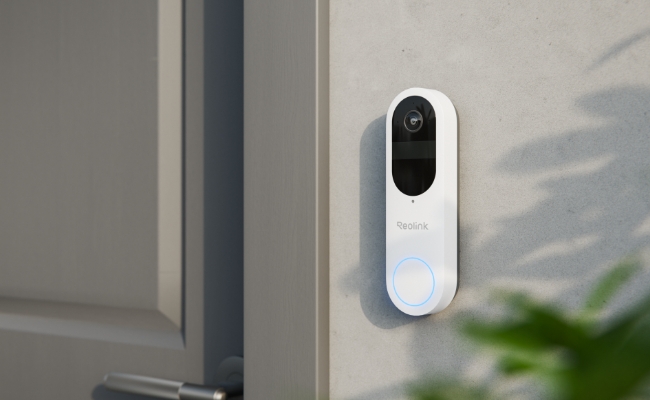
A doorbell camera with an SD card provides a flexible local storage option to store videos. It is an excellent choice if you want to save money on cloud subscriptions.
In this article, we will discuss what a doorbell camera with an SD card is and how it works. We will compare it with the cloud storage doorbell camera to give you a better idea. We will also share some excellent doorbell options that support SD cards.
What is a Doorbell Camera with SD Card?
A doorbell camera with SD card records videos like a normal video doorbell, but it stores the video locally on the microSD card. It has a dedicated card slot where you can insert a microSD card of a compatible size.
If you have a doorbell camera with SD card, you don’t need to spend monthly on cloud storage. It saves money, which is why people prefer to go with it. You can access the recordings via the applications or by taking out the card from the doorbell.
Key Considerations for SD Card Doorbells
Storage Capacity
SD card size determines how much footage a doorbell can store. Small cards like 32GB suit short-term or low-res recording, while 64GB–128GB handle longer or higher-res video. For 4K or continuous monitoring, 256GB or larger may be needed.
Recording Type
Recording mode affects storage use. Continuous recording captures everything but fills the card fast, while motion-triggered recording saves space by only recording activity.
File Management
Automatic loop recording overwrites old footage when the card is full, eliminating manual deletion. This keeps the camera recording continuously, ideal for 24/7 monitoring or long absences.
Compatibility
Not all doorbells support SD cards; some rely on cloud storage. Check for supported card size and file system (FAT32/exFAT) to ensure compatibility and avoid issues after purchase.
Security & Encryption
Encrypted SD card storage protects video if the camera is stolen or the card removed, keeping footage secure from tampering or unauthorized access.
Ease of Access
Accessing footage should be easy via an app or computer. Removable SD cards also allow simple backup or transfer, making it convenient to save or share videos.
Cost & Subscription
SD card storage avoids monthly cloud fees, offering a cost-effective solution. Basic local storage usually meets most home security needs without subscriptions.
Best Doorbell Camera with SD Card
Wireless Doorbell Camera with SD Card: Reolink Video Doorbell Battery
Reolink Battery Doorbell is a completely wireless doorbell with a built-in battery. On one charge, the battery lasts up to 5 months, and you can also connect it through hardwiring. It supports a microSD card storage up to 256GB, which is more than enough. It records videos in 2K (4MP) resolution and stores them in the card.
It records a 1:1 head-to-toe view to capture the person and the surroundings. It can automatically detect persons, vehicles, and packages and send real-time alerts to your devices. It’s a Wi-Fi doorbell camera that works on dual-band Wi-Fi to ensure smooth and fast live preview and excellent performance.
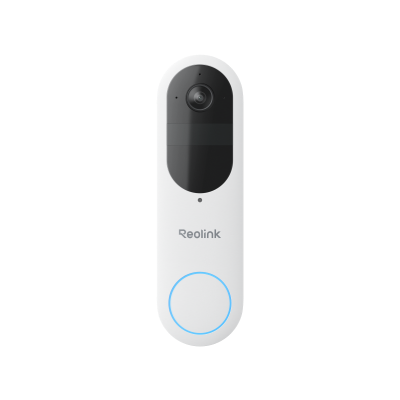
Smart 2K Dual-Band Wi-Fi Battery Doorbell
2K 4MP Head-to-Toe View; Person/Vehicle/Package Detection; Works with Reolink Home Hub & Wi-Fi NVR; 5/2.4GHz Dual-Band Wi-Fi.
Wired Doorbell Camera with SD Card: Reolink Video Doorbell PoE
Reolink PoE Video Doorbell is an ideal option for reliable and fast performance. It also supports a microSD card up to 256GB, and you can also store videos in Reolink NVR and FTP-server. Its 2K+ (5MP) video quality is exceptional for clarity and rich details. And it is available in 3:4 and 4:3 aspect ratio options, so you can choose according to your area.
The doorbell is like a plug-and-play device and is easy to install. It detects persons through motion detection and sends instant alerts. You can also customize the motion zone for more accurate alerts. You can communicate with the person at the door and also set quick replies to answer the door quickly. And it also works with Google Assistant and Alexa.
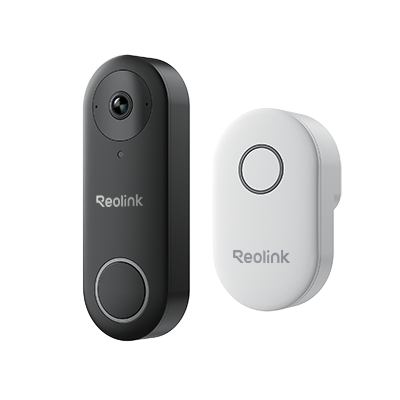
Smart 5MP Video Doorbell with Chime
5MP Super HD, Person Detection, Power over Ethernet, 180° Diagonal Viewing Angle, Two-Way Audio, High-Quality Night Vision.
Cloud Storage vs SD Card Doorbell Camera: What's the Difference?
- SD card doorbell cameras store all videos locally on the inserted microSD card, eliminating the need for cloud storage or an NVR.
- SD cards are affordable with no recurring or hidden fees. Cloud storage cameras usually require a monthly subscription.
- With an SD card, you have complete control over your recordings. Cloud storage may leave your private data handling uncertain.
- SD card cameras work even if the internet is down, storing videos locally. Cloud storage cameras need a stable internet connection to save footage.
- SD card cameras do not automatically back up data. If the card fails, stored footage can be lost.
Bonus Advice of Doorbell Camera with SD Card
How do you put an SD card in a doorbell camera?
Let’s see how you can put an SD card in the Reolink doorbell camera.
- Power off the doorbell camera and locate the microSD card slot.
- Once you see that, place the card flat in front of the slot. Make sure the pin side is down.
- Push the SD card into the slot using your fingernail until you hear a clicking sound.
How much storage do you need for a SD card doorbell?
The storage requirement depends on the video quality of the doorbell, frequency of usage, and other factors.
However, for a 2K resolution video doorbell, you should go with a minimum of a 64GB microSD card. It is suitable for storing videos on motion detection. The best option would be a 256GB card if it is compatible.
Where to use SD Card doorbell camera?
- Front Door/Entryway: Perfect for keeping track of visitors and deliveries.
- Back or Side Doors: Monitors secondary entrances without needing extra cloud storage.
- Rental Properties or Apartments: Convenient for locations without permanent wiring, with all data stored locally.
- Areas with Poor Wi-Fi: Cameras like Reolink keep recording to the SD card even if the internet is down, allowing later review.
FAQs
1. Do doorbell cameras have SD cards?
No, not all doorbells have a SD card slot. Some require a home hub or use cloud storage to store videos. However, Reolink doorbells support microSD cards, allowing local storage without a subscription.
2. Do any Ring cameras have SD cards?
Standard Ring cameras and doorbells don’t support SD card storage. They are designed to save video recordings in the cloud through a Ring Protect Plan.
3. How long will a 256 SD card last in a security camera?
- 1080p (Full HD) at 15–20 FPS, H.264: ~30–40 days of motion-triggered recording, or ~7–10 days of continuous recording.
- 2K (1440p) at 20 FPS, H.265: ~15–20 days motion-triggered, or ~3–5 days continuous.
- 4K (2160p) at 20–30 FPS, H.265: ~7–10 days motion-triggered, or ~1–2 days continuous.
Conclusion
A doorbell with SD card is a great choice for homeowners. It stores all videos on the SD card, giving you complete control over your data. It is an affordable option as you don’t have to pay a monthly subscription for cloud storage. If you are looking for an excellent doorbell camera with SD card, you can go with the doorbell cameras we have shared.
Search
Subscribe for the Latest Updates
Security insights & offers right into your inbox