
Reolink RLC-520A Review
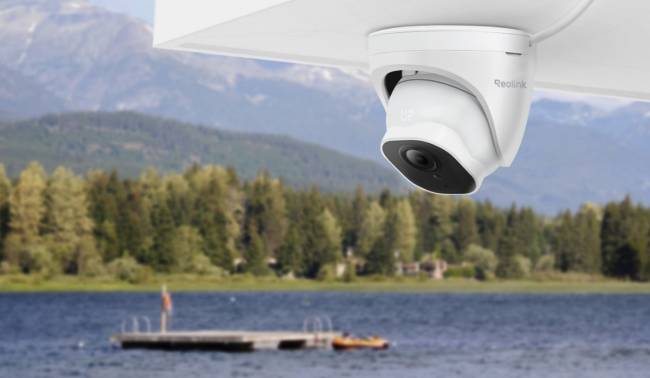
Reolink’s RLC-520A is an incredible budget-friendly security camera that brings PoE reliability, fast performance, smart detection, and other features at a low cost. It’s an affordable option to secure your outdoor areas.
This is a complete Reolink RLC-520A review to help people understand its key features and what it offers. We will share real user feedback, compare it with other similar cameras, and explain how you can install it without any hassle.
What Is Reolink RLC-520A?
Reolink RLC-520A is a simple and affordable dome security camera. It’s a PoE security camera for reliable outdoor performance. It offers high-definition video quality along with real-time person, vehicle, and animal detection.
The camera is suitable for the front porch, driveway, front door, back door, backyard, or any outdoor space where you need 24/7 recording with clear video. In the box, you will find only the camera and a 1m network cable to set it up.
Pros:
- Records videos in 5MP high definition, which ensures clarity
- Automatically detects persons, pets, and vehicles and reduces false alerts
- Sends real-time alerts to the connected devices without any subscription
- Offers flexible storage options, microSD card or NVR, to set up without any hassle
- IP67 rugged weatherproofing to work in harsh outdoor conditions
Cons:
- Doesn’t have color night vision
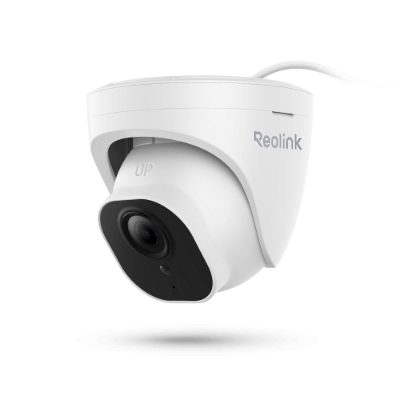
PoE IP Camera with Person/Vehicle Detection
5MP Super HD; Smart Motion Detection, Outdoor/Indoor Protection; 100ft Night Vision; Audio Recording; Time Lapse, Remote Access & Control.
What Makes Reolink RLC-520A Different?
Smart Person/Vehicle/Animal Alerts
For people who need real-time updates of activities at their property, this camera is perfect. It not only records every moment but also smartly detects people, vehicles, and animals. It knows who is around and instantly sends an alert to the connected device with details.
It reduces false alerts and sends alarms or notifications of events that matter. It is a great feature to get real-time updates, ensure the security of the area, and respond quickly in case of any suspicious activity.
100ft Night Vision
With this camera, you can secure your property 24/7. The reason is that it records clear video all day.
At night, it uses 18 infrared lights that deliver sharp black-and-white night vision. It clearly captures intruders from up to 100ft away at night. That said, if someone is around your property, the camera detects it and records every moment. It also sends an alert if there is a person, animal, or vehicle.
Versatile Storage Options
Users can easily set up and get started with this camera. It supports versatile and flexible storage options. You can insert a microSD card up to 512GB, which is enough to record videos for 194.2 hours, while 128GB can store 48.5 hours of recordings. Just insert the card, and it’s ready to work.
The second option is the Reolink NVR. If you already have other cameras paired with the NVR, you can also connect this camera to it and save the recordings in the unified local storage and manage all cameras through one platform.
How to Install and Setup Reolink RLC-520A
Reolink RLC-520A is easy to install and set up. Here are the steps you need to follow.
Set Up the Camera
- Connect a PoE switch to your router using an Ethernet cable. Then, use another Ethernet cable to connect the camera to the PoE switch and power it on.
- Install the Reolink app on your phone and open it. You will see the camera feed in the app saying “uninstalled device.” Tap it, create a login and password, and complete the initialisation process. You are ready to use the camera.
Installation Steps
You have to mount the camera upside down outdoors. Choose a suitable location where you want optimal security.
- Put the mounting template on the ceiling and drill the required holes.
- Remove the base plate from the camera and screw it to the ceiling.
- Once the plate is secured, mount the camera on it.
- Use the provided waterproof lid to prevent water intrusion through the connector.
- Finally, adjust the camera angle as you need. Avoid direct sunlight, glass windows, and too dim or too bright areas.
Here’s a short video of installation and setup.
Real-World Review and Feedback
Here are some real-world user reviews and feedback of Relink RLC-520A.
Atakan: Amazing Quality for the Price
“You can’t beat the quality at this price. The picture is clear, the cameras work great, and the setup was easy. Amazing cameras and an excellent value. Highly recommended!”
Scot Moore: Solid Camera That Gets the Job Done
“Picked this up for outdoor security and it’s been a good, reliable camera.
The video quality is clear, it performs well outside, and it’s been consistent without any issues. Does exactly what you want—keeps an eye on things without needing constant attention.”
Art Mom: Nice, sharp camera Quality
I like the Reolink system, and have 5 cameras set up as well as a doorbell camera. I appreciate the image quality and ease of setting it all up. Easy to install and works great so far. Night vision is great and detects movement for quite a distance.
Reolink RLC-520A vs 510A vs 820A
The primary differences between RLC-520A, RLC-510A, and RLC-820A are the physical design and camera resolution.
RLC-520A and RLC-820A are both dome security cameras, but the former has a 5MP resolution, while the latter offers 4K (8MP) resolution. The RLC-510A has exactly the same features and resolution as the RLC-520A, but it is a bullet security camera to focus on a specific area and be more visible for deterrence.
FAQ
Is the Reolink RLC-520A Worth Buying?
Yes, the Reolink RLC-520A is totally worth buying as it offers 5MP resolution, smart detection, audio recording, night vision, flexible storage, and PoE reliability at a low cost.
Does the Reolink RLC-520A Support 24/7 Recording?
Yes, Reolink RLC-520A supports 24/7 recording. You can record all day continuously and save the recording to the microSD card or NVR.
Does the Reolink RLC-520A Need an NVR?
No, the Reolink RLC-520A does not need an NVR. You can use a microSD card to save the recordings. However, if you already have an NVR, you can connect to it.
Can the Reolink RLC-520A Work Without Internet?
Reolink RLC-520A can work without internet. It will save the recording in the local storage. However, you cannot access it remotely, receive real-time alerts, or use other features that require internet connectivity.
Conclusion
Reolink RLC-520A is a dome PoE security camera available at an affordable price. It secures your outdoors and offers excellent clarity during the day and even at night. It smartly detects people, animals, and vehicles and sends real-time alerts to the connected devices. All you need to do is connect the camera to the router and insert a microSD card, and it’s ready to secure your premises and keep you updated about every moment and activity.
Search
Subscribe for the Latest Updates
Security insights & offers right into your inbox