
Reolink OMVI 2i Ultra Review: Features, Pros & Cons
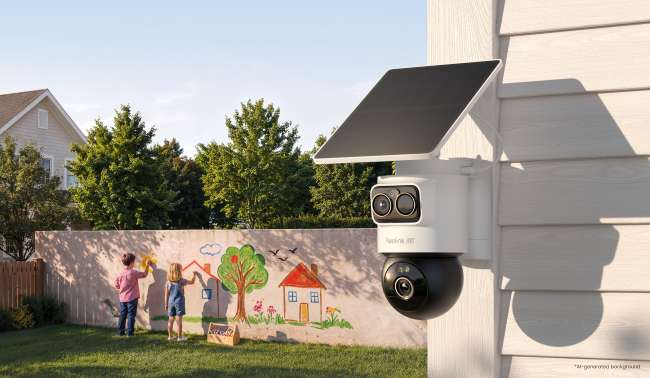
Reolink OMVI 2i Ultra is a dual-lens PT & bullet wireless camera that is perfect for robust outdoor monitoring. With only one camera, you can cover a large area and keep an eye on every moment and activity.
This is a Reolink OMVI 2i Ultra review where we will discuss key features of the camera, pros & cons, and best use cases. It will help you decide if it’s the right option for your property or business.
Reolink OMVI 2i Ultra Review: Quick Verdict
Reolink OMVI 2i Ultra is a completely wireless security camera perfect for outdoor locations where you can’t run wires. It comes in a hybrid housing that merges a fixed bullet-style lens with a pan-and-tilt dome base and combines the functionality and benefits of both (PT and bullet) security cameras. It covers a wider area, such as a parking lot, farm, driveway, large backyard, pool area, restaurant entrance, and other outdoor places.
It has a built-in battery, which recharges automatically with the attached solar panel. It supports dual-band Wi-Fi 6 and offers reliable performance day and night without any monthly fee for local storage. Inside the box, you’ll have the camera, a solar panel, a mounting bracket, and a USB-C cable.
Pros:
- Covers a wide area with wide-angle and pan-and-tilt lenses
- Uses AI to accurately detect people, vehicles, and animals
- Automatically frames objects and tracks their motion
- It not only records clear, color video at night but also deters intruders with spotlights and a siren.
- With an IP65 rating, it handles harsh outdoor weather conditions and offers reliable performance.
Cons:
- Does not have continuous recording for 24/7 monitoring
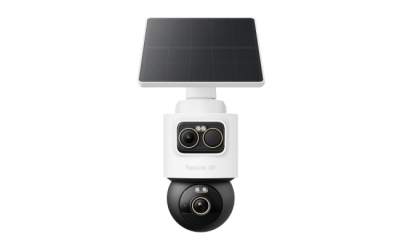
4K + 3K Dual-Lens PT & Bullet Wireless Security Camera
- 4K + 3K Dual-Lens with 360° Full Coverage
- SolarEase Endless Solar Power
- SyncTrack with Auto-Framing & Auto-Tracking
- AI Detection for Person, Vehicle & Animal
- Local Storage Up to 512GB microSD Card
What Makes Reolink OMVI 2i Ultra Advanced?
4K + 3K Dual-Lens Video Quality
Reolink OMVI 2i Ultra is a perfect option for detailed monitoring. One of its lenses captures video in 4K resolution, while the other records in 3K. That said, you get extremely clear videos with rich details.
Even at night, the camera records clear footage with spotlight color night vision. It illuminates the area and records color videos. And if you want disturbance-free and discreet night monitoring, you can use IR night vision.
360° Full Coverage
For covering a large area with only one camera, you can install Reolink OMVI 2i Ultra. The 4K wide-angle bullet cam monitors the full scene while focusing on a specific area, while the PT camera rotates independently and covers 360°, leaving no blind spots.
Both cameras/lenses record videos separately, but they work together to monitor the whole area. If the object skips the field of view of one camera, it is detected by the other. That said, both cameras cover the area and offer optimal surveillance.
SyncTrack with Auto-Framing & Auto-Tracking
Reolink OMVI 2i Ultra is suitable for effective monitoring and surveillance. Because of SyncTrack, when motion is detected by the upper camera, the lower PT camera coordinates automatically. It keeps 360° tracking of the target even after the target moves beyond the wide-view camera's coverage. It always keeps moving targets in view across different areas.
Moreover, the camera automatically zooms in or out to keep detected people, vehicles, or animals positioned clearly in the frame. Therefore, every moment and activity is captured with rich details and superior clarity.
Reolink SolarEase
Because of Reolink SolarEase, you don’t need to worry about recharging. It makes the camera maintenance-free. The mounted solar panel offers 26% solar charging efficiency, and with only 0.5 hours of sunlight, it covers the daily power use. Therefore, it needs less frequent manual charging and reduced maintenance.
The camera has a detachable 10,000 mAh battery. It provides up to 6 months of battery life (based on 5-minute recording per day). That said, the camera is capable of working even during a power outage.
AI Detection
AI detection automates monitoring. You don’t need to see the live feed every now and then. Once there is a person, vehicle, or animal in the vicinity, the camera detects it and sends a real-time alert to the connected devices so that users can respond immediately.
Local Storage, No Subscription
Reolink OMVI 2i Ultra is a convenient option because of its flexible storage. It supports a microSD card up to 512GB. Just insert the card, and the camera is ready to record every activity.
A notable feature is that it requires no subscription. When you save videos to local storage (microSD card), it does not require any monthly fee. You can benefit from real-time alerts, remote access, two-way audio, and all features without paying any recurring charges.
Best Use Cases for Reolink OMVI 2i Ultra
Backyard: Reolink OMVI 2i Ultra can cover fence entrances, side gates, or activity within the yard. Whether children are playing in the backyard or an intruder has crossed the fence, the camera tracks every movement with fine detail. It can also deter intruders with a built-in siren and spotlights.
Front Door & Walkways: It’s possible to cover the front door and walkways at the same time using Reolink OMVI 2i Ultra. Whether someone is entering or leaving the house or store, the camera records every activity. It also secures the high-traffic pedestrian zones, monitors delivery couriers, and anyone stepping onto the porch or walkway.
Driveway/Garage: Reolink OMVI 2i Ultra secures your whole driveway and garage without leaving any blind spots. It focuses on vehicle movement and garage entry points. It monitors parked cars and open garage doors. It tracks vehicles pulling into the driveway and identifies anyone loitering near car doors or attempting to access tools and valuables stored in the garage.
Farm & Large Properties: For covering a specific zone on a farm, even in locations away from the power outlets, Reolink OMVI 2i Ultra is perfect. It monitors detached equipment sheds, livestock gates, barn entrances, and perimeter access roads without needing to run long wires.
Parking Lots: Small open lots and commercial parking spaces can be secured with Reolink OMVI 2i Ultra. It secures parked vehicles, oversees traffic flow, and also monitors foot traffic. Management can keep an eye on suspicious activity around vehicles and exterior inventory during the day and even at night.
How to Set Up Reolink OMVI 2i Ultra?
- Reolink OMVI 2i Ultra can be installed on the wall, ceiling, or corner using appropriate mounts. Select where you want to install the camera.
- The recommended height is around 8–11 ft for accurate motion detection and a wider field of view. Avoid pointing the camera directly at light sources, windows, or heavily shaded areas. If you are mounting on a wall, position the camera to face directly forward, centering the monitored area. For ceiling mount, install the camera as close to the edge as possible to minimize ceiling reflection and blind spots.
- Place the bracket and mark positions for holes. Drill the required holes and secure the bracket using screws. Seat the camera into the bracket until it clicks into place. Tighten the screws by turning them clockwise.
- After installing the camera, adjust the upper wide-angle cam and the lower pan-tilt cam to your preferred angle to ensure the best field of view.
- Switch on the camera. Open the Reolink app and tap the “+” button. Scan the square QR code on the camera.
- Select Configure Wi-Fi via Bluetooth. Ensure the camera is powered on, then tap Next. If you hear voice prompts from the camera, tick the box accordingly and tap Next. You may need to grant permissions on the phone.
- After a successful Bluetooth connection, enter the Wi-Fi name and Wi-Fi password for the camera. Complete the initialization process, and your camera is ready to use.
Reolink OMVI 2i Ultra vs Reolink OMVI 3i PoE
Reolink OMVI 2i Ultra and Reolink OMVI 3i PoE mainly differ in how they are powered and networked. Reolink OMVI 2i Ultra is battery/solar powered and works on Wi-Fi, while Reolink OMVI 3i PoE requires one Ethernet cable for power and network.
Secondly, they differ in the total resolution: the 2i Ultra offers 4K + 3K (13MP) resolution, while the 3i PoE is an 18MP camera. Other than that, they share many common features.
Reolink OMVI 2i Ultra is a battery/solar-powered dual-lens Wi-Fi camera, while Reolink OMVI 3i PoE is a triple-lens PoE camera.
Verdict: Is the Reolink OMVI 2i Ultra Worth Buying?
Reolink OMVI 2i Ultra is worth buying. Firstly, it combines a bullet and PT camera in one and covers a massive area, so you need fewer cameras for monitoring a large property. Secondly, it does not require recharging or maintenance, as the attached solar panel recharges the battery automatically, and you can use the camera for 6 months once the battery is fully charged.
Thirdly, it’s a completely wireless security camera you can install without running long wires. Last but not least is its SyncTrack with Auto-Framing & Auto-Tracking, which helps with effective monitoring and captures every activity. It is a complete package for robust outdoor security and is worth every penny.
FAQ
Can the Reolink OMVI 2i Ultra Record 24/7?
No, Reolink OMVI 2i Ultra cannot record 24/7. It only works in motion-triggered mode. However, its dual lenses do not miss any activity or important moments.
What Is the Difference Between the Reolink OMVI 2i Ultra and TrackMix Battery?
The OMVI 2i Ultra uses a fixed 4K lens plus a separate 3K pan-tilt lens for independent dual views, whereas the TrackMix Battery pairs a 4K wide lens with a 1080p telephoto. The former has a detachable 10,000mAh battery, while the latter has a 5,100mAh non-removable battery.
Can the Reolink OMVI 2i Ultra Track Multiple People at Once?
No. The PT cam can only lock onto and track one primary target at a time using its SyncTrack and auto-framing features.
Does the Reolink OMVI 2i Ultra Work Without Wi-Fi?
Reolink OMVI 2i Ultra can record videos without Wi-Fi and save them to local storage. For remote access, two-way audio, real-time alerts, and other phone-connected features, Wi-Fi is necessary.
Search
Subscribe for the Latest Updates
Security insights & offers right into your inbox