
Reolink E1 Outdoor Review: Affordable Smart Camera with Pan & Tilt
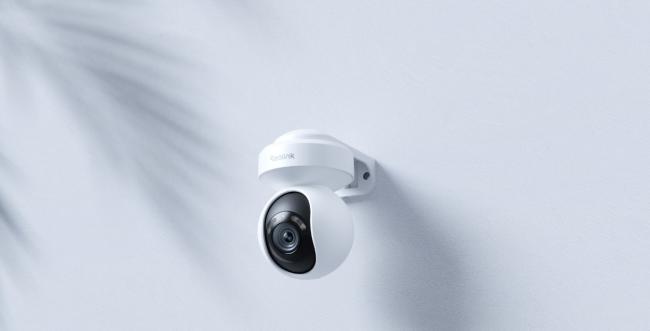
Ever wished you could swing your camera around to catch every corner of your yard? That’s exactly what the Reolink E1 Outdoor offers. With pan and tilt controls, clear night vision, and smart alerts, this affordable smart camera brings big features in a small package.
In this review, we’ll walk through what comes in the box, how to set it up, what it can do, and how it feels in the app. By the end, you’ll know if this Reolink camera is right for you.
What’s in the Box & Specs
When you open the box, you’ll find everything you need to get started:
- Reolink E1 Outdoor camera
- Security bracket to mount on walls or eaves
- Strap for extra mounting options
- Power adapter with a 4.5 m extension cable
- Network cable for a wired setup
The E1 Outdoor packs these specs into its compact frame:
- 5MP resolution with 3× optical zoom for detailed images
- 355° pan and 50° tilt to cover wide areas
- Dual-band WiFi (2.4 GHz and 5 GHz) for flexible wireless setup
- Color night vision with spotlights for clear night shots
- Person, vehicle, and pet detection to cut down on false alerts
- Auto-tracking that follows moving targets
- Built-in siren you can trigger to scare off intruders
- Two-way audio to listen and talk in real time
- microSD supports up to 512 GB for long recording times
- Certified weatherproof, so it works rain or shine
With those specs, this camera aims to give you a full view of your outdoor space without breaking the bank.

Wireless PTZ WiFi Camera with Spotlights
5MP Super HD, Smart Person/Vehicle Alerts, 355° Pan & 50° Tilt & 3X Optical Zoom, Auto Tracking, Color Night Vision, Two-Way Audio.
Installation & Setup of Reolink E1 Outdoor
Setting up the E1 Outdoor feels quick and painless. You get both wired and wireless options, and the bracket and strap make it easy to fit the camera where you need it.
Installation
Let’s secure your camera in place before powering up. Use these clear steps to mount the bracket, position the camera, and prepare it for its first setup without hassle:
- Choose your spot. Pick a sturdy surface such as a wall, eave, or beam.
- Attach the bracket. Secure the security bracket with screws or anchors appropriate for the material.
- Route the cable. If you’re under an overhang, pass the power cable through a small hole for a tidy finish.
- Mount the camera. Click the E1 Outdoor onto the bracket and tighten the screws until it feels snug.
- Add the strap (optional). Loop the strap around a pole or branch for a temporary or covert setup.
How to set up Reolink E1 Outdoor?
With your camera in place, here’s how to transform it from box to live stream. Follow these straightforward steps to get your Reolink E1 Outdoor up and running quickly and smoothly:
- Power and network. Plug in the power adapter and, if you prefer a wired connection, attach the network cable.
- Get the app. On your smartphone, download and install the Reolink app from the App Store or Google Play.
- Add your device. Open the app, tap “Add Device,” and scan the QR code on the camera’s base.
- Follow prompts. Choose between WiFi or Ethernet, enter your network credentials if needed, and let the app connect.
- Finalize setup. Wait for confirmation in the app. Within five minutes, you’ll see the live feed and be ready to explore features.
Performance
Let’s talk about what this camera actually does in real life. Below are its key features.
Wide field of view
The E1 Outdoor sweeps 355° side to side and tilts 50° up and down. You hardly need more than one camera to monitor a yard corner to corner. Just tap the app joystick and spin the camera to see blind spots in seconds.
PTZ
Pan-tilt-zoom (PTZ) gives more control than a fixed lens. You can zoom in three times optically without losing clarity. That means you can spy on a package on your porch or read a street sign across the driveway.
Auto tracking
Once you turn on auto tracking, the camera locks onto moving people, cars, or pets. It pans and tilts to keep them in view until they stop. This works well in a driveway or a yard where you don’t want to miss someone coming or going.
Video quality
Daytime video looks sharp and bright. The 5 MP sensor picks up fine details like license plates or clothing colors. In low light, the spotlight kicks on for full-color night vision. It beats most infrared-only cameras that only show black-and-white.
Storage options
You can record to a microSD card (up to 512 GB), a Reolink NVR, or cloud storage if you prefer. With a big card, you can store days of footage without overwriting. You can set continuous recording or motion-only clips to save space.
Smart detection
This camera uses on-device AI to tell people, vehicles, and pets apart from other motion. That cuts false alarms from trees or bugs. You can customize detection zones so alerts only trigger where you care, like your driveway, not your neighbor’s yard.
Reolink App Experience
The Reolink app ties all features together. It feels snappy and easy, even for first-time users. Below are the main functions you’ll use every day.
Pan and tilt control
In live view, you’ll find a little joystick overlay. Swipe it to move the camera around. It responds fast enough that you can track movement in real time. Zoom controls sit right next to it, so you can get closer with a tap.
Motion sensitivity
You can set how eager the camera is to alert you. Slide a bar between low, medium, and high sensitivity. If you have deer in your yard, you might dial it down. If you want every motion, turn it up.
Real-time live view
Tap a thumbnail to see what’s happening right now. The stream updates in under a second on WiFi. You can also snap screenshots or record video right inside the app.
Download and playback
All recorded clips show up in a timeline. You can scrub back at any time of day. Tap a clip to watch and then hit “Download” to save it to your phone. This comes in handy if you need to share footage.
Pros and Cons
Even great cameras have trade-offs. Here’s where the E1 Outdoor shines and where it could improve.
Pros:
- Pan, tilt, and zoom give full coverage with one camera.
- Color night vision with spotlights beats infrared-only models.
- Smart detection cuts false alerts.
- Dual-band WiFi offers reliable wireless connections.
- Easy DIY setup—no professional help needed.
- Two-way audio and siren add extra security layers.
- Supports large microSD cards for local recordings.
Cons:
- The camera needs power—no battery option here.
- It relies on spotlights at night, which could disturb neighbors.
- It’s small, so someone might spot and tamper with it.
- Cloud storage carries an extra monthly cost.
Verdict
The Reolink E1 Outdoor packs a lot of power into its small frame. You get true pan-tilt-zoom control, clear color night vision, and smart detection for under $100. The app makes setup and daily use a breeze.
Your only real drawback is the need for a power outlet and bright night spotlights. If you want a reliable, flexible outdoor camera that won’t break the bank, the E1 Outdoor hits the mark. It’s a smart choice for any homeowner who wants full yard coverage without extra cameras or wiring headaches.
Search
Subscribe for the Latest Updates
Security insights & offers right into your inbox