
How to Find Camera IP Address & Set up Remote Viewing
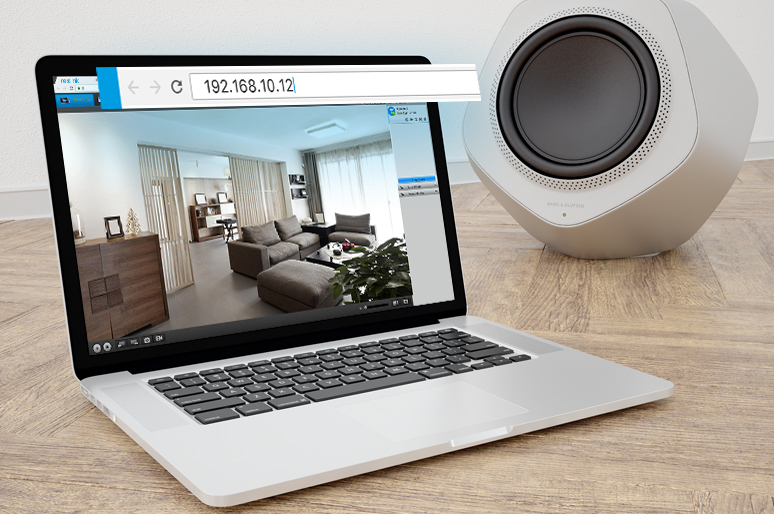
Camera IP address is the key to remote viewing.The right IP camera address enables you to access the specific camera you want in the crowded Internet, which is oftentimes fully packed with various electronic devices.
Here we will introduce how to find CCTV ip address quickly and easily (with step-by-step guides and videos).
And more importantly, you’ll learn how to set up remote viewing with the IP camera address here.
What is Camera IP Address?
An IP camera is a digital camera that sends and receives data over a network, and each device needs a unique IP address so you can find, access, and manage it.
Typically, cameras get their IP address automatically from a router or NVR using DHCP. This allows them to connect to your local network without manual setup.
For initial setup, many wireless cameras require a temporary cable connection to obtain an IP address. However, battery-powered cameras can connect directly to WiFi by scanning a QR code, making installation fully wire-free.
How to Find Camera IP Address: 4 Easy Ways
Here are 4 options you can find the IP address for camera.
1. Find the IP camera address via the security camera companion software
This is the easiest way to find the IP address.
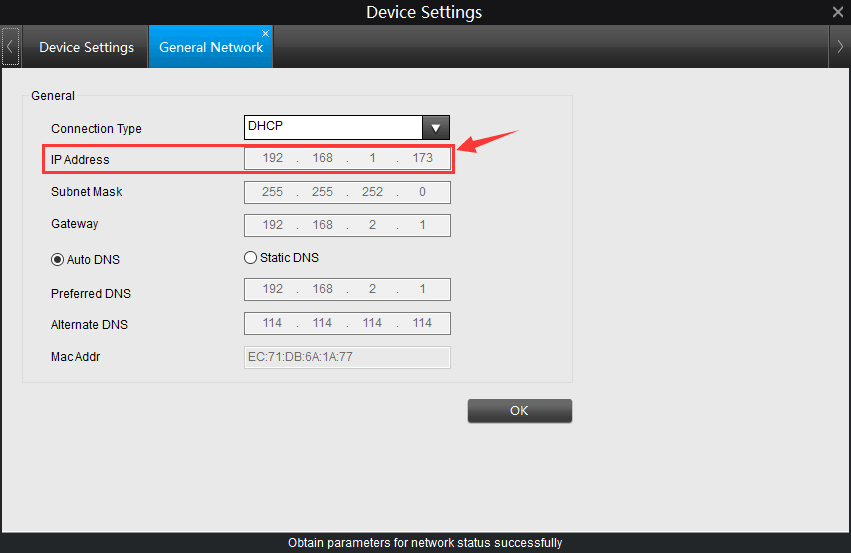
The easiest way to find the IP camera address is to check the Network page on the CCTV camera software (mobile app or PC client). The network page will display all the IP address information of your camera.
Generally you can get the CCTV IP address with 2 easy steps. Take Reolink cameras as an example:
Step 1. Download the free Reolink software on your phone or PC.
Step 2. Come to its device settings, and then find the security camera IP address on the Network Status tab.
Here is also a video tutorial:
2. Find the IP camera address via the router configuration software
Another easy option to obtain your security camera IP address is to check the " DHCP Clients Table " or " Attached Devices " page on the router configuration software. The page displays all the IP addresses of devices attached to the router. And you can quickly identify the IP address of your security camera with the unique MAC address of the camera.
For example, you may easily find the Reolink camera addresses via the following steps:
Step 1. Enter the gateway IP address of the router.
Step 2. Check the IP camera MAC address via the camera software.

Step 3. Go to the WiFi setting page > DHCP server page and find the IP camera address according to the camera MAC address.
3. Find the address via online IP camera address finder tool
There are many IP camera address finders and scanners online. For example, the Advanced IP Scanner (for PC) and Fing (for mobile device) can scan all the devices connected to the Internet and show you the security camera IP addresses, MAC address, and manufacturer for everything.
4. Find the CCTV IP address via the URL of the camera configuration page
If you have access to the security camera settings and configuration page, you can obtain the IP camera address by observing the URL of your camera’s setting page.
Here is the thing: the IP camera address is something that lists at the top of the URL. If the URL of your security camera’s setting page begins with “http://183.37.194.134”, then the IP camera address might be 183.37.194.134.
How to Setup CCTV Camera IP Address via NVR
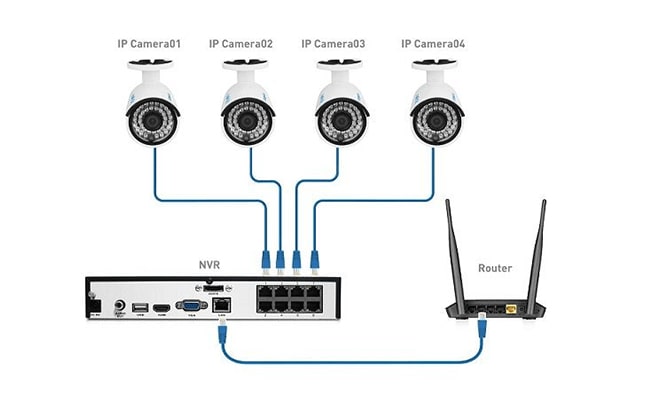
As I mentioned, the NVR will automatically assign IP camera addresses to the devices connected to it.
So the cameras can communicate with the NVR in its subnet once they are powered up and connected.
That’s to say the cameras will start recording and save the videos to the NVR without connecting to a router. You may also access the live view after connecting the IP address camera system to a monitor.
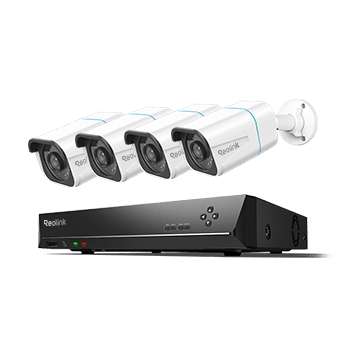
Smart 4K 8-Channel PoE Security System
4 pcs 4K Ultral HD Security Cameras with Person/Vehicle Detection; 2TB HDD 8-Channel NVR for 24/7 Recording; Plug & Play.
So you don’t need to know what the IP camera address is for remote viewing. Many security camera NVRs, including Reolink, will take care of the whole process: Simply scan and add all the cameras on the LAN.
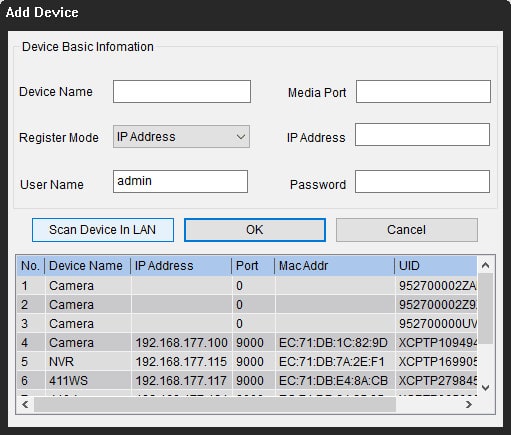
How to Set Up Remote Viewing for Your CCTV Camera?
How to Set up Remote Viewing via 3rd Party Software
Some of you might prefer to use the 3rd party software like Blue Iris or iSpy for remote viewing. In that case, you’ll need to add cameras manually via the IP camera address.
Note that your camera should be 3rd-party compatible so that the software could discover it.
Here we take Blue Iris software as an example to show the steps to configure the CCTV IP address:
Step 1. Launch Blue Iris and click + button and select Add new camera.
Step 2. Set up camera basic information.
Input the camera name and choose Network IP as the connection type. Check “Enable audio” and “Enable motion detector” and then click OK.
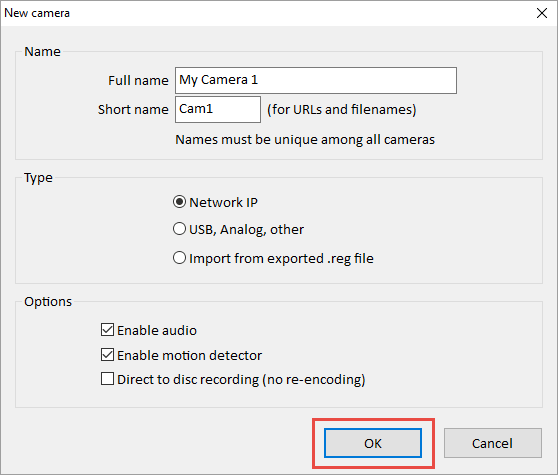
Step 3. Configure the CCTV camera IP address.
Click Find/inspect button to search the camera in the LAN and choose the Make as your camera brand, Reolink for example. Remember to change the “Discover port” to 8000 (the Reolink camera default port number and you may change it according to your situations).

How to view Your IP Camera Remotely via a Web Browser
With the right CCTV IP camera address, your next move is probably the port forwarding setup.
Port forwarding is a general solution for remote viewing.
Actually, all you need to do is to find the public IP camera address (http://wanip:httpport), and then you can access the camera wherever you are.
Here are detailed steps:
Step 1: Find the IP camera address on local network. (We’ve already got it.)
Step 2: Check the “HTTP port” and “RTMP port” of the camera via the security camera software. Here we take Reolink client as an example.
Click “Network” -> “Advanced”, and then click “Setup” next to the “Port Setting”, and then you’ll find the page with all the port setting information.
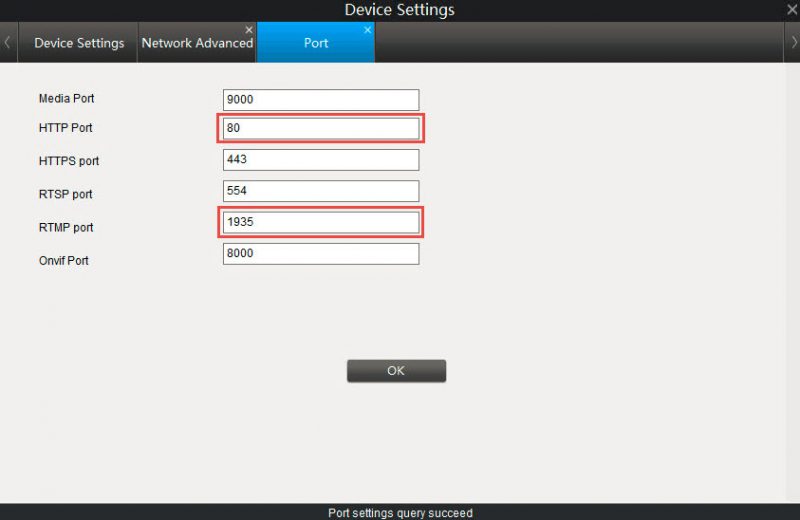
Step 3: Log into your router to set up the port forwarding rules.
Enter the port number and IP camera address as required. Some routers may allow you to specify the packet types (TCP or UDP). Select both if possible, otherwise select TCP.
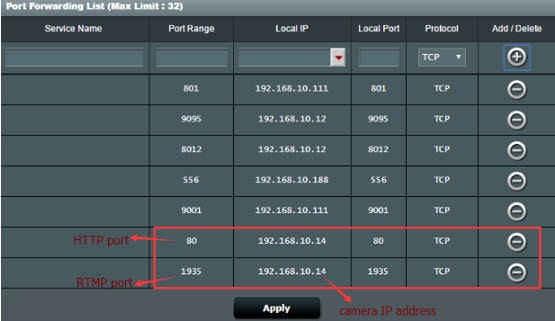
Step 4: Check the WAN IP address of your router.
Use IP address finding Internet to check your current WAN IP address of your home network.
Step 5: Enter the IP camera network URL address in the address bar.
The format of the CCTV camera public IP address is: http://(wanip):(httpport).
So if your WAN IP address is 183.37.194.135, and the HTTP port is 805, the home security camera IP address should be “http://183.37.194.134:805”. Enter it in the address bar, the live view will appear.
Bonus: With the IP camera address available, you can connect the security camera to your PC even without Internet. The critical thing you need to do is to change the computer’s IP address to the same network prefix of the IP camera address. Here is how to do it (Check Method 1).
Bonus: IP Security Camera Recommendation
For an exceptional IP security camera, consider the Reolink Altas PT Ultra. This high-end camera offers True 4K 8MP resolution, delivering crystal-clear video quality. It features a powerful 20000mAh battery, providing extended usage and minimizing the need for frequent recharges. The Altas PT Ultra also supports dual-band WiFi 6 (2.4GHz and 5GHz), ensuring stable and fast connectivity, even in busy network environments.
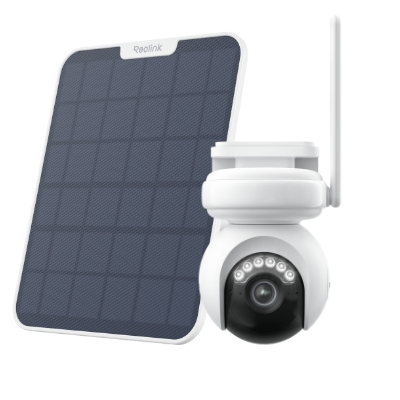
Industry-leading 4K Continuous Recording Battery Camera
4K UHD Continuous Recording; ColorX Night Vision; Pan & Tilt; Automatic Tracking; All Recordings Stored Locally.
FAQs
Can you access a camera with an IP address?
Yes, you can access a camera using its IP address, as long as it is connected to the same local network or properly configured for remote access. On a local network, you can enter the camera’s IP address into a web browser to view the live feed and manage settings after logging in with the correct credentials. For remote access outside your home network, additional setup such as port forwarding or using a manufacturer’s app or cloud service is required to ensure secure connectivity.
Can someone access your camera without you knowing?
Yes, it is possible, but only under certain conditions. If a camera is poorly secured—such as using weak passwords, outdated firmware, or exposed ports on the internet—hackers could potentially gain unauthorized access and view the feed without the owner knowing. However, most modern IP cameras include encryption, secure login systems, and app-based access that make unauthorized entry much harder.
Conclusion
Knowing how to find IP camera address is essential for remote viewing and management of your cameras and ensuring the safety and security of your home or business. If you have any further questions or concerns, please feel free to leave them in the comments section below.
Search
Subscribe for the Latest Updates
Security insights & offers right into your inbox