
How Long Do AirTags Last? Understanding Battery Life and Replacement
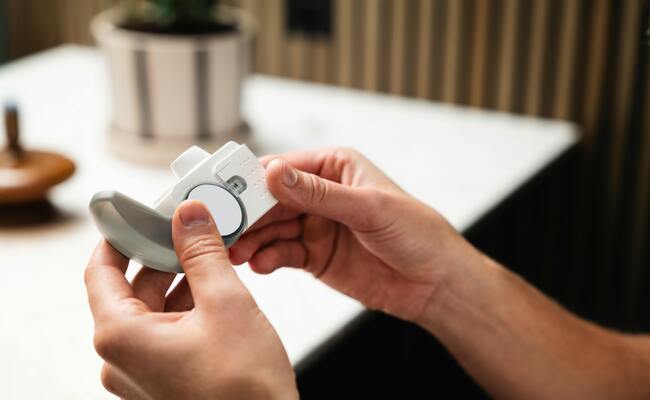
AirTags keep you away from the hassle of recharging, but users often question how long its battery lasts. It is important to know when to replace the battery and how to do it correctly.
In this article, we will discuss how long an AirTag lasts. We will give an estimation of the battery life. We will also discuss the factors that affect the battery life and how you can extend it. The step-by-step process will help you replace the battery without any hassle.
How Long Do AirTags Last?
Apple officially states that an AirTag battery lasts approximately one year under normal usage conditions. This estimate assumes the device performs regular location updates and occasional precision finding interactions. For most users, this translates to 10 to 14 months of reliable service before the battery needs replacement. The built-in CR2032 battery powers the device, and once depleted, the entire unit doesn't need replacement, just the battery.
The one-year figure represents Apple's carefully calculated average based on typical usage patterns. However, your experience may vary significantly depending on how often you use the AirTag. A tag attached to daily-used keys will drain faster than one sitting in a rarely used backpack. Frequent separation from your iPhone also increases power consumption, as the tag must ping the Find My network more often to report its location.
What Will Affect the Battery Life of AirTags?
Several factors influence how quickly your AirTag battery drains. Understanding these variables helps you anticipate when replacement becomes necessary.
Frequency of Precision Finding: Each time you use Precision Finding to locate an item, the AirTag activates its U1 chip and communicates heavily with your iPhone. This feature consumes significantly more power than background location updates.
How Often You Move the Tag: An AirTag attached to frequently moved items (keys, wallet, bag) wakes up more often to update location. Stationary tags like those in checked luggage or on rarely used items consume minimal power.
Proximity to Your iPhone: When an AirTag stays within Bluetooth range of your iPhone, it enters a low-power idle state. Tags frequently separated from their paired device use more energy to transmit location through the Find My network.
Sound and Vibration Alerts: If your AirTag gets moved and emits its separation alert chime, that sound drains battery. Frequent alerts from being left behind accelerate power consumption.
Temperature Extremes: Exposing AirTags to extreme cold or heat affects battery chemistry. Very cold temperatures temporarily reduce battery performance, while excessive heat can permanently shorten overall lifespan.
Battery Quality: Not all CR2032 batteries perform equally. Some brands offer lower capacity or degrade faster than Apple's recommended high-quality options. Battery coating matters too. Some CR2032 batteries have bitter coatings that can interfere with AirTag contacts.
Can You Replace AirTag Batteries? How to Replace?
Yes, AirTag batteries are user-replaceable. The CR2032 coin battery is widely available at supermarkets, electronics stores, and online retailers. You need only a new battery and a few minutes to restore your AirTag to full functionality.
Follow this step-by-step guide to replace your AirTag battery:
- Place the AirTag on a flat surface with the stainless steel battery cover facing up. The polished metal side should be visible.
- Press down firmly on the battery cover with the palm of your hand. Apply steady, even pressure while rotating the cover counterclockwise (to the left).
- Remove the old CR2032 battery from the AirTag. Discard it properly according to local battery disposal regulations.
- Insert the new CR2032 battery with the positive (+) side facing up. You should hear a sound confirming the battery is connected properly.
- Align the three small tabs on the battery cover with the three slots on the AirTag body. Press down gently.
- Rotate the cover clockwise (to the right) until it locks securely into place. You will feel it click when fully tightened.
How to Extend AirTag Battery Life?
Maximizing your AirTag battery requires simple habits that reduce unnecessary power consumption. These practices help you get closer to Apple's one-year estimate and avoid unexpected dead batteries.
-
Precision Finding is the biggest battery drain. Use it only when genuinely needed rather than as a casual check. Each activation uses the U1 chip heavily and consumes significant power.
-
Allow AirTags to stay near your iPhone when not actively tracking items. This keeps them in low-power idle mode rather than constantly transmitting through the Find My network.
-
The Find My app shows battery levels for all your AirTags. Check periodically, especially around the 10-month mark, so you never discover a dead tag when urgently needed.
-
For seasonal items like holiday decorations or luggage, remove the battery entirely during storage. A fresh battery waits when you need the item again.
-
Don't leave AirTags in cars during summer heat or freezing winter conditions. Store them in climate-controlled environments when not in active use.
-
Choose reputable CR2032 brands known for reliable performance. Avoid bargain batteries that may have lower actual capacity or inconsistent power delivery.
FAQs
How far away do AirTags track?
AirTags have no maximum range limit. They use the global Find My network of hundreds of millions of Apple devices to report location anywhere with nearby Apple devices.
How often do AirTags need replacing?
The internal battery needs replacement approximately once per year. The AirTag hardware itself lasts indefinitely with regular battery changes.
Does AirTag need to be charged?
No, AirTags do not require charging. They operate on a standard CR2032 coin battery that users replace when depleted.
Conclusion
Apple AirTags last one year of typical use, and the battery is replaceable in seconds. You can install a new CR2032 battery by following the simple steps we have mentioned. The battery life also depends on various factors that we have explained, so one year is not guaranteed; it can vary. However, you can consider the tips we have shared to extend the battery life and ensure reliable operation when needed.
Search
Subscribe for the Latest Updates
Security insights & offers right into your inbox