
Do Motion Sensors Have Cameras? Everything You Need to Know
Many households install smart alarms yet feel unsure about each component. After a small sensor blinks, people often ask if a hidden lens now watches them. Clear knowledge removes that stress.
This guide answers the question do motion sensors have cameras in them, compares leading brands, and shows simple checks you can perform before mounting new gear.
Do Motion Sensors Have Cameras?
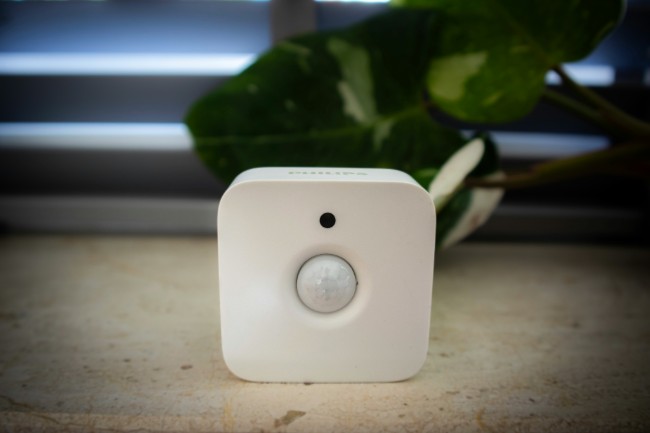
A stand-alone motion sensor does not include a camera. The device watches for changes in infrared heat, microwave reflections, vibration, or a mix of these. When the sensor notices movement, it closes an electrical circuit and sends a signal to an alarm panel or smart hub. It never captures an image.
Some hybrid products combine a sensor and a camera in one shell, yet manufacturers keep the two parts separate inside. The sensor part measures energy or waves, while the camera part uses a lens and an image chip. Designers link them with a small cable on the board so the camera records only when the sensor signals. This layout saves power and storage space. You may see a motion detecting camera in a catalog. It means a camera that starts recording after an internal sensor triggers. The sensor still does not film; it only wakes the lens.
Do ADT Motion Sensors Have Cameras?
ADT sells different lines of hardware. The basic Pulse and Command motion detectors rely on passive infrared elements and ship without a camera. They link to the ADT control panel and send alerts when they sense body heat crossing a zone. ADT also offers indoor and outdoor cameras.
Those units carry their own lenses and memory or cloud connection. When an ADT camera includes motion detection, the lens and sensor sit side by side, not merged. The sensor board wakes the lens and recorder, which keeps battery usage low in wireless models. Therefore, standard ADT motion sensors do not have cameras, while ADT cameras may have embedded sensors that serve only as triggers.
Do Ring Motion Sensors Have Cameras?
Ring follows the same pattern. The Ring Alarm motion sensor uses a passive infrared module and creates a Z-Wave event for the base station. No lens rests behind the plastic window, so you can mount it in corners without worrying about recorded images. Ring’s Stick Up Cam, Spotlight Cam, and Floodlight Cam house both a motion sensor and a camera inside one shell. In those products, the camera records only after the sensor wakes it. Ring lets you adjust the trigger threshold in the app so pets do not set it off. For this reason, Ring motion sensors on their own have no cameras, but some Ring cameras include a sensor.
How to Tell If a Motion Sensor Has a Camera?
You might enter a rental home or office and spot a sensor on the wall. You want to know if someone can watch you. Follow the steps below to check:
- Look for a glass or plastic lens. Cameras need a clear opening, often round and dark. A simple sensor usually shows a milky, faceted dome made of Fresnel plastic, not glass. If you see a shiny lens inside the cover, you have found a camera.
- Search for wires or a memory card slot. Cameras store or stream video, so they need thicker wiring, Ethernet, or room for a micro-SD card. A sensor often runs on a thin two-conductor cable or batteries.
- Check the product label or model number. Use your phone to look up the model printed on the unit. The official sheet will state if it records video.
- Watch for infrared cut filter clicks. Cameras with night vision shift a filter when lights change. You may hear a soft click when the room goes dark. A pure sensor stays silent.
- Observe power demand. A camera warms up and may feel hot after a while. A sensor remains cool because it pulls only a small amount of power.

Reolink Spring Sale - Step Into Spring, Step Into Security!
Reolink Spring Sale is here! Grab top deals on security cameras, doorbells, and systems to keep your home safe this season.
Motion Detector vs. Camera: What's the Difference?
Many shoppers confuse the two products because ads mention “motion alerts” for both. Yet the core roles differ. The table below lays out the main contrasts:
Motion Sensor or Camera: Which to Choose?
You may still ask for, motion detector or camera for a hall, garage, or office. The answer depends on your goal, budget, and privacy level. The advice below helps you weigh each path. Remember, is a motion detector a camera? No, yet you can pair the two for complete coverage.
Motion detector: pros and cons
Pros:
- Costs less than a camera and fits tight budgets.
- Runs for years on one battery because it sips power.
- Blends into the décor and draws little attention.
- Sends quick alerts with almost no lag.
Cons:
- Provides no images, so you may not know who caused the alert.
- May trigger false alarms from pets or heat vents.
- Covers a fixed cone; moving air or angle changes can leave blind spots.
- Requires a hub, siren, or automation to act on the signal.
Motion detecting cameras: pros and cons
Pros:
- Records provide clear evidence that helps police or insurance claims.
- Lets you watch live video and speak through two-way audio.
- Combines a sensor and a camera, so you install one unit instead of two.
- Offers cloud storage, person filtering, and smart zones through apps.
Cons:
- Costs more upfront and may add monthly cloud fees.
- Needs steady Wi-Fi, which can drop in storms.
- Draws more power, so battery models need frequent charging.
- Raises privacy concerns if pointed at shared spaces.
FAQs
Can motion sensors be used as cameras?
A motion sensor does not capture images by itself. You can pair a sensor with a camera or alarm to start recording when the sensor picks up movement, yet the sensor alone only measures changes in infrared heat or microwave reflection. It cannot show video footage or still pictures directly.
Can a motion sensor record you?
Because a motion sensor lacks a lens and digital storage, it cannot record anything on its own. Recording begins only when a linked device, such as a video camera, activates after the sensor detects movement. Without that extra device, the sensor merely triggers alerts, lights, or alarms and stores nothing.
Are motion sensor cameras always recording?
Motion sensor cameras save power and data by recording only when they sense activity. The built-in sensor wakes the camera, starts video, and then returns to standby once the scene stays still. Settings in the app let owners choose continuous recording, yet the default mode typically captures movement events only.
Conclusion
You now know the key facts about motion sensors and cameras. A plain sensor detects movement and sends a signal; it does not film. A camera records video, and its built-in sensor simply decides when to start. ADT and Ring sensors follow that pattern. You can spot a hidden lens by checking for a clear opening, extra wiring, model numbers, and filter clicks.
When choosing between the two devices, weigh cost, power needs, evidence value, and privacy. Add your thoughts in the comments or on social media to help others find the right balance between awareness and discretion.
Search
Subscribe for the Latest Updates
Security insights & offers right into your inbox