
CCTV Camera Maintenance: When and How Often to Check?
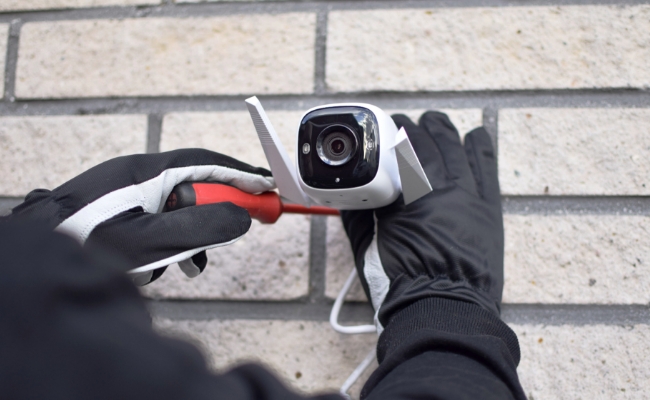
Regular CCTV camera maintenance is the solid pillar of every working security system. Without proper care, even the most advanced cameras fail to produce perfect images. They do not live up to the expectations or may almost completely break down.
In this article, we will share a detailed CCTV camera maintenance guide. It will help you increase the life of your security camera and systems and ensure optimal performance.
Why You Need to Make CCTV Camera Maintenance?
This security system is only going to be as effective as its maintenance schedule. CCTV camera maintenance will deal with common issues before they happen, such as image distortion due to the accumulation of dust or moisture within the lenses. Outdoor cameras suffer from similar problems, plus they have to deal with the weather, spiders, and changes in temperature that may affect performance. Regular cleaning and checks will ensure that your cameras deliver crystal clear, usable footage 24/7.
Beyond image quality, maintenance of CCTV cameras enhances the preservation of the investment. Most manufacturers require such proof should the homeowner want to call for service under warranty. Components deteriorate with time, and if the cable is not checked for any wear, it could cause short circuits or total system failure. By professional maintenance checks, these would have been caught early enough to eliminate very expensive replacements.
How Often Should You Do CCTV Maintenance?
The ideal upkeep frequency for CCTV is based on one's environment and the type of system. Most checks suffice twice a year for most indoor residential systems. However, outdoor cameras exposed to the roughest weather, dust, and high traffic areas require inspection every three months.
Coastal properties should also have an even more frequent check-up because of the salt-laden air, which pushes corrosion even further on equipment.
CCTV system maintenance must be performed monthly in commercial and industrial facilities. High-security places like banks, government buildings, and retail stores that contain valuable inventory cannot afford downtime in their cameras. Professional monthly checks ensure correct alignment, proper recording, and no obstruction of all cameras.
CCTV Maintenance Checklist
Follow this step-by-step CCTV system maintenance checklist to keep your security cameras in optimal condition. Regular maintenance prevents failures and extends your system’s lifespan.
Clean camera lenses
The camera lens accumulates dust and debris over time, and it badly affects the video quality. Use a microfiber cloth and lens cleaner to remove dust, dirt, and condensation. It’s better to do it every month but do it at least once in two months.
Check camera housing
Inspect for cracks, water damage, or insect nests (especially for outdoor cameras). These can damage the camera and affect its performance. Use a microfiber cloth to clean the housing. Check for signs of water. Do it once every month to ensure the camera's reliable performance.
Inspect cables & connections
The connections might get loose over time. And cables also suffer damage and deterioration. Look for frayed wires, loose BNC/Ethernet ports, or corrosion. Tighten the loose connections. The connectors should be free from corrosion. If there is any wear and tear or corrosion, replace the cable or connector. Do it once every two months.
Check storage health
To ensure recordings are saved properly, the storage health must be optimum. Check the storage health and delete old recordings if needed. Make sure there is sufficient storage. Also, check the payback. Do it once in three months.
Update firmware
Your camera firmware must be updated to perform well. Otherwise, it might stop working or cause malfunctions. Install the latest firmware updates and security patches for cameras and recorders. You can do it once in 3-4 months.
Power supply test
The power supply must be working to power the camera. Keep it clean and well-maintained. There should be no signs of water near it. For testing, measure voltage levels to prevent electrical failures. You can do it annually to ensure the health of the power supply.
Full system diagnostics
It’s better to consider full system diagnostics to prevent issues from occurring. Professionals can detect hidden issues like signal loss or bandwidth problems. It is recommended once a year to check for faults and issues.
For those who prefer professional assistance, many security companies offer customized CCTV maintenance checklist services. These experts can identify issues you might miss and provide specialized care like firmware updates, advanced diagnostics, and infrared calibration to keep your system in top condition year-round.
High Quality Security Camera Recommendations
Reolink Duo 3V PoE
Duo 3V PoE is an IK10 vandal-proof security camera with an IP67 rating, so there is no way water or dust could enter it. It can work in all weather conditions and requires almost no maintenance. It's a plug-and-play PoE camera for reliable performance.
It records videos in 16MP resolution to offer intricate details. It captures a 180-degree panoramic view and eliminates blind spots. Thus, it covers a wider area. It automatically tracks the motion of objects and sends real-time alerts to the connected devices.

16MP Dual-Lens IK10 Vandal-Proof PoE Camera
16MP Ultra HD, 180° Panorama, Motion Track, IK10 Vandal-Proof, color night vision.
Reolink Altas
Reolink Altas is a battery-powered Wi-Fi security camera that requires minimal maintenance. It has a built-in 20,000mAH battery that lasts up to 540 days, so you don't need to recharge it frequently. Plus, it is compatible with solar panels for automatic recharging.
The camera 10s pre-recording to record every moment with details. It captures videos in 2K resolution to ensure optimal clarity. It's also equipped with Reolink ColorX night vision to work even in extreme darkness.
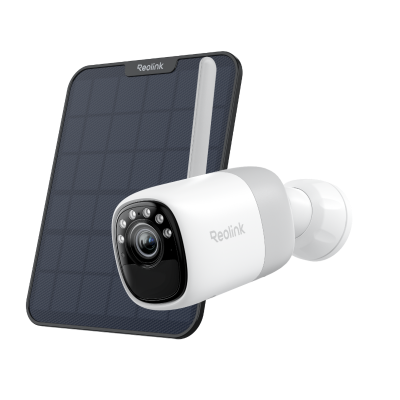
2K Pre-recording Bullet Camera with a Long Lasting Battery
2K 10s Pre-recording ; ColorX Night Vision; 20,000mAh Battery; Dual-band Wi-Fi 6.
RLK8-1200B4-A
RLK8-1200B4-A is a PoE surveillance kit with four security cameras and one 8-channel NVR. You can use this minimal-maintenance kit to cover a massive area. The cameras record videos in 12MP resolution, which is extremely clear and detailed. They have smart detection to distinguish vehicles and persons and send real-time alerts.
The NVR can connect up to eight security cameras. It has 2TB HDD built-in storage, and you can increase it up to 12TB, which is more than enough for continuous monitoring. It's like a plug-and-play device meant to offer reliable and fast performance.
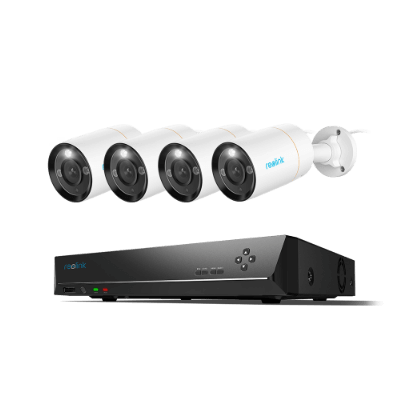
12MP 8-Channel PoE Surveillance Kit with Spotlights
4 pcs 12MP Ultra HD Security Cameras; 2TB HDD 8-Channel NVR for 24/7 Recording; Person/Vehicle Detection; Color Night Vision.
FAQs
Is there CCTV maintenance near me?
Yes! Search online for local CCTV maintenance providers. Check service areas and customer feedback.
How much does CCTV maintenance cost?
It costs anywhere between $50 to $200 annually per camera. Complex and commercial systems could range between $1,000 to $5,000 annually, depending on the setup.
Conclusion
Regular CCTV camera maintenance is indeed the most intelligent way to preserve one's security investment. From simple lens cleaning to professional system diagnostics, each step ensures your cameras remain operational when needed most. One very sure thing is that prevention is always cheaper than a cure or a security breach. Whether you handle basic upkeep yourself or hire specialists, consistent camera maintenance delivers peace of mind and maximum protection.
Search
Subscribe for the Latest Updates
Security insights & offers right into your inbox