
Can Alexa Record Conversations? Understanding Privacy Features
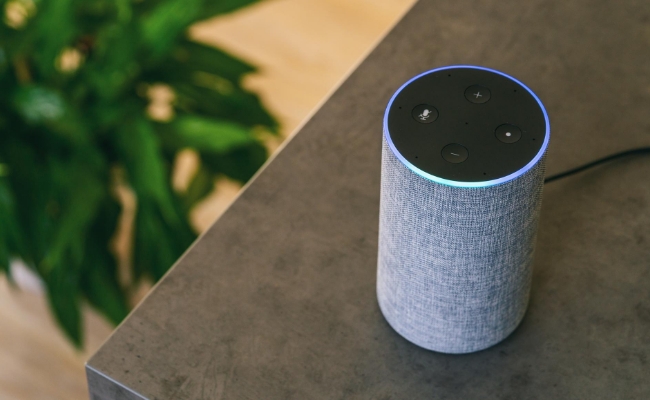
"Can Alexa record conversations in a room?" is a common question for every Alexa user. This concern stems from Alexa's always-on microphone. While designed to only activate after hearing a wake word, many users worry about accidental recordings.
In this article, we will examine Alexa's actual recording capabilities, privacy controls, and better alternatives for intentional monitoring like Reolink's security cameras.
Can Alexa Record Conversations Without You Knowing?
Many users wonder: "Can Alexa record conversations?" The answer is No. While Alexa devices constantly listen for wake words like "Alexa" or "Echo," they don't continuously record or store conversations.
The microphone remains active in a low-power state, analyzing sounds locally for activation phrases. Only when a wake word is detected, Alexa starts recording, which is then sent to Amazon's servers for processing. This recording is limited to the few seconds surrounding the activation and is clearly marked in your voice history.
False triggers can occur (about 1 in 200 interactions) when background noise resembles wake words. These accidental recordings are similarly limited and visible in your history. For complete privacy, use the physical mute button. It electronically disconnects the microphone, with a red light confirming it's disabled.
Can Alexa Record Conversation on Command?
Yes, it can, but with clear user consent. The device responds with both visual (blue ring) and audible ("Recording started") confirmation. These manual recordings are saved to your Alexa app's voice history.
Recordings made this way capture up to 30 seconds of audio. They include metadata showing the exact date/time. You must manually delete these files through the Alexa privacy settings.
Alexa cannot secretly record conversations on command. Amazon's design requires clear user consent through either wake words or manual activation. All recordings trigger obvious indicators per privacy regulations.
How to Manage the Function of Alexa Record Conversation?
The following sections provide detailed, step-by-step instructions for configuring your Alexa device's recording settings to match your personal privacy preferences.
How to Set Alexa to Record Conversation?
- Open the Alexa app on your smartphone or tablet. Log in with the same Amazon account linked to your Alexa device.
- Tap the "More" option in the bottom right corner and click Settings.
- Choose "Alexa Privacy" from the settings options. Tap "Review Voice History" to access recordings. It shows a chronological list of all voice interactions.
- Select "Automatically Delete Recordings." The default is to keep recordings indefinitely.
- Choose your preferred deletion timeframe (3 or 18 months). 3 months is recommended for maximum privacy.
- Enable "Voice Recording Notifications" for alerts. It sends push notifications when new recordings are saved.
How do you disable your Alexa from recording private conversations?
- Locate the microphone mute button on your Alexa device. Press the button to activate mute (red light will appear). The Red ring/light indicates the microphone is disabled.
- Open the Alexa app on your mobile device. Navigate to Settings → Alexa Privacy → Manage Your Alexa Data.
- Toggle off "Save Audio Recordings." It prevents the storage of voice recordings in the cloud.
- Disable "Use Voice Recordings to Improve Amazon Services" to opt out of the use of your data for product improvement.
- Turn off "Help Develop New Features." Regularly visit "Review Voice History" to delete existing recordings
Bonus: Recommendations for Alexa-Compatible Security Cameras
For legitimate monitoring needs, dedicated security cameras offer better control than smart speakers.
Argus PT Ultra
Argus PT Ultra is an Alexa and Google Assistant-compatible security camera. It works on your voice commands and does not require hands for control. You can manage everything through your voice or via the application. It can also be used with Home Hub to use multiple cameras to cover a wider area.
It's a 4K Wi-Fi security camera with pan and tilt motion. It covers a wider area and records clear videos all day. It can automatically detect persons, pets, and vehicles and also deter intruders through double warnings. It is solar/battery-powered for reliable monitoring and automatic recharging.
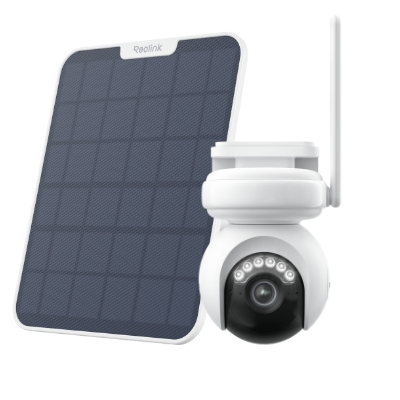
Industry-leading 4K Continuous Recording Battery Camera
4K UHD Continuous Recording; ColorX Night Vision; Pan & Tilt; Automatic Tracking; All Recordings Stored Locally.
FAQs
How long can Alexa record conversations in a room?
Alexa only records temporarily after activation (until the query ends). Saved recordings remain in your account until manually deleted or auto-expire based on your settings (default: until you delete them).
Can you use Alexa as a listening device?
No. While Alexa listens for its wake word, it cannot continuously record or stream conversations remotely without triggering visible/audible indicators.
Does Alexa record conversations all the time?
No. Alexa only buffers audio locally to detect wake words, deleting this buffer if no activation occurs. Full recordings require to wake word triggers or manual commands.
Conclusion
Users have privacy concerns with Alexa due to its always-on microphone. Alexa is capable of making brief recordings after activation, but it cannot be secretly monitored continuously. For true peace of mind, use physical mute buttons and privacy settings. Manage all your recordings, regularly check and delete them, and if you are not satisfied, go for alternative options.
Search
Subscribe for the Latest Updates
Security insights & offers right into your inbox