
Can Alexa Call 911? Everything You Need to Know

People in the United States often ask, Can Alexa call 911 when something goes wrong at home. The short answer is no, the speaker cannot dial 911 on its own.
The device can do many things, but a direct call to the public safety system is not one of them. This article walks through every detail so you know can you call 911 from Alexa.
Can Alexa Call 911?
The Alexa software does not contain a built-in way to reach 911. Amazon keeps the public safety line separate from voice helpers for legal and technical reasons. When you say, “Alexa, call 911,” the speaker replies that it cannot make that call.
The device needs an outside phone line or a special paid add-on before it can reach a public safety answering point. If you rely only on the speaker, the call will not go through, and you will lose valuable time.
Can You Ask Alexa to Call 911?
You can speak the phrase, but the speaker will not obey. The command “tell Alexa to call 911” ends with a polite refusal. Amazon blocks the request to stay in line with federal rules that demand exact location data for every 911 call.
A stand-alone speaker cannot give that data, so the request is rejected. You still need a landline, a mobile phone, or a certified VoIP line that is linked to a real address.
Can You Call 911 from Alexa without a Phone?
You cannot call 911 from the speaker unless you bring a phone service into the picture. The speaker itself is not a phone. It can place calls only when it pairs with a service that already has a ten-digit number.
Some people add a paid service such as Alexa Emergency Assist, or they link an existing mobile plan through a carrier skill. Without one of those extras, the speaker has no path to the public safety network.
How to Use Alexa for Emergencies?
Although the speaker cannot dial 911, it can still help during urgent events. The next sections show five built-in tools that keep you connected when seconds count and will let you know can Alexa call 911 in an emergency.
1. Alexa Emergency Assist
This is a paid add-on from Amazon. Once you subscribe, you can say, “Alexa, call for help,” and the speaker will connect you to a 24-hour response center. The agent can then call 911 on your behalf and share the address you listed in the app. The service costs a few dollars each month, and you must keep your payment method current.
2. Drop-in feature
You can also add family members with whom you have a good relationship and allow them to call you without you calling them by adding them to your contacts list. When you fall or suddenly get sick, you may not have time to get to the phone, but a drop-in call would allow a relative to hear what is going on and call 911 on your behalf. This is enabled in the apps area of Communications settings.
3. Announcements
A single voice command can send an announcement to every Echo in the house. You can shout, “Alexa, announce I need help downstairs,” and every speaker will repeat the message. A neighbor or family member inside the home can hear the alert and take action.
4. Calls and messages
The speaker can call any ten-digit number in your contact list. You can set your spouse, your adult child, or a close neighbor as the first entry. In a crisis, you can say, “Alexa, call Mary,” and the speaker will dial her mobile. Mary can then call 911 and give the operator your location.
5. Use Alexa with security systems
Many home security brands offer a skill that arms, disarms, or triggers an alarm. Some of those systems have their own cellular link to a monitoring center. If you trigger the alarm by voice, the center can call 911 and send help. The speaker acts as a microphone, while the security hub handles the actual call.
You can also use a security camera that works with Alexa and set up motion alerts. If an emergency occurs, you’ll get a smartphone notification and can call 911 yourself.
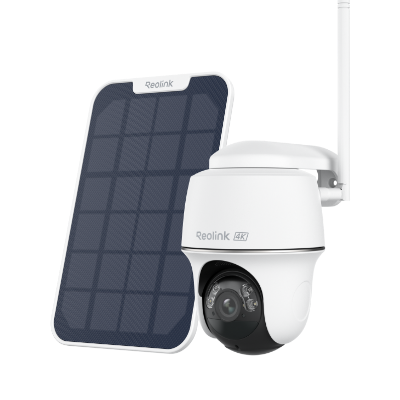
4k 100% Wire-Free PT Camera
4K 8MP Ultra HD; 5GHz/2.4GHz WiFi; Rechargeable Battery & Solar Powered; 355° Pan & 140° Tilt; IP65 Certified Weatherproof; Clear Night Vision; 2-Way Audio; 122° Wide Viewing Angle.
How to Set Up Alexa for Emergency Contacts?
Before an emergency happens, open the Alexa app on your phone and add people who can help. The steps below take less than five minutes and will work on any Android or iPhone.
- Open the Alexa app and tap Communicate at the bottom.
- Choose the contacts icon in the top right corner.
- Tap Add New and pick Add Contact.
- Type the name and phone number of the person you trust most.
- Repeat the step for two more people so you have backups.
- Return to Communicate and select Settings.
- Turn on Drop In and choose which contacts may drop in at any time.
- Go to Devices, pick your Echo, and make sure Communications is on.
- Test each contact by saying, “Alexa, call [name],” and confirm the call goes through.
If you want the paid service, tap Alexa Emergency Assist under Settings and follow the enrollment screens.
FAQs
Can elderly use Alexa to call for help?
Yes. After you add trusted contacts, an elderly person can say, “Alexa, call Mary,” and the speaker will dial. The call goes through the internet, so the senior does not need to find a phone.
Can Alexa help in an emergency?
The speaker can make announcements, place calls to the family, visit the relatives, or activate a security system. It does not know how to dial 911; however, it can make the chain of help faster when you pre-configure it.
How much is Alexa emergency?
Alexa Emergency Assist costs $5.99 per month plus tax at the time of writing. The price appears in the app before you confirm, and you can cancel any month through the same screen.
Conclusion
The speaker you already own can do many useful things in a crisis, yet the answer to can Alexa call 911 remains no unless you add a paid service or a linked phone line. You have now mastered how to use drop-in calls, announcements, and emergency contacts, hence nothing leaves you without a voice.
Today, make time to open the app, add three people that you trust, and do a quick test. However, in case you have found this guide convenient, share it with one of your neighbors and tell us which point assisted you the most.
Search
Subscribe for the Latest Updates
Security insights & offers right into your inbox