
Apple HomeKit Security System: The Ultimate Guide

Home security systems that work with Apple HomeKit provide seamless integration, voice control through Siri, automation capabilities, and robust privacy protections. In this ultimate guide, we'll cover everything you need to know about the best security system for Apple HomeKit - from key features to top recommended systems to setup instructions.
Whether you're an Apple fan looking to build out a smart home ecosystem or want the convenience of controlling security through Siri voice commands, a HomeKit security system delivers.
What Security System Works with Apple HomeKit?
Apple HomeKit is a software framework that allows compatible smart home accessories and devices to integrate with Apple's iOS, macOS, watchOS, and tvOS systems. It uses end-to-end encryption and authentication to protect data transmission between devices and allows you to control accessories via Siri voice commands.
HomeKit also enables automation through scenes and triggers - for example, you can create a "Good Morning" scene that turns on lights, adjusts the thermostat temperature, and disarms your Apple HomeKit security system when your alarm goes off.
Key Features of Apple HomeKit Security System
Apple HomeKit security systems come with all the standard functionality you'd expect in a self-monitored DIY system, plus they add special integrations and capabilities thanks to Apple HomeKit support. Here are some of the most important features offered:
Seamless integration with Apple devices
HomeKit security systems allow complete integration with your other Apple products, including iPhone, iPad, Apple Watch, Apple TV, and Mac. You can view live feeds from security cameras, control your system, and receive notifications directly on these devices. No third-party apps are required - everything works within Apple's native Home app.
Siri voice control
With HomeKit integration, you can arm, disarm, and check system status completely hands-free using Siri voice commands. For example, as you're heading out the door, just say, "Hey Siri, set the security system to away" to arm it. Other voice commands for lighting, locks, garage doors, and more also work seamlessly when paired with a HomeKit hub.
Secure and private communications
Apple HomeKit transmits data between devices using end-to-end encryption, so no one (including Apple itself) can view video feeds or access controls except approved users. HomeKit also goes through an authentication process during setup to verify device identities and prevent spoofing. This ensures excellent privacy protections.
Automation and Scenes
You can create Apple Home automation and scenes that involve your HomeKit security system and other smart home accessories. For instance, automation could flash smart bulbs red and send a push notification if a window/door sensor is opened while the system is armed in Home or Away mode. Lots of options for customization to fit your needs!
Home app integration
The Apple Home app provides a single dashboard to manage both HomeKit-compatible security devices and other smart home products like lights, thermostats, and locks. You can view live feeds, manually control your system and accessories, run automation/scenes, and more right within the Home app.
Best HomeKit Security System
Here is a look at some of the best Apple HomeKit security systems that work with Apple HomeKit right out of the box:
- Abode Home Security System - Flexible DIY system with no contracts
- ADT Pulse Security System - Professionally installed and monitored
- Eve Cam - Indoor security camera with facial recognition
- Logitech Circle 2 Wired - Weatherproof outdoor security camera
- iSmartAlarm Security System - Affordable self-installed option
- Deep Sentinel Smart Security - Advanced AI intruder detection
- August Smart Lock Pro + Connect - Retrofit any deadbolt lock
Why Choose Security Systems that Work with Apple HomeKit?
There are several great reasons to choose a security system that works with Apple HomeKit:
- Easy Voice Control - Use Siri to arm, disarm, or check system status completely hands-free. Much more convenient than pulling out your phone or fiddling with an app.
- Seamless Connectivity - HomeKit systems work natively with Apple products you already own, like iPhone, iPad, Apple Watch, and Mac. No need for third-party apps - manage your system through Apple's Home app.
- Powerful Automation - Create customized HomeKit automations that involve both your security system and other HomeKit-enabled lights, locks, and accessories in your smart home ecosystem.
- Robust Privacy - HomeKit uses end-to-end encryption for data transmission and device authentication, offering security and privacy when connecting accessories. Video feeds stay fully under your control.
- No Monthly Fees - Most DIY HomeKit security systems don't require a monthly fee, just purchase the hardware outright. Self-monitoring and self-installation. But professional monitoring options also exist for extra protection.
How to Set Up an Apple HomeKit Compatible Security System?
The exact steps to set up a HomeKit security system will vary a bit by individual manufacturer. But the general process goes as follows:
- Choose a HomeKit-compatible security system kit that meets your needs. Most offer starter packages with a hub/base station plus entry sensors, motion detectors, and a siren or keypad.
- Create a HomeKit home in the Apple Home app if you don't already have one. Use an Apple TV, HomePod, or iPad as a HomeKit hub device.
- Install the base station in a central location with access to your router via ethernet for optimal connectivity.
- Mount the external sensors on doors, windows, and other entry points you want to secure. Launch the manufacturer’s app and follow the instructions to connect and pair all devices to the base station.
- In the Apple Home app, tap the + button and select Add Accessory. Follow the prompts to pair the base station and accessories into HomeKit.
- Once added, you'll be able to control, customize, and integrate your HomeKit security system along with other smart accessories right within Apple's Home app.
Alternatives to HomeKit Security Camera System
Two solid alternatives to explore beyond HomeKit security cameras are the Reolink Argus PT and Argus 4 Pro wireless systems. While not natively HomeKit compatible, both cameras work with Google Assistant for some smart functionality.
Reolink Home Hub with Argus PT Ultra
The Argus PT Ultra is a completely wireless standalone security camera that records 4K video locally to the base station's MicroSD card. It consists of a Home Hub and an expandable system supporting up to 8 cameras. With ultra-sharp 4K resolution and color night vision, it captures vehicle license plates and suspect faces clearly for evidence. The camera runs continuously on a rechargeable battery or solar panel, so it can be installed virtually anywhere outdoors. The home hub also features exclusive anti-theft protection plus real-time alerts to detect and deter intruders.
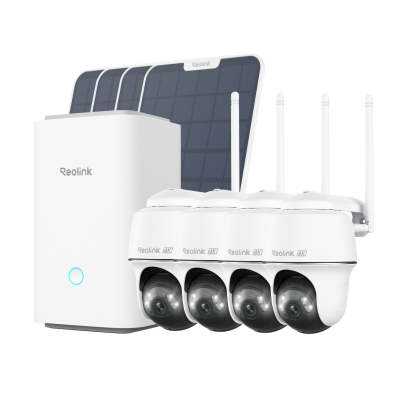
Wireless Security System With 4K PT Standalone Battery/Solar Wi-Fi Cameras
4K Color Footage Day & Night, 1 Year of Local Storage, Exclusive Anti-Theft Algorithms, 360° All-Around Coverage, Expandable System Up to 8 Reolink Cams.
Reolink Home Hub with Argus 4 Pro
Argus 4 Pro steps up to next-gen WiFi 6 connectivity for lightning-fast transmission speeds, minimal delays, and reliable performance, even with multiple cameras streaming simultaneously. This system includes the Home Hub, which allows you to expand your security system by linking up to 8 cameras. Sharp 4K image quality combined with night vision technology renders nighttime scenes in vivid color detail. The solar-compatible battery design allows flexible placement anywhere, while continuous power from the sun removes the need to ever recharge.
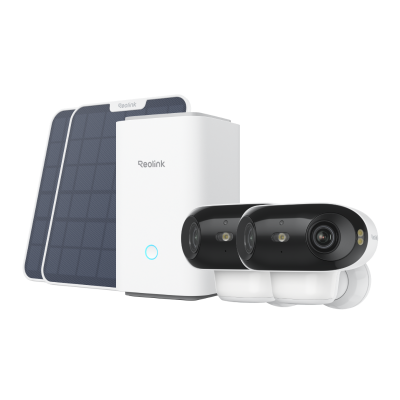
4K UHD Wi-Fi 6 Security System with 180° Blindspot-Free View
ColorX Night Vision, 1 Year of Local Storage, Exclusive Anti-Theft Algorithms, 180° Blindspot-Free Coverage, Expandable System Up to 8 Reolink Cams.
FAQs
Is there a security system that works with HomeKit?
Yes, there are a growing number of natively HomeKit-compatible DIY security systems on the market, including options from Abode, Eve, Logitech, Honeywell, iSmartAlarm, and more. These systems allow features like Siri voice control, Home app integration, and HomeKit automation involving other smart accessories.
What are the disadvantages of Apple HomeKit?
Some downsides of Apple HomeKit include needing an Apple device to set up and control accessories, lack of web portal access, and many devices still don't offer native HomeKit support even if controllable. HomeKit also doesn't work with popular smart assistants like Amazon Alexa. Still, for dedicated Apple households, it provides tight integration.
How much does Apple HomeKit cost?
HomeKit itself is Apple's software framework for controlling compatible smart home devices, so there is no cost for HomeKit. However, you must purchase HomeKit-compatible accessories, which vary widely in price - for example, HomeKit security system starter kits often range from $200 up to $500+ depending on included components. HomePod Mini ($99) or Apple TV ($149) is required as a hub for full functionality.
Conclusion
HomeKit security systems allow Apple users to monitor homes, control accessories, leverage Siri, and build automation while maintaining privacy. With native Apple device integration, voice commands, end-to-end encryption, and robust automation capabilities, HomeKit security systems make an excellent choice for iPhone households looking to deploy smart home technology.
What has your experience been with Apple HomeKit devices or security systems? Do you find HomeKit beneficial for centralizing control of smart home gadgets? Share your thoughts below!
Search
Subscribe for the Latest Updates
Security insights & offers right into your inbox