
What Is a TF Card? A Complete Guide for Beginners
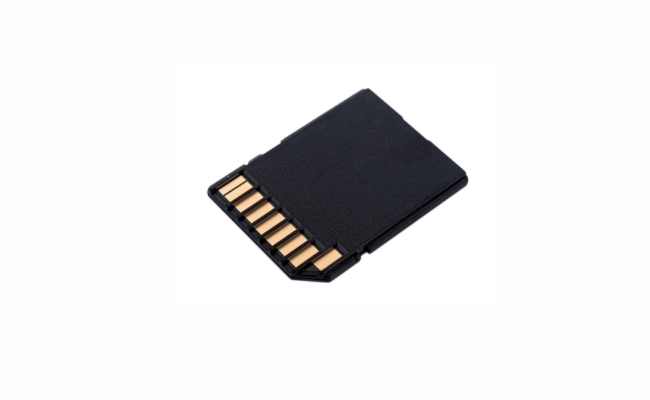
A TF card (meaning TransFlash card), or simply microSD card, is a small removable flash memory card that has been used for saving photos, videos, papers, and more on small and portable devices. If you possess a smartphone, action camera, drone, security camera for homes, or some other devices having less internal storage space, chances are you will have already experience with TF cards. In this convenient guide, we will be discussing what is TF card.
What Is a TF Card?
A TF card is essentially a miniature version of the SD (Secure Digital) card. It is a flash-based removable memory card measuring 15 x 11 x 1 mm in size. Due to its tiny physical dimensions, a TF card is also commonly referred to as a microSD card.
But physically what is a TF memory card look like? Physically, a TF card looks almost identical to a miniSD card, another variant of an SD card. The only visible difference is that a TF card's electrodes are placed on the reverse side compared to miniSD. A TF card also has a slightly different pinout from miniSD and cannot be used interchangeably despite their similar sizes.
While their names sound confusing alike, it’s important to know that a TF card, microSD card, and TransFlash card all refer to the exact same type of memory card. They simply go by different names from various manufacturers and industry organizations.
What Is a TF Card for a Camera?
On digital cameras, the TF card slot is where you insert a TF/microSD card so the camera can save photos and videos onto the card. But, what is a TF card for camera? The TF card effectively serves as the long-term memory storage for cameras. Photos and video footage are first saved from the camera's sensor and internal memory buffers onto the TF card inserted in the card slot.
Nowadays most consumer digital cameras have a built-in TF card slot that supports standard capacities up to 2TB. Higher-end DSLR and mirrorless cameras often have slots for larger-capacity SD cards instead.
What Is a TF Card Used For?
TF cards have now become a widespread storage device found in numerous varieties of consumer electronic devices, particularly portable devices where low power consumption and small size are significant factors.
Smartphones and Tablets
On the majority of Android devices and tablets, there is a TF card slot for external storage in addition to the internal memory. Although not always a requirement, possessing a TF card enables you to hold more apps, photos, videos, and offline content media.
Security Cameras and Dash Cams
Surveillance cameras and car dash cams rely on TF cards for saving continuous video footage. Their non-stop recording nature demands stable and reliable storage media like flash memory cards.
Gaming Consoles
Sony's PlayStation Vita console uses TF cards as the storage medium for storing downloaded games, files, and other data. Similarly, Nintendo Switch also supports TF cards up to 2TB capacity.
Drones and Action Cameras
Consumer drones typically have a TF card slot to store all those aerial photos and video footage. The same applies for action cams like GoPro which would otherwise run out of space very quickly without a TF card.
MP3 Players and IoT Devices
Prior to streaming going mainstream, MP3 players utilized TF cards to save music files. Today TF cards are commonly used in smartwatches, fitness trackers, and other small Internet of Things (IoT) devices that require offline storage and file transfers.
Headphones
Certain Bluetooth earphones and earbuds are equipped with internal memory driven by TF cards to support independent play without a smartphone. It makes it possible for you to carry audio files on your headset directly.
TF Card Specifications and Storage Capacity
TF cards follow the SD card specification standards managed by the SD Association (SDA). They share similar technical details as full-size SD cards but differ vastly on the physical size.
The latest TF cards utilize the microSDXC and microSDUC standards to support capacities from 32GB all the way to 1TB and soon 2TB. Older TF cards still around are based on the microSDHC (4~32GB) and original microSD (up to 2GB) standards.
How to Use and Format a TF Card?
Using a brand new TF card for the first time requires formatting it properly first. The same goes when switching a used TF card between devices. Follow these steps to format and start using a new TF card:
- Insert the TF card into the device's card slot or card reader. Be gentle and ensure it is inserted in the right orientation.
- A prompt may appear asking if you want to format the card. Select yes and wait for the formatting process to complete.
- If no prompt appears, find the storage settings menu and select the option to format external storage. Pick the TF card as the drive and confirm formatting.
- Once formatting is done, the TF card's storage capacity will show up. You can now start transferring files or saving new data onto it.
- Use the Safely Remove Hardware/Eject option before physically removing the TF card. This flushes any cached writes and prevents data corruption.
- To reuse the formatted TF card on other devices, simply insert it into the new device and repeat the OS-level formatting process.
What TF Card Size Do You Need for Home Security Cameras?
Choosing the right TF card size for home security cameras depends on a few factors:
- Video resolution - Higher video resolution takes up more storage space per recording duration
- Motion detection vs. continuous recording - Motion-triggered recording consumes less space compared to uninterrupted recording
- Number of cameras - More security cameras mean more combined storage needed
- Footage retention duration - Whether you plan to store videos for a few days or a few weeks/months
As a general guideline:
- 32-64GB: Suitable for light, motion-detected recording on 720p or 1080p cameras.
- 128GB: Ideal for moderate use with 1080p indoor cameras.
- 256GB: Recommended for one or two motion-activated outdoor cameras or 4K recording.
- 512GB: Best for multi-camera setups, constant recording, or high-traffic environments.
For instance, the Reolink Home Hub supports up to two 512GB MicroSD cards, providing seamless local storage. It can be paired with various Reolink cameras, allowing you to build a fully customized wireless security camera system!
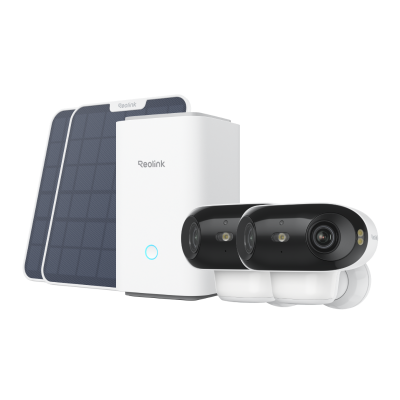
4K UHD Wi-Fi 6 Security System with 180° Blindspot-Free View
ColorX Night Vision, 1 Year of Local Storage, Exclusive Anti-Theft Algorithms, 180° Blindspot-Free Coverage, Expandable System Up to 8 Reolink Cams.
FAQs
Is a TF card the same as a SD card?
No. TF cards are based on the SD card standard but differ greatly in physical size. TF cards are much smaller in dimensions compared to full-size SD cards - 15 x 11 x 1 mm vs 24 x 32 x 2.1 mm. However, their internal pinouts and memory technology remain very similar. A TF card is more comparable to a miniSD card instead. Due to software-level compatibility, it’s possible to use a TF-to-SD adapter to insert a TF card into an SD card slot.
Can I put a SD card in a TF slot?
You cannot physically insert a full-size SD card into a TF card slot meant for microSD cards. But by using a passive adapter that converts the SD card's pinout signals to match a TF card interface, you can essentially use SD cards in TF slots with some caveats.
SD cards tend to consume higher power compared to TF cards though, so device compatibility varies. Not all devices with TF slots can mount SD cards even with adapters due to higher power requirements.
What is a TF card for a Bluetooth speaker?
On Bluetooth speakers and wireless headphones that have built-in storage, the TF card slot acts as additional memory for storing audio files. It allows you to load up MP3 tracks and playlists onto the device and listen to music directly instead of streaming from the phone.
Conclusion
TF cards have now become the standard removable storage device for most consumer electronics devices because of their extremely small size and decreasing price. As storage capacity continues to grow while physical size decreases even more, TF cards will have universal use in increasingly smaller portable devices in the years to come. If you have other questions regarding TF cards, don't hesitate to ask them in the comments area below.
Search
Subscribe for the Latest Updates
Security insights & offers right into your inbox