
Things That Work With Apple Home - Full Review
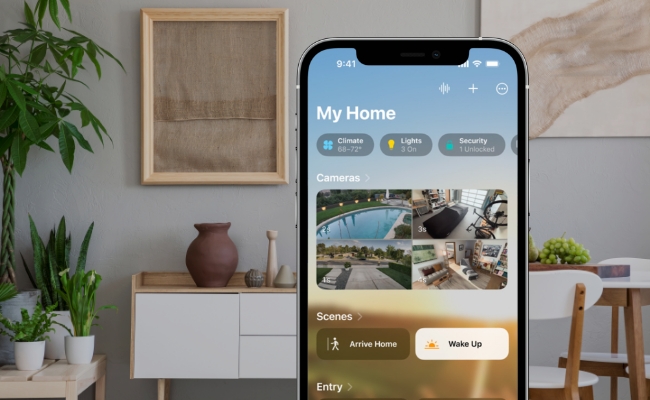
Apple Home is a popular central hub for managing all smart devices seamlessly. It integrates with most smart devices to become an efficient controller for the entire house. You will get a user-friendly experience using the compatible products.
In this guide, we will discuss what Apple HomeKit is and the devices that can be connected to offer you a completely automated and interconnected living space.
How To Get Start With Apple Home?
Before starting with Apple Home, you must ensure that the smart devices are compatible with it. It will prevent any connectivity issues.
Download and install Apple Home on your iOS device and launch it. Tap the "+" icon on the top right corner of the home screen and choose Add Accessory from the menu list.
Use the device camera to scan the QR code of the smart device, such as security camera, smart lights, or thermostats. You can also enter the setup code.
After scanning the code, you must follow the onscreen instructions. It will ask you to connect the device to a Wi-Fi network and assign the name to the device. You can also do some personalized settings, and finally your device will be ready and connected to control your home ecosystem.
Through this general method, you can connect all Apple HomeKit accessories, including cameras, locks, lights, plugs, and sensors.
What Things That Work With Apple Home?
Here are some common types of devices that are compatible with Apple Home.
Smart Speakers
Smart speakers can control your Apple-compatible devices using voice commands. HomePod is a popular smart speaker that is compatible with Apple HomeKit. It works with Siri voice commands, and you can set reminders, play and stop music, or send messages to someone.
It has a top-notch microphone that picks your commands and performs that task within seconds. Moreover, the audio quality is immersive and loud enough for entertainment.
Smart Appliances
Smart garage door openers, robot vacuums, and TVs can also work with your Apple Home. For example, Apple TV is one of the popular infotainment gadgets that most people use for high-quality visuals. You can also access the HomeKit-enabled devices using it. It allows you to have real-time monitoring of your home from security cameras. Additionally, you can watch live TV, play music and play arcade games with high quality graphics.
Apple TV also works as a hub that adds multiple devices to control it and facilitates the user to access them when they are away from home.
Smart Lighting
Numerous smart lights are compatible with Apple HomeKit like Meross MSL120 and Philips Hue. It allows the users to control the color and brightness and schedule lighting scenes for a commendable experience. You can control the smart light with Siri voice commands for a hands-free experience.
Security
Smart Security Camera:
Smart security cameras are compatible with Apple HomeKit and allow users a hassle-free experience monitoring their land. The users can stream the live footage and receive alerts when any suspicious movements get caught.
Reolink Duo 3 PoE is an ideal security camera. It can be integrated with HomeKit via Homebridge. It offers 4K UHD for crisp and clear videos, and you can monitor a vast area through its 180-degree panoramic view. It is an advanced security camera with motion tracking, time-lapse, two-way audio, color night vision, and tons of other features.

Groundbreaking 16MP Dual-Lens PoE Camera
16MP UHD, Dual-Lens, Motion Track, 180° Wide Viewing Angle, Power over Ethernet, Color Night Vision.
Smart Doorbell:
Smart doorbells provide a complete and enhanced security system for your household. It has a built-in camera to record everything happening at the door. The two-way audio feature lets users interact with the guests using your iOS device. It allows the users to get real-time recordings of the visitors and receive notifications when someone is next to the door.
Reolink video doorbells are perfect for optimal security. They can be connected to HomeKit through Homebridge. It offers incredible clarity, person detection, night vision, two-way audio, and everything you need.
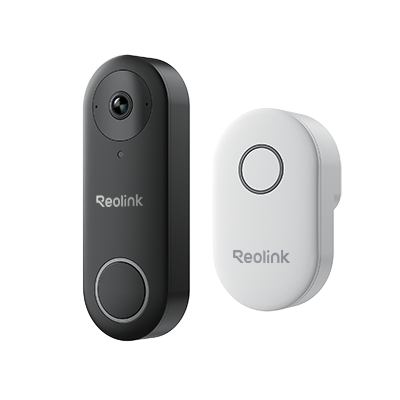
Smart 5MP Video Doorbell with Chime
5MP Super HD Day & Night, Person Detection, 2.4/5 GHz Dual-Band WiFi, 180° Diagonal Viewing Angle, Two-Way Audio, Rich Notification.
Smart Locks:
Smart locks offer keyless entry and allow users to lock and unlock doors, making them remotely accessible. They give temporary access to the guests and notify you about the door activities.
Level Lock + and Yale Assure Lock are among the most demanding smart locks compatible with Apple HomeKit.
Temperature Control
There are numerous smart thermostats available, but ecoobe is compatible with Apple HomeKit. It allows individuals to control their home's heating and cooling temperature with a click. You can adjust the temperature and monitor the energy usage from the application.
Smart Sensor
Smart sensors include motion detectors, window sensors, indoor air quality sensors, and many others, but you must check the compatibility with Apple HomeKit.
They give users an automated experience, making it easier to detect household changes with the gadgets quickly. The users can incorporate the sensors for different applications, such as enhancing the security system or enjoying advanced mechanization.
Technologies That Make Your Devices Work With Apple Home
Apple Home relies on several key technologies to ensure your devices are compatible and connected:
- HomeKit Framework – Apple’s smart home platform that lets devices communicate securely with iOS, iPadOS, and macOS.
- Wi-Fi Connectivity – Many devices connect directly to your home Wi-Fi network for remote control and automation.
- Bluetooth Low Energy (BLE) – Enables close-range communication for devices like smart locks, sensors, and lights.
- Thread Protocol – A low-power, reliable mesh networking technology that allows devices to communicate seamlessly.
- Siri Voice Control – Lets you control compatible devices using natural voice commands.
- Matter Protocol – A new industry-standard protocol that ensures cross-brand compatibility, making it easier for devices from different manufacturers to work together in Apple Home.
How to Find Things That Work with Apple Home?
- Look for the “Works with Apple Home” Badge – Many products display this logo on packaging or in their online descriptions.
- Check Apple’s HomeKit Accessories Page – Apple maintains an official list of compatible devices on their website.
- Read Product Specifications – Look for mentions of HomeKit, Thread, Matter, or Siri compatibility.
- Use Trusted Retailers – Stores like Amazon, Best Buy, or specialty smart home retailers often filter products by Apple Home compatibility.
- Check Reviews & Forums – User reviews and smart home communities can confirm real-world compatibility.
- Update Device Firmware – Some devices may add Home compatibility through software updates, so check the manufacturer’s website.
Bonus Tips: How To Connect Reolink Devices To HomeKit?
Reolink devices require a server like Homebridge to integrate with Apple HomeKit. You can install Homebridge on your PC or Mac and configure it to add the devices on Apple HomeKit.
Let's follow the step-by-step guide to add the Reolink devices quickly.
- Download and install Homebridge on your PC or Mac. Install the Camera ui plugin by searching on the Homebridge.
- Click the Config option from the menu. Navigate to Cameras and type the name of the camera.
- Enter the video source and video substream source. You must generate the right RTSP address for the connectivity. For that, you must navigate to the website and select the camera model. Click the URL and enter the IP Address, username and password. Click Generate URL, copy the address, and paste it into the configuration section.
- Once you have configured the server, you can use HomeKit and add the relevant cameras easily.
FAQs
1. Can you add anything to Apple Home?
Yes, you can add multiple smart devices to your Apple home, but make sure they are compatible. If you add any third-party devices, you will encounter issues connecting them with the app.
2. What works as Apple Home Hub?
HomePod, HomePod mini, or Apple TV works as an Apple Home Hub that helps users control smart devices even when away from home. They serve as a hub for live camera recordings, adjust thermos stats or control smart locks.
3. Can I use HomeKit without a hub?
Yes, you can use HomeKit without a hub but the functions will be limited. It won't allow you to access the devices when you are away from home because you will be connected to a different Wi-Fi network.
Conclusion
Apple Home is a dominating smart-home controlling facility that has a wide range of devices. It provides flexibility to the users to customize their home environment with advanced and intelligent devices like HomePod, Smart Doorbell, Apple TV, Security Camera, and other valuables. It enhances security and provides a smarter way of living with exceptional devices. The best thing is the operation of the devices with Siri commands. It makes the home environment smarter and more connected.
Search
Subscribe for the Latest Updates
Security insights & offers right into your inbox