
How to Prevent WiFi Jamming: Protect Your Home Network
WiFi jamming is one of the most irritating yet common problems almost every household faces in particular spots. The main purpose of such jammers is to prevent devices from connecting with particular networks.
However, there are some ways you can save yourself from such a situation. Wondering what? Well, keep on reading; the forthcoming content will provide all the essential information and tell you how to prevent WiFi jamming.
What is WiFi Jamming?
WiFi jamming aims to disrupt the communication of frequencies used by wireless devices. For this purpose, a stronger signal is transmitted to the same frequency.
This makes it impossible for devices like routers, smartphones, laptops, and other wireless devices to maintain a stable connection. WiFi Jamming occurs, and the devices become unable to access the internet. WiFi jamming can be used for many purposes, including preventing unauthorized access to security cameras and networks.
How to Prevent WiFi Jamming?
Although jamming attacks are hard to detect, you can consider some ways to prevent WiFi jamming.
Configure your network security settings
- Use encryption and authentication
Ensure your network is protected and encrypted through efficient methods like WPA3. This will make it harder for alien users to interfere with your signals. Secure networks are also less vulnerable to jamming attacks.
- Enable Protected Management Frames (PMF)
Protected Management Frames (PMF) is a Wi-Fi security feature that protects certain wireless management frames from being forged or tampered with. This feature can mitigate some deauthentication attacks, though not all devices support it.
- Change default credentials
Change the default admin username and password for your router's settings immediately. And enable different unused features, like Wi-Fi Protected Setup (WPS) or remote management.
- Set up MAC filtering
Use this filtering to control device access by allowing or blocking traffic based on unique hardware identifiers (MAC addresses), essentially creating a digital guest list for your Wi-Fi or network, but it's not foolproof as MAC addresses can be spoofed (changed)
Optimize WiFi environment
- Switch to 5GHz
Usually, WiFi jammers target 2.4 GHz, which is commonly used by devices. That is why it is suggested that you switch to 5GHZ, as it can reduce the interference of jammers with your device.
Most Reolink battery-powered security cameras work on 2.4GHz and 5GHz WiFi, such as the new Altas PT Ultra.
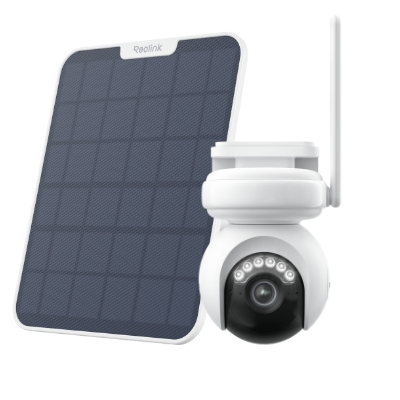
Industry-leading 4K Continuous Recording Battery Camera
4K UHD Continuous Recording; ColorX Night Vision; Pan & Tilt; Automatic Tracking; All Recordings Stored Locally.
- Optimize your router placement
Put the router near the center of your home so the signal spreads evenly in all directions. Avoid obstacles. Thick walls, metal objects, mirrors, and large appliances can block or weaken the signal.
Physical solutions
- Add directional or adaptive antennas
Using directional antennas can focus your WiFi signals in a single direction, reducing the area where a jammer can interfere. You can also use adaptive antennas to adjust their beam.
- Install multiple access points or routers.
To minimize the impact of jamming, you can set up access points in multiple areas of your home or working space. If one access point becomes an attack, simply switch to the other.
- Switch to wired connections
Wired connections, like Ethernet cables, are not affected by jammers. Hence, instead of using wireless technology all over the space, install wired connections at some points to be used when jamming attacks occur.
- Invest in an anti-WiFi jammer
Anti-jamming devices can detect jammers and their attacks and reverse them. They also alert you whenever signals are blocked by a jammer, helping to maintain the network's stability.
What devices are vulnerable to WiFi signal jammers?
Here are some of the devices that can easily be affected by a jammer.
- WiFi routers: These are the main target of WiFi jamming. Jammers can disrupt the signals between the router and connected devices to prevent them from accessing the Internet.
- Smart home devices: Devices like smart lights, speakers, and others that rely on wireless technology can be easily targeted through WiFi jammers. The jammer can interfere with these devices, making them malfunction or lose the internet connection completely.
- WiFi-enabled security cameras: Security cameras that use WiFi technology to stream and send alerts on an app are very vulnerable to jammers. If a jammer attacks them, the camera feed can be disrupted, which can decrease the overall home's security. In this case, choosing a dual-band WiFi security camera is essential.
- Smartphones and tablets: Most smartphones and tablets use WiFi frequencies. Hence, a jamming device can block all signals, resulting in a loss of internet connection and other applications.
- Bluetooth devices: Jammers can block Bluetooth-enabled devices such as headphones, wearables, and speakers, making them dysfunctional.
How to Tell If Your WiFi Has Been Jammed?
Here, we discuss some of the significant signs you can rely upon to tell if your WiFi has been jammed.
Poor signal quality
The first thing a jammer affects is the quality of the signal. Hence, if you suddenly feel a sudden drop in signal quality, it's a clear sign of a decline, even if you are sitting next to the router.
Remember, in normal conditions, your WiFi signals stay consistent. However, it might suddenly drop without any change in the environment.
High packet loss or latency
Another sign of potential WiFi jamming is the loss of latency during data transmission. It occurs when the data packet is unable to reach its destination. Jamming can cause such an interface that disrupts the flow of data from sender to receiver.
Frequent disconnections and reconnections
Frequent disconnections and reconnections are another major red flag. A jamming device disrupts the frequency that your router previously used to communicate with the connected devices, making it difficult for them to stay online.
Reduced bandwidth
Jammers can also reduce the bandwidth of WiFi signals. When a WiFi jammer is activated, it can limit the amount of data passing between your device and the router.
Increased power consumption
When your device suddenly starts to lose its charge faster than normal, realize that you are in the jammed zone. This happens because the low frequency demands that your device consume extra power to acquire the signals.
Heat generation
Jamming forces the router to work harder than usual to acquire and maintain communication. This causes them to generate more heat than usual, which can result in the device becoming mild or extremely hot.
FAQs
How can jamming be prevented?
In the first place, secure your WiFi connection by using encryption methods like WPA3. In addition, you can switch over to the 5GHz as they are more stable against the potential jamming attacks. You can also install the anti-jamming devices within a specified space.
How do I stabilize my Wi-Fi connection?
Position your router in a central location to stabilize your connection. In addition, update your router's firmware to ensure it works effectively without any disruptions.
Can we bypass a jammer?
Bypassing a jammer can be challenging. However, you can use a wired ethernet connection for this purpose, as it can not be affected by the jamming attack. The second way to bypass a jammer is by installing anti-jamming devices or multiple access points in your space.
Conclusion
WiFi jamming can significantly reduce the user experience of the internet. Although it's hard to tell if a jammer is nearby, you can look into inconsistent Wi-Fi connections, reduced bandwidth, etc., to detect if the jamming attack has occurred.
In addition, there are multiple ways to prevent your device from getting jammed, such as switching to 5GHz, installing encrypted software, and installing anti WiFi jammers. Please share the content with your friends and family if you found it helpful. Also, don't forget to let us know about your thoughts in the comments section below.
Search
Subscribe for the Latest Updates
Security insights & offers right into your inbox