
How to Get WiFi at Home Without Cable: Easy Solutions

Today, most homes need internet. Many people wonder if they can get WiFi without cable or how to get internet without cable or phone line. The answer is yes! You don’t need a cable to stay connected. This article shows you different ways to get internet at home without cable or phone line.
We will talk about how to set them up, how much they cost, and more. Each part gives you clear information to help you pick the best option for you. Whether you live in a city or the countryside, there’s a solution that can work.
How to Get WiFi at Home Without Cable or Phone Line?
If you want WiFi at home without cable, you have a few options. Cable internet uses physical lines, but other ways bring internet to your home differently. This part talks about six main ways to get WiFi without cable. Let’s explore these options to see how to get WiFi without cable.
1. Mobile Hotspot
A mobile hotspot uses your smartphone to give you internet. It’s one of the easiest ways to get WiFi without cable. Your phone connects to the cellular network, and you share that connection with other devices. Here’s how it works: Your phone needs a data plan from a cellular company.
2. Fixed Wireless Internet
Fixed wireless internet uses radio waves to bring the internet to your home. It doesn’t need cables or phone lines. Instead, it connects your house to a nearby tower run by an internet company.
3. Fiber or DSL Internet Only Plans
Fiber and DSL internet usually use phone lines, but some plans give you internet without cable or phone service. These options focus only on the internet, without TV or phone bundles. Here’s how they work: Fiber internet uses thin glass cables to carry data very fast. Companies run these cables to your home, and you get a modem to make WiFi. DSL uses copper phone lines but doesn’t need an active phone. Both need equipment from a company, like a modem or router.
4. 5G or 4G LTE Home Internet
5G and 4G LTE home internet uses cellular networks to give you WiFi at home. These are newer ways that use mobile technology. You plug in the device, and it makes a WiFi network for your home. You don’t need cables or phone lines.
5. Satellite Internet
Satellite internet gives you WiFi at home using a dish and a satellite in space. It works almost anywhere, which is great for remote places like farms or cabins. Here’s how it works: You put a small dish outside your home. This dish points at a satellite orbiting Earth. The satellite connects to the internet and sends signals back to your dish. A modem inside turns the signal into WiFi. Companies like Starlink or HughesNet offer this service.
6. Public WiFi and WiFi Sharing
Public WiFi and WiFi sharing are short-term ways to get internet without cable. Here’s how they work: Public WiFi comes from places like libraries, cafes, or parks. You connect to their network with your device. WiFi sharing means using your neighbor’s WiFi with their permission. You need their password and a signal strong enough to reach your home.
How to Set Up WiFi Without Cable?
Setting up WiFi without a cable is easy once you choose a method. Each option has its own steps, but they all help you get online fast. Here are the steps to set up your WiFi without cable, explained simply.
- Choose your internet method: Pick the option that works for you, like a mobile hotspot or fixed wireless. Think about where you live and what you need it for.
- Contact a company (if needed): For fixed wireless, fiber, DSL, 5G/4G LTE, or satellite, sign up with a company that offers the service. They’ll guide you.
- Get the equipment: You might need a modem, router, antenna, or dish, depending on the method. Companies often give you these, sometimes for a fee.
- Set up the equipment: Follow the instructions to set up the device. For a hotspot, just turn it on in your phone settings. For others, connect the modem or point the dish.
- Connect your devices: Use the WiFi name and password to connect your phone, laptop, or tablet to the network. It’s usually on the device or in the manual.
- Test the connection: Open a website or play a video to see if the internet works well. If it’s slow, check your setup or call the company.
How Much is WiFi Without Cable?
The cost of WiFi without cable depends on the method you choose. Each option has different prices based on equipment, plans, and companies.
Mobile hotspots tie to your phone plan. Basic plans with limited data cost $20 to $40 per month. Unlimited plans for heavy use range from $50 to $100. You already have the phone, so no extra equipment is needed.
Fixed wireless internet costs between $40 and $100 per month. The price depends on speed and the provider. You might pay $100 to $200 upfront for the antenna and modem, or the company might include it in the plan.
Fiber or DSL internet-only plans differ by type. Fiber costs $50 to $100 per month for speeds up to 1,000 Mbps. DSL is cheaper, at $30 to $60 per month, but slower. Equipment like a modem might add $50 to $150 upfront or a small rental fee.
Pros and Cons of Getting WiFi Without Cable or Phone Line
Getting WiFi without cable or a phone line has good and bad points. You need to think about these to see if it’s right for you. This part lists the pros and cons clearly. Knowing both helps you choose the best method for your home. Let’s look at what’s great and what’s tricky about these options.
Pros
- You are not stuck with one local cable firm.
- Skip TV or landline fees you never use.
- Hotspots, 5G gateways, and fixed wireless antennas work in hours or minutes.
- Phone hotspots travel to hotels, RV parks, and job sites.
- Satellite and fixed wireless serve areas where cable ends.
Cons
- Cellular and satellite links slow when networks crowd or storms hit.
- Many wireless plans cap high-speed data, then throttle speed.
- Satellite ping remains higher than wired lines, which hurts fast-action games.
- Antennas, gateways, or dishes can add $200–$600.
- Thick walls, trees, or hills may weaken or lose the connection.
Can You Use WiFi Security Cameras Without Cable?
Yes, you can use WiFi security cameras without a cable. Wire-free security cameras don’t need cables for power or internet. They connect to your WiFi network and use batteries or solar power. You can put them anywhere within WiFi range, like your porch or backyard. They send a video to your phone or computer over the internet. A good WiFi connection is important for them to work well from far away.
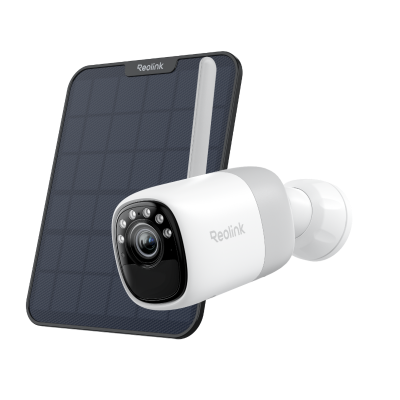
2K Pre-recording Bullet Camera with a Long Lasting Battery
2K 10s Pre-recording ; ColorX Night Vision; 20,000mAh Battery; Dual-band Wi-Fi 6.
FAQs
Can You Have Internet Without Cable?
Yes, you can have internet without cable. Cable internet is common, but there are other ways to connect. New technology gives you many choices that don’t need a cable line. You can use your phone’s data, wireless signals, or even satellites to get internet.
Can you get Wi-Fi without a cable provider?
Yes, it is possible to have Wi-Fi without a cable company. Other alternatives, such as mobile hotspots, fixed wireless, 5G/4G LTE, or satellite, have no need for a cable company. They connect with their cellular or satellite signals. An example is that a mobile hotspot utilizes your phone data so that Wi-Fi can be available anywhere you have a signal.
Can I just buy a Wi-Fi router and get Wi-Fi?
A Wi-Fi router will not get you Wi-Fi by itself. A router requires an internet source, such as a modem or a cellular connection. Otherwise, it is just a box. You can compare it to a radio; you need a radio station to play music. To get Wi-Fi, you will have to connect the router to a service such as DSL or 5G.
How do I get Wi-Fi in my house without a provider?
Without a company, Wi-Fi is difficult, but still possible to get temporarily. You can go through a mobile hotspot using the data on your phone or Wi-Fi hotspots available in the vicinity, like in a park. These are not trustworthy for long-term usage, as public Wi-Fi is not fast and safe, and there are limitations in data accessed using hotspots.
How do I get internet at home without a landline?
You can use Ethernet connections, wireless routers, or your phone’s mobile network through tethering or a USB dongle.
Conclusion
Home WiFi without cable or phone line is no longer difficult to get. You can access the internet through a mobile hotspot, fixed wireless, fiber, DSL, 5G/4G LTE, or satellite internet. Each way provides you with internet and does not require cable or a telephone line. Prices, speeds, and configurations will vary, and what suits your home and your wallet. What do you think or experience with it? We would love to hear about it down below!
Search
Subscribe for the Latest Updates
Security insights & offers right into your inbox