
Ultimate Guide to Amazon Package Tracking: Step-by-Step Instructions
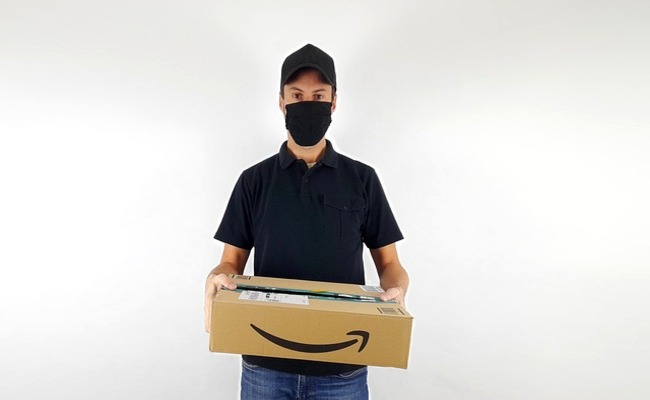
After the purchase, you should monitor the package's tracking to ensure on-time delivery, prevent theft, and resolve issues promptly if they arise.
This guide explains how to track any Amazon parcel, with or without a tracking number. We will share the step-by-step process, discuss the reasons for failed delivery, and explain how you can resolve issues on your own.
How to Track an Amazon Package with Tracking ID?
Learning how to track Amazon packages with tracking numbers is essential. This ID is your direct link to real-time shipping updates.
Step 1: Locate Your Tracking ID
Find this key number in your shipment email. It is also in the 'Your Orders' section online. The ID is a unique combination of letters and numbers. You can copy it directly from this page and paste it elsewhere.
Step 2: Use the Carrier's Website
Navigate to the shipper's official tracking page. Enter your full Tracking ID into the search field. You will get detailed transit history and scans here. This often provides more detailed information than Amazon's own status page.
Step 3: Use the Amazon Mobile App
Open the app and go to 'Your Orders'. Tap on the specific order you want to track. The app displays status and a map if available. You can also set up push notifications for live delivery alerts here.
How to Track an Amazon Package Without a Tracking Number?
Lost your number? You can still find your package. Your Amazon account holds all the necessary information. These steps help you quickly locate your order's status.
Step 1: Access "Your Orders"
Log in to your Amazon account on the website. Click on 'Returns & Orders' at the top. This shows a complete list of your recent purchases. Scroll to find the order you need information on.
Step 2: Review Order Details
Find and click on the specific order in question. The order detail page shows the latest status update. Look for any shipping or carrier information provided. Often, a hidden tracking number is revealed on this detailed page.
Step 3: Contact Amazon Customer Service
Use the 'Help' section to get support. Provide your order number and shipping address. A representative can locate your package and give updates. They can also resend your tracking details to your email if needed.
How to Follow an Amazon Package with a Tracking Map?
The Amazon Tracking Map offers a visual delivery experience. See your package's live location on a map.
Step 1: Open the Amazon App
Ensure you have the latest version of the Amazon shopping app. Log in to your account on your smartphone or tablet. This feature works best on the mobile application. Enable location services for the most accurate map functionality.
Step 2: Navigate to Your Order
Tap 'Your Orders' and select the outgoing delivery. Click on the 'Track Package' button for that item. A map view will appear if the carrier supports it. Not all carriers or shipments will have this live map feature available.
Step 3: Follow the Live Map
Watch the moving icon representing the delivery vehicle. The map provides an estimated time of arrival. You can see the driver's progress in your neighborhood. This live view updates every few seconds as the driver moves.
What to Do If an Amazon Package Is Running Late, No Tracking?
A missing, late package causes frustration and is a common issue. Identify the reason below and apply the solution.
Reason 1: Carrier Logistics Delay
High volume or facility backups slow processing. This is common during holidays and major sales. First, check the carrier's website for service alerts. Then, contact them directly with your shipping details. Allow an extra 48 hours for movement.
Reason 2: Incorrect Shipping Address
A wrong or incomplete address halts delivery. Packages often get returned to the sender. Immediately verify your address in 'Your Orders'. Contact Amazon support to correct it for future shipments. Request a package intercept or hold at a local facility.
Reason 3: Severe Weather Disruptions
Storms, floods, or snow can stop transit networks. Carrier services issue official delay notices. Check for weather advisories in your area and the origin. Be patient as safety is the carrier's priority. Your delivery will resume once conditions are safe.
Reason 4: Lost or Mis-sorted Package
Items can get misplaced in large sorting hubs. The tracking may not update for several days. File a trace request with the shipping company. Provide your Amazon order number to them. Simultaneously, initiate an inquiry with Amazon Customer Service.
Reason 5: Delivery Exception
Issues like inaccessible locations can occur. The driver may leave a notice if required. Check your door and mailbox for any carrier slips. Contact the local delivery depot directly. Provide clear instructions or an alternative drop-off spot.
What to Do if Your Amazon Package Isn't Delivered?
Your package is marked delivered, but it isn't there. This scenario requires immediate and systematic action. Start by thoroughly checking all possible locations around your home.
Reason: The Package was stolen from your porch.
Solution: Check with neighbors and household members immediately. File a report with Amazon and the shipping carrier. Consider filing a police report for theft. For future security, invest in a Reolink Video Doorbell.
Reason: The Package was delivered to the wrong address.
Solution: Check nearby homes with similar addresses. Use the delivery photo if Amazon provided one. Contact the carrier; they can sometimes retrieve it. Amazon will typically reship or refund in this case.
Reason: Carrier scanned it prematurely.
Solution: Wait 24-48 hours, as it may arrive the next day. The driver may have scanned it by mistake earlier. Contact the carrier to confirm the actual delivery scan time. If it doesn't arrive, report it to Amazon as missing.
Reason: It was delivered to a safe location.
Solution: Check thoroughly behind planters, garages, and side doors. Look in any designated "safe place" you may have set. Check with your building's leasing office or concierge. Review your delivery instructions for any location preferences.
Reason: Address error made delivery impossible.
Solution: The package will likely be returned to the sender. Contact Amazon to confirm and update your address. Request a reshipment to the corrected address. Ensure your default address is correct for future orders.
Note: The best defense is visual evidence. We recommend the Reolink security camera to prevent package theft. It detects parcels and deters thieves.
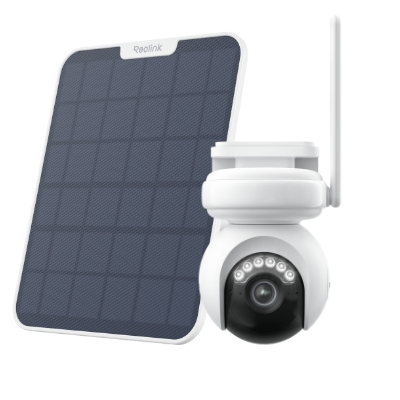 Reolink Altas PT Ultra
Industry-leading 4K Continuous Recording Battery Camera
4K UHD Continuous Recording; ColorX Night Vision; Pan & Tilt; Automatic Tracking; All Recordings Stored Locally.
FAQs
Where is the Amazon tracking number on the package?
Look at the shipping label attached to the box. It is often below the barcode. The number is a long series of digits. It may start with "TBA" for Amazon Logistics.
Why can't I see live tracking on Amazon?
Not all carriers offer live map tracking. The feature depends on the delivery service used. Sometimes data simply doesn't update in real time. Try refreshing the app or using the carrier's site.
Can I check the location of my Amazon package?
Yes, use the tracking number on the carrier's website. The Amazon app may show a map view. This pinpoints the package's last scan location. Live vehicle location is not always available.
Conclusion
If you know how to track your Amazon package, you can check its status and ensure its delivery. Use tracking numbers, maps, and account details wisely. We have explained several methods for tracking your package. We have also shared common reasons for your parcel not being delivered and explained the step-by-step process to resolve the issue.
Search
Subscribe for the Latest Updates
Security insights & offers right into your inbox