


Reolinkの特典キャンペーン、ニュース、最新情報を見逃さない!
あなたの考えや意見を私たちや他のユーザーと共有してください。あなたの提案で何かを作り出しましょう!
Subscribe to get real-time updates of Reolink.
Choose only show current products
Have had the RLC-823a installed for a couple of weeks now. It is an excellent camera.
Likes: clarity of image, small for cameras like this, 5x zoom, speed of panning, PoE (more about this below), auto tracking, internal person and vehicle detection, spotlight.
Issues include:
1) Motion detection cannot differentiate from panning or movement from people or cars. When in panning mode (this was one reason for getting this camera – I wanted it to cover the entire front of the house), every time the camera moves it assumes that there was some movement of an object. From a relative positioning perspective, this is true, but not what I would like. This behavior results in a new recording to the SD card for each stop. With each stop being about 30 seconds, I end up with what is almost a continuous recording to the SD card. This isn’t a problem for the recording to the NVR since I have it in continuous recording already. I would be fine if there was a way for the motion detection to be deactivated when the camera is moving and then restart once the new position is achieved. Not sure if this also effects push notifications since I have it turned off.
2) I have a Ubiquiti network system, which is more than what most homes will have, but even with this I was not able to use the PoE from the switch closest to the camera. This camera needs at least 24 watts of power, my Ubiquiti 8 port switch the camera is plugged into is only rated for a maximum of 15.4 W. My main 16 port switch has the power, but the camera Ethernet cable doesn’t go back to the main switch. The newer Ubiquiti Lite 8 port switch would have worked, as well as getting an injector rated for that power, but this was an added expense that I was not willing to undertake. Fortunately, I had a power cord already going to the camera location, so I ended up powering the camera with the included power supply instead of by PoE. If this was a camera install for a new location, I would have made sure PoE powered it.
3) The auto tracking works well by itself, but I tried it with the camera in panning mode and when it went back to panning after tracking someone, the stop times at each position were not being followed. Have not tried it again. I currently have it in a fixed location with auto tracking on and it works great. It starts tracking when the person is getting close and then follows the person until he gets too small relative to the complete image size. For my location, the tracking sometimes stops before the person is out of the image, which is OK with me. I attached a video showing the tracking of my mail delivery (the reasons for the caution tape is I am putting in a new lawn).
Overall, I am very pleased with the camera and glad that I added it to my Reolink collection.
役に立つ 36 皆はこれが役に立ったと思った
Hi Sam,
To answer your questions:
1. They are almost the same except for the hardware version. Both of them could work well with RLC-823A.
2. We could not upload pictures here, I did not find an article comparing the new UI and old UI. Could you email support@reolink.com for it?
Best Regards
Elena
Hi Sam, i believe any NVR that says RLK8-A or RLK16-A. NVRs that support smart detection with hardware version N2MB02 or
H3MB18.
Hi Elena,
Thank you very much for the prompt response. Greatly appreciated.
Upon further inspection and reading of your support pages, I came across the following link:
https://support.reolink.com/hc/en-us/articles/900000602543-Hardware-Version-of-Reolink-NVRs
Not all NVR hardware support AI for human & vehicle detection.
Further questions:
1. What is the difference between the RLN8-410 POE N3MB01 hardware vs RLN8-410 POE N2MB02?
The table shows them to be the same other than hardware versions.
2. Difference between the old and the new UI? Are there screenshots that you can show to demonstrate the differences?
Thank you once again for responding to my question.
I am delighted by the promptness of your service.
Regards,
Sam
Hi Sam,
The NVR we are selling on Reolink.com could work well with RLC-823A. That means if you buy an NVR on reolink.com today, you will receive one that you can use with this camera for the correct power and full function via PoE.
If you already have a Reolink NVR, you could check the hardware information to see if it can work well with RLC-823A. It should be N2MB02, N3MB01, H3MB18, H3MB18.
Hope it helps!
Best Regards
Reolink Service Team
> one that you have the right NVR
Hi Rey,
What are the suitable NVR models (from Reolink) that you can use with this camera for the correct power and full function via PoE?
Thank you in advance for any pointers.
Regards,
Sam
The image looks great and I actually like the camera overall.
But occasionally the camera resets itself to factory default. All settings are lost. That also means the password is reset, which is a huge security risk! I do not know why this happens, but I checked the reset button (looks ok) and I tried powering the camera with PoE and also with the DC input. Neither of it worked.
The behaviour can be reproduced reliably when changing the Resolution/Frame Rate setting on the WebUI.
Interestingly, I found forum entries from people having the same issues.
I was thrilled to test the camera for my use case, but with these resets there is no way I can put the camera into operation.
役に立つ 12 皆はこれが役に立ったと思った
Purchased this camera last week to replace my RLC-423 that kept losing WiFi. Easy setup, ran a Cat-6 cable to it so power was also easy. Setting up the vehicle/person detection took a bit of time and patience! It tracks very well, sometimes too well. While I want to see the vehicles in my driveway I did not want it to keep tracking them while they stood still. If I setup the road as an area to track, as soon as it saw the driveway vehicle, back it went. Setting the "guard point" did not initially help. What finally worked was decreasing the vehicle sensitivity, I was worried that I would miss vehicle traffic on the road but nope, it sees them everytime. Night vision is great, it gives you options of turning on spot lights, infrared lights, both or none. Audio is perfect, it sounds like the birds are in my living room! The only thing that would make this better is zooming in on a person once it finds one, maybe a future firmware upgrade? Overall a 9.5 out of 10!
役に立つ 9 皆はこれが役に立ったと思った
This may a great product in the future but not yet.
It runs ok on the app, somewhat. I needed it to run on Blue Iris as Reolink says it will. It doesn't like ver 4 at all. I connected it to ver 5 and it does try. I have multiple appearances of BI and when two are running this cam will run for about 30 seconds and reboot. After rebooting it runs for 30 seconds again and keeps doing this.
I sent a request for service about two weeks ago and have not had a response. After waiting a week i determined that a response was probably not coming and asked for a refund. I am still waiting for both responses and am considering that I will need to get the credit card company involved.
役に立つ 7 皆はこれが役に立ったと思った
I just noticed that you sent a new email to our support team, they also provided a new solution. If still no luck, our RMA team will contact you to return the products. After receiving it, you could receive the refund within 2 business days. Thanks for your patience in advance!
I did get a reply when you approved my review and always got a reply when Reolink sent messages regarding any purchases. I find it "unusual" that I did not get a reply when I asked for service or when I asked for a refund.
At this time I doubt that the camera will work properly on BI, which is what I want. Please arrange for a return and refund. I will try again at a later date. Maybe a future update will allow the camera to do what I want.
Dear Customer,
Thanks for your feedback on RLC-823A. We are sorry about the issue with Blue Iris, I just checked the conversation between you and our support team, actually they replied in the same day every time. But looks like you did not respond to their new email dated to August 21th and 25th. Could we have a channce for further troubleshooting?
RLC-823A supports ONVIF 2.1, and its vedio format is H.265, in theory, it could work well with Blue Iris. But if you want to get 100% performance of our cameras. we still recommend you use Reolink own software.
If you still prefer to return and get refund. Please kindly respond to our email at support@reolink.com. Our after-sales team (RMA team) will reply in 24 hours.
Best Regards
Reolink Service Team
I took a few minutes this morning to swap out my 4MP and 5 MP RLC-423's with the new 4K version and couldn't be happier. These were my only remaining low res cameras so I can boast I am 100% 4K now and enjoy the view even more. It's also nice to have the AI on two more cameras. I'm not quite at 100% on that goal yet but I do have all the important angles upgraded already. :)
I was quite happy to see Reolink use the same footprint for this camera since I have mentioned before how we shouldn't have to drill a new set of holes for every iteration of camera they come up with. Swapping out old for new was 4 screws and the ethernet plug.
Presets were easy enough to set and I have both cameras fully configured with minimal issues.
The image quality is everything I expect from Reolink and the motion of the PTZ is quick and precise. There's a bit of lag on the button controls when driven from the app but the camera responds immediately, the lag is in the actual video feed, even when hard wired direct to the NVR but overall, it's tolerable and honestly, nothing new.
So, after waiting on this camera to be released for a couple years now, I am not disappointed in any way other than how long it took to come to market. The only improvements I would suggest for future models are a 12MP version and more zoom but that's just me. I use my cams for wildlife viewing and like my closeups. :)
I, like others would have preferred much more optical zoom but honestly, the 5x combined with 8MP is about perfect for the range I use my cameras at. I would never say no to more but 5 is more than adequate for a camera in this price range.
役に立つ 7 皆はこれが役に立ったと思った
Enjoy the quality of videos. Camera detects vehicles and people and moves horizontally great. Although if someone walks towards the camera and gets under it does not tilt down. Hopefully there will be an update sometime soon that fixes this. I have gone the cheaper route and picked up a POE switch (with proper power output), connected the camera with a cat 6 Ethernet cable providing both power/internet and used the 256gb micro sd card. I do not have continuous recordings since I feel it would be a waste of space. It records vehicle or people detection and I have about two weeks back of recordings and the sd card is about halfway full. I’m waiting to see if it begins the overwrite process when it becomes full. If not I can easily reformat it through the app to clear all old videos. So I would give this 4 out of five. But would up it to a 5 out of 5 if the new update fixed the auto tracking for downward view. Hope this helps.
役に立つ 4 皆はこれが役に立ったと思った
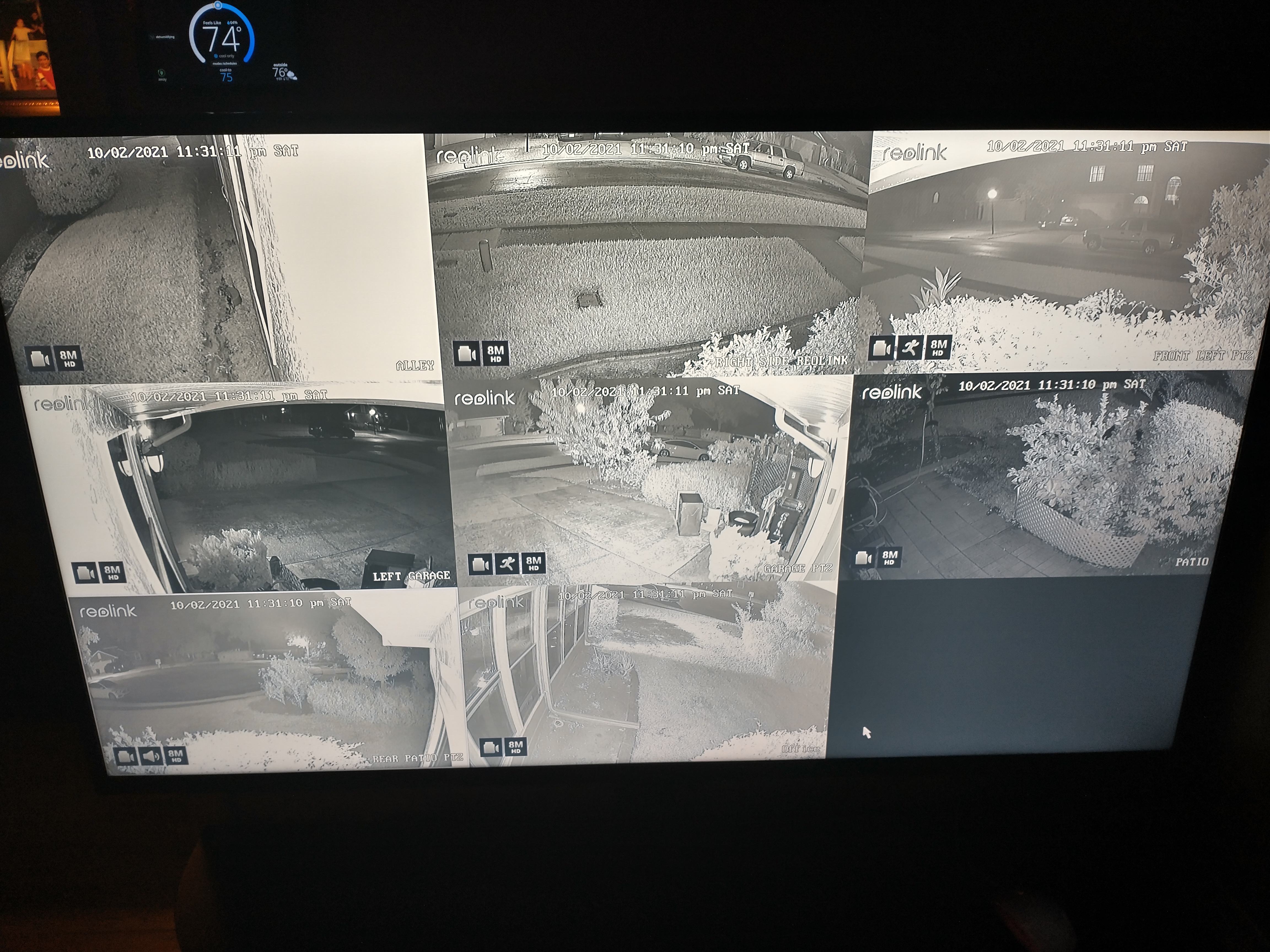
I must say that I was excited with the specs of the RLC823A Camera and was most eager to receive my 3 RLC-823A's along with my RLC 822 and my NVR Kit, whivh included the rlc 811A's. After finally getting everything set up and adjusted, all works great. My advice is to first do a test run of the system prior to actual install, as I did setting up parameters on my workbench, prior to install. Then, fully connect and properly adjust all 8 camera's, along with internet connection, once downloading and linking the phone app. And finally, contact Reolink, to arrange for a live remote-in from their tech support, to ensure all your firmware is properly updated with the most current version, to keep your new system working optimally. I have everything set up to a 55 inch monitor and must say that the difference is night and day, compared to my previous antiquated 720p cctv system...The Reolink Upgrade was worth every penny. I did purchase seperate cables to accomodate the longer wire runs, which I recommend as opposed to adding cables together. Below is a view, from my monitor, of my system at night, with low levels of light...very pleased. The Zoom feature (not shown) along with the AI Tracking and color night vision of my ptz cameras, raise the bar with Reolinl products, of which I find no other can compare, unless they cost 3x or 4x more.
役に立つ 3 皆はこれが役に立ったと思った
We just purchased the RLC-823A for our church and find it overall to be a really nice camera even though we've had to reset it twice in two weeks. We'll contact support if we can't figure it out so I am sure this is something that can be eventually resolved.
It would be better if the auto tracking (person) also did auto zoom/focus to help identify the intruder. I don't know if the police have better capability but I can't see any facial features nor am I able to read writing on a hat or shirt.
It would also be nice if the auto tracking worked in conjunction with the patrol mode. It seems you can have either auto tracking OR patrol, but we'd like to have the camera patrol 4 preset locations, but stay and auto track if something comes up within those preset zones.
役に立つ 3 皆はこれが役に立ったと思った
I am preparing to buy this camera but I would like to know if I can use it without PoE? Can I just run a power cable and ethernet cables to it? Thanks!
役に立つ 2 皆はこれが役に立ったと思った
I'll start this review by saying that I have had issues with Reolink cameras in the past, specifically when it came to interfacing with SecuritySpy, a Mac-based security camera management application that I use. In fact, the software author specifically recommended against using Reolink cameras with SecuritySpy. I persisted in the past, with mixed results.
With the advent of the RLC-823A and its AI-based auto tracking and 4K resolution, I decided to make the effort to try to see if I could use Reolink again. This time, things are different, and in a good way.
First off, this camera is in a very sweet spot price-wise. There is no other camera around $200 that can do what this camera can do. Kudos to Reolink for driving the cost down and adding the features here. I think this is going to pay dividends for them going forward.
Second, this camera just works. The auto tracking is great, the resolution is awesome, and the audio is clear. I have four of these mounted on the soffit of a new home I'm constructing and they all work great.
Third, they work great with SecuritySpy, and I let the developer of that software know that it's time to reconsider Reolink for users of his product.
Fourth, and this is a big one: the web-based setup on the camera itself is gorgeous, easy to use, and clear to understand. Great job on this! The iOS app is also easy to use and well designed.
The only nit I have about the camera is the motor noise that creeps into the recordings when the PTZ moves. I understand this is probably a challenge to overcome, and it's something I can live with given the other great features of this camera.
I think Reolink has knocked it out of the park here. This is an excellent camera with excellent value, and really raises the bar!
役に立つ 2 皆はこれが役に立ったと思った



Google、Google Play、Googleアシスタント、および関連するマークとロゴは、Google LLCの商標です。
Amazon、Alexa、および関連するすべてのロゴは、Amazon.com, Inc.またはその関連会社の商標です。
MacとSafariは、Apple Inc.の商標です。
App Storeは、米国およびその他の国で登録されたApple Inc.のサービスマークです。
Firefoxの商標およびロゴは、Mozilla Foundationの米国およびその他の国における商標です。
その他、本サイトに記載されている会社名、商品名は、各社の商標または登録商標です。