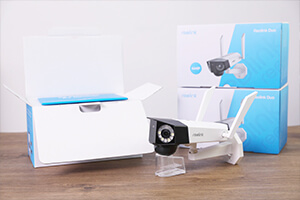
What are the advantages of the Reolink Duo 3 PoE dual-lens camera?
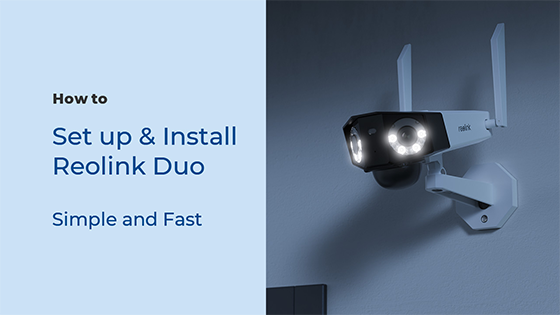
The Reolink Duo 3 PoE is equipped with two lenses that capture views in 4K 16MP UHD from a 180° ultra-wide angle. You don’t need two or more single-lens cameras to monitor a large area. Instead, with only one Reolink Duo 3 PoE you can save installation time and enjoy much broader images with lower distortion. Images from the dual lens are seamlessly merged into one frame both in live view and playback.
Why can't I connect the Reolink Duo 3 PoE to 3rd party softwares?
The RTSP and other ports may be disabled by default. You can launch Reolink Client, then go to Device Settings >> Network >> Advanced >> Port Settings to make sure all ports are enabled before using 3rd party softwares.
Does the Reolink Duo 3 PoE work with my Reolink PoE NVR?
If you want to buy a new one: the currently on-sale NVRs work with all PoE and plug-in WiFi cameras including the Reolink Duo 3 PoE with the latest firmware version.If you already have one: Please first refer to our
article on How to Find out System Information via Reolink App for its hardware version.
- For the NVR with the hardware N7MB01, N6MB01, or N5MB01, it works with all PoE and plug-in WiFi cameras including the Reolink Duo 3 PoE with the latest firmware version.
- For the NVR with the hardware N2MB02, N3MB01, or H3MB18, it works with all PoE and plug-in WiFi cameras. But you can not have a full-resolution live view of the following cameras: Reolink Duo 3 PoE, RLC-1212A, RLC-1224A, Reolink Duo 2 PoE, Reolink Duo 2 WiFi, Reolink Duo Floodlight WiFi, Reolink Duo Floodlight PoE.
- For the NVR with the rest hardware such as H3MB17, H3MB02, and H3MB16, please refer to our
Introduction to Hardware Versions of Reolink NVRs article for more detailed information. For all the compatible NVRs, we recommend you update their firmware version via our
Download Center before using them with the Reolink Duo 3 PoE.
Does the Reolink Duo 3 PoE support two-way audio?
Yes, the Reolink Duo 3 PoE supports two-way audio via its built-in mic and speaker. You can not only capture videos with audio recorded but also have real-time communication with people on the Reolink Duo 3 PoE's end through Reolink App or Client.
Can I turn off the spotlights and siren on the Reolink Duo 3 PoE?
Yes, you can turn off the spotlights and siren manually. By default, the Reolink Duo 3 PoE's spotlights and siren are motion activated: they will be turned on automatically when a motion is detected. You can turn them off, adjust the brightness of spotlights, or customize the siren to your liking. Please note that with the spotlights on you can enjoy clear color night vision, but if the spotlights are turned off, you will only see black and white images at night.
How do I use live view and playback for the Reolink Duo 3 PoE?
You can add and set up the Reolink Duo 3 PoE on Reolink APP/Client. Then click the Reolink Duo 3 PoE to check the live view and playback of it from anywhere, at any time. Reolink APP/Client is free of charge and the service is free of subscription. Please note that when using live view or playback on Reolink NVR, you may be prompted to switch the preview resolution, and following the prompt is recommended to avoid potential impact on performance.
Does the Reolink Duo 3 PoE support person/vehicle/animal detection?
Yes, the Reolink Duo 3 PoE supports person/vehicle/animal detection.
Can the Reolink Duo 3 PoE be used outdoors/indoors?
The Reolink Duo 3 PoE can be used both indoors and outdoors. It is IP67 certified weatherproof and its operating temperature is from -10°C to 55°C (14°F to 131°F), perfect for outdoor and indoor usage.
How can I power up the Reolink Duo 3 PoE?
There are two methods.
Method 1: Via an Ethernet cable, connect the Reolink Duo 3 PoE to a PoE NVR, PoE injector, PoE switch, or directly to a router with a PoE port, for both power supply and video signal transmission.
Method 2. Via a DC 12V 2A power adapter (purchased separately) for power supply only.
What kind of microSD card can I use for the Reolink Duo 3 PoE?
The Reolink Duo 3 PoE supports up to 256GB microSD cards with FAT32 format and Class 10 read & write speed.
Can I use the Reolink Duo 3 PoE with Synology?
Can the Reolink Duo 3 PoE support smart home like Google Assistant?
Can the Reolink Duo 3 PoE support time-lapse function?
Yes, the Reolink Duo 3 PoE can support time-lapse. It can save time-lapse photos and videos to the SD card.
Does this camera work with Home Assistant, Frigate, or third-party NVRs?
Yes. The Reolink Duo 3 PoE supports ONVIF and RTSP protocols, making it highly compatible with local smart home platforms like Home Assistant, Frigate, and Blue Iris, as well as third-party NVR systems.
Is a 16MP security camera noticeably better than a 4K camera?
Yes. A 4K security camera is 8 Megapixels. A 16MP camera essentially stitches two 4K lenses together, giving you double the pixel density. This means when you zoom in on a recording to see a face or a vehicle, the image remains incredibly sharp rather than becoming instantly blurry.
Does the Reolink Duo 3 PoE require a monthly subscription?
No. The Reolink Duo 3 PoE offers complete functionality including 16MP recording, smart AI detection, and remote access, without any mandatory monthly fees or cloud subscriptions. You can store your footage locally on a microSD card or a Reolink NVR.
Which is better? the Reolink Duo 3 PoE or Duo 3 WiFi?
Neither is objectively "better". It completely depends on your installation setup. The Reolink Duo 3 PoE is the best choice if you want the absolute highest reliability for 24/7 continuous recording and have the ability to run a single Ethernet cable for both power and internet. You should choose the
Duo 3 WiFi if you already have a standard power outlet nearby but running an Ethernet cable all the way back to your router or NVR is too difficult.
Can I connect the Reolink Video Doorbell WiFi to my existing NVR?
The Reolink Video Doorbell WiFi works with Reolink NVRs with hardware versions N5MB01, N6MB01 and N7MB01. It also works with H3MB18, N2MB02 and N3MB01 after you update the NVR’s firmware (its built-in software). All Reolink NVRs on sale now are compatible. To connect, join the doorbell to your Wi-Fi router by Wi-Fi or an Ethernet cable, and power it with the adapter. Then connect the NVR to the same router with a network cable. The NVR will find the doorbell on its own
Can I use Reolink Video Doorbell WiFi with my pre-existing chimes?
No, it does not work with chimes of other brands or pre-existing mechanical chimes. You can still
power the doorbell from your existing doorbell wiring. Turn off the power first. Then bypass the old chime with the jumper cable in the box, so the doorbell gets enough power. The old chime will stop ringing, so use the Reolink Chime instead. The doorbell works with most doorbell power systems (16V AC, 50/60 Hz, 30 VA). If you are unsure about your wiring, ask a qualified electrician.
Is the Reolink Video Doorbell WiFi battery-powered or hardwired?
The Reolink Video Doorbell WiFi does not use batteries; it is completely hardwired. You must power the Reolink Video Doorbell WiFi using either the included power adapter or your home's pre-existing 12-24V AC / 24V DC doorbell wiring.
Does Reolink Video Doorbell WiFi require a subscription?
No, the Reolink Video Doorbell WiFi does not require a mandatory monthly subscription. All core features of the Reolink Video Doorbell WiFi, including smart person and vehicle detection, two-way audio, 24/7 recording, and local storage, are available without any hidden fees.
Does the Reolink Video Doorbell WiFi support 5GHz Wi-Fi?
Yes. It supports dual-band Wi-Fi, so it works on 2.4GHz and 5GHz networks. Choose 2.4GHz for extended coverage or 5GHz for faster speed. Install the doorbell within your Wi-Fi range.
What are the dimensions of the Reolink Video Doorbell WiFi?
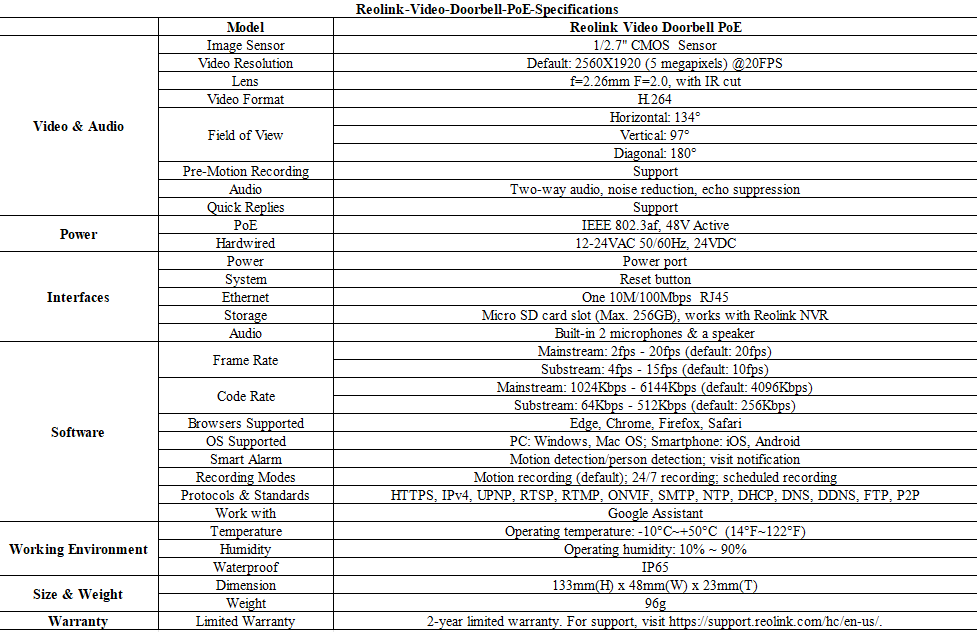
The Reolink Video Doorbell WiFi features a compact design, measuring exactly 133mm (Height) × 48mm (Width) × 23mm (Depth). These slim dimensions allow the Reolink Video Doorbell WiFi to mount perfectly on most standard doorframes and narrow trims.
Does the Reolink Video Doorbell WiFi come with an SD card, and what size is supported?
The Reolink Video Doorbell WiFi does not include a micro SD card. However, the Reolink Video Doorbell WiFi supports micro SD cards up to 256GB, which provides ample local storage for motion events and 24/7 continuous recording.
Questa telecamera supporta il rilevamento di persone/veicoli/animali?
Sì, questa telecamera supporta il rilevamento di persone/veicoli/animali.
Questa telecamera può collegarsi a router non Wi-Fi 6?
Sì, questa telecamera può connettersi a router non Wi-Fi 6, ma è consigliabile utilizzare un router WiFi 6 per migliorare la rete.
Che cos'è il Wi-Fi 6? Quali sono i suoi vantaggi?
Il Wi-Fi 6 (protocollo 802.11ax) è il più recente standard della tecnologia Wi-Fi, noto per la sua connettività wireless più veloce e stabile con una latenza di rete ridotta. Inoltre, applica il protocollo di crittografia avanzato WPA3 per migliorare la sicurezza della rete wireless.
La fotocamera supporta l'audio bidirezionale?
Sì, la telecamera supporta l'audio bidirezionale tramite il microfono e l'altoparlante integrati. È possibile non solo catturare video con l'audio registrato, ma anche comunicare in tempo reale con le persone che si trovano sul lato della telecamera tramite l'app o il client Reolink.
Tutte le telecamere IP nella stessa rete router possono connettersi a Reolink Home Hub?
Sì. Tutte le telecamere a batteria Reolink, le telecamere PoE e le telecamere Wi-Fi plug-in collegate allo stesso router possono connettersi a Reolink Home Hub.
Quali telecamere Reolink sono compatibili con Reolink Home Hub?
Reolink Home Hub è compatibile con tutte le telecamere Reolink Wi-Fi/PoE (tranne le telecamere 4G, le telecamere nei kit di sicurezza NVR e le telecamere aggiuntive). Scopri di più sulla compatibilità di Reolink Home Hub: https://support.reolink.com/hc/en-us/articles/32379509281561-Reolink-Home-Hub-Compatibility/
Perché non riesco a collegarla a software di terze parti?
RTSP e altre porte potrebbero essere disattivate di default. Puoi aprire Reolink Client, poi andare su Impostazioni dispositivo >> Rete >> Avanzate >> Impostazioni porta per assicurarti che tutte le porte siano attive prima di usare software di terze parti.
Posso spegnere i riflettori?
Sì, puoi spegnere i riflettori a mano.
Di default, i riflettori della telecamera si accendono quando c'è movimento: si accendono automaticamente quando rilevano qualcosa che si muove. Puoi spegnerli o regolare la luminosità come preferisci.
Ricorda che con i riflettori accesi puoi vedere bene di notte, ma se li spegni, vedrai solo immagini in bianco e nero.
Posso collegare la telecamera al mio sistema PoE NVR o PoE NVR?
Sì, le telecamere WiFi Reolink possono essere collegate al NVR PoE Reolink in modo indiretto. Per collegarle, puoi seguire questi passaggi:
Passaggio 1: collega la telecamera a un router WiFi tramite segnale WiFi o un cavo Ethernet e assicurati che sia alimentata tramite un alimentatore.
Passaggio 2: collega l'NVR allo stesso router tramite un cavo di rete.
L'NVR rileverà tutte le telecamere presenti sulla stessa rete.
Che tipo di scheda microSD posso usare?
Questa telecamera supporta schede microSD fino a 512 GB con formato FAT32 e velocità di lettura e scrittura Classe 10.
Come posso accendere questa telecamera?
La telecamera può essere alimentata da un adattatore di alimentazione CC da 12 V 1 A (un adattatore di alimentazione da 1,2 metri e un cavo di prolunga da 4,5 m sono inclusi nella confezione della telecamera). Puoi controllare cosa c'è nella confezione alla fine della pagina panoramica.
Questa telecamera supporta dispositivi smart home come Google Assistant?
Questa telecamera supporta il rilevamento di persone/veicoli?
Sì, questa fotocamera riconosce le persone e i veicoli. Riconosce anche gli animali domestici.
Questa fotocamera supporta la funzione time-lapse?
Questa fotocamera può connettersi a router non Wi-Fi 6?
Sì, questa fotocamera può connettersi a router non Wi-Fi 6, ma per una migliore connessione in rete è consigliabile utilizzare un router WiFi 6.
Cos'è il Wi-Fi 6? Quali sono i vantaggi?
Il Wi-Fi 6 (protocollo 802.11ax) è l'ultimo standard della tecnologia Wi-Fi, famoso per la sua connessione wireless più veloce e stabile con meno ritardi nella rete. Ha anche un protocollo di crittografia avanzato WPA3 per rendere la rete wireless più sicura.
Tutte le telecamere IP nella stessa rete router possono connettersi a Reolink Home Hub?
Sì. Tutte le telecamere a batteria Reolink, le telecamere PoE e le telecamere Wi-Fi plug-in collegate allo stesso router possono connettersi a Reolink Home Hub.
Quali telecamere Reolink sono compatibili con Reolink Home Hub?
Reolink Home Hub è compatibile con tutte le telecamere Reolink Wi-Fi/PoE (tranne le telecamere 4G, le telecamere nei kit di sicurezza NVR e le telecamere aggiuntive). Scopri di più sulla compatibilità di Reolink Home Hub: https://support.reolink.com/hc/en-us/articles/32379509281561-Reolink-Home-Hub-Compatibility/
How can I configure Surveillance Rules for Reolink Professional Series cameras?
How can I configure Surveillance Rules for Reolink Professional Series cameras?
How can I configure Surveillance Rules for Reolink Professional Series cameras?
How can I configure Surveillance Rules for Reolink Professional Series cameras?
How can I configure Surveillance Rules for Reolink Professional Series cameras?
How can I configure Surveillance Rules for Reolink Professional Series cameras?
How can I configure I/O alarms?
Designed for smart integration with external alarm devices, Reolink cameras with I/O alarm ports enable advanced automation, allowing your security system to respond to events in real time. Please refer to
How to Set Up Alarm In/Out Function on Reolink Camera for the methods to configure the I/O alarm ports and achieve seamless integration with your Reolink camera for smart, responsive alarm linkage.
How can I configure Surveillance Rules for Reolink Professional Series cameras?
How can I configure I/O alarms?
Designed for smart integration with external alarm devices, Reolink cameras with I/O alarm ports enable advanced automation, allowing your security system to respond to events in real time. Please refer to
How to Set Up Alarm In/Out Function on Reolink Camera for the methods to configure the I/O alarm ports and achieve seamless integration with your Reolink camera for smart, responsive alarm linkage.
How can I configure Surveillance Rules for Reolink Professional Series cameras?
Cosa rende OMVI diversa dalle altre telecamere di sicurezza?
OMVI combina una copertura panoramica con il tracciamento automatico PTZ, offrendo sia una visione completa dell'area sia un monitoraggio dettagliato dei soggetti.
Does the camera support cloud storage?
Yes. You can refer to
Reolink Cloud to check it available countries.
Note: You can also save video clips into a microSD card (supports up to 128GB).
Can this camera support time-lapse function?
How much data does the camera use?
Data usage of this camera depends on the bitrate you set up. 1 hour of live feed in 6MP mode for one channel (default bitrate: 4Mbps) will use about 2GB of data. If you use 1GB of data to stream live feed in Fluent mode (default bitrate: 1Mbps), you can watch for 2.3 hours (140 minutes). Based on that, you can estimate the data usage to choose the right data plan for you.
Does the camera work on 5G/4G/3G/2G?
The camera works on 4G networks. It also supports 3G, which is not recommended though (since wireless companies are working to retire older network technologies). It does not supports 5G or 2G SIM card.
Yet it does not matter you use a 4G or 5G mobile phone to access the camera. The camera needs a SIM card of its own, which is totally irrelevant to your mobile's SIM card.
Note:
(1) The camera does not support WiFi connection.
(2) As of July 1, 2022 T-Mobile’s older 3G UMTS network will be retired.
How does 4G work on this security camera?
Similar to your cellular phone, cellular security cameras need a SIM card with a data plan to tramsmit video signals over 3G/4G network.
The common SIM cards offered by carriers like T-Mobile and Vodafone can work for Reolink 4G camers (as they can for your cellular phone). Click to check
supported carriers in available countries and regions for this camera.
You can also contact
our support team for consultation.
Does the camera have an SD card?
No, the camera does not come with a microSD card built in. But it has a microSD card slot.
This camera supports Max. 128GB microSD cards with FAT32 format and Class 10 or higher read & write speed.
Can I turn off the spotlights and siren?
Yes, you can turn off the spotlights and siren manually.
By default, the camera's spotlights and siren are motion activated: they will be turned on automatically when a motion is detected. You can turn them off, adjust the brightness of spotlights, or customize the siren to your liking.
Please note that with the spotlights on you can enjoy clear color night vision, but if the spotlights are turned off, you will only see black and white images at night.
Does this camera support person/vehicle/pet detection?
Yes, this camera supports person/vehicle detection and pet detection (beta). Currently, pet detection is used to detect cats and dogs and is in beta testing.
How long does the battery last?
The camera comes with a rechargeable battery. Normally, the battery lasts for about 2 months per charge (Actual use varies based on settings, use conditions and environmental factors.) When the battery level goes down to 10%, the camera will send you a low-battery notification.
For non-stop power supply, you can connect the camera to a Reolink Solar Panel (purchased separately).
How can I charge this camera? Is the solar panel a must?
You have two charging options (including solar charging):
Option 1. Have the camera connected to a solar paner for non-stop power supply.
(👆Also recommended as the most friendly charging option for the cam's battery.)
Option 2. Charge the camera (with its non-removable battery) via a 5V 2A USB charger. (Please note that it's ok to charge the cam while it's working, but not for long.)
(Note: To purchase one Reolink Solar Panel, you can choose "1 Camera + 1 Solar Panel" option while buying this camera; or you can buy it separately from https://store.reolink.com/accessories/.)
Can this camera support smart home like Google Assistant?
Can I talk to someone via the Reolink App? (Two-way audio)
Yes, this security camera features two-way audio, which means you can listen and talk to someone in real time with simple clicks in App.
Can this camera be used outdoors/indoors?
This camera can be used both indoors and outdoors.
It is IP66 certified weatherproof and its operating temperature is from -10°C to 55°C (14°F to 131°F), perfect for outdoor and indoor usage.
What does the PIR sensor work for?
PIR sensors are more sensitive to the infrared radiations from humans or animals, and thus can dramatically reduce false alarms caused by fluttering moths or flying twigs.
Its full name is passive infrared sensor. It measures the infrared (IR) light radiating from objects with a temperature above absolute zero. When the amount of infrared radiation changes, it triggers detection.
What are the advantages of the dual-lens camera?
This dual-lens camera is equipped with two lenses that capture views in 6MP 2K+ Super HD from a 180° ultra-wide angle. You don't need two or more single-lens cameras to monitor a large area. Instead, with only one dual-lens camera you can save installation time and enjoy much broader images with lower distortion. Images from the dual lens are seamlessly merged into one frame both in live view and playback.
Can the camera record to the microSD card (sold separately) inserted in Hub P1 if an HDD is already installed?
No, if there is an HDD in the Hub P1, the camera will only record to the HDD, not the microSD card.
Can the camera continue recording to Reolink Hub P1 when the network connection is interrupted?
Yes, cameras can continue recording and save videos to the built-in HDD of the Reolink Hub P1 during an Internet outage.
What are Event History and Weekly Summary?
Event History collects all 24/7 footage from connected cameras, enabling smart playback of detection events across multiple cameras and video filtering by date range, device, and event type.
Weekly Summary provides statistics on detection events, including daily alarms, alarm types, and involved devices, helping you understand when and where break-ins are most likely to occur.
Does the Reolink Hub P1 support Wi-Fi 6?
Yes, Reolink Hub P1 supports 2.4 & 5GHz dual-band Wi-Fi frequencies & Wi-Fi 6 technology, covering an area of up to 1000 square meters*.
*Data obtained under laboratory conditions. Results may vary in practice.
Can all the IP cameras under the same router network connect to Reolink Hub P1?
Yes. All Reolink battery cameras, PoE cameras, and plug-in Wi-Fi cameras connected to the same router can connect to Reolink Hub P1.
Which Reolink cameras are compatible with Reolink Hub P1?
Reolink Hub P1 is compatible with all Reolink Wi-Fi/PoE cameras (except 4G cameras, cameras in NVR security kits, and add-on cameras). Learn more about Reolink Home Hub compatibility: https://support.reolink.com/hc/en-us/articles/32379509281561-Reolink-Home-Hub-Compatibility/
Do the Wi-Fi NVR's LAN ports support PoE power supply?
No, they don't. However, the NVR still works with PoE cameras. You just need to first power them on with a PoE injector, PoE switch, or power adapter before connecting to the NVR. Make sure the cameras are in the same network as the NVR.
Which cameras are compatible with the Wi-Fi NVR?
It works with all Reolink
PoE and
wired Wi-Fi cameras. For PoE cameras, you need to first power them on with a PoE injector, PoE switch, or power adapter before connecting to the NVR.
Does the camera support smart home like Google Assistant?
Does the camera support time-lapse function?
Does the camera work with Reolink IoT devices (Reolink Floodlight, etc.)? How can they be linked?
Yes, the camera works with Reolink IoT devices, including Reolink Floodlight PoE/WiFi. The specific functions supported depend on the camera.
When Reolink Floodlight is linked to a camera, the floodlights and the built-in siren will be triggered once the camera detects an event.
Click here to see how to link the camera to Reolink Floodlight.Why can't I connect the camera to 3rd party softwares?
The RTSP and other ports may be disabled by default. You can launch Reolink Client, then go to Device Settings >> Network >> Advanced >> Port Settings to make sure all ports are enabled before using 3rd party softwares.
Does Reolink charge subscription fees for the camera or the Reolink application?
No. Reolink does not charge any subscription fees for camera or Reolink App. All features of this camera as well as the Reolink App are completely free and require no subscription.
How do I use live view and playback?
You can add and set up the camera on Reolink APP/Client. Then click the camera to check the live view and playback of it from anywhere, at any time.
Reolink APP/Client is free of charge and the service is free of subscription.
Does the camera support NAS?
What kind of microSD card can I use?
This camera supports up to 256GB microSD cards with FAT32 format and Class 10 read & write speed.
Does the camera compatible with my Reolink PoE NVR?
This camera is compatible with Reolink PoE NVR of the following hardware versions: H3MB18, N2MB02, N3MB01, N7MB01, H3MB18, N6MB01, N5MB01. For best performance, you need to
upgrade the NVR's firmware to the latest version for video displaying.
Reolink PoE NVRs that are currently available for sale support all the PoE standalone and plug-in WiFi cameras. However, if you have already had a Reolink PoE NVR, you can check if its
hardware version is compatible with this camera.
Where are the recordings stored? Is NVR a must?
The camera can work without an NVR.
1. When it works without an NVR, the recordings can be saved to the microSD card (purchased separately);
2. When it works with an NVR, the recordings can be saved to the NVR.
Note: For best compatibility, do not use the camera with third-party NVRs.
What Ethernet cable do I need?
The camera supports T-568B connectors and 8-PIN Ethernet cables of CAT5 or higher.
How can I power up this camera?
There are two methods:
1. Via an Ethernet cable, connect the camera to a PoE NVR, PoE injector, PoE switch, or directly to a router with a PoE port, for both power supply and video signal transmission.
Note: Please make sure that the PoE injector/switch is 802.3 af compliant (48V) and supports active mode.
2.Via a DC 12V 1A power adapter (purchased separately), connect the camera to power outlet for power supply only.
Does the camera support two-way audio?
Yes, the camera supports two-way audio via its built-in mic and speaker. You can not only capture videos with audio recorded but also have real-time communication with people on the camera's end through Reolink App or Client.
Does the camera support person/vehicle/animal detection?
Yes, this camera supports person/vehicle/animal detection.
Can I turn off the warm light and siren?
Yes, you can turn off the warm lightand siren manually.
By default, the camera's warm light and siren are motion activated: they will be turned on automatically when a motion is detected. You can turn them off, adjust the brightness of warm light, or customize the siren to your liking.
The camera can provide clear and natural true full-color night vision even without turning on the warm light. You can also choose to turn on the warm light to enhance the quality of the color night vision in extremely dark environments.
Does the camera offer true color night vision when the warm light is off?
Yes, thanks to the ColorX technology, the camera can still provide color night vision without the warm light on. Featuring an F1.0 large aperture that allows four times more light in than an F2.0 aperture. Additionally, the camera is equipped with a 1/1.8" advanced sensor, enabling it to deliver clear and vivid full-color night vision even without additional lighting. You can also turn on the warm light for even higher quality color night vision.
Does the camera work with Reolink IoT devices (Reolink Floodlight, etc.)? How can they be linked?
Yes, the camera works with Reolink IoT devices, including Reolink Floodlight PoE/WiFi. The specific functions supported depend on the camera.
When Reolink Floodlight is linked to a camera, the floodlight and the built-in siren will be triggered once the camera detects an event.
Click here to see how to link the camera to Reolink Floodlight.Is a subscription fee required for Reolink PoE cameras?
No, Reolink PoE cameras work well on their own without subscription fees. You can make full use of the person/vehicle/pet detection, local storage, and other functions for free!
Can this camera support time-lapse function?
Can this camera support smart home like Google Assistant?
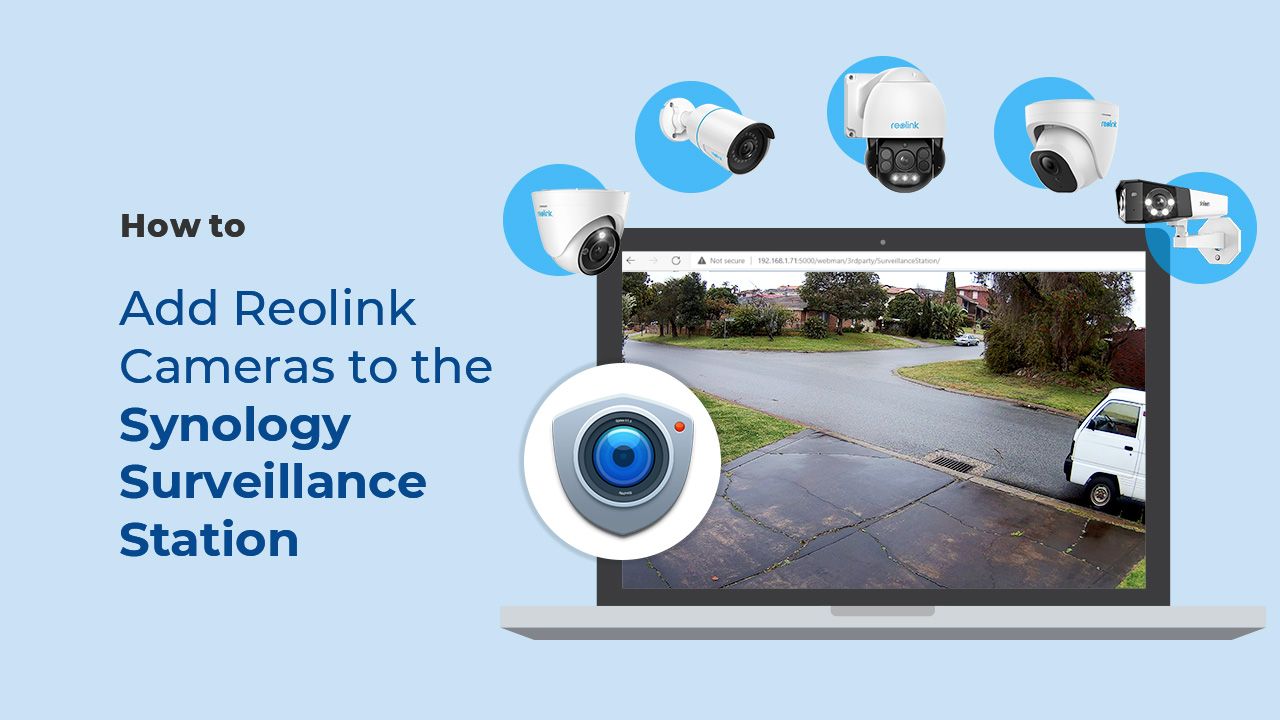
Can I use this camera with Synology?
Yes, this PoE IP camera can work with Synology. There are 2 methods for you to save videos in it.
Method 1 (recommended): You can add this camera to the Synology Surveillance Station. Check
this article to learn how to add a camera.
Method 2: You can treat your Synology device as an FTP server. For detailed steps, check
How to Set up FTP for Reolink Products.
What kind of microSD card can I use?
This camera supports up to 256GB microSD cards with FAT32 format and Class 10 read & write speed.
What Ethernet Cable Do I Need?
The camera supports T-568B connectors and 8-PIN Ethernet cables of CAT5 or higher.
Where are the recordings stored? Is NVR a must?
The camera can work without an NVR.
1. When it works without an NVR, the recordings can be saved to the microSD card (purchased separately);
2. When it works with an NVR, the recordings can be saved to the NVR, and the transmission will use one NVR channel.
Note: For best compatibility, do not use the camera with third-party NVRs.
How can I power up this camera?
There are two methods:
Method 1. Via an Ethernet cable, connect this camera to a PoE NVR, PoE injector, PoE switch, or directly to a router with a PoE port, for both power supply and video signal transmission.
Note: Please make sure that the PoE injector/switch is 802.3af compliant (48V) and supports active mode.
Method 2.Via a DC 12V 2A power adapter (purchased separately) for power supply only.
Can this camera be used outdoors/indoors?
This camera can be used both indoors and outdoors.
It is IP67 certified weatherproof and its operating temperature is from -10°C to 55°C (14°F to 131°F), perfect for outdoor and indoor usage.
How do I use live view and playback?
You can add and set up the camera on Reolink App/Client. Then click the camera to check the live view and playback of it from anywhere, at any time.
Reolink App/Client is free of charge and the service is free of subscription.
Please note that when using live view or playback on Reolink NVR, you may be prompted to switch the preview resolution, and following the prompt is recommended to avoid potential impact on performance.
Can I turn off the spotlights and siren?
Yes, you can turn off the spotlights and siren manually.
By default, the camera's spotlights and siren are motion activated: they will be turned on automatically when a motion is detected. You can turn them off, adjust the brightness of spotlights, or customize the siren to your liking.
Please note that with the spotlights on you can enjoy clear color night vision, but if the spotlights are turned off, you will only see black and white images at night.
Does the camera support two-way audio?
Yes, the camera supports two-way audio via its built-in mic and speaker. You can not only capture videos with audio recorded but also have real-time communication with people on the camera's end through Reolink App or Client.
Does the camera work with my Reolink PoE NVR?
If you want to buy a new one: the currently on-sale NVRs work with all PoE and plug-in WiFi cameras.
If you already have one:
Please first refer to
this article for its hardware version.
For the NVR with the hardware N7MB01, N6MB01, or N5MB01, it works with all PoE and plug-in WiFi cameras.
For the NVR with the hardware N2MB02, N3MB01, or H3MB18, it works with all PoE and plug-in WiFi cameras. But you can not have a full-resolution live view of the following cameras: Duo Series P737, Reolink Duo 3 PoE, RLC-1212A, RLC-1224A, Reolink Duo 2 PoE, Reolink Duo 2 WiFi, Reolink Duo Floodlight WiFi, Reolink Duo Floodlight PoE.
For the NVR with the rest hardwares such as H3MB17, H3MB02, and H3MB16, please refer to
Introduction to Hardware Versions of Reolink NVRs for more detailed information. For all the compatible NVRs, we recommend you update their firmware version here
before using them with the camera.Why can't I connect it to 3rd party softwares?
The RTSP and other ports may be disabled by default. You can open Reolink Client, then go to Device Settings >> Network >> Advanced >> Port Settings to make sure all ports are enabled before using 3rd party softwares.
Does my camera support person/vehicle/animal detection?
Yes, this camera supports person/vehicle/animal detection.
What are the advantages of the dual-lens camera?
This dual-lens camera is equipped with two lenses that capture views in 4K 8MP UHD from a 180° ultra-wide angle. You don’t need two or more single-lens cameras to monitor a large area. Instead, with only one dual-lens camera you can save installation time and enjoy much broader images with lower distortion. Images from the dual lens are seamlessly merged into one frame both in live view and playback.
Can this camera operate or charge at -20°C?
Yes. The working temperature range is -20°C to +55°C. In cold weather, the solar panel helps warm the battery, enabling it to charge once it reaches a suitable temperature. In strong sunlight, charging can resume in as little as 30 minutes.
How long does the battery last?
In standard usage mode, the camera can last up to 160 days (based on recording 300 seconds per day). In continuous recording mode, it can last up to 21 days (recording at 3fps, switching to 15fps when motion is detected). With the 30W solar panel and strong sunlight, the camera can stay charged without manual intervention.
How do I charge this camera? Do I need a solar panel?
The camera includes a 30W solar panel, which can power it continuously under sufficient sunlight. Alternatively, you can charge the internal battery using a 5V/2A USB charger.
Does the camera support Cloud storage?
Yes, Reolink Cloud is supported in select countries. You can also record to a microSD card (up to 512GB) for local storage.
What kind of microSD card does this camera support?
The camera supports microSD cards up to 512GB with FAT32 format and Class 10 or above for reliable read/write speeds.
Can I connect this camera with smart home systems like Google Assistant?
Does my camera support person/vehicle/animal detection?
Yes, it supports smart detection that can accurately detect people, vehicles, and animals.
What is ColorX Night Vision?
ColorX Night Vision combines an F1.0 large aperture with a 1/1.8'' sensor to capture four times more light than traditional cameras. This allows the camera to deliver full-color footage even in dark environments—without needing additional spotlights.
How long is the pre-recording duration?
The default pre-recording time is 10 seconds. You can adjust it to anywhere between 2 to 10 seconds in the app settings.
How do I enable the pre-recording mode?
Open the Reolink app, and go to Settings>Camera Recording to enable Pre-Recording Mode. And you can adjust "Frame Rate" and tap "Schedule" to adjust the time according to your needs.
How do I activate and use the SIM card included in the package?
To activate the SIM card, go to the SIM Service under the Cloud tab in the Reolink App, or visit the
activation page. Once activated, insert the SIM card into your camera to start using it. For detailed instructions, see the
Introduction to Reolink Sim Card.
Can this camera support time-lapse function?
Can I turn off the spotlight and siren?
Yes, you can turn off the spotlight and siren manually.
By default, the camera's spotlights and siren are motion activated: they will be turned on automatically when a motion is detected. You can turn them off, adjust the brightness of spotlights, or customize the siren to your liking.
Please note that with the spotlights on you can enjoy clear color night vision, but if the spotlights are turned off, you will only see black and white images at night.
Can I talk to someone via the Reolink App? (Two-way audio)
Yes, this security camera features two-way audio, which means you can listen and talk to someone in real time with simple clicks in App.
Does the camera have an SD card?
No, the camera does not come with a microSD card built in. But it has a microSD card slot.
This camera supports max. 512GB microSD cards with FAT32 format and Class 10 or higher read & write speed.
How much data do I need on the SIM card?
Data usage of this camera depends on the bitrate you set up. 1 hour of live feed in 4MP mode for one channel (default bitrate: 3Mbps) will use about 2GB of data. (In 4MP mode, only one channel is available for live feed). If you use 1GB of data to stream live feed in Fluent mode for one channel (default bitrate: 512kbps), you can watch for about 5 hours, while 1GB of data to stream live feed in Fluent mode for two channels at the same time (default bitrate: 512kbps for each) will last for about 2.5 hours. Based on that, you can estimate the data usage to choose the right data plan for you.
Does the camera work on 5G/4G/3G/2G?
The camera works on 4G networks. It also supports 3G, which is not recommended though (since wireless companies are working to retire older network technologies). It does not support 5G or 2G SIM card.
Yet it does not matter if you use a 4G or 5G mobile phone to access the camera. The camera needs a SIM card of its own, which is totally irrelevant to your mobile's SIM card.
Note:
(1) The camera does not support WiFi connection.
(2) As of July 1, 2022 T-Mobile’s older 3G UMTS network will be retired.
How does 4G work on this security camera?
Similar to your cellular phone, cellular security cameras need a SIM card with a data plan to transmit video signals over 3G/4G network.
The common SIM cards offered by carriers like T-Mobile and Vodafone can work for Reolink 4G cameras (as they can for your cellular phone). Click to check
supported carriers in available countries and regions for this camera.
You can also contact
our support team for consultation.
What is hybrid zoom?
Hybrid zoom is a combination of optical zoom and digital zoom, specifically referring to the presentation of Reolink TrackMix camera's close-up view. This view is cooperatively produced by the camera's two lenses in order to automatically zoom in onto the targeted object. When the target is not too far, the picture captured by the 4MP wide-angle lens will be digitally zoomed in; when the object gets too far, the view then switches to the picture captured by the 2MP telephoto lens to ensure the best image quality. In either way, TrackMix camera uses advanced technology to restore details and definition to the zoomed-in image, enhancing the image quality.
What is dual-tracking?
Dual-tracking refers to the two ways that a TrackMix camera simultaneously uses to automatically track an object in both the wide-angle and zoomed views.
In the panoramic view, which is captured by the camera's wide-angle lens, the camera pans and tilts to keep the detected objects within its field of view; In the zoomed view, which is produced by the two lenses cooperatively, the camera zooms in to the targeted object (which is within the camera's field) to closely follow its movement. It's notable that the TrackMix camera uses advanced technology to restore details and definition to the zoomed-in image, enhancing the image quality.
This can help you track the situation and details at the same time, without manually making the camera pan, tilt or zoom in.
Does the telephoto lens work continuously for 24/7 Recording?
No, only the wide-angle lens works to record 24/7, which differs from other cameras in the TrackMix Series. The telephoto lens is activated only when a motion is detected or when you preview the footage. This design helps reduce power consumption and extend battery life.
Does the camera support cloud storage?
Yes, this camera supports cloud service in certain countries. You can visit https://cloud.reolink.com/cloud-plan to check the available countries.
Note: You can also store footage on a microSD card (up to 512GB).
What kind of microSD card can I use?
This camera supports up to 512GB microSD cards with FAT32 format and Class 10 read & write speed.
Does the camera support smart home like Google Assistant?
How does 4G work on this security camera?
Similar to your mobile phone, cellular security cameras require a SIM card with a data plan to transmit video data over 3G/4G networks.
For optimal performance and seamless activation, a Reolink SIM card is recommended. Alternatively, common SIM cards (e.g. T-Mobile, Vodafone) are also compatible. Click to check
supported carriers in available countries and regions.
For any further help, please contact our support team.
Does the camera work on 5G/4G/3G/2G?
The camera works on 4G networks. It also supports 3G, which is not recommended though (since wireless companies are working to retire older network technologies). It does not support 5G or 2G SIM cards.
Note:
(1) It does not matter whether you use a 4G or 5G mobile phone to access the camera. The camera needs a SIM card of its own, which is irrelevant to your mobile's SIM card.
(2) The camera does not support Wi-Fi network.
Does the camera support person/vehicle/animal detection?
Yes, it supports person/vehicle/animal detection.
What is the ColorX night vision?
The F1.0 large aperture and 1/1.8'' sensor bring 4 times more light than traditional cameras, providing color night vision that is as clear as daylight in low-light environments without the need for additional spotlights.
How to set up Pre-recording Mode?
Tap the "Settings" button on the app, then select "Camera Recording" and enable the "Pre-Recording Mode" option. Tap "Frame Rate" and "Schedule" to adjust the settings as needed.
How long is the pre-recording time?
The default pre-recording time is 10s, adjustable between 2s and 10s. It is recommended to use it with a solar panel for a better pre-recording experience.
How to use the included SIM card?
Update your Reolink App to the latest version, then scan the QR code on the SIM card using the app.
Can I turn off the spotlights and siren?
Yes, you can turn off the spotlights and siren manually. By default, the camera's spotlights and siren are motion activated: they will be turned on automatically when a motion is detected. You can turn them off, adjust the brightness of spotlights, or customize the siren to your liking. Please note that with the spotlights on you can enjoy clear color night vision, but if the spotlights are turned off, you will only see black and white images at night.
Can this camera work with Reolink NVR or Reolink Home Hub Series?
Yes, this camera can work with all currently available PoE NVRs and Wi-Fi NVRs, supporting 24/7 continuous recording. It is also compatible with Reolink Home Hub and Home Hub Pro.
Can this camera connect to non-Wi-Fi 6 routers?
Yes, this camera can connect to non-Wi-Fi 6 routers, but a WiFi 6 router is better recommended for enhanced networking.
What is Wi-Fi 6?What are its benefits?
Wi-Fi 6 (802.11ax Protocol) is the newest standard of WiFi technology, known for its faster and more stable wireless connectivity with reduced network latency. It also applied advanced encryption protocol WPA3 to enhance the security of wireless network.
Does the camera support two-way audio?
Yes, the camera supports two-way audio via its built-in mic and speaker. You can not only capture videos with audio recorded but also have real-time communication with people on the camera's end through Reolink App or Client.
What kind of microSD card can I use?
This camera supports up to 512GB microSD card with FAT32 format and Class 10 read & write speed.
Can this camera support smart home like Google Assistant?
Can this camera support time-lapse function?
Can this camera be used outdoors/indoors?
This camera can be used both indoors and outdoors. It is IP67 certified weatherproof and its operating temperature is from -10°C to 55°C (14°F to 131°F), perfect for outdoor and indoor usage.
How can I power up this camera?
The camera can be powered by a 12V 2A DC power adapter (A 1.5-meter power adaptor and a 4.5m extension cable are shipped with the camera). You can check what is in the box at the end of the overview page.
Does my camera support person/vehicle/animal detection?
Yes, this camera supports person/vehicle/animal detection.
What are the advantages of a dual-lens camera?
With two lenses, this camera captures 4K 8MP UHD video in a seamless 180° ultra-wide view. It reduces the need for multiple cameras, making installation easier while delivering a broad, low-distortion image in both live view and playback.
How do I choose between a battery-powered and a power-connected model?
Power-connected models eliminate the need for frequent recharging. Please note that the total cable length, including the camera’s tail wire, is 19 feet.
What is the best placement for the Elite Series W740 camera?
Its ultra-wide field of view is ideal for large open areas. In tight spaces, walls and ceilings may dominate the frame and cause IR reflection at night, reducing visibility.
Can this camera work with Reolink NVR or Reolink Home Hub Series?
Yes, this camera can work with all currently available PoE NVRs and Wi-Fi NVRs, supporting 24/7 continuous recording. It is also compatible with Reolink Home Hub and Home Hub Pro.
Can this camera connect to non-WiFi 6 routers?
Yes, this camera can connect to non-WiFi 6 routers, but a WiFi 6 router is better recommended for enhanced networking.
What is Wi-Fi 6?What are its benefits?
Wi-Fi 6 (802.11ax Protocol) is the newest standard of WiFi technology, known for its faster and more stable wireless connectivity with reduced network latency. It also applied advanced encryption protocol WPA3 to enhance the security of wireless network.
How should I choose between battery-powered and plug-in cameras? What are their differences?
Plug-in cameras don’t need frequent recharging, but they should be installed within approximately 6m of a power socket.
What is Motion Track, and how does it function?
Motion Track captures the detected target's movement over a period of time and creates an image depicting its trajectory. You can receive the image via email in real-time, eliminating the hassle of video downloads. Additionally, Reolink App (4.45 version) supports image creation based on selected movement duration.
Can I use this camera with Synology?
Yes, this WiFi IP camera can work with Synology. There are 2 methods for you to save videos in it.
Method 1 (recommended): You can add this camera to the Synology Surveillance Station. Check
this article to learn how to add a camera.
Method 2: You can treat your Synology device as an FTP server. For detailed steps, check
How to Set up FTP for Reolink Products.
Can this camera support time-lapse function?
Can this camera support Smart Home like Google Assistant?
Does the camera support NAS?
Can I turn off the spotlights and siren?
Yes, you can turn off the spotlights and siren manually.
By default, the camera's spotlights and siren are motion activated: they will be turned on automatically when a motion is detected. You can turn them off, adjust the brightness of spotlights, or customize the siren to your liking.
Please note that with the spotlights on you can enjoy clear color night vision, but if the spotlights are turned off, you will only see black and white images at night.
What kind of microSD card can I use?
This camera supports up to 512GB microSD card with FAT32 format and Class 10 read & write speed.
How can I power up this camera?
The camera can be powered by a 12V 2A DC power adapter (A 1.5-meter power adaptor and a 4.5m extension cable are shipped with the camera). You can check what is in the box at the end of the overview page.
Can this camera be used outdoors/indoors?
This camera can be used both indoors and outdoors.
It is IP67 certified weatherproof and its operating temperature is from -10°C to 55°C (14°F to 131°F), perfect for outdoor and indoor usage.
Does my camera support person/vehicle/animal detection?
Yes, this camera supports person/vehicle/animal detection.
What are the advantages of the dual-lens camera?
This dual-lens camera is equipped with two lenses that capture views in 4K Ultra HD from a 180° ultra-wide angle. You don’t need two or more single-lens cameras to monitor a large area. Instead, with only one dual-lens camera you can save installation time and enjoy much broader images with lower distortion. Images from the dual lens are seamlessly merged into one frame both in live view and playback.
How many battery-powered Wi-Fi cameras does this NVR support at most?
Only the NVS8(NHD) with hardware N7MB01 supports connecting battery-powered Wi-Fi cameras, with a maximum of 12. The number of battery-powered Wi-Fi cameras that can be connected is 12 minus the number of wired IPCs. For more information, please refer to
Introduction to Hardware Versions of Reolink NVRsHow many wired IP cameras (including PoE & plug-in Wi-Fi cameras) does this NVR support at most?
The NVR supports 12 channels, allowing a maximum of 12 cameras. It can support up to 8 wired IP cameras (including PoE & plug-in Wi-Fi cameras) .
Please note that a Reolink dual-lens camera occupies two video channels.
Why can't I find the Talk button for two-way audio on my Reolink App/Client when my camera, which supports this function, is connected to the NVR?
Before using this function, please check if you have updated the firmware on your NVR to the latest version. Here is a step-by-step instruction on how to upgrade it: https://support.reolink.com/hc/en-us/articles/900004550323-How-to-Upgrade-Firmware-via-Reolink-Client-New-Client-/
Can I connect the NVR to the third-party cameras?
It's not suggested to do so. Compatibility issues may occur with third-party cameras. Please contact
our support team if you have any concerns about protocols.
Can I connect the NVR to the router wirelessly?
No, the NVR can only connect to the router via an ethernet cable.
Can I add a PoE switch?
Yes, there are 3 methods.
Method 1: Plug the PoE NVR and the PoE switch to the same router via Ethernet cable. Then plug the PoE cameras into the PoE switch or PoE NVR.
Method 2: Plug the PoE switch into the PoE NVR, and then connect the NVR LAN port to the router.
Method 3: Plug the PoE switch to your router, then connect the NVR LAN port to your PoE switch.
For more information, please refer to
How to Connect PoE Switch Router and PoE NVR Note: By adding PoE switches, you will not expand the number of cameras supported by the NVR, since its video channels are immutable.
How to expand the NVR storage capacity?
You can add HDDs for the NVR via SATA ports.
The currently on-sale NVS8(NHD) supports Max. 16TB in total: Max. 8TB via SATA, Max. 8TB via eSATA.
Does the NVR support the person/vehicle/animal detection of my Reolink cameras?
If you want to buy a new one:
Yes, the currently on-sale NVRs support the cameras' smart person/vehicle/animal detection.
If you already have one:
NVS8(NHD) with the newest hardware versions (H3MB18/N2MB02/N3MB01/N7MB01) supports the cameras' smart person/vehicle detection. Check
Hardware Version of Reolink NVRs for detailed information.
Can this camera work with Reolink NVR or Reolink Home Hub Series?
Yes, this camera can work with all currently available PoE NVRs and Wi-Fi NVRs, supporting 24/7 continuous recording. It is also compatible with Reolink Home Hub and Home Hub Pro.
Can this camera be used outdoors/indoors?
This camera can be used both indoors and outdoors.
It is weatherproof and its operating temperature is from -10°C to 55°C (14°F to 131°F), perfect for outdoor and indoor usage.
Can this camera support time-lapse function?
Does the camera support NAS?
Can I turn off the spotlights?
Yes, you can turn off the spotlights manually.
By default, the camera's spotlights are motion activated: it will turn on automatically when a motion is detected.
You can turn them off or adjust the brightness to your liking.
Please note that with the spotlights on you can enjoy clear color night vision, but if the spotlights are turned off, you will only see black and white images at night.
Does this camera support person/vehicle/animal detection?
Yes, this camera supports person/vehicle/animal detection.
What kind of microSD card can I use?
This camera supports up to 256GB microSD cards with FAT32 format and Class 10 read & write speed.
Can this camera connect to non-WiFi 6 routers?
Yes, this camera can connect to non-WiFi 6 routers, but a WiFi 6 router is better recommended for enhanced networking.
What is Wi-Fi 6?What are its benefits?
Wi-Fi 6 (802.11ax Protocol) is the newest standard of WiFi technology, known for its faster and more stable wireless connectivity with reduced network latency. It also applied advanced encryption protocol WPA3 to enhance the security of wireless network.
How should I choose between battery-powered and plug-in cameras? What are their differences?
Plug-in cameras don’t need frequent recharging, but they should be installed within approximately 10ft of a power socket.
Can I connect Lumus Series E450 to the currently available power extension cable?
No, Lumus Series E450 is not compatible with the extension cable.
How many battery-powered Wi-Fi cameras does this NVR support at most?
Only the NVS16 with hardware N6MB01 supports connecting battery-powered Wi-Fi cameras, with a maximum of 24. The number of battery-powered Wi-Fi cameras that can be connected is 24 minus the number of wired IPCs. For more information, please refer to
Introduction to Hardware Versions of Reolink NVRsHow many wired IP cameras (including PoE & plug-in Wi-Fi cameras) does this NVR support at most?
The NVR supports 24 channels, allowing a maximum of 24 cameras. It can support up to 16 wired IP cameras (including PoE & plug-in Wi-Fi cameras) .
Please note that a Reolink dual-lens camera occupies two video channels.
Why can't I find the Talk button for two-way audio on my Reolink App/Client when my camera, which supports this function, is connected to the NVR?
Before using this function, please check if you have updated the firmware on your NVR to the latest version. Here is a step-by-step instruction on how to upgrade it: https://support.reolink.com/hc/en-us/articles/900004550323-How-to-Upgrade-Firmware-via-Reolink-Client-New-Client-/
Can I connect the NVR to the third-party cameras?
It's not suggested to do so. Compatibility issues may occur with third-party cameras. Please contact
our support team if you have any concerns about protocols.
Can I connect the NVR to the router wirelessly?
No, the NVR can only connect to the router via an ethernet cable.
Can I add a PoE switch?
Yes, there are 3 methods.
Method 1: Plug the PoE NVR and the PoE switch to the same router via Ethernet cable. Then plug the PoE cameras into the PoE switch or PoE NVR.
Method 2: Plug the PoE switch into the PoE NVR, and then connect the NVR LAN port to the router.
Method 3: Plug the PoE switch to your router, then connect the NVR LAN port to your PoE switch.
For more information, please refer to
How to Connect PoE Switch Router and PoE NVR Note: By adding PoE switches, you will not expand the number of cameras supported by the NVR, since its video channels are immutable.
How to expand the NVR storage capacity?
You can change the pre-installed 4TB HDD to a larger one and/or add an external HDD for the NVR.
The currently available NVS16 supports max.16TB in total (2×8TB via SATA).
Does the NVR support the person/vehicle/animal detection of my Reolink cameras?
If you want to buy a new one:
Yes, the currently available NVRs support the cameras' smart person/vehicle/animal detection.
If you already have one:
NVS16 with the newest hardware versions (H3MB18/N6MB01) supports the cameras' smart person/vehicle detection. Check
Hardware Version of Reolink NVRs for detailed information.
Does my security system work with Google Assistant?
Sorry, the NVR system cannot work with Google Assistant.
How long does the security camera systems store video footage?
The length of time to store video footage is closely related to the video code rate.
As for NVS8-12MD4, the default bit rate of its cameras is 8192 kbps. Proximately, with the 4 cameras all working, this security system can store video footage for
6 days to its pre-installed 2TB HDD.
You can refer to
"How Long Can Reolink NVR Record?"for more details.
If you want to keep longer video storage, you can
expand the NVR's storage capacity.
What ethernet cable can I use? What is the maximum distance between the camera and NVR?
We have included 4x 18M Ethernet cables for the 4 cameras included in the kit. You can change them to longer ones if needed.
Reolink PoE cameras support CAT5, CAT5E, CAT6, CAT7 with 8 PIN Ethernet cables. The maximum length of the network cable they support is 330ft (100m). Please note that the data is obtained with a standard CAT5E Ethernet cable under specific test conditions and actual use may vary.
What is the difference if I buy cameras and NVR separately instead of buying a whole system?
The cameras in the kit cannot work alone. They have to work with the Reolink PoE NVR. If you buy standalone cameras and the NVR separately, the cameras can work alone.
Also, the network cables for cameras in the kit are 18m long while those for standalone cameras are 1m long.
Can I connect Reolink NVR to one or more displayers?
You can connect maximum two displayers with the NVR via HDMI or VGA (See the diagram below).
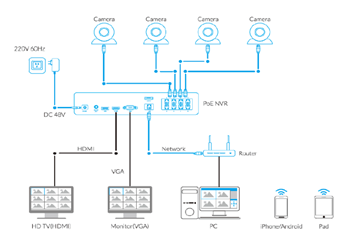
Cameras connected to the NVR will be shown on the displayer(s).
How can I live view or play back the recordings?
Method 1: Connect the NVR to a monitor or TV for live view or playback;
Method 2: Download FREE Reolink APP or Client, add the NVR to the APP or Client, configure the settings, and then you can live view or play back the footages.
Does the NVR support the person/vehicle/pet detection of my Reolink cameras?
Yes, the NVR in NVS8-12MD4 supports the cameras' smart person/vehicle/pet detection.
Does my security system work with Google Assistant?
Sorry, the NVR system cannot work with Google Assistant.
How long does the security camera systems store video footage?
The length of time to store video footage is closely related to the video code rate.
As for NVS8-12MB4, the default bit rate of its cameras is 8192 kbps. Proximately, with the 4 cameras all working, this security system can store video footage for
6 days to its pre-installed 2TB HDD.
You can refer to
"How Long Can Reolink NVR Record?"for more details.
If you want to keep longer video storage, you can
expand the NVR's storage capacity.
What ethernet cable can I use? What is the maximum distance between the camera and NVR?
We have included 4 18M ethernet cables for the 4 cameras included in the kit. You can change them to longer ones if needed.
Reolink PoE cameras support CAT5, CAT5E, CAT6, CAT7 with 8 PIN Ethernet cables. The maximum length of the network cable they support is 330ft (100m). Please note that the data is obtained with a standard CAT5E Ethernet cable under specific test conditions and actual use may vary.
What is the difference if I buy cameras and NVR separately instead of buying a whole system?
The cameras in the kit cannot work alone. They have to work with the Reolink PoE NVR. If you buy standalone cameras and the NVR separately, the cameras can work alone.
Also, the network cables for cameras in the kit are 18m long while those for standalone cameras are 1m long.
Can I connect Reolink NVR to one or more displayers?
You can connect maximum two displayers with the NVR via HDMI or VGA (See the diagram below).
Cameras connected to the NVR will be shown on the displayer(s).
How can I pre-view or play back the video?
Method 1: Connect the NVR to a monitor or TV for preview or playback;
Method 2: Download FREE Reolink APP or Client, add the NVR to the APP or Client, configure the settings, and then you can preview or play back the videos.
Does the NVR support the person/vehicle detection of my Reolink cameras?
Yes, the NVR in NVS8-12MB4 supports the cameras' smart person/vehicle detection.
Does the camera work with Reolink IoT devices (Reolink Floodlight, etc.)? How can they be linked?
Yes, the camera works with Reolink IoT devices, including Reolink Floodlight PoE/WiFi. The specific functions supported depend on the camera.
When Reolink Floodlight is linked to a camera, the floodlight and the built-in siren will be triggered once the camera detects an event.
Click here to see how to link the camera to Reolink Floodlight.Is a subscription fee required for Reolink PoE cameras?
No, Reolink PoE cameras work well on their own without subscription fees. You can make full use of the person/vehicle/pet detection, local storage, and other functions for free!
Can this camera support time-lapse function?
Can this camera support smart home like Google Assistant?
Can I use this camera with Synology?
Yes, this PoE IP camera can work with Synology. There are 2 methods for you to save videos in it.
Method 1 (recommended): You can add this camera to the Synology Surveillance Station. Check
this article to learn how to add a camera.
Method 2: You can treat your Synology device as an FTP server. For detailed steps, check
How to Set up FTP for Reolink Products.
What kind of microSD card can I use?
This camera supports up to 256GB microSD cards with FAT32 format and Class 10 read & write speed.
What Ethernet Cable Do I Need?
The camera supports T-568B connectors and 8-PIN Ethernet cables of CAT5 or higher.
Where are the recordings stored? Is NVR a must?
The camera can work without an NVR.
1. When it works without an NVR, the recordings can be saved to the microSD card (purchased separately);
2. When it works with an NVR, the recordings can be saved to the NVR, and the transmission will use one NVR channel.
Note: For best compatibility, do not use the camera with third-party NVRs.
How can I power up this camera?
There are two methods:
Method 1. Via an Ethernet cable, connect this camera to a PoE NVR, PoE injector, PoE switch, or directly to a router with a PoE port, for both power supply and video signal transmission.
Note: Please make sure that the PoE injector/switch is 802.3af compliant (48V) and supports active mode.
Method 2.Via a DC 12V 2A power adapter (purchased separately) for power supply only.
Can this camera be used outdoors/indoors?
This camera can be used both indoors and outdoors.
It is IP67 certified weatherproof and its operating temperature is from -10°C to 55°C (14°F to 131°F), perfect for outdoor and indoor usage.
How do I use live view and playback?
You can add and set up the camera on Reolink APP/Client. Then click the camera to check the live view and playback of it from anywhere, at any time.
Reolink APP/Client is free of charge and the service is free of subscription.
Please note that when using live view or playback on Reolink NVR, you may be prompted to switch the preview resolution, and following the prompt is recommended to avoid potential impact on performance.
Can I turn off the spotlights and siren?
Yes, you can turn off the spotlights and siren manually.
By default, the camera's spotlights and siren are motion activated: they will be turned on automatically when a motion is detected. You can turn them off, adjust the brightness of spotlights, or customize the siren to your liking.
Please note that with the spotlights on you can enjoy clear color night vision, but if the spotlights are turned off, you will only see black and white images at night.
Does the camera support two-way audio?
Yes, the camera supports two-way audio via its built-in mic and speaker. You can not only capture videos with audio recorded but also have real-time communication with people on the camera's end through Reolink App or Client.
Does the camera work with my Reolink PoE NVR?
If you want to buy a new one: the currently on-sale NVRs work with all PoE and plug-in WiFi cameras.
If you already have one:
Please first refer to
this article for its hardware version.
For the NVR with the hardware N7MB01, N6MB01, or N5MB01, it works with all PoE and plug-in WiFi cameras.
For the NVR with the hardware N2MB02, N3MB01, or H3MB18, it works with all PoE and plug-in WiFi cameras. But you can not have a full-resolution live view of the following cameras: Duo Series P757, Reolink Duo 3 PoE, RLC-1212A, RLC-1224A, Reolink Duo 2 PoE, Reolink Duo 2 WiFi, Reolink Duo Floodlight WiFi, Reolink Duo Floodlight PoE.
For the NVR with the rest hardwares such as H3MB17, H3MB02, and H3MB16, please refer to
Introduction to Hardware Versions of Reolink NVRs for more detailed information. For all the compatible NVRs, we recommend you update their firmware version here
before using them with the camera.Why can't I connect it to 3rd party softwares?
The RTSP and other ports may be disabled by default. You can launch Reolink Client, then go to Device Settings >> Network >> Advanced >> Port Settings to make sure all ports are enabled before using 3rd party softwares.
What is Motion Track, and how does it function?
Motion Track captures the detected target's movement over a period of time and creates an image depicting its trajectory. You can receive the image via email in real-time, eliminating the hassle of video downloads. Additionally, Reolink App (4.45 version) supports image creation based on selected movement duration.
Does my camera support person/vehicle/animal detection?
Yes, this camera supports person/vehicle/animal detection.
What are the advantages of the dual-lens camera?
This dual-lens camera is equipped with two lenses that capture views in 4K 16MP UHD from a 180° ultra-wide angle. You don’t need two or more single-lens cameras to monitor a large area. Instead, with only one dual-lens camera you can save installation time and enjoy much broader images with lower distortion. Images from the dual lens are seamlessly merged into one frame both in live view and playback.
Can this camera support smart home like Google Assistant?
Yes, currently, this camera can work with Google Assistant.
Tips:
How to add this camera to Google Assistant?Why can't I connect it to 3rd party softwares?
The RTSP and other ports may be disabled by default. You can launch Reolink Client, then go to Device Settings >> Network >> Advanced >> Port Settings to make sure all ports are enabled before using 3rd party softwares.
Can I use this camera with Synology?
Yes, this PoE IP camera can work with Synology. There are 2 methods for you to save videos in it.
Method 1 (recommended): You can add this camera to the Synology Surveillance Station. Check
this article to learn how to add a camera.
Method 2: You can treat your Synology device as an FTP server. For detailed steps, check How to Set up FTP for Reolink Products.Does the camera work with my Reolink PoE NVR?
If you want to buy a new one: the currently on-sale NVRs work with all PoE and plug-in WiFi cameras.
If you already have one:
Please first refer to
this article for its hardware version.
For the NVR with the hardware N7MB01, N6MB01, or N5MB01, it works with all PoE and plug-in WiFi cameras.
For the NVR with the hardware N2MB02, N3MB01, or H3MB18, it works with all PoE and plug-in WiFi cameras. But you can not have a full-resolution live view of the following cameras: RLC-1212A, RLC-1224A, Reolink Duo 2 PoE, Reolink Duo 2 WiFi, Reolink Duo Floodlight WiFi, Reolink Duo Floodlight PoE.
For the NVR with the rest hardwares such as H3MB17, H3MB02, and H3MB16, please refer to Introduction to Hardware Versions of Reolink NVRs for more detailed information.Where are the recordings stored? Is NVR a must?
The camera can work without an NVR.
1. When it works without an NVR, the recordings can be saved to the microSD card (purchased separately);
2. When it works with an NVR, the recordings can be saved to the NVR.
Note: For best compatibility, do not use the camera with third-party NVRs.
What kind of microSD card can I use?
This camera supports up to 256GB microSD cards with FAT32 format and Class 10 read & write speed.
Can this camera support time-lapse function?
Yes, the camera can support time-lapse. It can save time-lapse photos and videos to the SD card.
How to Set Up Time Lapse?How do I use live view and playback?
You can add and set up the camera on Reolink APP/Client. Then click the camera to check the live view and playback of it from anywhere, at any time.
Reolink APP/Client is free of charge and the service is free of subscription.
Can this camera be used outdoors/indoors?
This camera can be used both indoors and outdoors.
It is IP67 certified weatherproof and its operating temperature is from -10°C to 55°C (14°F to 131°F), perfect for outdoor and indoor usage.
What Ethernet Cable Do I Need?
The camera supports T-568B connectors and 8-PIN Ethernet cables of CAT5 or higher.
How can I power up the camera?
There are two methods:
1. Via an Ethernet cable, connect the camera to a PoE NVR, PoE injector, PoE switch, or directly to a router with a PoE port, for both power supply and video signal transmission.
Note: Please make sure that the PoE injector/switch is 802.3 af compliant (48V) and supports active mode.
2.Via a DC 12V 1A power adapter (purchased separately), connect the camera to power outlet for power supply only.
Can I turn off the spotlights?
Yes, you can turn off the spotlights manually.
By default, the camera's spotlights are motion activated: it will turn on automatically when a motion is detected. You can turn them off or adjust the brightness to your liking.
Please note that with the spotlights on you can enjoy clear color night vision, but if the spotlights are turned off, you will only see black and white images at night.
Does the camera support two-way audio?
Yes, the camera supports two-way audio via its built-in mic and speaker. You can not only capture videos with audio recorded but also have real-time communication with people on the camera's end through Reolink App or Client.
Does my camera support person/vehicle/animal detection?
Yes, this camera supports person/vehicle/animal detection.
Is a subscription fee required for Reolink PoE cameras?
No, Reolink PoE cameras work well on their own without subscription fees. You can make full use of the person/vehicle/pet detection, local storage, and other functions for free!
Does my security system work with Google Assistant?
Sorry, the NVR system cannot work with Google Assistant.
How long does the security camera systems store video footage?
The length of time to store video footage is closely related to the video code rate.
As for NVS8-8MD4, the default bit rate of its cameras is 6144 kbps. Proximately, with the 4 cameras all working, this security system can store video footage for
8 days to its pre-installed 2TB HDD.
You can refer to
"How Long Can Reolink NVR Record?"for more details.
If you want to keep longer video storage, you can
expand the NVR's storage capacity.
What ethernet cable can I use? What is the maximum distance between the camera and NVR?
We have included 4 18M ethernet cables for the 4 cameras included in the kit. You can change them to longer ones if needed.
Reolink PoE cameras support CAT5, CAT5E, CAT6, CAT7 with 8 PIN Ethernet cables. The maximum length of the network cable they support is 330ft (100m). Please note that the data is obtained with a standard CAT5E Ethernet cable under specific test conditions and actual use may vary.
What is the difference if I buy cameras and NVR separately instead of buying a whole system?
The cameras in the kit cannot work alone. They have to work with the Reolink PoE NVR. If you buy standalone cameras and the NVR separately, the cameras can work alone.
Also, the network cables for cameras in the kit are 18m long while those for standalone cameras are 1m long.
Can I connect Reolink NVR to one or more displayers?
You can connect maximum two displayers with the NVR via HDMI or VGA (See the diagram below).
Cameras connected to the NVR will be shown on the displayer(s).
How can I pre-view or play back the video?
Method 1: Connect the NVR to a monitor or TV for preview or playback;
Method 2: Download FREE Reolink APP or Client, add the NVR to the APP or Client, configure the settings, and then you can preview or play back the videos.
Does the NVR support the person/vehicle detection of my Reolink cameras?
Yes, the NVR in NVS8-8MD4 supports the cameras' smart person/vehicle detection.
Does my security system work with Google Assistant?
Sorry, the NVR system cannot work with Google Assistant.
How long does the security camera systems store video footage?
The length of time to store video footage is closely related to the video code rate.
As for NVS8-8MB4, the default bit rate of its cameras is 6144 kbps. Proximately, with the 4 cameras all working, this security system can store video footage for
8 days to its pre-installed 2TB HDD.
You can refer to
"How Long Can Reolink NVR Record?"for more details.
If you want to keep longer video storage, you can
expand the NVR's storage capacity.
What ethernet cable can I use? What is the maximum distance between the camera and NVR?
We have included 4 18M ethernet cables for the 4 cameras included in the kit. You can change them to longer ones if needed.
Reolink PoE cameras support CAT5, CAT5E, CAT6, CAT7 with 8 PIN Ethernet cables. The maximum length of the network cable they support is 330ft (100m). Please note that the data is obtained with a standard CAT5E Ethernet cable under specific test conditions and actual use may vary.
What is the difference if I buy cameras and NVR separately instead of buying a whole system?
The cameras in the kit cannot work alone. They have to work with the Reolink PoE NVR. If you buy standalone cameras and the NVR separately, the cameras can work alone.
Also, the network cables for cameras in the kit are 18m long while those for standalone cameras are 1m long.
Can I connect Reolink NVR to one or more displayers?
You can connect maximum two displayers with the NVR via HDMI or VGA (See the diagram below).
Cameras connected to the NVR will be shown on the displayer(s).
How can I pre-view or play back the video?
Method 1: Connect the NVR to a monitor or TV for preview or playback;
Method 2: Download FREE Reolink APP or Client, add the NVR to the APP or Client, configure the settings, and then you can preview or play back the videos.
Does the NVR support the person/vehicle detection of my Reolink cameras?
Yes, the NVR in NVS8-8MB4 supports the cameras' smart person/vehicle detection.
Can this camera connect to non-WiFi 6 routers?
Yes, this camera can connect to non-WiFi 6 routers, but a WiFi 6 router is better recommended for enhanced networking.
What kind of microSD card can I use?
This camera supports up to 512GB microSD cards with FAT32 format and Class 10 read & write speed.
Can this camera support smart home like Google Assistant?
Can this camera support time-lapse function?
Can I turn off the spotlights and siren?
Yes, you can turn off the spotlights and siren manually. By default, the camera's spotlights and siren are motion activated: they will be turned on automatically when a motion is detected. You can turn them off, adjust the brightness of spotlights, or customize the siren to your liking.
Why can't I connect it to 3rd party softwares?
You can add a camera to HOME HUB to support RTSP. If this does not apply to you, you can launch Reolink Client, then go to Device Settings >> Network >> Advanced >> Port Settings to make sure all ports are enabled before using 3rd party softwares.
How many recording modes does the camera support
The camera has three recording modes: pre-recording mode, continuous recording mode, and PIR triggered recording mode. If the battery power is less than 20% (adjustable), the camera's pre-recording mode will be turned off and automatically switched to PIR triggered recording mode.
Does the camera support infrared night vision
Sorry, the camera does not support infrared night vision. Altas Series B630 has advanced full-color night vision function, which can avoid the characteristics of IR light/white light visible at night + attracting mosquitoes, and obtain better concealment
Does my camera support person/vehicle/animal detection?
Yes, this camera supports person/vehicle/animal detection.
How to set up Pre-recording Mode?
You can tap the "Settings" button on the App, then tap "Camera Recording" and enable the "Pre-recording" option. And you can tap "Pre-recording time" to adjust the time according to your needs.
How long is the pre-recording time
The pre-record is set as 10s by default, 2s~10s adjustable. It is recommended to use with a solar panel for a better pre-recording experience.
How to Add Reolink Camera to Home Hub?
Can I adjust the floodlights on the Floodlight Series F751W camera?
Yes, the brightness of the floodlights can be adjusted through the app.
Is this camera compatible with Reolink NVRs or Home Hub Series?
Yes, it works with all current Reolink PoE and Wi-Fi NVRs for 24/7 continuous recording. It’s also compatible with the Reolink Home Hub and Home Hub Pro.
Can this camera connect to a non-Wi-Fi 6 router?
Yes, it’s backward compatible with older Wi-Fi standards. However, a Wi-Fi 6 router is recommended for optimal performance.
What is Wi-Fi 6 and what are its benefits?
Wi-Fi 6 (802.11ax) is the latest wireless standard. It offers faster speeds, lower latency, and better network stability. It also uses WPA3 for enhanced network security.
Does the camera support two-way audio?
Yes. It has a built-in microphone and speaker, enabling you to hear and speak through the camera using the Reolink App or Client.
What type of microSD card is supported?
This camera supports up to 512GB microSD cards with FAT32 format and Class 10 read & write speed.
Is this camera compatible with smart home systems like Google Assistant?
Does this camera support time-lapse?
Can this camera be used indoors and outdoors?
Yes. It’s IP66 weatherproof and designed for both indoor and outdoor use. It operates in temperatures from -10°C to 55°C (14°F to 131°F).
Do I need to charge the floodlights?
No. The camera requires a constant power supply. The floodlights operate through the same power source and do not need to be charged separately.
What’s the difference between spotlights and floodlights?
Spotlights offer focused, bright lighting ideal for smaller areas, while floodlights cover larger spaces with broad, even illumination.
Can I turn off the floodlights and siren?
Yes, you can turn them off manually. By default, both are motion-activated and will turn on when motion is detected. You can adjust the brightness of the floodlights or customize the siren via the Reolink app. Note: With the floodlights on, the camera provides color night vision. If turned off, the image will switch to black and white.
How is this camera powered?
The camera uses AC power.
What detection types does the Floodlight Series F751W support?
It supports person, vehicle, and animal detection, along with advanced alerts such as Line Crossing, Zone Intrusion, and Zone Loitering.
What are the advantages of a dual-lens camera?
This camera features two lenses that deliver 180° ultra-wide views in 16MP UHD. Instead of using multiple single-lens cameras to monitor a wide area, one dual-lens camera saves installation time and offers seamless panoramic coverage with minimal distortion. Both live view and playback are merged into a single image.
What is the best position to install the Reolink Floodlight Series F751W for optimal coverage?
Due to its ultra-wide field of view, this camera is best suited for large, open areas. Installing it in a tight or enclosed space may result in walls or ceilings reflecting infrared light at night, which can affect image clarity.
Does the NVR support person/vehicle/animal detection from my Reolink cameras?
Yes, the NVR in NVS8-5MD4 supports the cameras’ person/vehicle/animal detection.
Does my security system work with Google Assistant?
Sorry, the NVR system cannot work with Google Assistant.
How long does the security camera systems store video footage?
The length of time to store video footage is closely related to the video code rate.
As for NVS8-5MD4, the default bit rate of its cameras is 6144 kbps. Proximately, with the 4 cameras all working, this security system can store video footage for
8 days to its pre-installed 2TB HDD.
You can refer to
"How Long Can Reolink NVR Record?"for more details.
If you want to keep longer video storage, you can
expand the NVR's storage capacity.
What ethernet cable can I use? What is the maximum distance between the camera and NVR?
We have included 4 18M ethernet cables for the 4 cameras included in the kit. You can change them to longer ones if needed.
Reolink PoE cameras support CAT5, CAT5E, CAT6, CAT7 with 8 PIN Ethernet cables. The maximum length of the network cable they support is 330ft (100m). Please note that the data is obtained with a standard CAT5E Ethernet cable under specific test conditions and actual use may vary.
What is the difference if I buy cameras and NVR separately instead of buying a whole system?
The cameras in the kit cannot work alone. They have to work with the Reolink PoE NVR. If you buy standalone cameras and the NVR separately, the cameras can work alone.
Also, the network cables for cameras in the kit are 18m long while those for standalone cameras are 1m long.
Can I connect Reolink NVR to one or more displayers?
You can connect maximum two displayers with the NVR via HDMI or VGA (See the diagram below).
Cameras connected to the NVR will be shown on the displayer(s).
How can I pre-view or play back the video?
Method 1: Connect the NVR to a monitor or TV for preview or playback;
Method 2: Download FREE Reolink APP or Client, add the NVR to the APP or Client, configure the settings, and then you can preview or play back the videos.
Does my security system work with Google Assistant?
Sorry, the NVR system cannot work with Google Assistant.
How long does the security camera systems store video footage?
The length of time to store video footage is closely related to the video code rate.
As for NVS8-5MB4, the default bit rate of its cameras is 6144 kbps. Proximately, with the 4 cameras all working, this security system can store video footage for
8 days to its pre-installed 2TB HDD.
You can refer to
"How Long Can Reolink NVR Record?"for more details.
If you want to keep longer video storage, you can
expand the NVR's storage capacity.
What Ethernet cable can I use? What is the maximum distance between the camera and the NVR?
We have included 4 18M ethernet cables for the 4 cameras included in the kit. You can change them to longer ones if needed.
Reolink PoE cameras support CAT5, CAT5E, CAT6, CAT7 with 8 PIN Ethernet cables. The maximum length of the network cable they support is 330ft (100m). Please note that the data is obtained with a standard CAT5E Ethernet cable under specific test conditions and actual use may vary.
What is the difference if I buy cameras and NVR separately instead of buying a whole system?
The cameras in the kit cannot work alone. They have to work with the Reolink PoE NVR. If you buy standalone cameras and the NVR separately, the cameras can work alone.
Also, the network cables for cameras in the kit are 18m long while those for standalone cameras are 1m long.
Can I connect Reolink NVR to one or more displayers?
You can connect maximum two displayers with the NVR via HDMI or VGA (See the diagram below).
Cameras connected to the NVR will be shown on the displayer(s).
How can I live view or play back the video?
Method 1: Connect the NVR to a monitor or TV for preview or playback;
Method 2: Download FREE Reolink APP or Client, add the NVR to the APP or Client, configure the settings, and then you can preview or play back the videos.
Does the NVR work with Reolink TrackMix PoE/WiFi?
Yes, it works with Reolink TrackMix PoE/WiFi.
How Long Can Reolink Battery-Powered Wi-Fi Cameras Last After Being Added to Reolink Home Hub?
Does my camera support person/vehicle/animal detection?
Yes, this camera supports person/vehicle/animal detection.
Does the camera have an SD card?
No, the camera does not come with a microSD card built in. But it has a microSD card slot.
This camera supports Max. 128GB microSD cards with FAT32 format and Class 10 or higher read & write speed.
How long does the battery last?
The camera comes with a rechargeable battery. Normally, the battery lasts for about 3 months per charge (Actual use varies based on settings, use conditions and environmental factors.) When the battery level goes down to 10%, the camera will send you a low-battery notification.
For non-stop power supply, you can connect the camera to a Reolink Solar Panel (purchased separately).
How can I charge this camera? Is the solar panel a must?
You have two charging options (including solar charging):
Option 1. Have the camera connected to a solar panel for non-stop power supply.
( Also recommended as the most friendly charging option for the cam's battery.)
Option 2. Charge the camera (with its non-removable battery) via a 5V 2A USB charger. (Please note that it's ok to charge the cam while it's working, but not for long.)
(Note: To purchase one Reolink Solar Panel, you can choose "1 Camera + 1 Solar Panel" option while buying this camera; or you can buy it separately from https://store.reolink.com/accessories/.)
Does it support smart home integration like Google Assistant?
Can I talk to someone via the Reolink App? (Two-way audio)
Yes, this security camera features two-way audio, which means you can listen and talk to someone in real time with simple clicks in App.
Does the camera support cloud storage?
Yes. You can refer to
Reolink Cloud to check it available countries.
Note: You can also save video clips into a microSD card (supports up to 128GB).
Can this camera support time-lapse function?
Can this camera be used outdoors/indoors?
This camera can be used both indoors and outdoors.
It is IP65 certified weatherproof and its operating temperature is from -10°C to 55°C (14°F to 131°F), ideal for outdoor and indoor usage.
What does the PIR sensor work for?
PIR sensors are more sensitive to the infrared radiations from humans or animals, and thus can dramatically reduce false alarms caused by fluttering moths or flying twigs.
Its full name is passive infrared sensor. It measures the infrared (IR) light radiating from objects with a temperature above absolute zero. When the amount of infrared radiation changes, it triggers detection.
What are preset points?
Preset points are user-defined positions that the camera can automatically move to with a click. You can set your most commonly viewed areas as points of interest and have the camera move between them quickly and without effort.
Can this camera support time-lapse function?
Yes, the camera can support time-lapse. It can save time-lapse photos and videos to the SD card.
How to Set Up Time Lapse?Note: Only the wide-angle view supports time lapse.
Does the camera have an SD card?
No, the camera does not come with a microSD card built in. But it has a microSD card slot.
This camera supports Max. 512GB microSD cards with FAT32 format and Class 10 or higher read & write speed.
Can I turn off the spotlights and siren?
Yes, you can turn off the spotlights and siren manually.
By default, the camera's spotlights and siren are motion activated: they will be turned on automatically when a motion is detected. You can turn them off, adjust the brightness of spotlights, or customize the siren to your liking.
Please note that with the spotlights on you can enjoy clear color night vision, but if the spotlights are turned off, you will only see black and white images at night.
Does this camera support person/vehicle/animal detection?
Yes, this camera supports person/vehicle detection and animal detection.
How long does the battery last?
The camera comes with a rechargeable battery. Normally, the battery lasts for about 1-4 weeks per charge (Actual use varies based on settings, use conditions and environmental factors.) When the battery level goes down to 10%, the camera will send you a low-battery notification.
For non-stop power supply, you can connect the camera to a
Reolink Solar Panel 2 (purchased separately).
How can I charge this camera? Is the solar panel a must?
You have two charging options (including solar charging):
Option 1. Have the camera connected to a solar paner for non-stop power supply.
(👆Also recommended as the most friendly charging option for the cam's battery.)
Option 2. Charge the camera (with its non-removable battery) via a 5V 2A USB charger. (Please note that it's ok to charge the cam while it's working, but not for long.)
(Note: To purchase one Reolink Solar Panel, you can choose "1 Camera + 1 Solar Panel" option while buying this camera; or you can buy it separately from https://store.reolink.com/accessories/.)
Can this camera support smart home like Google Assistant?
Can I talk to someone via the Reolink App? (Two-way audio)
Yes, this security camera features two-way audio, which means you can listen and talk to someone in real time with simple clicks in App.
Can this camera be used outdoors/indoors?
This camera can be used both indoors and outdoors.
It is certified weatherproof and its operating temperature is from -10°C to 55°C (14°F to 131°F), perfect for outdoor and indoor usage.
What does the PIR sensor work for?
PIR sensors are more sensitive to the infrared radiations from humans or animals, and thus can dramatically reduce false alarms caused by fluttering moths or flying twigs.
Its full name is passive infrared sensor. It measures the infrared (IR) light radiating from objects with a temperature above absolute zero. When the amount of infrared radiation changes, it triggers detection.
What is hybrid zoom?
Hybrid zoom is a combination of optical zoom and digital zoom. Argus Track is equipped with a wide-angle lens and a telephoto lens. First, the wide-angle lens provides digital zoom. Then it switches to the telephoto lens for optical zoom. After that, the telephoto lens zooms in digitally. Thus, compared to digital zoom, hybrid zoom can retain more details and provide sharper images when zooming in.
What is auto-zoom tracking?
Auto-zoom tracking refers to the two ways that Argus Track simultaneously uses to auto track an object in both the wide-angle and zoomed views.
In the panoramic view, which is captured by the camera's wide-angle lens, the camera pans and tilts to keep the detected objects within its field of view; In the zoomed view, which is produced by the two lenses cooperatively, the camera zooms in to the targeted object (which is within the camera's field) to closely follow its movement. It's notable that the Argus Track uses advanced technology to restore details and definition to the zoomed-in image, enhancing the image quality.
This can help you track the situation and details at the same time, without manually making the camera pan, tilt or zoom in.
Does this camera support network protocols such as RTSP or RTMP?
This camera supports remote access and live viewing through the Reolink App/Client. RTSP functionality is available when using Reolink Home Hubs. No subscription fees are required.
Does the camera support cloud storage?
Yes. You can refer to
Reolink Cloud to check it available countries.
Note: You can also save video clips into a microSD card (supports up to 128GB).
What is hybrid zoom?
Hybrid zoom is a combination of optical zoom and digital zoom. Reolink Trackmix series are equipped with a wide-angle lens and a telephoto lens. First, the wide-angle lens provides digital zoom. Then it switches to the telephoto lens for optical zoom. After that, the telephoto lens zooms in digitally. Thus, compared to digital zoom, hybrid zoom can retain more details and provide sharper images when zooming in.
Can this camera support time-lapse function?
Does the camera have a microSD card?
No, this camera doesn't come with a built-in microSD card but features a microSD card slot that supports up to 512GB(CA Version:128GB) microSD cards (FAT32 format and Class 10 or higher read & write speed).
Can I turn off the spotlights and siren?
Yes, you can turn off the spotlights and siren manually.
By default, the camera's spotlights and siren are motion activated: they will be turned on automatically when a motion is detected. You can turn them off, adjust the brightness of spotlights, or customize the siren to your liking.
Please note that with the spotlights on you can enjoy clear color night vision, but if the spotlights are turned off, you will only see black and white images at night.
Does this camera support person/vehicle/animal detection?
Yes, this camera supports smart detection of persons, vehicles, and animals.
How long does the battery last?
The camera comes with a rechargeable battery. Normally, the battery lasts for about 1-4 weeks per charge (Actual use varies based on settings, use conditions and environmental factors.) When the battery level goes down to 10%, the camera will send you a low-battery notification.
For non-stop power supply, you can connect the camera to a
Reolink Solar Panel (purchased separately).
How can I charge this camera? Is the solar panel a must?
You have two charging options (including solar charging):
Option 1. Have the camera connected to a solar panel for non-stop power supply.
( Also recommended as the most friendly charging option for the cam's battery.)
Option 2. Charge the camera (with its non-removable battery) via a 5V 2A USB charger. (Please note that it's ok to charge the cam while it's working, but not for long.)
(Note: To purchase one Reolink Solar Panel, you can choose "1 Camera + 1 Solar Panel" option while buying this camera; or you can buy it separately from https://store.reolink.com/accessories/.)
Can this camera support smart home like Google Assistant?
Can I talk to someone via the Reolink App? (Two-way audio)
Yes, this security camera features two-way audio, which means you can listen and talk to someone in real time with simple clicks in App.
Can this camera be used outdoors/indoors?
This camera can be used both indoors and outdoors.
It is IP66 certified weatherproof and its operating temperature is from -10°C to 55°C (14°F to 131°F), perfect for outdoor and indoor usage.
What does the PIR sensor work for?
The PIR (Passive Infrared) motion sensor detects infrared radiation emitted by people or animals, minimizing false alarms triggered by objects like flying moths or twigs. It measures the infrared light from objects with temperatures above absolute zero and triggers detection when the infrared radiation changes.
What is dual-tracking?
Dual-tracking refers to the two ways that a Trackmix camera simultaneously uses to auto track an object in both the wide-angle and zoomed views.
In the panoramic view, which is captured by the camera's wide-angle lens, the camera pans and tilts to keep the detected objects within its field of view; In the zoomed view, which is produced by the two lenses cooperatively, the camera zooms in to the targeted object (which is within the camera's field) to closely follow its movement. It's notable that the Trackmix camera uses advanced technology to restore details and definition to the zoomed-in image, enhancing the image quality.
This can help you track the situation and details at the same time, without manually making the camera pan, tilt or zoom in.
Does the camera work with my Reolink PoE NVR?
If you want to buy a new one: the currently on-sale NVRs work with all PoE and plug-in WiFi cameras.
If you already have one:
Please first refer to
this article for its hardware version.
For the NVR with the hardware N7MB01, N6MB01, or N5MB01, it works with all PoE and plug-in WiFi cameras.
For the NVR with the hardware N2MB02, N3MB01, or H3MB18, it works with all PoE and plug-in WiFi cameras. But you can not have a full-resolution live view of the following cameras: RLC-1212A, RLC-1224A, Reolink Duo 2 PoE, Reolink Duo 2 WiFi, Reolink Duo Floodlight WiFi, Reolink Duo Floodlight PoE.
For the NVR with the rest hardwares such as H3MB17, H3MB02, and H3MB16, please refer to
Introduction to Hardware Versions of Reolink NVRs for more detailed information.
Why can't I connect it to 3rd party softwares?
The RTSP and other ports may be disabled by default. You can launch Reolink Client, then go to Device Settings >> Network >> Advanced >> Port Settings to make sure all ports are enabled before using 3rd party softwares.
Does the camera support NAS?
Can I turn off the spotlights?
Yes, you can turn off the spotlights manually.
By default, the camera's spotlights are motion activated: it will turn on automatically when a motion is detected. You can turn them off or adjust the brightness to your liking.
Please note that with the spotlights on you can enjoy clear color night vision, but if the spotlights are turned off, you will only see black and white images at night.
Can I connect the camera to my PoE NVR or PoE NVR system?
Yes, Reolink WiFi cameras can be connected to Reolink PoE NVR in an indirect way. You can follow these steps to connect them:
Step 1: Connect the camera to a wifi router via wifi signals or an ethernet cable, and it needs to be powered via a power adapter.
Step 2: Connect the NVR to the same router by a network cable.
The NVR will pick up all the cameras on the same network.
What kind of micro SD card can I use?
This camera supports up to 512GB micro SD cards with FAT32 format and Class 10 read & write speed.
How can I power up this camera?
The camera can be powered by a 12V 1A DC power adapter (A 1.2-meter power adaptor and a 4.5m extension cable are shipped with the camera). You can check what is in the box at the end of the overview page.
Can this camera support smart home like Google Assistant?
Does this camera support person/vehicle detection?
Yes, this camera supports person/vehicle detection. It also support pet detection.
Can this camera support time-lapse function?
Can this camera connect to non-Wi-Fi 6 routers?
Yes, this camera can connect to non-Wi-Fi 6 routers, but a Wi-Fi 6 router is better recommended for enhanced networking.
What is Wi-Fi 6?What are its benefits?
Wi-Fi 6 (802.11ax Protocol) is the newest standard of Wi-Fi technology, known for its faster and more stable wireless connectivity with reduced network latency. It also applied advanced encryption protocol WPA3 to enhance the security of wireless network.
Are the viewing modes on monitor via NVR recordable?
Yes, both the original fisheye view and the 5-in-1 view that apply to monitor via NVR are recordable.
Note: When switching between the 5-in-1 view and the original fisheye view, the device will reboot and the settings of privacy mask, detection zone, and object size will be cleared.
Can I get dewarped images when I'm only watching the monitor connected to NVR?
Yes. You can choose the 5-in-1 view mode for dewarped images on the monitor connected to NVR.
Note: When switching between the 5-in-1 view and the original fisheye view, the device will reboot, and the settings of privacy mask, detection zone, and object size will be cleared.
Are the display modes on App/Client recordable?
No. But you can record the original fisheye view from the camera and play back the saved videos with any display mode on Reolink App/Client.
How can I install the Reolink fisheye camera?
You can install this camera by 3 methods: ceiling mount, wall mount, or desktop mount.
Where are the recordings stored? Is NVR a must?
The camera can work without an NVR.
1. When it works without an NVR, the recordings can be saved to the microSD card (purchased separately);
2. When it works with an NVR, the recordings can be saved to the NVR.
Note: For best compatibility, do not use the camera with third-party NVRs.
Does Fisheye Series P520 require a subscription?
No, you don't need any subscription for using this camera.
Does the camera support cloud storage?
No. Currently, Fisheye Series P520 does not support cloud storage. You can save video clips to microSD card (up to 512GB), Reolink NVR, or FTP server.
How can I power up this camera?
There are two methods:
1. Via an Ethernet cable, connect the camera to a PoE NVR, PoE injector, PoE switch, or directly to a router with a PoE port, for both power supply and video signal transmission.
Note: Please make sure that the PoE injector/switch is 802.3 af compliant (48V) and supports active mode.
2.Via a DC 12V 1A power adapter (purchased separately), connect the camera to power outlet for power supply only.
Can this camera be used outdoors/indoors?
This camera can only be used indoors; it's designed for indoor usage.
Do NOT install it outdoors (Even under an eave that is free from rain).
Does this camera support person detection?
Yes, this camera supports person detection.
Does the camera work with my Reolink PoE NVR?
If you want to buy a new one: the currently on-sale NVRs work with all PoE and plug-in WiFi cameras.
If you already have one:
Please first refer to
this article for its hardware version.
For the NVR with the hardware N7MB01, N6MB01, or N5MB01, it works with all PoE and plug-in WiFi cameras.
For the NVR with the hardware N2MB02, N3MB01, or H3MB18, it works with all PoE and plug-in WiFi cameras. But you can not have a full-resolution live view of the following cameras: RLC-1212A, RLC-1224A, Reolink Duo 2 PoE, Reolink Duo 2 WiFi, Reolink Duo Floodlight WiFi, Reolink Duo Floodlight PoE.
For the NVR with the rest hardwares such as H3MB17, H3MB02, and H3MB16, please refer to
Introduction to Hardware Versions of Reolink NVRs for more detailed information.
Is a subscription fee required for Reolink PoE cameras?
No, Reolink PoE cameras work well on their own without subscription fees. You can make full use of the person/vehicle/pet detection, local storage, and other functions for free!
Can all the IP cameras under the same router network connect to Reolink Hub 1?
Yes. All Reolink battery cameras, PoE cameras, and plug-in Wi-Fi cameras connected to the same router can connect to Reolink Hub 1.
Which Reolink cameras are compatible with Reolink Hub 1?
Reolink Hub 1 is compatible with all Reolink Wi-Fi/PoE cameras (except 4G cameras, cameras in NVR security kits, and add-on cameras). Learn more about Reolink Hub 1 compatibility: https://support.reolink.com/hc/en-us/articles/32379509281561-Reolink-Home-Hub-Compatibility/
Does the camera work with Reolink IoT devices (Reolink Floodlight, etc.)? How can they be linked?
Yes, the camera works with Reolink IoT devices, including Reolink Floodlight PoE/WiFi. The specific functions supported depend on the camera.
When Reolink Floodlight is linked to a camera, the floodlight and the built-in siren will be triggered once the camera detects an event.
Click here to see how to link the camera to Reolink Floodlight.Can I use this camera with Synology?
Yes, this PoE IP camera can work with Synology. There are 2 methods for you to save videos in it.
Method 1 (recommended): You can add this camera to the Synology Surveillance Station. Check
this article to learn how to add a camera.
Method 2: You can treat your Synology device as an FTP server. For detailed steps, check
How to Set up FTP for Reolink Products.
What kind of microSD card can I use?
This camera supports up to 256GB microSD cards with FAT32 format and Class 10 read & write speed.
What Ethernet cable do I need?
The camera supports T-568B connectors and 8-PIN Ethernet cables of CAT5 or higher.
Where are the recordings stored? Is NVR a must?
The camera can work without an NVR.
1. When it works without an NVR, the recordings can be saved to the micro SD card (purchased separately);
2. When it works with an NVR, the recordings can be saved to the NVR.
Note: For best compatibility, do not use the camera with third-party NVRs.
How can I power up the camera?
There are two methods:
1. Via an Ethernet cable, connect the camera to a PoE NVR, PoE injector, PoE switch, or directly to a router with a PoE port, for both power supply and video signal transmission.
Note: Please make sure that the PoE injector/switch is 802.3 af compliant (48V) and supports active mode.
2.Via a DC 12V 1A power adapter (purchased separately), connect the camera to power outlet for power supply only.
Can this camera be used outdoors/indoors?
This camera can be used both indoors and outdoors.
It is IP66 certified weatherproof and its operating temperature is from -10°C to 55°C (14°F to 131°F), perfect for outdoor and indoor usage.
How do I use live view and playback?
You can add and set up the camera on Reolink APP/Client. Then click the camera to check the live view and playback of it from anywhere, at any time.
Reolink APP/Client is free of charge and the service is free of subscription.
Can this camera support smart home like Google Assistant?
Can I turn off the spotlights?
Yes, you can turn off the spotlights manually.
By default, the camera's spotlights are motion activated: it will turn on automatically when a motion is detected. You can turn them off or adjust the brightness to your liking.
Please note that with the spotlights on you can enjoy clear color night vision, but if the spotlights are turned off, you will only see black and white images at night.
Does the camera support two-way audio?
Yes, the camera supports two-way audio via its built-in mic and speaker. You can not only capture videos with audio recorded but also have real-time communication with people on the camera's end through Reolink App or Client.
Does my camera support person/vehicle detection?
Yes, this camera supports person/vehicle detection. It also supports animal detection.
Can this camera support time-lapse function?
Can I turn off the spotlights and siren?
Yes, you can turn off the spotlights and siren manually.
By default, the camera's spotlights and siren are motion activated: they will be turned on automatically when a motion is detected. You can turn them off, adjust the brightness of spotlights, or customize the siren to your liking.
Please note that with the spotlights on you can enjoy clear color night vision, but if the spotlights are turned off, you will only see black and white images at night.
Can this camera support smart home like Google Assistant?
Can I talk to someone via the Reolink App? (Two-way audio)
Yes, this security camera features two-way audio, which means you can listen and talk to someone in real time with simple clicks in App.
Does the camera support cloud storage?
Yes. You can refer to
Reolink Cloud to check it available countries.
Note: You can also save video clips into a microSD card (supports up to 128GB).
Can this camera support time-lapse function?
Yes, the camera can support time-lapse. It can save time-lapse photos and videos to the microSD card.
How to Set Up Time Lapse?What does the PIR sensor work for?
PIR sensors are more sensitive to the infrared radiations from humans or animals, and thus can dramatically reduce false alarms caused by fluttering moths or flying twigs.
Its full name is passive infrared sensor. It measures the infrared (IR) light radiating from objects with a temperature above absolute zero. When the amount of infrared radiation changes, it triggers detection.
How much data does the camera use?
Data usage of this camera depends on the bitrate you set up. 1 hour of live feed in Clear mode (default bitrate: 3Mbps) will use about 1.3GB of data. And if you use 1GB of data to stream live feed in Fluent mode (default bitrate: 672kbps), you can watch for 3.5 hours.
Note: The above information is just for reference. The actual data usage is based on the actual working situation and may vary from the SIM card providers.
How does 4G work on this security camera?
Similar to your cellular phone, cellular security cameras need a SIM card with a data plan to tramsmit video signals over 3G/4G network.
The common SIM cards offered by carriers like T-Mobile and Vodafone can work for Reolink 4G camers (as they can for your cellular phone). Click to check
supported carriers in available countries and regions for this camera.
You can also contact
our support team for consultation.
Does my camera support person/vehicle detection?
Yes, this camera supports person/vehicle detection. It also supports
animal detection.
How long does the battery last?
The camera comes with a rechargeable battery. Normally, the battery lasts for about 2 months per charge (Actual use varies based on settings, use conditions and environmental factors.) When the battery level goes down to 10%, the camera will send you a low-battery notification.
For non-stop power supply, you can connect the camera to a Reolink Solar Panel (purchased separately).
How can I charge this camera? Is the solar panel a must?
You have two charging options (including solar charging):
Option 1. Have the camera connected to a solar panel for non-stop power supply.
( Also recommended as the most friendly charging option for the cam's battery.)
Option 2. Charge the camera (with its non-removable battery) via a 5V 2A USB charger. (Please note that it's ok to charge the cam while it's working, but not for long.)
(Note: To purchase one Reolink Solar Panel, you can choose "1 Camera + 1 Solar Panel" option while buying this camera; or you can buy it separately from https://store.reolink.com/accessories/.)
Does the camera work on 5G/4G/3G/2G?
The camera works on 4G networks. It also supports 3G, which is not recommended though (since wireless companies are working to retire older network technologies). It does not supports 5G or 2G SIM card.
Yet it does not matter you use a 4G or 5G mobile phone to access the camera. The camera needs a SIM card of its own, which is totally irrelevant to your mobile's SIM card.
Note:
(1) The camera does not support WiFi connection.
(2) As of July 1, 2022 T-Mobile's older 3G UMTS network will be retired.
Does the camera have an SD card?
Yes, the camera has a 32GB microSD card built in.
The camera actually supports Max. 128GB microSD cards with FAT32 format and Class 10 or higher read & write speed.
Does this camera support person/vehicle/animal detection?
Yes, this camera supports person/vehicle/animal detection.
Can this camera connect to non-Wi-Fi 6 routers?
Yes, this camera can connect to non-Wi-Fi 6 routers, but a WiFi 6 router is better recommended for enhanced networking.
What is Wi-Fi 6? What are its benefits?
Wi-Fi 6 (802.11ax Protocol) is the newest standard of Wi-Fi technology, known for its faster and more stable wireless connectivity with reduced network latency. It also applied advanced encryption protocol WPA3 to enhance the security of wireless network.
Does this camera support FTP/NAS?
Yes, it supports FTP, NAS, RTSP & ONVIF.
Does the camera work with my Reolink PoE NVR?
If you want to buy a new one: the currently on-sale NVRs work with all PoE and plug-in WiFi cameras.
If you already have one:
Please first refer to
this article for its hardware version.
For the NVR with the hardware N7MB01, N6MB01, or N5MB01, it works with all PoE and plug-in WiFi cameras.
For the NVR with the hardware N2MB02, N3MB01, or H3MB18, it works with all PoE and plug-in WiFi cameras. But you can not have a full-resolution live view of the following cameras: RLC-1212A, RLC-1224A, Reolink Duo 2 PoE, Reolink Duo 2 WiFi, Reolink Duo Floodlight WiFi, Reolink Duo Floodlight PoE.
For the NVR with the rest hardwares such as H3MB17, H3MB02, and H3MB16, please refer to
Introduction to Hardware Versions of Reolink NVRs for more detailed information.
Does the camera support two-way audio?
Yes, the camera supports two-way audio via its built-in mic and speaker. You can not only capture videos with audio recorded but also have real-time communication with people on the camera's end through Reolink App or Client.
Does the camera work with my Reolink PoE NVR?
If you want to buy a new one: the currently on-sale NVRs work with all PoE and plug-in WiFi cameras.
If you already have one:
Please first refer to
this article for its hardware version.
For the NVR with the hardware N7MB01, N6MB01, or N5MB01, it works with all PoE and plug-in WiFi cameras.
For the NVR with the hardware N2MB02, N3MB01, or H3MB18, it works with all PoE and plug-in WiFi cameras. But you can not have a full-resolution live view of the following cameras: RLC-1212A, P344, Reolink Duo 2 PoE, Reolink Duo 2 WiFi, Reolink Duo Floodlight WiFi, Reolink Duo Floodlight PoE.
For the NVR with the rest hardwares such as H3MB17, H3MB02, and H3MB16, please refer to
Introduction to Hardware Versions of Reolink NVRs for more detailed information.
Is a subscription fee required for Reolink PoE cameras?
No, Reolink PoE cameras work well on their own without subscription fees. You can make full use of the person/vehicle/pet detection, local storage, and other functions for free!
What Ethernet Cable Do I Need?
The camera supports T-568B connectors and 8-PIN Ethernet cables of CAT5 or higher.
Can the camera be connected to an NVR?
Yes, you can connect the camera to an NVR using an Ethernet cable. It also requires a power adapter for power supply.
Can the camera be connected to the network via Ethernet cable?
Yes, the camera can be connected to the network using an Ethernet cable.Note: When both 4G and Ethernet connections are available, the camera will prioritize the wired network connection.
Can this camera be used outdoors/indoors?
This camera can be used both indoors and outdoors.
It is certified weatherproof and its operating temperature is from -10°C to 55°C (14°F to 131°F), perfect for outdoor and indoor usage.
Does the camera support cloud storage?
Yes. You can refer to
Reolink Cloud to check its available countries.
Note: You can also save motion-triggered video clips into a micro SD card (supports up to 256GB).Note: Cloud storage is not available when the camera is connected to a NVR.
Can this camera support time-lapse function?
Can I turn off the spotlight and siren?
Yes, you can turn off the spotlight and siren manually.
By default, the camera's spotlights and siren are motion activated: they will be turned on automatically when a motion is detected. You can turn them off, adjust the brightness of spotlights, or customize the siren to your liking.
Please note that with the spotlights on you can enjoy clear color night vision, but if the spotlights are turned off, you will only see black and white images at night.
Can I talk to someone via the Reolink App? (Two-way audio)
Yes, this security camera features two-way audio, which means you can listen and talk to someone in real time with simple clicks in App.
Does the camera have an SD card?
No, the camera does not come with a micro SD card built in. But it has a micro SD card slot.
This camera supports Max. 256GB micro SD cards with FAT32 format and Class 10 or higher read & write speed.
How can I power up this camera?
The camera can be powered by a 12V 2A DC power adapter (A 1.2-meter power adaptor and a 4.5m extension cable are shipped with the camera). You can check what is in the box at the end of the overview page.
How much data do I need on the SIM card?
Data usage of this camera depends on the bitrate you set up. 1 hour of live feed in 4MP mode for one channel (default bitrate: 3Mbps) will use about 2GB of data. (In 4MP mode, only one channel is available for live feed). If you use 1GB of data to stream live feed in Fluent mode for one channel (default bitrate: 512kbps), you can watch for about 5 hours, while 1GB of data to stream live feed in Fluent mode for two channels at the same time (default bitrate: 512kbps for each) will last for about 2.5 hours. Based on that, you can estimate the data usage to choose the right data plan for you.
Does the camera work on 5G/4G/3G/2G?
The camera works on 4G networks. It also supports 3G, which is not recommended though (since wireless companies are working to retire older network technologies). It does not support 5G or 2G SIM card.
Yet it does not matter if you use a 4G or 5G mobile phone to access the camera. The camera needs a SIM card of its own, which is totally irrelevant to your mobile's SIM card.
Note:
(1) The camera does not support WiFi connection.
(2) As of July 1, 2022 T-Mobile’s older 3G UMTS network will be retired.
How does 4G work on this security camera?
Similar to your cellular phone, cellular security cameras need a SIM card with a data plan to transmit video signals over 3G/4G network.
The common SIM cards offered by carriers like T-Mobile and Vodafone can work for Reolink 4G cameras (as they can for your cellular phone). Click to check
supported carriers in available countries and regions for this camera.
You can also contact
our support team for consultation.
What is hybrid zoom?
Hybrid zoom is a combination of optical zoom and digital zoom, specifically referring to the presentation of Reolink TrackMix camera's close-up view. This view is cooperatively produced by the camera's two lenses in order to automatically zoom in onto the targeted object. When the target is not too far, the picture captured by the 4MP wide-angle lens will be digitally zoomed in; when the object gets too far, the view then switches to the picture captured by the 2MP telephoto lens to ensure the best image quality. In either way, TrackMix camera uses advanced technology to restore details and definition to the zoomed-in image, enhancing the image quality.
What is Auto Tracking & Zoom?
Auto Tracking & Zoom refers to the two ways that a TrackMix camera simultaneously uses to automatically track an object in both the wide-angle and zoomed views.
In the panoramic view, which is captured by the camera's wide-angle lens, the camera pans and tilts to keep the detected objects within its field of view; In the zoomed view, which is produced by the two lenses cooperatively, the camera zooms in to the targeted object (which is within the camera's field) to closely follow its movement. It's notable that the TrackMix camera uses advanced technology to restore details and definition to the zoomed-in image, enhancing the image quality.
This can help you track the situation and details at the same time, without manually making the camera pan, tilt or zoom in.
What is hybrid zoom?
Hybrid zoom is a combination of optical zoom and digital zoom. Reolink Trackmix series are equipped with a wide-angle lens and a telephoto lens. First, the wide-angle lens provides digital zoom. Then it switches to the telephoto lens for optical zoom. After that, the telephoto lens zooms in digitally. Thus, compared to digital zoom, hybrid zoom can retain more details and provide sharper images when zooming in.
Does the camera support cloud storage?
Yes. You can refer to
Reolink Cloud to check it available countries.
Note: You can also save video clips into a micro SD card (supports up to 128GB).
Can this camera support time-lapse function?
How much data does the camera use?
Data usage of this camera depends on the bitrate you set up. 1 hour of live feed in 4MP mode for one channel (default bitrate: 3Mbps) will use about 2GB of data. (In 4MP mode, only one channel is available for live feed). If you use 1GB of data to stream live feed in Fluent mode for one channel (default bitrate: 512kbps), you can watch for about 5 hours, while 1GB of data to stream live feed in Fluent mode for two channels at the same time (default bitrate: 512kbps for each) will last for about 2.5 hours. Based on that, you can estimate the data usage to choose the right data plan for you.
Does the camera work on 5G/4G/3G/2G?
The camera works on 4G networks. It also supports 3G, which is not recommended though (since wireless companies are working to retire older network technologies). It does not supports 5G or 2G SIM card.
Yet it does not matter you use a 4G or 5G mobile phone to access the camera. The camera needs a SIM card of its own, which is totally irrelevant to your mobile's SIM card.
Note:
(1) The camera does not support WiFi connection.
(2) As of July 1, 2022 T-Mobile’s older 3G UMTS network will be retired.
How does 4G work on this security camera?
Similar to your cellular phone, cellular security cameras need a SIM card with a data plan to tramsmit video signals over 3G/4G network.
The common SIM cards offered by carriers like T-Mobile and Vodafone can work for Reolink 4G camers (as they can for your cellular phone). Click to check supported carriers in available countries and regions for this camera.
You can also contact our support team for consultation.
Does the camera have an SD card?
No, the camera does not come with a micro SD card built in. But it has a micro SD card slot.
This camera supports Max. 128GB micro SD cards with FAT32 format and Class 10 or higher read & write speed.
Can I turn off the spotlights and siren?
Yes, you can turn off the spotlights and siren manually.
By default, the camera's spotlights and siren are motion activated: they will be turned on automatically when a motion is detected. You can turn them off, adjust the brightness of spotlights, or customize the siren to your liking.
Please note that with the spotlights on you can enjoy clear color night vision, but if the spotlights are turned off, you will only see black and white images at night.
Does this camera support person/vehicle/pet detection?
Yes, this camera supports person/vehicle detection and pet detection (beta). Currently, pet detection is used to detect cats and dogs and is in beta testing.
How long does the battery last?
The camera comes with a rechargeable battery. Normally, the battery lasts for about 3 months per charge (Actual use varies based on settings, use conditions and environmental factors.) When the battery level goes down to 10%, the camera will send you a low-battery notification.
For non-stop power supply, you can connect the camera to a Reolink Solar Panel (purchased separately).
How can I charge this camera? Is the solar panel a must?
You have two charging options (including solar charging):
Option 1. Have the camera connected to a solar paner for non-stop power supply.
(👆Also recommended as the most friendly charging option for the cam's battery.)
Option 2. Charge the camera (with its non-removable battery) via a 5V 2A USB charger. (Please note that it's ok to charge the cam while it's working, but not for long.)
(Note: To purchase one Reolink Solar Panel, you can choose "1 Camera + 1 Solar Panel" option while buying this camera; or you can buy it separately from https://store.reolink.com/accessories/.)
Can this camera support smart home like Google Assistant?
Can I talk to someone via the Reolink App? (Two-way audio)
Yes, this security camera features two-way audio, which means you can listen and talk to someone in real time with simple clicks in App.
Can this camera be used outdoors/indoors?
This camera can be used both indoors and outdoors.
It is weatherproof and its operating temperature is from -10°C to 55°C (14°F to 131°F), perfect for outdoor and indoor usage.
What does the PIR sensor work for?
PIR sensors are more sensitive to the infrared radiations from humans or animals, and thus can dramatically reduce false alarms caused by fluttering moths or flying twigs.
Its full name is passive infrared sensor. It measures the infrared (IR) light radiating from objects with a temperature above absolute zero. When the amount of infrared radiation changes, it triggers detection.
What is dual-tracking?
Dual-tracking refers to the two ways that a Trackmix camera simultaneously uses to auto track an object in both the wide-angle and zoomed views.
In the panoramic view, which is captured by the camera's wide-angle lens, the camera pans and tilts to keep the detected objects within its field of view; In the zoomed view, which is produced by the two lenses cooperatively, the camera zooms in to the targeted object (which is within the camera's field) to closely follow its movement. It's notable that the Trackmix camera uses advanced technology to restore details and definition to the zoomed-in image, enhancing the image quality.
This can help you track the situation and details at the same time, without manually making the camera pan, tilt or zoom in.
Does the camera offer true full-color night vision when the spotlight is off?
Yes, thanks to the ColorX technology, the camera can still provide color night vision without the spotlight on. Featuring an F1.0 large aperture that allows four times more light in than an F2.0 aperture. Additionally, the camera is equipped with a 1/1.8" advanced sensor, enabling it to deliver clear and vivid full-color night vision even without additional lighting. You can also turn on the spotlight for even higher-quality color night vision.
Does this camera support network protocol, such as RTSP/RTMP?
This camera can support remote access and live viewing via Reolink App/Client, and RTSP is supported by using Reolink Home Hub. No subscription fees are required.
Does this camera have an SD card?
No, the camera does not come with a microSD card built in. But it has a microSD card slot. This camera supports Max. 512GB microSD cards with FAT32 format and Class 10 or higher read & write speed.
Can I turn off the spotlights and siren?
Yes, you can turn off the spotlights and sirens manually. By default, the camera's spotlights and siren are motion-activated: they will be turned on automatically when a motion is detected. You can turn them off, adjust the brightness of spotlights, or customize the siren to your liking. The camera can provide clear and natural true full-color night vision even without turning on the spotlights. You can also choose to turn on the spotlights to enhance the quality of the color night vision in extremely dark environments.
Does my camera support person/vehicle/animal detection?
Yes, this camera supports person/vehicle/animal detection.
How long does the battery last?
The camera comes with a rechargeable battery. Normally, the battery lasts for about 2 months per charge (under the condition that the camera records 300s per day). When the battery level goes down to 10%, the camera will send you a low-battery notification.
How can I charge this camera? Is the solar panel a must?
You have two charging options (including solar charging)
Option 1: Have the camera connected to a solar panel for non-stop power supply. Also recommended as the most friendly charging option for the cam's battery.
Option 2. Charge the camera (with its non-removable battery) via a 5V 2A USB charger. Please note that it's ok to charge the cam while it's working, but not for long. (Note: To purchase one Reolink Solar Panel, you can choose "1 Camera + 1 Solar Panel" option while buying this camera; or you can buy it separately from https://store.reolink.com/accessories/.)
Can this camera support smart home like Google Assistant?
Yes, currently, this camera can work with Google Assistant.
Can I talk to someone via the Reolink App? (Two-way audio)
Yes, this security camera features two-way audio, which means you can listen and talk to someone in real time with simple clicks in App.
Does the camera support PoE NVR or a third-party storage device such as NAS?
This camera supports local SD card storage, and cloud storage and can support NAS through the Reolink Home Hub.https://cloud.reolink.com/#supported-country-and-device.
Can this camera support time-lapse function?
Yes, the camera can support time-lapse. It can save time-lapse photos and videos to the SD card.
Can this camera be used outdoors/indoors?
This camera can be used both indoors and outdoors.It is IP66 certified weatherproof and its operating temperature is from -10°C to 55°C (14°F to 131°F), ideal for outdoor and indoor usage.
What does the PIR sensor work for?
PIR sensors are more sensitive to the infrared radiations from humans or animals, and thus can dramatically reduce false alarms caused by fluttering moths or flying twigs. Its full name is a passive infrared sensor. It measures the infrared (IR) light radiating from objects with a temperature above absolute zero. When the amount of infrared radiation changes, it triggers detection.
Does the camera work with my Reolink PoE NVR?
If you want to buy a new one: the currently on-sale NVRs work with all PoE and plug-in WiFi cameras.
If you already have one:
Please first refer to
this article for its hardware version.
For the NVR with the hardware N7MB01, N6MB01, or N5MB01, it works with all PoE and plug-in WiFi cameras.
For the NVR with the hardware N2MB02, N3MB01, or H3MB18, it works with all PoE and plug-in WiFi cameras. But you can not have a full-resolution live view of the following cameras: RLC-1212A, RLC-1224A, Reolink Duo 2 PoE, Reolink Duo 2 WiFi, Reolink Duo Floodlight WiFi, Reolink Duo Floodlight PoE.
For the NVR with the rest hardwares such as H3MB17, H3MB02, and H3MB16, please refer to
Introduction to Hardware Versions of Reolink NVRs for more detailed information.
Is a subscription fee required for Reolink PoE cameras?
No, Reolink PoE cameras work well on their own without subscription fees. You can make full use of the person/vehicle/pet detection, local storage, and other functions for free!
Why can't I connect it to 3rd party softwares?
The RTSP and other ports may be disabled by default. You can launch Reolink Client, then go to Device Settings >> Network >> Advanced >> Port Settings to make sure all ports are enabled before using 3rd party softwares.
Does the camera work with Reolink IoT devices (Reolink Floodlight, etc.)? How can they be linked?
Yes, the camera works with Reolink IoT devices, including Reolink Floodlight PoE/WiFi. The specific functions supported depend on the camera.
When Reolink Floodlight is linked to a camera, the floodlight and the built-in siren will be triggered once the camera detects an event.
Click here to see how to link the camera to Reolink Floodlight.Can I use this camera with Synology?
Yes, this PoE IP camera can work with Synology. There are 2 methods for you to save videos in it.
Method 1 (recommended): You can add this camera to the Synology Surveillance Station. Check
this article to learn how to add a camera.
Method 2: You can treat your Synology device as an FTP server. For detailed steps, check
How to Set up FTP for Reolink Products.
What kind of micro SD card can I use?
This camera supports up to 256GB micro SD cards with FAT32 format and Class 10 read & write speed.
What Ethernet Cable Do I Need?
The camera supports T-568B connectors and 8-PIN Ethernet cables of CAT5 or higher.
Where are the recordings stored? Is NVR a must?
The camera can work without an NVR.
1. When it works without an NVR, the recordings can be saved to the micro SD card (purchased separately);
2. When it works with an NVR, the recordings can be saved to the NVR.
Note: For best compatibility, do not use the camera with third-party NVRs.
How can I power up the camera?
There are two methods:
1. Via an Ethernet cable, connect the camera to a PoE NVR, PoE injector, PoE switch, or directly to a router with a PoE port, for both power supply and video signal transmission.
Note: Please make sure that the PoE injector/switch is 802.3 af compliant (48V) and supports active mode.
2.Via a DC 12V 1A power adapter (purchased separately), connect the camera to power outlet for power supply only.
Can this camera be used outdoors/indoors?
This camera can be used both indoors and outdoors.
It is IP66 certified weatherproof and its operating temperature is from -10°C to 55°C (14°F to 131°F), perfect for outdoor and indoor usage.
How do I use live view and playback?
You can add and set up the camera on Reolink APP/Client. Then click the camera to check the live view and playback of it from anywhere, at any time.
Reolink APP/Client is free of charge and the service is free of subscription.
Can this camera support smart home like Google Assistant?
Can I turn off the spotlights?
Yes, you can turn off the spotlights manually.
By default, the camera's spotlights are motion activated: it will turn on automatically when a motion is detected. You can turn them off or adjust the brightness to your liking.
Please note that with the spotlights on you can enjoy clear color night vision, but if the spotlights are turned off, you will only see black and white images at night.
Does the camera support two-way audio?
Yes, the camera supports two-way audio via its built-in mic and speaker. You can not only capture videos with audio recorded but also have real-time communication with people on the camera's end through Reolink App or Client.
Does my camera support person/vehicle/pet detection?
Yes, this camera supports person/vehicle/pet detection.
Can this camera support time-lapse function?
Does the camera work with my Reolink PoE NVR?
If you want to buy a new one: the currently on-sale NVRs work with all PoE and plug-in WiFi cameras.
If you already have one:
Please first refer to
this article for its hardware version.
For the NVR with the hardware N7MB01, N6MB01, or N5MB01, it works with all PoE and plug-in WiFi cameras.
For the NVR with the hardware N2MB02, N3MB01, or H3MB18, it works with all PoE and plug-in WiFi cameras. But you can not have a full-resolution live view of the following cameras: RLC-1212A, RLC-1224A, Reolink Duo 2 PoE, Reolink Duo 2 WiFi, Reolink Duo Floodlight WiFi, Reolink Duo Floodlight PoE.
For the NVR with the rest hardwares such as H3MB17, H3MB02, and H3MB16, please refer to
Introduction to Hardware Versions of Reolink NVRs for more detailed information.
Why can't I connect it to 3rd party softwares?
The RTSP and other ports may be disabled by default. You can launch Reolink Client, then go to Device Settings >> Network >> Advanced >> Port Settings to make sure all ports are enabled before using 3rd party softwares.
Does the camera support cloud storage?
Yes. You can refer to
Reolink Cloud to check it available countries.
Note: You can also save video clips into a micro SD card (supports up to 256GB), or
a Reolink NVR.
Does the camera support NAS?
Can I turn off the spotlights?
Yes, you can turn off the spotlights manually.
By default, the camera's spotlights are motion activated: it will turn on automatically when a motion is detected. You can turn them off or adjust the brightness to your liking.
Please note that with the spotlights on you can enjoy clear color night vision, but if the spotlights are turned off, you will only see black and white images at night.
Can I connect the camera to my PoE NVR or PoE NVR system?
Yes, Reolink WiFi cameras can be connected to Reolink PoE NVR in an indirect way. You can follow these steps to connect them:
Step 1: Connect the camera to a wifi router via wifi signals or an ethernet cable, and it needs to be powered via a power adapter.
Step 2: Connect the NVR to the same router by a network cable.
The NVR will pick up all the cameras on the same network.
What kind of microSD card can I use?
This camera supports up to 512GB microSD cards with FAT32 format and Class 10 read & write speed.
How can I power up this camera?
The camera can be powered by a 12V 1A DC power adapter (A 1.2-meter power adaptor and a 4.5m extension cable are shipped with the camera). You can check what is in the box at the end of the overview page.
Can this camera support smart home like Google Assistant?
Does this camera support person/vehicle/animal detection?
Yes, this camera supports person/vehicle/animal detection.
Can this camera support time-lapse function?
Does the camera work with Reolink IoT devices (Reolink Floodlight, etc.)? How can they be linked?
Yes, the camera works with Reolink IoT devices, including Reolink Floodlight PoE/WiFi. The specific functions supported depend on the camera.
When Reolink Floodlight is linked to a camera, the floodlight and the built-in siren will be triggered once the camera detects an event.
Click here to see how to link the camera to Reolink Floodlight.Why can't I connect this camera to 3rd party software?
The RTSP and other ports may be disabled by default. You can launch Reolink Client, then go to Device Settings >> Network >> Advanced >> Port Settings to make sure all ports are enabled before using 3rd party softwares.
Can the camera work with Synology?
Yes, this PoE IP camera can work with Synology. There are 2 methods for you to save videos in it.
Method 1 (recommended): You can add this camera to the Synology Surveillance Station. Check
this article to learn how to add a camera.
Method 2: You can treat your Synology device as an FTP server. For detailed steps, check
How to Set up FTP for Reolink Products.
Does the camera support NAS?
Does the camera work with my Reolink PoE NVR?
If you want to buy a new one: the currently on-sale NVRs work with all PoE and plug-in WiFi cameras.
If you already have one:
Please first refer to
this article for its hardware version.
For the NVR with the hardware N7MB01, N6MB01, or N5MB01, it works with all PoE and plug-in WiFi cameras.
For the NVR with the hardware N2MB02, N3MB01, or H3MB18, it works with all PoE and plug-in WiFi cameras. But you can not have a full-resolution live view of the following cameras: RLC-1212A, RLC-1224A, Reolink Duo 2 PoE, Reolink Duo 2 WiFi, Reolink Duo Floodlight WiFi, Reolink Duo Floodlight PoE.
For the NVR with the rest hardwares such as H3MB17, H3MB02, and H3MB16, please refer to
Introduction to Hardware Versions of Reolink NVRs for more detailed information.
Does this camera support time-lapse feature?
Yes, the camera supports timelapse feature. You can save time-lapse photos and videos to the SD card.
How to Set Up Time Lapse?Does this camera support smart home like Google Assistant?
Can I turn off the Siren?
Yes. It can be switched off on Reolink App, Reolink Client, or the NVR interface.
Can I turn off the spotlights?
Yes, you can turn off the spotlights manually.
By default, the camera's spotlights are motion activated: it will turn on automatically when a motion is detected. You can turn them off or adjust the brightness to your liking.
Please note that with the spotlights on you can enjoy clear color night vision, but if the spotlights are turned off, you will only see black and white images at night.
Does the camera support two-way audio?
Yes, the camera supports two-way audio via its built-in mic and speaker. You can not only capture videos with audio recorded but also have real-time communication with people on the camera's end through Reolink App or Client.
Does my camera support person/vehicle/animal detection?
Yes. This camera supports person/vehicle/animal detection.
How can I power up this camera?
There are two methods:
1. Via an Ethernet cable, connect the camera to a PoE NVR, PoE injector, PoE switch, or directly to a router with a PoE port, for both power supply and video signal transmission.
Note: Please make sure that the PoE injector/switch is 802.3at compliant (48V) and supports active mode.
2.Via its DC 12V 2A power adapter for power supply only.
What Ethernet cable do I need?
The camera supports T-568B connectors and 8-PIN Ethernet cables of CAT5 or higher.
What kind of microSD card can I use?
This camera supports up to 256GB microSD cards with FAT32 format and Class 10 read & write speed.
What is 3D Zoom? How can I use this function?
3D Zoom is a function that enables the camera to automatically pan, tilt, and zoom in on the specific area that you selected on the screen, without the need for manual control step by step.
Does this camera support auto tracking?
Yes. This camera will automatically follow detected objects. You can also control the camera to manually pan and tilt via the Reolink App/Client.
What is the difference between the black and white versions?
Apart from their body colors, the white and black doorbells feature different screen ratios: 3:4 for the white version and 4:3 for the black one. This makes the white doorbell ideal for front doors with a long, narrow porch, ensuring a complete view of visitors from head to toe. In contrast, the black doorbell is designed for doors with a more open front view, offering a wider horizontal field of vision. Additionally, the white version can detect packages, which helps prevent porch piracy.
What's the difference between D340P and D340W?
Reolink doorbell video camera series has two versions: the PoE version and the WiFi version. The main difference between the two versions lies in their ways of getting network connections.
To get access to the network, D340P needs to use network cables. It can get both the network and power via PoE injector/ PoE NVR by an Ethernet cable. Or it can get network access by connecting to a router via a network cable, and be powered via a 24V 0.5A power adapter, 12~24V AC pre-existing doorbell wiring.
Reolink video doorbell WiFi supports 2.4/5 GHz dual-band WiFi. And you can power it on via a 24V 0.5A power adapter or 12~24V AC pre-existing doorbell wiring.
Does the doorbell work with Reolink IoT devices (Reolink Floodlight, etc.)? How can they be linked?
Yes, the doorbell works with Reolink IoT devices, including Reolink Floodlight PoE/WiFi. The specific functions supported depend on the doorbell.
When Reolink Floodlight is linked to a doorbell, the floodlight and the built-in siren will be triggered once the doorbell detects a person.
Click here to see how to link the doorbell to Reolink Floodlight.What are the specifications of D340P?
Does it support third-party products?
No, D340P and its chime cannot work with doorbells or chimes from other brands. You can add it to some third-party software for live view, however. Please contact
our support team if you have any concerns about protocols.
Does D340P require a subscription?
No, you don't need any subscription for using D340P.
Can I use D340P with my pre-existing chimes?
No, it does not work with chimes of other brands or pre-existing mechanical chimes. But the doorbell can be powered by the existing wiring from your mechanical chime, which will no longer ring in such circumstances.
Can I use theD340P offline?
Yes. Without the Internet connection, the doorbell camera can still detect motion/person and record videos to the SD card (purchased separately). But it cannot send alerts to your mobile devices and you cannot live view it.
If the chime is connected to the doorbell, it will chime when the doorbell is pressed, regardless of the Internet connection.
Can I control the volume of the Chime?
Yes, you can control the volume of the Chime by pressing its button. Initially the volume goes up when you press the button. After the volume reaches the highest, it goes down if you keep pressing the button.
Please note that the settings of the Chime can only be done locally; you can NOT control the Chime via App or Client.
Does D340P use batteries?
No, it is hardwired. You need to power it via PoE cable, via power adapter, or via the pre-existing doorbell wiring (12-24V AC; 24V DC).
Does the video doorbell support 24/7 recording?
Yes, you can set D340P to record 24/7 continuously to a microSD card (not included) or an NVR. Or you can set it to record only when a person/motion is detected during the scheduled time periods.
Where should I place D340P?
You can place the doorbell camera on the entry points of your property such as your front door, and you are recommended to mount it 1.2m high off the ground. A 15° wedge is contained to help set up the right angle or alter the angle.
Does this doorbell use the same app for remote access as other Reolink products?
Yes. You can check your D340P at the same Reolink App as other Reolink products.
Which NVR can work with the doorbell?
The doorbell can work with NVRs with the Hw_H3MB18, Hw_N3MB01, Hw_N2MB02, Hw_N5MB01, Hw_N6MB01 and Hw_N7MB01 hardware.
If you want to buy a new compatible NVR, all of them on sale can work with the doorbell.
Does the camera work with Reolink IoT devices (Reolink Floodlight, etc.)? How can they be linked?
Yes, the camera works with Reolink IoT devices, including Reolink Floodlight PoE/WiFi. The specific functions supported depend on the camera.
When Reolink Floodlight is linked to a camera, the floodlight and the built-in siren will be triggered once the camera detects an event. Click here to see how to link the camera to Reolink Floodlight.
Does the camera work with my Reolink PoE NVR?
If you want to buy a new one: the currently on-sale NVRs work with all PoE and plug-in WiFi cameras.
If you already have one:
Please first refer to
this article for its hardware version.
For the NVR with the hardware N7MB01, N6MB01, or N5MB01, it works with all PoE and plug-in WiFi cameras.
For the NVR with the hardware N2MB02, N3MB01, or H3MB18, it works with all PoE and plug-in WiFi cameras. But you can not have a full-resolution live view of the following cameras: RLC-1212A, RLC-1224A, Reolink Duo 2 PoE, Reolink Duo 2 WiFi, Reolink Duo Floodlight WiFi, Reolink Duo Floodlight PoE.
For the NVR with the rest hardwares such as H3MB17, H3MB02, and H3MB16, please refer to
Introduction to Hardware Versions of Reolink NVRs for more detailed information.
Does the camera support cloud storage?
Yes. You can refer to
Reolink Cloud to check it available countries.
Note: You can also save video clips into a microSD card (supports up to 256GB), or
a Reolink NVR.
Does the camera support NAS?
No, the camera does not support NAS.
You can insert an SD card for it to save motion videos. This camera supports up to 256GB microSD cards with FAT32 format and Class 10 read & write speed.
Can I connect the camera to my PoE NVR or PoE NVR system?
Yes, Reolink WiFi cameras can be connected to Reolink PoE NVR in an indirect way. You can follow these steps to connect them:
Step 1: Connect the camera to a wifi router via wifi signals or an ethernet cable, and it needs to be powered via a power adapter.
Step 2: Connect the NVR to the same router by a network cable.
The NVR will pick up all the cameras on the same network.
What kind of microSD card can I use?
This camera supports up to 512GB microSD cards with FAT32 format and Class 10 read & write speed.
How can I power up this camera?
The camera can be powered by a 5V 1A DC power adapter (A 3-meter one is shipped with the camera). You can check what is in the box at the end of the overview page.
Can this camera support smart home like Google Assistant& Alexa?
Can this camera be used outdoors/indoors?
This camera can only be used indoors; it's designed for indoor usage.
Do NOT install it outdoors (Even under an eave that is free from rain).
Why can't I connect it to 3rd party softwares?
The RTSP and other ports may be disabled by default. You can launch Reolink Client, then go to Device Settings >> Network >> Advanced >> Port Settings to make sure all ports are enabled before using 3rd party softwares.
Does the camera support NAS?
What kind of microSD card can I use?
This camera supports up to 256GB microSD cards with FAT32 format and Class 10 read & write speed.
How can I power up this camera?
The camera can be powered by a 12V 1A DC power adapter (A 1.2m power adapter and a 4.5m extension cable are shipped with the camera). You can check what is in the box at the end of the overview page.
Can this camera support smart home like Google Assistant?
Can this camera be used outdoors/indoors?
This camera can be used both indoors and outdoors.
It is IP67 certified weatherproof and its operating temperature is from -10°C to 55°C (14°F to 131°F), perfect for outdoor and indoor usage.
Does my camera support person/vehicle/animal detection?
Yes, this camera supports person/vehicle/animal detection.
Can this camera support time-lapse function?
Can I connect the camera to my PoE NVR or PoE NVR system?
Yes, Reolink WiFi cameras can be connected to Reolink PoE NVR in an indirect way. You can follow these steps to connect them:
Step 1: Connect the camera to a wifi router via wifi signals or an ethernet cable, and it needs to be powered via a power adapter.
Step 2: Connect the NVR to the same router by a network cable.
The NVR will pick up all the cameras on the same network.
Can I turn off the spotlights?
Yes, you can turn off the spotlights manually.
By default, the camera's spotlights are motion activated: it will turn on automatically when a motion is detected. You can turn them off or adjust the brightness to your liking.
Please note that with the spotlights on you can enjoy clear color night vision, but if the spotlights are turned off, you will only see black and white images at night.
Can this camera connect to non-Wi-Fi 6 routers?
Yes, this camera can connect to non-Wi-Fi 6 routers, but a Wi-Fi 6 router is better recommended for enhanced networking.
What is Wi-Fi 6?What are its benefits?
Wi-Fi 6 (802.11ax Protocol) is the newest standard of Wi-Fi technology, known for its faster and more stable wireless connectivity with reduced network latency. It also applied advanced encryption protocol WPA3 to enhance the security of wireless network.
Can this camera support smart home like Google Assistant?
Yes, currently, this camera can work with Google Assistant.
Tips:
How to add this camera to Google Assistant?Does the camera work with my Reolink PoE NVR?
If you want to buy a new one: the currently on-sale NVRs work with all PoE and plug-in WiFi cameras.
If you already have one:
Please first refer to
this article for its hardware version.
For the NVR with the hardware N7MB01, N6MB01, or N5MB01, it works with all PoE and plug-in WiFi cameras.
For the NVR with the hardware N2MB02, N3MB01, or H3MB18, it works with all PoE and plug-in WiFi cameras. But you can not have a full-resolution live view of the following cameras: RLC-1212A, RLC-1224A, Reolink Duo 2 PoE, Reolink Duo 2 WiFi, Reolink Duo Floodlight WiFi, Reolink Duo Floodlight PoE.
For the NVR with the rest hardwares such as H3MB17, H3MB02, and H3MB16, please refer to
Introduction to Hardware Versions of Reolink NVRs for more detailed information.
Are the viewing modes on monitor via NVR recordable?
Yes, both the original fisheye view and the 5-in-1 view that apply to monitor via NVR are recordable.
Note: When switching between the 5-in-1 view and the original fisheye view, the device will reboot and the settings of privacy mask, detection zone, and object size will be cleared.
Can I get dewarped images when I'm only watching the monitor connected to NVR?
Yes. You can choose the 5-in-1 view mode for dewarped images on the monitor connected to NVR.
Note: When switching between the 5-in-1 view and the original fisheye view, the device will reboot, and the settings of privacy mask, detection zone, and object size will be cleared.
Are the display modes on App/Client recordable?
No. But you can record the original fisheye view from the camera and play back the saved videos with any display mode on Reolink App/Client.
How can I install the Reolink fisheye camera?
You can install this camera by 3 methods: ceiling mount, wall mount, or desktop mount.
Can I connect the camera to my PoE NVR or PoE NVR system?
Yes, FE-W can be connected to Reolink PoE NVR in an indirect way. You can follow these steps to connect them:
Step 1: Connect the camera to a wifi router via wifi signals or an ethernet cable, and it needs to be powered via a power adapter.
Step 2: Connect the NVR to the same router by a network cable.
The NVR will pick up all the cameras on the same network.
Does FE-W require a subscription?
No, you don't need any subscription for using this camera.
Does the camera support cloud storage?
No. Currently, FE-W does not support cloud storage. You can save video clips to microSD card (up to 512GB), Reolink NVR, or FTP server.
How can I power up this camera?
The camera can be powered by a 12V 1A DC power adapter (A 1.2-meter power adaptor and a 4.5m extension cable are shipped with the camera). You can check what is in the box at the end of the overview page.
Can this camera be used outdoors/indoors?
This camera can only be used indoors; it's designed for indoor usage.
Do NOT install it outdoors (Even under an eave that is free from rain).
Does this camera support person detection?
Yes, this camera supports person detection.
Does the doorbell work with Reolink IoT devices (Reolink Floodlight, etc.)? How can they be linked?
Yes, the doorbell works with Reolink IoT devices, including Reolink Floodlight PoE/WiFi. The specific functions supported depend on the doorbell.
When Reolink Floodlight is linked to a doorbell, the floodlight and the built-in siren will be triggered once the doorbell detects a person.
Click here to see how to link the doorbell to Reolink Floodlight.What is the difference between the black and white versions?
Apart from their body colors, the white and black doorbells feature different screen ratios: 3:4 for the white version and 4:3 for the black one. This makes the white doorbell ideal for front doors with a long, narrow porch, ensuring a complete view of visitors from head to toe. In contrast, the black doorbell is designed for doors with a more open front view, offering a wider horizontal field of vision. Additionally, the white version can detect packages, which helps prevent porch piracy.
What's the difference betweenD340P and D340W?
Reolink doorbell video camera series has two versions: the PoE version and the WiFi version. The main difference between the two versions lies in their ways of getting network connections.
To get access to the network, D340P needs to use network cables. It can get both the network and power via PoE injector/ PoE NVR by an Ethernet cable. Or it can get network access by connecting to a router via a network cable, and be powered via a 24V 0.5A power adapter, 12~24V AC pre-existing doorbell wiring.
D340W supports 2.4/5 GHz dual-band WiFi. And you can power it on via a 24V 0.5A power adapter or 12~24V AC pre-existing doorbell wiring.
Does it support third-party products?
No, D340W and its chime cannot work with doorbells or chimes from other brands. You can add it to some third-party software for live view, however. Please contact
our support team if you have any concerns about protocols.
Does D340W require a subscription?
No, you don’t need any subscription for using D340W unless you want to use Reolink Cloud services for cloud storage or rich notification.
Can I use D340W with my pre-existing chimes?
No, it does not work with chimes of other brands or pre-existing mechanical chimes. But the doorbell can be powered by the existing wiring from your mechanical chime, which will no longer ring in such circumstances.
Can I use the D340W offline?
Yes. Without the Internet connection, the doorbell camera can still detect motion/person and record videos to the SD card (purchased separately). But it cannot send alerts to your mobile devices and you cannot live view it.
If the chime is connected to the doorbell, it will chime when the doorbell is pressed, regardless of the Internet connection.
Can I control the volume of the Chime?
Yes, you can control the volume of the Chime by pressing its button. Initially the volume goes up when you press the button. After the volume reaches the highest, it goes down if you keep pressing the button.
Please note that the settings of the Chime can only be done locally; you can NOT control the Chime via App or Client.
Does D340W use batteries?
No, it is hardwired. You need to power it via power adapter, or via the pre-existing doorbell wiring (12-24V AC; 24V DC).
Does the video doorbell support 24/7 recording?
Yes, you can set D340W to record 24/7 continuously to a microSD card (not included) or an NVR. Or you can set it to record only when a person/motion is detected during the scheduled time periods.
Where should I place D340W?
You can place the doorbell camera on the entry points of your property such as your front door, and you are recommended to mount it 1.2m high off the ground. A 15° wedge is contained to help set up the right angle or alter the angle.
Does this doorbell use the same app for remote access as other Reolink products?
Yes. You can check your D340W at the same Reolink App as other Reolink products.
Which NVR can work with the doorbell?
The doorbell can work with NVRs with the Hw_H3MB18, Hw_N3MB01, Hw_N2MB02, Hw_N5MB01, Hw_N6MB01 and Hw_N7MB01 hardware.
If you want to buy a new compatible NVR, all of them on sale can work with the doorbell.
Does the camera work with my Reolink PoE NVR?
If you want to buy a new one: the currently on-sale NVRs work with all PoE and plug-in WiFi cameras.
If you already have one:
Please first refer to
this article for its hardware version.
For the NVR with the hardware N7MB01, N6MB01, or N5MB01, it works with all PoE and plug-in WiFi cameras.
For the NVR with the hardware N2MB02, N3MB01, or H3MB18, it works with all PoE and plug-in WiFi cameras. But you can not have a full-resolution live view of the following cameras: RLC-1212A, RLC-1224A, Reolink Duo 2 PoE, Reolink Duo 2 WiFi, Reolink Duo Floodlight WiFi, Reolink Duo Floodlight PoE.
For the NVR with the rest hardwares such as H3MB17, H3MB02, and H3MB16, please refer to
Introduction to Hardware Versions of Reolink NVRs for more detailed information.
Is a subscription fee required for Reolink PoE cameras?
No, Reolink PoE cameras work well on their own without subscription fees. You can make full use of the person/vehicle/pet detection, local storage, and other functions for free!
Does the camera work with Reolink IoT devices (Reolink Floodlight, etc.)? How can they be linked?
Yes, the camera works with Reolink IoT devices, including Reolink Floodlight PoE/WiFi. The specific functions supported depend on the camera.
When Reolink Floodlight is linked to a camera, the floodlight and the built-in siren will be triggered once the camera detects an event.
Click here to see how to link the camera to Reolink Floodlight.How can I power up this camera?
There are two methods:
1. Via an Ethernet cable, connect the camera to a PoE NVR, PoE injector, PoE switch, or directly to a router with a PoE port, for both power supply and video signal transmission.
Note: Please make sure that the PoE injector/switch is 802.3af compliant (48V) and supports active mode.
2.Via its DC 12V 2A power adapter for power supply only.
Does the camera work with my Reolink PoE NVR?
If you want to buy a new one: the currently on-sale NVRs work with all PoE and plug-in WiFi cameras.
If you already have one:
Please first refer to
this article for its hardware version.
For the NVR with the hardware N7MB01, N6MB01, or N5MB01, it works with all PoE and plug-in WiFi cameras.
For the NVR with the hardware N2MB02, N3MB01, or H3MB18, it works with all PoE and plug-in WiFi cameras. But you can not have a full-resolution live view of the following cameras: RLC-1212A, RLC-1224A, Reolink Duo 2 PoE, Reolink Duo 2 WiFi, Reolink Duo Floodlight WiFi, Reolink Duo Floodlight PoE.
For the NVR with the rest hardwares such as H3MB17, H3MB02, and H3MB16, please refer to
Introduction to Hardware Versions of Reolink NVRs for more detailed information.
Is a subscription fee required for Reolink PoE cameras?
No, Reolink PoE cameras work well on their own without subscription fees. You can make full use of the person/vehicle/pet detection, local storage, and other functions for free!
Does the camera work with Reolink IoT devices (Reolink Floodlight, etc.)? How can they be linked?
Yes, the camera works with Reolink IoT devices, including Reolink Floodlight PoE/WiFi. The specific functions supported depend on the camera.
When Reolink Floodlight is linked to a camera, the floodlights and the built-in siren will be triggered once the camera detects an event.
Click here to see how to link the camera to Reolink Floodlight.Why can't I connect it to 3rd party softwares?
The RTSP and other ports may be disabled by default. You can launch Reolink Client, then go to Device Settings >> Network >> Advanced >> Port Settings to make sure all ports are enabled before using 3rd party softwares.
Does the camera support NAS?
What kind of micro SD card can I use?
This camera supports up to 256GB micro SD cards with FAT32 format and Class 10 read & write speed.
What Ethernet Cable Do I Need?
The camera supports T-568B connectors and 8-PIN Ethernet cables of CAT5 or higher.
Where are the recordings stored? Is NVR a must?
The camera can work without an NVR.
1. When it works without an NVR, the recordings can be saved to the micro SD card (purchased separately);
2. When it works with an NVR, the recordings can be saved to the NVR.
Note: For best compatibility, do not use the camera with third-party NVRs.
How can I power up this camera?
There are two methods:
1. Via an Ethernet cable, connect the camera to a PoE NVR, PoE injector, PoE switch, or directly to a router with a PoE port, for both power supply and video signal transmission.
Note: Please make sure that the PoE injector/switch is 802.3at compliant (48V) and supports active mode.
2.Via its DC 12V 2A power adapter for power supply only.
How do I use live view and playback?
You can add and set up the camera on Reolink APP/Client. Then click the camera to check the live view and playback of it from anywhere, at any time.
Reolink APP/Client is free of charge and the service is free of subscription.
Can this camera support smart home like Google Assistant?
Can I turn off the spotlights and siren?
Yes, you can turn off the spotlights and siren manually.
By default, the camera's spotlights and siren are motion activated: they will be turned on automatically when a motion is detected. You can turn them off, adjust the brightness of spotlights, or customize the siren to your liking.
Please note that with the spotlights on you can enjoy clear color night vision, but if the spotlights are turned off, you will only see black and white images at night.
Does the camera support two-way audio?
Yes, the camera supports two-way audio via its built-in mic and speaker. You can not only capture videos with audio recorded but also have real-time communication with people on the camera's end through Reolink App or Client.
Does my camera support person/vehicle/pet detection?
Yes, this camera supports person/vehicle detection and pet detection (beta). Currently, pet detection is used to detect cats and dogs and is in beta testing.
Can this camera support time-lapse function?
Does the camera work with my Reolink PoE NVR?
If you want to buy a new one: the currently on-sale NVRs work with all PoE and plug-in WiFi cameras.
If you already have one:
Please first refer to
this article for its hardware version.
For the NVR with the hardware N7MB01, N6MB01, or N5MB01, it works with all PoE and plug-in WiFi cameras.
For the NVR with the hardware N2MB02, N3MB01, or H3MB18, it works with all PoE and plug-in WiFi cameras. But you can not have a full-resolution live view of the following cameras: P340, RLC-1224A, Reolink Duo 2 PoE, Reolink Duo 2 WiFi, Reolink Duo Floodlight WiFi, Reolink Duo Floodlight PoE.
For the NVR with the rest hardwares such as H3MB17, H3MB02, and H3MB16, please refer to
Introduction to Hardware Versions of Reolink NVRs for more detailed information.
Is a subscription fee required for Reolink PoE cameras?
No, Reolink PoE cameras work well on their own without subscription fees. You can make full use of the person/vehicle/pet detection, local storage, and other functions for free!
What Ethernet Cable Do I Need?
The camera supports T-568B connectors and 8-PIN Ethernet cables of CAT5 or higher.
Does the camera work with my Reolink PoE NVR?
If you want to buy a new one: the currently on-sale NVRs work with all PoE and plug-in WiFi cameras.
If you already have one:
Please first refer to
this article for its hardware version.
For the NVR with the hardware N7MB01, N6MB01, or N5MB01, it works with all PoE and plug-in WiFi cameras.
For the NVR with the hardware N2MB02, N3MB01, or H3MB18, it works with all PoE and plug-in WiFi cameras. But you can not have a full-resolution live view of the following cameras: RLC-1212A, RLC-1224A, Reolink Duo 2 PoE, Reolink Duo 2 WiFi, Reolink Duo Floodlight WiFi, Reolink Duo Floodlight PoE.
For the NVR with the rest hardwares such as H3MB17, H3MB02, and H3MB16, please refer to
Introduction to Hardware Versions of Reolink NVRs for more detailed information.
Is a subscription fee required for Reolink PoE cameras?
No, Reolink PoE cameras work well on their own without subscription fees. You can make full use of the person/vehicle/pet detection, local storage, and other functions for free!
What kind of micro SD card can I use?
This camera supports up to 256GB micro SD cards with FAT32 format and Class 10 read & write speed.
Where are the recordings stored? Is NVR a must?
The camera can work without an NVR.
1. When it works without an NVR, the recordings can be saved to the micro SD card (purchased separately);
2. When it works with an NVR, the recordings can be saved to the NVR.
Note: For best compatibility, do not use the camera with third-party NVRs.
How can I power up this camera?
There are two methods:
1. Via an Ethernet cable, connect the camera to a PoE NVR, PoE injector, PoE switch, or directly to a router with a PoE port, for both power supply and video signal transmission.
Note: Please make sure that the PoE injector/switch is 802.3af compliant (48V) and supports active mode.
2.Via its DC 12V 2A power adapter for power supply only.
Can this camera be used outdoors/indoors?
This camera can be used both indoors and outdoors.
It is weatherproof and its operating temperature is from -10°C to 55°C (14°F to 131°F), perfect for outdoor and indoor usage.
What Ethernet Cable do I need?
The camera supports T-568B connectors and 8-PIN Ethernet cables of CAT5 or higher.
Why can't I connect it to 3rd party softwares?
The RTSP and other ports may be disabled by default. You can launch Reolink Client, then go to Device Settings >> Network >> Advanced >> Port Settings to make sure all ports are enabled before using 3rd party softwares.
Can I use this camera with Synology?
Yes, this PoE IP camera can work with Synology. There are 2 methods for you to save videos in it.
Method 1 (recommended): You can add this camera to the Synology Surveillance Station. Check
this article to learn how to add a camera.
Method 2: You can treat your Synology device as an FTP server. For detailed steps, check
How to Set up FTP for Reolink Products.
Can this camera support smart home like Google Assistant?
Does the camera work with Reolink IoT devices (Reolink Floodlight, etc.)? How can they be linked?
Yes, the camera works with Reolink IoT devices, including Reolink Floodlight PoE/WiFi. The specific functions supported depend on the camera.
When Reolink Floodlight is linked to a camera, the floodlight and the built-in siren will be triggered once the camera detects an event.
Click here to see how to link the camera to Reolink Floodlight.How do I use live view and playback?
You can add and set up the camera on Reolink App/Client. Then click the camera to check the live view and playback of it from anywhere, at any time.
Reolink App/Client is free of charge and the service is free of subscription.
Can I turn off the Siren?
Yes. It can be switched off on Reolink App, Reolink Client, or the NVR interface.
Can this camera support time-lapse function?
Does the camera support two-way audio?
Yes, the camera supports two-way audio via its built-in mic and speaker. You can not only capture videos with audio recorded but also have real-time communication with people on the camera's end through Reolink App or Client.
Does my camera support person/vehicle detection?
Yes. This camera supports person/vehicle detection. In addition, the pet detection* for dogs/cats is added.
Note: The pet detection is still in beta test.
Does the camera work with my Reolink PoE NVR?
If you want to buy a new one: the currently on-sale NVRs work with all PoE and plug-in WiFi cameras.
If you already have one:
Please first refer to
this article for its hardware version.
For the NVR with the hardware N7MB01, N6MB01, or N5MB01, it works with all PoE and plug-in WiFi cameras.
For the NVR with the hardware N2MB02, N3MB01, or H3MB18, it works with all PoE and plug-in WiFi cameras. But you can not have a full-resolution live view of the following cameras: RLC-1212A, RLC-1224A, Reolink Duo 2 PoE, Reolink Duo 2 WiFi, Reolink Duo Floodlight WiFi, Reolink Duo Floodlight PoE.
For the NVR with the rest hardwares such as H3MB17, H3MB02, and H3MB16, please refer to
Introduction to Hardware Versions of Reolink NVRs for more detailed information.
Is a subscription fee required for Reolink PoE cameras?
No, Reolink PoE cameras work well on their own without subscription fees. You can make full use of the person/vehicle/pet detection, local storage, and other functions for free!
Does the camera work with Reolink IoT devices (Reolink Floodlight, etc.)? How can they be linked?
Yes, the camera works with Reolink IoT devices, including Reolink Floodlight PoE/WiFi. The specific functions supported depend on the camera.
When Reolink Floodlight is linked to a camera, the floodlight and the built-in siren will be triggered once the camera detects an event.
Click here to see how to link the camera to Reolink Floodlight.Can this camera support time-lapse function?
Does the camera work with my Reolink PoE NVR?
If you want to buy a new one: the currently on-sale NVRs work with all PoE and plug-in WiFi cameras.
If you already have one:
Please first refer to
this article for its hardware version.
For the NVR with the hardware N7MB01, N6MB01, or N5MB01, it works with all PoE and plug-in WiFi cameras.
For the NVR with the hardware N2MB02, N3MB01, or H3MB18, it works with all PoE and plug-in WiFi cameras. But you can not have a full-resolution live view of the following cameras: RLC-1212A, RLC-1224A, Reolink Duo 2 PoE, Reolink Duo 2 WiFi, Reolink Duo Floodlight WiFi, Reolink Duo Floodlight PoE.
For the NVR with the rest hardwares such as H3MB17, H3MB02, and H3MB16, please refer to
Introduction to Hardware Versions of Reolink NVRs for more detailed information.
Is a subscription fee required for Reolink PoE cameras?
No, Reolink PoE cameras work well on their own without subscription fees. You can make full use of the person/vehicle/pet detection, local storage, and other functions for free!
Why can't I connect it to 3rd party softwares?
The RTSP and other ports may be disabled by default. You can launch Reolink Client, then go to Device Settings >> Network >> Advanced >> Port Settings to make sure all ports are enabled before using 3rd party softwares.
Can I use this camera with Synology?
Yes, this PoE IP camera can work with Synology. There are 2 methods for you to save videos in it.
Method 1 (recommended): You can add this camera to the Synology Surveillance Station. Check
this article to learn how to add a camera.
Method 2: You can treat your Synology device as an FTP server. For detailed steps, check
How to Set up FTP for Reolink Products.
What kind of microSD card can I use?
This camera supports up to 256GB microSD cards with FAT32 format and Class 10 read & write speed.
What Ethernet cable do I need?
The camera supports T-568B connectors and 8-PIN Ethernet cables of CAT5 or higher.
Where are the recordings stored? Is NVR a must?
The camera can work without an NVR.
1. When it works without an NVR, the recordings can be saved to the microSD card (purchased separately);
2. When it works with an NVR, the recordings can be saved to the NVR.
Note: For best compatibility, do not use the camera with third-party NVRs.
How can I power up the camera?
There are two methods:
1. Via an Ethernet cable, connect the camera to a PoE NVR, PoE injector, PoE switch, or directly to a router with a PoE port, for both power supply and video signal transmission.
Note: Please make sure that the PoE injector/switch is 802.3 af compliant (48V) and supports active mode.
2.Via a DC 12V 1A power adapter (purchased separately), connect the camera to power outlet for power supply only.
Can this camera be used outdoors/indoors?
This camera can be used both indoors and outdoors.
It is IP67 certified weatherproof and its operating temperature is from -10°C to 55°C (14°F to 131°F), perfect for outdoor and indoor usage.
How do I use live view and playback?
You can add and set up the camera on Reolink APP/Client. Then click the camera to check the live view and playback of it from anywhere, at any time.
Reolink APP/Client is free of charge and the service is free of subscription.
Can this camera support smart home like Google Assistant?
Does my camera support person/vehicle/animal detection?
Yes, this camera supports person/vehicle/animal detection.
Can this camera support time-lapse function?
How much data does the camera use?
Data usage of this camera depends on the bitrate you set up. 1 hour of live feed in 1440p mode (default bitrate: 3Mbps) will use about 2GB of data. And if you use 1GB of data to stream live feed in Fluent mode (default bitrate: 160kbps), you can watch for 4 hours. Based on that, you can estimate the data usage to choose the right data plan for you.
Does the camera work on 5G/4G/3G/2G?
The camera works on 4G networks. It also supports 3G, which is not recommended though (since wireless companies are working to retire older network technologies). It does not supports 5G or 2G SIM card.
Yet it does not matter you use a 4G or 5G mobile phone to access the camera. The camera needs a SIM card of its own, which is totally irrelevant to your mobile's SIM card.
Note:
(1) The camera does not support WiFi connection.
(2) As of July 1, 2022 T-Mobile’s older 3G UMTS network will be retired.
Does the camera have an SD card?
No, the camera does not come with a micro SD card built in. But it has a micro SD card slot.
This camera supports Max. 128GB micro SD cards with FAT32 format and Class 10 or higher read & write speed.
Does my camera support person/vehicle detection?
Yes, this camera supports person/vehicle detection.
How long does the battery last?
The camera comes with a rechargeable battery. Normally, the battery lasts for about 2 months per charge (Actual use varies based on settings, use conditions and environmental factors.) When the battery level goes down to 10%, the camera will send you a low-battery notification.
For non-stop power supply, you can connect the camera to a Reolink Solar Panel (purchased separately).
How can I charge this camera? Is the solar panel a must?
You have three charging options (including solar charging):
Option 1. Have the camera connected to a solar paner for non-stop power supply.
(👆Also recommended as the most friendly charging option for the cam's battery.)
Option 2. Pull off the battery from the camera, connect it to power outlet via 5V 2A USB charger.
Option 3. Charge the camera with its battery in via a 5V 2A USB charger. (Please note that it's ok to charge the cam while it's working, but not for long.)
(Note: To purchase one Reolink Solar Panel, you can choose "1 Camera + 1 Solar Panel" option while buying this camera; or you can buy it separately from https://store.reolink.com/accessories/.)
Can this camera support smart home like Google Assistant?
Can I talk to someone via the Reolink App? (Two-way audio)
Yes, this security camera features two-way audio, which means you can listen and talk to someone in real time with simple clicks in App.
Does the camera support cloud storage?
Yes. You can refer to
Reolink Cloud to check it available countries.
Note: You can also save video clips into a micro SD card (supports up to 128GB).
Can this camera support time-lapse function?
Can this camera be used outdoors/indoors?
This camera can be used both indoors and outdoors.
It is IP65 certified weatherproof and its operating temperature is from -10°C to 55°C (14°F to 131°F), ideal for outdoor and indoor usage.
What Does the PIR Sensor Work for?
PIR sensors are more sensitive to the infrared radiations from humans or animals, and thus can dramatically reduce false alarms caused by fluttering moths or flying twigs.
Its full name is passive infrared sensor. It measures the infrared (IR) light radiating from objects with a temperature above absolute zero. When the amount of infrared radiation changes, it triggers detection.
How many battery-powered Wi-Fi cameras does this NVR support at most?
Only the NVS8 with hardware N7MB01 supports connecting battery-powered Wi-Fi cameras, with a maximum of 12. The number of battery-powered Wi-Fi cameras that can be connected is 12 minus the number of wired IPCs. For more information, please refer to
Introduction to Hardware Versions of Reolink NVRsHow many wired IP cameras (including PoE & plug-in Wi-Fi cameras) does this NVR support at most?
The NVR supports 12 channels, allowing a maximum of 12 cameras. It can support up to 8 wired IP cameras (including PoE & plug-in Wi-Fi cameras) .
Please note that a Reolink dual-lens camera occupies two video channels.
Why can't I find the Talk button for two-way audio on my Reolink App/Client when my camera, which supports this function, is connected to the NVR?
Before using this function, please check if you have updated the firmware on your NVR to the latest version. Here is a step-by-step instruction on how to upgrade it: https://support.reolink.com/hc/en-us/articles/900004550323-How-to-Upgrade-Firmware-via-Reolink-Client-New-Client-/
Can I connect the NVR to the third-party cameras?
It's not suggested to do so. Compatibility issues may occur with third-party cameras. Please contact
our support team if you have any concerns about protocols.
Can I connect the NVR to the router wirelessly?
No, the NVR can only connect to the router via an ethernet cable.
Can I add a PoE switch?
Yes, there are 3 methods.
Method 1: Plug the PoE NVR and the PoE switch to the same router via Ethernet cable. Then plug the PoE cameras into the PoE switch or PoE NVR.
Method 2: Plug the PoE switch into the PoE NVR, and then connect the NVR LAN port to the router.
Method 3: Plug the PoE switch to your router, then connect the NVR LAN port to your PoE switch.
For more information, please refer to
How to Connect PoE Switch Router and PoE NVR Note: By adding PoE switches, you will not expand the number of cameras supported by the NVR, since its video channels are immutable.
How to expand the NVR storage capacity?
You can change the pre-installed 2TB HDD to a larger one and/or add an external HDD for the NVR.
The currently on-sale NVS8 supports Max. 16TB in total: Max. 8TB via SATA, Max. 8TB via eSATA.
Does the NVR support the person/vehicle/animal detection of my Reolink cameras?
If you want to buy a new one:
Yes, the currently on-sale NVRs support the cameras' smart person/vehicle/animal detection.
If you already have one:
NVS8 with the newest hardware versions (H3MB18/N2MB02/N3MB01/N7MB01) supports the cameras' smart person/vehicle detection. Check
Hardware Version of Reolink NVRs for detailed information.
Does the camera support NAS?
Can I turn off the spotlights?
Yes, you can turn off the spotlights manually.
By default, the camera's spotlights are motion activated: it will turn on automatically when a motion is detected. You can turn them off or adjust the brightness to your liking.
Please note that with the spotlights on you can enjoy clear color night vision, but if the spotlights are turned off, you will only see black and white images at night.
Can I connect the camera to my PoE NVR or PoE NVR system?
Yes, Reolink WiFi cameras can be connected to Reolink PoE NVR in an indirect way. You can follow these steps to connect them:
Step 1: Connect the camera to a wifi router via wifi signals or an ethernet cable, and it needs to be powered via a power adapter.
Step 2: Connect the NVR to the same router by a network cable.
The NVR will pick up all the cameras on the same network.
What kind of micro SD card can I use?
This camera supports up to 256GB micro SD cards with FAT32 format and Class 10 read & write speed.
How can I power up this camera?
The camera can be powered by a 12V 1A DC power adapter (A 1.2-meter power adaptor and a 4.5m extension cable are shipped with the camera). You can check what is in the box at the end of the overview page.
Can this camera support smart home like Google Assistant?
Can this camera be used outdoors/indoors?
This camera can be used both indoors and outdoors.
It is IP67 certified weatherproof and its operating temperature is from -10°C to 55°C (14°F to 131°F), perfect for outdoor and indoor usage.
Does this camera support person/vehicle detection?
Yes, this camera supports person/vehicle detection. It also supports animal detection.
Can this camera support time-lapse function?
Why can't I connect it to 3rd party softwares?
The RTSP and other ports may be disabled by default. You can launch Reolink Client, then go to Device Settings >> Network >> Advanced >> Port Settings to make sure all ports are enabled before using 3rd party softwares.
Does the camera work with my Reolink PoE NVR?
If you want to buy a new one: the currently on-sale NVRs work with all PoE and plug-in WiFi cameras.
If you already have one:
Please first refer to
this article for its hardware version.
For the NVR with the hardware N7MB01, N6MB01, or N5MB01, it works with all PoE and plug-in WiFi cameras.
For the NVR with the hardware N2MB02, N3MB01, or H3MB18, it works with all PoE and plug-in WiFi cameras. But you can not have a full-resolution live view of the following cameras: RLC-1212A, RLC-1224A, Reolink Duo 2 PoE, Reolink Duo 2 WiFi, Reolink Duo Floodlight WiFi, Reolink Duo Floodlight PoE.
For the NVR with the rest hardwares such as H3MB17, H3MB02, and H3MB16, please refer to
Introduction to Hardware Versions of Reolink NVRs for more detailed information.
Does the camera work with my Reolink PoE NVR?
If you want to buy a new one: the currently on-sale NVRs work with all PoE and plug-in WiFi cameras.
If you already have one:
Please first refer to
this article for its hardware version.
For the NVR with the hardware N7MB01, N6MB01, or N5MB01, it works with all PoE and plug-in WiFi cameras.
For the NVR with the hardware N2MB02, N3MB01, or H3MB18, it works with all PoE and plug-in WiFi cameras. But you can not have a full-resolution live view of the following cameras: RLC-1212A, RLC-1224A, Reolink Duo 2 PoE, Reolink Duo 2 WiFi, Reolink Duo Floodlight WiFi, Reolink Duo Floodlight PoE.
For the NVR with the rest hardwares such as H3MB17, H3MB02, and H3MB16, please refer to
Introduction to Hardware Versions of Reolink NVRs for more detailed information.
Is a subscription fee required for Reolink PoE cameras?
No, Reolink PoE cameras work well on their own without subscription fees. You can make full use of the person/vehicle/pet detection, local storage, and other functions for free!
Why can't I connect it to 3rd party softwares?
The RTSP and other ports may be disabled by default. You can launch Reolink Client, then go to Device Settings >> Network >> Advanced >> Port Settings to make sure all ports are enabled before using 3rd party softwares.
Can I use this camera with Synology?
Yes, this PoE IP camera can work with Synology. There are 2 methods for you to save videos in it.
Method 1 (recommended): You can add this camera to the Synology Surveillance Station. Check
this article to learn how to add a camera.
Method 2: You can treat your Synology device as an FTP server. For detailed steps, check
How to Set up FTP for Reolink Products.
What kind of micro SD card can I use?
This camera supports up to 256GB micro SD cards with FAT32 format and Class 10 read & write speed.
What Ethernet Cable Do I Need?
The camera supports T-568B connectors and 8-PIN Ethernet cables of CAT5 or higher.
Where are the recordings stored? Is NVR a must?
The camera can work without an NVR.
1. When it works without an NVR, the recordings can be saved to the micro SD card (purchased separately);
2. When it works with an NVR, the recordings can be saved to the NVR.
Note: For best compatibility, do not use the camera with third-party NVRs.
How can I power up the camera?
There are two methods:
1. Via an Ethernet cable, connect the camera to a PoE NVR, PoE injector, PoE switch, or directly to a router with a PoE port, for both power supply and video signal transmission.
Note: Please make sure that the PoE injector/switch is 802.3 af compliant (48V) and supports active mode.
2.Via a DC 12V 1A power adapter (purchased separately), connect the camera to power outlet for power supply only.
Can this camera be used outdoors/indoors?
This camera can be used both indoors and outdoors.
It is IP66 certified weatherproof and its operating temperature is from -10°C to 55°C (14°F to 131°F), perfect for outdoor and indoor usage.
How do I use live view and playback?
You can add and set up the camera on Reolink APP/Client. Then click the camera to check the live view and playback of it from anywhere, at any time.
Reolink APP/Client is free of charge and the service is free of subscription.
Can this camera support smart home like Google Assistant?
Does my camera support person/vehicle/animal detection?
Yes, this camera supports person/vehicle/animal detection.
Can this camera support time-lapse function?
Does the camera work with my Reolink PoE NVR?
If you want to buy a new one: the currently on-sale NVRs work with all PoE and plug-in WiFi cameras.
If you already have one:
Please first refer to
this article for its hardware version.
For the NVR with the hardware N7MB01, N6MB01, or N5MB01, it works with all PoE and plug-in WiFi cameras.
For the NVR with the hardware N2MB02, N3MB01, or H3MB18, it works with all PoE and plug-in WiFi cameras. But you can not have a full-resolution live view of the following cameras: RLC-1212A, RLC-1224A, Reolink Duo 2 PoE, Reolink Duo 2 WiFi, Reolink Duo Floodlight WiFi, Reolink Duo Floodlight PoE.
For the NVR with the rest hardwares such as H3MB17, H3MB02, and H3MB16, please refer to
Introduction to Hardware Versions of Reolink NVRs for more detailed information.
Does the camera support cloud storage?
Yes. You can refer to
Reolink Cloud to check it available countries.
Note: You can also save video clips into a micro SD card (supports up to 128GB), or
a Reolink NVR.
Does the camera support NAS?
Can I connect the camera to my PoE NVR or PoE NVR system?
Yes, Reolink WiFi cameras can be connected to Reolink PoE NVR in an indirect way. You can follow these steps to connect them:
Step 1. Connect the camera to a wifi router via wifi signals, and it needs to be powered via a power adapter.
Step 2. Connect the NVR to the same router by a network cable.
The NVR will pick up all the cameras on the same network.
What kind of microSD card can I use?
This camera supports up to 256GB microSD cards with FAT32 format and Class 10 read & write speed.
How can I power up this camera?
The camera can be powered by a 5V 1A DC power adapter (A 3-meter one is shipped with the camera). You can check what is in the box at the end of the overview page.
Can this camera support smart home like Google Assistant& Alexa?
Can this camera be used outdoors/indoors?
This camera can only be used indoors; it's designed for indoor usage.
Do NOT install it outdoors (Even under an eave that is free from rain).
Does the camera work with my Reolink PoE NVR?
If you want to buy a new one: the currently on-sale NVRs work with all PoE and plug-in WiFi cameras.
If you already have one:
Please first refer to
this article for its hardware version.
For the NVR with the hardware N7MB01, N6MB01, or N5MB01, it works with all PoE and plug-in WiFi cameras.
For the NVR with the hardware N2MB02, N3MB01, or H3MB18, it works with all PoE and plug-in WiFi cameras. But you can not have a full-resolution live view of the following cameras: RLC-1212A, RLC-1224A, Reolink Duo 2 PoE, Reolink Duo 2 WiFi, Reolink Duo Floodlight WiFi, Reolink Duo Floodlight PoE.
For the NVR with the rest hardwares such as H3MB17, H3MB02, and H3MB16, please refer to
Introduction to Hardware Versions of Reolink NVRs for more detailed information.
Is a subscription fee required for Reolink PoE cameras?
No, Reolink PoE cameras work well on their own without subscription fees. You can make full use of the person/vehicle/pet detection, local storage, and other functions for free!
Why can't I connect it to 3rd party softwares?
The RTSP and other ports may be disabled by default. You can launch Reolink Client, then go to Device Settings >> Network >> Advanced >> Port Settings to make sure all ports are enabled before using 3rd party softwares.
Can I use this camera with Synology?
Yes, this PoE IP camera can work with Synology. There are 2 methods for you to save videos in it.
Method 1 (recommended): You can add this camera to the Synology Surveillance Station. Check
this article to learn how to add a camera.
Method 2: You can treat your Synology device as an FTP server. For detailed steps, check
How to Set up FTP for Reolink Products.
What kind of micro SD card can I use?
This camera supports up to 256GB micro SD cards with FAT32 format and Class 10 read & write speed.
What Ethernet Cable Do I Need?
The camera supports T-568B connectors and 8-PIN Ethernet cables of CAT5 or higher.
Where are the recordings stored? Is NVR a must?
The camera can work without an NVR.
1. When it works without an NVR, the recordings can be saved to the micro SD card (purchased separately);
2. When it works with an NVR, the recordings can be saved to the NVR.
Note: For best compatibility, do not use the camera with third-party NVRs.
How can I power up the camera?
There are two methods:
1. Via an Ethernet cable, connect the camera to a PoE NVR, PoE injector, PoE switch, or directly to a router with a PoE port, for both power supply and video signal transmission.
Note: Please make sure that the PoE injector/switch is 802.3 af compliant (48V) and supports active mode.
2.Via a DC 12V 1A power adapter (purchased separately), connect the camera to power outlet for power supply only.
Can this camera be used outdoors/indoors?
This camera can be used both indoors and outdoors.
It is IP66 certified weatherproof and its operating temperature is from -10°C to 55°C (14°F to 131°F), perfect for outdoor and indoor usage.
How do I use live view and playback?
You can add and set up the camera on Reolink APP/Client. Then click the camera to check the live view and playback of it from anywhere, at any time.
Reolink APP/Client is free of charge and the service is free of subscription.
Can this camera support smart home like Google Assistant?
Can I turn off the spotlights?
Yes, you can turn off the spotlights manually.
By default, the camera's spotlights are motion activated: it will turn on automatically when a motion is detected. You can turn them off or adjust the brightness to your liking.
Please note that with the spotlights on you can enjoy clear color night vision, but if the spotlights are turned off, you will only see black and white images at night.
Does the camera support two-way audio?
Yes, the camera supports two-way audio via its built-in mic and speaker. You can not only capture videos with audio recorded but also have real-time communication with people on the camera's end through Reolink App or Client.
Does my camera support person/vehicle detection?
Yes, this camera supports person/vehicle detection.
Can this camera support time-lapse function?
Does this camera support cloud storage?
Reolink Cloud is available in some countries and regions. You can refer to
Reolink Cloud to check its available countries and regions.
Note: You can also save video clips into a microSD card (supports up to 256GB), or
a Reolink NVR.
Does this camera support NAS?
No, the camera does not support NAS.
You can insert an SD card for it to save motion videos. This camera supports up to 256GB microSD cards with FAT32 format and Class 10 read & write speed.
Can I turn off the spotlights?
Yes, you can turn off the spotlights manually.
By default, the camera's spotlights are motion activated: it will turn on automatically when a motion is detected. You can turn them off or adjust the brightness to your liking.
Please note that with the spotlights on you can enjoy clear color night vision, but if the spotlights are turned off, you will only see black and white images at night.
Can I connect this camera to my PoE NVR or PoE NVR system?
Yes, Reolink Wi-Fi cameras can be connected to Reolink PoE NVR in an indirect way. You can follow these steps to connect them:
Step 1. Connect the camera to a Wi-Fi router via Wi-Fi signals, and it needs to be powered via a power adapter.
Step 2. Connect the NVR to the same router by a network cable.
The NVR will pick up all the cameras on the same network.
Does this camera support person/vehicle/animal detection?
Yes, this camera supports person/vehicle/animal detection.
What kind of microSD card can I use?
This camera supports up to 256GB microSD cards with FAT32 format and Class 10 read & write speed.
How can I power up this camera?
The camera can be powered by a 5V 2A DC power adapter (A 1.5m one is shipped with the camera). You can check what is in the box at the end of the overview page.
The camera itself also has a 3m tail cable attached.
Can this camera support smart home like Google Assistant?
Can this camera be used outdoors/indoors?
This camera can be used both indoors and outdoors.
It is IP65 certified weatherproof and its operating temperature is from -10°C to 55°C (14°F to 131°F), ideal for outdoor and indoor usage.
Does the camera work with my Reolink PoE NVR?
If you want to buy a new one: the currently on-sale NVRs work with all PoE and plug-in WiFi cameras.
If you already have one:
Please first refer to
this article for its hardware version.
For the NVR with the hardware N7MB01, N6MB01, or N5MB01, it works with all PoE and plug-in WiFi cameras.
For the NVR with the hardware N2MB02, N3MB01, or H3MB18, it works with all PoE and plug-in WiFi cameras. But you can not have a full-resolution live view of the following cameras: RLC-1212A, RLC-1224A, Reolink Duo 2 PoE, Reolink Duo 2 WiFi, Reolink Duo Floodlight WiFi, Reolink Duo Floodlight PoE.
For the NVR with the rest hardwares such as H3MB17, H3MB02, and H3MB16, please refer to
Introduction to Hardware Versions of Reolink NVRs for more detailed information.
Is a subscription fee required for Reolink PoE cameras?
No, Reolink PoE cameras work well on their own without subscription fees. You can make full use of the person/vehicle/pet detection, local storage, and other functions for free!
Why can't I connect it to 3rd party softwares?
The RTSP and other ports may be disabled by default. You can launch Reolink Client, then go to Device Settings >> Network >> Advanced >> Port Settings to make sure all ports are enabled before using 3rd party softwares.
Can I use this camera with Synology?
Yes, this PoE IP camera can work with Synology. There are 2 methods for you to save videos in it.
Method 1 (recommended): You can add this camera to the Synology Surveillance Station. Check
this article to learn how to add a camera.
Method 2: You can treat your Synology device as an FTP server. For detailed steps, check
How to Set up FTP for Reolink Products.
What kind of micro SD card can I use?
This camera supports up to 256GB micro SD cards with FAT32 format and Class 10 read & write speed.
What Ethernet Cable Do I Need?
The camera supports T-568B connectors and 8-PIN Ethernet cables of CAT5 or higher.
Where are the recordings stored? Is NVR a must?
The camera can work without an NVR.
1. When it works without an NVR, the recordings can be saved to the micro SD card (purchased separately);
2. When it works with an NVR, the recordings can be saved to the NVR.
Note: For best compatibility, do not use the camera with third-party NVRs.
How can I power up the camera?
There are two methods:
1. Via an Ethernet cable, connect the camera to a PoE NVR, PoE injector, PoE switch, or directly to a router with a PoE port, for both power supply and video signal transmission.
Note: Please make sure that the PoE injector/switch is 802.3 af compliant (48V) and supports active mode.
2.Via a DC 12V 1A power adapter (purchased separately), connect the camera to power outlet for power supply only.
Can this camera be used outdoors/indoors?
This camera can be used both indoors and outdoors.
It is IP66 certified weatherproof and its operating temperature is from -10°C to 55°C (14°F to 131°F), perfect for outdoor and indoor usage.
How do I use live view and playback?
You can add and set up the camera on Reolink APP/Client. Then click the camera to check the live view and playback of it from anywhere, at any time.
Reolink APP/Client is free of charge and the service is free of subscription.
Can this camera support smart home like Google Assistant?
Does my camera support person/vehicle detection?
Yes, this camera supports person/vehicle detection.
Can this camera support time-lapse function?
What is Privacy Mode? What is it used for?
Privacy Mode is a unique new feature of the E1 indoor series. It provides a convenient way to disable preview, alarms, audio recording, and video recording without unplugging the camera. When you don't want to be monitored by the camera, you can enable Privacy Mode.
Does this camera support Auto Tracking? What is it used for?
Yes, This camera will automatically follow detected objects. You can also control the camera to manually pan and tilt via the Reolink App/Client. Effortlessly track family members, monitor pets, and keep an eye on unwanted visitors.
Does this camera support Smart Detection?
Yes, this camera supports person/pet/crying detection.
Can this camera work with Reolink NVR or Reolink Home Hub Series?
Yes, this camera can work with all currently available PoE NVRs and Wi-Fi NVRs, supporting 24/7 continuous recording. It is also compatible with Reolink Home Hub and Home Hub Pro.
Does the camera support Two-Way Audio?
Yes, the camera supports two-way audio via its built-in mic and speaker. You can not only capture videos with audio recorded but also have real-time communication with people on the camera's end through Reolink App or Client.
What kind of microSD card can I use?
This camera supports up to 512GB microSD cards with FAT32 format and Class 10 read & write speed.
Can this camera support smart home like Google Assistant?
Can this camera support Time-Lapse function?
How can I power up this camera?
The camera can be powered by a 5V 1A DC power adapter (A 3-meter power adaptor and a 4.5m extension cable are shipped with the camera). You can check what is in the box at the end of the overview page.
How do I choose between a battery-powered model and a power-connected model? What are the differences?
Power-connected models don't require frequent recharging, but please note that the total length of the power cable and the tail wire on the security camera is 19 feet.
Does the camera work with my Reolink PoE NVR?
If you want to buy a new one: the currently on-sale NVRs work with all PoE and plug-in WiFi cameras.
If you already have one:
Please first refer to
this article for its hardware version.
For the NVR with the hardware N7MB01, N6MB01, or N5MB01, it works with all PoE and plug-in WiFi cameras.
For the NVR with the hardware N2MB02, N3MB01, or H3MB18, it works with all PoE and plug-in WiFi cameras. But you can not have a full-resolution live view of the following cameras: RLC-1212A, RLC-1224A, Reolink Duo 2 PoE, Reolink Duo 2 WiFi, Reolink Duo Floodlight WiFi, Reolink Duo Floodlight PoE.
For the NVR with the rest hardwares such as H3MB17, H3MB02, and H3MB16, please refer to
Introduction to Hardware Versions of Reolink NVRs for more detailed information.
Why can't I connect it to 3rd party softwares?
The RTSP and other ports may be disabled by default. You can launch Reolink Client, then go to Device Settings >> Network >> Advanced >> Port Settings to make sure all ports are enabled before using 3rd party softwares.
Does the camera support NAS?
Can I connect the camera to my PoE NVR or PoE NVR system?
Yes, Reolink Wi-Fi cameras can be connected to Reolink PoE NVR in an indirect way. You can follow these steps to connect them:
Step 1: Connect the camera to a wifi router via wifi signals or an Ethernet cable, and it needs to be powered via a power adapter.
Step 2: Connect the NVR to the same router using a network cable.
The NVR will pick up all the cameras on the same network.
What kind of microSD card can I use?
This camera supports up to 512GB microSD cards with FAT32 format and Class 10 read & write speed.
How can I power up this camera?
The camera can be powered by a 12V 1A DC power adapter (A 1.2-meter power adaptor and a 4.5m extension cable are shipped with the camera). You can check what is in the box at the end of the overview page.
Can this camera support smart home like Google Assistant?
Can this camera be used outdoors/indoors?
This camera can be used both indoors and outdoors.
It is IP67 certified weatherproof and its operating temperature is from -10°C to 55°C (14°F to 131°F), perfect for outdoor and indoor usage.
Does this camera support person/vehicle/animal detection?
Yes, this camera supports person/vehicle/animal detection.
Can this camera support time-lapse function?
What is Wi-Fi 6?What are its benefits?
Wi-Fi 6 (802.11ax Protocol) is the newest standard of WiFi technology, known for its faster and more stable wireless connectivity with reduced network latency. It also applied advanced encryption protocol WPA3 to enhance the security of wireless network.
Can I use this camera with Synology?
Yes, this WiFi IP camera can work with Synology. There are 2 methods for you to save videos in it.
Method 1 (recommended): You can add this camera to the Synology Surveillance Station. Check
this article to learn how to add a camera.
Method 2: You can treat your Synology device as an FTP server. For detailed steps, check
How to Set up FTP for Reolink Products.
Can this camera support time-lapse function?
Yes, the camera can support time-lapse. It can save time-lapse photos and videos to the microSD card.
How to Set Up Time Lapse?Does the camera support NAS?
Can I turn off the spotlights and siren?
Yes, you can turn off the spotlights and siren manually.
By default, the camera's spotlights and siren are motion activated: they will be turned on automatically when a motion is detected. You can turn them off, adjust the brightness of spotlights, or customize the siren to your liking.
Please note that with the spotlights on you can enjoy clear color night vision, but if the spotlights are turned off, you will only see black and white images at night.
Can I connect the camera to my PoE NVR or PoE NVR system?
Yes, Reolink WiFi cameras can be connected to Reolink PoE NVR in an indirect way. You can follow these steps to connect them:
Step 1: Connect the camera to a wifi router via wifi signals or an ethernet cable, and it needs to be powered via a power adapter.
Step 2: Connect the NVR to the same router by a network cable.
The NVR will pick up all the cameras on the same network.
When it works with a Reolink NVR, the recordings can be saved to the NVR, and the transmission will use one NVR channel.
Please note that when using live view or playback on Reolink NVR, you may be prompted to switch the preview resolution, and following the prompt is recommended to avoid potential impact on performance.
What kind of microSD card can I use?
This camera supports up to 512GB microSD cards with FAT32 format and Class 10 read & write speed.
How can I power up this camera?
The camera can be powered by a 12V 2A DC power adapter (A 1.5-meter power adaptor and a 4.5m extension cable are shipped with the camera). You can check what is in the box at the end of the overview page.
Can this camera be used outdoors/indoors?
This camera can be used both indoors and outdoors.
It is IP67 certified weatherproof and its operating temperature is from -10°C to 55°C (14°F to 131°F), perfect for outdoor and indoor usage.
Does this camera support person/vehicle/animal detection?
Yes, this camera supports person/vehicle detection and animal detection.
What are the advantages of the dual-lens camera?
This dual-lens camera is equipped with two lenses that capture views in 4K Ultra HD from a 180° ultra-wide angle. You don’t need two or more single-lens cameras to monitor a large area. Instead, with only one dual-lens camera you can save installation time and enjoy much broader images with lower distortion. Images from the dual lens are seamlessly merged into one frame both in live view and playback.
Does the camera work with my Reolink PoE NVR?
If you want to buy a new one: the currently on-sale NVRs work with all PoE and plug-in WiFi cameras.
If you already have one:
Please first refer to
this article for its hardware version.
For the NVR with the hardware N7MB01, N6MB01, or N5MB01, it works with all PoE and plug-in WiFi cameras.
For the NVR with the hardware N2MB02, N3MB01, or H3MB18, it works with all PoE and plug-in WiFi cameras. But you can not have a full-resolution live view of the following cameras: RLC-1212A, RLC-1224A, Reolink Duo 2 PoE, Reolink Duo 2 WiFi, Reolink Duo Floodlight WiFi, Reolink Duo Floodlight PoE.
For the NVR with the rest hardwares such as H3MB17, H3MB02, and H3MB16, please refer to
Introduction to Hardware Versions of Reolink NVRs for more detailed information.
Is a subscription fee required for Reolink PoE cameras?
No, Reolink PoE cameras work well on their own without subscription fees. You can make full use of the person/vehicle/pet detection, local storage, and other functions for free!
Why can't I connect it to 3rd party softwares?
The RTSP and other ports may be disabled by default. You can launch Reolink Client, then go to Device Settings >> Network >> Advanced >> Port Settings to make sure all ports are enabled before using 3rd party softwares.
Can I use this camera with Synology?
Yes, this PoE IP camera can work with Synology. There are 2 methods for you to save videos in it.
Method 1 (recommended): You can add this camera to the Synology Surveillance Station. Check
this article to learn how to add a camera.
Method 2: You can treat your Synology device as an FTP server. For detailed steps, check
How to Set up FTP for Reolink Products.
What kind of micro SD card can I use?
This camera supports up to 256GB micro SD cards with FAT32 format and Class 10 read & write speed.
What Ethernet Cable Do I Need?
The camera supports T-568B connectors and 8-PIN Ethernet cables of CAT5 or higher.
Where are the recordings stored? Is NVR a must?
The camera can work without an NVR.
1. When it works without an NVR, the recordings can be saved to the micro SD card (purchased separately);
2. When it works with an NVR, the recordings can be saved to the NVR.
Note: For best compatibility, do not use the camera with third-party NVRs.
How can I power up the camera?
There are two methods:
1. Via an Ethernet cable, connect the camera to a PoE NVR, PoE injector, PoE switch, or directly to a router with a PoE port, for both power supply and video signal transmission.
Note: Please make sure that the PoE injector/switch is 802.3 af compliant (48V) and supports active mode.
2.Via a DC 12V 1A power adapter (purchased separately), connect the camera to power outlet for power supply only.
Can this camera be used outdoors/indoors?
This camera can be used both indoors and outdoors.
It is IP66 certified weatherproof and its operating temperature is from -10°C to 55°C (14°F to 131°F), perfect for outdoor and indoor usage.
How do I use live view and playback?
You can add and set up the camera on Reolink APP/Client. Then click the camera to check the live view and playback of it from anywhere, at any time.
Reolink APP/Client is free of charge and the service is free of subscription.
Can this camera support smart home like Google Assistant?
Does my camera support person/vehicle/animal detection?
Yes, this camera supports person/vehicle/animal detection.
Can this camera support time-lapse function?
Can I turn off the spotlights?
Yes, you can turn off the spotlights manually.
By default, the camera's spotlights are motion activated: it will turn on automatically when a motion is detected. You can turn them off or adjust the brightness to your liking.
Please note that with the spotlights on you can enjoy clear color night vision, but if the spotlights are turned off, you will only see black and white images at night.
Does the camera have a microSD card?
No, the camera does not come with a microSD card built in. But it has a microSD card slot.
This camera supports Max. 512GB microSD cards with FAT32 format and Class 10 or higher read & write speed.
Does my camera support person/vehicle/pet detection?
Yes, this camera supports person/vehicle detection and pet detection. Currently, pet detection is used to detect cats and dogs.
How long does the battery last?
The camera comes with a rechargeable battery. Normally, the battery lasts for about 1-4 weeks per charge (Actual use varies based on settings, use conditions and environmental factors.) When the battery level goes down to 10%, the camera will send you a low-battery notification.
For non-stop power supply, you can connect the camera to a
Reolink Solar Panel 2 (purchased separately).
How can I charge this camera? Is the solar panel a must?
You have two charging options (including solar charging):
Option 1. Have the camera connected to a solar panel for non-stop power supply.
(漕Also recommended as the most friendly charging option for the cam's battery.)
Option 2. Charge the camera (with its non-removable battery) via a 5V 2A USB charger. (Please note that it's ok to charge the cam while it's working, but not for long.)
(Note: To purchase one Reolink Solar Panel, you can choose "1 Camera + 1 Solar Panel" option while buying this camera; or you can buy it separately from https://store.reolink.com/accessories/.)
Can this camera support smart home like Google Assistant?
Can I talk to someone via the Reolink App? (Two-way audio)
Yes, this security camera features two-way audio, which means you can listen and talk to someone in real time with simple clicks in App.
Does the camera support cloud storage?
Yes. You can refer to
Reolink Cloud to check it available countries.
Note: You can also save video clips into a microSD card (supports up to 128GB).
Can this camera support time-lapse function?
What does the PIR sensor work for?
PIR sensors are more sensitive to the infrared radiations from humans or animals, and thus can dramatically reduce false alarms caused by fluttering moths or flying twigs.
Its full name is passive infrared sensor. It measures the infrared (IR) light radiating from objects with a temperature above absolute zero. When the amount of infrared radiation changes, it triggers detection.
Does the Reolink Home Hub Mini support continuous recording?
To view continuous recordings, including both alarm events and non-alarm events, please select the "Fluent Mode" in the playback interface. If you select "Clear Mode", you can only view playback of alarm events.
What are Event History and Weekly Insights?
The Event History collects all 24/7 footage from connected cameras, enabling smart playback across multiple cameras and video filtering by date, device, and event type.
The Weekly Insights provide statistics on detection events, including daily alarms, alarm types, and involved devices, helping you know when and where break-ins are most likely to occur.
Can all the IP cameras in the same router network connect to the Reolink Home Hub Mini?
Yes. All Reolink battery-powered Wi-Fi and plug-in Wi-Fi cameras connected to the same router can connect to the Reolink Home Hub Mini.
Can a Reolink IP camera be added to multiple Home Hubs or NVRs?
No, one Reolink IP camera can only be added to one home hub or NVR.
Which Reolink cameras are compatible with the Reolink Home Hub Mini?
Currently, Reolink Home Hub series products are compatible with all Reolink Wi-Fi cameras, including wired Wi-Fi and battery-powered Wi-Fi cameras.
Posso utilizzare telecamere di terze parti con l'NVR?
Non è consigliato. Le telecamere di terze parti potrebbero presentare problemi di compatibilità. Per domande relative al protocollo, contattare il team di supporto.
Come posso espandere la capacità di archiviazione dell’NVR?
Puoi sostituire l’HDD preinstallato da 4TB con uno di maggiore capacità e aggiungere un disco rigido esterno. L’RP-PN16 supporta fino a 32TB totali: 2x16TB via SATA.
Posso usare questa telecamera con Synology?
Sì, tramite Surveillance Station o configurazione FTP.
Metodo 1 (consigliato): Puoi aggiungere questa telecamera alla Synology Surveillance Station. Vedi
la guida di configurazione.
Metodo 2: Puoi considerare il tuo dispositivo Synology come un server FTP. Per i passaggi dettagliati, leggi attentamente
la guida di configurazione.
Qual è la differenza tra le telecamere della Serie Professionale e le telecamere di sicurezza residenziali?
Le telecamere della Serie Professionale offrono una risoluzione, una capacità di archiviazione e funzionalità di sicurezza superiori, mentre le telecamere di sicurezza residenziali hanno solo funzionalità di base.
Quanto dura un HDD per le registrazioni?
Dipende dal bitrate e dalle impostazioni. Un bitrate più elevato consentirà una qualità dell'immagine e dell'audio migliore, ma comporterà file di dimensioni maggiori.
Per maggiori informazioni, leggi qui.
Che tipo di scheda microSD supporta questa telecamera?
Supporta schede microSD fino a 512 GB, formattate in FAT32, con velocità di lettura/scrittura di Classe 10 o superiore.
Questa telecamera supporta i cavi coassiali?
No. Questa è una telecamera PoE, che utilizza cavi Ethernet (CAT5 o superiore, con connettori 8-PIN T-568B). I cavi coassiali non sono supportati.
Posso utilizzare la mia SIM personale?
No, il Reolink Go PT S Lite è progettato con una SIM integrata che deve essere attivata tramite un account Reolink. Le SIM di altri operatori non sono supportate.
Il teleobiettivo supporta la registrazione continua 24/7?
No, solo l'obiettivo grandangolare effettua la registrazione continua 24/7, diversamente da altri modelli della serie TrackMix. Il teleobiettivo si attiva solo quando viene rilevato un movimento o durante la visualizzazione live delle immagini. Questo design è studiato per ridurre il consumo energetico e prolungare la durata della batteria.
Does the camera support cloud storage?
Yes. You can refer to
Reolink Cloud to check its available countries.
Note: You can also save video clips into a microSD card (supports up to 512GB).
Does the camera have an SD card?
No, the camera does not come with a microSD card built in. But it has a microSD card slot.
This camera supports Max. 512GB microSD cards with FAT32 format and Class 10 or higher read & write speed.
Can I turn off the spotlights?
Yes, you can turn off the spotlights manually.
By default, the camera's spotlights are motion activated: it will turn on automatically when a motion is detected. You can turn them off or adjust the brightness to your liking.
Please note that with the spotlights on you can enjoy clear color night vision, but if the spotlights are turned off, you will only see black and white images at night.
Does my camera support person/vehicle detection?
Yes, this camera supports person/vehicle detection.
How long does the battery last?
The camera comes with a rechargeable battery. Normally, the battery lasts for about 5 months per charge (Actual use varies based on settings, use conditions and environmental factors.) When the battery level goes down to 10%, the camera will send you a low-battery notification.
For non-stop power supply, you can connect the camera to a Reolink Solar Panel (purchased separately).
How can I charge this camera? Is the solar panel a must?
You have two charging options (including solar charging):
Option 1. Have the camera connected to a solar paner for non-stop power supply.
(👆Also recommended as the most friendly charging option for the cam's battery.)
Option 2. Charge the camera (with its non-removable battery) via a 5V 2A USB charger. (Please note that it's ok to charge the cam while it's working, but not for long.)
(Note: To purchase one Reolink Solar Panel, you can choose "1 Camera + 1 Solar Panel" option while buying this camera; or you can buy it separately from https://store.reolink.com/accessories/.)
Can this camera support smart home like Google Assistant?
Can I talk to someone via the Reolink App? (Two-way audio)
Yes, this security camera features two-way audio, which means you can listen and talk to someone in real time with simple clicks in App.
Can this camera support time-lapse function?
Can this camera be used outdoors/indoors?
This camera can be used both indoors and outdoors.
It is IP65 certified weatherproof and its operating temperature is from -10°C to 55°C (14°F to 131°F), ideal for outdoor and indoor usage.
What does the PIR sensor work for?
PIR sensors are more sensitive to the infrared radiations from humans or animals, and thus can dramatically reduce false alarms caused by fluttering moths or flying twigs.
Its full name is passive infrared sensor. It measures the infrared (IR) light radiating from objects with a temperature above absolute zero. When the amount of infrared radiation changes, it triggers detection.
Does the camera work with my Reolink PoE NVR?
If you want to buy a new one: the currently on-sale NVRs work with all PoE and plug-in WiFi cameras.
If you already have one:
Please first refer to
this article for its hardware version.
For the NVR with the hardware N7MB01, N6MB01, or N5MB01, it works with all PoE and plug-in WiFi cameras.
For the NVR with the hardware N2MB02, N3MB01, or H3MB18, it works with all PoE and plug-in WiFi cameras. But you can not have a full-resolution live view of the following cameras: RLC-1212A, RLC-1224A, Reolink Duo 2 PoE, Reolink Duo 2 WiFi, Reolink Duo Floodlight WiFi, Reolink Duo Floodlight PoE.
For the NVR with the rest hardwares such as H3MB17, H3MB02, and H3MB16, please refer to
Introduction to Hardware Versions of Reolink NVRs for more detailed information.
Does the camera support cloud storage?
Yes. You can refer to
Reolink Cloud to check it available countries.
Note: You can also save video clips into a microSD card (supports up to 256GB), or
a Reolink NVR.
Does the camera support NAS?
No, the camera does not support NAS.
You can insert an SD card for it to save motion videos. This camera supports up to 256GB microSD cards with FAT32 format and Class 10 read & write speed.
Can I connect the camera to my PoE NVR or PoE NVR system?
Yes, Reolink WiFi cameras can be connected to Reolink PoE NVR in an indirect way. You can follow these steps to connect them:
Step 1: Connect the camera to a wifi router via wifi signals or an ethernet cable, and it needs to be powered via a power adapter.
Step 2: Connect the NVR to the same router by a network cable.
The NVR will pick up all the cameras on the same network.
What kind of microSD card can I use?
This camera supports up to 512GB microSD cards with FAT32 format and Class 10 read & write speed.
How can I power up this camera?
The camera can be powered by a 5V/1A, Type-C (A 2 m flat-connector cable is shipped with the camera). You can check what is in the box at the end of the overview page.
Can this camera support smart home like Google Assistant& Alexa?
Can this camera be used outdoors/indoors?
This camera can only be used indoors; it's designed for indoor usage.
Do NOT install it outdoors (Even under an eave that is free from rain).
What is Privacy Mode? What is it used for?
Privacy Mode is a unique new feature of the E331 indoor series. It provides a convenient way to disable preview, alarms, audio recording, and video recording without unplugging the camera. When you don't want to be monitored by the camera, you can enable Privacy Mode.
Does this camera support Auto Tracking? What is it used for?
Yes, This camera will automatically follow detected objects. You can also control the camera to manually pan and tilt via the Reolink App/Client. Effortlessly track family members, monitor pets, and keep an eye on unwanted visitors.
Does this camera support Smart Detection?
Yes, this camera supports person/pet/crying detection.
Can this camera work with Reolink NVR or Reolink Home Hub Series?
Yes, this camera can work with all currently available PoE NVRs and Wi-Fi NVRs, supporting 24/7 continuous recording. It is also compatible with Reolink Home Hub and Home Hub Pro.
Does the camera support Two-Way Audio?
Yes, the camera supports two-way audio via its built-in mic and speaker. You can not only capture videos with audio recorded but also have real-time communication with people on the camera's end through Reolink App or Client.
What kind of microSD card can I use?
This camera supports up to 512GB microSD cards with FAT32 format and Class 10 read & write speed.
Can this camera support smart home like Google Assistant?
Can this camera support Time-Lapse function?
How can I power up this camera?
The camera can be powered by a 5V/1A, Type-C (A 3 m round-connector cable is shipped with the camera). You can check what is in the box at the end of the overview page.
How do I choose between a battery-powered model and a power-connected model? What are the differences?
Power-connected models don't require frequent recharging, but please note that the total length of the power cable and the tail wire on the security camera is 19 feet.
Does the camera work with my Reolink PoE NVR?
If you want to buy a new one: the currently on-sale NVRs work with all PoE and plug-in WiFi cameras.
If you already have one:
Please first refer to
this article for its hardware version.
For the NVR with the hardware N7MB01, N6MB01, or N5MB01, it works with all PoE and plug-in WiFi cameras.
For the NVR with the hardware N2MB02, N3MB01, or H3MB18, it works with all PoE and plug-in WiFi cameras. But you can not have a full-resolution live view of the following cameras: RLC-1212A, RLC-1224A, Reolink Duo 2 PoE, Reolink Duo 2 WiFi, Reolink Duo Floodlight WiFi, Reolink Duo Floodlight PoE.
For the NVR with the rest hardwares such as H3MB17, H3MB02, and H3MB16, please refer to
Introduction to Hardware Versions of Reolink NVRs for more detailed information.
Does the camera support cloud storage?
Yes. You can refer to
Reolink Cloud to check it available countries.
Note: You can also save video clips into a microSD card (supports up to 256GB), or
a Reolink NVR.
Does the camera support NAS?
No, the camera does not support NAS.
You can insert an SD card for it to save motion videos. This camera supports up to 256GB microSD cards with FAT32 format and Class 10 read & write speed.
Can I connect the camera to my PoE NVR or PoE NVR system?
Yes, Reolink WiFi cameras can be connected to Reolink PoE NVR in an indirect way. You can follow these steps to connect them:
Step 1: Connect the camera to a wifi router via wifi signals or an ethernet cable, and it needs to be powered via a power adapter.
Step 2: Connect the NVR to the same router by a network cable.
The NVR will pick up all the cameras on the same network.
What kind of microSD card can I use?
This camera supports up to 512GB microSD cards with FAT32 format and Class 10 read & write speed.
How can I power up this camera?
The camera can be powered by a 5V 1A DC power adapter (A 3-meter one is shipped with the camera). You can check what is in the box at the end of the overview page.
Can this camera support smart home like Google Assistant& Alexa?
Can this camera be used outdoors/indoors?
This camera can only be used indoors; it's designed for indoor usage.
Do NOT install it outdoors (Even under an eave that is free from rain).
Quali sono i vantaggi della telecamera a doppio obiettivo?
La telecamera a doppio obiettivo è dotata di due lenti che catturano immagini in 2K super HD da un angolo ultragrandangolare di 150°. Non hai bisogno di due o più fotocamere a lente singola per monitorare una vasta area. Invece, con una sola fotocamera a doppio obiettivo puoi risparmiare tempo di installazione e godere di immagini molto più ampie con una distorsione inferiore.
Quali sono i vantaggi della telecamera a doppio obiettivo?
La telecamera a doppio obiettivo è dotata di due lenti che catturano immagini in 2K super HD da un angolo ultragrandangolare di 150°. Non hai bisogno di due o più fotocamere a lente singola per monitorare una vasta area. Invece, con una sola fotocamera a doppio obiettivo puoi risparmiare tempo di installazione e godere di immagini molto più ampie con una distorsione inferiore.
A cosa serve il sensore PIR?
I sensori PIR sono più sensibili alle radiazioni infrarosse delle persone o degli animali, e quindi possono ridurre drasticamente i falsi allarmi causati da falene svolazzanti o ramoscelli volanti.
Il suo nome completo è sensore infrarosso passivo (passive infrared sensor). Misura la luce infrarossa (IR) che si irradia da oggetti con una temperatura superiore allo zero assoluto. Quando la quantità di radiazione infrarossa cambia, si attiva il rilevamento.
A cosa serve il sensore PIR?
I sensori PIR sono più sensibili alle radiazioni infrarosse delle persone o degli animali, e quindi possono ridurre drasticamente i falsi allarmi causati da falene svolazzanti o ramoscelli volanti.
Il suo nome completo è sensore infrarosso passivo (passive infrared sensor). Misura la luce infrarossa (IR) che si irradia da oggetti con una temperatura superiore allo zero assoluto. Quando la quantità di radiazione infrarossa cambia, si attiva il rilevamento.
A cosa serve il sensore PIR?
I sensori PIR sono più sensibili alle radiazioni infrarosse delle persone o degli animali, e quindi possono ridurre drasticamente i falsi allarmi causati da falene svolazzanti o ramoscelli volanti.
Il suo nome completo è sensore infrarosso passivo (passive infrared sensor). Misura la luce infrarossa (IR) che si irradia da oggetti con una temperatura superiore allo zero assoluto. Quando la quantità di radiazione infrarossa cambia, si attiva il rilevamento.
A cosa serve il sensore PIR?
I sensori PIR sono più sensibili alle radiazioni infrarosse delle persone o degli animali, e quindi possono ridurre drasticamente i falsi allarmi causati da falene svolazzanti o ramoscelli volanti.
Il suo nome completo è sensore infrarosso passivo (passive infrared sensor). Misura la luce infrarossa (IR) che si irradia da oggetti con una temperatura superiore allo zero assoluto. Quando la quantità di radiazione infrarossa cambia, si attiva il rilevamento.
A cosa serve il sensore PIR?
I sensori PIR sono più sensibili alle radiazioni infrarosse delle persone o degli animali, e quindi possono ridurre drasticamente i falsi allarmi causati da falene svolazzanti o ramoscelli volanti.
Il suo nome completo è sensore infrarosso passivo (passive infrared sensor). Misura la luce infrarossa (IR) che si irradia da oggetti con una temperatura superiore allo zero assoluto. Quando la quantità di radiazione infrarossa cambia, si attiva il rilevamento.
A cosa serve il sensore PIR?
I sensori PIR sono più sensibili alle radiazioni infrarosse delle persone o degli animali, e quindi possono ridurre drasticamente i falsi allarmi causati da falene svolazzanti o ramoscelli volanti.
Il suo nome completo è sensore infrarosso passivo (passive infrared sensor). Misura la luce infrarossa (IR) che si irradia da oggetti con una temperatura superiore allo zero assoluto. Quando la quantità di radiazione infrarossa cambia, si attiva il rilevamento.
A cosa serve il sensore PIR?
I sensori PIR sono più sensibili alle radiazioni infrarosse delle persone o degli animali, e quindi possono ridurre drasticamente i falsi allarmi causati da falene svolazzanti o ramoscelli volanti.
Il suo nome completo è sensore infrarosso passivo (passive infrared sensor). Misura la luce infrarossa (IR) che si irradia da oggetti con una temperatura superiore allo zero assoluto. Quando la quantità di radiazione infrarossa cambia, si attiva il rilevamento.
A cosa serve il sensore PIR?
I sensori PIR sono più sensibili alle radiazioni infrarosse delle persone o degli animali, e quindi possono ridurre drasticamente i falsi allarmi causati da falene svolazzanti o ramoscelli volanti.
Il suo nome completo è sensore infrarosso passivo (passive infrared sensor). Misura la luce infrarossa (IR) che si irradia da oggetti con una temperatura superiore allo zero assoluto. Quando la quantità di radiazione infrarossa cambia, si attiva il rilevamento.
A cosa serve il sensore PIR?
I sensori PIR sono più sensibili alle radiazioni infrarosse delle persone o degli animali, e quindi possono ridurre drasticamente i falsi allarmi causati da falene svolazzanti o ramoscelli volanti.
Il suo nome completo è sensore infrarosso passivo (passive infrared sensor). Misura la luce infrarossa (IR) che si irradia da oggetti con una temperatura superiore allo zero assoluto. Quando la quantità di radiazione infrarossa cambia, si attiva il rilevamento.
A cosa serve il sensore PIR?
I sensori PIR sono più sensibili alle radiazioni infrarosse delle persone o degli animali, e quindi possono ridurre drasticamente i falsi allarmi causati da falene svolazzanti o ramoscelli volanti.
Il suo nome completo è sensore infrarosso passivo (passive infrared sensor). Misura la luce infrarossa (IR) che si irradia da oggetti con una temperatura superiore allo zero assoluto. Quando la quantità di radiazione infrarossa cambia, si attiva il rilevamento.
A cosa serve il sensore PIR?
I sensori PIR sono più sensibili alle radiazioni infrarosse delle persone o degli animali, e quindi possono ridurre drasticamente i falsi allarmi causati da falene svolazzanti o ramoscelli volanti.
Il suo nome completo è sensore infrarosso passivo (passive infrared sensor). Misura la luce infrarossa (IR) che si irradia da oggetti con una temperatura superiore allo zero assoluto. Quando la quantità di radiazione infrarossa cambia, si attiva il rilevamento.
A cosa serve il sensore PIR?
I sensori PIR sono più sensibili alle radiazioni infrarosse delle persone o degli animali, e quindi possono ridurre drasticamente i falsi allarmi causati da falene svolazzanti o ramoscelli volanti.
Il suo nome completo è sensore infrarosso passivo (passive infrared sensor). Misura la luce infrarossa (IR) che si irradia da oggetti con una temperatura superiore allo zero assoluto. Quando la quantità di radiazione infrarossa cambia, si attiva il rilevamento.
A cosa serve il sensore PIR?
I sensori PIR sono più sensibili alle radiazioni infrarosse delle persone o degli animali, e quindi possono ridurre drasticamente i falsi allarmi causati da falene svolazzanti o ramoscelli volanti.
Il suo nome completo è sensore infrarosso passivo (passive infrared sensor). Misura la luce infrarossa (IR) che si irradia da oggetti con una temperatura superiore allo zero assoluto. Quando la quantità di radiazione infrarossa cambia, si attiva il rilevamento.
Questa telecamera può essere usata all'esterno/all'interno?
Questa telecamera può essere utilizzata sia all'interno che all'esterno.
Ha una certificazione IP66 contro le intemperie e la sua temperatura di funzionamento è da -10°C a 55°C (da 14°F a 131°F), perfetta per l'uso all'aperto e al chiuso.
Questa telecamera può essere usata all'esterno/all'interno?
Questa telecamera può essere utilizzata sia all'interno che all'esterno.
Ha una certificazione IP66 contro le intemperie e la sua temperatura di funzionamento è da -10°C a 55°C (da 14°F a 131°F), perfetta per l'uso all'aperto e al chiuso.
Questa telecamera può essere usata all'esterno/all'interno?
Questa telecamera può essere utilizzata sia all'interno che all'esterno.
Ha una certificazione IP65 contro le intemperie e la sua temperatura di funzionamento è da -10°C a 55°C (da 14°F a 131°F), ideale per l'uso all'aperto e al chiuso.
Questa telecamera può essere usata all'esterno/all'interno?
Questa telecamera può essere utilizzata sia all'interno che all'esterno.
Ha una certificazione IP65 contro le intemperie e la sua temperatura di funzionamento è da -10°C a 55°C (da 14°F a 131°F), ideale per l'uso all'aperto e al chiuso.
Questa telecamera può essere usata all'esterno/all'interno?
Questa telecamera può essere utilizzata sia all'interno che all'esterno.
Ha una certificazione IP65 contro le intemperie e la sua temperatura di funzionamento è da -10°C a 55°C (da 14°F a 131°F), ideale per l'uso all'aperto e al chiuso.
Questa telecamera può essere usata all'esterno/all'interno?
Questa telecamera può essere utilizzata sia all'interno che all'esterno.
Ha una certificazione IP65 contro le intemperie e la sua temperatura di funzionamento è da -10°C a 55°C (da 14°F a 131°F), ideale per l'uso all'aperto e al chiuso.
Questa telecamera può essere usata all'esterno/all'interno?
Questa telecamera può essere utilizzata sia all'interno che all'esterno.
Ha una certificazione IP65 contro le intemperie e la sua temperatura di funzionamento è da -10°C a 55°C (da 14°F a 131°F), ideale per l'uso all'aperto e al chiuso.
Questa telecamera può essere usata all'esterno/all'interno?
Questa telecamera può essere utilizzata sia all'interno che all'esterno.
Ha una certificazione IP65 contro le intemperie e la sua temperatura di funzionamento è da -10°C a 55°C (da 14°F a 131°F), ideale per l'uso all'aperto e al chiuso.
Questa telecamera può essere usata all'esterno/all'interno?
Questa telecamera può essere utilizzata sia all'interno che all'esterno.
Ha una certificazione IP65 contro le intemperie e la sua temperatura di funzionamento è da -10°C a 55°C (da 14°F a 131°F), ideale per l'uso all'aperto e al chiuso.
Questa telecamera può essere usata all'esterno/all'interno?
Questa telecamera può essere utilizzata sia all'interno che all'esterno.
Ha una certificazione IP65 contro le intemperie e la sua temperatura di funzionamento è da -10°C a 55°C (da 14°F a 131°F), ideale per l'uso all'aperto e al chiuso.
Questa telecamera può supportare la funzione time-lapse?
Questa telecamera può supportare la funzione time-lapse?
Questa telecamera può supportare la funzione time-lapse?
Questa telecamera può supportare la funzione time-lapse?
Questa telecamera può supportare la funzione time-lapse?
Questa telecamera può supportare la funzione time-lapse?
Questa telecamera può supportare la funzione time-lapse?
Questa telecamera può supportare la funzione time-lapse?
Questa telecamera può supportare la funzione time-lapse?
La telecamera supporta il cloud storage?
Sì. Reolink Could è disponibile nei seguenti paesi e regioni: Australia, Bahrain, Canada, Hong Kong, Indonesia, Israele, Kuwait, Libano, Macao, Malesia, Nuova Zelanda, Filippine, Porto Rico, Qatar, Arabia Saudita, Singapore, Corea del Sud, Thailandia, Emirati Arabi Uniti e Vietnam.
Altri paesi e regioni saranno supportati nel prossimo futuro e si può
abbonarsi per restare al corrente.
Nota: è anche possibile salvare i video clip in una scheda micro SD (fino a 128GB).
La telecamera supporta il cloud storage?
Sì. Reolink Could è disponibile nei seguenti paesi e regioni: Australia, Bahrain, Canada, Hong Kong, Indonesia, Israele, Kuwait, Libano, Macao, Malesia, Nuova Zelanda, Filippine, Porto Rico, Qatar, Arabia Saudita, Singapore, Corea del Sud, Thailandia, Emirati Arabi Uniti e Vietnam.
Altri paesi e regioni saranno supportati nel prossimo futuro e si può
abbonarsi per restare al corrente.
Nota: è anche possibile salvare i video clip in una scheda micro SD (fino a 128GB).
La telecamera supporta il cloud storage?
Sì. Reolink Could è disponibile nei seguenti paesi e regioni: Australia, Bahrain, Canada, Hong Kong, Indonesia, Israele, Kuwait, Libano, Macao, Malesia, Nuova Zelanda, Filippine, Porto Rico, Qatar, Arabia Saudita, Singapore, Corea del Sud, Thailandia, Emirati Arabi Uniti e Vietnam.
Altri paesi e regioni saranno supportati nel prossimo futuro e si può
abbonarsi per restare al corrente.
Nota: è anche possibile salvare i video clip in una scheda micro SD (fino a 128GB).
La telecamera supporta il cloud storage?
Sì. Reolink Could è disponibile nei seguenti paesi e regioni: Australia, Bahrain, Canada, Hong Kong, Indonesia, Israele, Kuwait, Libano, Macao, Malesia, Nuova Zelanda, Filippine, Porto Rico, Qatar, Arabia Saudita, Singapore, Corea del Sud, Thailandia, Emirati Arabi Uniti e Vietnam.
Altri paesi e regioni saranno supportati nel prossimo futuro e si può
abbonarsi per restare al corrente.
Nota: è anche possibile salvare i video clip in una scheda micro SD (fino a 128GB).
La telecamera supporta il cloud storage?
Sì. Reolink Could è disponibile nei seguenti paesi e regioni: Australia, Bahrain, Canada, Hong Kong, Indonesia, Israele, Kuwait, Libano, Macao, Malesia, Nuova Zelanda, Filippine, Porto Rico, Qatar, Arabia Saudita, Singapore, Corea del Sud, Thailandia, Emirati Arabi Uniti e Vietnam.
Altri paesi e regioni saranno supportati nel prossimo futuro e si può
abbonarsi per restare al corrente.
Nota: è anche possibile salvare i video clip in una scheda micro SD (fino a 64GB).
La telecamera supporta il cloud storage?
Sì. Reolink Could è disponibile nei seguenti paesi e regioni: Australia, Bahrain, Canada, Hong Kong, Indonesia, Israele, Kuwait, Libano, Macao, Malesia, Nuova Zelanda, Filippine, Porto Rico, Qatar, Arabia Saudita, Singapore, Corea del Sud, Thailandia, Emirati Arabi Uniti e Vietnam.
Altri paesi e regioni saranno supportati nel prossimo futuro e si può
abbonarsi per restare al corrente.
Nota: è anche possibile salvare i video clip in una scheda micro SD (fino a 64GB).
La telecamera supporta il cloud storage?
Sì. Reolink Could è disponibile nei seguenti paesi e regioni: Australia, Bahrain, Canada, Hong Kong, Indonesia, Israele, Kuwait, Libano, Macao, Malesia, Nuova Zelanda, Filippine, Porto Rico, Qatar, Arabia Saudita, Singapore, Corea del Sud, Thailandia, Emirati Arabi Uniti e Vietnam.
Altri paesi e regioni saranno supportati nel prossimo futuro e si può
abbonarsi per restare al corrente.
Nota: è anche possibile salvare i video clip in una scheda micro SD (fino a 64GB).
Posso parlare con qualcuno tramite l'App Reolink? (Audio bidirezionale)
Sì, questa telecamera di sicurezza dispone di audio bidirezionale, il che significa che è possibile ascoltare e parlare con qualcuno in tempo reale con semplici clic nell'App.
Posso parlare con qualcuno tramite l'App Reolink? (Audio bidirezionale)
Sì, questa telecamera di sicurezza dispone di audio bidirezionale, il che significa che è possibile ascoltare e parlare con qualcuno in tempo reale con semplici clic nell'App.
Posso parlare con qualcuno tramite l'App Reolink? (Audio bidirezionale)
Sì, questa telecamera di sicurezza dispone di audio bidirezionale, il che significa che è possibile ascoltare e parlare con qualcuno in tempo reale con semplici clic nell'App.
Posso parlare con qualcuno tramite l'App Reolink? (Audio bidirezionale)
Sì, questa telecamera di sicurezza dispone di audio bidirezionale, il che significa che è possibile ascoltare e parlare con qualcuno in tempo reale con semplici clic nell'App.
Posso parlare con qualcuno tramite l'App Reolink? (Audio bidirezionale)
Sì, questa telecamera di sicurezza dispone di audio bidirezionale, il che significa che è possibile ascoltare e parlare con qualcuno in tempo reale con semplici clic nell'App.
Posso parlare con qualcuno tramite l'App Reolink? (Audio bidirezionale)
Sì, questa telecamera di sicurezza dispone di audio bidirezionale, il che significa che è possibile ascoltare e parlare con qualcuno in tempo reale con semplici clic nell'App.
Posso parlare con qualcuno tramite l'App Reolink? (Audio bidirezionale)
Sì, questa telecamera di sicurezza dispone di audio bidirezionale, il che significa che è possibile ascoltare e parlare con qualcuno in tempo reale con semplici clic nell'App.
Posso parlare con qualcuno tramite l'App Reolink? (Audio bidirezionale)
Sì, questa telecamera di sicurezza dispone di audio bidirezionale, il che significa che è possibile ascoltare e parlare con qualcuno in tempo reale con semplici clic nell'App.
Posso parlare con qualcuno tramite l'App Reolink? (Audio bidirezionale)
Sì, questa telecamera di sicurezza dispone di audio bidirezionale, il che significa che è possibile ascoltare e parlare con qualcuno in tempo reale con semplici clic nell'App.
Posso parlare con qualcuno tramite l'App Reolink? (Audio bidirezionale)
Sì, questa telecamera di sicurezza dispone di audio bidirezionale, il che significa che è possibile ascoltare e parlare con qualcuno in tempo reale con semplici clic nell'App.
Posso parlare con qualcuno tramite l'App Reolink? (Audio bidirezionale)
Sì, questa telecamera di sicurezza dispone di audio bidirezionale, il che significa che è possibile ascoltare e parlare con qualcuno in tempo reale con semplici clic nell'App.
Posso parlare con qualcuno tramite l'App Reolink? (Audio bidirezionale)
Sì, questa telecamera di sicurezza dispone di audio bidirezionale, il che significa che è possibile ascoltare e parlare con qualcuno in tempo reale con semplici clic nell'App.
Posso parlare con qualcuno tramite l'App Reolink? (Audio bidirezionale)
Sì, questa telecamera di sicurezza dispone di audio bidirezionale, il che significa che è possibile ascoltare e parlare con qualcuno in tempo reale con semplici clic nell'App.
Questa telecamera può supportare dispositivi smart home come Google Assistant?
Questa telecamera può supportare dispositivi smart home come Google Assistant?
Questa telecamera può supportare dispositivi smart home come Google Assistant?
Questa telecamera può supportare dispositivi smart home come Google Assistant?
Questa telecamera può supportare dispositivi smart home come Google Assistant?
Questa telecamera può supportare dispositivi smart home come Google Assistant?
Questa telecamera può supportare dispositivi smart home come Google Assistant?
Questa telecamera può supportare dispositivi smart home come Google Assistant?
Questa telecamera può supportare dispositivi smart home come Google Assistant?
Questa telecamera può supportare dispositivi smart home come Google Assistant?
Questa telecamera può supportare dispositivi smart home come Google Assistant?
Questa telecamera può supportare dispositivi smart home come Google Assistant?
Come posso caricare questa telecamera? Il pannello solare è indispensabile?
Ci sono tre opzioni di ricarica (compresa la ricarica solare):
Opzione 1. Collegare la telecamera a un pannello solare per un'alimentazione non-stop.
(Opzione 2. Estrarre la batteria dalla telecamera, collegarla alla presa di corrente tramite un caricatore USB da 5V 2A.
Opzione 3. Caricare la telecamera con la batteria inserita tramite un caricatore USB 5V 2A. (Si prega di notare che va bene caricare la telecamera mentre è in funzione, ma non a lungo).
(Nota: Per acquistare un pannello solare Reolink, è possibile scegliere l'opzione "1 telecamera + 1 pannello solare" durante l'acquisto di questa fotocamera; oppure è possibile acquistarlo separatamente da https://store.reolink.com/accessories/.)
Come posso caricare questa telecamera? Il pannello solare è indispensabile?
Ci sono tre opzioni di ricarica (compresa la ricarica solare):
Opzione 1. Collegare la telecamera a un pannello solare per un'alimentazione non-stop.
(Opzione 2. Estrarre la batteria dalla telecamera, collegarla alla presa di corrente tramite un caricatore USB da 5V 2A.
Opzione 3. Caricare la telecamera con la batteria inserita tramite un caricatore USB 5V 2A. (Si prega di notare che va bene caricare la telecamera mentre è in funzione, ma non a lungo).
(Nota: Per acquistare un pannello solare Reolink, è possibile scegliere l'opzione "1 telecamera + 1 pannello solare" durante l'acquisto di questa fotocamera; oppure è possibile acquistarlo separatamente da https://store.reolink.com/accessories/.)
Come posso caricare questa telecamera? Il pannello solare è indispensabile?
Ci sono tre opzioni di ricarica (compresa la ricarica solare):
Opzione 1. Collegare la telecamera a un pannello solare per un'alimentazione non-stop.
(Opzione 2. Estrarre la batteria dalla telecamera, collegarla alla presa di corrente tramite un caricatore USB da 5V 2A.
Opzione 3. Caricare la telecamera con la batteria inserita tramite un caricatore USB 5V 2A. (Si prega di notare che va bene caricare la telecamera mentre è in funzione, ma non a lungo).
(Nota: Per acquistare un pannello solare Reolink, è possibile scegliere l'opzione "1 telecamera + 1 pannello solare" durante l'acquisto di questa fotocamera; oppure è possibile acquistarlo separatamente da https://store.reolink.com/accessories/.)
Come posso caricare questa telecamera? Il pannello solare è indispensabile?
Ci sono tre opzioni di ricarica (compresa la ricarica solare):
Opzione 1. Collegare la telecamera a un pannello solare per un'alimentazione non-stop.
(Opzione 2. Estrarre la batteria dalla telecamera, collegarla alla presa di corrente tramite un caricatore USB da 5V 2A.
Opzione 3. Caricare la telecamera con la batteria inserita tramite un caricatore USB 5V 2A. (Si prega di notare che va bene caricare la telecamera mentre è in funzione, ma non a lungo).
(Nota: Per acquistare un pannello solare Reolink, è possibile scegliere l'opzione "1 telecamera + 1 pannello solare" durante l'acquisto di questa fotocamera; oppure è possibile acquistarlo separatamente da https://store.reolink.com/accessories/.)
Come posso caricare questa telecamera? Il pannello solare è indispensabile?
Ci sono due opzioni di ricarica (compresa la ricarica solare):
Opzione 1. Collegare la telecamera a un pannello solare per un'alimentazione non-stop.
Opzione 2. Caricare la telecamera (con la sua batteria non rimovibile) tramite un caricatore USB 5V 2A. (Si prega di notare che va bene caricare la telecamera mentre è in funzione, ma non a lungo).
(Nota: Per acquistare un pannello solare Reolink, puoi scegliere l'opzione ""1 telecamera + 1 pannello solare"" mentre acquisti questa telecamera; oppure puoi acquistarlo separatamente da https://store.reolink.com/accessories/.)
Come posso caricare questa telecamera? Il pannello solare è indispensabile?
Ci sono due opzioni di ricarica (compresa la ricarica solare):
Opzione 1. Collegare la telecamera a un pannello solare per un'alimentazione non-stop.
Opzione 2. Caricare la telecamera (con la sua batteria non rimovibile) tramite un caricatore USB 5V 2A. (Si prega di notare che va bene caricare la telecamera mentre è in funzione, ma non a lungo).
(Nota: Per acquistare un pannello solare Reolink, puoi scegliere l'opzione ""1 telecamera + 1 pannello solare"" mentre acquisti questa telecamera; oppure puoi acquistarlo separatamente da https://store.reolink.com/accessories/.)
Come posso caricare questa telecamera? Il pannello solare è indispensabile?
Ci sono due opzioni di ricarica (compresa la ricarica solare):
Opzione 1. Collegare la telecamera a un pannello solare per un'alimentazione non-stop.
Opzione 2. Caricare la telecamera (con la sua batteria non rimovibile) tramite un caricatore USB 5V 2A. (Si prega di notare che va bene caricare la telecamera mentre è in funzione, ma non a lungo).
(Nota: Per acquistare un pannello solare Reolink, puoi scegliere l'opzione ""1 telecamera + 1 pannello solare"" mentre acquisti questa telecamera; oppure puoi acquistarlo separatamente da https://store.reolink.com/accessories/.)
Come posso caricare questa telecamera? Il pannello solare è indispensabile?
Ci sono due opzioni di ricarica (compresa la ricarica solare):
Opzione 1. Collegare la telecamera a un pannello solare per un'alimentazione non-stop.
Opzione 2. Caricare la telecamera (con la sua batteria non rimovibile) tramite un caricatore USB 5V 2A. (Si prega di notare che va bene caricare la telecamera mentre è in funzione, ma non a lungo).
(Nota: Per acquistare un pannello solare Reolink, puoi scegliere l'opzione ""1 telecamera + 1 pannello solare"" mentre acquisti questa telecamera; oppure puoi acquistarlo separatamente da https://store.reolink.com/accessories/.)
Come posso caricare questa telecamera? Il pannello solare è indispensabile?
Ci sono due opzioni di ricarica (compresa la ricarica solare):
Opzione 1. Collegare la telecamera a un pannello solare per un'alimentazione non-stop.
Opzione 2. Caricare la telecamera (con la sua batteria non rimovibile) tramite un caricatore USB 5V 2A. (Si prega di notare che va bene caricare la telecamera mentre è in funzione, ma non a lungo).
(Nota: Per acquistare un pannello solare Reolink, puoi scegliere l'opzione ""1 telecamera + 1 pannello solare"" mentre acquisti questa telecamera; oppure puoi acquistarlo separatamente da https://store.reolink.com/accessories/.)
Come posso caricare questa telecamera? Il pannello solare è indispensabile?
Ci sono due opzioni di ricarica (compresa la ricarica solare):
Opzione 1. Collegare la telecamera a un pannello solare per un'alimentazione non-stop.
Opzione 2. Caricare la telecamera (con la sua batteria non rimovibile) tramite un caricatore USB 5V 2A. (Si prega di notare che va bene caricare la telecamera mentre è in funzione, ma non a lungo).
(Nota: Per acquistare un pannello solare Reolink, puoi scegliere l'opzione ""1 telecamera + 1 pannello solare"" mentre acquisti questa telecamera; oppure puoi acquistarlo separatamente da https://store.reolink.com/accessories/.)
Come posso caricare questa telecamera? Il pannello solare è indispensabile?
Ci sono due opzioni di ricarica (compresa la ricarica solare):
Opzione 1. Collegare la telecamera a un pannello solare per un'alimentazione non-stop.
Opzione 2. Caricare la telecamera (con la sua batteria non rimovibile) tramite un caricatore USB 5V 2A. (Si prega di notare che va bene caricare la telecamera mentre è in funzione, ma non a lungo).
(Nota: Per acquistare un pannello solare Reolink, puoi scegliere l'opzione ""1 telecamera + 1 pannello solare"" mentre acquisti questa telecamera; oppure puoi acquistarlo separatamente da https://store.reolink.com/accessories/.)
Come posso caricare questa telecamera? Il pannello solare è indispensabile?
Ci sono due opzioni di ricarica (compresa la ricarica solare):
Opzione 1. Collegare la telecamera a un pannello solare per un'alimentazione non-stop.
Opzione 2. Caricare la telecamera (con la sua batteria non rimovibile) tramite un caricatore USB 5V 2A. (Si prega di notare che va bene caricare la telecamera mentre è in funzione, ma non a lungo).
(Nota: Per acquistare un pannello solare Reolink, puoi scegliere l'opzione ""1 telecamera + 1 pannello solare"" mentre acquisti questa telecamera; oppure puoi acquistarlo separatamente da https://store.reolink.com/accessories/.)
Come posso caricare questa telecamera? Il pannello solare è indispensabile?
Ci sono due opzioni di ricarica (compresa la ricarica solare):
Opzione 1. Collegare la telecamera a un pannello solare per un'alimentazione non-stop.
Opzione 2. Caricare la telecamera (con la sua batteria non rimovibile) tramite un caricatore USB 5V 2A. (Si prega di notare che va bene caricare la telecamera mentre è in funzione, ma non a lungo).
(Nota: Per acquistare un pannello solare Reolink, puoi scegliere l'opzione ""1 telecamera + 1 pannello solare"" mentre acquisti questa telecamera; oppure puoi acquistarlo separatamente da https://store.reolink.com/accessories/.)
Quanto dura la batteria?
La telecamera viene fornita con una batteria ricaricabile. Normalmente, la batteria dura circa 1-4 settimane per carica (l'uso effettivo varia in base alle impostazioni, alle condizioni d'uso e ai fattori ambientali). Quando il livello della batteria scende al 10%, la telecamera invia una notifica di batteria scarica.
Per un'alimentazione non-stop, è possibile collegare la telecamera a un
Pannello Solare Reolink (purchased separately).
Quanto dura la batteria?
La telecamera viene fornita con una batteria ricaricabile. Normalmente, la batteria dura circa 1-4 settimane per carica (l'uso effettivo varia in base alle impostazioni, alle condizioni d'uso e ai fattori ambientali). Quando il livello della batteria scende al 10%, la telecamera invia una notifica di batteria scarica.
Per un'alimentazione non-stop, è possibile collegare la telecamera a un
Pannello Solare Reolink (purchased separately).
Quanto dura la batteria?
La telecamera viene fornita con una batteria ricaricabile. Normalmente, la batteria dura circa 1-4 settimane per carica (l'uso effettivo varia in base alle impostazioni, alle condizioni d'uso e ai fattori ambientali). Quando il livello della batteria scende al 10%, la telecamera invia una notifica di batteria scarica.
Per un'alimentazione non-stop, è possibile collegare la telecamera a un
Pannello Solare Reolink (purchased separately).
Quanto dura la batteria?
La telecamera viene fornita con una batteria ricaricabile. Normalmente, la batteria dura circa 1-4 settimane per carica (l'uso effettivo varia in base alle impostazioni, alle condizioni d'uso e ai fattori ambientali). Quando il livello della batteria scende al 10%, la telecamera invia una notifica di batteria scarica.
Per un'alimentazione non-stop, è possibile collegare la telecamera a un
Pannello Solare Reolink (purchased separately).
Quanto dura la batteria?
La telecamera viene fornita con una batteria ricaricabile. Normalmente, la batteria dura circa 3 mesi per carica (l'uso effettivo varia in base alle impostazioni, alle condizioni d'uso e ai fattori ambientali). Quando il livello della batteria scende al 10%, la telecamera invia una notifica di batteria scarica.
Per un'alimentazione non-stop, è possibile collegare la telecamera a un Pannello Solare Reolink (purchased separately).
Quanto dura la batteria?
La telecamera viene fornita con una batteria ricaricabile. Normalmente, la batteria dura circa 1-4 settimane per carica (l'uso effettivo varia in base alle impostazioni, alle condizioni d'uso e ai fattori ambientali). Quando il livello della batteria scende al 10%, la telecamera invia una notifica di batteria scarica.
Per un'alimentazione non-stop, è possibile collegare la telecamera a un
Pannello Solare Reolink (purchased separately).
Quanto dura la batteria?
La telecamera viene fornita con una batteria ricaricabile. Normalmente, la batteria dura circa 1-4 settimane per carica (l'uso effettivo varia in base alle impostazioni, alle condizioni d'uso e ai fattori ambientali). Quando il livello della batteria scende al 10%, la telecamera invia una notifica di batteria scarica.
Per un'alimentazione non-stop, è possibile collegare la telecamera a un
Pannello Solare Reolink (purchased separately).
Quanto dura la batteria?
La telecamera viene fornita con una batteria ricaricabile. Normalmente, la batteria dura circa 2 mesi per carica (l'uso effettivo varia in base alle impostazioni, alle condizioni d'uso e ai fattori ambientali). Quando il livello della batteria scende al 10%, la telecamera invia una notifica di batteria scarica.
Per un'alimentazione non-stop, è possibile collegare la telecamera a un Pannello Solare Reolink (purchased separately).
Quanto dura la batteria?
La telecamera viene fornita con una batteria ricaricabile. Normalmente, la batteria dura circa 5 mesi per carica (l'uso effettivo varia in base alle impostazioni, alle condizioni d'uso e ai fattori ambientali). Quando il livello della batteria scende al 10%, la telecamera invia una notifica di batteria scarica.
Per un'alimentazione non-stop, è possibile collegare la telecamera a un Pannello Solare Reolink (purchased separately).
Quanto dura la batteria?
La telecamera viene fornita con una batteria ricaricabile. Normalmente, la batteria dura circa 1-4 settimane per carica (l'uso effettivo varia in base alle impostazioni, alle condizioni d'uso e ai fattori ambientali). Quando il livello della batteria scende al 10%, la telecamera invia una notifica di batteria scarica.
Per un'alimentazione non-stop, è possibile collegare la telecamera a un
Pannello Solare Reolink (purchased separately).
Quanto dura la batteria?
La telecamera viene fornita con una batteria ricaricabile. Normalmente, la batteria dura circa 1-4 settimane per carica (l'uso effettivo varia in base alle impostazioni, alle condizioni d'uso e ai fattori ambientali). Quando il livello della batteria scende al 10%, la telecamera invia una notifica di batteria scarica.
Per un'alimentazione non-stop, è possibile collegare la telecamera a un
Pannello Solare Reolink (purchased separately).
Quanto dura la batteria?
La telecamera viene fornita con una batteria ricaricabile. Normalmente, la batteria dura circa 1-4 settimane per carica (l'uso effettivo varia in base alle impostazioni, alle condizioni d'uso e ai fattori ambientali). Quando il livello della batteria scende al 10%, la telecamera invia una notifica di batteria scarica.
Per un'alimentazione non-stop, è possibile collegare la telecamera a un
Pannello Solare Reolink (purchased separately).
Quanto dura la batteria?
La telecamera viene fornita con una batteria ricaricabile. Normalmente, la batteria dura circa 1-4 settimane per carica (l'uso effettivo varia in base alle impostazioni, alle condizioni d'uso e ai fattori ambientali). Quando il livello della batteria scende al 10%, la telecamera invia una notifica di batteria scarica.
Per un'alimentazione non-stop, è possibile collegare la telecamera a un
Pannello Solare Reolink (purchased separately).
La mia telecamera supporta il rilevamento di persone/veicoli?
Sì, questa telecamera supporta il rilevamento di persone/veicoli.
La mia telecamera supporta il rilevamento di persone/veicoli?
Sì, questa telecamera supporta il rilevamento di persone/veicoli.
La mia telecamera supporta il rilevamento di persone/veicoli?
Sì, questa telecamera supporta il rilevamento di persone/veicoli.
La mia telecamera supporta il rilevamento di persone/veicoli?
Sì, questa telecamera supporta il rilevamento di persone/veicoli.
La mia telecamera supporta il rilevamento di persone/veicoli?
Sì, questa telecamera supporta il rilevamento di persone/veicoli.
La mia telecamera supporta il rilevamento di persone/veicoli?
Sì, questa telecamera supporta il rilevamento di persone/veicoli.
Posso spegnere le luci?
Sì, è possibile spegnere le luci manualmente.
Per impostazione predefinita, le luci della telecamera sono attivate dal movimento: si accendono automaticamente quando viene rilevato un movimento. Puoi spegnerle o regolare la luminosità a tuo piacimento.
Si prega di notare che con le luci accese si può godere di una chiara visione notturna a colori, ma se le luci sono spente, si vedranno solo immagini in bianco e nero di notte.
Posso spegnere le luci?
Sì, è possibile spegnere le luci manualmente.
Per impostazione predefinita, le luci della telecamera sono attivate dal movimento: si accendono automaticamente quando viene rilevato un movimento. Puoi spegnerle o regolare la luminosità a tuo piacimento.
Si prega di notare che con le luci accese si può godere di una chiara visione notturna a colori, ma se le luci sono spente, si vedranno solo immagini in bianco e nero di notte.
Posso spegnere le luci?
Sì, è possibile spegnere le luci manualmente.
Per impostazione predefinita, le luci della telecamera sono attivate dal movimento: si accendono automaticamente quando viene rilevato un movimento. Puoi spegnerle o regolare la luminosità a tuo piacimento.
Si prega di notare che con le luci accese si può godere di una chiara visione notturna a colori, ma se le luci sono spente, si vedranno solo immagini in bianco e nero di notte.
Posso spegnere le luci?
Sì, è possibile spegnere le luci manualmente.
Per impostazione predefinita, le luci della telecamera sono attivate dal movimento: si accendono automaticamente quando viene rilevato un movimento. Puoi spegnerle o regolare la luminosità a tuo piacimento.
Si prega di notare che con le luci accese si può godere di una chiara visione notturna a colori, ma se le luci sono spente, si vedranno solo immagini in bianco e nero di notte.
La telecamera ha una scheda SD?
No, la telecamera non è dotata di una scheda micro SD incorporata. Ma ha uno slot per schede micro SD.
La telecamera supporta al massimo schede micro SD da 128 GB con formato FAT32 e velocità di lettura e scrittura di classe 10 o superiore.
La telecamera ha una scheda SD?
No, la telecamera non è dotata di una scheda micro SD incorporata. Ma ha uno slot per schede micro SD.
La telecamera supporta al massimo schede micro SD da 128 GB con formato FAT32 e velocità di lettura e scrittura di classe 10 o superiore.
La telecamera ha una scheda SD?
No, la telecamera non è dotata di una scheda micro SD incorporata. Ma ha uno slot per schede micro SD.
La telecamera supporta al massimo schede micro SD da 128 GB con formato FAT32 e velocità di lettura e scrittura di classe 10 o superiore.
La telecamera ha una scheda SD?
No, la telecamera non è dotata di una scheda micro SD incorporata. Ma ha uno slot per schede micro SD.
La telecamera supporta al massimo schede micro SD da 128 GB con formato FAT32 e velocità di lettura e scrittura di classe 10 o superiore.
La telecamera ha una scheda SD?
No, la telecamera non è dotata di una scheda micro SD incorporata. Ma ha uno slot per schede micro SD.
La telecamera supporta al massimo schede micro SD da 128 GB con formato FAT32 e velocità di lettura e scrittura di classe 10 o superiore.
La telecamera ha una scheda SD?
No, la telecamera non è dotata di una scheda micro SD incorporata. Ma ha uno slot per schede micro SD.
La telecamera supporta al massimo schede micro SD da 128 GB con formato FAT32 e velocità di lettura e scrittura di classe 10 o superiore.
La telecamera ha una scheda SD?
No, la telecamera non è dotata di una scheda micro SD incorporata. Ma ha uno slot per schede micro SD.
La telecamera supporta al massimo schede micro SD da 128 GB con formato FAT32 e velocità di lettura e scrittura di classe 10 o superiore.
La telecamera ha una scheda SD?
No, la telecamera non è dotata di una scheda micro SD incorporata. Ma ha uno slot per schede micro SD.
La telecamera supporta al massimo schede micro SD da 128 GB con formato FAT32 e velocità di lettura e scrittura di classe 10 o superiore.
La telecamera ha una scheda SD?
No, la telecamera non è dotata di una scheda micro SD incorporata. Ma ha uno slot per schede micro SD.
La telecamera supporta al massimo schede micro SD da 128 GB con formato FAT32 e velocità di lettura e scrittura di classe 10 o superiore.
La telecamera ha una scheda SD?
Sì, la telecamera è dotata di una scheda micro SD preinstallata da 32GB.
La telecamera supporta al massimo schede micro SD da 128 GB con formato FAT32 e velocità di lettura e scrittura di classe 10 o superiore.
La telecamera ha una scheda SD?
No, la telecamera non è dotata di una scheda micro SD incorporata. Ma ha uno slot per schede micro SD.
Questa telecamera supporta al massimo schede micro SD da 64 GB con formato FAT32 e velocità di lettura e scrittura di classe 10 o superiore.
La telecamera ha una scheda SD?
No, la telecamera non è dotata di una scheda micro SD incorporata. Ma ha uno slot per schede micro SD.
Questa telecamera supporta al massimo schede micro SD da 64 GB con formato FAT32 e velocità di lettura e scrittura di classe 10 o superiore.
La telecamera ha una scheda SD?
No, la telecamera non è dotata di una scheda micro SD incorporata. Ma ha uno slot per schede micro SD.
Questa telecamera supporta al massimo schede micro SD da 64 GB con formato FAT32 e velocità di lettura e scrittura di classe 10 o superiore.
Come funziona il 4G su questa telecamera di sicurezza?
Simile al tuo telefono cellulare, le telecamere di sicurezza cellulare hanno bisogno di una scheda SIM con un piano dati per trasmettere i segnali video sulla rete 3G/4G.
Le comuni schede SIM offerte da operatori come T-Mobile e Vodafone possono funzionare per le videocamere Reolink 4G (come per il tuo telefono cellulare). Clicca per controllare
operatori supportati nei paesi e nelle regioni disponibili per questa telecamera.
Potete anche contattare support@reolink per una consulenza.
Come funziona il 4G su questa telecamera di sicurezza?
Simile al tuo telefono cellulare, le telecamere di sicurezza cellulare hanno bisogno di una scheda SIM con un piano dati per trasmettere i segnali video sulla rete 3G/4G.
Le comuni schede SIM offerte da operatori come T-Mobile e Vodafone possono funzionare per le videocamere Reolink 4G (come per il tuo telefono cellulare). Clicca per controllare
operatori supportati nei paesi e nelle regioni disponibili per questa telecamera.
Potete anche contattare support@reolink per una consulenza.
Come funziona il 4G su questa telecamera di sicurezza?
Simile al tuo telefono cellulare, le telecamere di sicurezza cellulare hanno bisogno di una scheda SIM con un piano dati per trasmettere i segnali video sulla rete 3G/4G.
Le comuni schede SIM offerte da operatori come T-Mobile e Vodafone possono funzionare per le videocamere Reolink 4G (come per il tuo telefono cellulare). Clicca per controllare
operatori supportati nei paesi e nelle regioni disponibili per questa telecamera.
Potete anche contattare support@reolink per una consulenza.
La telecamera funziona su 5G/4G/3G/2G?
La telecamera funziona su reti 4G. Supporta anche il 3G, che però non è consigliato (dato che le compagnie wireless stanno lavorando per ritirare le vecchie tecnologie di rete). Non supporta le SIM card 5G o 2G.
Tuttavia, non importa che usiate un cellulare 4G o 5G per accedere alla telecamera. La telecamera ha bisogno di una scheda SIM propria, il che è del tutto irrilevante per la scheda SIM del tuo cellulare.
Nota:
(1) La telecamera non supporta la connessione WiFi.
(2) Dal 1° luglio 2022 la vecchia rete 3G UMTS di T-Mobile sarà ritirata.
La telecamera funziona su 5G/4G/3G/2G?
La telecamera funziona su reti 4G. Supporta anche il 3G, che però non è consigliato (dato che le compagnie wireless stanno lavorando per ritirare le vecchie tecnologie di rete). Non supporta le SIM card 5G o 2G.
Tuttavia, non importa che usiate un cellulare 4G o 5G per accedere alla telecamera. La telecamera ha bisogno di una scheda SIM propria, il che è del tutto irrilevante per la scheda SIM del tuo cellulare.
Nota:
(1) La telecamera non supporta la connessione WiFi.
(2) Dal 1° luglio 2022 la vecchia rete 3G UMTS di T-Mobile sarà ritirata.
La telecamera funziona su 5G/4G/3G/2G?
La telecamera funziona su reti 4G. Supporta anche il 3G, che però non è consigliato (dato che le compagnie wireless stanno lavorando per ritirare le vecchie tecnologie di rete). Non supporta le SIM card 5G o 2G.
Tuttavia, non importa che usiate un cellulare 4G o 5G per accedere alla telecamera. La telecamera ha bisogno di una scheda SIM propria, il che è del tutto irrilevante per la scheda SIM del tuo cellulare.
Nota:
(1) La telecamera non supporta la connessione WiFi.
(2) Dal 1° luglio 2022 la vecchia rete 3G UMTS di T-Mobile sarà ritirata.
La telecamera funziona su 5G/4G/3G/2G?
La telecamera funziona su reti 4G. Supporta anche il 3G, che però non è consigliato (dato che le compagnie wireless stanno lavorando per ritirare le vecchie tecnologie di rete). Non supporta le SIM card 5G o 2G.
Tuttavia, non importa che usiate un cellulare 4G o 5G per accedere alla telecamera. La telecamera ha bisogno di una scheda SIM propria, il che è del tutto irrilevante per la scheda SIM del tuo cellulare.
Nota:
(1) La telecamera non supporta la connessione WiFi.
(2) Dal 1° luglio 2022 la vecchia rete 3G UMTS di T-Mobile sarà ritirata.
Quanti dati usa la telecamera?
L'utilizzo dei dati di questa telecamera dipende dal flusso di dati impostato. 1 ora di streaming live in modalità 1080p (flusso di dati di default: 1.5Mbps) utilizzerà circa 1GB di dati. E se usi 1GB di dati per lo streaming live in modalità Fluida (flusso di dati di default: 160kbps), puoi guardare video per 10 ore. In base a questo, puoi stimare l'utilizzo dei dati per scegliere il piano dati giusto per te.
Quanti dati usa la telecamera?
L'utilizzo dei dati di questa telecamera dipende dal flusso di dati impostato. 1 ora di streaming live in modalità 1080p (flusso di dati di default: 1.5Mbps) utilizzerà circa 1GB di dati. E se usi 1GB di dati per lo streaming live in modalità Fluida (flusso di dati di default: 160kbps), puoi guardare video per 10 ore. In base a questo, puoi stimare l'utilizzo dei dati per scegliere il piano dati giusto per te.
Quanti dati usa la telecamera?
L'utilizzo dei dati di questa telecamera dipende dal flusso di dati impostato. 1 ora di streaming live in modalità 1440p (flusso di dati di default: 3Mbps) utilizzerà circa 2GB di dati. E se usi 1GB di dati per lo streaming in modalità Fluida (flusso di dati predefinito: 160kbps), puoi guardare video per 4 ore. In base a questo, puoi stimare l'utilizzo dei dati per scegliere il piano dati giusto per te.
Quanti dati usa la telecamera?
L'utilizzo dei dati di questa telecamera dipende dal flusso di dati impostato. 1 ora di collegamento in diretta in modalità 4MP per un canale (flusso di dati di default: 3Mbps) utilizzerà circa 2GB di dati. (In modalità 4MP, solo un canale è disponibile per il collegamento in diretta). Se usi 1GB di dati per lo streaming in modalità Fluida per un canale (flusso di dati predefinito: 512kbps), puoi guardare video per circa 5 ore, mentre 1GB di dati per lo streaming in modalità Fluida per due canali allo stesso tempo (flusso di dati predefinito: 512kbps per ciascuno) durerà per circa 2,5 ore. In base a questo, puoi stimare l'utilizzo dei dati per scegliere il piano dati giusto per te.
Quali sono i vantaggi della telecamera a doppio obiettivo?
Questa telecamera a doppio obiettivo è dotata di due lenti che catturano immagini in 2K super HD da un grandangolo di 150°. Non hai bisogno di due o più telecamere a lente singola per monitorare una vasta area. Invece, con una sola telecamera a doppio obiettivo è possibile risparmiare tempo di installazione e godere di immagini molto più ampie con una minore distorsione.
Questa videocamera supporta la funzione time-lapse?
Questa telecamera può supportare la funzione time-lapse?
Questa telecamera può supportare la funzione time-lapse?
Questa telecamera può supportare la funzione time-lapse?
Questa telecamera può supportare la funzione time-lapse?
Questa telecamera può supportare la funzione time-lapse?
Questa telecamera può supportare la funzione time-lapse?
Questa telecamera può supportare la funzione time-lapse?
Questa telecamera supporta la funzione time-lapse?
Questa telecamera può supportare la funzione time-lapse?
Questa telecamera può supportare la funzione time-lapse?
Questa telecamera può supportare la funzione time-lapse?
La telecamera supporta il rilevamento di persone/veicoli/animali?
Sì, questa telecamera supporta il rilevamento di persone/veicoli/animali.
La mia telecamera supporta il rilevamento di persone/veicoli?
Sì, questa telecamera supporta il rilevamento di persone/veicoli.
La mia telecamera supporta il rilevamento di persone/veicoli/animali?
Sì, questa telecamera supporta il rilevamento di persone/veicoli/animali.
La mia telecamera supporta il rilevamento di persone/veicoli?
Sì, questa telecamera supporta il rilevamento di persone/veicoli.
La mia telecamera supporta il rilevamento di persone/veicoli?
Sì, questa telecamera supporta il rilevamento di persone/veicoli.
La mia telecamera supporta il rilevamento di persone/veicoli/animali?
Sì, questa telecamera supporta il rilevamento di persone/veicoli/animali.
La mia telecamera supporta il rilevamento di persone/veicoli?
Sì, questa telecamera supporta il rilevamento di persone/veicoli.
La mia telecamera supporta il rilevamento di persone/veicoli?
Sì, questa telecamera supporta il rilevamento di persone/veicoli.
La mia telecamera supporta il rilevamento di persone/veicoli?
Sì, questa telecamera supporta il rilevamento di persone/veicoli.
La mia telecamera supporta il rilevamento di persone/veicoli?
Sì, questa telecamera supporta il rilevamento di persone/veicoli.
La mia telecamera supporta il rilevamento di persone/veicoli?
Sì, questa telecamera supporta il rilevamento di persone/veicoli.
La mia telecamera supporta il rilevamento di persone/veicoli?
Sì, questa telecamera supporta il rilevamento di persone/veicoli.
La mia telecamera supporta il rilevamento di persone/veicoli?
Sì, questa telecamera supporta il rilevamento di persone/veicoli.
La telecamera supporta l'audio bidirezionale?
Sì, la telecamera supporta l'audio bidirezionale tramite il microfono e l'altoparlante integrati. È possibile non solo catturare video con audio registrato, ma anche avere una comunicazione in tempo reale con le persone dalla parte della telecamera attraverso Reolink App o Client.
La telecamera supporta l'audio bidirezionale?
Sì, la telecamera supporta l'audio bidirezionale tramite il microfono e l'altoparlante integrati. Non solo è possibile registrare video con audio, ma anche comunicare in tempo reale con le persone presenti dall'altra parte della telecamera tramite l'app o il client Reolink.
La telecamera supporta l'audio bidirezionale?
Sì, la telecamera supporta l'audio bidirezionale tramite il microfono e l'altoparlante integrati. È possibile non solo catturare video con audio registrato, ma anche avere una comunicazione in tempo reale con le persone dalla parte della telecamera attraverso Reolink App o Client.
La telecamera supporta l'audio bidirezionale?
Sì, la telecamera supporta l'audio bidirezionale tramite il microfono e l'altoparlante integrati. È possibile non solo catturare video con audio registrato, ma anche avere una comunicazione in tempo reale con le persone dalla parte della telecamera attraverso Reolink App o Client.
La telecamera supporta l'audio bidirezionale?
Sì, la telecamera supporta l'audio bidirezionale tramite il microfono e l'altoparlante integrati. È possibile non solo catturare video con audio registrato, ma anche avere una comunicazione in tempo reale con le persone dalla parte della telecamera attraverso Reolink App o Client.
Posso spegnere le luci?
Sì, è possibile spegnere le luci manualmente.
Per impostazione predefinita, le luci della telecamera sono attivate dal movimento: si accendono automaticamente quando viene rilevato un movimento. Puoi spegnerle o regolare la luminosità a tuo piacimento.
Si prega di notare che con le luci accese si può godere di una chiara visione notturna a colori, ma se le luci sono spente, si vedranno solo immagini in bianco e nero di notte.
Posso spegnere i faretti?
Sì, puoi spegnere manualmente i faretti.
Per impostazione predefinita, i faretti della telecamera si attivano con il movimento: si accenderanno automaticamente quando viene rilevato un movimento. Puoi spegnerli o regolare la luminosità a tuo piacimento.
Nota che con i faretti accesi è possibile godere di una visione notturna a colori nitida, ma se i faretti sono spenti, si vedranno solo immagini in bianco e nero notturne.
Posso spegnere le luci?
Sì, è possibile spegnere le luci manualmente.
Per impostazione predefinita, le luci della telecamera sono attivate dal movimento: si accendono automaticamente quando viene rilevato un movimento. Puoi spegnerle o regolare la luminosità a tuo piacimento.
Si prega di notare che con le luci accese si può godere di una chiara visione notturna a colori, ma se le luci sono spente, si vedranno solo immagini in bianco e nero di notte.
Posso spegnere le luci?
Sì, è possibile spegnere le luci manualmente.
Per impostazione predefinita, le luci della telecamera si accendono automaticamente di notte (in un ambiente buio). Puoi spegnerle manualmente o regolare la luminosità a tuo piacimento.
Si prega di notare che le luci sono un'illuminazione supplementare per la telecamera per catturare una chiara visione notturna. Se le luci sono spente, la visione notturna della telecamera ne risentirebbe.
Posso spegnere le luci?
Sì, è possibile spegnere le luci manualmente.
Per impostazione predefinita, le luci della telecamera si accendono automaticamente di notte (in un ambiente buio). Puoi spegnerle manualmente o regolare la luminosità a tuo piacimento.
Si prega di notare che le luci sono un'illuminazione supplementare per la telecamera per catturare una chiara visione notturna. Se le luci sono spente, la visione notturna della telecamera ne risentirebbe.
Questa telecamera supporta la smart home come Google Assistant?
Questa telecamera può supportare dispositivi smart home come Google Assistant?
Questa telecamera può supportare dispositivi smart home come Google Assistant?
Questa telecamera può supportare dispositivi smart home come Google Assistant?
Questa telecamera supporta la smart home come Google Assistant?
Questa telecamera può supportare dispositivi smart home come Google Assistant?
Questa telecamera può supportare dispositivi smart home come Google Assistant?
Questa telecamera può supportare dispositivi smart home come Google Assistant?
Questa telecamera può supportare dispositivi smart home come Google Assistant?
Questa telecamera può supportare dispositivi smart home come Google Assistant?
Questa telecamera può supportare dispositivi smart home come Google Assistant?
Questa telecamera può supportare dispositivi smart home come Google Assistant?
Come si usano la visualizzazione dal vivo e la riproduzione?
Puoi aggiungere e impostare la telecamera su Reolink APP/Client. Poi clicca sulla telecamera per controllare la visualizzazione dal vivo e la riproduzione di essa da qualsiasi luogo e in qualsiasi momento.
Reolink APP/Client è gratuito e il servizio è senza abbonamento.
Come si usano la visualizzazione dal vivo e la riproduzione?
Puoi aggiungere e impostare la telecamera su Reolink APP/Client. Poi clicca sulla telecamera per controllare la visualizzazione dal vivo e la riproduzione di essa da qualsiasi luogo e in qualsiasi momento.
Reolink APP/Client è gratuito e il servizio è senza abbonamento.
Come uso la visualizzazione live e la riproduzione?
Puoi aggiungere e configurare la telecamera sull'APP/Client Reolink. Fare clic sulla videocamera per controllare la visualizzazione in diretta e la riproduzione da qualsiasi luogo, in qualsiasi momento.
Reolink APP/Client è gratuito e il servizio non richiede abbonamento.
Come si usano la visualizzazione dal vivo e la riproduzione?
Puoi aggiungere e impostare la telecamera su Reolink APP/Client. Poi clicca sulla telecamera per controllare la visualizzazione dal vivo e la riproduzione di essa da qualsiasi luogo e in qualsiasi momento.
Reolink APP/Client è gratuito e il servizio è senza abbonamento.
Come si usano la visualizzazione dal vivo e la riproduzione?
Puoi aggiungere e impostare la telecamera su Reolink APP/Client. Poi clicca sulla telecamera per controllare la visualizzazione dal vivo e la riproduzione di essa da qualsiasi luogo e in qualsiasi momento.
Reolink APP/Client è gratuito e il servizio è senza abbonamento.
Come si usano la visualizzazione dal vivo e la riproduzione?
Puoi aggiungere e impostare la telecamera su Reolink APP/Client. Poi clicca sulla telecamera per controllare la visualizzazione dal vivo e la riproduzione di essa da qualsiasi luogo e in qualsiasi momento.
Reolink APP/Client è gratuito e il servizio è senza abbonamento.
Come si usano la visualizzazione dal vivo e la riproduzione?
Puoi aggiungere e impostare la telecamera su Reolink APP/Client. Poi clicca sulla telecamera per controllare la visualizzazione dal vivo e la riproduzione di essa da qualsiasi luogo e in qualsiasi momento.
Reolink APP/Client è gratuito e il servizio è senza abbonamento.
Come si usano la visualizzazione dal vivo e la riproduzione?
Puoi aggiungere e impostare la telecamera su Reolink APP/Client. Poi clicca sulla telecamera per controllare la visualizzazione dal vivo e la riproduzione di essa da qualsiasi luogo e in qualsiasi momento.
Reolink APP/Client è gratuito e il servizio è senza abbonamento.
Come si usano la visualizzazione dal vivo e la riproduzione?
Puoi aggiungere e impostare la telecamera su Reolink APP/Client. Poi clicca sulla telecamera per controllare la visualizzazione dal vivo e la riproduzione di essa da qualsiasi luogo e in qualsiasi momento.
Reolink APP/Client è gratuito e il servizio è senza abbonamento.
Come si usano la visualizzazione dal vivo e la riproduzione?
Puoi aggiungere e impostare la telecamera su Reolink APP/Client. Poi clicca sulla telecamera per controllare la visualizzazione dal vivo e la riproduzione di essa da qualsiasi luogo e in qualsiasi momento.
Reolink APP/Client è gratuito e il servizio è senza abbonamento.
Come si usano la visualizzazione dal vivo e la riproduzione?
Puoi aggiungere e impostare la telecamera su Reolink APP/Client. Poi clicca sulla telecamera per controllare la visualizzazione dal vivo e la riproduzione di essa da qualsiasi luogo e in qualsiasi momento.
Reolink APP/Client è gratuito e il servizio è senza abbonamento.
Come si usano la visualizzazione dal vivo e la riproduzione?
Puoi aggiungere e impostare la telecamera su Reolink APP/Client. Poi clicca sulla telecamera per controllare la visualizzazione dal vivo e la riproduzione di essa da qualsiasi luogo e in qualsiasi momento.
Reolink APP/Client è gratuito e il servizio è senza abbonamento.
Come si usano la visualizzazione dal vivo e la riproduzione?
Puoi aggiungere e impostare la telecamera su Reolink APP/Client. Poi clicca sulla telecamera per controllare la visualizzazione dal vivo e la riproduzione di essa da qualsiasi luogo e in qualsiasi momento.
Reolink APP/Client è gratuito e il servizio è senza abbonamento.
Come si usano la visualizzazione dal vivo e la riproduzione?
Puoi aggiungere e impostare la telecamera su Reolink APP/Client. Poi clicca sulla telecamera per controllare la visualizzazione dal vivo e la riproduzione di essa da qualsiasi luogo e in qualsiasi momento.
Reolink APP/Client è gratuito e il servizio è senza abbonamento.
Come si usano la visualizzazione dal vivo e la riproduzione?
Puoi aggiungere e impostare la telecamera su Reolink APP/Client. Poi clicca sulla telecamera per controllare la visualizzazione dal vivo e la riproduzione di essa da qualsiasi luogo e in qualsiasi momento.
Reolink APP/Client è gratuito e il servizio è senza abbonamento.
Come si usano la visualizzazione dal vivo e la riproduzione?
Puoi aggiungere e impostare la telecamera su Reolink APP/Client. Poi clicca sulla telecamera per controllare la visualizzazione dal vivo e la riproduzione di essa da qualsiasi luogo e in qualsiasi momento.
Reolink APP/Client è gratuito e il servizio è senza abbonamento.
Come si usano la visualizzazione dal vivo e la riproduzione?
Puoi aggiungere e impostare la telecamera su Reolink APP/Client. Poi clicca sulla telecamera per controllare la visualizzazione dal vivo e la riproduzione di essa da qualsiasi luogo e in qualsiasi momento.
Reolink APP/Client è gratuito e il servizio è senza abbonamento.
Come si usano la visualizzazione dal vivo e la riproduzione?
Puoi aggiungere e impostare la telecamera su Reolink APP/Client. Poi clicca sulla telecamera per controllare la visualizzazione dal vivo e la riproduzione di essa da qualsiasi luogo e in qualsiasi momento.
Reolink APP/Client è gratuito e il servizio è senza abbonamento.
Come uso la visualizzazione live e la riproduzione?
Puoi aggiungere e configurare la telecamera sull'APP/Client Reolink. Fare clic sulla telecamera per controllare la visualizzazione in diretta e la riproduzione da qualsiasi luogo, in qualsiasi momento.
Reolink APP/Client è gratuito e il servizio non richiede abbonamento.
Come si usano la visualizzazione dal vivo e la riproduzione?
Puoi aggiungere e impostare la telecamera su Reolink APP/Client. Poi clicca sulla telecamera per controllare la visualizzazione dal vivo e la riproduzione di essa da qualsiasi luogo e in qualsiasi momento.
Reolink APP/Client è gratuito e il servizio è senza abbonamento.
Come si usano la visualizzazione dal vivo e la riproduzione?
Puoi aggiungere e impostare la telecamera su Reolink APP/Client. Poi clicca sulla telecamera per controllare la visualizzazione dal vivo e la riproduzione di essa da qualsiasi luogo e in qualsiasi momento.
Reolink APP/Client è gratuito e il servizio è senza abbonamento.
Come si usano la visualizzazione dal vivo e la riproduzione?
Puoi aggiungere e impostare la telecamera su Reolink APP/Client. Poi clicca sulla telecamera per controllare la visualizzazione dal vivo e la riproduzione di essa da qualsiasi luogo e in qualsiasi momento.
Reolink APP/Client è gratuito e il servizio è senza abbonamento.
Come si usano la visualizzazione dal vivo e la riproduzione?
Puoi aggiungere e impostare la telecamera su Reolink APP/Client. Poi clicca sulla telecamera per controllare la visualizzazione dal vivo e la riproduzione di essa da qualsiasi luogo e in qualsiasi momento.
Reolink APP/Client è gratuito e il servizio è senza abbonamento.
Come si usano la visualizzazione dal vivo e la riproduzione?
Puoi aggiungere e impostare la telecamera su Reolink APP/Client. Poi clicca sulla telecamera per controllare la visualizzazione dal vivo e la riproduzione di essa da qualsiasi luogo e in qualsiasi momento.
Reolink APP/Client è gratuito e il servizio è senza abbonamento.
Questa telecamera può essere usata all'esterno/all'interno?
Questa telecamera può essere utilizzata sia all'interno che all'esterno.
Ha una certificazione IP66 contro le intemperie e la sua temperatura di funzionamento è da -10°C a 55°C (da 14°F a 131°F), perfetta per l'uso all'aperto e al chiuso.
Questa telecamera può essere usata all'esterno/all'interno?
Questa telecamera può essere utilizzata sia all'interno che all'esterno.
Ha una certificazione IP66 contro le intemperie e la sua temperatura di funzionamento è da -10°C a 55°C (da 14°F a 131°F), perfetta per l'uso all'aperto e al chiuso.
Questa videocamera può essere utilizzata all'aperto/al chiuso?
Questa telecamera può essere utilizzata sia all'interno che all'esterno.
È certificata IP67 resistente alle intemperie e la sua temperatura di funzionamento va da -10°C a 55°C (14°F a 131°F), perfetta per l'uso esterno e interno.
Questa telecamera può essere usata all'esterno/all'interno?
Questa telecamera può essere utilizzata sia all'interno che all'esterno.
Ha una certificazione IP66 contro le intemperie e la sua temperatura di funzionamento è da -10°C a 55°C (da 14°F a 131°F), perfetta per l'uso all'aperto e al chiuso.
Questa telecamera può essere usata all'esterno/all'interno?
Questa telecamera può essere utilizzata sia all'interno che all'esterno.
Ha una certificazione IP66 contro le intemperie e la sua temperatura di funzionamento è da -10°C a 55°C (da 14°F a 131°F), perfetta per l'uso all'aperto e al chiuso.
Questa telecamera può essere usata all'esterno/all'interno?
Questa telecamera può essere utilizzata sia all'interno che all'esterno.
Ha una certificazione IP66 contro le intemperie e la sua temperatura di funzionamento è da -10°C a 55°C (da 14°F a 131°F), perfetta per l'uso all'aperto e al chiuso.
Questa telecamera può essere usata all'esterno/all'interno?
Questa telecamera può essere utilizzata sia all'interno che all'esterno.
Ha una certificazione IP66 contro le intemperie e la sua temperatura di funzionamento è da -10°C a 55°C (da 14°F a 131°F), perfetta per l'uso all'aperto e al chiuso.
Questa telecamera può essere usata all'esterno/all'interno?
Questa telecamera può essere utilizzata sia all'interno che all'esterno.
Ha una certificazione IP66 contro le intemperie e la sua temperatura di funzionamento è da -10°C a 55°C (da 14°F a 131°F), perfetta per l'uso all'aperto e al chiuso.
Questa telecamera può essere usata all'esterno/all'interno?
Questa telecamera può essere utilizzata sia all'interno che all'esterno.
Ha una certificazione IP66 contro le intemperie e la sua temperatura di funzionamento è da -10°C a 55°C (da 14°F a 131°F), perfetta per l'uso all'aperto e al chiuso.
Questa telecamera può essere usata all'esterno/all'interno?
Questa telecamera può essere utilizzata sia all'interno che all'esterno.
Ha una certificazione IP66 contro le intemperie e la sua temperatura di funzionamento è da -10°C a 55°C (da 14°F a 131°F), perfetta per l'uso all'aperto e al chiuso.
Questa telecamera può essere usata all'esterno/all'interno?
Questa telecamera può essere utilizzata sia all'interno che all'esterno.
Ha una certificazione IP66 contro le intemperie e la sua temperatura di funzionamento è da -10°C a 55°C (da 14°F a 131°F), perfetta per l'uso all'aperto e al chiuso.
Questa telecamera può essere usata all'esterno/all'interno?
Questa telecamera può essere utilizzata sia all'interno che all'esterno.
Ha una certificazione IP66 contro le intemperie e la sua temperatura di funzionamento è da -10°C a 55°C (da 14°F a 131°F), perfetta per l'uso all'aperto e al chiuso.
Questa telecamera può essere usata all'esterno/all'interno?
Questa telecamera può essere utilizzata sia all'interno che all'esterno.
Ha una certificazione IP66 contro le intemperie e la sua temperatura di funzionamento è da -10°C a 55°C (da 14°F a 131°F), perfetta per l'uso all'aperto e al chiuso.
Questa telecamera può essere usata all'esterno/all'interno?
Questa telecamera può essere utilizzata sia all'interno che all'esterno.
Ha una certificazione IP66 contro le intemperie e la sua temperatura di funzionamento è da -10°C a 55°C (da 14°F a 131°F), perfetta per l'uso all'aperto e al chiuso.
Questa telecamera può essere usata all'esterno/all'interno?
Questa telecamera può essere utilizzata sia all'interno che all'esterno.
Ha una certificazione IP66 contro le intemperie e la sua temperatura di funzionamento è da -10°C a 55°C (da 14°F a 131°F), perfetta per l'uso all'aperto e al chiuso.
Questa telecamera può essere usata all'esterno/all'interno?
Questa telecamera può essere utilizzata sia all'interno che all'esterno.
Ha una certificazione IP66 contro le intemperie e la sua temperatura di funzionamento è da -10°C a 55°C (da 14°F a 131°F), perfetta per l'uso all'aperto e al chiuso.
Questa telecamera può essere usata all'esterno/all'interno?
Questa telecamera può essere utilizzata sia all'interno che all'esterno.
Ha una certificazione IP66 contro le intemperie e la sua temperatura di funzionamento è da -10°C a 55°C (da 14°F a 131°F), perfetta per l'uso all'aperto e al chiuso.
Questa telecamera può essere usata all'esterno/all'interno?
Questa telecamera può essere utilizzata sia all'interno che all'esterno.
Ha una certificazione IP66 contro le intemperie e la sua temperatura di funzionamento è da -10°C a 55°C (da 14°F a 131°F), perfetta per l'uso all'aperto e al chiuso.
Questa videocamera può essere utilizzata all'aperto/al chiuso?
Questa telecamera può essere utilizzata sia all'interno che all'esterno.
È certificata IP66 resistente alle intemperie e la sua temperatura di funzionamento va da -10 °C a 55 °C (14 °F a 131 °F), perfetta per l'uso esterno e interno.
Questa telecamera può essere usata all'esterno/all'interno?
Questa telecamera può essere utilizzata sia all'interno che all'esterno.
Ha una certificazione IP66 contro le intemperie e la sua temperatura di funzionamento è da -10°C a 55°C (da 14°F a 131°F), perfetta per l'uso all'aperto e al chiuso.
Questa telecamera può essere usata all'esterno/all'interno?
Questa telecamera può essere utilizzata sia all'interno che all'esterno.
Ha una certificazione IP66 contro le intemperie e la sua temperatura di funzionamento è da -10°C a 55°C (da 14°F a 131°F), perfetta per l'uso all'aperto e al chiuso.
Questa telecamera può essere usata all'esterno/all'interno?
Questa telecamera può essere utilizzata sia all'interno che all'esterno.
Ha una certificazione IP66 contro le intemperie e la sua temperatura di funzionamento è da -10°C a 55°C (da 14°F a 131°F), perfetta per l'uso all'aperto e al chiuso.
Questa telecamera può essere usata all'esterno/all'interno?
Questa telecamera può essere utilizzata sia all'interno che all'esterno.
Ha una certificazione IP66 contro le intemperie e la sua temperatura di funzionamento è da -10°C a 55°C (da 14°F a 131°F), perfetta per l'uso all'aperto e al chiuso.
Questa telecamera può essere usata all'esterno/all'interno?
Questa telecamera può essere utilizzata sia all'interno che all'esterno.
Ha una certificazione IP66 contro le intemperie e la sua temperatura di funzionamento è da -10°C a 55°C (da 14°F a 131°F), perfetta per l'uso all'aperto e al chiuso.
Come posso accendere la telecamera?
Ci sono due metodi:
1. Tramite un cavo Ethernet, collegare la telecamera a un NVR PoE, un iniettore PoE, un interruttore PoE o direttamente a un router con una porta PoE, sia per l'alimentazione che per la trasmissione del segnale video.
Nota: Assicurarsi che l'iniettore/interruttore PoE sia conforme a 802.3 af (48V) e supporti la modalità attiva.
2.Tramite un adattatore di alimentazione DC 12V 1A (acquistato separatamente), collegare la telecamera alla presa di corrente solo per l'alimentazione.
Come posso accendere la telecamera?
Ci sono due metodi:
1. Tramite un cavo Ethernet, collegare la telecamera a un NVR PoE, un iniettore PoE, un interruttore PoE o direttamente a un router con una porta PoE, sia per l'alimentazione che per la trasmissione del segnale video.
Nota: Assicurarsi che l'iniettore/interruttore PoE sia conforme a 802.3 af (48V) e supporti la modalità attiva.
2.Tramite un adattatore di alimentazione DC 12V 1A (acquistato separatamente), collegare la telecamera alla presa di corrente solo per l'alimentazione.
Come posso accendere la videocamera?
Ci sono due metodi:
1. Collegare la telecamera tramite un cavo Ethernet a un NVR PoE, un iniettore PoE, uno switch PoE o direttamente a un router con porta PoE, sia per l'alimentazione che per la trasmissione del segnale video.
Note: Verificare che l'iniettore/switch PoE sia conforme allo standard 802.3 af (48V) e supporti la modalità attiva.
2. Tramite un adattatore di alimentazione DC 12V 1A (acquistato separatamente), collegare la telecamera alla presa di corrente solo per l’alimentazione.
Come posso accendere la telecamera?
Ci sono due metodi:
1. Tramite un cavo Ethernet, collegare la telecamera a un NVR PoE, un iniettore PoE, un interruttore PoE o direttamente a un router con una porta PoE, sia per l'alimentazione che per la trasmissione del segnale video.
Nota: Assicurarsi che l'iniettore/interruttore PoE sia conforme a 802.3 af (48V) e supporti la modalità attiva.
2.Tramite un adattatore di alimentazione DC 12V 1A (acquistato separatamente), collegare la telecamera alla presa di corrente solo per l'alimentazione.
Come posso accendere la telecamera?
Ci sono due metodi:
1. Tramite un cavo Ethernet, collegare la telecamera a un NVR PoE, un iniettore PoE, un interruttore PoE o direttamente a un router con una porta PoE, sia per l'alimentazione che per la trasmissione del segnale video.
Nota: Assicurarsi che l'iniettore/interruttore PoE sia conforme a 802.3 af (48V) e supporti la modalità attiva.
2.Tramite un adattatore di alimentazione DC 12V 1A (acquistato separatamente), collegare la telecamera alla presa di corrente solo per l'alimentazione.
Come posso accendere la telecamera?
Ci sono due metodi:
1. Tramite un cavo Ethernet, collegare la telecamera a un NVR PoE, un iniettore PoE, un interruttore PoE o direttamente a un router con una porta PoE, sia per l'alimentazione che per la trasmissione del segnale video.
Nota: Assicurarsi che l'iniettore/interruttore PoE sia conforme a 802.3 af (48V) e supporti la modalità attiva.
2.Tramite un adattatore di alimentazione DC 12V 1A (acquistato separatamente), collegare la telecamera alla presa di corrente solo per l'alimentazione.
Come posso accendere la telecamera?
Ci sono due metodi:
1. Tramite un cavo Ethernet, collegare la telecamera a un NVR PoE, un iniettore PoE, un interruttore PoE o direttamente a un router con una porta PoE, sia per l'alimentazione che per la trasmissione del segnale video.
Nota: Assicurarsi che l'iniettore/interruttore PoE sia conforme a 802.3 af (48V) e supporti la modalità attiva.
2.Tramite un adattatore di alimentazione DC 12V 1A (acquistato separatamente), collegare la telecamera alla presa di corrente solo per l'alimentazione.
Come posso accendere la telecamera?
Ci sono due metodi:
1. Tramite un cavo Ethernet, collegare la telecamera a un NVR PoE, un iniettore PoE, un interruttore PoE o direttamente a un router con una porta PoE, sia per l'alimentazione che per la trasmissione del segnale video.
Nota: Assicurarsi che l'iniettore/interruttore PoE sia conforme a 802.3 af (48V) e supporti la modalità attiva.
2.Tramite un adattatore di alimentazione DC 12V 1A (acquistato separatamente), collegare la telecamera alla presa di corrente solo per l'alimentazione.
Come posso accendere la telecamera?
Ci sono due metodi:
1. Tramite un cavo Ethernet, collegare la telecamera a un NVR PoE, un iniettore PoE, un interruttore PoE o direttamente a un router con una porta PoE, sia per l'alimentazione che per la trasmissione del segnale video.
Nota: Assicurarsi che l'iniettore/interruttore PoE sia conforme a 802.3 af (48V) e supporti la modalità attiva.
2.Tramite un adattatore di alimentazione DC 12V 1A (acquistato separatamente), collegare la telecamera alla presa di corrente solo per l'alimentazione.
Come posso accendere la telecamera?
Ci sono due metodi:
1. Tramite un cavo Ethernet, collegare la telecamera a un NVR PoE, un iniettore PoE, un interruttore PoE o direttamente a un router con una porta PoE, sia per l'alimentazione che per la trasmissione del segnale video.
Nota: Assicurarsi che l'iniettore/interruttore PoE sia conforme a 802.3 af (48V) e supporti la modalità attiva.
2.Tramite un adattatore di alimentazione DC 12V 1A (acquistato separatamente), collegare la telecamera alla presa di corrente solo per l'alimentazione.
Come posso accendere la telecamera?
Ci sono due metodi:
1. Tramite un cavo Ethernet, collegare la telecamera a un NVR PoE, un iniettore PoE, un interruttore PoE o direttamente a un router con una porta PoE, sia per l'alimentazione che per la trasmissione del segnale video.
Nota: Assicurarsi che l'iniettore/interruttore PoE sia conforme a 802.3 af (48V) e supporti la modalità attiva.
2.Tramite un adattatore di alimentazione DC 12V 1A (acquistato separatamente), collegare la telecamera alla presa di corrente solo per l'alimentazione.
Come posso accendere la telecamera?
Ci sono due metodi:
1. Tramite un cavo Ethernet, collegare la telecamera a un NVR PoE, un iniettore PoE, un interruttore PoE o direttamente a un router con una porta PoE, sia per l'alimentazione che per la trasmissione del segnale video.
Nota: Assicurarsi che l'iniettore/interruttore PoE sia conforme a 802.3 af (48V) e supporti la modalità attiva.
2.Tramite un adattatore di alimentazione DC 12V 1A (acquistato separatamente), collegare la telecamera alla presa di corrente solo per l'alimentazione.
Come posso accendere la telecamera?
Ci sono due metodi:
1. Tramite un cavo Ethernet, collegare la telecamera a un NVR PoE, un iniettore PoE, un interruttore PoE o direttamente a un router con una porta PoE, sia per l'alimentazione che per la trasmissione del segnale video.
Nota: Assicurarsi che l'iniettore/interruttore PoE sia conforme a 802.3 af (48V) e supporti la modalità attiva.
2.Tramite un adattatore di alimentazione DC 12V 1A (acquistato separatamente), collegare la telecamera alla presa di corrente solo per l'alimentazione.
Come posso accendere la telecamera?
Ci sono due metodi:
1. Tramite un cavo Ethernet, collegare la telecamera a un NVR PoE, un iniettore PoE, un interruttore PoE o direttamente a un router con una porta PoE, sia per l'alimentazione che per la trasmissione del segnale video.
Nota: Assicurarsi che l'iniettore/interruttore PoE sia conforme a 802.3 af (48V) e supporti la modalità attiva.
2.Tramite un adattatore di alimentazione DC 12V 1A (acquistato separatamente), collegare la telecamera alla presa di corrente solo per l'alimentazione.
Come posso accendere la telecamera?
Ci sono due metodi:
1. Tramite un cavo Ethernet, collegare la telecamera a un NVR PoE, un iniettore PoE, un interruttore PoE o direttamente a un router con una porta PoE, sia per l'alimentazione che per la trasmissione del segnale video.
Nota: Assicurarsi che l'iniettore/interruttore PoE sia conforme a 802.3 af (48V) e supporti la modalità attiva.
2.Tramite un adattatore di alimentazione DC 12V 1A (acquistato separatamente), collegare la telecamera alla presa di corrente solo per l'alimentazione.
Come posso accendere la telecamera?
Ci sono due metodi:
1. Tramite un cavo Ethernet, collegare la telecamera a un NVR PoE, un iniettore PoE, un interruttore PoE o direttamente a un router con una porta PoE, sia per l'alimentazione che per la trasmissione del segnale video.
Nota: Assicurarsi che l'iniettore/interruttore PoE sia conforme a 802.3 af (48V) e supporti la modalità attiva.
2.Tramite un adattatore di alimentazione DC 12V 1A (acquistato separatamente), collegare la telecamera alla presa di corrente solo per l'alimentazione.
Come posso accendere la telecamera?
Ci sono due metodi:
1. Tramite un cavo Ethernet, collegare la telecamera a un NVR PoE, un iniettore PoE, un interruttore PoE o direttamente a un router con una porta PoE, sia per l'alimentazione che per la trasmissione del segnale video.
Nota: Assicurarsi che l'iniettore/interruttore PoE sia conforme a 802.3 af (48V) e supporti la modalità attiva.
2.Tramite un adattatore di alimentazione DC 12V 1A (acquistato separatamente), collegare la telecamera alla presa di corrente solo per l'alimentazione.
Come posso accendere la telecamera?
Ci sono due metodi:
1. Tramite un cavo Ethernet, collegare la telecamera a un NVR PoE, un iniettore PoE, un interruttore PoE o direttamente a un router con una porta PoE, sia per l'alimentazione che per la trasmissione del segnale video.
Nota: Assicurarsi che l'iniettore/interruttore PoE sia conforme a 802.3 af (48V) e supporti la modalità attiva.
2.Tramite un adattatore di alimentazione DC 12V 1A (acquistato separatamente), collegare la telecamera alla presa di corrente solo per l'alimentazione.
Come posso accendere la telecamera?
Ci sono due metodi:
1. Tramite un cavo Ethernet, collegare la telecamera a un NVR PoE, un iniettore PoE, un interruttore PoE o direttamente a un router con una porta PoE, sia per l'alimentazione che per la trasmissione del segnale video.
Nota: Assicurarsi che l'iniettore/interruttore PoE sia conforme a 802.3 af (48V) e supporti la modalità attiva.
2.Tramite un adattatore di alimentazione DC 12V 1A (acquistato separatamente), collegare la telecamera alla presa di corrente solo per l'alimentazione.
Come posso accendere la telecamera?
Ci sono due metodi:
1. Tramite un cavo Ethernet, collegare la telecamera a un NVR PoE, un iniettore PoE, un interruttore PoE o direttamente a un router con una porta PoE, sia per l'alimentazione che per la trasmissione del segnale video.
Nota: Assicurarsi che l'iniettore/interruttore PoE sia conforme a 802.3 af (48V) e supporti la modalità attiva.
2.Tramite un adattatore di alimentazione DC 12V 1A (acquistato separatamente), collegare la telecamera alla presa di corrente solo per l'alimentazione.
Come posso accendere la telecamera?
Ci sono due metodi:
1. Tramite un cavo Ethernet, collegare la telecamera a un NVR PoE, un iniettore PoE, un interruttore PoE o direttamente a un router con una porta PoE, sia per l'alimentazione che per la trasmissione del segnale video.
Nota: Assicurarsi che l'iniettore/interruttore PoE sia conforme a 802.3 af (48V) e supporti la modalità attiva.
2.Tramite un adattatore di alimentazione DC 12V 1A (acquistato separatamente), collegare la telecamera alla presa di corrente solo per l'alimentazione.
Come posso accendere questa telecamera?
Ci sono due metodi:
1. Collegare la telecamera tramite un cavo Ethernet a un NVR PoE, un iniettore PoE, un interruttore PoE o direttamente a un router con porta PoE, sia per l'alimentazione che per la trasmissione del segnale video.
Note: Verifica che l'iniettore/switch PoE sia conforme allo standard 802.3at (48 V) e supporti la modalità attiva.
2. Solo tramite adattatore di alimentazione CC 12 V 2 A.
Come posso accendere la telecamera?
Ci sono due metodi:
Metodo 1. Tramite un cavo Ethernet, collegare questa telecamera a un NVR PoE, un iniettore PoE, un interruttore PoE o direttamente a un router con una porta PoE, sia per l'alimentazione che per la trasmissione del segnale video.
Nota: Assicurarsi che l'iniettore/interruttore PoE sia conforme a 802.3at (48V) e supporti la modalità attiva.
Metodo 2. Tramite il suo adattatore di alimentazione DC 12V 1A solo per l'alimentazione.
Dove vengono memorizzate le registrazioni? L'NVR è indispensabile?
La telecamera può funzionare senza un NVR.
1. Quando funziona senza un NVR, le registrazioni possono essere salvate sulla scheda micro SD (acquistata separatamente);
2. Quando funziona con un NVR, le registrazioni possono essere salvate sull'NVR.
Nota: Per una migliore compatibilità, non utilizzare la telecamera con NVR di terzi.
Dove vengono memorizzate le registrazioni? L'NVR è indispensabile?
La telecamera può funzionare senza un NVR.
1. Quando funziona senza un NVR, le registrazioni possono essere salvate sulla scheda micro SD (acquistata separatamente);
2. Quando funziona con un NVR, le registrazioni possono essere salvate sull'NVR.
Nota: Per una migliore compatibilità, non utilizzare la telecamera con NVR di terzi.
Dove sono memorizzate le registrazioni? L'NVR è indispensabile?
La telecamera può funzionare senza un NVR.
1. Quando funziona senza un NVR, le registrazioni possono essere salvate sulla scheda microSD (acquistata separatamente);
2. Quando funziona con un NVR, le registrazioni possono essere salvate sull'NVR.
Nota: Per la migliore compatibilità, non utilizzare la videocamera con NVR di terze parti.
Dove vengono memorizzate le registrazioni? L'NVR è indispensabile?
La telecamera può funzionare senza un NVR.
1. Quando funziona senza un NVR, le registrazioni possono essere salvate sulla scheda micro SD (acquistata separatamente);
2. Quando funziona con un NVR, le registrazioni possono essere salvate sull'NVR.
Nota: Per una migliore compatibilità, non utilizzare la telecamera con NVR di terzi.
Dove vengono memorizzate le registrazioni? L'NVR è indispensabile?
La telecamera può funzionare senza un NVR.
1. Quando funziona senza un NVR, le registrazioni possono essere salvate sulla scheda micro SD (acquistata separatamente);
2. Quando funziona con un NVR, le registrazioni possono essere salvate sull'NVR.
Nota: Per una migliore compatibilità, non utilizzare la telecamera con NVR di terzi.
Dove vengono memorizzate le registrazioni? L'NVR è indispensabile?
La telecamera può funzionare senza un NVR.
1. Quando funziona senza un NVR, le registrazioni possono essere salvate sulla scheda micro SD (acquistata separatamente);
2. Quando funziona con un NVR, le registrazioni possono essere salvate sull'NVR.
Nota: Per una migliore compatibilità, non utilizzare la telecamera con NVR di terzi.
Dove vengono memorizzate le registrazioni? L'NVR è indispensabile?
La telecamera può funzionare senza un NVR.
1. Quando funziona senza un NVR, le registrazioni possono essere salvate sulla scheda micro SD (acquistata separatamente);
2. Quando funziona con un NVR, le registrazioni possono essere salvate sull'NVR.
Nota: Per una migliore compatibilità, non utilizzare la telecamera con NVR di terzi.
Dove vengono memorizzate le registrazioni? L'NVR è indispensabile?
La telecamera può funzionare senza un NVR.
1. Quando funziona senza un NVR, le registrazioni possono essere salvate sulla scheda micro SD (acquistata separatamente);
2. Quando funziona con un NVR, le registrazioni possono essere salvate sull'NVR.
Nota: Per una migliore compatibilità, non utilizzare la telecamera con NVR di terzi.
Dove vengono memorizzate le registrazioni? L'NVR è indispensabile?
La telecamera può funzionare senza un NVR.
1. Quando funziona senza un NVR, le registrazioni possono essere salvate sulla scheda micro SD (acquistata separatamente);
2. Quando funziona con un NVR, le registrazioni possono essere salvate sull'NVR.
Nota: Per una migliore compatibilità, non utilizzare la telecamera con NVR di terzi.
Dove vengono memorizzate le registrazioni? L'NVR è indispensabile?
La telecamera può funzionare senza un NVR.
1. Quando funziona senza un NVR, le registrazioni possono essere salvate sulla scheda micro SD (acquistata separatamente);
2. Quando funziona con un NVR, le registrazioni possono essere salvate sull'NVR.
Nota: Per una migliore compatibilità, non utilizzare la telecamera con NVR di terzi.
Dove vengono memorizzate le registrazioni? L'NVR è indispensabile?
La telecamera può funzionare senza un NVR.
1. Quando funziona senza un NVR, le registrazioni possono essere salvate sulla scheda micro SD (acquistata separatamente);
2. Quando funziona con un NVR, le registrazioni possono essere salvate sull'NVR.
Nota: Per una migliore compatibilità, non utilizzare la telecamera con NVR di terzi.
Dove vengono memorizzate le registrazioni? L'NVR è indispensabile?
La telecamera può funzionare senza un NVR.
1. Quando funziona senza un NVR, le registrazioni possono essere salvate sulla scheda micro SD (acquistata separatamente);
2. Quando funziona con un NVR, le registrazioni possono essere salvate sull'NVR.
Nota: Per una migliore compatibilità, non utilizzare la telecamera con NVR di terzi.
Dove vengono memorizzate le registrazioni? L'NVR è indispensabile?
La telecamera può funzionare senza un NVR.
1. Quando funziona senza un NVR, le registrazioni possono essere salvate sulla scheda micro SD (acquistata separatamente);
2. Quando funziona con un NVR, le registrazioni possono essere salvate sull'NVR.
Nota: Per una migliore compatibilità, non utilizzare la telecamera con NVR di terzi.
Dove vengono memorizzate le registrazioni? L'NVR è indispensabile?
La telecamera può funzionare senza un NVR.
1. Quando funziona senza un NVR, le registrazioni possono essere salvate sulla scheda micro SD (acquistata separatamente);
2. Quando funziona con un NVR, le registrazioni possono essere salvate sull'NVR.
Nota: Per una migliore compatibilità, non utilizzare la telecamera con NVR di terzi.
Dove sono memorizzate le registrazioni? L'NVR è indispensabile?
La telecamera può funzionare senza un NVR.
1. Quando funziona senza un NVR, le registrazioni possono essere salvate sulla scheda microSD (acquistata separatamente);
2. Quando funziona con un NVR, le registrazioni possono essere salvate sull'NVR.
Nota: Per la migliore compatibilità, non utilizzare la videocamera con NVR di terze parti.
Dove vengono memorizzate le registrazioni? L'NVR è indispensabile?
La telecamera può funzionare senza un NVR.
1. Quando funziona senza un NVR, le registrazioni possono essere salvate sulla scheda micro SD (acquistata separatamente);
2. Quando funziona con un NVR, le registrazioni possono essere salvate sull'NVR.
Nota: Per una migliore compatibilità, non utilizzare la telecamera con NVR di terzi.
Dove vengono memorizzate le registrazioni? L'NVR è indispensabile?
La telecamera può funzionare senza un NVR.
1. Quando funziona senza un NVR, le registrazioni possono essere salvate sulla scheda micro SD (acquistata separatamente);
2. Quando funziona con un NVR, le registrazioni possono essere salvate sull'NVR.
Nota: Per una migliore compatibilità, non utilizzare la telecamera con NVR di terzi.
Dove vengono memorizzate le registrazioni? L'NVR è indispensabile?
La telecamera può funzionare senza un NVR.
1. Quando funziona senza un NVR, le registrazioni possono essere salvate sulla scheda micro SD (acquistata separatamente);
2. Quando funziona con un NVR, le registrazioni possono essere salvate sull'NVR.
Nota: Per una migliore compatibilità, non utilizzare la telecamera con NVR di terzi.
Dove vengono memorizzate le registrazioni? L'NVR è indispensabile?
La telecamera può funzionare senza un NVR.
1. Quando funziona senza un NVR, le registrazioni possono essere salvate sulla scheda micro SD (acquistata separatamente);
2. Quando funziona con un NVR, le registrazioni possono essere salvate sull'NVR.
Nota: Per una migliore compatibilità, non utilizzare la telecamera con NVR di terzi.
Dove vengono memorizzate le registrazioni? L'NVR è indispensabile?
Sì, un NVR è indispensabile. La telecamera non può funzionare senza un NVR. Le registrazioni saranno salvate sull'NVR.
Nota: le telecamere aggiuntive Reolink funzionano solo con gli NVR Reolink.
Dove vengono memorizzate le registrazioni? L'NVR è indispensabile?
Sì, un NVR è indispensabile. La telecamera non può funzionare senza un NVR. Le registrazioni saranno salvate sull'NVR.
Nota: le telecamere aggiuntive Reolink funzionano solo con gli NVR Reolink.
Dove vengono memorizzate le registrazioni? L'NVR è indispensabile?
Sì, un NVR è indispensabile. La telecamera non può funzionare senza un NVR. Le registrazioni saranno salvate sull'NVR.
Nota: le telecamere aggiuntive Reolink funzionano solo con gli NVR Reolink.
Dove vengono memorizzate le registrazioni? L'NVR è indispensabile?
Sì, un NVR è indispensabile. La telecamera non può funzionare senza un NVR. Le registrazioni saranno salvate sull'NVR.
Nota: le telecamere aggiuntive Reolink funzionano solo con gli NVR Reolink.
Di quale cavo Ethernet ho bisogno?
La telecamera supporta connettori T-568B e cavi Ethernet 8-PIN di CAT5 o superiore.
Di quale cavo Ethernet ho bisogno?
La telecamera supporta connettori T-568B e cavi Ethernet 8-PIN di CAT5 o superiore.
Di quale cavo Ethernet ho bisogno?
La telecamera supporta connettori T-568B e cavi Ethernet 8-PIN CAT5 o superiori.
Di quale cavo Ethernet ho bisogno?
La telecamera supporta connettori T-568B e cavi Ethernet 8-PIN di CAT5 o superiore.
Di quale cavo Ethernet ho bisogno?
La telecamera supporta connettori T-568B e cavi Ethernet 8-PIN di CAT5 o superiore.
Di quale cavo Ethernet ho bisogno?
La telecamera supporta connettori T-568B e cavi Ethernet 8-PIN di CAT5 o superiore.
Di quale cavo Ethernet ho bisogno?
La telecamera supporta connettori T-568B e cavi Ethernet 8-PIN di CAT5 o superiore.
Di quale cavo Ethernet ho bisogno?
La telecamera supporta connettori T-568B e cavi Ethernet 8-PIN di CAT5 o superiore.
Di quale cavo Ethernet ho bisogno?
La telecamera supporta connettori T-568B e cavi Ethernet 8-PIN di CAT5 o superiore.
Di quale cavo Ethernet ho bisogno?
La telecamera supporta connettori T-568B e cavi Ethernet 8-PIN di CAT5 o superiore.
Di quale cavo Ethernet ho bisogno?
La telecamera supporta connettori T-568B e cavi Ethernet 8-PIN di CAT5 o superiore.
Di quale cavo Ethernet ho bisogno?
La telecamera supporta connettori T-568B e cavi Ethernet 8-PIN di CAT5 o superiore.
Di quale cavo Ethernet ho bisogno?
La telecamera supporta connettori T-568B e cavi Ethernet 8-PIN di CAT5 o superiore.
Di quale cavo Ethernet ho bisogno?
La telecamera supporta connettori T-568B e cavi Ethernet 8-PIN di CAT5 o superiore.
Di quale cavo Ethernet ho bisogno?
La telecamera supporta connettori T-568B e cavi Ethernet 8-PIN di CAT5 o superiore.
Di quale cavo Ethernet ho bisogno?
La telecamera supporta connettori T-568B e cavi Ethernet 8-PIN di CAT5 o superiore.
Di quale cavo Ethernet ho bisogno?
La telecamera supporta connettori T-568B e cavi Ethernet 8-PIN di CAT5 o superiore.
Di quale cavo Ethernet ho bisogno?
La telecamera supporta connettori T-568B e cavi Ethernet 8-PIN di CAT5 o superiore.
Che cavo Ethernet mi serve?
La telecamera supporta connettori T-568B e cavi Ethernet a 8 PIN di categoria CAT5 o superiore.
Di quale cavo Ethernet ho bisogno?
La telecamera supporta connettori T-568B e cavi Ethernet 8-PIN CAT5 o superiori.
Di quale cavo Ethernet ho bisogno?
La telecamera supporta connettori T-568B e cavi Ethernet 8-PIN di CAT5 o superiore.
Di quale cavo Ethernet ho bisogno?
La telecamera supporta connettori T-568B e cavi Ethernet 8-PIN di CAT5 o superiore.
Di quale cavo Ethernet ho bisogno?
La telecamera supporta connettori T-568B e cavi Ethernet 8-PIN di CAT5 o superiore.
Di quale cavo Ethernet ho bisogno?
La telecamera supporta connettori T-568B e cavi Ethernet a 8 PIN di categoria CAT5 o superiore.
Di quale cavo Ethernet ho bisogno?
La telecamera supporta connettori T-568B e cavi Ethernet 8-PIN di CAT5 o superiore.
Che tipo di scheda micro SD posso usare?
Questa telecamera supporta fino a 128GB di schede micro SD con formato FAT32 e velocità di lettura e scrittura di classe 10.
Che tipo di scheda micro SD posso usare?
Questa telecamera supporta fino a 128GB di schede micro SD con formato FAT32 e velocità di lettura e scrittura di classe 10.
Che tipo di scheda micro SD posso usare?
Questa telecamera supporta fino a 128GB di schede micro SD con formato FAT32 e velocità di lettura e scrittura di classe 10.
Che tipo di scheda micro SD posso usare?
Questa telecamera supporta fino a 128GB di schede micro SD con formato FAT32 e velocità di lettura e scrittura di classe 10.
Che tipo di scheda micro SD posso usare?
Questa telecamera supporta fino a 128GB di schede micro SD con formato FAT32 e velocità di lettura e scrittura di classe 10.
Che tipo di scheda microSD posso usare?
Questa videocamera supporta schede microSD fino a 256 GB con formato FAT32 e velocità di lettura e scrittura Class 10.
Che tipo di scheda micro SD posso usare?
Questa telecamera supporta fino a 256GB di schede micro SD con formato FAT32 e velocità di lettura e scrittura di classe 10.
Che tipo di scheda micro SD posso usare?
Questa telecamera supporta fino a 256GB di schede micro SD con formato FAT32 e velocità di lettura e scrittura di classe 10.
Che tipo di scheda micro SD posso usare?
Questa telecamera supporta fino a 256GB di schede micro SD con formato FAT32 e velocità di lettura e scrittura di classe 10.
Che tipo di scheda microSD posso usare?
Questa videocamera supporta schede microSD fino a 256 GB con formato FAT32 e velocità di lettura e scrittura Class 10.
Che tipo di scheda micro SD posso usare?
Questa telecamera supporta fino a 256GB di schede micro SD con formato FAT32 e velocità di lettura e scrittura di classe 10.
Che tipo di scheda micro SD posso usare?
Questa telecamera supporta fino a 256GB di schede micro SD con formato FAT32 e velocità di lettura e scrittura di classe 10.
Che tipo di scheda micro SD posso usare?
Questa telecamera supporta fino a 256GB di schede micro SD con formato FAT32 e velocità di lettura e scrittura di classe 10.
Che tipo di scheda micro SD posso usare?
Questa telecamera supporta fino a 256GB di schede micro SD con formato FAT32 e velocità di lettura e scrittura di classe 10.
Che tipo di scheda micro SD posso usare?
Questa telecamera supporta fino a 256GB di schede micro SD con formato FAT32 e velocità di lettura e scrittura di classe 10.
Che tipo di scheda micro SD posso usare?
Questa telecamera supporta fino a 256GB di schede micro SD con formato FAT32 e velocità di lettura e scrittura di classe 10.
Che tipo di scheda micro SD posso usare?
Questa telecamera supporta fino a 256GB di schede micro SD con formato FAT32 e velocità di lettura e scrittura di classe 10.
Posso usare questa telecamera con Synology?
Sì, questa telecamera IP PoE può funzionare con Synology. Ci sono 2 metodi per salvare i video in esso.
Metodo 1 (consigliato): È possibile aggiungere questa telecamera alla Synology Surveillance Station. Controllare
this article per imparare come aggiungere una telecamera.
Metodo 2: È possibile trattare il dispositivo Synology come un server FTP. Per i passi dettagliati, controlla
Come configurare l'FTP per i prodotti di Reolink.
Posso usare questa telecamera con Synology?
Sì, questa telecamera IP PoE può funzionare con Synology. Ci sono 2 metodi per salvare i video in esso.
Metodo 1 (consigliato): È possibile aggiungere questa telecamera alla Synology Surveillance Station. Controllare
this article per imparare come aggiungere una telecamera.
Metodo 2: È possibile trattare il dispositivo Synology come un server FTP. Per i passi dettagliati, controlla
Come configurare l'FTP per i prodotti di Reolink.
Posso usare questa videocamera con Synology?
Sì, questa telecamera IP PoE può funzionare con Synology. Ci sono 2 metodi per salvare i video in esso.
Metodo 1 (consigliato): Puoi aggiungere questa telecamera a Synology Surveillance Station. Controlla
questo articolo per imparare come aggiungere una telecamera.
Metodo 2: È possibile utilizzare il dispositivo Synology come server FTP. Per i passaggi dettagliati, consulta
Come configurare FTP per i prodotti Reolink.
Posso usare questa telecamera con Synology?
Sì, questa telecamera IP PoE può funzionare con Synology. Ci sono 2 metodi per salvare i video in esso.
Metodo 1 (consigliato): È possibile aggiungere questa telecamera alla Synology Surveillance Station. Controllare
this article per imparare come aggiungere una telecamera.
Metodo 2: È possibile trattare il dispositivo Synology come un server FTP. Per i passi dettagliati, controlla
Come configurare l'FTP per i prodotti di Reolink.
Posso usare questa telecamera con Synology?
Sì, questa telecamera IP PoE può funzionare con Synology. Ci sono 2 metodi per salvare i video in esso.
Metodo 1 (consigliato): È possibile aggiungere questa telecamera alla Synology Surveillance Station. Controllare
this article per imparare come aggiungere una telecamera.
Metodo 2: È possibile trattare il dispositivo Synology come un server FTP. Per i passi dettagliati, controlla
Come configurare l'FTP per i prodotti di Reolink.
Posso usare questa telecamera con Synology?
Sì, questa telecamera IP PoE può funzionare con Synology. Ci sono 2 metodi per salvare i video in esso.
Metodo 1 (consigliato): È possibile aggiungere questa telecamera alla Synology Surveillance Station. Controllare
this article per imparare come aggiungere una telecamera.
Metodo 2: È possibile trattare il dispositivo Synology come un server FTP. Per i passi dettagliati, controlla
Come configurare l'FTP per i prodotti di Reolink.
Posso usare questa telecamera con Synology?
Sì, questa telecamera IP PoE può funzionare con Synology. Ci sono 2 metodi per salvare i video in esso.
Metodo 1 (consigliato): È possibile aggiungere questa telecamera alla Synology Surveillance Station. Controllare
this article per imparare come aggiungere una telecamera.
Metodo 2: È possibile trattare il dispositivo Synology come un server FTP. Per i passi dettagliati, controlla
Come configurare l'FTP per i prodotti di Reolink.
Posso usare questa telecamera con Synology?
Sì, questa telecamera IP PoE può funzionare con Synology. Ci sono 2 metodi per salvare i video in esso.
Metodo 1 (consigliato): È possibile aggiungere questa telecamera alla Synology Surveillance Station. Controllare
this article per imparare come aggiungere una telecamera.
Metodo 2: È possibile trattare il dispositivo Synology come un server FTP. Per i passi dettagliati, controlla
Come configurare l'FTP per i prodotti di Reolink.
Posso usare questa telecamera con Synology?
Sì, questa telecamera IP PoE può funzionare con Synology. Ci sono 2 metodi per salvare i video in esso.
Metodo 1 (consigliato): È possibile aggiungere questa telecamera alla Synology Surveillance Station. Controllare
this article per imparare come aggiungere una telecamera.
Metodo 2: È possibile trattare il dispositivo Synology come un server FTP. Per i passi dettagliati, controlla
Come configurare l'FTP per i prodotti di Reolink.
Posso usare questa telecamera con Synology?
Sì, questa telecamera IP PoE può funzionare con Synology. Ci sono 2 metodi per salvare i video in esso.
Metodo 1 (consigliato): È possibile aggiungere questa telecamera alla Synology Surveillance Station. Controllare
this article per imparare come aggiungere una telecamera.
Metodo 2: È possibile trattare il dispositivo Synology come un server FTP. Per i passi dettagliati, controlla
Come configurare l'FTP per i prodotti di Reolink.
Posso usare questa telecamera con Synology?
Sì, questa telecamera IP PoE può funzionare con Synology. Ci sono 2 metodi per salvare i video in esso.
Metodo 1 (consigliato): È possibile aggiungere questa telecamera alla Synology Surveillance Station. Controllare
this article per imparare come aggiungere una telecamera.
Metodo 2: È possibile trattare il dispositivo Synology come un server FTP. Per i passi dettagliati, controlla
Come configurare l'FTP per i prodotti di Reolink.
Posso usare questa telecamera con Synology?
Sì, questa telecamera IP PoE può funzionare con Synology. Ci sono 2 metodi per salvare i video in esso.
Metodo 1 (consigliato): È possibile aggiungere questa telecamera alla Synology Surveillance Station. Controllare
this article per imparare come aggiungere una telecamera.
Metodo 2: È possibile trattare il dispositivo Synology come un server FTP. Per i passi dettagliati, controlla
Come configurare l'FTP per i prodotti di Reolink.
Posso usare questa telecamera con Synology?
Sì, questa telecamera IP PoE può funzionare con Synology. Ci sono 2 metodi per salvare i video in esso.
Metodo 1 (consigliato): È possibile aggiungere questa telecamera alla Synology Surveillance Station. Controllare
this article per imparare come aggiungere una telecamera.
Metodo 2: È possibile trattare il dispositivo Synology come un server FTP. Per i passi dettagliati, controlla
Come configurare l'FTP per i prodotti di Reolink.
Posso usare questa telecamera con Synology?
Sì, questa telecamera IP PoE può funzionare con Synology. Ci sono 2 metodi per salvare i video in esso.
Metodo 1 (consigliato): È possibile aggiungere questa telecamera alla Synology Surveillance Station. Controllare
this article per imparare come aggiungere una telecamera.
Metodo 2: È possibile trattare il dispositivo Synology come un server FTP. Per i passi dettagliati, controlla
Come configurare l'FTP per i prodotti di Reolink.
Posso usare questa videocamera con Synology?
Sì, questa telecamera IP PoE può funzionare con Synology. Ci sono 2 metodi per salvare i video in esso.
Metodo 1 (consigliato): Puoi aggiungere questa telecamera a Synology Surveillance Station. Controlla
questo articolo per imparare come aggiungere una videocamera.
Metodo 2: È possibile utilizzare il dispositivo Synology come server FTP. Per i passaggi dettagliati, controlla
Come impostare FTP per i prodotti Reolink.
Posso usare questa telecamera con Synology?
Sì, questa telecamera IP PoE può funzionare con Synology. Ci sono 2 metodi per salvare i video in esso.
Metodo 1 (consigliato): È possibile aggiungere questa telecamera alla Synology Surveillance Station. Controllare
this article per imparare come aggiungere una telecamera.
Metodo 2: È possibile trattare il dispositivo Synology come un server FTP. Per i passi dettagliati, controlla
Come configurare l'FTP per i prodotti di Reolink.
Posso usare questa telecamera con Synology?
Sì, questa telecamera IP PoE può funzionare con Synology. Ci sono 2 metodi per salvare i video in esso.
Metodo 1 (consigliato): È possibile aggiungere questa telecamera alla Synology Surveillance Station. Controllare
this article per imparare come aggiungere una telecamera.
Metodo 2: È possibile trattare il dispositivo Synology come un server FTP. Per i passi dettagliati, controlla
Come configurare l'FTP per i prodotti di Reolink.
Posso usare questa telecamera con Synology?
Sì, questa telecamera IP PoE può funzionare con Synology. Ci sono 2 metodi per salvare i video in esso.
Metodo 1 (consigliato): È possibile aggiungere questa telecamera alla Synology Surveillance Station. Controllare
this article per imparare come aggiungere una telecamera.
Metodo 2: È possibile trattare il dispositivo Synology come un server FTP. Per i passi dettagliati, controlla
Come configurare l'FTP per i prodotti di Reolink.
Posso usare questa telecamera con Synology?
Sì, questa telecamera IP PoE può funzionare con Synology. Ci sono 2 metodi per salvare i video in esso.
Metodo 1 (consigliato): È possibile aggiungere questa telecamera alla Synology Surveillance Station. Controllare
this article per imparare come aggiungere una telecamera.
Metodo 2: È possibile trattare il dispositivo Synology come un server FTP. Per i passi dettagliati, controlla
Come configurare l'FTP per i prodotti di Reolink.
Posso usare questa telecamera con Synology?
Sì, questa telecamera IP PoE può funzionare con Synology. Ci sono 2 metodi per salvare i video in esso.
Metodo 1 (consigliato): È possibile aggiungere questa telecamera alla Synology Surveillance Station. Controllare
this article per imparare come aggiungere una telecamera.
Metodo 2: È possibile trattare il dispositivo Synology come un server FTP. Per i passi dettagliati, controlla
Come configurare l'FTP per i prodotti di Reolink.
Quali sono i vantaggi della telecamera a doppio obiettivo?
Questa telecamera a doppio obiettivo è dotata di due lenti che catturano immagini in 2K super HD da un grandangolo di 150°. Non hai bisogno di due o più telecamere a lente singola per monitorare una vasta area. Invece, con una sola telecamera a doppio obiettivo è possibile risparmiare tempo di installazione e godere di immagini molto più ampie con una minore distorsione.
Questa telecamera supporta la funzione time-lapse?
Questa telecamera può supportare la funzione time-lapse?
Questa telecamera può supportare la funzione time-lapse?
Questa telecamera può supportare la funzione time-lapse?
Questa telecamera può supportare la funzione time-lapse?
Questa telecamera supporta il rilevamento di persone/veicoli/animali?
Sì, questa telecamera supporta il rilevamento di persone/veicoli/animali.
La telecamera supporta il rilevamento di persone/veicoli/animali?
Sì, questa telecamera supporta il rilevamento di persone, veicoli e animali.
La mia telecamera supporta il rilevamento di persone/veicoli?
Sì, questa telecamera supporta il rilevamento di persone/veicoli.
La mia telecamera supporta il rilevamento di persone/veicoli?
Sì, questa telecamera supporta il rilevamento di persone/veicoli.
La mia telecamera supporta il rilevamento di persone/veicoli?
Sì, questa telecamera supporta il rilevamento di persone/veicoli.
La mia telecamera supporta il rilevamento di persone/veicoli?
Sì, questa telecamera supporta il rilevamento di persone/veicoli.
Questa telecamera può essere usata all'esterno/all'interno?
Questa telecamera può essere utilizzata sia all'interno che all'esterno.
Ha una certificazione IP66 contro le intemperie e la sua temperatura di funzionamento è da -10°C a 55°C (da 14°F a 131°F), perfetta per l'uso all'aperto e al chiuso.
Questa videocamera può essere utilizzata all'aperto/al chiuso?
Questa telecamera può essere utilizzata sia all'interno che all'esterno.
È certificata IP67 per la resistenza alle intemperie e la sua temperatura di funzionamento va da -10 °C a 55 °C (14 °F a 131 °F), perfetta per l'uso esterno e interno.
Questa telecamera può essere usata all'esterno/all'interno?
Questa telecamera può essere utilizzata sia all'interno che all'esterno.
Ha una certificazione IP66 contro le intemperie e la sua temperatura di funzionamento è da -10°C a 55°C (da 14°F a 131°F), perfetta per l'uso all'aperto e al chiuso.
Questa telecamera può essere usata all'esterno/all'interno?
Questa telecamera può essere utilizzata sia all'interno che all'esterno.
Ha una certificazione IP66 contro le intemperie e la sua temperatura di funzionamento è da -10°C a 55°C (da 14°F a 131°F), perfetta per l'uso all'aperto e al chiuso.
Questa telecamera può essere usata all'esterno/all'interno?
Questa telecamera può essere utilizzata sia all'interno che all'esterno.
Ha una certificazione IP66 contro le intemperie e la sua temperatura di funzionamento è da -10°C a 55°C (da 14°F a 131°F), perfetta per l'uso all'aperto e al chiuso.
Questa telecamera può essere usata all'esterno/all'interno?
Questa telecamera può essere utilizzata sia all'interno che all'esterno.
Ha una certificazione IP66 contro le intemperie e la sua temperatura di funzionamento è da -10°C a 55°C (da 14°F a 131°F), perfetta per l'uso all'aperto e al chiuso.
Questa telecamera può essere usata all'esterno/all'interno?
Questa telecamera può essere utilizzata sia all'interno che all'esterno.
Ha una certificazione IP66 contro le intemperie e la sua temperatura di funzionamento è da -10°C a 55°C (da 14°F a 131°F), perfetta per l'uso all'aperto e al chiuso.
Questa telecamera può essere usata all'esterno/all'interno?
Questa telecamera può essere utilizzata sia all'interno che all'esterno.
Ha una certificazione IP66 contro le intemperie e la sua temperatura di funzionamento è da -10°C a 55°C (da 14°F a 131°F), perfetta per l'uso all'aperto e al chiuso.
Questa telecamera può essere usata all'esterno/all'interno?
Questa telecamera può essere usata solo in interni; è progettata per l'uso in interni.
NON installarlo all'esterno (nemmeno sotto una grondaia al riparo dalla pioggia).
Questa videocamera può essere utilizzata all'aperto/al chiuso?
Questa telecamera può essere utilizzata solo al chiuso; è progettata per l’uso interno.
NON installarlo all'aperto (anche sotto una grondaia che protegge dalla pioggia).
Questa telecamera supporta la smart home come Google Assistant?
Questa telecamera può supportare i dispositivi smart home come Google Assistant?
Questa telecamera può supportare i dispositivi smart home come Google Assistant?
Questa telecamera può supportare i dispositivi smart home come Google Assistant?
Questa telecamera può supportare i dispositivi smart home come Google Assistant?
Questa telecamera può supportare i dispositivi smart home come Google Assistant?
Questa telecamera supporta le smart home come Google Assistant e Alexa?
Come posso accendere questa telecamera?
La telecamera può essere alimentata da un adattatore di alimentazione DC 5V 1A (uno da 3 metri viene spedito con la telecamera). Puoi controllare cosa c'è nella scatola alla fine della scheda informativa.
Come posso alimentare questa telecamera?
La telecamera può essere alimentata da un adattatore di alimentazione DC 5 V 1 A (ne viene fornito uno da 3 metri insieme alla telecamera). Puoi controllare cosa c'è nella confezione alla fine della pagina panoramica.
Come posso accendere questa telecamera?
La telecamera può essere alimentata da un adattatore di alimentazione DC 12V 1A (un adattatore di alimentazione da 1,2 metri e un cavo di prolunga da 4,5 metri vengono spediti con la telecamera). Puoi controllare cosa c'è nella scatola alla fine della scheda informativa.
Come posso accendere questa telecamera?
La telecamera può essere alimentata da un adattatore di alimentazione DC 12V 1A (un adattatore di alimentazione da 1,2 metri e un cavo di prolunga da 4,5 metri vengono spediti con la telecamera). Puoi controllare cosa c'è nella scatola alla fine della scheda informativa.
Come posso accendere questa telecamera?
La telecamera può essere alimentata da un adattatore di alimentazione DC 12V 1A (un adattatore di alimentazione da 1,2 metri e un cavo di prolunga da 4,5 metri vengono spediti con la telecamera). Puoi controllare cosa c'è nella scatola alla fine della scheda informativa.
Come posso accendere questa telecacamera?
La telecamera può essere alimentata da un adattatore di alimentazione DC 12V 1A (un adattatore di alimentazione da 1,2 metri e un cavo di prolunga da 4,5 m sono forniti con la telecamera). Puoi controllare cosa c'è nella confezione alla fine della pagina panoramica.
Come posso accendere questa telecamera?
La telecamera può essere alimentata da un adattatore di alimentazione DC 12V 1A (un adattatore di alimentazione da 1,2 metri e un cavo di prolunga da 4,5 metri vengono spediti con la telecamera). Puoi controllare cosa c'è nella scatola alla fine della scheda informativa.
Come posso accendere questa telecamera?
La telecamera può essere alimentata da un adattatore di alimentazione DC 12V 1A (un adattatore di alimentazione da 1,2 metri e un cavo di prolunga da 4,5 metri vengono spediti con la telecamera). Puoi controllare cosa c'è nella scatola alla fine della scheda informativa.
Come posso accendere questa telecamera?
La telecamera può essere alimentata da un adattatore di alimentazione DC 12V 2A (un adattatore di alimentazione da 1,2 metri e un cavo di prolunga da 4,5 metri vengono spediti con la telecamera). Puoi controllare cosa c'è nella scatola alla fine della scheda informativa.
Come posso accendere questa telecamera?
La telecamera può essere alimentata da un adattatore di alimentazione DC 12V 2A (un adattatore di alimentazione da 1,2 metri e un cavo di prolunga da 4,5 metri vengono spediti con la telecamera). Puoi controllare cosa c'è nella scatola alla fine della scheda informativa.
Che tipo di scheda micro SD posso usare?
Questa telecamera supporta fino a 128GB di schede micro SD con formato FAT32 e velocità di lettura e scrittura di classe 10.
Che tipo di scheda micro SD posso usare?
Questa telecamera supporta fino a 256GB di schede micro SD con formato FAT32 e velocità di lettura e scrittura di classe 10.
Che tipo di scheda microSD posso usare?
Questa videocamera supporta schede microSD fino a 256 GB con formato FAT32 e velocità di lettura e scrittura Class 10.
Che tipo di scheda micro SD posso usare?
Questa telecamera supporta fino a 128GB di schede micro SD con formato FAT32 e velocità di lettura e scrittura di classe 10.
Che tipo di scheda microSD posso usare?
Questa videocamera supporta schede microSD fino a 512 GB con formato FAT32 e velocità di lettura e scrittura Class 10.
Che tipo di scheda micro SD posso usare?
Questa telecamera supporta fino a 512GB di schede micro SD con formato FAT32 e velocità di lettura e scrittura di classe 10.
Che tipo di scheda micro SD posso usare?
Questa telecamera supporta fino a 256GB di schede micro SD con formato FAT32 e velocità di lettura e scrittura di classe 10.
Che tipo di scheda micro SD posso usare?
Questa telecamera supporta fino a 256GB di schede micro SD con formato FAT32 e velocità di lettura e scrittura di classe 10.
Che tipo di scheda micro SD posso usare?
Questa telecamera supporta fino a 256GB di schede micro SD con formato FAT32 e velocità di lettura e scrittura di classe 10.
Che tipo di scheda micro SD posso usare?
Questa telecamera supporta fino a 256GB di schede micro SD con formato FAT32 e velocità di lettura e scrittura di classe 10.
Posso collegare la telecamera al mio sistema PoE NVR o PoE NVR?
Sì, le telecamere Roelink WiFi possono essere collegate a Reolink PoE NVR in modo indiretto. Puoi seguire questi passi per collegarle:
Passo 1: Collegare la telecamera a un router wifi tramite segnali wifi o un cavo ethernet, e deve essere alimentata tramite un adattatore di corrente.
Passo 2: Collegare l'NVR allo stesso router con un cavo di rete.
L'NVR rileverà la telecamera quando sono sulla stessa rete.
Posso collegare la telecamera al mio sistema PoE NVR o PoE NVR?
Sì, le telecamere Roelink WiFi possono essere collegate a Reolink PoE NVR in modo indiretto. Puoi seguire questi passi per collegarle:
Passo 1: Collegare la telecamera a un router wifi tramite segnali wifi o un cavo ethernet, e deve essere alimentata tramite un adattatore di corrente.
Passo 2: Collegare l'NVR allo stesso router con un cavo di rete.
L'NVR rileverà la telecamera quando sono sulla stessa rete.
Posso collegare la telecamera al mio NVR PoE o al sistema NVR PoE?
Si, le telecamere Reolink Wi-Fi possono essere collegate all'NVR PoE Reolink PoE in modo indiretto . Puoi seguire questi passaggi per collegarli:
Passaggio 1: Collega la telecamera a un router Wi-Fi tramite segnali Wi-Fi o un cavo Ethernet, ed è necessario che sia alimentata tramite un adattatore di alimentazione.
Passaggio 2: Collega l'NVR allo stesso router tramite un cavo di rete.
L'NVR rileverà tutte le telecamere sulla stessa rete.
Posso collegare la telecamera al mio NVR PoE o al sistema NVR PoE?
Sì, le telecamere Wi-Fi Reolink possono essere collegate all'NVR PoE Reolink in modo indiretto. Puoi seguire questi passaggi per collegarli:
Passaggio 1: Collegare la telecamera a un router wifi tramite segnali wifi o un cavo Ethernet, verificando che sia alimentata tramite un adattatore di alimentazione.
Passo 2: Collegare il NVR allo stesso router utilizzando un cavo di rete.
L'NVR rileverà tutte le telecamere sulla stessa rete.
Posso collegare la telecamera al mio sistema PoE NVR o PoE NVR?
Sì, le telecamere Roelink WiFi possono essere collegate a Reolink PoE NVR in modo indiretto. Puoi seguire questi passi per collegarle:
Passo 1: Collegare la telecamera a un router wifi tramite segnali wifi o un cavo ethernet, e deve essere alimentata tramite un adattatore di corrente.
Passo 2: Collegare l'NVR allo stesso router con un cavo di rete.
L'NVR rileverà la telecamera quando sono sulla stessa rete.
Posso collegare la telecamera al mio sistema PoE NVR o PoE NVR?
Sì, le telecamere Roelink WiFi possono essere collegate a Reolink PoE NVR in modo indiretto. Puoi seguire questi passi per collegarle:
Passo 1: Collegare la telecamera a un router wifi tramite segnali wifi o un cavo ethernet, e deve essere alimentata tramite un adattatore di corrente.
Passo 2: Collegare l'NVR allo stesso router con un cavo di rete.
L'NVR rileverà la telecamera quando sono sulla stessa rete.
Posso collegare la telecamera al mio sistema PoE NVR o PoE NVR?
Sì, le telecamere Roelink WiFi possono essere collegate a Reolink PoE NVR in modo indiretto. Puoi seguire questi passi per collegarle:
Passo 1: Collegare la telecamera a un router wifi tramite segnali wifi o un cavo ethernet, e deve essere alimentata tramite un adattatore di corrente.
Passo 2: Collegare l'NVR allo stesso router con un cavo di rete.
L'NVR rileverà la telecamera quando sono sulla stessa rete.
Posso collegare la telecamera al mio sistema PoE NVR o PoE NVR?
Sì, le telecamere Roelink WiFi possono essere collegate a Reolink PoE NVR in modo indiretto. Puoi seguire questi passi per collegarle:
Passo 1: Collegare la telecamera a un router wifi tramite segnali wifi o un cavo ethernet, e deve essere alimentata tramite un adattatore di corrente.
Passo 2: Collegare l'NVR allo stesso router con un cavo di rete.
L'NVR rileverà la telecamera quando sono sulla stessa rete.
Posso collegare la telecamera al mio sistema PoE NVR o PoE NVR?
Sì, le telecamere Roelink WiFi possono essere collegate a Reolink PoE NVR in modo indiretto. Puoi seguire questi passi per collegarle:
Passo 1: Collegare la telecamera a un router wifi tramite segnali wifi o un cavo ethernet, e deve essere alimentata tramite un adattatore di corrente.
Passo 2: Collegare l'NVR allo stesso router con un cavo di rete.
L'NVR rileverà la telecamera quando sono sulla stessa rete.
Posso collegare la telecamera al mio sistema PoE NVR o PoE NVR?
Sì, le telecamere Roelink WiFi possono essere collegate a Reolink PoE NVR in modo indiretto. Puoi seguire questi passi per collegarle:
Passo 1: Collegare la telecamera a un router wifi tramite segnali wifi o un cavo ethernet, e deve essere alimentata tramite un adattatore di corrente.
Passo 2: Collegare l'NVR allo stesso router con un cavo di rete.
L'NVR rileverà la telecamera quando sono sulla stessa rete.
Posso collegare la telecamera al mio sistema PoE NVR o PoE NVR?
Sì, le telecamere Roelink WiFi possono essere collegate a Reolink PoE NVR in modo indiretto. Puoi seguire questi passi per collegarle:
Passo 1: Collegare la telecamera a un router wifi tramite segnali wifi o un cavo ethernet, e deve essere alimentata tramite un adattatore di corrente.
Passo 2: Collegare l'NVR allo stesso router con un cavo di rete.
L'NVR rileverà la telecamera quando sono sulla stessa rete.
Posso collegare la telecamera al mio sistema PoE NVR o PoE NVR?
Sì, le telecamere Reolink WiFi possono essere collegate a Reolink PoE NVR in modo indiretto. Puoi seguire questi passi per collegarle:
Passo 1. Collegare la telecamera a un router wifi tramite segnali wifi, e deve essere alimentata tramite un adattatore di corrente.
Passo 2. Collegare l'NVR allo stesso router tramite un cavo di rete.
L'NVR rileverà la telecamera quando sono sulla stessa rete.
Posso spegnere le luci?
Sì, è possibile spegnere le luci manualmente.
Per impostazione predefinita, le luci della telecamera sono attivate dal movimento: si accendono automaticamente quando viene rilevato un movimento. Puoi spegnerle o regolare la luminosità a tuo piacimento.
Si prega di notare che con le luci accese si può godere di una chiara visione notturna a colori, ma se le luci sono spente, si vedranno solo immagini in bianco e nero di notte.
Posso spegnere le luci?
Sì, è possibile spegnere le luci manualmente.
Per impostazione predefinita, le luci della telecamera sono attivate dal movimento: si accendono automaticamente quando viene rilevato un movimento. Puoi spegnerle o regolare la luminosità a tuo piacimento.
Si prega di notare che con le luci accese si può godere di una chiara visione notturna a colori, ma se le luci sono spente, si vedranno solo immagini in bianco e nero di notte.
Posso spegnere le luci?
Sì, è possibile spegnere le luci manualmente.
Per impostazione predefinita, le luci della telecamera sono attivate dal movimento: si accendono automaticamente quando viene rilevato un movimento. Puoi spegnerle o regolare la luminosità a tuo piacimento.
Si prega di notare che con le luci accese si può godere di una chiara visione notturna a colori, ma se le luci sono spente, si vedranno solo immagini in bianco e nero di notte.
Posso spegnere le luci?
Sì, è possibile spegnere le luci manualmente.
Per impostazione predefinita, le luci della telecamera sono attivate dal movimento: si accendono automaticamente quando viene rilevato un movimento. Puoi spegnerle o regolare la luminosità a tuo piacimento.
Si prega di notare che con le luci accese si può godere di una chiara visione notturna a colori, ma se le luci sono spente, si vedranno solo immagini in bianco e nero di notte.
La telecamera supporta NAS?
La telecamera supporta NAS?
La telecamera supporta NAS?
La telecamera supporta NAS?
La telecamera supporta NAS?
La telecamera supporta NAS?
La telecamera supporta NAS?
La telecamera supporta NAS?
La telecamera supporta NAS?
La telecamera supporta NAS?
La telecamera supporta NAS?
La telecamera supporta NAS?
No, la telecamera non supporta NAS.
Puoi inserire una scheda SD per salvare i video di movimento. Questa videocamera supporta schede microSD fino a 256 GB con formato FAT32 e velocità di lettura e scrittura Class 10.
La telecamera supporta l'archiviazione su cloud?
SÌ. Fare riferimento a
Reolink Cloud per verificare i paesi disponibili.
Nota: È possibile salvare i videoclip su una scheda microSD (supporta fino a 256 GB) o su
un NVR Reolink.
La telecamera supporta il cloud storage?
Sì. Reolink Could è disponibile nei seguenti paesi e regioni: Australia, Bahrain, Canada, Hong Kong, Indonesia, Israele, Kuwait, Libano, Macao, Malesia, Nuova Zelanda, Filippine, Porto Rico, Qatar, Arabia Saudita, Singapore, Corea del Sud, Thailandia, Emirati Arabi Uniti e Vietnam.
Altri paesi e regioni saranno supportati nel prossimo futuro e si può
abbonarsi per restare al corrente.
Nota: è anche possibile salvare i video clip in una scheda micro SD (fino a 128GB), o
un NVR Reolink.
La telecamera supporta l'archiviazione su cloud?
Sì. Consulta Reolink Cloud per verificare i Paesi in cui è disponibile.
Nota: puoi anche salvare i filmati su una scheda microSD (fino a 256 GB supportati) oppure su un NVR Reolink.
L'NVR supporta il rilevamento di persone/veicoli delle mie telecamere Reolink?
Sì, l'NVR in RLK8-800D4 supporta il rilevamento intelligente di persone/veicoli delle telecamere.
L'NVR supporta il rilevamento di persone/veicoli delle mie telecamere Reolink?
Sì, l'NVR in RLK16-810B8-A supporta il rilevamento intelligente di persone/veicoli delle telecamere.
L'NVR supporta il rilevamento di persone/veicoli delle mie telecamere Reolink?
Sì, l'NVR in RLK8-1220D4-A supporta il rilevamento intelligente di persone/veicoli delle telecamere.
L'NVR supporta il rilevamento di persone/veicoli delle mie telecamere Reolink?
Sì, l'NVR in RLK8-520D4-A supporta il rilevamento intelligente di persone/veicoli delle telecamere.
L'NVR supporta il rilevamento di persone/veicoli delle mie telecamere Reolink?
Sì, l'NVR in RLK8-820D4-A supporta il rilevamento intelligente di persone/veicoli delle telecamere.
L'NVR supporta il rilevamento di persone/veicoli delle mie telecamere Reolink?
Sì, l'NVR in RLK16-820D8-A supporta il rilevamento intelligente di persone/veicoli delle telecamere.
L'NVR supporta il rilevamento di persone/veicoli delle mie telecamere Reolink?
Sì, l'NVR in RLK8-510B4-A supporta il rilevamento intelligente di persone/veicoli delle telecamere.
L'NVR supporta il rilevamento di persone/veicoli delle mie telecamere Reolink?
Sì, l'NVR in RLK16-800B8 supporta il rilevamento intelligente di persone/veicoli delle telecamere.
L'NVR supporta il rilevamento di persone/veicoli delle mie telecamere Reolink?
Sì, l'NVR in RLK8-800B4 supporta il rilevamento intelligente di persone/veicoli delle telecamere.
L'NVR supporta il rilevamento di persone/veicoli delle mie telecamere Reolink?
Sì, l'NVR in RLK8-824D4-A supporta il rilevamento intelligente di persone/veicoli delle telecamere.
L'NVR supporta il rilevamento di persone/veicoli delle mie telecamere Reolink?
Sì, l'NVR in RLK16-824D8-A supporta il rilevamento intelligente di persone/veicoli delle telecamere.
L'NVR supporta il rilevamento di persone/veicoli delle mie telecamere Reolink?
Sì, l'NVR in RLK16-800D8 supporta il rilevamento intelligente di persone/veicoli delle telecamere.
L'NVR supporta il rilevamento di persone/veicoli delle mie telecamere Reolink?
Sì, l'NVR in RLK8-812B4-A supporta il rilevamento intelligente di persone/veicoli delle telecamere.
L'NVR supporta il rilevamento di persone/veicoli delle mie telecamere Reolink?
Sì, l'NVR in RLK16-812B8-A supporta il rilevamento intelligente di persone/veicoli delle telecamere.
L'NVR supporta il rilevamento di persone/veicoli delle mie telecamere Reolink?
Sì, l'NVR in RLK8-810B4-A supporta il rilevamento intelligente di persone/veicoli delle telecamere.
L'NVR supporta il rilevamento di persone/veicoli delle mie telecamere Reolink?
Sì, l'NVR in RLK8-1200B4-A supporta il rilevamento intelligente di persone/veicoli delle telecamere.
L'NVR supporta il rilevamento di persone/veicoli/animali domestici delle mie telecamere Reolink?
Sì, l'NVR incluso nel kit RRLK8-1200D4-A supporta il rilevamento intelligente di persone/veicoli/ animali domestici.
L'NVR supporta il rilevamento di persone/veicoli delle mie telecamere Reolink?
Sì, l'NVR di RLK16-1200B8-A supporta il rilevamento intelligente di persone/veicoli da parte delle telecamere.
L'NVR supporta il rilevamento di persone/veicoli delle mie telecamere Reolink?
Sì, l'NVR in RLK16-1200D8-A supporta il rilevamento intelligente di persone/veicoli delle telecamere.
Come posso visualizzare l'anteprima o riprodurre il video?
Metodo 1: Collegare l'NVR a un monitor o una TV per l'anteprima o la riproduzione;
Metodo 2: Scaricare GRATIS Reolink APP o Client, aggiungere l'NVR all'APP o Client, configurare le impostazioni, e infine sarà possibile visualizzare l'anteprima o riprodurre i video.
Come posso visualizzare l'anteprima o riprodurre il video?
Metodo 1: Collegare l'NVR a un monitor o una TV per l'anteprima o la riproduzione;
Metodo 2: Scaricare GRATIS Reolink APP o Client, aggiungere l'NVR all'APP o Client, configurare le impostazioni, e infine sarà possibile visualizzare l'anteprima o riprodurre i video.
Come posso visualizzare l'anteprima o riprodurre il video?
Metodo 1: Collegare l'NVR a un monitor o una TV per l'anteprima o la riproduzione;
Metodo 2: Scaricare GRATIS Reolink APP o Client, aggiungere l'NVR all'APP o Client, configurare le impostazioni, e infine sarà possibile visualizzare l'anteprima o riprodurre i video.
Come posso visualizzare in anteprima o riprodurre il video?
Metodo 1: Collega l'NVR a un monitor o TV per anteprima o riproduzione;
Metodo 2: Scarica GRATIS l’APP o il Client Reolink, aggiungi l'NVR all’APP o al Client, configura le impostazioni, e poi potrai visualizzare in anteprima o riprodurre i video.
Come posso visualizzare l'anteprima o riprodurre il video?
Metodo 1: Collegare l'NVR a un monitor o una TV per l'anteprima o la riproduzione;
Metodo 2: Scaricare GRATIS Reolink APP o Client, aggiungere l'NVR all'APP o Client, configurare le impostazioni, e infine sarà possibile visualizzare l'anteprima o riprodurre i video.
Come posso visualizzare l'anteprima o riprodurre il video?
Metodo 1: Collegare l'NVR a un monitor o una TV per l'anteprima o la riproduzione;
Metodo 2: Scaricare GRATIS Reolink APP o Client, aggiungere l'NVR all'APP o Client, configurare le impostazioni, e infine sarà possibile visualizzare l'anteprima o riprodurre i video.
Come posso visualizzare l'anteprima o riprodurre il video?
Metodo 1: Collegare l'NVR a un monitor o una TV per l'anteprima o la riproduzione;
Metodo 2: Scaricare GRATIS Reolink APP o Client, aggiungere l'NVR all'APP o Client, configurare le impostazioni, e infine sarà possibile visualizzare l'anteprima o riprodurre i video.
Come posso visualizzare l'anteprima o riprodurre il video?
Metodo 1: Collegare l'NVR a un monitor o una TV per l'anteprima o la riproduzione;
Metodo 2: Scaricare GRATIS Reolink APP o Client, aggiungere l'NVR all'APP o Client, configurare le impostazioni, e infine sarà possibile visualizzare l'anteprima o riprodurre i video.
Come posso visualizzare l'anteprima o riprodurre il video?
Metodo 1: Collegare l'NVR a un monitor o una TV per l'anteprima o la riproduzione;
Metodo 2: Scaricare GRATIS Reolink APP o Client, aggiungere l'NVR all'APP o Client, configurare le impostazioni, e infine sarà possibile visualizzare l'anteprima o riprodurre i video.
Come posso visualizzare l'anteprima o riprodurre il video?
Metodo 1: Collegare l'NVR a un monitor o una TV per l'anteprima o la riproduzione;
Metodo 2: Scaricare GRATIS Reolink APP o Client, aggiungere l'NVR all'APP o Client, configurare le impostazioni, e infine sarà possibile visualizzare l'anteprima o riprodurre i video.
Come posso visualizzare l'anteprima o riprodurre il video?
Metodo 1: Collegare l'NVR a un monitor o una TV per l'anteprima o la riproduzione;
Metodo 2: Scaricare GRATIS Reolink APP o Client, aggiungere l'NVR all'APP o Client, configurare le impostazioni, e infine sarà possibile visualizzare l'anteprima o riprodurre i video.
Come posso visualizzare l'anteprima o riprodurre il video?
Metodo 1: Collegare l'NVR a un monitor o una TV per l'anteprima o la riproduzione;
Metodo 2: Scaricare GRATIS Reolink APP o Client, aggiungere l'NVR all'APP o Client, configurare le impostazioni, e infine sarà possibile visualizzare l'anteprima o riprodurre i video.
Come posso visualizzare l'anteprima o riprodurre il video?
Metodo 1: Collegare l'NVR a un monitor o una TV per l'anteprima o la riproduzione;
Metodo 2: Scaricare GRATIS Reolink APP o Client, aggiungere l'NVR all'APP o Client, configurare le impostazioni, e infine sarà possibile visualizzare l'anteprima o riprodurre i video.
Come posso visualizzare l'anteprima o riprodurre il video?
Metodo 1: Collegare l'NVR a un monitor o una TV per l'anteprima o la riproduzione;
Metodo 2: Scaricare GRATIS Reolink APP o Client, aggiungere l'NVR all'APP o Client, configurare le impostazioni, e infine sarà possibile visualizzare l'anteprima o riprodurre i video.
Come posso visualizzare l'anteprima o riprodurre il video?
Metodo 1: Collegare l'NVR a un monitor o una TV per l'anteprima o la riproduzione;
Metodo 2: Scaricare GRATIS Reolink APP o Client, aggiungere l'NVR all'APP o Client, configurare le impostazioni, e infine sarà possibile visualizzare l'anteprima o riprodurre i video.
Come posso visualizzare l'anteprima o riprodurre il video?
Metodo 1: Collegare l'NVR a un monitor o una TV per l'anteprima o la riproduzione;
Metodo 2: Scaricare GRATIS Reolink APP o Client, aggiungere l'NVR all'APP o Client, configurare le impostazioni, e infine sarà possibile visualizzare l'anteprima o riprodurre i video.
Come posso visualizzare l'anteprima o riprodurre il video?
Metodo 1: Collegare l'NVR a un monitor o una TV per l'anteprima o la riproduzione;
Metodo 2: Scaricare GRATIS Reolink APP o Client, aggiungere l'NVR all'APP o Client, configurare le impostazioni, e infine sarà possibile visualizzare l'anteprima o riprodurre i video.
Come posso visualizzare l'anteprima o riprodurre il video?
Metodo 1: Collegare l'NVR a un monitor o una TV per l'anteprima o la riproduzione;
Metodo 2: Scaricare GRATIS Reolink APP o Client, aggiungere l'NVR all'APP o Client, configurare le impostazioni, e infine sarà possibile visualizzare l'anteprima o riprodurre i video.
Come posso visualizzare l'anteprima o riprodurre il video?
Metodo 1: Collegare l'NVR a un monitor o una TV per l'anteprima o la riproduzione;
Metodo 2: Scaricare GRATIS Reolink APP o Client, aggiungere l'NVR all'APP o Client, configurare le impostazioni, e infine sarà possibile visualizzare l'anteprima o riprodurre i video.
Come posso visualizzare l'anteprima o riprodurre il video?
Metodo 1: Collegare l'NVR a un monitor o una TV per l'anteprima o la riproduzione;
Metodo 2: Scaricare GRATIS Reolink APP o Client, aggiungere l'NVR all'APP o Client, configurare le impostazioni, e infine sarà possibile visualizzare l'anteprima o riprodurre i video.
Come posso visualizzare l'anteprima o riprodurre il video?
Metodo 1: Collegare l'NVR a un monitor o una TV per l'anteprima o la riproduzione;
Metodo 2: Scaricare GRATIS Reolink APP o Client, aggiungere l'NVR all'APP o Client, configurare le impostazioni, e infine sarà possibile visualizzare l'anteprima o riprodurre i video.
Come posso visualizzare l'anteprima o riprodurre il video?
Metodo 1: Collegare l'NVR a un monitor o una TV per l'anteprima o la riproduzione;
Metodo 2: Scaricare GRATIS Reolink APP o Client, aggiungere l'NVR all'APP o Client, configurare le impostazioni, e infine sarà possibile visualizzare l'anteprima o riprodurre i video.
Come posso visualizzare l'anteprima o riprodurre il video?
Metodo 1: Collegare l'NVR a un monitor o una TV per l'anteprima o la riproduzione;
Metodo 2: Scaricare GRATIS Reolink APP o Client, aggiungere l'NVR all'APP o Client, configurare le impostazioni, e infine sarà possibile visualizzare l'anteprima o riprodurre i video.
Come posso visualizzare in diretta o riprodurre le registrazioni?
Metodo 1: Collega l'NVR a un monitor o TV per la visualizzazione in diretta o la riproduzione;
Metodo 2: Scarica l’app Reolink o il Client GRATUITO, aggiungi L'NVR all’app o al Client, configura le impostazioni, e potrai visualizzare in diretta o riprodurre i filmati.
Come posso pre-vedere o riprodurre i video?
Metodo 1: Collegare l'NVR a un monitor o una TV per l'anteprima o la riproduzione;
Metodo 2: Scarica l'APP o il client Reolink GRATUITO, aggiungi l'NVR all'APP o al client, configura le impostazioni e poi potrai vedere l'anteprima o riprodurre i video.
Come posso visualizzare l'anteprima o riprodurre il video?
Metodo 1: Collegare l'NVR a un monitor o una TV per l'anteprima o la riproduzione;
Metodo 2: Scaricare GRATIS Reolink APP o Client, aggiungere l'NVR all'APP o Client, configurare le impostazioni, e infine sarà possibile visualizzare l'anteprima o riprodurre i video.
Posso collegare Reolink NVR a uno o più schermi?
È possibile collegare un massimo di due schermi con l'NVR tramite HDMI o VGA (vedere il diagramma qui sotto).
Le telecamere collegate all'NVR saranno visualizzate sul/i displayer.
Posso collegare Reolink NVR a uno o più schermi?
È possibile collegare un massimo di due schermi con l'NVR tramite HDMI o VGA (vedere il diagramma qui sotto).
Le telecamere collegate all'NVR saranno visualizzate sul/i displayer.
Posso collegare Reolink NVR a uno o più schermi?
È possibile collegare un massimo di due schermi con l'NVR tramite HDMI o VGA (vedere il diagramma qui sotto).
Le telecamere collegate all'NVR saranno visualizzate sul/i displayer.
Posso collegare Reolink NVR a uno o più display?
Puoi collegare un massimo di due display all'NVR tramite HDMI o VGA (vedi il diagramma qui sotto).
Le telecamere collegate all'NVR verranno visualizzate sul/i display.
Posso collegare Reolink NVR a uno o più schermi?
È possibile collegare un massimo di due schermi con l'NVR tramite HDMI o VGA (vedere il diagramma qui sotto).
Le telecamere collegate all'NVR saranno visualizzate sul/i displayer.
Posso collegare Reolink NVR a uno o più schermi?
È possibile collegare un massimo di due schermi con l'NVR tramite HDMI o VGA (vedere il diagramma qui sotto).
Le telecamere collegate all'NVR saranno visualizzate sul/i displayer.
Posso collegare Reolink NVR a uno o più schermi?
È possibile collegare un massimo di due schermi con l'NVR tramite HDMI o VGA (vedere il diagramma qui sotto).
Le telecamere collegate all'NVR saranno visualizzate sul/i displayer.
Posso collegare Reolink NVR a uno o più schermi?
È possibile collegare un massimo di due schermi con l'NVR tramite HDMI o VGA (vedere il diagramma qui sotto).
Le telecamere collegate all'NVR saranno visualizzate sul/i displayer.
Posso collegare Reolink NVR a uno o più schermi?
È possibile collegare un massimo di due schermi con l'NVR tramite HDMI o VGA (vedere il diagramma qui sotto).
Le telecamere collegate all'NVR saranno visualizzate sul/i displayer.
Posso collegare Reolink NVR a uno o più schermi?
È possibile collegare un massimo di due schermi con l'NVR tramite HDMI o VGA (vedere il diagramma qui sotto).
Le telecamere collegate all'NVR saranno visualizzate sul/i displayer.
Posso collegare Reolink NVR a uno o più schermi?
È possibile collegare un massimo di due schermi con l'NVR tramite HDMI o VGA (vedere il diagramma qui sotto).
Le telecamere collegate all'NVR saranno visualizzate sul/i displayer.
Posso collegare Reolink NVR a uno o più schermi?
È possibile collegare un massimo di due schermi con l'NVR tramite HDMI o VGA (vedere il diagramma qui sotto).
Le telecamere collegate all'NVR saranno visualizzate sul/i displayer.
Posso collegare Reolink NVR a uno o più schermi?
È possibile collegare un massimo di due schermi con l'NVR tramite HDMI o VGA (vedere il diagramma qui sotto).
Le telecamere collegate all'NVR saranno visualizzate sul/i displayer.
Posso collegare Reolink NVR a uno o più schermi?
È possibile collegare un massimo di due schermi con l'NVR tramite HDMI o VGA (vedere il diagramma qui sotto).
Le telecamere collegate all'NVR saranno visualizzate sul/i displayer.
Posso collegare Reolink NVR a uno o più schermi?
È possibile collegare un massimo di due schermi con l'NVR tramite HDMI o VGA (vedere il diagramma qui sotto).
Le telecamere collegate all'NVR saranno visualizzate sul/i displayer.
Posso collegare Reolink NVR a uno o più schermi?
È possibile collegare un massimo di due schermi con l'NVR tramite HDMI o VGA (vedere il diagramma qui sotto).
Le telecamere collegate all'NVR saranno visualizzate sul/i displayer.
Posso collegare Reolink NVR a uno o più schermi?
È possibile collegare un massimo di due schermi con l'NVR tramite HDMI o VGA (vedere il diagramma qui sotto).
Le telecamere collegate all'NVR saranno visualizzate sul/i displayer.
Posso collegare Reolink NVR a uno o più schermi?
È possibile collegare un massimo di due schermi con l'NVR tramite HDMI o VGA (vedere il diagramma qui sotto).
Le telecamere collegate all'NVR saranno visualizzate sul/i displayer.
Posso collegare Reolink NVR a uno o più schermi?
È possibile collegare un massimo di due schermi con l'NVR tramite HDMI o VGA (vedere il diagramma qui sotto).
Le telecamere collegate all'NVR saranno visualizzate sul/i displayer.
Posso collegare Reolink NVR a uno o più schermi?
È possibile collegare un massimo di due schermi con l'NVR tramite HDMI o VGA (vedere il diagramma qui sotto).
Le telecamere collegate all'NVR saranno visualizzate sul/i displayer.
Posso collegare Reolink NVR a uno o più schermi?
È possibile collegare un massimo di due schermi con l'NVR tramite HDMI o VGA (vedere il diagramma qui sotto).
Le telecamere collegate all'NVR saranno visualizzate sul/i displayer.
Posso collegare Reolink NVR a uno o più schermi?
È possibile collegare un massimo di due schermi con l'NVR tramite HDMI o VGA (vedere il diagramma qui sotto).
Le telecamere collegate all'NVR saranno visualizzate sul/i displayer.
Posso collegare Reolink NVR a uno o più schermi?
È possibile collegare un massimo di due schermi con l'NVR tramite HDMI o VGA (vedere il diagramma qui sotto).
Le telecamere collegate all'NVR saranno visualizzate sul/i displayer.
Posso collegare L'NVR Reolink a uno o più schermi?
È possibile collegare al massimo due display all'NVR tramite HDMI o VGA (vedere lo schema seguente).
Le telecamere collegate all'NVR verranno visualizzate sui display.
Posso collegare l'NVR Reolink a uno o più display?
Puoi collegare all'NVR un massimo di due display tramite HDMI o VGA (vedi il diagramma qui sotto).
Le telecamere collegate all'NVR saranno visualizzate sui display.
Posso collegare Reolink NVR a uno o più schermi?
È possibile collegare un massimo di due schermi con l'NVR tramite HDMI o VGA (vedere il diagramma qui sotto).
Le telecamere collegate all'NVR saranno visualizzate sul/i displayer.
Qual è la differenza se compro telecamere e NVR separatamente invece di comprare un intero sistema?
Le telecamere del kit non possono funzionare da sole. Devono funzionare con il Reolink PoE NVR. Se si acquista separatamente, la telecamera può funzionare da sola.
Inoltre, i cavi di rete per le telecamere nel kit sono lunghi 18 metri, mentre quelli per le telecamere indipendenti sono lunghi 1 metro.
Qual è la differenza se compro telecamere e NVR separatamente invece di comprare un intero sistema?
Le telecamere del kit non possono funzionare da sole. Devono funzionare con il Reolink PoE NVR. Se si acquista separatamente, la telecamera può funzionare da sola.
Inoltre, i cavi di rete per le telecamere nel kit sono lunghi 18 metri, mentre quelli per le telecamere indipendenti sono lunghi 1 metro.
Qual è la differenza se compro telecamere e NVR separatamente invece di comprare un intero sistema?
Le telecamere del kit non possono funzionare da sole. Devono funzionare con il Reolink PoE NVR. Se si acquista separatamente, la telecamera può funzionare da sola.
Inoltre, i cavi di rete per le telecamere nel kit sono lunghi 18 metri, mentre quelli per le telecamere indipendenti sono lunghi 1 metro.
Qual è la differenza se compro le telecamere e l'NVR separatamente invece di acquistare un sistema completo?
Le telecamere nel kit non possono funzionare da sole. Devono funzionare con il Reolink PoE NVR. Se acquisti le telecamere standalone e l'NVR separatamente, le telecamere possono funzionare da sole.
Inoltre, i cavi di rete per le telecamere nel kit sono lunghi 18 m, mentre quelli per le telecamere standalone sono lunghi 1 m.
Qual è la differenza se compro telecamere e NVR separatamente invece di comprare un intero sistema?
Le telecamere del kit non possono funzionare da sole. Devono funzionare con il Reolink PoE NVR. Se si acquista separatamente, la telecamera può funzionare da sola.
Inoltre, i cavi di rete per le telecamere nel kit sono lunghi 18 metri, mentre quelli per le telecamere indipendenti sono lunghi 1 metro.
Qual è la differenza se compro telecamere e NVR separatamente invece di comprare un intero sistema?
Le telecamere del kit non possono funzionare da sole. Devono funzionare con il Reolink PoE NVR. Se si acquista separatamente, la telecamera può funzionare da sola.
Inoltre, i cavi di rete per le telecamere nel kit sono lunghi 18 metri, mentre quelli per le telecamere indipendenti sono lunghi 1 metro.
Qual è la differenza se compro telecamere e NVR separatamente invece di comprare un intero sistema?
Le telecamere del kit non possono funzionare da sole. Devono funzionare con il Reolink PoE NVR. Se si acquista separatamente, la telecamera può funzionare da sola.
Inoltre, i cavi di rete per le telecamere nel kit sono lunghi 18 metri, mentre quelli per le telecamere indipendenti sono lunghi 1 metro.
Qual è la differenza se compro telecamere e NVR separatamente invece di comprare un intero sistema?
Le telecamere del kit non possono funzionare da sole. Devono funzionare con il Reolink PoE NVR. Se si acquista separatamente, la telecamera può funzionare da sola.
Inoltre, i cavi di rete per le telecamere nel kit sono lunghi 18 metri, mentre quelli per le telecamere indipendenti sono lunghi 1 metro.
Qual è la differenza se compro telecamere e NVR separatamente invece di comprare un intero sistema?
Le telecamere del kit non possono funzionare da sole. Devono funzionare con il Reolink PoE NVR. Se si acquista separatamente, la telecamera può funzionare da sola.
Inoltre, i cavi di rete per le telecamere nel kit sono lunghi 18 metri, mentre quelli per le telecamere indipendenti sono lunghi 1 metro.
Qual è la differenza se compro telecamere e NVR separatamente invece di comprare un intero sistema?
Le telecamere del kit non possono funzionare da sole. Devono funzionare con il Reolink PoE NVR. Se si acquista separatamente, la telecamera può funzionare da sola.
Inoltre, i cavi di rete per le telecamere nel kit sono lunghi 18 metri, mentre quelli per le telecamere indipendenti sono lunghi 1 metro.
Qual è la differenza se compro telecamere e NVR separatamente invece di comprare un intero sistema?
Le telecamere del kit non possono funzionare da sole. Devono funzionare con il Reolink PoE NVR. Se si acquista separatamente, la telecamera può funzionare da sola.
Inoltre, i cavi di rete per le telecamere nel kit sono lunghi 18 metri, mentre quelli per le telecamere indipendenti sono lunghi 1 metro.
Qual è la differenza se compro telecamere e NVR separatamente invece di comprare un intero sistema?
Le telecamere del kit non possono funzionare da sole. Devono funzionare con il Reolink PoE NVR. Se si acquista separatamente, la telecamera può funzionare da sola.
Inoltre, i cavi di rete per le telecamere nel kit sono lunghi 18 metri, mentre quelli per le telecamere indipendenti sono lunghi 1 metro.
Qual è la differenza se compro telecamere e NVR separatamente invece di comprare un intero sistema?
Le telecamere del kit non possono funzionare da sole. Devono funzionare con il Reolink PoE NVR. Se si acquista separatamente, la telecamera può funzionare da sola.
Inoltre, i cavi di rete per le telecamere nel kit sono lunghi 18 metri, mentre quelli per le telecamere indipendenti sono lunghi 1 metro.
Qual è la differenza se compro telecamere e NVR separatamente invece di comprare un intero sistema?
Le telecamere del kit non possono funzionare da sole. Devono funzionare con il Reolink PoE NVR. Se si acquista separatamente, la telecamera può funzionare da sola.
Inoltre, i cavi di rete per le telecamere nel kit sono lunghi 18 metri, mentre quelli per le telecamere indipendenti sono lunghi 1 metro.
Qual è la differenza se compro telecamere e NVR separatamente invece di comprare un intero sistema?
Le telecamere del kit non possono funzionare da sole. Devono funzionare con il Reolink PoE NVR. Se si acquista separatamente, la telecamera può funzionare da sola.
Inoltre, i cavi di rete per le telecamere nel kit sono lunghi 18 metri, mentre quelli per le telecamere indipendenti sono lunghi 1 metro.
Qual è la differenza se compro telecamere e NVR separatamente invece di comprare un intero sistema?
Le telecamere del kit non possono funzionare da sole. Devono funzionare con il Reolink PoE NVR. Se si acquista separatamente, la telecamera può funzionare da sola.
Inoltre, i cavi di rete per le telecamere nel kit sono lunghi 18 metri, mentre quelli per le telecamere indipendenti sono lunghi 1 metro.
Qual è la differenza se compro telecamere e NVR separatamente invece di comprare un intero sistema?
Le telecamere del kit non possono funzionare da sole. Devono funzionare con il Reolink PoE NVR. Se si acquista separatamente, la telecamera può funzionare da sola.
Inoltre, i cavi di rete per le telecamere nel kit sono lunghi 18 metri, mentre quelli per le telecamere indipendenti sono lunghi 1 metro.
Qual è la differenza se compro telecamere e NVR separatamente invece di comprare un intero sistema?
Le telecamere del kit non possono funzionare da sole. Devono funzionare con il Reolink PoE NVR. Se si acquista separatamente, la telecamera può funzionare da sola.
Inoltre, i cavi di rete per le telecamere nel kit sono lunghi 18 metri, mentre quelli per le telecamere indipendenti sono lunghi 1 metro.
Qual è la differenza se compro telecamere e NVR separatamente invece di comprare un intero sistema?
Le telecamere del kit non possono funzionare da sole. Devono funzionare con il Reolink PoE NVR. Se si acquista separatamente, la telecamera può funzionare da sola.
Inoltre, i cavi di rete per le telecamere nel kit sono lunghi 18 metri, mentre quelli per le telecamere indipendenti sono lunghi 1 metro.
Qual è la differenza se compro telecamere e NVR separatamente invece di comprare un intero sistema?
Le telecamere del kit non possono funzionare da sole. Devono funzionare con il Reolink PoE NVR. Se si acquista separatamente, la telecamera può funzionare da sola.
Inoltre, i cavi di rete per le telecamere nel kit sono lunghi 18 metri, mentre quelli per le telecamere indipendenti sono lunghi 1 metro.
Qual è la differenza se compro telecamere e NVR separatamente invece di comprare un intero sistema?
Le telecamere del kit non possono funzionare da sole. Devono funzionare con il Reolink PoE NVR. Se si acquista separatamente, la telecamera può funzionare da sola.
Inoltre, i cavi di rete per le telecamere nel kit sono lunghi 18 metri, mentre quelli per le telecamere indipendenti sono lunghi 1 metro.
Qual è la differenza se compro telecamere e NVR separatamente invece di comprare un intero sistema?
Le telecamere del kit non possono funzionare da sole. Devono funzionare con il Reolink PoE NVR. Se si acquista separatamente, la telecamera può funzionare da sola.
Inoltre, i cavi di rete per le telecamere nel kit sono lunghi 18 metri, mentre quelli per le telecamere indipendenti sono lunghi 1 metro.
Qual è la differenza se compro telecamere e NVR separatamente invece di comprare un intero sistema?
Le telecamere del kit non possono funzionare da sole. Devono funzionare con il Reolink PoE NVR. Se si acquista separatamente, la telecamera può funzionare da sola.
Inoltre, i cavi di rete per le telecamere nel kit sono lunghi 18 metri, mentre quelli per le telecamere indipendenti sono lunghi 1 metro.
Qual è la differenza tra acquistare le telecamere e L'NVR separatamente anziché come sistema completo?
Le telecamere incluse nel kit non possono funzionare da sole. Devono funzionare con l'NVR PoE Reolink. Acquistando separatamente telecamere e NVR, le telecamere possono funzionare da sole.
Inoltre, i cavi di rete per le telecamere incluse nel kit sono lunghi 18 m, mentre quelli per le telecamere indipendenti sono lunghi 1 m.
Qual è la differenza se acquisto telecamere e NVR separatamente invece di acquistare un sistema completo?
Le telecamere incluse nel kit non sono autonome e devono essere utilizzate insieme all’NVR PoE Reolink. Se invece acquisti le telecamere standalone e l’NVR separatamente, queste possono funzionare anche in modo indipendente.
Inoltre, i cavi di rete forniti nel kit sono lunghi 18 metri, mentre quelli inclusi con le telecamere standalone hanno una lunghezza di 1 metro.
Qual è la differenza se compro telecamere e NVR separatamente invece di comprare un intero sistema?
Le telecamere del kit non possono funzionare da sole. Devono funzionare con il Reolink PoE NVR. Se si acquista separatamente, la telecamera può funzionare da sola.
Inoltre, i cavi di rete per le telecamere nel kit sono lunghi 18 metri, mentre quelli per le telecamere indipendenti sono lunghi 1 metro.
Che cavo ethernet posso usare? Qual è la distanza massima tra la telecamera e l'NVR?
Abbiamo incluso 4 cavi ethernet da 18M per le 4 telecamere incluse nel kit. Puoi cambiarli con altri più lunghi. se necessario.
Le telecamere Reolink PoE supportano CAT5, CAT5E, CAT6, CAT7 con cavi Ethernet 8 PIN. La lunghezza massima del cavo di rete che supportano è di 330ft (100m). Si prega di tenere presente che i dati sono ottenuti con un cavo Ethernet CAT5E standard in condizioni di test specifiche e l'uso effettivo può variare.
Che cavo ethernet posso usare? Qual è la distanza massima tra la telecamera e l'NVR?
Abbiamo incluso 4 cavi ethernet da 18M per le 4 telecamere incluse nel kit. Puoi cambiarli con altri più lunghi. se necessario.
Le telecamere Reolink PoE supportano CAT5, CAT5E, CAT6, CAT7 con cavi Ethernet 8 PIN. La lunghezza massima del cavo di rete che supportano è di 330ft (100m). Si prega di tenere presente che i dati sono ottenuti con un cavo Ethernet CAT5E standard in condizioni di test specifiche e l'uso effettivo può variare.
Quale cavo Ethernet posso usare? Qual è la distanza massima tra la telecamera e l'NVR?
Abbiamo incluso 4 cavi Ethernet da 18 m per le 4 telecamere incluse nel kit. Puoi cambiarli con le versioni più lunghe se necessario.
Le telecamere Reolink PoE supportano cavi Ethernet a 8 PIN CAT5, CAT5E, CAT6 e CAT7. La lunghezza massima del cavo di rete supportata è di 330ft (100 m). Si prega di notare che i dati sono ottenuti con un cavo Ethernet standard CAT5E in condizioni di test specifici e l’uso effettivo può variare.
Che cavo ethernet posso usare? Qual è la distanza massima tra la telecamera e l'NVR?
Abbiamo incluso 4 cavi ethernet da 18M per le 4 telecamere incluse nel kit. Puoi cambiarli con altri più lunghi. se necessario.
Le telecamere Reolink PoE supportano CAT5, CAT5E, CAT6, CAT7 con cavi Ethernet 8 PIN. La lunghezza massima del cavo di rete che supportano è di 330ft (100m). Si prega di tenere presente che i dati sono ottenuti con un cavo Ethernet CAT5E standard in condizioni di test specifiche e l'uso effettivo può variare.
Che cavo ethernet posso usare? Qual è la distanza massima tra la telecamera e l'NVR?
Abbiamo incluso 4 cavi ethernet da 18M per le 4 telecamere incluse nel kit. Puoi cambiarli con altri più lunghi. se necessario.
Le telecamere Reolink PoE supportano CAT5, CAT5E, CAT6, CAT7 con cavi Ethernet 8 PIN. La lunghezza massima del cavo di rete che supportano è di 330ft (100m). Si prega di tenere presente che i dati sono ottenuti con un cavo Ethernet CAT5E standard in condizioni di test specifiche e l'uso effettivo può variare.
Che cavo ethernet posso usare? Qual è la distanza massima tra la telecamera e l'NVR?
Abbiamo incluso 4 cavi ethernet da 18M per le 4 telecamere incluse nel kit. Puoi cambiarli con altri più lunghi. se necessario.
Le telecamere Reolink PoE supportano CAT5, CAT5E, CAT6, CAT7 con cavi Ethernet 8 PIN. La lunghezza massima del cavo di rete che supportano è di 330ft (100m). Si prega di tenere presente che i dati sono ottenuti con un cavo Ethernet CAT5E standard in condizioni di test specifiche e l'uso effettivo può variare.
Che cavo ethernet posso usare? Qual è la distanza massima tra la telecamera e l'NVR?
Abbiamo incluso 4 cavi ethernet da 18M per le 4 telecamere incluse nel kit. Puoi cambiarli con altri più lunghi. se necessario.
Le telecamere Reolink PoE supportano CAT5, CAT5E, CAT6, CAT7 con cavi Ethernet 8 PIN. La lunghezza massima del cavo di rete che supportano è di 330ft (100m). Si prega di tenere presente che i dati sono ottenuti con un cavo Ethernet CAT5E standard in condizioni di test specifiche e l'uso effettivo può variare.
Che cavo ethernet posso usare? Qual è la distanza massima tra la telecamera e l'NVR?
Abbiamo incluso 4 cavi ethernet da 18M per le 4 telecamere incluse nel kit. Puoi cambiarli con altri più lunghi. se necessario.
Le telecamere Reolink PoE supportano CAT5, CAT5E, CAT6, CAT7 con cavi Ethernet 8 PIN. La lunghezza massima del cavo di rete che supportano è di 330ft (100m). Si prega di tenere presente che i dati sono ottenuti con un cavo Ethernet CAT5E standard in condizioni di test specifiche e l'uso effettivo può variare.
Che cavo ethernet posso usare? Qual è la distanza massima tra la telecamera e l'NVR?
Abbiamo incluso 4 cavi ethernet da 18M per le 4 telecamere incluse nel kit. Puoi cambiarli con altri più lunghi. se necessario.
Le telecamere Reolink PoE supportano CAT5, CAT5E, CAT6, CAT7 con cavi Ethernet 8 PIN. La lunghezza massima del cavo di rete che supportano è di 330ft (100m). Si prega di tenere presente che i dati sono ottenuti con un cavo Ethernet CAT5E standard in condizioni di test specifiche e l'uso effettivo può variare.
Che cavo ethernet posso usare? Qual è la distanza massima tra la telecamera e l'NVR?
Abbiamo incluso 4 cavi ethernet da 18M per le 4 telecamere incluse nel kit. Puoi cambiarli con altri più lunghi. se necessario.
Le telecamere Reolink PoE supportano CAT5, CAT5E, CAT6, CAT7 con cavi Ethernet 8 PIN. La lunghezza massima del cavo di rete che supportano è di 330ft (100m). Si prega di tenere presente che i dati sono ottenuti con un cavo Ethernet CAT5E standard in condizioni di test specifiche e l'uso effettivo può variare.
Che cavo ethernet posso usare? Qual è la distanza massima tra la telecamera e l'NVR?
Abbiamo incluso 4 cavi ethernet da 18M per le 4 telecamere incluse nel kit. Puoi cambiarli con altri più lunghi. se necessario.
Le telecamere Reolink PoE supportano CAT5, CAT5E, CAT6, CAT7 con cavi Ethernet 8 PIN. La lunghezza massima del cavo di rete che supportano è di 330ft (100m). Si prega di tenere presente che i dati sono ottenuti con un cavo Ethernet CAT5E standard in condizioni di test specifiche e l'uso effettivo può variare.
Che cavo ethernet posso usare? Qual è la distanza massima tra la telecamera e l'NVR?
Abbiamo incluso 4 cavi ethernet da 18M per le 4 telecamere incluse nel kit. Puoi cambiarli con altri più lunghi. se necessario.
Le telecamere Reolink PoE supportano CAT5, CAT5E, CAT6, CAT7 con cavi Ethernet 8 PIN. La lunghezza massima del cavo di rete che supportano è di 330ft (100m). Si prega di tenere presente che i dati sono ottenuti con un cavo Ethernet CAT5E standard in condizioni di test specifiche e l'uso effettivo può variare.
Che cavo ethernet posso usare? Qual è la distanza massima tra la telecamera e l'NVR?
Abbiamo incluso 4 cavi ethernet da 18M per le 4 telecamere incluse nel kit. Puoi cambiarli con altri più lunghi. se necessario.
Le telecamere Reolink PoE supportano CAT5, CAT5E, CAT6, CAT7 con cavi Ethernet 8 PIN. La lunghezza massima del cavo di rete che supportano è di 330ft (100m). Si prega di tenere presente che i dati sono ottenuti con un cavo Ethernet CAT5E standard in condizioni di test specifiche e l'uso effettivo può variare.
Che cavo ethernet posso usare? Qual è la distanza massima tra la telecamera e l'NVR?
Abbiamo incluso 4 cavi ethernet da 18M per le 4 telecamere incluse nel kit. Puoi cambiarli con altri più lunghi. se necessario.
Le telecamere Reolink PoE supportano CAT5, CAT5E, CAT6, CAT7 con cavi Ethernet 8 PIN. La lunghezza massima del cavo di rete che supportano è di 330ft (100m). Si prega di tenere presente che i dati sono ottenuti con un cavo Ethernet CAT5E standard in condizioni di test specifiche e l'uso effettivo può variare.
Che cavo ethernet posso usare? Qual è la distanza massima tra la telecamera e l'NVR?
Abbiamo incluso 4 cavi ethernet da 18M per le 4 telecamere incluse nel kit. Puoi cambiarli con altri più lunghi. se necessario.
Le telecamere Reolink PoE supportano CAT5, CAT5E, CAT6, CAT7 con cavi Ethernet 8 PIN. La lunghezza massima del cavo di rete che supportano è di 330ft (100m). Si prega di tenere presente che i dati sono ottenuti con un cavo Ethernet CAT5E standard in condizioni di test specifiche e l'uso effettivo può variare.
Che tipo di cavo Ethernet posso usare? Qual è la distanza massima tra la telecamera e L'NVR?
Abbiamo incluso 4 cavi Ethernet da 18 m per le 4 telecamere incluse nel kit. È possibile sostituirli con cavi più lunghi se necessario.
Le telecamere PoE Reolink supportano cavi Ethernet CAT5, CAT5E, CAT6 e CAT7 a 8 pin. La lunghezza massima del cavo di rete supportato è di 100 m. Si prega di notare che i dati sono ottenuti con un cavo Ethernet CAT5E standard in condizioni di test specifiche e l'utilizzo effettivo può variare.
Che cavo ethernet posso usare? Qual è la distanza massima tra la telecamera e l'NVR?
Abbiamo incluso 8 cavi ethernet da 18M per le 8 telecamere incluse nel kit. Puoi cambiarli con altri più lunghi, se necessario.
Le telecamere Reolink PoE supportano CAT5, CAT5E, CAT6, CAT7 con cavi Ethernet 8 PIN. La lunghezza massima del cavo di rete che supportano è di 330ft (100m). Si prega di tenere presente che i dati sono ottenuti con un cavo Ethernet CAT5E standard in condizioni di test specifiche e l'uso effettivo può variare.
Che cavo ethernet posso usare? Qual è la distanza massima tra la telecamera e l'NVR?
Abbiamo incluso 8 cavi ethernet da 18M per le 8 telecamere incluse nel kit. Puoi cambiarli con altri più lunghi, se necessario.
Le telecamere Reolink PoE supportano CAT5, CAT5E, CAT6, CAT7 con cavi Ethernet 8 PIN. La lunghezza massima del cavo di rete che supportano è di 330ft (100m). Si prega di tenere presente che i dati sono ottenuti con un cavo Ethernet CAT5E standard in condizioni di test specifiche e l'uso effettivo può variare.
Che cavo ethernet posso usare? Qual è la distanza massima tra la telecamera e l'NVR?
Abbiamo incluso 8 cavi ethernet da 18M per le 8 telecamere incluse nel kit. Puoi cambiarli con altri più lunghi, se necessario.
Le telecamere Reolink PoE supportano CAT5, CAT5E, CAT6, CAT7 con cavi Ethernet 8 PIN. La lunghezza massima del cavo di rete che supportano è di 330ft (100m). Si prega di tenere presente che i dati sono ottenuti con un cavo Ethernet CAT5E standard in condizioni di test specifiche e l'uso effettivo può variare.
Che cavo ethernet posso usare? Qual è la distanza massima tra la telecamera e l'NVR?
Abbiamo incluso 8 cavi ethernet da 18M per le 8 telecamere incluse nel kit. Puoi cambiarli con altri più lunghi, se necessario.
Le telecamere Reolink PoE supportano CAT5, CAT5E, CAT6, CAT7 con cavi Ethernet 8 PIN. La lunghezza massima del cavo di rete che supportano è di 330ft (100m). Si prega di tenere presente che i dati sono ottenuti con un cavo Ethernet CAT5E standard in condizioni di test specifiche e l'uso effettivo può variare.
Che cavo ethernet posso usare? Qual è la distanza massima tra la telecamera e l'NVR?
Abbiamo incluso 8 cavi ethernet da 18M per le 8 telecamere incluse nel kit. Puoi cambiarli con altri più lunghi, se necessario.
Le telecamere Reolink PoE supportano CAT5, CAT5E, CAT6, CAT7 con cavi Ethernet 8 PIN. La lunghezza massima del cavo di rete che supportano è di 330ft (100m). Si prega di tenere presente che i dati sono ottenuti con un cavo Ethernet CAT5E standard in condizioni di test specifiche e l'uso effettivo può variare.
Che cavo ethernet posso usare? Qual è la distanza massima tra la telecamera e l'NVR?
Abbiamo incluso 8 cavi ethernet da 18M per le 8 telecamere incluse nel kit. Puoi cambiarli con altri più lunghi, se necessario.
Le telecamere Reolink PoE supportano CAT5, CAT5E, CAT6, CAT7 con cavi Ethernet 8 PIN. La lunghezza massima del cavo di rete che supportano è di 330ft (100m). Si prega di tenere presente che i dati sono ottenuti con un cavo Ethernet CAT5E standard in condizioni di test specifiche e l'uso effettivo può variare.
Che cavo ethernet posso usare? Qual è la distanza massima tra la telecamera e l'NVR?
Abbiamo incluso 8 cavi ethernet da 18M per le 8 telecamere incluse nel kit. Puoi cambiarli con altri più lunghi, se necessario.
Le telecamere Reolink PoE supportano CAT5, CAT5E, CAT6, CAT7 con cavi Ethernet 8 PIN. La lunghezza massima del cavo di rete che supportano è di 330ft (100m). Si prega di tenere presente che i dati sono ottenuti con un cavo Ethernet CAT5E standard in condizioni di test specifiche e l'uso effettivo può variare.
Che cavo ethernet posso usare? Qual è la distanza massima tra la telecamera e l'NVR?
Abbiamo incluso 8 cavi ethernet da 18M per le 8 telecamere incluse nel kit. Puoi cambiarli con altri più lunghi, se necessario.
Le telecamere Reolink PoE supportano CAT5, CAT5E, CAT6, CAT7 con cavi Ethernet 8 PIN. La lunghezza massima del cavo di rete che supportano è di 330ft (100m). Si prega di tenere presente che i dati sono ottenuti con un cavo Ethernet CAT5E standard in condizioni di test specifiche e l'uso effettivo può variare.
Quale cavo Ethernet posso utilizzare? Qual è la distanza massima tra la telecamera e l'NVR?
Abbiamo incluso 8 cavi ethernet da 18 metri per le 8 telecamere incluse nel kit. Se necessario, puoi sostituirli con altri più lunghi.
Le telecamere PoE di Reolink supportano CAT5, CAT5E, CAT6, CAT7 con cavi Ethernet a 8 PIN. La lunghezza massima del cavo di rete supportato è di 100 metri. Tieni presente che i dati sono stati ottenuti con un cavo Ethernet CAT5E standard in condizioni di test specifiche e che l'uso reale può variare.
Che cavo ethernet posso usare? Qual è la distanza massima tra la telecamera e l'NVR?
Abbiamo incluso 8 cavi ethernet da 18M per le 8 telecamere incluse nel kit. Puoi cambiarli con altri più lunghi, se necessario.
Le telecamere Reolink PoE supportano CAT5, CAT5E, CAT6, CAT7 con cavi Ethernet 8 PIN. La lunghezza massima del cavo di rete che supportano è di 330ft (100m). Si prega di tenere presente che i dati sono ottenuti con un cavo Ethernet CAT5E standard in condizioni di test specifiche e l'uso effettivo può variare.
Per quanto tempo i sistemi di telecamere di sicurezza conservano i filmati?
Il tempo di memorizzazione dei filmati è strettamente legato al tasso di codifica video.
Per quanto riguarda RLK8-520D4-A, la velocità di trasmissione predefinita delle sue telecamere è di 6144 kbps. Approssimativamente, con le 4 telecamere tutte funzionanti, questo sistema di sicurezza può memorizzare le riprese video per
8 giorni nel suo HDD da 2TB preinstallato.
Puoi fare riferimento a
"Per quanto tempo può registrare Reolink NVR?"per maggiori dettagli.
Se vuoi conservare più a lungo il video, puoi
espandere la capacità di archiviazione dell'NVR.
Per quanto tempo i sistemi di telecamere di sicurezza conservano i filmati?
Il tempo di memorizzazione dei filmati è strettamente legato al tasso di codifica video.
Per quanto riguarda RLK8-510B4-A, la velocità di trasmissione predefinita delle sue telecamere è di 6144 kbps. Approssimativamente, con le 4 telecamere tutte funzionanti, questo sistema di sicurezza può memorizzare le riprese video per
8 giorni nel suo HDD da 2TB preinstallato.
Puoi fare riferimento a
"Per quanto tempo può registrare Reolink NVR?"per maggiori dettagli.
Se vuoi conservare più a lungo il video, puoi
espandere la capacità di archiviazione dell'NVR.
Per quanto tempo i sistemi di telecamere di sicurezza conservano i filmati?
Il tempo di memorizzazione dei filmati è strettamente legato al tasso di codifica video.
Per quanto riguarda RLK8-520D4, la velocità di trasmissione predefinita delle sue telecamere è di 6144 kbps. Approssimativamente, con le 4 telecamere tutte funzionanti, questo sistema di sicurezza può memorizzare le riprese video per
8 giorni nel suo HDD da 2TB preinstallato.
Puoi fare riferimento a
"Per quanto tempo può registrare Reolink NVR?"per maggiori dettagli.
Se vuoi conservare più a lungo il video, puoi
espandere la capacità di archiviazione dell'NVR.
Per quanto tempo i sistemi di telecamere di sicurezza conservano i filmati?
Il tempo di memorizzazione dei filmati è strettamente legato al tasso di codifica video.
Per quanto riguarda RLK8-520B2D2, la velocità di trasmissione predefinita delle sue telecamere è di 6144 kbps. Approssimativamente, con le 4 telecamere tutte funzionanti, questo sistema di sicurezza può memorizzare le riprese video per
8 giorni nel suo HDD da 2TB preinstallato.
Puoi fare riferimento a
"Per quanto tempo può registrare Reolink NVR?"per maggiori dettagli.
Se vuoi conservare più a lungo il video, puoi
espandere la capacità di archiviazione dell'NVR.
Per quanto tempo i sistemi di telecamere di sicurezza conservano i filmati?
Il tempo di memorizzazione dei filmati è strettamente legato al tasso di codifica video.
Per quanto riguarda RLK8-410B4, la velocità di trasmissione predefinita delle sue telecamere è di 6144 kbps. Approssimativamente, con le 4 telecamere tutte funzionanti, questo sistema di sicurezza può memorizzare le riprese video per
8 giorni nel suo HDD da 2TB preinstallato.
Puoi fare riferimento a
"Per quanto tempo può registrare Reolink NVR?"per maggiori dettagli.
Se vuoi conservare più a lungo il video, puoi
espandere la capacità di archiviazione dell'NVR.
Per quanto tempo i sistemi di telecamere di sicurezza conservano i filmati?
Il tempo di memorizzazione dei filmati è strettamente legato al tasso di codifica video.
Per quanto riguarda RLK8-420D4, la velocità di trasmissione predefinita delle sue telecamere è di 6144 kbps. Approssimativamente, con le 4 telecamere tutte funzionanti, questo sistema di sicurezza può memorizzare le riprese video per
8 giorni nel suo HDD da 2TB preinstallato.
Puoi fare riferimento a
"Per quanto tempo può registrare Reolink NVR?"per maggiori dettagli.
Se vuoi conservare più a lungo il video, puoi
espandere la capacità di archiviazione dell'NVR.
Per quanto tempo i sistemi di telecamere di sicurezza conservano i filmati?
Il tempo di memorizzazione dei filmati è strettamente legato al tasso di codifica video.
Per quanto riguarda RLK8-410B2D2, la velocità di trasmissione predefinita delle sue telecamere è di 6144 kbps. Approssimativamente, con le 4 telecamere tutte funzionanti, questo sistema di sicurezza può memorizzare le riprese video per
8 giorni nel suo HDD da 2TB preinstallato.
Puoi fare riferimento a
"Per quanto tempo può registrare Reolink NVR?"per maggiori dettagli.
Se vuoi conservare più a lungo il video, puoi
espandere la capacità di archiviazione dell'NVR.
Per quanto tempo i sistemi di telecamere di sicurezza memorizzano le registrazioni video?
La durata di conservazione delle registrazioni video è strettamente correlata alla velocità del codice video.
Per quanto riguarda RLK8-800D4, la velocità di trasmissione predefinita delle sue telecamere è di 6144 Kbps. In condizioni normali, con tutte e 4 le telecamere funzionanti, questo sistema di sicurezza può memorizzare le registrazioni video per
8 giorni sul suo HDD preinstallato da 2 TB.
Puoi fare riferimento a
"Per quanto tempo può registrare un NVR Reolink?" per maggiori dettagli.
Se desideri conservare le registrazioni video più a lungo, puoi
espandere la capacità di archiviazione dell'NVR.
Per quanto tempo i sistemi di telecamere di sicurezza conservano i filmati?
Il tempo di memorizzazione dei filmati è strettamente legato al tasso di codifica video.
Per quanto riguarda RLK8-820D4-A, la velocità di trasmissione predefinita delle sue telecamere è di 6144 kbps. Approssimativamente, con le 4 telecamere tutte funzionanti, questo sistema di sicurezza può memorizzare le riprese video per
8 giorni nel suo HDD da 2TB preinstallato.
Puoi fare riferimento a
"Per quanto tempo può registrare Reolink NVR?"per maggiori dettagli.
Se vuoi conservare più a lungo il video, puoi
espandere la capacità di archiviazione dell'NVR.
Per quanto tempo i sistemi di telecamere di sicurezza conservano i filmati?
Il tempo di memorizzazione dei filmati è strettamente legato al tasso di codifica video.
Per quanto riguarda RLK8-800B4, la velocità di trasmissione predefinita delle sue telecamere è di 6144 kbps. Approssimativamente, con le 4 telecamere tutte funzionanti, questo sistema di sicurezza può memorizzare le riprese video per
8 giorni nel suo HDD da 2TB preinstallato.
Puoi fare riferimento a
"Per quanto tempo può registrare Reolink NVR?"per maggiori dettagli.
Se vuoi conservare più a lungo il video, puoi
espandere la capacità di archiviazione dell'NVR.
Per quanto tempo i sistemi di telecamere di sicurezza conservano i filmati?
Il tempo di memorizzazione dei filmati è strettamente legato al tasso di codifica video.
Per quanto riguarda RLK8-824D4-A, la velocità di trasmissione predefinita delle sue telecamere è di 6144 kbps. Approssimativamente, con le 4 telecamere tutte funzionanti, questo sistema di sicurezza può memorizzare le riprese video per
8 giorni nel suo HDD da 2TB preinstallato.
Puoi fare riferimento a
"Per quanto tempo può registrare Reolink NVR?"per maggiori dettagli.
Se vuoi conservare più a lungo il video, puoi
espandere la capacità di archiviazione dell'NVR.
Per quanto tempo i sistemi di telecamere di sicurezza conservano i filmati?
Il tempo di memorizzazione dei filmati è strettamente legato al tasso di codifica video.
Per quanto riguarda RLK8-812B4-A, la velocità di trasmissione predefinita delle sue telecamere è di 6144 kbps. Approssimativamente, con le 4 telecamere tutte funzionanti, questo sistema di sicurezza può memorizzare le riprese video per
8 giorni nel suo HDD da 2TB preinstallato.
Puoi fare riferimento a
"Per quanto tempo può registrare Reolink NVR?"per maggiori dettagli.
Se vuoi conservare più a lungo il video, puoi
espandere la capacità di archiviazione dell'NVR.
Per quanto tempo i sistemi di telecamere di sicurezza conservano i filmati?
Il tempo di memorizzazione dei filmati è strettamente legato al tasso di codifica video.
Per quanto riguarda RLK8-810B4-A, la velocità di trasmissione predefinita delle sue telecamere è di 6144 kbps. Approssimativamente, con le 4 telecamere tutte funzionanti, questo sistema di sicurezza può memorizzare le riprese video per
8 giorni nel suo HDD da 2TB preinstallato.
Puoi fare riferimento a
"Per quanto tempo può registrare Reolink NVR?"per maggiori dettagli.
Se vuoi conservare più a lungo il video, puoi
espandere la capacità di archiviazione dell'NVR.
Per quanto tempo i sistemi di telecamere di sicurezza conservano i filmati?
Il tempo di memorizzazione dei filmati è strettamente legato al tasso di codifica video.
Per quanto riguarda RLK8-1220D4-A, la velocità di trasmissione predefinita delle sue telecamere è di 8192 kbps. Approssimativamente, con le 4 telecamere tutte funzionanti, questo sistema di sicurezza può memorizzare le riprese video per
6 giorni nel suo HDD da 2TB preinstallato.
Puoi fare riferimento a
"Per quanto tempo può registrare Reolink NVR?"per maggiori dettagli.
Se vuoi conservare più a lungo il video, puoi
espandere la capacità di archiviazione dell'NVR.
Per quanto tempo i sistemi di telecamere di sicurezza conservano i filmati?
Il tempo di memorizzazione dei filmati è strettamente legato al tasso di codifica video.
Per quanto riguarda RLK8-1200B4-A, la velocità di trasmissione predefinita delle sue telecamere è di 8192 kbps. Approssimativamente, con le 4 telecamere tutte funzionanti, questo sistema di sicurezza può memorizzare le riprese video per
6 giorni nel suo HDD da 2TB preinstallato.
Puoi fare riferimento a
"Per quanto tempo può registrare Reolink NVR?"per maggiori dettagli.
Se vuoi conservare più a lungo il video, puoi
espandere la capacità di archiviazione dell'NVR.
Per quanto tempo il sistema di videosorveglianza conserva i filmati?
La durata di memorizzazione dei filmati è strettamente correlata alla velocità del codice video.
Per quanto riguarda RLK8-1200D4-A, la velocità in bit predefinita delle sue telecamere è 8192 kbps. In media, con tutte e 4 le telecamere funzionanti, questo sistema di sicurezza può archiviare i filmati per
6 giorni sul suo HDD preinstallato da 2 TB.
Per maggiori dettagli, consulta l'articolo
"How Long Can Reolink NVR Record?".
Se desideri archiviare i video più a lungo, puoi
espandere la capacità di archiviazione dell'NVR.
Per quanto tempo i sistemi di telecamere di sicurezza conservano i filmati?
Il tempo di memorizzazione dei filmati è strettamente legato al tasso di codifica video.
Per quanto riguarda RLK16-410B8, la velocità di trasmissione predefinita delle sue telecamere è di 6144 kbps. Approssimativamente, con le 8 telecamere tutte funzionanti, questo sistema di sicurezza può memorizzare le riprese video per
6 giorni nel suo HDD da 3TB preinstallato.
Puoi fare riferimento a
"Per quanto tempo può registrare Reolink NVR?"per maggiori dettagli.
Se vuoi conservare più a lungo il video, puoi
espandere la capacità di archiviazione dell'NVR.
Per quanto tempo i sistemi di telecamere di sicurezza conservano i filmati?
Il tempo di memorizzazione dei filmati è strettamente legato al tasso di codifica video.
Per quanto riguarda RLK16-410B6D2, la velocità di trasmissione predefinita delle sue telecamere è di 6144 kbps. Approssimativamente, con le 8 telecamere tutte funzionanti, questo sistema di sicurezza può memorizzare le riprese video per
6 giorni nel suo HDD da 3TB preinstallato.
Puoi fare riferimento a
"Per quanto tempo può registrare Reolink NVR?"per maggiori dettagli.
Se vuoi conservare più a lungo il video, puoi
espandere la capacità di archiviazione dell'NVR.
Per quanto tempo i sistemi di telecamere di sicurezza conservano i filmati?
Il tempo di memorizzazione dei filmati è strettamente legato al tasso di codifica video.
Per quanto riguarda RLK16-810B8-A, la velocità di trasmissione predefinita delle sue telecamere è di 6144 kbps. Approssimativamente, con le 8 telecamere tutte funzionanti, questo sistema di sicurezza può memorizzare le riprese video per
6 giorni nel suo HDD da 3TB preinstallato.
Puoi fare riferimento a
"Per quanto tempo può registrare Reolink NVR?"per maggiori dettagli.
Se vuoi conservare più a lungo il video, puoi
espandere la capacità di archiviazione dell'NVR.
Per quanto tempo i sistemi di telecamere di sicurezza conservano i filmati?
Il tempo di memorizzazione dei filmati è strettamente legato al tasso di codifica video.
Per quanto riguarda RLK16-820D8-A, la velocità di trasmissione predefinita delle sue telecamere è di 6144 kbps. Approssimativamente, con le 8 telecamere tutte funzionanti, questo sistema di sicurezza può memorizzare le riprese video per
6 giorni nel suo HDD da 3TB preinstallato.
Puoi fare riferimento a
"Per quanto tempo può registrare Reolink NVR?"per maggiori dettagli.
Se vuoi conservare più a lungo il video, puoi
espandere la capacità di archiviazione dell'NVR.
Per quanto tempo i sistemi di telecamere di sicurezza conservano i filmati?
Il tempo di memorizzazione dei filmati è strettamente legato al tasso di codifica video.
Per quanto riguarda RLK16-800B8, la velocità di trasmissione predefinita delle sue telecamere è di 6144 kbps. Approssimativamente, con le 8 telecamere tutte funzionanti, questo sistema di sicurezza può memorizzare le riprese video per
6 giorni nel suo HDD da 4TB preinstallato.
Puoi fare riferimento a
"Per quanto tempo può registrare Reolink NVR?"per maggiori dettagli.
Se vuoi conservare più a lungo il video, puoi
espandere la capacità di archiviazione dell'NVR.
Per quanto tempo i sistemi di telecamere di sicurezza conservano i filmati?
Il tempo di memorizzazione dei filmati è strettamente legato al tasso di codifica video.
Per quanto riguarda RLK16-824D8-A, la velocità di trasmissione predefinita delle sue telecamere è di 6144 kbps. Approssimativamente, con le 8 telecamere tutte funzionanti, questo sistema di sicurezza può memorizzare le riprese video per
6 giorni nel suo HDD da 3TB preinstallato.
Puoi fare riferimento a
"Per quanto tempo può registrare Reolink NVR?"per maggiori dettagli.
Se vuoi conservare più a lungo il video, puoi
espandere la capacità di archiviazione dell'NVR.
Per quanto tempo i sistemi di telecamere di sicurezza conservano i filmati?
Il tempo di memorizzazione dei filmati è strettamente legato al tasso di codifica video.
Per quanto riguarda RLK16-800D8, la velocità di trasmissione predefinita delle sue telecamere è di 6144 kbps. Approssimativamente, con le 8 telecamere tutte funzionanti, questo sistema di sicurezza può memorizzare le riprese video per
6 giorni nel suo HDD da 4TB preinstallato.
Puoi fare riferimento a
"Per quanto tempo può registrare Reolink NVR?"per maggiori dettagli.
Se vuoi conservare più a lungo il video, puoi
espandere la capacità di archiviazione dell'NVR.
Per quanto tempo i sistemi di telecamere di sicurezza conservano i filmati?
Il tempo di memorizzazione dei filmati è strettamente legato al tasso di codifica video.
Per quanto riguarda RLK16-812B8-A, la velocità di trasmissione predefinita delle sue telecamere è di 6144 kbps. Approssimativamente, con le 8 telecamere tutte funzionanti, questo sistema di sicurezza può memorizzare le riprese video per
6 giorni nel suo HDD da 3TB preinstallato.
Puoi fare riferimento a
"Per quanto tempo può registrare Reolink NVR?"per maggiori dettagli.
Se vuoi conservare più a lungo il video, puoi
espandere la capacità di archiviazione dell'NVR.
Per quanto tempo i sistemi di telecamere di sicurezza conservano i filmati?
La durata dell'archiviazione dei filmati è strettamente legata alla velocità di codifica video.
Per quanto riguarda RLK16-1200B8-A, la velocità di bit predefinita delle sue telecamere è di 8192 kbps. Indicativamente, con 8 telecamere tutte funzionanti, questo sistema di sicurezza può archiviare filmati per 4 giorni sul suo HDD da 4TB preinstallato.
Puoi fare riferimento a"Per quanto tempo può registrare Reolink NVR?"per maggiori dettagli.
Se vuoi archiviare video più a lungo, puoi espandere la capacità di archiviazione del NVR.
Per quanto tempo i sistemi di telecamere di sicurezza conservano i filmati?
La lunghezza del tempo di archiviazione delle riprese video è strettamente legata al tasso di codifica video.
Per quanto riguarda RLK16-1200D8-A, la velocità di trasmissione predefinita delle sue telecamere è di 8192 kbps. Approssimativamente, con le 8 telecamere tutte funzionanti, questo sistema di sicurezza può memorizzare le riprese video per
4 giorni nel suo HDD da 3TB preinstallato.
Puoi fare riferimento a
"Per quanto tempo può registrare Reolink NVR?"per maggiori dettagli.
Se vuoi conservare più a lungo il video, puoi
espandere la capacità di archiviazione dell'NVR.
Il mio sistema di sicurezza funziona con Google Assistant?
Siamo spiacenti, il sistema NVR non può funzionare con Google Assistant.
Il mio sistema di sicurezza funziona con Google Assistant?
Siamo spiacenti, il sistema NVR non può funzionare con Google Assistant.
Il mio sistema di sicurezza funziona con Google Assistant?
Siamo spiacenti, il sistema NVR non può funzionare con Google Assistant.
Il mio sistema di sicurezza funziona con Assistente Google?
Spiacente, il sistema NVR non può funzionare con Assistente Google.
Il mio sistema di sicurezza funziona con Google Assistant?
Siamo spiacenti, il sistema NVR non può funzionare con Google Assistant.
Il mio sistema di sicurezza funziona con Google Assistant?
Siamo spiacenti, il sistema NVR non può funzionare con Google Assistant.
Il mio sistema di sicurezza funziona con Google Assistant?
Siamo spiacenti, il sistema NVR non può funzionare con Google Assistant.
Il mio sistema di sicurezza funziona con Google Assistant?
Siamo spiacenti, il sistema NVR non può funzionare con Google Assistant.
Il mio sistema di sicurezza funziona con Google Assistant?
Siamo spiacenti, il sistema NVR non può funzionare con Google Assistant.
Il mio sistema di sicurezza funziona con Google Assistant?
Siamo spiacenti, il sistema NVR non può funzionare con Google Assistant.
Il mio sistema di sicurezza funziona con Google Assistant?
Siamo spiacenti, il sistema NVR non può funzionare con Google Assistant.
Il mio sistema di sicurezza funziona con Google Assistant?
Siamo spiacenti, il sistema NVR non può funzionare con Google Assistant.
Il mio sistema di sicurezza funziona con Google Assistant?
Siamo spiacenti, il sistema NVR non può funzionare con Google Assistant.
Il mio sistema di sicurezza funziona con Google Assistant?
Siamo spiacenti, il sistema NVR non può funzionare con Google Assistant.
Il mio sistema di sicurezza funziona con Google Assistant?
Siamo spiacenti, il sistema NVR non può funzionare con Google Assistant.
Il mio sistema di sicurezza funziona con Google Assistant?
Siamo spiacenti, il sistema NVR non può funzionare con Google Assistant.
Il mio sistema di sicurezza funziona con Google Assistant?
Siamo spiacenti, il sistema NVR non può funzionare con Google Assistant.
Il mio sistema di sicurezza funziona con Google Assistant?
Siamo spiacenti, il sistema NVR non può funzionare con Google Assistant.
Il mio sistema di sicurezza funziona con Google Assistant?
Siamo spiacenti, il sistema NVR non può funzionare con Google Assistant.
Il mio sistema di sicurezza funziona con Google Assistant?
Siamo spiacenti, il sistema NVR non può funzionare con Google Assistant.
Il mio sistema di sicurezza funziona con Google Assistant?
Siamo spiacenti, il sistema NVR non può funzionare con Google Assistant.
Il mio sistema di sicurezza funziona con Google Assistant?
Siamo spiacenti, il sistema NVR non può funzionare con Google Assistant.
Il mio sistema di sicurezza funziona con Google Assistant?
Siamo spiacenti, il sistema NVR non può funzionare con Google Assistant.
Il mio sistema di sicurezza è compatibile con Google Assistant?
Spiacenti, il sistema NVR non funziona con l'Assistente Google.
Il mio sistema di sicurezza funziona con Google Assistant?
Siamo spiacenti, il sistema NVR non può funzionare con Google Assistant.
Il mio sistema di sicurezza funziona con Google Assistant?
Siamo spiacenti, il sistema NVR non può funzionare con Google Assistant.
Questa telecamera è adatta ad una smart home con l'Assistente Google?
La telecamera supporta il rilevamento di persone/veicoli?
Sì. Questa telecamera supporta il rilevamento di persone/veicoli. Inoltre, è stato aggiunto il rilevamento di animali domestici* per cani/gatti.
Nota: il rilevamento degli animali domestici è ancora in fase di beta test.
La telecamera supporta la funzione time-lapse?
La telecamera supporta l'audio bidirezionale?
Sì, la telecamera supporta l'audio bidirezionale tramite il microfono e l'altoparlante integrati. È possibile non solo catturare video con l'audio registrato, ma anche comunicare in tempo reale con le persone che si trovano sul lato della telecamera tramite l'app o il client Reolink.
È possibile disattivare la sirena?
Sì. Può essere disattivata dall'App Reolink, dal client Reolink o dall'interfaccia del NVR.
Come si utilizzano la visualizzazione live e la riproduzione?
È possibile aggiungere e impostare la telecamera su Reolink APP/Client. Quindi fare clic sulla telecamera per controllarne la visualizzazione dal vivo e la riproduzione da qualsiasi luogo e in qualsiasi momento.
L'APP/Client di Reolink è gratuita e il servizio è privo di abbonamento.
Questa telecamera può supportare la funzione smart home come Google Assistant?
Posso utilizzare questa telecamera con Synology?
Sì, questa telecamera IP PoE può funzionare con Synology. Ci sono due metodi per salvare i video in essa.
Metodo 1 (consigliato): È possibile aggiungere la telecamera a Synology Surveillance Station. Date un'occhiata
a questo articolo per imparare ad aggiungere una telecamera.
Metodo 2: è possibile trattare il dispositivo Synology come un server FTP. Per i passi dettagliati, leggete
Come impostare l'FTP per i prodotti Reolink.
Di quale cavo Ethernet ho bisogno?
La telecamera supporta i connettori T-568B e i cavi Ethernet a 8 pin di CAT5 o superiore.
Come posso accendere questa telecamera?
Esistono due metodi:
1. Tramite un cavo Ethernet, collegare la telecamera a un NVR PoE, a un iniettore PoE, a uno switch PoE o direttamente a un router con porta PoE, sia per l'alimentazione che per la trasmissione del segnale video.
Nota: assicurarsi che l'iniettore/switch PoE sia conforme a 802.3at (48V) e supporti la modalità attiva.
2.Tramite l'adattatore di alimentazione DC 12V 2A solo per l'alimentazione.
Dove vengono archiviate le registrazioni? L'NVR è indispensabile?
La telecamera può funzionare senza un NVR.
1. Quando funziona senza un NVR, le registrazioni possono essere salvate sulla scheda micro SD (acquistata separatamente);
2. Quando funziona con un NVR, le registrazioni possono essere salvate sul NVR.
Nota: per una migliore compatibilità, non utilizzare la telecamera con NVR di terze parti.
Che tipo di scheda micro SD posso utilizzare?
Questa telecamera supporta schede micro SD fino a 256 GB con formato FAT32 e velocità di lettura e scrittura di Classe 10.
La fotocamera supporta l'audio bidirezionale?
Sì, la telecamera supporta l'audio bidirezionale tramite il microfono e l'altoparlante integrati. È possibile non solo catturare video con l'audio registrato, ma anche comunicare in tempo reale con le persone che si trovano sul lato della telecamera tramite l'app o il client Reolink.
Come si accende la telecamera?
Esistono due metodi:
1. Tramite un cavo Ethernet, collegare la telecamera a un NVR PoE, a un iniettore PoE, a uno switch PoE o direttamente a un router con porta PoE, sia per l'alimentazione che per la trasmissione del segnale video.
Nota: assicurarsi che l'iniettore/switch PoE sia conforme allo standard (48V) e supporta la modalità attiva.
2.Tramite l'adattatore di alimentazione DC 12V 2A solo per l'alimentazione.
Does the NVR support person/vehicle/animal detection from my Reolink cameras?
Yes, the NVR in RLK8-520D4 supports the cameras’ person/vehicle/animal detection.
L'NVR supporta il rilevamento di persone/veicoli/animali delle mie telecamere Reolink?
Sì, L'NVR del kit RLK8-811B4-A supporta il rilevamento intelligente di persone, veicoli e animali delle telecamere.
Come posso visualizzare in diretta o riprodurre i video?
Metodo 1: Collega L'NVR a un monitor o a una TV per la visione in diretta o la riproduzione;
Metodo 2: Scarica l'app o il client Reolink GRATUITI, aggiungi L'NVR all'app o al client, configura le impostazioni e potrai visualizzare in anteprima o riprodurre i video.
Posso collegare L'NVR Reolink a uno o più schermi?
È possibile collegare al massimo due display all'NVR tramite HDMI o VGA (vedere lo schema seguente).
Le telecamere collegate all'NVR verranno visualizzate sui display.
Qual è la differenza tra acquistare telecamere e NVR separatamente rispetto all'acquisto del sistema completo?
Le telecamere nel kit non possono funzionare da sole. Devono essere compatibili con il videoregistratore di rete PoE Reolink. Acquistando separatamente telecamere e videoregistratore di rete, le telecamere possono funzionare anche da sole.
Inoltre, i cavi di rete per le telecamere nel kit sono lunghi 18 m, mentre quelli per le telecamere singole sono lunghi 1 m.
Che tipo di cavo Ethernet posso usare? Qual è la distanza massima tra telecamera e NVR?
Abbiamo incluso 4 cavi Ethernet da 18 m per le 4 telecamere incluse nel kit. È possibile sostituirli con cavi più lunghi se necessario.
Le telecamere PoE Reolink supportano cavi Ethernet CAT5, CAT5E, CAT6 e CAT7 a 8 pin. La lunghezza massima del cavo di rete supportato è di 100 m. Si prega di notare che i dati sono ottenuti con un cavo Ethernet CAT5E standard in condizioni di test specifiche e l'utilizzo effettivo può variare.
Per quanto tempo i sistemi di videosorveglianza conservano le registrazioni video?
La durata di memorizzazione dei filmati video è strettamente correlata alla velocità del codice video.
Per quanto riguarda RLK8-811B4-A, la velocità in bit predefinita delle sue telecamere è 6144 kbps. In media, con tutte e 4 le telecamere funzionanti, questo sistema di sicurezza può archiviare i filmati per
8 giorni sul suo HDD da 2 TB preinstallato.
Per maggiori dettagli, puoi consultare
"How Long Can Reolink NVR Record?".
Se desideri archiviare i video più a lungo, puoi
espandere la capacità di archiviazione dell'NVR.
Il mio sistema di sicurezza è compatibile con Google Assistant?
Purtroppo, il sistema NVR non è compatibile con Google Assistant.
Come si utilizza l'audio bidirezionale?
Attualmente, l'audio bidirezionale è disponibile solo tramite l'app e il client Reolink. Accedi all'interfaccia di visualizzazione live della telecamera sull'app o sul client Reolink e clicca/tocca il pulsante del microfono per attivare la comunicazione bidirezionale. Puoi consultare il
tutorial dettagliato su come utilizzare l'audio bidirezionale.
Posso disattivare i faretti e la sirena?
Sì, puoi spegnere manualmente i faretti e la sirena.
Per impostazione predefinita, i faretti e la sirena della telecamera sono attivati dal movimento: si accendono automaticamente quando viene rilevato un movimento. Puoi spegnerli, regolare la luminosità dei faretti o personalizzare la sirena a tuo piacimento.
Tieni presente che con i faretti accesi puoi godere di una visione notturna a colori nitida, ma se i faretti sono spenti, vedrai solo immagini in bianco e nero di notte.
L'NVR supporta il rilevamento di persone/veicoli delle mie telecamere Reolink?
Sì, l'NVR in RLK8-842D4-A supporta il rilevamento intelligente di persone/veicoli delle telecamere.
Come posso pre-vedere o riprodurre i video?
Metodo 1: collegare l'NVR a un monitor o a un televisore per l'anteprima o la riproduzione;
Metodo 2: scaricare l'APP o il client Reolink GRATUITO, aggiungere l'NVR all'APP o al client, configurare le impostazioni e quindi visualizzare l'anteprima o riprodurre i video.
Posso collegare l'NVR Reolink a uno o più display?
È possibile collegare all'NVR un massimo di due display tramite HDMI o VGA (vedere il diagramma seguente).
Le telecamere collegate all'NVR saranno visualizzate sui display.
Qual è la differenza se acquisto telecamere e NVR separatamente invece di acquistare un sistema completo?
Le telecamere del kit non possono funzionare da sole. Devono funzionare con l'NVR PoE di Reolink. Se si acquistano separatamente le telecamere e l'NVR, le telecamere possono funzionare da sole.
Inoltre, i cavi di rete per le telecamere del kit sono lunghi 18 metri, mentre quelli per le telecamere autonome sono lunghi 1 metro.
Quale cavo Ethernet posso utilizzare? Qual è la distanza massima tra la telecamera e l'NVR?
Abbiamo incluso 4 cavi Ethernet da 18M per le 4 telecamere incluse nel kit. Se necessario, è possibile sostituirli con altri più lunghi.
Le telecamere PoE di Reolink supportano cavi Ethernet CAT5, CAT5E, CAT6 e CAT7 a 8 PIN. La lunghezza massima del cavo di rete supportato è di 100 metri. Da notare che i dati sono stati ottenuti con un cavo Ethernet CAT5E standard in condizioni di test specifiche e che l'uso effettivo può variare.
Per quanto tempo i sistemi di telecamere di sicurezza conservano i filmati?
La durata dell'archiviazione dei filmati è strettamente legata alla velocità del codice video.
Per quanto riguarda RLK8-842D4-A, la velocità di trasmissione predefinita delle sue telecamere è di 6144 kbps. In pratica, con le 4 telecamere funzionanti, questo sistema di sicurezza può memorizzare filmati per
8 giorni sul suo disco rigido da 2 TB preinstallato.
Si può fare riferimento a
"Per quanto tempo l'NVR Reolink può registrare?"per maggiori dettagli.
Se si desidera conservare più a lungo il video, è possibile
espandere la capacità di archiviazione dell'NVR.
Il mio sistema di sicurezza funziona con Google Assistant?
Siamo spiacenti, il sistema NVR non può funzionare con Google Assistant.
L'NVR supporta il rilevamento di persone/veicoli delle mie telecamere Reolink?
Sì, l'NVR in RLK8-822D4-A supporta il rilevamento intelligente di persone/veicoli delle telecamere.
Come posso pre-visualizzare o riprodurre i video?
Metodo 1: collegare l'NVR a un monitor o a un televisore per l'anteprima o la riproduzione;
Metodo 2: scaricare l'APP o il client Reolink GRATUITO, aggiungere l'NVR all'APP o al client, configurare le impostazioni e quindi visualizzare l'anteprima o riprodurre i video.
Posso collegare l'NVR Reolink a uno o più display?
È possibile collegare al massimo due display al NVR tramite HDMI o VGA (vedere il diagramma seguente).
Le telecamere collegate all'NVR saranno visualizzate sul/i displayer.
Qual è la differenza se acquisto telecamere e NVR separatamente invece di acquistare un sistema completo?
Le telecamere del kit non possono funzionare da sole. Devono funzionare con l'NVR PoE di Reolink. Se si acquistano separatamente le telecamere e l'NVR, le telecamere possono funzionare da sole.
Inoltre, i cavi di rete per le telecamere del kit sono lunghi 18 metri, mentre quelli per le telecamere autonome sono lunghi 1 metro.
Quale cavo Ethernet posso utilizzare? Qual è la distanza massima tra la telecamera e l'NVR?
Abbiamo incluso 4 cavi Ethernet da 18M per le 4 telecamere incluse nel kit. Se necessario, è possibile sostituirli con altri più lunghi.
Le telecamere PoE di Reolink supportano cavi Ethernet CAT5, CAT5E, CAT6 e CAT7 a 8 PIN. La lunghezza massima del cavo di rete supportato è di 100 metri. Da notare che i dati sono stati ottenuti con un cavo Ethernet CAT5E standard in condizioni di test specifiche e che l'uso effettivo può variare.
Per quanto tempo i sistemi di telecamere di sicurezza conservano i filmati?
La durata dell'archiviazione dei filmati è strettamente legata alla velocità del codice video.
Per quanto riguarda RLK8-822D4-A, la velocità di trasmissione predefinita delle sue telecamere è di 6144 kbps. In pratica, con le 4 telecamere funzionanti, questo sistema di sicurezza può memorizzare filmati per
8 giorni sul suo disco rigido da 2 TB preinstallato.
Si può fare riferimento a
"Per quanto tempo l'NVR Reolink può registrare?"per maggiori dettagli.
Se si desidera conservare più a lungo il video, è possibile
espandere la capacità di archiviazione dell'NVR.
Il mio sistema di sicurezza funziona con Google Assistant?
Siamo spiacenti, il sistema NVR non può funzionare con Google Assistant.
Questa fotocamera supporta la funzione time-lapse?
Quali sono i vantaggi della telecamera a doppio obiettivo?
Questa telecamera a doppio obiettivo è dotata di due lenti che catturano immagini 6MP in 2K super HD da un grandangolo di 180°. Non hai bisogno di due o più telecamere a lente singola per monitorare una vasta area. Invece, con una sola telecamera a doppio obiettivo è possibile risparmiare tempo di installazione e godere di immagini molto più ampie con una minore distorsione. Le immagini del doppio obiettivo si fondono perfettamente in un unico fotogramma sia in live view che in riproduzione.
A cosa serve il sensore PIR?
I sensori PIR sono più sensibili alle radiazioni infrarosse delle persone o degli animali, e quindi possono ridurre drasticamente i falsi allarmi causati da falene svolazzanti o ramoscelli volanti.
Il suo nome completo è sensore infrarosso passivo (passive infrared sensor). Misura la luce infrarossa (IR) che si irradia da oggetti con una temperatura superiore allo zero assoluto. Quando la quantità di radiazione infrarossa cambia, si attiva il rilevamento.
Questa telecamera può essere usata all'esterno/all'interno?
Questa telecamera può essere utilizzata sia all'interno che all'esterno.
Ha una certificazione IP66 contro le intemperie e la sua temperatura di funzionamento è da -10°C a 55°C (da 14°F a 131°F), ideale per l'uso all'aperto e al chiuso.
Posso parlare con qualcuno tramite l'App Reolink? (Audio bidirezionale)
Sì, questa telecamera di sicurezza dispone di audio bidirezionale, il che significa che è possibile ascoltare e parlare con qualcuno in tempo reale con semplici clic nell'App.
Questa telecamera può supportare dispositivi smart home come Google Assistant?
Come posso caricare questa telecamera? Il pannello solare è indispensabile?
Ci sono due opzioni di ricarica (compresa la ricarica solare):
Opzione 1. Collegare la telecamera a un pannello solare per un'alimentazione non-stop.
(👆 Consigliata anche l'opzione di ricarica più amichevole per la batteria della telecamera).
Opzione 2. Caricare la telecamera (con la sua batteria non rimovibile) tramite un caricatore USB 5V 2A. (Si prega di notare che va bene caricare la telecamera mentre è in funzione, ma non a lungo).
(Nota: Per acquistare un pannello solare Reolink, puoi scegliere l'opzione "1 telecamera + 1 pannello solare" mentre acquisti questa telecamera; oppure puoi acquistarlo separatamente da https://store.reolink.com/accessories/.)
Quanto dura la batteria?
La telecamera viene fornita con una batteria ricaricabile. Normalmente, la batteria dura circa 1-4 settimane per carica (l'uso effettivo varia in base alle impostazioni, alle condizioni d'uso e ai fattori ambientali). Quando il livello della batteria scende al 10%, la telecamera invia una notifica di batteria scarica.
Per un'alimentazione non-stop, è possibile collegare la telecamera a un
Pannello Solare Reolink (purchased separately).
La mia telecamera supporta il rilevamento di persone/veicoli/animali domestici?
Sì, questa telecamera supporta il rilevamento di persone/veicoli/animali domestici (beta). Attualmente il rilevamento degli animali domestici viene utilizzato per rilevare cani e gatti ed è in fase di beta testing.
Posso spegnere le luci e la sirena?
Sì, è possibile spegnere le luci e la sirena manualmente.
Per impostazione predefinita, le luci della telecamera sono attivate dal movimento: si accendono automaticamente quando viene rilevato un movimento. Puoi spegnerle, regolare la luminosità o personalizzare la sirena a proprio piacimento.
Si prega di notare che con le luci accese si può godere di una chiara visione notturna a colori, ma se le luci sono spente, si vedranno solo immagini in bianco e nero di notte.
La telecamera ha una scheda SD?
No, la telecamera non è dotata di una scheda micro SD incorporata. Ma ha uno slot per schede micro SD.
Questa telecamera supporta al massimo schede micro SD da 128 GB con formato FAT32 e velocità di lettura e scrittura di classe 10 o superiore.
Questa telecamera può supportare la funzione time-lapse?
Quali sono i vantaggi della telecamera a doppio obiettivo?
Questa telecamera a doppio obiettivo è dotata di due lenti che catturano immagini 6MP in 2K super HD da un grandangolo di 180°. Non hai bisogno di due o più telecamere a lente singola per monitorare una vasta area. Invece, con una sola telecamera a doppio obiettivo è possibile risparmiare tempo di installazione e godere di immagini molto più ampie con una minore distorsione. Le immagini del doppio obiettivo si fondono perfettamente in un unico fotogramma sia in live view che in riproduzione.
A cosa serve il sensore PIR?
I sensori PIR sono più sensibili alle radiazioni infrarosse delle persone o degli animali, e quindi possono ridurre drasticamente i falsi allarmi causati da falene svolazzanti o ramoscelli volanti.
Il suo nome completo è sensore infrarosso passivo (passive infrared sensor). Misura la luce infrarossa (IR) che si irradia da oggetti con una temperatura superiore allo zero assoluto. Quando la quantità di radiazione infrarossa cambia, si attiva il rilevamento.
Questa telecamera può essere usata all'esterno/all'interno?
Questa telecamera può essere utilizzata sia all'interno che all'esterno.
Ha una certificazione IP66 contro le intemperie e la sua temperatura di funzionamento è da -10°C a 55°C (da 14°F a 131°F), ideale per l'uso all'aperto e al chiuso.
Posso parlare con qualcuno tramite l'App Reolink? (Audio bidirezionale)
Sì, questa telecamera di sicurezza dispone di audio bidirezionale, il che significa che è possibile ascoltare e parlare con qualcuno in tempo reale con semplici clic nell'App.
Questa telecamera può supportare dispositivi smart home come Google Assistant?
Come posso caricare questa telecamera? Il pannello solare è indispensabile?
Ci sono due opzioni di ricarica (compresa la ricarica solare):
Opzione 1. Collegare la telecamera a un pannello solare per un'alimentazione non-stop.
(👆 Consigliata anche l'opzione di ricarica più amichevole per la batteria della telecamera).
Opzione 2. Caricare la telecamera (con la sua batteria non rimovibile) tramite un caricatore USB 5V 2A. (Si prega di notare che va bene caricare la telecamera mentre è in funzione, ma non a lungo).
(Nota: Per acquistare un pannello solare Reolink, puoi scegliere l'opzione "1 telecamera + 1 pannello solare" mentre acquisti questa telecamera; oppure puoi acquistarlo separatamente da https://store.reolink.com/accessories/.)
Quanto dura la batteria?
La telecamera viene fornita con una batteria ricaricabile. Normalmente, la batteria dura circa 2 mesi per carica (l'uso effettivo varia in base alle impostazioni, alle condizioni d'uso e ai fattori ambientali). Quando il livello della batteria scende al 10%, la telecamera invia una notifica di batteria scarica.
Per un'alimentazione non-stop, è possibile collegare la telecamera a un Pannello Solare Reolink (purchased separately).
La mia telecamera supporta il rilevamento di persone/veicoli/animali domestici?
Sì, questa telecamera supporta il rilevamento di persone/veicoli/animali domestici (beta). Attualmente il rilevamento degli animali domestici viene utilizzato per rilevare cani e gatti ed è in fase di beta testing.
Posso spegnere le luci e la sirena?
Sì, è possibile spegnere le luci e la sirena manualmente.
Per impostazione predefinita, le luci della telecamera sono attivate dal movimento: si accendono automaticamente quando viene rilevato un movimento. Puoi spegnerle, regolare la luminosità o personalizzare la sirena a proprio piacimento.
Si prega di notare che con le luci accese si può godere di una chiara visione notturna a colori, ma se le luci sono spente, si vedranno solo immagini in bianco e nero di notte.
La telecamera ha una scheda SD?
No, la telecamera non è dotata di una scheda micro SD incorporata. Ma ha uno slot per schede micro SD.
Questa telecamera supporta al massimo schede micro SD da 128 GB con formato FAT32 e velocità di lettura e scrittura di classe 10 o superiore.
Come funziona il 4G su questa telecamera di sicurezza?
Simile al tuo telefono cellulare, le telecamere di sicurezza cellulare hanno bisogno di una scheda SIM con un piano dati per trasmettere i segnali video sulla rete 3G/4G.
Le comuni schede SIM offerte da operatori come T-Mobile e Vodafone possono funzionare per le telecamere Reolink 4G (come per il tuo telefono cellulare). Clicca per controllare
operatori supportati nei paesi e nelle regioni disponibili per questa telecamera.
Potete anche contattare support@reolink per una consulenza.
La telecamera funziona su 5G/4G/3G/2G?
La telecamera funziona su reti 4G. Supporta anche il 3G, che però non è consigliato (dato che le compagnie wireless stanno lavorando per ritirare le vecchie tecnologie di rete). Non supporta le SIM card 5G o 2G.
Tuttavia, non importa che usiate un cellulare 4G o 5G per accedere alla telecamera. La telecamera ha bisogno di una scheda SIM propria, il che è del tutto irrilevante per la scheda SIM del tuo cellulare.
Nota:
(1) La telecamera non supporta la connessione WiFi.
(2) Dal 1° luglio 2022 la vecchia rete 3G UMTS di T-Mobile sarà ritirata.
Quanti dati usa la telecamera?
L'utilizzo dei dati di questa fotocamera dipende dal bit rate impostato. 1 ora di feed dal vivo in modalità 6MP per un canale (bit rate predefinito: 4 Mbps) utilizzerà circa 2 GB di dati. Se si utilizzano 1 GB di dati per trasmettere in streaming il feed dal vivo in modalità Fluent (bit rate predefinito: 1 Mbps), sarà possibile trasmettere per 2,3 ore (140 minuti). In base di ciò è possibile stimare l'utilizzo dei dati per scegliere il piano dati giusto per la propria applicazione.
Questa telecamera può supportare la funzione time-lapse?
La telecamera supporta il cloud storage?
Sì. È possibile fare riferimento a
Reolink Cloud per verificare i paesi disponibili.
Nota: È anche possibile salvare i video clip in una scheda micro SD (supporta fino a 128 GB).
Devo ricaricare i faretti?
No. L'alimentazione è necessaria solo per la telecamera.
Devo alimentare i fari separatamente?
No, non è necessario alimentare i fari separatamente. È sufficiente alimentare la telecamera.
Che cos'è il dual-tracking?
Il dual-tracking si riferisce ai due modi con cui una telecamera Trackmix segue automaticamente un oggetto sia nella visuale grandangolare che in quella con zoom. Nella vista panoramica, acquisita tramite l'obiettivo grandangolare della telecamera, la camera ruota orizzontalmente e verticalmente per mantenere gli oggetti rilevati nel proprio campo visivo; nella visuale con zoom, generata dalla combinazione dei due obiettivi, la telecamera ingrandisce l'oggetto rilevato (presente nel campo visivo) per seguirne i movimenti da vicino. Vale la pena notare che la telecamera Trackmix utilizza tecnologie avanzate per ripristinare i dettagli e la definizione dell'immagine ingrandita, migliorandone la qualità.
Questo ti consente di monitorare contemporaneamente la situazione generale e i dettagli, senza dover regolare manualmente la panoramica, l'inclinazione o lo zoom.
A cosa serve il sensore PIR?
Il sensore di movimento PIR (a infrarossi passivi) rileva la radiazione infrarossa emessa da persone o animali, riducendo al minimo i falsi allarmi causati da oggetti come falene o rami. Misura la luce infrarossa proveniente da oggetti con una temperatura superiore allo zero assoluto e attiva la rilevazione quando questa radiazione cambia.
La telecamera può essere utilizzata all'interno e all'esterno?
Questa telecamera è adatta sia per uso interno che esterno.È certificata IP66 contro le intemperie e funziona in un intervallo di temperatura compreso tra -10°C e 55°C, ideale per ambienti interni ed esterni.
Posso parlare con qualcuno tramite l'app Reolink? (Audio bidirezionale)
Sì, questa telecamera di sicurezza è dotata di audio bidirezionale, il che significa che puoi ascoltare e parlare in tempo reale con semplici tocchi nell'app.
Questa telecamera è compatibile con la smart home (es. Google Assistant)?
Come posso ricaricare questa telecamera? È necessario usare il pannello solare?
Hai due opzioni di ricarica (inclusa la ricarica solare):Opzione 1. Collega la telecamera a un pannello solare per un'alimentazione continua.(Consigliata anche come opzione di ricarica più comoda per la batteria integrata.)Opzione 2. Ricarica la telecamera (con batteria non rimovibile) tramite un caricatore USB da 5V 2A. (Nota: è possibile ricaricare la telecamera mentre è in funzione, ma non per lunghi periodi.)(Nota: per acquistare un pannello solare Reolink, puoi selezionare l'opzione “1 Telecamera + 1 Pannello Solare” durante l'acquisto oppure acquistarlo separatamente da https://store.reolink.com/accessories/.)
Quanto dura la batteria?
La telecamera è dotata di una batteria ricaricabile. In genere, una carica dura da 1 a 4 settimane (la durata effettiva dipende dalle impostazioni, dall'utilizzo e dalle condizioni ambientali). Quando la batteria scende al 10%, riceverai una notifica di batteria scarica.
Per un'alimentazione continua, puoi collegare la telecamera a un
pannello solare Reolink (acquistabile separatamente).
La telecamera supporta il rilevamento di persone/veicoli/animali?
Sì, questa telecamera supporta il rilevamento intelligente di persone, veicoli e animali.
Posso disattivare i faretti e la sirena?
Sì, puoi disattivare manualmente i faretti e la sirena.
Per impostazione predefinita, i faretti e la sirena si attivano al rilevamento di movimenti. Puoi disattivarli, regolare la luminosità dei faretti o personalizzare la sirena secondo le tue preferenze.
Nota: con i faretti accesi, puoi godere della visione notturna a colori; con i faretti spenti, la visione notturna sarà in bianco e nero.
La telecamera ha una scheda microSD inclusa?
No, la telecamera non include una scheda microSD, ma dispone di uno slot compatibile con schede fino a 512GB () (formato FAT32, classe 10 o superiore in lettura/scrittura).
Questa telecamera supporta la funzione time-lapse?
Cos'è il doppio tracciamento?
Il doppio tracciamento si riferisce ai due modi in cui una telecamera Trackmix traccia automaticamente un oggetto sia nella vista grandangolare che in quella zoomata.
Nella vista panoramica catturata dall'obiettivo grandangolare della telecamera, la telecamera esegue una panoramica e un'inclinazione per mantenere gli oggetti rilevati all'interno del suo campo visivo. Nella vista zoomata, prodotta da entrambi gli obiettivi, la telecamera ingrandisce l'oggetto rilevato (all'interno del campo visivo della telecamera) per seguirne da vicino il movimento. La telecamera Trackmix utilizza una tecnologia avanzata per ripristinare i dettagli e la definizione dell'immagine ingrandita, migliorandone la qualità.
Questo può aiutarti a monitorare la situazione e vedere al contempo i dettagli senza dover eseguire manualmente la panoramica, l'inclinazione o lo zoom della telecamera.
A cosa serve il sensore ad infrarossi passivo?
I sensori ad infrarossi passivo sono sensibili alle radiazioni infrarosse provenienti da esseri umani o animali e possono quindi ridurre drasticamente i falsi allarmi causati da falene svolazzanti o ramoscelli volanti.
La sua abbreviazione è PIR. Misura la luce infrarossa (IR) irradiata da oggetti con una temperatura superiore allo zero assoluto. Quando cambia la quantità di radiazione infrarossa, si attiva il rilevamento.
Questa telecamera può essere utilizzata all'aperto / all'interno?
Questa telecamera può essere utilizzata sia all'aperto che all'interno.
La telecamera è resistente alle intemperie, e la sua temperatura di funzionamento va da -10°C a 55°C, perfetta per l'uso all'aperto e interno.
Posso parlare con qualcuno tramite l'app Reolink? (Audio bidirezionale)
Sì, questa telecamera di sorveglianza è dotata di audio bidirezionale, il che significa che puoi ascoltare e parlare con qualcuno in tempo reale con dei semplici click nell'app.
Questa telecamera è adatta ad una smart home con l'Assistente Google?
Come si ricarica questa telecamera? Il pannello solare è indispensabile?
Vi sono due opzioni di ricarica (inclusa la ricarica solare):
Opzione 1. Collega la telecamera a un pannello solare per l'alimentazione continua.
Opzione 2. Ricarica la telecamera (e la batteria non rimovibile) con un caricabatterie USB da 5V 2A. (Si prega di notare che è possibile ricaricare la telecamera mentre questa è attiva, ma si consiglia di non farlo per molto.)
(Nota: per acquistare un pannello solare Reolink, scegli l'opzione "1 telecamera + 1 pannello solare" durante l'acquisto, oppure acquistalo separatamente su https://store.reolink.com/accessories/.)
Quanto dura la batteria?
La telecamera viene fornita con una batteria ricaricabile. Normalmente, la batteria dura circa 3 mesi per ricarica (l'uso effettivo varia in base alle impostazioni, alle condizioni d'uso e ai fattori ambientali). Quando il livello della batteria scende al 10%, la telecamera invierà una notifica di batteria quasi scarica.
Per l'alimentazione continua, collega la telecamera a un pannello solare Reolink (acquistato separatamente).
Questa telecamera supporta il rilevamento di persone/veicoli/animali domestici?
Sì, questa telecamera supporta il rilevamento di persone/veicoli e il rilevamento di animali domestici (beta). Attualmente, il rilevamento degli animali domestici viene utilizzato per rilevare cani e gatti ed è in fase di beta test.
Si possono spegnere i riflettori e la sirena?
Sì, è possibile spegnere manualmente i riflettori e la sirena.
Per impostazione predefinita, i riflettori e la sirena della telecamera vengono attivati dal movimento, ossia si accendono automaticamente quando viene rilevato un movimento. Puoi spegnerli, regolare la luminosità dei riflettori o personalizzare la sirena.
Con i riflettori accesi la visione notturna è a colori definiti, mentre se i riflettori sono spenti si vedranno solo immagini in bianco e nero.
La telecamera ha una scheda SD?
No, la telecamera non viene fornita con una scheda micro SD integrata, ma ha uno slot per schede micro SD.
Questa telecamera supporta schede micro SD fino a 128 GB in FAT32 e velocità di lettura e scrittura di classe 10 o superiore.
Come funziona il 4G su questa telecamera di sicurezza?
La telecamera si connette alle reti 5G/4G/3G/2G?
La telecamera si connette alla rete 4G. Inoltre, supporta anche il 3G, anche se non si raccomanda l'uso di questa rete (dal momento che le aziende wireless stanno ritirando le vecchie tecnologie di rete). La scheda SIM 5G o 2G non è supportata.
Per accedere alla telecamera si può utilizzare tranquillamente un telefono con rete 4G o 5G: la telecamera ha bisogno di una scheda SIM propria, e questa è completamente indipendente dalla scheda SIM del telefono.
Nota:
(1) la telecamera non supporta la connessione WiFi.
(2) A partire dal 1 luglio 2022, è stata ritirata la vecchia rete UMTS 3G di T-Mobile.
Quanti dati utilizza la telecamera?
L'utilizzo dei dati di questa telecamera dipende dal bitrate impostato. 1 ora di feed in diretta in 4MP per un canale (bitrate predefinito: 3Mbps) utilizzerà circa 2 GB di dati. (In modalità 4MP, è disponibile un solo canale per il feed in diretta). Per la visualizzazione di feed in diretta in modalità Fluent per un canale (bitrate predefinito: 512 kbps) puoi guardare per circa 5 ore utilizzando 1 GB di dati, mentre per la visualizzazione di feed in diretta in modalità Fluent per due canali (bitrate predefinito: 512 kbps ciascuno) puoi guardare per circa 2,5 ore utilizzando 1 GB di dati. Sulla base di ciò, è possibile stimare l'utilizzo dei dati per scegliere il piano dati più adatto.
Questa telecamera supporta la funzione time-lapse?
La telecamera supporta l'archiviazione cloud?
Sì. Per verificare i paesi disponibili puoi fare riferimento a
Cloud Reolink.
Nota: puoi inoltre salvare i video su una scheda micro SD (fino a 128 GB).
Il NVR supporta la funzione di rilevamento di persone/veicoli delle telecamere Reolink?
Sì, il NVR in RLK16-811B8-A supporta il rilevamento intelligente di persone/veicoli delle telecamere.
Come posso visualizzare l'anteprima o riprodurre il video?
Metodo 1: Collegare l'NVR a un monitor o una TV per l'anteprima o la riproduzione;
Metodo 2: Scaricare GRATIS Reolink APP o Client, aggiungere l'NVR all'APP o Client, configurare le impostazioni, e infine sarà possibile visualizzare l'anteprima o riprodurre i video.
Posso collegare il NVR Reolink a uno o più schermi?
È possibile collegare massimo due schermi con il NVR tramite HDMI o VGA (vedi lo schema seguente).
Le telecamere collegate al NVR verranno visualizzate sugli schermi.
Cosa cambia se acquisto separatamente le telecamere e i NVR invece di acquistare un sistema completo?
Le telecamere nel kit non possono funzionare autonomamente poiché necessitano del PoE NVR di Reolink. Se invece si acquistano separatamente telecamere indipendenti e il NVR, le telecamere possono funzionare autonomamente.
Inoltre, i cavi di rete per le telecamere nel kit sono lunghi 18 m mentre quelli per le telecamere indipendenti sono lunghi 1 m.
Quale cavo ethernet posso usare? Qual è la distanza massima tra la telecamera e il NVR?
Abbiamo incluso 4 cavi Ethernet da 18 m per le 4 telecamere incluse nel kit. Se necessario, puoi sostituirli con cavi più lunghi.
Le telecamere PoE Reolink supportano CAT5, CAT5E, CAT6, CAT7 con cavi Ethernet a 8 PIN. La lunghezza massima del cavo di rete supportato è di 100 m. I dati sono ottenuti con un cavo Ethernet CAT5E standard in condizioni di test specifiche e l'uso effettivo può variare.
Per quanto tempo i sistemi di telecamere di sicurezza conservano le riprese video?
Il periodo di tempo necessario per archiviare le riprese video è strettamente correlato al tasso di codifica del video.
Per quanto riguarda RLK16-811B8-A, il bit rate predefinito è di 6144 kbps. Di conseguenza, attivando le 4 telecamere, questo sistema di sorveglianza può archiviare le riprese video per
8 giorni sull'hard disk da 4 TB preinstallato.
Per maggiori dettagli fare riferimento a
"Qual è il tempo di archiviazione del NVR di Reolink?".
Se si desidera avere una memoria video più grande, è possibile
espandere la capacità di archiviazione del NVR.
Il mio sistema di sicurezza funziona con l'Assistente Google?
Siamo spiacenti, il sistema NVR non funziona con l'Assistente Google.
Come utilizzare l'audio bidirezionale?
Attualmente, l'audio bidirezionale è disponibile solo tramite l'app e client Reolink. Vai all'interfaccia visualizzazione in diretta della telecamera sull'app o sul client Reolink e clicca sul pulsante del microfono per comunicare in senso bidirezionale. Puoi fare riferimento al
tutorial dettagliato su come utilizzare l'audio bidirezionale.
Si possono spegnere i riflettori e la sirena?
Sì, è possibile spegnere manualmente i riflettori e la sirena.
Per impostazione predefinita, i riflettori e la sirena della telecamera vengono attivati dal movimento, ossia si accendono automaticamente quando viene rilevato un movimento. Puoi spegnerli, regolare la luminosità dei riflettori o personalizzare la sirena.
Con i riflettori accesi la visione notturna è a colori definiti, mentre se i riflettori sono spenti si vedranno solo immagini in bianco e nero.
Qual è la differenza tra faretti e riflettori?
I faretti possono fornire un'illuminazione concentrata e luminosa per le aree più piccole, mentre i riflettori offrono un'illuminazione più potente per le aree più grandi con luci ampiamente e uniformemente distribuite. I riflettori possono scoraggiare drasticamente gli intrusi e migliorare la qualità della visione notturna.
Qual è la differenza tra la versione WiFi e la versione PoE?
Entrambe le versioni PoE e WiFi sono uguali nell'aspetto. La versione PoE può essere alimentata e collegata contemporaneamente alla rete tramite un solo cavo. La versione WiFi richiede un adattatore esterno per l'alimentazione e supporta WiFi a 2.4 GHz per la connessione di rete.
Come alimentare il Riflettore Reolink?
La versione PoE può essere collegata a un NVR PoE o a uno switch PoE tramite un cavo per l'alimentazione e la connessione di rete. (Nota: il riflettore potrebbe non funzionare correttamente a meno che non sia collegato a uno switch PoE conforme allo standard 802.3at (PoE+) o a un NVR Reolink).
Entrambe le versioni PoE e WiFi possono essere alimentate da un adattatore di alimentazione 12V 2A. (Per la versione PoE è necessario acquistare un adattatore e una prolunga.)
Quale cavo Ethernet è adatto alla versione PoE?
Il Riflettore Reolink supporta connettori T-568B e cavi Ethernet a 8 PIN CAT5 o superiore.
Quali telecamere possono essere collegate al Riflettore Reolink? Come si collegano?
Il Riflettore Reolink e la telecamera devono collegarsi alla stessa LAN?
No. Il collegamento può avvenire fintanto che la telecamera supporta il collegamento e sia la telecamera che il Riflettore Reolink sono collegati alla rete.
Il Riflettore Reolink può collegarsi a un NVR o un sistema NVR?
Sì, il riflettore può collegarsi a un NVR Reolink. Se il NVR collegato supporta il collegamento, il Riflettore Reolink può funzionare con le telecamere collegate a tale NVR (comprese le telecamere che non possono funzionare autonomamente con il riflettore). (Nota: per un'esperienza migliore si consiglia di aggiornare il NVR al firmware più recente.)
Controlla quali NVR supportano il collegamento.Qual è la modalità di illuminazione se il Riflettore Reolink non è mai stato configurato prima?
Se il Riflettore non è mai stato configurato, viene attivato nella modalità di illuminazione predefinita. I riflettori rimangono spenti durante il giorno e si accendono solo quando l'allarme a infrarossi passivo viene attivato di notte, infine si spengono quando termina l'allarme.
Come funziona la sirena?
La sirena viene attivata solo quando il Riflettore Reolink è collegato a una telecamera. Quando la telecamera rileva un evento, il riflettore emette un suono. Puoi personalizzare il suono della sirena secondo le tue preferenze.
Il Riflettore Reolink può funzionare autonomamente?
Sì, il riflettore può funzionare autonomamente senza una telecamera di sorveglianza. Tramite l'app Reolink è possibile accendere/spegnere la luce, regolare la luminosità, impostare la modalità di illuminazione, ricevere notifiche push e altro.
Il Riflettore Reolink è adatto ad una smart home con l'Assistente Google?
Sì, il riflettore funziona attualmente con l'Assistente Google. Puoi accendere/spegnere la luce solo in questo modo.
Che cos'è lo zoom ibrido?
Lo zoom ibrido è una combinazione tra zoom ottico e zoom digitale. Le telecamere della serie Reolink Trackmix sono dotate di un obiettivo grandangolare e di un teleobiettivo. Prima viene utilizzato lo zoom digitale tramite l'obiettivo grandangolare, poi si passa al teleobiettivo per lo zoom ottico. Successivamente, anche il teleobiettivo effettua uno zoom digitale. Rispetto allo zoom digitale puro, lo zoom ibrido consente di conservare più dettagli e ottenere immagini più nitide.
Cos'è lo zoom ibrido?
Lo zoom ibrido è una combinazione di zoom ottico e zoom digitale. Le serie Reolink Trackmix sono dotate di un obiettivo grandangolare e di un teleobiettivo. Innanzitutto, l'obiettivo grandangolare fornisce lo zoom digitale, quindi passa al teleobiettivo per lo zoom ottico. Successivamente, il teleobiettivo ingrandisce digitalmente. Pertanto, rispetto allo zoom digitale, lo zoom ibrido può mantenere più dettagli e fornire immagini più nitide durante lo zoom.
Perché non è possibile collegarlo a software di terze parti?
Le porte RTSP e altre potrebbero essere disabilitate per impostazione predefinita. È possibile avviare Reolink Client, quindi andare su Impostazioni dispositivo >> Rete >> Avanzate >> Impostazioni porta per verificare che tutte le porte siano abilitate prima di utilizzare software di terze parti.
Perché non riesco a collegarla a software di terze parti?
Le RTSP ed altre porte potrebbero essere disabilitate dall' impostazione predefinita. Si può avviare Reolink Client ed accedere a Impostazioni dispositivo >> Rete >> Avanzato >> Impostazioni della porta per assicurarsi che tutte le porte siano abilitate prima di usare software di terze parti.
Perché non riesco a collegarla a software di terze parti?
Le RTSP ed altre porte potrebbero essere disabilitate dall' impostazione predefinita. Si può avviare Reolink Client ed accedere a Impostazioni dispositivo >> Rete >> Avanzato >> Impostazioni della porta per assicurarsi che tutte le porte siano abilitate prima di usare software di terze parti.
Perché non riesco a collegarla a software di terze parti?
Le RTSP ed altre porte potrebbero essere disabilitate dall' impostazione predefinita. Si può avviare Reolink Client ed accedere a Impostazioni dispositivo >> Rete >> Avanzato >> Impostazioni della porta per assicurarsi che tutte le porte siano abilitate prima di usare software di terze parti.
Perché non riesco a collegarla a software di terze parti?
Le RTSP ed altre porte potrebbero essere disabilitate dall' impostazione predefinita. Si può avviare Reolink Client ed accedere a Impostazioni dispositivo >> Rete >> Avanzato >> Impostazioni della porta per assicurarsi che tutte le porte siano abilitate prima di usare software di terze parti.
Perché non riesco a collegarla a software di terze parti?
Le RTSP ed altre porte potrebbero essere disabilitate dall' impostazione predefinita. Si può avviare Reolink Client ed accedere a Impostazioni dispositivo >> Rete >> Avanzato >> Impostazioni della porta per assicurarsi che tutte le porte siano abilitate prima di usare software di terze parti.
Perché non riesco a collegarla a software di terze parti?
Le RTSP ed altre porte potrebbero essere disabilitate dall' impostazione predefinita. Si può avviare Reolink Client ed accedere a Impostazioni dispositivo >> Rete >> Avanzato >> Impostazioni della porta per assicurarsi che tutte le porte siano abilitate prima di usare software di terze parti.
Perché non riesco a collegarla a software di terze parti?
Le RTSP ed altre porte potrebbero essere disabilitate dall' impostazione predefinita. Si può avviare Reolink Client ed accedere a Impostazioni dispositivo >> Rete >> Avanzato >> Impostazioni della porta per assicurarsi che tutte le porte siano abilitate prima di usare software di terze parti.
Perché non è possibile collegarlo a software di terze parti?
Le porte RTSP e altre potrebbero essere disabilitate per impostazione predefinita. È possibile avviare Reolink Client, quindi andare su Impostazioni dispositivo >> Rete >> Avanzate >> Impostazioni porta per verificare che tutte le porte siano abilitate prima di utilizzare software di terze parti.
Perché non riesco a collegarla a software di terze parti?
Le RTSP ed altre porte potrebbero essere disabilitate dall' impostazione predefinita. Si può avviare Reolink Client ed accedere a Impostazioni dispositivo >> Rete >> Avanzato >> Impostazioni della porta per assicurarsi che tutte le porte siano abilitate prima di usare software di terze parti.
Perché non riesco a collegarla a software di terze parti?
Le RTSP ed altre porte potrebbero essere disabilitate dall' impostazione predefinita. Si può avviare Reolink Client ed accedere a Impostazioni dispositivo >> Rete >> Avanzato >> Impostazioni della porta per assicurarsi che tutte le porte siano abilitate prima di usare software di terze parti.
Perché non riesco a collegarla a software di terze parti?
Le RTSP ed altre porte potrebbero essere disabilitate dall' impostazione predefinita. Si può avviare Reolink Client ed accedere a Impostazioni dispositivo >> Rete >> Avanzato >> Impostazioni della porta per assicurarsi che tutte le porte siano abilitate prima di usare software di terze parti.
Perché non riesco a collegarla a software di terze parti?
Le RTSP ed altre porte potrebbero essere disabilitate dall' impostazione predefinita. Si può avviare Reolink Client ed accedere a Impostazioni dispositivo >> Rete >> Avanzato >> Impostazioni della porta per assicurarsi che tutte le porte siano abilitate prima di usare software di terze parti.
Perché non è possibile collegarlo a software di terze parti?
Le porte RTSP e altre potrebbero essere disabilitate per impostazione predefinita. È possibile avviare Reolink Client, quindi andare su Impostazioni dispositivo >> Rete >> Avanzate >> Impostazioni porta per verificare che tutte le porte siano abilitate prima di utilizzare software di terze parti.
Perché non riesco a collegarla a software di terze parti?
Le RTSP ed altre porte potrebbero essere disabilitate dall' impostazione predefinita. Si può avviare Reolink Client ed accedere a Impostazioni dispositivo >> Rete >> Avanzato >> Impostazioni della porta per assicurarsi che tutte le porte siano abilitate prima di usare software di terze parti.
Perché non riesco a collegarla a software di terze parti?
Le RTSP ed altre porte potrebbero essere disabilitate dall' impostazione predefinita. Si può avviare Reolink Client ed accedere a Impostazioni dispositivo >> Rete >> Avanzato >> Impostazioni della porta per assicurarsi che tutte le porte siano abilitate prima di usare software di terze parti.
Perché non riesco a collegarla a software di terze parti?
Le RTSP ed altre porte potrebbero essere disabilitate dall' impostazione predefinita. Si può avviare Reolink Client ed accedere a Impostazioni dispositivo >> Rete >> Avanzato >> Impostazioni della porta per assicurarsi che tutte le porte siano abilitate prima di usare software di terze parti.
Perché non riesco a collegarla a software di terze parti?
Le RTSP ed altre porte potrebbero essere disabilitate dall' impostazione predefinita. Si può avviare Reolink Client ed accedere a Impostazioni dispositivo >> Rete >> Avanzato >> Impostazioni della porta per assicurarsi che tutte le porte siano abilitate prima di usare software di terze parti.
Perché non riesco a collegarla a software di terze parti?
Le RTSP ed altre porte potrebbero essere disabilitate dall' impostazione predefinita. Si può avviare Reolink Client ed accedere a Impostazioni dispositivo >> Rete >> Avanzato >> Impostazioni della porta per assicurarsi che tutte le porte siano abilitate prima di usare software di terze parti.
Questa telecamera può supportare la funzione time-lapse?
La mia fotocamera supporta il rilevamento di persone/veicoli/animali domestici?
Sì, questa telecamera supporta il rilevamento di persone/veicoli/animali domestici.
La telecamera supporta l'audio bidirezionale?
Sì, la telecamera supporta l'audio bidirezionale tramite il microfono e l'altoparlante integrati. È possibile non solo catturare video con audio registrato, ma anche avere una comunicazione in tempo reale con le persone dalla parte della telecamera attraverso Reolink App o Client.
Posso spegnere i faretti?
Sì, è possibile spegnere i faretti manualmente.
Per impostazione predefinita, i faretti della telecamera sono attivati dal movimento: si accendono automaticamente quando viene rilevato un movimento. Si può spegnere o regolare la luminosità a proprio piacimento.
Si noti che con i faretti accesi si può godere di una chiara visione notturna a colori, ma se i faretti sono spenti, di notte si vedranno solo immagini in bianco e nero.
Questa telecamera può supportare Smart Home come Google Assistant?
Come posso visualizzare l'anteprima o riprodurre il video?
Si può aggiungere e impostare la telecamera su Reolink APP/Client. Quindi fare clic sulla telecamera per controllarne la visualizzazione dal vivo e la riproduzione da qualsiasi luogo e in qualsiasi momento.
Reolink APP/Client è gratuito e il servizio è privo di abbonamento.
Questa telecamera può essere usata all'esterno/all'interno?
Questa telecamera può essere utilizzata sia all'interno che all'esterno.
Ha una certificazione IP66 contro le intemperie e la sua temperatura di funzionamento è da -10°C a 55°C (da 14°F a 131°F), perfetta per l'uso all'aperto e al chiuso.
Come posso caricare questa telecamera?
Ci sono due metodi:
1. Tramite un cavo Ethernet, collegare la telecamera a un NVR PoE, a un iniettore PoE, a un commutatore PoE o direttamente a un router con una porta PoE, sia per l'alimentazione che per la trasmissione del segnale video.
Nota: assicurarsi che l'iniettore/commutatore PoE sia conforme allo standard 802.3 af (48V) e che supporti la modalità attiva.
2.Tramite un adattatore di alimentazione DC 12V 1A (acquistabile separatamente), collegare la telecamera alla presa di corrente per la sola alimentazione.
Dove vengono memorizzate le registrazioni? L'NVR è indispensabile?
La telecamera può funzionare senza un NVR.
1. Quando funziona senza un NVR, le registrazioni possono essere salvate sulla scheda micro SD (acquistata separatamente);
2. Quando funziona con un NVR, le registrazioni possono essere salvate sull'NVR.
Nota: Per una migliore compatibilità, non utilizzare la telecamera con NVR di terzi.
Di quale cavo Ethernet ho bisogno?
La telecamera supporta connettori T-568B e cavi Ethernet 8-PIN di CAT5 o superiore.
Che tipo di scheda micro SD posso usare?
Questa telecamera supporta fino a 256GB di schede micro SD con formato FAT32 e velocità di lettura e scrittura di classe 10.
Posso usare questa telecamera con Synology?
Sì, questa telecamera IP PoE può funzionare con Synology. Ci sono 2 metodi per salvare i video in esso.
Metodo 1 (consigliato): È possibile aggiungere questa telecamera alla Synology Surveillance Station. Controllare
this article per imparare come aggiungere una telecamera.
Metodo 2: È possibile trattare il dispositivo Synology come un server FTP. Per i passi dettagliati, controlla
Come configurare l'FTP per i prodotti di Reolink.
La telecamera funziona con i dispositivi IoT Reolink (riflettore Reolink, ecc.)? Come possono essere collegati?
Sì, la telecamera funziona con i dispositivi IoT Reolink, compresi i Reolink Floodlight PoE/WiFi. Le funzioni specifiche supportate dipendono dalla telecamera.
Quando Reolink Floodlight è collegato ad una telecamera, i riflettori e la sirena integrata si attivano quando la telecamera rileva un evento.
Fare clic qui per vedere come collegare la telecamera a Reolink Floodlight.Perché non riesco a collegarla a software di terze parti?
Le RTSP ed altre porte potrebbero essere disabilitate dall' impostazione predefinita. Si può avviare Reolink Client ed accedere a Impostazioni dispositivo >> Rete >> Avanzato >> Impostazioni della porta per assicurarsi che tutte le porte siano abilitate prima di usare software di terze parti.
La mia telecamera supporta il rilevamento di persone/veicoli?
Sì, questa telecamera supporta il rilevamento di persone/veicoli.
La telecamera funziona con i dispositivi IoT Reolink (Reolink Floodlight, ecc.)? Come si possono collegare?
Sì, la telecamera funziona con i dispositivi Reolink IoT, incluso il Reolink Floodlight PoE/WiFi. Le funzioni specifiche supportate dipendono dalla telecamera.
Quando il Reolink Floodlight è collegato a una telecamera, il faro e la sirena integrata si attiveranno non appena la telecamera rileva un evento.
Clicca qui per scoprire come collegare la telecamera al Reolink Floodlight.La telecamera funziona con i dispositivi IoT Reolink (proiettore Reolink, ecc.)? Come possono essere collegati?
Sì, la telecamera funziona con i dispositivi IoT Reolink, compreso il proiettore PoE/WiFi Reolink. Le funzioni specifiche supportate dipendono dalla telecamera.
Quando Reolink Floodlight è collegato a una telecamera, il proiettore e la sirena integrata si attivano quando la telecamera rileva un evento.
Fare clic qui per vedere come collegare la telecamera al faretto Reolink.La telecamera funziona con i dispositivi IoT di Reolink (Reolink Floodlight, ecc.)? Come possono essere collegati?
Sì, la telecamera funziona con i dispositivi IoT Reolink, compreso il proiettore PoE/WiFi Reolink. Le funzioni specifiche supportate dipendono dalla telecamera.
Quando Reolink Floodlight è collegato a una telecamera, il proiettore e la sirena integrata si attivano quando la telecamera rileva un evento.
Fare clic qui per vedere come collegare la telecamera al proiettore Reolink.Il NVR funziona con Reolink TrackMix PoE/WiFi?
Sì, funziona con Reolink TrackMix PoE/WiFi.
A cosa serve il sensore PIR?
I sensori PIR sono più sensibili alle radiazioni infrarosse provenienti da esseri umani o animali e possono quindi ridurre drasticamente i falsi allarmi causati da falene svolazzanti o ramoscelli volanti.
Il suo nome completo è sensore a infrarossi passivo. Misura la luce infrarossa (IR) irradiata da oggetti con una temperatura superiore allo zero assoluto. Quando la quantità di radiazione infrarossa cambia, si attiva il rilevamento.
Questa telecamera può supportare la funzione time-lapse?
Posso parlare con qualcuno tramite l'App Reolink? (Audio bidirezionale)
Sì, questa telecamera di sicurezza è dotata di audio bidirezionale, il che significa che è possibile ascoltare e parlare con qualcuno in tempo reale con semplici clic nell'App.
Questa telecamera può supportare la funzione smart home come Google Assistant?
Come posso caricare questa telecamera? Il pannello solare è indispensabile?
Sono disponibili due opzioni di ricarica (inclusa la ricarica solare):
Opzione 1. Collegare la telecamera a un pannello solare per un'alimentazione continua.
(👆 Si consiglia inoltre di scegliere l'opzione di ricarica più semplice per la batteria della telecamera.)
Opzione 2. Caricare la telecamera (con la batteria non rimovibile) tramite un caricatore USB da 5V 2A. (Si prega di notare che è possibile caricare la telecamera mentre è in funzione, ma non a lungo.)
(Nota: Per acquistare un pannello solare Reolink, è possibile scegliere l'opzione "1 telecamera + 1 pannello solare" durante l'acquisto di questa telecamera; oppure è possibile acquistarlo separatamente da https://store.reolink.com/accessories/.)
Quanto dura la batteria?
La telecamera è dotata di una batteria ricaricabile. Normalmente, la batteria dura circa 4 mesi per carica (l'uso effettivo varia in base alle impostazioni, alle condizioni d'uso e ai fattori ambientali). Quando il livello della batteria scende al 10%, la telecamera invia una notifica di batteria scarica.
Per un'alimentazione continua, è possibile collegare la telecamera a un Pannello solare Reolink 2 (acquistabile separatamente).
La telecamera supporta il rilevamento di persone/veicoli/animali domestici?
Sì, questa telecamera supporta il rilevamento di persone/veicoli e il rilevamento di animali domestici. Attualmente, il rilevamento di animali domestici viene utilizzato per rilevare cani e gatti.
La telecamera dispone di una scheda SD?
No, la telecamera non è dotata di una scheda micro SD integrata. Ma ha uno slot per schede micro SD.
Questa telecamera supporta schede micro SD da massimo 512 GB con formato FAT32 e velocità di lettura e scri
Posso spegnere i faretti?
Sì, è possibile spegnere i faretti manualmente.
Per impostazione predefinita, i faretti della telecamera sono attivati dal movimento: si accendono automaticamente quando viene rilevato un movimento. È possibile spegnerli o regolare la luminosità a proprio piacimento.
Si prega di notare che con i faretti accesi si può godere di una visione notturna a colori nitidi, ma se i faretti sono spenti, si vedranno solo immagini in bianco e nero durante la notte.
Questa telecamera supporta la funzione time-lapse?
Questa telecamera supporta il rilevamento di persone/veicoli/animali domestici?
Sì, questa telecamera supporta il rilevamento di persone/veicoli e il rilevamento di animali domestici (beta). Attualmente, il rilevamento degli animali domestici viene utilizzato per rilevare cani e gatti ed è in fase di beta test.
La telecamera supporta l'audio bidirezionale?
Sì, la telecamera supporta l'audio bidirezionale tramite il microfono e l'altoparlante integrati. Registra dei video con l'audio e comunica in tempo reale con le persone tramite la telecamera con l'app o il client Reolink.
Si possono spegnere i riflettori e la sirena?
Sì, è possibile spegnere manualmente i riflettori e la sirena.
Per impostazione predefinita, i riflettori e la sirena della telecamera vengono attivati dal movimento, ossia si accendono automaticamente quando viene rilevato un movimento. Puoi spegnerli, regolare la luminosità dei riflettori o personalizzare la sirena.
Con i riflettori accesi la visione notturna è a colori definiti, mentre se i riflettori sono spenti si vedranno solo immagini in bianco e nero.
Questa telecamera è adatta ad una smart home con l'Assistente Google?
Come guardare il video in diretta e la riproduzione del filmato?
È possibile aggiungere e configurare la telecamera sull'app/client di Reolink. Clicca sulla telecamera nell'app/client per guardare la visualizzazione in diretta e la riproduzione da qualsiasi luogo e in qualsiasi momento.
L'app/client e il servizio di Reolink sono gratuiti.
Come si avvia la telecamera?
La telecamera si accende in due modi:
1. Collega la telecamera ad un NVR PoE, un injector PoE, uno switch PoE o direttamente a un router con una porta PoE tramite un cavo Ethernet, sia per alimentarla che per trasmettere il segnale video.
Nota: assicurati che l'injector/lo switch PoE sia compatibile con 802.3at (48 V) e supporti la modalità attiva.
2. Collega la telecamera ad un adattatore di alimentazione DC 12V 2A solo per alimentarla.
Dove vengono archiviate le registrazioni? Il NVR è indispensabile?
La telecamera può funzionare senza NVR.
1. Senza NVR, le registrazioni possono essere salvate sulla scheda micro SD (acquistata separatamente);
2. Con un NVR, le registrazioni possono essere salvate sul NVR.
Nota: per una migliore compatibilità, non utilizzare la telecamera con NVR di terze parti.
Di quale cavo Ethernet ho bisogno?
La telecamera supporta connettori T-568B e cavi Ethernet a 8 PIN CAT5 o superiore.
Che tipo di scheda micro SD posso usare?
Questa telecamera supporta schede micro SD fino a 256 GB in FAT32 e velocità di lettura e scrittura di classe 10.
La telecamera supporta il NAS?
Perché non riesco a collegare il dispositivo a software di terza parte?
L'RTSP e altre porte possono essere disabilitate per impostazione predefinita. Per assicurarti che tutte le porte siano abilitate prima di utilizzare software di terza parte, avvia il Client Reolink, quindi vai su Impostazioni dispositivo >> Rete >> Avanzate >> Impostazioni delle Porte.
La telecamera funziona con i dispositivi IoT Reolink (Riflettori Reolink ecc.)? Come si collegano?
Sì, la telecamera funziona con i dispositivi IoT Reolink, incluso il Riflettore PoE/WiFi Reolink. Le funzioni specifiche supportate dipendono dalla telecamera.
Collegando il Riflettore Reolink ad una telecamera, il riflettore e la sirena integrata vengono attivati una volta che la telecamera rileva un evento.
Clicca qui per vedere come collegare la telecamera al Riflettore Reolink.Questo switch PoE è uno switch PoE non gestito?
SÌ. Reolink RLA-PS1 è uno switch PoE non gestito, veramente plug-and-play.
Quale cavo Ethernet devo utilizzare per questo switch PoE Reolink?
Questo switch PoE supporta connettori T-568B e cavi Ethernet a 8 PIN. Per le porte PoE+ e le porte uplink Gigabit, si raccomandano cavi Ethernet di categoria Cat5E o superiore.
Questo switch PoE supporta PoE+?
SÌ. Lo switch PoE Reolink RLA-PS1 supporta PoE+ (sia IEEE 802.3af che IEEE 802.3at). Questo switch PoE fornisce fino a 30 W per porta PoE e ha un budget di potenza totale di 120 W. Se la potenza totale allocata supera il budget, le porte PoE verranno disattivate una per una a partire dalla Porta 8 per garantire il normale funzionamento dello switch.
Posso collegare il mio PC o altri dispositivi non PoE a questo switch PoE? Causerà qualche danno?
Sì, è possibile collegare i dispositivi non PoE allo switch PoE senza causare alcun danno. In qualità di switch PoE attivo, il Reolink RLA-PS1 può riconoscere automaticamente i dispositivi non PoE e non fornirà loro alimentazione per evitare danni. Tuttavia, per consentire a questi dispositivi non PoE di ottenere la connettività di rete, lo switch PoE deve essere collegato a un router anziché a un NVR.
Questo switch PoE supporta il montaggio a parete?
SÌ. Reolink RLA-PS1 può essere montato sulla parete o sulla scrivania. Una soluzione perfetta per una varietà di ambienti.
Che tipo di scheda micro SD posso utilizzare?
Questa telecamera supporta schede micro SD fino a 256 GB con formato FAT32 e velocità di lettura e scrittura di Classe 10.
Posso utilizzare questa fotocamera con Synology?
Sì, questa telecamera IP PoE può funzionare con Synology. Ci sono 2 metodi per salvare i video in essa.
Metodo 1 (consigliato): È possibile aggiungere la telecamera a Synology Surveillance Station. Date un'occhiata
a questo articolo per imparare ad aggiungere una telecamera.
Metodo 2: è possibile trattare il dispositivo Synology come un server FTP. Per i passi dettagliati, controllate
Come impostare l'FTP per i prodotti Reolink.
Da notare che per impostazione predefinita, su Synology viene visualizzata la vista grandangolare. È possibile passare manualmente alla vista zoomata. Per una visualizzazione a doppia vista, assicurarsi che la telecamera possa occupare due canali.
Questa fotocamera può supportare la funzione time-lapse?
Sì, la telecamera supporta il time-lapse per il suo obiettivo grandangolare. Può salvare foto e video in time-lapse sulla scheda SD.
Come impostare il Time Lapse?La mia telecamera supporta il rilevamento di persone/veicoli/animali?
Sì, questa telecamera supporta il rilevamento di persone/veicoli/animali.
La telecamera supporta l'audio bidirezionale?
Sì, la telecamera supporta l'audio bidirezionale tramite il microfono e l'altoparlante integrati. È possibile non solo catturare video con l'audio registrato, ma anche comunicare in tempo reale con le persone che si trovano sul lato della telecamera tramite l'app o il client Reolink.
Posso spegnere i faretti?
Sì, è possibile spegnere i faretti manualmente.
Per impostazione predefinita, i faretti della telecamera sono attivati dal movimento: si accendono automaticamente quando viene rilevato un movimento. È possibile spegnerli o regolare la luminosità a proprio piacimento.
Da notare che con i faretti accesi si può godere di una chiara visione notturna a colori, ma se i faretti sono spenti, di notte si vedranno solo immagini in bianco e nero.
Questa telecamera può supportare la smart home come Google Assistant?
Come si utilizzano la visualizzazione live e la riproduzione?
You can add and set up the camera on Reolink APP/Client. Quindi fare clic sulla telecamera per controllarne la visualizzazione dal vivo e la riproduzione da qualsiasi luogo e in qualsiasi momento. Tuttavia, tramite l'App, è possibile visualizzare in diretta la doppia visualizzazione solo in modalità fluida; tramite i browser, non è possibile controllare due visualizzazioni in modo sincronizzato.
L'APP/Client di Reolink è gratuita e il servizio è privo di abbonamento.
Questa telecamera può essere utilizzata all'esterno/all'interno?
Questa telecamera può essere utilizzata sia all'interno che all'esterno.
È certificata resistente alle intemperie e la sua temperatura di funzionamento è compresa tra -10°C e 55°C (14°F e 131°F), perfetta per l'uso in esterni e interni.
Come si accende la telecamera?
Esistono due metodi:
1. Tramite un cavo Ethernet, collegare la telecamera a un NVR PoE, a un iniettore PoE, a uno switch PoE o direttamente a un router con porta PoE, sia per l'alimentazione che per la trasmissione del segnale video.
Nota: assicurarsi che l'iniettore/switch PoE sia conforme a 802.3af (48V) e supporti la modalità attiva.
2.Tramite l'adattatore di alimentazione DC 12V 1A solo per l'alimentazione.
Dove vengono archiviate le registrazioni? L'NVR è indispensabile?
La telecamera può funzionare anche senza un NVR.
1. Quando funziona senza un NVR, le registrazioni possono essere salvate sulla scheda micro SD (acquistata separatamente);
2. Quando funziona con un NVR, le registrazioni possono essere salvate sul NVR.
Nota: (1) Per una migliore compatibilità, non utilizzare la telecamera con NVR di terze parti.
(2)Sebbene la telecamera occupi un solo canale per la registrazione, produrrà due file di registrazione separati.
Di quale cavo Ethernet ho bisogno?
La telecamera supporta i connettori T-568B e i cavi Ethernet a 8 pin di CAT5 o superiore.
Perché non è possibile collegarla a software di terze parti?
Le porte RTSP e altre potrebbero essere disabilitate per impostazione predefinita. È possibile avviare Reolink Client, quindi andare su Impostazioni dispositivo >> Rete >> Avanzate >> Impostazioni porta per assicurarsi che tutte le porte siano abilitate prima di utilizzare software di terze parti.
Quale NVR può funzionare con la telecamera?
La telecamera può funzionare con gli NVR con hardware Hw_N7MB01, Hw_H3MB18, Hw_N2MB02, Hw_N3MB01, Hw_N6MB01 e N5MB01.
Per ottenere prestazioni ottimali, è necessario
aggiornare il firmware dell'NVR alla versione più recente per la visualizzazione di video.
Se si desidera acquistare un nuovo NVR compatibile, è possibile verificare la versione hardware nella pagina delle specifiche prima di effettuare l'ordine.
La mia telecamera supporta il rilevamento di persone/veicoli?
SÌ. Questa telecamera supporta il rilevamento di persone/veicoli. Inoltre, è stato aggiunto il rilevamento di animali domestici* per cani/gatti.
Nota: Il rilevamento degli animali domestici è ancora in fase di test beta.
La telecamera supporta l'audio bidirezionale?
Sì, la telecamera supporta l'audio bidirezionale tramite il microfono e l'altoparlante integrati. Non solo è possibile registrare video con audio, ma anche comunicare in tempo reale con le persone presenti dall’altra parte della telecamera tramite l’app o il client Reolink.
Questa telecamera supporta la funzione time-lapse?
Posso spegnere la sirena?
SÌ. Può essere disattivata sull'app Reolink, sul client Reolink o sull'interfaccia NVR.
Come uso la visualizzazione live e la riproduzione?
Puoi aggiungere e configurare la telecamera sull'app/client Reolink. Fare clic sulla telecamera per controllare la visualizzazione in diretta e la riproduzione da qualsiasi luogo, in qualsiasi momento.
Reolink APP/Client è gratuito e il servizio non richiede abbonamento.
La telecamera funziona con i dispositivi Reolink IoT (Reolink Floodlight, ecc.)? Come possono essere collegati?
Sì, la telecamera funziona con i dispositivi Reolink IoT, incluso Reolink Floodlight PoE/WiFi. Le funzioni specifiche supportate dipendono dalla fotocamera.
Quando Reolink Floodlight è collegato a una telecamera, il faretto e la sirena integrati si attivano non appena la telecamera rileva un evento.
Clicca qui per scoprire come collegare la telecamera a Reolink Floodlight.Questa telecamera supporta la smart home come Google Assistant?
Posso usare questa videocamera con Synology?
Sì, questa telecamera IP PoE può funzionare con Synology. Ci sono 2 metodi per salvare i video in esso.
Metodo 1 (consigliato): Puoi aggiungere questa telecamera a Synology Surveillance Station. Controlla
questo articolo per imparare come aggiungere una videocamera.
Metodo 2: È possibile utilizzare il dispositivo Synology come server FTP. Per i passaggi dettagliati, controlla
Come impostare FTP per i prodotti Reolink.
Perché non è possibile collegarlo a software di terze parti?
Le porte RTSP e altre potrebbero essere disabilitate per impostazione predefinita. È possibile avviare Reolink Client, quindi andare su Impostazioni dispositivo >> Rete >> Avanzate >> Impostazioni porta per verificare che tutte le porte siano abilitate prima di utilizzare software di terze parti.
Di quale cavo Ethernet ho bisogno?
La telecamera supporta connettori T-568B e cavi Ethernet 8-PIN CAT5 o superiori.
Questa videocamera può essere utilizzata all'aperto/al chiuso?
Questa telecamera può essere utilizzata sia all'interno che all'esterno.
È resistente alle intemperie e la sua temperatura di funzionamento va da -10 °C a 55 °C (14 °F a 131 °F), perfetta per l'uso esterno e interno.
Come posso accendere questa telecamera?
Ci sono due metodi:
1. Collegare la telecamera tramite un cavo Ethernet a un NVR PoE, un iniettore PoE, un interruttore PoE o direttamente a un router con porta PoE, sia per l'alimentazione che per la trasmissione del segnale video.
Note: Verificare che l'iniettore/switch PoE sia conforme allo standard 802.3af (48 V) e supporti la modalità attiva.
2. Solo tramite adattatore di alimentazione CC 12 V 2 A.
Dove sono memorizzate le registrazioni? L'NVR è indispensabile?
La telecamera può funzionare senza un NVR.
1. Quando funziona senza un NVR, le registrazioni possono essere salvate sulla scheda microSD (acquistata separatamente);
2. Quando funziona con un NVR, le registrazioni possono essere salvate sull'NVR.
Nota: Per la migliore compatibilità, non utilizzare la videocamera con NVR di terze parti.
Che tipo di scheda microSD posso usare?
Questa videocamera supporta schede microSD fino a 256 GB con formato FAT32 e velocità di lettura e scrittura Class 10.
Questa telecamera supporta il tracciamento automatico?
Sì. La telecamera segue automaticamente gli oggetti rilevati. È anche possibile controllare manualmente la panoramica e l'inclinazione della telecamera tramite l'App/Client Reolink.
Questa telecamera può essere utilizzata all'aperto / all'interno?
Questa telecamera può essere utilizzata sia all'aperto che all'interno.
La telecamera è certificata IP66 e resistente alle intemperie, e la sua temperatura di funzionamento va da -10°C a 55°C, perfetta per l'utilizzo esterno e interno.
Che cos'è lo zoom 3D? Come posso utilizzare questa funzione?
Lo Zoom 3D è una funzione che consente alla telecamera di eseguire automaticamente la panoramica, l'inclinazione e lo zoom sull'area specifica selezionata sullo schermo, senza la necessità di un controllo manuale passo dopo passo.
Il NVR supporta la funzione di rilevamento di persone/veicoli delle telecamere Reolink?
Sì, il NVR in questo sistema supporta il rilevamento intelligente di persone/veicoli delle telecamere.
Come vedere l'anteprima o la riproduzione del video?
Metodo 1: collega il NVR a un monitor o TV per vedere l'anteprima o la riproduzione;
Metodo 2: scarica l'app o il client Reolink GRATUITO, aggiungi il NVR all'app o al client, configura le impostazioni, quindi visualizza l'anteprima o la riproduzione del video.
Posso collegare il NVR di Reolink a uno o più schermi?
È possibile collegare massimo due schermi al NVR tramite HDMI o VGA (vedi lo schema seguente).
Le telecamere collegate al NVR verranno visualizzate sugli schermi.
Cosa cambia se acquisto separatamente le telecamere e i NVR invece di acquistare un sistema completo?
Le telecamere nel kit non possono funzionare autonomamente poiché necessitano del PoE NVR di Reolink. Se invece si acquistano separatamente telecamere indipendenti e il NVR, le telecamere possono funzionare autonomamente.
Inoltre, i cavi di rete per le telecamere nel kit sono lunghi 18 m mentre quelli per le telecamere indipendenti sono lunghi 1 m.
Quale cavo ethernet posso usare? Qual è la distanza massima tra la telecamera e il NVR?
Le telecamere PoE Reolink supportano CAT5, CAT5E, CAT6, CAT7 con cavi Ethernet a 8 PIN. La lunghezza massima del cavo di rete supportato è di 100 m. I dati sono ottenuti con un cavo Ethernet CAT5E standard in condizioni di test specifiche e l'uso effettivo può variare.
Per quanto tempo i sistemi di telecamere di sicurezza conservano le riprese video?
Il sistema di sicurezza è adatto ad una smart home con l'Assistente Google?
Siamo spiacenti, il sistema NVR non funziona con l'Assistente Google.
Il NVR supporta la funzione di rilevamento di persone/veicoli delle telecamere Reolink?
Sì, il NVR in questo sistema supporta il rilevamento intelligente di persone/veicoli delle telecamere.
Come vedere l'anteprima o la riproduzione del video?
Metodo 1: collega il NVR a un monitor o TV per vedere l'anteprima o la riproduzione;
Metodo 2: scarica l'app o il client Reolink GRATUITO, aggiungi il NVR all'app o al client, configura le impostazioni, quindi visualizza l'anteprima o la riproduzione del video.
Posso collegare il NVR Reolink a uno o più schermi?
È possibile collegare massimo due schermi al NVR tramite HDMI o VGA (vedi lo schema seguente).
Le telecamere collegate al NVR verranno visualizzate sugli schermi.
Cosa cambia se acquisto separatamente le telecamere e i NVR invece di acquistare un sistema completo?
Le telecamere nel kit non possono funzionare autonomamente poiché necessitano del PoE NVR di Reolink. Se invece si acquistano separatamente telecamere indipendenti e il NVR, le telecamere possono funzionare autonomamente.
Inoltre, i cavi di rete per le telecamere nel kit sono lunghi 18 m mentre quelli per le telecamere indipendenti sono lunghi 1 m.
Quale cavo ethernet posso usare? Qual è la distanza massima tra la telecamera e il NVR?
Le telecamere PoE Reolink supportano CAT5, CAT5E, CAT6, CAT7 con cavi Ethernet a 8 PIN. La lunghezza massima del cavo di rete supportato è di 100 m. I dati sono ottenuti con un cavo Ethernet CAT5E standard in condizioni di test specifiche e l'uso effettivo può variare.
Per quanto tempo i sistemi di telecamere di sicurezza conservano le riprese video?
Il sistema di sicurezza è adatto ad una smart home con l'Assistente Google?
Siamo spiacenti, il sistema NVR non funziona con l'Assistente Google.
Che cos'è il doppio tracciamento dual-tracking?
Il dual-tracking si riferisce ai due modi che una telecamera TrackMix utilizza simultaneamente per tracciare automaticamente un oggetto sia nella visuale grandangolare che in quella ingrandita.
Nella visuale panoramica, catturata dall'obiettivo grandangolare della telecamera, questa esegue una panoramica e si inclina per mantenere gli oggetti rilevati all'interno del campo visivo; Nella visuale ingrandita, prodotta dai due obiettivi in modo cooperativo, la telecamera ingrandisce l'oggetto mirato (che si trova all'interno del campo visivo) per seguirne da vicino il movimento. È da notare che la videocamera TrackMix utilizza una tecnologia avanzata per ripristinare i dettagli e la definizione dell'immagine ingrandita, migliorando la qualità dell'immagine.
Questo può aiutarti a monitorare la situazione e i dettagli allo stesso tempo, senza eseguire manualmente la panoramica della videocamera, inclinare o ingrandire.
Cos'è lo zoom ibrido?
Lo zoom ibrido è una combinazione di zoom ottico e zoom digitale, riferendosi in particolare alla presentazione della vista ravvicinata della videocamera Reolink TrackMix. Questa vista è prodotta in modo cooperativo dai due obiettivi della telecamera per ingrandire automaticamente l'oggetto mirato. Quando il bersaglio non è troppo lontano, l'immagine catturata dall'obiettivo grandangolare da 4 MP verrà ingrandita digitalmente; quando l'oggetto si allontana troppo, la vista passa all'immagine catturata dal teleobiettivo da 2 MP per garantire una migliore qualità dell'immagine. In entrambi i casi, la videocamera TrackMix utilizza una tecnologia avanzata per ripristinare i dettagli e la definizione dell'immagine ingrandita, migliorandone la qualità.
Come funziona il 4G su questa telecamera di sicurezza?
Analogamente al tuo cellulare, le telecamere di sicurezza cellulare necessitano di una scheda SIM con un piano dati per trasmettere segnali video su rete 3G/4G.
Le comuni schede SIM offerte dagli operatori come T-Mobile e Vodafone possono funzionare con le telecamere Reolink 4G (così come per il tuo telefono cellulare). Clicca qui per controllare
gli operatori supportati nei paesi e nelle regioni disponibili per questa telecamera.< br>Puoi anche contattare il
nostro team di supporto per un consulto diretto.
La fotocamera funziona con 5G/4G/3G/2G?
La telecamera funziona su reti 4G. Supporta anche il 3G, che tuttavia non è raccomandato (poiché le aziende wireless stanno lavorando per ritirare le vecchie tecnologie di rete). Non supporta la scheda SIM 5G o 2G.
Tuttavia non importa se utilizzi un telefono cellulare 4G o 5G per accedere alla telecamera. La videocamera necessita di una propria scheda SIM, che è totalmente irrilevante per la scheda SIM del tuo cellulare.
Nota:
(1) la videocamera non supporta la connessione WiFi.
(2) A partire dal 1° luglio 2022 La vecchia rete UMTS 3G di T-Mobile verrà ritirata.
Di quanti dati ho bisogno sulla scheda SIM?
L'utilizzo dei dati di questa telecamera dipende dal bitrate impostato. 1 ora di live feed in modalità 4 MP per un canale (bitrate predefinito: 3 Mbps) utilizzerà circa 2 GB di dati. (In modalità 4MP, solo un canale è disponibile per il feed dal vivo). Se utilizzi 1 GB di dati per lo streaming di feed live in modalità Fluent per un canale (bitrate predefinito: 512 kbps), potrai visualizzare per circa 5 ore, mentre 1 GB di dati per lo streaming di feed live in modalità Fluent per due canali contemporaneamente ( bitrate predefinito: 512kbps per ciascuno) avrà una durata di circa 2,5 ore. Sulla base di ciò, puoi stimare l'utilizzo dei dati per scegliere il piano dati giusto per te.
Come posso caricare la telecamera? Il pannello solare è necessario?
SÌ. Reolink TrackMix LTE Plus necessita di un pannello solare poiché la telecamera stessa non contiene alcuna batteria. La telecamera non può funzionare con pannelli solari Reolink diversi da Reolink Solar Panel Plus (incluso nella confezione).
Quanto dura la batteria?
Il pannello solare del prodotto viene fornito con una batteria ricaricabile. Normalmente, la batteria dura circa 5 mesi per carica (l'uso effettivo varia in base alle impostazioni, alle condizioni d'uso e ai fattori ambientali). Quando il livello della batteria scende al 10%, la fotocamera ti invierà una notifica di batteria scarica.
La telecamera ha una scheda SD?
No, la telecamera non è dotata di una scheda micro SD integrata. Ma ha uno slot per scheda micro SD.
Questa telecamera supporta Schede micro SD fino a 256 GB con formato FAT32 e velocità di lettura e scrittura Classe 10 o superiore.
Posso parlare con qualcuno tramite l'app Reolink? (Audio bidirezionale)
Sì, questa telecamera di sicurezza è dotata di audio bidirezionale, il che significa che potrai ascoltare e parlare in tempo reale con semplici clic nell'app.
Posso spegnere i riflettori e la sirena?
Sì, puoi spegnere i riflettori e la sirena manualmente.
Da impostazione predefinita, i riflettori e la sirena della videocamera sono attivati dal movimento: si accendono automaticamente quando viene rilevato un movimento. Puoi spegnerli, regolare la luminosità dei faretti o personalizzare la sirena a tuo piacimento.
Tieni presente che con i riflettori accesi potrai godere di una visione notturna a colori nitida, ma se i riflettori sono spenti, vedrai solo immagini in bianco e nero di notte.
Questa telecamera può supportare la funzione time-lapse?
La telecamera supporta l'archiviazione cloud?
SÌ. Puoi fare riferimento a
Reolink Cloud per verificare i paesi disponibili.
Nota: puoi anche salvare video attivati dal movimento in una Scheda micro SD (supporta fino a 256 GB).
Questa telecamera può essere utilizzata all'aperto/al chiuso?
Può essere utilizzato sia all'aperto che al chiuso. Per l'uso all'aperto, si consiglia vivamente di installare la telecamera sotto il pannello solare per un migliore effetto impermeabile. Per uso interno, assicurarsi che il pannello solare sia installato in luoghi dove viene colpito da sufficiente luce solare.
Questa telecamera supporta il rilevamento delle persone?
Sì, questa telecamera supporta il rilevamento di persone.
Questa videocamera può essere utilizzata all'aperto/al chiuso?
Questa telecamera può essere utilizzata solo al chiuso; è progettata per l’uso interno.
NON installarla all’esterno (anche sotto una grondaia protetta dalla pioggia).
Come posso alimentare questa telecamera?
La telecamera può essere alimentata da un adattatore di alimentazione DC 12V 1A (un adattatore di alimentazione da 1,2 metri e un cavo di prolunga da 4,5 m sono forniti con la telecamera). Puoi controllare cosa c'è nella confezione alla fine della pagina panoramica.
La telecamera supporta l'archiviazione su cloud?
No. Attualmente, FE-W non supporta l’archiviazione Cloud. È possibile salvare i videoclip su scheda microSD (fino a 256 GB), NVR Reolink o server FTP.
FE-W richiede un abbonamento?
No, non è necessario alcun abbonamento per utilizzare questa telecamera.
Posso collegare la telecamera al mio NVR PoE o al sistema NVR PoE?
Sì, FE-W può essere collegato all'NVR PoE Reolink in modo indiretto. Puoi seguire questi passaggi per collegarli:
Passaggio 1: Collega la telecamera a un router Wi-Fi tramite segnali Wi-Fi o un cavo Ethernet, ed è necessario che sia alimentata tramite un adattatore di alimentazione.
Passaggio 2: Collega l'NVR allo stesso router tramite un cavo di rete.
L'NVR rileverà tutte le telecamere sulla stessa rete.
Come posso installare la telecamera Reolink fisheye?
È possibile installare questa telecamera con 3 metodi: montaggio a soffitto, montaggio a parete o con supporto da tavolo.
Le modalità di visualizzazione su App/Client sono registrabili?
No. Ma puoi registrare la visuale originale fis-eye dalla telecamera e riprodurre i video salvati con qualsiasi modalità di visualizzazione sull’App/Client Reolink.
Posso ottenere immagini dewarped (correzione della distorsione geometrica) quando sto solo guardando il monitor collegato al NVR?
SÌ. È possibile scegliere la modalità di visualizzazione 5-in-1 per le immagini dewarped sul monitor collegato al NVR.
Nota: Quando si passa dalla visualizzazione 5-in-1 alla visualizzazione originale fisheye, il dispositivo si riavvierà e le impostazioni della maschera di privacy, della zona di rilevamento e della dimensione dell’oggetto verranno cancellate.
Le modalità di visualizzazione sul monitor tramite NVR sono registrabili?
Sì, sia la visuale originale fisheye che la visualizzazione 5-in-1 applicata al monitor tramite NVR sono registrabili.
Nota: Quando si passa dalla visualizzazione 5 in 1 alla vista fisheye originale, il dispositivo si riavvierà e le impostazioni della maschera di privacy, della zona di rilevamento e delle dimensioni dell'oggetto verranno cancellate.
L'NVR supporta il rilevamento di persone/veicoli delle mie videocamere Reolink?
Sì, l'NVR in RLK16-842D8-A supporta il rilevamento intelligente di persone/veicoli da parte delle videocamere. Inoltre, è stato aggiunto il rilevamento degli animali domestici* per cani/gatti.
Nota: il rilevamento degli animali domestici è ancora in beta test.
Come posso visualizzare in anteprima o riprodurre il video?
Metodo 1: collegare l'NVR a un monitor o TV per l'anteprima o la riproduzione; Metodo 2: scaricare l'APP o il client Reolink GRATUITI, aggiungere l'NVR all'APP o al client, configurare le impostazioni e quindi visualizzare in anteprima o riprodurre i video.
Posso collegare Reolink NVR a uno o più display?
È possibile collegare al massimo due display con l'NVR tramite HDMI o VGA (vedere lo schema di seguito).
Le videocamere collegate all'NVR verranno mostrate sui display.
Che cavo ethernet posso usare? Qual è la distanza massima tra la videocamera e l'NVR?
Abbiamo incluso 8 cavi Ethernet da 18 M per le 8 videocamere incluse nel kit (ad eccezione del pacchetto senza cavo). Puoi cambiarli con quelli più lunghi se necessario. Le videocamere Reolink PoE supportano CAT5, CAT5E, CAT6, CAT7 con cavi Ethernet a 8 PIN. La lunghezza massima del cavo di rete che supportano è di 100 m. Si noti che i dati sono ottenuti con un cavo Ethernet CAT5E standard in condizioni di test specifiche e l'uso effettivo può variare.
Per quanto tempo i sistemi di videocamere di sicurezza memorizzano le riprese video?
Il periodo di tempo per archiviare le riprese video è strettamente correlato alla velocità del codice video.
Per quanto riguarda RLK16-842D8-A, la velocità in bit predefinita delle sue videocamere è 6144 kbps. Prossimamente, con le 8 telecamere tutte funzionanti, questo sistema di sicurezza può archiviare filmati video per
6 giorni sul suo HDD da 4 TB preinstallato.
Puoi fare riferimento a
"Quanto tempo può registrare Reolink NVR?"per maggiori dettagli.
Se vuoi conservare più a lungo archiviazione video, è possibile espandere la capacità di archiviazione dell'NVR.
Il mio sistema di sicurezza funziona con Google Assistant?
Spiacenti, il sistema NVR non può funzionare con Google Assistant.
La telecamera funziona su 5G/4G/3G/2G?
La telecamera funziona sulle reti 4G. Supporta anche la rete 3G, ma non è consigliabile (poiché le aziende wireless stanno lavorando per mandare in pensione le tecnologie di rete più vecchie). Non supporta le schede SIM 5G o 2G.
Non importa se si utilizza un telefono cellulare 4G o 5G per accedere alla telecamera. La telecamera ha bisogno di una scheda SIM propria, che è totalmente irrilevante rispetto alla scheda SIM del cellulare.
Note:
(1) La telecamera non supporta la connessione WiFi.
(2) A partire dal 1° luglio 2022 la vecchia rete 3G UMTS di T-Mobile sarà ritirata.
Come posso caricare la telecamera? Il pannello solare è indispensabile?
Sono disponibili due opzioni di ricarica (inclusa la ricarica solare):
Opzione 1. Collegare la telecamera a un pannello solare per un'alimentazione continua.
( Si consiglia anche l'opzione di ricarica più amichevole per la batteria della telecamera.)
Opzione 2. Caricare la telecamera (con la sua batteria non rimovibile) tramite un caricatore USB da 5V 2A. (Si prega di notare che è possibile caricare la telecamera mentre è in funzione, ma non per molto tempo.)
(Nota: Per acquistare un pannello solare Reolink, è possibile scegliere l'opzione "1 telecamera + 1 pannello solare" durante l'acquisto della telecamera; oppure è possibile acquistarlo separatamente da https://store.reolink.com/accessories/.)
Quanto dura la batteria?
La telecamera è dotata di una batteria ricaricabile. Normalmente, la batteria dura circa 2 mesi per carica (l'uso effettivo varia in base alle impostazioni, alle condizioni d'uso e ai fattori ambientali). Quando il livello della batteria scende al 10%, la telecamera invia una notifica di batteria scarica.
Per un'alimentazione continua, è possibile collegare la telecamera a un pannello solare Reolink (acquistabile separatamente).
La telecamera supporta il rilevamento di persone/veicoli?
Come funziona il 4G su questa telecamera di sicurezza?
Come il telefono cellulare, le telecamere di sicurezza cellulari hanno bisogno di una scheda SIM con un piano dati per trasmettere i segnali video sulla rete 3G/4G.
Le comuni schede SIM offerte da operatori come T-Mobile e Vodafone possono funzionare per le telecamere Reolink 4G (come per il vostro telefono cellulare). Fare clic per controllare
gli operatori supportati nei paesi e nelle regioni disponibili per questa telecamera.
Potete anche contattare
il nostro team di assistenza per una consulenza.
Quanti dati utilizza la telecamera?
Il consumo di dati di questa telecamera dipende dalla velocità di trasmissione impostata. 1 ora di trasmissione in diretta in modalità Clear (bitrate predefinito: 3Mbps) utilizza circa 1,3GB di dati. Se si utilizza 1GB di dati per lo streaming in diretta in modalità Fluent (bitrate predefinito: 672 kbps), è possibile guardare per 3,5 ore.
Nota: Le informazioni di cui sopra sono solo di riferimento. L'utilizzo effettivo dei dati si basa sulla situazione reale di lavoro e può variare a seconda dei fornitori di schede SIM.
A cosa serve il sensore PIR?
I sensori PIR sono più sensibili alle radiazioni infrarosse provenienti da persone o animali e possono quindi ridurre drasticamente i falsi allarmi causati da falene svolazzanti o ramoscelli volanti.
Il suo nome completo è sensore a infrarossi passivo. Misura la luce infrarossa (IR) irradiata da oggetti con una temperatura superiore allo zero assoluto. Quando la quantità di radiazione infrarossa cambia, si attiva il rilevamento.
Questa telecamera supporta la funzione time-lapse?
La telecamera supporta l'archiviazione su cloud?
Sì. È possibile fare riferimento a
Reolink Cloud per verificare i paesi disponibili.
Nota: È anche possibile salvare i video clip in una scheda microSD (supporta fino a 128GB).
Posso parlare con qualcuno tramite l'App Reolink? (audio bidirezionale)
Sì, questa telecamera di sicurezza è dotata di audio bidirezionale, il che significa che è possibile ascoltare e parlare con qualcuno in tempo reale con semplici clic nell'App.
Questa telecamera può supportare la funzione smart home come Google Assistant?
Posso spegnere i faretti e la sirena?
Sì, è possibile spegnere manualmente i faretti e la sirena.
Per impostazione predefinita, i faretti e la sirena della telecamera sono attivati dal movimento: si accendono automaticamente quando viene rilevato un movimento. È possibile spegnerli, regolare la luminosità dei faretti o personalizzare la sirena a proprio piacimento.
Si noti che con i faretti accesi si può godere di una visione notturna a colori nitidi, ma se i faretti sono spenti, di notte si vedranno solo immagini in bianco e nero.
La telecamera offre una visione notturna a colori reali quando la luce calda è spenta?
Sì, grazie alla tecnologia ColorX, la telecamera può ancora fornire la visione notturna a colori senza la luce calda accesa. Dotato di un grande diaframma F1,0 che consente di far entrare quattro volte più luce rispetto a un diaframma F2,0. Inoltre, la telecamera è dotata di un sensore avanzato da 1/1,8", che le consente di offrire una visione notturna a colori nitida e vivida anche senza illuminazione aggiuntiva. È possibile anche attivare la luce calda per una visione notturna a colori di qualità ancora superiore.
Posso spegnere la luce calda e la sirena?
Sì, È possibile spegnere manualmente la luce calda e la sirena.
Per impostazione predefinita, la luce calda e la sirena della telecamera si attivano con il movimento: si accenderanno automaticamente quando viene rilevato un movimento. Puoi spegnerli, regolare la luminosità della luce calda o personalizzare la sirena a tuo piacimento.
La telecamera può fornire una visione notturna a colori reali chiara e naturale anche senza accendere la luce calda. È anche possibile scegliere di attivare la luce calda per migliorare la qualità della visione notturna a colori in ambienti estremamente bui.
La mia telecamera supporta il rilevamento di persone/veicoli/animali?
Sì, questa telecamera supporta il rilevamento di persone, veicoli e animali domestici.
La telecamera supporta l'audio bidirezionale?
Sì, la telecamera supporta l'audio bidirezionale tramite il microfono e l'altoparlante integrati. Non solo è possibile registrare video con audio, ma anche comunicare in tempo reale con le persone presenti dall’altra parte della telecamera tramite l’app o il client Reolink.
Come posso alimentare questa telecamera?
Ci sono due metodi:
1. Collegare la telecamera tramite un cavo Ethernet a un NVR PoE, un iniettore PoE, un interruttore PoE o direttamente a un router con porta PoE, sia per l'alimentazione che per la trasmissione del segnale video.
Note: Verificare che l'iniettore/switch PoE sia conforme allo standard 802.3 af (48 V) e supporti la modalità attiva.
2. Tramite un adattatore di alimentazione DC 12V 1A (acquistato separatamente), collegare la telecamera alla presa di corrente solo per l'alimentazione.
Di quale cavo Ethernet ho bisogno?
La telecamera supporta connettori T-568B e cavi Ethernet 8-PIN CAT5 o superiori.
Dove sono memorizzate le registrazioni? L'NVR è indispensabile?
La telecamera può funzionare senza un NVR.
1. Quando funziona senza un NVR, le registrazioni possono essere salvate sulla scheda microSD (acquistata separatamente);
2. Quando funziona con un NVR, le registrazioni possono essere salvate sull'NVR.
Nota: Per la migliore compatibilità, non utilizzare la videocamera con NVR di terze parti.
La telecamera è compatibile con il mio Reolink PoE NVR?
Questa telecamera è compatibile con l'NVR PoE Reolink delle seguenti versioni hardware: H3MB18, N2MB02, N3MB01, N7MB01, H3MB18, N6MB01, N5MB01. Per prestazioni ottimali, devi
aggiornare il firmware dell'NVR all'ultima versione per la visualizzazione video.
Gli NVR PoE Reolink attualmente in vendita supportano tutte le telecamere PoE standalone e plug-in WiFi. Tuttavia, se possiedi già un NVR PoE Reolink, puoi verificare se la sua
versione hardware è compatibile con questa telecamera.
Che tipo di scheda microSD posso usare?
Questa videocamera supporta schede microSD fino a 256 GB con formato FAT32 e velocità di lettura e scrittura Class 10.
La telecamera supporta NAS?
Come uso la visualizzazione live e la riproduzione?
Puoi aggiungere e configurare la telecamera sull'APP/Client Reolink. Fare clic sulla telecamera per controllare la visualizzazione in diretta e la riproduzione da qualsiasi luogo, in qualsiasi momento.
Reolink APP/Client è gratuito e il servizio non richiede abbonamento.
Reolink addebita una tariffa di abbonamento per la telecamera o per l’applicazione Reolink?
No. Reolink non addebita alcuna tariffa di abbonamento per la telecamera o l'app Reolink. Tutte le funzionalità di questa telecamera, così come l’app Reolink, sono completamente gratuite e non richiedono alcun abbonamento.
Perché non è possibile collegarlo a software di terze parti?
Le porte RTSP e altre potrebbero essere disabilitate per impostazione predefinita. È possibile avviare Reolink Client, quindi andare su Impostazioni dispositivo >> Rete >> Avanzate >> Impostazioni porta per verificare che tutte le porte siano abilitate prima di utilizzare software di terze parti.
La telecamera funziona con i dispositivi Reolink IoT (Reolink Floodlight, ecc.)? Come possono essere collegati?
Sì, la telecamera funziona con i dispositivi Reolink IoT, inclusi Reolink Floodlight PoE/WiFi. Le funzioni specifiche supportate dipendono dalla videocamera.
Quando Reolink Floodlight è collegato a una telecamera, i faretti e la sirena integrata si attivano non appena la telecamera rileva un evento.
Fare clic qui per vedere come collegare la telecamera a Reolink Floodlight.Questa telecamera supporta la funzione time-lapse?
Questa telecamera supporta la smart home come Google Assistant?
Cos'è il Wi-Fi 6? Quali sono i vantaggi?
Il Wi-Fi 6 (protocollo 802.11ax) è l'ultimo standard della tecnologia Wi-Fi, famoso per la sua connessione wireless più veloce e stabile con meno ritardi nella rete. Ha anche un protocollo di crittografia avanzato WPA3 per rendere la rete wireless più sicura.
Questa fotocamera può connettersi a router non Wi-Fi 6?
Sì, questa fotocamera può connettersi a router non Wi-Fi 6, ma per una migliore connessione in rete è consigliabile utilizzare un router WiFi 6.
Questa fotocamera supporta la funzione time-lapse?
Questa telecamera supporta il rilevamento di persone/veicoli?
Sì, questa fotocamera riconosce le persone e i veicoli. Riconosce anche gli animali domestici.
Questa telecamera supporta dispositivi smart home come Google Assistant?
Come posso accendere questa telecamera?
La telecamera può essere alimentata da un adattatore di alimentazione CC da 12 V 1 A (un adattatore di alimentazione da 1,2 metri e un cavo di prolunga da 4,5 m sono inclusi nella confezione della telecamera). Puoi controllare cosa c'è nella confezione alla fine della pagina panoramica.
Che tipo di scheda microSD posso usare?
Questa telecamera supporta schede microSD fino a 512 GB con formato FAT32 e velocità di lettura e scrittura Classe 10.
Posso collegare la telecamera al mio sistema PoE NVR o PoE NVR?
Sì, le telecamere WiFi Reolink possono essere collegate al NVR PoE Reolink in modo indiretto. Per collegarle, puoi seguire questi passaggi:
Passaggio 1: collega la telecamera a un router WiFi tramite segnale WiFi o un cavo Ethernet e assicurati che sia alimentata tramite un alimentatore.
Passaggio 2: collega l'NVR allo stesso router tramite un cavo di rete.
L'NVR rileverà tutte le telecamere presenti sulla stessa rete.
Posso spegnere i riflettori?
Sì, puoi spegnere i riflettori a mano.
Di default, i riflettori della telecamera si accendono quando c'è movimento: si accendono automaticamente quando rilevano qualcosa che si muove. Puoi spegnerli o regolare la luminosità come preferisci.
Ricorda che con i riflettori accesi puoi vedere bene di notte, ma se li spegni, vedrai solo immagini in bianco e nero.
La telecamera supporta il NAS?
Perché non riesco a collegarla a software di terze parti?
RTSP e altre porte potrebbero essere disattivate di default. Puoi aprire Reolink Client, poi andare su Impostazioni dispositivo >> Rete >> Avanzate >> Impostazioni porta per assicurarti che tutte le porte siano attive prima di usare software di terze parti.
La telecamera supporta il rilevamento di persone/veicoli/animali?
SÌ. Questa telecamera supporta il rilevamento di persone/veicoli/animali.
La fotocamera supporta l'audio bidirezionale?
Sì, la fotocamera supporta l'audio bidirezionale tramite il microfono e l'altoparlante integrati. Non solo puoi acquisire video con audio registrato, ma anche comunicare in tempo reale con le persone all'estremità della videocamera tramite l'app Reolink o il client.
Sarà possibile spegnere le luci e l'allarme?
Sì, puoi spegnere il riflettore e la sirena manualmente.
Per impostazione predefinita, il riflettore e la sirena della videocamera sono attivati dal movimento: si accendono automaticamente quando viene rilevato un movimento. Puoi spegnerli, regolare la luminosità dei riflettori o personalizzare la sirena a tuo piacimento.
Tieni presente che con i riflettori accesi puoi goderti una visione notturna a colori nitida, ma se i riflettori sono spenti, di notte vedrai solo immagini in bianco e nero.
Come posso utilizzare la visualizzazione live e la riproduzione?
Puoi aggiungere e configurare la videocamera su Reolink APP/Client. Quindi fai clic sulla videocamera per controllare la visualizzazione live e riprodurla da qualsiasi luogo, in qualsiasi momento.
L'APP/Client Reolink è gratuito e il servizio è gratuito.
La fotocamera può supportare strumenti domotici come l'Assistenza Google?
La fotocamera supporta la funzione time-lapse?
Posso usare la fotocamera con Synology?
Sì, questa telecamera IP PoE può funzionare con Synology. Sono disponibili 2 metodi per salvare i video al suo interno.
Metodo 1 (consigliato): è possibile aggiungere questa videocamera a Synology Surveillance Station. Consulta
questo articolo per sapere come aggiungere una telecamera.
Metodo 2: puoi trattare il tuo dispositivo Synology come un server FTP. Per i passaggi dettagliati, consulta
Come impostare up FTP per i prodotti Reolink.
Perché non riesco a collegarlo ad un software di terze parti?
L'RTSP e le altre porte possono essere disabilitate per impostazione predefinita. Puoi avviare Reolink Client, quindi andare su Impostazioni dispositivo >> Rete >> Avanzate >> Impostazioni porta per assicurarti che tutte le porte siano abilitate prima di utilizzare software di terze parti.
Di quale cavo Ethernet avrò bisogno?
La telecamera supporta connettori T-568B e cavi Ethernet a 8 pin di CAT5 o superiore.
La fotocamera può essere utilizzata all'aperto/al chiuso?
Questa videocamera può essere utilizzata sia all'interno che all'esterno.
È certificata IP67 resistente alle intemperie e la sua temperatura operativa è compresa tra -10°C e 55°C (da 14°F a 131°F), perfetta per l'uso all'aperto e al chiuso.
Posso inclinare la fotocamera in maniera manuale?
Sì, puoi inclinare manualmente la videocamera regolando le viti sulla staffa. Tuttavia, non sarai in grado di inclinarlo tramite l'app/client Reolink.
Come posso alimentare la fotocamera?
Esistono due metodi:
1. Tramite un cavo Ethernet, collega la telecamera a un NVR PoE, un iniettore PoE, uno switch PoE o direttamente a un router con una porta PoE, sia per l'alimentazione che per la trasmissione del segnale video.
Nota: assicurati che l'iniettore PoE /switch è conforme a 802.3af (48 V) e supporta la modalità attiva.
2. Tramite il suo adattatore di alimentazione DC 12V 2A solo per l'alimentazione.
Dove sono archiviate le registrazioni? L'NVR è indispensabile?
La telecamera può funzionare senza un NVR.
1. Quando funziona senza NVR, le registrazioni possono essere salvate sulla scheda micro SD (acquistata separatamente);
2. Quando funziona con un NVR, le registrazioni possono essere salvate sull'NVR. Per prestazioni ottimali, è necessario
aggiornare il firmware dell'NVR all'ultima versione per la visualizzazione dei video. Se desideri acquistare un nuovo NVR compatibile, puoi verificarne la versione hardware nella pagina delle specifiche prima di effettuare l'ordine.
Nota: per una migliore compatibilità, non utilizzare la videocamera con NVR di terze parti.
Che tipo di micro SD posso usare?
Questa fotocamera supporta schede micro SD fino a 256 GB con formato FAT32 e velocità di lettura e scrittura di Classe 10.
Reolink addebita una quota di abbonamento per la fotocamera o l'applicazione?
No. Reolink non addebita alcun costo di abbonamento per la fotocamera o l'app Reolink. Tutte le funzionalità di questa fotocamera e l'app Reolink sono completamente gratuite e non richiedono abbonamento.
La fotocamera è compatibile con il mio NVR Reolink PoE?
Questa telecamera è compatibile con Reolink PoE NVR delle seguenti versioni hardware: H3MB18, N2MB02, N3MB01, N7MB01, H3MB18, N6MB01, N5MB01. Per prestazioni ottimali, è necessario
aggiornare il firmware dell'NVR all'ultima versione per la visualizzazione dei video.
Gli NVR Reolink PoE attualmente disponibili per la vendita supportano tutte le telecamere WiFi PoE standalone e plug-in. Tuttavia, se disponi già di un NVR PoE Reolink, puoi verificarne la
versione hardware è compatibile con questa fotocamera.
È richiesto un canone di abbonamento per le telecamere Reolink PoE?
No, le telecamere Reolink PoE funzionano bene da sole senza costi di abbonamento. È possibile utilizzare gratuitamente le funzioni di rilevamento persona/veicolo/animale domestico, archiviazione locale e altro.
Is a subscription fee required for Reolink PoE cameras?
No, Reolink PoE cameras work well on their own without subscription fees. You can make full use of the person/vehicle/pet detection, local storage, and other functions for free!
È richiesta una quota di abbonamento per le telecamere PoE Reolink?
No, le telecamere PoE Reolink funzionano bene da sole senza costi di abbonamento. Puoi utilizzare gratuitamente il rilevamento di persone/veicoli/animali domestici, l'archiviazione locale e altre funzioni!
È richiesta una quota di abbonamento per le telecamere PoE Reolink?
No, le telecamere PoE Reolink funzionano bene da sole senza costi di abbonamento. Puoi utilizzare gratuitamente il rilevamento di persone/veicoli/animali domestici, l'archiviazione locale e altre funzioni!
Is a subscription fee required for Reolink PoE cameras?
No, Reolink PoE cameras work well on their own without subscription fees. You can make full use of the person/vehicle/pet detection, local storage, and other functions for free!
È richiesto un canone di abbonamento per le telecamere Reolink PoE?
No, le telecamere Reolink PoE funzionano bene da sole senza costi di abbonamento. È possibile utilizzare gratuitamente le funzioni di rilevamento persona/veicolo/animale domestico, archiviazione locale e altre!
Is a subscription fee required for Reolink PoE cameras?
No, Reolink PoE cameras work well on their own without subscription fees. You can make full use of the person/vehicle/pet detection, local storage, and other functions for free!
Is a subscription fee required for Reolink PoE cameras?
No, Reolink PoE cameras work well on their own without subscription fees. You can make full use of the person/vehicle/pet detection, local storage, and other functions for free!
È richiesta una quota di abbonamento per le telecamere PoE Reolink?
No,le telecamere PoE Reolink funzionano bene da sole senza costi di abbonamento. Puoi utilizzare gratuitamente il rilevamento di persone/veicoli/animali domestici, l'archiviazione locale e altre funzioni!
Is a subscription fee required for Reolink PoE cameras?
No, Reolink PoE cameras work well on their own without subscription fees. You can make full use of the person/vehicle/pet detection, local storage, and other functions for free!
È richiesto un canone di abbonamento per le telecamere Reolink PoE?
No, le telecamere Reolink PoE funzionano bene da sole senza costi di abbonamento. È possibile utilizzare gratuitamente le funzioni di rilevamento persona/veicolo/animale domestico, archiviazione locale e altre!
Is a subscription fee required for Reolink PoE cameras?
No, Reolink PoE cameras work well on their own without subscription fees. You can make full use of the person/vehicle/pet detection, local storage, and other functions for free!
Is a subscription fee required for Reolink PoE cameras?
No, Reolink PoE cameras work well on their own without subscription fees. You can make full use of the person/vehicle/pet detection, local storage, and other functions for free!
C'è un abbonamento per le telecamere PoE Reolink?
No, le telecamere PoE Reolink funzionano bene da sole senza costi di abbonamento. Puoi usare tutte le funzioni di rilevamento di persone/veicoli/animali domestici, archiviazione locale e altre funzioni gratuitamente!
È necessario un abbonamento per le telecamere PoE Reolink?
No, le telecamere PoE Reolink funzionano bene da sole senza costi di abbonamento. È possibile utilizzare gratuitamente tutte le funzioni di rilevamento di persone/veicoli/animali domestici, archiviazione locale e altre funzioni!
È necessario un abbonamento per le telecamere PoE di Reolink?
No, le telecamere PoE Reolink funzionano perfettamente da sole, senza costi di abbonamento. Puoi utilizzare gratuitamente tutte le funzioni, come il rilevamento di persone/veicoli/animali, l’archiviazione locale e molto altro!
È necessario un abbonamento per le telecamere PoE di Reolink?
No, le telecamere PoE di Reolink funzionano perfettamente da sole, senza costi di abbonamento. Puoi usufruire gratuitamente di tutte le funzioni, come il rilevamento di persone/veicoli/animali, l’archiviazione locale e altro ancora!
C'è un abbonamento per le telecamere PoE Reolink?
No, le telecamere PoE Reolink funzionano bene da sole senza costi di abbonamento. Puoi usare tutte le funzioni di rilevamento di persone/veicoli/animali domestici, archiviazione locale e altre funzioni gratuitamente!
È richiesto un canone di abbonamento per le telecamere Reolink PoE?
No, le telecamere Reolink PoE funzionano bene da sole senza costi di abbonamento. È possibile utilizzare gratuitamente le funzioni di rilevamento persona/veicolo/animale domestico, archiviazione locale e altre!
La telecamera funziona con il mio Reolink PoE NVR?
Se vuoi acquistarne uno nuovo: gli NVR attualmente in vendita funzionano con tutte le telecamere PoE e WiFi plug-in.
Se ne hai già uno:
Fare prima riferimento a
questo articolo per verificarne la versione hardware.
Per l'NVR con hardware N7MB01, N6MB01 o N5MB01, è compatibile con tutte le telecamere PoE e WiFi plug-in.
Per l'NVR con hardware N2MB02, N3MB01 o H3MB18, è compatibile con tutte le telecamere PoE e WiFi plug-in. Ma non È possibile avere una visualizzazione live a piena risoluzione delle seguenti telecamere: RLC-1212A, RLC-1224A, Reolink Duo 2 PoE, Reolink Duo 2 WiFi, Reolink Duo Floodlight WiFi, Reolink Duo Floodlight PoE.
Per l'NVR con gli altri hardware come H3MB17, H3MB02 e H3MB16, fare riferimento a
Introduzione alle versioni hardware degli NVR Reolink per informazioni più dettagliate.
Does the camera work with my Reolink PoE NVR?
If you want to buy a new one: the currently on-sale NVRs work with all PoE and plug-in WiFi cameras.
If you already have one:
Please first refer to
this article for its hardware version.
For the NVR with the hardware N7MB01, N6MB01, or N5MB01, it works with all PoE and plug-in WiFi cameras.
For the NVR with the hardware N2MB02, N3MB01, or H3MB18, it works with all PoE and plug-in WiFi cameras. But you can not have a full-resolution live view of the following cameras: RLC-1212A, RLC-1224A, Reolink Duo 2 PoE, Reolink Duo 2 WiFi, Reolink Duo Floodlight WiFi, Reolink Duo Floodlight PoE.
For the NVR with the rest hardwares such as H3MB17, H3MB02, and H3MB16, please refer to
Introduction to Hardware Versions of Reolink NVRs for more detailed information.
La telecamera funziona con il mio NVR PoE Reolink?
Se vuoi comprarne uno nuovo: gli NVR attualmente in vendita funzionano con tutte le telecamere PoE e WiFi plug-in.
Se ne hai già uno:
per prima cosa fai riferimento a questo articolo per la versione hardware.
Per l'NVR con l'hardware N7MB01, N6MB01 o N5MB01, funziona con tutte le telecamere PoE e WiFi plug-in.
Per l'NVR con l'hardware N2MB02, N3MB01 o H3MB18, funziona con tutte le telecamere PoE e WiFi plug-in. Ma non è possibile avere una visualizzazione live a piena risoluzione delle seguenti telecamere: RLC-1212A, RLC-1224A, Reolink Duo 2 PoE, Reolink Duo 2 WiFi, Reolink Duo Floodlight WiFi, Reolink Duo Floodlight PoE.
Per l'NVR con gli altri hardware come H3MB17, H3MB02 e H3MB16, fai riferimento a Introduzione alle versioni hardware degli NVR Reolink per informazioni più dettagliate.
La telecamera funziona con il mio NVR PoE Reolink?
Se vuoi comprarne uno nuovo: gli NVR attualmente in vendita funzionano con tutte le telecamere PoE e WiFi plug-in.
Se ne hai già uno: <br>per prima cosa fai riferimento a questo articolo per la versione hardware.
Per l'NVR con l'hardware N7MB01, N6MB01 o N5MB01, funziona con tutte le telecamere PoE e WiFi plug-in.
Per l'NVR con l'hardware N2MB02, N3MB01 o H3MB18, funziona con tutte le telecamere PoE e WiFi plug-in. Ma non è possibile avere una visualizzazione live a piena risoluzione delle seguenti telecamere: RLC-1212A, RLC-1224A, Reolink Duo 2 PoE, Reolink Duo 2 WiFi, Reolink Duo Floodlight WiFi, Reolink Duo Floodlight PoE.
Per l'NVR con gli altri hardware come H3MB17, H3MB02 e H3MB16, fai riferimento a Introduzione alle versioni hardware degli NVR Reolink per informazioni più dettagliate.
Does the camera work with my Reolink PoE NVR?
If you want to buy a new one: the currently on-sale NVRs work with all PoE and plug-in WiFi cameras.
If you already have one:
Please first refer to
this article for its hardware version.
For the NVR with the hardware N7MB01, N6MB01, or N5MB01, it works with all PoE and plug-in WiFi cameras.
For the NVR with the hardware N2MB02, N3MB01, or H3MB18, it works with all PoE and plug-in WiFi cameras. But you can not have a full-resolution live view of the following cameras: RLC-1212A, RLC-1224A, Reolink Duo 2 PoE, Reolink Duo 2 WiFi, Reolink Duo Floodlight WiFi, Reolink Duo Floodlight PoE.
For the NVR with the rest hardwares such as H3MB17, H3MB02, and H3MB16, please refer to
Introduction to Hardware Versions of Reolink NVRs for more detailed information.
La telecamera funziona con il mio Reolink PoE NVR?
Se vuoi acquistarne uno nuovo: gli NVR attualmente in vendita funzionano con tutte le telecamere PoE e WiFi plug-in.
Se ne hai già uno:
fare prima riferimento a
questo articolo per verificarne la versione hardware.
Per l'NVR con hardware N7MB01, N6MB01 o N5MB01, è compatibile con tutte le telecamere PoE e WiFi plug-in.
Per l'NVR con hardware N2MB02, N3MB01 o H3MB18, è compatibile con tutte le telecamere PoE e WiFi plug-in. Ma non È possibile avere una visualizzazione live a piena risoluzione delle seguenti telecamere: RLC-1212A, RLC-1224A, Reolink Duo 2 PoE, Reolink Duo 2 WiFi, Reolink Duo Floodlight WiFi, Reolink Duo Floodlight PoE.
Per l'NVR con gli altri hardware come H3MB17, H3MB02 e H3MB16, fare riferimento a
Introduzione alle versioni hardware degli NVR Reolink per informazioni più dettagliate.
Does the camera work with my Reolink PoE NVR?
If you want to buy a new one: the currently on-sale NVRs work with all PoE and plug-in WiFi cameras.
If you already have one:
Please first refer to
this article for its hardware version.
For the NVR with the hardware N7MB01, N6MB01, or N5MB01, it works with all PoE and plug-in WiFi cameras.
For the NVR with the hardware N2MB02, N3MB01, or H3MB18, it works with all PoE and plug-in WiFi cameras. But you can not have a full-resolution live view of the following cameras: RLC-1212A, RLC-1224A, Reolink Duo 2 PoE, Reolink Duo 2 WiFi, Reolink Duo Floodlight WiFi, Reolink Duo Floodlight PoE.
For the NVR with the rest hardwares such as H3MB17, H3MB02, and H3MB16, please refer to
Introduction to Hardware Versions of Reolink NVRs for more detailed information.
Does the camera work with my Reolink PoE NVR?
If you want to buy a new one: the currently on-sale NVRs work with all PoE and plug-in WiFi cameras.
If you already have one:
Please first refer to
this article for its hardware version.
For the NVR with the hardware N7MB01, N6MB01, or N5MB01, it works with all PoE and plug-in WiFi cameras.
For the NVR with the hardware N2MB02, N3MB01, or H3MB18, it works with all PoE and plug-in WiFi cameras. But you can not have a full-resolution live view of the following cameras: RLC-1212A, RLC-1224A, Reolink Duo 2 PoE, Reolink Duo 2 WiFi, Reolink Duo Floodlight WiFi, Reolink Duo Floodlight PoE.
For the NVR with the rest hardwares such as H3MB17, H3MB02, and H3MB16, please refer to
Introduction to Hardware Versions of Reolink NVRs for more detailed information.
La telecamera funziona con il mio NVR PoE Reolink?
Se vuoi comprarne uno nuovo: gli NVR attualmente in vendita funzionano con tutte le telecamere PoE e WiFi plug-in.
Se ne hai già uno:
Per prima cosa fai riferimento a questo articolo per la versione hardware.
Per l'NVR con l'hardware N7MB01,N6MB01 o N5MB01, funziona con tutte le telecamere PoE e WiFi plug-in.
Per I'NVR con l'hardware N2MB02,N3MB01 o H3MB18, funziona con tutte le telecamere PoE e WiFi plug-in. Ma non è possibile avere una visualizzazione live a piena risoluzione delle seguenti telecamere: RLC-1212A, RLC-1224A, Reolink Duo 2 PoE, Reolink Duo 2 WiFi, Reolink Duo Floodlight WiFi, Reolink Duo Floodlight PoE.
Per l'NVR con gli altri hardware come H3MB17, H3MB02 e H3MB16, fai riferimento a lntroduzione alle versioni hardware degli NVR Reolink per informazioni più dettagliate.
Does the camera work with my Reolink PoE NVR?
If you want to buy a new one: the currently on-sale NVRs work with all PoE and plug-in WiFi cameras.
If you already have one:
Please first refer to
this article for its hardware version.
For the NVR with the hardware N7MB01, N6MB01, or N5MB01, it works with all PoE and plug-in WiFi cameras.
For the NVR with the hardware N2MB02, N3MB01, or H3MB18, it works with all PoE and plug-in WiFi cameras. But you can not have a full-resolution live view of the following cameras: RLC-1212A, RLC-1224A, Reolink Duo 2 PoE, Reolink Duo 2 WiFi, Reolink Duo Floodlight WiFi, Reolink Duo Floodlight PoE.
For the NVR with the rest hardwares such as H3MB17, H3MB02, and H3MB16, please refer to
Introduction to Hardware Versions of Reolink NVRs for more detailed information.
La telecamera funziona con il mio Reolink PoE NVR?
Se vuoi acquistarne uno nuovo: gli NVR attualmente in vendita funzionano con tutte le telecamere PoE e WiFi plug-in.
Se ne hai già uno:
fare prima riferimento a
questo articolo per verificarne la versione hardware.
Per l'NVR con hardware N7MB01, N6MB01 o N5MB01, è compatibile con tutte le telecamere PoE e WiFi plug-in.
Per l'NVR con hardware N2MB02, N3MB01 o H3MB18, è compatibile con tutte le telecamere PoE e WiFi plug-in. Ma non È possibile avere una visualizzazione live a piena risoluzione delle seguenti telecamere: RLC-1212A, RLC-1224A, Reolink Duo 2 PoE, Reolink Duo 2 WiFi, Reolink Duo Floodlight WiFi, Reolink Duo Floodlight PoE.
Per l'NVR con gli altri hardware come H3MB17, H3MB02 e H3MB16, fare riferimento a
Introduzione alle versioni hardware degli NVR Reolink per informazioni più dettagliate.
Does the camera work with my Reolink PoE NVR?
If you want to buy a new one: the currently on-sale NVRs work with all PoE and plug-in WiFi cameras.
If you already have one:
Please first refer to
this article for its hardware version.
For the NVR with the hardware N7MB01, N6MB01, or N5MB01, it works with all PoE and plug-in WiFi cameras.
For the NVR with the hardware N2MB02, N3MB01, or H3MB18, it works with all PoE and plug-in WiFi cameras. But you can not have a full-resolution live view of the following cameras: RLC-1212A, RLC-1224A, Reolink Duo 2 PoE, Reolink Duo 2 WiFi, Reolink Duo Floodlight WiFi, Reolink Duo Floodlight PoE.
For the NVR with the rest hardwares such as H3MB17, H3MB02, and H3MB16, please refer to
Introduction to Hardware Versions of Reolink NVRs for more detailed information.
Does the camera work with my Reolink PoE NVR?
If you want to buy a new one: the currently on-sale NVRs work with all PoE and plug-in WiFi cameras.
If you already have one:
Please first refer to
this article for its hardware version.
For the NVR with the hardware N7MB01, N6MB01, or N5MB01, it works with all PoE and plug-in WiFi cameras.
For the NVR with the hardware N2MB02, N3MB01, or H3MB18, it works with all PoE and plug-in WiFi cameras. But you can not have a full-resolution live view of the following cameras: RLC-1212A, RLC-1224A, Reolink Duo 2 PoE, Reolink Duo 2 WiFi, Reolink Duo Floodlight WiFi, Reolink Duo Floodlight PoE.
For the NVR with the rest hardwares such as H3MB17, H3MB02, and H3MB16, please refer to
Introduction to Hardware Versions of Reolink NVRs for more detailed information.
La telecamera funziona con il mio NVR PoE Reolink?
Se vuoi comprarne uno nuovo: gli NVR attualmente in vendita funzionano con tutte le telecamere PoE e WiFi plug-in.
Se ne hai già uno:
prima controlla la versione hardware facendo riferimento a
questo articolo.1425Per gli NVR con hardware N7MB01, N6MB01 o N5MB01, funziona con tutte le telecamere PoE e WiFi plug-in.
Per gli NVR con hardware N2MB02, N3MB01 o H3MB18, funziona con tutte le telecamere PoE e WiFi plug-in. Ma non puoi avere una visualizzazione live a piena risoluzione delle seguenti telecamere: RLC-1212A, RLC-1224A, Reolink Duo 2 PoE, Reolink Duo 2 WiFi, Reolink Duo Floodlight WiFi, Reolink Duo Floodlight PoE.Per l'NVR con il resto dell'hardware, come H3MB17, H3MB02 e H3MB16, dai un'occhiata a
Introduzione alle versioni hardware degli NVR Reolink per maggiori dettagli.
La telecamera funziona con il mio NVR PoE Reolink?
Se desideri acquistarne uno nuovo: gli NVR attualmente in vendita funzionano con tutte le telecamere PoE e WiFi plug-in. Se ne possiedi già uno: consulta innanzitutto
questo articolo per verificarne la versione hardware.
Per gli NVR con hardware N7MB01, N6MB01 o N5MB01, funziona con tutte le telecamere PoE e WiFi plug-in.
Per gli NVR con hardware N2MB02, N3MB01 o H3MB18, funziona con tutte le telecamere PoE e WiFi plug-in. Tuttavia, non è possibile ottenere una visualizzazione live a piena risoluzione delle seguenti telecamere: RLC-1212A, RLC-1224A, Reolink Duo 2 PoE, Reolink Duo 2 WiFi, Reolink Duo Floodlight WiFi, Reolink Duo Floodlight PoE.
Per l'NVR con il resto dell'hardware, come H3MB17, H3MB02 e H3MB16, fare riferimento a
Introduzione alle versioni hardware degli NVR Reolink per informazioni più dettagliate.
La telecamera funziona con il mio NVR PoE Reolink?
Se vuoi comprarne uno nuovo: gli NVR attualmente in vendita sono compatibili con tutte le telecamere PoE e WiFi plug-in.
Se ne possiedi già uno:
Per prima cosa, consulta
questo articolo per conoscere la versione hardware.
Gli NVR con hardware N7MB01, N6MB01 o N5MB01 funzionano con tutte le telecamere PoE e WiFi plug-in.
Gli NVR con hardware N2MB02, N3MB01 o H3MB18 funzionano con tutte le telecamere PoE e WiFi plug-in, ma non permettono la visualizzazione live a piena risoluzione delle seguenti telecamere: RLC-1212A, RLC-1224A, Reolink Duo 2 PoE, Reolink Duo 2 WiFi, Reolink Duo Floodlight WiFi, Reolink Duo Floodlight PoE.
Per gli NVR con altri hardware, come H3MB17, H3MB02 e H3MB16, consulta
Introduzione alle versioni hardware degli NVR Reolink per informazioni più dettagliate.
La telecamera funziona con il mio NVR PoE Reolink?
Se vuoi acquistarne uno nuovo: gli NVR attualmente in vendita sono compatibili con tutte le telecamere PoE e WiFi plug-in.
Se ne possiedi già uno:
Consulta prima questo articolo per conoscere la versione hardware.
Gli NVR con hardware N7MB01, N6MB01 o N5MB01 funzionano con tutte le telecamere PoE e WiFi plug-in.
Gli NVR con hardware N2MB02, N3MB01 o H3MB18 funzionano con tutte le telecamere PoE e WiFi plug-in, ma non supportano la visualizzazione live a piena risoluzione delle seguenti telecamere: RLC-1212A, RLC-1224A, Reolink Duo 2 PoE, Reolink Duo 2 WiFi, Reolink Duo Floodlight WiFi, Reolink Duo Floodlight PoE.
Per gli NVR con altre versioni hardware come H3MB17, H3MB02 e H3MB16, consulta Introduzione alle versioni hardware degli NVR Reolink per informazioni più dettagliate.
La telecamera funziona con il mio NVR PoE Reolink?
Se vuoi comprarne uno nuovo: gli NVR attualmente in vendita funzionano con tutte le telecamere PoE e WiFi plug-in.
Se ne hai già uno:
prima controlla la versione hardware facendo riferimento a
questo articolo.1425Per gli NVR con hardware N7MB01, N6MB01 o N5MB01, funziona con tutte le telecamere PoE e WiFi plug-in.
Per gli NVR con hardware N2MB02, N3MB01 o H3MB18, funziona con tutte le telecamere PoE e WiFi plug-in. Ma non puoi avere una visualizzazione live a piena risoluzione delle seguenti telecamere: RLC-1212A, RLC-1224A, Reolink Duo 2 PoE, Reolink Duo 2 WiFi, Reolink Duo Floodlight WiFi, Reolink Duo Floodlight PoE.Per l'NVR con il resto dell'hardware, come H3MB17, H3MB02 e H3MB16, dai un'occhiata a
Introduzione alle versioni hardware degli NVR Reolink per maggiori dettagli.
La telecamera funziona con il mio Reolink PoE NVR?
Se vuoi acquistarne uno nuovo: gli NVR attualmente in vendita funzionano con tutte le telecamere PoE e WiFi plug-in.
Se ne hai già uno:
fare prima riferimento a
questo articolo per verificarne la versione hardware.
Per l'NVR con hardware N7MB01, N6MB01 o N5MB01, è compatibile con tutte le telecamere PoE e WiFi plug-in.
Per l'NVR con hardware N2MB02, N3MB01 o H3MB18, è compatibile con tutte le telecamere PoE e WiFi plug-in. Ma non È possibile avere una visualizzazione live a piena risoluzione delle seguenti telecamere: RLC-1212A, RLC-1224A, Reolink Duo 2 PoE, Reolink Duo 2 WiFi, Reolink Duo Floodlight WiFi, Reolink Duo Floodlight PoE.
Per l'NVR con gli altri hardware come H3MB17, H3MB02 e H3MB16, fare riferimento a
Introduzione alle versioni hardware degli NVR Reolink per informazioni più dettagliate.
La telecamera funziona con il mio NVR PoE Reolink?
Se vuoi comprarne uno nuovo: gli NVR attualmente in vendita funzionano con tutte le telecamere PoE e WiFi plug-in.
Se ne hai già uno: prima controlla la versione hardware facendo riferimento a questo articolo.
Per gli NVR con hardware N7MB01, N6MB01 o N5MB01, funziona con tutte le telecamere PoE e WiFi plug-in.
Per gli NVR con hardware N2MB02, N3MB01 o H3MB18, funziona con tutte le telecamere PoE e WiFi plug-in. Ma non puoi avere una visualizzazione live a piena risoluzione delle seguenti telecamere: RLC-1212A, RLC-1224A, Reolink Duo 2 PoE, Reolink Duo 2 WiFi, Reolink Duo Floodlight WiFi, Reolink Duo Floodlight PoE.
Per l'NVR con il resto dell'hardware, come H3MB17, H3MB02 e H3MB16, dai un'occhiata a Introduzione alle versioni hardware degli NVR Reolink per maggiori dettagli.
La telecamera funziona con il mio NVR PoE Reolink?
Se vuoi acquistare un nuovo NVR: i modelli attualmente in vendita sono compatibili con tutte le telecamere PoE e WiFi con alimentazione via cavo.
Se ne possiedi già uno:
consulta prima questo articolo per verificarne la versione hardware.
Gli NVR con hardware N7MB01, N6MB01 o N5MB01 sono compatibili con tutte le telecamere PoE e WiFi con alimentazione via cavo.
Gli NVR con hardware N2MB02, N3MB01 o H3MB18 sono anch’essi compatibili, ma non supportano la visualizzazione in tempo reale alla massima risoluzione per le seguenti telecamere: RLC-1212A, RLC-1224A, Reolink Duo 2 PoE, Reolink Duo 2 WiFi, Reolink Duo Floodlight WiFi, Reolink Duo Floodlight PoE.
Per gli NVR con altri hardware come H3MB17, H3MB02 e H3MB16, consulta questa guida alle versioni hardware degli NVR Reolink per informazioni più dettagliate.
La telecamera funziona con il mio Reolink PoE NVR?
Se vuoi acquistarne uno nuovo: gli NVR attualmente in vendita funzionano con tutte le telecamere PoE e WiFi plug-in.
Se ne hai già uno:
fare prima riferimento a
questo articolo per verificarne la versione hardware.
Per l'NVR con hardware N7MB01, N6MB01 o N5MB01, è compatibile con tutte le telecamere PoE e WiFi plug-in.
Per l'NVR con hardware N2MB02, N3MB01 o H3MB18, è compatibile con tutte le telecamere PoE e WiFi plug-in. Ma non È possibile avere una visualizzazione live a piena risoluzione delle seguenti telecamere: RLC-1212A, RLC-1224A, Reolink Duo 2 PoE, Reolink Duo 2 WiFi, Reolink Duo Floodlight WiFi, Reolink Duo Floodlight PoE.
Per l'NVR con gli altri hardware come H3MB17, H3MB02 e H3MB16, fare riferimento a
Introduzione alle versioni hardware degli NVR Reolink per informazioni più dettagliate.
Does the camera work with my Reolink PoE NVR?
If you want to buy a new one: the currently on-sale NVRs work with all PoE and plug-in WiFi cameras.
If you already have one:
Please first refer to
this article for its hardware version.
For the NVR with the hardware N7MB01, N6MB01, or N5MB01, it works with all PoE and plug-in WiFi cameras.
For the NVR with the hardware N2MB02, N3MB01, or H3MB18, it works with all PoE and plug-in WiFi cameras. But you can not have a full-resolution live view of the following cameras: RLC-1212A, RLC-1224A, Reolink Duo 2 PoE, Reolink Duo 2 WiFi, Reolink Duo Floodlight WiFi, Reolink Duo Floodlight PoE.
For the NVR with the rest hardwares such as H3MB17, H3MB02, and H3MB16, please refer to
Introduction to Hardware Versions of Reolink NVRs for more detailed information.
Does the camera work with my Reolink PoE NVR?
If you want to buy a new one: the currently on-sale NVRs work with all PoE and plug-in WiFi cameras.
If you already have one:
Please first refer to
this article for its hardware version.
For the NVR with the hardware N7MB01, N6MB01, or N5MB01, it works with all PoE and plug-in WiFi cameras.
For the NVR with the hardware N2MB02, N3MB01, or H3MB18, it works with all PoE and plug-in WiFi cameras. But you can not have a full-resolution live view of the following cameras: RLC-1212A, RLC-1224A, Reolink Duo 2 PoE, Reolink Duo 2 WiFi, Reolink Duo Floodlight WiFi, Reolink Duo Floodlight PoE.
For the NVR with the rest hardwares such as H3MB17, H3MB02, and H3MB16, please refer to
Introduction to Hardware Versions of Reolink NVRs for more detailed information.
Does the camera work with my Reolink PoE NVR?
If you want to buy a new one: the currently on-sale NVRs work with all PoE and plug-in WiFi cameras.
If you already have one:
Please first refer to
this article for its hardware version.
For the NVR with the hardware N7MB01, N6MB01, or N5MB01, it works with all PoE and plug-in WiFi cameras.
For the NVR with the hardware N2MB02, N3MB01, or H3MB18, it works with all PoE and plug-in WiFi cameras. But you can not have a full-resolution live view of the following cameras: RLC-1212A, RLC-1224A, Reolink Duo 2 PoE, Reolink Duo 2 WiFi, Reolink Duo Floodlight WiFi, Reolink Duo Floodlight PoE.
For the NVR with the rest hardwares such as H3MB17, H3MB02, and H3MB16, please refer to
Introduction to Hardware Versions of Reolink NVRs for more detailed information.
La telecamera funziona con il mio Reolink PoE NVR?
Se vuoi acquistarne uno nuovo: gli NVR attualmente in vendita funzionano con tutte le telecamere PoE e WiFi plug-in.
Se ne hai già uno:
fare prima riferimento a
questo articolo per verificarne la versione hardware.
Per l'NVR con hardware N7MB01, N6MB01 o N5MB01, è compatibile con tutte le telecamere PoE e WiFi plug-in.
Per l'NVR con hardware N2MB02, N3MB01 o H3MB18, è compatibile con tutte le telecamere PoE e WiFi plug-in. Ma non È possibile avere una visualizzazione live a piena risoluzione delle seguenti telecamere: RLC-1212A, RLC-1224A, Reolink Duo 2 PoE, Reolink Duo 2 WiFi, Reolink Duo Floodlight WiFi, Reolink Duo Floodlight PoE.
Per l'NVR con gli altri hardware come H3MB17, H3MB02 e H3MB16, fare riferimento a
Introduzione alle versioni hardware degli NVR Reolink per informazioni più dettagliate.
Does the camera work with my Reolink PoE NVR?
If you want to buy a new one: the currently on-sale NVRs work with all PoE and plug-in WiFi cameras.
If you already have one:
Please first refer to
this article for its hardware version.
For the NVR with the hardware N7MB01, N6MB01, or N5MB01, it works with all PoE and plug-in WiFi cameras.
For the NVR with the hardware N2MB02, N3MB01, or H3MB18, it works with all PoE and plug-in WiFi cameras. But you can not have a full-resolution live view of the following cameras: RLC-1212A, RLC-1224A, Reolink Duo 2 PoE, Reolink Duo 2 WiFi, Reolink Duo Floodlight WiFi, Reolink Duo Floodlight PoE.
For the NVR with the rest hardwares such as H3MB17, H3MB02, and H3MB16, please refer to
Introduction to Hardware Versions of Reolink NVRs for more detailed information.
La telecamera funziona con il mio NVR PoE Reolink?
Se desideri acquistarne uno nuovo: gli NVR attualmente in vendita funzionano con tutte le telecamere PoE e WiFi plug-in.
Se ne possiedi già uno:
Consulta prima
questo articolo per verificare la versione hardware.
Per gli NVR con hardware N7MB01, N6MB01 o N5MB01, funzionano con tutte le telecamere PoE e WiFi plug-in.
Per gli NVR con hardware N2MB02, N3MB01 o H3MB18, funzionano con tutte le telecamere PoE e WiFi plug-in. Tuttavia, non è possibile visualizzare in risoluzione completa le seguenti telecamere: RLC-1212A, RLC-1224A, Reolink Duo 2 PoE, Reolink Duo 2 WiFi, Reolink Duo Floodlight WiFi, Reolink Duo Floodlight PoE.
Per gli NVR con altri hardware come H3MB17, H3MB02 e H3MB16, consulta
Introduzione alle versioni hardware degli NVR Reolink per maggiori informazioni dettagliate.
La videocamera funziona con il mio NVR PoE Reolink?
Se desideri acquistare un nuovo NVR: quelli attualmente in vendita sono compatibili con tutte le videocamere PoE e WiFi con alimentazione.
Se ne possiedi già uno:
Fai riferimento a
questo articolo per verificarne la versione hardware.
Per gli NVR con hardware N7MB01, N6MB01 o N5MB01, sono compatibili con tutte le videocamere PoE e WiFi con alimentazione.
Per quelli con hardware N2MB02, N3MB01 o H3MB18, sono anch'essi compatibili ma non supportano la visualizzazione live alla massima risoluzione per i seguenti modelli: RLC-1212A, RLC-1224A, Reolink Duo 2 PoE, Reolink Duo 2 WiFi, Reolink Duo Floodlight WiFi, Reolink Duo Floodlight PoE.
Per altri hardware come H3MB17, H3MB02 e H3MB16, consulta
questa guida alle versioni hardware degli NVR Reolink per maggiori informazioni.
La telecamera funziona con il mio Reolink PoE NVR?
Se vuoi acquistarne uno nuovo: gli NVR attualmente in vendita funzionano con tutte le telecamere PoE e WiFi plug-in.
Se ne hai già uno:
fare prima riferimento a
questo articolo per verificarne la versione hardware.
Per l'NVR con hardware N7MB01, N6MB01 o N5MB01, è compatibile con tutte le telecamere PoE e WiFi plug-in.
Per l'NVR con hardware N2MB02, N3MB01 o H3MB18, è compatibile con tutte le telecamere PoE e WiFi plug-in. Ma non È possibile avere una visualizzazione live a piena risoluzione delle seguenti telecamere: RLC-1212A, RLC-1224A, Reolink Duo 2 PoE, Reolink Duo 2 WiFi, Reolink Duo Floodlight WiFi, Reolink Duo Floodlight PoE.
Per l'NVR con gli altri hardware come H3MB17, H3MB02 e H3MB16, fare riferimento a
Introduzione alle versioni hardware degli NVR Reolink per informazioni più dettagliate.
What’s the most suitable place for using KEEN Ranger PT?
KEEN Ranger PT can work perfectly in places without WiFi coverage, such as the wild, forest, barns, farms, countryside, campsites, construction sites, etc.
How can I charge this camera? Is the solar panel a must?
You have two charging options (including solar charging):
Option 1. Have the camera connected to a solar paner for non-stop power supply.
(👆Also recommended as the most friendly charging option for the cam's battery.)
Option 2. Charge the camera (with its non-removable battery) via a 5V 2A USB charger. (Please note that it's ok to charge the cam while it's working, but not for long.)
(Note: To purchase one Reolink Solar Panel, you can choose "1 Camera + 1 Solar Panel" option while buying this camera; or you can buy it separately from https://store.reolink.com/accessories/.)
How long does the battery last?
The camera comes with a rechargeable battery. Normally, the battery lasts for about 1-4 weeks per charge (Actual use varies based on settings, use conditions and environmental factors.) When the battery level goes down to 10%, the camera will send you a low-battery notification.
For non-stop power supply, you can connect the camera to a
Reolink Solar Panel (purchased separately).
Does my camera support person/vehicle detection?
Yes, this camera supports person/vehicle detection.
Does the camera have an SD card?
No, the camera does not come with a micro SD card built in. But it has a micro SD card slot.
This camera supports Max. 128GB micro SD cards with FAT32 format and Class 10 or higher read & write speed.
Can this camera support smart home like Google Assistant?
What does the PIR sensor work for?
PIR sensors are more sensitive to infrared radiations from humans or animals, and thus can dramatically reduce false alarms caused by fluttering moths or flying twigs.
Its full name is passive infrared sensor. It measures the infrared (IR) light radiating from objects with a temperature above absolute zero. When the amount of infrared radiation changes, it triggers detection.
Can this camera support time-lapse function?
Yes, the camera can support time-lapse. It can save time-lapse photos and videos to the SD card.
Tips:
How to Set Up Time Lapse?Does the camera support cloud storage?
Yes. You can refer to
Reolink Cloud to check it available countries.
Note: You can also save video clips into a micro SD card (supports up to 128GB).
Can I talk to someone via the Reolink App? (Two-way audio)
Yes, this security camera features two-way audio, which means you can listen and talk to someone in real time with simple clicks in App.
Does the camera support NVR or a third-party storage device such as NAS?
No, but you can record videos to a micro SD card and play back them via Reolink App and Client, no subscription fees required.
Does the camera support network protocol, such as RTSP/RTMP?
No, you can only log in or preview through Reolink App/Client. No subscription fees required.
What is Auto Tracking & Zoom?
Auto Tracking & Zoom refers to the two ways that a TrackMix camera simultaneously uses to automatically track an object in both the wide-angle and zoomed views.
In the panoramic view, which is captured by the camera's wide-angle lens, the camera pans and tilts to keep the detected objects within its field of view; In the zoomed view, which is produced by the two lenses cooperatively, the camera zooms in to the targeted object (which is within the camera's field) to closely follow its movement. It's notable that the TrackMix camera uses advanced technology to restore details and definition to the zoomed-in image, enhancing the image quality.
This can help you track the situation and details at the same time, without manually making the camera pan, tilt or zoom in.
What is hybrid zoom?
Hybrid zoom is a combination of optical zoom and digital zoom, specifically referring to the presentation of Reolink TrackMix camera's close-up view. This view is cooperatively produced by the camera's two lenses in order to automatically zoom in onto the targeted object. When the target is not too far, the picture captured by the 4MP wide-angle lens will be digitally zoomed in; when the object gets too far, the view then switches to the picture captured by the 2MP telephoto lens to ensure the best image quality. In either way, TrackMix camera uses advanced technology to restore details and definition to the zoomed-in image, enhancing the image quality.
How does 4G work on this security camera?
Similar to your cellular phone, cellular security cameras need a SIM card with a data plan to transmit video signals over 3G/4G network.
The common SIM cards offered by carriers like T-Mobile and Vodafone can work for Reolink 4G cameras (as they can for your cellular phone). Click to check
supported carriers in available countries and regions for this camera.
You can also contact
our support team for consultation.
Does the camera work on 5G/4G/3G/2G?
The camera works on 4G networks. It also supports 3G, which is not recommended though (since wireless companies are working to retire older network technologies). It does not support 5G or 2G SIM card.
Yet it does not matter if you use a 4G or 5G mobile phone to access the camera. The camera needs a SIM card of its own, which is totally irrelevant to your mobile's SIM card.
Note:
(1) The camera does not support WiFi connection.
(2) As of July 1, 2022 T-Mobile’s older 3G UMTS network will be retired.
How much data do I need on the SIM card?
Data usage of this camera depends on the bitrate you set up. 1 hour of live feed in 4MP mode for one channel (default bitrate: 3Mbps) will use about 2GB of data. (In 4MP mode, only one channel is available for live feed). If you use 1GB of data to stream live feed in Fluent mode for one channel (default bitrate: 512kbps), you can watch for about 5 hours, while 1GB of data to stream live feed in Fluent mode for two channels at the same time (default bitrate: 512kbps for each) will last for about 2.5 hours. Based on that, you can estimate the data usage to choose the right data plan for you.
How can I power up this camera?
The camera can be powered by a 12V 2A DC power adapter (A 1.2-meter power adaptor and a 4.5m extension cable are shipped with the camera). You can check what is in the box at the end of the overview page.
Does the camera have an SD card?
No, the camera does not come with a micro SD card built in. But it has a micro SD card slot.
This camera supports Max. 256GB micro SD cards with FAT32 format and Class 10 or higher read & write speed.
Can I talk to someone via the Reolink App? (Two-way audio)
Yes, this security camera features two-way audio, which means you can listen and talk to someone in real time with simple clicks in App.
Can I turn off the spotlight and siren?
Yes, you can turn off the spotlight and siren manually.
By default, the camera's spotlights and siren are motion activated: they will be turned on automatically when a motion is detected. You can turn them off, adjust the brightness of spotlights, or customize the siren to your liking.
Please note that with the spotlights on you can enjoy clear color night vision, but if the spotlights are turned off, you will only see black and white images at night.
Can this camera support time-lapse function?
Does the camera support cloud storage?
Yes. You can refer to
Reolink Cloud to check its available countries.
Note: You can also save motion-triggered video clips into a micro SD card (supports up to 256GB).Note: Cloud storage is not available when the camera is connected to a NVR.
Can this camera be used outdoors/indoors?
This camera can be used both indoors and outdoors.
It is certified weatherproof and its operating temperature is from -10°C to 55°C (14°F to 131°F), perfect for outdoor and indoor usage.
Can the camera be connected to the network via Ethernet cable?
Yes, the camera can be connected to the network using an Ethernet cable.Note: When both 4G and Ethernet connections are available, the camera will prioritize the wired network connection.
Can the camera be connected to an NVR?
Yes, you can connect the camera to an NVR using an Ethernet cable. It also requires a power adapter for power supply.
A cosa serve il sensore PIR?
I sensori PIR sono più sensibili alle radiazioni infrarosse provenienti da esseri umani o animali e possono quindi ridurre drasticamente i falsi allarmi causati da falene svolazzanti o ramoscelli volanti.
Il suo nome completo è sensore a infrarossi passivo. Misura la luce infrarossa (IR) irradiata da oggetti con una temperatura superiore allo zero assoluto. Quando la quantità di radiazione infrarossa cambia, si attiva il rilevamento.
Questa telecamera può essere utilizzata all'esterno/all'interno?
Questa telecamera può essere utilizzata sia all'interno che all'esterno.
È certificata IP65 per la resistenza alle intemperie e la sua temperatura di funzionamento va da -10°C a 55°C (da 14°F a 131°F), ideale per l'uso esterno e interno.
Questa telecamera può supportare la funzione time-lapse?
La telecamera supporta NVR PoE o un dispositivo di archiviazione di terze parti come il NAS?
Posso parlare con qualcuno tramite l'App Reolink? (Audio bidirezionale)
Sì, questa telecamera di sicurezza è dotata di audio bidirezionale, il che significa che è possibile ascoltare e parlare con qualcuno in tempo reale con semplici clic nell'App.
Questa telecamera può supportare la funzione smart home come Google Assistant?
Come posso caricare la telecamera? Il pannello solare è indispensabile?
Sono disponibili due opzioni di ricarica (inclusa la ricarica solare):
Opzione 1. Collegare la telecamera a un pannello solare per un'alimentazione continua.
(Consigliata anche l'opzione di ricarica più amichevole per la batteria della telecamera.)
Opzione 2. Caricare la telecamera (con la sua batteria non rimovibile) tramite un caricatore USB da 5V 2A. (Si prega di notare che è possibile caricare la telecamera mentre è in funzione, ma non a lungo.)
(Nota: Per acquistare un pannello solare Reolink, è possibile scegliere l'opzione "1 telecamera + 1 pannello solare" durante l'acquisto di questa telecamera; oppure è possibile acquistarlo separatamente da https://store.reolink.com/accessories/.)
Quanto dura la batteria?
La telecamera è dotata di una batteria ricaricabile. Normalmente, la batteria dura circa 4 mesi per carica (l'uso effettivo varia in base alle impostazioni, alle condizioni d'uso e ai fattori ambientali). Quando il livello della batteria scende al 10%, la telecamera invia una notifica di batteria scarica.
Per un'alimentazione continua, è possibile collegare la telecamera a un Pannello solare Reolink 2 (acquistabile separatamente).
La telecamera supporta il rilevamento di persone/veicoli/animali?
Sì, questa telecamera supporta il rilevamento di persone/veicoli/animali.
Posso spegnere i faretti?
Sì, è possibile spegnere i faretti manualmente.
Per impostazione predefinita, i faretti della telecamera sono attivati dal movimento: si accendono automaticamente quando viene rilevato un movimento. È possibile spegnerli o regolare la luminosità a proprio piacimento.
Si noti che con i faretti accesi è possibile godere di una visione notturna a colori nitidi, ma se i faretti sono spenti, di notte si vedranno solo immagini in bianco e nero.
Questa telecamera dispone di una scheda SD?
No, la telecamera non è dotata di una scheda microSD integrata. Ma è dotata di uno slot per schede microSD.
Questa telecamera supporta schede microSD 512GB al massimo con formato FAT32 e velocità di lettura e scrittura di Classe 10 o superiore.
Questa telecamera supporta il protocollo di rete, come RTSP/RTMP?
No, questa telecamera può supportare solo l'accesso remoto e la visualizzazione dal vivo tramite Reolink App/Client, senza costi di abbonamento.
Questa telecamera supporta il rilevamento delle persone?
Sì, questa telecamera supporta il rilevamento di persone.
Questa videocamera può essere utilizzata all'aperto/al chiuso?
Questa telecamera può essere utilizzata solo al chiuso; è progettata per l'uso interno.
NON installarla all'esterno (anche sotto una grondaia protetta dalla pioggia).
Come posso alimentare questa telecamera?
Ci sono due metodi:
1. Collegare la telecamera tramite un cavo Ethernet a un NVR PoE, un iniettore PoE, un interruttore PoE o direttamente a un router con porta PoE, sia per l'alimentazione che per la trasmissione del segnale video.
Note: Verificare che l'iniettore/switch PoE sia conforme allo standard 802.3 af (48 V) e supporti la modalità attiva.
2. Tramite un adattatore di alimentazione DC 12V 1A (acquistato separatamente), collegare la telecamera alla presa di corrente solo per l'alimentazione.
La telecamera supporta l'archiviazione su cloud?
No. Attualmente FE-P non supporta l'archiviazione Cloud. È possibile salvare i videoclip su scheda microSD (fino a 512 GB), NVR Reolink o server FTP.
FE-P richiede un abbonamento?
No, non è necessario alcun abbonamento per utilizzare questa telecamera.
Dove sono memorizzate le registrazioni? L'NVR è indispensabile?
La telecamera può funzionare senza un NVR.
1. Quando funziona senza un NVR, le registrazioni possono essere salvate sulla scheda microSD (acquistata separatamente);
2. Quando funziona con un NVR, le registrazioni possono essere salvate sull'NVR.
Nota: Per la migliore compatibilità, non utilizzare la videocamera con NVR di terze parti.
Come posso installare la telecamera Reolink fisheye?
È possibile installare questa telecamera con 3 metodi: montaggio a soffitto, montaggio a parete o con supporto da tavolo.
Le modalità di visualizzazione su App/Client sono registrabili?
No. Ma puoi registrare la visuale originale fis-eye dalla telecamera e riprodurre i video salvati con qualsiasi modalità di visualizzazione sull'App/Client Reolink.
Posso ottenere immagini dewarped (correzione della distorsione geometrica) quando sto solo guardando il monitor collegato al NVR?
SÌ. È possibile scegliere la modalità di visualizzazione 5-in-1 per le immagini dewarped sul monitor collegato al NVR.
Nota: Quando si passa dalla visualizzazione 5-in-1 alla visualizzazione originale fisheye, il dispositivo si riavvierà e le impostazioni della maschera di privacy, della zona di rilevamento e della dimensione dell'oggetto verranno cancellate.
Le modalità di visualizzazione sul monitor tramite NVR sono registrabili?
Sì, sia la visuale originale fisheye che la visualizzazione 5-in-1 applicata al monitor tramite NVR sono registrabili.
Nota: Quando si passa dalla visualizzazione 5 in 1 alla vista fisheye originale, il dispositivo si riavvierà e le impostazioni della maschera di privacy, della zona di rilevamento e delle dimensioni dell'oggetto verranno cancellate.
Che cos'è il tracciamento automatico dello zoom?
Il tracciamento con zoom automatico si riferisce ai due modi che Argus Track utilizza simultaneamente per tracciare automaticamente un oggetto sia nella vista grandangolare che in quella zoomata.
Nella vista panoramica, catturata dall'obiettivo grandangolare della telecamera, la telecamera esegue una panoramica e un'inclinazione per mantenere gli oggetti rilevati all'interno del suo campo visivo; nella vista zoomata, prodotta in modo cooperativo dai due obiettivi, la telecamera zooma l'oggetto mirato (che si trova all'interno del campo della telecamera) per seguirne da vicino il movimento. È interessante notare che Argus Track utilizza una tecnologia avanzata per ripristinare i dettagli e la definizione dell'immagine ingrandita, migliorando la qualità dell'immagine.
Questo può aiutare a tracciare la situazione e i dettagli allo stesso tempo, senza effettuare manualmente la panoramica della telecamera, inclinare o zoomare.
Cos'è lo zoom ibrido?
Lo zoom ibrido è una combinazione di zoom ottico e zoom digitale. Argus Track è dotato di un obiettivo grandangolare e di un teleobiettivo. Innanzitutto, l'obiettivo grandangolare fornisce lo zoom digitale. Poi si passa al teleobiettivo per lo zoom ottico. Successivamente, il teleobiettivo zooma digitalmente. Pertanto, rispetto allo zoom digitale, lo zoom ibrido è in grado di mantenere più dettagli e di fornire immagini più nitide durante lo zooma.
A cosa serve il sensore PIR?
I sensori PIR sono più sensibili alle radiazioni infrarosse provenienti da persone o animali, e quindi possono ridurre drasticamente i falsi allarmi causati da falene svolazzanti o ramoscelli volanti.
Il suo nome completo è sensore a infrarossi passivo. Misura la luce infrarossa (IR) irradiata da oggetti con una temperatura superiore allo zero assoluto. Quando la quantità di radiazione infrarossa cambia, si attiva il rilevamento.
Questa telecamera può essere utilizzata all'esterno/all'interno?
Questa telecamera può essere utilizzata sia all'interno che all'esterno.
È certificata resistente alle intemperie e la sua temperatura di funzionamento va da -10°C a 55°C (da 14°F a 131°F), perfetta per l'uso esterno e interno.
Posso parlare con qualcuno tramite l'App Reolink? (Audio bidirezionale)
Sì, questa telecamera di sicurezza è dotata di audio bidirezionale, il che significa che è possibile ascoltare e parlare con qualcuno in tempo reale con semplici clic nell'App.
Questa telecamera può supportare le funzioni smart home come Google Assistant?
Come posso caricare questa telecamera? Il pannello solare è indispensabile?
Sono disponibili due opzioni di ricarica (inclusa la ricarica solare):
Opzione 1. Collegare la telecamera a un pannello solare per un'alimentazione continua.
(Consigliata anche l'opzione di ricarica più amichevole per la batteria della telecamera.)
Opzione 2. Caricare la telecamera (con la sua batteria non rimovibile) tramite un caricatore USB da 5V 2A. (Si prega di notare che è possibile caricare la telecamera mentre è in funzione, ma non a lungo.)
(Nota: Per acquistare un pannello solare Reolink, è possibile scegliere l'opzione "1 telecamera + 1 pannello solare" durante l'acquisto di questa telecamera; oppure è possibile acquistarlo separatamente da https://store.reolink.com/accessories/.)
Quanto dura la batteria?
La telecamera è dotata di una batteria ricaricabile. Normalmente, la batteria dura circa 1-4 settimane per carica (l'uso effettivo varia in base alle impostazioni, alle condizioni d'uso e ai fattori ambientali). Quando il livello della batteria scende al 10%, la telecamera invia una notifica di batteria scarica.
Per un'alimentazione continua, è possibile collegare la telecamera a un
Pannello solare Reolink 2 (acquistabile separatamente).
Questa telecamera supporta il rilevamento di persone/veicoli/animali?
Sì, questa telecamera supporta il rilevamento di persone/veicoli e animali.
Posso spegnere i faretti e la sirena?
Sì, è possibile spegnere manualmente i faretti e la sirena.
Per impostazione predefinita, i faretti e la sirena della telecamera sono attivati dal movimento: si accenderanno automaticamente quando viene rilevato un movimento. È possibile spegnerli, regolare la luminosità dei faretti o personalizzare la sirena a proprio piacimento.
Si prega di notare che con i faretti accesi è possibile godere di una chiara visione notturna a colori nitidi, ma se i faretti sono spenti, di notte si vedranno solo immagini in bianco e nero.
La telecamera dispone di una scheda SD?
No, la telecamera non è dotata di una scheda microSD incorporata. Ma è dotata di uno slot per schede microSD.
Questa fotocamera supporta schede microSD da max. 512GB microSD con formato FAT32 e velocità di lettura e scrittura di Classe 10 o superiore.
Questa telecamera può supportare la funzione time-lapse?
Sì, la telecamera supporta il time-lapse. Può salvare foto e video time-lapse sulla scheda SD.
Come impostare il time lapse? Nota: Solo la vista grandangolare supporta il time lapse.
Does the camera work with my Reolink PoE NVR?
If you want to buy a new one: the currently on-sale NVRs work with all PoE and plug-in WiFi cameras.
If you already have one:
Please first refer to
this article for its hardware version.
For the NVR with the hardware N7MB01, N6MB01, or N5MB01, it works with all PoE and plug-in WiFi cameras.
For the NVR with the hardware N2MB02, N3MB01, or H3MB18, it works with all PoE and plug-in WiFi cameras. But you can not have a full-resolution live view of the following cameras: RLC-1212A, RLC-1224A, Reolink Duo 2 PoE, Reolink Duo 2 WiFi, Reolink Duo Floodlight WiFi, Reolink Duo Floodlight PoE.
For the NVR with the rest hardwares such as H3MB17, H3MB02, and H3MB16, please refer to
Introduction to Hardware Versions of Reolink NVRs for more detailed information.
Can this camera be used outdoors/indoors?
This camera can be used both indoors and outdoors.
It is IP65 certified weatherproof and its operating temperature is from -10°C to 55°C (14°F to 131°F), ideal for outdoor and indoor usage.
Can this camera support time-lapse function?
Does the camera support cloud storage?
Yes. You can refer to
Reolink Cloud to check it available countries.
Note: You can also save video clips into a micro SD card (supports up to 128GB).
Does the camera support NVR or a third-party storage device such as NAS?
No, but you can record videos to a micro SD card and play back them via Reolink App and Client, no subscription fees required.
Can I talk to someone via the Reolink App? (Two-way audio)
Yes, this security camera features two-way audio, which means you can listen and talk to someone in real time with simple clicks in App.
Can this camera support smart home like Google Assistant?
How can I charge this camera? Is the solar panel a must?
You have three charging options (including solar charging):
Option 1. Have the camera connected to a solar paner for non-stop power supply.
(👆Also recommended as the most friendly charging option for the cam's battery.)
Option 2. Pull off the battery from the camera, connect it to power outlet via 5V 2A USB charger.
Option 3. Charge the camera with its battery in via a 5V 2A USB charger. (Please note that it's ok to charge the cam while it's working, but not for long.)
(Note: To purchase one Reolink Solar Panel, you can choose "1 Camera + 1 Solar Panel" option while buying this camera; or you can buy it separately from https://store.reolink.com/accessories/.)
How long does the battery last?
The camera comes with a rechargeable battery. Normally, the battery lasts for about 2 months per charge (Actual use varies based on settings, use conditions and environmental factors.) When the battery level goes down to 10%, the camera will send you a low-battery notification.
For non-stop power supply, you can connect the camera to a Reolink Solar Panel (purchased separately).
Does my camera support person/vehicle detection?
Yes, this camera supports person/vehicle detection. In addition, pet detection is added.
Does the camera have an SD card?
No, the camera does not come with a micro SD card built in. But it has a micro SD card slot.
This camera supports Max. 128GB micro SD cards with FAT32 format and Class 10 or higher read & write speed.
Does the camera have a SIM card?
No, the camera does not come with a SIM card and Reolink doesn't have SIM card for sale, so you need to get one from a compatible cellular service provider. Every 4G camera needs a physical SIM card and does not support an e-SIM card. And note that Reolink 4G camera can only provide network for itself with a SIM card inserted, and cannot work as a hotspot to provide WiFi for other devices.
How does 4G work on this security camera?
Similar to your cellular phone, cellular security cameras need a SIM card with a data plan to tramsmit video signals over 3G/4G network.
The common SIM cards offered by carriers like T-Mobile and Vodafone can work for Reolink 4G camers (as they can for your cellular phone). Click to check
supported carriers in available countries and regions for this camera.
You can also contact
our support team for consultation.
Does the camera work on 5G/4G/3G/2G?
The camera works on 4G networks. It also supports 3G, which is not recommended though (since wireless companies are working to retire older network technologies). It does not supports 5G or 2G SIM card.
Yet it does not matter you use a 4G or 5G mobile phone to access the camera. The camera needs a SIM card of its own, which is totally irrelevant to your mobile's SIM card.
Note:
(1) The camera does not support WiFi connection.
(2) As of July 1, 2022 T-Mobile’s older 3G UMTS network will be retired.
How much data does the camera use?
Data usage of this camera depends on the bitrate you set up. 1 hour of live feed in Clear mode (default bitrate: 4Mbps) will use about 2GB of data. And if you use 1GB of data to stream live feed in Fluent mode (default bitrate: 672kbps), you can watch for 3.5 hours. Based on that, you can estimate the data usage to choose the right data plan for you.
Note: The above information is just for reference. The actual data usage is based on the actual working situation and may vary from the SIM card providers.
La telecamera funziona con il mio NVR Reolink PoE?
Se vuoi acquistarne uno nuovo: gli NVR attualmente in vendita funzionano con tutte le telecamere PoE e WiFi plug-in.
Se ne hai già una:
Fai riferimento prima a
questo articolo per la versione hardware.
Per l'NVR con hardware N7MB01, N6MB01 o N5MB01, funziona con tutte le telecamere Wi-Fi PoE e plug-in.
Per l'NVR con hardware N2MB02, N3MB01 o H3MB18, funziona con tutte le telecamere Wi-Fi PoE e plug-in. Ma non è possibile avere una visualizzazione live a piena risoluzione delle seguenti telecamere: RLC-1212A, RLC-1224A, Reolink Duo 2 PoE, Reolink Duo 2 WiFi, Reolink Duo Floodlight WiFi, Reolink Duo Floodlight PoE.
Per l'NVR con gli altri hardware come H3MB17, H3MB02 e H3MB16, fare riferimento a
Introduzione alle versioni hardware degli NVR Reolink per informazioni più dettagliate.
Perché non riesco a fare il collegamento con software di terze parti?
L'RTSP e altre porte potrebbero essere disabilitate per impostazione predefinita. Puoi avviare Reolink Client, quindi andare su Impostazioni dispositivo >> Rete >> Avanzate >> Impostazioni porta per assicurarti che tutte le porte siano abilitate prima di utilizzare software di terze parti.
Questa telecamera supporta la funzione time-lapse?
La mia telecamera supporta il rilevamento di persone/veicoli?
Sì, questa telecamera supporta il rilevamento di persone/veicoli. Supporta anche il rilevamento di animali.
Questa telecamera può essere utilizzata all'esterno/interno?
Questa telecamera può essere utilizzata sia all'interno che all'esterno.
È resistente alle intemperie certificata IP67 e la sua temperatura operativa è compresa tra -10 °C e 55 °C (da 14 °F a 131 °F), perfetta per l'uso esterno e interno.
Questa telecamera può funzionare con la smart home come l'Assistente Google?
Come posso alimentare questa telecamera?
La telecamera può essere alimentata da un adattatore di alimentazione CC da 12 V 1 A (con la telecamera vengono forniti un adattatore di alimentazione da 1,2 metri e un cavo di prolunga da 4,5 m). Puoi controllare il contenuto della confezione alla fine della pagina di panoramica.
Che tipo di scheda microSD posso utilizzare?
Questa telecamera supporta schede microSD fino a 256 GB con formato FAT32 e velocità di lettura e scrittura di Classe 10.
Posso connetttere la telecamera la mio PoE NVR o sistema PoE NVR?
Sì, le telecamere WiFi Reolink possono essere collegate a Reolink PoE NVR in modo indiretto. Puoi seguire questi passaggi per collegarli:
Passaggio 1: collega la videocamera a un router Wi-Fi tramite segnali Wi-Fi o un cavo Ethernet e deve essere alimentata tramite un alimentatore.
Passaggio 2: collega l'NVR allo stesso router tramite un cavo di rete.
L'NVR rileverà tutte le telecamere sulla stessa rete.
Posso spegnere i faretti?
Sì, si possono spegnere i faretti manualmente.
Per impostazione predefinita, i faretti della telecamera sono attivati dal movimento: si accenderanno automaticamente quando viene rilevato un movimento. Puoi spegnerli o regolare la luminosità a tuo piacimento.
Tieni presente che con i faretti accesi puoi godere di una visione notturna a colori nitidi, ma se i faretti sono spenti, di notte vedrai solo immagini in bianco e nero.
La telecamera supporta il NAS?
A cosa serve il sensore PIR?
I sensori PIR sono più sensibili alle radiazioni infrarosse di esseri umani o animali e quindi possono ridurre drasticamente i falsi allarmi causati da falene svolazzanti o rametti volanti.
Il suo nome completo è sensore a infrarossi passivo. Misura la luce infrarossa (IR) irradiata da oggetti con una temperatura superiore allo zero assoluto. Quando la quantità di radiazione infrarossa cambia, attiva il rilevamento.
La telecmaera si può usare all'interno/esterno?
Questa telecamera può essere utilizzata sia all'interno che all'esterno.
È certificata IP66 resistente alle intemperie e la sua temperatura di esercizio è compresa tra -10 °C e 55 °C (14 °F e 131 °F), ideale per l'uso all'esterno e all'interno.
La telecamera supporta la funzione time-lapse?
La telecamera supporta PoE NVR o un dispositivo di archiviazione di terze parti come NAS?
No, questa telecamera supporta solo l'archiviazione su cloud (disponibile solo in determinati paesi o regioni) o l'archiviazione su scheda SD locale.
Posso parlare con qualcuno tramite l'app Reolink? (Audio bidirezionale)
Sì, questa telecamera di sicurezza è dotata di audio bidirezionale, il che significa che puoi ascoltare e parlare con qualcuno in tempo reale con semplici clic nell'app.
Questa telecamera supporta la smart home come Google Assistant?
Come posso caricare questa telecamera? Il pannello solare è obbligatorio?
Hai due opzioni di ricarica (inclusa la ricarica solare):
Opzione 1. Collega la telecamera a un pannello solare per un'alimentazione continua.
(Consigliata anche come opzione di ricarica più semplice per la batteria della telecamera.)
Opzione 2. Carica la telecamera (con la sua batteria non rimovibile) tramite un caricabatterie USB da 5 V 2 A. (Si prega di notare che è possibile caricare la telecamera mentre è in funzione, ma non per molto.)
(Nota: per acquistare un pannello solare Reolink, puoi scegliere l'opzione "1 telecamera + 1 pannello solare" durante l'acquisto di questa telecamera; oppure puoi acquistarla separatamente da https://store.reolink.com/accessories/.)
Quanto dura la batteria?
La telecamera è dotata di una batteria ricaricabile. Normalmente, la batteria dura circa 4 mesi per carica (l'uso effettivo varia in base alle impostazioni, alle condizioni di utilizzo e ai fattori ambientali.) Quando il livello della batteria scende al 10%, la telecamera ti invierà una notifica di batteria scarica.
Per un'alimentazione continua, puoi collegare la telecamera a un Reolink Solar Panel 2 (acquistato separatamente).
La mia telecamera supporta il rilevamento di persone/veicoli/animali?
Sì, questa telecamera supporta il rilevamento di persone/veicoli/animali.
Posso spegnere i riflettori?
Sì, puoi spegnere i riflettori manualmente.
Per impostazione predefinita, i riflettori della telecamera sono attivati dal movimento: si accendono automaticamente quando viene rilevato un movimento. Puoi spegnerli o regolarne la luminosità a tuo piacimento.
Tieni presente che con i riflettori accesi puoi goderti una visione notturna a colori nitida, ma se i riflettori sono spenti, vedrai solo immagini in bianco e nero di notte.
Questa telecamera ha una scheda SD?
No, la telecamera non è dotata di una scheda microSD integrata. Ma ha uno slot per schede microSD.
Questa telecamera supporta schede microSD da massimo 128 GB con formato FAT32 e velocità di lettura e scrittura di Classe 10 o superiore.
Questa telecamera supporta il protocollo di rete, come RTSP/RTMP?
No, questa telecamera può supportare solo l'accesso remoto e la visualizzazione in tempo reale tramite l'app/client Reolink, senza costi di abbonamento richiesti.
La telecamera funziona con il mio NVR Reolink PoE?
Se vuoi acquistarne uno nuovo: gli NVR attualmente in vendita funzionano con tutte le telecamere PoE e WiFi plug-in.
Se ne hai già una:
Fai riferimento prima a
questo articolo per la versione hardware.
Per l'NVR con hardware N7MB01, N6MB01 o N5MB01, funziona con tutte le telecamere Wi-Fi PoE e plug-in.
Per l'NVR con hardware N2MB02, N3MB01 o H3MB18, funziona con tutte le telecamere Wi-Fi PoE e plug-in. Ma non è possibile avere una visualizzazione live a piena risoluzione delle seguenti telecamere: RLC-1212A, RLC-1224A, Reolink Duo 2 PoE, Reolink Duo 2 WiFi, Reolink Duo Floodlight WiFi, Reolink Duo Floodlight PoE.
Per l'NVR con gli altri hardware come H3MB17, H3MB02 e H3MB16, fare riferimento a
Introduzione alle versioni hardware degli NVR Reolink per informazioni più dettagliate.
Cos'è il WiFi 6?Quali sono i suoi vantaggi?
WiFi 6 (protocollo 802.11ax) è il più recente standard della tecnologia WiFi, noto per la sua connettività wireless più veloce e stabile con una latenza di rete ridotta. Ha inoltre applicato il protocollo di crittografia avanzato WPA3 per migliorare la sicurezza della rete wireless.
Questa fotocamera può connettersi a router non WiFi 6?
Sì, questa telecamera può connettersi a router non WiFi 6, ma per una rete avanzata è meglio consigliare un router WiFi 6.
Perché non riesco a fare il collegamento con software di terze parti?
L'RTSP e altre porte potrebbero essere disabilitate per impostazione predefinita. Puoi avviare Reolink Client, quindi andare su Impostazioni dispositivo >> Rete >> Avanzate >> Impostazioni porta per assicurarti che tutte le porte siano abilitate prima di utilizzare software di terze parti.
Questa telecamera supporta la funzione time-lapse?
La mia telecamera supporta il rilevamento di persone/veicoli?
Sì, questa telecamera supporta il rilevamento di persone/veicoli/animali.
Questa telecamera può essere utilizzata all'esterno/interno?
Questa telecamera può essere utilizzata sia all'interno che all'esterno.
È resistente alle intemperie certificata IP65 e la sua temperatura operativa è compresa tra -10 °C e 55 °C (da 14 °F a 131 °F), perfetta per l'uso esterno e interno.
Questa telecamera può funzionare con la smart home come l'Assistente Google?
Come posso alimentare questa telecamera?
La telecamera può essere alimentata da un adattatore di alimentazione CC da 12 V 1 A (con la telecamera vengono forniti un adattatore di alimentazione da 1,2 metri e un cavo di prolunga da 4,5 m). Puoi controllare il contenuto della confezione alla fine della pagina di panoramica.
Che tipo di scheda microSD posso utilizzare?
Questa telecamera supporta schede microSD fino a 256 GB con formato FAT32 e velocità di lettura e scrittura di Classe 10.
Posso collegare la telecamera al mio NVR PoE o al sistema NVR PoE?
Sì, le telecamere WiFi Reolink possono essere collegate a Reolink PoE NVR in modo indiretto. Puoi seguire questi passaggi per collegarli:
Passaggio 1: collega la videocamera a un router Wi-Fi tramite segnali Wi-Fi o un cavo Ethernet e deve essere alimentata tramite un alimentatore.
Passaggio 2: collega l'NVR allo stesso router tramite un cavo di rete.
L'NVR rileverà tutte le telecamere sulla stessa rete.
Posso spegnere i faretti?
Sì, si possono spegnere i faretti manualmente.
Per impostazione predefinita, i faretti della telecamera sono attivati dal movimento: si accenderanno automaticamente quando viene rilevato un movimento. Puoi spegnerli o regolare la luminosità a tuo piacimento.
Tieni presente che con i faretti accesi puoi godere di una visione notturna a colori nitidi, ma se i faretti sono spenti, di notte vedrai solo immagini in bianco e nero.
La telecamera supporta il NAS?
Questa telecamera può supportare la funzione time-lapse?
La telecamera supporta il rilevamento di persone/veicoli?
Sì, questa telecamera supporta il rilevamento di persone/veicoli. Supporta anche il rilevamento di animali.
La telecamera supporta l'audio bidirezionale?
Sì, la telecamera supporta l'audio bidirezionale tramite il microfono e l'altoparlante integrati. È possibile non solo acquisire video con audio registrato, ma anche comunicare in tempo reale con le persone che si trovano sul lato della telecamera tramite l'App o il Client di Reolink.
Posso spegnere i faretti?
Sì, è possibile spegnere manualmente i faretti.
Per impostazione predefinita, i faretti della telecamera sono attivati dal movimento: si accendono automaticamente quando viene rilevato un movimento. È possibile spegnerli o regolare la luminosità a proprio piacimento.
Si prega di notare che con i faretti accesi si può godere di una visione notturna a colori nitidi, ma se i faretti sono spenti, si vedranno solo immagini in bianco e nero durante la notte.
Questa telecamera può supportare la funzione smart home come Google Assistant?
Come si utilizzano la visualizzazione live e la riproduzione?
È possibile aggiungere e impostare la telecamera su Reolink APP/Client. Quindi fare clic sulla telecamera per controllarne la visualizzazione dal vivo e la riproduzione da qualsiasi luogo e in qualsiasi momento.
L'APP/Client di Reolink è gratuita e il servizio è privo di abbonamento.
Questa telecamera può essere utilizzata all'esterno/all'interno?
Questa telecamera può essere utilizzata sia all'interno che all'esterno.
È certificata IP66 per la resistenza alle intemperie e la sua temperatura di funzionamento va da -10°C a 55°C (da 14°F a 131°F), perfetta per l'uso esterno e interno.
Come si accende la telecamera?
Sono disponibili due metodi:
1. Tramite un cavo Ethernet, collegare la telecamera a un NVR PoE, a un iniettore PoE, a uno switch PoE o direttamente a un router con porta PoE, sia per l'alimentazione che per la trasmissione del segnale video.
Nota: Assicurarsi che l'iniettore/switch PoE sia conforme allo standard 802.3 af (48V) e supporti la modalità attiva.
2.Tramite un adattatore di alimentazione DC 12V 1A (acquistabile separatamente), collegare la telecamera alla presa di corrente per la sola alimentazione.
Dove vengono archiviate le registrazioni? È necessario un NVR?
La telecamera può funzionare senza un NVR.
1. Quando funziona senza un NVR, le registrazioni possono essere salvate sulla scheda microSD (acquistata separatamente);
2. Quando funziona con un NVR, le registrazioni possono essere salvate sull'NVR.
Nota: Per una migliore compatibilità, non utilizzare la telecamera con NVR di terze parti.
Di quale cavo Ethernet ho bisogno?
La telecamera supporta i connettori T-568B e i cavi Ethernet a 8 pin di CAT5 o superiore.
Posso utilizzare questa telecamera con Synology?
Sì, questa telecamera IP PoE può funzionare con Synology. Ci sono 2 metodi per salvare i video al suo interno.
Metodo 1 (consigliato): È possibile aggiungere questa telecamera alla Surveillance Station di Synology. Consultare
questo articolo per sapere come aggiungere una telecamera.
Metodo 2: è possibile trattare il dispositivo Synology come un server FTP. Per informazioni dettagliate, consultare
Come impostare l'FTP per i prodotti Reolink.
La telecamera funziona con i dispositivi IoT Reolink (proiettore Reolink, ecc.)? Come possono essere collegati?
Sì, la telecamera funziona con i dispositivi IoT Reolink, compreso il proiettore PoE/WiFi Reolink. Le funzioni specifiche supportate dipendono dalla telecamera.
Quando Reolink Floodlight è collegato a una telecamera, il faretto e la sirena incorporata si attivano una volta che la telecamera rileva un evento.
Cliccare qui per vedere come collegare la telecamera a Reolink Floodlight.Il mio sistema di sicurezza funziona con l'Assistente Google?
Siamo spiacenti, il sistema NVR non può funzionare con Google Assistant.
Quanto dura la batteria?
La telecamera è dotata di una batteria ricaricabile. Normalmente, la batteria dura circa 1-4 settimane per carica (l'uso effettivo varia in base alle impostazioni, alle condizioni di utilizzo e ai fattori ambientali). Quando il livello della batteria scende al 10%, la telecamera ti invierà una notifica di batteria scarica.
Per un'alimentazione continua, puoi collegare la telecamera a un
pannello solare Reolink (acquistato separatamente).
La telecamera ha una scheda SD?
No, la telecamera non è dotata di una scheda microSD integrata. Ma ha uno slot per schede microSD.
Questa telecamera supporta Max. Schede microSD da 128 GB con formato FAT32 e velocità di lettura e scrittura di Classe 10 o superiore.
A cosa serve il sensore PIR?
I sensori PIR sono più sensibili alle radiazioni infrarosse di esseri umani o animali e possono quindi ridurre drasticamente i falsi allarmi causati da falene svolazzanti o rametti volanti.
Il suo nome completo è sensore a infrarossi passivo. Misura la luce infrarossa (IR) irradiata da oggetti con una temperatura superiore allo zero assoluto. Quando la quantità di radiazione infrarossa cambia, attiva il rilevamento.
La telecmaera si può usare all'interno/esterno?
Questa telecamera può essere utilizzata sia all'interno che all'esterno.
È certificata IP66 resistente alle intemperie e la sua temperatura di esercizio è compresa tra -10 ℃ e 55 ℃ (14 °F e 131 °F), ideale per l'uso all'esterno e all'interno.
La telecamera supporta la funzione time-lapse?
Posso parlare con qualcuno tramite l'app Reolink? (Audio bidirezionale)
Sì, questa telecamera di sicurezza è dotata di audio bidirezionale, il che significa che puoi ascoltare e parlare con qualcuno in tempo reale con semplici clic nell'app.
La telecamera supporta la smart home come Google Assistant?
Come posso caricare questa fotocamera? Il pannello solare è obbligatorio?
Hai due opzioni di ricarica (inclusa la ricarica solare):
Opzione 1. Collega la telecamera a un pannello solare per un'alimentazione continua.
(Consigliata anche come opzione di ricarica più semplice per la batteria della telecamera.)
Opzione 2. Carica la telecamera (con la sua batteria non rimovibile) tramite un caricabatterie USB da 5 V 2 A. (Si prega di notare che è possibile caricare la telecamera mentre è in funzione, ma non per molto.)
(Nota: per acquistare un pannello solare Reolink, è possibile scegliere l'opzione "1 telecamera + 1 pannello solare" al momento dell'acquisto di questa telecamera; oppure è possibile acquistarla separatamente su https://store.reolink.com/accessories/.)
L'NVR supporta il rilevamento di persone/veicoli delle mie telecamere Reolink?
Sì, l'NVR in RLK16-833D8-A supporta il rilevamento intelligente di persone/veicoli delle telecamere.
Come posso visualizzare in anteprima o riprodurre i video?
Metodo 1: collega l'NVR a un monitor o a una TV per visionare l'anteprima o la riproduzione;
Metodo 2: scarica l'APP o il client Reolink GRATUITO, aggiungi l'NVR all'APP o al client, configura le impostazioni, in questo modo potrai visualizzare l'anteprima o riprodurre i video.
Posso collegare l'NVR Reolink a uno o più display?
È possibile collegare un massimo di due display all'NVR tramite HDMI o VGA (vedi lo schema seguente).

Le telecamere collegate all'NVR verranno visualizzate sui display.
Che differenza c'è tra acquistare separatamente telecamere e NVR invece di acquistare un intero sistema?
Le telecamere del kit non possono funzionare da sole. Devono funzionare con l'NVR Reolink PoE. Se acquisti separatamente le telecamere autonome e l'NVR, le telecamere potranno funzionare da sole.
Inoltre, i cavi di rete per le telecamere nel kit sono lunghi 18 metri mentre quelli per le telecamere autonome sono lunghi 1 metro.
Che cavo Ethernet posso usare? Qual è la distanza massima supportata tra la telecamera e l'NVR?
Abbiamo incluso 8 cavi ethernet da 18M per le 8 telecamere incluse nel kit. Potrai cambiarli con cavi più lunghi se necessario.
Le telecamere Reolink PoE supportano CAT5, CAT5E, CAT6, CAT7 con cavi Ethernet a 8 PIN. La lunghezza massima del cavo di rete supportato è 100 m (330 piedi). Tieni presente che i dati vengono ottenuti con un cavo Ethernet CAT5E standard in condizioni di test specifiche e l'uso effettivo può variare.
Per quanto tempo i sistemi di telecamere di sicurezza possono archiviare le riprese?
Il periodo di tempo per l'archiviazione delle riprese video è strettamente correlato alla velocità del codice video.
Per quanto riguarda RLK16-833D8-A, il bit rate predefinito delle sue telecamere è 6144 kbps. Approssimativamente, con le 8 telecamere tutte funzionanti, questo sistema di sicurezza può archiviare riprese video per
8 giorni sul suo HDD da 4 TB preinstallato.
Puoi fare riferimento a
"Quanto tempo può registrare Reolink NVR?"per maggiori dettagli.
Se desideri uno spazio di archiviazione video più lungo, puoi
espandere la capacità di archiviazione dell'NVR.
Il mio sistema di sicurezza funziona con l'Assistente Google?
Siamo spiacenti, il sistema NVR non può funzionare con l'Assistente Google.
Come si utilizza l'audio bidirezionale?
Attualmente, l'audio bidirezionale è disponibile solo tramite l'app e il client Reolink. Vai all'interfaccia di visualizzazione live della telecamera sull'app o sul client Reolink e clicca/premi il pulsante del microfono per avere una conversazione bidirezionale. Puoi fare riferimento al
tutorial dettagliato su come utilizzare l'audio bidirezionale.
Posso spegnere i fari e la sirena?
Sì, puoi spegnere manualmente i faretti e la sirena.
Come impostazione predefinita, i faretti e la sirena della telecamera sono attivati dal movimento: si accenderanno automaticamente quando viene rilevato un movimento. Potrai spegnerli, regolarne la luminosità o personalizzare la sirena a tuo piacimento.
Tieni presente che con i faretti accesi puoi godere di una visione notturna a colori nitidi, ma se i faretti sono spenti, di notte vedrai solo immagini in bianco e nero.
L'NVR supporta il rilevamento di persone/veicoli delle mie telecamere Reolink?
Sì, l'NVR in RLK8-833D4-A supporta il rilevamento intelligente di persone/veicoli delle telecamere.
Come posso visualizzare in anteprima o riprodurre i video?
Metodo 1: collega l'NVR a un monitor o a una TV per visionare l'anteprima o la riproduzione;
Metodo 2: scarica l'APP o il client Reolink GRATUITO, aggiungi l'NVR all'APP o al client, configura le impostazioni, in questo modo potrai visualizzare l'anteprima o riprodurre i video.
Posso collegare l'NVR Reolink a uno o più display?
È possibile collegare un massimo di due display all'NVR tramite HDMI o VGA (vedi lo schema seguente).
Le telecamere collegate all'NVR verranno visualizzate sui display.
Che differenza c'è tra acquistare separatamente telecamere e NVR invece di acquistare un intero sistema?
Le telecamere del kit non possono funzionare da sole. Devono funzionare con l'NVR Reolink PoE. Se acquisti separatamente le telecamere autonome e l'NVR, le telecamere potranno funzionare da sole.
Inoltre, i cavi di rete per le telecamere nel kit sono lunghi 18 metri mentre quelli per le telecamere autonome sono lunghi 1 metro.
Che cavo Ethernet posso usare? Qual è la distanza massima supportata tra la telecamera e l'NVR?
Abbiamo incluso 4 cavi ethernet da 18M per le 4 telecamere incluse nel kit. Potrai cambiarli con cavi più lunghi se necessario.
Le telecamere Reolink PoE supportano CAT5, CAT5E, CAT6, CAT7 con cavi Ethernet a 8 PIN. La lunghezza massima del cavo di rete supportato è 100 m (330 piedi). Tieni presente che i dati vengono ottenuti con un cavo Ethernet CAT5E standard in condizioni di test specifiche e l'uso effettivo può variare.
Per quanto tempo i sistemi di telecamere di sicurezza possono archiviare le riprese?
Il periodo di tempo per l'archiviazione delle riprese è strettamente correlato alla velocità del codice video.
Per quanto riguarda RLK8-833D4-A, il bit rate predefinito delle sue telecamere è di 6144 kbps. Approssimativamente, con tutte e 4 le telecamere funzionanti, questo sistema di sicurezza può archiviare video per
8 giorni sul suo HDD da 2 TB preinstallato.
Puoi fare riferimento a
"Quanto tempo può registrare l'NVR Reolink?"per maggiori dettagli.
Se desideri uno spazio di archiviazione video più lungo, potrai
espandere la capacità di archiviazione dell'NVR.
Il mio sistema di sicurezza funziona con l'Assistente Google?
Siamo spiacenti, il sistema NVR non può funzionare con l'Assistente Google.
Come si usa l'audio bidirezionale?
Attualmente, l'audio bidirezionale è disponibile solo tramite l'app e il client Reolink. Vai all'interfaccia di visualizzazione live della telecamera sull'app o sul client Reolink e clicca/premi il pulsante del microfono per avere una conversazione bidirezionale. Puoi fare riferimento al
tutorial dettagliato su come utilizzare l'audio bidirezionale.
Posso spegnere i fari e la sirena?
Sì, puoi spegnere manualmente i faretti e la sirena.
Come impostazione predefinita, i faretti e la sirena della telecamera sono attivati dal movimento: si accenderanno automaticamente quando viene rilevato un movimento. Puoi spegnerli, regolarne la luminosità o personalizzare la sirena a tuo piacimento.
Tieni presente che con i faretti accesi puoi godere di una visione notturna a colori nitidi, ma se i faretti saranno spenti, di notte vedrai solamente immagini in bianco e nero.
Cos'è il WiFi 6? Quali sono i suoi vantaggi?
Wi-Fi 6 (protocollo 802.11ax) è il più recente standard della tecnologia Wi-Fi, noto per la sua connettività wireless più veloce e stabile con latenza di rete ridotta. Ha anche applicato il protocollo di crittografia avanzato WPA3 per migliorare la sicurezza della rete wireless.
Questa telecamera può connettersi a router non WiFi 6?
Sì, questa telecamera può connettersi a router non Wi-Fi 6, ma un router Wi-Fi 6 è meglio consigliato per una rete avanzata.
Posso spegnere i riflettori?
Sì, puoi spegnere manualmente i riflettori.
Per impostazione predefinita, i riflettori della telecamera sono attivati dal movimento: si accendono automaticamente quando viene rilevato un movimento. Puoi spegnerli o regolarne la luminosità a tuo piacimento.
Si prega di notare che con i riflettori accesi è possibile godere di una visione notturna a colori nitida, ma se i riflettori sono spenti, di notte si vedranno solo immagini in bianco e nero.
Posso collegare la telecamera al mio PoE NVR o al sistema PoE NVR?
Sì, le telecamere WiFi Reolink possono essere collegate a Reolink PoE NVR in modo indiretto. Puoi seguire questi passaggi per collegarle:
Passaggio 1: collega la telecamera a un router WiFi tramite segnali WiFi o un cavo Ethernet e deve essere alimentata tramite un adattatore di alimentazione.
Passaggio 2: collega l'NVR allo stesso router tramite un cavo di rete.
L'NVR rileverà tutte le telecamere sulla stessa rete.
Questa telecamera può supportare la funzione time-lapse?
Questa telecamera supporta il rilevamento di persone/veicoli/animali?
Sì, questa telecamera supporta il rilevamento di persone/veicoli/animali.
Questa telecamera può essere utilizzata all'esterno/all'interno?
Questa telecamera può essere utilizzata sia all'interno che all'esterno.
È certificata IP67 resistente alle intemperie e la sua temperatura di funzionamento è compresa tra -10°C e 55°C (14°F e 131°F), perfetta per l'uso all'esterno e all'interno.
Questa telecamera può supportare la smart home come Google Assistant?
Come posso alimentare questa telecamera?
La telecamera può essere alimentata da un adattatore di corrente CC da 12 V 1 A (un adattatore di corrente da 1,2 m e un cavo di prolunga da 4,5 m sono forniti con la telecamera). Puoi controllare cosa c'è nella scatola alla fine della pagina di panoramica.
Che tipo di scheda microSD posso usare?
Questa telecamera supporta schede microSD fino a 256 GB con formato FAT32 e velocità di lettura e scrittura di Classe 10.
La telecamera supporta NAS?
Perché non posso collegare software di terze parti?
RTSP e altre porte potrebbero essere disabilitate per impostazione predefinita. Puoi avviare Reolink Client, quindi andare su Impostazioni dispositivo >> Rete >> Avanzate >> Impostazioni porta per assicurarti che tutte le porte siano abilitate prima di utilizzare software di terze parti.
Dove posso installare questa trail telecamera?
È possibile installare questa telecamera in qualsiasi punto della natura o nel giardino di casa. Si consiglia di installare la telecamera in un punto più alto rispetto alle altre videocamere da trail, in modo da ottenere una visione migliore utilizzando la funzione pan & tilt e rendere la telecamera più invisibile agli animali.
Posso vedere sempre in diretta attraverso la telecamera?
Sì. Si prega di notare che se si guarda in diretta attraverso la telecamera per un lungo periodo di tempo, la batteria si consuma rapidamente.
Come posso caricare la telecamera? Il pannello solare è indispensabile?
Sono disponibili due opzioni di ricarica (inclusa la ricarica solare):
Opzione 1. Collegare la telecamera a un pannello solare per un'alimentazione continua.( Consigliata anche come opzione di ricarica più ecologica per la batteria della telecamera).
Opzione 2. Caricare la telecamera (con la sua batteria non rimovibile) tramite un caricatore USB da 5V 2A. (Si prega di notare che è possibile caricare la telecamera mentre è in funzione, ma non per molto tempo).
Quanto dura la batteria?
La telecamera è dotata di una batteria ricaricabile. Normalmente, la batteria dura circa 2 mesi per carica (l'uso effettivo varia in base alle impostazioni, alle condizioni di utilizzo e ai fattori ambientali). Quando il livello della batteria scende al 10%, la telecamera invia una notifica di batteria scarica.
Per un'alimentazione continua, è possibile collegare la telecamera a un pannello solare (acquistabile separatamente).
Come funziona il 4G su questa telecamera?
Come per il telefono cellulare, le telecamere da trail necessitano di una scheda SIM con un piano dati per trasmettere segnali video su rete 3G/4G.
Le comuni schede SIM offerte da operatori come T-Mobile e Vodafone possono funzionare per questa telecamera 4G (come per il telefono cellulare). Fare clic per controllare
i vettori supportati nei paesi e nelle regioni disponibili per questa telecamera.
È inoltre possibile contattare
il nostro team di supporto per una consulenza.
La telecamera funziona su 5G/4G/3G/2G?
La telecamera funziona sulle reti 4G. Supporta anche la rete 3G, ma non è consigliabile (poiché le società wireless stanno lavorando per mandare in pensione le vecchie tecnologie di rete). Non supporta le schede SIM 5G o 2G.
Tuttavia, non importa se si utilizza un telefono cellulare 4G o 5G per accedere alla telecamera. La telecamera ha bisogno di una scheda SIM propria, che è totalmente irrilevante rispetto alla scheda SIM del cellulare.
Nota:
(1) La telecamera non supporta la connessione WiFi.
(2) A partire dal 1° luglio 2022, la vecchia rete 3G UMTS di T-Mobile sarà ritirata.
A cosa serve il sensore PIR?
I sensori PIR sono più sensibili alle radiazioni infrarosse provenienti da esseri umani o animali e possono quindi ridurre drasticamente i falsi allarmi causati da falene svolazzanti o ramoscelli volanti.
Il suo nome completo è sensore a infrarossi passivo. Misura la luce infrarossa (IR) irradiata da oggetti con una temperatura superiore allo zero assoluto. Quando la quantità di radiazione infrarossa cambia, si attiva il rilevamento.
Questa telecamera può supportare la funzione time-lapse?
La telecamera supporta l'archiviazione su cloud?
La telecamera supporta la funzione FTP?
Posso parlare con qualcuno tramite l'App Reolink? (audio bidirezionale)
Sì, questa telecamera da trail è dotata di audio bidirezionale, il che significa che è possibile ascoltare e parlare con qualcuno in tempo reale con semplici clic sull'App Reolink.
Questa telecamera supporta la funzione smart home come Google Assistant?
Quanti dati utilizza la telecamera?
Il consumo di dati di questa telecamera dipende dalla velocità di trasmissione impostata. 1 ora di trasmissione in diretta in modalità trasparente (bitrate predefinito: 3Mbps) utilizzerà circa 1,3GB di dati. Se si utilizza 1GB di dati per lo streaming in diretta in modalità Fluent (bitrate predefinito: 672 kbps), è possibile guardare per 3,5 ore. In base a ciò, è possibile stimare l'utilizzo dei dati per scegliere il piano dati più adatto alle proprie esigenze.
Nota: Le informazioni di cui sopra sono solo di riferimento. L'utilizzo effettivo dei dati si basa sulla situazione lavorativa effettiva e può variare a seconda del fornitore della carta SIM.
Which cameras are compatible with the Wi-Fi NVR?
It works with all Reolink
PoE and
wired Wi-Fi cameras. For PoE cameras, you need to first power them on with a PoE injector, PoE switch, or power adapter before connecting to the NVR.
Do the Wi-Fi NVR's LAN ports support PoE power supply?
No, they don't. However, the NVR still works with PoE cameras. You just need to first power them on with a PoE injector, PoE switch, or power adapter before connecting to the NVR. Make sure the cameras are in the same network as the NVR.
Cosa sono i punti preimpostati?
I punti preimpostati sono posizioni definite dall'utente in cui la telecamera può spostarsi automaticamente con un clic. È possibile impostare come punti di interesse le aree visualizzate più frequentemente osservate e fare in modo che la telecamera si sposti tra di esse rapidamente e senza sforzo.
È richiesto un canone di abbonamento per le telecamere Reolink PoE?
No, le telecamere PoE di Reolink funzionano bene da sole senza costi di abbonamento.Puoi sfruttare appieno il rilevamento di persone/veicoli/animali domestici, l'archiviazione locale e altre funzioni gratuitamente!
La mia telecamera supporta il rilevamento di persone/veicoli/animali?
Sì, questa telecamera supporta il rilevamento di persone/veicoli/animali.
La telecamera supporta l'audio bidirezionale?
Sì, la telecamera supporta l'audio bidirezionale tramite il microfono e l'altoparlante integrati.Non solo puoi acquisire video con audio registrato, ma anche comunicare in tempo reale con le persone all'estremità della videocamera tramite l'app Reolink o il client.
Posso spegnere i faretti?
Sì, si possono spegnere i faretti manualmente.
Per impostazione predefinita, i faretti della telecamera sono attivati dal movimento: si accenderanno automaticamente quando viene rilevato un movimento. Puoi spegnerli o regolare la luminosità a tuo piacimento.
Tieni presente che con i faretti accesi puoi godere di una visione notturna a colori nitidi, ma se i faretti sono spenti, di notte vedrai solo immagini in bianco e nero.
Come posso alimentare questa telecamera?
Esistono due metodi:
1.Tramite un cavo Ethernet, collega la videocamera a un NVR PoE, un iniettore PoE, uno switch PoE o direttamente a un router con una porta PoE, sia per l'alimentazione che per la trasmissione del segnale video.
Nota: assicurati che l'iniettore PoE /switch è conforme 802.3at (48 V) e supporta la modalità attiva.
2.Tramite l'adattatore CC 12 V 2 A solo per l'alimentazione.
Quale cavo Ethernet mi serve?
La telecamera supporta connettori T-568B e cavi Ethernet a 8 PIN di CAT5 o superiore.
Questa telecamera può essere utilizzata all'esterno/interno?
Questa telecamera può essere utilizzata sia all'interno che all'esterno.
È resistente alle intemperie certificata IP67 e la sua temperatura operativa è compresa tra -10 °C e 55 °C (da 14 °F a 131 °F), perfetta per l'uso esterno e interno.
Come posso utilizzare la visualizzazione dal vivo e la riproduzione?
Puoi aggiungere e configurare la telecamera sull'APP/client Reolink.Quindi, fai clic sulla telecamera per controllare la visualizzazione dal vivo e la riproduzione da qualsiasi luogo, in qualsiasi momento.
L'APP/Client Reolink è gratuito e il servizio è senza abbonamento.
Questa telecamera supporta la funzione time-lapse?
Che tipo di scheda microSD posso utilizzare?
Questa telecamera supporta schede microSD fino a 256 GB con formato FAT32 e velocità di lettura e scrittura di Classe 10.
Dove sono archiviate le registrazioni?L'NVR è un must?
La videocamera può funzionare senza NVR.
1.Quando funziona senza NVR, le registrazioni possono essere salvate sulla scheda microSD (acquistata separatamente);
2.Quando funziona con un NVR, le registrazioni possono essere salvate sull'NVR. Nota: per una migliore compatibilità, non utilizzare la telecamera con NVR di terze parti.
La telecamera funziona con il mio NVR PoE Reolink?
Se desideri acquistarne uno nuovo: gli NVR attualmente in vendita funzionano con tutte le telecamere PoE e WiFi plug-in.
Se ne hai già uno:
Per prima cosa fai riferimento a
questo articolo per la sua versione hardware.
Per l'NVR con l'hardware N7MB01, N6MB01 o N5MB01, funziona con tutte le telecamere PoE e WiFi plug-in .
Per l'NVR con l'hardware N2MB02, N3MB01 o H3MB18, funziona con tutte le telecamere PoE e WiFi plug-in.Tuttavia, non puoi avere una visualizzazione live a piena risoluzione delle seguenti telecamere: RLC-1212A, RLC-1224A, Reolink Duo 2 PoE, Reolink Duo 2 WiFi, Reolink Duo Floodlight WiFi, Reolink Duo Floodlight PoE.
Per NVR con il resto dell'hardware come H3MB17, H3MB02 e H3MB16, fare riferimento a
Introduzione alle versioni hardware degli NVR Reolink per informazioni più dettagliate.
Posso utilizzare questa telecamera con Synology?
Sì, questa telecamera IP PoE può funzionare con Synology.Sono disponibili 2 metodi per salvare i video al suo interno.
Metodo 1 (consigliato): è possibile aggiungere questa telecamera a Synology Surveillance Station.Consulta
questo articolo per sapere come aggiungere una telecamera.
Metodo 2: puoi trattare il tuo dispositivo Synology come un server FTP.Per i passaggi dettagliati, controlla
Come impostare attivare FTP per i prodotti Reolink.
Perché non riesco a collegarla a software di terze parti?
Le porte RTSP e altre porte potrebbero essere disabilitate per impostazione predefinita.Puoi avviare Reolink Client, quindi andare su Impostazioni dispositivo >> Rete >> Avanzate Impostazioni porta per assicurarti che tutte le porte siano abilitate prima di utilizzare software di terze parti.
Questa fotocamera può supportare la casa intelligente come l'Assistente Google?
Is a subscription fee required for Reolink PoE cameras?
No, Reolink PoE cameras work well on their own without subscription fees. You can make full use of the person/vehicle/pet detection, local storage, and other functions for free!
Does my camera support person/vehicle/animal detection?
Yes, this camera supports person/vehicle/animal detection.
Does the camera support two-way audio?
Yes, the camera supports two-way audio via its built-in mic and speaker. You can not only capture videos with audio recorded but also have real-time communication with people on the camera's end through Reolink App or Client.
Can I turn off the spotlights?
Yes, you can turn off the spotlights manually.
By default, the camera's spotlights are motion activated: it will turn on automatically when a motion is detected. You can turn them off or adjust the brightness to your liking.
Please note that with the spotlights on you can enjoy clear color night vision, but if the spotlights are turned off, you will only see black and white images at night.
How can I power up the camera?
There are two methods:
1. Via an Ethernet cable, connect the camera to a PoE NVR, PoE injector, PoE switch, or directly to a router with a PoE port, for both power supply and video signal transmission.
Note: Please make sure that the PoE injector/switch is 802.3 af compliant (48V) and supports active mode.
2.Via a DC 12V 1A power adapter (purchased separately), connect the camera to power outlet for power supply only.
What Ethernet Cable Do I Need?
The camera supports T-568B connectors and 8-PIN Ethernet cables of CAT5 or higher.
Can this camera be used outdoors/indoors?
This camera can be used both indoors and outdoors.
It is IP67 certified weatherproof and its operating temperature is from -10°C to 55°C (14°F to 131°F), perfect for outdoor and indoor usage.
How do I use live view and playback?
You can add and set up the camera on Reolink APP/Client. Then click the camera to check the live view and playback of it from anywhere, at any time.
Reolink APP/Client is free of charge and the service is free of subscription.
Can this camera support time-lapse function?
Yes, the camera can support time-lapse. It can save time-lapse photos and videos to the SD card.
How to Set Up Time Lapse?What kind of microSD card can I use?
This camera supports up to 256GB microSD cards with FAT32 format and Class 10 read & write speed.
Where are the recordings stored? Is NVR a must?
The camera can work without an NVR.
1. When it works without an NVR, the recordings can be saved to the microSD card (purchased separately);
2. When it works with an NVR, the recordings can be saved to the NVR.
Note: For best compatibility, do not use the camera with third-party NVRs.
Does the camera work with my Reolink PoE NVR?
If you want to buy a new one: the currently on-sale NVRs work with all PoE and plug-in WiFi cameras.
If you already have one:
Please first refer to
this article for its hardware version.
For the NVR with the hardware N7MB01, N6MB01, or N5MB01, it works with all PoE and plug-in WiFi cameras.
For the NVR with the hardware N2MB02, N3MB01, or H3MB18, it works with all PoE and plug-in WiFi cameras. But you can not have a full-resolution live view of the following cameras: RLC-1212A, RLC-1224A, Reolink Duo 2 PoE, Reolink Duo 2 WiFi, Reolink Duo Floodlight WiFi, Reolink Duo Floodlight PoE.
For the NVR with the rest hardwares such as H3MB17, H3MB02, and H3MB16, please refer to Introduction to Hardware Versions of Reolink NVRs for more detailed information.Can I use this camera with Synology?
Yes, this PoE IP camera can work with Synology. There are 2 methods for you to save videos in it.
Method 1 (recommended): You can add this camera to the Synology Surveillance Station. Check
this article to learn how to add a camera.
Method 2: You can treat your Synology device as an FTP server. For detailed steps, check How to Set up FTP for Reolink Products.Why can't I connect it to 3rd party softwares?
The RTSP and other ports may be disabled by default. You can launch Reolink Client, then go to Device Settings >> Network >> Advanced >> Port Settings to make sure all ports are enabled before using 3rd party softwares.
Can this camera support smart home like Google Assistant?
Yes, currently, this camera can work with Google Assistant.
Tips:
How to add this camera to Google Assistant?Il mio sistema di sicurezza funziona con l'Assistente Google?
Siamo spiacenti, il sistema NVR non può funzionare con l'Assistente Google.
Per quanto tempo il sistema di telecamere di sicurezza memorizza le riprese video?
La durata di tempo per l'archiviazione delle riprese video è strettamente correlata alla velocità del codice video.
Per quanto riguarda RLK12-800WTM4, la velocità in bit predefinita delle sue telecamere è 4096 kbps.Approssimativamente, con tutte e quattro le telecamere funzionanti, questo sistema di sicurezza può archiviare riprese video per 12 giorni sul suo disco rigido da 2 TB preinstallato. Puoi fare riferimento a "Per quanto tempo può registrare Reolink NVR?"per maggiori dettagli.
Se desideri conservare più a lungo l'archiviazione dei video, puoi espandere la capacità di archiviazione dell'NVR.
L'NVR supporta il rilevamento di persone/veicoli/animali da parte delle mie videocamere Reolink?
Sì, l'NVR di RLK12-800WTM4 supporta il rilevamento intelligente di persone/veicoli/animali da parte delle telecamere.
Come posso visualizzare in anteprima o riprodurre il video?
Metodo 1: collegare l'NVR a un monitor o a una TV per l'anteprima o la riproduzione. Metodo 2: scaricare l'APP o il client Reolink GRATUITO, aggiungere l'NVR all'APP o al client, configurare le impostazioni e quindi è possibile visualizzare in anteprima o riprodurre il video.
Posso collegare Reolink NVR a uno o più display?
Puoi collegare un massimo di due display all'NVR tramite HDMI o VGA (vedi lo schema seguente).

Le telecamere collegate all'NVR verranno visualizzate sui display.
Posso collegare la mia videocamera Reolink PoE acquistata in precedenza all'NVR WiFi?
Sì, le telecamere PoE possono funzionare con l'NVR Wi-Fi.Tuttavia, devi prima accendere la telecamera PoE con un iniettore PoE, uno switch PoE o un adattatore di alimentazione e collegarla all'NVR o alla stessa rete dell'NVR.
Quali sono le distanze massime di trasmissione tra l'NVR e le telecamere, nonché tra l'NVR e il router?
La distanza tra l'NVR e il router dipende principalmente dalla lunghezza del cavo Ethernet utilizzato.In condizioni ottimali, la distanza tra l'NVR e le telecamere può arrivare fino a 120 metri.
Posso spegnere i faretti?
Sì, si possono spegnere i faretti manualmente.
Per impostazione predefinita, i faretti della telecamera sono attivati dal movimento: si accenderanno automaticamente quando viene rilevato un movimento. Puoi spegnerli o regolare la luminosità a tuo piacimento.
Tieni presente che con i faretti accesi puoi godere di una visione notturna a colori nitidi, ma se i faretti sono spenti, di notte vedrai solo immagini in bianco e nero.
Posso passare dalla rete Wi-Fi a 2,4 GHz a quella a 5 GHz?
Sì, la nostra ultima versione hardware dell'NVR Wi-Fi supporta il passaggio manuale tra la rete a 2,4 GHz e quella a 5 GHz.
Does my security system work with Google Assistant?
Sorry, the NVR system cannot work with Google Assistant.
How long does the security camera system store video footage?
The length of time to store video footage is closely related to the video code rate.
As for RLK12-800WPTZ4, the default bit rate of its cameras is 5120 kbps. Proximately, with the 4 cameras all working, this security system can store video footage for 10 days to its pre-installed 2TB HDD.
You can refer to "How Long Can Reolink NVR Record?" for more details.
If you want to keep longer video storage, you can expand the NVR's storage capacity.
Does the NVR support the person/vehicle/animal detection of my Reolink cameras?
Yes, the NVR in RLK12-800WPTZ4 supports the cameras' smart person/vehicle/animal detection.
How can I preview or playback the video?
Method 1: Connect the NVR to a monitor or TV for preview or playback.
Method 2: Download FREE Reolink APP or Client, add the NVR to the APP or Client, configure the settings, and then you can preview or playback the videos.
Can I connect Reolink NVR to one or more displayers?
You can connect a maximum of two displayers with the NVR via HDMI or VGA (see the diagram below).
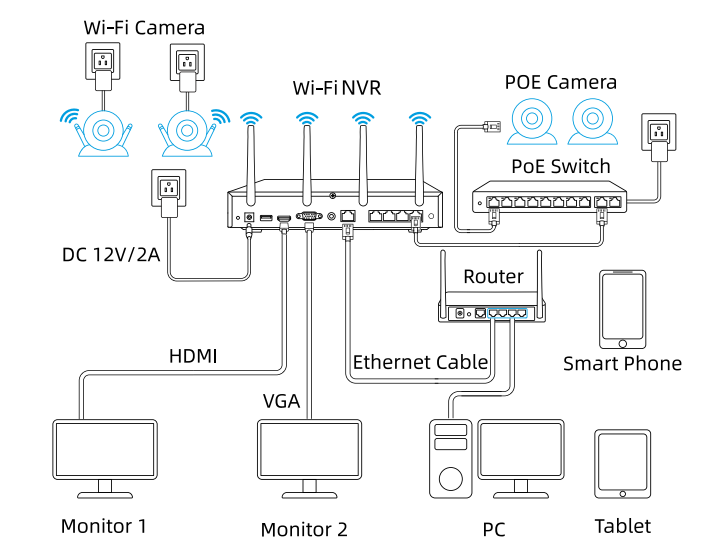
Cameras connected to the NVR will be shown on the displayer(s).
Can I connect my previously purchased Reolink PoE camera to the Wi-Fi NVR?
Yes, PoE cameras can work with the Wi-Fi NVR. But you need to first power on the PoE camera with a PoE injector, PoE switch, or power adapter, and connect it to the NVR or to the same network as the NVR.
What are the maximum transmission distances between the NVR and the cameras, as well as between the NVR and the router?
The distance between the NVR and the router primarily depends on the length of the Ethernet cable used. In optimal conditions, the distance between the NVR and the cameras can reach up to 120 meters.
Can I turn off the spotlights?
Yes, you can turn off the spotlights manually.
By default, the camera's spotlights are motion activated: it will turn on automatically when a motion is detected.
You can turn them off or adjust the brightness to your liking.
Please note that with the spotlights on you can enjoy clear color night vision, but if the spotlights are turned off, you will only see black and white images at night.
Can I switch between 2.4GHz and 5GHz Wi-Fi networks?
Yes, our latest hardware version of Wi-Fi NVR supports manual switching between 2.4GHz and 5GHznetwork.
La telecamera funziona con i dispositivi IoT Reolink (Reolink Floodlight, ecc.)? Come possono essere collegati?
Sì, la telecamera funziona con i dispositivi IoT Reolink, incluso Reolink Floodlight PoE/WiFi. Le funzioni specifiche supportate dipendono dalla telecamera.
Quando Reolink Floodlight è collegato a una telecamera, il faretto e la sirena integrata verranno attivati non appena la telecamera rileva un evento.
Fai clic qui per vedere come collegare la telecamera a Reolink Floodlight.What does the PIR sensor work for?
PIR sensors are more sensitive to the infrared radiations from humans or animals, and thus can dramatically reduce false alarms caused by fluttering moths or flying twigs.
Its full name is passive infrared sensor. It measures the infrared (IR) light radiating from objects with a temperature above absolute zero. When the amount of infrared radiation changes, it triggers detection.
Can this camera be used outdoors/indoors?
This camera can be used both indoors and outdoors.
It is IP65 certified weatherproof and its operating temperature is from -10°C to 55°C (14°F to 131°F), ideal for outdoor and indoor usage.
Can this camera support time-lapse function?
Does the camera support PoE NVR or a third-party storage device such as NAS?
Can I talk to someone via the Reolink App? (Two-way audio)
Yes, this security camera features two-way audio, which means you can listen and talk to someone in real time with simple clicks in App.
Can this camera support smart home like Google Assistant?
How can I charge this camera? Is the solar panel a must?
You have two charging options (including solar charging):
Option 1. Have the camera connected to a solar panel for non-stop power supply.
(👆Also recommended as the most friendly charging option for the cam's battery.)
Option 2. Charge the camera (with its non-removable battery) via a 5V 2A USB charger. (Please note that it's ok to charge the cam while it's working, but not for long.)
(Note: To purchase one Reolink Solar Panel, you can choose "1 Camera + 1 Solar Panel" option while buying this camera; or you can buy it separately from https://store.reolink.com/accessories/.)
How long does the battery last?
The camera comes with a rechargeable battery. Normally, the battery lasts for about 1-4 weeks per charge (Actual use varies based on settings, use conditions and environmental factors.) When the battery level goes down to 10%, the camera will send you a low-battery notification.
For non-stop power supply, you can connect the camera to a
Reolink Solar Panel 2 (purchased separately).
Does my camera support person/vehicle/animal detection?
Yes, this camera supports person/vehicle/animal detection.
Can I turn off the spotlights?
Yes, you can turn off the spotlights manually.
By default, the camera's spotlights are motion activated: it will turn on automatically when a motion is detected. You can turn them off or adjust the brightness to your liking.
Please note that with the spotlights on you can enjoy clear color night vision, but if the spotlights are turned off, you will only see black and white images at night.
Does this camera have an SD card?
No, the camera does not come with a microSD card built in. But it has a microSD card slot.
This camera supports Max. 128GB microSD cards with FAT32 format and Class 10 or higher read & write speed.
Does this camera support network protocol, such as RTSP/RTMP?
No, this camera can only support remote access and live viewing via Reolink App/Client, no subscription fees required.
How can I charge this camera? Is the solar panel a must?
You have two charging options (including solar charging):
Option 1. Have the camera connected to a solar paner for non-stop power supply.
(👆Also recommended as the most friendly charging option for the cam's battery.)
Option 2. Charge the camera (with its non-removable battery) via a 5V 2A USB charger. (Please note that it's ok to charge the cam while it's working, but not for long.)
(Note: To purchase one Reolink Solar Panel, you can choose "1 Camera + 1 Solar Panel" option while buying this camera; or you can buy it separately from https://store.reolink.com/accessories/.)
How long does the battery last?
The camera comes with a rechargeable battery. Normally, the battery lasts for about 1-4 weeks per charge (Actual use varies based on settings, use conditions and environmental factors.) When the battery level goes down to 10%, the camera will send you a low-battery notification.
For non-stop power supply, you can connect the camera to a
Reolink Solar Panel (purchased separately).
Does my camera support person/vehicle detection?
Yes, this camera supports person/vehicle detection.
Does the camera have an SD card?
No, the camera does not come with a microSD card built in. But it has a microSD card slot.
This camera supports Max. 128GB microSD cards with FAT32 format and Class 10 or higher read & write speed.
Can this camera support smart home like Google Assistant?
What does the PIR sensor work for?
PIR sensors are more sensitive to infrared radiations from humans or animals, and thus can dramatically reduce false alarms caused by fluttering moths or flying twigs.
Its full name is passive infrared sensor. It measures the infrared (IR) light radiating from objects with a temperature above absolute zero. When the amount of infrared radiation changes, it triggers detection.
Can this camera support time-lapse function?
Yes, the camera can support time-lapse. It can save time-lapse photos and videos to the SD card.
Tips:
How to Set Up Time Lapse?Does the camera support cloud storage?
Yes. You can refer to
Reolink Cloud to check it available countries.
Note: You can also save video clips into a microSD card (supports up to 128GB).
Can I talk to someone via the Reolink App? (Two-way audio)
Yes, this security camera features two-way audio, which means you can listen and talk to someone in real time with simple clicks in App.
Does the camera support NVR or a third-party storage device such as NAS?
No, but you can record videos to a microSD card and play back them via Reolink App and Client, no subscription fees required.
Does the camera support network protocol, such as RTSP/RTMP?
No, you can only log in or preview through Reolink App/Client. No subscription fees required.
How long does the battery last?
The camera comes with a rechargeable battery. Normally, the battery lasts for about 1-4 weeks per charge (Actual use varies based on settings, use conditions and environmental factors.) When the battery level goes down to 10%, the camera will send you a low-battery notification.
For non-stop power supply, you can connect the camera to a
Reolink Solar Panel (purchased separately).
Does the camera have an SD card?
No, the camera does not come with a microSD card built in. But it has a microSD card slot.
This camera supports Max. 128GB microSD cards with FAT32 format and Class 10 or higher read & write speed.
What Does the PIR Sensor Work for?
PIR sensors are more sensitive to the infrared radiations from humans or animals, and thus can dramatically reduce false alarms caused by fluttering moths or flying twigs.
Its full name is passive infrared sensor. It measures the infrared (IR) light radiating from objects with a temperature above absolute zero. When the amount of infrared radiation changes, it triggers detection.
Can this camera be used outdoors/indoors?
This camera can be used both indoors and outdoors.
It is IP66 certified weatherproof and its operating temperature is from -10°C to 55°C (14°F to 131°F), ideal for outdoor and indoor usage.
Can this camera support time-lapse function?
Can I talk to someone via the Reolink App? (Two-way audio)
Yes, this security camera features two-way audio, which means you can listen and talk to someone in real time with simple clicks in App.
Can this camera support smart home like Google Assistant?
How can I charge this camera? Is the solar panel a must?
You have two charging options (including solar charging):
Option 1. Have the camera connected to a solar paner for non-stop power supply.
(👆Also recommended as the most friendly charging option for the cam's battery.)
Option 2. Charge the camera (with its non-removable battery) via a 5V 2A USB charger. (Please note that it's ok to charge the cam while it's working, but not for long.)
(Note: To purchase one Reolink Solar Panel, you can choose "1 Camera + 1 Solar Panel" option while buying this camera; or you can buy it separately from https://store.reolink.com/accessories/.)
What does the PIR sensor work for?
PIR sensors are more sensitive to the infrared radiations from humans or animals, and thus can dramatically reduce false alarms caused by fluttering moths or flying twigs.
Its full name is passive infrared sensor. It measures the infrared (IR) light radiating from objects with a temperature above absolute zero. When the amount of infrared radiation changes, it triggers detection.
Can this camera support time-lapse function?
Does the camera support cloud storage?
Yes. You can refer to
Reolink Cloud to check it available countries.
Note: You can also save video clips into a microSD card (supports up to 128GB).
Can I talk to someone via the Reolink App? (Two-way audio)
Yes, this security camera features two-way audio, which means you can listen and talk to someone in real time with simple clicks in App.
Can this camera support smart home like Google Assistant?
How can I charge this camera? Is the solar panel a must?
You have two charging options (including solar charging):
Option 1. Have the camera connected to a solar panel for non-stop power supply.
(👆Also recommended as the most friendly charging option for the cam's battery.)
Option 2. Charge the camera (with its non-removable battery) via a 5V 2A USB charger. (Please note that it's ok to charge the cam while it's working, but not for long.)
(Note: To purchase one Reolink Solar Panel, you can choose "1 Camera + 1 Solar Panel" option while buying this camera; or you can buy it separately from https://store.reolink.com/accessories/.)
How long does the battery last?
The camera comes with a rechargeable battery. Normally, the battery lasts for about 1-4 weeks per charge (Actual use varies based on settings, use conditions and environmental factors.) When the battery level goes down to 10%, the camera will send you a low-battery notification.
For non-stop power supply, you can connect the camera to a
Reolink Solar Panel 2 (purchased separately).
Does my camera support person/vehicle/pet detection?
Yes, this camera supports person/vehicle detection and pet detection. Currently, pet detection is used to detect cats and dogs.
Does the camera have an SD card?
No, the camera does not come with a microSD card built in. But it has a microSD card slot.
This camera supports Max. 128GB microSD cards with FAT32 format and Class 10 or higher read & write speed.
Can I turn off the spotlights?
Yes, you can turn off the spotlights manually.
By default, the camera's spotlights are motion activated: it will turn on automatically when a motion is detected. You can turn them off or adjust the brightness to your liking.
Please note that with the spotlights on you can enjoy clear color night vision, but if the spotlights are turned off, you will only see black and white images at night.
What does the PIR sensor work for?
PIR sensors are more sensitive to the infrared radiations from humans or animals, and thus can dramatically reduce false alarms caused by fluttering moths or flying twigs.
Its full name is passive infrared sensor. It measures the infrared (IR) light radiating from objects with a temperature above absolute zero. When the amount of infrared radiation changes, it triggers detection.
Can this camera be used outdoors/indoors?
This camera can be used both indoors and outdoors.
It is IP65 certified weatherproof and its operating temperature is from -10°C to 55°C (14°F to 131°F), ideal for outdoor and indoor usage.
Can this camera support time-lapse function?
Does the camera support cloud storage?
Yes. You can refer to
Reolink Cloud to check it available countries.
Note: You can also save video clips into a microSD card (supports up to 128GB).
Does the camera support NVR or a third-party storage device such as NAS?
No, but you can record videos to a microSD card and play back them via Reolink App and Client, no subscription fees required.
Can I talk to someone via the Reolink App? (Two-way audio)
Yes, this security camera features two-way audio, which means you can listen and talk to someone in real time with simple clicks in App.
Can this camera support smart home like Google Assistant?
How can I charge this camera? Is the solar panel a must?
You have three charging options (including solar charging):
Option 1. Have the camera connected to a solar paner for non-stop power supply.
(👆Also recommended as the most friendly charging option for the cam's battery.)
Option 2. Pull off the battery from the camera, connect it to power outlet via 5V 2A USB charger.
Option 3. Charge the camera with its battery in via a 5V 2A USB charger. (Please note that it's ok to charge the cam while it's working, but not for long.)
(Note: To purchase one Reolink Solar Panel, you can choose "1 Camera + 1 Solar Panel" option while buying this camera; or you can buy it separately from https://store.reolink.com/accessories/.)
How long does the battery last?
The camera comes with a rechargeable battery. Normally, the battery lasts for about 1-4 weeks per charge (Actual use varies based on settings, use conditions and environmental factors.) When the battery level goes down to 10%, the camera will send you a low-battery notification.
For non-stop power supply, you can connect the camera to a
Reolink Solar Panel (purchased separately).
Does my camera support person/vehicle detection?
Yes, this camera supports person/vehicle detection. In addition, pet detection is added.
Does the camera have an SD card?
No, the camera does not come with a microSD card built in. But it has a microSD card slot.
This camera supports Max. 128GB microSD cards with FAT32 format and Class 10 or higher read & write speed.
Does the camera have a SIM card?
No, the camera does not come with a SIM card and Reolink doesn't have SIM card for sale, so you need to get one from a compatible cellular service provider. Every 4G camera needs a physical SIM card and does not support an e-SIM card. And note that Reolink 4G camera can only provide network for itself with a SIM card inserted, and cannot work as a hotspot to provide WiFi for other devices.
How does 4G work on this security camera?
Similar to your cellular phone, cellular security cameras need a SIM card with a data plan to tramsmit video signals over 3G/4G network.
The common SIM cards offered by carriers like T-Mobile and Vodafone can work for Reolink 4G camers (as they can for your cellular phone). Click to check
supported carriers in available countries and regions for this camera.
You can also contact
our support team for consultation.
Does the camera work on 5G/4G/3G/2G?
The camera works on 4G networks. It also supports 3G, which is not recommended though (since wireless companies are working to retire older network technologies). It does not supports 5G or 2G SIM card.
Yet it does not matter you use a 4G or 5G mobile phone to access the camera. The camera needs a SIM card of its own, which is totally irrelevant to your mobile's SIM card.
Note:
(1) The camera does not support WiFi connection.
(2) As of July 1, 2022 T-Mobile’s older 3G UMTS network will be retired.
How much data does the camera use?
Data usage of this camera depends on the bitrate you set up. 1 hour of live feed in Clear mode (default bitrate: 4Mbps) will use about 2GB of data. And if you use 1GB of data to stream live feed in Fluent mode (default bitrate: 672kbps), you can watch for 3.5 hours. Based on that, you can estimate the data usage to choose the right data plan for you.
Note: The above information is just for reference. The actual data usage is based on the actual working situation and may vary from the SIM card providers.
Does the camera work with my Reolink PoE NVR?
If you want to buy a new one: the currently on-sale NVRs work with all PoE and plug-in WiFi cameras.
If you already have one:
Please first refer to
this article for its hardware version.
For the NVR with the hardware N7MB01, N6MB01, or N5MB01, it works with all PoE and plug-in WiFi cameras.
For the NVR with the hardware N2MB02, N3MB01, or H3MB18, it works with all PoE and plug-in WiFi cameras. But you can not have a full-resolution live view of the following cameras: RLC-1212A, RLC-1224A, Reolink Duo 2 PoE, Reolink Duo 2 WiFi, Reolink Duo Floodlight WiFi, Reolink Duo Floodlight PoE.
For the NVR with the rest hardwares such as H3MB17, H3MB02, and H3MB16, please refer to
Introduction to Hardware Versions of Reolink NVRs for more detailed information.
What is WiFi 6?What are its benefits?
WiFi 6 (802.11ax Protocol) is the newest standard of WiFi technology, known for its faster and more stable wireless connectivity with reduced network latency. It also applied advanced encryption protocol WPA3 to enhance the security of wireless network.
Can this camera connect to non-WiFi 6 routers?
Yes, this camera can connect to non-WiFi 6 routers, but a WiFi 6 router is better recommended for enhanced networking.
Why can't I connect it to 3rd party softwares?
The RTSP and other ports may be disabled by default. You can launch Reolink Client, then go to Device Settings >> Network >> Advanced >> Port Settings to make sure all ports are enabled before using 3rd party softwares.
Can this camera support time-lapse function?
Does this camera support person/vehicle detection?
Yes, this camera supports person/vehicle detection. It also supports animal detection.
Can this camera be used outdoors/indoors?
This camera can be used both indoors and outdoors.
It is IP67 certified weatherproof and its operating temperature is from -10°C to 55°C (14°F to 131°F), perfect for outdoor and indoor usage.
Can this camera support smart home like Google Assistant?
How can I power up this camera?
The camera can be powered by a 12V 1A DC power adapter (A 1.2-meter power adaptor and a 4.5m extension cable are shipped with the camera). You can check what is in the box at the end of the overview page.
What kind of microSD card can I use?
This camera supports up to 256GB microSD cards with FAT32 format and Class 10 read & write speed.
Can I connect the camera to my PoE NVR or PoE NVR system?
Yes, Reolink WiFi cameras can be connected to Reolink PoE NVR in an indirect way. You can follow these steps to connect them:
Step 1: Connect the camera to a wifi router via wifi signals or an ethernet cable, and it needs to be powered via a power adapter.
Step 2: Connect the NVR to the same router by a network cable.
The NVR will pick up all the cameras on the same network.
Can I turn off the spotlights?
Yes, you can turn off the spotlights manually.
By default, the camera's spotlights are motion activated: it will turn on automatically when a motion is detected. You can turn them off or adjust the brightness to your liking.
Please note that with the spotlights on you can enjoy clear color night vision, but if the spotlights are turned off, you will only see black and white images at night.
Does the camera support NAS?
What does the PIR sensor work for?
PIR sensors are more sensitive to the infrared radiations from humans or animals, and thus can dramatically reduce false alarms caused by fluttering moths or flying twigs.
Its full name is passive infrared sensor. It measures the infrared (IR) light radiating from objects with a temperature above absolute zero. When the amount of infrared radiation changes, it triggers detection.
Can this camera be used outdoors/indoors?
This camera can be used both indoors and outdoors.
It is IP66 certified weatherproof and its operating temperature is from -10°C to 55°C (14°F to 131°F), ideal for outdoor and indoor usage.
Can this camera support time-lapse function?
Does the camera support PoE NVR or a third-party storage device such as NAS?
No, this camera only supports Cloud storage (available in specific countries or regions only) or local SD card storage.
Can I talk to someone via the Reolink App? (Two-way audio)
Yes, this security camera features two-way audio, which means you can listen and talk to someone in real time with simple clicks in App.
Can this camera support smart home like Google Assistant?
How can I charge this camera? Is the solar panel a must?
You have two charging options (including solar charging):
Option 1. Have the camera connected to a solar panel for non-stop power supply.
(👆Also recommended as the most friendly charging option for the cam's battery.)
Option 2. Charge the camera (with its non-removable battery) via a 5V 2A USB charger. (Please note that it's ok to charge the cam while it's working, but not for long.)
(Note: To purchase one Reolink Solar Panel, you can choose "1 Camera + 1 Solar Panel" option while buying this camera; or you can buy it separately from https://store.reolink.com/accessories/.)
How long does the battery last?
The camera comes with a rechargeable battery. Normally, the battery lasts for about 1-4 weeks per charge (Actual use varies based on settings, use conditions and environmental factors.) When the battery level goes down to 10%, the camera will send you a low-battery notification.
For non-stop power supply, you can connect the camera to a
Reolink Solar Panel 2 (purchased separately).
Does my camera support person/vehicle/animal detection?
Yes, this camera supports person/vehicle/animal detection.
Can I turn off the spotlights?
Yes, you can turn off the spotlights manually.
By default, the camera's spotlights are motion activated: it will turn on automatically when a motion is detected. You can turn them off or adjust the brightness to your liking.
Please note that with the spotlights on you can enjoy clear color night vision, but if the spotlights are turned off, you will only see black and white images at night.
Does this camera have an SD card?
No, the camera does not come with a microSD card built in. But it has a microSD card slot.
This camera supports Max. 128GB microSD cards with FAT32 format and Class 10 or higher read & write speed.
Does this camera support network protocol, such as RTSP/RTMP?
No, this camera can only support remote access and live viewing via Reolink App/Client, no subscription fees required.
How much are the customs duties?
Customs duties depend on where your items are shipped from and shipped to. See details in the Shipping Fees part of
Shipping & Delivery Policy.
Where can you ship? How long will it take to receive my items?
We sell security cameras to the United States, Germany, the United Kingdom and other dozens of countries.
And we handle orders within 24 hours and pass the packages to our forwarders within 48 working hours. The delivery time varies due to where your items are shipped from and shipped to. See details of
Shipping & Delivery Policy.
Does the camera have an SD card?
Yes, the camera has a 32GB microSD card built in.
The camera actually supports Max. 128GB microSD cards with FAT32 format and Class 10 or higher read & write speed.
Does the camera work on 5G/4G/3G/2G?
The camera works on 4G networks. It also supports 3G, which is not recommended though (since wireless companies are working to retire older network technologies). It does not supports 5G or 2G SIM card.
Yet it does not matter you use a 4G or 5G mobile phone to access the camera. The camera needs a SIM card of its own, which is totally irrelevant to your mobile's SIM card.
Note:
(1) The camera does not support WiFi connection.
(2) As of July 1, 2022 T-Mobile's older 3G UMTS network will be retired.
How can I charge this camera? Is the solar panel a must?
You have two charging options (including solar charging):
Option 1. Have the camera connected to a solar paner for non-stop power supply.
(👆Also recommended as the most friendly charging option for the cam's battery.)
Option 2. Charge the camera (with its non-removable battery) via a 5V 2A USB charger. (Please note that it's ok to charge the cam while it's working, but not for long.)
(Note: To purchase one Reolink Solar Panel, you can choose "1 Camera + 1 Solar Panel" option while buying this camera; or you can buy it separately from https://store.reolink.com/accessories/.)
How long does the battery last?
The camera comes with a rechargeable battery. Normally, the battery lasts for about 1-4 weeks per charge (Actual use varies based on settings, use conditions and environmental factors.) When the battery level goes down to 10%, the camera will send you a low-battery notification.
For non-stop power supply, you can connect the camera to a
Reolink Solar Panel (purchased separately).
Does my camera support person/vehicle detection?
Yes, this camera supports person/vehicle detection. It also supports
animal detection.
How does 4G work on this security camera?
Similar to your cellular phone, cellular security cameras need a SIM card with a data plan to tramsmit video signals over 3G/4G network.
The common SIM cards offered by carriers like T-Mobile and Vodafone can work for Reolink 4G camers (as they can for your cellular phone). Click to check
supported carriers in available countries and regions for this camera.
You can also contact
our support team for consultation.
How much data does the camera use?
Data usage of this camera depends on the bitrate you set up. 1 hour of live feed in Clear mode (default bitrate: 3Mbps) will use about 1.3GB of data. And if you use 1GB of data to stream live feed in Fluent mode (default bitrate: 672kbps), you can watch for 3.5 hours.
Note: The above information is just for reference. The actual data usage is based on the actual working situation and may vary from the SIM card providers.
What does the PIR sensor work for?
PIR sensors are more sensitive to the infrared radiations from humans or animals, and thus can dramatically reduce false alarms caused by fluttering moths or flying twigs.
Its full name is passive infrared sensor. It measures the infrared (IR) light radiating from objects with a temperature above absolute zero. When the amount of infrared radiation changes, it triggers detection.
Can this camera support time-lapse function?
Does the camera support cloud storage?
Yes. You can refer to
Reolink Cloud to check it available countries.
Note: You can also save video clips into a microSD card (supports up to 128GB).
Does my security system work with Google Assistant?
Sorry, the NVR system cannot work with Google Assistant.
Does the camera offer true full-color night vision when the warm light is off?
Yes, thanks to the ColorX technology, the camera can still provide color night vision without the warm light on. Featuring an F1.0 large aperture that allows four times more light in than an F2.0 aperture. Additionally, the camera is equipped with a 1/1.8" advanced sensor, enabling it to deliver clear and vivid full-color night vision even without additional lighting. You can also turn on the warm light for even higher-quality color night vision.
Can I turn off the warm light and siren?
Yes, you can turn off the warm light and siren manually.
By default, the camera's warm light and siren are motion-activated: they will be turned on automatically when a motion is detected. You can turn them off, adjust the brightness of warm light, or customize the siren to your liking.
The camera can provide clear and natural true full-color night vision even without turning on the warm light. You can also choose to turn on the warm light to enhance the quality of the color night vision in extremely dark environments.
Does my camera support person/vehicle/animal detection?
Yes, this camera supports person/vehicle/animal detection.
Can this camera be used outdoors/indoors?
This camera can be used both indoors and outdoors.
It is IP67 certified weatherproof and its operating temperature is from -10°C to 55°C (14°F to 131°F), perfect for outdoor and indoor usage.
Does the camera support two-way audio?
Yes, the camera supports two-way audio via its built-in mic and speaker. You can not only capture videos with audio recorded but also have real-time communication with people on the camera's end through Reolink App or Client.
How can I power up this camera?
The camera can be powered by a 12V 1A DC power adapter (A 1.2-meter power adaptor and a 4.5m extension cable are shipped with the camera). You can check what is in the box at the end of the overview page.
What Ethernet cable do I need?
The camera supports T-568B connectors and 8-PIN Ethernet cables of CAT5 or higher.
Where are the recordings stored? Is NVR a must?
The camera can work without an NVR.
1. When it works without an NVR, the recordings can be saved to the microSD card (purchased separately);
2. When it works with an NVR, the recordings can be saved to the NVR.
Note: For best compatibility, do not use the camera with third-party NVRs.
Can I connect the camera to my PoE NVR or PoE NVR system?
Yes, Reolink WiFi cameras can be connected to Reolink PoE NVR in an indirect way. You can follow these steps to connect them:
Step 1: Connect the camera to a wifi router via wifi signals or an ethernet cable, and it needs to be powered via a power adapter.
Step 2: Connect the NVR to the same router by a network cable.
The NVR will pick up all the cameras on the same network.
Is the camera compatible with my Reolink PoE NVR?
This camera is compatible with Reolink PoE NVR of the following hardware versions: H3MB18, N2MB02, N3MB01, N7MB01, H3MB18, N6MB01, N5MB01. For best performance, you need to
upgrade the NVR's firmware to the latest version for video displaying.
Reolink PoE NVRs that are currently available for sale support all the PoE standalone and plug-in WiFi cameras. However, if you have already had a Reolink PoE NVR, you can check if its hardware version is compatible with this camera.What kind of microSD card can I use?
This camera supports up to 256GB microSD cards with FAT32 format and Class 10 read & write speed.
Does the camera support NAS?
Yes, the camera supports NAS.
You may want to know
How to have Reolink cameras record to my NAS.How do I use live view and playback?
You can add and set up the camera on Reolink APP/Client. Then click the camera to check the live view and playback of it from anywhere, at any time.
Reolink APP/Client is free of charge and the service is free of subscription.
Does Reolink charge a subscription fee for the camera or the Reolink application?
No. Reolink does not charge any subscription fees for camera or Reolink App. All features of this camera as well as the Reolink App are completely free and require no subscription.
Why can't I connect it to 3rd party software?
The RTSP and other ports may be disabled by default. You can launch Reolink Client, then go to Device Settings >> Network >> Advanced >> Port Settings to make sure all ports are enabled before using 3rd party software.
Does the camera work with Reolink IoT devices (Reolink Floodlight, etc.)? How can they be linked?
Yes, the camera works with Reolink IoT devices, including Reolink Floodlight PoE/WiFi. The specific functions supported depend on the camera.
When Reolink Floodlight is linked to a camera, the floodlights and the built-in siren will be triggered once the camera detects an event.
Click here to see how to link the camera to Reolink Floodlight.Can this camera support time-lapse function?
Yes, the camera can support time-lapse. It can save time-lapse photos and videos to the SD card.
How to Set Up Time Lapse?Can this camera support smart home like Google Assistant?
Yes, currently, this camera can work with Google Assistant.
Tips:
How to add this camera to Google Assistant?Questa telecamera può supportare la casa intelligente come l'Assistente Google?
Can I turn off the spotlights?
Yes, you can turn off the spotlights manually.
By default, the camera's spotlights are motion activated: it will turn on automatically when a motion is detected. You can turn them off or adjust the brightness to your liking.
Please note that with the spotlights on you can enjoy clear color night vision, but if the spotlights are turned off, you will only see black and white images at night.
Does my camera support person/vehicle/animal detection?
Yes, this camera supports person/vehicle/animal detection.
Can this camera be used outdoors/indoors?
This camera can be used both indoors and outdoors.
It is IP67 certified weatherproof and its operating temperature is from -10°C to 55°C (14°F to 131°F), perfect for outdoor and indoor usage.
Does the camera support two-way audio?
Yes, the camera supports two-way audio via its built-in mic and speaker. You can not only capture videos with audio recorded but also have real-time communication with people on the camera's end through Reolink App or Client.
How can I power up this camera?
The camera can be powered by a 12V 1A DC power adapter (A 1.2-meter power adaptor and a 4.5m extension cable are shipped with the camera). You can check what is in the box at the end of the overview page.
What Ethernet cable do I need?
The camera supports T-568B connectors and 8-PIN Ethernet cables of CAT5 or higher.
Where are the recordings stored? Is NVR a must?
The camera can work without an NVR.
1. When it works without an NVR, the recordings can be saved to the microSD card (purchased separately);
2. When it works with an NVR, the recordings can be saved to the NVR.
Note: For best compatibility, do not use the camera with third-party NVRs.
Can I connect the camera to my PoE NVR or PoE NVR system?
Yes, Reolink WiFi cameras can be connected to Reolink PoE NVR in an indirect way. You can follow these steps to connect them:
Step 1: Connect the camera to a wifi router via wifi signals or an ethernet cable, and it needs to be powered via a power adapter.
Step 2: Connect the NVR to the same router by a network cable.
The NVR will pick up all the cameras on the same network.
Is the camera compatible with my Reolink PoE NVR?
This camera is compatible with Reolink PoE NVR of the following hardware versions: H3MB18, N2MB02, N3MB01, N7MB01, H3MB18, N6MB01, N5MB01. For best performance, you need to
upgrade the NVR's firmware to the latest version for video displaying.
Reolink PoE NVRs that are currently available for sale support all the PoE standalone and plug-in WiFi cameras. However, if you have already had a Reolink PoE NVR, you can check if its hardware version is compatible with this camera.What kind of microSD card can I use?
This camera supports up to 256GB microSD cards with FAT32 format and Class 10 read & write speed.
Does the camera support NAS?
Yes, the camera supports NAS.
You may want to know
How to have Reolink cameras record to my NAS.How do I use live view and playback?
You can add and set up the camera on Reolink APP/Client. Then click the camera to check the live view and playback of it from anywhere, at any time.
Reolink APP/Client is free of charge and the service is free of subscription.
Does Reolink charge a subscription fee for the camera or the Reolink application?
No. Reolink does not charge any subscription fees for camera or Reolink App. All features of this camera as well as the Reolink App are completely free and require no subscription.
Why can't I connect it to 3rd party software?
The RTSP and other ports may be disabled by default. You can launch Reolink Client, then go to Device Settings >> Network >> Advanced >> Port Settings to make sure all ports are enabled before using 3rd party software.
Does the camera work with Reolink IoT devices (Reolink Floodlight, etc.)? How can they be linked?
Yes, the camera works with Reolink IoT devices, including Reolink Floodlight PoE/WiFi. The specific functions supported depend on the camera.
When Reolink Floodlight is linked to a camera, the floodlights and the built-in siren will be triggered once the camera detects an event.
Click here to see how to link the camera to Reolink Floodlight.Does this camera support time-lapse function?
Yes, the camera can support time-lapse. It can save time-lapse photos and videos to the SD card.
How to Set Up Time Lapse?Does this camera support smart home like Google Assistant?
Yes, currently, this camera can work with Google Assistant.
Tips:
How to add this camera to Google Assistant?What is Wi-Fi 6?What are its benefits?
WiFi 6 (802.11ax Protocol) is the newest standard of WiFi technology, known for its faster and more stable wireless connectivity with reduced network latency. It also applied advanced encryption protocol WPA3 to enhance the security of wireless networks.
Can this camera connect to non–Wi-Fi 6 routers?
Yes, this camera can connect to non-WiFi 6 routers, but a WiFi 6 router is better recommended for enhanced networking.
Can I switch between 2.4GHz and 5GHz Wi-Fi networks?
No, manual switching is not supported. If the camera supports both 2.4GHz and 5GHz WiFi, it will be fixed on the 5GHz band. If the camera only supports 2.4GHz, it will stay connected to the 2.4GHz network.
La telecamera funziona con il mio Reolink PoE NVR?
Se vuoi acquistarne uno nuovo: gli NVR attualmente in vendita funzionano con tutte le telecamere PoE e WiFi plug-in.
Se ne hai già uno:
Fai prima riferimento a
questo articolo per la sua versione hardware.
Per l'NVR con hardware N7MB01, N6MB01 o N5MB01, funziona con tutte le telecamere PoE e WiFi plug-in.
Per l'NVR con hardware N2MB02, N3MB01 o H3MB18, funziona con tutte le telecamere PoE e WiFi plug-in. Ma non è possibile avere una visualizzazione live a piena risoluzione delle seguenti telecamere: RLC-1212A, RLC-1224A, Reolink Duo 2 PoE, Reolink Duo 2 WiFi, Reolink Duo Floodlight WiFi, Reolink Duo Floodlight PoE.
Per l'NVR con il resto dell'hardware come H3MB17, H3MB02 e H3MB16, fare riferimento a
Introduzione alle versioni hardware degli NVR Reolink per informazioni più dettagliate.
Cos'è il WiFi 6? Quali sono i suoi vantaggi?
WiFi 6 (protocollo 802.11ax) è il più recente standard della tecnologia WiFi, noto per la sua connettività wireless più veloce e stabile con latenza di rete ridotta. Ha anche applicato il protocollo di crittografia avanzato WPA3 per migliorare la sicurezza della rete wireless.
Questa telecamera può connettersi a router non WiFi 6?
Sì, questa telecamera può connettersi a router non WiFi 6, ma un router WiFi 6 è più consigliato per una rete avanzata.
Perché non posso collegarla a software di terze parti?
RTSP e altre porte potrebbero essere disabilitate per impostazione predefinita. Puoi avviare Reolink Client, quindi andare su Impostazioni dispositivo >> Rete >> Avanzate >> Impostazioni porta per assicurarti che tutte le porte siano abilitate prima di utilizzare software di terze parti.
Questa telecamera può supportare la funzione time-lapse?
Questa telecamera supporta il rilevamento di persone/veicoli?
Sì, questa telecamera supporta il rilevamento di persone/veicoli. Supporta anche il rilevamento di animali.
Questa telecamera può essere utilizzata all'esterno/all'interno?
Questa telecamera può essere utilizzata sia all'interno che all'esterno.
È certificata IP66 resistente alle intemperie e la sua temperatura di funzionamento è compresa tra -10°C e 55°C (14°F e 131°F), perfetta per l'uso all'esterno e all'interno.
Questa telecamera può supportare la smart home come Google Assistant?
Come posso accendere questa telecamera?
La telecamera può essere alimentata da un adattatore di alimentazione CC da 12 V 1 A (un adattatore di alimentazione da 1,2 m e un cavo di prolunga da 4,5 m sono spediti con la telecamera). Puoi controllare cosa c'è nella scatola alla fine della pagina di panoramica.
Che tipo di scheda microSD posso usare?
Questa telecamera supporta schede microSD fino a 256 GB con formato FAT32 e velocità di lettura e scrittura di Classe 10.
Posso collegare la telecamera al mio PoE NVR o al sistema PoE NVR?
Sì, le telecamere WiFi Reolink possono essere collegate a Reolink PoE NVR in modo indiretto. Puoi seguire questi passaggi per collegarle:
Passaggio 1: collega la telecamera a un router WiFi tramite segnali WiFi o un cavo Ethernet e deve essere alimentata tramite un adattatore di alimentazione.
Passaggio 2: collega l'NVR allo stesso router tramite un cavo di rete.
L'NVR rileverà tutte le telecamere sulla stessa rete.
Posso spegnere i riflettori?
Sì, puoi spegnere manualmente i riflettori.
Per impostazione predefinita, i riflettori della telecamera sono attivati dal movimento: si accendono automaticamente quando viene rilevato un movimento. Puoi spegnerli o regolarne la luminosità a tuo piacimento.
Tieni presente che con i riflettori accesi puoi goderti una visione notturna a colori nitida, ma se i riflettori sono spenti, vedrai solo immagini in bianco e nero di notte.
La telecamera supporta NAS?
Cos'è lo zoom 3D? Come posso usare questa funzione?
Lo zoom 3D è una funzione che consente alla telecamera di eseguire automaticamente panoramiche, inclinazioni e zoom sull'area specifica selezionata sullo schermo, senza la necessità di un controllo manuale passo dopo passo.
La telecamera offre una vera visione notturna a colori quando la luce calda è spenta?
Sì, grazie alla tecnologia ColorX, la telecamera può comunque fornire una visione notturna a colori senza che la luce calda sia accesa. Dotato di un'ampia apertura F1.0 che consente l'ingresso di quattro volte più luce rispetto a un'apertura F2.0. Inoltre, la telecamera è dotata di un sensore avanzato da 1/1,8", che le consente di fornire una visione notturna a colori chiara e vivida anche senza illuminazione aggiuntiva. Puoi anche attivare la luce calda per una visione notturna a colori di qualità ancora superiore.
Questa telecamera supporta la funzione time-lapse?
Questa telecamera può essere utilizzata all'esterno/interno?
Questa telecamera può essere utilizzata sia all'interno che all'esterno.
È resistente alle intemperie certificata IP65 e la sua temperatura operativa è compresa tra -10 °C e 55 °C (da 14 °F a 131 °F), perfetta per l'uso esterno e interno.
La mia telecamera supporta il rilevamento di persone/veicoli/animali?
Sì, questa telecamera supporta il rilevamento di persone/veicoli/animali.
Questa telecamera può funzionare con la smart home come l'Assistente Google?
Come posso accendere questa telecamera?
La telecamera può essere alimentata da un adattatore di alimentazione CC da 12 V 1 A (con la telecamera vengono forniti un adattatore di alimentazione da 1,2 metri e un cavo di prolunga da 4,5 m). Puoi controllare il contenuto della confezione alla fine della pagina di panoramica.
Che tipo di scheda microSD posso utilizzare?
Questa telecamera supporta schede microSD fino a 256 GB con formato FAT32 e velocità di lettura e scrittura di Classe 10.
Posso collegare la telecamera al mio NVR PoE o al sistema NVR PoE?
Sì, le telecamere WiFi Reolink possono essere collegate a Reolink PoE NVR in modo indiretto. Puoi seguire questi passaggi per collegarli:
Passaggio 1: collega la videocamera a un router Wi-Fi tramite segnali Wi-Fi o un cavo Ethernet e deve essere alimentata tramite un alimentatore.
Passaggio 2: collega l'NVR allo stesso router tramite un cavo di rete.
L'NVR rileverà tutte le telecamere sulla stessa rete.
La telecamera supporta il NAS?
Perché non riesco a fare il collegamento con software di terze parti?
L'RTSP e altre porte potrebbero essere disabilitate per impostazione predefinita. Puoi avviare Reolink Client, quindi andare su Impostazioni dispositivo >> Rete >> Avanzate >> Impostazioni porta per assicurarti che tutte le porte siano abilitate prima di utilizzare software di terze parti.
Questa telecamera può essere utilizzata all'esterno/all'interno?
Questa telecamera può essere utilizzata sia all'interno che all'esterno.
È certificata IP65 resistente alle intemperie e la sua temperatura di funzionamento è compresa tra -10 °C e 55 °C (14 °F e 131 °F), ideale per l'uso all'esterno e all'interno.
Questa telecamera supporta la smart home come l’Assistente Google?
Come posso accendere questa telecamera?
La telecamera può essere alimentata da un adattatore di alimentazione CC da 5 V 2 A (ne viene fornito uno da 1,5 m con la telecamera). Puoi controllare cosa c'è nella scatola alla fine della pagina di panoramica.
La telecamera stessa ha anche un cavo di coda da 3 m collegato.
Che tipo di scheda microSD posso usare?
Questa telecamera supporta schede microSD fino a 256 GB con formato FAT32 e velocità di lettura e scrittura di Classe 10.
La telecamera supporta il rilevamento di persone/veicoli/animali?
Sì, questa telecamera supporta il rilevamento di persone/veicoli/animali.
Posso collegare questa telecamera al mio PoE NVR o al sistema PoE NVR?
Sì, le telecamere Wi-Fi Reolink possono essere collegate a Reolink PoE NVR in modo indiretto. Puoi seguire questi passaggi per collegarle:
Passaggio 1. Collega la telecamera a un router Wi-Fi tramite segnali Wi-Fi e deve essere alimentata tramite un adattatore di alimentazione.
Passaggio 2. Collega l'NVR allo stesso router tramite un cavo di rete.
L'NVR rileverà tutte le telecamere sulla stessa rete.
Posso spegnere i riflettori?
Sì, puoi spegnere i riflettori manualmente.
Di default, i riflettori della telecamera sono attivati dal movimento: si accendono automaticamente quando viene rilevato un movimento. Puoi spegnerli o regolarne la luminosità a tuo piacimento.
Tieni presente che con i riflettori accesi puoi goderti una visione notturna a colori nitida, ma se i riflettori sono spenti, di notte vedrai solo immagini in bianco e nero.
La telecamera supporta il NAS?
No, la telecamera non supporta NAS.
È possibile inserire una scheda SD per salvare i video in movimento. Questa telecamera supporta schede microSD fino a 256 GB con formato FAT32 e velocità di lettura e scrittura di Classe 10.
Questa telecamera supporta l'archiviazione su cloud?
Reolink Cloud è disponibile in alcuni paesi e regioni. Puoi fare riferimento a
Reolink Cloud per controllare i paesi e le regioni in cui è disponibile.
Nota: puoi anche salvare i videoclip su una scheda microSD (supporta fino a 256 GB) o su
un NVR Reolink.
Does my security system work with Google Assistant?
Sorry, the NVR system cannot work with Google Assistant.
How long does the security camera system store video footage?
The length of time to store video footage is closely related to the video code rate.
As for RLK12-800WB4, the default bit rate of its cameras is 4096 kbps. Proximately, with the 4 cameras all working, this security system can store video footage for 10-11 days to its pre-installed 2TB HDD.
You can refer to "How Long Can Reolink NVR Record?" for more details.
If you want to keep longer video storage, you can expand the NVR's storage capacity.
Does the NVR support the person/vehicle/animal detection of my Reolink cameras?
Yes, the NVR in RLK12-811WB4 supports the cameras' smart person/vehicle/animal detection.
How can I preview or playback the video?
Method 1: Connect the NVR to a monitor or TV for preview or playback.
Method 2: Download FREE Reolink APP or Client, add the NVR to the APP or Client, configure the settings, and then you can preview or playback the videos.
Can I connect Reolink NVR to one or more displayers?
You can connect a maximum of two displayers with the NVR via HDMI or VGA (see the diagram below).
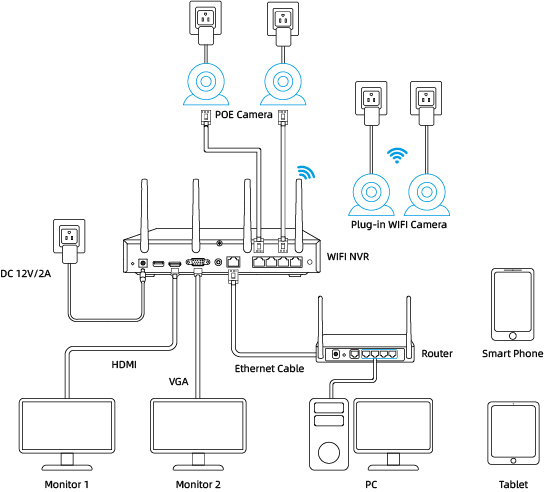
Cameras connected to the NVR will be shown on the displayer(s).
What is the difference if I buy cameras and NVR separately instead of buying a whole system?
The cameras in the kit cannot work alone. They have to work with the Reolink NVR. If you buy standalone cameras and the NVR separately, the cameras can work alone.
Can I connect my previously purchased Reolink PoE camera to the WiFi NVR?
Yes, PoE cameras can work with the WiFi NVR. But you need to first power on the PoE camera with a PoE injector, PoE switch, or power adapter, and connect it to the NVR or to the same network as the NVR.
What are the maximum transmission distances between the NVR and the cameras, as well as between the NVR and the router?
The distance between the NVR and the router primarily depends on the length of the Ethernet cable used. In optimal conditions, the distance between the NVR and the cameras can reach up to 120 meters.
Can I turn off the spotlights?
Yes, you can turn off the spotlights manually.
By default, the camera's spotlights are motion activated: it will turn on automatically when a motion is detected.
You can turn them off or adjust the brightness to your liking.
Please note that with the spotlights on you can enjoy clear color night vision, but if the spotlights are turned off, you will only see black and white images at night.
Can I switch between 2.4GHz and 5GHz WiFi networks?
Yes, our latest hardware version of Wi-Fi NVR supports manual switching between 2.4GHz and 5GHznetwork.
Does my security system work with Google Assistant?
Sorry, the NVR system cannot work with Google Assistant.
How long does the security camera system store video footage?
The length of time to store video footage is closely related to the video code rate.
As for RLK12-800WPT4, the default bit rate of its cameras is 3072 kbps. Proximately, with the 4 cameras all working, this security system can store video footage for 14 days to its pre-installed 2TB HDD.
You can refer to "How Long Can Reolink NVR Record?" for more details.
If you want to keep longer video storage, you can expand the NVR's storage capacity.
Does the NVR support the person/vehicle/animal detection of my Reolink cameras?
Yes, the NVR in RLK12-800WPT4 supports the cameras' smart person/vehicle/animal detection.
How can I preview or playback the video?
Method 1: Connect the NVR to a monitor or TV for preview or playback.
Method 2: Download FREE Reolink APP or Client, add the NVR to the APP or Client, configure the settings, and then you can preview or playback the videos.
Can I connect Reolink NVR to one or more displayers?
You can connect a maximum of two displayers with the NVR via HDMI or VGA (see the diagram below).
Cameras connected to the NVR will be shown on the displayer(s).
Can I connect my previously purchased Reolink PoE camera to the Wi-Fi NVR?
Yes, PoE cameras can work with the Wi-Fi NVR. But you need to first power on the PoE camera with a PoE injector, PoE switch, or power adapter, and connect it to the NVR or to the same network as the NVR.
What are the maximum transmission distances between the NVR and the cameras, as well as between the NVR and the router?
The distance between the NVR and the router primarily depends on the length of the Ethernet cable used. In optimal conditions, the distance between the NVR and the cameras can reach up to 120 meters.
Can I turn off the spotlights?
Yes, you can turn off the spotlights manually.
By default, the camera's spotlights are motion activated: it will turn on automatically when a motion is detected.
You can turn them off or adjust the brightness to your liking.
Please note that with the spotlights on you can enjoy clear color night vision, but if the spotlights are turned off, you will only see black and white images at night.
Can I switch between 2.4GHz and 5GHz Wi-Fi networks?
Yes, our latest hardware version of Wi-Fi NVR supports manual switching between 2.4GHz and 5GHznetwork.
Does the camera support auto-tracking and patrol?
This camera supports auto tracking of people, vehicles, and animals. We recommend downloading and updating to the latest firmware for a better user experience (
click here to download). Please note that this camera doesn't support patrol, but you can remotely control the camera to rotate to monitor different areas quickly with preset points.
Does the camera support person/vehicle detection?
Yes, this camera supports person/vehicle detection.
L'abbonamento è richiesto per le telecamere Reolink PoE?
No, le telecamere PoE Reolink funzionano bene da sole senza costi di abbonamento. Puoi sfruttare appieno il rilevamento di persone/veicoli/animali, l'archiviazione locale e altre funzioni gratuitamente!
Does my camera support person/vehicle/animal detection?
Sì, questa telecamera supporta il rilevamento di persone/veicoli/animali.
La telecameras upporta l'audio bidirezionale
Sì, la telecamera supporta l'audio bidirezionale tramite microfono e altoparlante integrati. Puoi non solo catturare video con audio registrato, ma anche comunicare in tempo reale con le persone dalla parte della telecamera tramite l'app o il client Reolink.
Posso spegnere i riflettori?
Sì, puoi spegnere manualmente i riflettori.
Per impostazione predefinita, i riflettori della telecamera sono attivati dal movimento: si accendono automaticamente quando viene rilevato un movimento. Puoi spegnerli o regolarne la luminosità a tuo piacimento.
Si prega di notare che con i riflettori accesi è possibile godere di una visione notturna a colori nitida, ma se i riflettori sono spenti, di notte si vedranno solo immagini in bianco e nero.
Come posso alimentare questa telecamera?
Esistono due metodi:
1. Tramite un cavo Ethernet, collegare la telecamera a un NVR PoE, un iniettore PoE, uno switch PoE o direttamente a un router con una porta PoE, sia per l'alimentazione che per la trasmissione del segnale video.
Nota: assicurarsi che l'iniettore/switch PoE sia conforme a 802.3 af (48 V) e supporti la modalità attiva.
2. Tramite un adattatore di alimentazione CC 12 V 1 A (acquistato separatamente), collegare la telecamera alla presa di corrente solo per l'alimentazione.
Quale cavo Ethernet mi serve?
La telecamera supporta connettori T-568B e cavi Ethernet a 8 PIN di CAT5 o superiori.
Questa telecamera può essere utilizzata all'esterno/all'interno?
Questa telecamera può essere utilizzata sia all'interno che all'esterno.
È certificata IP67 resistente alle intemperie e la sua temperatura di esercizio è compresa tra -10°C e 55°C (14°F e 131°F), perfetta per l'uso all'esterno e all'interno.
Come si usa la visualizzazione e riproduzione dal vivo?
Puoi aggiungere e configurare la telecamera su Reolink APP/Client. Quindi fai clic sulla telecamera per controllare la visualizzazione live e la riproduzione da qualsiasi luogo, in qualsiasi momento.
Reolink APP/Client è gratuito e il servizio è gratuito.
Questa telecamera può supportare la funzione time-lapse?
Che tipo di scheda microSD posso usare?
Questa telecamera supporta schede microSD fino a 256 GB con formato FAT32 e velocità di lettura e scrittura di Classe 10.
Dove vengono archiviate le registrazioni? L'NVR è obbligatorio?
La telecamera può funzionare senza un NVR.
1. Quando funziona senza un NVR, le registrazioni possono essere salvate sulla scheda microSD (acquistata separatamente);
2. Quando funziona con un NVR, le registrazioni possono essere salvate sull'NVR.
Nota: per una migliore compatibilità, non utilizzare la telecamera con NVR di terze parti.
La telecamera funziona con il mio Reolink PoE NVR?
Se desideri acquistarne uno nuovo: gli NVR attualmente in vendita funzionano con tutte le telecamere PoE e WiFi plug-in.
Se ne possiedi già uno:
Fai prima riferimento a
questo articolo per la versione hardware.
Per l'NVR con hardware N7MB01, N6MB01 o N5MB01, funziona con tutte le telecamere PoE e WiFi plug-in.
Per l'NVR con hardware N2MB02, N3MB01 o H3MB18, funziona con tutte le telecamere PoE e WiFi plug-in. Tuttavia, non è possibile avere una visualizzazione live a piena risoluzione delle seguenti telecamere: RLC-1212A, RLC-1224A, Reolink Duo 2 PoE, Reolink Duo 2 WiFi, Reolink Duo Floodlight WiFi, Reolink Duo Floodlight PoE.
Per l'NVR con gli altri hardware, come H3MB17, H3MB02 e H3MB16, fare riferimento a
Introduzione alle versioni hardware degli NVR Reolink per informazioni più dettagliate.
Posso usare questa telecamera con Synology?
Sì, questa telecamera IP PoE può funzionare con Synology. Esistono 2 metodi per salvare i video al suo interno.
Metodo 1 (consigliato): puoi aggiungere questa telecamera a Synology Surveillance Station. Consulta
questo articolo per scoprire come aggiungere una telecamera.
Metodo 2: puoi trattare il tuo dispositivo Synology come un server FTP. Per i passaggi dettagliati, consulta
How to Set up FTP for Reolink Products.
Perché non posso collegare software di terze parti?
RTSP e altre porte potrebbero essere disabilitate per impostazione predefinita. Puoi avviare Reolink Client, quindi andare su Impostazioni dispositivo >> Rete >> Avanzate >> Impostazioni porta per assicurarti che tutte le porte siano abilitate prima di utilizzare software di terze parti.
Questa telecamera può supportare la smart home come Google Assistant?
La telecamera offre una visione notturna a colori reali quando la luce calda è spenta?
Sì, grazie alla tecnologia ColorX, la fotocamera può comunque fornire una visione notturna a colori senza la luce calda accesa. Dotata di un'ampia apertura F1.0 che consente quattro volte più luce rispetto a un'apertura F2.0. Inoltre, la telecamera è dotata di un sensore avanzato da 1/1,8", che le consente di fornire una visione notturna a colori vivida e chiara anche senza illuminazione aggiuntiva. Puoi anche accendere la luce calda per una visione notturna a colori di qualità ancora più elevata.
Posso spegnere la luce calda e la sirena?
Sì, puoi spegnere manualmente la luce calda e la sirena.
Per impostazione predefinita, la luce calda e la sirena della telecamera sono attivate dal movimento: si accendono automaticamente quando viene rilevato un movimento. Puoi spegnerle, regolare la luminosità della luce calda o personalizzare la sirena a tuo piacimento.
La telecamera può fornire una visione notturna a colori vivida e naturale anche senza accendere la luce calda. Puoi anche scegliere di accendere la luce calda per migliorare la qualità della visione notturna a colori in ambienti estremamente bui.
La telecamera supporta il rilevamento di persone/veicoli/animali?
Sì, questa telecamera supporta il rilevamento di persone/veicoli/animali.
La telecamera supporta l'audio bidirezionale?
Sì, la telecamera supporta l'audio bidirezionale tramite il microfono e l'altoparlante integrati. Non solo puoi catturare video con audio registrato, ma puoi anche comunicare in tempo reale con le persone dalla parte della telecamera tramite l'app o il client Reolink.
Come posso accendere questa telecamera?
Esistono due metodi:
1. Tramite un cavo Ethernet, collega la telecamera a un PoE NVR, un iniettore PoE, uno switch PoE o direttamente a un router con una porta PoE, sia per l'alimentazione che per la trasmissione del segnale video.
Nota: assicurati che l'iniettore/switch PoE sia conforme a 802.3 af (48 V) e supporti la modalità attiva.
2. Tramite un adattatore di alimentazione CC 12 V 1 A (acquistato separatamente), collega la telecamera alla presa di corrente solo per l'alimentazione.
Di quale cavo Ethernet ho bisogno?
La telecamera supporta connettori T-568B e cavi Ethernet a 8 PIN di CAT5 o superiori.
Dove vengono archiviate le registrazioni? L'NVR è obbligatorio?
La telecamera può funzionare senza un NVR.
1. Quando funziona senza un NVR, le registrazioni possono essere salvate sulla scheda microSD (acquistata separatamente);
2. Quando funziona con un NVR, le registrazioni possono essere salvate sul NVR.
Nota: per una migliore compatibilità, non utilizzare la telecamera con NVR di terze parti.
La telecamera è compatibile con il mio NVR PoE Reolink?
Questa telecamera è compatibile con Reolink PoE NVR delle seguenti versioni hardware: H3MB18, N2MB02, N3MB01, N7MB01, H3MB18, N6MB01, N5MB01. Per prestazioni ottimali, è necessario
aggiornare il firmware dell'NVR all'ultima versione per la visualizzazione video.
I Reolink PoE NVR attualmente disponibili per la vendita supportano tutte le telecamere PoE standalone e plug-in WiFi. Tuttavia, se hai già un Reolink PoE NVR, puoi verificare se la sua
versione hardware è compatibile con questa telecamera.
Che tipo di scheda microSD posso usare?
Questa telecamera supporta schede microSD fino a 256 GB con formato FAT32 e velocità di lettura e scrittura di Classe 10.
La telecamera supporta il NAS?
Come si usano la visualizzazione live e la riproduzione?
Puoi aggiungere e configurare la telecamera su Reolink APP/Client. Quindi fai clic sulla telecamera per controllare la visualizzazione live e la riproduzione da qualsiasi luogo, in qualsiasi momento.
Reolink APP/Client è gratuito e il servizio è gratuito.
Reolink addebita costi di abbonamento per la telecamera o l'applicazione Reolink?
No. Reolink non addebita alcun costo di abbonamento per la telecamera o l'app Reolink. Tutte le funzionalità di questa telecamera e dell'app Reolink sono completamente gratuite e non richiedono alcun abbonamento.
Perché non riesco a collegare la telecamera a software di terze parti?
RTSP e altre porte potrebbero essere disabilitate per impostazione predefinita. Puoi avviare Reolink Client, quindi andare su Impostazioni dispositivo >> Rete >> Avanzate >> Impostazioni porta per assicurarti che tutte le porte siano abilitate prima di utilizzare software di terze parti.
La telecamera funziona con i dispositivi IoT Reolink (Reolink Floodlight, ecc.)? Come possono essere collegati?
Sì, la telecamera funziona con i dispositivi IoT Reolink, incluso Reolink Floodlight PoE/WiFi. Le funzioni specifiche supportate dipendono dalla telecamera.
Quando Reolink Floodlight è collegato a una telecamera, i fari e la sirena integrata verranno attivati quando la telecamera rileva un evento.
Clicca qui per vedere come collegare la telecamera a Reolink Floodlight.Questa telecamera supporta la funzione time-lapse?
Questa telecamera supporta la smart home come l’Assistente Google?
Questa telecamera supporta il tracciamento automatico?
Sì. Questa telecamera seguirà automaticamente gli oggetti rilevati. Puoi anche controllare la telecamera per eseguire manualmente la panoramica e l'inclinazione tramite l'app/client Reolink.
Cos'è lo zoom 3D? Come posso usare questa funzione?
Lo zoom 3D è una funzione che consente alla telecamera di eseguire automaticamente la panoramica, l'inclinazione e lo zoom sull'area specifica selezionata sullo schermo, senza la necessità di un controllo manuale passo dopo passo.
Che tipo di scheda microSD posso usare?
Questa telecamera supporta schede microSD fino a 256 GB con formato FAT32 e velocità di lettura e scrittura di Classe 10.
Di quale cavo Ethernet ho bisogno?
La telecamera supporta connettori T-568B e cavi Ethernet a 8 PIN di CAT5 o superiore.
Come posso accendere questa telecamera?
Esistono due metodi:
1. Tramite un cavo Ethernet, collega la telecamera a un NVR PoE, un iniettore PoE, uno switch PoE o direttamente a un router con una porta PoE, sia per l'alimentazione che per la trasmissione del segnale video.
Nota: assicurati che l'iniettore/switch PoE sia conforme a 802.3at (48 V) e supporti la modalità attiva.
2. Tramite il suo adattatore di alimentazione DC 12V 2A solo per l'alimentazione.
La mia telecamera supporta il rilevamento di persone/veicoli/animali?
Sì. Questa telecamera supporta il rilevamento di persone/veicoli/animali.
La telecamera supporta l'audio bidirezionale?
Sì, la telecamera supporta l'audio bidirezionale tramite il microfono e l'altoparlante integrati. Non solo puoi catturare video con audio registrato, ma puoi anche comunicare in tempo reale con le persone dalla parte della telecamera tramite l'app o il client Reolink.
Posso spegnere i riflettori?
Sì, puoi spegnere i riflettori manualmente.
Per impostazione predefinita, i riflettori della telecamera sono attivati dal movimento: si accendono automaticamente quando viene rilevato un movimento. Puoi spegnerli o regolarne la luminosità a tuo piacimento.
Tieni presente che con i riflettori accesi puoi goderti una visione notturna a colori nitida, ma se i riflettori sono spenti, di notte vedrai solo immagini in bianco e nero.
Posso spegnere la sirena?
Sì. Può essere spento sull'app Reolink, sul client Reolink o sull'interfaccia NVR.
Questa telecamera supporta la smart home come Google Assistant?
Questa telecamera supporta la funzione time-lapse?
La telecamera funziona con il mio Reolink PoE NVR?
Se vuoi acquistarne uno nuovo: gli NVR attualmente in vendita funzionano con tutte le telecamere PoE e WiFi plug-in.
Se ne hai già uno:
Fai prima riferimento a
questo articolo per la sua versione hardware.
Per l'NVR con hardware N7MB01, N6MB01 o N5MB01, funziona con tutte le telecamere PoE e WiFi plug-in.
Per l'NVR con hardware N2MB02, N3MB01 o H3MB18, funziona con tutte le telecamere PoE e WiFi plug-in. Tuttavia, non è possibile avere una visualizzazione live a piena risoluzione delle seguenti telecamere: RLC-1212A, RLC-1224A, Reolink Duo 2 PoE, Reolink Duo 2 WiFi, Reolink Duo Floodlight WiFi, Reolink Duo Floodlight PoE.
Per l'NVR con gli altri hardware come H3MB17, H3MB02 e H3MB16, fare riferimento a
Introduzione alle versioni hardware degli NVR Reolink per informazioni più dettagliate.
La telecamera supporta NAS?
La telecamera può funzionare con Synology?
Sì, questa telecamera IP PoE può funzionare con Synology. Esistono 2 metodi per salvare i video al suo interno.
Metodo 1 (consigliato): puoi aggiungere questa telecamera a Synology Surveillance Station. Consulta
questo articolo per scoprire come aggiungere una telecamera.
Metodo 2: puoi trattare il tuo dispositivo Synology come un server FTP. Per i passaggi dettagliati, consulta
How to Set up FTP for Reolink Products.
Perché non riesco a collegare questa telecamera a un software di terze parti?
La porta RTSP e altre porte potrebbero essere disabilitate di default. Puoi avviare Reolink Client, quindi vai su Impostazioni dispositivo >> Rete >> Avanzate >> Impostazioni porta per assicurarti che tutte le porte siano abilitate prima di usare software di terze parti.
La telecamera funziona con i dispositivi IoT Reolink (Reolink Floodlight, ecc.)? Come possono essere collegati?
Sì, la telecamera funziona con i dispositivi IoT Reolink, tra cui Reolink Floodlight PoE/WiFi. Le funzioni specifiche supportate dipendono dalla telecamera.
Quando Reolink Floodlight è collegato a una telecamera, il floodlight e la sirena integrata verranno attivati quando la telecamera rileva un evento.
Clicca qui per vedere come collegare la telecamera a Reolink Floodlight.La telecamera supporta la funzione time-lapse?
La mia telecamera supporta il rilevamento di persone/veicoli/animali?
Sì, questa telecamera supporta il rilevamento di persone/veicoli/animali.
La telecamera supporta l'audio bidirezionale?
Sì, la telecamera supporta l'audio bidirezionale tramite il microfono e l'altoparlante integrati. Non solo puoi registrare video con audio, ma puoi anche comunicare in tempo reale con le persone dalla parte della telecamera tramite l'app o il client Reolink.
Posso spegnere i riflettori e la sirena?
Sì, puoi spegnere i riflettori e la sirena manualmente.
Per impostazione predefinita, i riflettori e la sirena della telecamera sono attivati dal movimento: si accendono automaticamente quando viene rilevato un movimento. Puoi spegnerli, regolare la luminosità dei riflettori o personalizzare la sirena a tuo piacimento.
Tieni presente che con i riflettori accesi puoi goderti una visione notturna a colori nitida, ma se i riflettori sono spenti, vedrai solo immagini in bianco e nero di notte.
La telecamera supporta la smart home come Google Assistant?
Come si usa la visualizzazione live e la riproduzione?
Puoi aggiungere e configurare la telecamera su Reolink APP/Client. Quindi fai clic sulla telecamera per controllare la visualizzazione live e la riproduzione da qualsiasi luogo, in qualsiasi momento.
L'APP/Client Reolink è gratuito e il servizio è gratuito.
Come posso accendere questa telecamera?
Esistono due metodi:
1. Tramite un cavo Ethernet, collega la telecamera a un NVR PoE, un iniettore PoE, uno switch PoE o direttamente a un router con una porta PoE, sia per l'alimentazione che per la trasmissione del segnale video.
Nota: assicurati che l'iniettore/switch PoE sia conforme a 802.3at (48 V) e supporti la modalità attiva.
2. Tramite il suo adattatore di alimentazione CC 12 V 2 A solo per l'alimentazione.
Dove vengono archiviate le registrazioni? L'NVR è un must?
La telecamera può funzionare senza un NVR.
1. Quando funziona senza un NVR, le registrazioni possono essere salvate sulla scheda microSD (acquistata separatamente);
2. Quando funziona con un NVR, le registrazioni possono essere salvate sull'NVR.
Nota: per una migliore compatibilità, non utilizzare la telecamera con NVR di terze parti.
Che tipo di cavo Ethernet mi serve?
La telecamera supporta connettori T-568B e cavi Ethernet a 8 PIN di CAT5 o superiori.
Che tipo di scheda microSD posso usare?
Questa telecamera supporta schede microSD fino a 256 GB con formato FAT32 e velocità di lettura e scrittura di Classe 10.
La telecamera supporta NAS?
Perché non posso collegarla a software di terze parti?
RTSP e altre porte potrebbero essere disabilitate per impostazione predefinita. Puoi avviare Reolink Client, quindi andare su Impostazioni dispositivo >> Rete >> Avanzate >> Impostazioni porta per assicurarti che tutte le porte siano abilitate prima di utilizzare software di terze parti.
La telecamera funziona con i dispositivi IoT Reolink (Reolink Floodlight, ecc.)? Come possono essere collegati?
Sì, la telecamera funziona con i dispositivi IoT Reolink, tra cui Reolink Floodlight PoE/WiFi. Le funzioni specifiche supportate dipendono dalla telecamera.
Quando Reolink Floodlight è collegato a una telecamera, i fari e la sirena integrata verranno attivati non appena la telecamera rileva un evento.
Clicca qui per scoprire come collegare la telecamera a Reolink Floodlight.How many cameras can the system support at most? Does it support Reolink battery-powered cameras?
This system supports at most 16 cameras, but it doesn't support Reolink battery-powered cameras.
How many Ethernet cables are included in the package? What type of Ethernet cable does the cameras support?
This package includes 8pcs of 18m CAT 5E Ethernet cables. Reolink PoE cameras support CAT5, CAT5E, CAT6, CAT7 with 8 PIN Ethernet cables. The maximum length of the network cable they support is 330ft (100m). Please note that the data is obtained with a standard CAT5E Ethernet cable under specific test conditions and actual use may vary.
What are the output types supported by the NVR?
The NVR supports HDMI/VGA output and up to two monitors; HDMI currently supports output of up to 4K resolution.
How can I expand the HDD storage?
You can replace the hard drive with a larger capacity one or add another hard drive. The maximum capacity for a single HDD is 6TB.
Can the cameras included in the package be used independently?
No. The cameras included in the package can only be used when connected to an NVR.
Does my security system work with Google Assistant?
Sorry, the NVR system cannot work with Google Assistant.
How long does the security camera system store video footage?
The length of time to store video footage is closely related to the video code rate.
As for RLK12-800WV4, the default bit rate of its cameras is 4096 kbps. Proximately, with the 4 cameras all working, this security system can store video footage for 12 days to its pre-installed 2TB HDD.
You can refer to "How Long Can Reolink NVR Record?" for more details.
If you want to keep longer video storage, you can expand the NVR's storage capacity.
Does the NVR support the person/vehicle/animal detection of my Reolink cameras?
Yes, the NVR in RLK12-800WV4 supports the cameras' smart person/vehicle/animal detection.
How can I preview or play back the video?
Method 1: Connect the NVR to a monitor or TV for preview or playback.
Method 2: Download FREE Reolink APP or Client, add the NVR to the APP or Client, configure the settings, and then you can preview or playback the videos.
Can I connect the Reolink NVR to one or more displayers?
You can connect a maximum of two displayers with the NVR via HDMI or VGA (see the diagram below).
Cameras connected to the NVR will be shown on the displayer(s).
What's the difference between buying the cameras and NVR separately versus buying the whole system?
The cameras in the kit cannot work alone. They have to work with the Reolink NVR. If you buy standalone cameras and the NVR separately, the cameras can work alone.
Can I connect my previously purchased Reolink PoE camera to the WiFi NVR?
Yes, PoE cameras can work with the Wi-Fi NVR. But you need to first power on the PoE camera with a PoE injector, PoE switch, or power adapter, and connect it to the NVR or to the same network as the NVR.
What are the maximum transmission distances between the NVR and the cameras, as well as between the NVR and the router?
The distance between the NVR and the router primarily depends on the length of the Ethernet cable used. In optimal conditions, the distance between the NVR and the cameras can reach up to 120 meters.
Can I turn off the spotlights?
Yes, you can turn off the spotlights manually.
By default, the camera's spotlights are motion activated: it will turn on automatically when a motion is detected.
You can turn them off or adjust the brightness to your liking.
Please note that with the spotlights on you can enjoy clear color night vision, but if the spotlights are turned off, you will only see black and white images at night.
Can I switch between the 2.4GHz and 5GHz Wi-Fi networks?
Yes, our latest hardware version of Wi-Fi NVR supports manual switching between 2.4GHz and 5GHznetwork.
Quali telecamere Reolink sono compatibili con Reolink Home Hub?
Reolink Home Hub è compatibile con tutte le telecamere Reolink Wi-Fi/PoE (tranne le telecamere 4G, le telecamere nei kit di sicurezza NVR e le telecamere aggiuntive). Scopri di più sulla compatibilità di Reolink Home Hub: https://support.reolink.com/hc/en-us/articles/32379509281561-Reolink-Home-Hub-Compatibility/
How long does the battery last?
The camera comes with a rechargeable battery. Normally, the battery lasts for about 1-2 months per charge (actual use may vary based on settings, use conditions and environmental factors). When the battery level goes down to 10%, the camera will send you a low-battery notification.
What does the PIR sensor work for?
PIR sensors are more sensitive to the infrared radiations from humans or animals, and thus can dramatically reduce false alarms caused by fluttering moths or flying twigs.
Its full name is passive infrared sensor. It measures the infrared (IR) light radiating from objects with a temperature above absolute zero. When the amount of infrared radiation changes, it triggers detection.
Does this camera support two-way audio?
Yes, this security camera features two-way audio, which means you can listen and talk to someone in real time with simple clicks in App.
How can I charge this camera?
You have two charging options (including solar charging):
Option 1. Have the camera connected to a solar panel for non-stop power supply.
(👆Also recommended as the most friendly charging option for the cam's battery.)
Option 2. Charge the camera (with its non-removable battery) via a 5V 2A USB charger. Please note that it's OK to charge the cam while it's working, but not for long.
Does this camera support smart home like Google Assistant?
Does the camera come with an SD card?
Yes, this camera comes with a 64GB microSD card. It supports Max. 128GB microSD cards with FAT32 format and Class 10 or higher read & write speed.
Tutte le telecamere IP nella stessa rete router possono connettersi a Reolink Home Hub?
Sì. Tutte le telecamere a batteria Reolink, le telecamere PoE e le telecamere Wi-Fi plug-in collegate allo stesso router possono connettersi a Reolink Home Hub.
Quali telecamere Reolink sono compatibili con Reolink Home Hub?
Reolink Home Hub è compatibile con tutte le telecamere Reolink Wi-Fi/PoE (tranne le telecamere 4G, le telecamere nei kit di sicurezza NVR e le telecamere aggiuntive). Scopri di più sulla compatibilità di Reolink Home Hub: https://support.reolink.com/hc/en-us/articles/32379509281561-Reolink-Home-Hub-Compatibility/
Tutte le telecamere IP sotto la stessa rete router possono connettersi a Reolink Home Hub?
Sì. Tutte le telecamere a batteria Reolink, le telecamere PoE e le telecamere Wi-Fi plug-in collegate allo stesso router possono connettersi a Reolink Home Hub.
Which Reolink cameras are compatible with Reolink Home Hub?
Reolink Home Hub is compatible with all Reolink Wi-Fi/PoE cameras (except 4G cameras, cameras in NVR security kits, and add-on cameras). Learn more about Reolink Home Hub compatibility: https://support.reolink.com/hc/en-us/articles/32379509281561-Reolink-Home-Hub-Compatibility/
Can all the IP cameras under the same router network connect to Reolink Home Hub?
Yes. All Reolink battery cameras, PoE cameras, and plug-in Wi-Fi cameras connected to the same router can connect to Reolink Home Hub.
Quali telecamere Reolink sono compatibili con Reolink Home Hub?
Reolink Home Hub è compatibile con tutte le telecamere Reolink Wi-Fi/PoE (tranne le telecamere 4G, le telecamere nei kit di sicurezza NVR e le telecamere aggiuntive). Scopri di più sulla compatibilità di Reolink Home Hub: https://support.reolink.com/hc/en-us/articles/32379509281561-Reolink-Home-Hub-Compatibility/
Tutte le telecamere IP nella stessa rete router possono connettersi a Reolink Home Hub?
Sì. Tutte le telecamere a batteria Reolink, le telecamere PoE e le telecamere Wi-Fi plug-in collegate allo stesso router possono connettersi a Reolink Home Hub.
A cosa serve il sensore PIR?
I sensori PIR sono più sensibili alle radiazioni infrarosse provenienti da esseri umani o animali, e quindi possono ridurre drasticamente i falsi allarmi causati da insetti o rami. Il suo nome completo è sensore a infrarossi passivi. Misura la luce a infrarossi (IR) irradiata da oggetti con una temperatura superiore allo zero assoluto. Quando la quantità di radiazione infrarossa cambia, si attiva il rilevamento.
Questa telecamera può essere utilizzata sia all'esterno che all'interno?
Questa telecamera può essere utilizzata sia all'interno che all'esterno. È resistente alle intemperie con certificazione IP66 e la sua temperatura operativa è compresa tra -10 °C e 55 °C (da 14 °F a 131 °F), ideale per l'uso esterno e interno.
Questa telecamera può supportare la funzione time-lapse?
Sì, la telecamera può supportare il time-lapse. Può salvare foto e video in time-lapse sulla scheda SD.
La telecamera supporta NVR PoE o un dispositivo di archiviazione di terze parti come il NAS?
Questa telecamera supporta l'archiviazione su scheda SD locale, l'archiviazione su cloud e può supportare il NAS tramite Reolink Home Hub. https://cloud.reolink.com/#supported-country-and-device.
Posso comunicare tramite l'app Reolink? (Audio bidirezionale)
Sì, questa telecamera di sicurezza è dotata di audio bidirezionale, il che significa che puoi ascoltare e parlare in tempo reale con semplici clic direttamente dall'app.
Questa telecamera può supportare lo Smart Home come l'Assistente Google?
Sì, al momento questa telecamera funziona con l'Assistente Google.
Come posso caricare questa telecamera? Il pannello solare è un must?
Hai due opzioni di ricarica (inclusa la ricarica solare):
Opzione 1. Collega la telecamera al pannello solare per un'alimentazione continua. (Consigliata anche come opzione di ricarica più semplice per la batteria della telecamera.)
Opzione 2. Carica la telecamera (con la sua batteria non rimovibile) tramite un caricabatterie USB da 5 V 2 A. (Tieni presente che è possibile caricare la telecamera mentre è in funzione, ma non per molto.) (Nota: per acquistare un pannello solare Reolink, puoi scegliere l'opzione "1 telecamera + 1 pannello solare" durante l'acquisto di questa telecamera; oppure puoi acquistarlo separatamente da https://store.reolink.com/accessories/.)
Quanto dura la batteria?
La telecamera viene fornita con una batteria ricaricabile. Normalmente, la batteria dura circa 2 mesi per ogni carica (l'uso effettivo varia in base alle impostazioni, alle condizioni d'uso e ai fattori ambientali). Quando il livello della batteria scende al 10%, la telecamera ti invierà una notifica di batteria scarica.
La telecamera supporta il rilevamento di persone/veicoli/animali?
Sì, questa telecamera supporta il rilevamento di persone/veicoli/animali.
Posso spegnere i fari e la sirena?
Sì, puoi spegnere manualmente i faretti e la sirena. Per impostazione predefinita, i faretti e la sirena della telecamera vengono attivati dal movimento: si accenderanno automaticamente quando viene rilevato un movimento. Puoi spegnerli, regolare la luminosità dei faretti o personalizzare la sirena a tuo piacimento. La telecamera può fornire una visione notturna a colori chiara e naturale, anche senza accendere i faretti. Puoi anche scegliere di accendere i faretti per migliorare la qualità della visione notturna a colori in ambienti estremamente bui.
Questa telecamera ha una scheda SD?
No, la telecamera non viene fornita con una scheda microSD incorporata. Ma ha uno slot per schede microSD. Questa telecamera supporta max. Schede microSD da 512 GB con formato FAT32 e velocità di lettura e scrittura di Classe 10 o superiore.
Questa telecamera supporta il protocollo di rete, come RTSP/RTMP?
No, questa telecamera può supportare solo l'accesso da remoto e la visualizzazione dal vivo, tramite l'app/client Reolink, non è richiesto alcun costo di abbonamento.
La telecamera fornisce una visione notturna a colori quando i riflettori sono spenti?
Sì, grazie alla tecnologia ColorX, la telecamera può comunque fornire una visione notturna a colori anche senza faretti accesi. Dotata di un'ampia apertura F1.0 che consente l'ingresso di quattro volte più luce rispetto a un'apertura F2.0. Inoltre, la telecamera è dotata di un sensore avanzato da 1/1,8", che le consente di fornire una visione notturna a colori chiara e vivida anche senza illuminazione aggiuntiva. Puoi anche accendere il faretto per una visione notturna a colori di qualità ancora superiore.
A cosa serve il sensore PIR?
I sensori PIR sono più sensibili alle radiazioni infrarosse provenienti da esseri umani o animali, e quindi possono ridurre drasticamente i falsi allarmi causati da insetti o rami. Il suo nome completo è sensore a infrarossi passivi. Misura la luce a infrarossi (IR) irradiata da oggetti con una temperatura superiore allo zero assoluto. Quando la quantità di radiazione infrarossa cambia, si attiva il rilevamento.
Questa telecamera può essere utilizzata sia all'esterno che all'interno?
Questa telecamera può essere utilizzata sia all'interno che all'esterno. È resistente alle intemperie con certificazione IP66 e la sua temperatura operativa è compresa tra -10 °C e 55 °C (da 14 °F a 131 °F), ideale per l'uso esterno e interno.
Questa telecamera può supportare la funzione time-lapse?
Sì, la telecamera può supportare il time-lapse. Può salvare foto e video in time-lapse sulla scheda SD.
La telecamera supporta NVR PoE o un dispositivo di archiviazione di terze parti come il NAS?
Questa telecamera supporta l'archiviazione su scheda SD locale, l'archiviazione su cloud e può supportare il NAS tramite Reolink Home Hub. https://cloud.reolink.com/#supported-country-and-device.
Posso comunicare tramite l'app Reolink? (Audio bidirezionale)
Sì, questa telecamera di sicurezza è dotata di audio bidirezionale, il che significa che puoi ascoltare e parlare in tempo reale con semplici clic direttamente dall'app.
Questa telecamera può supportare lo Smart Home come l'Assistente Google?
Sì, al momento questa telecamera funziona con l'Assistente Google.
Come posso caricare questa telecamera? Il pannello solare è un must?
Hai due opzioni di ricarica (inclusa la ricarica solare):
Opzione 1. Collega la telecamera al pannello solare per un'alimentazione continua. (Consigliata anche come opzione di ricarica più semplice per la batteria della telecamera.)
Opzione 2. Carica la telecamera (con la sua batteria non rimovibile) tramite un caricabatterie USB da 5 V 2 A. (Tieni presente che è possibile caricare la telecamera mentre è in funzione, ma non per molto.) (Nota: per acquistare un pannello solare Reolink, puoi scegliere l'opzione "1 telecamera + 1 pannello solare" durante l'acquisto di questa telecamera; oppure puoi acquistarlo separatamente da https://store.reolink.com/accessories/.)
Quanto dura la batteria?
La telecamera viene fornita con una batteria ricaricabile. Normalmente, la batteria dura circa 2 mesi per ogni carica (l'uso effettivo varia in base alle impostazioni, alle condizioni d'uso e ai fattori ambientali). Quando il livello della batteria scende al 10%, la telecamera ti invierà una notifica di batteria scarica.
La telecamera supporta il rilevamento di persone/veicoli/animali?
Sì, questa telecamera supporta il rilevamento di persone/veicoli/animali.
Posso spegnere i fari e la sirena?
Sì, puoi spegnere manualmente i faretti e la sirena. Per impostazione predefinita, i faretti e la sirena della telecamera vengono attivati dal movimento: si accenderanno automaticamente quando viene rilevato un movimento. Puoi spegnerli, regolare la luminosità dei faretti o personalizzare la sirena a tuo piacimento. La telecamera può fornire una visione notturna a colori chiara e naturale, anche senza accendere i faretti. Puoi anche scegliere di accendere i faretti per migliorare la qualità della visione notturna a colori in ambienti estremamente bui.
Questa telecamera ha una scheda SD?
No, la telecamera non viene fornita con una scheda microSD incorporata. Ma ha uno slot per schede microSD. Questa telecamera supporta max. Schede microSD da 512 GB con formato FAT32 e velocità di lettura e scrittura di Classe 10 o superiore.
Questa telecamera supporta il protocollo di rete, come RTSP/RTMP?
No, questa telecamera può supportare solo l'accesso da remoto e la visualizzazione dal vivo, tramite l'app/client Reolink, non è richiesto alcun costo di abbonamento.
La telecamera fornisce una visione notturna a colori quando i riflettori sono spenti?
No, la telecamera può ancora fornire una visione notturna a colori con il proiettore acceso. Inoltre, la telecamera è dotata di un sensore avanzato da 1/2,7", che le consente di offrire una chiara visione notturna a colori quando è applicata illuminazione aggiuntiva.
Does the chime work with my Reolink Doorbell?
The compatibility depends on the model of your Chime:
Reolink Chime (Standard): Supports Reolink Video Doorbell PoE/WiFi (V2 & V3) and Reolink Doorbell Battery.
Reolink Chime Plus: Offers broader compatibility, supporting all Reolink doorbells except for the Reolink Video Doorbell PoE/WiFi V1 models.
Tip: You can verify your doorbell version by checking the product model on the sticker located on the back or side of the device.
Can I adjust the volume of the chime?
Yes, you can adjust the volume by pressing its button. Initially the volume goes up when you're pressing the button. After the volume reaches the highest, it'll go down if you keep pressing the button.
Please note that the settings of the Chime can be done locally or via Reolink App or Client.
Does it support third-party products?
No, Reolink Chime cannot work with doorbells or chimes from other brands. Please contact our support team if you have any concerns about protocols.
Can I power the chime with a battery?
No, this chime doesn't have a built-in battery and can only be powered by plugging it into a socket.
How many chimes can be paired with a doorbell?
You can pair up to 5 chimes with a single doorbell, but the compatible models vary:
Reolink Chime (Standard): Up to 5 chimes can be connected to the Reolink Doorbell Battery or Reolink Video Doorbell PoE/WiFi (V2 or higher). A single chime can only be paired with one doorbell at a time.
Reolink Chime Plus: Up to 5 Chime Plus units can be connected to all Reolink doorbells, except the Video Doorbell PoE/WiFi V1 models. Besides, a Chime Plus can be paired with up to 5 doorbells.
What does the PIR sensor work for?
PIR sensors are more sensitive to the infrared radiations from humans or animals, and thus can dramatically reduce false alarms caused by fluttering moths or flying twigs.
Its full name is passive infrared sensor. It measures the infrared (IR) light radiating from objects with a temperature above absolute zero. When the amount of infrared radiation changes, it triggers detection.
Can this camera be used outdoors/indoors?
This camera can be used both indoors and outdoors.
It is IP65 certified weatherproof and its operating temperature is from -10°C to 55°C (14°F to 131°F), ideal for outdoor and indoor usage.
Can this camera support time-lapse function?
Does the camera support cloud storage?
Yes. You can refer to
Reolink Cloud to check it available countries.
Note: You can also save video clips into a microSD card (supports up to 128GB).
Can I talk to someone via the Reolink App? (Two-way audio)
Yes, this security camera features two-way audio, which means you can listen and talk to someone in real time with simple clicks in App.
Does it support smart home integration like Google Assistant?
How can I charge this camera? Is the solar panel a must?
You have two charging options (including solar charging):
Option 1. Have the camera connected to a solar panel for non-stop power supply.
( Also recommended as the most friendly charging option for the cam's battery.)
Option 2. Charge the camera (with its non-removable battery) via a 5V 2A USB charger. (Please note that it's ok to charge the cam while it's working, but not for long.)
(Note: To purchase one Reolink Solar Panel, you can choose "1 Camera + 1 Solar Panel" option while buying this camera; or you can buy it separately from https://store.reolink.com/accessories/.)
How long does the battery last?
The camera comes with a rechargeable battery. Normally, the battery lasts for about 3 months per charge (Actual use varies based on settings, use conditions and environmental factors.) When the battery level goes down to 10%, the camera will send you a low-battery notification.
For non-stop power supply, you can connect the camera to a Reolink Solar Panel (purchased separately).
Does the camera have an SD card?
No, the camera does not come with a microSD card built in. But it has a microSD card slot.
This camera supports Max. 128GB microSD cards with FAT32 format and Class 10 or higher read & write speed.
Does my camera support person/vehicle/animal detection?
Yes, this camera supports person/vehicle/animal detection.
How Long Can Reolink Battery-Powered Wi-Fi Cameras Last After Being Added to Reolink Home Hub?
Quali sono i vantaggi della telecamera a doppio obiettivo?
Questa telecamera a doppio obiettivo dispone di due lenti che catturano immagini 4K 16MP UHD con un ampio angolo di 180°. Non servono più telecamere a obiettivo singolo per coprire vaste aree. Con una sola telecamera a doppio obiettivo, risparmi tempo d'installazione e ottieni immagini più ampie e con meno distorsione. Le riprese dei due obiettivi si fondono perfettamente in un unico fotogramma, sia in diretta che in riproduzione.
La telecamera supporta il rilevamento di persone/veicoli/animali?
Sì, questa telecamera supporta il rilevamento di persone/veicoli/animali.
Che cos'è il Motion Track e come funziona?
Motion Track rileva e cattura il movimento dell'obiettivo per un determinato periodo, generando un'immagine che rappresenta la traiettoria. L'immagine può essere inviata via e-mail in tempo reale, evitando il bisogno di scaricare i video. Inoltre, l'app Reolink (versione 4.45) permette di creare immagini in base alla durata del movimento selezionato.
Perché non posso collegare la telecamera a software di terze parti?
Le porte RTSP e altre potrebbero essere disabilitate di default. Puoi avviare Reolink Client, quindi andare su Impostazioni Dispositivo >> Rete >> Avanzate >> Impostazioni Porte per assicurarti che tutte le porte siano abilitate prima di usare software di terze parti.
La telecamera funziona con il mio NVR PoE Reolink?
Se desideri acquistare un nuovo NVR: quelli attualmente in vendita sono compatibili con tutte le telecamere PoE e WiFi plug-in.
Se ne possiedi già uno:
Prima fai riferimento a
questo articolo per verificare la versione hardware.
Per l'NVR con hardware N7MB01, N6MB01 o N5MB01, è compatibile con tutte le telecamere PoE e WiFi plug-in.
Per l'NVR con hardware N2MB02, N3MB01 o H3MB18, è compatibile con tutte le telecamere PoE e WiFi plug-in, ma non potrai visualizzare in tempo reale a risoluzione completa le seguenti telecamere: Reolink Duo 3V PoE, Reolink Duo 3 PoE, RLC-1212A, RLC-1224A, Reolink Duo 2 PoE, Reolink Duo 2 WiFi, Reolink Duo Floodlight WiFi, Reolink Duo Floodlight PoE.
Per l'NVR con altri hardware come H3MB17, H3MB02 e H3MB16, consulta
Introduzione alle versioni hardware degli NVR Reolink per maggiori dettagli. Per tutti gli NVR compatibili, ti consigliamo di aggiornare la versione del firmware qui
prima di utilizzarli con la telecamera.La telecamera supporta l'audio bidirezionale?
Sì, la telecamera supporta l'audio bidirezionale grazie al microfono e all'altoparlante integrati. Questo ti permette non solo di registrare video con audio, ma anche di comunicare in tempo reale con le persone davanti alla telecamera tramite l'app o il client Reolink.
Posso spegnere i faretti e la sirena?
Sì, puoi spegnere manualmente i faretti e la sirena.
Di default, i faretti e la sirena della telecamera sono attivati dal movimento: si accenderanno automaticamente quando viene rilevato un movimento. Puoi spegnerli, regolare la luminosità dei faretti o personalizzare la sirena a tuo piacimento.
Tieni presente che con i faretti accesi potrai godere di una visione notturna a colori chiari, ma se i faretti sono spenti, vedrai solo immagini in bianco e nero di notte.
Come si utilizzano la visualizzazione e la riproduzione live?
Puoi aggiungere e configurare la telecamera tramite l'app/client Reolink. Successivamente, puoi accedere alla visualizzazione in tempo reale e alla riproduzione dei video ovunque e in qualsiasi momento.
L'app/client Reolink è gratuita e non richiede abbonamenti.
Tieni presente che, durante la visualizzazione in tempo reale o la riproduzione su NVR Reolink, potrebbe essere richiesto di modificare la risoluzione di anteprima. È consigliato seguire le istruzioni per evitare eventuali problemi di prestazioni.
Questa telecamera può essere utilizzata all'esterno/all'interno?
Questa telecamera può essere utilizzata sia all'interno che all'esterno.
È certificata IP67 per la resistenza alle intemperie e la sua temperatura di funzionamento va da -10°C a 55°C, perfetta per l'uso in esterni e interni.
Come si accende la telecamera?
Esistono due metodi:
Metodo 1:
Tramite un cavo Ethernet, collega questa telecamera a un NVR PoE, un iniettore PoE, uno switch PoE, o direttamente a un router con una porta PoE, per alimentazione e trasmissione del segnale video.
Nota: Assicurati che l'iniettore/switch PoE sia conforme allo standard 802.3af (48V) e supporti la modalità attiva.
Metodo 2: Tramite un adattatore di alimentazione DC 12V 2A (acquistato separatamente) per solo l'alimentazione.
Dove vengono archiviate le registrazioni? L'NVR è indispensabile?
La telecamera può funzionare senza un NVR.
1. Quando funziona senza un NVR, le registrazioni possono essere salvate sulla microSD (acquistata separatamente);
2. Quando funziona con un NVR, le registrazioni possono essere salvate sull'NVR e la trasmissione utilizzerà un canale NVR.
Nota: Per la migliore compatibilità, non utilizzare la telecamera con NVR di terze parti.
Quale cavo Ethernet mi serve?
La telecamera supporta connettori T-568B e cavi Ethernet 8-PIN di categoria CAT5 o superiore.
Che tipo di scheda microSD posso utilizzare?
Questa telecamera supporta microSD fino a 256GB con formato FAT32 e velocità di lettura e scrittura di classe 10.
Posso utilizzare questa telecamera con Synology?
Sì, questa telecamera IP PoE può funzionare con Synology. Ci sono 2 metodi per salvare i video su di esso.
Metodo 1 (consigliato): puoi aggiungere questa telecamera alla Synology Surveillance Station. Consulta
questo articolo per scoprire come aggiungere una telecamera.
Metodo 2: puoi utilizzare il tuo dispositivo Synology come un server FTP. Per i dettagli, consulta
Come configurare FTP per i prodotti Reolink.
Questa videocamera può supportare la funzione smart home come Google Assistant?
Questa telecamera può supportare la funzione time-lapse?
È necessario un abbonamento per le telecamere PoE di Reolink?
No, le telecamere PoE Reolink funzionano autonomamente senza necessità di abbonamenti. Puoi utilizzare gratuitamente il rilevamento di persone, veicoli e animali, l'archiviazione locale e tutte le altre funzioni!
La telecamera è compatibile con i dispositivi IoT di Reolink (come il proiettore Reolink)? Come si collegano?
Sì, la telecamera è compatibile con i dispositivi IoT Reolink, inclusi Reolink Floodlight PoE/WiFi. Le funzioni specifiche supportate dipendono dalla telecamera.
Quando il Reolink Floodlight è collegato alla telecamera, il faretto e la sirena integrata si attiveranno non appena la telecamera rileva un evento.
Clicca qui per scoprire come collegare la telecamera al Reolink Floodlight.Quali sono i vantaggi della videocamera a doppio obiettivo?
Questa videocamera è dotata di due obiettivi che catturano immagini in 4K 8MP UHD con un angolo ultra-ampio di 180°. Non è necessario utilizzare due o più videocamere a obiettivo singolo per monitorare un'ampia area. Con una sola videocamera a doppio obiettivo, puoi risparmiare tempo nell'installazione e ottenere immagini molto più ampie con una minore distorsione. Le immagini dei due obiettivi vengono unite in un unico fotogramma sia in live view che in riproduzione.
La mia telecamera supporta il rilevamento di persone/veicoli/animali?
Sì, questa telecamera supporta il rilevamento di persone/veicoli/animali.
Perché non riesco a collegarla a software di terze parti?
Le porte RTSP e altre porte potrebbero essere disabilitate per impostazione predefinita. È possibile aprire Reolink Client, quindi andare su Impostazioni dispositivo >> Rete >> Avanzate >> Impostazioni porta per assicurarsi che tutte le porte siano abilitate prima di utilizzare software di terze parti.
La videocamera è compatibile con il mio NVR PoE Reolink?
Se desideri acquistarne uno nuovo: gli NVR attualmente disponibili sono compatibili con tutte le videocamere PoE e WiFi plug-in.
Se ne possiedi già uno: consulta prima
questo articolo per verificare la versione hardware.
Per NVR con hardware N7MB01, N6MB01 o N5MB01: compatibile con tutte le videocamere PoE e WiFi plug-in.
Per NVR con hardware N2MB02, N3MB01 o H3MB18: compatibile con tutte le videocamere PoE e WiFi plug-in, ma non è disponibile la visualizzazione live a piena risoluzione per i seguenti modelli: Reolink Duo 2V PoE, Reolink Duo 3 PoE, RLC-1212A, RLC-1224A, Reolink Duo 2 PoE, Reolink Duo 2 WiFi, Reolink Duo Floodlight WiFi, Reolink Duo Floodlight PoE.
Per NVR con altri hardware come H3MB17, H3MB02 o H3MB16, consulta
questa guida per ulteriori dettagli.
Per tutti gli NVR compatibili, si consiglia di aggiornare il firmware
qui prima di utilizzarli con la videocamera.
La telecamera supporta l'audio bidirezionale?
Sì, la telecamera supporta l'audio bidirezionale grazie al microfono e all'altoparlante integrati. Oltre a registrare video con l'audio, consente di comunicare in tempo reale con chi si trova davanti alla telecamera, utilizzando l'app o il client Reolink.
Posso spegnere i faretti e la sirena?
Sì, puoi disattivare manualmente i faretti e la sirena.
Per impostazione predefinita, i faretti e la sirena della telecamera si attivano automaticamente al rilevamento di movimento. Puoi spegnerli, regolare la luminosità dei faretti o personalizzare la sirena a tuo piacimento.
Nota che con i faretti accesi avrai una visione notturna a colori nitida, mentre, se sono spenti, vedrai solo immagini in bianco e nero durante la notte.
Come si utilizzano la visualizzazione in diretta e la riproduzione?
Puoi aggiungere e configurare la telecamera tramite l'App/Client Reolink. Quindi, clicca sulla telecamera per visualizzare la ripresa in diretta e la riproduzione da qualsiasi luogo, in qualsiasi momento.
L'App/Client Reolink è gratuita e il servizio non richiede abbonamento.
Nota che durante la visualizzazione in diretta o la riproduzione sul NVR Reolink, potrebbe apparire un avviso per cambiare la risoluzione di anteprima, e seguire tale avviso è consigliato per evitare possibili impatti sulle prestazioni.
Questa telecamera può essere utilizzata all'esterno/all'interno?
Questa telecamera può essere utilizzata sia all'interno che all'esterno.
È certificata IP67 per la resistenza alle intemperie e la sua temperatura di funzionamento va da -10°C a 55°C, perfetta per l'uso in esterni e interni.
Come si accende la telecamera?
Ci sono due metodi:
Metodo 1: Collega la telecamera a un NVR PoE, un iniettore PoE, uno switch PoE o direttamente a un router con porta PoE tramite cavo Ethernet, per l'alimentazione e la trasmissione del segnale video.
Nota: Assicurati che l'iniettore/switch PoE sia conforme allo standard 802.3af (48V) e supporti la modalità attiva.
Metodo 2: Utilizza un adattatore di alimentazione DC 12V 2A (acquistabile separatamente) per l'alimentazione.
Dove vengono archiviate le registrazioni? L'NVR è indispensabile?
La telecamera può funzionare senza NVR.
1. Senza NVR, le registrazioni possono essere salvate sulla scheda microSD (acquistabile separatamente);
2. Con NVR, le registrazioni vengono salvate sull'NVR, utilizzando un canale NVR per la trasmissione.
Nota: Per una compatibilità ottimale, evita di usare la telecamera con NVR di terze parti.
Di quale cavo Ethernet ho bisogno?
La telecamera supporta connettori T-568B e cavi Ethernet a 8 pin di categoria CAT5 o superiore.
Che tipo di scheda microSD posso utilizzare?
Supporta schede microSD fino a 256GB con formato FAT32 e velocità di lettura/scrittura di Classe 10.
È possibile utilizzare questa telecamera con Synology?
Sì, questa telecamera IP PoE può funzionare con Synology. Ci sono 2 metodi per salvare i video su di essa.
Metodo 1 (consigliato): Puoi aggiungere questa telecamera alla Synology Surveillance Station. Consulta
questo articolo per imparare come aggiungere una telecamera.
Metodo 2: Puoi utilizzare il tuo dispositivo Synology come server FTP. Per i passaggi dettagliati, consulta
Come configurare FTP per i prodotti Reolink.
Questa telecamera può supportare la smart home come Google Assistant?
Questa telecamera può supportare la funzione time-lapse?
È necessario un abbonamento per le telecamere PoE di Reolink?
No, le telecamere PoE di Reolink non richiedono costi di abbonamento. È possibile utilizzare pienamente il rilevamento di persone/veicoli/animali domestici, l'archiviazione locale e altre funzioni gratuitamente!
La telecamera funziona con i dispositivi IoT Reolink (Reolink Floodlight, ecc.)? Come possono essere collegati?
Sì, la telecamera funziona con i dispositivi IoT Reolink, inclusi Reolink Floodlight PoE/WiFi. Le funzioni specifiche supportate dipendono dalla telecamera.
Quando Reolink Floodlight è collegato a una telecamera, il riflettore e la sirena integrata si attivano non appena la telecamera rileva un evento.
Clicca qui per vedere come collegare la telecamera a Reolink Floodlight.Does the NVR support the person/vehicle/animal detection of my Reolink cameras?
Yes, the NVR in RLK8-500V4 supports the cameras' smart person/vehicle/animal detection.
How can I preview or play back the videos?
Method 1: Connect the NVR to a monitor or TV for preview or playback;
Method 2: Download FREE Reolink App or Client, add the NVR to the App or Client, and configure the settings, and then you can preview or play back the videos.
Can I connect Reolink NVR to one or more displayers?
You can connect up to two displayers to the NVR via HDMI or VGA (See the diagram below).
Cameras connected to the NVR will be shown on the displayer(s).
What is the difference if I buy cameras and the NVR separately instead of buying a whole system?
Cameras in the system cannot work alone. They have to work with the Reolink PoE NVR. If you buy standalone cameras and the NVR separately, the cameras can work alone.
Also, the network cables for cameras in the system are 18m long while those for standalone cameras are 1m long.
What ethernet cable can I use? What is the maximum distance between the camera and NVR?
Four 18m Ethernet cables are included for the four cameras in the kit. You can change them to longer ones if needed.
Reolink PoE cameras support CAT5, CAT5E, CAT6, CAT7 with 8 PIN Ethernet cables. The maximum length of the network cable they support is 330ft (100m). Please note that the data is obtained with a standard CAT5E Ethernet cable under specific test conditions and actual use may vary.
How long does the security camera systems store video footage?
The length of time to store video footage is closely related to the video code rate.
As for RLK8-500V4, the default bit rate of its cameras is 6144 kbps. Proximately, with the 4 cameras all working, this security system can store video footage for
8 days to its pre-installed 2TB HDD.
You can refer to
"How Long Can Reolink NVR Record?"for more details.
If you want to keep longer video storage, you can
expand the NVR's storage capacity.
Does my security system work with Google Assistant?
Sorry, the NVR system cannot work with Google Assistant.
Does the NVR support the person/vehicle/animal detection of my Reolink cameras?
Yes, the NVR in RLK8-800V4 supports the cameras' smart person/vehicle/animal detection.
How can I preview or play back the videos?
Method 1: Connect the NVR to a monitor or TV for preview or playback;
Method 2: Download FREE Reolink App or Client, add the NVR to the App or Client, and configure the settings, and then you can preview or play back the videos.
Can I connect Reolink NVR to one or more displayers?
You can connect up to two displayers to the NVR via HDMI or VGA (See the diagram below).
Cameras connected to the NVR will be shown on the displayer(s).
What is the difference if I buy cameras and the NVR separately instead of buying a whole system?
Cameras in the system cannot work alone. They have to work with the Reolink PoE NVR. If you buy standalone cameras and the NVR separately, the cameras can work alone.
Also, the network cables for cameras in the system are 18m long while those for standalone cameras are 1m long.
What ethernet cable can I use? What is the maximum distance between the camera and NVR?
Four 18m Ethernet cables are included for the four cameras in the kit. You can change them to longer ones if needed.
Reolink PoE cameras support CAT5, CAT5E, CAT6, CAT7 with 8 PIN Ethernet cables. The maximum length of the network cable they support is 330ft (100m). Please note that the data is obtained with a standard CAT5E Ethernet cable under specific test conditions and actual use may vary.
How long does the security camera systems store video footage?
The length of time to store video footage is closely related to the video code rate.
As for RLK8-800V4, the default bit rate of its cameras is 6144 kbps. Proximately, with the 4 cameras all working, this security system can store video footage for
8 days to its pre-installed 2TB HDD.
You can refer to
"How Long Can Reolink NVR Record?"for more details.
If you want to keep longer video storage, you can
expand the NVR's storage capacity.
Does my security system work with Google Assistant?
Sorry, the NVR system cannot work with Google Assistant.
L'NVR supporta il rilevamento di persone/veicoli/animali delle mie telecamere Reolink?
Sì, l'NVR in RLK8-1200V4 supporta il rilevamento intelligente di persone, veicoli e animali delle telecamere.
Come posso visualizzare in anteprima o riprodurre i video?
Metodo 1: Collega l'NVR a un monitor o TV per anteprima o riproduzione;
Metodo 2: Scarica gratuitamente l'app Reolink o il Client, aggiungi l'NVR all'app o al Client, configura le impostazioni, e poi potrai visualizzare in anteprima o riprodurre i video.
Posso collegare Reolink NVR a uno o più display?
È possibile collegare fino a due display al NVR tramite HDMI o VGA (vedere il diagramma sottostante).
Le telecamere collegate al NVR verranno visualizzate sul/i display.
Qual è la differenza se acquisto le telecamere e il NVR separatamente invece di acquistare un sistema completo?
Le telecamere nel sistema non possono funzionare da sole. Devono funzionare con il Reolink PoE NVR. Se acquisti le telecamere standalone e il NVR separatamente, le telecamere possono funzionare da sole.
Inoltre, i cavi di rete per le telecamere nel sistema sono lunghi 18 m, mentre quelli per le telecamere standalone sono lunghi 1 m.
Quale cavo Ethernet posso usare? Qual è la distanza massima tra la telecamera e l'NVR?
Quattro cavi Ethernet da 18 m sono inclusi per le quattro telecamere nel kit. Puoi cambiarli con le versioni più lunghe se necessario.
Le telecamere Reolink PoE supportano cavi Ethernet a 8 PIN CAT5, CAT5E, CAT6 e CAT7. La lunghezza massima del cavo di rete supportata è di 330ft (100 m). Si prega di notare che i dati sono ottenuti con un cavo Ethernet standard CAT5E in condizioni di test specifici e l'uso effettivo può variare.
Per quanto tempo i sistemi di telecamere di sicurezza memorizzano le registrazioni video?
La durata della conservazione delle registrazioni video è strettamente correlata al bitrate del video.
Per quanto riguarda RLK8-1200V4, il bitrate predefinito delle sue telecamere è 8192 kbps. In condizioni normali, con tutte e 4 le telecamere funzionanti, questo sistema di sicurezza può memorizzare le registrazioni video per
6 giorni sul suo HDD preinstallato da 2 TB.
Puoi fare riferimento a
"Per quanto tempo può registrare un NVR Reolink?" per maggiori dettagli.
Se desideri conservare le registrazioni video più a lungo, puoi
espandere la capacità di archiviazione dell'NVR.
Il mio sistema di sicurezza funziona con Assistente Google?
Spiacente, il sistema NVR non può funzionare con Assistente Google.
L'NVR supporta il rilevamento di persone/veicoli/animali delle mie telecamere Reolink?
Sì, l'NVR in RLK8-843V4 supporta il rilevamento intelligente di persone, veicoli e animali delle telecamere.
Come posso visualizzare in anteprima o riprodurre i video?
Metodo 1: Collega l'NVR a un monitor o TV per anteprima o riproduzione;
Metodo 2: Scarica gratuitamente l'app Reolink o il Client, aggiungi l'NVR all'app o al Client, configura le impostazioni, e poi potrai visualizzare in anteprima o riprodurre i video.
Posso collegare Reolink NVR a uno o più display?
È possibile collegare fino a due display al NVR tramite HDMI o VGA (vedere il diagramma sottostante).
Le telecamere collegate al NVR verranno visualizzate sul/i display.
Quale cavo Ethernet posso usare? Qual è la distanza massima tra la telecamera e l'NVR?
Quattro cavi Ethernet da 18 m sono inclusi per le quattro telecamere nel kit. Puoi cambiarli con le versioni più lunghe se necessario.
Le telecamere Reolink PoE supportano cavi Ethernet a 8 PIN CAT5, CAT5E, CAT6 e CAT7. La lunghezza massima del cavo di rete supportata è di 330ft (100 m). Si prega di notare che i dati sono ottenuti con un cavo Ethernet standard CAT5E in condizioni di test specifici e l'uso effettivo può variare.
Per quanto tempo i sistemi di telecamere di sicurezza memorizzano le registrazioni video?
La durata di conservazione delle registrazioni video è strettamente correlata al bitrate del video.
Per quanto riguarda RLK8-843V4, il bitrate predefinito delle telecamere è 6144 kbps. In condizioni normali, con tutte e 4 le telecamere funzionanti, questo sistema di sicurezza può memorizzare le registrazioni video per
8 giorni sul suo HDD preinstallato da 2 TB.
Puoi fare riferimento a
"Per quanto tempo può registrare un NVR Reolink?" per maggiori dettagli.
Se desideri conservare le registrazioni video più a lungo, puoi
espandere la capacità di archiviazione dell'NVR.
Il mio sistema di sicurezza funziona con Assistente Google?
Spiacente, il sistema NVR non può funzionare con Assistente Google.
Does the NVR support the person/vehicle/animal detection of my Reolink cameras?
Yes, the NVR in RLK16-843V8 supports the cameras' smart person/vehicle/animal detection.
How can I preview or play back the videos?
Method 1: Connect the NVR to a monitor or TV for preview or playback;
Method 2: Download FREE Reolink App or Client, add the NVR to the App or Client, and configure the settings, and then you can preview or play back the videos.
Can I connect Reolink NVR to one or more displayers?
You can connect up to two displayers to the NVR via HDMI or VGA (See the diagram below).
Cameras connected to the NVR will be shown on the displayer(s).
What ethernet cable can I use? What is the maximum distance between the camera and NVR?
Four 18m Ethernet cables are included for the four cameras in the kit. You can change them to longer ones if needed.
Reolink PoE cameras support CAT5, CAT5E, CAT6, CAT7 with 8 PIN Ethernet cables. The maximum length of the network cable they support is 330ft (100m). Please note that the data is obtained with a standard CAT5E Ethernet cable under specific test conditions and actual use may vary.
How long does the security camera systems store video footage?
The length of time to store video footage is closely related to the video code rate.
As for RLK16-843V8, the default bit rate of its cameras is 6144 kbps. Proximately, with the 8 cameras all working, this security system can store video footage for
8 days to its pre-installed 4TB HDD.
You can refer to
"How Long Can Reolink NVR Record?"for more details.
If you want to keep longer video storage, you can
expand the NVR's storage capacity.
Does my security system work with Google Assistant?
Sorry, the NVR system cannot work with Google Assistant.
Quali telecamere Reolink sono compatibili con Reolink Home Hub Pro?
Reolink Home Hub Pro è compatibile con tutte le telecamere Wi-Fi/PoE di Reolink (eccetto le telecamere 4G, le telecamere nei kit di sicurezza NVR e le telecamere aggiuntive). Per saperne di più sulla compatibilità di Reolink Home Hub: https://support.reolink.com/hc/en-us/articles/32379509281561-Reolink-Home-Hub-Compatibility/
Possono tutte le telecamere IP sotto lo stesso router connettersi a Reolink Home Hub Pro?
Sì. Tutte le telecamere a batteria Reolink, le telecamere PoE e le telecamere Wi-Fi plug-in connesse allo stesso router possono collegarsi a Reolink Home Hub Pro.
Reolink Home Hub Pro supporta il Wi-Fi 6?
Sì, Reolink Home Hub Pro supporta le frequenze Wi-Fi dual-band 2.4 e 5GHz e la tecnologia Wi-Fi 6, coprendo un'area fino a 1000 metri quadrati*.
*Dati ottenuti in condizioni di laboratorio. I risultati possono variare nella pratica.
Cosa sono la Cronologia Eventi e il Riepilogo Settimanale?
Cronologia Eventi raccoglie tutte le riprese 24/7 dalle telecamere connesse, consentendo una riproduzione intelligente degli eventi di rilevamento su più telecamere e un filtraggio video per intervallo di date, dispositivo e tipo di evento.
Riepilogo Settimanale fornisce statistiche sugli eventi di rilevamento, inclusi gli allarmi giornalieri, i tipi di allarme e i dispositivi coinvolti, aiutandoti a comprendere quando e dove i furti sono più probabili.
La telecamera continua a registrare su Reolink Home Hub Pro quando la connessione di rete viene interrotta?
Sì, le telecamere possono continuare a registrare e salvare i video sull'HDD (Acquista l'HDD separatamente oppure scegli l'opzione con HDD incluso) di Reolink Home Hub Pro durante un'interruzione di Internet.
Does the NVR support the person/vehicle/animal detection of my Reolink cameras?
Yes, the NVR in RLK8-800PT4 supports the cameras' smart person/vehicle/animal detection.
How can I preview or play back the videos?
Method 1: Connect the NVR to a monitor or TV for preview or playback;
Method 2: Download FREE Reolink App or Client, add the NVR to the App or Client, and configure the settings, and then you can preview or play back the videos.
Can I connect Reolink NVR to one or more displayers?
You can connect up to two displayers to the NVR via HDMI or VGA (See the diagram below).
Cameras connected to the NVR will be shown on the displayer(s).
What is the difference if I buy cameras and the NVR separately instead of buying a whole system?
Cameras in the system cannot work alone. They have to work with the Reolink PoE NVR. If you buy standalone cameras and the NVR separately, the cameras can work alone.
Also, the network cables for cameras in the system are 18m long while those for standalone cameras are 1m long.
What ethernet cable can I use? What is the maximum distance between the camera and NVR?
Four 18m Ethernet cables are included for the four cameras in the kit. You can change them to longer ones if needed.
Reolink PoE cameras support CAT5, CAT5E, CAT6, CAT7 with 8 PIN Ethernet cables. The maximum length of the network cable they support is 330ft (100m). Please note that the data is obtained with a standard CAT5E Ethernet cable under specific test conditions and actual use may vary.
How long does the security camera systems store video footage?
The length of time to store video footage is closely related to the video code rate.
As for RLK8-800PT4, the default bit rate of its cameras is 6144 kbps. Proximately, with the 4 cameras all working, this security system can store video footage for
8 days to its pre-installed 2TB HDD.
You can refer to
"How Long Can Reolink NVR Record?"for more details.
If you want to keep longer video storage, you can
expand the NVR's storage capacity.
Does my security system work with Google Assistant?
Sorry, the NVR system cannot work with Google Assistant.
Does the NVR support the person/vehicle detection of my Reolink cameras?
Yes, the NVR in RLK8-CX410B4 supports the cameras' smart person/vehicle/animal detection.
Can I connect Reolink NVR to one or more displayers?
You can connect up to two displayers to the NVR via HDMI or VGA (See the diagram below).
Cameras connected to the NVR will be shown on the displayer(s).
What ethernet cable can I use? What is the maximum distance between the camera and NVR?
Four 18m Ethernet cables are included for the four cameras in the kit. You can change them to longer ones if needed.
Reolink PoE cameras support CAT5, CAT5E, CAT6, CAT7 with 8 PIN Ethernet cables. The maximum length of the network cable they support is 330ft (100m). Please note that the data is obtained with a standard CAT5E Ethernet cable under specific test conditions and actual use may vary.
How long does the security camera systems store video footage?
The length of time to store video footage is closely related to the video code rate.
As for RLK8-CX410B4, the default bit rate of its cameras is 5120 kbps. Proximately, with the 8 cameras all working, this security system can store video footage for
9 days to its pre-installed 2TB HDD.
You can refer to
"How Long Can Reolink NVR Record?"for more details.
If you want to keep longer video storage, you can
expand the NVR's storage capacity.
How do I use live view and playback?
You can add and set up the camera on Reolink APP/Client. Then click the camera to check the live view and playback of it from anywhere, at any time.
Reolink APP/Client is free of charge and the service is free of subscription.
Does Reolink charge a subscription fee for the camera or the Reolink application?
No. Reolink does not charge any subscription fees for camera or Reolink App. All features of this camera as well as the Reolink App are completely free and require no subscription.
Does the camera offertrue color night vision whenthe warm light is off?
Yes, thanks to the ColorX technology, the camera can still provide color night vision without the warm light on. Featuring an F1.0 large aperture that allows four times more light in than an F2.0 aperture. Additionally, the camera is equipped with a 1/1.8" advanced sensor, enabling it to deliver clear and vivid full-color night vision even without additional lighting. You can also turn on the warm light for even higher quality color night vision.
Can I turn off the warm light and siren?
Yes, you can turn off the warm lightand siren manually.
By default, the camera's warm light and siren are motion activated: they will be turned on automatically when a motion is detected. You can turn them off, adjust the brightness of warm light, or customize the siren to your liking.
The camera can provide clear and natural true full-color night vision even without turning on the warm light. You can also choose to turn on the warm light to enhance the quality of the color night vision in extremely dark environments.
What is dual-tracking?
Dual-tracking refers to the two ways that a Trackmix camera simultaneously uses to auto track an object in both the wide-angle and zoomed views.
In the panoramic view, which is captured by the camera's wide-angle lens, the camera pans and tilts to keep the detected objects within its field of view; In the zoomed view, which is produced by the two lenses cooperatively, the camera zooms in to the targeted object (which is within the camera's field) to closely follow its movement. It's notable that the Trackmix camera uses advanced technology to restore details and definition to the zoomed-in image, enhancing the image quality.
This can help you track the situation and details at the same time, without manually making the camera pan, tilt or zoom in.
What does the PIR sensor work for?
PIR sensors are more sensitive to the infrared radiations from humans or animals, and thus can dramatically reduce false alarms caused by fluttering moths or flying twigs.
Its full name is passive infrared sensor. It measures the infrared (IR) light radiating from objects with a temperature above absolute zero. When the amount of infrared radiation changes, it triggers detection.
Can this camera be used outdoors/indoors?
This camera can be used both indoors and outdoors.
It is weatherproof and its operating temperature is from -10°C to 55°C (14°F to 131°F), perfect for outdoor and indoor usage.
Can I talk to someone via the Reolink App? (Two-way audio)
Yes, this security camera features two-way audio, which means you can listen and talk to someone in real time with simple clicks in App.
Can this camera support smart home like Google Assistant?
How can I charge this camera? Is the solar panel a must?
You have two charging options (including solar charging):
Option 1. Have the camera connected to a solar panel for non-stop power supply.
( Also recommended as the most friendly charging option for the cam's battery.)
Option 2. Charge the camera (with its non-removable battery) via a 5V 2A USB charger. (Please note that it's ok to charge the cam while it's working, but not for long.)
(Note: To purchase one Reolink Solar Panel, you can choose "1 Camera + 1 Solar Panel" option while buying this camera; or you can buy it separately from https://store.reolink.com/accessories/.)
How long does the battery last?
The camera comes with a rechargeable battery. Normally, the battery lasts for about 1-4 weeks per charge (Actual use varies based on settings, use conditions and environmental factors.) When the battery level goes down to 10%, the camera will send you a low-battery notification.
For non-stop power supply, you can connect the camera to a
Reolink Solar Panel (purchased separately).
Does this camera support person/vehicle/pet detection?
Yes, this camera supports person/vehicle detection and pet detection (beta). Currently, pet detection is used to detect cats and dogs and is in beta testing.
Can I turn off the spotlights and siren?
Yes, you can turn off the spotlights and siren manually.
By default, the camera's spotlights and siren are motion activated: they will be turned on automatically when a motion is detected. You can turn them off, adjust the brightness of spotlights, or customize the siren to your liking.
Please note that with the spotlights on you can enjoy clear color night vision, but if the spotlights are turned off, you will only see black and white images at night.
Does the camera have an SD card?
No, the camera does not come with a microSD card built in. But it has a microSD card slot.
This camera supports Max. 128GB microSD cards with FAT32 format and Class 10 or higher read & write speed.
How does 4G work on this security camera?
Similar to your cellular phone, cellular security cameras need a SIM card with a data plan to tramsmit video signals over 3G/4G network.
The common SIM cards offered by carriers like T-Mobile and Vodafone can work for Reolink 4G camers (as they can for your cellular phone). Click to check
supported carriers in available countries and regions for this camera.
You can also contact
our support team for consultation.
Does the camera work on 5G/4G/3G/2G?
The camera works on 4G networks. It also supports 3G, which is not recommended though (since wireless companies are working to retire older network technologies). It does not supports 5G or 2G SIM card.
Yet it does not matter you use a 4G or 5G mobile phone to access the camera. The camera needs a SIM card of its own, which is totally irrelevant to your mobile's SIM card.
Note:
(1) The camera does not support WiFi connection.
(2) As of July 1, 2022 T-Mobile’s older 3G UMTS network will be retired.
How much data does the camera use?
Data usage of this camera depends on the bitrate you set up. 1 hour of live feed in 4MP mode for one channel (default bitrate: 3Mbps) will use about 2GB of data. (In 4MP mode, only one channel is available for live feed). If you use 1GB of data to stream live feed in Fluent mode for one channel (default bitrate: 512kbps), you can watch for about 5 hours, while 1GB of data to stream live feed in Fluent mode for two channels at the same time (default bitrate: 512kbps for each) will last for about 2.5 hours. Based on that, you can estimate the data usage to choose the right data plan for you.
Can this camera support time-lapse function?
Does the camera support cloud storage?
Yes. You can refer to
Reolink Cloud to check it available countries.
Note: You can also save video clips into a microSD card (supports up to 128GB).
What is the difference between the camouflage version and the white version of the camera?
The camouflage version is equipped with invisible 940nm infrared light, while the white version has visible 850nm infrared light. In addition to the recording mode, the camouflage version also offers a photo mode that takes pictures when an alarm is triggered. With the camouflage version, you can turn the PIR sensor on or off, and set the alarm duration and intervals. The camouflage version also features a sleep mode to save power.
Does this doorbell require a subscription?
No, you don’t need any subscription for using Reolink Doorbell Battery unless you want to use Reolink Cloud services for cloud storage or rich notification.
How can I power the doorbell?
This doorbell offers three power options: battery-only, via mechanical/digital chime, and using a power adapter. In Battery-Only mode, after you fully charge the doorbell with a USB-C cable, it can operate using the built-in battery without any external power source.When using Chime or Power Adapter mode, the device switches to trickle charging for continuous power supply.
For more information, please check the article here:
Introduction to Reolink Doorbell Battery Power Supply MethodCan I use this doorbell with my pre-existing chimes?
Yes, this doorbell supports both wired traditional and digital chimes. Each doorbell can connect with up to 5 chimes. For traditional mechanical chimes, it works with transformers ranging from 8-24VAC, and 5VA-40VA. To check the compatibility of chimes, please see this article:
\nTo connect your doorbell to a mechanical or digital chime, please follow this guide:
Can I use this doorbell with the Reolink Chime?
Yes, the doorbell supports Reolink Chime V2, which can be identified by the label on the chime. For detailed instructions, please check the article here :
Quale NVR funziona con il citofono Doorbell?
Il citofono può funzionare con NVR con hardware Hw_H3MB18, Hw_N3MB01, Hw_N2MB02, Hw_N5MB01, Hw_N6MB01 e Hw_N7MB01.
Se desideri acquistare un nuovo NVR compatibile, tutti quelli in vendita possono funzionare con il citofono.
Questo citofono utilizza la stessa app per l'accesso da remoto degli altri prodotti Reolink?
SÌ. Puoi controllare il tuo Reolink Video Doorbell PoE dalla stessa app Reolink degli altri prodotti Reolink.
Dove devo posizionare il Reolink Video Doorbell PoE?
Puoi posizionare la telecamera del citofono sui punti di ingresso della tua proprietà, come la porta d'ingresso, e ti consigliamo di montarla a 1,2 m di altezza da terra. È incluso un cuneo da 15° per aiutare a impostare l'angolo retto o modificare l'angolo.
Il videocitofono supporta la registrazione 24 ore su 24, 7 giorni su 7?
Sì, puoi impostare Reolink Video Doorbell PoE per registrare continuamente 24 ore su 24, 7 giorni su 7 su una scheda microSD (non inclusa) o un NVR. Oppure puoi impostarlo per registrare solo quando viene rilevata una persona/un movimento durante i periodi di tempo programmati.
Reolink Video Doorbell PoE utilizza batterie?
No, funziona via cavo. È necessario alimentarlo tramite cavo PoE, tramite alimentatore o tramite il cablaggio del citofono preesistente (12-24 V CA; 24 V CC).
Posso controllare il volume del Chime?
Sì, puoi controllare il volume del Chime premendo il pulsante. Inizialmente il volume aumenta quando si preme il pulsante. Quando il volume raggiunge il massimo, se continui a premere il pulsante, questo si abbasserà.
Tieni presente che le impostazioni del Chime possono essere eseguite solo localmente; NON puoi controllare il Chime tramite App o Client.
Posso utilizzare Reolink Video Doorbell PoE offline?
SÌ. Senza connessione Internet, la telecamera del citofono può comunque rilevare movimenti/persone e registrare video sulla scheda SD (acquistata separatamente). Ma non può inviare avvisi ai tuoi dispositivi mobili e non puoi visualizzarlo dal vivo.
Se il cicalino è collegato al citofono, suonerà quando viene premuto il campanello, indipendentemente dalla connessione Internet.
Posso utilizzare Reolink Video Doorbell PoE con i miei cicalini preesistenti?
No, non funziona con cicalini di altre marche o con cicalini meccanici preesistenti. Ma il citofono può essere alimentato dal cablaggio esistente del cicalino meccanico, che in tali circostanze non suonerà più.
Reolink Video Doorbell PoE richiede un abbonamento?
No, non è necessario alcun abbonamento per utilizzare Reolink Video Doorbell PoE.
Supporta prodotti di terze parti?
No, Reolink Video Doorbell PoE e il suo cicalino non possono funzionare con citofoni o cicalini di altre marche. Tuttavia, puoi aggiungerlo ad alcuni software di terze parti per la visualizzazione in live. Contatta
il nostro team di supporto in caso di dubbi sui protocolli.
Quali sono le specifiche di Reolink Video Doorbell PoE?
Il citofono funziona con i dispositivi IoT Reolink (Reolink Floodlight ecc.)? Come possono essere collegati?
Sì, il citofono funziona con i dispositivi IoT Reolink, incluso Reolink Floodlight PoE/WiFi. Le funzioni specifiche supportate dipendono dal citofono.
Quando Reolink Floodlight è collegato a un citofono, il faretto e la sirena integrata verranno attivati non appena il citofono rileva una persona.
Clicca qui per vedere come collegare il citofono a Reolink Floodlight.Qual è la differenza tra Video Doorbell PoE e Video Doorbell WiFi?
La serie di telecamere per citofoni Reolink ha due versioni: la versione PoE e la versione WiFi. La differenza principale tra le due versioni risiede nel modo in cui ottengono la connessione di rete.
Per accedere alla rete, il Reolink Video Doorbell PoE deve utilizzare dei cavi di rete. Può ottenere sia la rete che l'alimentazione tramite l'iniettore PoE/NVR PoE tramite un cavo Ethernet. Oppure può ottenere l'accesso alla rete collegandosi a un router tramite un cavo di rete, ed essere alimentato tramite un alimentatore da 24 V 0,5 A, un cablaggio per citofoni preesistente da 12 ~ 24 V CA.
Reolink Video Doorbell WiFi supporta il Wi-Fi a banda larga da 2.4/5 GHz. È possibile avviarlo tramite un alimentatore da 24 V 0,5 A o tramite il cablaggio preesistente del citofono da 12 ~ 24 V CA.
Qual è la differenza tra la versione bianca e nera?
A parte i colori, i citofoni bianchi e neri presentano ratio dello schermo differenti: 3:4 per la versione bianca e 4:3 per quella nera. Ciò rende il campanello bianco ideale per le porte d'ingresso con un portico lungo e stretto, garantendo una visione completa dei visitatori dalla testa ai piedi. Al contrario, il citofono nero è progettato per porte con una vista frontale più aperta, offrendo un campo visivo orizzontale più ampio. Inoltre, la versione bianca è in grado di rilevare i pacchi, il che aiuta a prevenirne la manomissione.
Does this doorbell use the same app for remote access as other Reolink products?
Yes. You can check your Reolink Video Doorbell WiFi at the same Reolink App as other Reolink products.
Where should I place Reolink Video Doorbell WiFi?
You can place the doorbell camera on the entry points of your property such as your front door, and you are recommended to mount it 1.2m high off the ground. A 15° wedge is contained to help set up the right angle or alter the angle.
Does the video doorbell support 24/7 recording?
Yes, you can set Reolink Video Doorbell WiFi to record 24/7 continuously to a microSD card (not included) or an NVR. Or you can set it to record only when a person/motion is detected during the scheduled time periods.
Can I control the volume of the Chime?
Yes, you can control the volume of the Chime by pressing its button. Initially the volume goes up when you press the button. After the volume reaches the highest, it goes down if you keep pressing the button.
Please note that the settings of the Chime can only be done locally; you can NOT control the Chime via App or Client.
Can I use the Reolink Video Doorbell WiFi offline?
Yes. Without the Internet connection, the doorbell camera can still detect motion/person and record videos to the SD card (purchased separately). But it cannot send alerts to your mobile devices and you cannot live view it.
If the chime is connected to the doorbell, it will chime when the doorbell is pressed, regardless of the Internet connection.
Does it support third-party products?
No, Reolink Video Doorbell WiFi and its chime cannot work with doorbells or chimes from other brands. You can add it to some third-party software for live view, however. Please contact
our support team if you have any concerns about protocols.
What's the difference between Video Doorbell PoE and Video Doorbell WiFi?
Reolink doorbell video camera series has two versions: the PoE version and the WiFi version. The main difference between the two versions lies in their ways of getting network connections.
To get access to the network, Reolink video doorbell PoE needs to use network cables. It can get both the network and power via PoE injector/ PoE NVR by an Ethernet cable. Or it can get network access by connecting to a router via a network cable, and be powered via a 24V 0.5A power adapter, 12~24V AC pre-existing doorbell wiring.
Reolink video doorbell WiFi supports 2.4/5 GHz dual-band WiFi. And you can power it on via a 24V 0.5A power adapter or 12~24V AC pre-existing doorbell wiring.
Does the doorbell work with Reolink IoT devices
(Reolink Floodlight, etc.)? How can they be linked?
Yes, the doorbell works with Reolink IoT devices, including Reolink Floodlight PoE/WiFi. The specific functions supported depend on the doorbell.
When Reolink Floodlight is linked to a doorbell, the floodlight and the built-in siren will be triggered once the doorbell detects a person.
Click here to see how to link the doorbell to Reolink Floodlight.Which Reolink cameras are compatible with Reolink Home Hub?
Reolink Home Hub Series products are currently compatible with all Reolink PoE cameras, Plug-in Wi-Fi cameras, and most of the recently released battery Wi-Fi cameras except for 2MP battery cameras and 4G cameras. Learn more about Reolink Home Hub compatibility: https://support.reolink.com/hc/en-us/articles/32379509281561-Reolink-Home-Hub-Compatibility/
Can all the IP cameras under the same router network connect to Reolink Home Hub?
Yes. All Reolink battery cameras, PoE cameras, and plug-in Wi-Fi cameras connected to the same router can connect to Reolink Home Hub.
Does the Reolink Home Hub support Wi-Fi 6?
Yes, Reolink Home Hub supports 2.4 & 5GHz dual-band Wi-Fi frequencies & Wi-Fi 6 technology, covering an area of up to 1000 square meters*.
*Data obtained under laboratory conditions. Results may vary in practice.
What are Event History and Weekly Summary?
Event History collects all 24/7 footage from connected cameras, enabling smart playback of detection events across multiple cameras and video filtering by date range, device, and event type.
Weekly Summary provides statistics on detection events, including daily alarms, alarm types, and involved devices, helping you understand when and where break-ins are most likely to occur.
Can the camera continue recording to Reolink Home Hub when the network connection is interrupted?
Yes, cameras can continue recording and save videos to the microSD card of the Reolink Home Hub during an Internet outage.
Which Reolink cameras are compatible with Reolink Home Hub?
Reolink Home Hub Series products are currently compatible with all Reolink PoE cameras, Plug-in Wi-Fi cameras, and most of the recently released battery Wi-Fi cameras except for 2MP battery cameras and 4G cameras. Learn more about Reolink Home Hub compatibility: https://support.reolink.com/hc/en-us/articles/32379509281561-Reolink-Home-Hub-Compatibility/
Can all the IP cameras under the same router network connect to Reolink Home Hub?
Yes. All Reolink battery cameras, PoE cameras, and plug-in Wi-Fi cameras connected to the same router can connect to Reolink Home Hub.
Does the Reolink Home Hub support Wi-Fi 6?
Yes, Reolink Home Hub supports 2.4 & 5GHz dual-band Wi-Fi frequencies & Wi-Fi 6 technology, covering an area of up to 1000 square meters*.
*Data obtained under laboratory conditions. Results may vary in practice.
What are Event History and Weekly Summary?
Event History collects all 24/7 footage from connected cameras, enabling smart playback of detection events across multiple cameras and video filtering by date range, device, and event type.
Weekly Summary provides statistics on detection events, including daily alarms, alarm types, and involved devices, helping you understand when and where break-ins are most likely to occur.
Can the camera continue recording to Reolink Home Hub when the network connection is interrupted?
Yes, cameras can continue recording and save videos to the microSD card of the Reolink Home Hub during an Internet outage.
Does Reolink Battery Doorbell require a subscription?
No, you don’t need any subscription for using this battery doorbell unless you want to use Reolink Cloud services for cloud storage or rich notification.
Does it support third-party products?
No, the doorbell and its chime cannot work with doorbells or chimes from other brands. You can add it to some third-party software for live view, however. Please contact
our support team if you have any concerns about protocols.
Can I pair this doorbell with my mechanical chime?
What kind of chimes can be added to this doorbell?
This doorbell supports both wired traditional and digital chimes. For wireless connectivity, we recommend using Reolink Chime V2 (sold separately) or newer versions. Each doorbell can connect with up to 5 chimes.
Is the doorbell compatible with Reolink Home Hub?
Yes, it works with Reolink Home Hub. When connecting to the hub, it supports setting up different chime tones for multiple Reolink doorbell cameras.
Which Reolink cameras are compatible with Reolink Home Hub Pro?
Reolink Home Hub Pro is compatible with all Reolink Wi-Fi/PoE cameras (except 4G cameras, cameras in NVR security kits, and add-on cameras). Learn more about Reolink Home Hub compatibility: https://support.reolink.com/hc/en-us/articles/32379509281561-Reolink-Home-Hub-Compatibility/
Can all the IP cameras under the same router network connect to Reolink Home Hub Pro?
Yes. All Reolink battery cameras, PoE cameras, and plug-in Wi-Fi cameras connected to the same router can connect to Reolink Home Hub Pro.
Does the Reolink Home Hub Pro support Wi-Fi 6?
Yes, Reolink Home Hub Pro supports 2.4 & 5GHz dual-band Wi-Fi frequencies & Wi-Fi 6 technology, covering an area of up to 1000 square meters*.
*Data obtained under laboratory conditions. Results may vary in practice.
What are Event History and Weekly Summary?
Event History collects all 24/7 footage from connected cameras, enabling smart playback of detection events across multiple cameras and video filtering by date range, device, and event type.
Weekly Summary provides statistics on detection events, including daily alarms, alarm types, and involved devices, helping you understand when and where break-ins are most likely to occur.
Can the camera continue recording to Reolink Home Hub Pro when the network connection is interrupted?
Yes, cameras can continue recording and save videos to the built-in HDD of the Reolink Home Hub Pro during an Internet outage.
What does the PIR sensor work for?
PIR sensors are more sensitive to the infrared radiations from humans or animals, and thus can dramatically reduce false alarms caused by fluttering moths or flying twigs.
Its full name is passive infrared sensor. It measures the infrared (IR) light radiating from objects with a temperature above absolute zero. When the amount of infrared radiation changes, it triggers detection.
Can this camera be used outdoors/indoors?
This camera can be used both indoors and outdoors.
It is IP65 certified weatherproof and its operating temperature is from -10°C to 55°C (14°F to 131°F), ideal for outdoor and indoor usage.
Can this camera support time-lapse function?
Can I talk to someone via the Reolink App? (Two-way audio)
Yes, this security camera features two-way audio, which means you can listen and talk to someone in real time with simple clicks in App.
Can this camera support smart home like Google Assistant?
How can I charge this camera? Is the solar panel a must?
You have two charging options (including solar charging):
Option 1. Have the camera connected to a solar panel for non-stop power supply.
( Also recommended as the most friendly charging option for the cam's battery.)
Option 2. Charge the camera (with its non-removable battery) via a 5V 2A USB charger. (Please note that it's ok to charge the cam while it's working, but not for long.)
(Note: To purchase one Reolink Solar Panel, you can choose "1 Camera + 1 Solar Panel" option while buying this camera; or you can buy it separately from https://store.reolink.com/accessories/.)
How long does the battery last?
The camera comes with a rechargeable battery. Normally, the battery lasts for about 1-4 weeks per charge (Actual use varies based on settings, use conditions and environmental factors.) When the battery level goes down to 10%, the camera will send you a low-battery notification.
For non-stop power supply, you can connect the camera to a
Reolink Solar Panel (purchased separately).
Does the camera have an SD card?
No, the camera does not come with a microSD card built in. But it has a microSD card slot.
This camera supports Max. 128GB microSD cards with FAT32 format and Class 10 or higher read & write speed.
Does the camera support person/vehicle detection?
Yes, this camera supports person/vehicle detection.
Does the camera provide ColorX night vision when the spotlight is off?
Yes, thanks to the ColorX technology, the camera can still provide color night vision without the spotlight on. Featuring an F1.0 large aperture that allows four times more light in than an F2.0 aperture. You can also turn on the spotlight for even higher quality color night vision.
Can I turn off the spotlight and siren?
Yes, you can turn off the spotlight and siren manually.
By default, the camera's spotlight and siren are motion activated: they will be turned on automatically when a motion is detected. You can turn them off, adjust the brightness of spotlight, or customize the siren to your liking.
The camera can provide clear and natural true color night vision even without turning on the spotlight. You can also choose to turn on the spotlight to enhance the quality of the color night vision in extremely dark environments.
Does my camera support person/vehicle/animal detection?
Yes, this camera supports person/vehicle/animal detection.
Does the camera support two-way audio?
Yes, the camera supports two-way audio via its built-in mic and speaker. You can not only capture videos with audio recorded but also have real-time communication with people on the camera's end through Reolink App or Client.
How can I power up this camera?
There are two methods:
1. Via an Ethernet cable, connect the camera to a PoE NVR, PoE injector, PoE switch, or directly to a router with a PoE port, for both power supply and video signal transmission.
Note: Please make sure that the PoE injector/switch is 802.3 af compliant (48V) and supports active mode.
2.Via a DC 12V 1A power adapter (purchased separately), connect the camera to power outlet for power supply only.
What Ethernet cable do I need?
The camera supports T-568B connectors and 8-PIN Ethernet cables of CAT5 or higher.
Where are the recordings stored? Is NVR a must?
The camera can work without an NVR.
1. When it works without an NVR, the recordings can be saved to the microSD card (purchased separately);
2. When it works with an NVR, the recordings can be saved to the NVR.
Note: For best compatibility, do not use the camera with third-party NVRs.
Does the camera compatible with my Reolink PoE NVR?
This camera is compatible with Reolink PoE NVR of the following hardware versions: H3MB18, N2MB02, N3MB01, N7MB01, H3MB18, N6MB01, N5MB01. For best performance, you need to
upgrade the NVR's firmware to the latest version for video displaying.
Reolink PoE NVRs that are currently available for sale support all the PoE standalone and plug-in WiFi cameras. However, if you have already had a Reolink PoE NVR, you can check if its
hardware version is compatible with this camera.
What kind of microSD card can I use?
This camera supports up to 256GB microSD cards with FAT32 format and Class 10 read & write speed.
Does the camera support NAS?
How do I use live view and playback?
You can add and set up the camera on Reolink APP/Client. Then click the camera to check the live view and playback of it from anywhere, at any time.
Reolink APP/Client is free of charge and the service is free of subscription.
Does Reolink charge a subscription fee for the camera or the Reolink application?
No. Reolink does not charge any subscription fees for camera or Reolink App. All features of this camera as well as the Reolink App are completely free and require no subscription.
Why can't I connect it to 3rd party softwares?
The RTSP and other ports may be disabled by default. You can launch Reolink Client, then go to Device Settings >> Network >> Advanced >> Port Settings to make sure all ports are enabled before using 3rd party softwares.
Does the camera work with Reolink IoT devices (Reolink Floodlight, etc.)? How can they be linked?
Yes, the camera works with Reolink IoT devices, including Reolink Floodlight PoE/WiFi. The specific functions supported depend on the camera.
When Reolink Floodlight is linked to a camera, the floodlights and the built-in siren will be triggered once the camera detects an event.
Click here to see how to link the camera to Reolink Floodlight.Can this camera support time-lapse function?
Can this camera support smart home like Google Assistant?
Does the camera support infrared night vision?
Yes, the camera supports infrared night vision. In auto mode, it captures clear images even in extremely dark environments without additional lights.
Oltre alla registrazione continua, questa telecamera a batteria supporta la pre-registrazione?
Sì, questa telecamera a batteria supporta la registrazione continua in 4K, la pre-registrazione e la registrazione su allarme PIR. Puoi scegliere liberamente in base alle tue esigenze e personalizzare il tempo di registrazione.
Quanto dura la batteria?
La batteria da 20.000 mAh ha una capacità doppia rispetto ad altri prodotti del settore. Quando la telecamera registra continuamente o in pre-registrazione per 12 ore al giorno, può funzionare ininterrottamente per 8 giorni dopo una ricarica completa.
Cos’è la visione notturna ColorX della telecamera Reolink?
L'ampia apertura F1.0 e il sensore da 1/1.8'' catturano 4 volte più luce rispetto alle telecamere tradizionali, garantendo una visione notturna a colori paragonabile a quella diurna anche in ambienti scuri, senza necessità di faretti aggiuntivi.
Does the camera work on 5G/4G/3G/2G?
The camera works on 4G networks. It also supports 3G, which is not recommended though (since wireless companies are working to retire older network technologies). It does not supports 5G or 2G SIM card.
Yet it does not matter you use a 4G or 5G mobile phone to access the camera. The camera needs a SIM card of its own, which is totally irrelevant to your mobile's SIM card.
Note:
(1) The camera does not support WiFi connection.
(2) As of July 1, 2022 T-Mobile's older 3G UMTS network will be retired.
How can I charge this camera? Is the solar panel a must?
You have two charging options (including solar charging):
Option 1. Have the camera connected to a solar panel for non-stop power supply.
( Also recommended as the most friendly charging option for the cam's battery.)
Option 2. Charge the camera (with its non-removable battery) via a 5V 2A USB charger. (Please note that it's ok to charge the cam while it's working, but not for long.)
(Note: To purchase one Reolink Solar Panel, you can choose "1 Camera + 1 Solar Panel" option while buying this camera; or you can buy it separately from https://store.reolink.com/accessories/.)
How long does the battery last?
The camera comes with a rechargeable battery. Normally, the battery lasts for about 2 months per charge (Actual use varies based on settings, use conditions and environmental factors.) When the battery level goes down to 10%, the camera will send you a low-battery notification.
For non-stop power supply, you can connect the camera to a Reolink Solar Panel (purchased separately).
Does my camera support person/vehicle detection?
Yes, this camera supports person/vehicle detection. It also supports
animal detection.
How does 4G work on this security camera?
Similar to your cellular phone, cellular security cameras need a SIM card with a data plan to tramsmit video signals over 3G/4G network.
The common SIM cards offered by carriers like T-Mobile and Vodafone can work for Reolink 4G camers (as they can for your cellular phone). Click to check
supported carriers in available countries and regions for this camera.
You can also contact
our support team for consultation.
How much data does the camera use?
Data usage of this camera depends on the bitrate you set up. 1 hour of live feed in Clear mode (default bitrate: 3Mbps) will use about 1.3GB of data. And if you use 1GB of data to stream live feed in Fluent mode (default bitrate: 672kbps), you can watch for 3.5 hours.
Note: The above information is just for reference. The actual data usage is based on the actual working situation and may vary from the SIM card providers.
What does the PIR sensor work for?
PIR sensors are more sensitive to the infrared radiations from humans or animals, and thus can dramatically reduce false alarms caused by fluttering moths or flying twigs.
Its full name is passive infrared sensor. It measures the infrared (IR) light radiating from objects with a temperature above absolute zero. When the amount of infrared radiation changes, it triggers detection.
Can this camera support time-lapse function?
Yes, the camera can support time-lapse. It can save time-lapse photos and videos to the microSD card.
How to Set Up Time Lapse?Does the camera support cloud storage?
Yes. You can refer to
Reolink Cloud to check it available countries.
Note: You can also save video clips into a microSD card (supports up to 128GB).
Can I talk to someone via the Reolink App? (Two-way audio)
Yes, this security camera features two-way audio, which means you can listen and talk to someone in real time with simple clicks in App.
Can this camera support smart home like Google Assistant?
Can I turn off the spotlights and siren?
Yes, you can turn off the spotlights and siren manually.
By default, the camera's spotlights and siren are motion activated: they will be turned on automatically when a motion is detected. You can turn them off, adjust the brightness of spotlights, or customize the siren to your liking.
Please note that with the spotlights on you can enjoy clear color night vision, but if the spotlights are turned off, you will only see black and white images at night.
Can I connect Lumus Pro to the currently available power extension cable?
No, Lumus Pro is not compatible with the extension cable.
How should I choose between battery-powered and plug-in cameras? What are their differences?
Plug-in cameras don’t need frequent recharging, but they should be installed within approximately 10ft of a power socket.
What is Wi-Fi 6?What are its benefits?
Wi-Fi 6 (802.11ax Protocol) is the newest standard of WiFi technology, known for its faster and more stable wireless connectivity with reduced network latency. It also applied advanced encryption protocol WPA3 to enhance the security of wireless network.
Can this camera connect to non-WiFi 6 routers?
Yes, this camera can connect to non-WiFi 6 routers, but a WiFi 6 router is better recommended for enhanced networking.
What kind of microSD card can I use?
This camera supports up to 256GB microSD cards with FAT32 format and Class 10 read & write speed.
Does this camera support person/vehicle/animal detection?
Yes, this camera supports person/vehicle/animal detection.
Can I turn off the spotlights?
Yes, you can turn off the spotlights manually.
By default, the camera's spotlights are motion activated: it will turn on automatically when a motion is detected.
You can turn them off or adjust the brightness to your liking.
Please note that with the spotlights on you can enjoy clear color night vision, but if the spotlights are turned off, you will only see black and white images at night.
Does the camera support NAS?
Can this camera support time-lapse function?
Can this camera be used outdoors/indoors?
This camera can be used both indoors and outdoors.
It is weatherproof and its operating temperature is from -10°C to 55°C (14°F to 131°F), perfect for outdoor and indoor usage.
Can this camera work with Reolink NVR or Reolink Home Hub Series?
Yes, this camera can work with all currently available PoE NVRs and Wi-Fi NVRs, supporting 24/7 continuous recording. It is also compatible with Reolink Home Hub and Home Hub Pro.
Which Reolink cameras are compatible with Reolink Home Hub?
Reolink Home Hub Series products are currently compatible with all Reolink PoE cameras, Plug-in Wi-Fi cameras, and most of the recently released battery Wi-Fi cameras except for 2MP battery cameras and 4G cameras. For more information, please refer to
Reolink Home Hub CompatibilityCan a Reolink IP camera be added to multiple Home Hubs or NVRs?
No, a Reolink IP camera can only be added to one home hub or NVR.
Can a Reolink IP camera be added to the hub if it is not on the same LAN as the Home Hub?
No, a Reolink IP camera must be on the same LAN as the hub to be added.
Can cameras keep recording to the Home Hub if the network connection drops?
Yes, the cameras will continue recording and save the footage to the microSD card in the Reolink Home Hub during an internet outage.
What are Event History and Weekly Insights?
Event History collects all 24/7 footage from connected cameras, enabling smart playback of detection events across multiple cameras and video filtering by date range, device, and event type.
Weekly Insights provides statistics on detection events, including daily alarms, alarm types, and involved devices, helping you understand when and where break-ins are most likely to occur.
How can I power up this camera?
The camera can be powered by a 5V 1A DC power adapter (A 3-meter one is shipped with the camera). You can check what is in the box at the end of the overview page.
Can this camera be used outdoors/indoors?
This camera can only be used indoors; it's designed for indoor usage.
Do NOT install it outdoors (even under an eave that is free from rain).
Does this camera support smart home integration like Google Assistant?
Yes, currently, this camera can work with Google Assistant.
Tips: https://support.reolink.com/hc/en-us/articles/360020644034-How-to-Add-Reolink-Cameras-to-Google-Home
Does this camera support cloud storage?
Yes. You can refer to https://cloud.reolink.com/ to check its available countries.
Note: You can also store video clips on a microSD card (up to 128GB) or a
Reolink NVRCan I turn off the spotlights?
Yes, you can turn off the spotlights manually.
By default, the camera's spotlights are motion activated: it will turn on automatically when a motion is detected. You can turn them off or adjust the brightness to your liking.
Please note that with the spotlights on you can enjoy clear color night vision, but if the spotlights are turned off, you will only see black and white images at night.
Does my camera support person/vehicle/animal detection?
Yes, this camera supports person/vehicle/animal detection.
Can this camera be used outdoors/indoors?
This camera can be used both indoors and outdoors.
It is IP67 certified weatherproof and its operating temperature is from -10°C to 55°C (14°F to 131°F), perfect for outdoor and indoor usage.
Does the camera support two-way audio?
Yes, the camera supports two-way audio via its built-in mic and speaker. You can not only capture videos with audio recorded but also have real-time communication with people on the camera's end through Reolink App or Client.
How can I power up this camera?
The camera can be powered by a 12V 1A DC power adapter (A 1.2-meter power adaptor and a 4.5m extension cable are shipped with the camera). You can check what is in the box at the end of the overview page.
What Ethernet cable do I need?
The camera supports T-568B connectors and 8-PIN Ethernet cables of CAT5 or higher.
Where are the recordings stored? Is NVR a must?
The camera can work without an NVR.
1. When it works without an NVR, the recordings can be saved to the microSD card (purchased separately);
2. When it works with an NVR, the recordings can be saved to the NVR.
Note: For best compatibility, do not use the camera with third-party NVRs.
Can I connect the camera to my PoE NVR or PoE NVR system?
Yes, Reolink WiFi cameras can be connected to Reolink PoE NVR in an indirect way. You can follow these steps to connect them:
Step 1: Connect the camera to a wifi router via wifi signals or an ethernet cable, and it needs to be powered via a power adapter.
Step 2: Connect the NVR to the same router by a network cable.
The NVR will pick up all the cameras on the same network.
Is the camera compatible with my Reolink PoE NVR?
This camera is compatible with Reolink PoE NVR of the following hardware versions: H3MB18, N2MB02, N3MB01, N7MB01, H3MB18, N6MB01, N5MB01. For best performance, you need to
upgrade the NVR's firmware to the latest version for video displaying.
Reolink PoE NVRs that are currently available for sale support all the PoE standalone and plug-in WiFi cameras. However, if you have already had a Reolink PoE NVR, you can check if its
hardware version is compatible with this camera.
What kind of microSD card can I use?
This camera supports up to 256GB microSD cards with FAT32 format and Class 10 read & write speed.
Does the camera support NAS?
How do I use live view and playback?
You can add and set up the camera on Reolink APP/Client. Then click the camera to check the live view and playback of it from anywhere, at any time.
Reolink APP/Client is free of charge and the service is free of subscription.
Does Reolink charge a subscription fee for the camera or the Reolink application?
No. Reolink does not charge any subscription fees for camera or Reolink App. All features of this camera as well as the Reolink App are completely free and require no subscription.
Why can't I connect it to 3rd party software?
The RTSP and other ports may be disabled by default. You can launch Reolink Client, then go to Device Settings >> Network >> Advanced >> Port Settings to make sure all ports are enabled before using 3rd party software.
Does the camera work with Reolink IoT devices (Reolink Floodlight, etc.)? How can they be linked?
Yes, the camera works with Reolink IoT devices, including Reolink Floodlight PoE/WiFi. The specific functions supported depend on the camera.
When Reolink Floodlight is linked to a camera, the floodlights and the built-in siren will be triggered once the camera detects an event.
Click here to see how to link the camera to Reolink Floodlight.Does this camera support time-lapse function?
Does this camera support smart home like Google Assistant?
What is Wi-Fi 6?What are its benefits?
WiFi 6 (802.11ax Protocol) is the newest standard of WiFi technology, known for its faster and more stable wireless connectivity with reduced network latency. It also applied advanced encryption protocol WPA3 to enhance the security of wireless networks.
Can this camera connect to non–Wi-Fi 6 routers?
Yes, this camera can connect to non-WiFi 6 routers, but a WiFi 6 router is better recommended for enhanced networking.
Can I switch between 2.4GHz and 5GHz Wi-Fi networks?
No, manual switching is not supported. If the camera supports both 2.4GHz and 5GHz WiFi, it will be fixed on the 5GHz band. If the camera only supports 2.4GHz, it will stay connected to the 2.4GHz network.
Is a subscription fee required for Reolink PoE cameras?
No, Reolink PoE cameras work well on their own without subscription fees. You can make full use of the person/vehicle/pet detection, local storage, and other functions for free!
Does my camera support person/vehicle/animal detection?
Yes, this camera supports person/vehicle/animal detection.
Does the camera support two-way audio?
Yes, the camera supports two-way audio via its built-in mic and speaker. You can not only capture videos with audio recorded but also have real-time communication with people on the camera's end through Reolink App or Client.
Can I turn off the spotlights?
Yes, you can turn off the spotlights manually.
By default, the camera's spotlights are motion activated: it will turn on automatically when a motion is detected. You can turn them off or adjust the brightness to your liking.
Please note that with the spotlights on you can enjoy clear color night vision, but if the spotlights are turned off, you will only see black and white images at night.
How can I power up the camera?
There are two methods:
1. Via an Ethernet cable, connect the camera to a PoE NVR, PoE injector, PoE switch, or directly to a router with a PoE port, for both power supply and video signal transmission.
Note: Please make sure that the PoE injector/switch is 802.3 af compliant (48V) and supports active mode.
2.Via a DC 12V 1A power adapter (purchased separately), connect the camera to power outlet for power supply only.
What Ethernet Cable Do I Need?
The camera supports T-568B connectors and 8-PIN Ethernet cables of CAT5 or higher.
Can this camera be used outdoors/indoors?
This camera can be used both indoors and outdoors.
It is IP67 certified weatherproof and its operating temperature is from -10°C to 55°C (14°F to 131°F), perfect for outdoor and indoor usage.
How do I use live view and playback?
You can add and set up the camera on Reolink APP/Client. Then click the camera to check the live view and playback of it from anywhere, at any time.
Reolink APP/Client is free of charge and the service is free of subscription.
Can this camera support time-lapse function?
What kind of microSD card can I use?
This camera supports up to 256GB microSD cards with FAT32 format and Class 10 read & write speed.
Where are the recordings stored? Is NVR a must?
The camera can work without an NVR.
1. When it works without an NVR, the recordings can be saved to the microSD card (purchased separately);
2. When it works with an NVR, the recordings can be saved to the NVR.
Note: For best compatibility, do not use the camera with third-party NVRs.
Does the camera work with my Reolink PoE NVR?
If you want to buy a new one: the currently on-sale NVRs work with all PoE and plug-in WiFi cameras.
If you already have one:
Please first refer to
this article for its hardware version.
For the NVR with the hardware N7MB01, N6MB01, or N5MB01, it works with all PoE and plug-in WiFi cameras.
For the NVR with the hardware N2MB02, N3MB01, or H3MB18, it works with all PoE and plug-in WiFi cameras. But you can not have a full-resolution live view of the following cameras: RLC-1212A, RLC-1224A, Reolink Duo 2 PoE, Reolink Duo 2 WiFi, Reolink Duo Floodlight WiFi, Reolink Duo Floodlight PoE.
For the NVR with the rest hardwares such as H3MB17, H3MB02, and H3MB16, please refer to
Introduction to Hardware Versions of Reolink NVRs for more detailed information.
Can I use this camera with Synology?
Yes, this PoE IP camera can work with Synology. There are 2 methods for you to save videos in it.
Method 1 (recommended): You can add this camera to the Synology Surveillance Station. Check
this article to learn how to add a camera.
Method 2: You can treat your Synology device as an FTP server. For detailed steps, check
How to Set up FTP for Reolink Products.
Why can't I connect it to 3rd party softwares?
The RTSP and other ports may be disabled by default. You can launch Reolink Client, then go to Device Settings >> Network >> Advanced >> Port Settings to make sure all ports are enabled before using 3rd party softwares.
Can this camera support smart home like Google Assistant?
Does the NVR support the person/vehicle/animal detection of my Reolink cameras?
If you want to buy a new one:
Yes, the currently on-sale NVRs support the cameras' smart person/vehicle/animal detection.
If you already have one:
RLN8-410 with the newest hardware versions (H3MB18/N2MB02/N3MB01/N7MB01) supports the cameras' smart person/vehicle detection. Check
Hardware Version of Reolink NVRs for detailed information.
How to expand the NVR storage capacity?
You can add HDDs for the NVR via SATA ports.
The currently on-sale RLN8-410 supports Max. 16TB in total: Max. 8TB via SATA, Max. 8TB via eSATA.
Can I add a PoE switch?
Yes, there are 3 methods.
Method 1: Plug the PoE NVR and the PoE switch to the same router via Ethernet cable. Then plug the PoE cameras into the PoE switch or PoE NVR.
Method 2: Plug the PoE switch into the PoE NVR, and then connect the NVR LAN port to the router.
Method 3: Plug the PoE switch to your router, then connect the NVR LAN port to your PoE switch.
For more information, please refer to
How to Connect PoE Switch Router and PoE NVR Note: By adding PoE switches, you will not expand the number of cameras supported by the NVR, since its video channels are immutable.
Can I connect the NVR to the router wirelessly?
No, the NVR can only connect to the router via an ethernet cable.
Can I connect the NVR to the third-party cameras?
It's not suggested to do so. Compatibility issues may occur with third-party cameras. Please contact
our support team if you have any concerns about protocols.
Why can't I find the Talk button for two-way audio on my Reolink App/Client when my camera, which supports this function, is connected to the NVR?
Before using this function, please check if you have updated the firmware on your NVR to the latest version. Here is a step-by-step instruction on how to upgrade it: https://support.reolink.com/articles/900004568363-Reolink-Firmware-Update-Guide/#h_01J5SBY58BJTK30SEMQWTMSETM
How many wired IP cameras (including PoE & plug-in Wi-Fi cameras) does this NVR support at most?
The NVR supports 12 channels, allowing a maximum of 12 cameras. It can support up to 8 wired IP cameras (including PoE & plug-in Wi-Fi cameras) .
Please note that a Reolink dual-lens camera occupies two video channels.
How many battery-powered Wi-Fi cameras does this NVR support at most?
Only the RLN8-410 with hardware N7MB01 supports connecting battery-powered Wi-Fi cameras, with a maximum of 12. The number of battery-powered Wi-Fi cameras that can be connected is 12 minus the number of wired IPCs. For more information, please refer to
Introduction to Hardware Versions of Reolink NVRsWhich Reolink cameras are compatible with Reolink Home Hub?
Reolink Home Hub is compatible with all Reolink Wi-Fi/PoE cameras (except 4G cameras, cameras in NVR security kits, and add-on cameras). Learn more about Reolink Home Hub compatibility: https://support.reolink.com/hc/en-us/articles/32379509281561-Reolink-Home-Hub-Compatibility/
Can all the IP cameras under the same router network connect to Reolink Home Hub?
Yes. All Reolink battery cameras, PoE cameras, and plug-in Wi-Fi cameras connected to the same router can connect to Reolink Home Hub.
Can a Reolink IP camera be added to multiple home hubs or NVRs?
No, one Reolink security camera can only be added to one home hub or NVR.
Can a Reolink IP camera be added to the hub if it is not under the same LAN as the hub?
No, a Reolink IP camera must be on the same LAN as the hub to be added.
How long can the camera record footage to Reolink Home Hub?
The recording duration depends on the camera's bit rate, recording resolution, local storage, and recording frequency. For example, with two 4K cameras connected, Reolink Home Hub with a 64GB microSD card can store up to 1 year of 4K color footage, assuming each camera records 20 motion events per day, with each recording lasting 15 seconds. Learn more about the recording duration.https://support.reolink.com/hc/en-us/articles/33312364391449-How-Long-Can-the-microSD-Card-of-Reolink-Home-Hub-Record-for-Battery-powered-WiFi-Cameras/
Can the camera continue recording to Reolink Home Hub when the network connection is interrupted?
Yes, cameras can continue recording and save videos to the microSD card of the Reolink Home Hub during an Internet outage.
What are Event History and Weekly Summary?
Event History collects all 24/7 footage from connected cameras, enabling smart playback of detection events across multiple cameras and video filtering by date range, device, and event type.
Weekly Summary provides statistics on detection events, including daily alarms, alarm types, and involved devices, helping you understand when and where break-ins are most likely to occur.
How Long Can Reolink Battery-Powered Wi-Fi Cameras Last After Being Added to Reolink Home Hub?
Can this camera be used outdoors/indoors?
This camera can be used both indoors and outdoors.
It is weatherproof and its operating temperature is from -10°C to 55°C (14°F to 131°F), perfect for outdoor and indoor usage.
How long does the battery last?
The camera comes with a rechargeable battery. Normally, the battery lasts for about 1-4 weeks per charge (Actual use varies based on settings, use conditions and environmental factors.) When the battery level goes down to 10%, the camera will send you a low-battery notification.
For non-stop power supply, you can connect the camera to a
Reolink Solar Panel (purchased separately).
What does the PIR sensor work for?
PIR sensors are more sensitive to the infrared radiations from humans or animals, and thus can dramatically reduce false alarms caused by fluttering moths or flying twigs.
Its full name is passive infrared sensor. It measures the infrared (IR) light radiating from objects with a temperature above absolute zero. When the amount of infrared radiation changes, it triggers detection.
How can I charge this camera? Is the solar panel a must?
You have two charging options (including solar charging):
Option 1. Have the camera connected to a solar panel for non-stop power supply.
( Also recommended as the most friendly charging option for the cam's battery.)
Option 2. Charge the camera (with its non-removable battery) via a 5V 2A USB charger. (Please note that it's ok to charge the cam while it's working, but not for long.)
(Note: To purchase one Reolink Solar Panel, you can choose "1 Camera + 1 Solar Panel" option while buying this camera; or you can buy it separately from https://store.reolink.com/accessories/.)
Does my camera support person/vehicle/animal detection?
Yes, this camera supports person/vehicle/animal detection.
Can this camera support time-lapse function?
Yes, the camera can support time-lapse. It can save time-lapse photos and videos to the microSD card.
How to Set Up Time Lapse?Does it support smart home integration like Google Assistant?
Does the camera support cloud storage?
Yes. You can refer to
Reolink Cloud to check its available countries.
Note: You can also save video clips into a microSD card (supports up to 128GB).
La telecamera può registrare sulla microSD (venduta separatamente) inserita nel Home Hub Pro se è già installato un HDD?
Se è presente un HDD nel HomeHub Pro, la telecamera registrerà solo sull'HDD, non sulla microSD.
Does the NVR support the person/vehicle/animal detection of my Reolink cameras?
If you want to buy a new one:
Yes, the currently available NVRs support the cameras' smart person/vehicle/animal detection.
If you already have one:
RLN16-410 with the newest hardware versions (H3MB18/N6MB01) supports the cameras' smart person/vehicle detection. Check
Hardware Version of Reolink NVRs for detailed information.
How to expand the NVR storage capacity?
You can add HDDs to the NVR via SATA ports.
The currently available RLN16-410 supports max.16TB in total (2脳8TB via SATA).
Can I add a PoE switch?
Yes, there are 3 methods.
Method 1: Plug the PoE NVR and the PoE switch to the same router via Ethernet cable. Then plug the PoE cameras into the PoE switch or PoE NVR.
Method 2: Plug the PoE switch into the PoE NVR, and then connect the NVR LAN port to the router.
Method 3: Plug the PoE switch to your router, then connect the NVR LAN port to your PoE switch.
For more information, please refer to
How to Connect PoE Switch Router and PoE NVR Note: By adding PoE switches, you will not expand the number of cameras supported by the NVR, since its video channels are immutable.
Can I connect the NVR to the router wirelessly?
No, the NVR can only connect to the router via an ethernet cable.
Can I connect the NVR to the third-party cameras?
It's not suggested to do so. Compatibility issues may occur with third-party cameras. Please contact
our support team if you have any concerns about protocols.
Why can't I find the Talk button for two-way audio on my Reolink App/Client when my camera, which supports this function, is connected to the NVR?
Before using this function, please check if you have updated the firmware on your NVR to the latest version. Here is a step-by-step instruction on how to upgrade it: https://support.reolink.com/articles/900004568363-Reolink-Firmware-Update-Guide/#h_01J5SBY58BJTK30SEMQWTMSETM
How many wired IP cameras (including PoE & plug-in Wi-Fi cameras) does this NVR support at most?
The NVR supports 24 channels, allowing a maximum of 24 cameras. It can support up to 16 wired IP cameras (including PoE & plug-in Wi-Fi cameras) .
Please note that a Reolink dual-lens camera occupies two video channels.
How many battery-powered Wi-Fi cameras does this NVR support at most?
Only the RLN16-410 with hardware N6MB01 supports connecting battery-powered Wi-Fi cameras, with a maximum of 24. The number of battery-powered Wi-Fi cameras that can be connected is 24 minus the number of wired IPCs. For more information, please refer to
Introduction to Hardware Versions of Reolink NVRsCan I pair this doorbell with my mechanical chime?
Yes, this doorbell is compatible with traditional mechanical chimes and works with transformers ranging from 8-24VAC, and 5VA-40VA.
Does Reolink Battery Doorbell require a subscription?
No, you don’t need any subscription for using this battery doorbell unless you want to use Reolink Cloud services for cloud storage or rich notification.
Which Reolink cameras are compatible with Reolink Home Hub?
Reolink Home Hub Series products are currently compatible with all Reolink PoE cameras, Plug-in Wi-Fi cameras, and most of the recently released battery Wi-Fi cameras except for 2MP battery cameras and 4G cameras. For more information, please refer to
Reolink Home Hub CompatibilityWhat are Event History and Weekly Insights?
Event History collects all 24/7 footage from connected cameras, enabling smart playback of detection events across multiple cameras and video filtering by date range, device, and event type.
Weekly Insights provides statistics on detection events, including daily alarms, alarm types, and involved devices, helping you understand when and where break-ins are most likely to occur.
Can the camera continue recording to Reolink Home Hub when the network connection is interrupted?
Yes, cameras can continue recording and save videos to the microSD card of the Reolink Home Hub during an Internet outage.
Can I connect this battery doorbell to third-party apps, like Home Assistant?
The battery doorbell does not support Home Assistant directly. However, when connected to the Home Hub, it can integrate with Home Assistant, Synology, and other third-party apps via RTSP.
When will the video call feature on the battery doorbell be triggered?
A video call notification appears on your phone when someone presses the doorbell. If it only detects motion from passers-by, it will trigger person detection without initiating a video call.
Will my recordings be at risk if the video doorbell is stolen?
With built-in AES128 privacy protection and advanced on-device encryption, the Home Hub stores your recordings locally. You can secure recordings with an encryption code; without it, no one can access or delete recordings, even if the doorbell or SD card is stolen or reset.
Why is it recommended to connect the doorbell to the Home Hub?
Connecting the doorbell to the Home Hub extends battery life by an extra month, enables RTSP, and supports integration with Home Assistant and Synology. The hub also serves as a chime with customizable ringtones, and it can manage up to 8 devices, acting as a centralized security hub with encryption to keep data secure.
Why can't the doorbell's battery charge to 100% when powered by wire?
To extend the battery’s lifespan, the doorbell uses a trickle charging method. As a result, it will not charge to 100% when connected to a wired power source.
Questa telecamera supporta FTP/NAS?
Sì, supporta FTP, NAS, RTSP e ONVIF.
Che cos'è il Wi-Fi 6? Quali sono i suoi vantaggi?
Il Wi-Fi 6 (protocollo 802.11ax) è il più recente standard della tecnologia Wi-Fi, noto per la sua connettività wireless più veloce e stabile con una latenza di rete ridotta. Inoltre, applica il protocollo di crittografia avanzato WPA3 per migliorare la sicurezza della rete wireless.
Questa telecamera può collegarsi a router non Wi-Fi 6?
Sì, questa telecamera può connettersi a router non Wi-Fi 6, ma è consigliabile utilizzare un router WiFi 6 per migliorare la rete.
Questa telecamera supporta il rilevamento di persone/veicoli/animali?
Sì, questa telecamera supporta il rilevamento di persone/veicoli/animali.
Quali sono i vantaggi della telecamera con doppio obiettivo?
Questa telecamera a doppio obiettivo è dotata di due obiettivi che catturano immagini in 4K Ultra HD da un angolo ultra-ampio di 180°. Non è necessario utilizzare due o più telecamere con obiettivo singolo per monitorare un'area estesa. Invece, con una sola telecamera a doppio obiettivo puoi risparmiare tempo di installazione e godere di immagini molto più ampie con una distorsione inferiore. Le immagini provenienti dai due obiettivi vengono unite senza soluzione di continuità in un unico fotogramma sia nella visualizzazione live sia nella riproduzione.
La telecamera supporta il rilevamento di persone/veicoli/animali?
Sì, questa telecamera supporta il rilevamento di persone/veicoli/animali.
Questa videocamera può essere utilizzata all'aperto/al chiuso?
Questa telecamera può essere utilizzata sia all'interno che all'esterno.
È certificata IP67 resistente alle intemperie e la sua temperatura di funzionamento va da -10 °C a 55 °C (14 °F a 131 °F), perfetta per l'uso esterno e interno.
Come posso alimentare questa telecamera?
La telecamera può essere alimentata tramite un adattatore di alimentazione CC 12 V 2 A (un adattatore di alimentazione da 1,5 metri e un cavo di prolunga da 4,5 m sono forniti con la telecamera). Puoi controllare cosa c'è nella confezione alla fine della pagina panoramica.
Che tipo di scheda microSD posso usare?
Questa telecamera supporta schede microSD fino a 512 GB con formato FAT32 e velocità di lettura e scrittura di Classe 10.
Posso spegnere i faretti e la sirena?
Sì, puoi spegnere manualmente i faretti la sirena.
Per impostazione predefinita, i faretti e la sirena della telecamera si attivano con il movimento: si accendono automaticamente quando viene rilevato un movimento. Puoi spegnerli, regolare la luminosità dei faretti o personalizzare la sirena a tuo piacimento.
Nota che con i faretti accesi è possibile godere di una visione notturna a colori nitida, ma se i faretti sono spenti, si vedranno solo immagini in bianco e nero notturne.
La telecamera supporta NAS?
Questa telecamera supporta la smart home come Google Assistant?
Questa telecamera supporta la funzione time-lapse?
Posso usare questa videocamera con Synology?
Sì, questa telecamera IP WiFi può funzionare con Synology. Ci sono 2 metodi per salvare i video in esso.
Metodo 1 (consigliato): Puoi aggiungere questa telecamera a Synology Surveillance Station. Controlla
questo articolo per imparare come aggiungere una videocamera.
Metodo 2: È possibile utilizzare il dispositivo Synology come server FTP. Per i passaggi dettagliati, controlla
Come impostare FTP per i prodotti Reolink.
Cos'è la funzione Traccia del movimento e come funziona?
La funzione Traccia del movimento cattura il movimento bersaglio rilevato nel corso del tempo e crea un'immagine che ne rappresenta la traiettoria. Puoi ricevere l'immagine via email in tempo reale, eliminando la seccatura di dover scaricare i video. Inoltre, l'app Reolink (versione 4.45) supporta la creazione di immagini basate sulla durata di movimento selezionata.
Come scegliere tra telecamere a batteria e telecamere plug-in? Quali sono le differenze?
Le telecamere plug-in non necessitano di ricariche frequenti, ma devono essere installate a circa 6 m da una presa di corrente.
Cos'è il Wi-Fi 6?Quali sono i suoi vantaggi?
Il Wi-Fi 6 (protocollo 802.11ax) è il più recente standard della tecnologia Wi-Fi, noto per la sua connettività wireless più veloce e stabile con una latenza di rete ridotta. Applica inoltre il protocollo di crittografia avanzato WPA3 per migliorare la sicurezza della rete wireless.
Questa telecamera può connettersi a router non Wi-Fi 6?
Sì, questa telecamera può connettersi a router non Wi-Fi 6, ma si consiglia un router Wi-Fi 6 per una migliore connettività di rete.
Questa telecamera può funzionare con Reolink NVR o con la serie Reolink Home Hub?
Sì, questa telecamera può funzionare con tutti gli NVR PoE e NVR Wi-Fi attualmente disponibili, supportando la registrazione continua 24 ore su 24, 7 giorni su 7. È inoltre compatibile con Reolink Home Hub e Home Hub Pro.
How many Wi-Fi extenders can be connected on the same network?
To ensure a smooth user experience, it is recommended to connect a maximum of 2 RLA-WE1 extenders on the same network.
Why is there no increase in router speed after connecting the extender?
The extender expands the signal coverage of your existing NVR/router and strengthens weak signal areas, but it cannot increase the original Wi-Fi transmission rate of the NVR/router. Actual network speed may be limited by bandwidth, the number of connected devices, broadband line issues, NVR settings, and other environmental conditions.
Which Reolink cameras are compatible with Reolink Home Hub Pro?
Reolink Home Hub Pro is compatible with all Reolink Wi-Fi/PoE cameras (except 4G cameras, cameras in NVR security kits, and add-on cameras). Learn more about Reolink Home Hub compatibility: https://support.reolink.com/hc/en-us/articles/32379509281561-Reolink-Home-Hub-Compatibility/
Can all the IP cameras under the same router network connect to Reolink Home Hub Pro?
Yes. All Reolink battery cameras, PoE cameras, and plug-in Wi-Fi cameras connected to the same router can connect to Reolink Home Hub Pro.
Does the Reolink Home Hub Pro support Wi-Fi 6?
Yes, Reolink Home Hub Pro supports 2.4 & 5GHz dual-band Wi-Fi frequencies & Wi-Fi 6 technology, covering an area of up to 1000 square meters*.
*Data obtained under laboratory conditions. Results may vary in practice.
What are Event History and Weekly Insights?
Event History collects all 24/7 footage from connected cameras, enabling smart playback of detection events across multiple cameras and video filtering by date range, device, and event type.
Weekly Insights provides statistics on detection events, including daily alarms, alarm types, and involved devices, helping you understand when and where break-ins are most likely to occur.
Can the camera continue recording to Reolink Home Hub Pro when the network connection is interrupted?
Yes, cameras can continue recording and save videos to the built-in HDD of the Reolink Home Hub Pro during an Internet outage.
What is Wi-Fi 6?What are its benefits?
Wi-Fi 6 (802.11ax Protocol) is the newest standard of WiFi technology, known for its faster and more stable wireless connectivity with reduced network latency. It also applied advanced encryption protocol WPA3 to enhance the security of wireless network.
Can this camera connect to non-WiFi 6 routers?
Yes, this camera can connect to non-WiFi 6 routers, but a WiFi 6 router is better recommended for enhanced networking.
Does this camera support person/vehicle/animal detection?
Yes, this camera supports person/vehicle/animal detection.
Can I turn off the spotlights?
Yes, you can turn off the spotlights manually.
By default, the camera's spotlights are motion activated: it will turn on automatically when a motion is detected.
You can turn them off or adjust the brightness to your liking.
Please note that with the spotlights on you can enjoy clear color night vision, but if the spotlights are turned off, you will only see black and white images at night.
Can this camera be used outdoors/indoors?
This camera can be used both indoors and outdoors.
It is weatherproof and its operating temperature is from -10°C to 55°C (14°F to 131°F), perfect for outdoor and indoor usage.
La telecamera offre una visione notturna a colori reali quando la luce calda è spenta?
Sì, grazie alla tecnologia ColorX, la telecamera può ancora fornire la visione notturna a colori senza la luce calda accesa. Dotato di un grande diaframma F1,0 che consente di far entrare quattro volte più luce rispetto a un diaframma F2,0. Inoltre, la telecamera è dotata di un sensore avanzato da 1/1,8", che le consente di offrire una visione notturna a colori nitida e vivida anche senza illuminazione aggiuntiva. È possibile anche attivare la luce calda per una visione notturna a colori di qualità ancora superiore.
Posso spegnere la luce calda e la sirena?
Sì, È possibile spegnere manualmente la luce calda e la sirena.
Per impostazione predefinita, la luce calda e la sirena della telecamera si attivano con il movimento: si accenderanno automaticamente quando viene rilevato un movimento. Puoi spegnerli, regolare la luminosità della luce calda o personalizzare la sirena a tuo piacimento.
La telecamera può fornire una visione notturna a colori reali chiara e naturale anche senza accendere la luce calda. È anche possibile scegliere di attivare la luce calda per migliorare la qualità della visione notturna a colori in ambienti estremamente bui.
La telecamera supporta il rilevamento di persone/veicoli/animali?
Sì, questa telecamera supporta il rilevamento di persone/veicoli/animali.
La telecamera supporta l'audio bidirezionale?
Sì, la telecamera supporta l'audio bidirezionale tramite il microfono e l'altoparlante integrati. Non solo è possibile registrare video con audio, ma anche comunicare in tempo reale con le persone presenti dall'altra parte della telecamera tramite l'app o il client Reolink.
Come posso alimentare questa telecamera?
Ci sono due metodi:
1. Collegare la telecamera tramite un cavo Ethernet a un NVR PoE, un iniettore PoE, un interruttore PoE o direttamente a un router con porta PoE, sia per l'alimentazione che per la trasmissione del segnale video.
Note: Verificare che l'iniettore/switch PoE sia conforme allo standard 802.3 af (48 V) e supporti la modalità attiva.
2. Tramite un adattatore di alimentazione DC 12V 1A (acquistato separatamente), collegare la telecamera alla presa di corrente solo per l'alimentazione.
Di quale cavo Ethernet ho bisogno?
La telecamera supporta connettori T-568B e cavi Ethernet 8-PIN CAT5 o superiori.
Dove sono memorizzate le registrazioni? L'NVR è indispensabile?
La telecamera può funzionare senza un NVR.
1. Quando funziona senza un NVR, le registrazioni possono essere salvate sulla scheda microSD (acquistata separatamente);
2. Quando funziona con un NVR, le registrazioni possono essere salvate sull'NVR.
Nota: Per la migliore compatibilità, non utilizzare la videocamera con NVR di terze parti.
La telecamera è compatibile con il mio Reolink PoE NVR?
Questa telecamera è compatibile con l'NVR PoE Reolink delle seguenti versioni hardware: H3MB18, N2MB02, N3MB01, N7MB01, H3MB18, N6MB01, N5MB01. Per prestazioni ottimali, devi
aggiornare il firmware dell'NVR all'ultima versione per la visualizzazione video.
Gli NVR PoE Reolink attualmente in vendita supportano tutte le telecamere PoE standalone e plug-in WiFi. Tuttavia, se possiedi già un NVR PoE Reolink, puoi verificare se la sua
versione hardware è compatibile con questa telecamera.
Che tipo di scheda microSD posso usare?
Questa videocamera supporta schede microSD fino a 256 GB con formato FAT32 e velocità di lettura e scrittura Class 10.
La telecamera supporta NAS?
Come uso la visualizzazione live e la riproduzione?
Puoi aggiungere e configurare la telecamera sull'APP/Client Reolink. Fare clic sulla telecamera per controllare la visualizzazione in diretta e la riproduzione da qualsiasi luogo, in qualsiasi momento.
Reolink APP/Client è gratuito e il servizio non richiede abbonamento.
Reolink addebita costi di abbonamento per la telecamera o per l'applicazione Reolink?
No. Reolink non addebita alcuna tariffa di abbonamento per la telecamera o l'app Reolink. Tutte le funzionalità di questa telecamera, così come l'app Reolink, sono completamente gratuite e non richiedono alcun abbonamento.
Perché non riesco a collegare la telecamera a software di terze parti?
Le porte RTSP e altre potrebbero essere disabilitate per impostazione predefinita. È possibile avviare Reolink Client, quindi andare su Impostazioni dispositivo >> Rete >> Avanzate >> Impostazioni porta per verificare che tutte le porte siano abilitate prima di utilizzare software di terze parti.
La telecamera funziona con i dispositivi Reolink IoT (Reolink Floodlight, ecc.)? Come possono essere collegati?
Sì, la telecamera funziona con i dispositivi Reolink IoT, inclusi Reolink Floodlight PoE/WiFi. Le funzioni specifiche supportate dipendono dalla videocamera.
Quando Reolink Floodlight è collegato a una telecamera, i faretti e la sirena integrata si attivano non appena la telecamera rileva un evento.
Fare clic qui per vedere come collegare la telecamera a Reolink Floodlight.La telecamera supporta la funzione time-lapse?
La telecamera supporta la smart home come Google Assistant?
Where can I install this trail camera?
You can install this camera anywhere in the wild, or in your backyard. It’s recommended to install the camera in a higher place than other trail cameras so that you can get a better view by using its pan & tilt function and make the camera more invisible to animals.
Can I view live through the camera all the time?
Yes. Please note if you view live through the camera for a long time, its battery will be consumed quickly.
How can I charge this camera? Is the solar panel a must?
You have two charging options (including solar charging):
Option 1. Have the camera connected to a solar panel for non-stop power supply.
( Also recommended as the friendliest charging option for the camera's battery.)
Option 2. Charge the camera (with its non-removable battery) via a 5V 2A USB charger. (Please note that it's ok to charge the camera while it's working, but not for long.)
How long does the battery last?
The camera comes with a rechargeable battery. Normally, the battery lasts for about 1-4 weeks per charge (Actual use varies based on settings, use conditions and environmental factors.) When the battery level goes down to 10%, the camera will send you a low-battery notification.
For non-stop power supply, you can connect the camera to a solar panel (purchased separately).
Does the camera have an SD card?
Yes, the camera has a 32GB microSD card built-in.
The camera actually supports Max. 128GB microSD cards with FAT32 format and Class 10 or higher read & write speed.
How does 4G work on this camera?
Similar to your cellular phone, cellular trail cameras need a SIM card with a data plan to transmit video signals over 3G/4G network.
The common SIM cards offered by carriers like T-Mobile and Vodafone can work for this 4G camera (as they can for your cellular phone). Click to check
supported carriers in available countries and regions for this camera.
You can also contact
our support team for consultation.
Does the camera work on 5G/4G/3G/2G?
The camera works on 4G networks. It also supports 3G, which is not recommended though (since wireless companies are working to retire older network technologies). It does not support 5G or 2G SIM card.
Yet it does not matter if you use a 4G or 5G mobile phone to access the camera. The camera needs a SIM card of its own, which is totally irrelevant to your mobile's SIM card.
Note:
(1) The camera does not support WiFi connection.
(2) As of July 1, 2022, T-Mobile’s older 3G UMTS network will be retired.
What does the PIR sensor work for?
PIR sensors are more sensitive to infrared radiations from humans or animals, and thus can dramatically reduce false alarms caused by fluttering moths or flying twigs.
Its full name is passive infrared sensor. It measures the infrared (IR) light radiating from objects with a temperature above absolute zero. When the amount of infrared radiation changes, it triggers detection.
Can this camera support time-lapse function?
Yes, the camera can support time-lapse. It can save time-lapse photos and videos to the SD card.
Tips:
How to Set Up Time Lapse?Does the camera support cloud storage?
Yes, you can save the data to Reolink Could, which is available in
all the places we can ship cameras to, including European areas and the UK!
Note: You can also save video clips into a microSD card (up to 128GB).
Does the camera support FTP?
Can I talk to someone via the Reolink App? (Two-way audio)
Yes, this trail camera features two-way audio, which means you can listen and talk to someone in real time with simple clicks on Reolink App.
Does this camera support smart home like Google Assistant?
How much data does the camera use?
Data usage of this camera depends on the bitrate you set up. 1 hour of live feed in clear mode (default bitrate: 3Mbps) will use about 1.3GB of data. And if you use 1GB of data to stream live feed in Fluent mode (default bitrate: 672kbps), you can watch for 3.5 hours. Based on that, you can estimate the data usage to choose the right data plan for you.
Note: The above information is just for reference. The actual data usage is based on the actual working situation and may vary from the SIM card providers.
What are the advantages of the dual-lens camera?
This dual-lens camera is equipped with two lenses that capture views in 4K Ultra HD from a 180° ultra-wide angle. You don’t need two or more single-lens cameras to monitor a large area. Instead, with only one dual-lens camera you can save installation time and enjoy much broader images with lower distortion. Images from the dual lens are seamlessly merged into one frame both in live view and playback.
Does this camera support person/vehicle/animal detection?
Yes, this camera supports person/vehicle detection and animal detection.
Can this camera be used outdoors/indoors?
This camera can be used both indoors and outdoors.
It is IP67 certified weatherproof and its operating temperature is from -10°C to 55°C (14°F to 131°F), perfect for outdoor and indoor usage.
How can I power up this camera?
The camera can be powered by a 12V 2A DC power adapter (A 1.5-meter power adaptor and a 4.5m extension cable are shipped with the camera). You can check what is in the box at the end of the overview page.
What kind of microSD card can I use?
This camera supports up to 512GB microSD cards with FAT32 format and Class 10 read & write speed.
Can I connect the camera to my PoE NVR or PoE NVR system?
Yes, Reolink WiFi cameras can be connected to Reolink PoE NVR in an indirect way. You can follow these steps to connect them:
Step 1: Connect the camera to a wifi router via wifi signals or an ethernet cable, and it needs to be powered via a power adapter.
Step 2: Connect the NVR to the same router by a network cable.
The NVR will pick up all the cameras on the same network.
When it works with a Reolink NVR, the recordings can be saved to the NVR, and the transmission will use one NVR channel.
Please note that when using live view or playback on Reolink NVR, you may be prompted to switch the preview resolution, and following the prompt is recommended to avoid potential impact on performance.
Can I turn off the spotlights and siren?
Yes, you can turn off the spotlights and siren manually.
By default, the camera's spotlights and siren are motion activated: they will be turned on automatically when a motion is detected. You can turn them off, adjust the brightness of spotlights, or customize the siren to your liking.
Please note that with the spotlights on you can enjoy clear color night vision, but if the spotlights are turned off, you will only see black and white images at night.
Does the camera support NAS?
Can this camera support time-lapse function?
Yes, the camera can support time-lapse. It can save time-lapse photos and videos to the microSD card.
How to Set Up Time Lapse?Can I use this camera with Synology?
Yes, this WiFi IP camera can work with Synology. There are 2 methods for you to save videos in it.
Method 1 (recommended): You can add this camera to the Synology Surveillance Station. Check
this article to learn how to add a camera.
Method 2: You can treat your Synology device as an FTP server. For detailed steps, check
How to Set up FTP for Reolink Products.
What is Wi-Fi 6?What are its benefits?
Wi-Fi 6 (802.11ax Protocol) is the newest standard of WiFi technology, known for its faster and more stable wireless connectivity with reduced network latency. It also applied advanced encryption protocol WPA3 to enhance the security of wireless network.
Which Reolink cameras are compatible with Reolink Home Hub?
Reolink Home Hub Series products are currently compatible with all Reolink PoE cameras, Plug-in Wi-Fi cameras, and most of the recently released battery Wi-Fi cameras except for 2MP battery cameras and 4G cameras. For more information, please refer to
Reolink Home Hub CompatibilityCan all the IP cameras under the same router network connect to Reolink Home Hub?
Yes. All Reolink battery cameras, PoE cameras, and plug-in Wi-Fi cameras connected to the same router can connect to Reolink Home Hub.
Can a Reolink IP camera be added to multiple Home Hubs or NVRs?
No, a Reolink IP camera can only be added to one home hub or NVR.
Can a Reolink IP camera be added to the hub if it is not on the same LAN as the Home Hub?
No, a Reolink IP camera must be on the same LAN as the hub to be added.
How long can the camera record footage to Reolink Home Hub?
The recording duration depends on the camera's bit rate, recording resolution, local storage, and recording frequency. For example, with two 4K cameras connected, Reolink Home Hub with a 64GB microSD card can store up to 1 year of 4K color footage, assuming each camera records 20 motion events per day, with each recording lasting 15 seconds. Learn more about the recording duration.https://support.reolink.com/hc/en-us/articles/33312364391449-How-Long-Can-the-microSD-Card-of-Reolink-Home-Hub-Record-for-Battery-powered-WiFi-Cameras/
Can the camera continue recording to Reolink Home Hub when the network connection is interrupted?
Yes, cameras continue recording and save videos to the microSD card of the Reolink Home Hub during an Internet outage.
What are Event History and Weekly Insights?
Event History collects all 24/7 footage from connected cameras, enabling smart playback of detection events across multiple cameras and video filtering by date range, device, and event type.
Weekly Insights provides statistics on detection events, including daily alarms, alarm types, and involved devices, helping you understand when and where break-ins are most likely to occur.
What does the PIR sensor work for?
PIR sensors are more sensitive to the infrared radiations from humans or animals, and thus can dramatically reduce false alarms caused by fluttering moths or flying twigs.
Its full name is passive infrared sensor. It measures the infrared (IR) light radiating from objects with a temperature above absolute zero. When the amount of infrared radiation changes, it triggers detection.
How can I charge this camera? Is the solar panel a must?
You have two charging options (including solar charging):
Option 1. Have the camera connected to a solar panel for non-stop power supply.
( Also recommended as the most friendly charging option for the cam's battery.)
Option 2. Charge the camera (with its non-removable battery) via a 5V 2A USB charger. (Please note that it's ok to charge the cam while it's working, but not for long.)
(Note: To purchase one Reolink Solar Panel, you can choose "1 Camera + 1 Solar Panel" option while buying this camera; or you can buy it separately from https://store.reolink.com/accessories/.)
How long does the battery last?
The camera comes with a rechargeable battery. Normally, the battery lasts for about 2 months per charge (under the condition that the camera records 300s per day). When the battery level goes down to 10%, the camera will send you a low-battery notification.
Does my camera support person/vehicle/animal detection?
Yes, this camera supports person/vehicle/animal detection.
Can this camera support time-lapse function?
Does it support smart home integration like Google Assistant?
Does the camera offer true full-color night vision when the spotlight is off?
Yes, thanks to the ColorX technology, the camera can still provide color night vision without the spotlight on. Featuring an F1.0 large aperture that allows four times more light in than an F2.0 aperture. Additionally, the camera is equipped with a 1/1.8" advanced sensor, enabling it to deliver clear and vivid full-color night vision even without additional lighting. You can also turn on the spotlight for even higher-quality color night vision.
Which Reolink cameras are compatible with Reolink Home Hub Pro?
Reolink Home Hub Pro is compatible with all Reolink Wi-Fi/PoE cameras (except 4G cameras, cameras in NVR security kits, and add-on cameras). Learn more about Reolink Home Hub compatibility: https://support.reolink.com/hc/en-us/articles/32379509281561-Reolink-Home-Hub-Compatibility/
Can all the IP cameras under the same router network connect to Reolink Home Hub Pro?
Yes. All Reolink battery cameras, PoE cameras, and plug-in Wi-Fi cameras connected to the same router can connect to Reolink Home Hub Pro.
Does the Reolink Home Hub Pro support Wi-Fi 6?
Yes, Reolink Home Hub Pro supports 2.4 & 5GHz dual-band Wi-Fi frequencies & Wi-Fi 6 technology, covering an area of up to 1000 square meters*.
*Data obtained under laboratory conditions. Results may vary in practice.
What are Event History and Weekly Insights?
Event History collects all 24/7 footage from connected cameras, enabling smart playback of detection events across multiple cameras and video filtering by date range, device, and event type.
Weekly Insights provides statistics on detection events, including daily alarms, alarm types, and involved devices, helping you understand when and where break-ins are most likely to occur.
Can the camera continue recording to Reolink Home Hub Pro when the network connection is interrupted?
Yes, cameras can continue recording and save videos to the built-in HDD of the Reolink Home Hub Pro during an Internet outage.
What is Wi-Fi 6?What are its benefits?
Wi-Fi 6 (802.11ax Protocol) is the newest standard of WiFi technology, known for its faster and more stable wireless connectivity with reduced network latency. It also applied advanced encryption protocol WPA3 to enhance the security of wireless network.
Can this camera connect to non-WiFi 6 routers?
Yes, this camera can connect to non-WiFi 6 routers, but a WiFi 6 router is better recommended for enhanced networking.
Does this camera support person/vehicle/animal detection?
Yes, this camera supports person/vehicle/animal detection.
Can I turn off the spotlights?
Yes, you can turn off the spotlights manually.
By default, the camera's spotlights are motion activated: it will turn on automatically when a motion is detected.
You can turn them off or adjust the brightness to your liking.
Please note that with the spotlights on you can enjoy clear color night vision, but if the spotlights are turned off, you will only see black and white images at night.
Can this camera be used outdoors/indoors?
This camera can be used both indoors and outdoors.
It is weatherproof and its operating temperature is from -10°C to 55°C (14°F to 131°F), perfect for outdoor and indoor usage.
What is hybrid zoom?
Hybrid zoom is a combination of optical zoom and digital zoom. Reolink TrackMix series are equipped with a wide-angle lens and a telephoto lens. First, the wide-angle lens provides digital zoom. Then it switches to the telephoto lens for optical zoom. After that, the telephoto lens zooms in digitally. Thus, compared to digital zoom, hybrid zoom can retain more details and provide sharper images when zooming in.
How can I power up this camera?
The camera can be powered by a 12V 2A DC power adapter (A 1.2-meter power adaptor and a 4.5m extension cable are shipped with the camera). You can check what is in the box at the end of the overview page.
What is auto-zoom tracking?
Auto-zoom tracking is a feature that automatically follows an object in both panoramic and close-up views.
In the panoramic view, captured by the wide-angle lens, the camera pans and tilts to keep the object in frame. In the close-up view, created by the dual-lens system, the camera zooms in on the target to track its movement closely. Notably, the TrackMix camera uses advanced technology to restore detail and clarity in zoomed-in images, enhancing overall quality.
This allows you to monitor both the broader scene and fine details simultaneously, no need for manual pan, tilt, or zoom adjustments.
What is the best placement for the Reolink Elite WiFi camera?
Its ultra-wide field of view is ideal for large open areas. In tight spaces, walls and ceilings may dominate the frame and cause IR reflection at night, reducing visibility.
How do I choose between a battery-powered and a power-connected model?
Power-connected models eliminate the need for frequent recharging. Please note that the total cable length, including the camera’s tail wire, is 19 feet.
What are the advantages of a dual-lens camera?
With two lenses, this camera captures 4K 8MP UHD video in a seamless 180° ultra-wide view. It reduces the need for multiple cameras, making installation easier while delivering a broad, low-distortion image in both live view and playback.
Does my camera support person/vehicle/animal detection?
Yes, this camera supports person/vehicle/animal detection.
How can I power up this camera?
The camera can be powered by a 12V 2A DC power adapter (A 1.5-meter power adaptor and a 4.5m extension cable are shipped with the camera). You can check what is in the box at the end of the overview page.
Can this camera be used outdoors/indoors?
This camera can be used both indoors and outdoors. It is IP67 certified weatherproof and its operating temperature is from -10°C to 55°C (14°F to 131°F), perfect for outdoor and indoor usage.
Can this camera support time-lapse function?
Can this camera support smart home like Google Assistant?
What kind of microSD card can I use?
This camera supports up to 512GB microSD card with FAT32 format and Class 10 read & write speed.
Does the camera support two-way audio?
Yes, the camera supports two-way audio via its built-in mic and speaker. You can not only capture videos with audio recorded but also have real-time communication with people on the camera's end through Reolink App or Client.
What is Wi-Fi 6?What are its benefits?
Wi-Fi 6 (802.11ax Protocol) is the newest standard of WiFi technology, known for its faster and more stable wireless connectivity with reduced network latency. It also applied advanced encryption protocol WPA3 to enhance the security of wireless network.
Can this camera connect to non-Wi-Fi 6 routers?
Yes, this camera can connect to non-Wi-Fi 6 routers, but a WiFi 6 router is better recommended for enhanced networking.
Can this camera work with Reolink NVR or Reolink Home Hub Series?
Yes, this camera can work with all currently available PoE NVRs and Wi-Fi NVRs, supporting 24/7 continuous recording. It is also compatible with Reolink Home Hub and Home Hub Pro.
Can I turn off the spotlights and siren?
Yes, you can turn off the spotlights and siren manually. By default, the camera's spotlights and siren are motion activated: they will be turned on automatically when a motion is detected. You can turn them off, adjust the brightness of spotlights, or customize the siren to your liking. Please note that with the spotlights on you can enjoy clear color night vision, but if the spotlights are turned off, you will only see black and white images at night.
How do I choose between a battery-powered model and a power-connected model? What are the differences?
Power-connected models don't require frequent recharging, but please note that the total length of the power cable and the tail wire on the security camera is 19 feet.
How can I power up this camera?
The camera can be powered by a 5V 1A DC power adapter (A 3-meter power adaptor). You can check what is in the box at the end of the overview page.
Can this camera support Time-Lapse function?
Can this camera support smart home like Google Assistant?
What kind of microSD card can I use?
This camera supports up to 512GB microSD cards with FAT32 format and Class 10 read & write speed.
Does the camera support Two-Way Audio?
Yes, the camera supports two-way audio via its built-in mic and speaker. You can not only capture videos with audio recorded but also have real-time communication with people on the camera's end through Reolink App or Client.
Can this camera work with Reolink NVR or Reolink Home Hub Series?
Yes, this camera can work with all currently available PoE NVRs and Wi-Fi NVRs, supporting 24/7 continuous recording. It is also compatible with Reolink Home Hub and Home Hub Pro.
Does this camera support Smart Detection?
Yes, this camera supports person/pet/crying detection.
Does this camera support Auto Tracking? What is it used for?
Yes, This camera will automatically follow detected objects. You can also control the camera to manually pan and tilt via the Reolink App/Client. Effortlessly track family members, monitor pets, and keep an eye on unwanted visitors.
What is Privacy Mode? What is it used for?
Privacy Mode is a unique new feature of the E1 indoor series. It provides a convenient way to disable preview, alarms, audio recording, and video recording without unplugging the camera. When you don't want to be monitored by the camera, you can enable Privacy Mode.
In addition to continuous recording, does this battery camera support pre-recording?
Yes, this battery camera supports 4K continuous recording, pre-recording, and PIR alarm recording. You can freely choose according to your needs, and you can customize the recording time.
How long is the battery life?
The 20,000 mAh battery is twice the capacity of other products in the industry. When the camera is continuously recording/pre-recording for 12 hours a day, the camera can work continuously for 8 days after the battery is fully charged.
What is the ColorX night vision of the reolink camera?
The F1.0 large aperture and 1/1.8'' sensor bring 4 times the amount of light compared to traditional cameras and can provide color night vision comparable to daytime in dark environments without the need for additional spotlights.
Does the camera support cloud storage?
Yes. You can refer to
Reolink Cloud to check its available countries.
Note: You can also save video clips into a microSD card (supports up to 512GB).
Come aggiungere la telecamera Reolink all’Home Hub?
Quanto dura il pre-recording?
Il pre-recording è impostato di default su 10 secondi, ed è regolabile da 2 a 10 secondi. Si consiglia di utilizzarlo con un pannello solare per un esperienza migliore.
Come si imposta la modalità di pre-recording?
Premi il pulsante "Impostazioni" nell'app, poi vai su "Registrazione telecamera" e attiva l’opzione "Pre-recording". Puoi poi selzionare "Durata pre-recording" per regolare il tempo in base alle tue esigenze.
La mia telecamera supporta il rilevamento di persone/veicoli/animali?
Sì, questa telecamera supporta il rilevamento di persone, veicoli e animali.
La telecamera supporta la visione notturna a infrarossi?
No, la telecamera non supporta la visione notturna a infrarossi. Reolink Altas utilizza una visione notturna a colori avanzata, che evita la luce IR/luce bianca visibile e l’attrazione per le zanzare, garantendo maggiore discrezione.
Quante modalità di registrazione supporta la telecamera?
La telecamera ha tre modalità: pre-recording, registrazione continua e registrazione attivata da PIR. Se la batteria scende sotto il 20% (valore regolabile), la modalità pre-recording verrà disattivata e la telecamera passerà automaticamente alla modalità PIR.
Perché non riesco a collegarla a software di terze parti?
Puoi aggiungere la telecamera all’HOME HUB per abilitare RTSP. In alternativa, apri il Reolink Client, vai su Impostazioni Dispositivo >> Rete >> Avanzate >> Impostazioni Port e assicurati che tutte le porte siano abilitate prima di usare software di terze parti.
Posso disattivare i faretti e la sirena?
Sì, puoi disattivarli manualmente.
Di default, faretti e sirena si attivano automaticamente al rilevamento di movimento. Puoi spegnerli, regolare la luminosità dei faretti o personalizzare la sirena come preferisci.
Questa telecamera supporta la funzione time-lapse?
Questa telecamera è compatibile con smart home tipo Google Assistant?
Che tipo di scheda microSD posso usare?
La telecamera supporta schede microSD fino a 512 GB in formato FAT32 e velocità di lettura/scrittura di Classe 10.
Questa telecamera può connettersi a router non WiFi 6?
Sì, la telecamera può connettersi anche a router non WiFi 6, ma è consigliato usare un router WiFi 6 per migliori prestazioni di rete.
Qual è la posizione ideale per installare Reolink Elite Floodlight WiFi per una copertura ottimale?
Grazie al suo ampio campo visivo, questa telecamera è perfetta per aree grandi e aperte. L’installazione in spazi ristretti o chiusi potrebbe causare riflessi della luce a infrarossi su pareti o soffitti durante la notte, compromettendo la nitidezza dell’immagine.
Quali sono i vantaggi di una telecamera con doppia lente?
Questa telecamera è dotata di due obiettivi che offrono una visione ultra-grandangolare a 180° in qualità Ultra HD 16MP. A differenza delle telecamere a singolo obiettivo, che richiedono installazioni multiple per coprire ampie aree, una telecamera con doppia lente consente un’installazione più semplice e una copertura panoramica continua, con distorsione minima. Sia la visualizzazione in tempo reale che la riproduzione vengono unite in un’unica immagine.
Quali tipi di rilevamento supporta la Reolink Elite Floodlight WiFi?
Supporta il rilevamento di persone, veicoli e animali, oltre ad avvisi intelligenti come Attraversamento Linea, Intrusione in Zona e Sosta in Zona.
Come viene alimentata questa telecamera?
La telecamera è alimentata tramite corrente alternata (AC).
Posso disattivare i fari e la sirena?
Sì, puoi disattivarli manualmente. Per impostazione predefinita, entrambi si attivano con il rilevamento di movimento. Puoi regolare la luminosità dei fari o personalizzare la sirena tramite l’app Reolink.
Nota: con i fari accesi, la telecamera offre una visione notturna a colori; se disattivati, l’immagine sarà in bianco e nero.
Qual è la differenza tra fari (floodlights) e faretti (spotlights)?
I faretti offrono un’illuminazione intensa e concentrata, ideale per aree più piccole, mentre i fari coprono spazi più ampi con una luce uniforme e diffusa.
Devo caricare i fari?
No. La telecamera richiede un’alimentazione costante. I fari funzionano tramite la stessa fonte di alimentazione e non necessitano di ricarica separata.
Questa telecamera può essere usata sia all’interno che all’esterno?
Sì. È certificata IP66 contro le intemperie ed è progettata per l’uso sia interno che esterno. Funziona a temperature comprese tra -10°C e 55°C.
Questa telecamera supporta la funzione time-lapse?
La telecamera è compatibile con sistemi smart home come Google Assistant?
Che tipo di scheda microSD è supportata?
Supporta schede microSD fino a 512 GB, in formato FAT32 e con velocità di lettura/scrittura di Classe 10.
La telecamera supporta l’audio bidirezionale?
Sì. È dotata di microfono e altoparlante integrati, per permetterti di ascoltare e parlare attraverso la telecamera utilizzando l’app o il client Reolink.
Cos’è il Wi-Fi 6 e quali vantaggi offre?
Il Wi-Fi 6 (802.11ax) è il nuovo standard per le reti wireless. Offre velocità superiori, minore latenza e maggiore stabilità di connessione. Inoltre, utilizza il protocollo WPA3 per una sicurezza di rete avanzata.
Questa telecamera può connettersi a un router non Wi-Fi 6?
Sì, è retrocompatibile con gli standard Wi-Fi precedenti. Tuttavia, per prestazioni ottimali, si consiglia l’uso di un router Wi-Fi 6.
La telecamera è compatibile con i NVR Reolink o con la serie Home Hub?
Sì, è compatibile con tutti gli attuali NVR Reolink PoE e Wi-Fi per la registrazione continua 24/7. È compatibile anche con i sistemi Reolink Home Hub e Home Hub Pro.
Posso regolare l’intensità dei fari sulla telecamera Elite Floodlight WiFi?
Sì, la luminosità dei fari può essere regolata tramite l’app Reolink.
Questa videocamera può essere utilizzata all'aperto/al chiuso?
Questa telecamera può essere utilizzata solo al chiuso; è progettata per l’uso interno.
NON installarlo all'aperto (anche sotto una grondaia che protegge dalla pioggia).
Questa telecamera supporta le smart home come Google Assistant e Alexa?
Come posso alimentare questa telecamera?
La telecamera può essere alimentata da un adattatore di alimentazione DC 5 V 1 A (ne viene fornito uno da 3 metri insieme alla telecamera). Puoi controllare cosa c'è nella confezione alla fine della pagina panoramica.
Che tipo di scheda microSD posso usare?
Questa videocamera supporta schede microSD fino a 512 GB con formato FAT32 e velocità di lettura e scrittura Class 10.
Posso collegare la telecamera al mio NVR PoE o al sistema NVR PoE?
Sì, le telecamere Wi-Fi Reolink possono essere collegate all'NVR PoE Reolink in modo indiretto. Puoi seguire questi passaggi per collegarli:
Passaggio 1. Collegare la telecamera a un router Wi-Fi tramite segnali Wi-Fi e alimentarla tramite un adattatore di alimentazione.
Passaggio 2. Collegare l'NVR allo stesso router tramite un cavo di rete.
L'NVR rileverà tutte le telecamere sulla stessa rete.
La telecamera supporta NAS?
La telecamera supporta l'archiviazione su cloud?
SÌ. Fare riferimento a
Reolink Cloud per verificare i paesi disponibili.
Nota: È possibile salvare i videoclip su una scheda microSD (supporta fino a 256 GB) o su
un NVR Reolink.
La telecamera funziona con il mio Reolink PoE NVR?
Se vuoi acquistarne uno nuovo: gli NVR attualmente in vendita funzionano con tutte le telecamere PoE e WiFi plug-in.
Se ne hai già uno:
fare prima riferimento a
questo articolo per verificarne la versione hardware.
Per l'NVR con hardware N7MB01, N6MB01 o N5MB01, è compatibile con tutte le telecamere PoE e WiFi plug-in.
Per l'NVR con hardware N2MB02, N3MB01 o H3MB18, è compatibile con tutte le telecamere PoE e WiFi plug-in. Ma non È possibile avere una visualizzazione live a piena risoluzione delle seguenti telecamere: RLC-1212A, RLC-1224A, Reolink Duo 2 PoE, Reolink Duo 2 WiFi, Reolink Duo Floodlight WiFi, Reolink Duo Floodlight PoE.
Per l'NVR con gli altri hardware come H3MB17, H3MB02 e H3MB16, fare riferimento a
Introduzione alle versioni hardware degli NVR Reolink per informazioni più dettagliate.
Quale scatola di giunzione posso usare con questo modello?
È compatibile la scatola di giunzione
B10.
Dove vengono salvate le registrazioni? È necessario un NVR?
Sì. La telecamera supporta il funzionamento autonomo con archiviazione su scheda SD.
1. Senza NVR, le registrazioni si salvano sulla microSD (acquistata separatamente);
2. Con NVR, le registrazioni si salvano sull’NVR.
Nota: per la massima compatibilità, evitare di usare la telecamera con NVR di terze parti.
Posso usare questa telecamera con Synology?
Quanto dura un HDD per le registrazioni?
Dipende dal bit rate e dalle impostazioni. Bit rate più alto garantisce migliore qualità audio/video ma file più grandi.
Maggiori dettagli qui: https://support.reolink.com/hc/en-us/articles/360006073894-How-Long-Can-Reolink-NVR-Record-for/
Posso spegnere i fari spotlight?
Sì. I fari possono essere spenti manualmente o impostati per attivarsi con il movimento.
Di default sono attivati dal movimento e si accendono automaticamente. Puoi spegnerli o regolare la luminosità.
Nota: i fari garantiscono la visione notturna a colori. Se spenti, la telecamera registra in bianco e nero
Qual è la differenza tra telecamere professionali SMB e telecamere residenziali?
Le telecamere SMB offrono risoluzione, capacità di archiviazione e sicurezza superiori rispetto alle telecamere residenziali, che hanno funzioni base.
Quale cavo Ethernet devo usare?
Qualsiasi cavo CAT5 o superiore a 8 pin con cablaggio T-568B.
Quale tipo di scheda microSD è supportata?
Fino a 512GB, formato FAT32, velocità Class 10.
La telecamera supporta il time-lapse?
Sì, il time-lapse può essere salvato sulla scheda SD.
La telecamera supporta l’audio bidirezionale?
Sì, grazie a microfono e altoparlante integrati, è possibile comunicare in tempo reale tramite l’app Reolink.
Quale scatola di giunzione posso usare con questo modello?
È compatibile la scatola di giunzione
D20.
Dove vengono salvate le registrazioni? È necessario un NVR?
Sì. La telecamera supporta il funzionamento autonomo con archiviazione su scheda SD.
1. Senza NVR, le registrazioni si salvano sulla microSD (acquistata separatamente);
2. Con NVR, le registrazioni si salvano sull’NVR.
Nota: per la massima compatibilità, evitare di usare la telecamera con NVR di terze parti.
Posso usare questa telecamera con Synology?
Quanto dura un HDD per le registrazioni?
Dipende dal bit rate e dalle impostazioni. Bit rate più alto garantisce migliore qualità audio/video ma file più grandi.
Maggiori dettagli qui: https://support.reolink.com/hc/en-us/articles/360006073894-How-Long-Can-Reolink-NVR-Record-for/
Posso spegnere i fari spotlight?
Sì. I fari possono essere spenti manualmente o impostati per attivarsi con il movimento.
Di default sono attivati dal movimento e si accendono automaticamente. Puoi spegnerli o regolare la luminosità.
Nota: i fari garantiscono la visione notturna a colori. Se spenti, la telecamera registra in bianco e nero.
Qual è la differenza tra telecamere professionali SMB e telecamere residenziali?
Le telecamere SMB offrono risoluzione, capacità di archiviazione e sicurezza superiori rispetto alle telecamere residenziali, che hanno funzioni base.
Quale cavo Ethernet devo usare?
Qualsiasi cavo CAT5 o superiore a 8 pin con cablaggio T-568B.
Quale tipo di scheda microSD è supportata?
Fino a 512GB, formato FAT32, velocità Class 10.
La telecamera supporta il time-lapse?
Sì, il time-lapse può essere salvato sulla scheda SD.
La telecamera supporta l’audio bidirezionale?
Sì, grazie a microfono e altoparlante integrati, è possibile comunicare in tempo reale tramite l’app Reolink.
Per le telecamere PoE Reolink è richiesto un abbonamento?
No. Tutte le funzionalità di rilevamento intelligente e archiviazione funzionano senza abbonamento
Per le telecamere PoE Reolink è richiesto un abbonamento?
No. Tutte le funzionalità di rilevamento intelligente e archiviazione funzionano senza abbonamento
Per le telecamere PoE Reolink è richiesto un abbonamento?
No. Tutte le funzionalità di rilevamento intelligente e archiviazione funzionano senza abbonamento
Quale scatola di giunzione posso usare con questo modello?
È compatibile la scatola di giunzione B10.
Dove vengono salvate le registrazioni? È necessario un NVR?
Sì. La telecamera supporta il funzionamento autonomo con archiviazione su scheda SD.
1. Senza NVR, le registrazioni si salvano sulla microSD (acquistata separatamente);
2. Con NVR, le registrazioni si salvano sull’NVR.
Nota: per la massima compatibilità, evitare di usare la telecamera con NVR di terze parti.
Posso usare questa telecamera con Synology?
Sì, tramite Surveillance Station o configurazione FTP.
Metodo 1 (consigliato): aggiungi la telecamera alla Synology Surveillance Station (consulta la guida di installazione).
Metodo 2: usa il dispositivo Synology come server FTP (consulta la guida dettagliata).
Quanto dura un HDD per le registrazioni?
Dipende dal bit rate e dalle impostazioni. Bit rate più alto garantisce migliore qualità audio/video ma file più grandi.
Maggiori dettagli qui: https://support.reolink.com/hc/en-us/articles/360006073894-How-Long-Can-Reolink-NVR-Record-for/
Posso spegnere i fari spotlight?
Sì. I fari possono essere spenti manualmente o impostati per attivarsi con il movimento.
Di default sono attivati dal movimento e si accendono automaticamente. Puoi spegnerli o regolare la luminosità.
Nota: i fari garantiscono la visione notturna a colori. Se spenti, la telecamera registra in bianco e nero.
Quale cavo Ethernet devo usare?
Qualsiasi cavo CAT5 o superiore a 8 pin con cablaggio T-568B.
Quale tipo di scheda microSD è supportata?
Fino a 512GB, formato FAT32, velocità Class 10.
La telecamera supporta il time-lapse?
Sì, il time-lapse può essere salvato sulla scheda SD.
La telecamera supporta l’audio bidirezionale?
Sì, grazie a microfono e altoparlante integrati, è possibile comunicare in tempo reale tramite l’app Reolink.
Per le telecamere PoE Reolink è richiesto un abbonamento?
No. Tutte le funzionalità di rilevamento intelligente e archiviazione funzionano senza abbonamento
Quale scatola di giunzione posso usare con questo modello?
È compatibile la scatola di giunzione D20.
Dove vengono salvate le registrazioni? È necessario un NVR?
Sì. La telecamera supporta il funzionamento autonomo con archiviazione su scheda SD.
1. Senza NVR, le registrazioni si salvano sulla microSD (acquistata separatamente);
2. Con NVR, le registrazioni si salvano sull’NVR.
Nota: per la massima compatibilità, evitare di usare la telecamera con NVR di terze parti.
Posso usare questa telecamera con Synology?
Sì, tramite Surveillance Station o configurazione FTP.
Metodo 1 (consigliato): aggiungi la telecamera alla Synology Surveillance Station (consulta la guida di installazione).
Metodo 2: usa il dispositivo Synology come server FTP (consulta la guida dettagliata).
Quanto dura un HDD per le registrazioni?
Dipende dal bit rate e dalle impostazioni. Bit rate più alto garantisce migliore qualità audio/video ma file più grandi.
Maggiori dettagli qui: https://support.reolink.com/hc/en-us/articles/360006073894-How-Long-Can-Reolink-NVR-Record-for/
Posso spegnere i fari spotlight?
Sì. I fari possono essere spenti manualmente o impostati per attivarsi con il movimento.
Di default sono attivati dal movimento e si accendono automaticamente. Puoi spegnerli o regolare la luminosità.
Nota: i fari garantiscono la visione notturna a colori. Se spenti, la telecamera registra in bianco e nero.
Quale cavo Ethernet devo usare?
Qualsiasi cavo CAT5 o superiore a 8 pin con cablaggio T-568B.
Quale tipo di scheda microSD è supportata?
Fino a 512GB, formato FAT32, velocità Class 10.
La telecamera supporta il time-lapse?
Sì, il time-lapse può essere salvato sulla scheda SD.
La telecamera supporta l’audio bidirezionale?
Sì, grazie a microfono e altoparlante integrati, è possibile comunicare in tempo reale tramite l’app Reolink.
Cosa significano le lettere e i numeri nel nome del modello?
RP=Reolink Professional Series, PC=Telecamere PoE, B=Bullet, 8M=8MP, Z=Zoom
Per le telecamere PoE Reolink è richiesto un abbonamento?
No. Tutte le funzionalità di rilevamento intelligente e archiviazione funzionano senza abbonamento
Quale scatola di giunzione posso usare con questo modello?
È compatibile la scatola di giunzione B10.
Dove vengono salvate le registrazioni? È necessario un NVR?
Sì. La telecamera supporta il funzionamento autonomo con archiviazione su scheda SD.
1. Senza NVR, le registrazioni si salvano sulla microSD (acquistata separatamente);
2. Con NVR, le registrazioni si salvano sull’NVR.
Nota: per la massima compatibilità, evitare di usare la telecamera con NVR di terze parti.
Posso usare questa telecamera con Synology?
Sì, tramite Surveillance Station o configurazione FTP.
Metodo 1 (consigliato): aggiungi la telecamera alla Synology Surveillance Station (consulta la guida di installazione).
Metodo 2: usa il dispositivo Synology come server FTP (consulta la guida dettagliata).
Quanto dura un HDD per le registrazioni?
Dipende dal bit rate e dalle impostazioni. Bit rate più alto garantisce migliore qualità audio/video ma file più grandi.
Maggiori dettagli qui: https://support.reolink.com/hc/en-us/articles/360006073894-How-Long-Can-Reolink-NVR-Record-for/
Posso spegnere i fari spotlight?
Sì. I fari possono essere spenti manualmente o impostati per attivarsi con il movimento.
Di default sono attivati dal movimento e si accendono automaticamente. Puoi spegnerli o regolare la luminosità.
Nota: i fari garantiscono la visione notturna a colori. Se spenti, la telecamera registra in bianco e nero.
Quale cavo Ethernet devo usare?
Qualsiasi cavo CAT5 o superiore a 8 pin con cablaggio T-568B.
Quale tipo di scheda microSD è supportata?
Fino a 512GB, formato FAT32, velocità Class 10.
La telecamera supporta il time-lapse?
Sì, il time-lapse può essere salvato sulla scheda SD.
La telecamera supporta l’audio bidirezionale?
Sì, grazie a microfono e altoparlante integrati, è possibile comunicare in tempo reale tramite l’app Reolink.
In che modo il Battery Pack si ricarica a temperature fino a -10° C?
Quando la temperatura ambiente è inferiore alla temperatura ricaricabile (0 °C), il pannello solare alimenta prima il riscaldatore interno del pacco batteria. Una volta che la batteria si riscalda fino a 0 °C o superiore, la ricarica riprenderà. Sotto la luce solare diretta e con un pannello solare da 12 W, ci vogliono circa 1,5 ore per raggiungere la temperatura richiesta.
Quante volte il Battery Pack può caricare una telecamera a batteria?
Il numero di cariche varia in base al modello della telecamera. Per riferimento, fornisce 5 cariche per Argus 4 Pro, 4,5 cariche per Go PT Ultra, 4 cariche per Argus PT Ultra, 2,5 cariche per TrackMix LTE e 1,5 cariche per Altas PT Ultra/Altas Ultra. Per altri modelli, si prega di contattare support@reolink.com.
Dove potete spedire? Quanto tempo ci vorrà per ricevere i miei articoli?
Vendiamo telecamere di sicurezza negli Stati Uniti, in Germania, nel Regno Unito e in altri decine di paesi.
Gestiamo gli ordini entro 24 ore e consegniamo i pacchi ai nostri spedizionieri entro 48 ore lavorative. I tempi di consegna variano a seconda di dove vengono spediti e ricevuti gli articoli. Vedi i dettagli
Shipping & Delivery Policy.
Come posso visualizzare il live o riprodurre le registrazioni?
Metodo 1: collega l’NVR a un monitor o a una TV per la vista live o la riproduzione;
Metodo 2: scarica GRATIS l’app o il client Reolink, aggiungi l’NVR all’app o al client, configura le impostazioni e potrai visualizzare il live o riprodurre le registrazioni.
Per quanto tempo il sistema può archiviare le registrazioni video?
Questo sistema di sicurezza è compatibile con Google Assistant?
Siamo spiacenti, questo sistema di sicurezza non supporta Google Assistant.
Quanti schermi possono essere collegati all’NVR Reolink?
È possibile collegare l'NVR a un massimo di due schermi tramite HDMI o VGA (vedi diagramma sotto).
Le telecamere collegate all’NVR verranno visualizzate sugli schermi collegati.
Qual è la differenza tra l'acquisto di telecamere e NVR separati rispetto a un sistema completo?
Le telecamere incluse nel kit sono progettate per funzionare esclusivamente con l’NVR PoE Reolink e non possono funzionare autonomamente. Se invece acquisti l'NVR e le telecamere singole separatamente, queste ultime possono funzionare anche in modo indipendente.
Inoltre, i cavi di rete inclusi nel kit sono lunghi 18 metri, mentre quelli forniti con le telecamere singole sono da 1 metro.
Che tipo di cavo Ethernet posso usare? Qual è la distanza massima tra la telecamera e l'NVR?
Il kit include quattro cavi Ethernet da 18 metri per le quattro telecamere. Se necessario, è possibile sostituirli con cavi più lunghi.
Le telecamere PoE Reolink supportano cavi Ethernet CAT5, CAT5E, CAT6 e CAT7 con 8 pin. La lunghezza massima supportata è 100 m (330 piedi). Nota: questi dati si basano su test effettuati con un cavo CAT5E standard in condizioni specifiche; le prestazioni effettive potrebbero variare.
Le mie altre telecamere di sicurezza Reolink sono compatibili con il sistema RLK8-1200D4-A (nuova versione con protezione perimetrale)?
Sì, ma alcune funzionalità potrebbero non essere supportate. Ad esempio, se la telecamera non supporta nativamente la funzione di protezione perimetrale, questa non sarà disponibile quando viene utilizzata con questo sistema. Per ulteriori informazioni, contatta il nostro supporto all'indirizzo support@reolink.com.
Come posso espandere la capacità di archiviazione del NVR?
È possibile sostituire l'HDD da 2 TB preinstallato con uno di capacità maggiore e aggiungere un HDD esterno per il NVR. RP-PN8 supporta fino a un totale di 32 TB: max. 16 TB tramite SATA interno, max. 16 TB tramite eSATA esterno.
Posso aggiungere uno switch PoE?
Sì, sono disponibili tre metodi di connessione comuni
Metodo 1: Collegare sia il NVR PoE che lo switch PoE allo stesso router tramite cavi Ethernet. Quindi collegare le telecamere allo switch o all'NVR.
Metodo 2: Collegare lo switch PoE all'NVR, quindi collegare la porta LAN dell'NVR al router.
Metodo 3: Collegare lo switch PoE al router, quindi collegare la porta LAN dell'NVR allo switch.
Per maggiori dettagli, fare riferimento a:
How to Connect PoE Switch Router and PoE NVRNota: L'aggiunta di switch PoE non consente un aumento del numero di telecamere che l'NVR è in grado di supportare, poiché il limite di canali è fisso.
Posso collegare l'NVR al router in modalità wireless?
No, l'NVR deve essere collegato al router tramite un cavo Ethernet.
Posso utilizzare telecamere di terze parti con l'NVR?
Non è consigliato. Le telecamere di terze parti potrebbero presentare problemi di compatibilità. Per domande relative al protocollo, contattare il team di supporto.
Per quanto tempo può registrare l'NVR?
Il tempo di registrazione dipende dall'impostazione del bit rate: più alto è il bit rate, migliore è la qualità, con conseguente dimensione del file maggiore. Fare riferimento a:
How Long Can Reolink NVR Record forLe telecamere delle serie RLC, Argus, TrackMix e Duo sono compatibili con RP-PN8?
Sì, questi modelli sono compatibili ad eccezione della versione 4G/LTE.
Come posso espandere la capacità di archiviazione dell’NVR?
Puoi sostituire l’HDD preinstallato da 4TB con uno di maggiore capacità e aggiungere un disco rigido esterno. L’RP-PN16 supporta fino a 32TB totali: 2x16TB via SATA.
Posso aggiungere uno switch PoE?
Sì, esistono tre metodi di connessione comuni.
Metodo 1: collegare sia l'NVR PoE che lo switch PoE allo stesso router tramite cavi Ethernet. Quindi collegare le telecamere allo switch o all'NVR.
Metodo 2: collegare lo switch PoE all'NVR, quindi collegare la porta LAN dell'NVR al router.
Metodo 3: collegare lo switch PoE al router, quindi collegare la porta LAN dell'NVR allo switch.
Per maggiori dettagli, consultare:
Come collegare lo switch PoE al router e l'NVR PoENota: l'aggiunta di switch PoE non consente di aumentare il numero di telecamere supportate dall'NVR, poiché il limite di canali è fisso.
Posso collegare l’NVR al router in modalità wireless?
No, l’NVR deve essere collegato al router tramite cavo Ethernet.
Posso utilizzare telecamere di terze parti con l’NVR?
Non è consigliato. Le telecamere di terze parti potrebbero presentare problemi di compatibilità. Per domande relative ai protocolli, contatta il nostro team di supporto.
Per quanto tempo può registrare l’NVR?
Il tempo di registrazione dipende dall'impostazione del bit rate: maggiore è il bit rate, migliore è la qualità, con conseguente aumento delle dimensioni del file. Per ulteriori informazioni, consultare:
Per quanto tempo può registrare un NVR ReolinkLe serie RLC, Argus, TrackMix e Duo sono compatibili con l’RP-PN16?
Sì, questi modelli sono compatibili eccetto le versioni 4G/LTE.
How long it takes for the battery pack to get fully recharged?
When using a 5V/2A power adapter, it takes approximately 12 hours to fully recharge the battery pack.
When using a solar panel, the charging time depends on the power of the panel:
With a 12W solar panel, it takes just 11 hours under direct sunlight;
With a 6W solar panel, it takes around 21 hours under direct sunlight;
With a 3W solar panel, it requries 42 hours of charging under direct sunlight.
La telecamera supporta l'archiviazione su cloud?
Sì. Puoi consultare
Reolink Cloud per verificare la disponibilità in alcuni Paesi.
Nota: puoi anche salvare i videoclip su una scheda microSD (supporta fino a 128 GB).
Questa telecamera supporta protocolli di rete come RTSP o RTMP?
Questa telecamera supporta l'accesso remoto e la visione in tempo reale tramite l'app/client Reolink. La funzionalità RTSP è disponibile quando si utilizzano i Reolink Home Hubs. Non sono richiesti abbonamenti.
Questa telecamera può essere utilizzata all'interno/all'esterno?
Questa telecamera può essere utilizzata sia all'interno che all'esterno.
È certificata IP67 per la resistenza alle intemperie e IK10 per l'antivandalismo. La sua temperatura operativa va da -30°C a 55°C (-22°F a 131°F), perfetta per l'uso sia all'interno che all'esterno.
Posso spegnere i faretti?
Sì, puoi spegnere i faretti manualmente.
Per impostazione predefinita, i faretti della telecamera si attivano con il movimento: si accenderanno automaticamente quando viene rilevato un movimento. Puoi spegnerli o regolare la luminosità a tuo piacimento.
Si noti che con i faretti accesi puoi godere di una chiara visione notturna a colori, ma se i faretti sono spenti, vedrai solo immagini in bianco e nero di notte.
La telecamera supporta il rilevamento di persone/veicoli/animali?
Sì, questa telecamera supporta il rilevamento di persone, veicoli e animali.
Come posso alimentare questa telecamera?
Ci sono due metodi:
1. Tramite un cavo Ethernet, collega la telecamera a un NVR PoE, un iniettore PoE, un interrutore PoE o direttamente a un router con la porta PoE, per l'alimentazione e la trasmissione del segnale video.
Nota: Assicurati che l'iniettore/interruttore PoE sia conforme allo standard 802.3 af (48V) e che supporti la modalità attiva.
2. Tramite un adattatore di alimentazione DC 12V 2A (acquistabile separatamente), collega la telecamera alla presa di corrente solo per l'alimentazione.
Che tipo di cavo Ethernet devo utilizzare?
La telecamera supporta connettori T-568B e cavi Ethernet a 8 PIN di CAT5 o superiore.
Dove vengono archiviate le registrazioni? È necessario un NVR?
La telecamera può funzionare senza un NVR.
1. Quando lavora senza un NVR, le registrazioni possono essere salvate sulla scheda microSD (acquistabile separatamente);
2. Quando lavora con un NVR, le registrazioni possono essere salvate sul NVR.
Nota: Per la migliore compatibilità, non utilizzare la telecamera con NVR di terze parti.
Che tipo di scheda microSD posso usare?
Questa telecamera supporta schede microSD fino a 512 GB con formato FAT32 e con velocità di lettura & scrittura di Classe 10.
Come posso utilizzare la visualizzazione live e la riproduzione?
Puoi aggiungere e configurare la telecamera sull'App/Client Reolink. Poi clicca sulla telecamera per visualizzare in diretta e la riproduzione da qualsiasi luogo e in qualsiasi momento.
Perché non riesco a collegare la telecamera a software di terze parti?
La porta RTSP e altre porte potrebbero essere disabilitate per impostazione predefinita. Puoi avviare Reolink Client, poi andare su Impostazioni Dispositivo >> Rete >> Avanzate >>Impostazioni della Porta per assicurarti che tutte le porte siano abilitate prima di utilizzare software di terze parti.
La telecamera è compatibile con i dispositivi IoT Reolink (Reolink Floodlight, ecc.)? Come possono essere collegati?
Sì, la telecamera è compatibile con i dispositivi IoT Reolink, tra cui Reolink Floodlight PoE/WiFi. Le funzioni specifiche supportate dipendono dalla telecamera.
Quando Reolink Floodlight è collegato a una telecamera, i riflettori e la sirena integrata vengono attivate non appena la telecamera rileva un evento.
Clicca qui per vedere come collegare la telecamera a Reolink Floodlight.La telecamera supporta la funzione time-lapse?
La telecamera supporta smart home come Google Assistant?
How to use the included SIM card?
Update your Reolink App to the latest version, then scan the QR code on the SIM card using the app.
How long is the pre-recording time?
The default pre-recording time is 10s, adjustable between 2s and 10s. It is recommended to use it with a solar panel for a better pre-recording experience.
How to set up Pre-recording Mode?
Tap the "Settings" button on the app, then select "Camera Recording" and enable the "Pre-Recording Mode" option. Tap "Frame Rate" and "Schedule" to adjust the settings as needed.
What is the ColorX night vision?
The F1.0 large aperture and 1/1.8'' sensor bring 4 times more light than traditional cameras, providing color night vision that is as clear as daylight in low-light environments without the need for additional spotlights.
Does the camera support person/vehicle/animal detection?
Yes, it supports person/vehicle/animal detection.
Does the camera work on 5G/4G/3G/2G?
The camera works on 4G networks. It also supports 3G, which is not recommended though (since wireless companies are working to retire older network technologies). It does not support 5G or 2G SIM cards.
Note:
(1) It does not matter whether you use a 4G or 5G mobile phone to access the camera. The camera needs a SIM card of its own, which is irrelevant to your mobile's SIM card.
(2) The camera does not support Wi-Fi network.
How does 4G work on this security camera?
Similar to your mobile phone, cellular security cameras require a SIM card with a data plan to transmit video data over 3G/4G networks.
For optimal performance and seamless activation, a Reolink SIM card is recommended. Alternatively, common SIM cards (e.g. T-Mobile, Vodafone) are also compatible. Click to check
supported carriers in available countries and regions.
For any further help, please contact our support team.
Does the camera support smart home like Google Assistant?
What kind of microSD card can I use?
This camera supports up to 512GB microSD cards with FAT32 format and Class 10 read & write speed.
Does the camera support cloud storage?
Yes, this camera supports cloud service in certain countries. You can visit https://cloud.reolink.com/cloud-plan to check the available countries.
Note: You can also store footage on a microSD card (up to 512GB).
What is dual-tracking?
Dual-tracking refers to the two ways that a TrackMix camera simultaneously uses to automatically track an object in both the wide-angle and zoomed views.
In the panoramic view, which is captured by the camera's wide-angle lens, the camera pans and tilts to keep the detected objects within its field of view; In the zoomed view, which is produced by the two lenses cooperatively, the camera zooms in to the targeted object (which is within the camera's field) to closely follow its movement. It's notable that the TrackMix camera uses advanced technology to restore details and definition to the zoomed-in image, enhancing the image quality.
This can help you track the situation and details at the same time, without manually making the camera pan, tilt or zoom in.
What is hybrid zoom?
Hybrid zoom is a combination of optical zoom and digital zoom, specifically referring to the presentation of Reolink TrackMix camera's close-up view. This view is cooperatively produced by the camera's two lenses in order to automatically zoom in onto the targeted object. When the target is not too far, the picture captured by the 4MP wide-angle lens will be digitally zoomed in; when the object gets too far, the view then switches to the picture captured by the 2MP telephoto lens to ensure the best image quality. In either way, TrackMix camera uses advanced technology to restore details and definition to the zoomed-in image, enhancing the image quality.
How does 4G work on this security camera?
Similar to your cellular phone, cellular security cameras need a SIM card with a data plan to transmit video signals over 3G/4G network.
The common SIM cards offered by carriers like T-Mobile and Vodafone can work for Reolink 4G cameras (as they can for your cellular phone). Click to check
supported carriers in available countries and regions for this camera.
You can also contact
our support team for consultation.
Does the camera work on 5G/4G/3G/2G?
The camera works on 4G networks. It also supports 3G, which is not recommended though (since wireless companies are working to retire older network technologies). It does not support 5G or 2G SIM card.
Yet it does not matter if you use a 4G or 5G mobile phone to access the camera. The camera needs a SIM card of its own, which is totally irrelevant to your mobile's SIM card.
Note:
(1) The camera does not support WiFi connection.
(2) As of July 1, 2022 T-Mobile’s older 3G UMTS network will be retired.
How much data do I need on the SIM card?
Data usage of this camera depends on the bitrate you set up. 1 hour of live feed in 4MP mode for one channel (default bitrate: 3Mbps) will use about 2GB of data. (In 4MP mode, only one channel is available for live feed). If you use 1GB of data to stream live feed in Fluent mode for one channel (default bitrate: 512kbps), you can watch for about 5 hours, while 1GB of data to stream live feed in Fluent mode for two channels at the same time (default bitrate: 512kbps for each) will last for about 2.5 hours. Based on that, you can estimate the data usage to choose the right data plan for you.
Does the camera have an SD card?
No, the camera does not come with a microSD card built in. But it has a microSD card slot.
This camera supports max. 512GB microSD cards with FAT32 format and Class 10 or higher read & write speed.
Can I talk to someone via the Reolink App? (Two-way audio)
Yes, this security camera features two-way audio, which means you can listen and talk to someone in real time with simple clicks in App.
Can I turn off the spotlight and siren?
Yes, you can turn off the spotlight and siren manually.
By default, the camera's spotlights and siren are motion activated: they will be turned on automatically when a motion is detected. You can turn them off, adjust the brightness of spotlights, or customize the siren to your liking.
Please note that with the spotlights on you can enjoy clear color night vision, but if the spotlights are turned off, you will only see black and white images at night.
Can this camera support time-lapse function?
How do I activate and use the SIM card included in the package?
To activate the SIM card, go to the SIM Service under the Cloud tab in the Reolink App, or visit the
activation page. Once activated, insert the SIM card into your camera to start using it. For detailed instructions, see the
Introduction to Reolink Sim Card.
How do I enable the pre-recording mode?
Open the Reolink app, and go to Settings>Camera Recording to enable Pre-Recording Mode. And you can adjust "Frame Rate" and tap "Schedule" to adjust the time according to your needs.
How long is the pre-recording duration?
The default pre-recording time is 10 seconds. You can adjust it to anywhere between 2 to 10 seconds in the app settings.
What is ColorX Night Vision?
ColorX Night Vision combines an F1.0 large aperture with a 1/1.8'' sensor to capture four times more light than traditional cameras. This allows the camera to deliver full-color footage even in dark environments—without needing additional spotlights.
Does my camera support person/vehicle/animal detection?
Yes, it supports smart detection that can accurately detect people, vehicles, and animals.
Can I connect this camera with smart home systems like Google Assistant?
What kind of microSD card does this camera support?
The camera supports microSD cards up to 512GB with FAT32 format and Class 10 or above for reliable read/write speeds.
Does the camera support Cloud storage?
Yes, Reolink Cloud is supported in select countries. You can also record to a microSD card (up to 512GB) for local storage.
How do I charge this camera? Do I need a solar panel?
The camera includes a 30W solar panel, which can power it continuously under sufficient sunlight. Alternatively, you can charge the internal battery using a 5V/2A USB charger.
How long does the battery last?
In standard usage mode, the camera can last up to 160 days (based on recording 300 seconds per day). In continuous recording mode, it can last up to 21 days (recording at 3fps, switching to 15fps when motion is detected). With the 30W solar panel and strong sunlight, the camera can stay charged without manual intervention.
Can this camera operate or charge at -20°C?
Yes. The working temperature range is -20°C to +55°C. In cold weather, the solar panel helps warm the battery, enabling it to charge once it reaches a suitable temperature. In strong sunlight, charging can resume in as little as 30 minutes.
Che cos'è il dual-tracking?
Il doppio inseguimento si riferisce ai due modi che una telecamera TrackMix utilizza simultaneamente per seguire automaticamente un oggetto sia nella vista grandangolare che in quella zoomata.
Nella vista panoramica, acquisita dall'obiettivo grandangolare della telecamera, la telecamera esegue una panoramica e un'inclinazione per mantenere gli oggetti rilevati all'interno del suo campo visivo; nella vista zoomata, prodotta dai due obiettivi in modo cooperativo, la telecamera esegue uno zoom sull'oggetto mirato (che si trova all'interno del campo della telecamera) per seguirne da vicino il movimento. È da notare che la telecamera TrackMix utilizza una tecnologia avanzata per ripristinare i dettagli e la definizione dell'immagine ingrandita, migliorando la qualità dell'immagine.
In questo modo è possibile seguire la situazione e i dettagli allo stesso tempo, senza dover effettuare manualmente la panoramica, l'inclinazione o lo zoom della telecamera.
È necessario un abbonamento?
No. OMVI supporta l'archiviazione locale come soluzione principale, con la possibilità di effettuare un backup opzionale sul cloud.
Does the NVR work with Reolink Duo Floodlight PoE/WiFi?
Yes, it works with Reolink Duo Floodlight PoE/WiFi.
What is dual-tracking?
Dual-tracking refers to the two ways that a TrackMix camera simultaneously uses to auto track an object in both the wide-angle and zoomed views.
In the panoramic view, which is captured by the camera's wide-angle lens, the camera pans and tilts to keep the detected objects within its field of view; In the zoomed view, which is produced by the two lenses cooperatively, the camera zooms in to the targeted object (which is within the camera's field) to closely follow its movement. It's notable that the TrackMix camera uses advanced technology to restore details and definition to the zoomed-in image, enhancing the image quality.
This can help you track the situation and details at the same time, without manually making the camera pan, tilt or zoom in.
What kind of micro SD card can I use?
This camera supports up to 256GB micro SD cards with FAT32 format and Class 10 read & write speed.
Is a subscription fee required for Reolink PoE cameras?
No, Reolink PoE cameras work well on their own without subscription fees. You can make full use of the person/vehicle/pet detection, local storage, and other functions for free!
Can this camera support time-lapse function?
Yes, the camera can support time-lapse. It can save time-lapse photos and videos to the SD card.
How to Set Up Time Lapse?What Ethernet Cable Do I Need?
The camera supports T-568B connectors and 8-PIN Ethernet cables of CAT5 or higher.
What kind of microSD card can I use?
This camera supports up to 256GB microSD cards with FAT32 format and Class 10 read & write speed.
Can this camera support smart home like Google Assistant?
Di quale cavo Ethernet ho bisogno?
La telecamera supporta connettori T-568B e cavi Ethernet 8-PIN di CAT5 o superiore.
Che tipo di scheda microSD posso usare?
Questa telecamera supporta schede microSD fino a 256 GB con formato FAT32 e velocità di lettura e scrittura di Classe 10.
Che tipo di scheda microSD posso utilizzare?
Questa telecamera supporta schede microSD fino a 256 GB con formato FAT32 e velocità di lettura e scrittura di Classe 10.
Posso parlare con qualcuno tramite l'app Reolink? (Audio bidirezionale)
Sì, questa telecamera di osservazione è dotata di audio bidirezionale, il che significa che puoi ascoltare e parlare con qualcuno in tempo reale con dei semplici click nell'app Reolink.
Che cos'è il dual-tracking?
Il doppio inseguimento si riferisce ai due modi che una telecamera TrackMix utilizza simultaneamente per seguire automaticamente un oggetto sia nella vista grandangolare che in quella zoomata.
Nella vista panoramica, acquisita dall'obiettivo grandangolare della telecamera, la telecamera esegue una panoramica e un'inclinazione per mantenere gli oggetti rilevati all'interno del suo campo visivo; nella vista zoomata, prodotta dai due obiettivi in modo cooperativo, la telecamera esegue uno zoom sull'oggetto mirato (che si trova all'interno del campo della telecamera) per seguirne da vicino il movimento. È da notare che la telecamera TrackMix utilizza una tecnologia avanzata per ripristinare i dettagli e la definizione dell'immagine ingrandita, migliorando la qualità dell'immagine.
In questo modo è possibile seguire la situazione e i dettagli allo stesso tempo, senza dover effettuare manualmente la panoramica, l'inclinazione o lo zoom della telecamera.
Di quale cavo Ethernet ho bisogno?
La telecamera supporta i connettori T-568B e i cavi Ethernet a 8 pin di CAT5 o superiore.
Questa telecamera può supportare la funzione smart home come Google Assistant?
Qual è la differenza tra faretti e fari?
I faretti possono fornire un'illuminazione concentrata e intensa per le aree più piccole, mentre i fari forniscono un'illuminazione più potente per le aree più grandi, con una distribuzione ampia e uniforme della luce.
Qual è la differenza tra faretti e fari?
I faretti possono fornire un'illuminazione concentrata e intensa per le aree più piccole, mentre i fari forniscono un'illuminazione più potente per le aree più grandi, con una distribuzione ampia e uniforme della luce.
Il NVR funziona con Reolink Duo Floodlight PoE/WiFi?
Sì, funziona con Reolink Duo Floodlight PoE/WiFi.
La telecamera supporta il tracciamento automatico e il pattugliamento?
Questa telecamera supporta il tracciamento automatico di persone, veicoli e animali. Si consiglia di scaricare e aggiornare all’ultimo firmware per una migliore esperienza utente (clicca qui per scaricare: https://reolink.com/download-center). Nota che questa telecamera non supporta la modalità pattugliamento, ma è possibile controllare da remoto la telecamera per ruotare e monitorare rapidamente diverse aree con punti preimpostati.
Che differenza c'è se acquisto separatamente telecamere e NVR invece di acquistare un intero sistema?
Le telecamere del kit non possono funzionare da sole. Devono funzionare con Reolink NVR. Se acquisti separatamente le telecamere autonome e l'NVR, le telecamere possono funzionare da sole.
È richiesto un canone di abbonamento per le telecamere Reolink PoE?
No, le telecamere Reolink PoE funzionano bene da sole senza costi di abbonamento. Puoi sfruttare appieno il rilevamento di persone/veicoli/animali domestici, l'archiviazione locale e altre funzioni gratuitamente!
How long does the security camera system store video footage?
The length of time to store video footage is closely related to the video code rate.
As for RLK12-500WB4, the default bit rate of its cameras is 3072 kbps. Proximately, with the 4 cameras all working, this security system can store video footage for 6 days to its pre-installed 1TB HDD.
You can refer to "How Long Can Reolink NVR Record?" for more details.
If you want to keep longer video storage, you can expand the NVR's storage capacity.
Questa telecamera può supportare la funzione time-lapse?
Sì, la telecamera può supportare il time-lapse.Può salvare foto e video time-lapse sulla scheda SD.
Come impostare Time Lapse?La telecamera supporta il NAS?
A chi è destinata OMVI?
A proprietari di abitazioni di grandi dimensioni e utenti esperti di tecnologia che cercano una protezione affidabile e a lungo termine.
Posso aggiungere uno switch PoE?
Sì, esistono tre metodi di connessione comuni.
Metodo 1: collegare sia l'NVR PoE che lo switch PoE allo stesso router tramite cavi Ethernet. Quindi collegare le telecamere allo switch o all'NVR.
Metodo 2: collegare lo switch PoE all'NVR, quindi collegare la porta LAN dell'NVR al router.
Metodo 3: collegare lo switch PoE al router, quindi collegare la porta LAN dell'NVR allo switch.
Per maggiori dettagli, consultare:
Come collegare lo switch PoE al router e l'NVR PoENota: l'aggiunta di switch PoE non consente di aumentare il numero di telecamere supportate dall'NVR, poiché il limite di canali è fisso.
Quali capacità di archiviazione supporta RP-PN16?
RP-PN16 supporta fino a 32 TB di spazio di archiviazione: 2 x 16 TB tramite SATA.
Does the NVR work with Reolink Duo 2 PoE/WiFi?
Yes, it works with Reolink Duo 2 PoE/WiFi.
Does the camera support NAS?
Which NVR can work with the camera?
The camera can work with NVRs with the N5MB01, N6MB01, and N7MB01 hardware versions.
Can this camera support time-lapse function?
Does the camera work with Reolink IoT devices (Reolink Floodlight, etc.)? How can they be linked?
Yes, the camera works with Reolink IoT devices, including Reolink Floodlight PoE/WiFi. The specific functions supported depend on the camera.
When Reolink Floodlight is linked to a camera, the floodlight and the built-in siren will be triggered once the camera detects an event.
Click here to see how to link the camera to Reolink Floodlight.Can this camera be used outdoors/indoors?
This camera can be used both indoors and outdoors.
It is certified weatherproof and its operating temperature is from -10°C to 55°C (14°F to 131°F), perfect for outdoor and indoor usage.
Which NVR can work with the camera?
The camera can work with NVRs with the N5MB01, N6MB01, and N7MB01 hardware versions.
Can I use this camera with Synology?
Yes, this PoE IP camera can work with Synology. There are 2 methods for you to save videos in it.
Method 1 (recommended): You can add this camera to the Synology Surveillance Station. Check
this article to learn how to add a camera.
Method 2: You can treat your Synology device as an FTP server. For detailed steps, check
How to Set up FTP for Reolink Products.
Come posso accendere la telecamera?
Ci sono due metodi:
Metodo 1. Tramite un cavo Ethernet, collegare questa telecamera a un NVR PoE, un iniettore PoE, un interruttore PoE o direttamente a un router con una porta PoE, sia per l'alimentazione che per la trasmissione del segnale video.
Nota: Assicurarsi che l'iniettore/interruttore PoE sia conforme a 802.3af (48V) e supporti la modalità attiva.
Metodo 2. Tramite un adattatore di corrente DC 12V 2A (acquistato separatamente) solo per l'alimentazione.
La telecamera supporta l'archiviazione cloud?
La telecamera supporta il NAS?
Questa telecamera può essere utilizzata all'esterno/all'interno?
Questa telecamera può essere utilizzata sia all'interno che all'esterno.
È certificata resistente alle intemperie e la sua temperatura di funzionamento è compresa tra -10°C e 55°C (14°F e 131°F), perfetta per l'uso in esterni e interni.
Posso utilizzare questa telecamera con Synology?
Sì, questa telecamera IP PoE può funzionare con Synology. Ci sono 2 metodi per salvare i video su di essa.
Metodo 1 (consigliato): puoi aggiungere questa telecamera a Synology Surveillance Station. Consulta
questo articolo per imparare come aggiungere una telecamera.
Metodo 2: puoi utilizzare il tuo dispositivo Synology come server FTP. Per i passaggi dettagliati, consulta
Come configurare l’FTP per i prodotti Reolink.
Posso usare questa telecamera con Synology?
Sì, questa telecamera IP Wi-Fi funziona con Synology. Esistono 2 metodi per salvare i video al suo interno.
Metodo 1 (consigliato): puoi aggiungere questa telecamera a Synology Surveillance Station. Consulta
questo articolo per scoprire come aggiungere una telecamera.
Metodo 2: puoi gestire il tuo dispositivo Synology come un server FTP. Per la procedura dettagliata, consulta
Come configurare l'FTP per i prodotti Reolink.
Questa telecamera supporta la funzione time-lapse?
Il NVR funziona con Reolink Duo 2 PoE/WiFi?
Sì, funziona con Reolink Duo 2 PoE/WiFi.
Quale NVR può funzionare con la telecamera?
La telecamera può funzionare con NVR con le versioni hardware N5MB01, N6MB01 e N7MB01.
Quale NVR è compatibile con la telecamera?
La telecamera può funzionare con NVR con versioni hardware N5MB01, N6MB01 e N7MB01.
Per quanto tempo il sistema di telecamere di sicurezza memorizza le riprese video?
Il periodo di tempo per l'archiviazione delle riprese video è strettamente correlato alla velocità del codice video.
Per quanto riguarda RLK12-800WB4, il bit rate predefinito delle sue fotocamere è 4096 kbps. Approssimativamente, con tutte e 4 le telecamere funzionanti, questo sistema di sicurezza può archiviare riprese video per 12 giorni sul suo HDD da 2 TB preinstallato.
Puoi fare riferimento a "Per quanto tempo può registrare Reolink NVR?" per maggiori dettagli.
Se desideri conservare un'archiviazione video più lunga, puoi espandere la capacità di archiviazione dell'NVR.
Does the NVR support the person/vehicle/animal detection of my Reolink cameras?
Yes, the NVR in RLK12-500WB4 supports the cameras' smart person/vehicle/animal detection.
La telecamera funziona con i dispositivi IoT Reolink (Reolink Floodlight ecc.)?Come possono essere collegati?
Sì, la telecamera funziona con i dispositivi IoT Reolink, inclusi Reolink Floodlight PoE/WiFi.Le funzioni specifiche supportate dipendono dalla telecamera.
Quando Reolink Floodlight è collegato a una telecamera, il faretto e la sirena incorporata verranno attivati una volta che la telecamera rileva un evento.
Fai clic qui per vedere come collegare la telecamera a Reolink Floodlight.Cosa distingue OMVI dalle altre telecamere di sicurezza?
OMVI combina una copertura panoramica con il tracciamento automatico PTZ, offrendo allo stesso tempo una visione completa dell’area e una messa a fuoco dettagliata.
Posso spegnere i riflettori?
Sì, è possibile spegnere i faretti manualmente.
Per impostazione predefinita, i faretti della telecamera sono attivati dal movimento: si accendono automaticamente quando viene rilevato un movimento. È possibile spegnerli o regolare la luminosità a proprio piacimento.
Da notare che con i faretti accesi si può godere di una chiara visione notturna a colori, ma se i faretti sono spenti, di notte si vedranno solo immagini in bianco e nero.
Does the camera offer true color night vision when the warm light is off?
Yes, thanks to the ColorX technology, the camera can still provide color night vision without the warm light on. Featuring an F1.0 large aperture that allows four times more light in than an F2.0 aperture. Additionally, the camera is equipped with a 1/1.8" advanced sensor, enabling it to deliver clear and vivid full-color night vision even without additional lighting. You can also turn on the warm light for even higher quality color night vision.
How can I charge this camera?
The camera comes with Alkaline AA batteries and a power cable. You can power the camera by Alkaline AA batteries or via a power cable. When the camera is battery-powered and records for 5 minutes a day, it can work for up to 4 months.
La telecamera supporta il rilevamento di persone, veicoli e animali?
Sì, questa telecamera supporta il rilevamento intelligente di persone, veicoli e animali.
Come collego l'NVR alle telecamere PoE?
Collega l'NVR a un router tramite la porta LAN e agli switch PoE tramite le porte Ethernet di ingresso video. Fino a 64 telecamere possono quindi connettersi all'NVR tramite gli switch PoE. Configurazione consigliata:
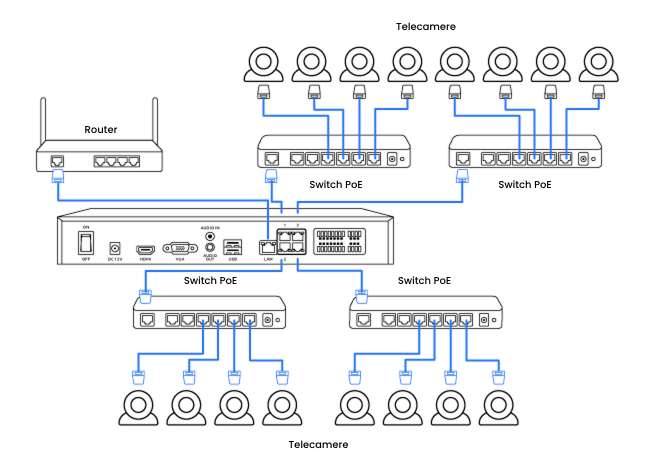
Note:
1. Aggiungendo gli switch PoE, non si aumenterà il numero di telecamere supportate dall'NVR, poiché i canali video sono invariabili.
2. Per evitare di sovraccaricare gli switch PoE, distribuisci le telecamere in modo uniforme tra le quattro porte Internet, se possibile.
Che tipo di scheda microSD posso utilizzare?
Questa telecamera supporta schede microSD fino a 512 GB, con formato FAT32 e velocità di lettura/scrittura Classe 10.
È richiesto un abbonamento per le telecamere PoE Reolink?
No. Le telecamere PoE Reolink funzionano in modo indipendente senza costi di abbonamento. Puoi utilizzare il rilevamento di persone/veicoli/animali, l'archiviazione locale e altre funzionalità senza costi aggiuntivi.
How can I preview or playback the video?
Method 1: Connect the NVR to a monitor or TV for preview or playback.
Method 2: Download FREE Reolink APP or Client, add the NVR to the APP or Client, configure the settings, and then you can preview or playback the videos.
Posso utilizzare telecamere di terze parti con l’NVR?
Non è consigliato. Le telecamere di terze parti potrebbero presentare problemi di compatibilità. Per domande relative ai protocolli, contatta il nostro team di supporto.
Posso collegare l’NVR al router in modalità wireless?
No, l’NVR deve essere collegato al router tramite cavo Ethernet.
Come posso espandere la capacità di archiviazione del NVR?
È possibile sostituire l'HDD da 2 TB preinstallato con uno di capacità maggiore e aggiungere un HDD esterno per il NVR. RP-PN8 supporta fino a un totale di 32 TB: max. 16 TB tramite SATA interno, max. 16 TB tramite eSATA esterno.
What is the hardware version of the NVR?
The hardware version is N5MB01.
Can I turn off the spotlights?
Yes, you can turn off the spotlights manually.
By default, the camera's spotlights are motion activated: it will turn on automatically when a motion is detected. You can turn them off or adjust the brightness to your liking.
Please note that with the spotlights on you can enjoy clear color night vision, but if the spotlights are turned off, you will only see black and white images at night.
Where are the recordings stored? Is NVR a must?
The camera can work without an NVR.
1. When it works without an NVR, the recordings can be saved to the micro SD card (purchased separately);
2. When it works with an NVR, the recordings can be saved to the NVR.
Note: For best compatibility, do not use the camera with third-party NVRs.
Can this camera support smart home like Google Assistant?
How do I use live view and playback?
You can add and set up the camera on Reolink APP/Client. Then click the camera to check the live view and playback of it from anywhere, at any time.
Reolink APP/Client is free of charge and the service is free of subscription.
How do I use live view and playback?
You can add and set up the camera on Reolink APP/Client. Then click the camera to check the live view and playback of it from anywhere, at any time. Yet, via the App, you can live view in the dual-view display only in fluent mode; Via browsers, you cannot check two views synchronously.
Reolink APP/Client is free of charge and the service is free of subscription.
Where are the recordings stored? Is NVR a must?
The camera can work without an NVR.
1. When it works without an NVR, the recordings can be saved to the microSD card (purchased separately);
2. When it works with an NVR, the recordings can be saved to the NVR.
Note: For best compatibility, do not use the camera with third-party NVRs.
What Ethernet cable do I need?
The camera supports T-568B connectors and 8-PIN Ethernet cables of CAT5 or higher.
Quali capacità di archiviazione supporta il RP-PN8?
RP-PN8 supporta fino a 32 TB di spazio di archiviazione: max. 16 TB tramite SATA interno, max. 16 TB tramite eSATA esterno.
Quali capacità di archiviazione supporta il RP-PN8?
RP-PN8 supporta fino a 32 TB di spazio di archiviazione: max. 16 TB tramite SATA interno, max. 16 TB tramite eSATA esterno.
Quanto dura la batteria?
Una volta completata la ricarica, la telecamera può funzionare fino a 3 mesi in modalità di registrazione attivata dal movimento. Grazie al pannello solare da 3W incluso, sono sufficienti soli 10 minuti di ricarica al giornoper garantirne il funzionamento continuo.
Dove vengono salvati i video? Devo avere un NVR?
La telecamera può funzionare senza un NVR.
1. Quando funziona senza un NVR, le registrazioni possono essere salvate sulla scheda microSD (venduta separatamente);
2. Quando funziona con un NVR, le registrazioni possono essere salvate sul NVR.
Nota: per una compatibilità ottimale, non usare la telecamera con NVR di altre marche.
Dove vengono memorizzate le registrazioni? È necessario un NVR?
La telecamera può funzionare senza un NVR.
1. Quando funziona senza un NVR, le registrazioni possono essere salvate sulla scheda microSD (acquistabile separatamente);
2. Quando funziona con un NVR, le registrazioni possono essere salvate sul NVR.
Nota: per una compatibilità ottimale, non utilizzare la telecamera con NVR di terze parti.
Che tipo di scheda micro SD posso usare?
Questa telecamera supporta fino a 256GB di schede micro SD con formato FAT32 e velocità di lettura e scrittura di classe 10.
Questa telecamera supporta la funzione time-lapse?
Posso spegnere i riflettori?
Sì, è possibile spegnere i faretti manualmente.
Per impostazione predefinita, i faretti della telecamera sono attivati dal movimento: si accendono automaticamente quando viene rilevato un movimento. È possibile spegnerli o regolare la luminosità a proprio piacimento.
Da notare che con i faretti accesi si può godere di una chiara visione notturna a colori, ma se i faretti sono spenti, di notte si vedranno solo immagini in bianco e nero.
Come si utilizzano la visualizzazione live e la riproduzione?
È possibile aggiungere e impostare la telecamera su Reolink APP/Client. Quindi fare clic sulla telecamera per controllarne la visualizzazione dal vivo e la riproduzione da qualsiasi luogo e in qualsiasi momento. Tuttavia, tramite l'App, è possibile visualizzare in diretta la doppia visualizzazione solo in modalità fluida; tramite i browser, non è possibile controllare due visualizzazioni in modo sincronizzato.
L'APP/Client di Reolink è gratuita e il servizio è privo di abbonamento.
Di quale cavo Ethernet ho bisogno?
La telecamera supporta i connettori T-568B e i cavi Ethernet a 8 pin di CAT5 o superiore.
Questa telecamera supporta la funzione time-lapse?
Questa telecamera supporta le smart home come Google Assistant?
Qual è la versione hardware dell'NVR?
La versione hardware è N5MB01.
L'NVR supporta il rilevamento di persone/veicoli/animali delle mie telecamere Reolink?
Sì, l'NVR in RLK12-800WB4 supporta il rilevamento intelligente di persone/veicoli/animali da parte delle telecamere.
How can I preview or playback the video?
Method 1: Connect the NVR to a monitor or TV for preview or playback.
Method 2: Download FREE Reolink APP or Client, add the NVR to the APP or Client, configure the settings, and then you can preview or playback the videos.
How can I preview or playback the video?
Method 1: Connect the NVR to a monitor or TV for preview or playback.
Method 2: Download FREE Reolink APP or Client, add the NVR to the APP or Client, configure the settings, and then you can preview or playback the videos.
Come posso utilizzare la visualizzazione dal vivo e la riproduzione?
Puoi aggiungere e configurare la telecamera sull'APP/client Reolink.Quindi, fai clic sulla telecamera per controllare la visualizzazione dal vivo e la riproduzione da qualsiasi luogo, in qualsiasi momento.
L'APP/Client Reolink è gratuito e il servizio è senza abbonamento.
È necessario un abbonamento?
No. OMVI supporta l’archiviazione locale come soluzione principale, con backup sul cloud opzionale.
Can I turn off the warm light and siren?
Yes, you can turn off the warm lightand siren manually.
By default, the camera's warm light and siren are motion activated: they will be turned on automatically when a motion is detected. You can turn them off, adjust the brightness of warm light, or customize the siren to your liking.
The camera can provide clear and natural true full-color night vision even without turning on the warm light. You can also choose to turn on the warm light to enhance the quality of the color night vision in extremely dark environments.
Can I use a cable to power the camera instead of batteries?
Yes. You can power the camera via a cable. But please note that the power applies to the camera, not to the battery.
Questa telecamera è compatibile con Reolink NVR o con la serie Reolink Home Hub?
Sì, questa telecamera è compatibile con tutti i modelli di NVR PoE e NVR Wi-Fi attualmente disponibili, supportando la registrazione continua 24/7. Inoltre, è perfettamente compatibile con Reolink Home Hub e Home Hub Pro.
Posso collegare l'NVR al router in modalità wireless?
No. L'NVR deve essere collegato al router tramite un cavo Ethernet.
È possibile regolare l'angolazione della telecamera?
Sì.
Telecamera bullet: rotazione orizzontale di 90° a sinistra e a destra; regolazione verticale verso il basso fino a 20° rispetto alla posizione orizzontale.
Telecamera PTZ: rotazione orizzontale fino a 350°; regolazione verticale verso il basso fino a 50°, a partire da un'inclinazione di 3° rispetto all'orizzontale.
Cosa significano le lettere e i numeri nel nome del modello?
PR = Serie Professionale Reolink
PC = Telecamera PoE
PT = Pan & Tilt
8M = 8MP
21Z = Zoom Ottico 21×
Can I connect the NVR to the third-party cameras?
It's not suggested to do so. Compatibility issues can occur with third-party cameras. Please contact
our support team if you have any concerns about protocols.
Le serie RLC, Argus, TrackMix e Duo sono compatibili con l’RP-PN16?
Sì, questi modelli sono compatibili eccetto le versioni 4G/LTE.
Per quanto tempo può registrare l’NVR?
Il tempo di registrazione dipende dall'impostazione del bit rate: maggiore è il bit rate, migliore è la qualità, con conseguente aumento delle dimensioni del file. Per ulteriori informazioni, consultare:
Per quanto tempo può registrare un NVR ReolinkPosso aggiungere uno switch PoE?
Sì, sono disponibili tre metodi di connessione comuni
Metodo 1: Collegare sia il NVR PoE che lo switch PoE allo stesso router tramite cavi Ethernet. Quindi collegare le telecamere allo switch o all'NVR.
Metodo 2: Collegare lo switch PoE all'NVR, quindi collegare la porta LAN dell'NVR al router.
Metodo 3: Collegare lo switch PoE al router, quindi collegare la porta LAN dell'NVR allo switch.Per maggiori dettagli, fare riferimento a: https://support.reolink.com/hc/en-us/articles/900000537406-How-to-Connect-PoE-Switch-Router-and-Reolink-NVRs/
Nota: L'aggiunta di switch PoE non consente un aumento del numero di telecamere che l'NVR è in grado di supportare, poiché il limite di canali è fisso.
How to connect the NVR to PoE cameras?
You can connect the NVR to a router via its LAN port, and to PoE switches via its video-in Ethernet ports. Then up to 36 cameras can be connected to the NVR via the PoE switches. The most suggested connecting configuration is as the follow:
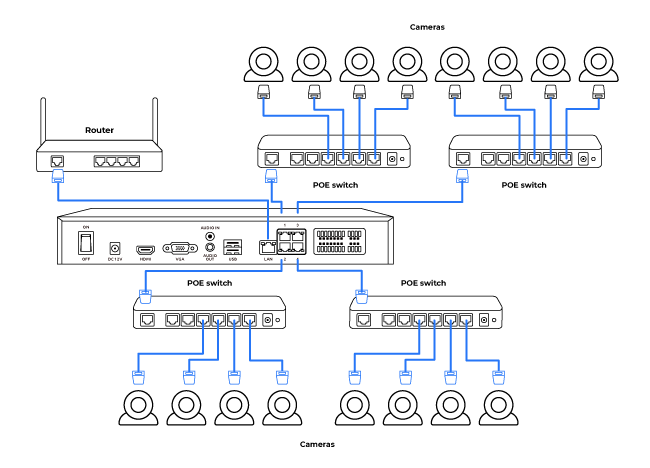
Note:
1. By adding PoE switches, you will not expand the number of cameras supported by the NVR, since its video channels are immutable.
2. To protect your PoE switch(es) from overloading, distribute your cameras/PoE switches evenly to the four Internet ports if possible.
How can I power up the camera?
There are two methods:
1. Via an Ethernet cable, connect the camera to a PoE NVR, PoE injector, PoE switch, or directly to a router with a PoE port, for both power supply and video signal transmission.
Note: Please make sure that the PoE injector/switch is 802.3 af compliant (48V) and supports active mode.
2.Via a DC 12V 1A power adapter (purchased separately), connect the camera to power outlet for power supply only.
Can I use this camera with Synology?
Yes, this PoE IP camera can work with Synology. There are 2 methods for you to save videos in it.
Method 1 (recommended): You can add this camera to the Synology Surveillance Station. Check this article to learn how to add a camera.
Method 2: You can treat your Synology device as an FTP server. For detailed steps, check How to Set up FTP for Reolink Products.
Can this camera be used outdoors/indoors?
This camera can be used both indoors and outdoors.
It is IP66 certified weatherproof and its operating temperature is from -10°C to 55°C (14°F to 131°F), perfect for outdoor and indoor usage.
Can this camera support smart home like Google Assistant?
How can I power up the camera?
There are two methods:
1. Via an Ethernet cable, connect the camera to a PoE NVR, PoE injector, PoE switch, or directly to a router with a PoE port, for both power supply and video signal transmission.
Note: Please make sure that the PoE injector/switch is 802.3 af compliant (48V) and supports active mode.
2.Via a DC 12V 1A power adapter (purchased separately), connect the camera to power outlet for power supply only.
What kind of microSD card can I use?
This camera supports up to 256GB microSD cards with FAT32 format and Class 10 read & write speed.
Posso aggiungere uno switch PoE?
Sì, sono disponibili tre metodi di connessione comuni.
Metodo 1: Collegare sia l'NVR PoE che lo switch PoE allo stesso router tramite cavi Ethernet. Quindi collegare le telecamere allo switch o all'NVR.
Metodo 2: Collegare lo switch PoE all'NVR, quindi collegare la porta LAN dell'NVR al router.
Metodo 3: Collegare lo switch PoE al router, quindi collegare la porta LAN dell'NVR allo switch.
Per maggiori dettagli, fare riferimento a:
Come collegare uno switch PoE, un router e un NVR PoENota: L'aggiunta di switch PoE non consente un aumento del numero di telecamere che l'NVR è in grado di supportare, poiché il limite di canali è fisso.
Posso aggiungere uno switch PoE?
Sì, sono disponibili tre metodi di connessione comuni
Metodo 1: Collegare sia il NVR PoE che lo switch PoE allo stesso router tramite cavi Ethernet. Quindi collegare le telecamere allo switch o all'NVR.
Metodo 2: Collegare lo switch PoE all'NVR, quindi collegare la porta LAN dell'NVR al router.
Metodo 3: Collegare lo switch PoE al router, quindi collegare la porta LAN dell'NVR allo switch.
Per maggiori dettagli, fare riferimento a:
How to Connect PoE Switch Router and PoE NVRNota: L'aggiunta di switch PoE non consente un aumento del numero di telecamere che l'NVR è in grado di supportare, poiché il limite di canali è fisso.
Posso usare questa telecamera con Synology?
Come si connette alla rete 4G?
Come faccio ad accendere la telecamera?
Ci sono due modi:
1. Usa un cavo Ethernet per collegare la telecamera a un NVR PoE, un iniettore PoE, uno switch PoE o direttamente a un router con una porta PoE, sia per l'alimentazione che per la trasmissione del segnale video.
2. Con un adattatore di alimentazione CC 12 V 1 A (da comprare a parte), collega la telecamera a una presa di corrente solo per l'alimentazione.
Come posso alimentare la telecamera?
Esistono due metodi:
1. Tramite un cavo Ethernet, collegare la telecamera a un NVR PoE, un iniettore PoE, uno switch PoE o direttamente a un router con una porta PoE, sia per l'alimentazione che per la trasmissione del segnale video.
Nota: assicurarsi che l'iniettore/switch PoE sia conforme allo standard 802.3 af (48 V) e supporti la modalità attiva.
2. Tramite un alimentatore CC 12 V 1 A (acquistabile separatamente), collegare la telecamera alla presa di corrente solo per l'alimentazione.
Dove vengono memorizzate le registrazioni? L'NVR è indispensabile?
La telecamera può funzionare senza un NVR.
1. Quando funziona senza un NVR, le registrazioni possono essere salvate sulla scheda micro SD (acquistata separatamente);
2. Quando funziona con un NVR, le registrazioni possono essere salvate sull'NVR.
Nota: Per una migliore compatibilità, non utilizzare la telecamera con NVR di terzi.
Come si collega l'NVR alle telecamere PoE?
È possibile collegare l'NVR a un router tramite la sua porta LAN e agli switch PoE tramite le sue porte Ethernet di ingresso video. In questo modo, è possibile collegare fino a 36 telecamere all'NVR tramite gli switch PoE. La configurazione di connessione più consigliata è la seguente:
Nota:
1. Aggiungendo ulteriori switch PoE, non si amplierà il numero di telecamere supportate dall'NVR, poiché i suoi canali video sono immutabili.
2. Per proteggere gli switch PoE dal sovraccarico, distribuire le telecamere/switch PoE equamente sulle quattro porte di rete, se possibile.
A cosa serve il sensore ad infrarossi passivo?
I sensori ad infrarossi passivo sono sensibili alle radiazioni infrarosse provenienti da esseri umani o animali e possono quindi ridurre drasticamente i falsi allarmi causati da falene svolazzanti o ramoscelli volanti.
La sua abbreviazione è PIR. Misura la luce infrarossa (IR) irradiata da oggetti con una temperatura superiore allo zero assoluto. Quando cambia la quantità di radiazione infrarossa, si attiva il rilevamento.
Questa telecamera può supportare la smart home come Google Assistant?
Che tipo di scheda microSD posso utilizzare?
Questa telecamera supporta schede microSD fino a 512 GB con formato FAT32 e velocità di lettura e scrittura di Classe 10.
Questa telecamera supporta la smart home come Google Assistant?
Posso usare questa telecamera con Synology?
Sì, questa telecamera IP PoE può funzionare con Synology. Esistono 2 metodi per salvare i video.
Metodo 1 (consigliato): è possibile aggiungere questa telecamera a Synology Surveillance Station. Consulta
questo articolo per scoprire come aggiungere una telecamera.
Metodo 2: puoi gestire il tuo dispositivo Synology come un server FTP. Per la procedura dettagliata, consulta
Come configurare l'FTP per i prodotti Reolink.
Come posso visualizzare in anteprima o riprodurre il video?
Metodo 1: collega l'NVR a un monitor o TV per l'anteprima o la riproduzione.
Metodo 2: scarica l'APP o il client Reolink GRATUITO, aggiungi l'NVR all'APP o al client, configura le impostazioni, quindi puoi visualizzare in anteprima o riprodurre il video.
Can I connect the NVR to the third-party cameras?
It's not suggested to do so. Compatibility issues can occur with third-party cameras. Please contact
our support team if you have any concerns about protocols.
Can I connect Reolink NVR to one or more displayers?
You can connect a maximum of two displayers with the NVR via HDMI or VGA (see the diagram below).
Cameras connected to the NVR will be shown on the displayer(s).
Questa telecamera può essere utilizzata all'esterno/all'interno?
Questa telecamera può essere utilizzata sia all'interno che all'esterno. È certificata IP66 per la resistenza alle intemperie e la sua temperatura operativa è compresa tra -10 °C e 55 °C (da 14 °F a 131 °F), perfetta per l'uso all'aperto e all'interno.
Per chi è pensata OMVI?
OMVI è ideale per chi desidera una copertura completa e una protezione affidabile, inclusi proprietari di abitazioni di grandi dimensioni, piccoli imprenditori e chi cerca soluzioni di sicurezza flessibili senza limitazioni di cablaggio.
Does the camera support person/vehicle/animal detection?
Yes, this camera supports person/vehicle/animal detection.
How to add a Reolink camera to the Home Hub?
Cos'è la protezione perimetrale e come funziona?
La protezione perimetrale è un insieme di funzioni AI che include attraversamento linea, intrusione in area e permanenza in area, basate su zone virtuali personalizzabili. Quando queste “barriere virtuali” vengono superate, riceverai un avviso.
Le telecamere delle serie RLC, Argus, TrackMix e Duo sono compatibili con RP-N64?
Sì, tutti i modelli elencati sono compatibili ad eccezione della versione 4G/LTE.
Che tipo di cavo Ethernet devo utilizzare?
La telecamera supporta connettori T-568B e cavi Ethernet a 8 pin di categoria CAT5 o superiore.
Cos'è lo Zoom 3D? Come posso utilizzare questa funzione?
Lo Zoom 3D consente alla telecamera di effettuare automaticamente pan, tilt e zoom su un'area selezionata dello schermo, senza controllo manuale passo dopo passo.
Can I connect a Reolink NVR to one or more displays?
You can connect a maximum of two displays with the NVR via HDMI or VGA (see the diagram below).
Cameras connected to the NVR will be shown on the displays.
Posso collegare l'NVR al router in modalità wireless?
No, l'NVR deve essere collegato al router tramite un cavo Ethernet.
Does the NVR support the person/vehicle detection of my Reolink cameras?
Yes. RLN36 supports the camera's smart person/vehicle detection.
Can I connect the camera to my PoE NVR or PoE NVR system?
Yes, Reolink WiFi cameras can be connected to Reolink PoE NVR in an indirect way. You can follow these steps to connect them:
Step 1: Connect the camera to a wifi router via wifi signals or an ethernet cable, and it needs to be powered via a power adapter.
Step 2: Connect the NVR to the same router by a network cable.
The NVR will pick up all the cameras on the same network.
Note: (1)For best compatibility, do not use the camera with third-party NVRs.
(2)Although the camera occupies only one channel for recording, it will produce two separate recording files.
Can this camera be used outdoors/indoors?
This camera can be used both indoors and outdoors.
It is IP66 certified weatherproof and its operating temperature is from -10°C to 55°C (14°F to 131°F), perfect for outdoor and indoor usage.
What kind of microSD card can I use?
This camera supports up to 256GB microSD cards with FAT32 format and Class 10 read & write speed.
What Ethernet Cable do I need?
The camera supports T-568B connectors and 8-PIN Ethernet cables of CAT5 or higher.
Can I turn off the spotlights?
Yes, you can turn off the spotlights manually.
By default, the camera's spotlights are motion activated: it will turn on automatically when a motion is detected. You can turn them off or adjust the brightness to your liking.
Please note that with the spotlights on you can enjoy clear color night vision, but if the spotlights are turned off, you will only see black and white images at night.
Can this camera be used outdoors/indoors?
This camera can be used both indoors and outdoors.
It is IP66 certified weatherproof and its operating temperature is from -10掳C to 55掳C (14掳F to 131掳F), perfect for outdoor and indoor usage.
Which NVR can work with the camera?
The camera can work with NVRs with the Hw_H3MB18, Hw_N3MB01, Hw_N2MB02, Hw_N5MB01, Hw_N6MB01 and Hw_N7MB01 hardware.
For the NVR with the Hw_H3MB18, Hw_N3MB01, and Hw_N2MB02 hardware, you need to
upgrade the NVR's firmware to the latest version for video displaying. In such case, the camera can only support up to 6MP video resolution.
For the NVR with the Hw_N5MB01, Hw_N6MB01 and Hw_N7MB01 hardware, the camera's maximum video resolution can be 8MP.
If you want to buy a new compatible NVR, you can check its hardware version on its Specs page before placing the order.
Posso collegare l'NVR al router in modalità wireless?
No, l'NVR deve essere collegato al router tramite un cavo Ethernet.
Posso collegare l'NVR al router in modalità wireless?
No, l'NVR deve essere collegato al router tramite un cavo Ethernet.
Come posso espandere la capacità di archiviazione del NVR?
È possibile sostituire l'HDD da 2 TB preinstallato con uno di capacità maggiore e aggiungere un HDD esterno per il NVR. RP-PN8 supporta fino a un totale di 32 TB: max. 16 TB tramite SATA interno, max. 16 TB tramite eSATA esterno.
Posso scegliere o cambiare il mio piano dati?
Certamente. Puoi scegliere il piano dati che preferisci direttamente dall'App Reolink. Tramite l'app potrai anche monitorare il consumo dei dati in tempo reale, così da poter aggiornare o cambiare il tuo
piano in base alle tue necessità.
Posso usare questa telecamera dentro o fuori casa?
Questa telecamera può essere usata sia all'interno che all'esterno. Ha la certificazione IP66 per la resistenza alle intemperie e la temperatura di funzionamento va da -10 °C a 55 °C (da 14 °F a 131 °F), perfetta per l'uso all'aperto e al chiuso.
Questa telecamera può essere utilizzata all'aperto/al chiuso?
Questa telecamera può essere utilizzata sia all'interno che all'esterno.
È certificata IP66 resistente alle intemperie e la sua temperatura di funzionamento va da -10 °C a 55 °C (14 °F a 131 °F), perfetta per l'uso all'aperto e al chiuso.
L'NVR supporta il rilevamento di persone/veicoli delle mie telecamere Reolink?
Sì. RLN36 supporta il rilevamento intelligente di persone/veicoli della telecamera.
Quanti dati utilizza la telecamera?
L'utilizzo dei dati di questa telecamera dipende dal bitrate impostato. 1 ora di feed in diretta in 1440p (bitrate predefinito: 3Mbps) utilizzerà circa 2 GB di dati. Per la visualizzazione di feed in diretta in modalità Fluent (bitrate predefinito: 160 kbps), puoi guardare per 4 ore utilizzando 1 GB di dati. Sulla base di ciò, è possibile stimare l'utilizzo dei dati per scegliere il piano dati più adatto.
Posso collegare la telecamera al mio sistema NVR o NVR PoE?
Sì, le telecamere WiFi di Reolink possono essere collegate a un NVR PoE di Reolink in un modo indiretto. Per collegarli è possibile seguire la seguente procedura:
Step 1: Collegare la telecamera a un router wifi tramite segnali wifi o un cavo Ethernet e alimentarla tramite un adattatore di corrente.
Step 2: Collegare l'NVR allo stesso router tramite un cavo di rete.
L'NVR rileva tutte le telecamere sulla stessa rete.
Nota: (1) Per una migliore compatibilità, non utilizzare la telecamera con NVR di terze parti.
(2)Sebbene la telecamera occupi un solo canale per la registrazione, produrrà due file di registrazione separati.
Posso spegnere i faretti?
Sì, è possibile spegnere i faretti manualmente.
Per impostazione predefinita, i faretti della telecamera sono attivati dal movimento: si accendono automaticamente quando viene rilevato un movimento. È possibile spegnerli o regolare la luminosità a proprio piacimento.
Da notare che con i faretti accesi si può godere di una chiara visione notturna a colori, ma se i faretti sono spenti, di notte si vedranno solo immagini in bianco e nero.
La telecamera supporta il NAS?
Di quale cavo Ethernet ho bisogno?
La telecamera supporta connettori T-568B e cavi Ethernet a 8 pin di tipo CAT5 o superiore.
Quale NVR può funzionare con la telecamera?
La telecamera può funzionare con NVR dotati dei seguenti hardware: Hw_H3MB18, Hw_N3MB01, Hw_N2MB02, Hw_N5MB01, Hw_N6MB01 e Hw_N7MB01.
Per gli NVR con hardware Hw_H3MB18, Hw_N3MB01 e Hw_N2MB02, è necessario
aggiornare il firmware dell'NVR all'ultima versione per la visualizzazione video. In questo caso, la telecamera supporta una risoluzione video massima di 6MP.
Per gli NVR con hardware Hw_N5MB01, Hw_N6MB01 e Hw_N7MB01, la risoluzione video massima supportata dalla telecamera può arrivare a 8MP.
Se desideri acquistare un nuovo NVR compatibile, puoi verificare la versione hardware nella pagina delle specifiche prima di effettuare l’ordine.
Posso collegare Reolink NVR a uno o più display?
È possibile collegare un massimo di due display all'NVR tramite HDMI o VGA (vedere lo schema seguente).

Le telecamere collegate all'NVR verranno visualizzate sui display.
Can I connect a Reolink NVR to one or more displays?
You can connect a maximum of two displays with the NVR via HDMI or VGA (see the diagram below).
Cameras connected to the NVR will be shown on the displays.
Can I connect my previously purchased Reolink PoE camera to the Wi-Fi NVR?
Yes, PoE cameras can work with the Wi-Fi NVR. But you need to first power on the PoE camera with a PoE injector, PoE switch, or power adapter, and connect it to the NVR or to the same network as the NVR.
Di quale cavo Ethernet mi serve?
La telecamera supporta connettori T-568B e cavi Ethernet a 8 PIN di CAT5 o superiore.
Che tipo di scheda microSD posso utilizzare?
Questa telecamera supporta schede microSD fino a 512GB, formattate in FAT32 e con velocità di lettura e scrittura di Classe 10.
Che tipo di scheda micro SD posso utilizzare?
Questa telecamera supporta schede micro SD fino a 256 GB con formato FAT32 e velocità di lettura e scrittura di Classe 10.
How can I power up this camera?
There are two methods:
1. Via an Ethernet cable, connect the camera to a PoE NVR, PoE injector, PoE switch, or directly to a router with a PoE port, for both power supply and video signal transmission.
Note: Please make sure that the PoE injector/switch is 802.3 af compliant (48V) and supports active mode.
2.Via a DC 12V 2A power adapter (purchased separately), connect the camera to power outlet for power supply only.
Does this camera have a microSD card?
No, the camera does not come with a microSD card, but a microSD card slot that supports up to a 512GB microSD card with FAT32 format and Class 10 or higher read & write speed.
È possibile regolare l'angolazione della telecamera?
Sì.
Telecamera bullet: rotazione orizzontale di 90° a sinistra e a destra; regolazione verticale verso il basso fino a 20° rispetto alla posizione orizzontale.
Telecamera PTZ: rotazione orizzontale fino a 350°; regolazione verticale verso il basso fino a 50°, a partire da un'inclinazione di 3° rispetto all'orizzontale.
Quanta capacità di archiviazione supporta l'RP-N64?
Supporta fino a 4 HDD interni, con un massimo di 20 TB per HDD.
Nota: PR-N64 non include un HDD preinstallato.
Questa telecamera supporta integrazioni smart home come Google Assistant?
Questa telecamera può essere utilizzata all'aperto/all'interno?
Sì. È adatta sia per uso interno che esterno.
Grazie alla protezione IP66 resistente alle intemperie e all'intervallo di temperatura operativa da -30°C a 55°C (-22°F a 131°F), garantisce prestazioni affidabili anche in condizioni difficili.
How to expand the NVR storage capacity?
You can change the pre-installed 2TB HDD to a larger one (The NVR has 1 SATA interface).
The NVR NVS12W supports Max. 8TB Storage per SATA.
Posso utilizzare telecamere di terze parti con l'NVR?
Non è consigliato. Le telecamere di terze parti potrebbero presentare problemi di compatibilità. Per domande relative al protocollo, contattare il team di supporto.
Can I connect WiFi cameras to the NVR when it is already connected to 36 PoE cameras?
No, RLN36 supports Max. 36 cameras (no matter WiFi or PoE). You cannot add any more cameras if it is already occupied by 36 ones.
The video channels of an NVR limit the number of cameras it supports. RLN36 has 36 channels and hence supports 36 cameras (excluding dual-lens cameras).
Please note that a Reolink duo-lens camera occupies two video channels.
What kind of microSD card can I use?
This camera supports up to 512GB microSD cards with FAT32 format and Class 10 read & write speed.
How do I use live view and playback?
You can add and set up the camera on Reolink APP/Client. Then click the camera to check the live view and playback of it from anywhere, at any time.
Reolink APP/Client is free of charge and the service is free of subscription.
What Ethernet Cable Do I Need?
The camera supports T-568B connectors and 8-PIN Ethernet cables of CAT5 or higher.
Can I use this camera with Synology?
Yes, this PoE IP camera can work with Synology. There are 2 methods for you to save videos in it.
Method 1 (recommended): You can add this camera to the Synology Surveillance Station. Check
this article to learn how to add a camera.
Method 2: You can treat your Synology device as an FTP server. For detailed steps, check How to Set up FTP for Reolink Products.Does the camera support two-way audio?
Yes, the camera supports two-way audio via its built-in mic and speaker. You can not only capture videos with audio recorded but also have real-time communication with people on the camera's end through Reolink App or Client.
How do I use live view and playback?
You can add and set up the camera on Reolink APP/Client. Then click the camera to check the live view and playback of it from anywhere, at any time.
Reolink APP/Client is free of charge and the service is free of subscription.
Where are the recordings stored? Is NVR a must?
The camera can work without an NVR.
1. When it works without an NVR, the recordings can be saved to the microSD card (purchased separately);
2. When it works with an NVR, the recordings can be saved to the NVR, and the transmission will use one NVR channel.
Note: For best compatibility, do not use the camera with third-party NVRs.
Posso utilizzare telecamere di terze parti con l'NVR?
Non è consigliato. Le telecamere di terze parti potrebbero presentare problemi di compatibilità. Per domande relative al protocollo, contattare il team di supporto.
Posso utilizzare telecamere di terze parti con l'NVR?
Non è consigliato. Le telecamere di terze parti potrebbero presentare problemi di compatibilità. Per domande relative al protocollo, contattare il team di supporto.
Quanto dura un HDD per le registrazioni?
Questa telecamera supporta il rilevamento di persone/veicoli/animali?
Sì, questa telecamera supporta il rilevamento di persone/veicoli/animali.
Come faccio a usare la visualizzazione live e la riproduzione?
Puoi aggiungere e configurare la telecamera sull'app/client Reolink. Poi clicca sulla telecamera per vedere le immagini in diretta e riprodurle da qualsiasi luogo e in qualsiasi momento. L'app/client Reolink è gratis e il servizio non ha abbonamento.
Come si utilizzano la visualizzazione live e la riproduzione?
È possibile aggiungere e configurare la telecamera sull'APP/Client Reolink. Quindi fare clic sulla telecamera per controllare la visualizzazione live e riprodurre le registrazioni da qualsiasi luogo e in qualsiasi momento.
L'APP/Client Reolink è gratuita e il servizio non richiede alcun abbonamento.
Posso collegare telecamere Wi-Fi all'NVR quando è già collegato a 36 telecamere PoE?
No, RLN36 supporta un massimo di 36 telecamere (che siano Wi-Fi o PoE). Non è possibile aggiungere altre telecamere se il dispositivo è già occupato da 36.
I canali video di un NVR limitano il numero di telecamere supportate. RLN36 ha 36 canali e quindi supporta 36 telecamere (escluse le telecamere a doppia lente).
Si noti che una telecamera a doppia lente Reolink occupa due canali video.
La telecamera si connette alle reti 5G/4G/3G/2G?
La telecamera si connette alla rete 4G. Inoltre, supporta anche il 3G, anche se non si raccomanda l'uso di questa rete (dal momento che le aziende wireless stanno ritirando le vecchie tecnologie di rete). La scheda SIM 5G o 2G non è supportata.
Per accedere alla telecamera si può utilizzare tranquillamente un telefono con rete 4G o 5G: la telecamera ha bisogno di una scheda SIM propria, e questa è completamente indipendente dalla scheda SIM del telefono.
Nota:
(1) la telecamera non supporta la connessione WiFi.
(2) A partire dal 1 luglio 2022, è stata ritirata la vecchia rete UMTS 3G di T-Mobile.
Che tipo di scheda micro SD posso utilizzare?
Questa telecamera supporta schede micro SD fino a 256 GB con formato FAT32 e velocità di lettura e scrittura di Classe 10.
La telecamera supporta l'audio bidirezionale?
Sì, la telecamera supporta l'audio bidirezionale tramite il microfono e l'altoparlante integrati. È possibile non solo catturare video con l'audio registrato, ma anche comunicare in tempo reale con le persone che si trovano sul lato della telecamera tramite l'app o il client Reolink.
Dove vengono archiviate le registrazioni? L'NVR è indispensabile?
La telecamera può funzionare senza un NVR.
1. Quando funziona senza NVR, le registrazioni possono essere salvate sulla microSD (acquistata separatamente);
2. Quando funziona con un NVR, le registrazioni vengono salvate sull’NVR e la trasmissione utilizzerà un canale dell’NVR.
Nota: per la migliore compatibilità, non usare la telecamera con NVR di terze parti.
Posso spegnere i fari e la sirena?
Sì, puoi spegnere manualmente i fari e la sirena.
Per impostazione predefinita, i fari e la sirena della telecamera sono attivati dal movimento: si accendono automaticamente quando viene rilevato un movimento. Puoi spegnerli, regolare la luminosità dei fari o personalizzare la sirena a tuo piacimento.
Tieni presente che con i fari accesi puoi goderti una visione notturna a colori nitida, ma se i fari sono spenti, vedrai solo immagini in bianco e nero di notte.
Che tipo di scheda microSD posso usare?
Questa telecamera supporta schede microSD fino a 256 GB con formato FAT32 e velocità di lettura e scrittura di Classe 10.
Posso collegare la mia telecamera Reolink PoE acquistata in precedenza all'NVR WiFi?
Sì, le telecamere PoE possono funzionare con l'NVR WiFi. Ma devi prima accendere la telecamera PoE con un iniettore PoE, uno switch PoE o un adattatore di alimentazione e collegarla all'NVR o alla stessa rete dell'NVR.
How to expand the NVR storage capacity?
You can change the pre-installed 2TB HDD to a larger one (The NVR has 1 SATA interface).
The NVR RLN12W supports Max. 8TB Storage per SATA.
Di quale cavo Ethernet ho bisogno?
La telecamera supporta connettori T-568B e cavi Ethernet a 8 PIN di CAT5 o superiore.
What are the maximum transmission distances between the NVR and the cameras, as well as between the NVR and the router?
The distance between the NVR and the router primarily depends on the length of the Ethernet cable used. In optimal conditions, the distance between the NVR and the cameras can reach up to 120 meters.
Posso utilizzare questa telecamera con Synology?
Sì, questa telecamera IP PoE può funzionare con Synology.Sono disponibili 2 metodi per salvare i video al suo interno.
Metodo 1 (consigliato): è possibile aggiungere questa telecamera a Synology Surveillance Station.Consulta
questo articolo per sapere come aggiungere una telecamera.
Metodo 2: puoi trattare il tuo dispositivo Synology come un server FTP.Per i passaggi dettagliati, controlla
Come impostare attivare FTP per i prodotti Reolink.
Posso regolare l’angolazione della telecamera?
Sì. La telecamera bullet superiore ha un’inclinazione predefinita di 7° verso il basso e può essere regolata manualmente fino a 32° in verticale (con ulteriori 25° verso il basso). La telecamera PT inferiore supporta una rotazione di 340° e un’inclinazione di 55°.
Come si accende la telecamera?
La telecamera può essere alimentata da un adattatore di corrente continua da 12 V 2 A (insieme alla telecamera vengono forniti un adattatore di alimentazione da 1,2 metri e un cavo di prolunga da 4,5 metri). È possibile verificare il contenuto della confezione alla fine della pagina di panoramica.
What Ethernet cable do I need?
The camera supports T-568B connectors and 8-PIN Ethernet cables of CAT5 or higher.
Can this camera support the time-lapse function?
Yes, the camera can support time-lapse. It can save time-lapse photos and videos to the microSD card.
How to Set Up Time Lapse?Che tipo di scheda microSD posso utilizzare?
Questa telecamera supporta schede microSD fino a 512 GB, con formato FAT32 e velocità di lettura/scrittura Classe 10.
Posso utilizzare telecamere di terze parti con l'NVR?
Non è consigliato. Le telecamere di terze parti potrebbero presentare problemi di compatibilità. Per domande relative al protocollo, contatta il team di assistenza.
Come posso alimentare la telecamera?
Si consiglia l'uso con NVR PoE, switch PoE o iniettore PoE Reolink. Se utilizzi uno switch di terze parti, deve supportare lo standard 802.3at e fornire almeno 30 W per porta. Una potenza insufficiente può causare malfunzionamenti. In alternativa, è possibile utilizzare un alimentatore DC 12V/2A (non incluso).
Come utilizzo la visualizzazione live e la riproduzione?
Aggiungi e configura la telecamera nel Client o nell'App Reolink VMS. Successivamente seleziona il dispositivo per accedere alla visualizzazione live e alla riproduzione sempre e ovunque.
Can I connect my previously purchased Reolink PoE camera to the Wi-Fi NVR?
Yes, PoE cameras can work with the Wi-Fi NVR. But you need to first power on the PoE camera with a PoE injector, PoE switch, or power adapter, and connect it to the NVR or to the same network as the NVR.
Per quanto tempo può registrare l'NVR?
Can I connect the NVR to the router wirelessly?
No, the NVR has to connect to the router via an ethernet cable.
How can I power up this camera?
The camera can be powered by a 12V 2A DC power adapter (A 1.2-meter power adaptor and a 4.5m extension cable are shipped with the camera). You can check what is in the box at the end of the overview page.
Can this camera support smart home like Google Assistant?
Where are the recordings stored? Is NVR a must?
The camera can work without an NVR.
1. When it works without an NVR, the recordings can be saved to the microSD card (purchased separately);
2. When it works with an NVR, the recordings can be saved to the NVR, and the transmission will use one NVR channel.
Note: For best compatibility, do not use the camera with third-party NVRs.
Does the camera work with my Reolink PoE NVR?
If you want to buy a new one: the currently on-sale NVRs work with all PoE and plug-in WiFi cameras.
If you already have one:
Please first refer to
this article for its hardware version.
For the NVR with the hardware N7MB01, N6MB01, or N5MB01, it works with all PoE and plug-in WiFi cameras.
For the NVR with the hardware N2MB02, N3MB01, or H3MB18, it works with all PoE and plug-in WiFi cameras. But you can not have a full-resolution live view of the following cameras: RLC-1212A, RLC-1224A, Reolink Duo 2 PoE, Reolink Duo 2 WiFi, Reolink Duo Floodlight WiFi, Reolink Duo Floodlight PoE.
For the NVR with the rest hardwares such as H3MB17, H3MB02, and H3MB16, please refer to Introduction to Hardware Versions of Reolink NVRs for more detailed information.Does my camera support person/vehicle detection?
Yes, this camera supports person/vehicle detection. It can also detects the cat and dog (beta version.
Can this camera support smart home like Google Assistant?
How can I power up this camera?
There are two methods:
Method 1. Via an Ethernet cable, connect this camera to a PoE NVR, PoE injector, PoE switch, or directly to a router with a PoE port, for both power supply and video signal transmission.
Note: Please make sure that the PoE injector/switch is 802.3af compliant (48V) and supports active mode.
Method 2.Via a DC 12V 2A power adapter (purchased separately) for power supply only.
Per quanto tempo può registrare l'NVR?
Per quanto tempo può registrare l'NVR?
Quale tipo di scheda microSD è supportata?
Fino a 512GB, formato FAT32, velocità Class 10.
Questa telecamera può supportare Smart Home come Google Assistant?
Questa telecamera funziona con sistemi smart home come Google Assistant?
Questa telecamera supporta la domotica come Google Assistant?
Posso collegare l'NVR al router in modalità wireless?
No, l'NVR deve connettersi al router tramite un cavo Ethernet.
Come funziona il 4G su questa telecamera?
Come si accende la telecamera?
La telecamera può essere alimentata da un adattatore di corrente continua da 12 V 2 A (insieme alla telecamera vengono forniti un adattatore di alimentazione da 1,2 metri e un cavo di prolunga da 4,5 metri). È possibile verificare il contenuto della confezione alla fine della pagina di panoramica.
La telecamera supporta il rilevamento di persone/veicoli?
Sì, questa telecamera supporta il rilevamento di persone/veicoli. Può anche rilevare cani e gatti (versione beta)
Come si alimenta la telecamera?
Ci sono due metodi:
Metodo 1. Collega questa telecamera tramite cavo Ethernet a un NVR PoE, un injector PoE, uno switch PoE o direttamente a un router con porta PoE, per l’alimentazione e la trasmissione del segnale video.
Nota: assicurati che l’injector/switch PoE sia conforme allo standard 802.3af (48V) e supporti la modalità attiva.
Metodo 2. Usa un alimentatore DC 12V 2A (acquistato separatamente) solo per l’alimentazione.
Quali NVR sono compatibili con la videocamera?
La videocamera è compatibile con gli NVR con hardware Hw_H3MB18, Hw_N3MB01, Hw_N2MB02, Hw_N5MB01, Hw_N6MB01 e Hw_N7MB01.
Per gli NVR con hardware Hw_H3MB18, Hw_N3MB01 e Hw_N2MB02, è necessario
aggiornare il firmware dell'NVR all'ultima versione per visualizzare i video. In questo caso, la risoluzione massima supportata è 6MP.
Per gli NVR con hardware Hw_N5MB01, Hw_N6MB01 e Hw_N7MB01, la videocamera può supportare fino a 8MP di risoluzione.
Se desideri acquistare un nuovo NVR compatibile, controlla la versione hardware nella pagina delle specifiche prima dell’acquisto.
Quel NVR est compatible avec la caméra ?
La caméra est compatible avec les NVR disposant des matériels Hw_H3MB18, Hw_N3MB01, Hw_N2MB02, Hw_N5MB01, Hw_N6MB01 et Hw_N7MB01.
Pour les NVR avec les matériels Hw_H3MB18, Hw_N3MB01 et Hw_N2MB02, vous devez
mettre à jour le firmware du NVR vers la dernière version pour afficher la vidéo. Dans ce cas, la caméra peut seulement supporter une résolution vidéo allant jusqu'à 6MP.
Pour les NVR avec les matériels Hw_N5MB01, Hw_N6MB01 et Hw_N7MB01, la résolution vidéo maximale supportée par la caméra est de 8MP.
Si vous souhaitez acheter un nouveau NVR compatible, vous pouvez vérifier sa version matérielle sur sa page de spécifications avant de passer commande.
Posso spegnere i faretti?
Sì, si possono spegnere i faretti manualmente.
Per impostazione predefinita, i faretti della telecamera sono attivati dal movimento: si accenderanno automaticamente quando viene rilevato un movimento. Puoi spegnerli o regolare la luminosità a tuo piacimento.
Tieni presente che con i faretti accesi puoi godere di una visione notturna a colori nitidi, ma se i faretti sono spenti, di notte vedrai solo immagini in bianco e nero.
Can I connect my previously purchased Reolink PoE camera to the Wi-Fi NVR?
Yes, PoE cameras can work with the Wi-Fi NVR. But you need to first power on the PoE camera with a PoE injector, PoE switch, or power adapter, and connect it to the NVR or to the same network as the NVR.
Dove vengono archiviate le registrazioni? L'NVR è obbligatorio?
La telecamera può funzionare senza NVR.
1. Quando funziona senza NVR, le registrazioni possono essere salvate sulla scheda microSD (acquistata separatamente);
2. Quando funziona con un NVR, le registrazioni possono essere salvate sull'NVR e la trasmissione utilizzerà un canale NVR.
Nota: per una migliore compatibilità, non utilizzare la fotocamera con NVR di terze parti.
Can I switch between 2.4GHz and 5GHz Wi-Fi networks?
Yes, our latest hardware version of Wi-Fi NVR supports manual switching between 2.4GHz and 5GHznetwork.
La telecamera funziona con il mio NVR PoE Reolink?
Se desideri acquistarne uno nuovo: gli NVR attualmente in vendita funzionano con tutte le telecamere PoE e WiFi plug-in.
Se ne hai già uno:
Per prima cosa fai riferimento a
questo articolo per la sua versione hardware.
Per l'NVR con l'hardware N7MB01, N6MB01 o N5MB01, funziona con tutte le telecamere PoE e WiFi plug-in .
Per l'NVR con l'hardware N2MB02, N3MB01 o H3MB18, funziona con tutte le telecamere PoE e WiFi plug-in.Tuttavia, non puoi avere una visualizzazione live a piena risoluzione delle seguenti telecamere: RLC-1212A, RLC-1224A, Reolink Duo 2 PoE, Reolink Duo 2 WiFi, Reolink Duo Floodlight WiFi, Reolink Duo Floodlight PoE.
Per NVR con il resto dell'hardware come H3MB17, H3MB02 e H3MB16, fare riferimento a
Introduzione alle versioni hardware degli NVR Reolink per informazioni più dettagliate.
Che cos’è la Protezione perimetrale e come funziona?
La
Protezione perimetrale riunisce diverse opzioni personalizzabili di zone perimetrali basate sull’intelligenza artificiale, tra cui Attraversamento linea, Intrusione in zona e Permanenza in zona, insieme a funzioni di rilevamento intelligente degli eventi come Rimozione oggetto e Oggetto dimenticato, per rendere il monitoraggio della sicurezza più efficace.
Come si utilizzano la visualizzazione live e la riproduzione?
You can add and set up the camera on Reolink APP/Client. Quindi fare clic sulla telecamera per controllarne la visualizzazione dal vivo e la riproduzione da qualsiasi luogo e in qualsiasi momento. Tuttavia, tramite l'App, è possibile visualizzare in diretta la doppia visualizzazione solo in modalità fluida; tramite i browser, non è possibile controllare due visualizzazioni in modo sincronizzato.
L'APP/Client di Reolink è gratuita e il servizio è privo di abbonamento.
Where are the recordings stored? Is NVR a must?
The camera can work without an NVR.
1. When it works without an NVR, the recordings can be saved to the microSD card (purchased separately);
2. When it works with an NVR, the recordings can be saved to the NVR.
Note: For best compatibility, do not use the camera with third-party NVRs.
Does my camera support person/vehicle/animal detection?
Yes, this camera supports person/vehicle/animal detection in both battery-powered and DC-powered modes.
A chi è destinata OMVI?
A proprietari di abitazioni di grandi dimensioni e utenti esperti di tecnologia che cercano una protezione affidabile e a lungo termine.
Per quanto tempo può registrare l’NVR?
Il tempo di registrazione dipende dall'impostazione del bit rate: maggiore è il bit rate, migliore è la qualità, con conseguente aumento delle dimensioni del file. Per ulteriori informazioni, consultare:
Per quanto tempo può registrare un NVR ReolinkLa telecamera supporta il rilevamento di persone, veicoli e animali?
Sì, questa telecamera supporta il rilevamento intelligente di persone, veicoli e animali.
Posso disattivare i faretti?
Sì. Puoi disattivare manualmentei faretti oppure regolarne la luminosità.
Per impostazione predefinita, i faretti si attivano tramite rilevamento del movimento e si accendono quando viene rilevato un movimento. Con i faretti attivi, ottieni una visione notturna a colori. Se disattivati, la telecamera passa alla visione notturna in bianco e nero.
Can I connect the Wi-Fi NVR to the router wirelessly?
No, the NVR has to be connected to the router via an ethernet cable.
La telecamera supporta il rilevamento di persone/veicoli/animali?
Sì, questa telecamera supporta il rilevamento di persone, veicoli e animali.
Can I connect the NVR to the third-party cameras?
It's not suggested to do so. Compatibility issues can occur with third-pary cameras. Please contact
our support team if you have any concerns about protocals.
How do I use live view and playback?
You can add and set up the camera on Reolink APP/Client. Then click the camera to check the live view and playback of it from anywhere, at any time. Yet, via the App, you can live view in the dual-view display only in fluent mode; Via browsers, you cannot check two views synchronously.
Reolink APP/Client is free of charge and the service is free of subscription.
Can I turn off the spotlights?
Yes, you can turn off the spotlights manually.
By default, the camera's spotlights are motion activated: it will turn on automatically when a motion is detected. You can turn them off or adjust the brightness to your liking.
Please note that with the spotlights on you can enjoy clear color night vision, but if the spotlights are turned off, you will only see black and white images at night.
How can I power up this camera?
There are two methods:
Method 1. Via an Ethernet cable, connect this camera to a PoE NVR, PoE injector, PoE switch, or directly to a router with a PoE port, for both power supply and video signal transmission.
Note: Please make sure that the PoE injector/switch is 802.3af compliant (48V) and supports active mode.
Method 2.Via a DC 12V 2A power adapter (purchased separately) for power supply only.
What kind of microSD card can I use?
This camera supports up to 256GB microSD cards with FAT32 format and Class 10 read & write speed.
Can this camera support time-lapse function?
Yes, the camera supports time-lapse for its wide-angle lens. It can save time-lapse photos and videos to the SD card.
How to Set Up Time Lapse?Can I turn off the spotlights?
Yes, you can turn off the spotlights manually.
By default, the camera's spotlights are motion activated: it will turn on automatically when a motion is detected. You can turn them off or adjust the brightness to your liking.
Please note that with the spotlights on you can enjoy clear color night vision, but if the spotlights are turned off, you will only see black and white images at night.
Can this camera be used outdoors/indoors?
This camera can be used both indoors and outdoors.
It is IP67 certified weatherproof and its operating temperature is from -10°C to 55°C (14°F to 131°F), perfect for outdoor and indoor usage.
Le telecamere delle serie RLC, Argus, TrackMix e Duo sono compatibili con RP-PN8?
Sì, questi modelli sono compatibili ad eccezione della versione 4G/LTE.
Le telecamere delle serie RLC, Argus, TrackMix e Duo sono compatibili con RP-PN8?
Sì, questi modelli sono compatibili ad eccezione della versione 4G/LTE.
Qual è la differenza tra telecamere professionali SMB e telecamere residenziali?
Le telecamere SMB offrono risoluzione, capacità di archiviazione e sicurezza superiori rispetto alle telecamere residenziali, che hanno funzioni base.
Che tipo di scheda microSD posso utilizzare?
Questa telecamera supporta schede microSD fino a 512GB, formattate in FAT32 e con velocità di lettura e scrittura Classe 10 o superiore.
Posso spegnere i riflettori?
Sì, puoi spegnere manualmente i riflettori. Di default, i riflettori della telecamera si accendono quando rilevano un movimento. Puoi spegnerli o regolare la luminosità come preferisci. Tieni presente che con i riflettori accesi puoi goderti una visione notturna a colori nitida, ma se i riflettori sono spenti, di notte vedrai solo immagini in bianco e nero.
Posso spegnere i riflettori?
Sì, è possibile disattivare manualmente i riflettori.
Per impostazione predefinita, i riflettori della telecamera si attivano al rilevamento di un movimento: si accendono automaticamente quando viene rilevato un movimento. È possibile disattivarli o regolare la luminosità in base alle proprie preferenze.
Si prega di notare che con i riflettori accesi è possibile godere di una visione notturna a colori nitida, ma se i riflettori sono spenti, di notte si vedranno solo immagini in bianco e nero.
Posso collegare l'NVR a telecamere di terze parti?
Non è consigliabile farlo. Potrebbero verificarsi problemi di compatibilità con telecamere di terze parti. Contatta il
nostro team di supporto in caso di dubbi sui protocolli.
La telecamera ha una scheda SD?
Sì, la telecamera ha una scheda micro SD da 32 GB integrata.
La telecamera supporta schede micro SD fino a 128 GB in FAT32 e velocità di lettura e scrittura di classe 10 o superiore.
Come si utilizzano la visualizzazione live e la riproduzione?
You can add and set up the camera on Reolink APP/Client. Quindi fare clic sulla telecamera per controllarne la visualizzazione dal vivo e la riproduzione da qualsiasi luogo e in qualsiasi momento. Tuttavia, tramite l'App, è possibile visualizzare in diretta la doppia visualizzazione solo in modalità fluida; tramite i browser, non è possibile controllare due visualizzazioni in modo sincronizzato.
L'APP/Client di Reolink è gratuita e il servizio è privo di abbonamento.
Questa telecamera può supportare la funzione time-lapse?
Sì, la telecamera supporta il time-lapse per il suo obiettivo grandangolare. Può salvare foto e video in time-lapse sulla scheda SD.
Come impostare il Time Lapse?Questa telecamera può essere utilizzata all'esterno/all'interno?
Questa telecamera può essere utilizzata sia all’interno che all’esterno.
È certificata IP67 resistente alle intemperie e la sua temperatura di funzionamento va da -10°C a 55°C (14°F a 131°F), perfetta per uso sia esterno che interno.
Posso collegare la telecamera al mio NVR PoE o al mio sistema NVR PoE?
Sì, le telecamere Wi-Fi Reolink possono essere collegate a un NVR PoE Reolink in modo indiretto. Per collegarle, seguire questi passaggi:
Passaggio 1: collegare la telecamera a un router Wi-Fi tramite segnali Wi-Fi o un cavo Ethernet; è necessario alimentarla tramite un adattatore di alimentazione.
Passaggio 2: collegare l'NVR allo stesso router tramite un cavo di rete.
L'NVR rileverà tutte le telecamere sulla stessa rete.
Quando funziona con un NVR Reolink, le registrazioni possono essere salvate sull'NVR e la trasmissione utilizzerà un canale NVR.
Si noti che quando si utilizza la visualizzazione live o la riproduzione su un NVR Reolink, potrebbe essere richiesto di modificare la risoluzione di anteprima. Si consiglia di seguire la procedura per evitare potenziali ripercussioni sulle prestazioni.
Dove vengono archiviate le registrazioni? È obbligatorio un NVR?
La telecamera può funzionare senza un NVR.
1. Quando funziona senza un NVR, le registrazioni possono essere salvate sulla scheda microSD (acquistabile separatamente);
2. Quando funziona con un NVR, le registrazioni possono essere salvate sull'NVR e la trasmissione utilizzerà un canale NVR.
Nota: per una compatibilità ottimale, non utilizzare la telecamera con NVR di terze parti.
Quali sono le distanze massime di trasmissione tra NVR e telecamere, nonché tra NVR e router?
La distanza tra l'NVR e il router dipende principalmente dalla lunghezza del cavo Ethernet utilizzato. In condizioni ottimali la distanza tra l'NVR e le telecamere può arrivare fino a 120 metri.
Can I connect the Wi-Fi NVR to the router wirelessly?
No, the NVR has to be connected to the router via an ethernet cable.
Che tipo di scheda microSD posso utilizzare?
Questa telecamera supporta schede microSD fino a 256 GB con formato FAT32 e velocità di lettura e scrittura di classe 10.
Questa telecamera è compatibile con Reolink NVR o con la serie Reolink Home Hub?
Sì. Questa telecamera è compatibile con tutti gli NVR attualmente disponibili, Home Hub e Home Hub Pro per la gestione centralizzata e la registrazione continua 24/7. Per un’esperienza ottimale, assicurati che il firmware dell’NVR/Hub e l’App/Client Reolink siano aggiornati alle versioni più recenti. Home Hub Mini non è consigliato.
Questa telecamera può supportare la funzione smart home come Google Assistant?
What kind of microSD card can I use?
This camera supports up to 256GB microSD cards with FAT32 format and Class 10 read & write speed.
Can I talk to someone via the Reolink App? (Two-way audio)
Yes, this security camera features two-way audio, which means you can listen and talk to someone in real time with simple clicks in the App.
È necessario un abbonamento?
No. OMVI supporta l'archiviazione locale come soluzione principale, con la possibilità di effettuare un backup opzionale sul cloud.
La telecamera può essere utilizzata sia all'interno che all'esterno?
Sì. È certificata IP66 ed è progettata per l'uso sia interno che esterno. Funziona a temperature comprese tra -10°C e 55°C (14°F – 131°F).
Posso disattivare la sirena?
Sì. La sirena può essere disattivata tramite l'App Reolink, il Client o l'interfaccia NVR.
What are the maximum transmission distances between the NVR and the cameras, as well as between the NVR and the router?
The distance between the NVR and the router primarily depends on the length of the Ethernet cable used. In optimal conditions, the distance between the NVR and the cameras can reach up to 120 meters.
Perché non riesco a collegare la telecamera a software di terze parti?
La porta RTSP e altre porte potrebbero essere disabilitate per impostazione predefinita. Puoi avviare Reolink Client, poi andare su Impostazioni Dispositivo >> Rete >> Avanzate >>Impostazioni della Porta per assicurarti che tutte le porte siano abilitate prima di utilizzare software di terze parti.
Can this camera support smart home like Google Assistant?
Does the camera support two-way audio?
Yes, the camera supports two-way audio via its built-in mic and speaker. You can not only capture videos with audio recorded but also have real-time communication with people on the camera's end through Reolink App or Client.
Can this camera be used outdoors/indoors?
This camera can be used both indoors and outdoors.
It is IP67 certified weatherproof and its operating temperature is from -10°C to 55°C (14°F to 131°F), perfect for outdoor and indoor usage.
Where are the recordings stored? Is NVR a must?
The camera can work without an NVR.
1. When it works without an NVR, the recordings can be saved to the microSD card (purchased separately);
2. When it works with an NVR, the recordings can be saved to the NVR.
Note: For best compatibility, do not use the camera with third-party NVRs.
Can I use this camera with Synology?
Yes, this PoE IP camera can work with Synology. There are 2 methods for you to save videos in it.
Method 1 (recommended): You can add this camera to the Synology Surveillance Station. Check
this article to learn how to add a camera.
Method 2: You can treat your Synology device as an FTP server. For detailed steps, check
How to Set up FTP for Reolink Products.
Please note that by default the wide-angle view will be shown on the Synology. You can manually switch it to the zoomed view. For a dual-view display, make sure the camera can occupy two channels.
Does the camera support two-way audio?
Yes, the camera supports two-way audio via its built-in mic and speaker. You can not only capture videos with audio recorded but also have real-time communication with people on the camera's end through Reolink App or Client.
How do I use live view and playback?
You can add and set up the camera on Reolink APP/Client. Then click the camera to check the live view and playback of it from anywhere, at any time.
Reolink APP/Client is free of charge and the service is free of subscription.
Please note that when using live view or playback on Reolink NVR, you may be prompted to switch the preview resolution, and following the prompt is recommended to avoid potential impact on performance.
Quale scatola di giunzione posso usare con questo modello?
È compatibile la scatola di giunzione
D20.
La telecamera supporta l'archiviazione su cloud?
La telecamera ha l'audio bidirezionale?
Sì, la telecamera ha l'audio bidirezionale grazie al microfono e all'altoparlante integrati. Non solo puoi registrare video con l'audio, ma anche parlare in tempo reale con chi è davanti alla telecamera usando l'app Reolink o il client.
La telecamera supporta l'audio bidirezionale?
Sì, la telecamera supporta l'audio bidirezionale tramite il microfono e l'altoparlante integrati. Non solo è possibile registrare video con audio, ma anche comunicare in tempo reale con le persone dall'altra parte della telecamera tramite l'app Reolink o il client.
Quanto dura la batteria?
La telecamera viene fornita con una batteria ricaricabile. Normalmente, la batteria dura circa 1-4 settimane per ricarica (l'uso effettivo varia in base alle impostazioni, alle condizioni d'uso e ai fattori ambientali). Quando il livello della batteria scende al 10%, la telecamera invierà una notifica di batteria quasi scarica.
Per l'alimentazione continua, collega la telecamera a un pannello solare (acquistato separatamente).
Questa telecamera può supportare la funzione smart home come Google Assistant?
Posso utilizzare questa fotocamera con Synology?
Sì, questa telecamera IP PoE può funzionare con Synology. Ci sono due metodi per salvare i video in essa.
Metodo 1 (consigliato): È possibile aggiungere la telecamera a Synology Surveillance Station. Date un'occhiata
a questo articolo per sapere come aggiungere una telecamera.
Metodo 2: è possibile trattare il dispositivo Synology come un server FTP. Per i passi dettagliati, leggere
Come impostare l'FTP per i prodotti Reolink.
Da notare che per impostazione predefinita, su Synology viene visualizzata la vista grandangolare. È possibile passare manualmente alla vista zoomata. Per una visualizzazione a doppia vista, assicurarsi che la telecamera possa occupare due canali.
Come si utilizzano la visualizzazione in diretta e la riproduzione?
Puoi aggiungere e configurare la telecamera sull’app o client Reolink. Poi clicca sulla telecamera per controllare la visualizzazione in diretta e la riproduzione da qualsiasi luogo e in qualsiasi momento.
L’app/client Reolink è gratuita e il servizio non richiede abbonamento.
Nota: durante l’uso della visualizzazione in diretta o della riproduzione su un NVR Reolink, potresti ricevere un avviso per cambiare la risoluzione di anteprima; si consiglia di seguire questo suggerimento per evitare possibili problemi di prestazioni.
Che tipo di scheda microSD posso usare?
Questa telecamera supporta schede microSD fino a 512 GB con formato FAT32 e velocità di lettura e scrittura di Classe 10.
Come posso alimentare questa telecamera?
Esistono due metodi:
Metodo 1. Tramite un cavo Ethernet, collegare la telecamera a un NVR PoE, un iniettore PoE, uno switch PoE o direttamente a un router con una porta PoE, sia per l'alimentazione che per la trasmissione del segnale video.
Nota: assicurarsi che l'iniettore/switch PoE sia conforme allo standard 802.3af (48 V) e supporti la modalità attiva.
Metodo 2. Tramite un alimentatore CC 12 V 2 A (acquistato separatamente) solo per l'alimentazione.
Posso passare dalla rete Wi-Fi a 2,4 GHz a quella a 5 GHz?
Sì, la nostra ultima versione hardware dell'NVR Wi-Fi supporta il passaggio manuale tra la rete a 2,4 GHz e quella a 5 GHz.
What are the maximum transmission distances between the NVR and the cameras, as well as between the NVR and the router?
The distance between the NVR and the router primarily depends on the length of the Ethernet cable used. In optimal conditions, the distance between the NVR and the cameras can reach up to 120 meters.
Dove sono archiviate le registrazioni?L'NVR è un must?
La videocamera può funzionare senza NVR.
1.Quando funziona senza NVR, le registrazioni possono essere salvate sulla scheda microSD (acquistata separatamente);
2.Quando funziona con un NVR, le registrazioni possono essere salvate sull'NVR. Nota: per una migliore compatibilità, non utilizzare la telecamera con NVR di terze parti.
Questa telecamera supporta il rilevamento di persone/veicoli/animali?
Sì. Questa telecamera supporta il rilevamento di persone, veicoli e animali.
Questa telecamera può essere utilizzata all'esterno/all'interno?
Questa telecamera può essere utilizzata sia all'interno che all'esterno.
È certificata IP66 per la resistenza alle intemperie e la sua temperatura di funzionamento va da -10°C a 55°C (da 14°F a 131°F), perfetta per l'uso in esterni e in interni.
How do I use live view and playback?
You can add and set up the camera on Reolink APP/Client. Then click the camera to check the live view and playback of it from anywhere, at any time.
What does the PIR sensor work for?
PIR sensors are more sensitive to the infrared radiation from humans or animals, and thus can dramatically reduce false alarms caused by fluttering moths or flying twigs.
Its full name is passive infrared sensor. It measures the infrared (IR) light radiating from objects with a temperature above absolute zero. When the amount of infrared radiation changes, it triggers detection.
Cosa rende OMVI diversa dalle altre telecamere di sicurezza?
OMVI combina una copertura panoramica con il tracciamento automatico PTZ, offrendo sia una visione completa dell'area sia un monitoraggio dettagliato dei soggetti.
Cos'è la protezione perimetrale e come funziona?
La protezione perimetrale è un insieme di funzioni AI che include attraversamento linea, intrusione in area e permanenza in area, basate su zone virtuali personalizzabili. Quando queste "barriere virtuali" vengono superate, riceverai un avviso.
Come posso alimentare questa telecamera?
Esistono due modalità:
Tramite cavo Ethernet, collegando la telecamera a un NVR PoE, un injector PoE, uno switch PoE o direttamente a un router con porta PoE, sia per l'alimentazione sia per la trasmissione del segnale video.
Nota: assicurati che l'injector/switch PoE sia conforme allo standard 802.3at (48V) e supporti la modalità attiva.
Tramite alimentatore DC 12V 2A esclusivamente per l'alimentazione.
Can I switch between 2.4GHz and 5GHz WiFi networks?
Yes, our latest hardware version of Wi-Fi NVR supports manual switching between 2.4GHz and 5GHznetwork.
Can this camera be used outdoors/indoors?
This camera can be used both indoors and outdoors.
It is IP66 certified weatherproof and its operating temperature is from -10°C to 55°C (14°F to 131°F), perfect for outdoor and indoor usage.
Does my camera support person/vehicle/pet detection?
Yes, this camera supports person/vehicle/pet detection.
How do I use live view and playback?
You can add and set up the camera on Reolink APP/Client. Then click the camera to check the live view and playback of it from anywhere, at any time.
Reolink APP/Client is free of charge and the service is free of subscription.
Please note that when using live view or playback on Reolink NVR, you may be prompted to switch the preview resolution, and following the prompt is recommended to avoid potential impact on performance.
How can I power up this camera?
There are two methods:
1. Via an Ethernet cable, connect the camera to a PoE NVR, PoE injector, PoE switch, or directly to a router with a PoE port, for both power supply and video signal transmission.
Note: Please make sure that the PoE injector/switch is 802.3at compliant (48V) and supports active mode.
2.Via its DC 12V 2A power adapter for power supply only.
What is dual-tracking?
Dual-tracking refers to the two ways that a TrackMix camera simultaneously uses to auto track an object in both the wide-angle and zoomed views.
In the panoramic view, which is captured by the camera's wide-angle lens, the camera pans and tilts to keep the detected objects within its field of view; In the zoomed view, which is produced by the two lenses cooperatively, the camera zooms in to the targeted object (which is within the camera's field) to closely follow its movement. It's notable that the TrackMix camera uses advanced technology to restore details and definition to the zoomed-in image, enhancing the image quality.
This can help you track the situation and details at the same time, without manually making the camera pan, tilt or zoom in.
Does my camera support person/vehicle/pet detection?
Yes, this camera supports person/vehicle/pet detection.
Can I turn off the spotlights and siren?
Yes, you can turn off the spotlights and siren manually.
By default, the camera's spotlights and siren are motion activated: they will be turned on automatically when a motion is detected. You can turn them off, adjust the brightness of spotlights, or customize the siren to your liking.
Please note that with the spotlights on you can enjoy clear color night vision, but if the spotlights are turned off, you will only see black and white images at night.
Quale cavo Ethernet devo usare?
Qualsiasi cavo CAT5 o superiore a 8 pin con cablaggio T-568B.
Questa telecamera supporta la funzione Time-lapse?
Sì, la telecamera supporta la registrazione in Time-lapse.
La mia fotocamera supporta il rilevamento di persone/veicoli/animali domestici?
Sì, questa telecamera supporta il rilevamento di persone/veicoli/animali domestici.
La mia telecamera supporta il rilevamento di persone/veicoli/animali domestici?
Sì, questa telecamera supporta il rilevamento di persone/veicoli/animali domestici.
Come si ricarica questa telecamera? Il pannello solare è indispensabile?
Vi sono due opzioni di ricarica (inclusa la ricarica solare):
Opzione 1. Collega la telecamera a un pannello solare per l'alimentazione continua.
(Consigliata anche come opzione di ricarica più adeguata per la batteria della telecamera.)
Opzione 2. Ricarica la telecamera (e la batteria non rimovibile) con un caricabatterie USB da 5V 2A. (Si prega di notare che è possibile ricaricare la telecamera mentre questa è attiva, ma si consiglia di non farlo per molto.)
Questa telecamera può essere utilizzata all'esterno/all'interno?
Questa telecamera può essere utilizzata sia all'interno che all'esterno.
È certificata IP66 per la resistenza alle intemperie e la sua temperatura di funzionamento va da -10°C a 55°C (da 14°F a 131°F), perfetta per l'uso in esterni e in interni.
Che cos'è il dual-tracking?
Il dual-tracking si riferisce ai due modi che una telecamera TrackMix utilizza simultaneamente per tracciare automaticamente un oggetto sia nella vista grandangolare che in quella zoomata.
Nella vista panoramica, acquisita dall'obiettivo grandangolare della telecamera, la telecamera esegue una panoramica e un'inclinazione per mantenere gli oggetti rilevati all'interno del suo campo visivo; nella vista zoomata, prodotta dai due obiettivi in modo cooperativo, la telecamera esegue uno zoom sull'oggetto mirato (che si trova all'interno del campo della telecamera) per seguirne da vicino il movimento. È da notare che la telecamera TrackMix utilizza una tecnologia avanzata per ripristinare i dettagli e la definizione dell'immagine ingrandita, migliorando la qualità dell'immagine.
In questo modo è possibile seguire la situazione e i dettagli allo stesso tempo, senza dover effettuare manualmente la panoramica, l'inclinazione o lo zoom della telecamera.
Posso spegnere i riflettori e la sirena?
Sì, puoi spegnere manualmente i faretti e la sirena.
Per impostazione predefinita, faretti e sirena si attivano con il movimento: si accendono automaticamente quando viene rilevato un movimento. Puoi spegnerli, regolare la luminosità dei faretti o personalizzare la sirena a tuo piacimento.
Nota: con i faretti accesi la visione notturna è a colori nitidi, mentre se i faretti sono spenti le immagini notturne saranno in bianco e nero.
Come posso alimentare questa telecamera?
La telecamera può essere alimentata tramite un alimentatore CC da 12 V 2 A (un alimentatore da 1,2 metri e una prolunga da 4,5 m sono forniti con la telecamera). Puoi controllare il contenuto della confezione alla fine della pagina di panoramica.
Questa telecamera può essere utilizzata all'esterno/all'interno?
Questa telecamera può essere utilizzata sia in interni che in esterni.
È certificata IP66 resistente alle intemperie e la sua temperatura di esercizio è compresa tra -10 °C e 55 °C (14 °F e 131 °F), perfetta per l'uso in esterni e interni.
Can I switch between 2.4GHz and 5GHz WiFi networks?
Yes, our latest hardware version of Wi-Fi NVR supports manual switching between 2.4GHz and 5GHznetwork.
Come posso accendere questa telecamera?
Esistono due metodi:
1.Tramite un cavo Ethernet, collega la videocamera a un NVR PoE, un iniettore PoE, uno switch PoE o direttamente a un router con una porta PoE, sia per l'alimentazione che per la trasmissione del segnale video.
Nota: assicurati che l'iniettore PoE /switch è conforme 802.3at (48 V) e supporta la modalità attiva.
2.Tramite l'adattatore CC 12 V 2 A solo per l'alimentazione.
Questa telecamera può essere utilizzata sia all’interno che all’esterno?
Sì. È impermeabile IP66 ed è progettata per l’uso sia interno che esterno. Funziona a temperature comprese tra -10°C e 55°C (14°F–131°F).
Why can't I connect the camera to 3rd party softwares?
The RTSP and other ports may be disabled by default. You can launch Reolink Client, then go to Device Settings >> Network >> Advanced >> Port Settings to make sure all ports are enabled before using 3rd party softwares.
Does this camera support network protocols, such as RTSP/RTMP?
This camera can support remote access and live viewing via the Reolink App/Client, and RTSP is supported by using the Reolink Home Hub Series. No subscription fees are required.
Quali sono le tue opzioni di pagamento? Quali valute supportate?
È possibile utilizzare PayPal (disponibile in 202 paesi e 25 valute) per acquistare i prodotti Reolink, oppure utilizzare direttamente carte di credito/debito (Visa, MasterCard, American Express, Discover) senza effettuare il login nel tuo account PayPal.
Consulta i dettagli della nostra Politica di Pagamento: https://support.reolink.com/hc/en-us/categories/360000280514-Orders-Payment/
Che tipo di scheda microSD posso utilizzare?
Scheda microSD fino a 512GB (formato FAT32, Classe 10 o superiore). (Non inclusa)
Does the NVR support the person/vehicle/animal detection of my Reolink cameras?
Yes, this NVR supports the cameras' smart person/vehicle/animal detection.
Can this camera support time-lapse function?
Can I turn off the spotlights and siren?
Yes, you can turn off the spotlights and siren manually.
By default, the camera's spotlights and siren are motion activated: they will be turned on automatically when a motion is detected. You can turn them off, adjust the brightness of spotlights, or customize the siren to your liking.
Please note that with the spotlights on you can enjoy clear color night vision, but if the spotlights are turned off, you will only see black and white images at night.
Is a subscription fee required for Reolink PoE cameras?
No, Reolink PoE cameras work well on their own without subscription fees. You can make full use of the person/vehicle/animal detection, local storage, and other functions for free!
What kind of micro SD card can I use?
This camera supports up to 256GB micro SD cards with FAT32 format and Class 10 read & write speed.
Can this camera support time-lapse function?
Does the camera support two-way audio?
Yes, the camera supports two-way audio via its built-in mic and speaker. You can not only capture videos with audio recorded but also have real-time communication with people on the camera's end through Reolink App or Client.
Posso utilizzare telecamere di terze parti con l'NVR?
Non è consigliato. Le telecamere di terze parti potrebbero presentare problemi di compatibilità. Per domande relative al protocollo, contattare il team di supporto.
Questa telecamera ha la funzione time-lapse?
Questa telecamera supporta la funzione time-lapse?
Posso vedere in diretta le immagini della telecamera in qualsiasi momento?
Sì. Si prega di notare però che se si visualizza in diretta per un lungo periodo, la batteria verrà consumata rapidamente.
Che tipo di scheda micro SD posso utilizzare?
Questa telecamera supporta schede micro SD fino a 256 GB con formato FAT32 e velocità di lettura e scrittura di Classe 10.
La telecamera supporta l'audio bidirezionale?
Sì, la telecamera supporta l’audio bidirezionale grazie al microfono e all’altoparlante integrati. Non solo puoi registrare video con audio, ma anche comunicare in tempo reale con le persone davanti alla telecamera tramite l’app o il client Reolink.
Questa telecamera può essere utilizzata all'esterno/all'interno?
Questa telecamera può essere utilizzata sia per interni che in esterni.
È certificata IP67 resistente alle intemperie e la sua temperatura di esercizio è compresa tra -10 °C e 55 °C (14 °F e 131 °F), perfetta per l'uso in interni ed esterni.
Come si usano la visualizzazione live e la riproduzione?
Puoi aggiungere e configurare la telecamera tramite l'app/client Reolink. Quindi clicca sulla telecamera per controllare la visualizzazione live e la riproduzione da qualsiasi luogo e in qualsiasi momento.
L'app/client Reolink è gratuito e il servizio è gratuito.
Tieni presente che quando utilizzi la visualizzazione live o la riproduzione su Reolink NVR, potrebbe essere richiesto di cambiare la risoluzione di anteprima; si consiglia di seguire le istruzioni per evitare potenziali ripercussioni sulle prestazioni.
Does the NVR support the person/vehicle/animal detection of my Reolink cameras?
Yes, this NVR supports the cameras' smart person/vehicle/animal detection.
È richiesto un canone di abbonamento per le telecamere Reolink PoE?
No, le telecamere PoE di Reolink funzionano bene da sole senza costi di abbonamento.Puoi sfruttare appieno il rilevamento di persone/veicoli/animali, l'archiviazione locale e altre funzioni gratuitamente!
Questa telecamera supporta dispositivi smart home come Google Assistant?
Questa telecamera supporta la funzione time-lapse?
Sì, la telecamera supporta il time-lapse per il suo obiettivo grandangolare. Può salvare foto e video in time-lapse sulla scheda SD.
Come impostare il Time Lapse?Does the camera support time-lapse function?
Dove si può spedire? Quanto tempo ci vorrà per ricevere gli articoli?
Spediamo negli Stati Uniti, in Canada, in Australia e in molti altri paesi. Gli ordini vengono elaborati entro 24 ore e spediti entro 48 ore lavorative. Il tempo di consegna varia a seconda dell'origine della spedizione e della destinazione.
Consulta i dettagli nella nostra Politica di spedizione e consegna: https://reolink.com/shipping-and-delivery/
Questa telecamera supporta la funzione time-lapse?
Sì. La telecamera supporta il time-lapse e i file possono essere salvati sulla scheda microSD.
Can this camera support time-lapse function?
Yes, the camera supports time-lapse for its wide-angle lens. It can save time-lapse photos and videos to the SD card.
How to Set Up Time Lapse?Can I use this camera with Synology?
Yes, this PoE IP camera can work with Synology. There are 2 methods for you to save videos in it.
Method 1 (recommended): You can add this camera to the Synology Surveillance Station. Check
this article to learn how to add a camera.
Method 2: You can treat your Synology device as an FTP server. For detailed steps, check
How to Set up FTP for Reolink Products.
Does the camera support two-way audio?
Yes, the camera supports two-way audio via its built-in mic and speaker. You can not only capture videos with audio recorded but also have real-time communication with people on the camera's end through Reolink App or Client.
Does my camera support person/vehicle/animal detection?
Yes. This camera supports person/vehicle/animal detection.
Which NVR can work with the camera?
The camera can work with NVRs with the Hw_H3MB18, Hw_N3MB01, Hw_N2MB02, Hw_N5MB01, Hw_N6MB01 and Hw_N7MB01 hardware.
For the NVR with the Hw_H3MB18, Hw_N3MB01, and Hw_N2MB02 hardware, you need to
upgrade the NVR's firmware to the latest version for video displaying.
If you want to buy a new compatible NVR, you can check its hardware version on its Specs page before placing the order.
Can I use this camera with Synology?
Yes, this PoE IP camera can work with Synology. There are 2 methods for you to save videos in it.
Method 1 (recommended): You can add this camera to the Synology Surveillance Station. Check
this article to learn how to add a camera.
Method 2: You can treat your Synology device as an FTP server. For detailed steps, check
How to Set up FTP for Reolink Products.
Does my camera support person/vehicle/animal detection?
Yes, this camera supports person/vehicle/animal detection.
Posso usare questa telecamera con Synology?
Sì, questa telecamera IP PoE funziona con Synology. Ci sono due modi per salvare i video.
Metodo 1 (consigliato): puoi aggiungere questa telecamera alla Synology Surveillance Station. Dai un'occhiata a
questo articolo per capire come aggiungere una telecamera.
Metodo 2: puoi usare il tuo dispositivo Synology come un server FTP. Per i passaggi dettagliati, dai un'occhiata a
Come configurare FTP per i prodotti Reolink.
Posso utilizzare questa telecamera con Synology?
Sì, questa telecamera IP PoE può funzionare con Synology. Esistono 2 metodi per salvare i video al suo interno. Metodo 1 (consigliato): è possibile aggiungere questa telecamera alla Synology Surveillance Station. Consulta
questo articolo per scoprire come aggiungere una telecamera.
Metodo 2: puoi considerare il tuo dispositivo Synology come un server FTP. Per i passaggi dettagliati, consulta
Come configurare FTP per i prodotti Reolink.
Dove posso installare questa telecamera di osservazione?
Puoi installare questa telecamera in natura o nel tuo cortile. Si consiglia di installarla in un luogo più alto rispetto alle altre telecamere di osservazione in modo da poter ottenere una visione migliore grazie alla funzione panoramica e inclinazione e renderla più invisibile agli animali.
Questa telecamera supporta la funzione time-lapse?
Sì, la telecamera supporta il time-lapse per il suo obiettivo grandangolare. Può salvare foto e video in time-lapse sulla scheda SD.
Come impostare il Time Lapse?La telecamera dispone di rilevamento di persone/veicoli/animali?
Sì, la telecamera dispone di rilevamento di persone/veicoli/animali.
Questa telecamera supporta il rilevamento di persone/veicoli/animali?
Sì, questa telecamera supporta il rilevamento di persone/veicoli/animali.
Posso spegnere i fari e la sirena?
Sì, è possibile spegnere manualmente i fari e la sirena.
Per impostazione predefinita, i fari e la sirena della telecamera sono attivati dal movimento: si accendono automaticamente quando viene rilevato un movimento. Puoi disattivarli, regolare la luminosità dei faretti o personalizzare la sirena a tuo piacimento.
Tieni presente che con i faretti accesi puoi goderti una visione notturna a colori nitida, ma se i faretti sono spenti, vedrai solo immagini in bianco e nero di notte.
Quale NVR può funzionare con la telecamera?
La telecamera può funzionare con gli NVR con hardware Hw_H3MB18, Hw_N3MB01, Hw_N2MB02, Hw_N5MB01, Hw_N6MB01 e Hw_N7MB01.
Per l'NVR con l'hardware Hw_H3MB18, Hw_N3MB01 e Hw_N2MB02, è necessario
aggiornare il firmware dell'NVR alla versione più recente per la visualizzazione di video.
Se si desidera acquistare un nuovo NVR compatibile, è possibile verificare la versione hardware nella pagina delle specifiche prima di effettuare l'ordine.
La mia telecamera supporta il rilevamento di persone/veicoli/animali?
SÌ. Questa telecamera supporta il rilevamento di persone/veicoli/animali.
Che cos’è il Wi-Fi 6? Quali vantaggi offre?
Il Wi-Fi 6 (protocollo 802.11ax) è uno standard Wi-Fi di nuova generazione, progettato per offrire connessioni wireless più veloci e stabili e una latenza di rete ridotta. Utilizza inoltre il protocollo di crittografia avanzato WPA3 per migliorare la sicurezza della rete wireless.
Cos'è lo zoom ibrido?
Lo zoom ibrido è una combinazione di zoom ottico e zoom digitale. La serie Reolink TrackMix è dotata di un obiettivo grandangolare e di un teleobiettivo. L'obiettivo grandangolare fornisce innanzitutto lo zoom digitale. Poi passa al teleobiettivo per lo zoom ottico. Successivamente, il teleobiettivo esegue lo zoom digitale. Rispetto allo zoom digitale, lo zoom ibrido è in grado di mantenere più dettagli e di fornire immagini più nitide durante lo zoom.
Does the camera support smart home like Google Assistant?
A quanto ammontano i dazi doganali?
I dazi doganali dipendono dal luogo di spedizione e dalla destinazione degli articoli.
Consulta i dettagli nella sezione Spese di Spedizione della nostra Politica di Spedizione e Consegna: https://reolink.com/shipping-and-delivery/
Posso utilizzare questa telecamera con Synology?
Sì. Questa telecamera IP PoE funziona con Synology in due modi:
Metodo 1 (Consigliato):
Aggiungi la telecamera a Synology Surveillance Station. Consulta questa
guida alla configurazione per maggiori dettagli.
Metodo 2:
Utilizza il tuo dispositivo Synology come server FTP per l'archiviazione video.
Consulta questa
guida alla configurazione per maggiori dettagli.
What is hybrid zoom?
Hybrid zoom is a combination of optical zoom and digital zoom. Reolink TrackMix series are equipped with a wide-angle lens and a telephoto lens. First, the wide-angle lens provides digital zoom. Then it switches to the telephoto lens for optical zoom. After that, the telephoto lens zooms in digitally. Thus, compared to digital zoom, hybrid zoom can retain more details and provide sharper images when zooming in.
Why can't I connect it to 3rd party softwares?
The RTSP and other ports may be disabled by default. You can launch Reolink Client, then go to Device Settings >> Network >> Advanced >> Port Settings to make sure all ports are enabled before using 3rd party softwares.
Does the camera work with my Reolink PoE NVR?
If you want to buy a new one: the currently on-sale NVRs work with all PoE and plug-in WiFi cameras including the Duo Series P750 camera with the latest firmware version.
If you already have one:
Please first refer to this article for its hardware version.
For the NVR with the hardware N7MB01, N6MB01, or N5MB01, it works with all PoE and plug-in WiFi cameras including the Duo Series P750 camera with the latest firmware version.
For the NVR with the hardware N2MB02, N3MB01, or H3MB18, it works with all PoE and plug-in WiFi cameras. But you can not have a full-resolution live view of the following cameras: Reolink Duo 3 PoE, RLC-1212A, RLC-1224A, Reolink Duo 2 PoE, Reolink Duo 2 WiFi, Reolink Duo Floodlight WiFi, Reolink Duo Floodlight PoE.
For the NVR with the rest hardware such as H3MB17, H3MB02, and H3MB16, please refer to Introduction to Hardware Versions of Reolink NVRs for more detailed information. For all the compatible NVRs, we recommend you update their firmware version here before using them with the camera.
Can I turn off the Siren?
Yes. It can be switched off on Reolink App, Reolink Client, or the NVR interface.
Where are the recordings stored? Is NVR a must?
The camera can work without an NVR.
1. When it works without an NVR, the recordings can be saved to the micro SD card (purchased separately);
2. When it works with an NVR, the recordings can be saved to the NVR.
Note: (1)For best compatibility, do not use the camera with third-party NVRs.
(2)Although the camera occupies only one channel for recording, it will produce two separate recording files.
Why can't I connect it to 3rd party softwares?
The RTSP and other ports may be disabled by default. You can launch Reolink Client, then go to Device Settings >> Network >> Advanced >> Port Settings to make sure all ports are enabled before using 3rd party softwares.
What are the advantages of the dual-lens camera?
This dual-lens camera is equipped with two lenses that capture views in 4K UHD from a 180° ultra-wide angle. You don’t need two or more single-lens cameras to monitor a large area. Instead, with only one dual-lens camera you can save installation time and enjoy much broader images with lower distortion. Images from the dual lens are seamlessly merged into one frame both in live view and playback.
Dove vengono archiviate le registrazioni? L'NVR è indispensabile?
La telecamera può funzionare senza un NVR.
1. Quando funziona senza un NVR, le registrazioni possono essere salvate sulla scheda micro SD (acquistata separatamente);
2. Quando funziona con un NVR, le registrazioni possono essere salvate sul NVR.
Nota: (1)Per una migliore compatibilità, non utilizzare la telecamera con NVR di terze parti.
(2)Sebbene la telecamera occupi un solo canale per la registrazione, produrrà due file di registrazione separati.
Quali sono i vantaggi della telecamera a doppio obiettivo?
Questa telecamera a doppio obiettivo è dotata di due lenti che catturano immagini in 4K UHD da un angolo ultra grandangolare di 180°. Non è necessario installare due o più videocamere a obiettivo singolo per monitorare un’area estesa: con una sola telecamera dual-lens risparmi tempo nell’installazione e ottieni immagini più ampie con minore distorsione. Le immagini dei due obiettivi vengono unite in un’unica inquadratura sia in live view sia in riproduzione.
Quali sono i vantaggi della telecamera a doppia lente?
Questa telecamera a doppio obiettivo è dotata di due lenti che catturano immagini in 4K Ultra HD da un angolo ultra-grandangolare di 180°. Non sono necessarie due o più telecamere a obiettivo singolo per monitorare un'area estesa. Con una sola telecamera a doppio obiettivo, è possibile risparmiare tempo di installazione e godere di immagini molto più ampie con una minore distorsione. Le immagini della doppia lente vengono unite perfettamente in un unico fotogramma sia in modalità live view che in modalità riproduzione.
La telecamera supporta l'audio bidirezionale?
Sì, la telecamera supporta l'audio bidirezionale tramite microfono e altoparlante integrati. È possibile non solo acquisire video con audio registrato, ma anche comunicare in tempo reale con le persone presenti sul lato della telecamera tramite l'app o il client Reolink.
Cos'è lo zoom ibrido?
Lo zoom ibrido è una combinazione di zoom ottico e zoom digitale. La serie Reolink TrackMix è dotata di un obiettivo grandangolare e di un teleobiettivo. L'obiettivo grandangolare fornisce innanzitutto lo zoom digitale. Poi passa al teleobiettivo per lo zoom ottico. Successivamente, il teleobiettivo esegue lo zoom digitale. Rispetto allo zoom digitale, lo zoom ibrido è in grado di mantenere più dettagli e di fornire immagini più nitide durante lo zoom.
Perché non riesco a collegarla a software di terze parti?
Le porte RTSP e altre potrebbero essere disattivate di default. Puoi aprire Reolink Client, poi andare su Impostazioni dispositivo >> Rete >> Avanzate >> Impostazioni porta per assicurarti che tutte le porte siano attive prima di usare software di terze parti.
Perché non riesco a collegarla a software di terze parti?
Le porte RTSP e altre porte potrebbero essere disabilitate per impostazione predefinita. È possibile avviare Reolink Client, quindi andare su Impostazioni dispositivo >> Rete >> Avanzate >> Impostazioni porta per assicurarsi che tutte le porte siano abilitate prima di utilizzare software di terze parti.
Posso disattivare la sirena?
SÌ.Può essere disattivato sull'app Reolink, sul client Reolink o sull'interfaccia NVR.
How can I configure Surveillance Rules for Reolink Professional Series cameras?
Why can't I connect it to 3rd party softwares?
The RTSP and other ports may be disabled by default. You can launch Reolink Client, then go to Device Settings >> Network >> Advanced >> Port Settings to make sure all ports are enabled before using 3rd party softwares.
Does the camera support two-way audio?
Yes, the camera supports two-way audio via its built-in mic and speaker. You can not only capture videos with audio recorded but also have real-time communication with people on the camera's end through Reolink App or Client.
What is hybrid zoom?
Hybrid zoom is a combination of optical zoom and digital zoom. Reolink TrackMix series are equipped with a wide-angle lens and a telephoto lens. First, the wide-angle lens provides digital zoom. Then it switches to the telephoto lens for optical zoom. After that, the telephoto lens zooms in digitally. Thus, compared to digital zoom, hybrid zoom can retain more details and provide sharper images when zooming in.
Why can't I connect it to 3rd party softwares?
The RTSP and other ports may be disabled by default. You can launch Reolink Client, then go to Device Settings >> Network >> Advanced >> Port Settings to make sure all ports are enabled before using 3rd party softwares.
La mia telecamera supporta il rilevamento di persone/veicoli/animali?
Sì, questa telecamera supporta il rilevamento di persone/veicoli e il rilevamento di animali domestici (beta). Attualmente, il rilevamento di animali domestici viene utilizzato per rilevare gatti e cani ed è in fase di beta testing.
Cos'è lo zoom ibrido?
Lo zoom ibrido è una combinazione di zoom ottico e zoom digitale. La serie Reolink TrackMix è dotata di un obiettivo grandangolare e di un teleobiettivo. L'obiettivo grandangolare fornisce innanzitutto lo zoom digitale. Poi passa al teleobiettivo per lo zoom ottico. Successivamente, il teleobiettivo esegue lo zoom digitale. Rispetto allo zoom digitale, lo zoom ibrido è in grado di mantenere più dettagli e di fornire immagini più nitide durante lo zoom.
Perché non posso collegarla a software di terze parti?
Le porte RTSP e altre potrebbero essere disabilitate di default. Puoi avviare Reolink Client, poi andare su Impostazioni dispositivo >> Rete >> Avanzate >> Impostazioni porte per assicurarti che tutte le porte siano abilitate prima di usare software di terze parti.
Quali NVR sono compatibili con la videocamera?
La videocamera è compatibile con gli NVR con hardware Hw_H3MB18, Hw_N3MB01, Hw_N2MB02, Hw_N5MB01, Hw_N6MB01 e Hw_N7MB01.
Per gli NVR con hardware Hw_H3MB18, Hw_N3MB01 e Hw_N2MB02, è necessario
aggiornare il firmware dell'NVR all'ultima versione per visualizzare i video. In questo caso, la risoluzione massima supportata è 6MP.
Per gli NVR con hardware Hw_N5MB01, Hw_N6MB01 e Hw_N7MB01, la videocamera può supportare fino a 8MP di risoluzione.
Se desideri acquistare un nuovo NVR compatibile, controlla la versione hardware nella pagina delle specifiche prima dell'acquisto.
La telecamera supporta l'audio bidirezionale?
Sì, la telecamera supporta l'audio bidirezionale tramite il microfono e l'altoparlante integrati.Non solo puoi acquisire video con audio registrato, ma anche comunicare in tempo reale con le persone all'estremità della videocamera tramite l'app Reolink o il client.
How can I configure I/O alarms?
Designed for smart integration with external alarm devices, Reolink cameras with I/O alarm ports enable advanced automation, allowing your security system to respond to events in real time. Please refer to
How to Set Up Alarm In/Out Function on Reolink Camera for the methods to configure the I/O alarm ports and achieve seamless integration with your Reolink camera for smart, responsive alarm linkage.
Does my camera support person/vehicle/animal detection?
Yes, this camera supports person/vehicle/animal detection.
Does this camera support auto tracking?
Yes. This camera will automatically follow detected objects. You can also control the camera to manually pan and tilt via the Reolink App/Client.
Why can't I connect it to 3rd party softwares?
The RTSP and other ports may be disabled by default. You can launch Reolink Client, then go to Device Settings >> Network >> Advanced >> Port Settings to make sure all ports are enabled before using 3rd party softwares.
Quali sono i vantaggi della telecamera a doppio obiettivo?
Questa telecamera a doppio obiettivo è dotata di due lenti che catturano immagini in 4K UHD da un angolo ultra-grandangolare di 180°. Non sono necessarie due o più telecamere a obiettivo singolo per monitorare un'area estesa. Con una sola telecamera a doppio obiettivo, è possibile risparmiare tempo di installazione e godere di immagini molto più ampie con una minore distorsione. Le immagini del doppio obiettivo vengono unite perfettamente in un unico fotogramma sia in modalità live view che in riproduzione.
Perché non posso collegarla a software di terze parti?
Le porte RTSP e altre potrebbero essere disabilitate per impostazione predefinita. È possibile avviare Reolink Client, quindi andare su Impostazioni dispositivo >> Rete >> Avanzate >> Impostazioni porta per assicurarsi che tutte le porte siano abilitate prima di utilizzare software di terze parti.
Questa telecamera supporta il monitoraggio automatico?
SÌ.Questa telecamera seguirà automaticamente gli oggetti rilevati.Puoi anche controllare la telecamera per eseguire la panoramica e l'inclinazione manualmente tramite l'app/client Reolink.
What are the advantages of the dual-lens camera?
This dual-lens camera is equipped with two lenses that capture views in 4K 16MP UHD from a 180° ultra-wide angle. You don’t need two or more single-lens cameras to monitor a large area. Instead, with only one dual-lens camera you can save installation time and enjoy much broader images with lower distortion. Images from the dual lens are seamlessly merged into one frame both in live view and playback.
Does the camera support color night vision?
Yes, the camera supports color night vision when its spotlights are always on or scheduled, or there is ample ambient light. The spotlights can't be triggered by motions.
Perché non riesco a collegarla a software di terze parti?
Le porte RTSP e altre potrebbero essere disattivate di default. Puoi aprire Reolink Client, poi andare su Impostazioni dispositivo >> Rete >> Avanzate >> Impostazioni porta per assicurarti che tutte le porte siano attive prima di usare software di terze parti.
La telecamera supporta la visione notturna a colori?
Sì, la telecamera supporta la visione notturna a colori quando i faretti sono sempre accesi o programmati oppure quando c'è molta luce ambientale. I faretti non possono essere attivati dai movimenti.
What is Motion Track, and how does it function?
Motion Track captures the detected target's movement over a period of time and creates an image depicting its trajectory. You can receive the image via email in real time, eliminating the hassle of video downloads. Additionally, future firmware updates are expected to enable image creation based on selected movement duration in the Reolink App.
Can the camera's spotlights be triggered by motions?
No, they can't. You can switch between color night vision and IR black & white vision by turning them on/off throughout the night or scheduling them.
Cos'è Motion Track e come funziona?
Motion Track cattura il movimento del target rilevato in un periodo di tempo e crea un'immagine che ne descrive la traiettoria. Puoi ricevere l'immagine via e-mail in tempo reale, eliminando il fastidio dei download video. Inoltre, si prevede che futuri aggiornamenti del firmware consentiranno la creazione di immagini in base alla durata del movimento selezionata nell'app Reolink.
I faretti della telecamera possono essere attivati dai movimenti?
No, non possono. Puoi passare dalla visione notturna a colori alla visione IR in bianco e nero attivandole/disattivandole durante la notte o programmandole.
What is 3D Zoom? How can I use this function?
3D Zoom is a function that enables the camera to automatically pan, tilt, and zoom in on the specific area that you selected on the screen, without the need for manual control step by step.
Che cos'è lo zoom 3D?Come posso utilizzare questa funzione?
Lo Zoom 3D è una funzione che consente alla telecamera di eseguire automaticamente la panoramica, l'inclinazione e lo zoom sull'area specifica selezionata sullo schermo, senza la necessità di un controllo manuale passo dopo passo.
Qual è la posizione migliore per installare la telecamera Reolink Elite Pro WiFi?
Il suo campo visivo ultra grandangolare è ideale per ampie aree aperte. Negli spazi ristretti, pareti e soffitti possono occupare gran parte dell'inquadratura e causare riflessi degli infrarossi durante la notte, riducendo la visibilità.
Does the camera support an integrated solar panel?
The Argus 3 Ultra sold on this page supports integrated installation with the Solar Panel and comes with an integrated bracket.
Come posso scegliere tra un modello alimentato a batteria e uno con alimentazione a filo?
I modelli alimentati a filo eliminano la necessità di ricaricare frequentemente la batteria. Tieni presente che la lunghezza totale del cavo, incluso il cavo integrato della telecamera, è di 5,8 m (19 piedi).
How long does the battery last?
The battery lasts for about 120 days per charge based on 5-minute recordings a day. (Actual use varies based on settings, use conditions, and environmental factors) A 3W solar panel is included in the package, which supports daily use with 30 minutes of sunlight a day.
La mia telecamera supporta il rilevamento di persone, veicoli e animali?
Sì, questa telecamera supporta il rilevamento intelligente di persone, veicoli e animali.
How can I charge this camera? Is the solar panel a must?
You have two charging options (including solar charging):
Option 1. Have the camera connected to a solar panel for a non-stop power supply.
(Also recommended as the most friendly charging option for the cam's battery.)
Option 2. Charge the camera (with its non-removable battery) via a 5V 2A USB charger. (Please note that it's fine to charge the camera while it's working, but not for long.)
Come posso alimentare questa telecamera?
La telecamera può essere alimentata tramite un adattatore di alimentazione CC da 12 V/2 A. Nella confezione sono inclusi un adattatore di alimentazione da 1,5 m e un cavo di prolunga da 4,5 m. Puoi verificare il contenuto della confezione alla fine della pagina panoramica del prodotto.
Does this camera have a microSD card?
No, the camera does not come with a microSD card, but its microSD card slot supports up to a 512GB microSD card with FAT32 format and Class 10 or higher read & write speed.
Questa telecamera può essere utilizzata all'aperto e al chiuso?
Sì, questa telecamera può essere utilizzata sia all'interno che all'esterno. È certificata IP67 per la resistenza agli agenti atmosferici e può funzionare a temperature comprese tra -10 °C e 50 °C, rendendola ideale sia per gli ambienti interni che per quelli esterni.
How can I know the footage duration that a microSD card with various storage capacities can store?
Questa telecamera supporta la funzione Time-Lapse?
What does the PIR sensor work for?
PIR sensors are more sensitive to the infrared radiation from humans or animals and thus can dramatically reduce false alarms caused by fluttering moths or flying twigs.
Its full name is Passive Infrared Sensor. It measures the infrared (IR) light radiating from objects with a temperature above absolute zero. When the amount of infrared radiation changes, it triggers detection.
La telecamera supporta i sistemi per la smart home, come Google Assistant?
Can this camera be used indoors and outdoors?
The camera can be used both indoors and outdoors.
Its IP66 certified weatherproof rating and operating temperature range from -10°C to 55°C make it ideal for outdoor and indoor usage.
Quale tipo di scheda microSD posso utilizzare?
Questa telecamera supporta schede microSD fino a 512 GB, con formato FAT32 e velocità di lettura e scrittura di Classe 10.
Can I talk to someone via the Reolink App? (Two-way audio)
Yes, this security camera features two-way audio, which means you can hear and talk to someone in real time with simple clicks in the App.
La telecamera supporta l'audio bidirezionale?
Sì, la telecamera supporta l'audio bidirezionale tramite il microfono e l'altoparlante integrati. Non solo puoi registrare video con audio, ma puoi anche comunicare in tempo reale con chi si trova dall'altra parte tramite l'App o il Client Reolink.
Can this camera support the time-lapse function?
Yes, the camera can support time-lapse. It can save time-lapse photos and videos to the microSD card.
How to Set Up Time Lapse?Che cos'è il Wi-Fi 6? Quali sono i suoi vantaggi?
Il Wi-Fi 6 (protocollo 802.11ax) è lo standard più recente della tecnologia Wi-Fi, caratterizzato da una connessione wireless più veloce e stabile e da una latenza di rete ridotta. Utilizza inoltre il protocollo di crittografia avanzato WPA3 per migliorare la sicurezza della rete wireless.
Questa telecamera può connettersi a router non Wi-Fi 6?
Sì, la telecamera può connettersi anche a router con standard precedenti, ma per prestazioni di rete ottimali si consiglia l'uso di un router Wi-Fi 6.
Questa telecamera è compatibile con gli NVR Reolink o con la serie Reolink Home Hub?
Sì, questa telecamera è compatibile con tutti gli NVR PoE e gli NVR Wi-Fi Reolink attualmente disponibili e supporta la registrazione continua 24/7. È inoltre compatibile con Reolink Home Hub e Home Hub Pro.
Posso disattivare i faretti e la sirena?
Sì, puoi disattivare manualmente i faretti e la sirena. Per impostazione predefinita, i faretti e la sirena della telecamera si attivano in caso di rilevamento di movimento: si accendono e suonano automaticamente quando viene rilevato un movimento. Puoi disattivarli, regolare la luminosità dei faretti o personalizzare la sirena in base alle tue preferenze. Tieni presente che con i faretti accesi, puoi ottenere una visione notturna a colori nitidi; disattivandoli, la visione notturna sarà solo in bianco e nero.
Quali sono i vantaggi di una telecamera a doppio obiettivo?
Grazie ai due obiettivi, questa telecamera acquisisce video UHD da 16 MP con una visione ultra grandangolare a 180°. Ciò riduce la necessità di installare più dispositivi, semplifica il montaggio e offre al contempo un'ampia inquadratura a bassa distorsione sia nella visualizzazione live che durante la riproduzione.
La telecamera supporta il NAS?
Che cos'è la Protezione perimetrale e come funziona?
La
Protezione perimetrale include una serie di opzioni di delimitazione virtuale tramite IA, tra cui Attraversamento linea, Intrusione nell'area e Permanenza nell'area, oltre a funzioni di Rilevamento intelligente degli eventi, come Rimozione oggetti e Oggetto dimenticato, progettate per rendere il monitoraggio della sicurezza più intelligente ed efficace.
Which Reolink cameras are compatible with the Reolink Home Hub Mini?
Currently, Reolink Home Hub series products are compatible with all Reolink Wi-Fi cameras, including wired Wi-Fi and battery-powered Wi-Fi cameras.
Can a Reolink IP camera be added to multiple Home Hubs or NVRs?
No, one Reolink IP camera can only be added to one home hub or NVR.
Can all the IP cameras in the same router network connect to the Reolink Home Hub Mini?
Yes. All Reolink battery-powered Wi-Fi and plug-in Wi-Fi cameras connected to the same router can connect to the Reolink Home Hub Mini.
What are Event History and Weekly Summary?
The Event History collects all 24/7 footage from connected cameras, enabling smart playback across multiple cameras and video filtering by date, device, and event type.
The Weekly Summary provides statistics on detection events, including daily alarms, alarm types, and involved devices, helping you know when and where break-ins are most likely to occur.
Can the angles of the TrackFlex Floodlight PoE and the Floodlight be adjusted?
Yes, you can adjust both of the angles as you need. The camera can be adjusted at any of the pan angles from 0 to 355° and tilt angles from 0 to 50°. And the floodlight panels can be adjusted manually within 0 to 10° upward, 0 to 45° downward, and 0 to 70° horizontally backward.
Does the Reolink Home Hub Mini support continuous recording?
To view continuous recordings, including both alarm events and non-alarm events, please select the "Fluent Mode" in the playback interface. If you select "Clear Mode", you can only view playback of alarm events.
Cosa distingue OMVI dalle altre telecamere di sicurezza?
OMVI combina una copertura grandangolare con il tracciamento automatico PT, offrendo sia una visione completa dell'area sia una messa a fuoco dettagliata sugli eventi rilevanti.
Can this camera work with Reolink NVR or Reolink Home Hub Series?
Yes, this camera can work with all currently available PoE NVRs and Wi-Fi NVRs, supporting 24/7 continuous recording. It is also compatible with Reolink Home Hub and Home Hub Pro
Does the doorbell work with Reolink IoT devices (Reolink Floodlight, etc.)? How can they be linked?
Yes, the doorbell works with Reolink IoT devices, including Reolink Floodlight PoE/WiFi. The specific functions supported depend on the doorbell.
When Reolink Floodlight is linked to a doorbell, the floodlight and the built-in siren will be triggered once the doorbell detects a person.
Click here to see how to link the doorbell to Reolink Floodlight.What makes OMVI different from other security cameras?
OMVI combines panoramic coverage with auto-tracking PTZ, offering both full-area visibility and detailed focus.
A chi è destinata OMVI?
OMVI è pensata per chi possiede una proprietà di grandi dimensioni e per gli utenti appassionati di tecnologia che cercano una protezione affidabile e di lungo periodo.
If I decide to buy new batteries, what kind of batteries should I buy?
The camera supports AA lithium batteries, so we recommend you buy AA lithium batteries that are well compatible with the camera. If you use other batteries, such as AA alkaline batteries, the battery life may suffer. The camera comes with a pair of non-rechargeable AA lithium batteries. For any battery recommendation, visit
How Reolink Power Mode Works .
What Ethernet Cable do I Need?
The camera supports T-568B connectors and 8-PIN Ethernet cables of CAT5 or higher.
What is the difference between the black and white versions?
Apart from their body colors, the white and black doorbells feature different screen ratios: 3:4 for the white version and 4:3 for the black one. This makes the white doorbell ideal for front doors with a long, narrow porch, ensuring a complete view of visitors from head to toe. In contrast, the black doorbell is designed for doors with a more open front view, offering a wider horizontal field of vision. Additionally, the white version can detect packages, which helps prevent porch piracy.
Quali batterie dovrei acquistare se decido di sostituirle?
La telecamera supporta le batterie al litio AA; consigliamo quindi di acquistare batterie AA al litio che garantiscano una buona compatibilità. L'uso di altre tipologie, come le batterie alcaline AA, potrebbe compromettere la durata della carica. La telecamera include già una coppia di batterie al litio AA non ricaricabili. Per ulteriori consigli sulle batterie, visita:
Come funziona la modalità di alimentazione Reolink.
Who is OMVI designed for?
Large-property homeowners and tech-savvy users who want reliable, long-term protection.
Cosa devo fare se utilizzo la OMVI 2i PoE in modo autonomo e non sono disponibili la visuale PT o i pulsanti di controllo PT?
Assicurati che l'app Reolink e il client per PC siano aggiornati all'ultima versione disponibile:
• App Reolink: v4.60 o successiva
• Client Reolink: v8.21 o successivo
What makes OMVI different from other security cameras?
OMVI combines panoramic coverage with auto-tracking PTZ, offering both full-area visibility and detailed focus.
Can I use the camera 24/7?
Yes, the camera can be used 24/7 only when it is powered by a cord. But please note that the Wi-Fi feature is restricted in the power-on mode when the camera can't record continuously through a Hub.
Dove posso trovare l'analisi della mappa di calore?
Questa funzionalità è disponibile solo sull'NVR, non sull'app Reolink né sul client per PC. È necessario un monitor, collegato all'NVR tramite la porta VGA o la porta HDMI.
Can I customize the floodlight settings?
Yes, you can adjust the floodlight brightness from 0 to 2800 lumens, and switch the color temperature from 3000K (warm) to 6500K (cold).
What's the difference between Video Doorbell PoE and Video Doorbell WiFi?
Reolink doorbell video camera series has two versions: the PoE version and the WiFi version. The main difference between the two versions lies in their ways of getting network connections.
To get access to the network, Reolink video doorbell PoE needs to use network cables. It can get both the network and power via PoE injector/ PoE NVR by an Ethernet cable. Or it can get network access by connecting to a router via a network cable, and be powered via a 24V 0.5A power adapter, 12~24V AC pre-existing doorbell wiring.
Reolink video doorbell WiFi supports 2.4/5 GHz dual-band WiFi. And you can power it on via a 24V 0.5A power adapter or 12~24V AC pre-existing doorbell wiring.
Posso usare la telecamera 24 ore su 24, 7 giorni su 7?
Sì, la telecamera può essere utilizzata 24/7 solo quando è alimentata tramite cavo. Tieni presente, tuttavia, che le funzioni Wi-Fi sono limitate quando la telecamera è alimentata in questo modo, quindi non è possibile effettuare la registrazione continua tramite Hub.
Reolink app and NVR monitor show both views, but the PC Client only shows the panoramic view. How to fix this?
To enable both wide-angle view and PT view, please update your Client to version 8.21 or later.
For Windows users, update to version 8.21+ via the Reolink Download Center.
For Mac users, we offer separate versions for Apple Silicon and Intel, which will be updated separately going forward. Please select the specific download package that matches your Mac's architecture. The initial upgrade to version 8.21 must be downloaded manually from the Reolink Download Center, while subsequent updates can be installed directly from within the Mac Client.
Cosa devo fare se, quando OMVI 2i PoE è collegata a un NVR Reolink, non sono disponibili la visuale PT o i pulsanti di controllo PT?
Verifica che la versione hardware del tuo NVR sia compatibile e che il firmware sia aggiornato.
✔ NVR supportati (con firmware v3.6.5 o successivo):
RLN8-410/NVS8 (versione hardware: N7MB01 / NVR_NNT3NA78P)
RLN16-410/NVS16 (versione hardware: N6MB01 / NVR_NNT4NA716P)
RP-PN8/RP-PN16
✔ NVR supportati (con firmware v3.6.4 o successivo):
RLN12W/NVS12W
RLN36/NVS36
Nota: La dicitura firmware v3.6.4 fa riferimento alle versioni che iniziano con v3.6.4, ad esempio v3.6.4.47326021143. Scarica il firmware dal Centro Scarica Reolink.
Is a subscription required?
No. OMVI supports local-first storage with optional cloud backup.
La telecamera o Home Hub Mini includono una scheda microSD?
No. Reolink Home Hub Mini non include una scheda microSD. Tuttavia, dispone di uno slot per schede microSD che supporta fino a 1TB. Argus MagiCam supporta schede microSD fino a 256 GB, formattate in FAT32 e con velocità di lettura e scrittura di Classe 10 o superiore.
How long does the battery last?
With AA lithium batteries, the camera can operate for up to 9 months, provided it records for 300 seconds per day.
Quale disco rigido dovrei acquistare?
Leggi l'articolo "How to Choose HDDs for Your Reolink Device".
https://support.reolink.com/hc/en-us/articles/900000419883-How-to-Choose-HDDs-for-your-Reolink-Device/
Does the camera support two-way audio?
Yes, the camera supports two-way audio via its built-in mic and speaker. You can not only capture videos with audio recorded, but also have real-time communication with people on the camera's end through the Reolink App or Client.
Does it support third-party products?
No, Reolink Video Doorbell WiFi and its chime cannot work with doorbells or chimes from other brands. You can add it to some third-party software for live view, however. Please contact
our support team if you have any concerns about protocols.
Quanto dura la batteria?
Con le batterie al litio AA, la telecamera può funzionare fino a 9 mesi, supponendo circa 300 secondi di registrazione al giorno.
What Ethernet cable do I need? What is the maximum distance between the camera and the NVR?
Reolink PoE cameras support 8-pin CAT5, CAT5E, CAT6, and CAT7 Ethernet cables. The maximum length is 330ft (100m). Please note that the data is obtained with a standard CAT5E Ethernet cable under specific test conditions, and actual use may vary.
L'app Reolink e il monitor NVR mostrano entrambe le visuali, ma il Client Reolink mostra solo la visuale panoramica. Come posso risolvere il problema?
Per abilitare sia la visuale grandangolare sia la visuale PT, aggiorna il Client Reolink alla versione 8.21 o successiva.
Per gli utenti Windows: Aggiorna alla versione 8.21 o successiva tramite il Centro Scarica Reolink.
Per gli utenti Mac: Offriamo versioni distinte per processori Apple Silicon e Intel, che verranno aggiornate separatamente in futuro. Seleziona il pacchetto di installazione corrispondente all'architettura del tuo Mac. Il primo aggiornamento alla versione 8.21 deve essere scaricato manualmente dal Centro Scarica Reolink, mentre i successivi potranno essere installati direttamente all'interno del client per Mac.
Who is OMVI designed for?
Large-property homeowners and tech-savvy users who want reliable, long-term protection.
How can I charge this camera?
The camera comes with Alkaline AA batteries and a power cable. You can power the camera by Alkaline AA batteries or via a power cable. When the camera is battery-powered and records for 5 minutes a day, it can work for up to 4 months.
Se devo acquistare nuove batterie, quale tipo dovrei scegliere?
La telecamera è compatibile con batterie al litio AA; pertanto, consigliamo di utilizzare batterie al litio AA compatibili con il dispositivo. L'uso di altri tipi di batterie, come le batterie alcaline AA, potrebbe ridurre l'autonomia. La confezione include già una coppia di batterie al litio AA non ricaricabili. Per ulteriori informazioni sulle batterie consigliate, consulta
How Reolink Power Mode Works .
Come posso ricaricare questa telecamera?
Puoi ricaricare Argus Solar tramite il pannello solare integrato per ottenere un'alimentazione continua con solo 1 ora di luce solare al giorno. In alternativa, puoi ricaricare la telecamera direttamente tramite il cavo.
How can I charge this camera? Is the solar panel a must?
The camera comes with lithium batteries rather than rechargeable batteries. Even though you replace them with rechargeable batteries, and then you connect the camera to the power supply via a cord, it can't charge the batteries inside the camera. The USB cable in the box is only used for power access. The camera does not support solar charging as it does not have a port for a solar panel.
Come posso conoscere la durata dei filmati che un NVR con diverse capacità di memoria può memorizzare?
Consulta il calcolatore di spazio di archiviazione: https://reolink.com/lp/storage-calculator/
What kind of microSD card can I use?
This camera supports up to 512GB microSD cards with FAT32 format and Class 10 read & write speed.
Does Reolink Video Doorbell WiFi require a subscription?
No, you don’t need any subscription for using Reolink Video Doorbell WiFi unless you want to use Reolink Cloud services for cloud storage or rich notification.
Come si ricarica questa telecamera? Il pannello solare è obbligatorio?
La telecamera viene fornita con batterie al litio non ricaricabili. Anche se dovessi sostituirle con batterie ricaricabili, il collegamento alla rete elettrica tramite cavo non caricherà le batterie all'interno del dispositivo. Il cavo USB incluso nella confezione serve esclusivamente per l'alimentazione. Inoltre, la telecamera non supporta la ricarica solare in quanto non è dotata di una porta per il pannello solare.
How much footage can the security system store?
Come posso ricaricare questa telecamera? Il pannello solare è indispensabile?
Hai due opzioni di ricarica, inclusa quella solare:
Opzione 1. Collega la telecamera a un pannello solare per un'alimentazione continua.
(È anche l'opzione di ricarica più pratica per la batteria della telecamera.)
Opzione 2. Ricarica la telecamera con un caricabatterie USB da 5 V 2 A. (Puoi ricaricarla mentre è in funzione, ma non per periodi prolungati.)
Dove posso trovare articoli o informazioni per verificare il numero di versione, aggiornare il firmware o utilizzare la modalità HyBridge dell'NVR?
What kind of microSD card can I use?
This camera supports up to 512GB microSD cards with FAT32 format and Class 10 read & write speed.
Can I use a cable to power the camera instead of batteries?
Yes. You can power the camera via a cable. But please note that the power applies to the camera, not to the battery.
Posso utilizzare la telecamera 24 ore su 24, 7 giorni su 7?
Sì. La telecamera può essere utilizzata 24 ore su 24, 7 giorni su 7 solo quando è alimentata tramite cavo. Tieni presente, però, che la funzionalità Wi-Fi presenta delle limitazioni quando la telecamera è alimentata a cavo e la telecamera non può registrare in modo continuo tramite l'Home Hub.
Posso utilizzare un cavo per alimentare la telecamera invece delle batterie?
Sì, la telecamera può essere alimentata o ricaricata tramite cavo.
How to add a Reolink camera to the Home Hub?
L'NVR supporta il rilevamento di persone/veicoli/animali delle mie telecamere Reolink?
Sì, RLN4E supporta la funzione di rilevamento di persone, veicoli e animali.
Can this camera support the smart home like Google Assistant?
Yes, currently, this camera can work with Google Assistant.
Tips:
How to add this camera to Google Assistant?Can I use Reolink Video Doorbell WiFi with my pre-existing chimes?
No, it does not work with chimes of other brands or pre-existing mechanical chimes. But the doorbell can be powered by the existing wiring from your mechanical chime, which will no longer ring in such circumstances.
Come posso aggiungere una telecamera Reolink all'Home Hub?
When the OMVI 2i PoE works standalone, there is no PT view or PT control buttons. How can I fix it?
Make sure the Reolink App, OMVI 2i PoE firmware, and PC Client are all updated to the latest versions.
• Reolink App: v4.60 or later.
• PC Client: 8.20 or later.
• OMVI 3i PoE Firmware: v3.2.0.6443_2605220882, v3.2.0.6443_2605229559, or later.
Quanto dura la batteria?
La batteria rimovibile da 10.000 mAh è conforme alle nuove normative UE sulle batterie e offre fino a 6 mesi di autonomia con una singola carica. Con il pannello solare da 6 W, alla telecamera bastano appena 0,5 ore di sole al giorno.
Che tipo di scheda microSD posso utilizzare?
Questa telecamera supporta schede microSD fino a 512 GB, formattate in FAT32 e con velocità di lettura e scrittura di Classe 10.
Can the camera’s angle be adjusted?
Gun camera: Horizontal direction - 90° left and right, Vertical direction - can be adjusted down by 20° from the horizontal position.
PTZ camera: Horizontal direction - 350° rotation, Vertical direction - can be adjusted downward up to 50° starting from a 3° angle from the horizontal.
How to add a Reolink camera to the Home Hub?
Reolink Home Hub Mini supporta la registrazione continua?
Per visualizzare le registrazioni continue, incluse sia quelle relative agli eventi di allarme sia quelle senza eventi di allarme, seleziona la modalità "Fluida" nell'interfaccia di riproduzione. Se selezioni la modalità "Nitida", potrai visualizzare soltanto le registrazioni degli eventi di allarme.
Come aggiungere una telecamera Reolink all'Home Hub?
Can I talk to someone via the Reolink App? (Two-way audio)
Yes, this security camera features two-way audio, which means you can listen and talk to someone in real time with simple clicks in the App.
Come espandere la capacità di archiviazione dell'NVR?
È possibile acquistare un disco rigido (HDD) per l'NVR. Il modello RLN4E, attualmente in vendita, supporta un disco rigido con capacità fino a 8 TB (senza porta eSATA).
Can this camera support time-lapse function?
Yes, the camera can support time-lapse. It can save time-lapse photos and videos to the SD card.
How to Set Up Time Lapse?Can I use the Reolink Video Doorbell WiFi offline?
Yes. Without the Internet connection, the doorbell camera can still detect motion/person and record videos to the SD card (purchased separately). But it cannot send alerts to your mobile devices and you cannot live view it.
If the chime is connected to the doorbell, it will chime when the doorbell is pressed, regardless of the Internet connection.
Posso parlare con qualcuno tramite l'app Reolink? (Audio bidirezionale)
Sì, questa telecamera di sicurezza supporta l'audio bidirezionale. Ciò significa che puoi ascoltare e parlare con chiunque in tempo reale con pochi clic direttamente dall'app.
Can these cameras be used indoors and outdoors?
Yes. It's IP66 weatherproof and designed for both indoor and outdoor use. It can operate in temperatures from -10°C to 55° C (14°F to 131°F).
La telecamera supporta il rilevamento di persone, veicoli e animali?
Sì, questa telecamera supporta il rilevamento di persone, veicoli e animali.
Posso regolare l'angolazione della telecamera?
Sì. L'obiettivo superiore ha un'inclinazione predefinita verso il basso di 7° e può essere regolato manualmente fino a 32° in verticale. L'obiettivo PT inferiore supporta una rotazione orizzontale di 340° e un'inclinazione verticale di 55°.
What Ethernet cable do I need?
The camera supports T-568B connectors and 8-PIN Ethernet cables of CAT5 or higher.
Does the camera support an integrated solar panel?
The Argus 3 Pro sold here supports the integrated installation with Solar Panel Lite and includes brackets.
Il Reolink Video Doorbell (2nd Gen) richiede un abbonamento?
No, non è necessario alcun abbonamento per utilizzare questo videocitofono a batteria, a meno che non si desideri utilizzare i servizi Reolink Cloud per l'archiviazione Cloud o per ricevere le notifiche avanzate.
Does this camera have a microSD card?
No, the camera does not come with a microSD card, but a microSD card slot that supports up to a 512GB microSD card with FAT32 format and Class 10 or higher read & write speed.
Come posso alimentare questa telecamera? Il pannello solare è obbligatorio?
La telecamera funziona con normali batterie al litio e non con batterie ricaricabili. Anche sostituendole con batterie ricaricabili e collegando la telecamera alla corrente tramite cavo, le batterie installate all'interno non verranno ricaricate. Il cavo USB incluso nella confezione serve esclusivamente per l'alimentazione diretta a corrente. Inoltre, la telecamera non supporta la ricarica solare poiché non è dotata di una porta per il pannello solare.
La telecamera include una scheda microSD?
No, la telecamera non include una scheda microSD, ma dispone di uno slot microSD compatibile con schede fino a 512GB in formato FAT32 e con velocità di lettura/scrittura Class 10 o superiore.
Can this camera support the time-lapse function?
Posso aggiungere uno switch PoE?
Sì, ci sono 3 metodi.
Metodo 1: Collega l'NVR PoE e lo switch PoE allo stesso router tramite un cavo Ethernet. Quindi collega le telecamere PoE allo switch PoE o all'NVR PoE.
Metodo 2: Collega lo switch PoE all'NVR PoE, quindi collega la porta LAN dell'NVR al router.
Metodo 3: Collega lo switch PoE al router, quindi collega la porta LAN dell'NVR allo switch PoE.
Per ulteriori informazioni, consulta la guida "Come collegare un router switch PoE e un NVR PoE"
Nota: Aggiungendo gli switch PoE, non si aumenterà il numero di telecamere supportate dall'NVR, poiché i suoi canali video sono invariabili.
Can this camera be used outdoors/indoors?
This camera can be used both indoors and outdoors.
It is IP66 certified weatherproof, and its operating temperature is from -10°C to 55°C (14°F to 131°F), perfect for outdoor and indoor usage.
Can I control the volume of the Chime?
Yes, you can control the volume of the Chime by pressing its button. Initially the volume goes up when you press the button. After the volume reaches the highest, it goes down if you keep pressing the button.
Please note that the settings of the Chime can only be done locally; you can NOT control the Chime via App or Client.
Questa telecamera supporta la funzione Time-lapse?
Sì, la telecamera supporta la funzione Time-lapse. È possibile salvare foto e video in modalità Time-lapse direttamente sulla scheda SD.
Come impostare il Time-lapse?Can I adjust the angles of the camera?
Yes. The upper camera has a default 7° downward tilt and can be manually adjusted up to 32° vertically. The lower PT camera supports 340° pan and 55° tilt.
Questa telecamera può essere utilizzata sia all'interno che all'esterno?
Sì. È resistente alle intemperie con certificazione IP65 ed è progettata per l'uso sia interno che esterno. Funziona a temperature comprese tra -10 °C e 55 °C (14 °F e 131 °F).
Che tipo di cavo Ethernet devo utilizzare?
La telecamera supporta cavi Ethernet a 8 poli di categoria CAT5 o superiore con connettori T-568B.
Can this camera support smart home integrations like Google Assistant?
Yes, currently, this camera can work with Google Assistant. Tips: How to add this camera to Google Assistant?
Does the camera or Home Hub Mini have a microSD card?
No, the Reolink Home Hub Mini does not come with a microSD card. But it has a microSD card slot that supports up to a 1TB microSD card. The Argus 3 Pro supports Max. 512GB microSD card with FAT32 format and Class 10 or higher read/write speed.
Does the camera or Home Hub Mini have a microSD card?
No, the Reolink Home Hub Mini does not come with a microSD card. But it has a microSD card slot that supports up to a 1TB microSD card. The Argus 3 Pro supports Max. 512GB microSD card with FAT32 format and Class 10 or higher read/write speed.
Posso associare questo videocitofono al mio chime meccanico?
Sì. In modalità batteria, il campanello può far suonare un campanello meccanico compatibile se collegato a un trasformatore da 8–24 V CA, 5 VA–40 VA.
In modalità di alimentazione cablata, per mantenere attivo il campanello meccanico sono necessari un'alimentazione da 16–24 V CA e il RLA-PK1 Power Kit (venduto separatamente).
Can this camera support the time-lapse function?
Yes, the camera can support time-lapse. It can save time-lapse photos and videos to the microSD card.
How to Set Up Time Lapse?Questa telecamera supporta protocolli di rete come RTSP o RTMP?
La telecamera supporta l'accesso remoto e la visualizzazione in diretta tramite l'App o il Client Reolink. Inoltre, il protocollo RTSP è supportato quando il dispositivo viene abbinato alla serie Reolink Home Hub. Non è richiesto alcun costo di abbonamento.
Questa telecamera supporta la funzione time-lapse?
Posso collegare l'NVR al router in modalità wireless?
No, l'NVR può connettersi al router solo tramite un cavo Ethernet.
Do I need to charge the floodlights?
No. Power supply is required for the camera only.
Does Reolink Video Doorbell WiFi use batteries?
No, it is hardwired. You need to power it via power adapter, or via the pre-existing doorbell wiring (12-24V AC; 24V DC).
Are there any requirements for the Reolink App and PC Client when I access the camera via the App or PC Client?
The Reolink App should be updated to version v4.57 or later, and your PC Client should be version v8.21 or later. Previous versions do not support dual views, Pinpoint, and SyncTrack.
Questa telecamera include una scheda SD?
No, la telecamera non viene fornita con una scheda microSD integrata, ma dispone di uno slot per schede microSD.
Supporta schede microSD fino a 512 GB, formattate in FAT32, con velocità di lettura e scrittura di Classe 10 o superiore.
Per maggiori informazioni sul calcolo dello spazio di archiviazione, consulta: https://reolink.com/lp/storage-calculator/
How to optimize the efficiency of the Reolink Doorbell Solar Charger?
It's recommended to install the charger in a place with full sunlight. The actual charging efficiency depends on illumination level, installation angle, weather, temperature, device usage frequency, and other factors.
Questa telecamera supporta sistemi di domotica come Google Assistant?
How can I power up this camera?
It is recommended to use with Reolink PoE NVR/injector/switch. If using your own switch, it needs to be 802.3at and have a single-port power output of 30W or higher. Low power may cause operational issues. 12V/2A DC adapter (not included), with a DC power input on the camera.
Can I delete those videos stored on the microSD card?
Yes. You can delete those local recordings via the Reolink App.
Can I delete those videos stored on the microSD card?
Yes. You can delete those local recordings via the Reolink App.
Quali tipi di chime sono compatibili con questo videocitofono?
Questo campanello supporta Reolink Chime Plus (venduto separatamente) e si associa a un massimo di 5 Chimes. Reolink Chime V1 e V2 non sono supportati.
Does my camera support person/vehicle/animal detection?
Yes, this camera supports person/vehicle/animal detection in both battery-powered and DC-powered modes.
Come aggiungere una telecamera Reolink a Home Hub Mini?
La mia telecamera supporta il rilevamento di persone/veicoli/animali?
Sì, questa telecamera supporta il rilevamento di persone, veicoli e animali.
Does this camera have a microSD card?
No, the camera does not come with a microSD card built in. But it has a microSD card slot.
This camera supports Max. 256GB microSD cards with FAT32 format and Class 10 or higher read & write speed.
Posso collegare l'NVR a telecamere di terze parti?
Non è consigliabile farlo. Potrebbero verificarsi problemi di compatibilità con telecamere di terze parti. Contatta il nostro team di assistenza in caso di dubbi sui protocolli.
What is the difference between spotlights and floodlights?
Spotlights can provide condensed and bright lighting for the smaller areas, while floodlights bring more powerful lighting for the larger areas with widely and evenly distributed lights.
Does the video doorbell support 24/7 recording?
Yes, you can set Reolink Video Doorbell WiFi to record 24/7 continuously to a microSD card (not included) or an NVR. Or you can set it to record only when a person/motion is detected during the scheduled time periods.
Questa telecamera include una scheda microSD?
No, la telecamera non include una scheda microSD, ma è dotata di uno slot per microSD.
Supporta schede microSD fino a 256GB, in formato FAT32 e con velocità di lettura e scrittura Class 10 o superiore.
Questa telecamera supporta la funzione time-lapse?
Sì, la telecamera supporta il time-lapse e può salvare foto e video time-lapse sulla scheda SD.
https://support.reolink.com/articles/900002834583-How-to-Set-up-Time-Lapse-via-Reolink-App/
Does the charger work with my Reolink Doorbell?
It supports both 1st- and 2nd-generation Reolink battery doorbells. When working with a Reolink video doorbell (1st generation), it should connect via the Y-shaped terminals rather than the solar charging contacts.
Tip: You can verify your doorbell version by checking the sticker on the back or side of the device.
Does my camera support person/vehicle/animal detection?
Yes, this camera supports person/vehicle/animal detection.
How much video can a microSD card store?
How much video can a microSD card store?
Il videocitofono è compatibile con Reolink Home Hub?
Sì, è perfettamente compatibile con Reolink Home Hub. Collegando i videocitofoni all'Home Hub, puoi assegnare una suoneria diversa a ciascun videocitofono Reolink.
Can I talk to someone via the Reolink App? (Two-way audio)
Yes, this security camera features two-way audio, which means you can listen and talk to someone in real time with simple clicks in the App.
Quante registrazioni può archiviare una scheda microSD?
Posso parlare con qualcuno tramite l'App Reolink? (Audio bidirezionale)
Sì, questa telecamera di sicurezza è dotata di audio bidirezionale, il che significa che puoi ascoltare e parlare con qualcuno in tempo reale con semplici tocchi nell'App.
Can I use a cable to power the camera instead of batteries?
Yes, the camera can be powered via a cable.
What are your payment options? And what currencies do you support?
You can use PayPal (available in 202 countries and 25 currencies) to purchase Reolink security products, or use credit or debit cards (Visa, MasterCard, American Express, Discover) directly without logging into your PayPal account. See details of
Payment Policy.
Where should I place Reolink Video Doorbell WiFi?
You can place the doorbell camera on the entry points of your property such as your front door, and you are recommended to mount it 1.2m high off the ground. A 15° wedge is contained to help set up the right angle or alter the angle.
Posso alimentare la telecamera tramite cavo invece delle batterie?
Sì, la telecamera può essere alimentata tramite cavo.
Does it charge differently with 1st-gen and 2nd-gen doorbells?
Yes. The 2nd-gen doorbells offer improved performance and deliver higher charging efficiency with about a 20% improvement compared with 1st-gen doorbells. For optimal charging performance, we recommend pairing the charger with a 2nd-gen doorbell.
Which Reolink cameras are compatible with the Reolink Home Hub 2?
Reolink Home Hub 2 is compatible with all Reolink Wi-Fi/PoE cameras (except 4G cameras, cameras in NVR security kits, and add-on cameras). Learn more about
Reolink Home Hub 2 compatibility.Come posso alimentare questa telecamera?
Puoi alimentarla tramite un NVR Reolink, un iniettore PoE o uno switch PoE, oppure collegala a una presa di corrente utilizzando un alimentatore CC da 12 V/1 A (non incluso).
Can this camera be used indoors and outdoors?
Yes. It’s IP66 weatherproof and designed for both indoor and outdoor use. It operates in temperatures from -10°C to 55°C (14°F to 131°F).
Does the Reolink Home Hub Mini support continuous recording?
To view continuous recordings, including both alarm events and non-alarm events, please select "Fluent Mode" in the playback interface. If you select "Clear Mode", you can only view playback of alarm events.
Does the Reolink Home Hub Mini support continuous recording?
To view continuous recordings, including both alarm events and non-alarm events, please select the "Fluent Mode" in the playback interface. If you select "Clear Mode", you can only view playback of alarm events.
Quanto dura la batteria? È possibile alimentare il videocitofono tramite collegamento cablato?
Hai la massima flessibilità. Alimentato dalla soluzione Qualcomm® Micro-Power Wi-Fi, il campanello offre fino a 300 giorni di autonomia con una singola carica*. Per un'alimentazione continua ed ecologica, associalo a un Reolink Solar Panel (0.6W). In modalità batteria, il campanello può ricevere una ricarica di mantenimento quando è cablato a un circuito CA da 8-24 V.
In alternativa, puoi collegarlo a un alimentatore CA da 16–24 V e attivare la modalità di alimentazione cablataper un funzionamento continuo, registrazione continua 24/7 e pre-registrazione.
*La durata della batteria è calcolata sulla base di 5 minuti di registrazione al giorno. L'uso effettivo può variare.
What does the PIR sensor work for?
PIR sensors are more sensitive to the infrared radiation from humans or animals, and thus can dramatically reduce false alarms caused by fluttering moths or flying twigs.
Its full name is passive infrared sensor. It measures the infrared (IR) light radiating from objects with a temperature above absolute zero. When the amount of infrared radiation changes, it triggers detection.
Quali telecamere Reolink sono compatibili con Reolink Home Hub Mini?
Sono supportate tutte le telecamere Reolink Wi-Fi e PoE (i modelli a batteria richiedono un aggiornamento del firmware per supportare Home Hub; Home Hub Mini supporta telecamere Reolink con risoluzione fino a 12MP).
A cosa serve il sensore PIR?
I sensori PIR sono più sensibili alla radiazione infrarossa emessa da persone o animali e possono quindi ridurre drasticamente i falsi allarmi causati da falene svolazzanti o ramoscelli mossi dal vento. Il suo nome completo è sensore a infrarossi passivo. Misura la luce infrarossa (IR) emessa dagli oggetti con una temperatura superiore allo zero assoluto. Quando la quantità di radiazione infrarossa cambia, viene attivato il rilevamento.
What does the PIR Sensor work for?
PIR sensors are more sensitive to the infrared radiation from humans or animals, and thus can dramatically reduce false alarms caused by fluttering moths or flying twigs.
Its full name is passive infrared sensor. It measures the infrared (IR) light radiating from objects with a temperature above absolute zero. When the amount of infrared radiation changes, it triggers detection.
Quante telecamere IP cablate (incluse quelle PoE e Wi-Fi plug-in) supporta al massimo questo NVR?
L'NVR dispone di 4 porte PoE, che consentono il collegamento di un massimo di 6 telecamere: 4 telecamere PoE e 2 telecamere Wi-Fi cablate/a batteria. Se lo colleghi a uno switch PoE (venduto separatamente), l'NVR può supportare fino a 6 telecamere IP PoE.
Where can you ship? How long will it take to receive my items?
We sell security cameras to the United States, Germany, the United Kingdom and other dozens of countries.
And we handle orders within 24 hours and pass the packages to our forwarders within 48 working hours. The delivery time varies due to where your items are shipped from and shipped to. See details of
Shipping & Delivery Policy.
Does this doorbell use the same app for remote access as other Reolink products?
Yes. You can check your Reolink Video Doorbell WiFi at the same Reolink App as other Reolink products.
A cosa serve il sensore PIR?
I sensori PIR sono particolarmente sensibili alla radiazione infrarossa emessa da esseri umani o animali; questo permette di ridurre drasticamente i falsi allarmi causati, ad esempio, dal volo di insetti o dal movimento di rami e foglie. Il nome completo è "sensore a infrarossi passivi". Misurano la luce infrarossa (IR) irradiata dagli oggetti con una temperatura superiore allo zero assoluto. Quando la quantità di radiazioni infrarosse varia, il sensore attiva il rilevamento.
Come attivare correttamente SyncTrack e PinPoint Control?
Per garantire il corretto funzionamento di SyncTrack e PinPoint, è necessario eseguire una calibrazione PTZ dopo l’installazione all’aperto. Tocca «Calibrazione» nel menu PTZ e la telecamera avvierà la procedura.
Is it normal that the camera's battery does not get charged in winter?
Yes, it's normal because the camera's battery cannot get charged below 0°C. But the built-in battery of Solar Panel 2S will directly power the camera instead of charging the camera.
Without sunlight, how long can the built-in battery of the Reolink Solar Panel 2S power a camera to work?
It depends on what kind of battery-powered camera it is. For instance, it can extend the battery life of about 160 days for Argus 4 Pro, but 310 days for Altas PT Ultra (The data is based on that the cameras wake up from standby and work for 300 seconds a day). For more details, please contact support@reolink.com.
How long does it take to fully charge the built-in battery of Solar Panel 2S?
The built-in battery charges by 10% per hour with the 6W solar panel, in a full sun environment. If the panel gets sunlight for 5 hours a day, it takes 2 days to get the battery fully charged.
Does it support third-party products?
No, Reolink Doorbell Solar Charger cannot work with doorbells from other brands.
Can all the IP cameras on the same router network connect to the Reolink Home Hub 2?
Yes. All Reolink battery cameras, PoE cameras, and plug-in Wi-Fi cameras connected to the same router can connect to the Reolink Home Hub.
Questa telecamera può essere utilizzata sia in ambienti interni che esterni?
Sì. Grazie alla protezione dagli agenti atmosferici IP66, è progettata per l'uso sia in ambienti interni che esterni. Funziona a temperature comprese tra -10 °C e 55 °C (14 °F e 131 °F).
What is Perimeter Protection, and how does it function?
Perimeter Protection is the name of a bundle of custom AI fencing zone options, including line Crossing, Zone Intrusion, and Zone Loitering. Once these virutal lines are crossed, you'll recieve an alert.
RLN4E è compatibile con OMVI 3i PoE?
Sì, è compatibile con OMVI 3i PoE.
La mappa di calore è disponibile sull'app Reolink?
No, la mappa di calore è disponibile solo sull'interfaccia dell'NVR e non è supportata nell'app Reolink o nel client PC.
RLN4E supporta la compressione video Intelligent H.265+/H.265/H.264?
Sì, la funzione è disponibile a condizione che sia supportata dalla telecamera stessa.
L'NVR supporta AI Video Search?
Which Reolink cameras are compatible with Reolink Home Hub Mini?
All Reolink Wi-Fi and PoE cameras are supported (battery-powered models require a firmware update to support the Hub; up to 12MP Reolink cameras supported).
Which Reolink cameras are compatible with Reolink Home Hub Mini?
All Reolink Wi-Fi and PoE cameras are supported (battery-powered models require a firmware update to support the Hub; up to 12MP Reolink cameras supported).
Il Reolink Video Doorbell (2nd Gen) supporta la pre-registrazione e la registrazione continua 24/7? Il mio chime esistente continuerà a funzionare?
Sì, certamente. Collega il Reolink Video Doorbell (2nd Gen) a un alimentatore CA da 16-24 V e abilita la modalità di alimentazione cablata per il funzionamento continuo, la pre-registrazione e la registrazione 24/7.
Tieni presente che la registrazione completa 24/7 sarà disponibile solo quando il campanello viene utilizzato come unità standalone. Le registrazioni 24/7 verranno memorizzate esclusivamente sulla scheda microSD del campanello, mentre le registrazioni dei movimenti verranno conservate su un NVR o un Hub (se presenti).
Does this camera support network protocols, such as RTSP/RTMP?
This camera can support remote access and live viewing via the Reolink App/Client, and RTSP is supported by using the Reolink Home Hub Series. No subscription fees are required.
Quali specie animali è in grado di riconoscere Talon Pro?
Grazie al supporto del servizio Cloud, Talon Pro è attualmente in grado di identificare 12 specie animali: cervo maschio, orso, cinghiale, volpe, cervo senza palchi, procione, tacchino selvatico, lupo, puma, donnola, bisonte e capra delle nevi.
Quali modalità di foto e video supporta Talon Pro in modalità risparmio energetico?
In modalità di risparmio energetico, la visualizzazione live viene disattivata per ridurre i consumi, ma la fototrappola continua a funzionare regolarmente: scatta foto e registra video quando il sensore PIR rileva un movimento, caricandoli automaticamente sul cloud per consentirti di consultarli in qualsiasi momento.
Posso utilizzare una mia scheda SIM per la connessione 4G al posto di quella fornita con Talon Pro?
Sì, è possibile utilizzare altre schede SIM compatibili consultando l'elenco riportato qui: (Link to the list of compatible SIM cards.)
Quali sono i vantaggi dell'utilizzo della scheda SIM inclusa con la fototrappola?
Inserendo la scheda SIM inclusa nella confezione, la fototrappola si connette automaticamente alla rete cellulare con il segnale più forte, garantendo una connessione stabile. Consigliamo di utilizzare la SIM fornita in dotazione poiché non prevede contratti né costi di attivazione, ed è quindi ideale per fattorie, cantieri edili o aree remote.
Come posso installare la mia fototrappola Talon Pro?
La confezione standard include una cinghia di fissaggio per montare facilmente la fototrappola a un albero. Inoltre, è possibile acquistare separatamente staffe di montaggio e custodie di sicurezza compatibili per ulteriori opzioni di installazione.
Tutte le telecamere IP collegate allo stesso router possono connettersi a Reolink Home Hub Mini?
Sì. Tutte le telecamere Reolink Wi-Fi a batteria e le telecamere Wi-Fi alimentate tramite presa elettrica connesse allo stesso router possono essere collegate al Reolink Home Hub Mini.
Posso collegare un pannello solare aggiuntivo alla telecamera?
Sì. La telecamera supporta un Pannello Solare Reolink supplementare per una ricarica ancora più flessibile.
Il pannello solare integrato garantisce già un'alimentazione affidabile in diverse condizioni di luce. Tuttavia, in ambienti con scarsa esposizione solare, l'aggiunta di un pannello esterno può contribuire a una ricarica più stabile e affidabile.
Questa telecamera supporta protocolli di rete come RTSP/RTMP?
Questa telecamera supporta l'accesso da remoto e la visualizzazione live tramite l'App/Client Reolink, mentre RTSP è supportato utilizzando la serie Reolink Home Hub. Non sono richiesti costi di abbonamento.
Which Reolink cameras are compatible with the Reolink Hub 1 Lite?
Currently, Reolink Home Hub series products are compatible with all Reolink Wi-Fi cameras, including wired Wi-Fi and battery-powered Wi-Fi cameras.
Can a Reolink IP camera be added to multiple Home Hubs or NVRs?
No, one Reolink IP camera can only be added to one home hub or NVR.
Can all the IP cameras in the same router network connect to the Reolink Hub 1 Lite?
Yes. All Reolink battery-powered Wi-Fi and plug-in Wi-Fi cameras connected to the same router can connect to the Reolink Hub 1 Lite.
What are Event History and Weekly Summary?
The Event History collects all 24/7 footage from connected cameras, enabling smart playback across multiple cameras and video filtering by date, device, and event type.
The Weekly Summary provides statistics on detection events, including daily alarms, alarm types, and involved devices, helping you know when and where break-ins are most likely to occur.
Does the Reolink Hub 1 Lite support continuous recording?
To view continuous recordings, including both alarm events and non-alarm events, please select the "Fluent Mode" in the playback interface. If you select "Clear Mode", you can only view playback of alarm events.
Does this camera support network protocol, such as RTSP/RTMP?
This camera can support remote access and live viewing via Reolink App/Client, and RTSP is supported by using Reolink Home Hub.No subscription fees are required.
How to add a Reolink camera to the Home Hub?
Why can't I connect it to 3rd party softwares?
You can add a camera to the Home Hub to support RTSP. If this does not apply to you, you can launch Reolink Client, then go to Device Settings >> Network >> Advanced >> Port Settings to make sure all ports are enabled before using 3rd party softwares.
Can I turn off the floodlights and siren?
Yes, you can manually turn off the floodlights and siren. By default, both are motion-activated and will automatically turn on when motion is detected. You can also adjust the floodlight brightness or customize the siren to suit your preferences.
Please note that with the floodlights on, you'll get clear color night vision. However, if the floodlights are off, you'll only see black-and-white images at night.
Does the camera support two-way audio?
Yes, the camera supports two-way audio via its built-in mic and speaker. You can not only capture videos with audio recorded, but also have real-time communication with people on the camera's end through the Reolink App or Client.
Can this camera connect to non-Wi-Fi 6 routers?
Yes, this camera can connect to non-Wi-Fi 6 routers, but a WiFi 6 router is recommended for enhanced networking.
What kind of microSD card can I use?
This camera supports up to 512GB microSD cards with FAT32 format and Class 10 read & write speed.
What is Reolink SolarEase™?
The Reolink SolarEase™ is Reolink's cutting-edge solar charging solution, boasting an industry-leading photoelectric conversion efficiency of up to 26%. It supports solar charging even when the illuminance levels are as low as 1000 lux, providing continuous power.
"Lux" is a unit of measurement for illuminance, which quantifies how much light is received on a unit surface, defined as one lumen per square meter. Direct sunlight can reach levels of 50,000 lux, while shaded areas typically range from 10,000 lux to 25,000 lux. On an overcast day, light levels are approximately 15,000 lux, whereas during sunrise and sunset, they measure around 400 lux.
Which products support Reolink SolarEase™?
Reolink SolarEase™ is available on Floodlight Series F310B, and future Argus Solar and Argus 4S.
Quante telecamere Wi-Fi a batteria supporta al massimo questo NVR?
RLN4E può supportare fino a 6 telecamere in totale. Il numero di telecamere Wi-Fi alimentate a batteria supportate deve essere pari al numero massimo meno il numero di telecamere IP cablate collegate.
How much are the customs duties?
Customs duties depend on where your items are shipped from and shipped to. See details in the Shipping Fees part of
Shipping & Delivery Policy.
How can I power up this camera?
To power up this floodlight camera, you need to connect it to a 100-240V AC power using a UL-certified junction box. Be sure to review local laws and regulations before starting the installation. For regions outside North America, a licensed electrician must handle the installation and wiring.
Can I turn off the floodlights and siren?
Yes, you can manually turn off the floodlights and siren. By default, both are motion-activated and will automatically turn on when motion is detected. You can also adjust the floodlight brightness or customize the siren to suit your preferences.
Please note that with the floodlights on, you'll get clear color night vision. However, if the floodlights are off, you'll only see black-and-white images at night.
What is the difference between spotlights and floodlights?
Spotlights deliver focused, bright light for smaller areas, while floodlights provide broader, more powerful illumination for larger spaces with well-distributed light.
Can this camera be used outdoors/indoors?
This floodlight camera is suitable for both indoor and outdoor use. It is IP66 weatherproof certified and operates in temperatures ranging from -10°C to 55°C (14°F to 131°F), making it ideal for any environment.
Does this camera support Time Lapse?
Yes, this camera supports Time Lapse. It can record and save time-lapse videos directly to the microSD card. Learn more about
how to set up Time Lapse.Does this camera support smart home integration, such as Google Assistant?
Yes, this camera can work with Google Assistant. Learn more about
how to add this camera to Google Assistant.What kind of microSD card can I use?
This camera supports microSD cards up to 512GB, formatted in FAT32, with a Class 10 read and write speed.
Does this camera support two-way audio?
Yes, this camera supports two-way audio through its built-in mic and speaker. You can record videos with audio and also communicate in real-time with people at the camera’s location via the Reolink App or Client.
Can this camera connect to non-Wi-Fi 6 routers?
Yes, this camera can connect to non-Wi-Fi 6 routers, but a Wi-Fi 6 router is recommended for enhanced networking.
Can this camera work with Reolink NVRs and home hubs?
Yes, this camera can work with all currently available PoE and Wi-Fi NVRs, supporting 24/7 continuous recording. It is also compatible with Reolink Home Hub and Home Hub Pro.
Which NVR can work with the doorbell?
The doorbell can work with NVRs with the Hw_H3MB18, Hw_N3MB01, Hw_N2MB02, Hw_N5MB01, Hw_N6MB01 and Hw_N7MB01 hardware.
If you want to buy a new compatible NVR, all of them on sale can work with the doorbell.
Does the Reolink Home Hub Mini support continuous recording?
To view continuous recordings, including both alarm events and non-alarm events, please select the "Fluent Mode" in the playback interface. If you select "Clear Mode", you can only view playback of alarm events.
What are Event History and Weekly Summary?
The Event History collects all 24/7 footage from connected cameras, enabling smart playback across multiple cameras and video filtering by date, device, and event type.
The Weekly Summary provides statistics on detection events, including daily alarms, alarm types, and involved devices, helping you know when and where break-ins are most likely to occur.
Can all the IP cameras in the same router network connect to the Reolink Home Hub Mini?
Yes. All Reolink battery-powered Wi-Fi and plug-in Wi-Fi cameras connected to the same router can connect to the Reolink Home Hub Mini.
Can a Reolink IP camera be added to multiple Home Hubs or NVRs?
No, one Reolink IP camera can only be added to one home hub or NVR.
Which Reolink cameras are compatible with the Reolink Home Hub Mini?
Currently, Reolink Home Hub series products are compatible with all Reolink Wi-Fi cameras, including wired Wi-Fi and battery-powered Wi-Fi cameras.
Does this camera support network protocol, such as RTSP/RTMP?
No, this camera can only support remote access and live viewing via Reolink App/Client, no subscription fees required.
Does this camera have an SD card?
No, the camera does not come with a microSD card built in. But it has a microSD card slot.
This camera supports Max. 512GB microSD cards with FAT32 format and Class 10 or higher read & write speed.
Can I turn off the spotlights?
Yes, you can turn off the spotlights manually.
By default, the camera's spotlights are motion activated: it will turn on automatically when a motion is detected. You can turn them off or adjust the brightness to your liking.
Please note that with the spotlights on you can enjoy clear color night vision, but if the spotlights are turned off, you will only see black and white images at night.
Does my camera support person/vehicle/animal detection?
Yes, this camera supports person/vehicle/animal detection.
How long does the battery last?
The camera comes with a rechargeable battery. Normally, the battery lasts for about 1-4 weeks per charge (Actual use varies based on settings, use conditions and environmental factors.) When the battery level goes down to 10%, the camera will send you a low-battery notification.
For non-stop power supply, you can connect the camera to a
Reolink Solar Panel 2 (purchased separately).
How can I charge this camera? Is the solar panel a must?
You have two charging options (including solar charging):
Option 1. Have the camera connected to a solar panel for non-stop power supply.
( Also recommended as the most friendly charging option for the cam's battery.)
Option 2. Charge the camera (with its non-removable battery) via a 5V 2A USB charger. (Please note that it's ok to charge the cam while it's working, but not for long.)
(Note: To purchase one Reolink Solar Panel, you can choose "1 Camera + 1 Solar Panel" option while buying this camera; or you can buy it separately from https://store.reolink.com/accessories/.)
Can this camera support smart home like Google Assistant?
Can I talk to someone via the Reolink App? (Two-way audio)
Yes, this security camera features two-way audio, which means you can listen and talk to someone in real time with simple clicks in App.
Does the camera support PoE NVR or a third-party storage device such as NAS?
Can this camera support time-lapse function?
Can this camera be used outdoors/indoors?
This camera can be used both indoors and outdoors.
It is IP65 certified weatherproof and its operating temperature is from -10°C to 55°C (14°F to 131°F), ideal for outdoor and indoor usage.
What does the PIR sensor work for?
PIR sensors are more sensitive to the infrared radiations from humans or animals, and thus can dramatically reduce false alarms caused by fluttering moths or flying twigs.
Its full name is passive infrared sensor. It measures the infrared (IR) light radiating from objects with a temperature above absolute zero. When the amount of infrared radiation changes, it triggers detection.
Does the Reolink Home Hub Mini support continuous recording?
To view continuous recordings, including both alarm events and non-alarm events, please select the "Fluent Mode" in the playback interface. If you select "Clear Mode", you can only view playback of alarm events.
What are Event History and Weekly Insights?
The Event History collects all 24/7 footage from connected cameras, enabling smart playback across multiple cameras and video filtering by date, device, and event type.
The Weekly Insights provide statistics on detection events, including daily alarms, alarm types, and involved devices, helping you know when and where break-ins are most likely to occur.
Can all the IP cameras in the same router network connect to the Reolink Home Hub Mini?
Yes. All Reolink battery-powered Wi-Fi and plug-in Wi-Fi cameras connected to the same router can connect to the Reolink Home Hub Mini.
Can a Reolink IP camera be added to multiple Home Hubs or NVRs?
No, one Reolink IP camera can only be added to one home hub or NVR.
Which Reolink cameras are compatible with the Reolink Home Hub Mini?
Currently, Reolink Home Hub series products are compatible with all Reolink Wi-Fi cameras, including wired Wi-Fi and battery-powered Wi-Fi cameras.
Quali prodotti supportano Reolink SolarEase™?
Reolink SolarEase™ è disponibile su Solar Floodlight Cam e sarà supportato anche nei futuri modelli Argus Solar e Argus 4S.
Che cos'è Reolink SolarEase™?
Reolink SolarEase™ è la soluzione avanzata di ricarica solare di Reolink, che vanta un'efficienza di conversione fotoelettrica fino al 26%, tra le più elevate del settore. Supporta la ricarica solare anche con livelli di illuminazione fino a soli 1000 lux, garantendo un'alimentazione continua.
Il “lux” è un'unità di misura dell'illuminamento, che indica la quantità di luce che colpisce una superficie, definita come un lumen per metro quadrato. Per darti un'idea: la luce solare diretta può raggiungere circa 50.000 lux, mentre le aree ombreggiate variano generalmente tra 10.000 e 25.000 lux. In una giornata nuvolosa, i livelli di illuminazione si aggirano intorno ai 15.000 lux, mentre all'alba e al tramonto possono scendere fino a circa 400 lux.
Che tipo di scheda microSD posso utilizzare?
Questa telecamera supporta schede microSD fino a 512GB, formattate in FAT32, con velocità di lettura e scrittura di Classe 10.
Questa telecamera può connettersi a router non Wi-Fi 6?
Sì, questa telecamera può connettersi anche a router che non supportano il Wi-Fi 6, ma si consiglia l'utilizzo di un router Wi-Fi 6 per ottenere prestazioni di rete ottimali.
La telecamera supporta l'audio bidirezionale?
Sì, la telecamera supporta l'audio bidirezionale grazie al microfono e all'altoparlante integrati. Non solo puoi registrare video con audio, ma anche comunicare in tempo reale con chi si trova davanti alla telecamera tramite l'app o il client Reolink.
Posso spegnere i proiettori e la sirena?
Sì, puoi spegnere manualmente sia i proiettori che la sirena. Per impostazione predefinita, entrambi si attivano al rilevamento di movimento e si accendono automaticamente quando viene rilevata un movimento. È inoltre possibile regolare la luminosità dei proiettori o personalizzare la sirena in base alle proprie preferenze.
Tieni presente che con i proiettori accesi otterrai una visione notturna a colori nitida. Se invece i proiettori sono spenti, durante la notte vedrai solo immagini in bianco e nero.
Perché non riesco a collegare la telecamera a software di terze parti?
Puoi aggiungere la telecamera a Home Hub per abilitare il supporto RTSP. Se questa opzione non è applicabile al tuo caso, avvia il client Reolink, quindi vai su Impostazioni dispositivo >> Rete >> Avanzate >> Impostazioni della porta e assicurati che tutte le porte siano abilitate prima di utilizzare software di terze parti.
Come posso aggiungere una telecamera Reolink all'Home Hub?
Does the Reolink Home Hub Mini support continuous recording?
To view continuous recordings, including both alarm events and non-alarm events, please select the "Fluent Mode" in the playback interface. If you select "Clear Mode", you can only view playback of alarm events.
Questa telecamera supporta protocolli di rete come RTSP/RTMP?
Questa telecamera supporta l'accesso remoto e la visualizzazione in diretta tramite l'app o il client Reolink. Il protocollo RTSP è supportato tramite l'utilizzo di Reolink Home Hub. Non è richiesto alcun costo di abbonamento.
What are Event History and Weekly Summary?
The Event History collects all 24/7 footage from connected cameras, enabling smart playback across multiple cameras and video filtering by date, device, and event type.
The Weekly Summary provides statistics on detection events, including daily alarms, alarm types, and involved devices, helping you know when and where break-ins are most likely to occur.
Can all the IP cameras in the same router network connect to the Reolink Home Hub Mini?
Yes. All Reolink battery-powered Wi-Fi and plug-in Wi-Fi cameras connected to the same router can connect to the Reolink Home Hub Mini.
Can a Reolink IP camera be added to multiple Home Hubs or NVRs?
No, one Reolink IP camera can only be added to one home hub or NVR.
Which Reolink cameras are compatible with the Reolink Home Hub Mini?
Currently, Reolink Home Hub series products are compatible with all Reolink Wi-Fi cameras, including wired Wi-Fi and battery-powered Wi-Fi cameras.
When will the video call feature on the battery doorbell be triggered?
A video call notification appears on your phone when someone presses the doorbell. If it only detects motion from passers-by, it will trigger person detection without initiating a video call.
Can the camera continue recording to the Reolink Home Hub Mini when the network connection is interrupted?
Yes, cameras can continue recording and save videos to the microSD card in the Reolink Home Hub mini during an Internet outage.
Does Reolink Battery Doorbell require a subscription?
No, you don’t need any subscription to use this battery doorbell unless you want to use Reolink Cloud services for cloud storage or Rich Notification.
Can I pair this doorbell with my mechanical chime?
Yes, this doorbell is compatible with traditional mechanical chimes and works with transformers ranging from 8-24VAC and 5VA-40VA.
Will my recordings be at risk if the video doorbell is stolen?
With the built-in AES128 encryption method, the Home Hub Mini stores your recordings locally and keeps them confidential. Protect your footage with an encryption key;
without it, no one can access or delete recordings, even if the doorbell or microSD card is stolen or reset.
What are Event History and Weekly Summary?
The Event History collects all 24/7 footage from connected cameras, enabling smart playback across multiple cameras and video filtering by date, device, and event type.
The Weekly Summary provides statistics on detection events, including daily alarms, alarm types, and involved devices, helping you know when and where break-ins are most likely to occur.
Can all the IP cameras in the same router network connect to the Reolink Home Hub Mini?
Yes. All Reolink battery cameras, PoE cameras, and plug-in Wi-Fi cameras connected to the same router can connect to the Reolink Home Hub Mini.
Can a Reolink IP camera be added to multiple Home Hubs or NVRs?
No, one Reolink IP camera can only be added to one home hub or NVR.
Which Reolink cameras are compatible with the Reolink Home Hub Mini?
Currently, Reolink Home Hub Series products support all Reolink PoE cameras, plug-in Wi-Fi cameras, and most recently released battery Wi-Fi cameras, except for 2MP battery cameras and 4G cameras.
Can this camera work with Reolink NVRs and home hubs?
Yes, this camera can work with all currently available PoE and Wi-Fi NVRs, supporting 24/7 continuous recording. It is also compatible with Reolink Home Hub and Home Hub Pro.
Can this camera connect to non-Wi-Fi 6 routers?
Yes, this camera can connect to non-Wi-Fi 6 routers, but a Wi-Fi 6 router is recommended for enhanced networking.
Does this camera support two-way audio?
Yes, this camera supports two-way audio through its built-in mic and speaker. You can record videos with audio and also communicate in real-time with people at the camera’s location via the Reolink App or Client.
What kind of microSD card can I use?
This camera supports microSD cards up to 512GB, formatted in FAT32, with a Class 10 read and write speed.
Does this camera support smart home integration, such as Google Assistant?
Yes, this camera can work with Google Assistant. Learn more about
how to add this camera to Google Assistant.Does this camera support Time Lapse?
Yes, this camera supports Time Lapse. It can record and save time-lapse videos directly to the microSD card. Learn more about
how to set up Time Lapse.Can this camera be used outdoors/indoors?
This floodlight camera is suitable for both indoor and outdoor use. It is IP66 weatherproof certified and operates in temperatures ranging from -10°C to 55°C (14°F to 131°F), making it ideal for any environment.
What is the difference between spotlights and floodlights?
Spotlights deliver focused, bright light for smaller areas, while floodlights provide broader, more powerful illumination for larger spaces with well-distributed light.
Can I turn off the floodlights and siren?
Yes, you can manually turn off the floodlights and siren. By default, both are motion-activated and will automatically turn on when motion is detected. You can also adjust the floodlight brightness or customize the siren to suit your preferences.
Please note that with the floodlights on, you'll get clear color night vision. However, if the floodlights are off, you'll only see black-and-white images at night.
How can I power up this camera?
To power up this floodlight camera, you need to connect it to a 100-240V AC power using a UL-certified junction box. Be sure to review local laws and regulations before starting the installation. For regions outside North America, a licensed electrician must handle the installation and wiring.
Che tipo di scheda microSD posso utilizzare?
Questa telecamera supporta schede microSD fino a 512GB con formato FAT32 e velocità di lettura e scrittura di Classe 10.
L'NVR supporta il rilevamento di persone/veicoli delle mie telecamere Reolink?
Sì, l'NVR in RLK16-1200D8-A supporta il rilevamento intelligente di persone/veicoli delle telecamere.
Come posso visualizzare l'anteprima o riprodurre il video?
Metodo 1: Collegare l'NVR a un monitor o una TV per l'anteprima o la riproduzione;
Metodo 2: Scaricare GRATIS Reolink APP o Client, aggiungere l'NVR all'APP o Client, configurare le impostazioni, e infine sarà possibile visualizzare l'anteprima o riprodurre i video.
Posso collegare Reolink NVR a uno o più schermi?
È possibile collegare un massimo di due schermi con l'NVR tramite HDMI o VGA (vedere il diagramma qui sotto).
Le telecamere collegate all'NVR saranno visualizzate sul/i displayer.
Qual è la differenza se compro telecamere e NVR separatamente invece di comprare un intero sistema?
Le telecamere del kit non possono funzionare da sole. Devono funzionare con il Reolink PoE NVR. Se si acquista separatamente, la telecamera può funzionare da sola.
Inoltre, i cavi di rete per le telecamere nel kit sono lunghi 18 metri, mentre quelli per le telecamere indipendenti sono lunghi 1 metro.
Che cavo ethernet posso usare? Qual è la distanza massima tra la telecamera e l'NVR?
Abbiamo incluso 8 cavi ethernet da 18M per le 8 telecamere incluse nel kit. Puoi cambiarli con altri più lunghi, se necessario.
Le telecamere Reolink PoE supportano CAT5, CAT5E, CAT6, CAT7 con cavi Ethernet 8 PIN. La lunghezza massima del cavo di rete che supportano è di 330ft (100m). Si prega di tenere presente che i dati sono ottenuti con un cavo Ethernet CAT5E standard in condizioni di test specifiche e l'uso effettivo può variare.
Per quanto tempo i sistemi di telecamere di sicurezza conservano i filmati?
La lunghezza del tempo di archiviazione delle riprese video è strettamente legata al tasso di codifica video.
Per quanto riguarda RLK16-1200D8-A, la velocità di trasmissione predefinita delle sue telecamere è di 8192 kbps. Approssimativamente, con le 8 telecamere tutte funzionanti, questo sistema di sicurezza può memorizzare le riprese video per
4 giorni nel suo HDD da 3TB preinstallato.
Puoi fare riferimento a
"Per quanto tempo può registrare Reolink NVR?"per maggiori dettagli.
Se vuoi conservare più a lungo il video, puoi
espandere la capacità di archiviazione dell'NVR.
Il mio sistema di sicurezza funziona con Google Assistant?
Siamo spiacenti, il sistema NVR non può funzionare con Google Assistant.