What are the advantages of the Reolink Duo 3 PoE dual-lens camera?
The Reolink Duo 3 PoE is equipped with two lenses that capture views in 4K 16MP UHD from a 180° ultra-wide angle. You don’t need two or more single-lens cameras to monitor a large area. Instead, with only one Reolink Duo 3 PoE you can save installation time and enjoy much broader images with lower distortion. Images from the dual lens are seamlessly merged into one frame both in live view and playback.
Why can't I connect the Reolink Duo 3 PoE to 3rd party softwares?
The RTSP and other ports may be disabled by default. You can launch Reolink Client, then go to Device Settings >> Network >> Advanced >> Port Settings to make sure all ports are enabled before using 3rd party softwares.
Does the Reolink Duo 3 PoE work with my Reolink PoE NVR?
If you want to buy a new one: the currently on-sale NVRs work with all PoE and plug-in WiFi cameras including the Reolink Duo 3 PoE with the latest firmware version.If you already have one: Please first refer to our
article on How to Find out System Information via Reolink App for its hardware version.
- For the NVR with the hardware N7MB01, N6MB01, or N5MB01, it works with all PoE and plug-in WiFi cameras including the Reolink Duo 3 PoE with the latest firmware version.
- For the NVR with the hardware N2MB02, N3MB01, or H3MB18, it works with all PoE and plug-in WiFi cameras. But you can not have a full-resolution live view of the following cameras: Reolink Duo 3 PoE, RLC-1212A, RLC-1224A, Reolink Duo 2 PoE, Reolink Duo 2 WiFi, Reolink Duo Floodlight WiFi, Reolink Duo Floodlight PoE.
- For the NVR with the rest hardware such as H3MB17, H3MB02, and H3MB16, please refer to our
Introduction to Hardware Versions of Reolink NVRs article for more detailed information. For all the compatible NVRs, we recommend you update their firmware version via our
Download Center before using them with the Reolink Duo 3 PoE.
Does the Reolink Duo 3 PoE support two-way audio?
Yes, the Reolink Duo 3 PoE supports two-way audio via its built-in mic and speaker. You can not only capture videos with audio recorded but also have real-time communication with people on the Reolink Duo 3 PoE's end through Reolink App or Client.
Can I turn off the spotlights and siren on the Reolink Duo 3 PoE?
Yes, you can turn off the spotlights and siren manually. By default, the Reolink Duo 3 PoE's spotlights and siren are motion activated: they will be turned on automatically when a motion is detected. You can turn them off, adjust the brightness of spotlights, or customize the siren to your liking. Please note that with the spotlights on you can enjoy clear color night vision, but if the spotlights are turned off, you will only see black and white images at night.
How do I use live view and playback for the Reolink Duo 3 PoE?
You can add and set up the Reolink Duo 3 PoE on Reolink APP/Client. Then click the Reolink Duo 3 PoE to check the live view and playback of it from anywhere, at any time. Reolink APP/Client is free of charge and the service is free of subscription. Please note that when using live view or playback on Reolink NVR, you may be prompted to switch the preview resolution, and following the prompt is recommended to avoid potential impact on performance.
Does the Reolink Duo 3 PoE support person/vehicle/animal detection?
Yes, the Reolink Duo 3 PoE supports person/vehicle/animal detection.
Can the Reolink Duo 3 PoE be used outdoors/indoors?
The Reolink Duo 3 PoE can be used both indoors and outdoors. It is IP67 certified weatherproof and its operating temperature is from -10°C to 55°C (14°F to 131°F), perfect for outdoor and indoor usage.
How can I power up the Reolink Duo 3 PoE?
There are two methods.
Method 1: Via an Ethernet cable, connect the Reolink Duo 3 PoE to a PoE NVR, PoE injector, PoE switch, or directly to a router with a PoE port, for both power supply and video signal transmission.
Method 2. Via a DC 12V 2A power adapter (purchased separately) for power supply only.
What kind of microSD card can I use for the Reolink Duo 3 PoE?
The Reolink Duo 3 PoE supports up to 256GB microSD cards with FAT32 format and Class 10 read & write speed.
Can I use the Reolink Duo 3 PoE with Synology?
Can the Reolink Duo 3 PoE support smart home like Google Assistant?
Can the Reolink Duo 3 PoE support time-lapse function?
Yes, the Reolink Duo 3 PoE can support time-lapse. It can save time-lapse photos and videos to the SD card.
Does this camera work with Home Assistant, Frigate, or third-party NVRs?
Yes. The Reolink Duo 3 PoE supports ONVIF and RTSP protocols, making it highly compatible with local smart home platforms like Home Assistant, Frigate, and Blue Iris, as well as third-party NVR systems.
Is a 16MP security camera noticeably better than a 4K camera?
Yes. A 4K security camera is 8 Megapixels. A 16MP camera essentially stitches two 4K lenses together, giving you double the pixel density. This means when you zoom in on a recording to see a face or a vehicle, the image remains incredibly sharp rather than becoming instantly blurry.
Does the Reolink Duo 3 PoE require a monthly subscription?
No. The Reolink Duo 3 PoE offers complete functionality including 16MP recording, smart AI detection, and remote access, without any mandatory monthly fees or cloud subscriptions. You can store your footage locally on a microSD card or a Reolink NVR.
Which is better? the Reolink Duo 3 PoE or Duo 3 WiFi?
Neither is objectively "better". It completely depends on your installation setup. The Reolink Duo 3 PoE is the best choice if you want the absolute highest reliability for 24/7 continuous recording and have the ability to run a single Ethernet cable for both power and internet. You should choose the
Duo 3 WiFi if you already have a standard power outlet nearby but running an Ethernet cable all the way back to your router or NVR is too difficult.
Can I connect the Reolink Video Doorbell WiFi to my existing NVR?
The Reolink Video Doorbell WiFi works with Reolink NVRs with hardware versions N5MB01, N6MB01 and N7MB01. It also works with H3MB18, N2MB02 and N3MB01 after you update the NVR’s firmware (its built-in software). All Reolink NVRs on sale now are compatible. To connect, join the doorbell to your Wi-Fi router by Wi-Fi or an Ethernet cable, and power it with the adapter. Then connect the NVR to the same router with a network cable. The NVR will find the doorbell on its own
Can I use Reolink Video Doorbell WiFi with my pre-existing chimes?
No, it does not work with chimes of other brands or pre-existing mechanical chimes. You can still
power the doorbell from your existing doorbell wiring. Turn off the power first. Then bypass the old chime with the jumper cable in the box, so the doorbell gets enough power. The old chime will stop ringing, so use the Reolink Chime instead. The doorbell works with most doorbell power systems (16V AC, 50/60 Hz, 30 VA). If you are unsure about your wiring, ask a qualified electrician.
Is the Reolink Video Doorbell WiFi battery-powered or hardwired?
The Reolink Video Doorbell WiFi does not use batteries; it is completely hardwired. You must power the Reolink Video Doorbell WiFi using either the included power adapter or your home's pre-existing 12-24V AC / 24V DC doorbell wiring.
Does Reolink Video Doorbell WiFi require a subscription?
No, the Reolink Video Doorbell WiFi does not require a mandatory monthly subscription. All core features of the Reolink Video Doorbell WiFi, including smart person and vehicle detection, two-way audio, 24/7 recording, and local storage, are available without any hidden fees.
Does the Reolink Video Doorbell WiFi support 5GHz Wi-Fi?
Yes. It supports dual-band Wi-Fi, so it works on 2.4GHz and 5GHz networks. Choose 2.4GHz for extended coverage or 5GHz for faster speed. Install the doorbell within your Wi-Fi range.
What are the dimensions of the Reolink Video Doorbell WiFi?
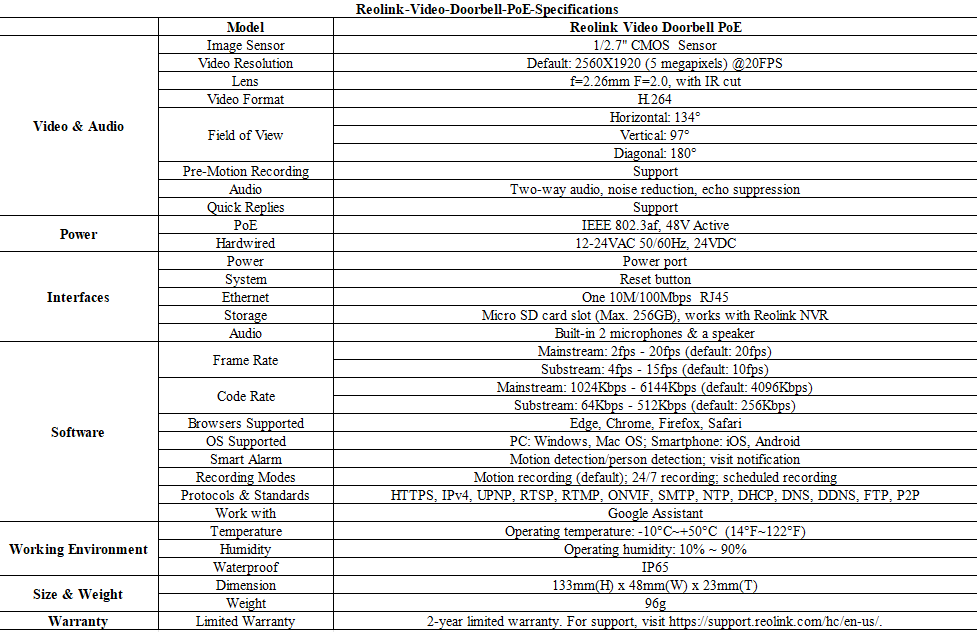
The Reolink Video Doorbell WiFi features a compact design, measuring exactly 133mm (Height) × 48mm (Width) × 23mm (Depth). These slim dimensions allow the Reolink Video Doorbell WiFi to mount perfectly on most standard doorframes and narrow trims.
Does the Reolink Video Doorbell WiFi come with an SD card, and what size is supported?
The Reolink Video Doorbell WiFi does not include a micro SD card. However, the Reolink Video Doorbell WiFi supports micro SD cards up to 256GB, which provides ample local storage for motion events and 24/7 continuous recording.
Does this camera support person/vehicle/animal detection?
Yes, this camera supports person/vehicle/animal detection.
Can this camera connect to non-Wi-Fi 6 routers?
Yes, this camera can connect to non-Wi-Fi 6 routers, but a WiFi 6 router is better recommended for enhanced networking.
What is Wi-Fi 6? What are its benefits?
Wi-Fi 6 (802.11ax Protocol) is the newest standard of Wi-Fi technology, known for its faster and more stable wireless connectivity with reduced network latency. It also applied advanced encryption protocol WPA3 to enhance the security of wireless network.
Does the camera support two-way audio?
Yes, the camera supports two-way audio via its built-in mic and speaker. You can not only capture videos with audio recorded but also have real-time communication with people on the camera's end through Reolink App or Client.
Can all the IP cameras under the same router network connect to Reolink Home Hub?
Yes. All Reolink battery cameras, PoE cameras, and plug-in Wi-Fi cameras connected to the same router can connect to Reolink Home Hub.
Which Reolink cameras are compatible with Reolink Home Hub?
Reolink Home Hub is compatible with all Reolink Wi-Fi/PoE cameras (except 4G cameras, cameras in NVR security kits, and add-on cameras). Learn more about Reolink Home Hub compatibility: https://support.reolink.com/hc/en-us/articles/32379509281561-Reolink-Home-Hub-Compatibility/
Why can't I connect it to 3rd party softwares?
The RTSP and other ports may be disabled by default. You can launch Reolink Client, then go to Device Settings >> Network >> Advanced >> Port Settings to make sure all ports are enabled before using 3rd party softwares.
Can I turn off the spotlights?
Yes, you can turn off the spotlights manually.
By default, the camera's spotlights are motion activated: it will turn on automatically when a motion is detected. You can turn them off or adjust the brightness to your liking.
Please note that with the spotlights on you can enjoy clear color night vision, but if the spotlights are turned off, you will only see black and white images at night.
Can I connect the camera to my PoE NVR or PoE NVR system?
Yes, Reolink WiFi cameras can be connected to Reolink PoE NVR in an indirect way. You can follow these steps to connect them:
Step 1: Connect the camera to a wifi router via wifi signals or an ethernet cable, and it needs to be powered via a power adapter.
Step 2: Connect the NVR to the same router by a network cable.
The NVR will pick up all the cameras on the same network.
What kind of micro SD card can I use?
This camera supports up to 512GB micro SD cards with FAT32 format and Class 10 read & write speed.
How can I power up this camera?
The camera can be powered by a 12V 1A DC power adapter (A 1.2-meter power adaptor and a 4.5m extension cable are shipped with the camera). You can check what is in the box at the end of the overview page.
Can this camera support smart home like Google Assistant?
Does this camera support person/vehicle detection?
Yes, this camera supports person/vehicle detection. It also support pet detection.
Can this camera support time-lapse function?
Can this camera connect to non-Wi-Fi 6 routers?
Yes, this camera can connect to non-Wi-Fi 6 routers, but a Wi-Fi 6 router is better recommended for enhanced networking.
What is Wi-Fi 6?What are its benefits?
Wi-Fi 6 (802.11ax Protocol) is the newest standard of Wi-Fi technology, known for its faster and more stable wireless connectivity with reduced network latency. It also applied advanced encryption protocol WPA3 to enhance the security of wireless network.
Can all the IP cameras under the same router network connect to Reolink Home Hub?
Yes. All Reolink battery cameras, PoE cameras, and plug-in Wi-Fi cameras connected to the same router can connect to Reolink Home Hub.
Which Reolink cameras are compatible with Reolink Home Hub?
Reolink Home Hub is compatible with all Reolink Wi-Fi/PoE cameras (except 4G cameras, cameras in NVR security kits, and add-on cameras). Learn more about Reolink Home Hub compatibility: https://support.reolink.com/hc/en-us/articles/32379509281561-Reolink-Home-Hub-Compatibility/
How can I configure Surveillance Rules for Reolink Professional Series cameras?
How can I configure Surveillance Rules for Reolink Professional Series cameras?
How can I configure Surveillance Rules for Reolink Professional Series cameras?
How can I configure Surveillance Rules for Reolink Professional Series cameras?
How can I configure Surveillance Rules for Reolink Professional Series cameras?
How can I configure Surveillance Rules for Reolink Professional Series cameras?
How can I configure I/O alarms?
Designed for smart integration with external alarm devices, Reolink cameras with I/O alarm ports enable advanced automation, allowing your security system to respond to events in real time. Please refer to
How to Set Up Alarm In/Out Function on Reolink Camera for the methods to configure the I/O alarm ports and achieve seamless integration with your Reolink camera for smart, responsive alarm linkage.
How can I configure Surveillance Rules for Reolink Professional Series cameras?
How can I configure I/O alarms?
Designed for smart integration with external alarm devices, Reolink cameras with I/O alarm ports enable advanced automation, allowing your security system to respond to events in real time. Please refer to
How to Set Up Alarm In/Out Function on Reolink Camera for the methods to configure the I/O alarm ports and achieve seamless integration with your Reolink camera for smart, responsive alarm linkage.
How can I configure Surveillance Rules for Reolink Professional Series cameras?
What makes OMVI different from other security cameras?
OMVI combines panoramic coverage with auto-tracking PTZ, offering both full-area visibility and detailed focus.
Does the camera support cloud storage?
Yes. You can refer to
Reolink Cloud to check it available countries.
Note: You can also save video clips into a microSD card (supports up to 128GB).
Can this camera support time-lapse function?
How much data does the camera use?
Data usage of this camera depends on the bitrate you set up. 1 hour of live feed in 6MP mode for one channel (default bitrate: 4Mbps) will use about 2GB of data. If you use 1GB of data to stream live feed in Fluent mode (default bitrate: 1Mbps), you can watch for 2.3 hours (140 minutes). Based on that, you can estimate the data usage to choose the right data plan for you.
Does the camera work on 5G/4G/3G/2G?
The camera works on 4G networks. It also supports 3G, which is not recommended though (since wireless companies are working to retire older network technologies). It does not supports 5G or 2G SIM card.
Yet it does not matter you use a 4G or 5G mobile phone to access the camera. The camera needs a SIM card of its own, which is totally irrelevant to your mobile's SIM card.
Note:
(1) The camera does not support WiFi connection.
(2) As of July 1, 2022 T-Mobile’s older 3G UMTS network will be retired.
How does 4G work on this security camera?
Similar to your cellular phone, cellular security cameras need a SIM card with a data plan to tramsmit video signals over 3G/4G network.
The common SIM cards offered by carriers like T-Mobile and Vodafone can work for Reolink 4G camers (as they can for your cellular phone). Click to check
supported carriers in available countries and regions for this camera.
You can also contact
our support team for consultation.
Does the camera have an SD card?
No, the camera does not come with a microSD card built in. But it has a microSD card slot.
This camera supports Max. 128GB microSD cards with FAT32 format and Class 10 or higher read & write speed.
Can I turn off the spotlights and siren?
Yes, you can turn off the spotlights and siren manually.
By default, the camera's spotlights and siren are motion activated: they will be turned on automatically when a motion is detected. You can turn them off, adjust the brightness of spotlights, or customize the siren to your liking.
Please note that with the spotlights on you can enjoy clear color night vision, but if the spotlights are turned off, you will only see black and white images at night.
Does this camera support person/vehicle/pet detection?
Yes, this camera supports person/vehicle detection and pet detection (beta). Currently, pet detection is used to detect cats and dogs and is in beta testing.
How long does the battery last?
The camera comes with a rechargeable battery. Normally, the battery lasts for about 2 months per charge (Actual use varies based on settings, use conditions and environmental factors.) When the battery level goes down to 10%, the camera will send you a low-battery notification.
For non-stop power supply, you can connect the camera to a Reolink Solar Panel (purchased separately).
How can I charge this camera? Is the solar panel a must?
You have two charging options (including solar charging):
Option 1. Have the camera connected to a solar paner for non-stop power supply.
(👆Also recommended as the most friendly charging option for the cam's battery.)
Option 2. Charge the camera (with its non-removable battery) via a 5V 2A USB charger. (Please note that it's ok to charge the cam while it's working, but not for long.)
(Note: To purchase one Reolink Solar Panel, you can choose "1 Camera + 1 Solar Panel" option while buying this camera; or you can buy it separately from https://store.reolink.com/accessories/.)
Can this camera support smart home like Google Assistant?
Can I talk to someone via the Reolink App? (Two-way audio)
Yes, this security camera features two-way audio, which means you can listen and talk to someone in real time with simple clicks in App.
Can this camera be used outdoors/indoors?
This camera can be used both indoors and outdoors.
It is IP66 certified weatherproof and its operating temperature is from -10°C to 55°C (14°F to 131°F), perfect for outdoor and indoor usage.
What does the PIR sensor work for?
PIR sensors are more sensitive to the infrared radiations from humans or animals, and thus can dramatically reduce false alarms caused by fluttering moths or flying twigs.
Its full name is passive infrared sensor. It measures the infrared (IR) light radiating from objects with a temperature above absolute zero. When the amount of infrared radiation changes, it triggers detection.
What are the advantages of the dual-lens camera?
This dual-lens camera is equipped with two lenses that capture views in 6MP 2K+ Super HD from a 180° ultra-wide angle. You don't need two or more single-lens cameras to monitor a large area. Instead, with only one dual-lens camera you can save installation time and enjoy much broader images with lower distortion. Images from the dual lens are seamlessly merged into one frame both in live view and playback.
Can the camera record to the microSD card (sold separately) inserted in Hub P1 if an HDD is already installed?
No, if there is an HDD in the Hub P1, the camera will only record to the HDD, not the microSD card.
Can the camera continue recording to Reolink Hub P1 when the network connection is interrupted?
Yes, cameras can continue recording and save videos to the built-in HDD of the Reolink Hub P1 during an Internet outage.
What are Event History and Weekly Summary?
Event History collects all 24/7 footage from connected cameras, enabling smart playback of detection events across multiple cameras and video filtering by date range, device, and event type.
Weekly Summary provides statistics on detection events, including daily alarms, alarm types, and involved devices, helping you understand when and where break-ins are most likely to occur.
Does the Reolink Hub P1 support Wi-Fi 6?
Yes, Reolink Hub P1 supports 2.4 & 5GHz dual-band Wi-Fi frequencies & Wi-Fi 6 technology, covering an area of up to 1000 square meters*.
*Data obtained under laboratory conditions. Results may vary in practice.
Can all the IP cameras under the same router network connect to Reolink Hub P1?
Yes. All Reolink battery cameras, PoE cameras, and plug-in Wi-Fi cameras connected to the same router can connect to Reolink Hub P1.
Which Reolink cameras are compatible with Reolink Hub P1?
Reolink Hub P1 is compatible with all Reolink Wi-Fi/PoE cameras (except 4G cameras, cameras in NVR security kits, and add-on cameras). Learn more about Reolink Home Hub compatibility: https://support.reolink.com/hc/en-us/articles/32379509281561-Reolink-Home-Hub-Compatibility/
Do the Wi-Fi NVR's LAN ports support PoE power supply?
No, they don't. However, the NVR still works with PoE cameras. You just need to first power them on with a PoE injector, PoE switch, or power adapter before connecting to the NVR. Make sure the cameras are in the same network as the NVR.
Which cameras are compatible with the Wi-Fi NVR?
It works with all Reolink
PoE and
wired Wi-Fi cameras. For PoE cameras, you need to first power them on with a PoE injector, PoE switch, or power adapter before connecting to the NVR.
Does the camera support smart home like Google Assistant?
Does the camera support time-lapse function?
Does the camera work with Reolink IoT devices (Reolink Floodlight, etc.)? How can they be linked?
Yes, the camera works with Reolink IoT devices, including Reolink Floodlight PoE/WiFi. The specific functions supported depend on the camera.
When Reolink Floodlight is linked to a camera, the floodlights and the built-in siren will be triggered once the camera detects an event.
Click here to see how to link the camera to Reolink Floodlight.Why can't I connect the camera to 3rd party softwares?
The RTSP and other ports may be disabled by default. You can launch Reolink Client, then go to Device Settings >> Network >> Advanced >> Port Settings to make sure all ports are enabled before using 3rd party softwares.
Does Reolink charge subscription fees for the camera or the Reolink application?
No. Reolink does not charge any subscription fees for camera or Reolink App. All features of this camera as well as the Reolink App are completely free and require no subscription.
How do I use live view and playback?
You can add and set up the camera on Reolink APP/Client. Then click the camera to check the live view and playback of it from anywhere, at any time.
Reolink APP/Client is free of charge and the service is free of subscription.
Does the camera support NAS?
What kind of microSD card can I use?
This camera supports up to 256GB microSD cards with FAT32 format and Class 10 read & write speed.
Does the camera compatible with my Reolink PoE NVR?
This camera is compatible with Reolink PoE NVR of the following hardware versions: H3MB18, N2MB02, N3MB01, N7MB01, H3MB18, N6MB01, N5MB01. For best performance, you need to
upgrade the NVR's firmware to the latest version for video displaying.
Reolink PoE NVRs that are currently available for sale support all the PoE standalone and plug-in WiFi cameras. However, if you have already had a Reolink PoE NVR, you can check if its
hardware version is compatible with this camera.
Where are the recordings stored? Is NVR a must?
The camera can work without an NVR.
1. When it works without an NVR, the recordings can be saved to the microSD card (purchased separately);
2. When it works with an NVR, the recordings can be saved to the NVR.
Note: For best compatibility, do not use the camera with third-party NVRs.
What Ethernet cable do I need?
The camera supports T-568B connectors and 8-PIN Ethernet cables of CAT5 or higher.
How can I power up this camera?
There are two methods:
1. Via an Ethernet cable, connect the camera to a PoE NVR, PoE injector, PoE switch, or directly to a router with a PoE port, for both power supply and video signal transmission.
Note: Please make sure that the PoE injector/switch is 802.3 af compliant (48V) and supports active mode.
2.Via a DC 12V 1A power adapter (purchased separately), connect the camera to power outlet for power supply only.
Does the camera support two-way audio?
Yes, the camera supports two-way audio via its built-in mic and speaker. You can not only capture videos with audio recorded but also have real-time communication with people on the camera's end through Reolink App or Client.
Does the camera support person/vehicle/animal detection?
Yes, this camera supports person/vehicle/animal detection.
Can I turn off the warm light and siren?
Yes, you can turn off the warm lightand siren manually.
By default, the camera's warm light and siren are motion activated: they will be turned on automatically when a motion is detected. You can turn them off, adjust the brightness of warm light, or customize the siren to your liking.
The camera can provide clear and natural true full-color night vision even without turning on the warm light. You can also choose to turn on the warm light to enhance the quality of the color night vision in extremely dark environments.
Does the camera offer true color night vision when the warm light is off?
Yes, thanks to the ColorX technology, the camera can still provide color night vision without the warm light on. Featuring an F1.0 large aperture that allows four times more light in than an F2.0 aperture. Additionally, the camera is equipped with a 1/1.8" advanced sensor, enabling it to deliver clear and vivid full-color night vision even without additional lighting. You can also turn on the warm light for even higher quality color night vision.
Does the camera work with Reolink IoT devices (Reolink Floodlight, etc.)? How can they be linked?
Yes, the camera works with Reolink IoT devices, including Reolink Floodlight PoE/WiFi. The specific functions supported depend on the camera.
When Reolink Floodlight is linked to a camera, the floodlight and the built-in siren will be triggered once the camera detects an event.
Click here to see how to link the camera to Reolink Floodlight.Is a subscription fee required for Reolink PoE cameras?
No, Reolink PoE cameras work well on their own without subscription fees. You can make full use of the person/vehicle/pet detection, local storage, and other functions for free!
Can this camera support time-lapse function?
Can this camera support smart home like Google Assistant?
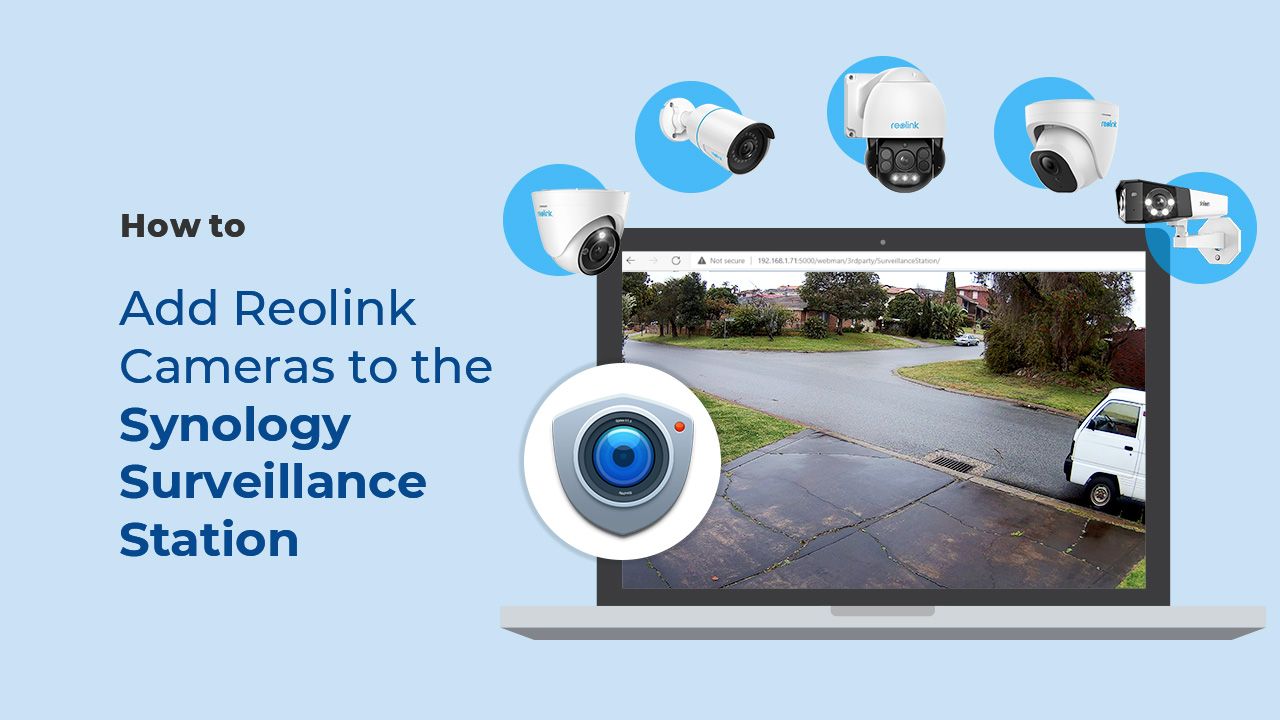
Can I use this camera with Synology?
Yes, this PoE IP camera can work with Synology. There are 2 methods for you to save videos in it.
Method 1 (recommended): You can add this camera to the Synology Surveillance Station. Check
this article to learn how to add a camera.
Method 2: You can treat your Synology device as an FTP server. For detailed steps, check
How to Set up FTP for Reolink Products.
What kind of microSD card can I use?
This camera supports up to 256GB microSD cards with FAT32 format and Class 10 read & write speed.
What Ethernet Cable Do I Need?
The camera supports T-568B connectors and 8-PIN Ethernet cables of CAT5 or higher.
Where are the recordings stored? Is NVR a must?
The camera can work without an NVR.
1. When it works without an NVR, the recordings can be saved to the microSD card (purchased separately);
2. When it works with an NVR, the recordings can be saved to the NVR, and the transmission will use one NVR channel.
Note: For best compatibility, do not use the camera with third-party NVRs.
How can I power up this camera?
There are two methods:
Method 1. Via an Ethernet cable, connect this camera to a PoE NVR, PoE injector, PoE switch, or directly to a router with a PoE port, for both power supply and video signal transmission.
Note: Please make sure that the PoE injector/switch is 802.3af compliant (48V) and supports active mode.
Method 2.Via a DC 12V 2A power adapter (purchased separately) for power supply only.
Can this camera be used outdoors/indoors?
This camera can be used both indoors and outdoors.
It is IP67 certified weatherproof and its operating temperature is from -10°C to 55°C (14°F to 131°F), perfect for outdoor and indoor usage.
How do I use live view and playback?
You can add and set up the camera on Reolink App/Client. Then click the camera to check the live view and playback of it from anywhere, at any time.
Reolink App/Client is free of charge and the service is free of subscription.
Please note that when using live view or playback on Reolink NVR, you may be prompted to switch the preview resolution, and following the prompt is recommended to avoid potential impact on performance.
Can I turn off the spotlights and siren?
Yes, you can turn off the spotlights and siren manually.
By default, the camera's spotlights and siren are motion activated: they will be turned on automatically when a motion is detected. You can turn them off, adjust the brightness of spotlights, or customize the siren to your liking.
Please note that with the spotlights on you can enjoy clear color night vision, but if the spotlights are turned off, you will only see black and white images at night.
Does the camera support two-way audio?
Yes, the camera supports two-way audio via its built-in mic and speaker. You can not only capture videos with audio recorded but also have real-time communication with people on the camera's end through Reolink App or Client.
Does the camera work with my Reolink PoE NVR?
If you want to buy a new one: the currently on-sale NVRs work with all PoE and plug-in WiFi cameras.
If you already have one:
Please first refer to
this article for its hardware version.
For the NVR with the hardware N7MB01, N6MB01, or N5MB01, it works with all PoE and plug-in WiFi cameras.
For the NVR with the hardware N2MB02, N3MB01, or H3MB18, it works with all PoE and plug-in WiFi cameras. But you can not have a full-resolution live view of the following cameras: Duo Series P737, Reolink Duo 3 PoE, RLC-1212A, RLC-1224A, Reolink Duo 2 PoE, Reolink Duo 2 WiFi, Reolink Duo Floodlight WiFi, Reolink Duo Floodlight PoE.
For the NVR with the rest hardwares such as H3MB17, H3MB02, and H3MB16, please refer to
Introduction to Hardware Versions of Reolink NVRs for more detailed information. For all the compatible NVRs, we recommend you update their firmware version here
before using them with the camera.Why can't I connect it to 3rd party softwares?
The RTSP and other ports may be disabled by default. You can open Reolink Client, then go to Device Settings >> Network >> Advanced >> Port Settings to make sure all ports are enabled before using 3rd party softwares.
Does my camera support person/vehicle/animal detection?
Yes, this camera supports person/vehicle/animal detection.
What are the advantages of the dual-lens camera?
This dual-lens camera is equipped with two lenses that capture views in 4K 8MP UHD from a 180° ultra-wide angle. You don’t need two or more single-lens cameras to monitor a large area. Instead, with only one dual-lens camera you can save installation time and enjoy much broader images with lower distortion. Images from the dual lens are seamlessly merged into one frame both in live view and playback.
Can this camera operate or charge at -20°C?
Yes. The working temperature range is -20°C to +55°C. In cold weather, the solar panel helps warm the battery, enabling it to charge once it reaches a suitable temperature. In strong sunlight, charging can resume in as little as 30 minutes.
How long does the battery last?
In standard usage mode, the camera can last up to 160 days (based on recording 300 seconds per day). In continuous recording mode, it can last up to 21 days (recording at 3fps, switching to 15fps when motion is detected). With the 30W solar panel and strong sunlight, the camera can stay charged without manual intervention.
How do I charge this camera? Do I need a solar panel?
The camera includes a 30W solar panel, which can power it continuously under sufficient sunlight. Alternatively, you can charge the internal battery using a 5V/2A USB charger.
Does the camera support Cloud storage?
Yes, Reolink Cloud is supported in select countries. You can also record to a microSD card (up to 512GB) for local storage.
What kind of microSD card does this camera support?
The camera supports microSD cards up to 512GB with FAT32 format and Class 10 or above for reliable read/write speeds.
Can I connect this camera with smart home systems like Google Assistant?
Does my camera support person/vehicle/animal detection?
Yes, it supports smart detection that can accurately detect people, vehicles, and animals.
What is ColorX Night Vision?
ColorX Night Vision combines an F1.0 large aperture with a 1/1.8'' sensor to capture four times more light than traditional cameras. This allows the camera to deliver full-color footage even in dark environments—without needing additional spotlights.
How long is the pre-recording duration?
The default pre-recording time is 10 seconds. You can adjust it to anywhere between 2 to 10 seconds in the app settings.
How do I enable the pre-recording mode?
Open the Reolink app, and go to Settings>Camera Recording to enable Pre-Recording Mode. And you can adjust "Frame Rate" and tap "Schedule" to adjust the time according to your needs.
How do I activate and use the SIM card included in the package?
To activate the SIM card, go to the SIM Service under the Cloud tab in the Reolink App, or visit the
activation page. Once activated, insert the SIM card into your camera to start using it. For detailed instructions, see the
Introduction to Reolink Sim Card.
Can this camera support time-lapse function?
Can I turn off the spotlight and siren?
Yes, you can turn off the spotlight and siren manually.
By default, the camera's spotlights and siren are motion activated: they will be turned on automatically when a motion is detected. You can turn them off, adjust the brightness of spotlights, or customize the siren to your liking.
Please note that with the spotlights on you can enjoy clear color night vision, but if the spotlights are turned off, you will only see black and white images at night.
Can I talk to someone via the Reolink App? (Two-way audio)
Yes, this security camera features two-way audio, which means you can listen and talk to someone in real time with simple clicks in App.
Does the camera have an SD card?
No, the camera does not come with a microSD card built in. But it has a microSD card slot.
This camera supports max. 512GB microSD cards with FAT32 format and Class 10 or higher read & write speed.
How much data do I need on the SIM card?
Data usage of this camera depends on the bitrate you set up. 1 hour of live feed in 4MP mode for one channel (default bitrate: 3Mbps) will use about 2GB of data. (In 4MP mode, only one channel is available for live feed). If you use 1GB of data to stream live feed in Fluent mode for one channel (default bitrate: 512kbps), you can watch for about 5 hours, while 1GB of data to stream live feed in Fluent mode for two channels at the same time (default bitrate: 512kbps for each) will last for about 2.5 hours. Based on that, you can estimate the data usage to choose the right data plan for you.
Does the camera work on 5G/4G/3G/2G?
The camera works on 4G networks. It also supports 3G, which is not recommended though (since wireless companies are working to retire older network technologies). It does not support 5G or 2G SIM card.
Yet it does not matter if you use a 4G or 5G mobile phone to access the camera. The camera needs a SIM card of its own, which is totally irrelevant to your mobile's SIM card.
Note:
(1) The camera does not support WiFi connection.
(2) As of July 1, 2022 T-Mobile’s older 3G UMTS network will be retired.
How does 4G work on this security camera?
Similar to your cellular phone, cellular security cameras need a SIM card with a data plan to transmit video signals over 3G/4G network.
The common SIM cards offered by carriers like T-Mobile and Vodafone can work for Reolink 4G cameras (as they can for your cellular phone). Click to check
supported carriers in available countries and regions for this camera.
You can also contact
our support team for consultation.
What is hybrid zoom?
Hybrid zoom is a combination of optical zoom and digital zoom, specifically referring to the presentation of Reolink TrackMix camera's close-up view. This view is cooperatively produced by the camera's two lenses in order to automatically zoom in onto the targeted object. When the target is not too far, the picture captured by the 4MP wide-angle lens will be digitally zoomed in; when the object gets too far, the view then switches to the picture captured by the 2MP telephoto lens to ensure the best image quality. In either way, TrackMix camera uses advanced technology to restore details and definition to the zoomed-in image, enhancing the image quality.
What is dual-tracking?
Dual-tracking refers to the two ways that a TrackMix camera simultaneously uses to automatically track an object in both the wide-angle and zoomed views.
In the panoramic view, which is captured by the camera's wide-angle lens, the camera pans and tilts to keep the detected objects within its field of view; In the zoomed view, which is produced by the two lenses cooperatively, the camera zooms in to the targeted object (which is within the camera's field) to closely follow its movement. It's notable that the TrackMix camera uses advanced technology to restore details and definition to the zoomed-in image, enhancing the image quality.
This can help you track the situation and details at the same time, without manually making the camera pan, tilt or zoom in.
Does the telephoto lens work continuously for 24/7 Recording?
No, only the wide-angle lens works to record 24/7, which differs from other cameras in the TrackMix Series. The telephoto lens is activated only when a motion is detected or when you preview the footage. This design helps reduce power consumption and extend battery life.
Does the camera support cloud storage?
Yes, this camera supports cloud service in certain countries. You can visit https://cloud.reolink.com/cloud-plan to check the available countries.
Note: You can also store footage on a microSD card (up to 512GB).
What kind of microSD card can I use?
This camera supports up to 512GB microSD cards with FAT32 format and Class 10 read & write speed.
Does the camera support smart home like Google Assistant?
How does 4G work on this security camera?
Similar to your mobile phone, cellular security cameras require a SIM card with a data plan to transmit video data over 3G/4G networks.
For optimal performance and seamless activation, a Reolink SIM card is recommended. Alternatively, common SIM cards (e.g. T-Mobile, Vodafone) are also compatible. Click to check
supported carriers in available countries and regions.
For any further help, please contact our support team.
Does the camera work on 5G/4G/3G/2G?
The camera works on 4G networks. It also supports 3G, which is not recommended though (since wireless companies are working to retire older network technologies). It does not support 5G or 2G SIM cards.
Note:
(1) It does not matter whether you use a 4G or 5G mobile phone to access the camera. The camera needs a SIM card of its own, which is irrelevant to your mobile's SIM card.
(2) The camera does not support Wi-Fi network.
Does the camera support person/vehicle/animal detection?
Yes, it supports person/vehicle/animal detection.
What is the ColorX night vision?
The F1.0 large aperture and 1/1.8'' sensor bring 4 times more light than traditional cameras, providing color night vision that is as clear as daylight in low-light environments without the need for additional spotlights.
How to set up Pre-recording Mode?
Tap the "Settings" button on the app, then select "Camera Recording" and enable the "Pre-Recording Mode" option. Tap "Frame Rate" and "Schedule" to adjust the settings as needed.
How long is the pre-recording time?
The default pre-recording time is 10s, adjustable between 2s and 10s. It is recommended to use it with a solar panel for a better pre-recording experience.
How to use the included SIM card?
Update your Reolink App to the latest version, then scan the QR code on the SIM card using the app.
Can I turn off the spotlights and siren?
Yes, you can turn off the spotlights and siren manually. By default, the camera's spotlights and siren are motion activated: they will be turned on automatically when a motion is detected. You can turn them off, adjust the brightness of spotlights, or customize the siren to your liking. Please note that with the spotlights on you can enjoy clear color night vision, but if the spotlights are turned off, you will only see black and white images at night.
Can this camera work with Reolink NVR or Reolink Home Hub Series?
Yes, this camera can work with all currently available PoE NVRs and Wi-Fi NVRs, supporting 24/7 continuous recording. It is also compatible with Reolink Home Hub and Home Hub Pro.
Can this camera connect to non-Wi-Fi 6 routers?
Yes, this camera can connect to non-Wi-Fi 6 routers, but a WiFi 6 router is better recommended for enhanced networking.
What is Wi-Fi 6?What are its benefits?
Wi-Fi 6 (802.11ax Protocol) is the newest standard of WiFi technology, known for its faster and more stable wireless connectivity with reduced network latency. It also applied advanced encryption protocol WPA3 to enhance the security of wireless network.
Does the camera support two-way audio?
Yes, the camera supports two-way audio via its built-in mic and speaker. You can not only capture videos with audio recorded but also have real-time communication with people on the camera's end through Reolink App or Client.
What kind of microSD card can I use?
This camera supports up to 512GB microSD card with FAT32 format and Class 10 read & write speed.
Can this camera support smart home like Google Assistant?
Can this camera support time-lapse function?
Can this camera be used outdoors/indoors?
This camera can be used both indoors and outdoors. It is IP67 certified weatherproof and its operating temperature is from -10°C to 55°C (14°F to 131°F), perfect for outdoor and indoor usage.
How can I power up this camera?
The camera can be powered by a 12V 2A DC power adapter (A 1.5-meter power adaptor and a 4.5m extension cable are shipped with the camera). You can check what is in the box at the end of the overview page.
Does my camera support person/vehicle/animal detection?
Yes, this camera supports person/vehicle/animal detection.
What are the advantages of a dual-lens camera?
With two lenses, this camera captures 4K 8MP UHD video in a seamless 180° ultra-wide view. It reduces the need for multiple cameras, making installation easier while delivering a broad, low-distortion image in both live view and playback.
How do I choose between a battery-powered and a power-connected model?
Power-connected models eliminate the need for frequent recharging. Please note that the total cable length, including the camera’s tail wire, is 19 feet.
What is the best placement for the Elite Series W740 camera?
Its ultra-wide field of view is ideal for large open areas. In tight spaces, walls and ceilings may dominate the frame and cause IR reflection at night, reducing visibility.
Can this camera work with Reolink NVR or Reolink Home Hub Series?
Yes, this camera can work with all currently available PoE NVRs and Wi-Fi NVRs, supporting 24/7 continuous recording. It is also compatible with Reolink Home Hub and Home Hub Pro.
Can this camera connect to non-WiFi 6 routers?
Yes, this camera can connect to non-WiFi 6 routers, but a WiFi 6 router is better recommended for enhanced networking.
What is Wi-Fi 6?What are its benefits?
Wi-Fi 6 (802.11ax Protocol) is the newest standard of WiFi technology, known for its faster and more stable wireless connectivity with reduced network latency. It also applied advanced encryption protocol WPA3 to enhance the security of wireless network.
How should I choose between battery-powered and plug-in cameras? What are their differences?
Plug-in cameras don’t need frequent recharging, but they should be installed within approximately 6m of a power socket.
What is Motion Track, and how does it function?
Motion Track captures the detected target's movement over a period of time and creates an image depicting its trajectory. You can receive the image via email in real-time, eliminating the hassle of video downloads. Additionally, Reolink App (4.45 version) supports image creation based on selected movement duration.
Can I use this camera with Synology?
Yes, this WiFi IP camera can work with Synology. There are 2 methods for you to save videos in it.
Method 1 (recommended): You can add this camera to the Synology Surveillance Station. Check
this article to learn how to add a camera.
Method 2: You can treat your Synology device as an FTP server. For detailed steps, check
How to Set up FTP for Reolink Products.
Can this camera support time-lapse function?
Can this camera support Smart Home like Google Assistant?
Does the camera support NAS?
Can I turn off the spotlights and siren?
Yes, you can turn off the spotlights and siren manually.
By default, the camera's spotlights and siren are motion activated: they will be turned on automatically when a motion is detected. You can turn them off, adjust the brightness of spotlights, or customize the siren to your liking.
Please note that with the spotlights on you can enjoy clear color night vision, but if the spotlights are turned off, you will only see black and white images at night.
What kind of microSD card can I use?
This camera supports up to 512GB microSD card with FAT32 format and Class 10 read & write speed.
How can I power up this camera?
The camera can be powered by a 12V 2A DC power adapter (A 1.5-meter power adaptor and a 4.5m extension cable are shipped with the camera). You can check what is in the box at the end of the overview page.
Can this camera be used outdoors/indoors?
This camera can be used both indoors and outdoors.
It is IP67 certified weatherproof and its operating temperature is from -10°C to 55°C (14°F to 131°F), perfect for outdoor and indoor usage.
Does my camera support person/vehicle/animal detection?
Yes, this camera supports person/vehicle/animal detection.
What are the advantages of the dual-lens camera?
This dual-lens camera is equipped with two lenses that capture views in 4K Ultra HD from a 180° ultra-wide angle. You don’t need two or more single-lens cameras to monitor a large area. Instead, with only one dual-lens camera you can save installation time and enjoy much broader images with lower distortion. Images from the dual lens are seamlessly merged into one frame both in live view and playback.
How many battery-powered Wi-Fi cameras does this NVR support at most?
Only the NVS8(NHD) with hardware N7MB01 supports connecting battery-powered Wi-Fi cameras, with a maximum of 12. The number of battery-powered Wi-Fi cameras that can be connected is 12 minus the number of wired IPCs. For more information, please refer to
Introduction to Hardware Versions of Reolink NVRsHow many wired IP cameras (including PoE & plug-in Wi-Fi cameras) does this NVR support at most?
The NVR supports 12 channels, allowing a maximum of 12 cameras. It can support up to 8 wired IP cameras (including PoE & plug-in Wi-Fi cameras) .
Please note that a Reolink dual-lens camera occupies two video channels.
Why can't I find the Talk button for two-way audio on my Reolink App/Client when my camera, which supports this function, is connected to the NVR?
Before using this function, please check if you have updated the firmware on your NVR to the latest version. Here is a step-by-step instruction on how to upgrade it: https://support.reolink.com/hc/en-us/articles/900004550323-How-to-Upgrade-Firmware-via-Reolink-Client-New-Client-/
Can I connect the NVR to the third-party cameras?
It's not suggested to do so. Compatibility issues may occur with third-party cameras. Please contact
our support team if you have any concerns about protocols.
Can I connect the NVR to the router wirelessly?
No, the NVR can only connect to the router via an ethernet cable.
Can I add a PoE switch?
Yes, there are 3 methods.
Method 1: Plug the PoE NVR and the PoE switch to the same router via Ethernet cable. Then plug the PoE cameras into the PoE switch or PoE NVR.
Method 2: Plug the PoE switch into the PoE NVR, and then connect the NVR LAN port to the router.
Method 3: Plug the PoE switch to your router, then connect the NVR LAN port to your PoE switch.
For more information, please refer to
How to Connect PoE Switch Router and PoE NVR Note: By adding PoE switches, you will not expand the number of cameras supported by the NVR, since its video channels are immutable.
How to expand the NVR storage capacity?
You can add HDDs for the NVR via SATA ports.
The currently on-sale NVS8(NHD) supports Max. 16TB in total: Max. 8TB via SATA, Max. 8TB via eSATA.
Does the NVR support the person/vehicle/animal detection of my Reolink cameras?
If you want to buy a new one:
Yes, the currently on-sale NVRs support the cameras' smart person/vehicle/animal detection.
If you already have one:
NVS8(NHD) with the newest hardware versions (H3MB18/N2MB02/N3MB01/N7MB01) supports the cameras' smart person/vehicle detection. Check
Hardware Version of Reolink NVRs for detailed information.
Can this camera work with Reolink NVR or Reolink Home Hub Series?
Yes, this camera can work with all currently available PoE NVRs and Wi-Fi NVRs, supporting 24/7 continuous recording. It is also compatible with Reolink Home Hub and Home Hub Pro.
Can this camera be used outdoors/indoors?
This camera can be used both indoors and outdoors.
It is weatherproof and its operating temperature is from -10°C to 55°C (14°F to 131°F), perfect for outdoor and indoor usage.
Can this camera support time-lapse function?
Does the camera support NAS?
Can I turn off the spotlights?
Yes, you can turn off the spotlights manually.
By default, the camera's spotlights are motion activated: it will turn on automatically when a motion is detected.
You can turn them off or adjust the brightness to your liking.
Please note that with the spotlights on you can enjoy clear color night vision, but if the spotlights are turned off, you will only see black and white images at night.
Does this camera support person/vehicle/animal detection?
Yes, this camera supports person/vehicle/animal detection.
What kind of microSD card can I use?
This camera supports up to 256GB microSD cards with FAT32 format and Class 10 read & write speed.
Can this camera connect to non-WiFi 6 routers?
Yes, this camera can connect to non-WiFi 6 routers, but a WiFi 6 router is better recommended for enhanced networking.
What is Wi-Fi 6?What are its benefits?
Wi-Fi 6 (802.11ax Protocol) is the newest standard of WiFi technology, known for its faster and more stable wireless connectivity with reduced network latency. It also applied advanced encryption protocol WPA3 to enhance the security of wireless network.
How should I choose between battery-powered and plug-in cameras? What are their differences?
Plug-in cameras don’t need frequent recharging, but they should be installed within approximately 10ft of a power socket.
Can I connect Lumus Series E450 to the currently available power extension cable?
No, Lumus Series E450 is not compatible with the extension cable.
How many battery-powered Wi-Fi cameras does this NVR support at most?
Only the NVS16 with hardware N6MB01 supports connecting battery-powered Wi-Fi cameras, with a maximum of 24. The number of battery-powered Wi-Fi cameras that can be connected is 24 minus the number of wired IPCs. For more information, please refer to
Introduction to Hardware Versions of Reolink NVRsHow many wired IP cameras (including PoE & plug-in Wi-Fi cameras) does this NVR support at most?
The NVR supports 24 channels, allowing a maximum of 24 cameras. It can support up to 16 wired IP cameras (including PoE & plug-in Wi-Fi cameras) .
Please note that a Reolink dual-lens camera occupies two video channels.
Why can't I find the Talk button for two-way audio on my Reolink App/Client when my camera, which supports this function, is connected to the NVR?
Before using this function, please check if you have updated the firmware on your NVR to the latest version. Here is a step-by-step instruction on how to upgrade it: https://support.reolink.com/hc/en-us/articles/900004550323-How-to-Upgrade-Firmware-via-Reolink-Client-New-Client-/
Can I connect the NVR to the third-party cameras?
It's not suggested to do so. Compatibility issues may occur with third-party cameras. Please contact
our support team if you have any concerns about protocols.
Can I connect the NVR to the router wirelessly?
No, the NVR can only connect to the router via an ethernet cable.
Can I add a PoE switch?
Yes, there are 3 methods.
Method 1: Plug the PoE NVR and the PoE switch to the same router via Ethernet cable. Then plug the PoE cameras into the PoE switch or PoE NVR.
Method 2: Plug the PoE switch into the PoE NVR, and then connect the NVR LAN port to the router.
Method 3: Plug the PoE switch to your router, then connect the NVR LAN port to your PoE switch.
For more information, please refer to
How to Connect PoE Switch Router and PoE NVR Note: By adding PoE switches, you will not expand the number of cameras supported by the NVR, since its video channels are immutable.
How to expand the NVR storage capacity?
You can change the pre-installed 4TB HDD to a larger one and/or add an external HDD for the NVR.
The currently available NVS16 supports max.16TB in total (2×8TB via SATA).
Does the NVR support the person/vehicle/animal detection of my Reolink cameras?
If you want to buy a new one:
Yes, the currently available NVRs support the cameras' smart person/vehicle/animal detection.
If you already have one:
NVS16 with the newest hardware versions (H3MB18/N6MB01) supports the cameras' smart person/vehicle detection. Check
Hardware Version of Reolink NVRs for detailed information.
Does my security system work with Google Assistant?
Sorry, the NVR system cannot work with Google Assistant.
How long does the security camera systems store video footage?
The length of time to store video footage is closely related to the video code rate.
As for NVS8-12MD4, the default bit rate of its cameras is 8192 kbps. Proximately, with the 4 cameras all working, this security system can store video footage for
6 days to its pre-installed 2TB HDD.
You can refer to
"How Long Can Reolink NVR Record?"for more details.
If you want to keep longer video storage, you can
expand the NVR's storage capacity.
What ethernet cable can I use? What is the maximum distance between the camera and NVR?
We have included 4x 18M Ethernet cables for the 4 cameras included in the kit. You can change them to longer ones if needed.
Reolink PoE cameras support CAT5, CAT5E, CAT6, CAT7 with 8 PIN Ethernet cables. The maximum length of the network cable they support is 330ft (100m). Please note that the data is obtained with a standard CAT5E Ethernet cable under specific test conditions and actual use may vary.
What is the difference if I buy cameras and NVR separately instead of buying a whole system?
The cameras in the kit cannot work alone. They have to work with the Reolink PoE NVR. If you buy standalone cameras and the NVR separately, the cameras can work alone.
Also, the network cables for cameras in the kit are 18m long while those for standalone cameras are 1m long.
Can I connect Reolink NVR to one or more displayers?
You can connect maximum two displayers with the NVR via HDMI or VGA (See the diagram below).
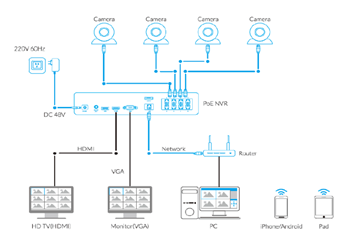
Cameras connected to the NVR will be shown on the displayer(s).
How can I live view or play back the recordings?
Method 1: Connect the NVR to a monitor or TV for live view or playback;
Method 2: Download FREE Reolink APP or Client, add the NVR to the APP or Client, configure the settings, and then you can live view or play back the footages.
Does the NVR support the person/vehicle/pet detection of my Reolink cameras?
Yes, the NVR in NVS8-12MD4 supports the cameras' smart person/vehicle/pet detection.
Does my security system work with Google Assistant?
Sorry, the NVR system cannot work with Google Assistant.
How long does the security camera systems store video footage?
The length of time to store video footage is closely related to the video code rate.
As for NVS8-12MB4, the default bit rate of its cameras is 8192 kbps. Proximately, with the 4 cameras all working, this security system can store video footage for
6 days to its pre-installed 2TB HDD.
You can refer to
"How Long Can Reolink NVR Record?"for more details.
If you want to keep longer video storage, you can
expand the NVR's storage capacity.
What ethernet cable can I use? What is the maximum distance between the camera and NVR?
We have included 4 18M ethernet cables for the 4 cameras included in the kit. You can change them to longer ones if needed.
Reolink PoE cameras support CAT5, CAT5E, CAT6, CAT7 with 8 PIN Ethernet cables. The maximum length of the network cable they support is 330ft (100m). Please note that the data is obtained with a standard CAT5E Ethernet cable under specific test conditions and actual use may vary.
What is the difference if I buy cameras and NVR separately instead of buying a whole system?
The cameras in the kit cannot work alone. They have to work with the Reolink PoE NVR. If you buy standalone cameras and the NVR separately, the cameras can work alone.
Also, the network cables for cameras in the kit are 18m long while those for standalone cameras are 1m long.
Can I connect Reolink NVR to one or more displayers?
You can connect maximum two displayers with the NVR via HDMI or VGA (See the diagram below).
Cameras connected to the NVR will be shown on the displayer(s).
How can I pre-view or play back the video?
Method 1: Connect the NVR to a monitor or TV for preview or playback;
Method 2: Download FREE Reolink APP or Client, add the NVR to the APP or Client, configure the settings, and then you can preview or play back the videos.
Does the NVR support the person/vehicle detection of my Reolink cameras?
Yes, the NVR in NVS8-12MB4 supports the cameras' smart person/vehicle detection.
Does the camera work with Reolink IoT devices (Reolink Floodlight, etc.)? How can they be linked?
Yes, the camera works with Reolink IoT devices, including Reolink Floodlight PoE/WiFi. The specific functions supported depend on the camera.
When Reolink Floodlight is linked to a camera, the floodlight and the built-in siren will be triggered once the camera detects an event.
Click here to see how to link the camera to Reolink Floodlight.Is a subscription fee required for Reolink PoE cameras?
No, Reolink PoE cameras work well on their own without subscription fees. You can make full use of the person/vehicle/pet detection, local storage, and other functions for free!
Can this camera support time-lapse function?
Can this camera support smart home like Google Assistant?
Can I use this camera with Synology?
Yes, this PoE IP camera can work with Synology. There are 2 methods for you to save videos in it.
Method 1 (recommended): You can add this camera to the Synology Surveillance Station. Check
this article to learn how to add a camera.
Method 2: You can treat your Synology device as an FTP server. For detailed steps, check
How to Set up FTP for Reolink Products.
What kind of microSD card can I use?
This camera supports up to 256GB microSD cards with FAT32 format and Class 10 read & write speed.
What Ethernet Cable Do I Need?
The camera supports T-568B connectors and 8-PIN Ethernet cables of CAT5 or higher.
Where are the recordings stored? Is NVR a must?
The camera can work without an NVR.
1. When it works without an NVR, the recordings can be saved to the microSD card (purchased separately);
2. When it works with an NVR, the recordings can be saved to the NVR, and the transmission will use one NVR channel.
Note: For best compatibility, do not use the camera with third-party NVRs.
How can I power up this camera?
There are two methods:
Method 1. Via an Ethernet cable, connect this camera to a PoE NVR, PoE injector, PoE switch, or directly to a router with a PoE port, for both power supply and video signal transmission.
Note: Please make sure that the PoE injector/switch is 802.3af compliant (48V) and supports active mode.
Method 2.Via a DC 12V 2A power adapter (purchased separately) for power supply only.
Can this camera be used outdoors/indoors?
This camera can be used both indoors and outdoors.
It is IP67 certified weatherproof and its operating temperature is from -10°C to 55°C (14°F to 131°F), perfect for outdoor and indoor usage.
How do I use live view and playback?
You can add and set up the camera on Reolink APP/Client. Then click the camera to check the live view and playback of it from anywhere, at any time.
Reolink APP/Client is free of charge and the service is free of subscription.
Please note that when using live view or playback on Reolink NVR, you may be prompted to switch the preview resolution, and following the prompt is recommended to avoid potential impact on performance.
Can I turn off the spotlights and siren?
Yes, you can turn off the spotlights and siren manually.
By default, the camera's spotlights and siren are motion activated: they will be turned on automatically when a motion is detected. You can turn them off, adjust the brightness of spotlights, or customize the siren to your liking.
Please note that with the spotlights on you can enjoy clear color night vision, but if the spotlights are turned off, you will only see black and white images at night.
Does the camera support two-way audio?
Yes, the camera supports two-way audio via its built-in mic and speaker. You can not only capture videos with audio recorded but also have real-time communication with people on the camera's end through Reolink App or Client.
Does the camera work with my Reolink PoE NVR?
If you want to buy a new one: the currently on-sale NVRs work with all PoE and plug-in WiFi cameras.
If you already have one:
Please first refer to
this article for its hardware version.
For the NVR with the hardware N7MB01, N6MB01, or N5MB01, it works with all PoE and plug-in WiFi cameras.
For the NVR with the hardware N2MB02, N3MB01, or H3MB18, it works with all PoE and plug-in WiFi cameras. But you can not have a full-resolution live view of the following cameras: Duo Series P757, Reolink Duo 3 PoE, RLC-1212A, RLC-1224A, Reolink Duo 2 PoE, Reolink Duo 2 WiFi, Reolink Duo Floodlight WiFi, Reolink Duo Floodlight PoE.
For the NVR with the rest hardwares such as H3MB17, H3MB02, and H3MB16, please refer to
Introduction to Hardware Versions of Reolink NVRs for more detailed information. For all the compatible NVRs, we recommend you update their firmware version here
before using them with the camera.Why can't I connect it to 3rd party softwares?
The RTSP and other ports may be disabled by default. You can launch Reolink Client, then go to Device Settings >> Network >> Advanced >> Port Settings to make sure all ports are enabled before using 3rd party softwares.
What is Motion Track, and how does it function?
Motion Track captures the detected target's movement over a period of time and creates an image depicting its trajectory. You can receive the image via email in real-time, eliminating the hassle of video downloads. Additionally, Reolink App (4.45 version) supports image creation based on selected movement duration.
Does my camera support person/vehicle/animal detection?
Yes, this camera supports person/vehicle/animal detection.
What are the advantages of the dual-lens camera?
This dual-lens camera is equipped with two lenses that capture views in 4K 16MP UHD from a 180° ultra-wide angle. You don’t need two or more single-lens cameras to monitor a large area. Instead, with only one dual-lens camera you can save installation time and enjoy much broader images with lower distortion. Images from the dual lens are seamlessly merged into one frame both in live view and playback.
Can this camera support smart home like Google Assistant?
Yes, currently, this camera can work with Google Assistant.
Tips:
How to add this camera to Google Assistant?Why can't I connect it to 3rd party softwares?
The RTSP and other ports may be disabled by default. You can launch Reolink Client, then go to Device Settings >> Network >> Advanced >> Port Settings to make sure all ports are enabled before using 3rd party softwares.
Can I use this camera with Synology?
Yes, this PoE IP camera can work with Synology. There are 2 methods for you to save videos in it.
Method 1 (recommended): You can add this camera to the Synology Surveillance Station. Check
this article to learn how to add a camera.
Method 2: You can treat your Synology device as an FTP server. For detailed steps, check How to Set up FTP for Reolink Products.Does the camera work with my Reolink PoE NVR?
If you want to buy a new one: the currently on-sale NVRs work with all PoE and plug-in WiFi cameras.
If you already have one:
Please first refer to
this article for its hardware version.
For the NVR with the hardware N7MB01, N6MB01, or N5MB01, it works with all PoE and plug-in WiFi cameras.
For the NVR with the hardware N2MB02, N3MB01, or H3MB18, it works with all PoE and plug-in WiFi cameras. But you can not have a full-resolution live view of the following cameras: RLC-1212A, RLC-1224A, Reolink Duo 2 PoE, Reolink Duo 2 WiFi, Reolink Duo Floodlight WiFi, Reolink Duo Floodlight PoE.
For the NVR with the rest hardwares such as H3MB17, H3MB02, and H3MB16, please refer to Introduction to Hardware Versions of Reolink NVRs for more detailed information.Where are the recordings stored? Is NVR a must?
The camera can work without an NVR.
1. When it works without an NVR, the recordings can be saved to the microSD card (purchased separately);
2. When it works with an NVR, the recordings can be saved to the NVR.
Note: For best compatibility, do not use the camera with third-party NVRs.
What kind of microSD card can I use?
This camera supports up to 256GB microSD cards with FAT32 format and Class 10 read & write speed.
Can this camera support time-lapse function?
Yes, the camera can support time-lapse. It can save time-lapse photos and videos to the SD card.
How to Set Up Time Lapse?How do I use live view and playback?
You can add and set up the camera on Reolink APP/Client. Then click the camera to check the live view and playback of it from anywhere, at any time.
Reolink APP/Client is free of charge and the service is free of subscription.
Can this camera be used outdoors/indoors?
This camera can be used both indoors and outdoors.
It is IP67 certified weatherproof and its operating temperature is from -10°C to 55°C (14°F to 131°F), perfect for outdoor and indoor usage.
What Ethernet Cable Do I Need?
The camera supports T-568B connectors and 8-PIN Ethernet cables of CAT5 or higher.
How can I power up the camera?
There are two methods:
1. Via an Ethernet cable, connect the camera to a PoE NVR, PoE injector, PoE switch, or directly to a router with a PoE port, for both power supply and video signal transmission.
Note: Please make sure that the PoE injector/switch is 802.3 af compliant (48V) and supports active mode.
2.Via a DC 12V 1A power adapter (purchased separately), connect the camera to power outlet for power supply only.
Can I turn off the spotlights?
Yes, you can turn off the spotlights manually.
By default, the camera's spotlights are motion activated: it will turn on automatically when a motion is detected. You can turn them off or adjust the brightness to your liking.
Please note that with the spotlights on you can enjoy clear color night vision, but if the spotlights are turned off, you will only see black and white images at night.
Does the camera support two-way audio?
Yes, the camera supports two-way audio via its built-in mic and speaker. You can not only capture videos with audio recorded but also have real-time communication with people on the camera's end through Reolink App or Client.
Does my camera support person/vehicle/animal detection?
Yes, this camera supports person/vehicle/animal detection.
Is a subscription fee required for Reolink PoE cameras?
No, Reolink PoE cameras work well on their own without subscription fees. You can make full use of the person/vehicle/pet detection, local storage, and other functions for free!
Does my security system work with Google Assistant?
Sorry, the NVR system cannot work with Google Assistant.
How long does the security camera systems store video footage?
The length of time to store video footage is closely related to the video code rate.
As for NVS8-8MD4, the default bit rate of its cameras is 6144 kbps. Proximately, with the 4 cameras all working, this security system can store video footage for
8 days to its pre-installed 2TB HDD.
You can refer to
"How Long Can Reolink NVR Record?"for more details.
If you want to keep longer video storage, you can
expand the NVR's storage capacity.
What ethernet cable can I use? What is the maximum distance between the camera and NVR?
We have included 4 18M ethernet cables for the 4 cameras included in the kit. You can change them to longer ones if needed.
Reolink PoE cameras support CAT5, CAT5E, CAT6, CAT7 with 8 PIN Ethernet cables. The maximum length of the network cable they support is 330ft (100m). Please note that the data is obtained with a standard CAT5E Ethernet cable under specific test conditions and actual use may vary.
What is the difference if I buy cameras and NVR separately instead of buying a whole system?
The cameras in the kit cannot work alone. They have to work with the Reolink PoE NVR. If you buy standalone cameras and the NVR separately, the cameras can work alone.
Also, the network cables for cameras in the kit are 18m long while those for standalone cameras are 1m long.
Can I connect Reolink NVR to one or more displayers?
You can connect maximum two displayers with the NVR via HDMI or VGA (See the diagram below).
Cameras connected to the NVR will be shown on the displayer(s).
How can I pre-view or play back the video?
Method 1: Connect the NVR to a monitor or TV for preview or playback;
Method 2: Download FREE Reolink APP or Client, add the NVR to the APP or Client, configure the settings, and then you can preview or play back the videos.
Does the NVR support the person/vehicle detection of my Reolink cameras?
Yes, the NVR in NVS8-8MD4 supports the cameras' smart person/vehicle detection.
Does my security system work with Google Assistant?
Sorry, the NVR system cannot work with Google Assistant.
How long does the security camera systems store video footage?
The length of time to store video footage is closely related to the video code rate.
As for NVS8-8MB4, the default bit rate of its cameras is 6144 kbps. Proximately, with the 4 cameras all working, this security system can store video footage for
8 days to its pre-installed 2TB HDD.
You can refer to
"How Long Can Reolink NVR Record?"for more details.
If you want to keep longer video storage, you can
expand the NVR's storage capacity.
What ethernet cable can I use? What is the maximum distance between the camera and NVR?
We have included 4 18M ethernet cables for the 4 cameras included in the kit. You can change them to longer ones if needed.
Reolink PoE cameras support CAT5, CAT5E, CAT6, CAT7 with 8 PIN Ethernet cables. The maximum length of the network cable they support is 330ft (100m). Please note that the data is obtained with a standard CAT5E Ethernet cable under specific test conditions and actual use may vary.
What is the difference if I buy cameras and NVR separately instead of buying a whole system?
The cameras in the kit cannot work alone. They have to work with the Reolink PoE NVR. If you buy standalone cameras and the NVR separately, the cameras can work alone.
Also, the network cables for cameras in the kit are 18m long while those for standalone cameras are 1m long.
Can I connect Reolink NVR to one or more displayers?
You can connect maximum two displayers with the NVR via HDMI or VGA (See the diagram below).
Cameras connected to the NVR will be shown on the displayer(s).
How can I pre-view or play back the video?
Method 1: Connect the NVR to a monitor or TV for preview or playback;
Method 2: Download FREE Reolink APP or Client, add the NVR to the APP or Client, configure the settings, and then you can preview or play back the videos.
Does the NVR support the person/vehicle detection of my Reolink cameras?
Yes, the NVR in NVS8-8MB4 supports the cameras' smart person/vehicle detection.
Can this camera connect to non-WiFi 6 routers?
Yes, this camera can connect to non-WiFi 6 routers, but a WiFi 6 router is better recommended for enhanced networking.
What kind of microSD card can I use?
This camera supports up to 512GB microSD cards with FAT32 format and Class 10 read & write speed.
Can this camera support smart home like Google Assistant?
Can this camera support time-lapse function?
Can I turn off the spotlights and siren?
Yes, you can turn off the spotlights and siren manually. By default, the camera's spotlights and siren are motion activated: they will be turned on automatically when a motion is detected. You can turn them off, adjust the brightness of spotlights, or customize the siren to your liking.
Why can't I connect it to 3rd party softwares?
You can add a camera to HOME HUB to support RTSP. If this does not apply to you, you can launch Reolink Client, then go to Device Settings >> Network >> Advanced >> Port Settings to make sure all ports are enabled before using 3rd party softwares.
How many recording modes does the camera support
The camera has three recording modes: pre-recording mode, continuous recording mode, and PIR triggered recording mode. If the battery power is less than 20% (adjustable), the camera's pre-recording mode will be turned off and automatically switched to PIR triggered recording mode.
Does the camera support infrared night vision
Sorry, the camera does not support infrared night vision. Altas Series B630 has advanced full-color night vision function, which can avoid the characteristics of IR light/white light visible at night + attracting mosquitoes, and obtain better concealment
Does my camera support person/vehicle/animal detection?
Yes, this camera supports person/vehicle/animal detection.
How to set up Pre-recording Mode?
You can tap the "Settings" button on the App, then tap "Camera Recording" and enable the "Pre-recording" option. And you can tap "Pre-recording time" to adjust the time according to your needs.
How long is the pre-recording time
The pre-record is set as 10s by default, 2s~10s adjustable. It is recommended to use with a solar panel for a better pre-recording experience.
How to Add Reolink Camera to Home Hub?
Can I adjust the floodlights on the Floodlight Series F751W camera?
Yes, the brightness of the floodlights can be adjusted through the app.
Is this camera compatible with Reolink NVRs or Home Hub Series?
Yes, it works with all current Reolink PoE and Wi-Fi NVRs for 24/7 continuous recording. It’s also compatible with the Reolink Home Hub and Home Hub Pro.
Can this camera connect to a non-Wi-Fi 6 router?
Yes, it’s backward compatible with older Wi-Fi standards. However, a Wi-Fi 6 router is recommended for optimal performance.
What is Wi-Fi 6 and what are its benefits?
Wi-Fi 6 (802.11ax) is the latest wireless standard. It offers faster speeds, lower latency, and better network stability. It also uses WPA3 for enhanced network security.
Does the camera support two-way audio?
Yes. It has a built-in microphone and speaker, enabling you to hear and speak through the camera using the Reolink App or Client.
What type of microSD card is supported?
This camera supports up to 512GB microSD cards with FAT32 format and Class 10 read & write speed.
Is this camera compatible with smart home systems like Google Assistant?
Does this camera support time-lapse?
Can this camera be used indoors and outdoors?
Yes. It’s IP66 weatherproof and designed for both indoor and outdoor use. It operates in temperatures from -10°C to 55°C (14°F to 131°F).
Do I need to charge the floodlights?
No. The camera requires a constant power supply. The floodlights operate through the same power source and do not need to be charged separately.
What’s the difference between spotlights and floodlights?
Spotlights offer focused, bright lighting ideal for smaller areas, while floodlights cover larger spaces with broad, even illumination.
Can I turn off the floodlights and siren?
Yes, you can turn them off manually. By default, both are motion-activated and will turn on when motion is detected. You can adjust the brightness of the floodlights or customize the siren via the Reolink app. Note: With the floodlights on, the camera provides color night vision. If turned off, the image will switch to black and white.
How is this camera powered?
The camera uses AC power.
What detection types does the Floodlight Series F751W support?
It supports person, vehicle, and animal detection, along with advanced alerts such as Line Crossing, Zone Intrusion, and Zone Loitering.
What are the advantages of a dual-lens camera?
This camera features two lenses that deliver 180° ultra-wide views in 16MP UHD. Instead of using multiple single-lens cameras to monitor a wide area, one dual-lens camera saves installation time and offers seamless panoramic coverage with minimal distortion. Both live view and playback are merged into a single image.
What is the best position to install the Reolink Floodlight Series F751W for optimal coverage?
Due to its ultra-wide field of view, this camera is best suited for large, open areas. Installing it in a tight or enclosed space may result in walls or ceilings reflecting infrared light at night, which can affect image clarity.
Does the NVR support person/vehicle/animal detection from my Reolink cameras?
Yes, the NVR in NVS8-5MD4 supports the cameras’ person/vehicle/animal detection.
Does my security system work with Google Assistant?
Sorry, the NVR system cannot work with Google Assistant.
How long does the security camera systems store video footage?
The length of time to store video footage is closely related to the video code rate.
As for NVS8-5MD4, the default bit rate of its cameras is 6144 kbps. Proximately, with the 4 cameras all working, this security system can store video footage for
8 days to its pre-installed 2TB HDD.
You can refer to
"How Long Can Reolink NVR Record?"for more details.
If you want to keep longer video storage, you can
expand the NVR's storage capacity.
What ethernet cable can I use? What is the maximum distance between the camera and NVR?
We have included 4 18M ethernet cables for the 4 cameras included in the kit. You can change them to longer ones if needed.
Reolink PoE cameras support CAT5, CAT5E, CAT6, CAT7 with 8 PIN Ethernet cables. The maximum length of the network cable they support is 330ft (100m). Please note that the data is obtained with a standard CAT5E Ethernet cable under specific test conditions and actual use may vary.
What is the difference if I buy cameras and NVR separately instead of buying a whole system?
The cameras in the kit cannot work alone. They have to work with the Reolink PoE NVR. If you buy standalone cameras and the NVR separately, the cameras can work alone.
Also, the network cables for cameras in the kit are 18m long while those for standalone cameras are 1m long.
Can I connect Reolink NVR to one or more displayers?
You can connect maximum two displayers with the NVR via HDMI or VGA (See the diagram below).
Cameras connected to the NVR will be shown on the displayer(s).
How can I pre-view or play back the video?
Method 1: Connect the NVR to a monitor or TV for preview or playback;
Method 2: Download FREE Reolink APP or Client, add the NVR to the APP or Client, configure the settings, and then you can preview or play back the videos.
Does my security system work with Google Assistant?
Sorry, the NVR system cannot work with Google Assistant.
How long does the security camera systems store video footage?
The length of time to store video footage is closely related to the video code rate.
As for NVS8-5MB4, the default bit rate of its cameras is 6144 kbps. Proximately, with the 4 cameras all working, this security system can store video footage for
8 days to its pre-installed 2TB HDD.
You can refer to
"How Long Can Reolink NVR Record?"for more details.
If you want to keep longer video storage, you can
expand the NVR's storage capacity.
What Ethernet cable can I use? What is the maximum distance between the camera and the NVR?
We have included 4 18M ethernet cables for the 4 cameras included in the kit. You can change them to longer ones if needed.
Reolink PoE cameras support CAT5, CAT5E, CAT6, CAT7 with 8 PIN Ethernet cables. The maximum length of the network cable they support is 330ft (100m). Please note that the data is obtained with a standard CAT5E Ethernet cable under specific test conditions and actual use may vary.
What is the difference if I buy cameras and NVR separately instead of buying a whole system?
The cameras in the kit cannot work alone. They have to work with the Reolink PoE NVR. If you buy standalone cameras and the NVR separately, the cameras can work alone.
Also, the network cables for cameras in the kit are 18m long while those for standalone cameras are 1m long.
Can I connect Reolink NVR to one or more displayers?
You can connect maximum two displayers with the NVR via HDMI or VGA (See the diagram below).
Cameras connected to the NVR will be shown on the displayer(s).
How can I live view or play back the video?
Method 1: Connect the NVR to a monitor or TV for preview or playback;
Method 2: Download FREE Reolink APP or Client, add the NVR to the APP or Client, configure the settings, and then you can preview or play back the videos.
Does the NVR work with Reolink TrackMix PoE/WiFi?
Yes, it works with Reolink TrackMix PoE/WiFi.
How Long Can Reolink Battery-Powered Wi-Fi Cameras Last After Being Added to Reolink Home Hub?
Does my camera support person/vehicle/animal detection?
Yes, this camera supports person/vehicle/animal detection.
Does the camera have an SD card?
No, the camera does not come with a microSD card built in. But it has a microSD card slot.
This camera supports Max. 128GB microSD cards with FAT32 format and Class 10 or higher read & write speed.
How long does the battery last?
The camera comes with a rechargeable battery. Normally, the battery lasts for about 3 months per charge (Actual use varies based on settings, use conditions and environmental factors.) When the battery level goes down to 10%, the camera will send you a low-battery notification.
For non-stop power supply, you can connect the camera to a Reolink Solar Panel (purchased separately).
How can I charge this camera? Is the solar panel a must?
You have two charging options (including solar charging):
Option 1. Have the camera connected to a solar panel for non-stop power supply.
( Also recommended as the most friendly charging option for the cam's battery.)
Option 2. Charge the camera (with its non-removable battery) via a 5V 2A USB charger. (Please note that it's ok to charge the cam while it's working, but not for long.)
(Note: To purchase one Reolink Solar Panel, you can choose "1 Camera + 1 Solar Panel" option while buying this camera; or you can buy it separately from https://store.reolink.com/accessories/.)
Does it support smart home integration like Google Assistant?
Can I talk to someone via the Reolink App? (Two-way audio)
Yes, this security camera features two-way audio, which means you can listen and talk to someone in real time with simple clicks in App.
Does the camera support cloud storage?
Yes. You can refer to
Reolink Cloud to check it available countries.
Note: You can also save video clips into a microSD card (supports up to 128GB).
Can this camera support time-lapse function?
Can this camera be used outdoors/indoors?
This camera can be used both indoors and outdoors.
It is IP65 certified weatherproof and its operating temperature is from -10°C to 55°C (14°F to 131°F), ideal for outdoor and indoor usage.
What does the PIR sensor work for?
PIR sensors are more sensitive to the infrared radiations from humans or animals, and thus can dramatically reduce false alarms caused by fluttering moths or flying twigs.
Its full name is passive infrared sensor. It measures the infrared (IR) light radiating from objects with a temperature above absolute zero. When the amount of infrared radiation changes, it triggers detection.
What are preset points?
Preset points are user-defined positions that the camera can automatically move to with a click. You can set your most commonly viewed areas as points of interest and have the camera move between them quickly and without effort.
Can this camera support time-lapse function?
Yes, the camera can support time-lapse. It can save time-lapse photos and videos to the SD card.
How to Set Up Time Lapse?Note: Only the wide-angle view supports time lapse.
Does the camera have an SD card?
No, the camera does not come with a microSD card built in. But it has a microSD card slot.
This camera supports Max. 512GB microSD cards with FAT32 format and Class 10 or higher read & write speed.
Can I turn off the spotlights and siren?
Yes, you can turn off the spotlights and siren manually.
By default, the camera's spotlights and siren are motion activated: they will be turned on automatically when a motion is detected. You can turn them off, adjust the brightness of spotlights, or customize the siren to your liking.
Please note that with the spotlights on you can enjoy clear color night vision, but if the spotlights are turned off, you will only see black and white images at night.
Does this camera support person/vehicle/animal detection?
Yes, this camera supports person/vehicle detection and animal detection.
How long does the battery last?
The camera comes with a rechargeable battery. Normally, the battery lasts for about 1-4 weeks per charge (Actual use varies based on settings, use conditions and environmental factors.) When the battery level goes down to 10%, the camera will send you a low-battery notification.
For non-stop power supply, you can connect the camera to a
Reolink Solar Panel 2 (purchased separately).
How can I charge this camera? Is the solar panel a must?
You have two charging options (including solar charging):
Option 1. Have the camera connected to a solar paner for non-stop power supply.
(👆Also recommended as the most friendly charging option for the cam's battery.)
Option 2. Charge the camera (with its non-removable battery) via a 5V 2A USB charger. (Please note that it's ok to charge the cam while it's working, but not for long.)
(Note: To purchase one Reolink Solar Panel, you can choose "1 Camera + 1 Solar Panel" option while buying this camera; or you can buy it separately from https://store.reolink.com/accessories/.)
Can this camera support smart home like Google Assistant?
Can I talk to someone via the Reolink App? (Two-way audio)
Yes, this security camera features two-way audio, which means you can listen and talk to someone in real time with simple clicks in App.
Can this camera be used outdoors/indoors?
This camera can be used both indoors and outdoors.
It is certified weatherproof and its operating temperature is from -10°C to 55°C (14°F to 131°F), perfect for outdoor and indoor usage.
What does the PIR sensor work for?
PIR sensors are more sensitive to the infrared radiations from humans or animals, and thus can dramatically reduce false alarms caused by fluttering moths or flying twigs.
Its full name is passive infrared sensor. It measures the infrared (IR) light radiating from objects with a temperature above absolute zero. When the amount of infrared radiation changes, it triggers detection.
What is hybrid zoom?
Hybrid zoom is a combination of optical zoom and digital zoom. Argus Track is equipped with a wide-angle lens and a telephoto lens. First, the wide-angle lens provides digital zoom. Then it switches to the telephoto lens for optical zoom. After that, the telephoto lens zooms in digitally. Thus, compared to digital zoom, hybrid zoom can retain more details and provide sharper images when zooming in.
What is auto-zoom tracking?
Auto-zoom tracking refers to the two ways that Argus Track simultaneously uses to auto track an object in both the wide-angle and zoomed views.
In the panoramic view, which is captured by the camera's wide-angle lens, the camera pans and tilts to keep the detected objects within its field of view; In the zoomed view, which is produced by the two lenses cooperatively, the camera zooms in to the targeted object (which is within the camera's field) to closely follow its movement. It's notable that the Argus Track uses advanced technology to restore details and definition to the zoomed-in image, enhancing the image quality.
This can help you track the situation and details at the same time, without manually making the camera pan, tilt or zoom in.
Does this camera support network protocols such as RTSP or RTMP?
This camera supports remote access and live viewing through the Reolink App/Client. RTSP functionality is available when using Reolink Home Hubs. No subscription fees are required.
Does the camera support cloud storage?
Yes. You can refer to
Reolink Cloud to check it available countries.
Note: You can also save video clips into a microSD card (supports up to 128GB).
What is hybrid zoom?
Hybrid zoom is a combination of optical zoom and digital zoom. Reolink Trackmix series are equipped with a wide-angle lens and a telephoto lens. First, the wide-angle lens provides digital zoom. Then it switches to the telephoto lens for optical zoom. After that, the telephoto lens zooms in digitally. Thus, compared to digital zoom, hybrid zoom can retain more details and provide sharper images when zooming in.
Can this camera support time-lapse function?
Does the camera have a microSD card?
No, this camera doesn't come with a built-in microSD card but features a microSD card slot that supports up to 512GB(CA Version:128GB) microSD cards (FAT32 format and Class 10 or higher read & write speed).
Can I turn off the spotlights and siren?
Yes, you can turn off the spotlights and siren manually.
By default, the camera's spotlights and siren are motion activated: they will be turned on automatically when a motion is detected. You can turn them off, adjust the brightness of spotlights, or customize the siren to your liking.
Please note that with the spotlights on you can enjoy clear color night vision, but if the spotlights are turned off, you will only see black and white images at night.
Does this camera support person/vehicle/animal detection?
Yes, this camera supports smart detection of persons, vehicles, and animals.
How long does the battery last?
The camera comes with a rechargeable battery. Normally, the battery lasts for about 1-4 weeks per charge (Actual use varies based on settings, use conditions and environmental factors.) When the battery level goes down to 10%, the camera will send you a low-battery notification.
For non-stop power supply, you can connect the camera to a
Reolink Solar Panel (purchased separately).
How can I charge this camera? Is the solar panel a must?
You have two charging options (including solar charging):
Option 1. Have the camera connected to a solar panel for non-stop power supply.
( Also recommended as the most friendly charging option for the cam's battery.)
Option 2. Charge the camera (with its non-removable battery) via a 5V 2A USB charger. (Please note that it's ok to charge the cam while it's working, but not for long.)
(Note: To purchase one Reolink Solar Panel, you can choose "1 Camera + 1 Solar Panel" option while buying this camera; or you can buy it separately from https://store.reolink.com/accessories/.)
Can this camera support smart home like Google Assistant?
Can I talk to someone via the Reolink App? (Two-way audio)
Yes, this security camera features two-way audio, which means you can listen and talk to someone in real time with simple clicks in App.
Can this camera be used outdoors/indoors?
This camera can be used both indoors and outdoors.
It is IP66 certified weatherproof and its operating temperature is from -10°C to 55°C (14°F to 131°F), perfect for outdoor and indoor usage.
What does the PIR sensor work for?
The PIR (Passive Infrared) motion sensor detects infrared radiation emitted by people or animals, minimizing false alarms triggered by objects like flying moths or twigs. It measures the infrared light from objects with temperatures above absolute zero and triggers detection when the infrared radiation changes.
What is dual-tracking?
Dual-tracking refers to the two ways that a Trackmix camera simultaneously uses to auto track an object in both the wide-angle and zoomed views.
In the panoramic view, which is captured by the camera's wide-angle lens, the camera pans and tilts to keep the detected objects within its field of view; In the zoomed view, which is produced by the two lenses cooperatively, the camera zooms in to the targeted object (which is within the camera's field) to closely follow its movement. It's notable that the Trackmix camera uses advanced technology to restore details and definition to the zoomed-in image, enhancing the image quality.
This can help you track the situation and details at the same time, without manually making the camera pan, tilt or zoom in.
Does the camera work with my Reolink PoE NVR?
If you want to buy a new one: the currently on-sale NVRs work with all PoE and plug-in WiFi cameras.
If you already have one:
Please first refer to
this article for its hardware version.
For the NVR with the hardware N7MB01, N6MB01, or N5MB01, it works with all PoE and plug-in WiFi cameras.
For the NVR with the hardware N2MB02, N3MB01, or H3MB18, it works with all PoE and plug-in WiFi cameras. But you can not have a full-resolution live view of the following cameras: RLC-1212A, RLC-1224A, Reolink Duo 2 PoE, Reolink Duo 2 WiFi, Reolink Duo Floodlight WiFi, Reolink Duo Floodlight PoE.
For the NVR with the rest hardwares such as H3MB17, H3MB02, and H3MB16, please refer to
Introduction to Hardware Versions of Reolink NVRs for more detailed information.
Why can't I connect it to 3rd party softwares?
The RTSP and other ports may be disabled by default. You can launch Reolink Client, then go to Device Settings >> Network >> Advanced >> Port Settings to make sure all ports are enabled before using 3rd party softwares.
Does the camera support NAS?
Can I turn off the spotlights?
Yes, you can turn off the spotlights manually.
By default, the camera's spotlights are motion activated: it will turn on automatically when a motion is detected. You can turn them off or adjust the brightness to your liking.
Please note that with the spotlights on you can enjoy clear color night vision, but if the spotlights are turned off, you will only see black and white images at night.
Can I connect the camera to my PoE NVR or PoE NVR system?
Yes, Reolink WiFi cameras can be connected to Reolink PoE NVR in an indirect way. You can follow these steps to connect them:
Step 1: Connect the camera to a wifi router via wifi signals or an ethernet cable, and it needs to be powered via a power adapter.
Step 2: Connect the NVR to the same router by a network cable.
The NVR will pick up all the cameras on the same network.
What kind of micro SD card can I use?
This camera supports up to 512GB micro SD cards with FAT32 format and Class 10 read & write speed.
How can I power up this camera?
The camera can be powered by a 12V 1A DC power adapter (A 1.2-meter power adaptor and a 4.5m extension cable are shipped with the camera). You can check what is in the box at the end of the overview page.
Can this camera support smart home like Google Assistant?
Does this camera support person/vehicle detection?
Yes, this camera supports person/vehicle detection. It also support pet detection.
Can this camera support time-lapse function?
Can this camera connect to non-Wi-Fi 6 routers?
Yes, this camera can connect to non-Wi-Fi 6 routers, but a Wi-Fi 6 router is better recommended for enhanced networking.
What is Wi-Fi 6?What are its benefits?
Wi-Fi 6 (802.11ax Protocol) is the newest standard of Wi-Fi technology, known for its faster and more stable wireless connectivity with reduced network latency. It also applied advanced encryption protocol WPA3 to enhance the security of wireless network.
Are the viewing modes on monitor via NVR recordable?
Yes, both the original fisheye view and the 5-in-1 view that apply to monitor via NVR are recordable.
Note: When switching between the 5-in-1 view and the original fisheye view, the device will reboot and the settings of privacy mask, detection zone, and object size will be cleared.
Can I get dewarped images when I'm only watching the monitor connected to NVR?
Yes. You can choose the 5-in-1 view mode for dewarped images on the monitor connected to NVR.
Note: When switching between the 5-in-1 view and the original fisheye view, the device will reboot, and the settings of privacy mask, detection zone, and object size will be cleared.
Are the display modes on App/Client recordable?
No. But you can record the original fisheye view from the camera and play back the saved videos with any display mode on Reolink App/Client.
How can I install the Reolink fisheye camera?
You can install this camera by 3 methods: ceiling mount, wall mount, or desktop mount.
Where are the recordings stored? Is NVR a must?
The camera can work without an NVR.
1. When it works without an NVR, the recordings can be saved to the microSD card (purchased separately);
2. When it works with an NVR, the recordings can be saved to the NVR.
Note: For best compatibility, do not use the camera with third-party NVRs.
Does Fisheye Series P520 require a subscription?
No, you don't need any subscription for using this camera.
Does the camera support cloud storage?
No. Currently, Fisheye Series P520 does not support cloud storage. You can save video clips to microSD card (up to 512GB), Reolink NVR, or FTP server.
How can I power up this camera?
There are two methods:
1. Via an Ethernet cable, connect the camera to a PoE NVR, PoE injector, PoE switch, or directly to a router with a PoE port, for both power supply and video signal transmission.
Note: Please make sure that the PoE injector/switch is 802.3 af compliant (48V) and supports active mode.
2.Via a DC 12V 1A power adapter (purchased separately), connect the camera to power outlet for power supply only.
Can this camera be used outdoors/indoors?
This camera can only be used indoors; it's designed for indoor usage.
Do NOT install it outdoors (Even under an eave that is free from rain).
Does this camera support person detection?
Yes, this camera supports person detection.
Does the camera work with my Reolink PoE NVR?
If you want to buy a new one: the currently on-sale NVRs work with all PoE and plug-in WiFi cameras.
If you already have one:
Please first refer to
this article for its hardware version.
For the NVR with the hardware N7MB01, N6MB01, or N5MB01, it works with all PoE and plug-in WiFi cameras.
For the NVR with the hardware N2MB02, N3MB01, or H3MB18, it works with all PoE and plug-in WiFi cameras. But you can not have a full-resolution live view of the following cameras: RLC-1212A, RLC-1224A, Reolink Duo 2 PoE, Reolink Duo 2 WiFi, Reolink Duo Floodlight WiFi, Reolink Duo Floodlight PoE.
For the NVR with the rest hardwares such as H3MB17, H3MB02, and H3MB16, please refer to
Introduction to Hardware Versions of Reolink NVRs for more detailed information.
Is a subscription fee required for Reolink PoE cameras?
No, Reolink PoE cameras work well on their own without subscription fees. You can make full use of the person/vehicle/pet detection, local storage, and other functions for free!
Can all the IP cameras under the same router network connect to Reolink Hub 1?
Yes. All Reolink battery cameras, PoE cameras, and plug-in Wi-Fi cameras connected to the same router can connect to Reolink Hub 1.
Which Reolink cameras are compatible with Reolink Hub 1?
Reolink Hub 1 is compatible with all Reolink Wi-Fi/PoE cameras (except 4G cameras, cameras in NVR security kits, and add-on cameras). Learn more about Reolink Hub 1 compatibility: https://support.reolink.com/hc/en-us/articles/32379509281561-Reolink-Home-Hub-Compatibility/
Does the camera work with Reolink IoT devices (Reolink Floodlight, etc.)? How can they be linked?
Yes, the camera works with Reolink IoT devices, including Reolink Floodlight PoE/WiFi. The specific functions supported depend on the camera.
When Reolink Floodlight is linked to a camera, the floodlight and the built-in siren will be triggered once the camera detects an event.
Click here to see how to link the camera to Reolink Floodlight.Can I use this camera with Synology?
Yes, this PoE IP camera can work with Synology. There are 2 methods for you to save videos in it.
Method 1 (recommended): You can add this camera to the Synology Surveillance Station. Check
this article to learn how to add a camera.
Method 2: You can treat your Synology device as an FTP server. For detailed steps, check
How to Set up FTP for Reolink Products.
What kind of microSD card can I use?
This camera supports up to 256GB microSD cards with FAT32 format and Class 10 read & write speed.
What Ethernet cable do I need?
The camera supports T-568B connectors and 8-PIN Ethernet cables of CAT5 or higher.
Where are the recordings stored? Is NVR a must?
The camera can work without an NVR.
1. When it works without an NVR, the recordings can be saved to the micro SD card (purchased separately);
2. When it works with an NVR, the recordings can be saved to the NVR.
Note: For best compatibility, do not use the camera with third-party NVRs.
How can I power up the camera?
There are two methods:
1. Via an Ethernet cable, connect the camera to a PoE NVR, PoE injector, PoE switch, or directly to a router with a PoE port, for both power supply and video signal transmission.
Note: Please make sure that the PoE injector/switch is 802.3 af compliant (48V) and supports active mode.
2.Via a DC 12V 1A power adapter (purchased separately), connect the camera to power outlet for power supply only.
Can this camera be used outdoors/indoors?
This camera can be used both indoors and outdoors.
It is IP66 certified weatherproof and its operating temperature is from -10°C to 55°C (14°F to 131°F), perfect for outdoor and indoor usage.
How do I use live view and playback?
You can add and set up the camera on Reolink APP/Client. Then click the camera to check the live view and playback of it from anywhere, at any time.
Reolink APP/Client is free of charge and the service is free of subscription.
Can this camera support smart home like Google Assistant?
Can I turn off the spotlights?
Yes, you can turn off the spotlights manually.
By default, the camera's spotlights are motion activated: it will turn on automatically when a motion is detected. You can turn them off or adjust the brightness to your liking.
Please note that with the spotlights on you can enjoy clear color night vision, but if the spotlights are turned off, you will only see black and white images at night.
Does the camera support two-way audio?
Yes, the camera supports two-way audio via its built-in mic and speaker. You can not only capture videos with audio recorded but also have real-time communication with people on the camera's end through Reolink App or Client.
Does my camera support person/vehicle detection?
Yes, this camera supports person/vehicle detection. It also supports animal detection.
Can this camera support time-lapse function?
Can I turn off the spotlights and siren?
Yes, you can turn off the spotlights and siren manually.
By default, the camera's spotlights and siren are motion activated: they will be turned on automatically when a motion is detected. You can turn them off, adjust the brightness of spotlights, or customize the siren to your liking.
Please note that with the spotlights on you can enjoy clear color night vision, but if the spotlights are turned off, you will only see black and white images at night.
Can this camera support smart home like Google Assistant?
Can I talk to someone via the Reolink App? (Two-way audio)
Yes, this security camera features two-way audio, which means you can listen and talk to someone in real time with simple clicks in App.
Does the camera support cloud storage?
Yes. You can refer to
Reolink Cloud to check it available countries.
Note: You can also save video clips into a microSD card (supports up to 128GB).
Can this camera support time-lapse function?
Yes, the camera can support time-lapse. It can save time-lapse photos and videos to the microSD card.
How to Set Up Time Lapse?What does the PIR sensor work for?
PIR sensors are more sensitive to the infrared radiations from humans or animals, and thus can dramatically reduce false alarms caused by fluttering moths or flying twigs.
Its full name is passive infrared sensor. It measures the infrared (IR) light radiating from objects with a temperature above absolute zero. When the amount of infrared radiation changes, it triggers detection.
How much data does the camera use?
Data usage of this camera depends on the bitrate you set up. 1 hour of live feed in Clear mode (default bitrate: 3Mbps) will use about 1.3GB of data. And if you use 1GB of data to stream live feed in Fluent mode (default bitrate: 672kbps), you can watch for 3.5 hours.
Note: The above information is just for reference. The actual data usage is based on the actual working situation and may vary from the SIM card providers.
How does 4G work on this security camera?
Similar to your cellular phone, cellular security cameras need a SIM card with a data plan to tramsmit video signals over 3G/4G network.
The common SIM cards offered by carriers like T-Mobile and Vodafone can work for Reolink 4G camers (as they can for your cellular phone). Click to check
supported carriers in available countries and regions for this camera.
You can also contact
our support team for consultation.
Does my camera support person/vehicle detection?
Yes, this camera supports person/vehicle detection. It also supports
animal detection.
How long does the battery last?
The camera comes with a rechargeable battery. Normally, the battery lasts for about 2 months per charge (Actual use varies based on settings, use conditions and environmental factors.) When the battery level goes down to 10%, the camera will send you a low-battery notification.
For non-stop power supply, you can connect the camera to a Reolink Solar Panel (purchased separately).
How can I charge this camera? Is the solar panel a must?
You have two charging options (including solar charging):
Option 1. Have the camera connected to a solar panel for non-stop power supply.
( Also recommended as the most friendly charging option for the cam's battery.)
Option 2. Charge the camera (with its non-removable battery) via a 5V 2A USB charger. (Please note that it's ok to charge the cam while it's working, but not for long.)
(Note: To purchase one Reolink Solar Panel, you can choose "1 Camera + 1 Solar Panel" option while buying this camera; or you can buy it separately from https://store.reolink.com/accessories/.)
Does the camera work on 5G/4G/3G/2G?
The camera works on 4G networks. It also supports 3G, which is not recommended though (since wireless companies are working to retire older network technologies). It does not supports 5G or 2G SIM card.
Yet it does not matter you use a 4G or 5G mobile phone to access the camera. The camera needs a SIM card of its own, which is totally irrelevant to your mobile's SIM card.
Note:
(1) The camera does not support WiFi connection.
(2) As of July 1, 2022 T-Mobile's older 3G UMTS network will be retired.
Does the camera have an SD card?
Yes, the camera has a 32GB microSD card built in.
The camera actually supports Max. 128GB microSD cards with FAT32 format and Class 10 or higher read & write speed.
Does this camera support person/vehicle/animal detection?
Yes, this camera supports person/vehicle/animal detection.
Can this camera connect to non-Wi-Fi 6 routers?
Yes, this camera can connect to non-Wi-Fi 6 routers, but a WiFi 6 router is better recommended for enhanced networking.
What is Wi-Fi 6? What are its benefits?
Wi-Fi 6 (802.11ax Protocol) is the newest standard of Wi-Fi technology, known for its faster and more stable wireless connectivity with reduced network latency. It also applied advanced encryption protocol WPA3 to enhance the security of wireless network.
Does this camera support FTP/NAS?
Yes, it supports FTP, NAS, RTSP & ONVIF.
Does the camera work with my Reolink PoE NVR?
If you want to buy a new one: the currently on-sale NVRs work with all PoE and plug-in WiFi cameras.
If you already have one:
Please first refer to
this article for its hardware version.
For the NVR with the hardware N7MB01, N6MB01, or N5MB01, it works with all PoE and plug-in WiFi cameras.
For the NVR with the hardware N2MB02, N3MB01, or H3MB18, it works with all PoE and plug-in WiFi cameras. But you can not have a full-resolution live view of the following cameras: RLC-1212A, RLC-1224A, Reolink Duo 2 PoE, Reolink Duo 2 WiFi, Reolink Duo Floodlight WiFi, Reolink Duo Floodlight PoE.
For the NVR with the rest hardwares such as H3MB17, H3MB02, and H3MB16, please refer to
Introduction to Hardware Versions of Reolink NVRs for more detailed information.
Does the camera support two-way audio?
Yes, the camera supports two-way audio via its built-in mic and speaker. You can not only capture videos with audio recorded but also have real-time communication with people on the camera's end through Reolink App or Client.
Does the camera work with my Reolink PoE NVR?
If you want to buy a new one: the currently on-sale NVRs work with all PoE and plug-in WiFi cameras.
If you already have one:
Please first refer to
this article for its hardware version.
For the NVR with the hardware N7MB01, N6MB01, or N5MB01, it works with all PoE and plug-in WiFi cameras.
For the NVR with the hardware N2MB02, N3MB01, or H3MB18, it works with all PoE and plug-in WiFi cameras. But you can not have a full-resolution live view of the following cameras: RLC-1212A, P344, Reolink Duo 2 PoE, Reolink Duo 2 WiFi, Reolink Duo Floodlight WiFi, Reolink Duo Floodlight PoE.
For the NVR with the rest hardwares such as H3MB17, H3MB02, and H3MB16, please refer to
Introduction to Hardware Versions of Reolink NVRs for more detailed information.
Is a subscription fee required for Reolink PoE cameras?
No, Reolink PoE cameras work well on their own without subscription fees. You can make full use of the person/vehicle/pet detection, local storage, and other functions for free!
What Ethernet Cable Do I Need?
The camera supports T-568B connectors and 8-PIN Ethernet cables of CAT5 or higher.
Can the camera be connected to an NVR?
Yes, you can connect the camera to an NVR using an Ethernet cable. It also requires a power adapter for power supply.
Can the camera be connected to the network via Ethernet cable?
Yes, the camera can be connected to the network using an Ethernet cable.Note: When both 4G and Ethernet connections are available, the camera will prioritize the wired network connection.
Can this camera be used outdoors/indoors?
This camera can be used both indoors and outdoors.
It is certified weatherproof and its operating temperature is from -10°C to 55°C (14°F to 131°F), perfect for outdoor and indoor usage.
Does the camera support cloud storage?
Yes. You can refer to
Reolink Cloud to check its available countries.
Note: You can also save motion-triggered video clips into a micro SD card (supports up to 256GB).Note: Cloud storage is not available when the camera is connected to a NVR.
Can this camera support time-lapse function?
Can I turn off the spotlight and siren?
Yes, you can turn off the spotlight and siren manually.
By default, the camera's spotlights and siren are motion activated: they will be turned on automatically when a motion is detected. You can turn them off, adjust the brightness of spotlights, or customize the siren to your liking.
Please note that with the spotlights on you can enjoy clear color night vision, but if the spotlights are turned off, you will only see black and white images at night.
Can I talk to someone via the Reolink App? (Two-way audio)
Yes, this security camera features two-way audio, which means you can listen and talk to someone in real time with simple clicks in App.
Does the camera have an SD card?
No, the camera does not come with a micro SD card built in. But it has a micro SD card slot.
This camera supports Max. 256GB micro SD cards with FAT32 format and Class 10 or higher read & write speed.
How can I power up this camera?
The camera can be powered by a 12V 2A DC power adapter (A 1.2-meter power adaptor and a 4.5m extension cable are shipped with the camera). You can check what is in the box at the end of the overview page.
How much data do I need on the SIM card?
Data usage of this camera depends on the bitrate you set up. 1 hour of live feed in 4MP mode for one channel (default bitrate: 3Mbps) will use about 2GB of data. (In 4MP mode, only one channel is available for live feed). If you use 1GB of data to stream live feed in Fluent mode for one channel (default bitrate: 512kbps), you can watch for about 5 hours, while 1GB of data to stream live feed in Fluent mode for two channels at the same time (default bitrate: 512kbps for each) will last for about 2.5 hours. Based on that, you can estimate the data usage to choose the right data plan for you.
Does the camera work on 5G/4G/3G/2G?
The camera works on 4G networks. It also supports 3G, which is not recommended though (since wireless companies are working to retire older network technologies). It does not support 5G or 2G SIM card.
Yet it does not matter if you use a 4G or 5G mobile phone to access the camera. The camera needs a SIM card of its own, which is totally irrelevant to your mobile's SIM card.
Note:
(1) The camera does not support WiFi connection.
(2) As of July 1, 2022 T-Mobile’s older 3G UMTS network will be retired.
How does 4G work on this security camera?
Similar to your cellular phone, cellular security cameras need a SIM card with a data plan to transmit video signals over 3G/4G network.
The common SIM cards offered by carriers like T-Mobile and Vodafone can work for Reolink 4G cameras (as they can for your cellular phone). Click to check
supported carriers in available countries and regions for this camera.
You can also contact
our support team for consultation.
What is hybrid zoom?
Hybrid zoom is a combination of optical zoom and digital zoom, specifically referring to the presentation of Reolink TrackMix camera's close-up view. This view is cooperatively produced by the camera's two lenses in order to automatically zoom in onto the targeted object. When the target is not too far, the picture captured by the 4MP wide-angle lens will be digitally zoomed in; when the object gets too far, the view then switches to the picture captured by the 2MP telephoto lens to ensure the best image quality. In either way, TrackMix camera uses advanced technology to restore details and definition to the zoomed-in image, enhancing the image quality.
What is Auto Tracking & Zoom?
Auto Tracking & Zoom refers to the two ways that a TrackMix camera simultaneously uses to automatically track an object in both the wide-angle and zoomed views.
In the panoramic view, which is captured by the camera's wide-angle lens, the camera pans and tilts to keep the detected objects within its field of view; In the zoomed view, which is produced by the two lenses cooperatively, the camera zooms in to the targeted object (which is within the camera's field) to closely follow its movement. It's notable that the TrackMix camera uses advanced technology to restore details and definition to the zoomed-in image, enhancing the image quality.
This can help you track the situation and details at the same time, without manually making the camera pan, tilt or zoom in.
What is hybrid zoom?
Hybrid zoom is a combination of optical zoom and digital zoom. Reolink Trackmix series are equipped with a wide-angle lens and a telephoto lens. First, the wide-angle lens provides digital zoom. Then it switches to the telephoto lens for optical zoom. After that, the telephoto lens zooms in digitally. Thus, compared to digital zoom, hybrid zoom can retain more details and provide sharper images when zooming in.
Does the camera support cloud storage?
Yes. You can refer to
Reolink Cloud to check it available countries.
Note: You can also save video clips into a micro SD card (supports up to 128GB).
Can this camera support time-lapse function?
How much data does the camera use?
Data usage of this camera depends on the bitrate you set up. 1 hour of live feed in 4MP mode for one channel (default bitrate: 3Mbps) will use about 2GB of data. (In 4MP mode, only one channel is available for live feed). If you use 1GB of data to stream live feed in Fluent mode for one channel (default bitrate: 512kbps), you can watch for about 5 hours, while 1GB of data to stream live feed in Fluent mode for two channels at the same time (default bitrate: 512kbps for each) will last for about 2.5 hours. Based on that, you can estimate the data usage to choose the right data plan for you.
Does the camera work on 5G/4G/3G/2G?
The camera works on 4G networks. It also supports 3G, which is not recommended though (since wireless companies are working to retire older network technologies). It does not supports 5G or 2G SIM card.
Yet it does not matter you use a 4G or 5G mobile phone to access the camera. The camera needs a SIM card of its own, which is totally irrelevant to your mobile's SIM card.
Note:
(1) The camera does not support WiFi connection.
(2) As of July 1, 2022 T-Mobile’s older 3G UMTS network will be retired.
How does 4G work on this security camera?
Similar to your cellular phone, cellular security cameras need a SIM card with a data plan to tramsmit video signals over 3G/4G network.
The common SIM cards offered by carriers like T-Mobile and Vodafone can work for Reolink 4G camers (as they can for your cellular phone). Click to check supported carriers in available countries and regions for this camera.
You can also contact our support team for consultation.
Does the camera have an SD card?
No, the camera does not come with a micro SD card built in. But it has a micro SD card slot.
This camera supports Max. 128GB micro SD cards with FAT32 format and Class 10 or higher read & write speed.
Can I turn off the spotlights and siren?
Yes, you can turn off the spotlights and siren manually.
By default, the camera's spotlights and siren are motion activated: they will be turned on automatically when a motion is detected. You can turn them off, adjust the brightness of spotlights, or customize the siren to your liking.
Please note that with the spotlights on you can enjoy clear color night vision, but if the spotlights are turned off, you will only see black and white images at night.
Does this camera support person/vehicle/pet detection?
Yes, this camera supports person/vehicle detection and pet detection (beta). Currently, pet detection is used to detect cats and dogs and is in beta testing.
How long does the battery last?
The camera comes with a rechargeable battery. Normally, the battery lasts for about 3 months per charge (Actual use varies based on settings, use conditions and environmental factors.) When the battery level goes down to 10%, the camera will send you a low-battery notification.
For non-stop power supply, you can connect the camera to a Reolink Solar Panel (purchased separately).
How can I charge this camera? Is the solar panel a must?
You have two charging options (including solar charging):
Option 1. Have the camera connected to a solar paner for non-stop power supply.
(👆Also recommended as the most friendly charging option for the cam's battery.)
Option 2. Charge the camera (with its non-removable battery) via a 5V 2A USB charger. (Please note that it's ok to charge the cam while it's working, but not for long.)
(Note: To purchase one Reolink Solar Panel, you can choose "1 Camera + 1 Solar Panel" option while buying this camera; or you can buy it separately from https://store.reolink.com/accessories/.)
Can this camera support smart home like Google Assistant?
Can I talk to someone via the Reolink App? (Two-way audio)
Yes, this security camera features two-way audio, which means you can listen and talk to someone in real time with simple clicks in App.
Can this camera be used outdoors/indoors?
This camera can be used both indoors and outdoors.
It is weatherproof and its operating temperature is from -10°C to 55°C (14°F to 131°F), perfect for outdoor and indoor usage.
What does the PIR sensor work for?
PIR sensors are more sensitive to the infrared radiations from humans or animals, and thus can dramatically reduce false alarms caused by fluttering moths or flying twigs.
Its full name is passive infrared sensor. It measures the infrared (IR) light radiating from objects with a temperature above absolute zero. When the amount of infrared radiation changes, it triggers detection.
What is dual-tracking?
Dual-tracking refers to the two ways that a Trackmix camera simultaneously uses to auto track an object in both the wide-angle and zoomed views.
In the panoramic view, which is captured by the camera's wide-angle lens, the camera pans and tilts to keep the detected objects within its field of view; In the zoomed view, which is produced by the two lenses cooperatively, the camera zooms in to the targeted object (which is within the camera's field) to closely follow its movement. It's notable that the Trackmix camera uses advanced technology to restore details and definition to the zoomed-in image, enhancing the image quality.
This can help you track the situation and details at the same time, without manually making the camera pan, tilt or zoom in.
Does the camera offer true full-color night vision when the spotlight is off?
Yes, thanks to the ColorX technology, the camera can still provide color night vision without the spotlight on. Featuring an F1.0 large aperture that allows four times more light in than an F2.0 aperture. Additionally, the camera is equipped with a 1/1.8" advanced sensor, enabling it to deliver clear and vivid full-color night vision even without additional lighting. You can also turn on the spotlight for even higher-quality color night vision.
Does this camera support network protocol, such as RTSP/RTMP?
This camera can support remote access and live viewing via Reolink App/Client, and RTSP is supported by using Reolink Home Hub. No subscription fees are required.
Does this camera have an SD card?
No, the camera does not come with a microSD card built in. But it has a microSD card slot. This camera supports Max. 512GB microSD cards with FAT32 format and Class 10 or higher read & write speed.
Can I turn off the spotlights and siren?
Yes, you can turn off the spotlights and sirens manually. By default, the camera's spotlights and siren are motion-activated: they will be turned on automatically when a motion is detected. You can turn them off, adjust the brightness of spotlights, or customize the siren to your liking. The camera can provide clear and natural true full-color night vision even without turning on the spotlights. You can also choose to turn on the spotlights to enhance the quality of the color night vision in extremely dark environments.
Does my camera support person/vehicle/animal detection?
Yes, this camera supports person/vehicle/animal detection.
How long does the battery last?
The camera comes with a rechargeable battery. Normally, the battery lasts for about 2 months per charge (under the condition that the camera records 300s per day). When the battery level goes down to 10%, the camera will send you a low-battery notification.
How can I charge this camera? Is the solar panel a must?
You have two charging options (including solar charging)
Option 1: Have the camera connected to a solar panel for non-stop power supply. Also recommended as the most friendly charging option for the cam's battery.
Option 2. Charge the camera (with its non-removable battery) via a 5V 2A USB charger. Please note that it's ok to charge the cam while it's working, but not for long. (Note: To purchase one Reolink Solar Panel, you can choose "1 Camera + 1 Solar Panel" option while buying this camera; or you can buy it separately from https://store.reolink.com/accessories/.)
Can this camera support smart home like Google Assistant?
Yes, currently, this camera can work with Google Assistant.
Can I talk to someone via the Reolink App? (Two-way audio)
Yes, this security camera features two-way audio, which means you can listen and talk to someone in real time with simple clicks in App.
Does the camera support PoE NVR or a third-party storage device such as NAS?
This camera supports local SD card storage, and cloud storage and can support NAS through the Reolink Home Hub.https://cloud.reolink.com/#supported-country-and-device.
Can this camera support time-lapse function?
Yes, the camera can support time-lapse. It can save time-lapse photos and videos to the SD card.
Can this camera be used outdoors/indoors?
This camera can be used both indoors and outdoors.It is IP66 certified weatherproof and its operating temperature is from -10°C to 55°C (14°F to 131°F), ideal for outdoor and indoor usage.
What does the PIR sensor work for?
PIR sensors are more sensitive to the infrared radiations from humans or animals, and thus can dramatically reduce false alarms caused by fluttering moths or flying twigs. Its full name is a passive infrared sensor. It measures the infrared (IR) light radiating from objects with a temperature above absolute zero. When the amount of infrared radiation changes, it triggers detection.
Does the camera work with my Reolink PoE NVR?
If you want to buy a new one: the currently on-sale NVRs work with all PoE and plug-in WiFi cameras.
If you already have one:
Please first refer to
this article for its hardware version.
For the NVR with the hardware N7MB01, N6MB01, or N5MB01, it works with all PoE and plug-in WiFi cameras.
For the NVR with the hardware N2MB02, N3MB01, or H3MB18, it works with all PoE and plug-in WiFi cameras. But you can not have a full-resolution live view of the following cameras: RLC-1212A, RLC-1224A, Reolink Duo 2 PoE, Reolink Duo 2 WiFi, Reolink Duo Floodlight WiFi, Reolink Duo Floodlight PoE.
For the NVR with the rest hardwares such as H3MB17, H3MB02, and H3MB16, please refer to
Introduction to Hardware Versions of Reolink NVRs for more detailed information.
Is a subscription fee required for Reolink PoE cameras?
No, Reolink PoE cameras work well on their own without subscription fees. You can make full use of the person/vehicle/pet detection, local storage, and other functions for free!
Why can't I connect it to 3rd party softwares?
The RTSP and other ports may be disabled by default. You can launch Reolink Client, then go to Device Settings >> Network >> Advanced >> Port Settings to make sure all ports are enabled before using 3rd party softwares.
Does the camera work with Reolink IoT devices (Reolink Floodlight, etc.)? How can they be linked?
Yes, the camera works with Reolink IoT devices, including Reolink Floodlight PoE/WiFi. The specific functions supported depend on the camera.
When Reolink Floodlight is linked to a camera, the floodlight and the built-in siren will be triggered once the camera detects an event.
Click here to see how to link the camera to Reolink Floodlight.Can I use this camera with Synology?
Yes, this PoE IP camera can work with Synology. There are 2 methods for you to save videos in it.
Method 1 (recommended): You can add this camera to the Synology Surveillance Station. Check
this article to learn how to add a camera.
Method 2: You can treat your Synology device as an FTP server. For detailed steps, check
How to Set up FTP for Reolink Products.
What kind of micro SD card can I use?
This camera supports up to 256GB micro SD cards with FAT32 format and Class 10 read & write speed.
What Ethernet Cable Do I Need?
The camera supports T-568B connectors and 8-PIN Ethernet cables of CAT5 or higher.
Where are the recordings stored? Is NVR a must?
The camera can work without an NVR.
1. When it works without an NVR, the recordings can be saved to the micro SD card (purchased separately);
2. When it works with an NVR, the recordings can be saved to the NVR.
Note: For best compatibility, do not use the camera with third-party NVRs.
How can I power up the camera?
There are two methods:
1. Via an Ethernet cable, connect the camera to a PoE NVR, PoE injector, PoE switch, or directly to a router with a PoE port, for both power supply and video signal transmission.
Note: Please make sure that the PoE injector/switch is 802.3 af compliant (48V) and supports active mode.
2.Via a DC 12V 1A power adapter (purchased separately), connect the camera to power outlet for power supply only.
Can this camera be used outdoors/indoors?
This camera can be used both indoors and outdoors.
It is IP66 certified weatherproof and its operating temperature is from -10°C to 55°C (14°F to 131°F), perfect for outdoor and indoor usage.
How do I use live view and playback?
You can add and set up the camera on Reolink APP/Client. Then click the camera to check the live view and playback of it from anywhere, at any time.
Reolink APP/Client is free of charge and the service is free of subscription.
Can this camera support smart home like Google Assistant?
Can I turn off the spotlights?
Yes, you can turn off the spotlights manually.
By default, the camera's spotlights are motion activated: it will turn on automatically when a motion is detected. You can turn them off or adjust the brightness to your liking.
Please note that with the spotlights on you can enjoy clear color night vision, but if the spotlights are turned off, you will only see black and white images at night.
Does the camera support two-way audio?
Yes, the camera supports two-way audio via its built-in mic and speaker. You can not only capture videos with audio recorded but also have real-time communication with people on the camera's end through Reolink App or Client.
Does my camera support person/vehicle/pet detection?
Yes, this camera supports person/vehicle/pet detection.
Can this camera support time-lapse function?
Does the camera work with my Reolink PoE NVR?
If you want to buy a new one: the currently on-sale NVRs work with all PoE and plug-in WiFi cameras.
If you already have one:
Please first refer to
this article for its hardware version.
For the NVR with the hardware N7MB01, N6MB01, or N5MB01, it works with all PoE and plug-in WiFi cameras.
For the NVR with the hardware N2MB02, N3MB01, or H3MB18, it works with all PoE and plug-in WiFi cameras. But you can not have a full-resolution live view of the following cameras: RLC-1212A, RLC-1224A, Reolink Duo 2 PoE, Reolink Duo 2 WiFi, Reolink Duo Floodlight WiFi, Reolink Duo Floodlight PoE.
For the NVR with the rest hardwares such as H3MB17, H3MB02, and H3MB16, please refer to
Introduction to Hardware Versions of Reolink NVRs for more detailed information.
Why can't I connect it to 3rd party softwares?
The RTSP and other ports may be disabled by default. You can launch Reolink Client, then go to Device Settings >> Network >> Advanced >> Port Settings to make sure all ports are enabled before using 3rd party softwares.
Does the camera support cloud storage?
Yes. You can refer to
Reolink Cloud to check it available countries.
Note: You can also save video clips into a micro SD card (supports up to 256GB), or
a Reolink NVR.
Does the camera support NAS?
Can I turn off the spotlights?
Yes, you can turn off the spotlights manually.
By default, the camera's spotlights are motion activated: it will turn on automatically when a motion is detected. You can turn them off or adjust the brightness to your liking.
Please note that with the spotlights on you can enjoy clear color night vision, but if the spotlights are turned off, you will only see black and white images at night.
Can I connect the camera to my PoE NVR or PoE NVR system?
Yes, Reolink WiFi cameras can be connected to Reolink PoE NVR in an indirect way. You can follow these steps to connect them:
Step 1: Connect the camera to a wifi router via wifi signals or an ethernet cable, and it needs to be powered via a power adapter.
Step 2: Connect the NVR to the same router by a network cable.
The NVR will pick up all the cameras on the same network.
What kind of microSD card can I use?
This camera supports up to 512GB microSD cards with FAT32 format and Class 10 read & write speed.
How can I power up this camera?
The camera can be powered by a 12V 1A DC power adapter (A 1.2-meter power adaptor and a 4.5m extension cable are shipped with the camera). You can check what is in the box at the end of the overview page.
Can this camera support smart home like Google Assistant?
Does this camera support person/vehicle/animal detection?
Yes, this camera supports person/vehicle/animal detection.
Can this camera support time-lapse function?
Does the camera work with Reolink IoT devices (Reolink Floodlight, etc.)? How can they be linked?
Yes, the camera works with Reolink IoT devices, including Reolink Floodlight PoE/WiFi. The specific functions supported depend on the camera.
When Reolink Floodlight is linked to a camera, the floodlight and the built-in siren will be triggered once the camera detects an event.
Click here to see how to link the camera to Reolink Floodlight.Why can't I connect this camera to 3rd party software?
The RTSP and other ports may be disabled by default. You can launch Reolink Client, then go to Device Settings >> Network >> Advanced >> Port Settings to make sure all ports are enabled before using 3rd party softwares.
Can the camera work with Synology?
Yes, this PoE IP camera can work with Synology. There are 2 methods for you to save videos in it.
Method 1 (recommended): You can add this camera to the Synology Surveillance Station. Check
this article to learn how to add a camera.
Method 2: You can treat your Synology device as an FTP server. For detailed steps, check
How to Set up FTP for Reolink Products.
Does the camera support NAS?
Does the camera work with my Reolink PoE NVR?
If you want to buy a new one: the currently on-sale NVRs work with all PoE and plug-in WiFi cameras.
If you already have one:
Please first refer to
this article for its hardware version.
For the NVR with the hardware N7MB01, N6MB01, or N5MB01, it works with all PoE and plug-in WiFi cameras.
For the NVR with the hardware N2MB02, N3MB01, or H3MB18, it works with all PoE and plug-in WiFi cameras. But you can not have a full-resolution live view of the following cameras: RLC-1212A, RLC-1224A, Reolink Duo 2 PoE, Reolink Duo 2 WiFi, Reolink Duo Floodlight WiFi, Reolink Duo Floodlight PoE.
For the NVR with the rest hardwares such as H3MB17, H3MB02, and H3MB16, please refer to
Introduction to Hardware Versions of Reolink NVRs for more detailed information.
Does this camera support time-lapse feature?
Yes, the camera supports timelapse feature. You can save time-lapse photos and videos to the SD card.
How to Set Up Time Lapse?Does this camera support smart home like Google Assistant?
Can I turn off the Siren?
Yes. It can be switched off on Reolink App, Reolink Client, or the NVR interface.
Can I turn off the spotlights?
Yes, you can turn off the spotlights manually.
By default, the camera's spotlights are motion activated: it will turn on automatically when a motion is detected. You can turn them off or adjust the brightness to your liking.
Please note that with the spotlights on you can enjoy clear color night vision, but if the spotlights are turned off, you will only see black and white images at night.
Does the camera support two-way audio?
Yes, the camera supports two-way audio via its built-in mic and speaker. You can not only capture videos with audio recorded but also have real-time communication with people on the camera's end through Reolink App or Client.
Does my camera support person/vehicle/animal detection?
Yes. This camera supports person/vehicle/animal detection.
How can I power up this camera?
There are two methods:
1. Via an Ethernet cable, connect the camera to a PoE NVR, PoE injector, PoE switch, or directly to a router with a PoE port, for both power supply and video signal transmission.
Note: Please make sure that the PoE injector/switch is 802.3at compliant (48V) and supports active mode.
2.Via its DC 12V 2A power adapter for power supply only.
What Ethernet cable do I need?
The camera supports T-568B connectors and 8-PIN Ethernet cables of CAT5 or higher.
What kind of microSD card can I use?
This camera supports up to 256GB microSD cards with FAT32 format and Class 10 read & write speed.
What is 3D Zoom? How can I use this function?
3D Zoom is a function that enables the camera to automatically pan, tilt, and zoom in on the specific area that you selected on the screen, without the need for manual control step by step.
Does this camera support auto tracking?
Yes. This camera will automatically follow detected objects. You can also control the camera to manually pan and tilt via the Reolink App/Client.
What is the difference between the black and white versions?
Apart from their body colors, the white and black doorbells feature different screen ratios: 3:4 for the white version and 4:3 for the black one. This makes the white doorbell ideal for front doors with a long, narrow porch, ensuring a complete view of visitors from head to toe. In contrast, the black doorbell is designed for doors with a more open front view, offering a wider horizontal field of vision. Additionally, the white version can detect packages, which helps prevent porch piracy.
What's the difference between D340P and D340W?
Reolink doorbell video camera series has two versions: the PoE version and the WiFi version. The main difference between the two versions lies in their ways of getting network connections.
To get access to the network, D340P needs to use network cables. It can get both the network and power via PoE injector/ PoE NVR by an Ethernet cable. Or it can get network access by connecting to a router via a network cable, and be powered via a 24V 0.5A power adapter, 12~24V AC pre-existing doorbell wiring.
Reolink video doorbell WiFi supports 2.4/5 GHz dual-band WiFi. And you can power it on via a 24V 0.5A power adapter or 12~24V AC pre-existing doorbell wiring.
Does the doorbell work with Reolink IoT devices (Reolink Floodlight, etc.)? How can they be linked?
Yes, the doorbell works with Reolink IoT devices, including Reolink Floodlight PoE/WiFi. The specific functions supported depend on the doorbell.
When Reolink Floodlight is linked to a doorbell, the floodlight and the built-in siren will be triggered once the doorbell detects a person.
Click here to see how to link the doorbell to Reolink Floodlight.What are the specifications of D340P?
Does it support third-party products?
No, D340P and its chime cannot work with doorbells or chimes from other brands. You can add it to some third-party software for live view, however. Please contact
our support team if you have any concerns about protocols.
Does D340P require a subscription?
No, you don't need any subscription for using D340P.
Can I use D340P with my pre-existing chimes?
No, it does not work with chimes of other brands or pre-existing mechanical chimes. But the doorbell can be powered by the existing wiring from your mechanical chime, which will no longer ring in such circumstances.
Can I use theD340P offline?
Yes. Without the Internet connection, the doorbell camera can still detect motion/person and record videos to the SD card (purchased separately). But it cannot send alerts to your mobile devices and you cannot live view it.
If the chime is connected to the doorbell, it will chime when the doorbell is pressed, regardless of the Internet connection.
Can I control the volume of the Chime?
Yes, you can control the volume of the Chime by pressing its button. Initially the volume goes up when you press the button. After the volume reaches the highest, it goes down if you keep pressing the button.
Please note that the settings of the Chime can only be done locally; you can NOT control the Chime via App or Client.
Does D340P use batteries?
No, it is hardwired. You need to power it via PoE cable, via power adapter, or via the pre-existing doorbell wiring (12-24V AC; 24V DC).
Does the video doorbell support 24/7 recording?
Yes, you can set D340P to record 24/7 continuously to a microSD card (not included) or an NVR. Or you can set it to record only when a person/motion is detected during the scheduled time periods.
Where should I place D340P?
You can place the doorbell camera on the entry points of your property such as your front door, and you are recommended to mount it 1.2m high off the ground. A 15° wedge is contained to help set up the right angle or alter the angle.
Does this doorbell use the same app for remote access as other Reolink products?
Yes. You can check your D340P at the same Reolink App as other Reolink products.
Which NVR can work with the doorbell?
The doorbell can work with NVRs with the Hw_H3MB18, Hw_N3MB01, Hw_N2MB02, Hw_N5MB01, Hw_N6MB01 and Hw_N7MB01 hardware.
If you want to buy a new compatible NVR, all of them on sale can work with the doorbell.
Does the camera work with Reolink IoT devices (Reolink Floodlight, etc.)? How can they be linked?
Yes, the camera works with Reolink IoT devices, including Reolink Floodlight PoE/WiFi. The specific functions supported depend on the camera.
When Reolink Floodlight is linked to a camera, the floodlight and the built-in siren will be triggered once the camera detects an event. Click here to see how to link the camera to Reolink Floodlight.
Does the camera work with my Reolink PoE NVR?
If you want to buy a new one: the currently on-sale NVRs work with all PoE and plug-in WiFi cameras.
If you already have one:
Please first refer to
this article for its hardware version.
For the NVR with the hardware N7MB01, N6MB01, or N5MB01, it works with all PoE and plug-in WiFi cameras.
For the NVR with the hardware N2MB02, N3MB01, or H3MB18, it works with all PoE and plug-in WiFi cameras. But you can not have a full-resolution live view of the following cameras: RLC-1212A, RLC-1224A, Reolink Duo 2 PoE, Reolink Duo 2 WiFi, Reolink Duo Floodlight WiFi, Reolink Duo Floodlight PoE.
For the NVR with the rest hardwares such as H3MB17, H3MB02, and H3MB16, please refer to
Introduction to Hardware Versions of Reolink NVRs for more detailed information.
Does the camera support cloud storage?
Yes. You can refer to
Reolink Cloud to check it available countries.
Note: You can also save video clips into a microSD card (supports up to 256GB), or
a Reolink NVR.
Does the camera support NAS?
No, the camera does not support NAS.
You can insert an SD card for it to save motion videos. This camera supports up to 256GB microSD cards with FAT32 format and Class 10 read & write speed.
Can I connect the camera to my PoE NVR or PoE NVR system?
Yes, Reolink WiFi cameras can be connected to Reolink PoE NVR in an indirect way. You can follow these steps to connect them:
Step 1: Connect the camera to a wifi router via wifi signals or an ethernet cable, and it needs to be powered via a power adapter.
Step 2: Connect the NVR to the same router by a network cable.
The NVR will pick up all the cameras on the same network.
What kind of microSD card can I use?
This camera supports up to 512GB microSD cards with FAT32 format and Class 10 read & write speed.
How can I power up this camera?
The camera can be powered by a 5V 1A DC power adapter (A 3-meter one is shipped with the camera). You can check what is in the box at the end of the overview page.
Can this camera support smart home like Google Assistant& Alexa?
Can this camera be used outdoors/indoors?
This camera can only be used indoors; it's designed for indoor usage.
Do NOT install it outdoors (Even under an eave that is free from rain).
Why can't I connect it to 3rd party softwares?
The RTSP and other ports may be disabled by default. You can launch Reolink Client, then go to Device Settings >> Network >> Advanced >> Port Settings to make sure all ports are enabled before using 3rd party softwares.
Does the camera support NAS?
What kind of microSD card can I use?
This camera supports up to 256GB microSD cards with FAT32 format and Class 10 read & write speed.
How can I power up this camera?
The camera can be powered by a 12V 1A DC power adapter (A 1.2m power adapter and a 4.5m extension cable are shipped with the camera). You can check what is in the box at the end of the overview page.
Can this camera support smart home like Google Assistant?
Can this camera be used outdoors/indoors?
This camera can be used both indoors and outdoors.
It is IP67 certified weatherproof and its operating temperature is from -10°C to 55°C (14°F to 131°F), perfect for outdoor and indoor usage.
Does my camera support person/vehicle/animal detection?
Yes, this camera supports person/vehicle/animal detection.
Can this camera support time-lapse function?
Can I connect the camera to my PoE NVR or PoE NVR system?
Yes, Reolink WiFi cameras can be connected to Reolink PoE NVR in an indirect way. You can follow these steps to connect them:
Step 1: Connect the camera to a wifi router via wifi signals or an ethernet cable, and it needs to be powered via a power adapter.
Step 2: Connect the NVR to the same router by a network cable.
The NVR will pick up all the cameras on the same network.
Can I turn off the spotlights?
Yes, you can turn off the spotlights manually.
By default, the camera's spotlights are motion activated: it will turn on automatically when a motion is detected. You can turn them off or adjust the brightness to your liking.
Please note that with the spotlights on you can enjoy clear color night vision, but if the spotlights are turned off, you will only see black and white images at night.
Can this camera connect to non-Wi-Fi 6 routers?
Yes, this camera can connect to non-Wi-Fi 6 routers, but a Wi-Fi 6 router is better recommended for enhanced networking.
What is Wi-Fi 6?What are its benefits?
Wi-Fi 6 (802.11ax Protocol) is the newest standard of Wi-Fi technology, known for its faster and more stable wireless connectivity with reduced network latency. It also applied advanced encryption protocol WPA3 to enhance the security of wireless network.
Can this camera support smart home like Google Assistant?
Yes, currently, this camera can work with Google Assistant.
Tips:
How to add this camera to Google Assistant?Does the camera work with my Reolink PoE NVR?
If you want to buy a new one: the currently on-sale NVRs work with all PoE and plug-in WiFi cameras.
If you already have one:
Please first refer to
this article for its hardware version.
For the NVR with the hardware N7MB01, N6MB01, or N5MB01, it works with all PoE and plug-in WiFi cameras.
For the NVR with the hardware N2MB02, N3MB01, or H3MB18, it works with all PoE and plug-in WiFi cameras. But you can not have a full-resolution live view of the following cameras: RLC-1212A, RLC-1224A, Reolink Duo 2 PoE, Reolink Duo 2 WiFi, Reolink Duo Floodlight WiFi, Reolink Duo Floodlight PoE.
For the NVR with the rest hardwares such as H3MB17, H3MB02, and H3MB16, please refer to
Introduction to Hardware Versions of Reolink NVRs for more detailed information.
Are the viewing modes on monitor via NVR recordable?
Yes, both the original fisheye view and the 5-in-1 view that apply to monitor via NVR are recordable.
Note: When switching between the 5-in-1 view and the original fisheye view, the device will reboot and the settings of privacy mask, detection zone, and object size will be cleared.
Can I get dewarped images when I'm only watching the monitor connected to NVR?
Yes. You can choose the 5-in-1 view mode for dewarped images on the monitor connected to NVR.
Note: When switching between the 5-in-1 view and the original fisheye view, the device will reboot, and the settings of privacy mask, detection zone, and object size will be cleared.
Are the display modes on App/Client recordable?
No. But you can record the original fisheye view from the camera and play back the saved videos with any display mode on Reolink App/Client.
How can I install the Reolink fisheye camera?
You can install this camera by 3 methods: ceiling mount, wall mount, or desktop mount.
Can I connect the camera to my PoE NVR or PoE NVR system?
Yes, FE-W can be connected to Reolink PoE NVR in an indirect way. You can follow these steps to connect them:
Step 1: Connect the camera to a wifi router via wifi signals or an ethernet cable, and it needs to be powered via a power adapter.
Step 2: Connect the NVR to the same router by a network cable.
The NVR will pick up all the cameras on the same network.
Does FE-W require a subscription?
No, you don't need any subscription for using this camera.
Does the camera support cloud storage?
No. Currently, FE-W does not support cloud storage. You can save video clips to microSD card (up to 512GB), Reolink NVR, or FTP server.
How can I power up this camera?
The camera can be powered by a 12V 1A DC power adapter (A 1.2-meter power adaptor and a 4.5m extension cable are shipped with the camera). You can check what is in the box at the end of the overview page.
Can this camera be used outdoors/indoors?
This camera can only be used indoors; it's designed for indoor usage.
Do NOT install it outdoors (Even under an eave that is free from rain).
Does this camera support person detection?
Yes, this camera supports person detection.
Does the doorbell work with Reolink IoT devices (Reolink Floodlight, etc.)? How can they be linked?
Yes, the doorbell works with Reolink IoT devices, including Reolink Floodlight PoE/WiFi. The specific functions supported depend on the doorbell.
When Reolink Floodlight is linked to a doorbell, the floodlight and the built-in siren will be triggered once the doorbell detects a person.
Click here to see how to link the doorbell to Reolink Floodlight.What is the difference between the black and white versions?
Apart from their body colors, the white and black doorbells feature different screen ratios: 3:4 for the white version and 4:3 for the black one. This makes the white doorbell ideal for front doors with a long, narrow porch, ensuring a complete view of visitors from head to toe. In contrast, the black doorbell is designed for doors with a more open front view, offering a wider horizontal field of vision. Additionally, the white version can detect packages, which helps prevent porch piracy.
What's the difference betweenD340P and D340W?
Reolink doorbell video camera series has two versions: the PoE version and the WiFi version. The main difference between the two versions lies in their ways of getting network connections.
To get access to the network, D340P needs to use network cables. It can get both the network and power via PoE injector/ PoE NVR by an Ethernet cable. Or it can get network access by connecting to a router via a network cable, and be powered via a 24V 0.5A power adapter, 12~24V AC pre-existing doorbell wiring.
D340W supports 2.4/5 GHz dual-band WiFi. And you can power it on via a 24V 0.5A power adapter or 12~24V AC pre-existing doorbell wiring.
Does it support third-party products?
No, D340W and its chime cannot work with doorbells or chimes from other brands. You can add it to some third-party software for live view, however. Please contact
our support team if you have any concerns about protocols.
Does D340W require a subscription?
No, you don’t need any subscription for using D340W unless you want to use Reolink Cloud services for cloud storage or rich notification.
Can I use D340W with my pre-existing chimes?
No, it does not work with chimes of other brands or pre-existing mechanical chimes. But the doorbell can be powered by the existing wiring from your mechanical chime, which will no longer ring in such circumstances.
Can I use the D340W offline?
Yes. Without the Internet connection, the doorbell camera can still detect motion/person and record videos to the SD card (purchased separately). But it cannot send alerts to your mobile devices and you cannot live view it.
If the chime is connected to the doorbell, it will chime when the doorbell is pressed, regardless of the Internet connection.
Can I control the volume of the Chime?
Yes, you can control the volume of the Chime by pressing its button. Initially the volume goes up when you press the button. After the volume reaches the highest, it goes down if you keep pressing the button.
Please note that the settings of the Chime can only be done locally; you can NOT control the Chime via App or Client.
Does D340W use batteries?
No, it is hardwired. You need to power it via power adapter, or via the pre-existing doorbell wiring (12-24V AC; 24V DC).
Does the video doorbell support 24/7 recording?
Yes, you can set D340W to record 24/7 continuously to a microSD card (not included) or an NVR. Or you can set it to record only when a person/motion is detected during the scheduled time periods.
Where should I place D340W?
You can place the doorbell camera on the entry points of your property such as your front door, and you are recommended to mount it 1.2m high off the ground. A 15° wedge is contained to help set up the right angle or alter the angle.
Does this doorbell use the same app for remote access as other Reolink products?
Yes. You can check your D340W at the same Reolink App as other Reolink products.
Which NVR can work with the doorbell?
The doorbell can work with NVRs with the Hw_H3MB18, Hw_N3MB01, Hw_N2MB02, Hw_N5MB01, Hw_N6MB01 and Hw_N7MB01 hardware.
If you want to buy a new compatible NVR, all of them on sale can work with the doorbell.
Does the camera work with my Reolink PoE NVR?
If you want to buy a new one: the currently on-sale NVRs work with all PoE and plug-in WiFi cameras.
If you already have one:
Please first refer to
this article for its hardware version.
For the NVR with the hardware N7MB01, N6MB01, or N5MB01, it works with all PoE and plug-in WiFi cameras.
For the NVR with the hardware N2MB02, N3MB01, or H3MB18, it works with all PoE and plug-in WiFi cameras. But you can not have a full-resolution live view of the following cameras: RLC-1212A, RLC-1224A, Reolink Duo 2 PoE, Reolink Duo 2 WiFi, Reolink Duo Floodlight WiFi, Reolink Duo Floodlight PoE.
For the NVR with the rest hardwares such as H3MB17, H3MB02, and H3MB16, please refer to
Introduction to Hardware Versions of Reolink NVRs for more detailed information.
Is a subscription fee required for Reolink PoE cameras?
No, Reolink PoE cameras work well on their own without subscription fees. You can make full use of the person/vehicle/pet detection, local storage, and other functions for free!
Does the camera work with Reolink IoT devices (Reolink Floodlight, etc.)? How can they be linked?
Yes, the camera works with Reolink IoT devices, including Reolink Floodlight PoE/WiFi. The specific functions supported depend on the camera.
When Reolink Floodlight is linked to a camera, the floodlight and the built-in siren will be triggered once the camera detects an event.
Click here to see how to link the camera to Reolink Floodlight.How can I power up this camera?
There are two methods:
1. Via an Ethernet cable, connect the camera to a PoE NVR, PoE injector, PoE switch, or directly to a router with a PoE port, for both power supply and video signal transmission.
Note: Please make sure that the PoE injector/switch is 802.3af compliant (48V) and supports active mode.
2.Via its DC 12V 2A power adapter for power supply only.
Does the camera work with my Reolink PoE NVR?
If you want to buy a new one: the currently on-sale NVRs work with all PoE and plug-in WiFi cameras.
If you already have one:
Please first refer to
this article for its hardware version.
For the NVR with the hardware N7MB01, N6MB01, or N5MB01, it works with all PoE and plug-in WiFi cameras.
For the NVR with the hardware N2MB02, N3MB01, or H3MB18, it works with all PoE and plug-in WiFi cameras. But you can not have a full-resolution live view of the following cameras: RLC-1212A, RLC-1224A, Reolink Duo 2 PoE, Reolink Duo 2 WiFi, Reolink Duo Floodlight WiFi, Reolink Duo Floodlight PoE.
For the NVR with the rest hardwares such as H3MB17, H3MB02, and H3MB16, please refer to
Introduction to Hardware Versions of Reolink NVRs for more detailed information.
Is a subscription fee required for Reolink PoE cameras?
No, Reolink PoE cameras work well on their own without subscription fees. You can make full use of the person/vehicle/pet detection, local storage, and other functions for free!
Does the camera work with Reolink IoT devices (Reolink Floodlight, etc.)? How can they be linked?
Yes, the camera works with Reolink IoT devices, including Reolink Floodlight PoE/WiFi. The specific functions supported depend on the camera.
When Reolink Floodlight is linked to a camera, the floodlights and the built-in siren will be triggered once the camera detects an event.
Click here to see how to link the camera to Reolink Floodlight.Why can't I connect it to 3rd party softwares?
The RTSP and other ports may be disabled by default. You can launch Reolink Client, then go to Device Settings >> Network >> Advanced >> Port Settings to make sure all ports are enabled before using 3rd party softwares.
Does the camera support NAS?
What kind of micro SD card can I use?
This camera supports up to 256GB micro SD cards with FAT32 format and Class 10 read & write speed.
What Ethernet Cable Do I Need?
The camera supports T-568B connectors and 8-PIN Ethernet cables of CAT5 or higher.
Where are the recordings stored? Is NVR a must?
The camera can work without an NVR.
1. When it works without an NVR, the recordings can be saved to the micro SD card (purchased separately);
2. When it works with an NVR, the recordings can be saved to the NVR.
Note: For best compatibility, do not use the camera with third-party NVRs.
How can I power up this camera?
There are two methods:
1. Via an Ethernet cable, connect the camera to a PoE NVR, PoE injector, PoE switch, or directly to a router with a PoE port, for both power supply and video signal transmission.
Note: Please make sure that the PoE injector/switch is 802.3at compliant (48V) and supports active mode.
2.Via its DC 12V 2A power adapter for power supply only.
How do I use live view and playback?
You can add and set up the camera on Reolink APP/Client. Then click the camera to check the live view and playback of it from anywhere, at any time.
Reolink APP/Client is free of charge and the service is free of subscription.
Can this camera support smart home like Google Assistant?
Can I turn off the spotlights and siren?
Yes, you can turn off the spotlights and siren manually.
By default, the camera's spotlights and siren are motion activated: they will be turned on automatically when a motion is detected. You can turn them off, adjust the brightness of spotlights, or customize the siren to your liking.
Please note that with the spotlights on you can enjoy clear color night vision, but if the spotlights are turned off, you will only see black and white images at night.
Does the camera support two-way audio?
Yes, the camera supports two-way audio via its built-in mic and speaker. You can not only capture videos with audio recorded but also have real-time communication with people on the camera's end through Reolink App or Client.
Does my camera support person/vehicle/pet detection?
Yes, this camera supports person/vehicle detection and pet detection (beta). Currently, pet detection is used to detect cats and dogs and is in beta testing.
Can this camera support time-lapse function?
Does the camera work with my Reolink PoE NVR?
If you want to buy a new one: the currently on-sale NVRs work with all PoE and plug-in WiFi cameras.
If you already have one:
Please first refer to
this article for its hardware version.
For the NVR with the hardware N7MB01, N6MB01, or N5MB01, it works with all PoE and plug-in WiFi cameras.
For the NVR with the hardware N2MB02, N3MB01, or H3MB18, it works with all PoE and plug-in WiFi cameras. But you can not have a full-resolution live view of the following cameras: P340, RLC-1224A, Reolink Duo 2 PoE, Reolink Duo 2 WiFi, Reolink Duo Floodlight WiFi, Reolink Duo Floodlight PoE.
For the NVR with the rest hardwares such as H3MB17, H3MB02, and H3MB16, please refer to
Introduction to Hardware Versions of Reolink NVRs for more detailed information.
Is a subscription fee required for Reolink PoE cameras?
No, Reolink PoE cameras work well on their own without subscription fees. You can make full use of the person/vehicle/pet detection, local storage, and other functions for free!
What Ethernet Cable Do I Need?
The camera supports T-568B connectors and 8-PIN Ethernet cables of CAT5 or higher.
Does the camera work with my Reolink PoE NVR?
If you want to buy a new one: the currently on-sale NVRs work with all PoE and plug-in WiFi cameras.
If you already have one:
Please first refer to
this article for its hardware version.
For the NVR with the hardware N7MB01, N6MB01, or N5MB01, it works with all PoE and plug-in WiFi cameras.
For the NVR with the hardware N2MB02, N3MB01, or H3MB18, it works with all PoE and plug-in WiFi cameras. But you can not have a full-resolution live view of the following cameras: RLC-1212A, RLC-1224A, Reolink Duo 2 PoE, Reolink Duo 2 WiFi, Reolink Duo Floodlight WiFi, Reolink Duo Floodlight PoE.
For the NVR with the rest hardwares such as H3MB17, H3MB02, and H3MB16, please refer to
Introduction to Hardware Versions of Reolink NVRs for more detailed information.
Is a subscription fee required for Reolink PoE cameras?
No, Reolink PoE cameras work well on their own without subscription fees. You can make full use of the person/vehicle/pet detection, local storage, and other functions for free!
What kind of micro SD card can I use?
This camera supports up to 256GB micro SD cards with FAT32 format and Class 10 read & write speed.
Where are the recordings stored? Is NVR a must?
The camera can work without an NVR.
1. When it works without an NVR, the recordings can be saved to the micro SD card (purchased separately);
2. When it works with an NVR, the recordings can be saved to the NVR.
Note: For best compatibility, do not use the camera with third-party NVRs.
How can I power up this camera?
There are two methods:
1. Via an Ethernet cable, connect the camera to a PoE NVR, PoE injector, PoE switch, or directly to a router with a PoE port, for both power supply and video signal transmission.
Note: Please make sure that the PoE injector/switch is 802.3af compliant (48V) and supports active mode.
2.Via its DC 12V 2A power adapter for power supply only.
Can this camera be used outdoors/indoors?
This camera can be used both indoors and outdoors.
It is weatherproof and its operating temperature is from -10°C to 55°C (14°F to 131°F), perfect for outdoor and indoor usage.
What Ethernet Cable do I need?
The camera supports T-568B connectors and 8-PIN Ethernet cables of CAT5 or higher.
Why can't I connect it to 3rd party softwares?
The RTSP and other ports may be disabled by default. You can launch Reolink Client, then go to Device Settings >> Network >> Advanced >> Port Settings to make sure all ports are enabled before using 3rd party softwares.
Can I use this camera with Synology?
Yes, this PoE IP camera can work with Synology. There are 2 methods for you to save videos in it.
Method 1 (recommended): You can add this camera to the Synology Surveillance Station. Check
this article to learn how to add a camera.
Method 2: You can treat your Synology device as an FTP server. For detailed steps, check
How to Set up FTP for Reolink Products.
Can this camera support smart home like Google Assistant?
Does the camera work with Reolink IoT devices (Reolink Floodlight, etc.)? How can they be linked?
Yes, the camera works with Reolink IoT devices, including Reolink Floodlight PoE/WiFi. The specific functions supported depend on the camera.
When Reolink Floodlight is linked to a camera, the floodlight and the built-in siren will be triggered once the camera detects an event.
Click here to see how to link the camera to Reolink Floodlight.How do I use live view and playback?
You can add and set up the camera on Reolink App/Client. Then click the camera to check the live view and playback of it from anywhere, at any time.
Reolink App/Client is free of charge and the service is free of subscription.
Can I turn off the Siren?
Yes. It can be switched off on Reolink App, Reolink Client, or the NVR interface.
Can this camera support time-lapse function?
Does the camera support two-way audio?
Yes, the camera supports two-way audio via its built-in mic and speaker. You can not only capture videos with audio recorded but also have real-time communication with people on the camera's end through Reolink App or Client.
Does my camera support person/vehicle detection?
Yes. This camera supports person/vehicle detection. In addition, the pet detection* for dogs/cats is added.
Note: The pet detection is still in beta test.
Does the camera work with my Reolink PoE NVR?
If you want to buy a new one: the currently on-sale NVRs work with all PoE and plug-in WiFi cameras.
If you already have one:
Please first refer to
this article for its hardware version.
For the NVR with the hardware N7MB01, N6MB01, or N5MB01, it works with all PoE and plug-in WiFi cameras.
For the NVR with the hardware N2MB02, N3MB01, or H3MB18, it works with all PoE and plug-in WiFi cameras. But you can not have a full-resolution live view of the following cameras: RLC-1212A, RLC-1224A, Reolink Duo 2 PoE, Reolink Duo 2 WiFi, Reolink Duo Floodlight WiFi, Reolink Duo Floodlight PoE.
For the NVR with the rest hardwares such as H3MB17, H3MB02, and H3MB16, please refer to
Introduction to Hardware Versions of Reolink NVRs for more detailed information.
Is a subscription fee required for Reolink PoE cameras?
No, Reolink PoE cameras work well on their own without subscription fees. You can make full use of the person/vehicle/pet detection, local storage, and other functions for free!
Does the camera work with Reolink IoT devices (Reolink Floodlight, etc.)? How can they be linked?
Yes, the camera works with Reolink IoT devices, including Reolink Floodlight PoE/WiFi. The specific functions supported depend on the camera.
When Reolink Floodlight is linked to a camera, the floodlight and the built-in siren will be triggered once the camera detects an event.
Click here to see how to link the camera to Reolink Floodlight.Can this camera support time-lapse function?
Does the camera work with my Reolink PoE NVR?
If you want to buy a new one: the currently on-sale NVRs work with all PoE and plug-in WiFi cameras.
If you already have one:
Please first refer to
this article for its hardware version.
For the NVR with the hardware N7MB01, N6MB01, or N5MB01, it works with all PoE and plug-in WiFi cameras.
For the NVR with the hardware N2MB02, N3MB01, or H3MB18, it works with all PoE and plug-in WiFi cameras. But you can not have a full-resolution live view of the following cameras: RLC-1212A, RLC-1224A, Reolink Duo 2 PoE, Reolink Duo 2 WiFi, Reolink Duo Floodlight WiFi, Reolink Duo Floodlight PoE.
For the NVR with the rest hardwares such as H3MB17, H3MB02, and H3MB16, please refer to
Introduction to Hardware Versions of Reolink NVRs for more detailed information.
Is a subscription fee required for Reolink PoE cameras?
No, Reolink PoE cameras work well on their own without subscription fees. You can make full use of the person/vehicle/pet detection, local storage, and other functions for free!
Why can't I connect it to 3rd party softwares?
The RTSP and other ports may be disabled by default. You can launch Reolink Client, then go to Device Settings >> Network >> Advanced >> Port Settings to make sure all ports are enabled before using 3rd party softwares.
Can I use this camera with Synology?
Yes, this PoE IP camera can work with Synology. There are 2 methods for you to save videos in it.
Method 1 (recommended): You can add this camera to the Synology Surveillance Station. Check
this article to learn how to add a camera.
Method 2: You can treat your Synology device as an FTP server. For detailed steps, check
How to Set up FTP for Reolink Products.
What kind of microSD card can I use?
This camera supports up to 256GB microSD cards with FAT32 format and Class 10 read & write speed.
What Ethernet cable do I need?
The camera supports T-568B connectors and 8-PIN Ethernet cables of CAT5 or higher.
Where are the recordings stored? Is NVR a must?
The camera can work without an NVR.
1. When it works without an NVR, the recordings can be saved to the microSD card (purchased separately);
2. When it works with an NVR, the recordings can be saved to the NVR.
Note: For best compatibility, do not use the camera with third-party NVRs.
How can I power up the camera?
There are two methods:
1. Via an Ethernet cable, connect the camera to a PoE NVR, PoE injector, PoE switch, or directly to a router with a PoE port, for both power supply and video signal transmission.
Note: Please make sure that the PoE injector/switch is 802.3 af compliant (48V) and supports active mode.
2.Via a DC 12V 1A power adapter (purchased separately), connect the camera to power outlet for power supply only.
Can this camera be used outdoors/indoors?
This camera can be used both indoors and outdoors.
It is IP67 certified weatherproof and its operating temperature is from -10°C to 55°C (14°F to 131°F), perfect for outdoor and indoor usage.
How do I use live view and playback?
You can add and set up the camera on Reolink APP/Client. Then click the camera to check the live view and playback of it from anywhere, at any time.
Reolink APP/Client is free of charge and the service is free of subscription.
Can this camera support smart home like Google Assistant?
Does my camera support person/vehicle/animal detection?
Yes, this camera supports person/vehicle/animal detection.
Can this camera support time-lapse function?
How much data does the camera use?
Data usage of this camera depends on the bitrate you set up. 1 hour of live feed in 1440p mode (default bitrate: 3Mbps) will use about 2GB of data. And if you use 1GB of data to stream live feed in Fluent mode (default bitrate: 160kbps), you can watch for 4 hours. Based on that, you can estimate the data usage to choose the right data plan for you.
Does the camera work on 5G/4G/3G/2G?
The camera works on 4G networks. It also supports 3G, which is not recommended though (since wireless companies are working to retire older network technologies). It does not supports 5G or 2G SIM card.
Yet it does not matter you use a 4G or 5G mobile phone to access the camera. The camera needs a SIM card of its own, which is totally irrelevant to your mobile's SIM card.
Note:
(1) The camera does not support WiFi connection.
(2) As of July 1, 2022 T-Mobile’s older 3G UMTS network will be retired.
Does the camera have an SD card?
No, the camera does not come with a micro SD card built in. But it has a micro SD card slot.
This camera supports Max. 128GB micro SD cards with FAT32 format and Class 10 or higher read & write speed.
Does my camera support person/vehicle detection?
Yes, this camera supports person/vehicle detection.
How long does the battery last?
The camera comes with a rechargeable battery. Normally, the battery lasts for about 2 months per charge (Actual use varies based on settings, use conditions and environmental factors.) When the battery level goes down to 10%, the camera will send you a low-battery notification.
For non-stop power supply, you can connect the camera to a Reolink Solar Panel (purchased separately).
How can I charge this camera? Is the solar panel a must?
You have three charging options (including solar charging):
Option 1. Have the camera connected to a solar paner for non-stop power supply.
(👆Also recommended as the most friendly charging option for the cam's battery.)
Option 2. Pull off the battery from the camera, connect it to power outlet via 5V 2A USB charger.
Option 3. Charge the camera with its battery in via a 5V 2A USB charger. (Please note that it's ok to charge the cam while it's working, but not for long.)
(Note: To purchase one Reolink Solar Panel, you can choose "1 Camera + 1 Solar Panel" option while buying this camera; or you can buy it separately from https://store.reolink.com/accessories/.)
Can this camera support smart home like Google Assistant?
Can I talk to someone via the Reolink App? (Two-way audio)
Yes, this security camera features two-way audio, which means you can listen and talk to someone in real time with simple clicks in App.
Does the camera support cloud storage?
Yes. You can refer to
Reolink Cloud to check it available countries.
Note: You can also save video clips into a micro SD card (supports up to 128GB).
Can this camera support time-lapse function?
Can this camera be used outdoors/indoors?
This camera can be used both indoors and outdoors.
It is IP65 certified weatherproof and its operating temperature is from -10°C to 55°C (14°F to 131°F), ideal for outdoor and indoor usage.
What Does the PIR Sensor Work for?
PIR sensors are more sensitive to the infrared radiations from humans or animals, and thus can dramatically reduce false alarms caused by fluttering moths or flying twigs.
Its full name is passive infrared sensor. It measures the infrared (IR) light radiating from objects with a temperature above absolute zero. When the amount of infrared radiation changes, it triggers detection.
How many battery-powered Wi-Fi cameras does this NVR support at most?
Only the NVS8 with hardware N7MB01 supports connecting battery-powered Wi-Fi cameras, with a maximum of 12. The number of battery-powered Wi-Fi cameras that can be connected is 12 minus the number of wired IPCs. For more information, please refer to
Introduction to Hardware Versions of Reolink NVRsHow many wired IP cameras (including PoE & plug-in Wi-Fi cameras) does this NVR support at most?
The NVR supports 12 channels, allowing a maximum of 12 cameras. It can support up to 8 wired IP cameras (including PoE & plug-in Wi-Fi cameras) .
Please note that a Reolink dual-lens camera occupies two video channels.
Why can't I find the Talk button for two-way audio on my Reolink App/Client when my camera, which supports this function, is connected to the NVR?
Before using this function, please check if you have updated the firmware on your NVR to the latest version. Here is a step-by-step instruction on how to upgrade it: https://support.reolink.com/hc/en-us/articles/900004550323-How-to-Upgrade-Firmware-via-Reolink-Client-New-Client-/
Can I connect the NVR to the third-party cameras?
It's not suggested to do so. Compatibility issues may occur with third-party cameras. Please contact
our support team if you have any concerns about protocols.
Can I connect the NVR to the router wirelessly?
No, the NVR can only connect to the router via an ethernet cable.
Can I add a PoE switch?
Yes, there are 3 methods.
Method 1: Plug the PoE NVR and the PoE switch to the same router via Ethernet cable. Then plug the PoE cameras into the PoE switch or PoE NVR.
Method 2: Plug the PoE switch into the PoE NVR, and then connect the NVR LAN port to the router.
Method 3: Plug the PoE switch to your router, then connect the NVR LAN port to your PoE switch.
For more information, please refer to
How to Connect PoE Switch Router and PoE NVR Note: By adding PoE switches, you will not expand the number of cameras supported by the NVR, since its video channels are immutable.
How to expand the NVR storage capacity?
You can change the pre-installed 2TB HDD to a larger one and/or add an external HDD for the NVR.
The currently on-sale NVS8 supports Max. 16TB in total: Max. 8TB via SATA, Max. 8TB via eSATA.
Does the NVR support the person/vehicle/animal detection of my Reolink cameras?
If you want to buy a new one:
Yes, the currently on-sale NVRs support the cameras' smart person/vehicle/animal detection.
If you already have one:
NVS8 with the newest hardware versions (H3MB18/N2MB02/N3MB01/N7MB01) supports the cameras' smart person/vehicle detection. Check
Hardware Version of Reolink NVRs for detailed information.
Does the camera support NAS?
Can I turn off the spotlights?
Yes, you can turn off the spotlights manually.
By default, the camera's spotlights are motion activated: it will turn on automatically when a motion is detected. You can turn them off or adjust the brightness to your liking.
Please note that with the spotlights on you can enjoy clear color night vision, but if the spotlights are turned off, you will only see black and white images at night.
Can I connect the camera to my PoE NVR or PoE NVR system?
Yes, Reolink WiFi cameras can be connected to Reolink PoE NVR in an indirect way. You can follow these steps to connect them:
Step 1: Connect the camera to a wifi router via wifi signals or an ethernet cable, and it needs to be powered via a power adapter.
Step 2: Connect the NVR to the same router by a network cable.
The NVR will pick up all the cameras on the same network.
What kind of micro SD card can I use?
This camera supports up to 256GB micro SD cards with FAT32 format and Class 10 read & write speed.
How can I power up this camera?
The camera can be powered by a 12V 1A DC power adapter (A 1.2-meter power adaptor and a 4.5m extension cable are shipped with the camera). You can check what is in the box at the end of the overview page.
Can this camera support smart home like Google Assistant?
Can this camera be used outdoors/indoors?
This camera can be used both indoors and outdoors.
It is IP67 certified weatherproof and its operating temperature is from -10°C to 55°C (14°F to 131°F), perfect for outdoor and indoor usage.
Does this camera support person/vehicle detection?
Yes, this camera supports person/vehicle detection. It also supports animal detection.
Can this camera support time-lapse function?
Why can't I connect it to 3rd party softwares?
The RTSP and other ports may be disabled by default. You can launch Reolink Client, then go to Device Settings >> Network >> Advanced >> Port Settings to make sure all ports are enabled before using 3rd party softwares.
Does the camera work with my Reolink PoE NVR?
If you want to buy a new one: the currently on-sale NVRs work with all PoE and plug-in WiFi cameras.
If you already have one:
Please first refer to
this article for its hardware version.
For the NVR with the hardware N7MB01, N6MB01, or N5MB01, it works with all PoE and plug-in WiFi cameras.
For the NVR with the hardware N2MB02, N3MB01, or H3MB18, it works with all PoE and plug-in WiFi cameras. But you can not have a full-resolution live view of the following cameras: RLC-1212A, RLC-1224A, Reolink Duo 2 PoE, Reolink Duo 2 WiFi, Reolink Duo Floodlight WiFi, Reolink Duo Floodlight PoE.
For the NVR with the rest hardwares such as H3MB17, H3MB02, and H3MB16, please refer to
Introduction to Hardware Versions of Reolink NVRs for more detailed information.
Does the camera work with my Reolink PoE NVR?
If you want to buy a new one: the currently on-sale NVRs work with all PoE and plug-in WiFi cameras.
If you already have one:
Please first refer to
this article for its hardware version.
For the NVR with the hardware N7MB01, N6MB01, or N5MB01, it works with all PoE and plug-in WiFi cameras.
For the NVR with the hardware N2MB02, N3MB01, or H3MB18, it works with all PoE and plug-in WiFi cameras. But you can not have a full-resolution live view of the following cameras: RLC-1212A, RLC-1224A, Reolink Duo 2 PoE, Reolink Duo 2 WiFi, Reolink Duo Floodlight WiFi, Reolink Duo Floodlight PoE.
For the NVR with the rest hardwares such as H3MB17, H3MB02, and H3MB16, please refer to
Introduction to Hardware Versions of Reolink NVRs for more detailed information.
Is a subscription fee required for Reolink PoE cameras?
No, Reolink PoE cameras work well on their own without subscription fees. You can make full use of the person/vehicle/pet detection, local storage, and other functions for free!
Why can't I connect it to 3rd party softwares?
The RTSP and other ports may be disabled by default. You can launch Reolink Client, then go to Device Settings >> Network >> Advanced >> Port Settings to make sure all ports are enabled before using 3rd party softwares.
Can I use this camera with Synology?
Yes, this PoE IP camera can work with Synology. There are 2 methods for you to save videos in it.
Method 1 (recommended): You can add this camera to the Synology Surveillance Station. Check
this article to learn how to add a camera.
Method 2: You can treat your Synology device as an FTP server. For detailed steps, check
How to Set up FTP for Reolink Products.
What kind of micro SD card can I use?
This camera supports up to 256GB micro SD cards with FAT32 format and Class 10 read & write speed.
What Ethernet Cable Do I Need?
The camera supports T-568B connectors and 8-PIN Ethernet cables of CAT5 or higher.
Where are the recordings stored? Is NVR a must?
The camera can work without an NVR.
1. When it works without an NVR, the recordings can be saved to the micro SD card (purchased separately);
2. When it works with an NVR, the recordings can be saved to the NVR.
Note: For best compatibility, do not use the camera with third-party NVRs.
How can I power up the camera?
There are two methods:
1. Via an Ethernet cable, connect the camera to a PoE NVR, PoE injector, PoE switch, or directly to a router with a PoE port, for both power supply and video signal transmission.
Note: Please make sure that the PoE injector/switch is 802.3 af compliant (48V) and supports active mode.
2.Via a DC 12V 1A power adapter (purchased separately), connect the camera to power outlet for power supply only.
Can this camera be used outdoors/indoors?
This camera can be used both indoors and outdoors.
It is IP66 certified weatherproof and its operating temperature is from -10°C to 55°C (14°F to 131°F), perfect for outdoor and indoor usage.
How do I use live view and playback?
You can add and set up the camera on Reolink APP/Client. Then click the camera to check the live view and playback of it from anywhere, at any time.
Reolink APP/Client is free of charge and the service is free of subscription.
Can this camera support smart home like Google Assistant?
Does my camera support person/vehicle/animal detection?
Yes, this camera supports person/vehicle/animal detection.
Can this camera support time-lapse function?
Does the camera work with my Reolink PoE NVR?
If you want to buy a new one: the currently on-sale NVRs work with all PoE and plug-in WiFi cameras.
If you already have one:
Please first refer to
this article for its hardware version.
For the NVR with the hardware N7MB01, N6MB01, or N5MB01, it works with all PoE and plug-in WiFi cameras.
For the NVR with the hardware N2MB02, N3MB01, or H3MB18, it works with all PoE and plug-in WiFi cameras. But you can not have a full-resolution live view of the following cameras: RLC-1212A, RLC-1224A, Reolink Duo 2 PoE, Reolink Duo 2 WiFi, Reolink Duo Floodlight WiFi, Reolink Duo Floodlight PoE.
For the NVR with the rest hardwares such as H3MB17, H3MB02, and H3MB16, please refer to
Introduction to Hardware Versions of Reolink NVRs for more detailed information.
Does the camera support cloud storage?
Yes. You can refer to
Reolink Cloud to check it available countries.
Note: You can also save video clips into a micro SD card (supports up to 128GB), or
a Reolink NVR.
Does the camera support NAS?
Can I connect the camera to my PoE NVR or PoE NVR system?
Yes, Reolink WiFi cameras can be connected to Reolink PoE NVR in an indirect way. You can follow these steps to connect them:
Step 1. Connect the camera to a wifi router via wifi signals, and it needs to be powered via a power adapter.
Step 2. Connect the NVR to the same router by a network cable.
The NVR will pick up all the cameras on the same network.
What kind of microSD card can I use?
This camera supports up to 256GB microSD cards with FAT32 format and Class 10 read & write speed.
How can I power up this camera?
The camera can be powered by a 5V 1A DC power adapter (A 3-meter one is shipped with the camera). You can check what is in the box at the end of the overview page.
Can this camera support smart home like Google Assistant& Alexa?
Can this camera be used outdoors/indoors?
This camera can only be used indoors; it's designed for indoor usage.
Do NOT install it outdoors (Even under an eave that is free from rain).
Does the camera work with my Reolink PoE NVR?
If you want to buy a new one: the currently on-sale NVRs work with all PoE and plug-in WiFi cameras.
If you already have one:
Please first refer to
this article for its hardware version.
For the NVR with the hardware N7MB01, N6MB01, or N5MB01, it works with all PoE and plug-in WiFi cameras.
For the NVR with the hardware N2MB02, N3MB01, or H3MB18, it works with all PoE and plug-in WiFi cameras. But you can not have a full-resolution live view of the following cameras: RLC-1212A, RLC-1224A, Reolink Duo 2 PoE, Reolink Duo 2 WiFi, Reolink Duo Floodlight WiFi, Reolink Duo Floodlight PoE.
For the NVR with the rest hardwares such as H3MB17, H3MB02, and H3MB16, please refer to
Introduction to Hardware Versions of Reolink NVRs for more detailed information.
Is a subscription fee required for Reolink PoE cameras?
No, Reolink PoE cameras work well on their own without subscription fees. You can make full use of the person/vehicle/pet detection, local storage, and other functions for free!
Why can't I connect it to 3rd party softwares?
The RTSP and other ports may be disabled by default. You can launch Reolink Client, then go to Device Settings >> Network >> Advanced >> Port Settings to make sure all ports are enabled before using 3rd party softwares.
Can I use this camera with Synology?
Yes, this PoE IP camera can work with Synology. There are 2 methods for you to save videos in it.
Method 1 (recommended): You can add this camera to the Synology Surveillance Station. Check
this article to learn how to add a camera.
Method 2: You can treat your Synology device as an FTP server. For detailed steps, check
How to Set up FTP for Reolink Products.
What kind of micro SD card can I use?
This camera supports up to 256GB micro SD cards with FAT32 format and Class 10 read & write speed.
What Ethernet Cable Do I Need?
The camera supports T-568B connectors and 8-PIN Ethernet cables of CAT5 or higher.
Where are the recordings stored? Is NVR a must?
The camera can work without an NVR.
1. When it works without an NVR, the recordings can be saved to the micro SD card (purchased separately);
2. When it works with an NVR, the recordings can be saved to the NVR.
Note: For best compatibility, do not use the camera with third-party NVRs.
How can I power up the camera?
There are two methods:
1. Via an Ethernet cable, connect the camera to a PoE NVR, PoE injector, PoE switch, or directly to a router with a PoE port, for both power supply and video signal transmission.
Note: Please make sure that the PoE injector/switch is 802.3 af compliant (48V) and supports active mode.
2.Via a DC 12V 1A power adapter (purchased separately), connect the camera to power outlet for power supply only.
Can this camera be used outdoors/indoors?
This camera can be used both indoors and outdoors.
It is IP66 certified weatherproof and its operating temperature is from -10°C to 55°C (14°F to 131°F), perfect for outdoor and indoor usage.
How do I use live view and playback?
You can add and set up the camera on Reolink APP/Client. Then click the camera to check the live view and playback of it from anywhere, at any time.
Reolink APP/Client is free of charge and the service is free of subscription.
Can this camera support smart home like Google Assistant?
Can I turn off the spotlights?
Yes, you can turn off the spotlights manually.
By default, the camera's spotlights are motion activated: it will turn on automatically when a motion is detected. You can turn them off or adjust the brightness to your liking.
Please note that with the spotlights on you can enjoy clear color night vision, but if the spotlights are turned off, you will only see black and white images at night.
Does the camera support two-way audio?
Yes, the camera supports two-way audio via its built-in mic and speaker. You can not only capture videos with audio recorded but also have real-time communication with people on the camera's end through Reolink App or Client.
Does my camera support person/vehicle detection?
Yes, this camera supports person/vehicle detection.
Can this camera support time-lapse function?
Does this camera support cloud storage?
Reolink Cloud is available in some countries and regions. You can refer to
Reolink Cloud to check its available countries and regions.
Note: You can also save video clips into a microSD card (supports up to 256GB), or
a Reolink NVR.
Does this camera support NAS?
No, the camera does not support NAS.
You can insert an SD card for it to save motion videos. This camera supports up to 256GB microSD cards with FAT32 format and Class 10 read & write speed.
Can I turn off the spotlights?
Yes, you can turn off the spotlights manually.
By default, the camera's spotlights are motion activated: it will turn on automatically when a motion is detected. You can turn them off or adjust the brightness to your liking.
Please note that with the spotlights on you can enjoy clear color night vision, but if the spotlights are turned off, you will only see black and white images at night.
Can I connect this camera to my PoE NVR or PoE NVR system?
Yes, Reolink Wi-Fi cameras can be connected to Reolink PoE NVR in an indirect way. You can follow these steps to connect them:
Step 1. Connect the camera to a Wi-Fi router via Wi-Fi signals, and it needs to be powered via a power adapter.
Step 2. Connect the NVR to the same router by a network cable.
The NVR will pick up all the cameras on the same network.
Does this camera support person/vehicle/animal detection?
Yes, this camera supports person/vehicle/animal detection.
What kind of microSD card can I use?
This camera supports up to 256GB microSD cards with FAT32 format and Class 10 read & write speed.
How can I power up this camera?
The camera can be powered by a 5V 2A DC power adapter (A 1.5m one is shipped with the camera). You can check what is in the box at the end of the overview page.
The camera itself also has a 3m tail cable attached.
Can this camera support smart home like Google Assistant?
Can this camera be used outdoors/indoors?
This camera can be used both indoors and outdoors.
It is IP65 certified weatherproof and its operating temperature is from -10°C to 55°C (14°F to 131°F), ideal for outdoor and indoor usage.
Does the camera work with my Reolink PoE NVR?
If you want to buy a new one: the currently on-sale NVRs work with all PoE and plug-in WiFi cameras.
If you already have one:
Please first refer to
this article for its hardware version.
For the NVR with the hardware N7MB01, N6MB01, or N5MB01, it works with all PoE and plug-in WiFi cameras.
For the NVR with the hardware N2MB02, N3MB01, or H3MB18, it works with all PoE and plug-in WiFi cameras. But you can not have a full-resolution live view of the following cameras: RLC-1212A, RLC-1224A, Reolink Duo 2 PoE, Reolink Duo 2 WiFi, Reolink Duo Floodlight WiFi, Reolink Duo Floodlight PoE.
For the NVR with the rest hardwares such as H3MB17, H3MB02, and H3MB16, please refer to
Introduction to Hardware Versions of Reolink NVRs for more detailed information.
Is a subscription fee required for Reolink PoE cameras?
No, Reolink PoE cameras work well on their own without subscription fees. You can make full use of the person/vehicle/pet detection, local storage, and other functions for free!
Why can't I connect it to 3rd party softwares?
The RTSP and other ports may be disabled by default. You can launch Reolink Client, then go to Device Settings >> Network >> Advanced >> Port Settings to make sure all ports are enabled before using 3rd party softwares.
Can I use this camera with Synology?
Yes, this PoE IP camera can work with Synology. There are 2 methods for you to save videos in it.
Method 1 (recommended): You can add this camera to the Synology Surveillance Station. Check
this article to learn how to add a camera.
Method 2: You can treat your Synology device as an FTP server. For detailed steps, check
How to Set up FTP for Reolink Products.
What kind of micro SD card can I use?
This camera supports up to 256GB micro SD cards with FAT32 format and Class 10 read & write speed.
What Ethernet Cable Do I Need?
The camera supports T-568B connectors and 8-PIN Ethernet cables of CAT5 or higher.
Where are the recordings stored? Is NVR a must?
The camera can work without an NVR.
1. When it works without an NVR, the recordings can be saved to the micro SD card (purchased separately);
2. When it works with an NVR, the recordings can be saved to the NVR.
Note: For best compatibility, do not use the camera with third-party NVRs.
How can I power up the camera?
There are two methods:
1. Via an Ethernet cable, connect the camera to a PoE NVR, PoE injector, PoE switch, or directly to a router with a PoE port, for both power supply and video signal transmission.
Note: Please make sure that the PoE injector/switch is 802.3 af compliant (48V) and supports active mode.
2.Via a DC 12V 1A power adapter (purchased separately), connect the camera to power outlet for power supply only.
Can this camera be used outdoors/indoors?
This camera can be used both indoors and outdoors.
It is IP66 certified weatherproof and its operating temperature is from -10°C to 55°C (14°F to 131°F), perfect for outdoor and indoor usage.
How do I use live view and playback?
You can add and set up the camera on Reolink APP/Client. Then click the camera to check the live view and playback of it from anywhere, at any time.
Reolink APP/Client is free of charge and the service is free of subscription.
Can this camera support smart home like Google Assistant?
Does my camera support person/vehicle detection?
Yes, this camera supports person/vehicle detection.
Can this camera support time-lapse function?
What is Privacy Mode? What is it used for?
Privacy Mode is a unique new feature of the E1 indoor series. It provides a convenient way to disable preview, alarms, audio recording, and video recording without unplugging the camera. When you don't want to be monitored by the camera, you can enable Privacy Mode.
Does this camera support Auto Tracking? What is it used for?
Yes, This camera will automatically follow detected objects. You can also control the camera to manually pan and tilt via the Reolink App/Client. Effortlessly track family members, monitor pets, and keep an eye on unwanted visitors.
Does this camera support Smart Detection?
Yes, this camera supports person/pet/crying detection.
Can this camera work with Reolink NVR or Reolink Home Hub Series?
Yes, this camera can work with all currently available PoE NVRs and Wi-Fi NVRs, supporting 24/7 continuous recording. It is also compatible with Reolink Home Hub and Home Hub Pro.
Does the camera support Two-Way Audio?
Yes, the camera supports two-way audio via its built-in mic and speaker. You can not only capture videos with audio recorded but also have real-time communication with people on the camera's end through Reolink App or Client.
What kind of microSD card can I use?
This camera supports up to 512GB microSD cards with FAT32 format and Class 10 read & write speed.
Can this camera support smart home like Google Assistant?
Can this camera support Time-Lapse function?
How can I power up this camera?
The camera can be powered by a 5V 1A DC power adapter (A 3-meter power adaptor and a 4.5m extension cable are shipped with the camera). You can check what is in the box at the end of the overview page.
How do I choose between a battery-powered model and a power-connected model? What are the differences?
Power-connected models don't require frequent recharging, but please note that the total length of the power cable and the tail wire on the security camera is 19 feet.
Does the camera work with my Reolink PoE NVR?
If you want to buy a new one: the currently on-sale NVRs work with all PoE and plug-in WiFi cameras.
If you already have one:
Please first refer to
this article for its hardware version.
For the NVR with the hardware N7MB01, N6MB01, or N5MB01, it works with all PoE and plug-in WiFi cameras.
For the NVR with the hardware N2MB02, N3MB01, or H3MB18, it works with all PoE and plug-in WiFi cameras. But you can not have a full-resolution live view of the following cameras: RLC-1212A, RLC-1224A, Reolink Duo 2 PoE, Reolink Duo 2 WiFi, Reolink Duo Floodlight WiFi, Reolink Duo Floodlight PoE.
For the NVR with the rest hardwares such as H3MB17, H3MB02, and H3MB16, please refer to
Introduction to Hardware Versions of Reolink NVRs for more detailed information.
Why can't I connect it to 3rd party softwares?
The RTSP and other ports may be disabled by default. You can launch Reolink Client, then go to Device Settings >> Network >> Advanced >> Port Settings to make sure all ports are enabled before using 3rd party softwares.
Does the camera support NAS?
Can I connect the camera to my PoE NVR or PoE NVR system?
Yes, Reolink Wi-Fi cameras can be connected to Reolink PoE NVR in an indirect way. You can follow these steps to connect them:
Step 1: Connect the camera to a wifi router via wifi signals or an Ethernet cable, and it needs to be powered via a power adapter.
Step 2: Connect the NVR to the same router using a network cable.
The NVR will pick up all the cameras on the same network.
What kind of microSD card can I use?
This camera supports up to 512GB microSD cards with FAT32 format and Class 10 read & write speed.
How can I power up this camera?
The camera can be powered by a 12V 1A DC power adapter (A 1.2-meter power adaptor and a 4.5m extension cable are shipped with the camera). You can check what is in the box at the end of the overview page.
Can this camera support smart home like Google Assistant?
Can this camera be used outdoors/indoors?
This camera can be used both indoors and outdoors.
It is IP67 certified weatherproof and its operating temperature is from -10°C to 55°C (14°F to 131°F), perfect for outdoor and indoor usage.
Does this camera support person/vehicle/animal detection?
Yes, this camera supports person/vehicle/animal detection.
Can this camera support time-lapse function?
What is Wi-Fi 6?What are its benefits?
Wi-Fi 6 (802.11ax Protocol) is the newest standard of WiFi technology, known for its faster and more stable wireless connectivity with reduced network latency. It also applied advanced encryption protocol WPA3 to enhance the security of wireless network.
Can I use this camera with Synology?
Yes, this WiFi IP camera can work with Synology. There are 2 methods for you to save videos in it.
Method 1 (recommended): You can add this camera to the Synology Surveillance Station. Check
this article to learn how to add a camera.
Method 2: You can treat your Synology device as an FTP server. For detailed steps, check
How to Set up FTP for Reolink Products.
Can this camera support time-lapse function?
Yes, the camera can support time-lapse. It can save time-lapse photos and videos to the microSD card.
How to Set Up Time Lapse?Does the camera support NAS?
Can I turn off the spotlights and siren?
Yes, you can turn off the spotlights and siren manually.
By default, the camera's spotlights and siren are motion activated: they will be turned on automatically when a motion is detected. You can turn them off, adjust the brightness of spotlights, or customize the siren to your liking.
Please note that with the spotlights on you can enjoy clear color night vision, but if the spotlights are turned off, you will only see black and white images at night.
Can I connect the camera to my PoE NVR or PoE NVR system?
Yes, Reolink WiFi cameras can be connected to Reolink PoE NVR in an indirect way. You can follow these steps to connect them:
Step 1: Connect the camera to a wifi router via wifi signals or an ethernet cable, and it needs to be powered via a power adapter.
Step 2: Connect the NVR to the same router by a network cable.
The NVR will pick up all the cameras on the same network.
When it works with a Reolink NVR, the recordings can be saved to the NVR, and the transmission will use one NVR channel.
Please note that when using live view or playback on Reolink NVR, you may be prompted to switch the preview resolution, and following the prompt is recommended to avoid potential impact on performance.
What kind of microSD card can I use?
This camera supports up to 512GB microSD cards with FAT32 format and Class 10 read & write speed.
How can I power up this camera?
The camera can be powered by a 12V 2A DC power adapter (A 1.5-meter power adaptor and a 4.5m extension cable are shipped with the camera). You can check what is in the box at the end of the overview page.
Can this camera be used outdoors/indoors?
This camera can be used both indoors and outdoors.
It is IP67 certified weatherproof and its operating temperature is from -10°C to 55°C (14°F to 131°F), perfect for outdoor and indoor usage.
Does this camera support person/vehicle/animal detection?
Yes, this camera supports person/vehicle detection and animal detection.
What are the advantages of the dual-lens camera?
This dual-lens camera is equipped with two lenses that capture views in 4K Ultra HD from a 180° ultra-wide angle. You don’t need two or more single-lens cameras to monitor a large area. Instead, with only one dual-lens camera you can save installation time and enjoy much broader images with lower distortion. Images from the dual lens are seamlessly merged into one frame both in live view and playback.
Does the camera work with my Reolink PoE NVR?
If you want to buy a new one: the currently on-sale NVRs work with all PoE and plug-in WiFi cameras.
If you already have one:
Please first refer to
this article for its hardware version.
For the NVR with the hardware N7MB01, N6MB01, or N5MB01, it works with all PoE and plug-in WiFi cameras.
For the NVR with the hardware N2MB02, N3MB01, or H3MB18, it works with all PoE and plug-in WiFi cameras. But you can not have a full-resolution live view of the following cameras: RLC-1212A, RLC-1224A, Reolink Duo 2 PoE, Reolink Duo 2 WiFi, Reolink Duo Floodlight WiFi, Reolink Duo Floodlight PoE.
For the NVR with the rest hardwares such as H3MB17, H3MB02, and H3MB16, please refer to
Introduction to Hardware Versions of Reolink NVRs for more detailed information.
Is a subscription fee required for Reolink PoE cameras?
No, Reolink PoE cameras work well on their own without subscription fees. You can make full use of the person/vehicle/pet detection, local storage, and other functions for free!
Why can't I connect it to 3rd party softwares?
The RTSP and other ports may be disabled by default. You can launch Reolink Client, then go to Device Settings >> Network >> Advanced >> Port Settings to make sure all ports are enabled before using 3rd party softwares.
Can I use this camera with Synology?
Yes, this PoE IP camera can work with Synology. There are 2 methods for you to save videos in it.
Method 1 (recommended): You can add this camera to the Synology Surveillance Station. Check
this article to learn how to add a camera.
Method 2: You can treat your Synology device as an FTP server. For detailed steps, check
How to Set up FTP for Reolink Products.
What kind of micro SD card can I use?
This camera supports up to 256GB micro SD cards with FAT32 format and Class 10 read & write speed.
What Ethernet Cable Do I Need?
The camera supports T-568B connectors and 8-PIN Ethernet cables of CAT5 or higher.
Where are the recordings stored? Is NVR a must?
The camera can work without an NVR.
1. When it works without an NVR, the recordings can be saved to the micro SD card (purchased separately);
2. When it works with an NVR, the recordings can be saved to the NVR.
Note: For best compatibility, do not use the camera with third-party NVRs.
How can I power up the camera?
There are two methods:
1. Via an Ethernet cable, connect the camera to a PoE NVR, PoE injector, PoE switch, or directly to a router with a PoE port, for both power supply and video signal transmission.
Note: Please make sure that the PoE injector/switch is 802.3 af compliant (48V) and supports active mode.
2.Via a DC 12V 1A power adapter (purchased separately), connect the camera to power outlet for power supply only.
Can this camera be used outdoors/indoors?
This camera can be used both indoors and outdoors.
It is IP66 certified weatherproof and its operating temperature is from -10°C to 55°C (14°F to 131°F), perfect for outdoor and indoor usage.
How do I use live view and playback?
You can add and set up the camera on Reolink APP/Client. Then click the camera to check the live view and playback of it from anywhere, at any time.
Reolink APP/Client is free of charge and the service is free of subscription.
Can this camera support smart home like Google Assistant?
Does my camera support person/vehicle/animal detection?
Yes, this camera supports person/vehicle/animal detection.
Can this camera support time-lapse function?
Can I turn off the spotlights?
Yes, you can turn off the spotlights manually.
By default, the camera's spotlights are motion activated: it will turn on automatically when a motion is detected. You can turn them off or adjust the brightness to your liking.
Please note that with the spotlights on you can enjoy clear color night vision, but if the spotlights are turned off, you will only see black and white images at night.
Does the camera have a microSD card?
No, the camera does not come with a microSD card built in. But it has a microSD card slot.
This camera supports Max. 512GB microSD cards with FAT32 format and Class 10 or higher read & write speed.
Does my camera support person/vehicle/pet detection?
Yes, this camera supports person/vehicle detection and pet detection. Currently, pet detection is used to detect cats and dogs.
How long does the battery last?
The camera comes with a rechargeable battery. Normally, the battery lasts for about 1-4 weeks per charge (Actual use varies based on settings, use conditions and environmental factors.) When the battery level goes down to 10%, the camera will send you a low-battery notification.
For non-stop power supply, you can connect the camera to a
Reolink Solar Panel 2 (purchased separately).
How can I charge this camera? Is the solar panel a must?
You have two charging options (including solar charging):
Option 1. Have the camera connected to a solar panel for non-stop power supply.
(漕Also recommended as the most friendly charging option for the cam's battery.)
Option 2. Charge the camera (with its non-removable battery) via a 5V 2A USB charger. (Please note that it's ok to charge the cam while it's working, but not for long.)
(Note: To purchase one Reolink Solar Panel, you can choose "1 Camera + 1 Solar Panel" option while buying this camera; or you can buy it separately from https://store.reolink.com/accessories/.)
Can this camera support smart home like Google Assistant?
Can I talk to someone via the Reolink App? (Two-way audio)
Yes, this security camera features two-way audio, which means you can listen and talk to someone in real time with simple clicks in App.
Does the camera support cloud storage?
Yes. You can refer to
Reolink Cloud to check it available countries.
Note: You can also save video clips into a microSD card (supports up to 128GB).
Can this camera support time-lapse function?
What does the PIR sensor work for?
PIR sensors are more sensitive to the infrared radiations from humans or animals, and thus can dramatically reduce false alarms caused by fluttering moths or flying twigs.
Its full name is passive infrared sensor. It measures the infrared (IR) light radiating from objects with a temperature above absolute zero. When the amount of infrared radiation changes, it triggers detection.
Does the Reolink Home Hub Mini support continuous recording?
To view continuous recordings, including both alarm events and non-alarm events, please select the "Fluent Mode" in the playback interface. If you select "Clear Mode", you can only view playback of alarm events.
What are Event History and Weekly Insights?
The Event History collects all 24/7 footage from connected cameras, enabling smart playback across multiple cameras and video filtering by date, device, and event type.
The Weekly Insights provide statistics on detection events, including daily alarms, alarm types, and involved devices, helping you know when and where break-ins are most likely to occur.
Can all the IP cameras in the same router network connect to the Reolink Home Hub Mini?
Yes. All Reolink battery-powered Wi-Fi and plug-in Wi-Fi cameras connected to the same router can connect to the Reolink Home Hub Mini.
Can a Reolink IP camera be added to multiple Home Hubs or NVRs?
No, one Reolink IP camera can only be added to one home hub or NVR.
Which Reolink cameras are compatible with the Reolink Home Hub Mini?
Currently, Reolink Home Hub series products are compatible with all Reolink Wi-Fi cameras, including wired Wi-Fi and battery-powered Wi-Fi cameras.
Can I use third-party cameras with the NVR?
It's not recommended. Third-party cameras may have compatibility issues. Please contact our support ream for protocol-relatiod inquires.
How can I expand the NVR's storage capacity?
You can replace the pre-installed 4TB HDD with a larger one and add an external HDD for the NVR. The RP-PN16 supports up to 32TB total: 2x16TB via SATA
Can I use this camera with Synology?
Yes, via Surveillance Station or FTP setup.
Method 1 (recommended): You can add this camera to the Synology Surveillance Station. See
setup guide .
Method 2: You can treat your Synology device as an FTP server. For detailed steps, read through the
setup guide .
What is the difference between Professional Series cameras and residential security cameras?
Professional Series cameras offer greater resolution, storage, and security capabilities, as opposed to residential security cameras which only have basic features.
How long does an HDD last for recordings?
It depends on the bit rate and settings. A higher bit rate will allow for better image and audio quality, leading to a bigger file size. Read more about it here:
How Long Can Reolink NVR Record for .
What kind of microSD card does this camera support?
It supports microSD cards up to 512GB, formatted in FAT32, with Class 10 or higher read/write speed.
Does this camera support coaxial cable?
No. This is a PoE camera, which uses Ethernet cables (CAT5 or higher, 8-PIN T-568B connectors). Coaxial cables are not supported.
Can I use my own SIM cards?
No, the Reolink Go PT S Lite is designed with a built-in SIM card that requires activation through a Reolink account. SIM cards from other carriers are not supported.
Does the telephoto lens work continuously for 24/7 Recording?
No, only the wide-angle lens works to record 24/7, which differs from other cameras in the TrackMix Series. The telephoto lens is activated only when a motion is detected or when you preview the footage. This design helps reduce power consumption and extend battery life.
Does the camera support cloud storage?
Yes. You can refer to
Reolink Cloud to check its available countries.
Note: You can also save video clips into a microSD card (supports up to 512GB).
Does the camera have an SD card?
No, the camera does not come with a microSD card built in. But it has a microSD card slot.
This camera supports Max. 512GB microSD cards with FAT32 format and Class 10 or higher read & write speed.
Can I turn off the spotlights?
Yes, you can turn off the spotlights manually.
By default, the camera's spotlights are motion activated: it will turn on automatically when a motion is detected. You can turn them off or adjust the brightness to your liking.
Please note that with the spotlights on you can enjoy clear color night vision, but if the spotlights are turned off, you will only see black and white images at night.
Does my camera support person/vehicle detection?
Yes, this camera supports person/vehicle detection.
How long does the battery last?
The camera comes with a rechargeable battery. Normally, the battery lasts for about 5 months per charge (Actual use varies based on settings, use conditions and environmental factors.) When the battery level goes down to 10%, the camera will send you a low-battery notification.
For non-stop power supply, you can connect the camera to a Reolink Solar Panel (purchased separately).
How can I charge this camera? Is the solar panel a must?
You have two charging options (including solar charging):
Option 1. Have the camera connected to a solar paner for non-stop power supply.
(👆Also recommended as the most friendly charging option for the cam's battery.)
Option 2. Charge the camera (with its non-removable battery) via a 5V 2A USB charger. (Please note that it's ok to charge the cam while it's working, but not for long.)
(Note: To purchase one Reolink Solar Panel, you can choose "1 Camera + 1 Solar Panel" option while buying this camera; or you can buy it separately from https://store.reolink.com/accessories/.)
Can this camera support smart home like Google Assistant?
Can I talk to someone via the Reolink App? (Two-way audio)
Yes, this security camera features two-way audio, which means you can listen and talk to someone in real time with simple clicks in App.
Can this camera support time-lapse function?
Can this camera be used outdoors/indoors?
This camera can be used both indoors and outdoors.
It is IP65 certified weatherproof and its operating temperature is from -10°C to 55°C (14°F to 131°F), ideal for outdoor and indoor usage.
What does the PIR sensor work for?
PIR sensors are more sensitive to the infrared radiations from humans or animals, and thus can dramatically reduce false alarms caused by fluttering moths or flying twigs.
Its full name is passive infrared sensor. It measures the infrared (IR) light radiating from objects with a temperature above absolute zero. When the amount of infrared radiation changes, it triggers detection.
Does the camera work with my Reolink PoE NVR?
If you want to buy a new one: the currently on-sale NVRs work with all PoE and plug-in WiFi cameras.
If you already have one:
Please first refer to
this article for its hardware version.
For the NVR with the hardware N7MB01, N6MB01, or N5MB01, it works with all PoE and plug-in WiFi cameras.
For the NVR with the hardware N2MB02, N3MB01, or H3MB18, it works with all PoE and plug-in WiFi cameras. But you can not have a full-resolution live view of the following cameras: RLC-1212A, RLC-1224A, Reolink Duo 2 PoE, Reolink Duo 2 WiFi, Reolink Duo Floodlight WiFi, Reolink Duo Floodlight PoE.
For the NVR with the rest hardwares such as H3MB17, H3MB02, and H3MB16, please refer to
Introduction to Hardware Versions of Reolink NVRs for more detailed information.
Does the camera support cloud storage?
Yes. You can refer to
Reolink Cloud to check it available countries.
Note: You can also save video clips into a microSD card (supports up to 256GB), or
a Reolink NVR.
Does the camera support NAS?
No, the camera does not support NAS.
You can insert an SD card for it to save motion videos. This camera supports up to 256GB microSD cards with FAT32 format and Class 10 read & write speed.
Can I connect the camera to my PoE NVR or PoE NVR system?
Yes, Reolink WiFi cameras can be connected to Reolink PoE NVR in an indirect way. You can follow these steps to connect them:
Step 1: Connect the camera to a wifi router via wifi signals or an ethernet cable, and it needs to be powered via a power adapter.
Step 2: Connect the NVR to the same router by a network cable.
The NVR will pick up all the cameras on the same network.
What kind of microSD card can I use?
This camera supports up to 512GB microSD cards with FAT32 format and Class 10 read & write speed.
How can I power up this camera?
The camera can be powered by a 5V/1A, Type-C (A 2 m flat-connector cable is shipped with the camera). You can check what is in the box at the end of the overview page.
Can this camera support smart home like Google Assistant& Alexa?
Can this camera be used outdoors/indoors?
This camera can only be used indoors; it's designed for indoor usage.
Do NOT install it outdoors (Even under an eave that is free from rain).
What is Privacy Mode? What is it used for?
Privacy Mode is a unique new feature of the E331 indoor series. It provides a convenient way to disable preview, alarms, audio recording, and video recording without unplugging the camera. When you don't want to be monitored by the camera, you can enable Privacy Mode.
Does this camera support Auto Tracking? What is it used for?
Yes, This camera will automatically follow detected objects. You can also control the camera to manually pan and tilt via the Reolink App/Client. Effortlessly track family members, monitor pets, and keep an eye on unwanted visitors.
Does this camera support Smart Detection?
Yes, this camera supports person/pet/crying detection.
Can this camera work with Reolink NVR or Reolink Home Hub Series?
Yes, this camera can work with all currently available PoE NVRs and Wi-Fi NVRs, supporting 24/7 continuous recording. It is also compatible with Reolink Home Hub and Home Hub Pro.
Does the camera support Two-Way Audio?
Yes, the camera supports two-way audio via its built-in mic and speaker. You can not only capture videos with audio recorded but also have real-time communication with people on the camera's end through Reolink App or Client.
What kind of microSD card can I use?
This camera supports up to 512GB microSD cards with FAT32 format and Class 10 read & write speed.
Can this camera support smart home like Google Assistant?
Can this camera support Time-Lapse function?
How can I power up this camera?
The camera can be powered by a 5V/1A, Type-C (A 3 m round-connector cable is shipped with the camera). You can check what is in the box at the end of the overview page.
How do I choose between a battery-powered model and a power-connected model? What are the differences?
Power-connected models don't require frequent recharging, but please note that the total length of the power cable and the tail wire on the security camera is 19 feet.
Does the camera work with my Reolink PoE NVR?
If you want to buy a new one: the currently on-sale NVRs work with all PoE and plug-in WiFi cameras.
If you already have one:
Please first refer to
this article for its hardware version.
For the NVR with the hardware N7MB01, N6MB01, or N5MB01, it works with all PoE and plug-in WiFi cameras.
For the NVR with the hardware N2MB02, N3MB01, or H3MB18, it works with all PoE and plug-in WiFi cameras. But you can not have a full-resolution live view of the following cameras: RLC-1212A, RLC-1224A, Reolink Duo 2 PoE, Reolink Duo 2 WiFi, Reolink Duo Floodlight WiFi, Reolink Duo Floodlight PoE.
For the NVR with the rest hardwares such as H3MB17, H3MB02, and H3MB16, please refer to
Introduction to Hardware Versions of Reolink NVRs for more detailed information.
Does the camera support cloud storage?
Yes. You can refer to
Reolink Cloud to check it available countries.
Note: You can also save video clips into a microSD card (supports up to 256GB), or
a Reolink NVR.
Does the camera support NAS?
No, the camera does not support NAS.
You can insert an SD card for it to save motion videos. This camera supports up to 256GB microSD cards with FAT32 format and Class 10 read & write speed.
Can I connect the camera to my PoE NVR or PoE NVR system?
Yes, Reolink WiFi cameras can be connected to Reolink PoE NVR in an indirect way. You can follow these steps to connect them:
Step 1: Connect the camera to a wifi router via wifi signals or an ethernet cable, and it needs to be powered via a power adapter.
Step 2: Connect the NVR to the same router by a network cable.
The NVR will pick up all the cameras on the same network.
What kind of microSD card can I use?
This camera supports up to 512GB microSD cards with FAT32 format and Class 10 read & write speed.
How can I power up this camera?
The camera can be powered by a 5V 1A DC power adapter (A 3-meter one is shipped with the camera). You can check what is in the box at the end of the overview page.
Can this camera support smart home like Google Assistant& Alexa?
Can this camera be used outdoors/indoors?
This camera can only be used indoors; it's designed for indoor usage.
Do NOT install it outdoors (Even under an eave that is free from rain).
What are the advantages of the dual-lens camera?
This dual-lens camera is equipped with two lenses that capture views in 2K super HD from a 150° ultra-wide angle. You don't need two or more single-lens cameras to monitor a large area. Instead, with only one dual-lens camera you can save installation time and enjoy much broader images with lower distortion.
What are the advantages of the dual-lens camera?
This dual-lens camera is equipped with two lenses that capture views in 2K super HD from a 150° ultra-wide angle. You don't need two or more single-lens cameras to monitor a large area. Instead, with only one dual-lens camera you can save installation time and enjoy much broader images with lower distortion.
What Does the PIR Sensor Work for?
PIR sensors are more sensitive to the infrared radiations from humans or animals, and thus can dramatically reduce false alarms caused by fluttering moths or flying twigs.
Its full name is passive infrared sensor. It measures the infrared (IR) light radiating from objects with a temperature above absolute zero. When the amount of infrared radiation changes, it triggers detection.
What Does the PIR Sensor Work for?
PIR sensors are more sensitive to the infrared radiations from humans or animals, and thus can dramatically reduce false alarms caused by fluttering moths or flying twigs.
Its full name is passive infrared sensor. It measures the infrared (IR) light radiating from objects with a temperature above absolute zero. When the amount of infrared radiation changes, it triggers detection.
What Does the PIR Sensor Work for?
PIR sensors are more sensitive to the infrared radiations from humans or animals, and thus can dramatically reduce false alarms caused by fluttering moths or flying twigs.
Its full name is passive infrared sensor. It measures the infrared (IR) light radiating from objects with a temperature above absolute zero. When the amount of infrared radiation changes, it triggers detection.
What Does the PIR Sensor Work for?
PIR sensors are more sensitive to the infrared radiations from humans or animals, and thus can dramatically reduce false alarms caused by fluttering moths or flying twigs.
Its full name is passive infrared sensor. It measures the infrared (IR) light radiating from objects with a temperature above absolute zero. When the amount of infrared radiation changes, it triggers detection.
What Does the PIR Sensor Work for?
PIR sensors are more sensitive to the infrared radiations from humans or animals, and thus can dramatically reduce false alarms caused by fluttering moths or flying twigs.
Its full name is passive infrared sensor. It measures the infrared (IR) light radiating from objects with a temperature above absolute zero. When the amount of infrared radiation changes, it triggers detection.
What Does the PIR Sensor Work for?
PIR sensors are more sensitive to the infrared radiations from humans or animals, and thus can dramatically reduce false alarms caused by fluttering moths or flying twigs.
Its full name is passive infrared sensor. It measures the infrared (IR) light radiating from objects with a temperature above absolute zero. When the amount of infrared radiation changes, it triggers detection.
What Does the PIR Sensor Work for?
PIR sensors are more sensitive to the infrared radiations from humans or animals, and thus can dramatically reduce false alarms caused by fluttering moths or flying twigs.
Its full name is passive infrared sensor. It measures the infrared (IR) light radiating from objects with a temperature above absolute zero. When the amount of infrared radiation changes, it triggers detection.
What Does the PIR Sensor Work for?
PIR sensors are more sensitive to the infrared radiations from humans or animals, and thus can dramatically reduce false alarms caused by fluttering moths or flying twigs.
Its full name is passive infrared sensor. It measures the infrared (IR) light radiating from objects with a temperature above absolute zero. When the amount of infrared radiation changes, it triggers detection.
What does the PIR sensor work for?
PIR sensors are more sensitive to the infrared radiations from humans or animals, and thus can dramatically reduce false alarms caused by fluttering moths or flying twigs.
Its full name is passive infrared sensor. It measures the infrared (IR) light radiating from objects with a temperature above absolute zero. When the amount of infrared radiation changes, it triggers detection.
What Does the PIR Sensor Work for?
PIR sensors are more sensitive to the infrared radiations from humans or animals, and thus can dramatically reduce false alarms caused by fluttering moths or flying twigs.
Its full name is passive infrared sensor. It measures the infrared (IR) light radiating from objects with a temperature above absolute zero. When the amount of infrared radiation changes, it triggers detection.
What Does the PIR Sensor Work for?
PIR sensors are more sensitive to the infrared radiations from humans or animals, and thus can dramatically reduce false alarms caused by fluttering moths or flying twigs.
Its full name is passive infrared sensor. It measures the infrared (IR) light radiating from objects with a temperature above absolute zero. When the amount of infrared radiation changes, it triggers detection.
What Does the PIR Sensor Work for?
PIR sensors are more sensitive to the infrared radiations from humans or animals, and thus can dramatically reduce false alarms caused by fluttering moths or flying twigs.
Its full name is passive infrared sensor. It measures the infrared (IR) light radiating from objects with a temperature above absolute zero. When the amount of infrared radiation changes, it triggers detection.
What Does the PIR Sensor Work for?
PIR sensors are more sensitive to the infrared radiations from humans or animals, and thus can dramatically reduce false alarms caused by fluttering moths or flying twigs.
Its full name is passive infrared sensor. It measures the infrared (IR) light radiating from objects with a temperature above absolute zero. When the amount of infrared radiation changes, it triggers detection.
Can this camera be used outdoors/indoors?
This camera can be used both indoors and outdoors.
It is IP66 certified weatherproof and its operating temperature is from -10°C to 55°C (14°F to 131°F), perfect for outdoor and indoor usage.
Can this camera be used outdoors/indoors?
This camera can be used both indoors and outdoors.
It is IP66 certified weatherproof and its operating temperature is from -10°C to 55°C (14°F to 131°F), perfect for outdoor and indoor usage.
Can this camera be used outdoors/indoors?
This camera can be used both indoors and outdoors.
It is IP65 certified weatherproof and its operating temperature is from -10°C to 55°C (14°F to 131°F), ideal for outdoor and indoor usage.
Can this camera be used outdoors/indoors?
This camera can be used both indoors and outdoors.
It is IP65 certified weatherproof and its operating temperature is from -10°C to 55°C (14°F to 131°F), ideal for outdoor and indoor usage.
Can this camera be used outdoors/indoors?
This camera can be used both indoors and outdoors.
It is IP65 certified weatherproof and its operating temperature is from -10°C to 55°C (14°F to 131°F), ideal for outdoor and indoor usage.
Can this camera be used outdoors/indoors?
This camera can be used both indoors and outdoors.
It is IP65 certified weatherproof and its operating temperature is from -10°C to 55°C (14°F to 131°F), ideal for outdoor and indoor usage.
Can this camera be used outdoors/indoors?
This camera can be used both indoors and outdoors.
It is IP65 certified weatherproof and its operating temperature is from -10°C to 55°C (14°F to 131°F), ideal for outdoor and indoor usage.
Can this camera be used outdoors/indoors?
This camera can be used both indoors and outdoors.
It is IP65 certified weatherproof and its operating temperature is from -10°C to 55°C (14°F to 131°F), ideal for outdoor and indoor usage.
Can this camera be used outdoors/indoors?
This camera can be used both indoors and outdoors.
It is IP65 certified weatherproof and its operating temperature is from -10°C to 55°C (14°F to 131°F), ideal for outdoor and indoor usage.
Can this camera be used outdoors/indoors?
This camera can be used both indoors and outdoors.
It is IP65 certified weatherproof and its operating temperature is from -10°C to 55°C (14°F to 131°F), ideal for outdoor and indoor usage.
Can this camera support time-lapse function?
Can this camera support time-lapse function?
Can this camera support time-lapse function?
Can this camera support time-lapse function?
Can this camera support time-lapse function?
Can this camera support time-lapse function?
Can this camera support time-lapse function?
Can this camera support time-lapse function?
Can this camera support time-lapse function?
Does the camera support cloud storage?
Yes. You can refer to
Reolink Cloud to check its available countries.
Note: You can also save video clips into a micro SD card (supports up to 128GB).
Does the camera support cloud storage?
Yes. You can refer to
Reolink Cloud to check it available countries.
Note: You can also save video clips into a micro SD card (supports up to 128GB).
Does the camera support cloud storage?
Yes. You can refer to
Reolink Cloud to check it available countries.
Note: You can also save video clips into a micro SD card (supports up to 128GB).
Does the camera support cloud storage?
Yes. You can refer to
Reolink Cloud to check it available countries.
Note: You can also save video clips into a micro SD card (supports up to 128GB).
Does the camera support cloud storage?
Yes. You can refer to
Reolink Cloud to check it available countries.
Note: You can also save video clips into a micro SD card (supports up to 64GB).
Does the camera support cloud storage?
Yes. You can refer to
Reolink Cloud to check it available countries.
Note: You can also save video clips into a micro SD card (supports up to 64GB).
Does the camera support cloud storage?
Yes. You can refer to
Reolink Cloud to check it available countries.
Note: You can also save video clips into a micro SD card (supports up to 64GB).
Can I talk to someone via the Reolink App? (Two-way audio)
Yes, this security camera features two-way audio, which means you can listen and talk to someone in real time with simple clicks in App.
Can I talk to someone via the Reolink App? (Two-way audio)
Yes, this security camera features two-way audio, which means you can listen and talk to someone in real time with simple clicks in App.
Can I talk to someone via the Reolink App? (Two-way audio)
Yes, this security camera features two-way audio, which means you can listen and talk to someone in real time with simple clicks in App.
Can I talk to someone via the Reolink App? (Two-way audio)
Yes, this security camera features two-way audio, which means you can listen and talk to someone in real time with simple clicks in App.
Can I talk to someone via the Reolink App? (Two-way audio)
Yes, this security camera features two-way audio, which means you can listen and talk to someone in real time with simple clicks in App.
Can I talk to someone via the Reolink App? (Two-way audio)
Yes, this security camera features two-way audio, which means you can listen and talk to someone in real time with simple clicks in App.
Can I talk to someone via the Reolink App? (Two-way audio)
Yes, this security camera features two-way audio, which means you can listen and talk to someone in real time with simple clicks in App.
Can I talk to someone via the Reolink App? (Two-way audio)
Yes, this security camera features two-way audio, which means you can listen and talk to someone in real time with simple clicks in App.
Can I talk to someone via the Reolink App? (Two-way audio)
Yes, this security camera features two-way audio, which means you can listen and talk to someone in real time with simple clicks in App.
Can I talk to someone via the Reolink App? (Two-way audio)
Yes, this security camera features two-way audio, which means you can listen and talk to someone in real time with simple clicks in App.
Can I talk to someone via the Reolink App? (Two-way audio)
Yes, this security camera features two-way audio, which means you can listen and talk to someone in real time with simple clicks in App.
Can I talk to someone via the Reolink App? (Two-way audio)
Yes, this security camera features two-way audio, which means you can listen and talk to someone in real time with simple clicks in App.
Can I talk to someone via the Reolink App? (Two-way audio)
Yes, this security camera features two-way audio, which means you can listen and talk to someone in real time with simple clicks in App.
Can this camera support smart home like Google Assistant?
Can this camera support smart home like Google Assistant?
Can this camera support smart home like Google Assistant?
Can this camera support smart home like Google Assistant?
Can this camera support smart home like Google Assistant?
Can this camera support smart home like Google Assistant?
Can this camera support smart home like Google Assistant?
Can this camera support smart home like Google Assistant?
Can this camera support smart home like Google Assistant?
Can this camera support smart home like Google Assistant?
Can this camera support smart home like Google Assistant?
Can this camera support smart home like Google Assistant?
How can I charge this camera? Is the solar panel a must?
You have three charging options (including solar charging):
Option 1. Have the camera connected to a solar paner for non-stop power supply.
(👆Also recommended as the most friendly charging option for the cam's battery.)
Option 2. Pull off the battery from the camera, connect it to power outlet via 5V 2A USB charger.
Option 3. Charge the camera with its battery in via a 5V 2A USB charger. (Please note that it's ok to charge the cam while it's working, but not for long.)
(Note: To purchase one Reolink Solar Panel, you can choose "1 Camera + 1 Solar Panel" option while buying this camera; or you can buy it separately from https://store.reolink.com/accessories/.)
How can I charge this camera? Is the solar panel a must?
You have three charging options (including solar charging):
Option 1. Have the camera connected to a solar paner for non-stop power supply.
(👆Also recommended as the most friendly charging option for the cam's battery.)
Option 2. Pull off the battery from the camera, connect it to power outlet via 5V 2A USB charger.
Option 3. Charge the camera with its battery in via a 5V 2A USB charger. (Please note that it's ok to charge the cam while it's working, but not for long.)
(Note: To purchase one Reolink Solar Panel, you can choose "1 Camera + 1 Solar Panel" option while buying this camera; or you can buy it separately from https://store.reolink.com/accessories/.)
How can I charge this camera? Is the solar panel a must?
You have three charging options (including solar charging):
Option 1. Have the camera connected to a solar paner for non-stop power supply.
(👆Also recommended as the most friendly charging option for the cam's battery.)
Option 2. Pull off the battery from the camera, connect it to power outlet via 5V 2A USB charger.
Option 3. Charge the camera with its battery in via a 5V 2A USB charger. (Please note that it's ok to charge the cam while it's working, but not for long.)
(Note: To purchase one Reolink Solar Panel, you can choose "1 Camera + 1 Solar Panel" option while buying this camera; or you can buy it separately from https://store.reolink.com/accessories/.)
How can I charge this camera? Is the solar panel a must?
You have three charging options (including solar charging):
Option 1. Have the camera connected to a solar paner for non-stop power supply.
(👆Also recommended as the most friendly charging option for the cam's battery.)
Option 2. Pull off the battery from the camera, connect it to power outlet via 5V 2A USB charger.
Option 3. Charge the camera with its battery in via a 5V 2A USB charger. (Please note that it's ok to charge the cam while it's working, but not for long.)
(Note: To purchase one Reolink Solar Panel, you can choose "1 Camera + 1 Solar Panel" option while buying this camera; or you can buy it separately from https://store.reolink.com/accessories/.)
How can I charge this camera? Is the solar panel a must?
You have two charging options (including solar charging):
Option 1. Have the camera connected to a solar paner for non-stop power supply.
(👆Also recommended as the most friendly charging option for the cam's battery.)
Option 2. Charge the camera (with its non-removable battery) via a 5V 2A USB charger. (Please note that it's ok to charge the cam while it's working, but not for long.)
(Note: To purchase one Reolink Solar Panel, you can choose "1 Camera + 1 Solar Panel" option while buying this camera; or you can buy it separately from https://store.reolink.com/accessories/.)
How can I charge this camera? Is the solar panel a must?
You have two charging options (including solar charging):
Option 1. Have the camera connected to a solar paner for non-stop power supply.
(👆Also recommended as the most friendly charging option for the cam's battery.)
Option 2. Charge the camera (with its non-removable battery) via a 5V 2A USB charger. (Please note that it's ok to charge the cam while it's working, but not for long.)
(Note: To purchase one Reolink Solar Panel, you can choose "1 Camera + 1 Solar Panel" option while buying this camera; or you can buy it separately from https://store.reolink.com/accessories/.)
How can I charge this camera? Is the solar panel a must?
You have two charging options (including solar charging):
Option 1. Have the camera connected to a solar paner for non-stop power supply.
(👆Also recommended as the most friendly charging option for the cam's battery.)
Option 2. Charge the camera (with its non-removable battery) via a 5V 2A USB charger. (Please note that it's ok to charge the cam while it's working, but not for long.)
(Note: To purchase one Reolink Solar Panel, you can choose "1 Camera + 1 Solar Panel" option while buying this camera; or you can buy it separately from https://store.reolink.com/accessories/.)
How can I charge this camera? Is the solar panel a must?
You have two charging options (including solar charging):
Option 1. Have the camera connected to a solar paner for non-stop power supply.
(👆Also recommended as the most friendly charging option for the cam's battery.)
Option 2. Charge the camera (with its non-removable battery) via a 5V 2A USB charger. (Please note that it's ok to charge the cam while it's working, but not for long.)
(Note: To purchase one Reolink Solar Panel, you can choose "1 Camera + 1 Solar Panel" option while buying this camera; or you can buy it separately from https://store.reolink.com/accessories/.)
How can I charge this camera? Is the solar panel a must?
You have two charging options (including solar charging):
Option 1. Have the camera connected to a solar paner for non-stop power supply.
(👆Also recommended as the most friendly charging option for the cam's battery.)
Option 2. Charge the camera (with its non-removable battery) via a 5V 2A USB charger. (Please note that it's ok to charge the cam while it's working, but not for long.)
(Note: To purchase one Reolink Solar Panel, you can choose "1 Camera + 1 Solar Panel" option while buying this camera; or you can buy it separately from https://store.reolink.com/accessories/.)
How can I charge this camera? Is the solar panel a must?
You have two charging options (including solar charging):
Option 1. Have the camera connected to a solar paner for non-stop power supply.
(👆Also recommended as the most friendly charging option for the cam's battery.)
Option 2. Charge the camera (with its non-removable battery) via a 5V 2A USB charger. (Please note that it's ok to charge the cam while it's working, but not for long.)
(Note: To purchase one Reolink Solar Panel, you can choose "1 Camera + 1 Solar Panel" option while buying this camera; or you can buy it separately from https://store.reolink.com/accessories/.)
How can I charge this camera? Is the solar panel a must?
You have two charging options (including solar charging):
Option 1. Have the camera connected to a solar paner for non-stop power supply.
(👆Also recommended as the most friendly charging option for the cam's battery.)
Option 2. Charge the camera (with its non-removable battery) via a 5V 2A USB charger. (Please note that it's ok to charge the cam while it's working, but not for long.)
(Note: To purchase one Reolink Solar Panel, you can choose "1 Camera + 1 Solar Panel" option while buying this camera; or you can buy it separately from https://store.reolink.com/accessories/.)
How can I charge this camera? Is the solar panel a must?
You have two charging options (including solar charging):
Option 1. Have the camera connected to a solar paner for non-stop power supply.
(👆Also recommended as the most friendly charging option for the cam's battery.)
Option 2. Charge the camera (with its non-removable battery) via a 5V 2A USB charger. (Please note that it's ok to charge the cam while it's working, but not for long.)
(Note: To purchase one Reolink Solar Panel, you can choose "1 Camera + 1 Solar Panel" option while buying this camera; or you can buy it separately from https://store.reolink.com/accessories/.)
How can I charge this camera? Is the solar panel a must?
You have two charging options (including solar charging):
Option 1. Have the camera connected to a solar paner for non-stop power supply.
(👆Also recommended as the most friendly charging option for the cam's battery.)
Option 2. Charge the camera (with its non-removable battery) via a 5V 2A USB charger. (Please note that it's ok to charge the cam while it's working, but not for long.)
(Note: To purchase one Reolink Solar Panel, you can choose "1 Camera + 1 Solar Panel" option while buying this camera; or you can buy it separately from https://store.reolink.com/accessories/.)
How long does the battery last?
The camera comes with a rechargeable battery. Normally, the battery lasts for about 1-4 weeks per charge (Actual use varies based on settings, use conditions and environmental factors.) When the battery level goes down to 10%, the camera will send you a low-battery notification.
For non-stop power supply, you can connect the camera to a
Reolink Solar Panel (purchased separately).
How long does the battery last?
The camera comes with a rechargeable battery. Normally, the battery lasts for about 1-4 weeks per charge (Actual use varies based on settings, use conditions and environmental factors.) When the battery level goes down to 10%, the camera will send you a low-battery notification.
For non-stop power supply, you can connect the camera to a
Reolink Solar Panel (purchased separately).
How long does the battery last?
The camera comes with a rechargeable battery. Normally, the battery lasts for about 1-4 weeks per charge (Actual use varies based on settings, use conditions and environmental factors.) When the battery level goes down to 10%, the camera will send you a low-battery notification.
For non-stop power supply, you can connect the camera to a
Reolink Solar Panel (purchased separately).
How long does the battery last?
The camera comes with a rechargeable battery. Normally, the battery lasts for about 1-4 weeks per charge (Actual use varies based on settings, use conditions and environmental factors.) When the battery level goes down to 10%, the camera will send you a low-battery notification.
For non-stop power supply, you can connect the camera to a
Reolink Solar Panel (purchased separately).
How long does the battery last?
The camera comes with a rechargeable battery. Normally, the battery lasts for about 3 months per charge (Actual use varies based on settings, use conditions and environmental factors.) When the battery level goes down to 10%, the camera will send you a low-battery notification.
For non-stop power supply, you can connect the camera to a Reolink Solar Panel (purchased separately).
How long does the battery last?
The camera comes with a rechargeable battery. Normally, the battery lasts for about 1-4 weeks per charge (Actual use varies based on settings, use conditions and environmental factors.) When the battery level goes down to 10%, the camera will send you a low-battery notification.
For non-stop power supply, you can connect the camera to a
Reolink Solar Panel (purchased separately).
How long does the battery last?
The camera comes with a rechargeable battery. Normally, the battery lasts for about 1-4 weeks per charge (Actual use varies based on settings, use conditions and environmental factors.) When the battery level goes down to 10%, the camera will send you a low-battery notification.
For non-stop power supply, you can connect the camera to a
Reolink Solar Panel (purchased separately).
How long does the battery last?
The camera comes with a rechargeable battery. Normally, the battery lasts for about 2 months per charge (Actual use varies based on settings, use conditions and environmental factors.) When the battery level goes down to 10%, the camera will send you a low-battery notification.
For non-stop power supply, you can connect the camera to a Reolink Solar Panel (purchased separately).
How long does the battery last?
The camera comes with a rechargeable battery. Normally, the battery lasts for about 5 months per charge (Actual use varies based on settings, use conditions and environmental factors.) When the battery level goes down to 10%, the camera will send you a low-battery notification.
For non-stop power supply, you can connect the camera to a Reolink Solar Panel (purchased separately).
How long does the battery last?
The camera comes with a rechargeable battery. Normally, the battery lasts for about 1-4 weeks per charge (Actual use varies based on settings, use conditions and environmental factors.) When the battery level goes down to 10%, the camera will send you a low-battery notification.
For non-stop power supply, you can connect the camera to a
Reolink Solar Panel (purchased separately).
How long does the battery last?
The camera comes with a rechargeable battery. Normally, the battery lasts for about 1-4 weeks per charge (Actual use varies based on settings, use conditions and environmental factors.) When the battery level goes down to 10%, the camera will send you a low-battery notification.
For non-stop power supply, you can connect the camera to a
Reolink Solar Panel (purchased separately).
How long does the battery last?
The camera comes with a rechargeable battery. Normally, the battery lasts for about 1-2 months per charge (Actual use varies based on settings, use conditions and environmental factors.) When the battery level goes down to 10%, the camera will send you a low-battery notification.
For non-stop power supply, you can connect the camera to a
Reolink Solar Panel (purchased separately).
How long does the battery last?
The camera comes with a rechargeable battery. Normally, the battery lasts for about 1-4 weeks per charge (Actual use varies based on settings, use conditions and environmental factors.) When the battery level goes down to 10%, the camera will send you a low-battery notification.
For non-stop power supply, you can connect the camera to a
Reolink Solar Panel (purchased separately).
Does my camera support person/vehicle detection?
Yes, this camera supports person/vehicle detection.
Does my camera support person/vehicle detection?
Yes, this camera supports person/vehicle detection.
Does my camera support person/vehicle detection?
Yes, this camera supports person/vehicle detection.
Does my camera support person/vehicle detection?
Yes, this camera supports person/vehicle detection.
Does my camera support person/vehicle/animal detection?
Yes, this camera supports person/vehicle/animal detection.
Does my camera support person/vehicle detection?
Yes, this camera supports person/vehicle detection.
Can I turn off the spotlights?
Yes, you can turn off the spotlights manually.
By default, the camera's spotlights are motion activated: it will turn on automatically when a motion is detected. You can turn them off or adjust the brightness to your liking.
Please note that with the spotlights on you can enjoy clear color night vision, but if the spotlights are turned off, you will only see black and white images at night.
Can I turn off the spotlights?
Yes, you can turn off the spotlights manually.
By default, the camera's spotlights are motion activated: it will turn on automatically when a motion is detected. You can turn them off or adjust the brightness to your liking.
Please note that with the spotlights on you can enjoy clear color night vision, but if the spotlights are turned off, you will only see black and white images at night.
Can I turn off the spotlights?
Yes, you can turn off the spotlights manually.
By default, the camera's spotlights are motion activated: it will turn on automatically when a motion is detected. You can turn them off or adjust the brightness to your liking.
Please note that with the spotlights on you can enjoy clear color night vision, but if the spotlights are turned off, you will only see black and white images at night.
Can I turn off the spotlights?
Yes, you can turn off the spotlights manually.
By default, the camera's spotlights are motion activated: it will turn on automatically when a motion is detected. You can turn them off or adjust the brightness to your liking.
Please note that with the spotlights on you can enjoy clear color night vision, but if the spotlights are turned off, you will only see black and white images at night.
Does the camera have an SD card?
No, the camera does not come with a micro SD card built in. But it has a micro SD card slot.
This camera supports Max. 128GB micro SD cards with FAT32 format and Class 10 or higher read & write speed.
Does the camera have an SD card?
No, the camera does not come with a microSD card built in. But it has a microSD card slot.
This camera supports Max. 512GB microSD cards with FAT32 format and Class 10 or higher read & write speed.
Does the camera have an SD card?
No, the camera does not come with a micro SD card built in. But it has a micro SD card slot.
This camera supports Max. 128GB micro SD cards with FAT32 format and Class 10 or higher read & write speed.
Does the camera have an SD card?
No, the camera does not come with a micro SD card built in. But it has a micro SD card slot.
This camera supports Max. 128GB micro SD cards with FAT32 format and Class 10 or higher read & write speed.
Does the camera have an SD card?
No, the camera does not come with a micro SD card built in. But it has a micro SD card slot.
This camera supports Max. 128GB micro SD cards with FAT32 format and Class 10 or higher read & write speed.
Does the camera have an SD card?
No, the camera does not come with a micro SD card built in. But it has a micro SD card slot.
This camera supports Max. 128GB micro SD cards with FAT32 format and Class 10 or higher read & write speed.
Does the camera have an SD card?
No, the camera does not come with a micro SD card built in. But it has a micro SD card slot.
This camera supports Max. 128GB micro SD cards with FAT32 format and Class 10 or higher read & write speed.
Does the camera have an SD card?
No, the camera does not come with a micro SD card built in. But it has a micro SD card slot.
This camera supports Max. 128GB micro SD cards with FAT32 format and Class 10 or higher read & write speed.
Does the camera have an SD card?
No, the camera does not come with a micro SD card built in. But it has a micro SD card slot.
This camera supports Max. 128GB micro SD cards with FAT32 format and Class 10 or higher read & write speed.
Does the camera have an SD card?
Yes, the camera has a pre-installed 32GB micro SD card.
The camera actually supports Max. 128GB micro SD cards with FAT32 format and Class 10 or higher read & write speed.
Does the camera have an SD card?
No, the camera does not come with a micro SD card built in. But it has a micro SD card slot.
This camera supports Max. 64GB micro SD cards with FAT32 format and Class 10 or higher read & write speed.
Does the camera have an SD card?
No, the camera does not come with a micro SD card built in. But it has a micro SD card slot.
This camera supports Max. 64GB micro SD cards with FAT32 format and Class 10 or higher read & write speed.
Does the camera have an SD card?
No, the camera does not come with a micro SD card built in. But it has a micro SD card slot.
This camera supports Max. 64GB micro SD cards with FAT32 format and Class 10 or higher read & write speed.
How does 4G work on this security camera?
Similar to your cellular phone, cellular security cameras need a SIM card with a data plan to tramsmit video signals over 3G/4G network.
The common SIM cards offered by carriers like T-Mobile and Vodafone can work for Reolink 4G camers (as they can for your cellular phone). Click to check
supported carriers in available countries and regions for this camera.
You can also contact
our support team for consultation.
How does 4G work on this security camera?
Similar to your cellular phone, cellular security cameras need a SIM card with a data plan to tramsmit video signals over 3G/4G network.
The common SIM cards offered by carriers like T-Mobile and Vodafone can work for Reolink 4G camers (as they can for your cellular phone). Click to check
supported carriers in available countries and regions for this camera.
You can also contact
our support team for consultation.
How does 4G work on this security camera?
Similar to your cellular phone, cellular security cameras need a SIM card with a data plan to tramsmit video signals over 3G/4G network.
The common SIM cards offered by carriers like T-Mobile and Vodafone can work for Reolink 4G camers (as they can for your cellular phone). Click to check
supported carriers in available countries and regions for this camera.
You can also contact
our support team for consultation.
Does the camera work on 5G/4G/3G/2G?
The camera works on 4G networks. It also supports 3G, which is not recommended though (since wireless companies are working to retire older network technologies). It does not supports 5G or 2G SIM card.
Yet it does not matter you use a 4G or 5G mobile phone to access the camera. The camera needs a SIM card of its own, which is totally irrelevant to your mobile's SIM card.
Note:
(1) The camera does not support WiFi connection.
(2) As of July 1, 2022 T-Mobile’s older 3G UMTS network will be retired.
Does the camera work on 5G/4G/3G/2G?
The camera works on 4G networks. It also supports 3G, which is not recommended though (since wireless companies are working to retire older network technologies). It does not supports 5G or 2G SIM card.
Yet it does not matter you use a 4G or 5G mobile phone to access the camera. The camera needs a SIM card of its own, which is totally irrelevant to your mobile's SIM card.
Note:
(1) The camera does not support WiFi connection.
(2) As of July 1, 2022 T-Mobile’s older 3G UMTS network will be retired.
Does the camera work on 5G/4G/3G/2G?
The camera works on 4G networks. It also supports 3G, which is not recommended though (since wireless companies are working to retire older network technologies). It does not supports 5G or 2G SIM card.
Yet it does not matter you use a 4G or 5G mobile phone to access the camera. The camera needs a SIM card of its own, which is totally irrelevant to your mobile's SIM card.
Note:
(1) The camera does not support WiFi connection.
(2) As of July 1, 2022 T-Mobile’s older 3G UMTS network will be retired.
Does the camera work on 5G/4G/3G/2G?
The camera works on 4G networks. It also supports 3G, which is not recommended though (since wireless companies are working to retire older network technologies). It does not supports 5G or 2G SIM card.
Yet it does not matter you use a 4G or 5G mobile phone to access the camera. The camera needs a SIM card of its own, which is totally irrelevant to your mobile's SIM card.
Note:
(1) The camera does not support WiFi connection.
(2) As of July 1, 2022 T-Mobile’s older 3G UMTS network will be retired.
How much data does the camera use?
Data usage of this camera depends on the bitrate you set up. 1 hour of live feed in 1080p mode (default bitrate: 1.5Mbps) will use about 1GB of data. And if you use 1GB of data to stream live feed in Fluent mode (default bitrate: 160kbps), you can watch for 10 hours. Based on that, you can estimate the data usage to choose the right data plan for you.
How much data does the camera use?
Data usage of this camera depends on the bitrate you set up. 1 hour of live feed in 1080p mode (default bitrate: 1.5Mbps) will use about 1GB of data. And if you use 1GB of data to stream live feed in Fluent mode (default bitrate: 160kbps), you can watch for 10 hours. Based on that, you can estimate the data usage to choose the right data plan for you.
How much data does the camera use?
Data usage of this camera depends on the bitrate you set up. 1 hour of live feed in 1440p mode (default bitrate: 3Mbps) will use about 2GB of data. And if you use 1GB of data to stream live feed in Fluent mode (default bitrate: 160kbps), you can watch for 4 hours. Based on that, you can estimate the data usage to choose the right data plan for you.
How much data does the camera use?
Data usage of this camera depends on the bitrate you set up. 1 hour of live feed in 4MP mode for one channel (default bitrate: 3Mbps) will use about 2GB of data. (In 4MP mode, only one channel is available for live feed). If you use 1GB of data to stream live feed in Fluent mode for one channel (default bitrate: 512kbps), you can watch for about 5 hours, while 1GB of data to stream live feed in Fluent mode for two channels at the same time (default bitrate: 512kbps for each) will last for about 2.5 hours. Based on that, you can estimate the data usage to choose the right data plan for you.
What are the advantages of the dual-lens camera?
This dual-lens camera is equipped with two lenses that capture views in 2K super HD from a 150° ultra-wide angle. You don’t need two or more single-lens cameras to monitor a large area. Instead, with only one dual-lens camera you can save installation time and enjoy much broader images with lower distortion.
Can this camera support time-lapse function?
Can this camera support time-lapse function?
Can this camera support time-lapse function?
Can this camera support time-lapse function?
Can this camera support time-lapse function?
Can this camera support time-lapse function?
Can this camera support time-lapse function?
Can this camera support time-lapse function?
Can this camera support time-lapse function?
Can this camera support time-lapse function?
Can this camera support time-lapse function?
Can this camera support time-lapse function?
Does my camera support person/vehicle/animal detection?
Yes, this camera supports person/vehicle/animal detection.
Does my camera support person/vehicle detection?
Yes, this camera supports person/vehicle detection.
Does my camera support person/vehicle/animal detection?
Yes, this camera supports person/vehicle/animal detection.
Does my camera support person/vehicle detection?
Yes, this camera supports person/vehicle detection.
Does my camera support person/vehicle detection?
Yes, this camera supports person/vehicle detection.
Does my camera support person/vehicle/animal detection?
Yes, this camera supports person/vehicle/animal detection.
Does my camera support person/vehicle detection?
Yes, this camera supports person/vehicle detection.
Does my camera support person/vehicle detection?
Yes, this camera supports person/vehicle detection.
Does my camera support person/vehicle detection?
Yes, this camera supports person/vehicle detection.
Does my camera support person/vehicle detection?
Yes, this camera supports person/vehicle detection.
Does my camera support person/vehicle detection?
Yes, this camera supports person/vehicle detection.
Does my camera support person/vehicle detection?
Yes, this camera supports person/vehicle detection.
Does my camera support person/vehicle detection?
Yes, this camera supports person/vehicle detection.
Does the camera support two-way audio?
Yes, the camera supports two-way audio via its built-in mic and speaker. You can not only capture videos with audio recorded but also have real-time communication with people on the camera's end through Reolink App or Client.
Does the camera support two-way audio?
Yes, the camera supports two-way audio via its built-in mic and speaker. You can not only capture videos with audio recorded but also have real-time communication with people on the camera's end through Reolink App or Client.
Does the camera support two-way audio?
Yes, the camera supports two-way audio via its built-in mic and speaker. You can not only capture videos with audio recorded but also have real-time communication with people on the camera's end through Reolink App or Client.
Does the camera support two-way audio?
Yes, the camera supports two-way audio via its built-in mic and speaker. You can not only capture videos with audio recorded but also have real-time communication with people on the camera's end through Reolink App or Client.
Does the camera support two-way audio?
Yes, the camera supports two-way audio via its built-in mic and speaker. You can not only capture videos with audio recorded but also have real-time communication with people on the camera's end through Reolink App or Client.
Can I turn off the spotlights?
Yes, you can turn off the spotlights manually.
By default, the camera's spotlights are motion activated: it will turn on automatically when a motion is detected. You can turn them off or adjust the brightness to your liking.
Please note that with the spotlights on you can enjoy clear color night vision, but if the spotlights are turned off, you will only see black and white images at night.
Can I turn off the spotlights?
Yes, you can turn off the spotlights manually.
By default, the camera's spotlights are motion activated: it will turn on automatically when a motion is detected. You can turn them off or adjust the brightness to your liking.
Please note that with the spotlights on you can enjoy clear color night vision, but if the spotlights are turned off, you will only see black and white images at night.
Can I turn off the spotlights?
Yes, you can turn off the spotlights manually.
By default, the camera's spotlights are motion activated: it will turn on automatically when a motion is detected. You can turn them off or adjust the brightness to your liking.
Please note that with the spotlights on you can enjoy clear color night vision, but if the spotlights are turned off, you will only see black and white images at night.
Can I turn off the spotlights?
Yes, you can turn off the spotlights manually.
By default, the camera's spotlights would switch on automatically at night (in the dark environment). You can turn them off manually or adjust the brightness to your liking.
Please note that sptlights are supplementary lighting for the camera to capture clear night vision. If the spotlights are turned off, the camera's night vision would be affected.
Can I turn off the spotlights?
Yes, you can turn off the spotlights manually.
By default, the camera's spotlights would switch on automatically at night (in the dark environment). You can turn them off manually or adjust the brightness to your liking.
Please note that sptlights are supplementary lighting for the camera to capture clear night vision. If the spotlights are turned off, the camera's night vision would be affected.
Can this camera support smart home like Google Assistant?
Can this camera support smart home like Google Assistant?
Can this camera support smart home like Google Assistant?
Can this camera support smart home like Google Assistant?
Can this camera support smart home like Google Assistant?
Can this camera support smart home like Google Assistant?
Can this camera support smart home like Google Assistant?
Can this camera support smart home like Google Assistant?
Can this camera support smart home like Google Assistant?
Can this camera support smart home like Google Assistant?
Can this camera support smart home like Google Assistant?
Can this camera support smart home like Google Assistant?
How do I use live view and playback?
You can add and set up the camera on Reolink APP/Client. Then click the camera to check the live view and playback of it from anywhere, at any time.
Reolink APP/Client is free of charge and the service is free of subscription.
How do I use live view and playback?
You can add and set up the camera on Reolink APP/Client. Then click the camera to check the live view and playback of it from anywhere, at any time.
Reolink APP/Client is free of charge and the service is free of subscription.
How do I use live view and playback?
You can add and set up the camera on Reolink APP/Client. Then click the camera to check the live view and playback of it from anywhere, at any time.
Reolink APP/Client is free of charge and the service is free of subscription.
How do I use live view and playback?
You can add and set up the camera on Reolink APP/Client. Then click the camera to check the live view and playback of it from anywhere, at any time.
Reolink APP/Client is free of charge and the service is free of subscription.
How do I use live view and playback?
You can add and set up the camera on Reolink APP/Client. Then click the camera to check the live view and playback of it from anywhere, at any time.
Reolink APP/Client is free of charge and the service is free of subscription.
How do I use live view and playback?
You can add and set up the camera on Reolink APP/Client. Then click the camera to check the live view and playback of it from anywhere, at any time.
Reolink APP/Client is free of charge and the service is free of subscription.
How do I use live view and playback?
You can add and set up the camera on Reolink APP/Client. Then click the camera to check the live view and playback of it from anywhere, at any time.
Reolink APP/Client is free of charge and the service is free of subscription.
How do I use live view and playback?
You can add and set up the camera on Reolink APP/Client. Then click the camera to check the live view and playback of it from anywhere, at any time.
Reolink APP/Client is free of charge and the service is free of subscription.
How do I use live view and playback?
You can add and set up the camera on Reolink APP/Client. Then click the camera to check the live view and playback of it from anywhere, at any time.
Reolink APP/Client is free of charge and the service is free of subscription.
How do I use live view and playback?
You can add and set up the camera on Reolink APP/Client. Then click the camera to check the live view and playback of it from anywhere, at any time.
Reolink APP/Client is free of charge and the service is free of subscription.
How do I use live view and playback?
You can add and set up the camera on Reolink APP/Client. Then click the camera to check the live view and playback of it from anywhere, at any time.
Reolink APP/Client is free of charge and the service is free of subscription.
How do I use live view and playback?
You can add and set up the camera on Reolink APP/Client. Then click the camera to check the live view and playback of it from anywhere, at any time.
Reolink APP/Client is free of charge and the service is free of subscription.
How do I use live view and playback?
You can add and set up the camera on Reolink APP/Client. Then click the camera to check the live view and playback of it from anywhere, at any time.
Reolink APP/Client is free of charge and the service is free of subscription.
How do I use live view and playback?
You can add and set up the camera on Reolink APP/Client. Then click the camera to check the live view and playback of it from anywhere, at any time.
Reolink APP/Client is free of charge and the service is free of subscription.
How do I use live view and playback?
You can add and set up the camera on Reolink APP/Client. Then click the camera to check the live view and playback of it from anywhere, at any time.
Reolink APP/Client is free of charge and the service is free of subscription.
How do I use live view and playback?
You can add and set up the camera on Reolink APP/Client. Then click the camera to check the live view and playback of it from anywhere, at any time.
Reolink APP/Client is free of charge and the service is free of subscription.
How do I use live view and playback?
You can add and set up the camera on Reolink APP/Client. Then click the camera to check the live view and playback of it from anywhere, at any time.
Reolink APP/Client is free of charge and the service is free of subscription.
How do I use live view and playback?
You can add and set up the camera on Reolink APP/Client. Then click the camera to check the live view and playback of it from anywhere, at any time.
Reolink APP/Client is free of charge and the service is free of subscription.
How do I use live view and playback?
You can add and set up the camera on Reolink APP/Client. Then click the camera to check the live view and playback of it from anywhere, at any time.
Reolink APP/Client is free of charge and the service is free of subscription.
How do I use live view and playback?
You can add and set up the camera on Reolink APP/Client. Then click the camera to check the live view and playback of it from anywhere, at any time.
Reolink APP/Client is free of charge and the service is free of subscription.
How do I use live view and playback?
You can add and set up the camera on Reolink APP/Client. Then click the camera to check the live view and playback of it from anywhere, at any time.
Reolink APP/Client is free of charge and the service is free of subscription.
How do I use live view and playback?
You can add and set up the camera on Reolink APP/Client. Then click the camera to check the live view and playback of it from anywhere, at any time.
Reolink APP/Client is free of charge and the service is free of subscription.
How do I use live view and playback?
You can add and set up the camera on Reolink APP/Client. Then click the camera to check the live view and playback of it from anywhere, at any time.
Reolink APP/Client is free of charge and the service is free of subscription.
How do I use live view and playback?
You can add and set up the camera on Reolink APP/Client. Then click the camera to check the live view and playback of it from anywhere, at any time.
Reolink APP/Client is free of charge and the service is free of subscription.
Can this camera be used outdoors/indoors?
This camera can be used both indoors and outdoors.
It is IP66 certified weatherproof and its operating temperature is from -10°C to 55°C (14°F to 131°F), perfect for outdoor and indoor usage.
Can this camera be used outdoors/indoors?
This camera can be used both indoors and outdoors.
It is IP66 certified weatherproof and its operating temperature is from -10°C to 55°C (14°F to 131°F), perfect for outdoor and indoor usage.
Can this camera be used outdoors/indoors?
This camera can be used both indoors and outdoors.
It is IP67 certified weatherproof and its operating temperature is from -10°C to 55°C (14°F to 131°F), perfect for outdoor and indoor usage.
Can this camera be used outdoors/indoors?
This camera can be used both indoors and outdoors.
It is IP66 certified weatherproof and its operating temperature is from -10°C to 55°C (14°F to 131°F), perfect for outdoor and indoor usage.
Can this camera be used outdoors/indoors?
This camera can be used both indoors and outdoors.
It is IP66 certified weatherproof and its operating temperature is from -10°C to 55°C (14°F to 131°F), perfect for outdoor and indoor usage.
Can this camera be used outdoors/indoors?
This camera can be used both indoors and outdoors.
It is IP66 certified weatherproof and its operating temperature is from -10°C to 55°C (14°F to 131°F), perfect for outdoor and indoor usage.
Can this camera be used outdoors/indoors?
This camera can be used both indoors and outdoors.
It is IP66 certified weatherproof and its operating temperature is from -10°C to 55°C (14°F to 131°F), perfect for outdoor and indoor usage.
Can this camera be used outdoors/indoors?
This camera can be used both indoors and outdoors.
It is IP66 certified weatherproof and its operating temperature is from -10°C to 55°C (14°F to 131°F), perfect for outdoor and indoor usage.
Can this camera be used outdoors/indoors?
This camera can be used both indoors and outdoors.
It is IP66 certified weatherproof and its operating temperature is from -10°C to 55°C (14°F to 131°F), perfect for outdoor and indoor usage.
Can this camera be used outdoors/indoors?
This camera can be used both indoors and outdoors.
It is IP66 certified weatherproof and its operating temperature is from -10°C to 55°C (14°F to 131°F), perfect for outdoor and indoor usage.
Can this camera be used outdoors/indoors?
This camera can be used both indoors and outdoors.
It is IP66 certified weatherproof and its operating temperature is from -10°C to 55°C (14°F to 131°F), perfect for outdoor and indoor usage.
Can this camera be used outdoors/indoors?
This camera can be used both indoors and outdoors.
It is IP66 certified weatherproof and its operating temperature is from -10°C to 55°C (14°F to 131°F), perfect for outdoor and indoor usage.
Can this camera be used outdoors/indoors?
This camera can be used both indoors and outdoors.
It is IP66 certified weatherproof and its operating temperature is from -10°C to 55°C (14°F to 131°F), perfect for outdoor and indoor usage.
Can this camera be used outdoors/indoors?
This camera can be used both indoors and outdoors.
It is IP66 certified weatherproof and its operating temperature is from -10°C to 55°C (14°F to 131°F), perfect for outdoor and indoor usage.
Can this camera be used outdoors/indoors?
This camera can be used both indoors and outdoors.
It is IP66 certified weatherproof and its operating temperature is from -10°C to 55°C (14°F to 131°F), perfect for outdoor and indoor usage.
Can this camera be used outdoors/indoors?
This camera can be used both indoors and outdoors.
It is IP66 certified weatherproof and its operating temperature is from -10°C to 55°C (14°F to 131°F), perfect for outdoor and indoor usage.
Can this camera be used outdoors/indoors?
This camera can be used both indoors and outdoors.
It is IP66 certified weatherproof and its operating temperature is from -10°C to 55°C (14°F to 131°F), perfect for outdoor and indoor usage.
Can this camera be used outdoors/indoors?
This camera can be used both indoors and outdoors.
It is IP66 certified weatherproof and its operating temperature is from -10°C to 55°C (14°F to 131°F), perfect for outdoor and indoor usage.
Can this camera be used outdoors/indoors?
This camera can be used both indoors and outdoors.
It is IP66 certified weatherproof and its operating temperature is from -10°C to 55°C (14°F to 131°F), perfect for outdoor and indoor usage.
Can this camera be used outdoors/indoors?
This camera can be used both indoors and outdoors.
It is IP66 certified weatherproof and its operating temperature is from -10°C to 55°C (14°F to 131°F), perfect for outdoor and indoor usage.
Can this camera be used outdoors/indoors?
This camera can be used both indoors and outdoors.
It is IP66 certified weatherproof and its operating temperature is from -10°C to 55°C (14°F to 131°F), perfect for outdoor and indoor usage.
Can this camera be used outdoors/indoors?
This camera can be used both indoors and outdoors.
It is IP66 certified weatherproof and its operating temperature is from -10°C to 55°C (14°F to 131°F), perfect for outdoor and indoor usage.
Can this camera be used outdoors/indoors?
This camera can be used both indoors and outdoors.
It is IP66 certified weatherproof and its operating temperature is from -10°C to 55°C (14°F to 131°F), perfect for outdoor and indoor usage.
Can this camera be used outdoors/indoors?
This camera can be used both indoors and outdoors.
It is IP66 certified weatherproof and its operating temperature is from -10°C to 55°C (14°F to 131°F), perfect for outdoor and indoor usage.
How can I power up the camera?
There are two methods:
1. Via an Ethernet cable, connect the camera to a PoE NVR, PoE injector, PoE switch, or directly to a router with a PoE port, for both power supply and video signal transmission.
Note: Please make sure that the PoE injector/switch is 802.3 af compliant (48V) and supports active mode.
2.Via a DC 12V 1A power adapter (purchased separately), connect the camera to power outlet for power supply only.
How can I power up the camera?
There are two methods:
1. Via an Ethernet cable, connect the camera to a PoE NVR, PoE injector, PoE switch, or directly to a router with a PoE port, for both power supply and video signal transmission.
Note: Please make sure that the PoE injector/switch is 802.3 af compliant (48V) and supports active mode.
2.Via a DC 12V 1A power adapter (purchased separately), connect the camera to power outlet for power supply only.
How can I power up the camera?
There are two methods:
1. Via an Ethernet cable, connect the camera to a PoE NVR, PoE injector, PoE switch, or directly to a router with a PoE port, for both power supply and video signal transmission.
Note: Please make sure that the PoE injector/switch is 802.3 af compliant (48V) and supports active mode.
2.Via a DC 12V 1A power adapter (purchased separately), connect the camera to power outlet for power supply only.
How can I power up the camera?
There are two methods:
1. Via an Ethernet cable, connect the camera to a PoE NVR, PoE injector, PoE switch, or directly to a router with a PoE port, for both power supply and video signal transmission.
Note: Please make sure that the PoE injector/switch is 802.3 af compliant (48V) and supports active mode.
2.Via a DC 12V 1A power adapter (purchased separately), connect the camera to power outlet for power supply only.
How can I power up the camera?
There are two methods:
1. Via an Ethernet cable, connect the camera to a PoE NVR, PoE injector, PoE switch, or directly to a router with a PoE port, for both power supply and video signal transmission.
Note: Please make sure that the PoE injector/switch is 802.3 af compliant (48V) and supports active mode.
2.Via a DC 12V 1A power adapter (purchased separately), connect the camera to power outlet for power supply only.
How can I power up the camera?
There are two methods:
1. Via an Ethernet cable, connect the camera to a PoE NVR, PoE injector, PoE switch, or directly to a router with a PoE port, for both power supply and video signal transmission.
Note: Please make sure that the PoE injector/switch is 802.3 af compliant (48V) and supports active mode.
2.Via a DC 12V 1A power adapter (purchased separately), connect the camera to power outlet for power supply only.
How can I power up the camera?
There are two methods:
1. Via an Ethernet cable, connect the camera to a PoE NVR, PoE injector, PoE switch, or directly to a router with a PoE port, for both power supply and video signal transmission.
Note: Please make sure that the PoE injector/switch is 802.3 af compliant (48V) and supports active mode.
2.Via a DC 12V 1A power adapter (purchased separately), connect the camera to power outlet for power supply only.
How can I power up the camera?
There are two methods:
1. Via an Ethernet cable, connect the camera to a PoE NVR, PoE injector, PoE switch, or directly to a router with a PoE port, for both power supply and video signal transmission.
Note: Please make sure that the PoE injector/switch is 802.3 af compliant (48V) and supports active mode.
2.Via a DC 12V 1A power adapter (purchased separately), connect the camera to power outlet for power supply only.
How can I power up the camera?
There are two methods:
1. Via an Ethernet cable, connect the camera to a PoE NVR, PoE injector, PoE switch, or directly to a router with a PoE port, for both power supply and video signal transmission.
Note: Please make sure that the PoE injector/switch is 802.3 af compliant (48V) and supports active mode.
2.Via a DC 12V 1A power adapter (purchased separately), connect the camera to power outlet for power supply only.
How can I power up the camera?
There are two methods:
1. Via an Ethernet cable, connect the camera to a PoE NVR, PoE injector, PoE switch, or directly to a router with a PoE port, for both power supply and video signal transmission.
Note: Please make sure that the PoE injector/switch is 802.3 af compliant (48V) and supports active mode.
2.Via a DC 12V 1A power adapter (purchased separately), connect the camera to power outlet for power supply only.
How can I power up the camera?
There are two methods:
1. Via an Ethernet cable, connect the camera to a PoE NVR, PoE injector, PoE switch, or directly to a router with a PoE port, for both power supply and video signal transmission.
Note: Please make sure that the PoE injector/switch is 802.3 af compliant (48V) and supports active mode.
2.Via a DC 12V 1A power adapter (purchased separately), connect the camera to power outlet for power supply only.
How can I power up the camera?
There are two methods:
1. Via an Ethernet cable, connect the camera to a PoE NVR, PoE injector, PoE switch, or directly to a router with a PoE port, for both power supply and video signal transmission.
Note: Please make sure that the PoE injector/switch is 802.3 af compliant (48V) and supports active mode.
2.Via a DC 12V 1A power adapter (purchased separately), connect the camera to power outlet for power supply only.
How can I power up the camera?
There are two methods:
1. Via an Ethernet cable, connect the camera to a PoE NVR, PoE injector, PoE switch, or directly to a router with a PoE port, for both power supply and video signal transmission.
Note: Please make sure that the PoE injector/switch is 802.3 af compliant (48V) and supports active mode.
2.Via a DC 12V 1A power adapter (purchased separately), connect the camera to power outlet for power supply only.
How can I power up the camera?
There are two methods:
1. Via an Ethernet cable, connect the camera to a PoE NVR, PoE injector, PoE switch, or directly to a router with a PoE port, for both power supply and video signal transmission.
Note: Please make sure that the PoE injector/switch is 802.3 af compliant (48V) and supports active mode.
2.Via a DC 12V 1A power adapter (purchased separately), connect the camera to power outlet for power supply only.
How can I power up the camera?
There are two methods:
1. Via an Ethernet cable, connect the camera to a PoE NVR, PoE injector, PoE switch, or directly to a router with a PoE port, for both power supply and video signal transmission.
Note: Please make sure that the PoE injector/switch is 802.3 af compliant (48V) and supports active mode.
2.Via a DC 12V 1A power adapter (purchased separately), connect the camera to power outlet for power supply only.
How can I power up the camera?
There are two methods:
1. Via an Ethernet cable, connect the camera to a PoE NVR, PoE injector, PoE switch, or directly to a router with a PoE port, for both power supply and video signal transmission.
Note: Please make sure that the PoE injector/switch is 802.3 af compliant (48V) and supports active mode.
2.Via a DC 12V 1A power adapter (purchased separately), connect the camera to power outlet for power supply only.
How can I power up the camera?
There are two methods:
1. Via an Ethernet cable, connect the camera to a PoE NVR, PoE injector, PoE switch, or directly to a router with a PoE port, for both power supply and video signal transmission.
Note: Please make sure that the PoE injector/switch is 802.3 af compliant (48V) and supports active mode.
2.Via a DC 12V 1A power adapter (purchased separately), connect the camera to power outlet for power supply only.
How can I power up the camera?
There are two methods:
1. Via an Ethernet cable, connect the camera to a PoE NVR, PoE injector, PoE switch, or directly to a router with a PoE port, for both power supply and video signal transmission.
Note: Please make sure that the PoE injector/switch is 802.3 af compliant (48V) and supports active mode.
2.Via a DC 12V 1A power adapter (purchased separately), connect the camera to power outlet for power supply only.
How can I power up the camera?
There are two methods:
1. Via an Ethernet cable, connect the camera to a PoE NVR, PoE injector, PoE switch, or directly to a router with a PoE port, for both power supply and video signal transmission.
Note: Please make sure that the PoE injector/switch is 802.3 af compliant (48V) and supports active mode.
2.Via a DC 12V 1A power adapter (purchased separately), connect the camera to power outlet for power supply only.
How can I power up the camera?
There are two methods:
1. Via an Ethernet cable, connect the camera to a PoE NVR, PoE injector, PoE switch, or directly to a router with a PoE port, for both power supply and video signal transmission.
Note: Please make sure that the PoE injector/switch is 802.3 af compliant (48V) and supports active mode.
2.Via a DC 12V 1A power adapter (purchased separately), connect the camera to power outlet for power supply only.
How can I power up the camera?
There are two methods:
1. Via an Ethernet cable, connect the camera to a PoE NVR, PoE injector, PoE switch, or directly to a router with a PoE port, for both power supply and video signal transmission.
Note: Please make sure that the PoE injector/switch is 802.3 af compliant (48V) and supports active mode.
2.Via a DC 12V 1A power adapter (purchased separately), connect the camera to power outlet for power supply only.
How can I power up this camera?
There are two methods:
1. Via an Ethernet cable, connect the camera to a PoE NVR, PoE injector, PoE switch, or directly to a router with a PoE port, for both power supply and video signal transmission.
Note: Please make sure that the PoE injector/switch is 802.3at compliant (48V) and supports active mode.
2.Via its DC 12V 2A power adapter for power supply only.
How can I power up this camera?
There are two methods:
Method 1. Via an Ethernet cable, connect this camera to a PoE NVR, PoE injector, PoE switch, or directly to a router with a PoE port, for both power supply and video signal transmission.
Note: Please make sure that the PoE injector/switch is 802.3at compliant (48V) and supports active mode.
Method 2.Via its DC 12V 1A power adapter for power supply only.
Where are the recordings stored? Is NVR a must?
The camera can work without an NVR.
1. When it works without an NVR, the recordings can be saved to the micro SD card (purchased separately);
2. When it works with an NVR, the recordings can be saved to the NVR.
Note: For best compatibility, do not use the camera with third-party NVRs.
Where are the recordings stored? Is NVR a must?
The camera can work without an NVR.
1. When it works without an NVR, the recordings can be saved to the micro SD card (purchased separately);
2. When it works with an NVR, the recordings can be saved to the NVR.
Note: For best compatibility, do not use the camera with third-party NVRs.
Where are the recordings stored? Is NVR a must?
The camera can work without an NVR.
1. When it works without an NVR, the recordings can be saved to the microSD card (purchased separately);
2. When it works with an NVR, the recordings can be saved to the NVR.
Note: For best compatibility, do not use the camera with third-party NVRs.
Where are the recordings stored? Is NVR a must?
The camera can work without an NVR.
1. When it works without an NVR, the recordings can be saved to the micro SD card (purchased separately);
2. When it works with an NVR, the recordings can be saved to the NVR.
Note: For best compatibility, do not use the camera with third-party NVRs.
Where are the recordings stored? Is NVR a must?
The camera can work without an NVR.
1. When it works without an NVR, the recordings can be saved to the micro SD card (purchased separately);
2. When it works with an NVR, the recordings can be saved to the NVR.
Note: For best compatibility, do not use the camera with third-party NVRs.
Where are the recordings stored? Is NVR a must?
The camera can work without an NVR.
1. When it works without an NVR, the recordings can be saved to the micro SD card (purchased separately);
2. When it works with an NVR, the recordings can be saved to the NVR.
Note: For best compatibility, do not use the camera with third-party NVRs.
Where are the recordings stored? Is NVR a must?
The camera can work without an NVR.
1. When it works without an NVR, the recordings can be saved to the micro SD card (purchased separately);
2. When it works with an NVR, the recordings can be saved to the NVR.
Note: For best compatibility, do not use the camera with third-party NVRs.
Where are the recordings stored? Is NVR a must?
The camera can work without an NVR.
1. When it works without an NVR, the recordings can be saved to the micro SD card (purchased separately);
2. When it works with an NVR, the recordings can be saved to the NVR.
Note: For best compatibility, do not use the camera with third-party NVRs.
Where are the recordings stored? Is NVR a must?
The camera can work without an NVR.
1. When it works without an NVR, the recordings can be saved to the micro SD card (purchased separately);
2. When it works with an NVR, the recordings can be saved to the NVR.
Note: For best compatibility, do not use the camera with third-party NVRs.
Where are the recordings stored? Is NVR a must?
The camera can work without an NVR.
1. When it works without an NVR, the recordings can be saved to the micro SD card (purchased separately);
2. When it works with an NVR, the recordings can be saved to the NVR.
Note: For best compatibility, do not use the camera with third-party NVRs.
Where are the recordings stored? Is NVR a must?
The camera can work without an NVR.
1. When it works without an NVR, the recordings can be saved to the micro SD card (purchased separately);
2. When it works with an NVR, the recordings can be saved to the NVR.
Note: For best compatibility, do not use the camera with third-party NVRs.
Where are the recordings stored? Is NVR a must?
The camera can work without an NVR.
1. When it works without an NVR, the recordings can be saved to the micro SD card (purchased separately);
2. When it works with an NVR, the recordings can be saved to the NVR.
Note: For best compatibility, do not use the camera with third-party NVRs.
Where are the recordings stored? Is NVR a must?
The camera can work without an NVR.
1. When it works without an NVR, the recordings can be saved to the micro SD card (purchased separately);
2. When it works with an NVR, the recordings can be saved to the NVR.
Note: For best compatibility, do not use the camera with third-party NVRs.
Where are the recordings stored? Is NVR a must?
The camera can work without an NVR.
1. When it works without an NVR, the recordings can be saved to the micro SD card (purchased separately);
2. When it works with an NVR, the recordings can be saved to the NVR.
Note: For best compatibility, do not use the camera with third-party NVRs.
Where are the recordings stored? Is NVR a must?
The camera can work without an NVR.
1. When it works without an NVR, the recordings can be saved to the microSD card (purchased separately);
2. When it works with an NVR, the recordings can be saved to the NVR.
Note: For best compatibility, do not use the camera with third-party NVRs.
Where are the recordings stored? Is NVR a must?
The camera can work without an NVR.
1. When it works without an NVR, the recordings can be saved to the micro SD card (purchased separately);
2. When it works with an NVR, the recordings can be saved to the NVR.
Note: For best compatibility, do not use the camera with third-party NVRs.
Where are the recordings stored? Is NVR a must?
The camera can work without an NVR.
1. When it works without an NVR, the recordings can be saved to the micro SD card (purchased separately);
2. When it works with an NVR, the recordings can be saved to the NVR.
Note: For best compatibility, do not use the camera with third-party NVRs.
Where are the recordings stored? Is NVR a must?
The camera can work without an NVR.
1. When it works without an NVR, the recordings can be saved to the micro SD card (purchased separately);
2. When it works with an NVR, the recordings can be saved to the NVR.
Note: For best compatibility, do not use the camera with third-party NVRs.
Where are the recordings stored? Is NVR a must?
The camera can work without an NVR.
1. When it works without an NVR, the recordings can be saved to the micro SD card (purchased separately);
2. When it works with an NVR, the recordings can be saved to the NVR.
Note: For best compatibility, do not use the camera with third-party NVRs.
Where are the recordings stored? Is NVR a must?
Yes, an NVR is a must. Tthe camera cannot work without an NVR. The recordings will be saved to the NVR.
Note: Reolink add-on cameras work with Reolink NVRs only.
Where are the recordings stored? Is NVR a must?
Yes, an NVR is a must. Tthe camera cannot work without an NVR. The recordings will be saved to the NVR.
Note: Reolink add-on cameras work with Reolink NVRs only.
Where are the recordings stored? Is NVR a must?
Yes, an NVR is a must. Tthe camera cannot work without an NVR. The recordings will be saved to the NVR.
Note: Reolink add-on cameras work with Reolink NVRs only.
Where are the recordings stored? Is NVR a must?
Yes, an NVR is a must. Tthe camera cannot work without an NVR. The recordings will be saved to the NVR.
Note: Reolink add-on cameras work with Reolink NVRs only.
What Ethernet Cable Do I Need?
The camera supports T-568B connectors and 8-PIN Ethernet cables of CAT5 or higher.
What Ethernet Cable Do I Need?
The camera supports T-568B connectors and 8-PIN Ethernet cables of CAT5 or higher.
What Ethernet cable do I need?
The camera supports T-568B connectors and 8-PIN Ethernet cables of CAT5 or higher.
What Ethernet Cable Do I Need?
The camera supports T-568B connectors and 8-PIN Ethernet cables of CAT5 or higher.
What Ethernet Cable Do I Need?
The camera supports T-568B connectors and 8-PIN Ethernet cables of CAT5 or higher.
What Ethernet Cable Do I Need?
The camera supports T-568B connectors and 8-PIN Ethernet cables of CAT5 or higher.
What Ethernet Cable Do I Need?
The camera supports T-568B connectors and 8-PIN Ethernet cables of CAT5 or higher.
What Ethernet Cable Do I Need?
The camera supports T-568B connectors and 8-PIN Ethernet cables of CAT5 or higher.
What Ethernet Cable Do I Need?
The camera supports T-568B connectors and 8-PIN Ethernet cables of CAT5 or higher.
What Ethernet Cable Do I Need?
The camera supports T-568B connectors and 8-PIN Ethernet cables of CAT5 or higher.
What Ethernet Cable Do I Need?
The camera supports T-568B connectors and 8-PIN Ethernet cables of CAT5 or higher.
What Ethernet Cable Do I Need?
The camera supports T-568B connectors and 8-PIN Ethernet cables of CAT5 or higher.
What Ethernet Cable Do I Need?
The camera supports T-568B connectors and 8-PIN Ethernet cables of CAT5 or higher.
What Ethernet Cable Do I Need?
The camera supports T-568B connectors and 8-PIN Ethernet cables of CAT5 or higher.
What Ethernet Cable Do I Need?
The camera supports T-568B connectors and 8-PIN Ethernet cables of CAT5 or higher.
What Ethernet Cable Do I Need?
The camera supports T-568B connectors and 8-PIN Ethernet cables of CAT5 or higher.
What Ethernet Cable Do I Need?
The camera supports T-568B connectors and 8-PIN Ethernet cables of CAT5 or higher.
What Ethernet Cable Do I Need?
The camera supports T-568B connectors and 8-PIN Ethernet cables of CAT5 or higher.
What Ethernet Cable Do I Need?
The camera supports T-568B connectors and 8-PIN Ethernet cables of CAT5 or higher.
What Ethernet Cable Do I Need?
The camera supports T-568B connectors and 8-PIN Ethernet cables of CAT5 or higher.
What Ethernet Cable Do I Need?
The camera supports T-568B connectors and 8-PIN Ethernet cables of CAT5 or higher.
What Ethernet Cable Do I Need?
The camera supports T-568B connectors and 8-PIN Ethernet cables of CAT5 or higher.
What Ethernet Cable Do I Need?
The camera supports T-568B connectors and 8-PIN Ethernet cables of CAT5 or higher.
What Ethernet Cable Do I Need?
The camera supports T-568B connectors and 8-PIN Ethernet cables of CAT5 or higher.
What Ethernet Cable Do I Need?
The camera supports T-568B connectors and 8-PIN Ethernet cables of CAT5 or higher.
What kind of micro SD card can I use?
This camera supports up to 128GB micro SD cards with FAT32 format and Class 10 read & write speed.
What kind of micro SD card can I use?
This camera supports up to 128GB micro SD cards with FAT32 format and Class 10 read & write speed.
What kind of micro SD card can I use?
This camera supports up to 128GB micro SD cards with FAT32 format and Class 10 read & write speed.
What kind of micro SD card can I use?
This camera supports up to 128GB micro SD cards with FAT32 format and Class 10 read & write speed.
What kind of micro SD card can I use?
This camera supports up to 128GB micro SD cards with FAT32 format and Class 10 read & write speed.
What kind of microSD card can I use?
This camera supports up to 256GB microSD cards with FAT32 format and Class 10 read & write speed.
What kind of micro SD card can I use?
This camera supports up to 256GB micro SD cards with FAT32 format and Class 10 read & write speed.
What kind of micro SD card can I use?
This camera supports up to 256GB micro SD cards with FAT32 format and Class 10 read & write speed.
What kind of micro SD card can I use?
This camera supports up to 256GB micro SD cards with FAT32 format and Class 10 read & write speed.
What kind of microSD card can I use?
This camera supports up to 256GB microSD cards with FAT32 format and Class 10 read & write speed.
What kind of micro SD card can I use?
This camera supports up to 256GB micro SD cards with FAT32 format and Class 10 read & write speed.
What kind of micro SD card can I use?
This camera supports up to 256GB micro SD cards with FAT32 format and Class 10 read & write speed.
What kind of micro SD card can I use?
This camera supports up to 256GB micro SD cards with FAT32 format and Class 10 read & write speed.
What kind of micro SD card can I use?
This camera supports up to 256GB micro SD cards with FAT32 format and Class 10 read & write speed.
What kind of micro SD card can I use?
This camera supports up to 256GB micro SD cards with FAT32 format and Class 10 read & write speed.
What kind of micro SD card can I use?
This camera supports up to 256GB micro SD cards with FAT32 format and Class 10 read & write speed.
What kind of micro SD card can I use?
This camera supports up to 256GB micro SD cards with FAT32 format and Class 10 read & write speed.
Can I use this camera with Synology?
Yes, this PoE IP camera can work with Synology. There are 2 methods for you to save videos in it.
Method 1 (recommended): You can add this camera to the Synology Surveillance Station. Check
this article to learn how to add a camera.
Method 2: You can treat your Synology device as an FTP server. For detailed steps, check
How to Set up FTP for Reolink Products.
Can I use this camera with Synology?
Yes, this PoE IP camera can work with Synology. There are 2 methods for you to save videos in it.
Method 1 (recommended): You can add this camera to the Synology Surveillance Station. Check
this article to learn how to add a camera.
Method 2: You can treat your Synology device as an FTP server. For detailed steps, check
How to Set up FTP for Reolink Products.
Can I use this camera with Synology?
Yes, this PoE IP camera can work with Synology. There are 2 methods for you to save videos in it.
Method 1 (recommended): You can add this camera to the Synology Surveillance Station. Check
this article to learn how to add a camera.
Method 2: You can treat your Synology device as an FTP server. For detailed steps, check
How to Set up FTP for Reolink Products.
Can I use this camera with Synology?
Yes, this PoE IP camera can work with Synology. There are 2 methods for you to save videos in it.
Method 1 (recommended): You can add this camera to the Synology Surveillance Station. Check
this article to learn how to add a camera.
Method 2: You can treat your Synology device as an FTP server. For detailed steps, check
How to Set up FTP for Reolink Products.
Can I use this camera with Synology?
Yes, this PoE IP camera can work with Synology. There are 2 methods for you to save videos in it.
Method 1 (recommended): You can add this camera to the Synology Surveillance Station. Check
this article to learn how to add a camera.
Method 2: You can treat your Synology device as an FTP server. For detailed steps, check
How to Set up FTP for Reolink Products.
Can I use this camera with Synology?
Yes, this PoE IP camera can work with Synology. There are 2 methods for you to save videos in it.
Method 1 (recommended): You can add this camera to the Synology Surveillance Station. Check
this article to learn how to add a camera.
Method 2: You can treat your Synology device as an FTP server. For detailed steps, check
How to Set up FTP for Reolink Products.
Can I use this camera with Synology?
Yes, this PoE IP camera can work with Synology. There are 2 methods for you to save videos in it.
Method 1 (recommended): You can add this camera to the Synology Surveillance Station. Check
this article to learn how to add a camera.
Method 2: You can treat your Synology device as an FTP server. For detailed steps, check
How to Set up FTP for Reolink Products.
Can I use this camera with Synology?
Yes, this PoE IP camera can work with Synology. There are 2 methods for you to save videos in it.
Method 1 (recommended): You can add this camera to the Synology Surveillance Station. Check
this article to learn how to add a camera.
Method 2: You can treat your Synology device as an FTP server. For detailed steps, check
How to Set up FTP for Reolink Products.
Can I use this camera with Synology?
Yes, this PoE IP camera can work with Synology. There are 2 methods for you to save videos in it.
Method 1 (recommended): You can add this camera to the Synology Surveillance Station. Check
this article to learn how to add a camera.
Method 2: You can treat your Synology device as an FTP server. For detailed steps, check
How to Set up FTP for Reolink Products.
Can I use this camera with Synology?
Yes, this PoE IP camera can work with Synology. There are 2 methods for you to save videos in it.
Method 1 (recommended): You can add this camera to the Synology Surveillance Station. Check
this article to learn how to add a camera.
Method 2: You can treat your Synology device as an FTP server. For detailed steps, check
How to Set up FTP for Reolink Products.
Can I use this camera with Synology?
Yes, this PoE IP camera can work with Synology. There are 2 methods for you to save videos in it.
Method 1 (recommended): You can add this camera to the Synology Surveillance Station. Check
this article to learn how to add a camera.
Method 2: You can treat your Synology device as an FTP server. For detailed steps, check
How to Set up FTP for Reolink Products.
Can I use this camera with Synology?
Yes, this PoE IP camera can work with Synology. There are 2 methods for you to save videos in it.
Method 1 (recommended): You can add this camera to the Synology Surveillance Station. Check
this article to learn how to add a camera.
Method 2: You can treat your Synology device as an FTP server. For detailed steps, check
How to Set up FTP for Reolink Products.
Can I use this camera with Synology?
Yes, this PoE IP camera can work with Synology. There are 2 methods for you to save videos in it.
Method 1 (recommended): You can add this camera to the Synology Surveillance Station. Check
this article to learn how to add a camera.
Method 2: You can treat your Synology device as an FTP server. For detailed steps, check
How to Set up FTP for Reolink Products.
Can I use this camera with Synology?
Yes, this PoE IP camera can work with Synology. There are 2 methods for you to save videos in it.
Method 1 (recommended): You can add this camera to the Synology Surveillance Station. Check
this article to learn how to add a camera.
Method 2: You can treat your Synology device as an FTP server. For detailed steps, check
How to Set up FTP for Reolink Products.
Can I use this camera with Synology?
Yes, this PoE IP camera can work with Synology. There are 2 methods for you to save videos in it.
Method 1 (recommended): You can add this camera to the Synology Surveillance Station. Check
this article to learn how to add a camera.
Method 2: You can treat your Synology device as an FTP server. For detailed steps, check
How to Set up FTP for Reolink Products.
Can I use this camera with Synology?
Yes, this PoE IP camera can work with Synology. There are 2 methods for you to save videos in it.
Method 1 (recommended): You can add this camera to the Synology Surveillance Station. Check
this article to learn how to add a camera.
Method 2: You can treat your Synology device as an FTP server. For detailed steps, check
How to Set up FTP for Reolink Products.
Can I use this camera with Synology?
Yes, this PoE IP camera can work with Synology. There are 2 methods for you to save videos in it.
Method 1 (recommended): You can add this camera to the Synology Surveillance Station. Check
this article to learn how to add a camera.
Method 2: You can treat your Synology device as an FTP server. For detailed steps, check
How to Set up FTP for Reolink Products.
Can I use this camera with Synology?
Yes, this PoE IP camera can work with Synology. There are 2 methods for you to save videos in it.
Method 1 (recommended): You can add this camera to the Synology Surveillance Station. Check
this article to learn how to add a camera.
Method 2: You can treat your Synology device as an FTP server. For detailed steps, check
How to Set up FTP for Reolink Products.
Can I use this camera with Synology?
Yes, this PoE IP camera can work with Synology. There are 2 methods for you to save videos in it.
Method 1 (recommended): You can add this camera to the Synology Surveillance Station. Check
this article to learn how to add a camera.
Method 2: You can treat your Synology device as an FTP server. For detailed steps, check
How to Set up FTP for Reolink Products.
Can I use this camera with Synology?
Yes, this PoE IP camera can work with Synology. There are 2 methods for you to save videos in it.
Method 1 (recommended): You can add this camera to the Synology Surveillance Station. Check
this article to learn how to add a camera.
Method 2: You can treat your Synology device as an FTP server. For detailed steps, check
How to Set up FTP for Reolink Products.
What are the advantages of the dual-lens camera?
This dual-lens camera is equipped with two lenses that capture views in 2K super HD from a 150° ultra-wide angle. You don’t need two or more single-lens cameras to monitor a large area. Instead, with only one dual-lens camera you can save installation time and enjoy much broader images with lower distortion.
Can this camera support time-lapse function?
Can this camera support time-lapse function?
Can this camera support time-lapse function?
Can this camera support time-lapse function?
Can this camera support time-lapse function?
Does this camera support person/vehicle/animal detection?
Yes, this camera supports person/vehicle/animal detection.
Does this camera support person/vehicle/animal detection?
Yes, this camera supports person/vehicle/animal detection.
Does this camera support person/vehicle detection?
Yes, this camera supports person/vehicle detection.
Does this camera support person/vehicle detection?
Yes, this camera supports person/vehicle detection.
Does this camera support person/vehicle detection?
Yes, this camera supports person/vehicle detection.
Does this camera support person/vehicle detection?
Yes, this camera supports person/vehicle detection.
Can this camera be used outdoors/indoors?
This camera can be used both indoors and outdoors.
It is IP66 certified weatherproof and its operating temperature is from -10°C to 55°C (14°F to 131°F), perfect for outdoor and indoor usage.
Can this camera be used outdoors/indoors?
This camera can be used both indoors and outdoors.
It is IP67 certified weatherproof and its operating temperature is from -10°C to 55°C (14°F to 131°F), perfect for outdoor and indoor usage.
Can this camera be used outdoors/indoors?
This camera can be used both indoors and outdoors.
It is IP66 certified weatherproof and its operating temperature is from -10°C to 55°C (14°F to 131°F), perfect for outdoor and indoor usage.
Can this camera be used outdoors/indoors?
This camera can be used both indoors and outdoors.
It is IP66 certified weatherproof and its operating temperature is from -10°C to 55°C (14°F to 131°F), perfect for outdoor and indoor usage.
Can this camera be used outdoors/indoors?
This camera can be used both indoors and outdoors.
It is IP66 certified weatherproof and its operating temperature is from -10°C to 55°C (14°F to 131°F), perfect for outdoor and indoor usage.
Can this camera be used outdoors/indoors?
This camera can be used both indoors and outdoors.
It is IP66 certified weatherproof and its operating temperature is from -10°C to 55°C (14°F to 131°F), perfect for outdoor and indoor usage.
Can this camera be used outdoors/indoors?
This camera can be used both indoors and outdoors.
It is IP66 certified weatherproof and its operating temperature is from -10°C to 55°C (14°F to 131°F), perfect for outdoor and indoor usage.
Can this camera be used outdoors/indoors?
This camera can be used both indoors and outdoors.
It is IP66 certified weatherproof and its operating temperature is from -10°C to 55°C (14°F to 131°F), perfect for outdoor and indoor usage.
Can this camera be used outdoors/indoors?
This camera can only be used indoors; it's designed for indoor usage.
Do NOT install it outdoors (Even under an eave that is free from rain).
Can this camera be used outdoors/indoors?
This camera can only be used indoors; it's designed for indoor usage.
Do NOT install it outdoors (Even under an eave that is free from rain).
Can this camera support smart home like Google Assistant?
Can this camera support smart home like Google Assistant?
Can this camera support smart home like Google Assistant?
Can this camera support smart home like Google Assistant?
Can this camera support smart home like Google Assistant?
Can this camera support smart home like Google Assistant& Alexa?
Can this camera support smart home like Google Assistant& Alexa?
How can I power up this camera?
The camera can be powered by a 5V 1A DC power adapter (A 3-meter one is shipped with the camera). You can check what is in the box at the end of the overview page.
How can I power up this camera?
The camera can be powered by a 5V 1A DC power adapter (A 3-meter one is shipped with the camera). You can check what is in the box at the end of the overview page.
How can I power up this camera?
The camera can be powered by a 12V 1A DC power adapter (A 1.2-meter power adaptor and a 4.5m extension cable are shipped with the camera). You can check what is in the box at the end of the overview page.
How can I power up this camera?
The camera can be powered by a 12V 1A DC power adapter (A 1.2-meter power adaptor and a 4.5m extension cable are shipped with the camera). You can check what is in the box at the end of the overview page.
How can I power up this camera?
The camera can be powered by a 12V 1A DC power adapter (A 1.2-meter power adaptor and a 4.5m extension cable are shipped with the camera). You can check what is in the box at the end of the overview page.
How can I power up this camera?
The camera can be powered by a 12V 1A DC power adapter (A 1.2-meter power adaptor and a 4.5m extension cable are shipped with the camera). You can check what is in the box at the end of the overview page.
How can I power up this camera?
The camera can be powered by a 12V 1A DC power adapter (A 1.2-meter power adaptor and a 4.5m extension cable are shipped with the camera). You can check what is in the box at the end of the overview page.
How can I power up this camera?
The camera can be powered by a 12V 1A DC power adapter (A 1.2-meter power adaptor and a 4.5m extension cable are shipped with the camera). You can check what is in the box at the end of the overview page.
How can I power up this camera?
The camera can be powered by a 12V 2A DC power adapter (A 1.2-meter power adaptor and a 4.5m extension cable are shipped with the camera). You can check what is in the box at the end of the overview page.
How can I power up this camera?
The camera can be powered by a 12V 2A DC power adapter (A 1.2-meter power adaptor and a 4.5m extension cable are shipped with the camera). You can check what is in the box at the end of the overview page.
What kind of micro SD card can I use?
This camera supports up to 128GB micro SD cards with FAT32 format and Class 10 read & write speed.
What kind of microSD card can I use?
This camera supports up to 256GB microSD cards with FAT32 format and Class 10 read & write speed.
What kind of microSD card can I use?
This camera supports up to 512GB microSD cards with FAT32 format and Class 10 read & write speed.
What kind of micro SD card can I use?
This camera supports up to 128GB micro SD cards with FAT32 format and Class 10 read & write speed.
What kind of microSD card can I use?
This camera supports up to 512GB microSD cards with FAT32 format and Class 10 read & write speed.
What kind of microSD card can I use?
This camera supports up to 512GB microSD cards with FAT32 format and Class 10 read & write speed.
What kind of micro SD card can I use?
This camera supports up to 256GB micro SD cards with FAT32 format and Class 10 read & write speed.
What kind of micro SD card can I use?
This camera supports up to 256GB micro SD cards with FAT32 format and Class 10 read & write speed.
What kind of micro SD card can I use?
This camera supports up to 256GB micro SD cards with FAT32 format and Class 10 read & write speed.
What kind of micro SD card can I use?
This camera supports up to 256GB micro SD cards with FAT32 format and Class 10 read & write speed.
Can I connect the camera to my PoE NVR or PoE NVR system?
Yes, Reolink WiFi cameras can be connected to Reolink PoE NVR in an indirect way. You can follow these steps to connect them:
Step 1: Connect the camera to a wifi router via wifi signals or an ethernet cable, and it needs to be powered via a power adapter.
Step 2: Connect the NVR to the same router by a network cable.
The NVR will pick up all the cameras on the same network.
Can I connect the camera to my PoE NVR or PoE NVR system?
Yes, Reolink WiFi cameras can be connected to Reolink PoE NVR in an indirect way. You can follow these steps to connect them:
Step 1: Connect the camera to a wifi router via wifi signals or an ethernet cable, and it needs to be powered via a power adapter.
Step 2: Connect the NVR to the same router by a network cable.
The NVR will pick up all the cameras on the same network.
Can I connect the camera to my PoE NVR or PoE NVR system?
Yes, Reolink WiFi cameras can be connected to Reolink PoE NVR in an indirect way. You can follow these steps to connect them:
Step 1: Connect the camera to a wifi router via wifi signals or an ethernet cable, and it needs to be powered via a power adapter.
Step 2: Connect the NVR to the same router by a network cable.
The NVR will pick up all the cameras on the same network.
Can I connect the camera to my PoE NVR or PoE NVR system?
Yes, Reolink Wi-Fi cameras can be connected to Reolink PoE NVR in an indirect way. You can follow these steps to connect them:
Step 1: Connect the camera to a wifi router via wifi signals or an Ethernet cable, and it needs to be powered via a power adapter.
Step 2: Connect the NVR to the same router using a network cable.
The NVR will pick up all the cameras on the same network.
Can I connect the camera to my PoE NVR or PoE NVR system?
Yes, Reolink WiFi cameras can be connected to Reolink PoE NVR in an indirect way. You can follow these steps to connect them:
Step 1: Connect the camera to a wifi router via wifi signals or an ethernet cable, and it needs to be powered via a power adapter.
Step 2: Connect the NVR to the same router by a network cable.
The NVR will pick up all the cameras on the same network.
Can I connect the camera to my PoE NVR or PoE NVR system?
Yes, Reolink WiFi cameras can be connected to Reolink PoE NVR in an indirect way. You can follow these steps to connect them:
Step 1: Connect the camera to a wifi router via wifi signals or an ethernet cable, and it needs to be powered via a power adapter.
Step 2: Connect the NVR to the same router by a network cable.
The NVR will pick up all the cameras on the same network.
Can I connect the camera to my PoE NVR or PoE NVR system?
Yes, Reolink WiFi cameras can be connected to Reolink PoE NVR in an indirect way. You can follow these steps to connect them:
Step 1: Connect the camera to a wifi router via wifi signals or an ethernet cable, and it needs to be powered via a power adapter.
Step 2: Connect the NVR to the same router by a network cable.
The NVR will pick up all the cameras on the same network.
Can I connect the camera to my PoE NVR or PoE NVR system?
Yes, Reolink WiFi cameras can be connected to Reolink PoE NVR in an indirect way. You can follow these steps to connect them:
Step 1: Connect the camera to a wifi router via wifi signals or an ethernet cable, and it needs to be powered via a power adapter.
Step 2: Connect the NVR to the same router by a network cable.
The NVR will pick up all the cameras on the same network.
Can I connect the camera to my PoE NVR or PoE NVR system?
Yes, Reolink WiFi cameras can be connected to Reolink PoE NVR in an indirect way. You can follow these steps to connect them:
Step 1: Connect the camera to a wifi router via wifi signals or an ethernet cable, and it needs to be powered via a power adapter.
Step 2: Connect the NVR to the same router by a network cable.
The NVR will pick up all the cameras on the same network.
Can I connect the camera to my PoE NVR or PoE NVR system?
Yes, Reolink WiFi cameras can be connected to Reolink PoE NVR in an indirect way. You can follow these steps to connect them:
Step 1: Connect the camera to a wifi router via wifi signals or an ethernet cable, and it needs to be powered via a power adapter.
Step 2: Connect the NVR to the same router by a network cable.
The NVR will pick up all the cameras on the same network.
Can I connect the camera to my PoE NVR or PoE NVR system?
Yes, Reolink WiFi cameras can be connected to Reolink PoE NVR in an indirect way. You can follow these steps to connect them:
Step 1: Connect the camera to a wifi router via wifi signals or an ethernet cable, and it needs to be powered via a power adapter.
Step 2: Connect the NVR to the same router by a network cable.
The NVR will pick up all the cameras on the same network.
Can I connect the camera to my PoE NVR or PoE NVR system?
Yes, Reolink WiFi cameras can be connected to Reolink PoE NVR in an indirect way. You can follow these steps to connect them:
Step 1. Connect the camera to a wifi router via wifi signals, and it needs to be powered via a power adapter.
Step 2. Connect the NVR to the same router by a network cable.
The NVR will pick up all the cameras on the same network.
Can I turn off the spotlights?
Yes, you can turn off the spotlights manually.
By default, the camera's spotlights are motion activated: it will turn on automatically when a motion is detected. You can turn them off or adjust the brightness to your liking.
Please note that with the spotlights on you can enjoy clear color night vision, but if the spotlights are turned off, you will only see black and white images at night.
Can I turn off the spotlights?
Yes, you can turn off the spotlights manually.
By default, the camera's spotlights are motion activated: it will turn on automatically when a motion is detected. You can turn them off or adjust the brightness to your liking.
Please note that with the spotlights on you can enjoy clear color night vision, but if the spotlights are turned off, you will only see black and white images at night.
Can I turn off the spotlights?
Yes, you can turn off the spotlights manually.
By default, the camera's spotlights are motion activated: it will turn on automatically when a motion is detected. You can turn them off or adjust the brightness to your liking.
Please note that with the spotlights on you can enjoy clear color night vision, but if the spotlights are turned off, you will only see black and white images at night.
Can I turn off the spotlights?
Yes, you can turn off the spotlights manually.
By default, the camera's spotlights are motion activated: it will turn on automatically when a motion is detected. You can turn them off or adjust the brightness to your liking.
Please note that with the spotlights on you can enjoy clear color night vision, but if the spotlights are turned off, you will only see black and white images at night.
Does the camera support NAS?
Does the camera support NAS?
Does the camera support NAS?
Does the camera support NAS?
Does the camera support NAS?
Does the camera support NAS?
Does the camera support NAS?
Does the camera support NAS?
Does the camera support NAS?
Does the camera support NAS?
Does the camera support NAS?
Does the camera support NAS?
No, the camera does not support NAS.
You can insert an SD card for it to save motion videos. This camera supports up to 256GB microSD cards with FAT32 format and Class 10 read & write speed.
Does the camera support cloud storage?
Yes. You can refer to
Reolink Cloud to check it available countries.
Note: You can also save video clips into a microSD card (supports up to 256GB), or
a Reolink NVR.
Does the camera support cloud storage?
Yes. You can refer to
Reolink Cloud to check it available countries.
Note: You can also save video clips into a micro SD card (supports up to 128GB), or
a Reolink NVR.
Does the camera support cloud storage?
Yes. You can refer to
Reolink Cloud to check it available countries.
Note: You can also save video clips into a micro SD card (supports up to 256GB), or
a Reolink NVR.
Does the NVR support the person/vehicle detection of my Reolink cameras?
Yes, the NVR in RLK8-800D4 supports the cameras' smart person/vehicle detection.
Does the NVR support the person/vehicle detection of my Reolink cameras?
Yes, the NVR in RLK16-810B8-A supports the cameras' smart person/vehicle detection.
Does the NVR support the person/vehicle detection of my Reolink cameras?
Yes, the NVR in RLK8-1220D4-A supports the cameras' smart person/vehicle detection.
Does the NVR support the person/vehicle detection of my Reolink cameras?
Yes, the NVR in RLK8-520D4-A supports the cameras' smart person/vehicle detection.
Does the NVR support the person/vehicle detection of my Reolink cameras?
Yes, the NVR in RLK8-820D4-A supports the cameras' smart person/vehicle detection.
Does the NVR support the person/vehicle detection of my Reolink cameras?
Yes, the NVR in RLK16-820D8-A supports the cameras' smart person/vehicle detection.
Does the NVR support the person/vehicle detection of my Reolink cameras?
Yes, the NVR in RLK8-510B4-A supports the cameras' smart person/vehicle detection.
Does the NVR support the person/vehicle detection of my Reolink cameras?
Yes, the NVR in RLK16-800B8 supports the cameras' smart person/vehicle detection.
Does the NVR support the person/vehicle detection of my Reolink cameras?
Yes, the NVR in RLK8-800B4 supports the cameras' smart person/vehicle detection.
Does the NVR support the person/vehicle detection of my Reolink cameras?
Yes, the NVR in RLK8-824D4-A supports the cameras' smart person/vehicle detection.
Does the NVR support the person/vehicle detection of my Reolink cameras?
Yes, the NVR in RLK16-824D8-A supports the cameras' smart person/vehicle detection.
Does the NVR support the person/vehicle detection of my Reolink cameras?
Yes, the NVR in RLK16-800D8 supports the cameras' smart person/vehicle detection.
Does the NVR support the person/vehicle detection of my Reolink cameras?
Yes, the NVR in RLK8-812B4-A supports the cameras' smart person/vehicle detection.
Does the NVR support the person/vehicle detection of my Reolink cameras?
Yes, the NVR in RLK16-812B8-A supports the cameras' smart person/vehicle detection.
Does the NVR support the person/vehicle detection of my Reolink cameras?
Yes, the NVR in RLK8-810B4-A supports the cameras' smart person/vehicle detection.
Does the NVR support the person/vehicle detection of my Reolink cameras?
Yes, the NVR in RLK8-1200B4-A supports the cameras' smart person/vehicle detection.
Does the NVR support the person/vehicle/pet detection of my Reolink cameras?
Yes, the NVR in RRLK8-1200D4-A supports the cameras' smart person/vehicle/pet detection.
Does the NVR support the person/vehicle detection of my Reolink cameras?
Yes, the NVR in RLK16-1200B8-A supports the cameras' smart person/vehicle detection.
Does the NVR support the person/vehicle detection of my Reolink cameras?
Yes, the NVR in RLK16-1200D8-A supports the cameras' smart person/vehicle detection.
How can I live view or play back the video?
Method 1: Connect the NVR to a monitor or TV for preview or playback;
Method 2: Download FREE Reolink APP or Client, add the NVR to the APP or Client, configure the settings, and then you can preview or play back the videos.
How can I pre-view or play back the video?
Method 1: Connect the NVR to a monitor or TV for preview or playback;
Method 2: Download FREE Reolink APP or Client, add the NVR to the APP or Client, configure the settings, and then you can preview or play back the videos.
How can I pre-view or play back the video?
Method 1: Connect the NVR to a monitor or TV for preview or playback;
Method 2: Download FREE Reolink APP or Client, add the NVR to the APP or Client, configure the settings, and then you can preview or play back the videos.
How can I pre-view or play back the video?
Method 1: Connect the NVR to a monitor or TV for preview or playback;
Method 2: Download FREE Reolink APP or Client, add the NVR to the APP or Client, configure the settings, and then you can preview or play back the videos.
How can I pre-view or play back the video?
Method 1: Connect the NVR to a monitor or TV for preview or playback;
Method 2: Download FREE Reolink APP or Client, add the NVR to the APP or Client, configure the settings, and then you can preview or play back the videos.
How can I pre-view or play back the video?
Method 1: Connect the NVR to a monitor or TV for preview or playback;
Method 2: Download FREE Reolink APP or Client, add the NVR to the APP or Client, configure the settings, and then you can preview or play back the videos.
How can I pre-view or play back the video?
Method 1: Connect the NVR to a monitor or TV for preview or playback;
Method 2: Download FREE Reolink APP or Client, add the NVR to the APP or Client, configure the settings, and then you can preview or play back the videos.
How can I pre-view or play back the video?
Method 1: Connect the NVR to a monitor or TV for preview or playback;
Method 2: Download FREE Reolink APP or Client, add the NVR to the APP or Client, configure the settings, and then you can preview or play back the videos.
How can I pre-view or play back the video?
Method 1: Connect the NVR to a monitor or TV for preview or playback;
Method 2: Download FREE Reolink APP or Client, add the NVR to the APP or Client, configure the settings, and then you can preview or play back the videos.
How can I pre-view or play back the video?
Method 1: Connect the NVR to a monitor or TV for preview or playback;
Method 2: Download FREE Reolink APP or Client, add the NVR to the APP or Client, configure the settings, and then you can preview or play back the videos.
How can I pre-view or play back the video?
Method 1: Connect the NVR to a monitor or TV for preview or playback;
Method 2: Download FREE Reolink APP or Client, add the NVR to the APP or Client, configure the settings, and then you can preview or play back the videos.
How can I pre-view or play back the video?
Method 1: Connect the NVR to a monitor or TV for preview or playback;
Method 2: Download FREE Reolink APP or Client, add the NVR to the APP or Client, configure the settings, and then you can preview or play back the videos.
How can I pre-view or play back the video?
Method 1: Connect the NVR to a monitor or TV for preview or playback;
Method 2: Download FREE Reolink APP or Client, add the NVR to the APP or Client, configure the settings, and then you can preview or play back the videos.
How can I pre-view or play back the video?
Method 1: Connect the NVR to a monitor or TV for preview or playback;
Method 2: Download FREE Reolink APP or Client, add the NVR to the APP or Client, configure the settings, and then you can preview or play back the videos.
How can I pre-view or play back the video?
Method 1: Connect the NVR to a monitor or TV for preview or playback;
Method 2: Download FREE Reolink APP or Client, add the NVR to the APP or Client, configure the settings, and then you can preview or play back the videos.
How can I pre-view or play back the video?
Method 1: Connect the NVR to a monitor or TV for preview or playback;
Method 2: Download FREE Reolink APP or Client, add the NVR to the APP or Client, configure the settings, and then you can preview or play back the videos.
How can I pre-view or play back the video?
Method 1: Connect the NVR to a monitor or TV for preview or playback;
Method 2: Download FREE Reolink APP or Client, add the NVR to the APP or Client, configure the settings, and then you can preview or play back the videos.
How can I pre-view or play back the video?
Method 1: Connect the NVR to a monitor or TV for preview or playback;
Method 2: Download FREE Reolink APP or Client, add the NVR to the APP or Client, configure the settings, and then you can preview or play back the videos.
How can I pre-view or play back the video?
Method 1: Connect the NVR to a monitor or TV for preview or playback;
Method 2: Download FREE Reolink APP or Client, add the NVR to the APP or Client, configure the settings, and then you can preview or play back the videos.
How can I pre-view or play back the video?
Method 1: Connect the NVR to a monitor or TV for preview or playback;
Method 2: Download FREE Reolink APP or Client, add the NVR to the APP or Client, configure the settings, and then you can preview or play back the videos.
How can I pre-view or play back the video?
Method 1: Connect the NVR to a monitor or TV for preview or playback;
Method 2: Download FREE Reolink APP or Client, add the NVR to the APP or Client, configure the settings, and then you can preview or play back the videos.
How can I pre-view or play back the video?
Method 1: Connect the NVR to a monitor or TV for preview or playback;
Method 2: Download FREE Reolink APP or Client, add the NVR to the APP or Client, configure the settings, and then you can preview or play back the videos.
How can I pre-view or play back the video?
Method 1: Connect the NVR to a monitor or TV for preview or playback;
Method 2: Download FREE Reolink APP or Client, add the NVR to the APP or Client, configure the settings, and then you can preview or play back the videos.
How can I live view or play back the recordings?
Method 1: Connect the NVR to a monitor or TV for live view or playback;
Method 2: Download FREE Reolink APP or Client, add the NVR to the APP or Client, configure the settings, and then you can live view or play back the footages.
How can I pre-view or play back the video?
Method 1: Connect the NVR to a monitor or TV for preview or playback;
Method 2: Download FREE Reolink APP or Client, add the NVR to the APP or Client, configure the settings, and then you can preview or play back the videos.
How can I pre-view or play back the video?
Method 1: Connect the NVR to a monitor or TV for preview or playback;
Method 2: Download FREE Reolink APP or Client, add the NVR to the APP or Client, configure the settings, and then you can preview or play back the videos.
Can I connect Reolink NVR to one or more displayers?
You can connect maximum two displayers with the NVR via HDMI or VGA (See the diagram below).
Cameras connected to the NVR will be shown on the displayer(s).
Can I connect Reolink NVR to one or more displayers?
You can connect maximum two displayers with the NVR via HDMI or VGA (See the diagram below).
Cameras connected to the NVR will be shown on the displayer(s).
Can I connect Reolink NVR to one or more displayers?
You can connect maximum two displayers with the NVR via HDMI or VGA (See the diagram below).
Cameras connected to the NVR will be shown on the displayer(s).
Can I connect Reolink NVR to one or more displayers?
You can connect maximum two displayers with the NVR via HDMI or VGA (See the diagram below).
Cameras connected to the NVR will be shown on the displayer(s).
Can I connect Reolink NVR to one or more displayers?
You can connect maximum two displayers with the NVR via HDMI or VGA (See the diagram below).
Cameras connected to the NVR will be shown on the displayer(s).
Can I connect Reolink NVR to one or more displayers?
You can connect maximum two displayers with the NVR via HDMI or VGA (See the diagram below).
Cameras connected to the NVR will be shown on the displayer(s).
Can I connect Reolink NVR to one or more displayers?
You can connect maximum two displayers with the NVR via HDMI or VGA (See the diagram below).
Cameras connected to the NVR will be shown on the displayer(s).
Can I connect Reolink NVR to one or more displayers?
You can connect maximum two displayers with the NVR via HDMI or VGA (See the diagram below).
Cameras connected to the NVR will be shown on the displayer(s).
Can I connect Reolink NVR to one or more displayers?
You can connect maximum two displayers with the NVR via HDMI or VGA (See the diagram below).
Cameras connected to the NVR will be shown on the displayer(s).
Can I connect Reolink NVR to one or more displayers?
You can connect maximum two displayers with the NVR via HDMI or VGA (See the diagram below).
Cameras connected to the NVR will be shown on the displayer(s).
Can I connect Reolink NVR to one or more displayers?
You can connect maximum two displayers with the NVR via HDMI or VGA (See the diagram below).
Cameras connected to the NVR will be shown on the displayer(s).
Can I connect Reolink NVR to one or more displayers?
You can connect maximum two displayers with the NVR via HDMI or VGA (See the diagram below).
Cameras connected to the NVR will be shown on the displayer(s).
Can I connect Reolink NVR to one or more displayers?
You can connect maximum two displayers with the NVR via HDMI or VGA (See the diagram below).
Cameras connected to the NVR will be shown on the displayer(s).
Can I connect Reolink NVR to one or more displayers?
You can connect maximum two displayers with the NVR via HDMI or VGA (See the diagram below).
Cameras connected to the NVR will be shown on the displayer(s).
Can I connect Reolink NVR to one or more displayers?
You can connect maximum two displayers with the NVR via HDMI or VGA (See the diagram below).
Cameras connected to the NVR will be shown on the displayer(s).
Can I connect Reolink NVR to one or more displayers?
You can connect maximum two displayers with the NVR via HDMI or VGA (See the diagram below).
Cameras connected to the NVR will be shown on the displayer(s).
Can I connect Reolink NVR to one or more displayers?
You can connect maximum two displayers with the NVR via HDMI or VGA (See the diagram below).
Cameras connected to the NVR will be shown on the displayer(s).
Can I connect Reolink NVR to one or more displayers?
You can connect maximum two displayers with the NVR via HDMI or VGA (See the diagram below).
Cameras connected to the NVR will be shown on the displayer(s).
Can I connect Reolink NVR to one or more displayers?
You can connect maximum two displayers with the NVR via HDMI or VGA (See the diagram below).
Cameras connected to the NVR will be shown on the displayer(s).
Can I connect Reolink NVR to one or more displayers?
You can connect maximum two displayers with the NVR via HDMI or VGA (See the diagram below).
Cameras connected to the NVR will be shown on the displayer(s).
Can I connect Reolink NVR to one or more displayers?
You can connect maximum two displayers with the NVR via HDMI or VGA (See the diagram below).
Cameras connected to the NVR will be shown on the displayer(s).
Can I connect Reolink NVR to one or more displayers?
You can connect maximum two displayers with the NVR via HDMI or VGA (See the diagram below).
Cameras connected to the NVR will be shown on the displayer(s).
Can I connect Reolink NVR to one or more displayers?
You can connect maximum two displayers with the NVR via HDMI or VGA (See the diagram below).
Cameras connected to the NVR will be shown on the displayer(s).
Can I connect Reolink NVR to one or more displayers?
You can connect maximum two displayers with the NVR via HDMI or VGA (See the diagram below).
Cameras connected to the NVR will be shown on the displayer(s).
Can I connect Reolink NVR to one or more displayers?
You can connect maximum two displayers with the NVR via HDMI or VGA (See the diagram below).
Cameras connected to the NVR will be shown on the displayer(s).
Can I connect Reolink NVR to one or more displayers?
You can connect maximum two displayers with the NVR via HDMI or VGA (See the diagram below).
Cameras connected to the NVR will be shown on the displayer(s).
What is the difference if I buy cameras and NVR separately instead of buying a whole system?
The cameras in the kit cannot work alone. They have to work with the Reolink PoE NVR. If you buy standalone cameras and the NVR separately, the cameras can work alone.
Also, the network cables for cameras in the kit are 18m long while those for standalone cameras are 1m long.
What is the difference if I buy cameras and NVR separately instead of buying a whole system?
The cameras in the kit cannot work alone. They have to work with the Reolink PoE NVR. If you buy standalone cameras and the NVR separately, the cameras can work alone.
Also, the network cables for cameras in the kit are 18m long while those for standalone cameras are 1m long.
What is the difference if I buy cameras and NVR separately instead of buying a whole system?
The cameras in the kit cannot work alone. They have to work with the Reolink PoE NVR. If you buy standalone cameras and the NVR separately, the cameras can work alone.
Also, the network cables for cameras in the kit are 18m long while those for standalone cameras are 1m long.
What is the difference if I buy cameras and NVR separately instead of buying a whole system?
The cameras in the kit cannot work alone. They have to work with the Reolink PoE NVR. If you buy standalone cameras and the NVR separately, the cameras can work alone.
Also, the network cables for cameras in the kit are 18m long while those for standalone cameras are 1m long.
What is the difference if I buy cameras and NVR separately instead of buying a whole system?
The cameras in the kit cannot work alone. They have to work with the Reolink PoE NVR. If you buy standalone cameras and the NVR separately, the cameras can work alone.
Also, the network cables for cameras in the kit are 18m long while those for standalone cameras are 1m long.
What is the difference if I buy cameras and NVR separately instead of buying a whole system?
The cameras in the kit cannot work alone. They have to work with the Reolink PoE NVR. If you buy standalone cameras and the NVR separately, the cameras can work alone.
Also, the network cables for cameras in the kit are 18m long while those for standalone cameras are 1m long.
What is the difference if I buy cameras and NVR separately instead of buying a whole system?
The cameras in the kit cannot work alone. They have to work with the Reolink PoE NVR. If you buy standalone cameras and the NVR separately, the cameras can work alone.
Also, the network cables for cameras in the kit are 18m long while those for standalone cameras are 1m long.
What is the difference if I buy cameras and NVR separately instead of buying a whole system?
The cameras in the kit cannot work alone. They have to work with the Reolink PoE NVR. If you buy standalone cameras and the NVR separately, the cameras can work alone.
Also, the network cables for cameras in the kit are 18m long while those for standalone cameras are 1m long.
What is the difference if I buy cameras and NVR separately instead of buying a whole system?
The cameras in the kit cannot work alone. They have to work with the Reolink PoE NVR. If you buy standalone cameras and the NVR separately, the cameras can work alone.
Also, the network cables for cameras in the kit are 18m long while those for standalone cameras are 1m long.
What is the difference if I buy cameras and NVR separately instead of buying a whole system?
The cameras in the kit cannot work alone. They have to work with the Reolink PoE NVR. If you buy standalone cameras and the NVR separately, the cameras can work alone.
Also, the network cables for cameras in the kit are 18m long while those for standalone cameras are 1m long.
What is the difference if I buy cameras and NVR separately instead of buying a whole system?
The cameras in the kit cannot work alone. They have to work with the Reolink PoE NVR. If you buy standalone cameras and the NVR separately, the cameras can work alone.
Also, the network cables for cameras in the kit are 18m long while those for standalone cameras are 1m long.
What is the difference if I buy cameras and NVR separately instead of buying a whole system?
The cameras in the kit cannot work alone. They have to work with the Reolink PoE NVR. If you buy standalone cameras and the NVR separately, the cameras can work alone.
Also, the network cables for cameras in the kit are 18m long while those for standalone cameras are 1m long.
What is the difference if I buy cameras and NVR separately instead of buying a whole system?
The cameras in the kit cannot work alone. They have to work with the Reolink PoE NVR. If you buy standalone cameras and the NVR separately, the cameras can work alone.
Also, the network cables for cameras in the kit are 18m long while those for standalone cameras are 1m long.
What is the difference if I buy cameras and NVR separately instead of buying a whole system?
The cameras in the kit cannot work alone. They have to work with the Reolink PoE NVR. If you buy standalone cameras and the NVR separately, the cameras can work alone.
Also, the network cables for cameras in the kit are 18m long while those for standalone cameras are 1m long.
What is the difference if I buy cameras and NVR separately instead of buying a whole system?
The cameras in the kit cannot work alone. They have to work with the Reolink PoE NVR. If you buy standalone cameras and the NVR separately, the cameras can work alone.
Also, the network cables for cameras in the kit are 18m long while those for standalone cameras are 1m long.
What is the difference if I buy cameras and NVR separately instead of buying a whole system?
The cameras in the kit cannot work alone. They have to work with the Reolink PoE NVR. If you buy standalone cameras and the NVR separately, the cameras can work alone.
Also, the network cables for cameras in the kit are 18m long while those for standalone cameras are 1m long.
What is the difference if I buy cameras and NVR separately instead of buying a whole system?
The cameras in the kit cannot work alone. They have to work with the Reolink PoE NVR. If you buy standalone cameras and the NVR separately, the cameras can work alone.
Also, the network cables for cameras in the kit are 18m long while those for standalone cameras are 1m long.
What is the difference if I buy cameras and NVR separately instead of buying a whole system?
The cameras in the kit cannot work alone. They have to work with the Reolink PoE NVR. If you buy standalone cameras and the NVR separately, the cameras can work alone.
Also, the network cables for cameras in the kit are 18m long while those for standalone cameras are 1m long.
What is the difference if I buy cameras and NVR separately instead of buying a whole system?
The cameras in the kit cannot work alone. They have to work with the Reolink PoE NVR. If you buy standalone cameras and the NVR separately, the cameras can work alone.
Also, the network cables for cameras in the kit are 18m long while those for standalone cameras are 1m long.
What is the difference if I buy cameras and NVR separately instead of buying a whole system?
The cameras in the kit cannot work alone. They have to work with the Reolink PoE NVR. If you buy standalone cameras and the NVR separately, the cameras can work alone.
Also, the network cables for cameras in the kit are 18m long while those for standalone cameras are 1m long.
What is the difference if I buy cameras and NVR separately instead of buying a whole system?
The cameras in the kit cannot work alone. They have to work with the Reolink PoE NVR. If you buy standalone cameras and the NVR separately, the cameras can work alone.
Also, the network cables for cameras in the kit are 18m long while those for standalone cameras are 1m long.
What is the difference if I buy cameras and NVR separately instead of buying a whole system?
The cameras in the kit cannot work alone. They have to work with the Reolink PoE NVR. If you buy standalone cameras and the NVR separately, the cameras can work alone.
Also, the network cables for cameras in the kit are 18m long while those for standalone cameras are 1m long.
What is the difference if I buy cameras and NVR separately instead of buying a whole system?
The cameras in the kit cannot work alone. They have to work with the Reolink PoE NVR. If you buy standalone cameras and the NVR separately, the cameras can work alone.
Also, the network cables for cameras in the kit are 18m long while those for standalone cameras are 1m long.
What is the difference if I buy cameras and NVR separately instead of buying a whole system?
The cameras in the kit cannot work alone. They have to work with the Reolink PoE NVR. If you buy standalone cameras and the NVR separately, the cameras can work alone.
Also, the network cables for cameras in the kit are 18m long while those for standalone cameras are 1m long.
What is the difference if I buy cameras and NVR separately instead of buying a whole system?
The cameras in the kit cannot work alone. They have to work with the Reolink PoE NVR. If you buy standalone cameras and the NVR separately, the cameras can work alone.
Also, the network cables for cameras in the kit are 18m long while those for standalone cameras are 1m long.
What is the difference if I buy cameras and NVR separately instead of buying a whole system?
The cameras in the kit cannot work alone. They have to work with the Reolink PoE NVR. If you buy standalone cameras and the NVR separately, the cameras can work alone.
Also, the network cables for cameras in the kit are 18m long while those for standalone cameras are 1m long.
What Ethernet cable can I use? What is the maximum distance between the camera and the NVR?
We have included 4 18M ethernet cables for the 4 cameras included in the kit. You can change them to longer ones if needed.
Reolink PoE cameras support CAT5, CAT5E, CAT6, CAT7 with 8 PIN Ethernet cables. The maximum length of the network cable they support is 330ft (100m). Please note that the data is obtained with a standard CAT5E Ethernet cable under specific test conditions and actual use may vary.
What ethernet cable can I use? What is the maximum distance between the camera and NVR?
We have included 4 18M ethernet cables for the 4 cameras included in the kit. You can change them to longer ones if needed.
Reolink PoE cameras support CAT5, CAT5E, CAT6, CAT7 with 8 PIN Ethernet cables. The maximum length of the network cable they support is 330ft (100m). Please note that the data is obtained with a standard CAT5E Ethernet cable under specific test conditions and actual use may vary.
What ethernet cable can I use? What is the maximum distance between the camera and NVR?
We have included 4 18M ethernet cables for the 4 cameras included in the kit. You can change them to longer ones if needed.
Reolink PoE cameras support CAT5, CAT5E, CAT6, CAT7 with 8 PIN Ethernet cables. The maximum length of the network cable they support is 330ft (100m). Please note that the data is obtained with a standard CAT5E Ethernet cable under specific test conditions and actual use may vary.
What ethernet cable can I use? What is the maximum distance between the camera and NVR?
We have included 4 18M ethernet cables for the 4 cameras included in the kit. You can change them to longer ones if needed.
Reolink PoE cameras support CAT5, CAT5E, CAT6, CAT7 with 8 PIN Ethernet cables. The maximum length of the network cable they support is 330ft (100m). Please note that the data is obtained with a standard CAT5E Ethernet cable under specific test conditions and actual use may vary.
What ethernet cable can I use? What is the maximum distance between the camera and NVR?
We have included 4 18M ethernet cables for the 4 cameras included in the kit. You can change them to longer ones if needed.
Reolink PoE cameras support CAT5, CAT5E, CAT6, CAT7 with 8 PIN Ethernet cables. The maximum length of the network cable they support is 330ft (100m). Please note that the data is obtained with a standard CAT5E Ethernet cable under specific test conditions and actual use may vary.
What ethernet cable can I use? What is the maximum distance between the camera and NVR?
We have included 4 18M ethernet cables for the 4 cameras included in the kit. You can change them to longer ones if needed.
Reolink PoE cameras support CAT5, CAT5E, CAT6, CAT7 with 8 PIN Ethernet cables. The maximum length of the network cable they support is 330ft (100m). Please note that the data is obtained with a standard CAT5E Ethernet cable under specific test conditions and actual use may vary.
What ethernet cable can I use? What is the maximum distance between the camera and NVR?
We have included 4 18M ethernet cables for the 4 cameras included in the kit. You can change them to longer ones if needed.
Reolink PoE cameras support CAT5, CAT5E, CAT6, CAT7 with 8 PIN Ethernet cables. The maximum length of the network cable they support is 330ft (100m). Please note that the data is obtained with a standard CAT5E Ethernet cable under specific test conditions and actual use may vary.
What ethernet cable can I use? What is the maximum distance between the camera and NVR?
We have included 4 18M ethernet cables for the 4 cameras included in the kit. You can change them to longer ones if needed.
Reolink PoE cameras support CAT5, CAT5E, CAT6, CAT7 with 8 PIN Ethernet cables. The maximum length of the network cable they support is 330ft (100m). Please note that the data is obtained with a standard CAT5E Ethernet cable under specific test conditions and actual use may vary.
What ethernet cable can I use? What is the maximum distance between the camera and NVR?
We have included 4 18M ethernet cables for the 4 cameras included in the kit. You can change them to longer ones if needed.
Reolink PoE cameras support CAT5, CAT5E, CAT6, CAT7 with 8 PIN Ethernet cables. The maximum length of the network cable they support is 330ft (100m). Please note that the data is obtained with a standard CAT5E Ethernet cable under specific test conditions and actual use may vary.
What ethernet cable can I use? What is the maximum distance between the camera and NVR?
We have included 4 18M ethernet cables for the 4 cameras included in the kit. You can change them to longer ones if needed.
Reolink PoE cameras support CAT5, CAT5E, CAT6, CAT7 with 8 PIN Ethernet cables. The maximum length of the network cable they support is 330ft (100m). Please note that the data is obtained with a standard CAT5E Ethernet cable under specific test conditions and actual use may vary.
What ethernet cable can I use? What is the maximum distance between the camera and NVR?
We have included 4 18M ethernet cables for the 4 cameras included in the kit. You can change them to longer ones if needed.
Reolink PoE cameras support CAT5, CAT5E, CAT6, CAT7 with 8 PIN Ethernet cables. The maximum length of the network cable they support is 330ft (100m). Please note that the data is obtained with a standard CAT5E Ethernet cable under specific test conditions and actual use may vary.
What ethernet cable can I use? What is the maximum distance between the camera and NVR?
We have included 4 18M ethernet cables for the 4 cameras included in the kit. You can change them to longer ones if needed.
Reolink PoE cameras support CAT5, CAT5E, CAT6, CAT7 with 8 PIN Ethernet cables. The maximum length of the network cable they support is 330ft (100m). Please note that the data is obtained with a standard CAT5E Ethernet cable under specific test conditions and actual use may vary.
What ethernet cable can I use? What is the maximum distance between the camera and NVR?
We have included 4 18M ethernet cables for the 4 cameras included in the kit. You can change them to longer ones if needed.
Reolink PoE cameras support CAT5, CAT5E, CAT6, CAT7 with 8 PIN Ethernet cables. The maximum length of the network cable they support is 330ft (100m). Please note that the data is obtained with a standard CAT5E Ethernet cable under specific test conditions and actual use may vary.
What ethernet cable can I use? What is the maximum distance between the camera and NVR?
We have included 4 18M ethernet cables for the 4 cameras included in the kit. You can change them to longer ones if needed.
Reolink PoE cameras support CAT5, CAT5E, CAT6, CAT7 with 8 PIN Ethernet cables. The maximum length of the network cable they support is 330ft (100m). Please note that the data is obtained with a standard CAT5E Ethernet cable under specific test conditions and actual use may vary.
What ethernet cable can I use? What is the maximum distance between the camera and NVR?
We have included 4 18M ethernet cables for the 4 cameras included in the kit. You can change them to longer ones if needed.
Reolink PoE cameras support CAT5, CAT5E, CAT6, CAT7 with 8 PIN Ethernet cables. The maximum length of the network cable they support is 330ft (100m). Please note that the data is obtained with a standard CAT5E Ethernet cable under specific test conditions and actual use may vary.
What ethernet cable can I use? What is the maximum distance between the camera and NVR?
We have included 4x 18M Ethernet cables for the 4 cameras included in the kit. You can change them to longer ones if needed.
Reolink PoE cameras support CAT5, CAT5E, CAT6, CAT7 with 8 PIN Ethernet cables. The maximum length of the network cable they support is 330ft (100m). Please note that the data is obtained with a standard CAT5E Ethernet cable under specific test conditions and actual use may vary.
What ethernet cable can I use? What is the maximum distance between the camera and NVR?
We have included 8 18M ethernet cables for the 8 cameras included in the kit. You can change them to longer ones if needed.
Reolink PoE cameras support CAT5, CAT5E, CAT6, CAT7 with 8 PIN Ethernet cables. The maximum length of the network cable they support is 330ft (100m). Please note that the data is obtained with a standard CAT5E Ethernet cable under specific test conditions and actual use may vary.
What ethernet cable can I use? What is the maximum distance between the camera and NVR?
We have included 8 18M ethernet cables for the 8 cameras included in the kit. You can change them to longer ones if needed.
Reolink PoE cameras support CAT5, CAT5E, CAT6, CAT7 with 8 PIN Ethernet cables. The maximum length of the network cable they support is 330ft (100m). Please note that the data is obtained with a standard CAT5E Ethernet cable under specific test conditions and actual use may vary.
What ethernet cable can I use? What is the maximum distance between the camera and NVR?
We have included 8 18M ethernet cables for the 8 cameras included in the kit. You can change them to longer ones if needed.
Reolink PoE cameras support CAT5, CAT5E, CAT6, CAT7 with 8 PIN Ethernet cables. The maximum length of the network cable they support is 330ft (100m). Please note that the data is obtained with a standard CAT5E Ethernet cable under specific test conditions and actual use may vary.
What ethernet cable can I use? What is the maximum distance between the camera and NVR?
We have included 8 18M ethernet cables for the 8 cameras included in the kit. You can change them to longer ones if needed.
Reolink PoE cameras support CAT5, CAT5E, CAT6, CAT7 with 8 PIN Ethernet cables. The maximum length of the network cable they support is 330ft (100m). Please note that the data is obtained with a standard CAT5E Ethernet cable under specific test conditions and actual use may vary.
What ethernet cable can I use? What is the maximum distance between the camera and NVR?
We have included 8 18M ethernet cables for the 8 cameras included in the kit. You can change them to longer ones if needed.
Reolink PoE cameras support CAT5, CAT5E, CAT6, CAT7 with 8 PIN Ethernet cables. The maximum length of the network cable they support is 330ft (100m). Please note that the data is obtained with a standard CAT5E Ethernet cable under specific test conditions and actual use may vary.
What ethernet cable can I use? What is the maximum distance between the camera and NVR?
We have included 8 18M ethernet cables for the 8 cameras included in the kit. You can change them to longer ones if needed.
Reolink PoE cameras support CAT5, CAT5E, CAT6, CAT7 with 8 PIN Ethernet cables. The maximum length of the network cable they support is 330ft (100m). Please note that the data is obtained with a standard CAT5E Ethernet cable under specific test conditions and actual use may vary.
What ethernet cable can I use? What is the maximum distance between the camera and NVR?
We have included 8 18M ethernet cables for the 8 cameras included in the kit. You can change them to longer ones if needed.
Reolink PoE cameras support CAT5, CAT5E, CAT6, CAT7 with 8 PIN Ethernet cables. The maximum length of the network cable they support is 330ft (100m). Please note that the data is obtained with a standard CAT5E Ethernet cable under specific test conditions and actual use may vary.
What ethernet cable can I use? What is the maximum distance between the camera and NVR?
We have included 8 18M ethernet cables for the 8 cameras included in the kit. You can change them to longer ones if needed.
Reolink PoE cameras support CAT5, CAT5E, CAT6, CAT7 with 8 PIN Ethernet cables. The maximum length of the network cable they support is 330ft (100m). Please note that the data is obtained with a standard CAT5E Ethernet cable under specific test conditions and actual use may vary.
What ethernet cable can I use? What is the maximum distance between the camera and NVR?
We have included 8 18M ethernet cables for the 8 cameras included in the kit. You can change them to longer ones if needed.
Reolink PoE cameras support CAT5, CAT5E, CAT6, CAT7 with 8 PIN Ethernet cables. The maximum length of the network cable they support is 330ft (100m). Please note that the data is obtained with a standard CAT5E Ethernet cable under specific test conditions and actual use may vary.
What ethernet cable can I use? What is the maximum distance between the camera and NVR?
We have included 8 18M ethernet cables for the 8 cameras included in the kit. You can change them to longer ones if needed.
Reolink PoE cameras support CAT5, CAT5E, CAT6, CAT7 with 8 PIN Ethernet cables. The maximum length of the network cable they support is 330ft (100m). Please note that the data is obtained with a standard CAT5E Ethernet cable under specific test conditions and actual use may vary.
How long does the security camera systems store video footage?
The length of time to store video footage is closely related to the video code rate.
As for RLK8-520D4-A, the default bit rate of its cameras is 6144 kbps. Proximately, with the 4 cameras all working, this security system can store video footage for
8 days to its pre-installed 2TB HDD.
You can refer to
"How Long Can Reolink NVR Record?"for more details.
If you want to keep longer video storage, you can
expand the NVR's storage capacity.
How long does the security camera systems store video footage?
The length of time to store video footage is closely related to the video code rate.
As for RLK8-510B4-A, the default bit rate of its cameras is 6144 kbps. Proximately, with the 4 cameras all working, this security system can store video footage for
8 days to its pre-installed 2TB HDD.
You can refer to
"How Long Can Reolink NVR Record?"for more details.
If you want to keep longer video storage, you can
expand the NVR's storage capacity.
How long does the security camera systems store video footage?
The length of time to store video footage is closely related to the video code rate.
As for RLK8-520D4, the default bit rate of its cameras is 6144 kbps. Proximately, with the 4 cameras all working, this security system can store video footage for
8 days to its pre-installed 2TB HDD.
You can refer to
"How Long Can Reolink NVR Record?"for more details.
If you want to keep longer video storage, you can
expand the NVR's storage capacity.
How long does the security camera systems store video footage?
The length of time to store video footage is closely related to the video code rate.
As for RLK8-520B2D2, the default bit rate of its cameras is 6144 kbps. Proximately, with the 4 cameras all working, this security system can store video footage for
8 days to its pre-installed 2TB HDD.
You can refer to
"How Long Can Reolink NVR Record?"for more details.
If you want to keep longer video storage, you can
expand the NVR's storage capacity.
How long does the security camera systems store video footage?
The length of time to store video footage is closely related to the video code rate.
As for RLK8-410B4, the default bit rate of its cameras is 6144 kbps. Proximately, with the 4 cameras all working, this security system can store video footage for
8 days to its pre-installed 2TB HDD.
You can refer to
"How Long Can Reolink NVR Record?"for more details.
If you want to keep longer video storage, you can
expand the NVR's storage capacity.
How long does the security camera systems store video footage?
The length of time to store video footage is closely related to the video code rate.
As for RLK8-420D4, the default bit rate of its cameras is 6144 kbps. Proximately, with the 4 cameras all working, this security system can store video footage for
8 days to its pre-installed 2TB HDD.
You can refer to
"How Long Can Reolink NVR Record?"for more details.
If you want to keep longer video storage, you can
expand the NVR's storage capacity.
How long does the security camera systems store video footage?
The length of time to store video footage is closely related to the video code rate.
As for RLK8-410B2D2, the default bit rate of its cameras is 6144 kbps. Proximately, with the 4 cameras all working, this security system can store video footage for
8 days to its pre-installed 2TB HDD.
You can refer to
"How Long Can Reolink NVR Record?"for more details.
If you want to keep longer video storage, you can
expand the NVR's storage capacity.
How long does the security camera systems store video footage?
The length of time to store video footage is closely related to the video code rate.
As for RLK8-800D4, the default bit rate of its cameras is 6144 kbps. Proximately, with the 4 cameras all working, this security system can store video footage for
8 days to its pre-installed 2TB HDD.
You can refer to
"How Long Can Reolink NVR Record?"for more details.
If you want to keep longer video storage, you can
expand the NVR's storage capacity.
How long does the security camera systems store video footage?
The length of time to store video footage is closely related to the video code rate.
As for RLK8-820D4-A, the default bit rate of its cameras is 6144 kbps. Proximately, with the 4 cameras all working, this security system can store video footage for
8 days to its pre-installed 2TB HDD.
You can refer to
"How Long Can Reolink NVR Record?"for more details.
If you want to keep longer video storage, you can
expand the NVR's storage capacity.
How long does the security camera systems store video footage?
The length of time to store video footage is closely related to the video code rate.
As for RLK8-800B4, the default bit rate of its cameras is 6144 kbps. Proximately, with the 4 cameras all working, this security system can store video footage for
8 days to its pre-installed 2TB HDD.
You can refer to
"How Long Can Reolink NVR Record?"for more details.
If you want to keep longer video storage, you can
expand the NVR's storage capacity.
How long does the security camera systems store video footage?
The length of time to store video footage is closely related to the video code rate.
As for RLK8-824D4-A, the default bit rate of its cameras is 6144 kbps. Proximately, with the 4 cameras all working, this security system can store video footage for
8 days to its pre-installed 2TB HDD.
You can refer to
"How Long Can Reolink NVR Record?"for more details.
If you want to keep longer video storage, you can
expand the NVR's storage capacity.
How long does the security camera systems store video footage?
The length of time to store video footage is closely related to the video code rate.
As for RLK8-812B4-A, the default bit rate of its cameras is 6144 kbps. Proximately, with the 4 cameras all working, this security system can store video footage for
8 days to its pre-installed 2TB HDD.
You can refer to
"How Long Can Reolink NVR Record?"for more details.
If you want to keep longer video storage, you can
expand the NVR's storage capacity.
How long does the security camera systems store video footage?
The length of time to store video footage is closely related to the video code rate.
As for RLK8-810B4-A, the default bit rate of its cameras is 6144 kbps. Proximately, with the 4 cameras all working, this security system can store video footage for
8 days to its pre-installed 2TB HDD.
You can refer to
"How Long Can Reolink NVR Record?"for more details.
If you want to keep longer video storage, you can
expand the NVR's storage capacity.
How long does the security camera systems store video footage?
The length of time to store video footage is closely related to the video code rate.
As for RLK8-1220D4-A, the default bit rate of its cameras is 8192 kbps. Proximately, with the 4 cameras all working, this security system can store video footage for
6 days to its pre-installed 2TB HDD.
You can refer to
"How Long Can Reolink NVR Record?"for more details.
If you want to keep longer video storage, you can
expand the NVR's storage capacity.
How long does the security camera systems store video footage?
The length of time to store video footage is closely related to the video code rate.
As for RLK8-1200B4-A, the default bit rate of its cameras is 8192 kbps. Proximately, with the 4 cameras all working, this security system can store video footage for
6 days to its pre-installed 2TB HDD.
You can refer to
"How Long Can Reolink NVR Record?"for more details.
If you want to keep longer video storage, you can
expand the NVR's storage capacity.
How long does the security camera systems store video footage?
The length of time to store video footage is closely related to the video code rate.
As for RLK8-1200D4-A, the default bit rate of its cameras is 8192 kbps. Proximately, with the 4 cameras all working, this security system can store video footage for
6 days to its pre-installed 2TB HDD.
You can refer to
"How Long Can Reolink NVR Record?"for more details.
If you want to keep longer video storage, you can
expand the NVR's storage capacity.
How long does the security camera systems store video footage?
The length of time to store video footage is closely related to the video code rate.
As for RLK16-410B8, the default bit rate of its cameras is 6144 kbps. Proximately, with the 8 cameras all working, this security system can store video footage for
6 days to its pre-installed 3TB HDD.
You can refer to
"How Long Can Reolink NVR Record?"for more details.
If you want to keep longer video storage, you can
expand the NVR's storage capacity.
How long does the security camera systems store video footage?
The length of time to store video footage is closely related to the video code rate.
As for RLK16-410B6D2, the default bit rate of its cameras is 6144 kbps. Proximately, with the 8 cameras all working, this security system can store video footage for
6 days to its pre-installed 3TB HDD.
You can refer to
"How Long Can Reolink NVR Record?"for more details.
If you want to keep longer video storage, you can
expand the NVR's storage capacity.
How long does the security camera systems store video footage?
The length of time to store video footage is closely related to the video code rate.
As for RLK16-810B8-A, the default bit rate of its cameras is 6144 kbps. Proximately, with the 8 cameras all working, this security system can store video footage for
6 days to its pre-installed 3TB HDD.
You can refer to
"How Long Can Reolink NVR Record?"for more details.
If you want to keep longer video storage, you can
expand the NVR's storage capacity.
How long does the security camera systems store video footage?
The length of time to store video footage is closely related to the video code rate.
As for RLK16-820D8-A, the default bit rate of its cameras is 6144 kbps. Proximately, with the 8 cameras all working, this security system can store video footage for
6 days to its pre-installed 3TB HDD.
You can refer to
"How Long Can Reolink NVR Record?"for more details.
If you want to keep longer video storage, you can
expand the NVR's storage capacity.
How long does the security camera systems store video footage?
The length of time to store video footage is closely related to the video code rate.
As for RLK16-800B8, the default bit rate of its cameras is 6144 kbps. Proximately, with the 8 cameras all working, this security system can store video footage for
6 days to its pre-installed 4TB HDD.
You can refer to
"How Long Can Reolink NVR Record?"for more details.
If you want to keep longer video storage, you can
expand the NVR's storage capacity.
How long does the security camera systems store video footage?
The length of time to store video footage is closely related to the video code rate.
As for RLK16-824D8-A, the default bit rate of its cameras is 6144 kbps. Proximately, with the 8 cameras all working, this security system can store video footage for
6 days to its pre-installed 3TB HDD.
You can refer to
"How Long Can Reolink NVR Record?"for more details.
If you want to keep longer video storage, you can
expand the NVR's storage capacity.
How long does the security camera systems store video footage?
The length of time to store video footage is closely related to the video code rate.
As for RLK16-800D8, the default bit rate of its cameras is 6144 kbps. Proximately, with the 8 cameras all working, this security system can store video footage for
6 days to its pre-installed 4TB HDD.
You can refer to
"How Long Can Reolink NVR Record?"for more details.
If you want to keep longer video storage, you can
expand the NVR's storage capacity.
How long does the security camera systems store video footage?
The length of time to store video footage is closely related to the video code rate.
As for RLK16-812B8-A, the default bit rate of its cameras is 6144 kbps. Proximately, with the 8 cameras all working, this security system can store video footage for
6 days to its pre-installed 3TB HDD.
You can refer to
"How Long Can Reolink NVR Record?"for more details.
If you want to keep longer video storage, you can
expand the NVR's storage capacity.
How long does the security camera systems store video footage?
The length of time to store video footage is closely related to the video code rate.
As for RLK16-1200B8-A, the default bit rate of its cameras is 8192 kbps. Proximately, with the 8 cameras all working, this security system can store video footage for
4 days to its pre-installed 4TB HDD.
You can refer to
"How Long Can Reolink NVR Record?"for more details.
If you want to keep longer video storage, you can
expand the NVR's storage capacity.
How long does the security camera systems store video footage?
The length of time to store video footage is closely related to the video code rate.
As for RLK16-1200D8-A, the default bit rate of its cameras is 8192 kbps. Proximately, with the 8 cameras all working, this security system can store video footage for
4 days to its pre-installed 4TB HDD.
You can refer to
"How Long Can Reolink NVR Record?"for more details.
If you want to keep longer video storage, you can
expand the NVR's storage capacity.
Does my security system work with Google Assistant?
Sorry, the NVR system cannot work with Google Assistant.
Does my security system work with Google Assistant?
Sorry, the NVR system cannot work with Google Assistant.
Does my security system work with Google Assistant?
Sorry, the NVR system cannot work with Google Assistant.
Does my security system work with Google Assistant?
Sorry, the NVR system cannot work with Google Assistant.
Does my security system work with Google Assistant?
Sorry, the NVR system cannot work with Google Assistant.
Does my security system work with Google Assistant?
Sorry, the NVR system cannot work with Google Assistant.
Does my security system work with Google Assistant?
Sorry, the NVR system cannot work with Google Assistant.
Does my security system work with Google Assistant?
Sorry, the NVR system cannot work with Google Assistant.
Does my security system work with Google Assistant?
Sorry, the NVR system cannot work with Google Assistant.
Does my security system work with Google Assistant?
Sorry, the NVR system cannot work with Google Assistant.
Does my security system work with Google Assistant?
Sorry, the NVR system cannot work with Google Assistant.
Does my security system work with Google Assistant?
Sorry, the NVR system cannot work with Google Assistant.
Does my security system work with Google Assistant?
Sorry, the NVR system cannot work with Google Assistant.
Does my security system work with Google Assistant?
Sorry, the NVR system cannot work with Google Assistant.
Does my security system work with Google Assistant?
Sorry, the NVR system cannot work with Google Assistant.
Does my security system work with Google Assistant?
Sorry, the NVR system cannot work with Google Assistant.
Does my security system work with Google Assistant?
Sorry, the NVR system cannot work with Google Assistant.
Does my security system work with Google Assistant?
Sorry, the NVR system cannot work with Google Assistant.
Does my security system work with Google Assistant?
Sorry, the NVR system cannot work with Google Assistant.
Does my security system work with Google Assistant?
Sorry, the NVR system cannot work with Google Assistant.
Does my security system work with Google Assistant?
Sorry, the NVR system cannot work with Google Assistant.
Does my security system work with Google Assistant?
Sorry, the NVR system cannot work with Google Assistant.
Does my security system work with Google Assistant?
Sorry, the NVR system cannot work with Google Assistant.
Does my security system work with Google Assistant?
Sorry, the NVR system cannot work with Google Assistant.
Does my security system work with Google Assistant?
Sorry, the NVR system cannot work with Google Assistant.
Does my security system work with Google Assistant?
Sorry, the NVR system cannot work with Google Assistant.
Does this camera support smart home like Google Assistant?
Does my camera support person/vehicle detection?
Yes. This camera supports person/vehicle detection. In addition, the pet detection* for dogs/cats is added.
Note: The pet detection is still in beta test.
Can this camera support time-lapse function?
Does the camera support two-way audio?
Yes, the camera supports two-way audio via its built-in mic and speaker. You can not only capture videos with audio recorded but also have real-time communication with people on the camera's end through Reolink App or Client.
Can I turn off the Siren?
Yes. It can be switched off on Reolink App, Reolink Client, or the NVR interface.
How do I use live view and playback?
You can add and set up the camera on Reolink APP/Client. Then click the camera to check the live view and playback of it from anywhere, at any time.
Reolink APP/Client is free of charge and the service is free of subscription.
Can this camera support smart home like Google Assistant?
Can I use this camera with Synology?
Yes, this PoE IP camera can work with Synology. There are 2 methods for you to save videos in it.
Method 1 (recommended): You can add this camera to the Synology Surveillance Station. Check
this article to learn how to add a camera.
Method 2: You can treat your Synology device as an FTP server. For detailed steps, check
How to Set up FTP for Reolink Products.
What Ethernet Cable do I need?
The camera supports T-568B connectors and 8-PIN Ethernet cables of CAT5 or higher.
How can I power up this camera?
There are two methods:
1. Via an Ethernet cable, connect the camera to a PoE NVR, PoE injector, PoE switch, or directly to a router with a PoE port, for both power supply and video signal transmission.
Note: Please make sure that the PoE injector/switch is 802.3at compliant (48V) and supports active mode.
2.Via its DC 12V 2A power adapter for power supply only.
Where are the recordings stored? Is NVR a must?
The camera can work without an NVR.
1. When it works without an NVR, the recordings can be saved to the micro SD card (purchased separately);
2. When it works with an NVR, the recordings can be saved to the NVR.
Note: For best compatibility, do not use the camera with third-party NVRs.
What kind of micro SD card can I use?
This camera supports up to 256GB micro SD cards with FAT32 format and Class 10 read & write speed.
Does the camera support two-way audio?
Yes, the camera supports two-way audio via its built-in mic and speaker. You can not only capture videos with audio recorded but also have real-time communication with people on the camera's end through Reolink App or Client.
How can I power up this camera?
There are two methods:
1. Via an Ethernet cable, connect the camera to a PoE NVR, PoE injector, PoE switch, or directly to a router with a PoE port, for both power supply and video signal transmission.
Note: Please make sure that the PoE injector/switch is 802.3af compliant (48V) and supports active mode.
2.Via its DC 12V 2A power adapter for power supply only.
Does the NVR support person/vehicle/animal detection from my Reolink cameras?
Yes, the NVR in RLK8-520D4 supports the cameras’ person/vehicle/animal detection.
Does the NVR support the person/vehicle/animal detection of my Reolink cameras?
Yes, the NVR in RLK8-811B4-A supports the cameras'smart person/vehicle/animal detection.
How can I live view or play back the video?
Method 1: Connect the NVR to a monitor or TV for live view or playback;
Method 2: Download FREE Reolink APP or Client, add the NVR to the APP or Client, configure the settings, and then you can preview or play back the videos.
Can I connect Reolink NVR to one or more displayers?
You can connect maximum two displayers with the NVR via HDMI or VGA (See the diagram below).
Cameras connected to the NVR will be shown on the displayer(s).
What is the difference if I buy cameras and NVR separately instead of buying a whole system?
The cameras in the kit cannot work alone. They have to work with the Reolink PoE NVR. If you buy standalone cameras and the NVR separately, the cameras can work alone.
Also, the network cables for cameras in the kit are 18m long while those for standalone cameras are 1m long.
What ethernet cable can I use? What is the maximum distance between the camera and NVR?
We have included 4 18M ethernet cables for the 4 cameras included in the kit. You can change them to longer ones if needed.
Reolink PoE cameras support CAT5, CAT5E, CAT6, CAT7 with 8 PIN Ethernet cables. The maximum length of the network cable they support is 330ft (100m). Please note that the data is obtained with a standard CAT5E Ethernet cable under specific test conditions and actual use may vary.
How long does the security camera systems store video footage?
The length of time to store video footage is closely related to the video code rate.
As for RLK8-811B4-A, the default bit rate of its cameras is 6144 kbps. Proximately, with the 4 cameras all working, this security system can store video footage for
8 days to its pre-installed 2TB HDD.
You can refer to
"How Long Can Reolink NVR Record?"for more details.
If you want to keep longer video storage, you can
expand the NVR's storage capacity.
Does my security system work with Google Assistant?
Sorry, the NVR system cannot work with Google Assistant.
How to use the two-way audio?
Can I turn off the spotlights and siren?
Yes, you can turn off the spotlights and siren manually.
By default, the camera's spotlights and siren are motion activated: they will be turned on automatically when a motion is detected. You can turn them off, adjust the brightness of spotlights, or customize the siren to your liking.
Please note that with the spotlights on you can enjoy clear color night vision, but if the spotlights are turned off, you will only see black and white images at night.
Does the NVR support the person/vehicle detection of my Reolink cameras?
Yes, the NVR in RLK8-842D4-A supports the cameras' smart person/vehicle detection.
How can I pre-view or play back the video?
Method 1: Connect the NVR to a monitor or TV for preview or playback;
Method 2: Download FREE Reolink APP or Client, add the NVR to the APP or Client, configure the settings, and then you can preview or play back the videos.
Can I connect Reolink NVR to one or more displayers?
You can connect maximum two displayers with the NVR via HDMI or VGA (See the diagram below).
Cameras connected to the NVR will be shown on the displayer(s).
What is the difference if I buy cameras and NVR separately instead of buying a whole system?
The cameras in the kit cannot work alone. They have to work with the Reolink PoE NVR. If you buy standalone cameras and the NVR separately, the cameras can work alone.
Also, the network cables for cameras in the kit are 18m long while those for standalone cameras are 1m long.
What ethernet cable can I use? What is the maximum distance between the camera and NVR?
We have included 4 18M ethernet cables for the 4 cameras included in the kit. You can change them to longer ones if needed.
Reolink PoE cameras support CAT5, CAT5E, CAT6, CAT7 with 8 PIN Ethernet cables. The maximum length of the network cable they support is 330ft (100m). Please note that the data is obtained with a standard CAT5E Ethernet cable under specific test conditions and actual use may vary.
How long does the security camera systems store video footage?
The length of time to store video footage is closely related to the video code rate.
As for RLK8-842D4-A, the default bit rate of its cameras is 6144 kbps. Proximately, with the 4 cameras all working, this security system can store video footage for
8 days to its pre-installed 2TB HDD.
You can refer to
"How Long Can Reolink NVR Record?"for more details.
If you want to keep longer video storage, you can
expand the NVR's storage capacity.
Does my security system work with Google Assistant?
Sorry, the NVR system cannot work with Google Assistant.
Does the NVR support the person/vehicle detection of my Reolink cameras?
Yes, the NVR in RLK8-822D4-A supports the cameras' smart person/vehicle detection.
How can I pre-view or play back the video?
Method 1: Connect the NVR to a monitor or TV for preview or playback;
Method 2: Download FREE Reolink APP or Client, add the NVR to the APP or Client, configure the settings, and then you can preview or play back the videos.
Can I connect Reolink NVR to one or more displayers?
You can connect maximum two displayers with the NVR via HDMI or VGA (See the diagram below).
Cameras connected to the NVR will be shown on the displayer(s).
What is the difference if I buy cameras and NVR separately instead of buying a whole system?
The cameras in the kit cannot work alone. They have to work with the Reolink PoE NVR. If you buy standalone cameras and the NVR separately, the cameras can work alone.
Also, the network cables for cameras in the kit are 18m long while those for standalone cameras are 1m long.
What ethernet cable can I use? What is the maximum distance between the camera and NVR?
We have included 4 18M ethernet cables for the 4 cameras included in the kit. You can change them to longer ones if needed.
Reolink PoE cameras support CAT5, CAT5E, CAT6, CAT7 with 8 PIN Ethernet cables. The maximum length of the network cable they support is 330ft (100m). Please note that the data is obtained with a standard CAT5E Ethernet cable under specific test conditions and actual use may vary.
How long does the security camera systems store video footage?
The length of time to store video footage is closely related to the video code rate.
As for RLK8-822D4-A, the default bit rate of its cameras is 6144 kbps. Proximately, with the 4 cameras all working, this security system can store video footage for
8 days to its pre-installed 2TB HDD.
You can refer to
"How Long Can Reolink NVR Record?"for more details.
If you want to keep longer video storage, you can
expand the NVR's storage capacity.
Does my security system work with Google Assistant?
Sorry, the NVR system cannot work with Google Assistant.
Can this camera support time-lapse function?
What are the advantages of the dual-lens camera?
This dual-lens camera is equipped with two lenses that capture views in 6MP 2K+ Super HD from a 180° ultra-wide angle. You don't need two or more single-lens cameras to monitor a large area. Instead, with only one dual-lens camera you can save installation time and enjoy much broader images with lower distortion. Images from the dual lens are seamlessly merged into one frame both in live view and playback.
What does the PIR sensor work for?
PIR sensors are more sensitive to the infrared radiations from humans or animals, and thus can dramatically reduce false alarms caused by fluttering moths or flying twigs.
Its full name is passive infrared sensor. It measures the infrared (IR) light radiating from objects with a temperature above absolute zero. When the amount of infrared radiation changes, it triggers detection.
Can this camera be used outdoors/indoors?
This camera can be used both indoors and outdoors.
It is IP66 certified weatherproof and its operating temperature is from -10°C to 55°C (14°F to 131°F), perfect for outdoor and indoor usage.
Can I talk to someone via the Reolink App? (Two-way audio)
Yes, this security camera features two-way audio, which means you can listen and talk to someone in real time with simple clicks in App.
Can this camera support smart home like Google Assistant?
How can I charge this camera? Is the solar panel a must?
You have two charging options (including solar charging):
Option 1. Have the camera connected to a solar paner for non-stop power supply.
(👆Also recommended as the most friendly charging option for the cam's battery.)
Option 2. Charge the camera (with its non-removable battery) via a 5V 2A USB charger. (Please note that it's ok to charge the cam while it's working, but not for long.)
(Note: To purchase one Reolink Solar Panel, you can choose "1 Camera + 1 Solar Panel" option while buying this camera; or you can buy it separately from https://store.reolink.com/accessories/.)
How long does the battery last?
The camera comes with a rechargeable battery. Normally, the battery lasts for about 1-4 weeks per charge (Actual use varies based on settings, use conditions and environmental factors.) When the battery level goes down to 10%, the camera will send you a low-battery notification.
For non-stop power supply, you can connect the camera to a
Reolink Solar Panel (purchased separately).
Does this camera support person/vehicle/pet detection?
Yes, this camera supports person/vehicle detection and pet detection (beta). Currently, pet detection is used to detect cats and dogs and is in beta testing.
Can I turn off the spotlights and siren?
Yes, you can turn off the spotlights and siren manually.
By default, the camera's spotlights and siren are motion activated: they will be turned on automatically when a motion is detected. You can turn them off, adjust the brightness of spotlights, or customize the siren to your liking.
Please note that with the spotlights on you can enjoy clear color night vision, but if the spotlights are turned off, you will only see black and white images at night.
Does the camera have an SD card?
No, the camera does not come with a microSD card built in. But it has a microSD card slot.
This camera supports Max. 512GB microSD cards with FAT32 format and Class 10 or higher read & write speed.
Can this camera support time-lapse function?
What are the advantages of the dual-lens camera?
This dual-lens camera is equipped with two lenses that capture views in 6MP 2K+ Super HD from a 180° ultra-wide angle. You don't need two or more single-lens cameras to monitor a large area. Instead, with only one dual-lens camera you can save installation time and enjoy much broader images with lower distortion. Images from the dual lens are seamlessly merged into one frame both in live view and playback.
What does the PIR sensor work for?
PIR sensors are more sensitive to the infrared radiations from humans or animals, and thus can dramatically reduce false alarms caused by fluttering moths or flying twigs.
Its full name is passive infrared sensor. It measures the infrared (IR) light radiating from objects with a temperature above absolute zero. When the amount of infrared radiation changes, it triggers detection.
Can this camera be used outdoors/indoors?
This camera can be used both indoors and outdoors.
It is IP66 certified weatherproof and its operating temperature is from -10°C to 55°C (14°F to 131°F), perfect for outdoor and indoor usage.
Can I talk to someone via the Reolink App? (Two-way audio)
Yes, this security camera features two-way audio, which means you can listen and talk to someone in real time with simple clicks in App.
Can this camera support smart home like Google Assistant?
How can I charge this camera? Is the solar panel a must?
You have two charging options (including solar charging):
Option 1. Have the camera connected to a solar paner for non-stop power supply.
(👆Also recommended as the most friendly charging option for the cam's battery.)
Option 2. Charge the camera (with its non-removable battery) via a 5V 2A USB charger. (Please note that it's ok to charge the cam while it's working, but not for long.)
(Note: To purchase one Reolink Solar Panel, you can choose "1 Camera + 1 Solar Panel" option while buying this camera; or you can buy it separately from https://store.reolink.com/accessories/.)
How long does the battery last?
The camera comes with a rechargeable battery. Normally, the battery lasts for about 2 months per charge (Actual use varies based on settings, use conditions and environmental factors.) When the battery level goes down to 10%, the camera will send you a low-battery notification.
For non-stop power supply, you can connect the camera to a Reolink Solar Panel (purchased separately).
Does this camera support person/vehicle/pet detection?
Yes, this camera supports person/vehicle detection and pet detection (beta). Currently, pet detection is used to detect cats and dogs and is in beta testing.
Can I turn off the spotlights and siren?
Yes, you can turn off the spotlights and siren manually.
By default, the camera's spotlights and siren are motion activated: they will be turned on automatically when a motion is detected. You can turn them off, adjust the brightness of spotlights, or customize the siren to your liking.
Please note that with the spotlights on you can enjoy clear color night vision, but if the spotlights are turned off, you will only see black and white images at night.
Does the camera have an SD card?
No, the camera does not come with a microSD card built in. But it has a microSD card slot.
This camera supports Max. 128GB microSD cards with FAT32 format and Class 10 or higher read & write speed.
How does 4G work on this security camera?
Similar to your cellular phone, cellular security cameras need a SIM card with a data plan to tramsmit video signals over 3G/4G network.
The common SIM cards offered by carriers like T-Mobile and Vodafone can work for Reolink 4G camers (as they can for your cellular phone). Click to check
supported carriers in available countries and regions for this camera.
You can also contact
our support team for consultation.
Does the camera work on 5G/4G/3G/2G?
The camera works on 4G networks. It also supports 3G, which is not recommended though (since wireless companies are working to retire older network technologies). It does not supports 5G or 2G SIM card.
Yet it does not matter you use a 4G or 5G mobile phone to access the camera. The camera needs a SIM card of its own, which is totally irrelevant to your mobile's SIM card.
Note:
(1) The camera does not support WiFi connection.
(2) As of July 1, 2022 T-Mobile’s older 3G UMTS network will be retired.
How much data does the camera use?
Data usage of this camera depends on the bitrate you set up. 1 hour of live feed in 6MP mode for one channel (default bitrate: 4Mbps) will use about 2GB of data. If you use 1GB of data to stream live feed in Fluent mode (default bitrate: 1Mbps), you can watch for 2.3 hours (140 minutes). Based on that, you can estimate the data usage to choose the right data plan for you.
Can this camera support time-lapse function?
Does the camera support cloud storage?
Yes. You can refer to
Reolink Cloud to check it available countries.
Note: You can also save video clips into a microSD card (supports up to 128GB).
Do I need to charge the floodlights?
No. Power supply is required for the camera only.
Do I need to power the floodlights separately?
No, you don't need to power the floodlights separately. You only need to power the camera.
What is dual-tracking?
Dual-tracking refers to the two ways that a Trackmix camera simultaneously uses to auto track an object in both the wide-angle and zoomed views.
In the panoramic view, which is captured by the camera's wide-angle lens, the camera pans and tilts to keep the detected objects within its field of view; In the zoomed view, which is produced by the two lenses cooperatively, the camera zooms in to the targeted object (which is within the camera's field) to closely follow its movement. It's notable that the Trackmix camera uses advanced technology to restore details and definition to the zoomed-in image, enhancing the image quality.
This can help you track the situation and details at the same time, without manually making the camera pan, tilt or zoom in.
What does the PIR sensor work for?
The PIR (Passive Infrared) motion sensor detects infrared radiation emitted by people or animals, minimizing false alarms triggered by objects like flying moths or twigs. It measures the infrared light from objects with temperatures above absolute zero and triggers detection when the infrared radiation changes.
Can this camera be used outdoors/indoors?
This camera can be used both indoors and outdoors.
It is IP66 certified weatherproof and its operating temperature is from -10°C to 55°C (14°F to 131°F), perfect for outdoor and indoor usage.
Can I talk to someone via the Reolink App? (Two-way audio)
Yes, this security camera features two-way audio, which means you can listen and talk to someone in real time with simple clicks in App.
Can this camera support smart home like Google Assistant?
How can I charge this camera? Is the solar panel a must?
You have two charging options (including solar charging):
Option 1. Have the camera connected to a solar panel for non-stop power supply.
( Also recommended as the most friendly charging option for the cam's battery.)
Option 2. Charge the camera (with its non-removable battery) via a 5V 2A USB charger. (Please note that it's ok to charge the cam while it's working, but not for long.)
(Note: To purchase one Reolink Solar Panel, you can choose "1 Camera + 1 Solar Panel" option while buying this camera; or you can buy it separately from https://store.reolink.com/accessories/.)
How long does the battery last?
The camera comes with a rechargeable battery. Normally, the battery lasts for about 1-4 weeks per charge (Actual use varies based on settings, use conditions and environmental factors.) When the battery level goes down to 10%, the camera will send you a low-battery notification.
For non-stop power supply, you can connect the camera to a
Reolink Solar Panel (purchased separately).
Does this camera support person/vehicle/animal detection?
Yes, this camera supports smart detection of persons, vehicles, and animals.
Can I turn off the spotlights and siren?
Yes, you can turn off the spotlights and siren manually.
By default, the camera's spotlights and siren are motion activated: they will be turned on automatically when a motion is detected. You can turn them off, adjust the brightness of spotlights, or customize the siren to your liking.
Please note that with the spotlights on you can enjoy clear color night vision, but if the spotlights are turned off, you will only see black and white images at night.
Does the camera have a microSD card?
No, this camera doesn't come with a built-in microSD card but features a microSD card slot that supports up to 512GB(CA Version:128GB) microSD cards (FAT32 format and Class 10 or higher read & write speed).
Can this camera support time-lapse function?
What is dual-tracking?
Dual-tracking refers to the two ways that a Trackmix camera simultaneously uses to auto track an object in both the wide-angle and zoomed views.
In the panoramic view, which is captured by the camera's wide-angle lens, the camera pans and tilts to keep the detected objects within its field of view; In the zoomed view, which is produced by the two lenses cooperatively, the camera zooms in to the targeted object (which is within the camera's field) to closely follow its movement. It's notable that the Trackmix camera uses advanced technology to restore details and definition to the zoomed-in image, enhancing the image quality.
This can help you track the situation and details at the same time, without manually making the camera pan, tilt or zoom in.
What does the PIR sensor work for?
PIR sensors are more sensitive to the infrared radiations from humans or animals, and thus can dramatically reduce false alarms caused by fluttering moths or flying twigs.
Its full name is passive infrared sensor. It measures the infrared (IR) light radiating from objects with a temperature above absolute zero. When the amount of infrared radiation changes, it triggers detection.
Can this camera be used outdoors/indoors?
This camera can be used both indoors and outdoors.
It is weatherproof and its operating temperature is from -10°C to 55°C (14°F to 131°F), perfect for outdoor and indoor usage.
Can I talk to someone via the Reolink App? (Two-way audio)
Yes, this security camera features two-way audio, which means you can listen and talk to someone in real time with simple clicks in App.
Can this camera support smart home like Google Assistant?
How can I charge this camera? Is the solar panel a must?
You have two charging options (including solar charging):
Option 1. Have the camera connected to a solar paner for non-stop power supply.
(👆Also recommended as the most friendly charging option for the cam's battery.)
Option 2. Charge the camera (with its non-removable battery) via a 5V 2A USB charger. (Please note that it's ok to charge the cam while it's working, but not for long.)
(Note: To purchase one Reolink Solar Panel, you can choose "1 Camera + 1 Solar Panel" option while buying this camera; or you can buy it separately from https://store.reolink.com/accessories/.)
How long does the battery last?
The camera comes with a rechargeable battery. Normally, the battery lasts for about 3 months per charge (Actual use varies based on settings, use conditions and environmental factors.) When the battery level goes down to 10%, the camera will send you a low-battery notification.
For non-stop power supply, you can connect the camera to a Reolink Solar Panel (purchased separately).
Does this camera support person/vehicle/pet detection?
Yes, this camera supports person/vehicle detection and pet detection (beta). Currently, pet detection is used to detect cats and dogs and is in beta testing.
Can I turn off the spotlights and siren?
Yes, you can turn off the spotlights and siren manually.
By default, the camera's spotlights and siren are motion activated: they will be turned on automatically when a motion is detected. You can turn them off, adjust the brightness of spotlights, or customize the siren to your liking.
Please note that with the spotlights on you can enjoy clear color night vision, but if the spotlights are turned off, you will only see black and white images at night.
Does the camera have an SD card?
No, the camera does not come with a micro SD card built in. But it has a micro SD card slot.
This camera supports Max. 128GB micro SD cards with FAT32 format and Class 10 or higher read & write speed.
How does 4G work on this security camera?
Similar to your cellular phone, cellular security cameras need a SIM card with a data plan to tramsmit video signals over 3G/4G network.
The common SIM cards offered by carriers like T-Mobile and Vodafone can work for Reolink 4G camers (as they can for your cellular phone). Click to check supported carriers in available countries and regions for this camera.
You can also contact our support team for consultation.
Does the camera work on 5G/4G/3G/2G?
The camera works on 4G networks. It also supports 3G, which is not recommended though (since wireless companies are working to retire older network technologies). It does not supports 5G or 2G SIM card.
Yet it does not matter you use a 4G or 5G mobile phone to access the camera. The camera needs a SIM card of its own, which is totally irrelevant to your mobile's SIM card.
Note:
(1) The camera does not support WiFi connection.
(2) As of July 1, 2022 T-Mobile’s older 3G UMTS network will be retired.
How much data does the camera use?
Data usage of this camera depends on the bitrate you set up. 1 hour of live feed in 4MP mode for one channel (default bitrate: 3Mbps) will use about 2GB of data. (In 4MP mode, only one channel is available for live feed). If you use 1GB of data to stream live feed in Fluent mode for one channel (default bitrate: 512kbps), you can watch for about 5 hours, while 1GB of data to stream live feed in Fluent mode for two channels at the same time (default bitrate: 512kbps for each) will last for about 2.5 hours. Based on that, you can estimate the data usage to choose the right data plan for you.
Can this camera support time-lapse function?
Does the camera support cloud storage?
Yes. You can refer to
Reolink Cloud to check it available countries.
Note: You can also save video clips into a micro SD card (supports up to 128GB).
Does the NVR support the person/vehicle detection of my Reolink cameras?
Yes, the NVR in RLK16-811B8-A supports the cameras' smart person/vehicle detection.
How can I pre-view or play back the video?
Method 1: Connect the NVR to a monitor or TV for preview or playback;
Method 2: Download FREE Reolink APP or Client, add the NVR to the APP or Client, configure the settings, and then you can preview or play back the videos.
Can I connect Reolink NVR to one or more displayers?
You can connect maximum two displayers with the NVR via HDMI or VGA (See the diagram below).
Cameras connected to the NVR will be shown on the displayer(s).
What is the difference if I buy cameras and NVR separately instead of buying a whole system?
The cameras in the kit cannot work alone. They have to work with the Reolink PoE NVR. If you buy standalone cameras and the NVR separately, the cameras can work alone.
Also, the network cables for cameras in the kit are 18m long while those for standalone cameras are 1m long.
What ethernet cable can I use? What is the maximum distance between the camera and NVR?
We have included 8 18m Ethernet cables for the 8 cameras included in the kit. You can change them to longer ones if needed.
Reolink PoE cameras support CAT5, CAT5E, CAT6, CAT7 with 8 PIN Ethernet cables. The maximum length of the network cable they support is 330ft (100m). Please note that the data is obtained with a standard CAT5E Ethernet cable under specific test conditions and actual use may vary.
How long does the security camera systems store video footage?
The length of time to store video footage is closely related to the video code rate.
As for RLK16-811B8-A, the default bit rate of its cameras is 6144 kbps. Proximately, with the 4 cameras all working, this security system can store video footage for
8 days to its pre-installed 4TB HDD.
You can refer to
"How Long Can Reolink NVR Record?"for more details.
If you want to keep longer video storage, you can
expand the NVR's storage capacity.
Does my security system work with Google Assistant?
Sorry, the NVR system cannot work with Google Assistant.
How to use the two-way audio?
Can I turn off the spotlights and siren?
Yes, you can turn off the spotlights and siren manually.
By default, the camera's spotlights and siren are motion activated: they will be turned on automatically when a motion is detected. You can turn them off, adjust the brightness of spotlights, or customize the siren to your liking.
Please note that with the spotlights on you can enjoy clear color night vision, but if the spotlights are turned off, you will only see black and white images at night.
What's the difference between spotlights and floodlights?
Spotlights can provide condensed lighting for smaller areas, while floodlights can illuminate larger areas with widely and evenly distributed lights. Floodlights can dramatically deter intruders and improve the night vision quality.
What is the difference between the WiFi version and the PoE version?
Both the PoE and WiFi versions are the same in appearance. The PoE version can be powered and connected to the network simultaneously via only one cable. The WiFi version requires an external adapter for power and supports 2.4GHz WiFi for network connection.
How to power Reolink Floodlight?
The PoE version can be connected to a PoE NVR or PoE switch via a network cable for power and network connection simultaneously. (Note: The floodlight may not work properly unless it is connected to an 802.3at (PoE+) compliant PoE switch or Reolink NVR).
Both PoE and WiFi versions can be powered by a 12V 2A power adapter. (You need to buy a power adapter and a power extension cable for the PoE version only.)
What Ethernet cable can work with the PoE version?
Reolink Floodlight PoE supports T-568B connectors and 8 PIN Ethernet cables with CAT5 or above.
Which cameras can be linked to Reolink Floodlight? How can they be linked?
Do Reolink Floodlight and the camera to be linked need to be in the same LAN?
No. Linkage can happen as long as the camera supports to be linked and both the camera and Reolink Floodlight are connected to the network.
Can Reolink Floodlight be connected to an NVR or NVR system?
Yes, it can be connected to a Reolink NVR. If the connected NVR supports the linkage function, Reolink Floodlight can work with cameras connected to that NVR (including cameras that cannot work with the floodlight on their own). (Note: You are recommended to update the NVR to the latest firmware for a better experience.)
Check which NVRs support the linkage function.What is the lighting mode if Reolink Floodlight has never been set up before?
It will run in its default lighting mode if it has never been set up before. The floodlights stay off during the day, and only turn on when the PIR alarm is activated at night and then turn off when the alarm ends.
How does the siren work?
The siren is triggered only when Reolink Floodlight is linked to a camera. When the linked camera detects an event, the floodlight will sound a siren. You can also customize the siren sound to your preference.
Can Reolink Floodlight work alone?
Yes, it can work alone without a security camera. Via Reolink App, you can turn the light on/off, adjust the brightness, set lighting modes, receive push notifications, and more.
Can Reolink Floodlight support smart home like Google Assistant?
Yes, currently, it can work with Google Assistant. But you can only turn the light on/off in this way.
What is hybrid zoom?
Hybrid zoom is a combination of optical zoom and digital zoom. Reolink Trackmix series are equipped with a wide-angle lens and a telephoto lens. First, the wide-angle lens provides digital zoom. Then it switches to the telephoto lens for optical zoom. After that, the telephoto lens zooms in digitally. Thus, compared to digital zoom, hybrid zoom can retain more details and provide sharper images when zooming in.
What is hybrid zoom?
Hybrid zoom is a combination of optical zoom and digital zoom. Reolink Trackmix series are equipped with a wide-angle lens and a telephoto lens. First, the wide-angle lens provides digital zoom. Then it switches to the telephoto lens for optical zoom. After that, the telephoto lens zooms in digitally. Thus, compared to digital zoom, hybrid zoom can retain more details and provide sharper images when zooming in.
Why can't I connect it to 3rd party softwares?
The RTSP and other ports may be disabled by default. You can launch Reolink Client, then go to Device Settings >> Network >> Advanced >> Port Settings to make sure all ports are enabled before using 3rd party softwares.
Why can't I connect it to 3rd party softwares?
The RTSP and other ports may be disabled by default. You can launch Reolink Client, then go to Device Settings >> Network >> Advanced >> Port Settings to make sure all ports are enabled before using 3rd party softwares.
Why can't I connect it to 3rd party softwares?
The RTSP and other ports may be disabled by default. You can launch Reolink Client, then go to Device Settings >> Network >> Advanced >> Port Settings to make sure all ports are enabled before using 3rd party softwares.
Why can't I connect it to 3rd party softwares?
The RTSP and other ports may be disabled by default. You can launch Reolink Client, then go to Device Settings >> Network >> Advanced >> Port Settings to make sure all ports are enabled before using 3rd party softwares.
Why can't I connect it to 3rd party softwares?
The RTSP and other ports may be disabled by default. You can launch Reolink Client, then go to Device Settings >> Network >> Advanced >> Port Settings to make sure all ports are enabled before using 3rd party softwares.
Why can't I connect it to 3rd party softwares?
The RTSP and other ports may be disabled by default. You can launch Reolink Client, then go to Device Settings >> Network >> Advanced >> Port Settings to make sure all ports are enabled before using 3rd party softwares.
Why can't I connect it to 3rd party softwares?
The RTSP and other ports may be disabled by default. You can launch Reolink Client, then go to Device Settings >> Network >> Advanced >> Port Settings to make sure all ports are enabled before using 3rd party softwares.
Why can't I connect it to 3rd party softwares?
The RTSP and other ports may be disabled by default. You can launch Reolink Client, then go to Device Settings >> Network >> Advanced >> Port Settings to make sure all ports are enabled before using 3rd party softwares.
Why can't I connect it to 3rd party softwares?
The RTSP and other ports may be disabled by default. You can launch Reolink Client, then go to Device Settings >> Network >> Advanced >> Port Settings to make sure all ports are enabled before using 3rd party softwares.
Why can't I connect it to 3rd party softwares?
The RTSP and other ports may be disabled by default. You can launch Reolink Client, then go to Device Settings >> Network >> Advanced >> Port Settings to make sure all ports are enabled before using 3rd party softwares.
Why can't I connect it to 3rd party softwares?
The RTSP and other ports may be disabled by default. You can launch Reolink Client, then go to Device Settings >> Network >> Advanced >> Port Settings to make sure all ports are enabled before using 3rd party softwares.
Why can't I connect it to 3rd party softwares?
The RTSP and other ports may be disabled by default. You can launch Reolink Client, then go to Device Settings >> Network >> Advanced >> Port Settings to make sure all ports are enabled before using 3rd party softwares.
Why can't I connect it to 3rd party softwares?
The RTSP and other ports may be disabled by default. You can launch Reolink Client, then go to Device Settings >> Network >> Advanced >> Port Settings to make sure all ports are enabled before using 3rd party softwares.
Why can't I connect it to 3rd party softwares?
The RTSP and other ports may be disabled by default. You can launch Reolink Client, then go to Device Settings >> Network >> Advanced >> Port Settings to make sure all ports are enabled before using 3rd party softwares.
Why can't I connect it to 3rd party softwares?
The RTSP and other ports may be disabled by default. You can launch Reolink Client, then go to Device Settings >> Network >> Advanced >> Port Settings to make sure all ports are enabled before using 3rd party softwares.
Why can't I connect it to 3rd party softwares?
The RTSP and other ports may be disabled by default. You can launch Reolink Client, then go to Device Settings >> Network >> Advanced >> Port Settings to make sure all ports are enabled before using 3rd party softwares.
Why can't I connect it to 3rd party softwares?
The RTSP and other ports may be disabled by default. You can launch Reolink Client, then go to Device Settings >> Network >> Advanced >> Port Settings to make sure all ports are enabled before using 3rd party softwares.
Why can't I connect it to 3rd party softwares?
The RTSP and other ports may be disabled by default. You can launch Reolink Client, then go to Device Settings >> Network >> Advanced >> Port Settings to make sure all ports are enabled before using 3rd party softwares.
Why can't I connect it to 3rd party softwares?
The RTSP and other ports may be disabled by default. You can launch Reolink Client, then go to Device Settings >> Network >> Advanced >> Port Settings to make sure all ports are enabled before using 3rd party softwares.
Can this camera support time-lapse function?
Does my camera support person/vehicle/pet detection?
Yes, this camera supports person/vehicle/pet detection.
Does the camera support two-way audio?
Yes, the camera supports two-way audio via its built-in mic and speaker. You can not only capture videos with audio recorded but also have real-time communication with people on the camera's end through Reolink App or Client.
Can I turn off the spotlights?
Yes, you can turn off the spotlights manually.
By default, the camera's spotlights are motion activated: it will turn on automatically when a motion is detected. You can turn them off or adjust the brightness to your liking.
Please note that with the spotlights on you can enjoy clear color night vision, but if the spotlights are turned off, you will only see black and white images at night.
Can this camera support smart home like Google Assistant?
How do I use live view and playback?
You can add and set up the camera on Reolink APP/Client. Then click the camera to check the live view and playback of it from anywhere, at any time.
Reolink APP/Client is free of charge and the service is free of subscription.
Can this camera be used outdoors/indoors?
This camera can be used both indoors and outdoors.
It is IP66 certified weatherproof and its operating temperature is from -10°C to 55°C (14°F to 131°F), perfect for outdoor and indoor usage.
How can I power up the camera?
There are two methods:
1. Via an Ethernet cable, connect the camera to a PoE NVR, PoE injector, PoE switch, or directly to a router with a PoE port, for both power supply and video signal transmission.
Note: Please make sure that the PoE injector/switch is 802.3 af compliant (48V) and supports active mode.
2.Via a DC 12V 1A power adapter (purchased separately), connect the camera to power outlet for power supply only.
Where are the recordings stored? Is NVR a must?
The camera can work without an NVR.
1. When it works without an NVR, the recordings can be saved to the micro SD card (purchased separately);
2. When it works with an NVR, the recordings can be saved to the NVR.
Note: For best compatibility, do not use the camera with third-party NVRs.
What Ethernet Cable Do I Need?
The camera supports T-568B connectors and 8-PIN Ethernet cables of CAT5 or higher.
What kind of micro SD card can I use?
This camera supports up to 256GB micro SD cards with FAT32 format and Class 10 read & write speed.
Can I use this camera with Synology?
Yes, this PoE IP camera can work with Synology. There are 2 methods for you to save videos in it.
Method 1 (recommended): You can add this camera to the Synology Surveillance Station. Check
this article to learn how to add a camera.
Method 2: You can treat your Synology device as an FTP server. For detailed steps, check
How to Set up FTP for Reolink Products.
Does the camera work with Reolink IoT devices (Reolink Floodlight, etc.)? How can they be linked?
Yes, the camera works with Reolink IoT devices, including Reolink Floodlight PoE/WiFi. The specific functions supported depend on the camera.
When Reolink Floodlight is linked to a camera, the floodlight and the built-in siren will be triggered once the camera detects an event.
Click here to see how to link the camera to Reolink Floodlight.Why can't I connect it to 3rd party softwares?
The RTSP and other ports may be disabled by default. You can launch Reolink Client, then go to Device Settings >> Network >> Advanced >> Port Settings to make sure all ports are enabled before using 3rd party softwares.
Does this camera support person/vehicle detection?
Yes, this camera supports person/vehicle detection.
Does the camera work with Reolink IoT devices (Reolink Floodlight, etc.)? How can they be linked?
Yes, the camera works with Reolink IoT devices, including Reolink Floodlight PoE/WiFi. The specific functions supported depend on the camera.
When Reolink Floodlight is linked to a camera, the floodlight and the built-in siren will be triggered once the camera detects an event.
Click here to see how to link the camera to Reolink Floodlight.Does the camera work with Reolink IoT devices (Reolink Floodlight, etc.)? How can they be linked?
Yes, the camera works with Reolink IoT devices, including Reolink Floodlight PoE/WiFi. The specific functions supported depend on the camera.
When Reolink Floodlight is linked to a camera, the floodlight and the built-in siren will be triggered once the camera detects an event.
Click here to see how to link the camera to Reolink Floodlight.Does the camera work with Reolink IoT devices (Reolink Floodlight, etc.)? How can they be linked?
Yes, the camera works with Reolink IoT devices, including Reolink Floodlight PoE/WiFi. The specific functions supported depend on the camera.
When Reolink Floodlight is linked to a camera, the floodlight and the built-in siren will be triggered once the camera detects an event.
Click here to see how to link the camera to Reolink Floodlight.Does the NVR work with Reolink TrackMix PoE/WiFi?
Yes, it works with Reolink TrackMix PoE/WiFi.
What does the PIR sensor work for?
PIR sensors are more sensitive to the infrared radiations from humans or animals, and thus can dramatically reduce false alarms caused by fluttering moths or flying twigs.
Its full name is passive infrared sensor. It measures the infrared (IR) light radiating from objects with a temperature above absolute zero. When the amount of infrared radiation changes, it triggers detection.
Can this camera support time-lapse function?
Can I talk to someone via the Reolink App? (Two-way audio)
Yes, this security camera features two-way audio, which means you can listen and talk to someone in real time with simple clicks in App.
Can this camera support smart home like Google Assistant?
How can I charge this camera? Is the solar panel a must?
You have two charging options (including solar charging):
Option 1. Have the camera connected to a solar paner for non-stop power supply.
(👆Also recommended as the most friendly charging option for the cam's battery.)
Option 2. Charge the camera (with its non-removable battery) via a 5V 2A USB charger. (Please note that it's ok to charge the cam while it's working, but not for long.)
(Note: To purchase one Reolink Solar Panel, you can choose "1 Camera + 1 Solar Panel" option while buying this camera.)
How long does the battery last?
The camera comes with a rechargeable battery. Normally, the battery lasts for about 4 months per charge (Actual use varies based on settings, use conditions and environmental factors.) When the battery level goes down to 10%, the camera will send you a low-battery notification.
For non-stop power supply, you can connect the camera to a Reolink Solar Panel (purchased separately).
Does my camera support person/vehicle/pet detection?
Yes, this camera supports person/vehicle detection and pet detection (beta). Currently, pet detection is used to detect cats and dogs and is in beta testing.
Does the camera have an SD card?
No, the camera does not come with a microSD card built in. But it has a microSD card slot.
This camera supports Max. 512GB microSD cards with FAT32 format and Class 10 or higher read & write speed.
Can I turn off the spotlights?
Yes, you can turn off the spotlights manually.
By default, the camera's spotlights are motion activated: it will turn on automatically when a motion is detected. You can turn them off or adjust the brightness to your liking.
Please note that with the spotlights on you can enjoy clear color night vision, but if the spotlights are turned off, you will only see black and white images at night.
Can this camera support time-lapse function?
Does my camera support person/vehicle/pet detection?
Yes, this camera supports person/vehicle detection and pet detection (beta). Currently, pet detection is used to detect cats and dogs and is in beta testing.
Does the camera support two-way audio?
Yes, the camera supports two-way audio via its built-in mic and speaker. You can not only capture videos with audio recorded but also have real-time communication with people on the camera's end through Reolink App or Client.
Can I turn off the spotlights and siren?
Yes, you can turn off the spotlights and siren manually.
By default, the camera's spotlights and siren are motion activated: they will be turned on automatically when a motion is detected. You can turn them off, adjust the brightness of spotlights, or customize the siren to your liking.
Please note that with the spotlights on you can enjoy clear color night vision, but if the spotlights are turned off, you will only see black and white images at night.
Can this camera support smart home like Google Assistant?
How do I use live view and playback?
You can add and set up the camera on Reolink APP/Client. Then click the camera to check the live view and playback of it from anywhere, at any time.
Reolink APP/Client is free of charge and the service is free of subscription.
How can I power up this camera?
There are two methods:
1. Via an Ethernet cable, connect the camera to a PoE NVR, PoE injector, PoE switch, or directly to a router with a PoE port, for both power supply and video signal transmission.
Note: Please make sure that the PoE injector/switch is 802.3at compliant (48V) and supports active mode.
2.Via its DC 12V 2A power adapter for power supply only.
Where are the recordings stored? Is NVR a must?
The camera can work without an NVR.
1. When it works without an NVR, the recordings can be saved to the micro SD card (purchased separately);
2. When it works with an NVR, the recordings can be saved to the NVR.
Note: For best compatibility, do not use the camera with third-party NVRs.
What Ethernet Cable Do I Need?
The camera supports T-568B connectors and 8-PIN Ethernet cables of CAT5 or higher.
What kind of micro SD card can I use?
This camera supports up to 256GB micro SD cards with FAT32 format and Class 10 read & write speed.
Does the camera support NAS?
Why can't I connect it to 3rd party softwares?
The RTSP and other ports may be disabled by default. You can launch Reolink Client, then go to Device Settings >> Network >> Advanced >> Port Settings to make sure all ports are enabled before using 3rd party softwares.
Does the camera work with Reolink IoT devices (Reolink Floodlight, etc.)? How can they be linked?
Yes, the camera works with Reolink IoT devices, including Reolink Floodlight PoE/WiFi. The specific functions supported depend on the camera.
When Reolink Floodlight is linked to a camera, the floodlights and the built-in siren will be triggered once the camera detects an event.
Click here to see how to link the camera to Reolink Floodlight.Is this PoE Switch an unmanaged PoE switch?
Yes. Reolink RLA-PS1 is an unmanaged PoE switch, truly plug-and-play.
What Ethernet cable should I use for this Reolink PoE Switch?
This PoE switch supports T-568B connectors and 8-PIN Ethernet cables. For PoE+ ports and Gigabit uplink ports, Ethernet cables of Cat5E or above are recommended.
Does this PoE Switch support PoE+?
Yes. Reolink RLA-PS1 PoE switch supports PoE+ (both IEEE 802.3af and IEEE802.3at). This PoE switch provides up to 30W per PoE port and has a total power budget of 120W. If the total allocated power exceeds the budget, the PoE ports will be powered off one by one starting from Port 8 to ensure the normal operation of the switch.
Can I connect my PC or other non-PoE devices to this PoE Switch? Will it cause any damage?
Yes, you can connect your non-PoE devices to the PoE switch without causing any damage. As an active PoE switch, the Reolink RLA-PS1 can automatically recognize non-PoE devices and will not supply power to them to avoid damage. However, for these non-PoE devices to get network connectivity, the PoE switch should be connected to a router instead of an NVR.
Does this PoE switch support wall mount?
Yes. Reolink RLA-PS1 can be mounted on the wall or desktop. It is a perfect solution for a variety of environments.
What kind of microSD card can I use?
This camera supports up to 256GB microSD cards with FAT32 format and Class 10 read & write speed.
Can I use this camera with Synology?
Yes, this PoE IP camera can work with Synology. There are 2 methods for you to save videos in it.
Method 1 (recommended): You can add this camera to the Synology Surveillance Station. Check
this article to learn how to add a camera.
Method 2: You can treat your Synology device as an FTP server. For detailed steps, check
How to Set up FTP for Reolink Products.
Please note that by default the wide-angle view will be shown on the Synology. You can manually switch it to the zoomed view. For a dual-view display, make sure the camera can occupy two channels.
Can this camera support time-lapse function?
Yes, the camera supports time-lapse for its wide-angle lens. It can save time-lapse photos and videos to the SD card.
How to Set Up Time Lapse?Does my camera support person/vehicle/animal detection?
Yes, this camera supports person/vehicle/animal detection.
Does the camera support two-way audio?
Yes, the camera supports two-way audio via its built-in mic and speaker. You can not only capture videos with audio recorded but also have real-time communication with people on the camera's end through Reolink App or Client.
Can I turn off the spotlights?
Yes, you can turn off the spotlights manually.
By default, the camera's spotlights are motion activated: it will turn on automatically when a motion is detected. You can turn them off or adjust the brightness to your liking.
Please note that with the spotlights on you can enjoy clear color night vision, but if the spotlights are turned off, you will only see black and white images at night.
Can this camera support smart home like Google Assistant?
How do I use live view and playback?
You can add and set up the camera on Reolink APP/Client. Then click the camera to check the live view and playback of it from anywhere, at any time. Yet, via the App, you can live view in the dual-view display only in fluent mode; Via browsers, you cannot check two views synchronously.
Reolink APP/Client is free of charge and the service is free of subscription.
Can this camera be used outdoors/indoors?
This camera can be used both indoors and outdoors.
It is certified weatherproof and its operating temperature is from -10°C to 55°C (14°F to 131°F), perfect for outdoor and indoor usage.
How can I power up this camera?
There are two methods:
1. Via an Ethernet cable, connect the camera to a PoE NVR, PoE injector, PoE switch, or directly to a router with a PoE port, for both power supply and video signal transmission.
Note: Please make sure that the PoE injector/switch is 802.3af compliant (48V) and supports active mode.
2.Via its DC 12V 1A power adapter for power supply only.
Where are the recordings stored? Is NVR a must?
The camera can work without an NVR.
1. When it works without an NVR, the recordings can be saved to the micro SD card (purchased separately);
2. When it works with an NVR, the recordings can be saved to the NVR.
Note: (1)For best compatibility, do not use the camera with third-party NVRs.
(2)Although the camera occupies only one channel for recording, it will produce two separate recording files.
What Ethernet Cable Do I Need?
The camera supports T-568B connectors and 8-PIN Ethernet cables of CAT5 or higher.
Why can't I connect it to 3rd party softwares?
The RTSP and other ports may be disabled by default. You can launch Reolink Client, then go to Device Settings >> Network >> Advanced >> Port Settings to make sure all ports are enabled before using 3rd party softwares.
Which NVR can work with the camera?
The camera can work with NVRs with the Hw_N7MB01, Hw_H3MB18, Hw_N2MB02, Hw_N3MB01, Hw_N6MB01 and N5MB01 hardware.
For best performance, you need to
upgrade the NVR's firmware to the latest version for video displaying.
If you want to buy a new compatible NVR, you can check its hardware version on its Specs page before placing the order.
Does my camera support person/vehicle detection?
Yes. This camera supports person/vehicle detection. In addition, the pet detection* for dogs/cats is added.
Note: The pet detection is still in beta test.
Does the camera support two-way audio?
Yes, the camera supports two-way audio via its built-in mic and speaker. You can not only capture videos with audio recorded but also have real-time communication with people on the camera's end through Reolink App or Client.
Can this camera support time-lapse function?
Can I turn off the Siren?
Yes. It can be switched off on Reolink App, Reolink Client, or the NVR interface.
How do I use live view and playback?
You can add and set up the camera on Reolink App/Client. Then click the camera to check the live view and playback of it from anywhere, at any time.
Reolink App/Client is free of charge and the service is free of subscription.
Does the camera work with Reolink IoT devices (Reolink Floodlight, etc.)? How can they be linked?
Yes, the camera works with Reolink IoT devices, including Reolink Floodlight PoE/WiFi. The specific functions supported depend on the camera.
When Reolink Floodlight is linked to a camera, the floodlight and the built-in siren will be triggered once the camera detects an event.
Click here to see how to link the camera to Reolink Floodlight.Can this camera support smart home like Google Assistant?
Can I use this camera with Synology?
Yes, this PoE IP camera can work with Synology. There are 2 methods for you to save videos in it.
Method 1 (recommended): You can add this camera to the Synology Surveillance Station. Check
this article to learn how to add a camera.
Method 2: You can treat your Synology device as an FTP server. For detailed steps, check
How to Set up FTP for Reolink Products.
Why can't I connect it to 3rd party softwares?
The RTSP and other ports may be disabled by default. You can launch Reolink Client, then go to Device Settings >> Network >> Advanced >> Port Settings to make sure all ports are enabled before using 3rd party softwares.
What Ethernet Cable do I need?
The camera supports T-568B connectors and 8-PIN Ethernet cables of CAT5 or higher.
Can this camera be used outdoors/indoors?
This camera can be used both indoors and outdoors.
It is weatherproof and its operating temperature is from -10°C to 55°C (14°F to 131°F), perfect for outdoor and indoor usage.
How can I power up this camera?
There are two methods:
1. Via an Ethernet cable, connect the camera to a PoE NVR, PoE injector, PoE switch, or directly to a router with a PoE port, for both power supply and video signal transmission.
Note: Please make sure that the PoE injector/switch is 802.3af compliant (48V) and supports active mode.
2.Via its DC 12V 2A power adapter for power supply only.
Where are the recordings stored? Is NVR a must?
The camera can work without an NVR.
1. When it works without an NVR, the recordings can be saved to the micro SD card (purchased separately);
2. When it works with an NVR, the recordings can be saved to the NVR.
Note: For best compatibility, do not use the camera with third-party NVRs.
What kind of micro SD card can I use?
This camera supports up to 256GB micro SD cards with FAT32 format and Class 10 read & write speed.
Does this camera support auto tracking?
Yes. This camera will automatically follow detected objects. You can also control the camera to manually pan and tilt via the Reolink App/Client.
Can this camera be used outdoors/indoors?
This camera can be used both indoors and outdoors.
It is IP66 certified weatherproof and its operating temperature is from -10°C to 55°C (14°F to 131°F), perfect for outdoor and indoor usage.
What is 3D Zoom? How can I use this function?
3D Zoom is a function that enables the camera to automatically pan, tilt, and zoom in on the specific area that you selected on the screen, without the need for manual control step by step.
Does the NVR support the person/vehicle detection of my Reolink cameras?
Yes, the NVR in this system supports the cameras' smart person/vehicle detection.
How can I pre-view or play back the video?
Method 1: Connect the NVR to a monitor or TV for preview or playback;
Method 2: Download FREE Reolink APP or Client, add the NVR to the APP or Client, configure the settings, and then you can preview or play back the videos.
Can I connect Reolink NVR to one or more displayers?
You can connect maximum two displayers with the NVR via HDMI or VGA (See the diagram below).
Cameras connected to the NVR will be shown on the displayer(s).
What is the difference if I buy cameras and NVR separately instead of buying a whole system?
The cameras in the kit cannot work alone. They have to work with the Reolink PoE NVR. If you buy standalone cameras and the NVR separately, the cameras can work alone.
Also, the network cables for cameras in the kit are 18m long while those for standalone cameras are 1m long.
What ethernet cable can I use? What is the maximum distance between the camera and NVR?
Reolink PoE cameras support CAT5, CAT5E, CAT6, CAT7 with 8 PIN Ethernet cables. The maximum length of the network cable they support is 330ft (100m). Please note that the data is obtained with a standard CAT5E Ethernet cable under specific test conditions and actual use may vary.
How long does the security camera systems store video footage?
Does my security system work with Google Assistant?
Sorry, the NVR system cannot work with Google Assistant.
Does the NVR support the person/vehicle detection of my Reolink cameras?
Yes, the NVR in this system supports the cameras' smart person/vehicle detection.
How can I pre-view or play back the video?
Method 1: Connect the NVR to a monitor or TV for preview or playback;
Method 2: Download FREE Reolink APP or Client, add the NVR to the APP or Client, configure the settings, and then you can preview or play back the videos.
Can I connect Reolink NVR to one or more displayers?
You can connect maximum two displayers with the NVR via HDMI or VGA (See the diagram below).
Cameras connected to the NVR will be shown on the displayer(s).
What is the difference if I buy cameras and NVR separately instead of buying a whole system?
The cameras in the kit cannot work alone. They have to work with the Reolink PoE NVR. If you buy standalone cameras and the NVR separately, the cameras can work alone.
Also, the network cables for cameras in the kit are 18m long while those for standalone cameras are 1m long.
What ethernet cable can I use? What is the maximum distance between the camera and NVR?
Reolink PoE cameras support CAT5, CAT5E, CAT6, CAT7 with 8 PIN Ethernet cables. The maximum length of the network cable they support is 330ft (100m). Please note that the data is obtained with a standard CAT5E Ethernet cable under specific test conditions and actual use may vary.
How long does the security camera systems store video footage?
Does my security system work with Google Assistant?
Sorry, the NVR system cannot work with Google Assistant.
What is dual-tracking?
Dual-tracking refers to the two ways that a TrackMix camera simultaneously uses to automatically track an object in both the wide-angle and zoomed views.
In the panoramic view, which is captured by the camera's wide-angle lens, the camera pans and tilts to keep the detected objects within its field of view; In the zoomed view, which is produced by the two lenses cooperatively, the camera zooms in to the targeted object (which is within the camera's field) to closely follow its movement. It's notable that the TrackMix camera uses advanced technology to restore details and definition to the zoomed-in image, enhancing the image quality.
This can help you track the situation and details at the same time, without manually making the camera pan, tilt or zoom in.
What is hybrid zoom?
Hybrid zoom is a combination of optical zoom and digital zoom, specifically referring to the presentation of Reolink TrackMix camera's close-up view. This view is cooperatively produced by the camera's two lenses in order to automatically zoom in onto the targeted object. When the target is not too far, the picture captured by the 4MP wide-angle lens will be digitally zoomed in; when the object gets too far, the view then switches to the picture captured by the 2MP telephoto lens to ensure the best image quality. In either way, TrackMix camera uses advanced technology to restore details and definition to the zoomed-in image, enhancing the image quality.
How does 4G work on this security camera?
Similar to your cellular phone, cellular security cameras need a SIM card with a data plan to transmit video signals over 3G/4G network.
The common SIM cards offered by carriers like T-Mobile and Vodafone can work for Reolink 4G cameras (as they can for your cellular phone). Click to check
supported carriers in available countries and regions for this camera.
You can also contact
our support team for consultation.
Does the camera work on 5G/4G/3G/2G?
The camera works on 4G networks. It also supports 3G, which is not recommended though (since wireless companies are working to retire older network technologies). It does not support 5G or 2G SIM card.
Yet it does not matter if you use a 4G or 5G mobile phone to access the camera. The camera needs a SIM card of its own, which is totally irrelevant to your mobile's SIM card.
Note:
(1) The camera does not support WiFi connection.
(2) As of July 1, 2022 T-Mobile’s older 3G UMTS network will be retired.
How much data do I need on the SIM card?
Data usage of this camera depends on the bitrate you set up. 1 hour of live feed in 4MP mode for one channel (default bitrate: 3Mbps) will use about 2GB of data. (In 4MP mode, only one channel is available for live feed). If you use 1GB of data to stream live feed in Fluent mode for one channel (default bitrate: 512kbps), you can watch for about 5 hours, while 1GB of data to stream live feed in Fluent mode for two channels at the same time (default bitrate: 512kbps for each) will last for about 2.5 hours. Based on that, you can estimate the data usage to choose the right data plan for you.
How can I charge this camera? Is the solar panel a must?
Yes. Reolink TrackMix LTE Plus needs a solar panel since the camera itself does not contain any battery. The camera cannot work with any Reolink solar panels other than Reolink Solar Panel Plus (included).
How long does the battery last?
The solar panel of the product comes with a rechargeable battery. Normally, the battery lasts for about 5 months per charge (Actual use varies based on settings, use conditions and environmental factors.) When the battery level goes down to 10%, the camera will send you a low-battery notification.
Does the camera have an SD card?
No, the camera does not come with a micro SD card built in. But it has a micro SD card slot.
This camera supports Max. 256GB micro SD cards with FAT32 format and Class 10 or higher read & write speed.
Can I talk to someone via the Reolink App? (Two-way audio)
Yes, this security camera features two-way audio, which means you can listen and talk to someone in real time with simple clicks in App.
Can I turn off the spotlight and siren?
Yes, you can turn off the spotlight and siren manually.
By default, the camera's spotlights and siren are motion activated: they will be turned on automatically when a motion is detected. You can turn them off, adjust the brightness of spotlights, or customize the siren to your liking.
Please note that with the spotlights on you can enjoy clear color night vision, but if the spotlights are turned off, you will only see black and white images at night.
Can this camera support time-lapse function?
Does the camera support cloud storage?
Yes. You can refer to
Reolink Cloud to check its available countries.
Note: You can also save motion-triggered video clips into a micro SD card (supports up to 256GB).
Can this camera be used outdoors/indoors?
It can be used both outdoors and indoors. For outdoor usage, you are strongly recommended to install the camera right under the solar panel for better waterproof effect. For indoor usage, please make sure the solar panel is installed in places where sunlight is sufficient.
Does this camera support person detection?
Yes, this camera supports person detection.
Can this camera be used outdoors/indoors?
This camera can only be used indoors; it's designed for indoor usage.
Do NOT install it outdoors (Even under an eave that is free from rain).
How can I power up this camera?
The camera can be powered by a 12V 1A DC power adapter (A 1.2-meter power adaptor and a 4.5m extension cable are shipped with the camera). You can check what is in the box at the end of the overview page.
Does the camera support cloud storage?
No. Currently, FE-W does not support cloud storage. You can save video clips to microSD card (up to 512GB), Reolink NVR, or FTP server.
Does FE-W require a subscription?
No, you don't need any subscription for using this camera.
Can I connect the camera to my PoE NVR or PoE NVR system?
Yes, FE-W can be connected to Reolink PoE NVR in an indirect way. You can follow these steps to connect them:
Step 1: Connect the camera to a wifi router via wifi signals or an ethernet cable, and it needs to be powered via a power adapter.
Step 2: Connect the NVR to the same router by a network cable.
The NVR will pick up all the cameras on the same network.
How can I install the Reolink fisheye camera?
You can install this camera by 3 methods: ceiling mount, wall mount, or desktop mount.
Are the display modes on App/Client recordable?
No. But you can record the original fisheye view from the camera and play back the saved videos with any display mode on Reolink App/Client.
Can I get dewarped images when I'm only watching the monitor connected to NVR?
Yes. You can choose the 5-in-1 view mode for dewarped images on the monitor connected to NVR.
Note: When switching between the 5-in-1 view and the original fisheye view, the device will reboot, and the settings of privacy mask, detection zone, and object size will be cleared.
Are the viewing modes on monitor via NVR recordable?
Yes, both the original fisheye view and the 5-in-1 view that apply to monitor via NVR are recordable.
Note: When switching between the 5-in-1 view and the original fisheye view, the device will reboot and the settings of privacy mask, detection zone, and object size will be cleared.
Does the NVR support the person/vehicle detection of my Reolink cameras?
Yes, the NVR in RLK16-842D8-A supports the cameras' smart person/vehicle detection. In addition, the pet detection* for dogs/cats is added.
Note: The pet detection is still in beta testing.
How can I pre-view or play back the video?
Method 1: Connect the NVR to a monitor or TV for preview or playback;Method 2: Download FREE Reolink APP or Client, add the NVR to the APP or Client, configure the settings, and then you can preview or play back the videos.
Can I connect Reolink NVR to one or more displayers?
You can connect maximum two displayers with the NVR via HDMI or VGA (See the diagram below).
Cameras connected to the NVR will be shown on the displayer(s).
What ethernet cable can I use? What is the maximum distance between the camera and NVR?
We have included 8 18M ethernet cables for the 8 cameras included in the kit (except for the bundle without cable). You can change them to longer ones if needed.Reolink PoE cameras support CAT5, CAT5E, CAT6, CAT7 with 8 PIN Ethernet cables. The maximum length of the network cable they support is 330ft (100m). Please note that the data is obtained with a standard CAT5E Ethernet cable under specific test conditions and actual use may vary.
How long does the security camera systems store video footage?
The length of time to store video footage is closely related to the video code rate.
As for RLK16-842D8-A, the default bit rate of its cameras is 6144 kbps. Proximately, with the 8 cameras all working, this security system can store video footage for
6 days to its pre-installed 4TB HDD.
You can refer to
"How Long Can Reolink NVR Record?"for more details.
If you want to keep longer video storage, you can
expand the NVR's storage capacity.
Does my security system work with Google Assistant?
Sorry, the NVR system cannot work with Google Assistant.
Does the camera work on 5G/4G/3G/2G?
The camera works on 4G networks. It also supports 3G, which is not recommended though (since wireless companies are working to retire older network technologies). It does not supports 5G or 2G SIM card.
Yet it does not matter you use a 4G or 5G mobile phone to access the camera. The camera needs a SIM card of its own, which is totally irrelevant to your mobile's SIM card.
Note:
(1) The camera does not support WiFi connection.
(2) As of July 1, 2022 T-Mobile’s older 3G UMTS network will be retired.
How can I charge this camera? Is the solar panel a must?
You have two charging options (including solar charging):
Option 1. Have the camera connected to a solar paner for non-stop power supply.
(👆Also recommended as the most friendly charging option for the cam's battery.)
Option 2. Charge the camera (with its non-removable battery) via a 5V 2A USB charger. (Please note that it's ok to charge the cam while it's working, but not for long.)
(Note: To purchase one Reolink Solar Panel, you can choose "1 Camera + 1 Solar Panel" option while buying this camera; or you can buy it separately from https://store.reolink.com/accessories/.)
How long does the battery last?
The camera comes with a rechargeable battery. Normally, the battery lasts for about 2 months per charge (Actual use varies based on settings, use conditions and environmental factors.) When the battery level goes down to 10%, the camera will send you a low-battery notification.
For non-stop power supply, you can connect the camera to a Reolink Solar Panel (purchased separately).
Does my camera support person/vehicle detection?
Yes, this camera supports person/vehicle detection. It can also detects the cat and dog.
How does 4G work on this security camera?
Similar to your cellular phone, cellular security cameras need a SIM card with a data plan to tramsmit video signals over 3G/4G network.
The common SIM cards offered by carriers like T-Mobile and Vodafone can work for Reolink 4G camers (as they can for your cellular phone). Click to check
supported carriers in available countries and regions for this camera.
You can also contact
our support team for consultation.
How much data does the camera use?
Data usage of this camera depends on the bitrate you set up. 1 hour of live feed in Clear mode (default bitrate: 3Mbps) will use about 1.3GB of data. And if you use 1GB of data to stream live feed in Fluent mode (default bitrate: 672kbps), you can watch for 3.5 hours.
Note: The above information is just for reference. The actual data usage is based on the actual working situation and may vary from the SIM card providers.
What Does the PIR Sensor Work for?
PIR sensors are more sensitive to the infrared radiations from humans or animals, and thus can dramatically reduce false alarms caused by fluttering moths or flying twigs.
Its full name is passive infrared sensor. It measures the infrared (IR) light radiating from objects with a temperature above absolute zero. When the amount of infrared radiation changes, it triggers detection.
Can this camera support time-lapse function?
Does the camera support cloud storage?
Yes. You can refer to
Reolink Cloud to check it available countries.
Note: You can also save video clips into a micro SD card (supports up to 128GB).
Can I talk to someone via the Reolink App? (Two-way audio)
Yes, this security camera features two-way audio, which means you can listen and talk to someone in real time with simple clicks in App.
Can this camera support smart home like Google Assistant?
Can I turn off the spotlights and siren?
Yes, you can turn off the spotlights and siren manually.
By default, the camera's spotlights and siren are motion activated: they will be turned on automatically when a motion is detected. You can turn them off, adjust the brightness of spotlights, or customize the siren to your liking.
Please note that with the spotlights on you can enjoy clear color night vision, but if the spotlights are turned off, you will only see black and white images at night.
Does the camera offertrue color night vision whenthe warm light is off?
Yes, thanks to the ColorX technology, the camera can still provide color night vision without the warm light on. Featuring an F1.0 large aperture that allows four times more light in than an F2.0 aperture. Additionally, the camera is equipped with a 1/1.8" advanced sensor, enabling it to deliver clear and vivid full-color night vision even without additional lighting. You can also turn on the warm light for even higher quality color night vision.
Can I turn off the warm light and siren?
Yes, you can turn off the warm lightand siren manually.
By default, the camera's warm light and siren are motion activated: they will be turned on automatically when a motion is detected. You can turn them off, adjust the brightness of warm light, or customize the siren to your liking.
The camera can provide clear and natural true full-color night vision even without turning on the warm light. You can also choose to turn on the warm light to enhance the quality of the color night vision in extremely dark environments.
Does my camera support person/vehicle/pet detection?
Yes, this camera supports person/vehicle/pet detection.
Does the camera support two-way audio?
Yes, the camera supports two-way audio via its built-in mic and speaker. You can not only capture videos with audio recorded but also have real-time communication with people on the camera's end through Reolink App or Client.
How can I power up this camera?
There are two methods:
1. Via an Ethernet cable, connect the camera to a PoE NVR, PoE injector, PoE switch, or directly to a router with a PoE port, for both power supply and video signal transmission.
Note: Please make sure that the PoE injector/switch is 802.3 af compliant (48V) and supports active mode.
2.Via a DC 12V 1A power adapter (purchased separately), connect the camera to power outlet for power supply only.
What Ethernet cable do I need?
The camera supports T-568B connectors and 8-PIN Ethernet cables of CAT5 or higher.
Where are the recordings stored? Is NVR a must?
The camera can work without an NVR.
1. When it works without an NVR, the recordings can be saved to the microSD card (purchased separately);
2. When it works with an NVR, the recordings can be saved to the NVR.
Note: For best compatibility, do not use the camera with third-party NVRs.
Does the camera compatible with my Reolink PoE NVR?
This camera is compatible with Reolink PoE NVR of the following hardware versions: H3MB18, N2MB02, N3MB01, N7MB01, H3MB18, N6MB01, N5MB01. For best performance, you need to
upgrade the NVR's firmware to the latest version for video displaying.
Reolink PoE NVRs that are currently available for sale support all the PoE standalone and plug-in WiFi cameras. However, if you have already had a Reolink PoE NVR, you can check if its
hardware version is compatible with this camera.
What kind of microSD card can I use?
This camera supports up to 256GB microSD cards with FAT32 format and Class 10 read & write speed.
Does the camera support NAS?
How do I use live view and playback?
You can add and set up the camera on Reolink APP/Client. Then click the camera to check the live view and playback of it from anywhere, at any time.
Reolink APP/Client is free of charge and the service is free of subscription.
Does Reolink charge a subscription fee for the camera or the Reolink application?
No. Reolink does not charge any subscription fees for camera or Reolink App. All features of this camera as well as the Reolink App are completely free and require no subscription.
Why can't I connect it to 3rd party softwares?
The RTSP and other ports may be disabled by default. You can launch Reolink Client, then go to Device Settings >> Network >> Advanced >> Port Settings to make sure all ports are enabled before using 3rd party softwares.
Does the camera work with Reolink IoT devices (Reolink Floodlight, etc.)? How can they be linked?
Yes, the camera works with Reolink IoT devices, including Reolink Floodlight PoE/WiFi. The specific functions supported depend on the camera.
When Reolink Floodlight is linked to a camera, the floodlights and the built-in siren will be triggered once the camera detects an event.
Click here to see how to link the camera to Reolink Floodlight.Can this camera support time-lapse function?
Can this camera support smart home like Google Assistant?
What is Wi-Fi 6?What are its benefits?
Wi-Fi 6 (802.11ax Protocol) is the newest standard of Wi-Fi technology, known for its faster and more stable wireless connectivity with reduced network latency. It also applied advanced encryption protocol WPA3 to enhance the security of wireless network.
Can this camera connect to non-Wi-Fi 6 routers?
Yes, this camera can connect to non-Wi-Fi 6 routers, but a Wi-Fi 6 router is better recommended for enhanced networking.
Can this camera support time-lapse function?
Does this camera support person/vehicle detection?
Yes, this camera supports person/vehicle detection. It also support pet detection.
Can this camera support smart home like Google Assistant?
How can I power up this camera?
The camera can be powered by a 12V 1A DC power adapter (A 1.2-meter power adaptor and a 4.5m extension cable are shipped with the camera). You can check what is in the box at the end of the overview page.
What kind of micro SD card can I use?
This camera supports up to 512GB micro SD cards with FAT32 format and Class 10 read & write speed.
Can I connect the camera to my PoE NVR or PoE NVR system?
Yes, Reolink WiFi cameras can be connected to Reolink PoE NVR in an indirect way. You can follow these steps to connect them:
Step 1: Connect the camera to a wifi router via wifi signals or an ethernet cable, and it needs to be powered via a power adapter.
Step 2: Connect the NVR to the same router by a network cable.
The NVR will pick up all the cameras on the same network.
Can I turn off the spotlights?
Yes, you can turn off the spotlights manually.
By default, the camera's spotlights are motion activated: it will turn on automatically when a motion is detected. You can turn them off or adjust the brightness to your liking.
Please note that with the spotlights on you can enjoy clear color night vision, but if the spotlights are turned off, you will only see black and white images at night.
Does the camera support NAS?
Why can't I connect it to 3rd party softwares?
The RTSP and other ports may be disabled by default. You can launch Reolink Client, then go to Device Settings >> Network >> Advanced >> Port Settings to make sure all ports are enabled before using 3rd party softwares.
Does my camera support person/vehicle/animal detection?
Yes. This camera supports person/vehicle/animal detection.
Does the camera support two-way audio?
Yes, the camera supports two-way audio via its built-in mic and speaker. You can not only capture videos with audio recorded but also have real-time communication with people on the camera's end through Reolink App or Client.
Can I turn off the spotlight and Siren?
Yes, you can turn off the spotlight and siren manually.
By default, the camera's spotlight and siren are motion activated: they will be turned on automatically when a motion is detected. You can turn them off, adjust the brightness of spotlight, or customize the siren to your liking.
Please note that with the spotlight on you can enjoy clear color night vision, but if the spotlight is turned off, you will only see black and white images at night.
How do I use live view and playback?
You can add and set up the camera on Reolink APP/Client. Then click the camera to check the live view and playback of it from anywhere, at any time.
Reolink APP/Client is free of charge and the service is free of subscription.
Can this camera support smart home like Google Assistant?
Can this camera support time-lapse function?
Can I use this camera with Synology?
Yes, this PoE IP camera can work with Synology. There are 2 methods for you to save videos in it.
Method 1 (recommended): You can add this camera to the Synology Surveillance Station. Check
this article to learn how to add a camera.
Method 2: You can treat your Synology device as an FTP server. For detailed steps, check
How to Set up FTP for Reolink Products.
Why can't I connect it to 3rd party softwares?
The RTSP and other ports may be disabled by default. You can launch Reolink Client, then go to Device Settings >> Network >> Advanced >> Port Settings to make sure all ports are enabled before using 3rd party softwares.
What Ethernet cable do I need?
The camera supports T-568B connectors and 8-PIN Ethernet cables of CAT5 or higher.
Can this camera be used outdoors/indoors?
This camera can be used both indoors and outdoors.
It is IP67 certified weatherproof and its operating temperature is from -10°C to 55°C (14°F to 131°F), perfect for outdoor and indoor usage.
Can I tilt the camera manually?
Yes, you can tilt the camera manually by adjusting the screws on the bracket. However, you won't be able to tilt it via Reolink App/Client.
How can I power up this camera?
There are two methods:
1. Via an Ethernet cable, connect the camera to a PoE NVR, PoE injector, PoE switch, or directly to a router with a PoE port, for both power supply and video signal transmission.
Note: Please make sure that the PoE injector/switch is 802.3af compliant (48V) and supports active mode.
2.Via its DC 12V 2A power adapter for power supply only.
Where are the recordings stored? Is NVR a must?
The camera can work without an NVR.
1. When it works without an NVR, the recordings can be saved to the microSD card (purchased separately);
2. When it works with an NVR, the recordings can be saved to the NVR. For best performance, you need to
upgrade the NVR's firmware to the latest version for video displaying. If you want to buy a new compatible NVR, you can check its hardware version on its Specs page before placing the order.
Note: For best compatibility, do not use the camera with third-party NVRs.
What kind of microSD card can I use?
This camera supports up to 256GB microSD cards with FAT32 format and Class 10 read & write speed.
Does Reolink charge a subscription fee for the camera or the Reolink application?
No. Reolink does not charge any subscription fees for camera or Reolink App. All features of this camera as well as the Reolink App are completely free and require no subscription.
Does the camera compatible with my Reolink PoE NVR?
This camera is compatible with Reolink PoE NVR of the following hardware versions: H3MB18, N2MB02, N3MB01, N7MB01, H3MB18, N6MB01, N5MB01. For best performance, you need to
upgrade the NVR's firmware to the latest version for video displaying.
Reolink PoE NVRs that are currently available for sale support all the PoE standalone and plug-in WiFi cameras. However, if you have already had a Reolink PoE NVR, you can check if its
hardware version is compatible with this camera.
Is a subscription fee required for Reolink PoE cameras?
No, Reolink PoE cameras work well on their own without subscription fees. You can make full use of the person/vehicle/pet detection, local storage, and other functions for free!
Is a subscription fee required for Reolink PoE cameras?
No, Reolink PoE cameras work well on their own without subscription fees. You can make full use of the person/vehicle/pet detection, local storage, and other functions for free!
Is a subscription fee required for Reolink PoE cameras?
No, Reolink PoE cameras work well on their own without subscription fees. You can make full use of the person/vehicle/pet detection, local storage, and other functions for free!
Is a subscription fee required for Reolink PoE cameras?
No, Reolink PoE cameras work well on their own without subscription fees. You can make full use of the person/vehicle/pet detection, local storage, and other functions for free!
Is a subscription fee required for Reolink PoE cameras?
No, Reolink PoE cameras work well on their own without subscription fees. You can make full use of the person/vehicle/pet detection, local storage, and other functions for free!
Is a subscription fee required for Reolink PoE cameras?
No, Reolink PoE cameras work well on their own without subscription fees. You can make full use of the person/vehicle/pet detection, local storage, and other functions for free!
Is a subscription fee required for Reolink PoE cameras?
No, Reolink PoE cameras work well on their own without subscription fees. You can make full use of the person/vehicle/pet detection, local storage, and other functions for free!
Is a subscription fee required for Reolink PoE cameras?
No, Reolink PoE cameras work well on their own without subscription fees. You can make full use of the person/vehicle/pet detection, local storage, and other functions for free!
Is a subscription fee required for Reolink PoE cameras?
No, Reolink PoE cameras work well on their own without subscription fees. You can make full use of the person/vehicle/pet detection, local storage, and other functions for free!
Is a subscription fee required for Reolink PoE cameras?
No, Reolink PoE cameras work well on their own without subscription fees. You can make full use of the person/vehicle/pet detection, local storage, and other functions for free!
Is a subscription fee required for Reolink PoE cameras?
No, Reolink PoE cameras work well on their own without subscription fees. You can make full use of the person/vehicle/pet detection, local storage, and other functions for free!
Is a subscription fee required for Reolink PoE cameras?
No, Reolink PoE cameras work well on their own without subscription fees. You can make full use of the person/vehicle/pet detection, local storage, and other functions for free!
Is a subscription fee required for Reolink PoE cameras?
No, Reolink PoE cameras work well on their own without subscription fees. You can make full use of the person/vehicle/pet detection, local storage, and other functions for free!
Is a subscription fee required for Reolink PoE cameras?
No, Reolink PoE cameras work well on their own without subscription fees. You can make full use of the person/vehicle/pet detection, local storage, and other functions for free!
Is a subscription fee required for Reolink PoE cameras?
No, Reolink PoE cameras work well on their own without subscription fees. You can make full use of the person/vehicle/pet detection, local storage, and other functions for free!
Is a subscription fee required for Reolink PoE cameras?
No, Reolink PoE cameras work well on their own without subscription fees. You can make full use of the person/vehicle/pet detection, local storage, and other functions for free!
Is a subscription fee required for Reolink PoE cameras?
No, Reolink PoE cameras work well on their own without subscription fees. You can make full use of the person/vehicle/pet detection, local storage, and other functions for free!
Is a subscription fee required for Reolink PoE cameras?
No, Reolink PoE cameras work well on their own without subscription fees. You can make full use of the person/vehicle/pet detection, local storage, and other functions for free!
Is a subscription fee required for Reolink PoE cameras?
No, Reolink PoE cameras work well on their own without subscription fees. You can make full use of the person/vehicle/pet detection, local storage, and other functions for free!
Does the camera work with my Reolink PoE NVR?
If you want to buy a new one: the currently on-sale NVRs work with all PoE and plug-in WiFi cameras.
If you already have one:
Please first refer to
this article for its hardware version.
For the NVR with the hardware N7MB01, N6MB01, or N5MB01, it works with all PoE and plug-in WiFi cameras.
For the NVR with the hardware N2MB02, N3MB01, or H3MB18, it works with all PoE and plug-in WiFi cameras. But you can not have a full-resolution live view of the following cameras: RLC-1212A, RLC-1224A, Reolink Duo 2 PoE, Reolink Duo 2 WiFi, Reolink Duo Floodlight WiFi, Reolink Duo Floodlight PoE.
For the NVR with the rest hardwares such as H3MB17, H3MB02, and H3MB16, please refer to
Introduction to Hardware Versions of Reolink NVRs for more detailed information.
Does the camera work with my Reolink PoE NVR?
If you want to buy a new one: the currently on-sale NVRs work with all PoE and plug-in WiFi cameras.
If you already have one:
Please first refer to
this article for its hardware version.
For the NVR with the hardware N7MB01, N6MB01, or N5MB01, it works with all PoE and plug-in WiFi cameras.
For the NVR with the hardware N2MB02, N3MB01, or H3MB18, it works with all PoE and plug-in WiFi cameras. But you can not have a full-resolution live view of the following cameras: RLC-1212A, RLC-1224A, Reolink Duo 2 PoE, Reolink Duo 2 WiFi, Reolink Duo Floodlight WiFi, Reolink Duo Floodlight PoE.
For the NVR with the rest hardwares such as H3MB17, H3MB02, and H3MB16, please refer to
Introduction to Hardware Versions of Reolink NVRs for more detailed information.
Does the camera work with my Reolink PoE NVR?
If you want to buy a new one: the currently on-sale NVRs work with all PoE and plug-in WiFi cameras.
If you already have one:
Please first refer to
this article for its hardware version.
For the NVR with the hardware N7MB01, N6MB01, or N5MB01, it works with all PoE and plug-in WiFi cameras.
For the NVR with the hardware N2MB02, N3MB01, or H3MB18, it works with all PoE and plug-in WiFi cameras. But you can not have a full-resolution live view of the following cameras: RLC-1212A, RLC-1224A, Reolink Duo 2 PoE, Reolink Duo 2 WiFi, Reolink Duo Floodlight WiFi, Reolink Duo Floodlight PoE.
For the NVR with the rest hardwares such as H3MB17, H3MB02, and H3MB16, please refer to
Introduction to Hardware Versions of Reolink NVRs for more detailed information.
Does the camera work with my Reolink PoE NVR?
If you want to buy a new one: the currently on-sale NVRs work with all PoE and plug-in WiFi cameras.
If you already have one:
Please first refer to
this article for its hardware version.
For the NVR with the hardware N7MB01, N6MB01, or N5MB01, it works with all PoE and plug-in WiFi cameras.
For the NVR with the hardware N2MB02, N3MB01, or H3MB18, it works with all PoE and plug-in WiFi cameras. But you can not have a full-resolution live view of the following cameras: RLC-1212A, RLC-1224A, Reolink Duo 2 PoE, Reolink Duo 2 WiFi, Reolink Duo Floodlight WiFi, Reolink Duo Floodlight PoE.
For the NVR with the rest hardwares such as H3MB17, H3MB02, and H3MB16, please refer to
Introduction to Hardware Versions of Reolink NVRs for more detailed information.
Does the camera work with my Reolink PoE NVR?
If you want to buy a new one: the currently on-sale NVRs work with all PoE and plug-in WiFi cameras.
If you already have one:
Please first refer to
this article for its hardware version.
For the NVR with the hardware N7MB01, N6MB01, or N5MB01, it works with all PoE and plug-in WiFi cameras.
For the NVR with the hardware N2MB02, N3MB01, or H3MB18, it works with all PoE and plug-in WiFi cameras. But you can not have a full-resolution live view of the following cameras: RLC-1212A, RLC-1224A, Reolink Duo 2 PoE, Reolink Duo 2 WiFi, Reolink Duo Floodlight WiFi, Reolink Duo Floodlight PoE.
For the NVR with the rest hardwares such as H3MB17, H3MB02, and H3MB16, please refer to
Introduction to Hardware Versions of Reolink NVRs for more detailed information.
Does the camera work with my Reolink PoE NVR?
If you want to buy a new one: the currently on-sale NVRs work with all PoE and plug-in WiFi cameras.
If you already have one:
Please first refer to
this article for its hardware version.
For the NVR with the hardware N7MB01, N6MB01, or N5MB01, it works with all PoE and plug-in WiFi cameras.
For the NVR with the hardware N2MB02, N3MB01, or H3MB18, it works with all PoE and plug-in WiFi cameras. But you can not have a full-resolution live view of the following cameras: RLC-1212A, RLC-1224A, Reolink Duo 2 PoE, Reolink Duo 2 WiFi, Reolink Duo Floodlight WiFi, Reolink Duo Floodlight PoE.
For the NVR with the rest hardwares such as H3MB17, H3MB02, and H3MB16, please refer to
Introduction to Hardware Versions of Reolink NVRs for more detailed information.
Does the camera work with my Reolink PoE NVR?
If you want to buy a new one: the currently on-sale NVRs work with all PoE and plug-in WiFi cameras.
If you already have one:
Please first refer to
this article for its hardware version.
For the NVR with the hardware N7MB01, N6MB01, or N5MB01, it works with all PoE and plug-in WiFi cameras.
For the NVR with the hardware N2MB02, N3MB01, or H3MB18, it works with all PoE and plug-in WiFi cameras. But you can not have a full-resolution live view of the following cameras: RLC-1212A, RLC-1224A, Reolink Duo 2 PoE, Reolink Duo 2 WiFi, Reolink Duo Floodlight WiFi, Reolink Duo Floodlight PoE.
For the NVR with the rest hardwares such as H3MB17, H3MB02, and H3MB16, please refer to
Introduction to Hardware Versions of Reolink NVRs for more detailed information.
Does the camera work with my Reolink PoE NVR?
If you want to buy a new one: the currently on-sale NVRs work with all PoE and plug-in WiFi cameras.
If you already have one:
Please first refer to
this article for its hardware version.
For the NVR with the hardware N7MB01, N6MB01, or N5MB01, it works with all PoE and plug-in WiFi cameras.
For the NVR with the hardware N2MB02, N3MB01, or H3MB18, it works with all PoE and plug-in WiFi cameras. But you can not have a full-resolution live view of the following cameras: RLC-1212A, RLC-1224A, Reolink Duo 2 PoE, Reolink Duo 2 WiFi, Reolink Duo Floodlight WiFi, Reolink Duo Floodlight PoE.
For the NVR with the rest hardwares such as H3MB17, H3MB02, and H3MB16, please refer to
Introduction to Hardware Versions of Reolink NVRs for more detailed information.
Does the camera work with my Reolink PoE NVR?
If you want to buy a new one: the currently on-sale NVRs work with all PoE and plug-in WiFi cameras.
If you already have one:
Please first refer to
this article for its hardware version.
For the NVR with the hardware N7MB01, N6MB01, or N5MB01, it works with all PoE and plug-in WiFi cameras.
For the NVR with the hardware N2MB02, N3MB01, or H3MB18, it works with all PoE and plug-in WiFi cameras. But you can not have a full-resolution live view of the following cameras: RLC-1212A, RLC-1224A, Reolink Duo 2 PoE, Reolink Duo 2 WiFi, Reolink Duo Floodlight WiFi, Reolink Duo Floodlight PoE.
For the NVR with the rest hardwares such as H3MB17, H3MB02, and H3MB16, please refer to
Introduction to Hardware Versions of Reolink NVRs for more detailed information.
Does the camera work with my Reolink PoE NVR?
If you want to buy a new one: the currently on-sale NVRs work with all PoE and plug-in WiFi cameras.
If you already have one:
Please first refer to
this article for its hardware version.
For the NVR with the hardware N7MB01, N6MB01, or N5MB01, it works with all PoE and plug-in WiFi cameras.
For the NVR with the hardware N2MB02, N3MB01, or H3MB18, it works with all PoE and plug-in WiFi cameras. But you can not have a full-resolution live view of the following cameras: RLC-1212A, RLC-1224A, Reolink Duo 2 PoE, Reolink Duo 2 WiFi, Reolink Duo Floodlight WiFi, Reolink Duo Floodlight PoE.
For the NVR with the rest hardwares such as H3MB17, H3MB02, and H3MB16, please refer to
Introduction to Hardware Versions of Reolink NVRs for more detailed information.
Does the camera work with my Reolink PoE NVR?
If you want to buy a new one: the currently on-sale NVRs work with all PoE and plug-in WiFi cameras.
If you already have one:
Please first refer to
this article for its hardware version.
For the NVR with the hardware N7MB01, N6MB01, or N5MB01, it works with all PoE and plug-in WiFi cameras.
For the NVR with the hardware N2MB02, N3MB01, or H3MB18, it works with all PoE and plug-in WiFi cameras. But you can not have a full-resolution live view of the following cameras: RLC-1212A, RLC-1224A, Reolink Duo 2 PoE, Reolink Duo 2 WiFi, Reolink Duo Floodlight WiFi, Reolink Duo Floodlight PoE.
For the NVR with the rest hardwares such as H3MB17, H3MB02, and H3MB16, please refer to
Introduction to Hardware Versions of Reolink NVRs for more detailed information.
Does the camera work with my Reolink PoE NVR?
If you want to buy a new one: the currently on-sale NVRs work with all PoE and plug-in WiFi cameras.
If you already have one:
Please first refer to
this article for its hardware version.
For the NVR with the hardware N7MB01, N6MB01, or N5MB01, it works with all PoE and plug-in WiFi cameras.
For the NVR with the hardware N2MB02, N3MB01, or H3MB18, it works with all PoE and plug-in WiFi cameras. But you can not have a full-resolution live view of the following cameras: RLC-1212A, RLC-1224A, Reolink Duo 2 PoE, Reolink Duo 2 WiFi, Reolink Duo Floodlight WiFi, Reolink Duo Floodlight PoE.
For the NVR with the rest hardwares such as H3MB17, H3MB02, and H3MB16, please refer to
Introduction to Hardware Versions of Reolink NVRs for more detailed information.
Does the camera work with my Reolink PoE NVR?
If you want to buy a new one: the currently on-sale NVRs work with all PoE and plug-in WiFi cameras.
If you already have one:
Please first refer to
this article for its hardware version.
For the NVR with the hardware N7MB01, N6MB01, or N5MB01, it works with all PoE and plug-in WiFi cameras.
For the NVR with the hardware N2MB02, N3MB01, or H3MB18, it works with all PoE and plug-in WiFi cameras. But you can not have a full-resolution live view of the following cameras: RLC-1212A, RLC-1224A, Reolink Duo 2 PoE, Reolink Duo 2 WiFi, Reolink Duo Floodlight WiFi, Reolink Duo Floodlight PoE.
For the NVR with the rest hardwares such as H3MB17, H3MB02, and H3MB16, please refer to
Introduction to Hardware Versions of Reolink NVRs for more detailed information.
Does the camera work with my Reolink PoE NVR?
If you want to buy a new one: the currently on-sale NVRs work with all PoE and plug-in WiFi cameras.
If you already have one:
Please first refer to
this article for its hardware version.
For the NVR with the hardware N7MB01, N6MB01, or N5MB01, it works with all PoE and plug-in WiFi cameras.
For the NVR with the hardware N2MB02, N3MB01, or H3MB18, it works with all PoE and plug-in WiFi cameras. But you can not have a full-resolution live view of the following cameras: RLC-1212A, RLC-1224A, Reolink Duo 2 PoE, Reolink Duo 2 WiFi, Reolink Duo Floodlight WiFi, Reolink Duo Floodlight PoE.
For the NVR with the rest hardwares such as H3MB17, H3MB02, and H3MB16, please refer to
Introduction to Hardware Versions of Reolink NVRs for more detailed information.
Does the camera work with my Reolink PoE NVR?
If you want to buy a new one: the currently on-sale NVRs work with all PoE and plug-in WiFi cameras.
If you already have one:
Please first refer to
this article for its hardware version.
For the NVR with the hardware N7MB01, N6MB01, or N5MB01, it works with all PoE and plug-in WiFi cameras.
For the NVR with the hardware N2MB02, N3MB01, or H3MB18, it works with all PoE and plug-in WiFi cameras. But you can not have a full-resolution live view of the following cameras: RLC-1212A, RLC-1224A, Reolink Duo 2 PoE, Reolink Duo 2 WiFi, Reolink Duo Floodlight WiFi, Reolink Duo Floodlight PoE.
For the NVR with the rest hardwares such as H3MB17, H3MB02, and H3MB16, please refer to
Introduction to Hardware Versions of Reolink NVRs for more detailed information.
Does the camera work with my Reolink PoE NVR?
If you want to buy a new one: the currently on-sale NVRs work with all PoE and plug-in WiFi cameras.
If you already have one:
Please first refer to
this article for its hardware version.
For the NVR with the hardware N7MB01, N6MB01, or N5MB01, it works with all PoE and plug-in WiFi cameras.
For the NVR with the hardware N2MB02, N3MB01, or H3MB18, it works with all PoE and plug-in WiFi cameras. But you can not have a full-resolution live view of the following cameras: RLC-1212A, RLC-1224A, Reolink Duo 2 PoE, Reolink Duo 2 WiFi, Reolink Duo Floodlight WiFi, Reolink Duo Floodlight PoE.
For the NVR with the rest hardwares such as H3MB17, H3MB02, and H3MB16, please refer to
Introduction to Hardware Versions of Reolink NVRs for more detailed information.
Does the camera work with my Reolink PoE NVR?
If you want to buy a new one: the currently on-sale NVRs work with all PoE and plug-in WiFi cameras.
If you already have one:
Please first refer to
this article for its hardware version.
For the NVR with the hardware N7MB01, N6MB01, or N5MB01, it works with all PoE and plug-in WiFi cameras.
For the NVR with the hardware N2MB02, N3MB01, or H3MB18, it works with all PoE and plug-in WiFi cameras. But you can not have a full-resolution live view of the following cameras: RLC-1212A, RLC-1224A, Reolink Duo 2 PoE, Reolink Duo 2 WiFi, Reolink Duo Floodlight WiFi, Reolink Duo Floodlight PoE.
For the NVR with the rest hardwares such as H3MB17, H3MB02, and H3MB16, please refer to
Introduction to Hardware Versions of Reolink NVRs for more detailed information.
Does the camera work with my Reolink PoE NVR?
If you want to buy a new one: the currently on-sale NVRs work with all PoE and plug-in WiFi cameras.
If you already have one:
Please first refer to
this article for its hardware version.
For the NVR with the hardware N7MB01, N6MB01, or N5MB01, it works with all PoE and plug-in WiFi cameras.
For the NVR with the hardware N2MB02, N3MB01, or H3MB18, it works with all PoE and plug-in WiFi cameras. But you can not have a full-resolution live view of the following cameras: RLC-1212A, RLC-1224A, Reolink Duo 2 PoE, Reolink Duo 2 WiFi, Reolink Duo Floodlight WiFi, Reolink Duo Floodlight PoE.
For the NVR with the rest hardwares such as H3MB17, H3MB02, and H3MB16, please refer to
Introduction to Hardware Versions of Reolink NVRs for more detailed information.
Does the camera work with my Reolink PoE NVR?
If you want to buy a new one: the currently on-sale NVRs work with all PoE and plug-in WiFi cameras.
If you already have one:
Please first refer to
this article for its hardware version.
For the NVR with the hardware N7MB01, N6MB01, or N5MB01, it works with all PoE and plug-in WiFi cameras.
For the NVR with the hardware N2MB02, N3MB01, or H3MB18, it works with all PoE and plug-in WiFi cameras. But you can not have a full-resolution live view of the following cameras: RLC-1212A, RLC-1224A, Reolink Duo 2 PoE, Reolink Duo 2 WiFi, Reolink Duo Floodlight WiFi, Reolink Duo Floodlight PoE.
For the NVR with the rest hardwares such as H3MB17, H3MB02, and H3MB16, please refer to
Introduction to Hardware Versions of Reolink NVRs for more detailed information.
Does the camera work with my Reolink PoE NVR?
If you want to buy a new one: the currently on-sale NVRs work with all PoE and plug-in WiFi cameras.
If you already have one:
Please first refer to
this article for its hardware version.
For the NVR with the hardware N7MB01, N6MB01, or N5MB01, it works with all PoE and plug-in WiFi cameras.
For the NVR with the hardware N2MB02, N3MB01, or H3MB18, it works with all PoE and plug-in WiFi cameras. But you can not have a full-resolution live view of the following cameras: RLC-1212A, RLC-1224A, Reolink Duo 2 PoE, Reolink Duo 2 WiFi, Reolink Duo Floodlight WiFi, Reolink Duo Floodlight PoE.
For the NVR with the rest hardwares such as H3MB17, H3MB02, and H3MB16, please refer to
Introduction to Hardware Versions of Reolink NVRs for more detailed information.
Does the camera work with my Reolink PoE NVR?
If you want to buy a new one: the currently on-sale NVRs work with all PoE and plug-in WiFi cameras.
If you already have one:
Please first refer to
this article for its hardware version.
For the NVR with the hardware N7MB01, N6MB01, or N5MB01, it works with all PoE and plug-in WiFi cameras.
For the NVR with the hardware N2MB02, N3MB01, or H3MB18, it works with all PoE and plug-in WiFi cameras. But you can not have a full-resolution live view of the following cameras: RLC-1212A, RLC-1224A, Reolink Duo 2 PoE, Reolink Duo 2 WiFi, Reolink Duo Floodlight WiFi, Reolink Duo Floodlight PoE.
For the NVR with the rest hardwares such as H3MB17, H3MB02, and H3MB16, please refer to
Introduction to Hardware Versions of Reolink NVRs for more detailed information.
Does the camera work with my Reolink PoE NVR?
If you want to buy a new one: the currently on-sale NVRs work with all PoE and plug-in WiFi cameras.
If you already have one:
Please first refer to
this article for its hardware version.
For the NVR with the hardware N7MB01, N6MB01, or N5MB01, it works with all PoE and plug-in WiFi cameras.
For the NVR with the hardware N2MB02, N3MB01, or H3MB18, it works with all PoE and plug-in WiFi cameras. But you can not have a full-resolution live view of the following cameras: RLC-1212A, RLC-1224A, Reolink Duo 2 PoE, Reolink Duo 2 WiFi, Reolink Duo Floodlight WiFi, Reolink Duo Floodlight PoE.
For the NVR with the rest hardwares such as H3MB17, H3MB02, and H3MB16, please refer to
Introduction to Hardware Versions of Reolink NVRs for more detailed information.
Does the camera work with my Reolink PoE NVR?
If you want to buy a new one: the currently on-sale NVRs work with all PoE and plug-in WiFi cameras.
If you already have one:
Please first refer to
this article for its hardware version.
For the NVR with the hardware N7MB01, N6MB01, or N5MB01, it works with all PoE and plug-in WiFi cameras.
For the NVR with the hardware N2MB02, N3MB01, or H3MB18, it works with all PoE and plug-in WiFi cameras. But you can not have a full-resolution live view of the following cameras: RLC-1212A, RLC-1224A, Reolink Duo 2 PoE, Reolink Duo 2 WiFi, Reolink Duo Floodlight WiFi, Reolink Duo Floodlight PoE.
For the NVR with the rest hardwares such as H3MB17, H3MB02, and H3MB16, please refer to
Introduction to Hardware Versions of Reolink NVRs for more detailed information.
Does the camera work with my Reolink PoE NVR?
If you want to buy a new one: the currently on-sale NVRs work with all PoE and plug-in WiFi cameras.
If you already have one:
Please first refer to
this article for its hardware version.
For the NVR with the hardware N7MB01, N6MB01, or N5MB01, it works with all PoE and plug-in WiFi cameras.
For the NVR with the hardware N2MB02, N3MB01, or H3MB18, it works with all PoE and plug-in WiFi cameras. But you can not have a full-resolution live view of the following cameras: RLC-1212A, RLC-1224A, Reolink Duo 2 PoE, Reolink Duo 2 WiFi, Reolink Duo Floodlight WiFi, Reolink Duo Floodlight PoE.
For the NVR with the rest hardwares such as H3MB17, H3MB02, and H3MB16, please refer to
Introduction to Hardware Versions of Reolink NVRs for more detailed information.
Does the camera work with my Reolink PoE NVR?
If you want to buy a new one: the currently on-sale NVRs work with all PoE and plug-in WiFi cameras.
If you already have one:
Please first refer to
this article for its hardware version.
For the NVR with the hardware N7MB01, N6MB01, or N5MB01, it works with all PoE and plug-in WiFi cameras.
For the NVR with the hardware N2MB02, N3MB01, or H3MB18, it works with all PoE and plug-in WiFi cameras. But you can not have a full-resolution live view of the following cameras: RLC-1212A, RLC-1224A, Reolink Duo 2 PoE, Reolink Duo 2 WiFi, Reolink Duo Floodlight WiFi, Reolink Duo Floodlight PoE.
For the NVR with the rest hardwares such as H3MB17, H3MB02, and H3MB16, please refer to
Introduction to Hardware Versions of Reolink NVRs for more detailed information.
Does the camera work with my Reolink PoE NVR?
If you want to buy a new one: the currently on-sale NVRs work with all PoE and plug-in WiFi cameras.
If you already have one:
Please first refer to
this article for its hardware version.
For the NVR with the hardware N7MB01, N6MB01, or N5MB01, it works with all PoE and plug-in WiFi cameras.
For the NVR with the hardware N2MB02, N3MB01, or H3MB18, it works with all PoE and plug-in WiFi cameras. But you can not have a full-resolution live view of the following cameras: RLC-1212A, RLC-1224A, Reolink Duo 2 PoE, Reolink Duo 2 WiFi, Reolink Duo Floodlight WiFi, Reolink Duo Floodlight PoE.
For the NVR with the rest hardwares such as H3MB17, H3MB02, and H3MB16, please refer to
Introduction to Hardware Versions of Reolink NVRs for more detailed information.
Does the camera work with my Reolink PoE NVR?
If you want to buy a new one: the currently on-sale NVRs work with all PoE and plug-in WiFi cameras.
If you already have one:
Please first refer to
this article for its hardware version.
For the NVR with the hardware N7MB01, N6MB01, or N5MB01, it works with all PoE and plug-in WiFi cameras.
For the NVR with the hardware N2MB02, N3MB01, or H3MB18, it works with all PoE and plug-in WiFi cameras. But you can not have a full-resolution live view of the following cameras: RLC-1212A, RLC-1224A, Reolink Duo 2 PoE, Reolink Duo 2 WiFi, Reolink Duo Floodlight WiFi, Reolink Duo Floodlight PoE.
For the NVR with the rest hardwares such as H3MB17, H3MB02, and H3MB16, please refer to
Introduction to Hardware Versions of Reolink NVRs for more detailed information.
Does the camera work with my Reolink PoE NVR?
If you want to buy a new one: the currently on-sale NVRs work with all PoE and plug-in WiFi cameras.
If you already have one:
Please first refer to
this article for its hardware version.
For the NVR with the hardware N7MB01, N6MB01, or N5MB01, it works with all PoE and plug-in WiFi cameras.
For the NVR with the hardware N2MB02, N3MB01, or H3MB18, it works with all PoE and plug-in WiFi cameras. But you can not have a full-resolution live view of the following cameras: RLC-1212A, RLC-1224A, Reolink Duo 2 PoE, Reolink Duo 2 WiFi, Reolink Duo Floodlight WiFi, Reolink Duo Floodlight PoE.
For the NVR with the rest hardwares such as H3MB17, H3MB02, and H3MB16, please refer to
Introduction to Hardware Versions of Reolink NVRs for more detailed information.
Does the camera work with my Reolink PoE NVR?
If you want to buy a new one: the currently on-sale NVRs work with all PoE and plug-in WiFi cameras.
If you already have one:
Please first refer to
this article for its hardware version.
For the NVR with the hardware N7MB01, N6MB01, or N5MB01, it works with all PoE and plug-in WiFi cameras.
For the NVR with the hardware N2MB02, N3MB01, or H3MB18, it works with all PoE and plug-in WiFi cameras. But you can not have a full-resolution live view of the following cameras: RLC-1212A, RLC-1224A, Reolink Duo 2 PoE, Reolink Duo 2 WiFi, Reolink Duo Floodlight WiFi, Reolink Duo Floodlight PoE.
For the NVR with the rest hardwares such as H3MB17, H3MB02, and H3MB16, please refer to
Introduction to Hardware Versions of Reolink NVRs for more detailed information.
Does the camera work with my Reolink PoE NVR?
If you want to buy a new one: the currently on-sale NVRs work with all PoE and plug-in WiFi cameras.
If you already have one:
Please first refer to
this article for its hardware version.
For the NVR with the hardware N7MB01, N6MB01, or N5MB01, it works with all PoE and plug-in WiFi cameras.
For the NVR with the hardware N2MB02, N3MB01, or H3MB18, it works with all PoE and plug-in WiFi cameras. But you can not have a full-resolution live view of the following cameras: RLC-1212A, RLC-1224A, Reolink Duo 2 PoE, Reolink Duo 2 WiFi, Reolink Duo Floodlight WiFi, Reolink Duo Floodlight PoE.
For the NVR with the rest hardwares such as H3MB17, H3MB02, and H3MB16, please refer to
Introduction to Hardware Versions of Reolink NVRs for more detailed information.
What’s the most suitable place for using KEEN Ranger PT?
KEEN Ranger PT can work perfectly in places without WiFi coverage, such as the wild, forest, barns, farms, countryside, campsites, construction sites, etc.
How can I charge this camera? Is the solar panel a must?
You have two charging options (including solar charging):
Option 1. Have the camera connected to a solar paner for non-stop power supply.
(👆Also recommended as the most friendly charging option for the cam's battery.)
Option 2. Charge the camera (with its non-removable battery) via a 5V 2A USB charger. (Please note that it's ok to charge the cam while it's working, but not for long.)
(Note: To purchase one Reolink Solar Panel, you can choose "1 Camera + 1 Solar Panel" option while buying this camera; or you can buy it separately from https://store.reolink.com/accessories/.)
How long does the battery last?
The camera comes with a rechargeable battery. Normally, the battery lasts for about 1-4 weeks per charge (Actual use varies based on settings, use conditions and environmental factors.) When the battery level goes down to 10%, the camera will send you a low-battery notification.
For non-stop power supply, you can connect the camera to a
Reolink Solar Panel (purchased separately).
Does my camera support person/vehicle detection?
Yes, this camera supports person/vehicle detection.
Does the camera have an SD card?
No, the camera does not come with a micro SD card built in. But it has a micro SD card slot.
This camera supports Max. 128GB micro SD cards with FAT32 format and Class 10 or higher read & write speed.
Can this camera support smart home like Google Assistant?
What does the PIR sensor work for?
PIR sensors are more sensitive to infrared radiations from humans or animals, and thus can dramatically reduce false alarms caused by fluttering moths or flying twigs.
Its full name is passive infrared sensor. It measures the infrared (IR) light radiating from objects with a temperature above absolute zero. When the amount of infrared radiation changes, it triggers detection.
Can this camera support time-lapse function?
Yes, the camera can support time-lapse. It can save time-lapse photos and videos to the SD card.
Tips:
How to Set Up Time Lapse?Does the camera support cloud storage?
Yes. You can refer to
Reolink Cloud to check it available countries.
Note: You can also save video clips into a micro SD card (supports up to 128GB).
Can I talk to someone via the Reolink App? (Two-way audio)
Yes, this security camera features two-way audio, which means you can listen and talk to someone in real time with simple clicks in App.
Does the camera support NVR or a third-party storage device such as NAS?
No, but you can record videos to a micro SD card and play back them via Reolink App and Client, no subscription fees required.
Does the camera support network protocol, such as RTSP/RTMP?
No, you can only log in or preview through Reolink App/Client. No subscription fees required.
What is Auto Tracking & Zoom?
Auto Tracking & Zoom refers to the two ways that a TrackMix camera simultaneously uses to automatically track an object in both the wide-angle and zoomed views.
In the panoramic view, which is captured by the camera's wide-angle lens, the camera pans and tilts to keep the detected objects within its field of view; In the zoomed view, which is produced by the two lenses cooperatively, the camera zooms in to the targeted object (which is within the camera's field) to closely follow its movement. It's notable that the TrackMix camera uses advanced technology to restore details and definition to the zoomed-in image, enhancing the image quality.
This can help you track the situation and details at the same time, without manually making the camera pan, tilt or zoom in.
What is hybrid zoom?
Hybrid zoom is a combination of optical zoom and digital zoom, specifically referring to the presentation of Reolink TrackMix camera's close-up view. This view is cooperatively produced by the camera's two lenses in order to automatically zoom in onto the targeted object. When the target is not too far, the picture captured by the 4MP wide-angle lens will be digitally zoomed in; when the object gets too far, the view then switches to the picture captured by the 2MP telephoto lens to ensure the best image quality. In either way, TrackMix camera uses advanced technology to restore details and definition to the zoomed-in image, enhancing the image quality.
How does 4G work on this security camera?
Similar to your cellular phone, cellular security cameras need a SIM card with a data plan to transmit video signals over 3G/4G network.
The common SIM cards offered by carriers like T-Mobile and Vodafone can work for Reolink 4G cameras (as they can for your cellular phone). Click to check
supported carriers in available countries and regions for this camera.
You can also contact
our support team for consultation.
Does the camera work on 5G/4G/3G/2G?
The camera works on 4G networks. It also supports 3G, which is not recommended though (since wireless companies are working to retire older network technologies). It does not support 5G or 2G SIM card.
Yet it does not matter if you use a 4G or 5G mobile phone to access the camera. The camera needs a SIM card of its own, which is totally irrelevant to your mobile's SIM card.
Note:
(1) The camera does not support WiFi connection.
(2) As of July 1, 2022 T-Mobile’s older 3G UMTS network will be retired.
How much data do I need on the SIM card?
Data usage of this camera depends on the bitrate you set up. 1 hour of live feed in 4MP mode for one channel (default bitrate: 3Mbps) will use about 2GB of data. (In 4MP mode, only one channel is available for live feed). If you use 1GB of data to stream live feed in Fluent mode for one channel (default bitrate: 512kbps), you can watch for about 5 hours, while 1GB of data to stream live feed in Fluent mode for two channels at the same time (default bitrate: 512kbps for each) will last for about 2.5 hours. Based on that, you can estimate the data usage to choose the right data plan for you.
How can I power up this camera?
The camera can be powered by a 12V 2A DC power adapter (A 1.2-meter power adaptor and a 4.5m extension cable are shipped with the camera). You can check what is in the box at the end of the overview page.
Does the camera have an SD card?
No, the camera does not come with a micro SD card built in. But it has a micro SD card slot.
This camera supports Max. 256GB micro SD cards with FAT32 format and Class 10 or higher read & write speed.
Can I talk to someone via the Reolink App? (Two-way audio)
Yes, this security camera features two-way audio, which means you can listen and talk to someone in real time with simple clicks in App.
Can I turn off the spotlight and siren?
Yes, you can turn off the spotlight and siren manually.
By default, the camera's spotlights and siren are motion activated: they will be turned on automatically when a motion is detected. You can turn them off, adjust the brightness of spotlights, or customize the siren to your liking.
Please note that with the spotlights on you can enjoy clear color night vision, but if the spotlights are turned off, you will only see black and white images at night.
Can this camera support time-lapse function?
Does the camera support cloud storage?
Yes. You can refer to
Reolink Cloud to check its available countries.
Note: You can also save motion-triggered video clips into a micro SD card (supports up to 256GB).Note: Cloud storage is not available when the camera is connected to a NVR.
Can this camera be used outdoors/indoors?
This camera can be used both indoors and outdoors.
It is certified weatherproof and its operating temperature is from -10°C to 55°C (14°F to 131°F), perfect for outdoor and indoor usage.
Can the camera be connected to the network via Ethernet cable?
Yes, the camera can be connected to the network using an Ethernet cable.Note: When both 4G and Ethernet connections are available, the camera will prioritize the wired network connection.
Can the camera be connected to an NVR?
Yes, you can connect the camera to an NVR using an Ethernet cable. It also requires a power adapter for power supply.
What does the PIR sensor work for?
PIR sensors are more sensitive to the infrared radiations from humans or animals, and thus can dramatically reduce false alarms caused by fluttering moths or flying twigs.
Its full name is passive infrared sensor. It measures the infrared (IR) light radiating from objects with a temperature above absolute zero. When the amount of infrared radiation changes, it triggers detection.
Can this camera be used outdoors/indoors?
This camera can be used both indoors and outdoors.
It is IP65 certified weatherproof and its operating temperature is from -10°C to 55°C (14°F to 131°F), ideal for outdoor and indoor usage.
Can this camera support time-lapse function?
Does the camera support PoE NVR or a third-party storage device such as NAS?
No, this camera only supports Cloud storage or local SD card storage.
Can I talk to someone via the Reolink App? (Two-way audio)
Yes, this security camera features two-way audio, which means you can listen and talk to someone in real time with simple clicks in App.
Can this camera support smart home like Google Assistant?
How can I charge this camera? Is the solar panel a must?
You have two charging options (including solar charging):
Option 1. Have the camera connected to a solar panel for non-stop power supply.
(👆Also recommended as the most friendly charging option for the cam's battery.)
Option 2. Charge the camera (with its non-removable battery) via a 5V 2A USB charger. (Please note that it's ok to charge the cam while it's working, but not for long.)
(Note: To purchase one Reolink Solar Panel, you can choose "1 Camera + 1 Solar Panel" option while buying this camera; or you can buy it separately from https://store.reolink.com/accessories/.)
How long does the battery last?
The camera comes with a rechargeable battery. Normally, the battery lasts for about 4 months per charge (Actual use varies based on settings, use conditions and environmental factors.) When the battery level goes down to 10%, the camera will send you a low-battery notification.
For non-stop power supply, you can connect the camera to a Reolink Solar Panel 2 (purchased separately).
Does my camera support person/vehicle/animal detection?
Yes, this camera supports person/vehicle/animal detection.
Can I turn off the spotlights?
Yes, you can turn off the spotlights manually.
By default, the camera's spotlights are motion activated: it will turn on automatically when a motion is detected. You can turn them off or adjust the brightness to your liking.
Please note that with the spotlights on you can enjoy clear color night vision, but if the spotlights are turned off, you will only see black and white images at night.
Does this camera have an SD card?
No, the camera does not come with a microSD card built in. But it has a microSD card slot.
This camera supports Max. 512GB microSD cards with FAT32 format and Class 10 or higher read & write speed.
Does this camera support network protocol, such as RTSP/RTMP?
No, this camera can only support remote access and live viewing via Reolink App/Client, no subscription fees required.
Does this camera support person detection?
Yes, this camera supports person detection.
Can this camera be used outdoors/indoors?
This camera can only be used indoors; it's designed for indoor usage.
Do NOT install it outdoors (Even under an eave that is free from rain).
How can I power up this camera?
There are two methods:
1. Via an Ethernet cable, connect the camera to a PoE NVR, PoE injector, PoE switch, or directly to a router with a PoE port, for both power supply and video signal transmission.
Note: Please make sure that the PoE injector/switch is 802.3 af compliant (48V) and supports active mode.
2.Via a DC 12V 1A power adapter (purchased separately), connect the camera to power outlet for power supply only.
Does the camera support cloud storage?
No. Currently, FE-P does not support cloud storage. You can save video clips to microSD card (up to 512GB), Reolink NVR, or FTP server.
Does FE-P require a subscription?
No, you don't need any subscription for using this camera.
Where are the recordings stored? Is NVR a must?
The camera can work without an NVR.
1. When it works without an NVR, the recordings can be saved to the microSD card (purchased separately);
2. When it works with an NVR, the recordings can be saved to the NVR.
Note: For best compatibility, do not use the camera with third-party NVRs.
How can I install the Reolink fisheye camera?
You can install this camera by 3 methods: ceiling mount, wall mount, or desktop mount.
Are the display modes on App/Client recordable?
No. But you can record the original fisheye view from the camera and play back the saved videos with any display mode on Reolink App/Client.
Can I get dewarped images when I'm only watching the monitor connected to NVR?
Yes. You can choose the 5-in-1 view mode for dewarped images on the monitor connected to NVR.
Note: When switching between the 5-in-1 view and the original fisheye view, the device will reboot, and the settings of privacy mask, detection zone, and object size will be cleared.
Are the viewing modes on monitor via NVR recordable?
Yes, both the original fisheye view and the 5-in-1 view that apply to monitor via NVR are recordable.
Note: When switching between the 5-in-1 view and the original fisheye view, the device will reboot and the settings of privacy mask, detection zone, and object size will be cleared.
What is auto-zoom tracking?
Auto-zoom tracking refers to the two ways that Argus Track simultaneously uses to auto track an object in both the wide-angle and zoomed views.
In the panoramic view, which is captured by the camera's wide-angle lens, the camera pans and tilts to keep the detected objects within its field of view; In the zoomed view, which is produced by the two lenses cooperatively, the camera zooms in to the targeted object (which is within the camera's field) to closely follow its movement. It's notable that the Argus Track uses advanced technology to restore details and definition to the zoomed-in image, enhancing the image quality.
This can help you track the situation and details at the same time, without manually making the camera pan, tilt or zoom in.
What is hybrid zoom?
Hybrid zoom is a combination of optical zoom and digital zoom. Argus Track is equipped with a wide-angle lens and a telephoto lens. First, the wide-angle lens provides digital zoom. Then it switches to the telephoto lens for optical zoom. After that, the telephoto lens zooms in digitally. Thus, compared to digital zoom, hybrid zoom can retain more details and provide sharper images when zooming in.
What does the PIR sensor work for?
PIR sensors are more sensitive to the infrared radiations from humans or animals, and thus can dramatically reduce false alarms caused by fluttering moths or flying twigs.
Its full name is passive infrared sensor. It measures the infrared (IR) light radiating from objects with a temperature above absolute zero. When the amount of infrared radiation changes, it triggers detection.
Can this camera be used outdoors/indoors?
This camera can be used both indoors and outdoors.
It is certified weatherproof and its operating temperature is from -10°C to 55°C (14°F to 131°F), perfect for outdoor and indoor usage.
Can I talk to someone via the Reolink App? (Two-way audio)
Yes, this security camera features two-way audio, which means you can listen and talk to someone in real time with simple clicks in App.
Can this camera support smart home like Google Assistant?
How can I charge this camera? Is the solar panel a must?
You have two charging options (including solar charging):
Option 1. Have the camera connected to a solar paner for non-stop power supply.
(👆Also recommended as the most friendly charging option for the cam's battery.)
Option 2. Charge the camera (with its non-removable battery) via a 5V 2A USB charger. (Please note that it's ok to charge the cam while it's working, but not for long.)
(Note: To purchase one Reolink Solar Panel, you can choose "1 Camera + 1 Solar Panel" option while buying this camera; or you can buy it separately from https://store.reolink.com/accessories/.)
How long does the battery last?
The camera comes with a rechargeable battery. Normally, the battery lasts for about 1-4 weeks per charge (Actual use varies based on settings, use conditions and environmental factors.) When the battery level goes down to 10%, the camera will send you a low-battery notification.
For non-stop power supply, you can connect the camera to a
Reolink Solar Panel 2 (purchased separately).
Does this camera support person/vehicle/animal detection?
Yes, this camera supports person/vehicle detection and animal detection.
Can I turn off the spotlights and siren?
Yes, you can turn off the spotlights and siren manually.
By default, the camera's spotlights and siren are motion activated: they will be turned on automatically when a motion is detected. You can turn them off, adjust the brightness of spotlights, or customize the siren to your liking.
Please note that with the spotlights on you can enjoy clear color night vision, but if the spotlights are turned off, you will only see black and white images at night.
Does the camera have an SD card?
No, the camera does not come with a microSD card built in. But it has a microSD card slot.
This camera supports Max. 512GB microSD cards with FAT32 format and Class 10 or higher read & write speed.
Can this camera support time-lapse function?
Yes, the camera can support time-lapse. It can save time-lapse photos and videos to the SD card.
How to Set Up Time Lapse?Note: Only the wide-angle view supports time lapse.
Does the camera work with my Reolink PoE NVR?
If you want to buy a new one: the currently on-sale NVRs work with all PoE and plug-in WiFi cameras.
If you already have one:
Please first refer to
this article for its hardware version.
For the NVR with the hardware N7MB01, N6MB01, or N5MB01, it works with all PoE and plug-in WiFi cameras.
For the NVR with the hardware N2MB02, N3MB01, or H3MB18, it works with all PoE and plug-in WiFi cameras. But you can not have a full-resolution live view of the following cameras: RLC-1212A, RLC-1224A, Reolink Duo 2 PoE, Reolink Duo 2 WiFi, Reolink Duo Floodlight WiFi, Reolink Duo Floodlight PoE.
For the NVR with the rest hardwares such as H3MB17, H3MB02, and H3MB16, please refer to
Introduction to Hardware Versions of Reolink NVRs for more detailed information.
Can this camera be used outdoors/indoors?
This camera can be used both indoors and outdoors.
It is IP65 certified weatherproof and its operating temperature is from -10°C to 55°C (14°F to 131°F), ideal for outdoor and indoor usage.
Can this camera support time-lapse function?
Does the camera support cloud storage?
Yes. You can refer to
Reolink Cloud to check it available countries.
Note: You can also save video clips into a micro SD card (supports up to 128GB).
Does the camera support NVR or a third-party storage device such as NAS?
No, but you can record videos to a micro SD card and play back them via Reolink App and Client, no subscription fees required.
Can I talk to someone via the Reolink App? (Two-way audio)
Yes, this security camera features two-way audio, which means you can listen and talk to someone in real time with simple clicks in App.
Can this camera support smart home like Google Assistant?
How can I charge this camera? Is the solar panel a must?
You have three charging options (including solar charging):
Option 1. Have the camera connected to a solar paner for non-stop power supply.
(👆Also recommended as the most friendly charging option for the cam's battery.)
Option 2. Pull off the battery from the camera, connect it to power outlet via 5V 2A USB charger.
Option 3. Charge the camera with its battery in via a 5V 2A USB charger. (Please note that it's ok to charge the cam while it's working, but not for long.)
(Note: To purchase one Reolink Solar Panel, you can choose "1 Camera + 1 Solar Panel" option while buying this camera; or you can buy it separately from https://store.reolink.com/accessories/.)
How long does the battery last?
The camera comes with a rechargeable battery. Normally, the battery lasts for about 2 months per charge (Actual use varies based on settings, use conditions and environmental factors.) When the battery level goes down to 10%, the camera will send you a low-battery notification.
For non-stop power supply, you can connect the camera to a Reolink Solar Panel (purchased separately).
Does my camera support person/vehicle detection?
Yes, this camera supports person/vehicle detection. In addition, pet detection is added.
Does the camera have an SD card?
No, the camera does not come with a micro SD card built in. But it has a micro SD card slot.
This camera supports Max. 128GB micro SD cards with FAT32 format and Class 10 or higher read & write speed.
Does the camera have a SIM card?
No, the camera does not come with a SIM card and Reolink doesn't have SIM card for sale, so you need to get one from a compatible cellular service provider. Every 4G camera needs a physical SIM card and does not support an e-SIM card. And note that Reolink 4G camera can only provide network for itself with a SIM card inserted, and cannot work as a hotspot to provide WiFi for other devices.
How does 4G work on this security camera?
Similar to your cellular phone, cellular security cameras need a SIM card with a data plan to tramsmit video signals over 3G/4G network.
The common SIM cards offered by carriers like T-Mobile and Vodafone can work for Reolink 4G camers (as they can for your cellular phone). Click to check
supported carriers in available countries and regions for this camera.
You can also contact
our support team for consultation.
Does the camera work on 5G/4G/3G/2G?
The camera works on 4G networks. It also supports 3G, which is not recommended though (since wireless companies are working to retire older network technologies). It does not supports 5G or 2G SIM card.
Yet it does not matter you use a 4G or 5G mobile phone to access the camera. The camera needs a SIM card of its own, which is totally irrelevant to your mobile's SIM card.
Note:
(1) The camera does not support WiFi connection.
(2) As of July 1, 2022 T-Mobile’s older 3G UMTS network will be retired.
How much data does the camera use?
Data usage of this camera depends on the bitrate you set up. 1 hour of live feed in Clear mode (default bitrate: 4Mbps) will use about 2GB of data. And if you use 1GB of data to stream live feed in Fluent mode (default bitrate: 672kbps), you can watch for 3.5 hours. Based on that, you can estimate the data usage to choose the right data plan for you.
Note: The above information is just for reference. The actual data usage is based on the actual working situation and may vary from the SIM card providers.
Does the camera work with my Reolink PoE NVR?
If you want to buy a new one: the currently on-sale NVRs work with all PoE and plug-in WiFi cameras.
If you already have one:
Please first refer to
this article for its hardware version.
For the NVR with the hardware N7MB01, N6MB01, or N5MB01, it works with all PoE and plug-in WiFi cameras.
For the NVR with the hardware N2MB02, N3MB01, or H3MB18, it works with all PoE and plug-in WiFi cameras. But you can not have a full-resolution live view of the following cameras: RLC-1212A, RLC-1224A, Reolink Duo 2 PoE, Reolink Duo 2 WiFi, Reolink Duo Floodlight WiFi, Reolink Duo Floodlight PoE.
For the NVR with the rest hardwares such as H3MB17, H3MB02, and H3MB16, please refer to
Introduction to Hardware Versions of Reolink NVRs for more detailed information.
Why can't I connect it to 3rd party softwares?
The RTSP and other ports may be disabled by default. You can launch Reolink Client, then go to Device Settings >> Network >> Advanced >> Port Settings to make sure all ports are enabled before using 3rd party softwares.
Can this camera support time-lapse function?
Does this camera support person/vehicle detection?
Yes, this camera supports person/vehicle detection. It also supports animal detection.
Can this camera be used outdoors/indoors?
This camera can be used both indoors and outdoors.
It is IP67 certified weatherproof and its operating temperature is from -10°C to 55°C (14°F to 131°F), perfect for outdoor and indoor usage.
Can this camera support smart home like Google Assistant?
How can I power up this camera?
The camera can be powered by a 12V 1A DC power adapter (A 1.2-meter power adaptor and a 4.5m extension cable are shipped with the camera). You can check what is in the box at the end of the overview page.
What kind of micro SD card can I use?
This camera supports up to 256GB micro SD cards with FAT32 format and Class 10 read & write speed.
Can I connect the camera to my PoE NVR or PoE NVR system?
Yes, Reolink WiFi cameras can be connected to Reolink PoE NVR in an indirect way. You can follow these steps to connect them:
Step 1: Connect the camera to a wifi router via wifi signals or an ethernet cable, and it needs to be powered via a power adapter.
Step 2: Connect the NVR to the same router by a network cable.
The NVR will pick up all the cameras on the same network.
Can I turn off the spotlights?
Yes, you can turn off the spotlights manually.
By default, the camera's spotlights are motion activated: it will turn on automatically when a motion is detected. You can turn them off or adjust the brightness to your liking.
Please note that with the spotlights on you can enjoy clear color night vision, but if the spotlights are turned off, you will only see black and white images at night.
Does the camera support NAS?
What does the PIR sensor work for?
PIR sensors are more sensitive to the infrared radiations from humans or animals, and thus can dramatically reduce false alarms caused by fluttering moths or flying twigs.
Its full name is passive infrared sensor. It measures the infrared (IR) light radiating from objects with a temperature above absolute zero. When the amount of infrared radiation changes, it triggers detection.
Can this camera be used outdoors/indoors?
This camera can be used both indoors and outdoors.
It is IP66 certified weatherproof and its operating temperature is from -10°C to 55°C (14°F to 131°F), ideal for outdoor and indoor usage.
Can this camera support time-lapse function?
Does the camera support PoE NVR or a third-party storage device such as NAS?
No, this camera only supports Cloud storage (available in specific countries or regions only) or local SD card storage.
Can I talk to someone via the Reolink App? (Two-way audio)
Yes, this security camera features two-way audio, which means you can listen and talk to someone in real time with simple clicks in App.
Can this camera support smart home like Google Assistant?
How can I charge this camera? Is the solar panel a must?
You have two charging options (including solar charging):
Option 1. Have the camera connected to a solar panel for non-stop power supply.
(👆Also recommended as the most friendly charging option for the cam's battery.)
Option 2. Charge the camera (with its non-removable battery) via a 5V 2A USB charger. (Please note that it's ok to charge the cam while it's working, but not for long.)
(Note: To purchase one Reolink Solar Panel, you can choose "1 Camera + 1 Solar Panel" option while buying this camera; or you can buy it separately from https://store.reolink.com/accessories/.)
How long does the battery last?
The camera comes with a rechargeable battery. Normally, the battery lasts for about 4 months per charge (Actual use varies based on settings, use conditions and environmental factors.) When the battery level goes down to 10%, the camera will send you a low-battery notification.
For non-stop power supply, you can connect the camera to a Reolink Solar Panel 2 (purchased separately).
Does my camera support person/vehicle/animal detection?
Yes, this camera supports person/vehicle/animal detection.
Can I turn off the spotlights?
Yes, you can turn off the spotlights manually.
By default, the camera's spotlights are motion activated: it will turn on automatically when a motion is detected. You can turn them off or adjust the brightness to your liking.
Please note that with the spotlights on you can enjoy clear color night vision, but if the spotlights are turned off, you will only see black and white images at night.
Does this camera have an SD card?
No, the camera does not come with a microSD card built in. But it has a microSD card slot.
This camera supports Max. 512GB microSD cards with FAT32 format and Class 10 or higher read & write speed.
Does this camera support network protocol, such as RTSP/RTMP?
No, this camera can only support remote access and live viewing via Reolink App/Client, no subscription fees required.
Does the camera work with my Reolink PoE NVR?
If you want to buy a new one: the currently on-sale NVRs work with all PoE and plug-in WiFi cameras.
If you already have one:
Please first refer to
this article for its hardware version.
For the NVR with the hardware N7MB01, N6MB01, or N5MB01, it works with all PoE and plug-in WiFi cameras.
For the NVR with the hardware N2MB02, N3MB01, or H3MB18, it works with all PoE and plug-in WiFi cameras. But you can not have a full-resolution live view of the following cameras: RLC-1212A, RLC-1224A, Reolink Duo 2 PoE, Reolink Duo 2 WiFi, Reolink Duo Floodlight WiFi, Reolink Duo Floodlight PoE.
For the NVR with the rest hardwares such as H3MB17, H3MB02, and H3MB16, please refer to
Introduction to Hardware Versions of Reolink NVRs for more detailed information.
What is WiFi 6?What are its benefits?
WiFi 6 (802.11ax Protocol) is the newest standard of WiFi technology, known for its faster and more stable wireless connectivity with reduced network latency. It also applied advanced encryption protocol WPA3 to enhance the security of wireless network.
Can this camera connect to non-WiFi 6 routers?
Yes, this camera can connect to non-WiFi 6 routers, but a WiFi 6 router is better recommended for enhanced networking.
Why can't I connect it to 3rd party softwares?
The RTSP and other ports may be disabled by default. You can launch Reolink Client, then go to Device Settings >> Network >> Advanced >> Port Settings to make sure all ports are enabled before using 3rd party softwares.
Can this camera support time-lapse function?
Does this camera support person/vehicle detection?
Yes, this camera supports person/vehicle detection. It also supports animal detection.
Can this camera be used outdoors/indoors?
This camera can be used both indoors and outdoors.
It is IP67 certified weatherproof and its operating temperature is from -10°C to 55°C (14°F to 131°F), perfect for outdoor and indoor usage.
Can this camera support smart home like Google Assistant?
How can I power up this camera?
The camera can be powered by a 12V 1A DC power adapter (A 1.2-meter power adaptor and a 4.5m extension cable are shipped with the camera). You can check what is in the box at the end of the overview page.
What kind of microSD card can I use?
This camera supports up to 256GB microSD cards with FAT32 format and Class 10 read & write speed.
Can I connect the camera to my PoE NVR or PoE NVR system?
Yes, Reolink WiFi cameras can be connected to Reolink PoE NVR in an indirect way. You can follow these steps to connect them:
Step 1: Connect the camera to a wifi router via wifi signals or an ethernet cable, and it needs to be powered via a power adapter.
Step 2: Connect the NVR to the same router by a network cable.
The NVR will pick up all the cameras on the same network.
Can I turn off the spotlights?
Yes, you can turn off the spotlights manually.
By default, the camera's spotlights are motion activated: it will turn on automatically when a motion is detected. You can turn them off or adjust the brightness to your liking.
Please note that with the spotlights on you can enjoy clear color night vision, but if the spotlights are turned off, you will only see black and white images at night.
Does the camera support NAS?
Can this camera support time-lapse function?
Does my camera support person/vehicle detection?
Yes, this camera supports person/vehicle detection. It also supports animal detection.
Does the camera support two-way audio?
Yes, the camera supports two-way audio via its built-in mic and speaker. You can not only capture videos with audio recorded but also have real-time communication with people on the camera's end through Reolink App or Client.
Can I turn off the spotlights?
Yes, you can turn off the spotlights manually.
By default, the camera's spotlights are motion activated: it will turn on automatically when a motion is detected. You can turn them off or adjust the brightness to your liking.
Please note that with the spotlights on you can enjoy clear color night vision, but if the spotlights are turned off, you will only see black and white images at night.
Can this camera support smart home like Google Assistant?
How do I use live view and playback?
You can add and set up the camera on Reolink APP/Client. Then click the camera to check the live view and playback of it from anywhere, at any time.
Reolink APP/Client is free of charge and the service is free of subscription.
Can this camera be used outdoors/indoors?
This camera can be used both indoors and outdoors.
It is IP66 certified weatherproof and its operating temperature is from -10°C to 55°C (14°F to 131°F), perfect for outdoor and indoor usage.
How can I power up the camera?
There are two methods:
1. Via an Ethernet cable, connect the camera to a PoE NVR, PoE injector, PoE switch, or directly to a router with a PoE port, for both power supply and video signal transmission.
Note: Please make sure that the PoE injector/switch is 802.3 af compliant (48V) and supports active mode.
2.Via a DC 12V 1A power adapter (purchased separately), connect the camera to power outlet for power supply only.
Where are the recordings stored? Is NVR a must?
The camera can work without an NVR.
1. When it works without an NVR, the recordings can be saved to the micro SD card (purchased separately);
2. When it works with an NVR, the recordings can be saved to the NVR.
Note: For best compatibility, do not use the camera with third-party NVRs.
What Ethernet cable do I need?
The camera supports T-568B connectors and 8-PIN Ethernet cables of CAT5 or higher.
Can I use this camera with Synology?
Yes, this PoE IP camera can work with Synology. There are 2 methods for you to save videos in it.
Method 1 (recommended): You can add this camera to the Synology Surveillance Station. Check
this article to learn how to add a camera.
Method 2: You can treat your Synology device as an FTP server. For detailed steps, check
How to Set up FTP for Reolink Products.
Does the camera work with Reolink IoT devices (Reolink Floodlight, etc.)? How can they be linked?
Yes, the camera works with Reolink IoT devices, including Reolink Floodlight PoE/WiFi. The specific functions supported depend on the camera.
When Reolink Floodlight is linked to a camera, the floodlight and the built-in siren will be triggered once the camera detects an event.
Click here to see how to link the camera to Reolink Floodlight.Does my security system work with Google Assistant?
Sorry, the NVR system cannot work with Google Assistant.
How long does the battery last?
The camera comes with a rechargeable battery. Normally, the battery lasts for about 1-4 weeks per charge (Actual use varies based on settings, use conditions and environmental factors.) When the battery level goes down to 10%, the camera will send you a low-battery notification.
For non-stop power supply, you can connect the camera to a
Reolink Solar Panel (purchased separately).
Does the camera have an SD card?
No, the camera does not come with a microSD card built in. But it has a microSD card slot.
This camera supports Max. 128GB microSD cards with FAT32 format and Class 10 or higher read & write speed.
What Does the PIR Sensor Work for?
PIR sensors are more sensitive to the infrared radiations from humans or animals, and thus can dramatically reduce false alarms caused by fluttering moths or flying twigs.
Its full name is passive infrared sensor. It measures the infrared (IR) light radiating from objects with a temperature above absolute zero. When the amount of infrared radiation changes, it triggers detection.
Can this camera be used outdoors/indoors?
This camera can be used both indoors and outdoors.
It is IP66 certified weatherproof and its operating temperature is from -10°C to 55°C (14°F to 131°F), ideal for outdoor and indoor usage.
Can this camera support time-lapse function?
Can I talk to someone via the Reolink App? (Two-way audio)
Yes, this security camera features two-way audio, which means you can listen and talk to someone in real time with simple clicks in App.
Can this camera support smart home like Google Assistant?
How can I charge this camera? Is the solar panel a must?
You have two charging options (including solar charging):
Option 1. Have the camera connected to a solar paner for non-stop power supply.
(👆Also recommended as the most friendly charging option for the cam's battery.)
Option 2. Charge the camera (with its non-removable battery) via a 5V 2A USB charger. (Please note that it's ok to charge the cam while it's working, but not for long.)
(Note: To purchase one Reolink Solar Panel, you can choose "1 Camera + 1 Solar Panel" option while buying this camera; or you can buy it separately from https://store.reolink.com/accessories/.)
Does the NVR support the person/vehicle detection of my Reolink cameras?
Yes, the NVR in RLK16-833D8-A supports the cameras' smart person/vehicle detection.
How can I pre-view or play back the video?
Method 1: Connect the NVR to a monitor or TV for preview or playback;
Method 2: Download FREE Reolink APP or Client, add the NVR to the APP or Client, configure the settings, and then you can preview or play back the videos.
Can I connect Reolink NVR to one or more displayers?
You can connect maximum two displayers with the NVR via HDMI or VGA (See the diagram below).
Cameras connected to the NVR will be shown on the displayer(s).
What is the difference if I buy cameras and NVR separately instead of buying a whole system?
The cameras in the kit cannot work alone. They have to work with the Reolink PoE NVR. If you buy standalone cameras and the NVR separately, the cameras can work alone.
Also, the network cables for cameras in the kit are 18m long while those for standalone cameras are 1m long.
What ethernet cable can I use? What is the maximum distance between the camera and NVR?
We have included 8 18M ethernet cables for the 8 cameras included in the kit. You can change them to longer ones if needed.
Reolink PoE cameras support CAT5, CAT5E, CAT6, CAT7 with 8 PIN Ethernet cables. The maximum length of the network cable they support is 330ft (100m). Please note that the data is obtained with a standard CAT5E Ethernet cable under specific test conditions and actual use may vary.
How long does the security camera systems store video footage?
The length of time to store video footage is closely related to the video code rate.
As for RLK16-833D8-A, the default bit rate of its cameras is 6144 kbps. Proximately, with the 8 cameras all working, this security system can store video footage for
8 days to its pre-installed 4TB HDD.
You can refer to
"How Long Can Reolink NVR Record?"for more details.
If you want to keep longer video storage, you can
expand the NVR's storage capacity.
Does my security system work with Google Assistant?
Sorry, the NVR system cannot work with Google Assistant.
How to use the two-way audio?
Can I turn off the spotlights and siren?
Yes, you can turn off the spotlights and siren manually.
By default, the camera's spotlights and siren are motion activated: they will be turned on automatically when a motion is detected. You can turn them off, adjust the brightness of spotlights, or customize the siren to your liking.
Please note that with the spotlights on you can enjoy clear color night vision, but if the spotlights are turned off, you will only see black and white images at night.
Does the NVR support the person/vehicle detection of my Reolink cameras?
Yes, the NVR in RLK8-833D4-A supports the cameras' smart person/vehicle detection.
How can I pre-view or play back the video?
Method 1: Connect the NVR to a monitor or TV for preview or playback;
Method 2: Download FREE Reolink APP or Client, add the NVR to the APP or Client, configure the settings, and then you can preview or play back the videos.
Can I connect Reolink NVR to one or more displayers?
You can connect maximum two displayers with the NVR via HDMI or VGA (See the diagram below).
Cameras connected to the NVR will be shown on the displayer(s).
What is the difference if I buy cameras and NVR separately instead of buying a whole system?
The cameras in the kit cannot work alone. They have to work with the Reolink PoE NVR. If you buy standalone cameras and the NVR separately, the cameras can work alone.
Also, the network cables for cameras in the kit are 18m long while those for standalone cameras are 1m long.
What ethernet cable can I use? What is the maximum distance between the camera and NVR?
We have included 4 18M ethernet cables for the 4 cameras included in the kit. You can change them to longer ones if needed.
Reolink PoE cameras support CAT5, CAT5E, CAT6, CAT7 with 8 PIN Ethernet cables. The maximum length of the network cable they support is 330ft (100m). Please note that the data is obtained with a standard CAT5E Ethernet cable under specific test conditions and actual use may vary.
How long does the security camera systems store video footage?
The length of time to store video footage is closely related to the video code rate.
As for RLK8-833D4-A, the default bit rate of its cameras is 6144 kbps. Proximately, with the 4 cameras all working, this security system can store video footage for
8 days to its pre-installed 2TB HDD.
You can refer to
"How Long Can Reolink NVR Record?"for more details.
If you want to keep longer video storage, you can
expand the NVR's storage capacity.
Does my security system work with Google Assistant?
Sorry, the NVR system cannot work with Google Assistant.
How to use the two-way audio?
Can I turn off the spotlights and siren?
Yes, you can turn off the spotlights and siren manually.
By default, the camera's spotlights and siren are motion activated: they will be turned on automatically when a motion is detected. You can turn them off, adjust the brightness of spotlights, or customize the siren to your liking.
Please note that with the spotlights on you can enjoy clear color night vision, but if the spotlights are turned off, you will only see black and white images at night.
What is Wi-Fi 6?What are its benefits?
Wi-Fi 6 (802.11ax Protocol) is the newest standard of Wi-Fi technology, known for its faster and more stable wireless connectivity with reduced network latency. It also applied advanced encryption protocol WPA3 to enhance the security of wireless network.
Can this camera connect to non-Wi-Fi 6 routers?
Yes, this camera can connect to non-Wi-Fi 6 routers, but a Wi-Fi 6 router is better recommended for enhanced networking.
Can I turn off the spotlights?
Yes, you can turn off the spotlights manually.
By default, the camera's spotlights are motion activated: it will turn on automatically when a motion is detected. You can turn them off or adjust the brightness to your liking.
Please note that with the spotlights on you can enjoy clear color night vision, but if the spotlights are turned off, you will only see black and white images at night.
Can I connect the camera to my PoE NVR or PoE NVR system?
Yes, Reolink WiFi cameras can be connected to Reolink PoE NVR in an indirect way. You can follow these steps to connect them:
Step 1: Connect the camera to a wifi router via wifi signals or an ethernet cable, and it needs to be powered via a power adapter.
Step 2: Connect the NVR to the same router by a network cable.
The NVR will pick up all the cameras on the same network.
Can this camera support time-lapse function?
Does my camera support person/vehicle/animal detection?
Yes, this camera supports person/vehicle/animal detection.
Can this camera be used outdoors/indoors?
This camera can be used both indoors and outdoors.
It is IP67 certified weatherproof and its operating temperature is from -10°C to 55°C (14°F to 131°F), perfect for outdoor and indoor usage.
Can this camera support smart home like Google Assistant?
How can I power up this camera?
The camera can be powered by a 12V 1A DC power adapter (A 1.2m power adapter and a 4.5m extension cable are shipped with the camera). You can check what is in the box at the end of the overview page.
What kind of microSD card can I use?
This camera supports up to 256GB microSD cards with FAT32 format and Class 10 read & write speed.
Does the camera support NAS?
Why can't I connect it to 3rd party softwares?
The RTSP and other ports may be disabled by default. You can launch Reolink Client, then go to Device Settings >> Network >> Advanced >> Port Settings to make sure all ports are enabled before using 3rd party softwares.
Where can I install this trail camera?
You can install this camera anywhere in the wild, or in your backyard. It’s recommended to install the camera in a higher place than other trail cameras so that you can get a better view by using its pan & tilt function and make the camera more invisible to animals.
Can I view live through the camera all the time?
Yes. Please note if you view live through the camera for a long time, its battery will be consumed quickly.
How can I charge this camera? Is the solar panel a must?
You have two charging options (including solar charging):
Option 1. Have the camera connected to a solar panel for non-stop power supply.
(👆Also recommended as the friendliest charging option for the camera's battery.)
Option 2. Charge the camera (with its non-removable battery) via a 5V 2A USB charger. (Please note that it's ok to charge the camera while it's working, but not for long.)
How long does the battery last?
The camera comes with a rechargeable battery. Normally, the battery lasts for about 2 months per charge (Actual use varies based on settings, use conditions and environmental factors.) When the battery level goes down to 10%, the camera will send you a low-battery notification.
For non-stop power supply, you can connect the camera to a solar panel (purchased separately).
How does 4G work on this camera?
Similar to your cellular phone, cellular trail cameras need a SIM card with a data plan to transmit video signals over 3G/4G network.
The common SIM cards offered by carriers like T-Mobile and Vodafone can work for this 4G camera (as they can for your cellular phone). Click to check
supported carriers in available countries and regions for this camera.You can also contact our support team for consultation.Does the camera work on 5G/4G/3G/2G?
The camera works on 4G networks. It also supports 3G, which is not recommended though (since wireless companies are working to retire older network technologies). It does not support 5G or 2G SIM card.
Yet it does not matter if you use a 4G or 5G mobile phone to access the camera. The camera needs a SIM card of its own, which is totally irrelevant to your mobile's SIM card.
Note:
(1) The camera does not support WiFi connection.
(2) As of July 1, 2022, T-Mobile’s older 3G UMTS network will be retired.
What does the PIR sensor work for?
PIR sensors are more sensitive to infrared radiations from humans or animals, and thus can dramatically reduce false alarms caused by fluttering moths or flying twigs.
Its full name is passive infrared sensor. It measures the infrared (IR) light radiating from objects with a temperature above absolute zero. When the amount of infrared radiation changes, it triggers detection.
Can this camera support time-lapse function?
Yes, the camera can support time-lapse. It can save time-lapse photos and videos to the SD card.
Tips:
How to Set Up Time Lapse?Does the camera support cloud storage?
Yes, you can save the data to Reolink Could, which is available in
all the places we can ship cameras to, including European areas and the UK!Note: You can also save video clips into a microSD card (up to 128GB).Does the camera support FTP?
Can I talk to someone via the Reolink App? (Two-way audio)
Yes, this trail camera features two-way audio, which means you can listen and talk to someone in real time with simple clicks on Reolink App.
Does this camera support smart home like Google Assistant?
Yes, currently, this camera can work with Google Assistant.
Tips:
How to add this camera to Google Assistant?How much data does the camera use?
Data usage of this camera depends on the bitrate you set up. 1 hour of live feed in clear mode (default bitrate: 3Mbps) will use about 1.3GB of data. And if you use 1GB of data to stream live feed in Fluent mode (default bitrate: 672kbps), you can watch for 3.5 hours. Based on that, you can estimate the data usage to choose the right data plan for you.
Note: The above information is just for reference. The actual data usage is based on the actual working situation and may vary from the SIM card providers.
Which cameras are compatible with the Wi-Fi NVR?
It works with all Reolink
PoE and
wired Wi-Fi cameras. For PoE cameras, you need to first power them on with a PoE injector, PoE switch, or power adapter before connecting to the NVR.
Do the Wi-Fi NVR's LAN ports support PoE power supply?
No, they don't. However, the NVR still works with PoE cameras. You just need to first power them on with a PoE injector, PoE switch, or power adapter before connecting to the NVR. Make sure the cameras are in the same network as the NVR.
What are preset points?
Preset points are user-defined positions that the camera can automatically move to with a click. You can set your most commonly viewed areas as points of interest and have the camera move between them quickly and without effort.
Is a subscription fee required for Reolink PoE cameras?
No, Reolink PoE cameras work well on their own without subscription fees. You can make full use of the person/vehicle/pet detection, local storage, and other functions for free!
Does my camera support person/vehicle/animal detection?
Yes, this camera supports person/vehicle/animal detection.
Does the camera support two-way audio?
Yes, the camera supports two-way audio via its built-in mic and speaker. You can not only capture videos with audio recorded but also have real-time communication with people on the camera's end through Reolink App or Client.
Can I turn off the spotlights?
Yes, you can turn off the spotlights manually.
By default, the camera's spotlights are motion activated: it will turn on automatically when a motion is detected. You can turn them off or adjust the brightness to your liking.
Please note that with the spotlights on you can enjoy clear color night vision, but if the spotlights are turned off, you will only see black and white images at night.
How can I power up the camera?
There are two methods:
1. Via an Ethernet cable, connect the camera to a PoE NVR, PoE injector, PoE switch, or directly to a router with a PoE port, for both power supply and video signal transmission.
Note: Please make sure that the PoE injector/switch is 802.3 af compliant (48V) and supports active mode.
2.Via a DC 12V 1A power adapter (purchased separately), connect the camera to power outlet for power supply only.
What Ethernet Cable Do I Need?
The camera supports T-568B connectors and 8-PIN Ethernet cables of CAT5 or higher.
Can this camera be used outdoors/indoors?
This camera can be used both indoors and outdoors.
It is IP67 certified weatherproof and its operating temperature is from -10°C to 55°C (14°F to 131°F), perfect for outdoor and indoor usage.
How do I use live view and playback?
You can add and set up the camera on Reolink APP/Client. Then click the camera to check the live view and playback of it from anywhere, at any time.
Reolink APP/Client is free of charge and the service is free of subscription.
Can this camera support time-lapse function?
Yes, the camera can support time-lapse. It can save time-lapse photos and videos to the SD card.
How to Set Up Time Lapse?What kind of microSD card can I use?
This camera supports up to 256GB microSD cards with FAT32 format and Class 10 read & write speed.
Where are the recordings stored? Is NVR a must?
The camera can work without an NVR.
1. When it works without an NVR, the recordings can be saved to the microSD card (purchased separately);
2. When it works with an NVR, the recordings can be saved to the NVR.
Note: For best compatibility, do not use the camera with third-party NVRs.
Does the camera work with my Reolink PoE NVR?
If you want to buy a new one: the currently on-sale NVRs work with all PoE and plug-in WiFi cameras.
If you already have one:
Please first refer to
this article for its hardware version.
For the NVR with the hardware N7MB01, N6MB01, or N5MB01, it works with all PoE and plug-in WiFi cameras.
For the NVR with the hardware N2MB02, N3MB01, or H3MB18, it works with all PoE and plug-in WiFi cameras. But you can not have a full-resolution live view of the following cameras: RLC-1212A, RLC-1224A, Reolink Duo 2 PoE, Reolink Duo 2 WiFi, Reolink Duo Floodlight WiFi, Reolink Duo Floodlight PoE.
For the NVR with the rest hardwares such as H3MB17, H3MB02, and H3MB16, please refer to Introduction to Hardware Versions of Reolink NVRs for more detailed information.Can I use this camera with Synology?
Yes, this PoE IP camera can work with Synology. There are 2 methods for you to save videos in it.
Method 1 (recommended): You can add this camera to the Synology Surveillance Station. Check
this article to learn how to add a camera.
Method 2: You can treat your Synology device as an FTP server. For detailed steps, check How to Set up FTP for Reolink Products.Why can't I connect it to 3rd party softwares?
The RTSP and other ports may be disabled by default. You can launch Reolink Client, then go to Device Settings >> Network >> Advanced >> Port Settings to make sure all ports are enabled before using 3rd party softwares.
Can this camera support smart home like Google Assistant?
Yes, currently, this camera can work with Google Assistant.
Tips:
How to add this camera to Google Assistant?Is a subscription fee required for Reolink PoE cameras?
No, Reolink PoE cameras work well on their own without subscription fees. You can make full use of the person/vehicle/pet detection, local storage, and other functions for free!
Does my camera support person/vehicle/animal detection?
Yes, this camera supports person/vehicle/animal detection.
Does the camera support two-way audio?
Yes, the camera supports two-way audio via its built-in mic and speaker. You can not only capture videos with audio recorded but also have real-time communication with people on the camera's end through Reolink App or Client.
Can I turn off the spotlights?
Yes, you can turn off the spotlights manually.
By default, the camera's spotlights are motion activated: it will turn on automatically when a motion is detected. You can turn them off or adjust the brightness to your liking.
Please note that with the spotlights on you can enjoy clear color night vision, but if the spotlights are turned off, you will only see black and white images at night.
How can I power up the camera?
There are two methods:
1. Via an Ethernet cable, connect the camera to a PoE NVR, PoE injector, PoE switch, or directly to a router with a PoE port, for both power supply and video signal transmission.
Note: Please make sure that the PoE injector/switch is 802.3 af compliant (48V) and supports active mode.
2.Via a DC 12V 1A power adapter (purchased separately), connect the camera to power outlet for power supply only.
What Ethernet Cable Do I Need?
The camera supports T-568B connectors and 8-PIN Ethernet cables of CAT5 or higher.
Can this camera be used outdoors/indoors?
This camera can be used both indoors and outdoors.
It is IP67 certified weatherproof and its operating temperature is from -10°C to 55°C (14°F to 131°F), perfect for outdoor and indoor usage.
How do I use live view and playback?
You can add and set up the camera on Reolink APP/Client. Then click the camera to check the live view and playback of it from anywhere, at any time.
Reolink APP/Client is free of charge and the service is free of subscription.
Can this camera support time-lapse function?
Yes, the camera can support time-lapse. It can save time-lapse photos and videos to the SD card.
How to Set Up Time Lapse?What kind of microSD card can I use?
This camera supports up to 256GB microSD cards with FAT32 format and Class 10 read & write speed.
Where are the recordings stored? Is NVR a must?
The camera can work without an NVR.
1. When it works without an NVR, the recordings can be saved to the microSD card (purchased separately);
2. When it works with an NVR, the recordings can be saved to the NVR.
Note: For best compatibility, do not use the camera with third-party NVRs.
Does the camera work with my Reolink PoE NVR?
If you want to buy a new one: the currently on-sale NVRs work with all PoE and plug-in WiFi cameras.
If you already have one:
Please first refer to
this article for its hardware version.
For the NVR with the hardware N7MB01, N6MB01, or N5MB01, it works with all PoE and plug-in WiFi cameras.
For the NVR with the hardware N2MB02, N3MB01, or H3MB18, it works with all PoE and plug-in WiFi cameras. But you can not have a full-resolution live view of the following cameras: RLC-1212A, RLC-1224A, Reolink Duo 2 PoE, Reolink Duo 2 WiFi, Reolink Duo Floodlight WiFi, Reolink Duo Floodlight PoE.
For the NVR with the rest hardwares such as H3MB17, H3MB02, and H3MB16, please refer to Introduction to Hardware Versions of Reolink NVRs for more detailed information.Can I use this camera with Synology?
Yes, this PoE IP camera can work with Synology. There are 2 methods for you to save videos in it.
Method 1 (recommended): You can add this camera to the Synology Surveillance Station. Check
this article to learn how to add a camera.
Method 2: You can treat your Synology device as an FTP server. For detailed steps, check How to Set up FTP for Reolink Products.Why can't I connect it to 3rd party softwares?
The RTSP and other ports may be disabled by default. You can launch Reolink Client, then go to Device Settings >> Network >> Advanced >> Port Settings to make sure all ports are enabled before using 3rd party softwares.
Can this camera support smart home like Google Assistant?
Yes, currently, this camera can work with Google Assistant.
Tips:
How to add this camera to Google Assistant?Does my security system work with Google Assistant?
Sorry, the NVR system cannot work with Google Assistant.
How long does the security camera system store video footage?
The length of time to store video footage is closely related to the video code rate.
As for RLK12-800WTM4, the default bit rate of its cameras is 4096 kbps. Proximately, with the 4 cameras all working, this security system can store video footage for 12 days to its pre-installed 2TB HDD.
You can refer to "How Long Can Reolink NVR Record?" for more details.
If you want to keep longer video storage, you can expand the NVR's storage capacity.
Does the NVR support the person/vehicle/animal detection of my Reolink cameras?
Yes, the NVR in RLK12-800WTM4 supports the cameras' smart person/vehicle/animal detection.
How can I preview or playback the video?
Method 1: Connect the NVR to a monitor or TV for preview or playback.
Method 2: Download FREE Reolink APP or Client, add the NVR to the APP or Client, configure the settings, and then you can preview or playback the videos.
Can I connect Reolink NVR to one or more displayers?
You can connect a maximum of two displayers with the NVR via HDMI or VGA (see the diagram below).
Cameras connected to the NVR will be shown on the displayer(s).Can I connect my previously purchased Reolink PoE camera to the WiFi NVR?
Yes, PoE cameras can work with the Wi-Fi NVR. But you need to first power on the PoE camera with a PoE injector, PoE switch, or power adapter, and connect it to the NVR or to the same network as the NVR.
What are the maximum transmission distances between the NVR and the cameras, as well as between the NVR and the router?
The distance between the NVR and the router primarily depends on the length of the Ethernet cable used. In optimal conditions, the distance between the NVR and the cameras can reach up to 120 meters.
Can I turn off the spotlights?
Yes, you can turn off the spotlights manually.
By default, the camera's spotlights are motion activated: it will turn on automatically when a motion is detected.
You can turn them off or adjust the brightness to your liking.
Please note that with the spotlights on you can enjoy clear color night vision, but if the spotlights are turned off, you will only see black and white images at night.
Can I switch between 2.4GHz and 5GHz Wi-Fi networks?
Yes, our latest hardware version of Wi-Fi NVR supports manual switching between 2.4GHz and 5GHznetwork.
Does my security system work with Google Assistant?
Sorry, the NVR system cannot work with Google Assistant.
How long does the security camera system store video footage?
The length of time to store video footage is closely related to the video code rate.
As for RLK12-800WPTZ4, the default bit rate of its cameras is 5120 kbps. Proximately, with the 4 cameras all working, this security system can store video footage for 10 days to its pre-installed 2TB HDD.
You can refer to "How Long Can Reolink NVR Record?" for more details.
If you want to keep longer video storage, you can expand the NVR's storage capacity.
Does the NVR support the person/vehicle/animal detection of my Reolink cameras?
Yes, the NVR in RLK12-800WPTZ4 supports the cameras' smart person/vehicle/animal detection.
How can I preview or playback the video?
Method 1: Connect the NVR to a monitor or TV for preview or playback.
Method 2: Download FREE Reolink APP or Client, add the NVR to the APP or Client, configure the settings, and then you can preview or playback the videos.
Can I connect Reolink NVR to one or more displayers?
You can connect a maximum of two displayers with the NVR via HDMI or VGA (see the diagram below).
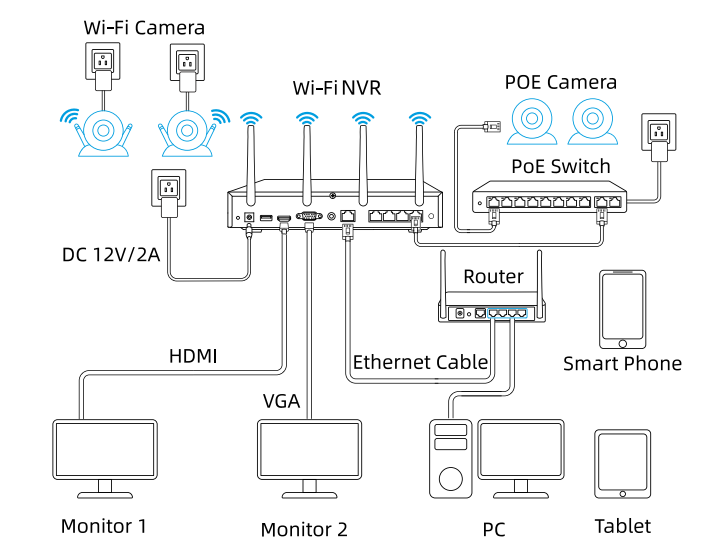
Cameras connected to the NVR will be shown on the displayer(s).
Can I connect my previously purchased Reolink PoE camera to the Wi-Fi NVR?
Yes, PoE cameras can work with the Wi-Fi NVR. But you need to first power on the PoE camera with a PoE injector, PoE switch, or power adapter, and connect it to the NVR or to the same network as the NVR.
What are the maximum transmission distances between the NVR and the cameras, as well as between the NVR and the router?
The distance between the NVR and the router primarily depends on the length of the Ethernet cable used. In optimal conditions, the distance between the NVR and the cameras can reach up to 120 meters.
Can I turn off the spotlights?
Yes, you can turn off the spotlights manually.
By default, the camera's spotlights are motion activated: it will turn on automatically when a motion is detected.
You can turn them off or adjust the brightness to your liking.
Please note that with the spotlights on you can enjoy clear color night vision, but if the spotlights are turned off, you will only see black and white images at night.
Can I switch between 2.4GHz and 5GHz Wi-Fi networks?
Yes, our latest hardware version of Wi-Fi NVR supports manual switching between 2.4GHz and 5GHznetwork.
Does the camera work with Reolink IoT devices (Reolink Floodlight, etc.)? How can they be linked?
Yes, the camera works with Reolink IoT devices, including Reolink Floodlight PoE/WiFi. The specific functions supported depend on the camera.
When Reolink Floodlight is linked to a camera, the floodlight and the built-in siren will be triggered once the camera detects an event. Click here to see how to link the camera to Reolink Floodlight.
What does the PIR sensor work for?
PIR sensors are more sensitive to the infrared radiations from humans or animals, and thus can dramatically reduce false alarms caused by fluttering moths or flying twigs.
Its full name is passive infrared sensor. It measures the infrared (IR) light radiating from objects with a temperature above absolute zero. When the amount of infrared radiation changes, it triggers detection.
Can this camera be used outdoors/indoors?
This camera can be used both indoors and outdoors.
It is IP65 certified weatherproof and its operating temperature is from -10°C to 55°C (14°F to 131°F), ideal for outdoor and indoor usage.
Can this camera support time-lapse function?
Does the camera support PoE NVR or a third-party storage device such as NAS?
Can I talk to someone via the Reolink App? (Two-way audio)
Yes, this security camera features two-way audio, which means you can listen and talk to someone in real time with simple clicks in App.
Can this camera support smart home like Google Assistant?
How can I charge this camera? Is the solar panel a must?
You have two charging options (including solar charging):
Option 1. Have the camera connected to a solar panel for non-stop power supply.
(👆Also recommended as the most friendly charging option for the cam's battery.)
Option 2. Charge the camera (with its non-removable battery) via a 5V 2A USB charger. (Please note that it's ok to charge the cam while it's working, but not for long.)
(Note: To purchase one Reolink Solar Panel, you can choose "1 Camera + 1 Solar Panel" option while buying this camera; or you can buy it separately from https://store.reolink.com/accessories/.)
How long does the battery last?
The camera comes with a rechargeable battery. Normally, the battery lasts for about 1-4 weeks per charge (Actual use varies based on settings, use conditions and environmental factors.) When the battery level goes down to 10%, the camera will send you a low-battery notification.
For non-stop power supply, you can connect the camera to a
Reolink Solar Panel 2 (purchased separately).
Does my camera support person/vehicle/animal detection?
Yes, this camera supports person/vehicle/animal detection.
Can I turn off the spotlights?
Yes, you can turn off the spotlights manually.
By default, the camera's spotlights are motion activated: it will turn on automatically when a motion is detected. You can turn them off or adjust the brightness to your liking.
Please note that with the spotlights on you can enjoy clear color night vision, but if the spotlights are turned off, you will only see black and white images at night.
Does this camera have an SD card?
No, the camera does not come with a microSD card built in. But it has a microSD card slot.
This camera supports Max. 128GB microSD cards with FAT32 format and Class 10 or higher read & write speed.
Does this camera support network protocol, such as RTSP/RTMP?
No, this camera can only support remote access and live viewing via Reolink App/Client, no subscription fees required.
How can I charge this camera? Is the solar panel a must?
You have two charging options (including solar charging):
Option 1. Have the camera connected to a solar paner for non-stop power supply.
(👆Also recommended as the most friendly charging option for the cam's battery.)
Option 2. Charge the camera (with its non-removable battery) via a 5V 2A USB charger. (Please note that it's ok to charge the cam while it's working, but not for long.)
(Note: To purchase one Reolink Solar Panel, you can choose "1 Camera + 1 Solar Panel" option while buying this camera; or you can buy it separately from https://store.reolink.com/accessories/.)
How long does the battery last?
The camera comes with a rechargeable battery. Normally, the battery lasts for about 1-4 weeks per charge (Actual use varies based on settings, use conditions and environmental factors.) When the battery level goes down to 10%, the camera will send you a low-battery notification.
For non-stop power supply, you can connect the camera to a
Reolink Solar Panel (purchased separately).
Does my camera support person/vehicle detection?
Yes, this camera supports person/vehicle detection.
Does the camera have an SD card?
No, the camera does not come with a microSD card built in. But it has a microSD card slot.
This camera supports Max. 128GB microSD cards with FAT32 format and Class 10 or higher read & write speed.
Can this camera support smart home like Google Assistant?
What does the PIR sensor work for?
PIR sensors are more sensitive to infrared radiations from humans or animals, and thus can dramatically reduce false alarms caused by fluttering moths or flying twigs.
Its full name is passive infrared sensor. It measures the infrared (IR) light radiating from objects with a temperature above absolute zero. When the amount of infrared radiation changes, it triggers detection.
Can this camera support time-lapse function?
Yes, the camera can support time-lapse. It can save time-lapse photos and videos to the SD card.
Tips:
How to Set Up Time Lapse?Does the camera support cloud storage?
Yes. You can refer to
Reolink Cloud to check it available countries.
Note: You can also save video clips into a microSD card (supports up to 128GB).
Can I talk to someone via the Reolink App? (Two-way audio)
Yes, this security camera features two-way audio, which means you can listen and talk to someone in real time with simple clicks in App.
Does the camera support NVR or a third-party storage device such as NAS?
No, but you can record videos to a microSD card and play back them via Reolink App and Client, no subscription fees required.
Does the camera support network protocol, such as RTSP/RTMP?
No, you can only log in or preview through Reolink App/Client. No subscription fees required.
How long does the battery last?
The camera comes with a rechargeable battery. Normally, the battery lasts for about 1-4 weeks per charge (Actual use varies based on settings, use conditions and environmental factors.) When the battery level goes down to 10%, the camera will send you a low-battery notification.
For non-stop power supply, you can connect the camera to a
Reolink Solar Panel (purchased separately).
Does the camera have an SD card?
No, the camera does not come with a microSD card built in. But it has a microSD card slot.
This camera supports Max. 128GB microSD cards with FAT32 format and Class 10 or higher read & write speed.
What Does the PIR Sensor Work for?
PIR sensors are more sensitive to the infrared radiations from humans or animals, and thus can dramatically reduce false alarms caused by fluttering moths or flying twigs.
Its full name is passive infrared sensor. It measures the infrared (IR) light radiating from objects with a temperature above absolute zero. When the amount of infrared radiation changes, it triggers detection.
Can this camera be used outdoors/indoors?
This camera can be used both indoors and outdoors.
It is IP66 certified weatherproof and its operating temperature is from -10°C to 55°C (14°F to 131°F), ideal for outdoor and indoor usage.
Can this camera support time-lapse function?
Can I talk to someone via the Reolink App? (Two-way audio)
Yes, this security camera features two-way audio, which means you can listen and talk to someone in real time with simple clicks in App.
Can this camera support smart home like Google Assistant?
How can I charge this camera? Is the solar panel a must?
You have two charging options (including solar charging):
Option 1. Have the camera connected to a solar paner for non-stop power supply.
(👆Also recommended as the most friendly charging option for the cam's battery.)
Option 2. Charge the camera (with its non-removable battery) via a 5V 2A USB charger. (Please note that it's ok to charge the cam while it's working, but not for long.)
(Note: To purchase one Reolink Solar Panel, you can choose "1 Camera + 1 Solar Panel" option while buying this camera; or you can buy it separately from https://store.reolink.com/accessories/.)
What does the PIR sensor work for?
PIR sensors are more sensitive to the infrared radiations from humans or animals, and thus can dramatically reduce false alarms caused by fluttering moths or flying twigs.
Its full name is passive infrared sensor. It measures the infrared (IR) light radiating from objects with a temperature above absolute zero. When the amount of infrared radiation changes, it triggers detection.
Can this camera support time-lapse function?
Does the camera support cloud storage?
Yes. You can refer to
Reolink Cloud to check it available countries.
Note: You can also save video clips into a microSD card (supports up to 128GB).
Can I talk to someone via the Reolink App? (Two-way audio)
Yes, this security camera features two-way audio, which means you can listen and talk to someone in real time with simple clicks in App.
Can this camera support smart home like Google Assistant?
How can I charge this camera? Is the solar panel a must?
You have two charging options (including solar charging):
Option 1. Have the camera connected to a solar panel for non-stop power supply.
(👆Also recommended as the most friendly charging option for the cam's battery.)
Option 2. Charge the camera (with its non-removable battery) via a 5V 2A USB charger. (Please note that it's ok to charge the cam while it's working, but not for long.)
(Note: To purchase one Reolink Solar Panel, you can choose "1 Camera + 1 Solar Panel" option while buying this camera; or you can buy it separately from https://store.reolink.com/accessories/.)
How long does the battery last?
The camera comes with a rechargeable battery. Normally, the battery lasts for about 1-4 weeks per charge (Actual use varies based on settings, use conditions and environmental factors.) When the battery level goes down to 10%, the camera will send you a low-battery notification.
For non-stop power supply, you can connect the camera to a
Reolink Solar Panel 2 (purchased separately).
Does my camera support person/vehicle/pet detection?
Yes, this camera supports person/vehicle detection and pet detection. Currently, pet detection is used to detect cats and dogs.
Does the camera have an SD card?
No, the camera does not come with a microSD card built in. But it has a microSD card slot.
This camera supports Max. 128GB microSD cards with FAT32 format and Class 10 or higher read & write speed.
Can I turn off the spotlights?
Yes, you can turn off the spotlights manually.
By default, the camera's spotlights are motion activated: it will turn on automatically when a motion is detected. You can turn them off or adjust the brightness to your liking.
Please note that with the spotlights on you can enjoy clear color night vision, but if the spotlights are turned off, you will only see black and white images at night.
What does the PIR sensor work for?
PIR sensors are more sensitive to the infrared radiations from humans or animals, and thus can dramatically reduce false alarms caused by fluttering moths or flying twigs.
Its full name is passive infrared sensor. It measures the infrared (IR) light radiating from objects with a temperature above absolute zero. When the amount of infrared radiation changes, it triggers detection.
Can this camera be used outdoors/indoors?
This camera can be used both indoors and outdoors.
It is IP65 certified weatherproof and its operating temperature is from -10°C to 55°C (14°F to 131°F), ideal for outdoor and indoor usage.
Can this camera support time-lapse function?
Does the camera support cloud storage?
Yes. You can refer to
Reolink Cloud to check it available countries.
Note: You can also save video clips into a microSD card (supports up to 128GB).
Does the camera support NVR or a third-party storage device such as NAS?
No, but you can record videos to a microSD card and play back them via Reolink App and Client, no subscription fees required.
Can I talk to someone via the Reolink App? (Two-way audio)
Yes, this security camera features two-way audio, which means you can listen and talk to someone in real time with simple clicks in App.
Can this camera support smart home like Google Assistant?
How can I charge this camera? Is the solar panel a must?
You have three charging options (including solar charging):
Option 1. Have the camera connected to a solar paner for non-stop power supply.
(👆Also recommended as the most friendly charging option for the cam's battery.)
Option 2. Pull off the battery from the camera, connect it to power outlet via 5V 2A USB charger.
Option 3. Charge the camera with its battery in via a 5V 2A USB charger. (Please note that it's ok to charge the cam while it's working, but not for long.)
(Note: To purchase one Reolink Solar Panel, you can choose "1 Camera + 1 Solar Panel" option while buying this camera; or you can buy it separately from https://store.reolink.com/accessories/.)
How long does the battery last?
The camera comes with a rechargeable battery. Normally, the battery lasts for about 1-4 weeks per charge (Actual use varies based on settings, use conditions and environmental factors.) When the battery level goes down to 10%, the camera will send you a low-battery notification.
For non-stop power supply, you can connect the camera to a
Reolink Solar Panel (purchased separately).
Does my camera support person/vehicle detection?
Yes, this camera supports person/vehicle detection. In addition, pet detection is added.
Does the camera have an SD card?
No, the camera does not come with a microSD card built in. But it has a microSD card slot.
This camera supports Max. 128GB microSD cards with FAT32 format and Class 10 or higher read & write speed.
Does the camera have a SIM card?
No, the camera does not come with a SIM card and Reolink doesn't have SIM card for sale, so you need to get one from a compatible cellular service provider. Every 4G camera needs a physical SIM card and does not support an e-SIM card. And note that Reolink 4G camera can only provide network for itself with a SIM card inserted, and cannot work as a hotspot to provide WiFi for other devices.
How does 4G work on this security camera?
Similar to your cellular phone, cellular security cameras need a SIM card with a data plan to tramsmit video signals over 3G/4G network.
The common SIM cards offered by carriers like T-Mobile and Vodafone can work for Reolink 4G camers (as they can for your cellular phone). Click to check
supported carriers in available countries and regions for this camera.
You can also contact
our support team for consultation.
Does the camera work on 5G/4G/3G/2G?
The camera works on 4G networks. It also supports 3G, which is not recommended though (since wireless companies are working to retire older network technologies). It does not supports 5G or 2G SIM card.
Yet it does not matter you use a 4G or 5G mobile phone to access the camera. The camera needs a SIM card of its own, which is totally irrelevant to your mobile's SIM card.
Note:
(1) The camera does not support WiFi connection.
(2) As of July 1, 2022 T-Mobile’s older 3G UMTS network will be retired.
How much data does the camera use?
Data usage of this camera depends on the bitrate you set up. 1 hour of live feed in Clear mode (default bitrate: 4Mbps) will use about 2GB of data. And if you use 1GB of data to stream live feed in Fluent mode (default bitrate: 672kbps), you can watch for 3.5 hours. Based on that, you can estimate the data usage to choose the right data plan for you.
Note: The above information is just for reference. The actual data usage is based on the actual working situation and may vary from the SIM card providers.
Does the camera work with my Reolink PoE NVR?
If you want to buy a new one: the currently on-sale NVRs work with all PoE and plug-in WiFi cameras.
If you already have one:
Please first refer to
this article for its hardware version.
For the NVR with the hardware N7MB01, N6MB01, or N5MB01, it works with all PoE and plug-in WiFi cameras.
For the NVR with the hardware N2MB02, N3MB01, or H3MB18, it works with all PoE and plug-in WiFi cameras. But you can not have a full-resolution live view of the following cameras: RLC-1212A, RLC-1224A, Reolink Duo 2 PoE, Reolink Duo 2 WiFi, Reolink Duo Floodlight WiFi, Reolink Duo Floodlight PoE.
For the NVR with the rest hardwares such as H3MB17, H3MB02, and H3MB16, please refer to
Introduction to Hardware Versions of Reolink NVRs for more detailed information.
What is WiFi 6?What are its benefits?
WiFi 6 (802.11ax Protocol) is the newest standard of WiFi technology, known for its faster and more stable wireless connectivity with reduced network latency. It also applied advanced encryption protocol WPA3 to enhance the security of wireless network.
Can this camera connect to non-WiFi 6 routers?
Yes, this camera can connect to non-WiFi 6 routers, but a WiFi 6 router is better recommended for enhanced networking.
Why can't I connect it to 3rd party softwares?
The RTSP and other ports may be disabled by default. You can launch Reolink Client, then go to Device Settings >> Network >> Advanced >> Port Settings to make sure all ports are enabled before using 3rd party softwares.
Can this camera support time-lapse function?
Does this camera support person/vehicle detection?
Yes, this camera supports person/vehicle detection. It also supports animal detection.
Can this camera be used outdoors/indoors?
This camera can be used both indoors and outdoors.
It is IP67 certified weatherproof and its operating temperature is from -10°C to 55°C (14°F to 131°F), perfect for outdoor and indoor usage.
Can this camera support smart home like Google Assistant?
How can I power up this camera?
The camera can be powered by a 12V 1A DC power adapter (A 1.2-meter power adaptor and a 4.5m extension cable are shipped with the camera). You can check what is in the box at the end of the overview page.
What kind of microSD card can I use?
This camera supports up to 256GB microSD cards with FAT32 format and Class 10 read & write speed.
Can I connect the camera to my PoE NVR or PoE NVR system?
Yes, Reolink WiFi cameras can be connected to Reolink PoE NVR in an indirect way. You can follow these steps to connect them:
Step 1: Connect the camera to a wifi router via wifi signals or an ethernet cable, and it needs to be powered via a power adapter.
Step 2: Connect the NVR to the same router by a network cable.
The NVR will pick up all the cameras on the same network.
Can I turn off the spotlights?
Yes, you can turn off the spotlights manually.
By default, the camera's spotlights are motion activated: it will turn on automatically when a motion is detected. You can turn them off or adjust the brightness to your liking.
Please note that with the spotlights on you can enjoy clear color night vision, but if the spotlights are turned off, you will only see black and white images at night.
Does the camera support NAS?
What does the PIR sensor work for?
PIR sensors are more sensitive to the infrared radiations from humans or animals, and thus can dramatically reduce false alarms caused by fluttering moths or flying twigs.
Its full name is passive infrared sensor. It measures the infrared (IR) light radiating from objects with a temperature above absolute zero. When the amount of infrared radiation changes, it triggers detection.
Can this camera be used outdoors/indoors?
This camera can be used both indoors and outdoors.
It is IP66 certified weatherproof and its operating temperature is from -10°C to 55°C (14°F to 131°F), ideal for outdoor and indoor usage.
Can this camera support time-lapse function?
Does the camera support PoE NVR or a third-party storage device such as NAS?
No, this camera only supports Cloud storage (available in specific countries or regions only) or local SD card storage.
Can I talk to someone via the Reolink App? (Two-way audio)
Yes, this security camera features two-way audio, which means you can listen and talk to someone in real time with simple clicks in App.
Can this camera support smart home like Google Assistant?
How can I charge this camera? Is the solar panel a must?
You have two charging options (including solar charging):
Option 1. Have the camera connected to a solar panel for non-stop power supply.
(👆Also recommended as the most friendly charging option for the cam's battery.)
Option 2. Charge the camera (with its non-removable battery) via a 5V 2A USB charger. (Please note that it's ok to charge the cam while it's working, but not for long.)
(Note: To purchase one Reolink Solar Panel, you can choose "1 Camera + 1 Solar Panel" option while buying this camera; or you can buy it separately from https://store.reolink.com/accessories/.)
How long does the battery last?
The camera comes with a rechargeable battery. Normally, the battery lasts for about 1-4 weeks per charge (Actual use varies based on settings, use conditions and environmental factors.) When the battery level goes down to 10%, the camera will send you a low-battery notification.
For non-stop power supply, you can connect the camera to a
Reolink Solar Panel 2 (purchased separately).
Does my camera support person/vehicle/animal detection?
Yes, this camera supports person/vehicle/animal detection.
Can I turn off the spotlights?
Yes, you can turn off the spotlights manually.
By default, the camera's spotlights are motion activated: it will turn on automatically when a motion is detected. You can turn them off or adjust the brightness to your liking.
Please note that with the spotlights on you can enjoy clear color night vision, but if the spotlights are turned off, you will only see black and white images at night.
Does this camera have an SD card?
No, the camera does not come with a microSD card built in. But it has a microSD card slot.
This camera supports Max. 128GB microSD cards with FAT32 format and Class 10 or higher read & write speed.
Does this camera support network protocol, such as RTSP/RTMP?
No, this camera can only support remote access and live viewing via Reolink App/Client, no subscription fees required.
How much are the customs duties?
Customs duties depend on where your items are shipped from and shipped to. See details in the Shipping Fees part of
Shipping & Delivery Policy.
Where can you ship? How long will it take to receive my items?
We sell security cameras to the United States, Germany, the United Kingdom and other dozens of countries.
And we handle orders within 24 hours and pass the packages to our forwarders within 48 working hours. The delivery time varies due to where your items are shipped from and shipped to. See details of
Shipping & Delivery Policy.
Does the camera have an SD card?
Yes, the camera has a 32GB microSD card built in.
The camera actually supports Max. 128GB microSD cards with FAT32 format and Class 10 or higher read & write speed.
Does the camera work on 5G/4G/3G/2G?
The camera works on 4G networks. It also supports 3G, which is not recommended though (since wireless companies are working to retire older network technologies). It does not supports 5G or 2G SIM card.
Yet it does not matter you use a 4G or 5G mobile phone to access the camera. The camera needs a SIM card of its own, which is totally irrelevant to your mobile's SIM card.
Note:
(1) The camera does not support WiFi connection.
(2) As of July 1, 2022 T-Mobile's older 3G UMTS network will be retired.
How can I charge this camera? Is the solar panel a must?
You have two charging options (including solar charging):
Option 1. Have the camera connected to a solar paner for non-stop power supply.
(👆Also recommended as the most friendly charging option for the cam's battery.)
Option 2. Charge the camera (with its non-removable battery) via a 5V 2A USB charger. (Please note that it's ok to charge the cam while it's working, but not for long.)
(Note: To purchase one Reolink Solar Panel, you can choose "1 Camera + 1 Solar Panel" option while buying this camera; or you can buy it separately from https://store.reolink.com/accessories/.)
How long does the battery last?
The camera comes with a rechargeable battery. Normally, the battery lasts for about 1-4 weeks per charge (Actual use varies based on settings, use conditions and environmental factors.) When the battery level goes down to 10%, the camera will send you a low-battery notification.
For non-stop power supply, you can connect the camera to a
Reolink Solar Panel (purchased separately).
Does my camera support person/vehicle detection?
Yes, this camera supports person/vehicle detection. It also supports
animal detection.
How does 4G work on this security camera?
Similar to your cellular phone, cellular security cameras need a SIM card with a data plan to tramsmit video signals over 3G/4G network.
The common SIM cards offered by carriers like T-Mobile and Vodafone can work for Reolink 4G camers (as they can for your cellular phone). Click to check
supported carriers in available countries and regions for this camera.
You can also contact
our support team for consultation.
How much data does the camera use?
Data usage of this camera depends on the bitrate you set up. 1 hour of live feed in Clear mode (default bitrate: 3Mbps) will use about 1.3GB of data. And if you use 1GB of data to stream live feed in Fluent mode (default bitrate: 672kbps), you can watch for 3.5 hours.
Note: The above information is just for reference. The actual data usage is based on the actual working situation and may vary from the SIM card providers.
What does the PIR sensor work for?
PIR sensors are more sensitive to the infrared radiations from humans or animals, and thus can dramatically reduce false alarms caused by fluttering moths or flying twigs.
Its full name is passive infrared sensor. It measures the infrared (IR) light radiating from objects with a temperature above absolute zero. When the amount of infrared radiation changes, it triggers detection.
Can this camera support time-lapse function?
Does the camera support cloud storage?
Yes. You can refer to
Reolink Cloud to check it available countries.
Note: You can also save video clips into a microSD card (supports up to 128GB).
Does my security system work with Google Assistant?
Sorry, the NVR system cannot work with Google Assistant.
Does the camera offer true full-color night vision when the warm light is off?
Yes, thanks to the ColorX technology, the camera can still provide color night vision without the warm light on. Featuring an F1.0 large aperture that allows four times more light in than an F2.0 aperture. Additionally, the camera is equipped with a 1/1.8" advanced sensor, enabling it to deliver clear and vivid full-color night vision even without additional lighting. You can also turn on the warm light for even higher-quality color night vision.
Can I turn off the warm light and siren?
Yes, you can turn off the warm light and siren manually.
By default, the camera's warm light and siren are motion-activated: they will be turned on automatically when a motion is detected. You can turn them off, adjust the brightness of warm light, or customize the siren to your liking.
The camera can provide clear and natural true full-color night vision even without turning on the warm light. You can also choose to turn on the warm light to enhance the quality of the color night vision in extremely dark environments.
Does my camera support person/vehicle/animal detection?
Yes, this camera supports person/vehicle/animal detection.
Can this camera be used outdoors/indoors?
This camera can be used both indoors and outdoors.
It is IP67 certified weatherproof and its operating temperature is from -10°C to 55°C (14°F to 131°F), perfect for outdoor and indoor usage.
Does the camera support two-way audio?
Yes, the camera supports two-way audio via its built-in mic and speaker. You can not only capture videos with audio recorded but also have real-time communication with people on the camera's end through Reolink App or Client.
How can I power up this camera?
The camera can be powered by a 12V 1A DC power adapter (A 1.2-meter power adaptor and a 4.5m extension cable are shipped with the camera). You can check what is in the box at the end of the overview page.
What Ethernet cable do I need?
The camera supports T-568B connectors and 8-PIN Ethernet cables of CAT5 or higher.
Where are the recordings stored? Is NVR a must?
The camera can work without an NVR.
1. When it works without an NVR, the recordings can be saved to the microSD card (purchased separately);
2. When it works with an NVR, the recordings can be saved to the NVR.
Note: For best compatibility, do not use the camera with third-party NVRs.
Can I connect the camera to my PoE NVR or PoE NVR system?
Yes, Reolink WiFi cameras can be connected to Reolink PoE NVR in an indirect way. You can follow these steps to connect them:
Step 1: Connect the camera to a wifi router via wifi signals or an ethernet cable, and it needs to be powered via a power adapter.
Step 2: Connect the NVR to the same router by a network cable.
The NVR will pick up all the cameras on the same network.
Is the camera compatible with my Reolink PoE NVR?
This camera is compatible with Reolink PoE NVR of the following hardware versions: H3MB18, N2MB02, N3MB01, N7MB01, H3MB18, N6MB01, N5MB01. For best performance, you need to
upgrade the NVR's firmware to the latest version for video displaying.
Reolink PoE NVRs that are currently available for sale support all the PoE standalone and plug-in WiFi cameras. However, if you have already had a Reolink PoE NVR, you can check if its hardware version is compatible with this camera.What kind of microSD card can I use?
This camera supports up to 256GB microSD cards with FAT32 format and Class 10 read & write speed.
Does the camera support NAS?
Yes, the camera supports NAS.
You may want to know
How to have Reolink cameras record to my NAS.How do I use live view and playback?
You can add and set up the camera on Reolink APP/Client. Then click the camera to check the live view and playback of it from anywhere, at any time.
Reolink APP/Client is free of charge and the service is free of subscription.
Does Reolink charge a subscription fee for the camera or the Reolink application?
No. Reolink does not charge any subscription fees for camera or Reolink App. All features of this camera as well as the Reolink App are completely free and require no subscription.
Why can't I connect it to 3rd party software?
The RTSP and other ports may be disabled by default. You can launch Reolink Client, then go to Device Settings >> Network >> Advanced >> Port Settings to make sure all ports are enabled before using 3rd party software.
Does the camera work with Reolink IoT devices (Reolink Floodlight, etc.)? How can they be linked?
Yes, the camera works with Reolink IoT devices, including Reolink Floodlight PoE/WiFi. The specific functions supported depend on the camera.
When Reolink Floodlight is linked to a camera, the floodlights and the built-in siren will be triggered once the camera detects an event.
Click here to see how to link the camera to Reolink Floodlight.Can this camera support time-lapse function?
Yes, the camera can support time-lapse. It can save time-lapse photos and videos to the SD card.
How to Set Up Time Lapse?Can this camera support smart home like Google Assistant?
Yes, currently, this camera can work with Google Assistant.
Tips:
How to add this camera to Google Assistant?Can this camera support smart home like Google Assistant?
Yes, currently, this camera can work with Google Assistant.
Tips:
How to add this camera to Google Assistant?Can I turn off the spotlights?
Yes, you can turn off the spotlights manually.
By default, the camera's spotlights are motion activated: it will turn on automatically when a motion is detected. You can turn them off or adjust the brightness to your liking.
Please note that with the spotlights on you can enjoy clear color night vision, but if the spotlights are turned off, you will only see black and white images at night.
Does my camera support person/vehicle/animal detection?
Yes, this camera supports person/vehicle/animal detection.
Can this camera be used outdoors/indoors?
This camera can be used both indoors and outdoors.
It is IP67 certified weatherproof and its operating temperature is from -10°C to 55°C (14°F to 131°F), perfect for outdoor and indoor usage.
Does the camera support two-way audio?
Yes, the camera supports two-way audio via its built-in mic and speaker. You can not only capture videos with audio recorded but also have real-time communication with people on the camera's end through Reolink App or Client.
How can I power up this camera?
The camera can be powered by a 12V 1A DC power adapter (A 1.2-meter power adaptor and a 4.5m extension cable are shipped with the camera). You can check what is in the box at the end of the overview page.
What Ethernet cable do I need?
The camera supports T-568B connectors and 8-PIN Ethernet cables of CAT5 or higher.
Where are the recordings stored? Is NVR a must?
The camera can work without an NVR.
1. When it works without an NVR, the recordings can be saved to the microSD card (purchased separately);
2. When it works with an NVR, the recordings can be saved to the NVR.
Note: For best compatibility, do not use the camera with third-party NVRs.
Can I connect the camera to my PoE NVR or PoE NVR system?
Yes, Reolink WiFi cameras can be connected to Reolink PoE NVR in an indirect way. You can follow these steps to connect them:
Step 1: Connect the camera to a wifi router via wifi signals or an ethernet cable, and it needs to be powered via a power adapter.
Step 2: Connect the NVR to the same router by a network cable.
The NVR will pick up all the cameras on the same network.
Is the camera compatible with my Reolink PoE NVR?
This camera is compatible with Reolink PoE NVR of the following hardware versions: H3MB18, N2MB02, N3MB01, N7MB01, H3MB18, N6MB01, N5MB01. For best performance, you need to
upgrade the NVR's firmware to the latest version for video displaying.
Reolink PoE NVRs that are currently available for sale support all the PoE standalone and plug-in WiFi cameras. However, if you have already had a Reolink PoE NVR, you can check if its hardware version is compatible with this camera.What kind of microSD card can I use?
This camera supports up to 256GB microSD cards with FAT32 format and Class 10 read & write speed.
Does the camera support NAS?
Yes, the camera supports NAS.
You may want to know
How to have Reolink cameras record to my NAS.How do I use live view and playback?
You can add and set up the camera on Reolink APP/Client. Then click the camera to check the live view and playback of it from anywhere, at any time.
Reolink APP/Client is free of charge and the service is free of subscription.
Does Reolink charge a subscription fee for the camera or the Reolink application?
No. Reolink does not charge any subscription fees for camera or Reolink App. All features of this camera as well as the Reolink App are completely free and require no subscription.
Why can't I connect it to 3rd party software?
The RTSP and other ports may be disabled by default. You can launch Reolink Client, then go to Device Settings >> Network >> Advanced >> Port Settings to make sure all ports are enabled before using 3rd party software.
Does the camera work with Reolink IoT devices (Reolink Floodlight, etc.)? How can they be linked?
Yes, the camera works with Reolink IoT devices, including Reolink Floodlight PoE/WiFi. The specific functions supported depend on the camera.
When Reolink Floodlight is linked to a camera, the floodlights and the built-in siren will be triggered once the camera detects an event.
Click here to see how to link the camera to Reolink Floodlight.Does this camera support time-lapse function?
Yes, the camera can support time-lapse. It can save time-lapse photos and videos to the SD card.
How to Set Up Time Lapse?Does this camera support smart home like Google Assistant?
Yes, currently, this camera can work with Google Assistant.
Tips:
How to add this camera to Google Assistant?What is Wi-Fi 6?What are its benefits?
WiFi 6 (802.11ax Protocol) is the newest standard of WiFi technology, known for its faster and more stable wireless connectivity with reduced network latency. It also applied advanced encryption protocol WPA3 to enhance the security of wireless networks.
Can this camera connect to non–Wi-Fi 6 routers?
Yes, this camera can connect to non-WiFi 6 routers, but a WiFi 6 router is better recommended for enhanced networking.
Can I switch between 2.4GHz and 5GHz Wi-Fi networks?
No, manual switching is not supported. If the camera supports both 2.4GHz and 5GHz WiFi, it will be fixed on the 5GHz band. If the camera only supports 2.4GHz, it will stay connected to the 2.4GHz network.
Does the camera work with my Reolink PoE NVR?
If you want to buy a new one: the currently on-sale NVRs work with all PoE and plug-in WiFi cameras.
If you already have one:
Please first refer to
this article for its hardware version.
For the NVR with the hardware N7MB01, N6MB01, or N5MB01, it works with all PoE and plug-in WiFi cameras.
For the NVR with the hardware N2MB02, N3MB01, or H3MB18, it works with all PoE and plug-in WiFi cameras. But you can not have a full-resolution live view of the following cameras: RLC-1212A, RLC-1224A, Reolink Duo 2 PoE, Reolink Duo 2 WiFi, Reolink Duo Floodlight WiFi, Reolink Duo Floodlight PoE.
For the NVR with the rest hardware such as H3MB17, H3MB02, and H3MB16, please refer to
Introduction to Hardware Versions of Reolink NVRs for more detailed information.
What is WiFi 6? What are its benefits?
WiFi 6 (802.11ax Protocol) is the newest standard of WiFi technology, known for its faster and more stable wireless connectivity with reduced network latency. It also applied advanced encryption protocol WPA3 to enhance the security of wireless network.
Can this camera connect to non-WiFi 6 routers?
Yes, this camera can connect to non-WiFi 6 routers, but a WiFi 6 router is better recommended for enhanced networking.
Why can't I connect it to 3rd party softwares?
The RTSP and other ports may be disabled by default. You can launch Reolink Client, then go to Device Settings >> Network >> Advanced >> Port Settings to make sure all ports are enabled before using 3rd party softwares.
Can this camera support time-lapse function?
Does this camera support person/vehicle detection?
Yes, this camera supports person/vehicle detection. It also supports animal detection.
Can this camera be used outdoors/indoors?
This camera can be used both indoors and outdoors.
It is IP66 certified weatherproof and its operating temperature is from -10°C to 55°C (14°F to 131°F), perfect for outdoor and indoor usage.
Can this camera support smart home like Google Assistant?
How can I power up this camera?
The camera can be powered by a 12V 1A DC power adapter (A 1.2-meter power adaptor and a 4.5m extension cable are shipped with the camera). You can check what is in the box at the end of the overview page.
What kind of microSD card can I use?
This camera supports up to 256GB microSD cards with FAT32 format and Class 10 read & write speed.
Can I connect the camera to my PoE NVR or PoE NVR system?
Yes, Reolink WiFi cameras can be connected to Reolink PoE NVR in an indirect way. You can follow these steps to connect them:
Step 1: Connect the camera to a wifi router via wifi signals or an ethernet cable, and it needs to be powered via a power adapter.
Step 2: Connect the NVR to the same router by a network cable.
The NVR will pick up all the cameras on the same network.
Can I turn off the spotlights?
Yes, you can turn off the spotlights manually.
By default, the camera's spotlights are motion activated: it will turn on automatically when a motion is detected. You can turn them off or adjust the brightness to your liking.
Please note that with the spotlights on you can enjoy clear color night vision, but if the spotlights are turned off, you will only see black and white images at night.
Does the camera support NAS?
What is 3D Zoom? How can I use this function?
3D Zoom is a function that enables the camera to automatically pan, tilt, and zoom in on the specific area that you selected on the screen, without the need for manual control step by step.
Does the camera offer true full-color night vision when the warm light is off?
Yes, thanks to the ColorX technology, the camera can still provide color night vision without the warm light on. Featuring an F1.0 large aperture that allows four times more light in than an F2.0 aperture. Additionally, the camera is equipped with a 1/1.8" advanced sensor, enabling it to deliver clear and vivid full-color night vision even without additional lighting. You can also turn on the warm light for even higher-quality color night vision.
Does this camera support the time-lapse function?
Can this camera be used outdoors/indoors?
This camera can be used both indoors and outdoors.
It is IP65 certified weatherproof and its operating temperature is from -10°C to 55°C (14°F to 131°F), perfect for outdoor and indoor usage.
Does my camera support person/vehicle/animal detection?
Yes, this camera supports person/vehicle/animal detection.
Can this camera work with smart home like Google Assistant?
How can I power up this camera?
The camera can be powered by a 12V 1A DC power adapter (A 1.2-meter power adaptor and a 4.5m extension cable are shipped with the camera). You can check what is in the box at the end of the overview page.
What kind of microSD card can I use?
This camera supports up to 256GB microSD cards with FAT32 format and Class 10 read & write speed.
Can I connect the camera to my PoE NVR or PoE NVR system?
Yes, Reolink WiFi cameras can be connected to Reolink PoE NVR in an indirect way. You can follow these steps to connect them:
Step 1: Connect the camera to a wifi router via wifi signals or an ethernet cable, and it needs to be powered via a power adapter.
Step 2: Connect the NVR to the same router by a network cable.
The NVR will pick up all the cameras on the same network.
Does the camera support NAS?
Why can't I connect it to 3rd party software?
The RTSP and other ports may be disabled by default. You can launch Reolink Client, then go to Device Settings >> Network >> Advanced >> Port Settings to make sure all ports are enabled before using 3rd party software.
Can this camera be used outdoors/indoors?
This camera can be used both indoors and outdoors.
It is IP65 certified weatherproof and its operating temperature is from -10°C to 55°C (14°F to 131°F), ideal for outdoor and indoor usage.
Can this camera support smart home like Google Assistant?
How can I power up this camera?
The camera can be powered by a 5V 2A DC power adapter (A 1.5m one is shipped with the camera). You can check what is in the box at the end of the overview page.
The camera itself also has a 3m tail cable attached.
What kind of microSD card can I use?
This camera supports up to 256GB microSD cards with FAT32 format and Class 10 read & write speed.
Does this camera support person/vehicle/animal detection?
Yes, this camera supports person/vehicle/animal detection.
Can I connect this camera to my PoE NVR or PoE NVR system?
Yes, Reolink Wi-Fi cameras can be connected to Reolink PoE NVR in an indirect way. You can follow these steps to connect them:
Step 1. Connect the camera to a Wi-Fi router via Wi-Fi signals, and it needs to be powered via a power adapter.
Step 2. Connect the NVR to the same router by a network cable.
The NVR will pick up all the cameras on the same network.
Can I turn off the spotlights?
Yes, you can turn off the spotlights manually.
By default, the camera's spotlights are motion activated: it will turn on automatically when a motion is detected. You can turn them off or adjust the brightness to your liking.
Please note that with the spotlights on you can enjoy clear color night vision, but if the spotlights are turned off, you will only see black and white images at night.
Does this camera support NAS?
No, the camera does not support NAS.
You can insert an SD card for it to save motion videos. This camera supports up to 256GB microSD cards with FAT32 format and Class 10 read & write speed.
Does this camera support cloud storage?
Reolink Cloud is available in some countries and regions. You can refer to
Reolink Cloud to check its available countries and regions.
Note: You can also save video clips into a microSD card (supports up to 256GB), or
a Reolink NVR.
Does my security system work with Google Assistant?
Sorry, the NVR system cannot work with Google Assistant.
How long does the security camera system store video footage?
The length of time to store video footage is closely related to the video code rate.
As for RLK12-800WB4, the default bit rate of its cameras is 4096 kbps. Proximately, with the 4 cameras all working, this security system can store video footage for 10-11 days to its pre-installed 2TB HDD.
You can refer to "How Long Can Reolink NVR Record?" for more details.
If you want to keep longer video storage, you can expand the NVR's storage capacity.
Does the NVR support the person/vehicle/animal detection of my Reolink cameras?
Yes, the NVR in RLK12-811WB4 supports the cameras' smart person/vehicle/animal detection.
How can I preview or playback the video?
Method 1: Connect the NVR to a monitor or TV for preview or playback.
Method 2: Download FREE Reolink APP or Client, add the NVR to the APP or Client, configure the settings, and then you can preview or playback the videos.
Can I connect Reolink NVR to one or more displayers?
You can connect a maximum of two displayers with the NVR via HDMI or VGA (see the diagram below).
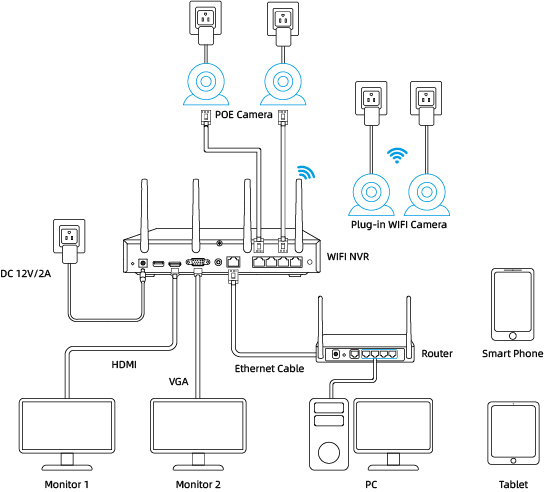
Cameras connected to the NVR will be shown on the displayer(s).
What is the difference if I buy cameras and NVR separately instead of buying a whole system?
The cameras in the kit cannot work alone. They have to work with the Reolink NVR. If you buy standalone cameras and the NVR separately, the cameras can work alone.
Can I connect my previously purchased Reolink PoE camera to the WiFi NVR?
Yes, PoE cameras can work with the WiFi NVR. But you need to first power on the PoE camera with a PoE injector, PoE switch, or power adapter, and connect it to the NVR or to the same network as the NVR.
What are the maximum transmission distances between the NVR and the cameras, as well as between the NVR and the router?
The distance between the NVR and the router primarily depends on the length of the Ethernet cable used. In optimal conditions, the distance between the NVR and the cameras can reach up to 120 meters.
Can I turn off the spotlights?
Yes, you can turn off the spotlights manually.
By default, the camera's spotlights are motion activated: it will turn on automatically when a motion is detected.
You can turn them off or adjust the brightness to your liking.
Please note that with the spotlights on you can enjoy clear color night vision, but if the spotlights are turned off, you will only see black and white images at night.
Can I switch between 2.4GHz and 5GHz WiFi networks?
Yes, our latest hardware version of Wi-Fi NVR supports manual switching between 2.4GHz and 5GHznetwork.
Does my security system work with Google Assistant?
Sorry, the NVR system cannot work with Google Assistant.
How long does the security camera system store video footage?
The length of time to store video footage is closely related to the video code rate.
As for RLK12-800WPT4, the default bit rate of its cameras is 3072 kbps. Proximately, with the 4 cameras all working, this security system can store video footage for 14 days to its pre-installed 2TB HDD.
You can refer to "How Long Can Reolink NVR Record?" for more details.
If you want to keep longer video storage, you can expand the NVR's storage capacity.
Does the NVR support the person/vehicle/animal detection of my Reolink cameras?
Yes, the NVR in RLK12-800WPT4 supports the cameras' smart person/vehicle/animal detection.
How can I preview or playback the video?
Method 1: Connect the NVR to a monitor or TV for preview or playback.
Method 2: Download FREE Reolink APP or Client, add the NVR to the APP or Client, configure the settings, and then you can preview or playback the videos.
Can I connect Reolink NVR to one or more displayers?
You can connect a maximum of two displayers with the NVR via HDMI or VGA (see the diagram below).
Cameras connected to the NVR will be shown on the displayer(s).
Can I connect my previously purchased Reolink PoE camera to the Wi-Fi NVR?
Yes, PoE cameras can work with the Wi-Fi NVR. But you need to first power on the PoE camera with a PoE injector, PoE switch, or power adapter, and connect it to the NVR or to the same network as the NVR.
What are the maximum transmission distances between the NVR and the cameras, as well as between the NVR and the router?
The distance between the NVR and the router primarily depends on the length of the Ethernet cable used. In optimal conditions, the distance between the NVR and the cameras can reach up to 120 meters.
Can I turn off the spotlights?
Yes, you can turn off the spotlights manually.
By default, the camera's spotlights are motion activated: it will turn on automatically when a motion is detected.
You can turn them off or adjust the brightness to your liking.
Please note that with the spotlights on you can enjoy clear color night vision, but if the spotlights are turned off, you will only see black and white images at night.
Can I switch between 2.4GHz and 5GHz Wi-Fi networks?
Yes, our latest hardware version of Wi-Fi NVR supports manual switching between 2.4GHz and 5GHznetwork.
Does the camera support auto-tracking and patrol?
This camera supports auto tracking of people, vehicles, and animals. We recommend downloading and updating to the latest firmware for a better user experience (
click here to download). Please note that this camera doesn't support patrol, but you can remotely control the camera to rotate to monitor different areas quickly with preset points.
Does the camera support person/vehicle detection?
Yes, this camera supports person/vehicle detection.
Is a subscription fee required for Reolink PoE cameras?
No, Reolink PoE cameras work well on their own without subscription fees. You can make full use of the person/vehicle/animaldetection, local storage, and other functions for free!
Does my camera support person/vehicle/animal detection?
Yes, this camera supports person/vehicle/animal detection.
Does the camera support two-way audio?
Yes, the camera supports two-way audio via its built-in mic and speaker. You can not only capture videos with audio recorded but also have real-time communication with people on the camera's end through Reolink App or Client.
Can I turn off the spotlights?
Yes, you can turn off the spotlights manually.
By default, the camera's spotlights are motion activated: it will turn on automatically when a motion is detected. You can turn them off or adjust the brightness to your liking.
Please note that with the spotlights on you can enjoy clear color night vision, but if the spotlights are turned off, you will only see black and white images at night.
How can I power up the camera?
There are two methods:
1. Via an Ethernet cable, connect the camera to a PoE NVR, PoE injector, PoE switch, or directly to a router with a PoE port, for both power supply and video signal transmission.
Note: Please make sure that the PoE injector/switch is 802.3 af compliant (48V) and supports active mode.
2.Via a DC 12V 1A power adapter (purchased separately), connect the camera to power outlet for power supply only.
What Ethernet Cable Do I Need?
The camera supports T-568B connectors and 8-PIN Ethernet cables of CAT5 or higher.
Can this camera be used outdoors/indoors?
This camera can be used both indoors and outdoors.
It is IP67 certified weatherproof and its operating temperature is from -10°C to 55°C (14°F to 131°F), perfect for outdoor and indoor usage.
How do I use live view and playback?
You can add and set up the camera on Reolink APP/Client. Then click the camera to check the live view and playback of it from anywhere, at any time.
Reolink APP/Client is free of charge and the service is free of subscription.
Can this camera support time-lapse function?
What kind of microSD card can I use?
This camera supports up to 256GB microSD cards with FAT32 format and Class 10 read & write speed.
Where are the recordings stored? Is NVR a must?
The camera can work without an NVR.
1. When it works without an NVR, the recordings can be saved to the microSD card (purchased separately);
2. When it works with an NVR, the recordings can be saved to the NVR.
Note: For best compatibility, do not use the camera with third-party NVRs.
Does the camera work with my Reolink PoE NVR?
If you want to buy a new one: the currently on-sale NVRs work with all PoE and plug-in WiFi cameras.
If you already have one:
Please first refer to
this article for its hardware version.
For the NVR with the hardware N7MB01, N6MB01, or N5MB01, it works with all PoE and plug-in WiFi cameras.
For the NVR with the hardware N2MB02, N3MB01, or H3MB18, it works with all PoE and plug-in WiFi cameras. But you can not have a full-resolution live view of the following cameras: RLC-1212A, RLC-1224A, Reolink Duo 2 PoE, Reolink Duo 2 WiFi, Reolink Duo Floodlight WiFi, Reolink Duo Floodlight PoE.
For the NVR with the rest hardwares such as H3MB17, H3MB02, and H3MB16, please refer to
Introduction to Hardware Versions of Reolink NVRs for more detailed information.
Can I use this camera with Synology?
Yes, this PoE IP camera can work with Synology. There are 2 methods for you to save videos in it.
Method 1 (recommended): You can add this camera to the Synology Surveillance Station. Check
this article to learn how to add a camera.
Method 2: You can treat your Synology device as an FTP server. For detailed steps, check
How to Set up FTP for Reolink Products.
Why can't I connect it to 3rd party softwares?
The RTSP and other ports may be disabled by default. You can launch Reolink Client, then go to Device Settings >> Network >> Advanced >> Port Settings to make sure all ports are enabled before using 3rd party softwares.
Can this camera support smart home like Google Assistant?
Does the camera offer true color night vision when the warm light is off?
Yes, thanks to the ColorX technology, the camera can still provide color night vision without the warm light on. Featuring an F1.0 large aperture that allows four times more light in than an F2.0 aperture. Additionally, the camera is equipped with a 1/1.8" advanced sensor, enabling it to deliver clear and vivid full-color night vision even without additional lighting. You can also turn on the warm light for even higher quality color night vision.
Can I turn off the warm light and siren?
Yes, you can turn off the warm lightand siren manually.
By default, the camera's warm light and siren are motion activated: they will be turned on automatically when a motion is detected. You can turn them off, adjust the brightness of warm light, or customize the siren to your liking.
The camera can provide clear and natural true full-color night vision even without turning on the warm light. You can also choose to turn on the warm light to enhance the quality of the color night vision in extremely dark environments.
Does the camera support person/vehicle/animal detection?
Yes, this camera supports person/vehicle/animal detection.
Does the camera support two-way audio?
Yes, the camera supports two-way audio via its built-in mic and speaker. You can not only capture videos with audio recorded but also have real-time communication with people on the camera's end through Reolink App or Client.
How can I power up this camera?
There are two methods:
1. Via an Ethernet cable, connect the camera to a PoE NVR, PoE injector, PoE switch, or directly to a router with a PoE port, for both power supply and video signal transmission.
Note: Please make sure that the PoE injector/switch is 802.3 af compliant (48V) and supports active mode.
2.Via a DC 12V 1A power adapter (purchased separately), connect the camera to power outlet for power supply only.
What Ethernet cable do I need?
The camera supports T-568B connectors and 8-PIN Ethernet cables of CAT5 or higher.
Where are the recordings stored? Is NVR a must?
The camera can work without an NVR.
1. When it works without an NVR, the recordings can be saved to the microSD card (purchased separately);
2. When it works with an NVR, the recordings can be saved to the NVR.
Note: For best compatibility, do not use the camera with third-party NVRs.
Does the camera compatible with my Reolink PoE NVR?
This camera is compatible with Reolink PoE NVR of the following hardware versions: H3MB18, N2MB02, N3MB01, N7MB01, H3MB18, N6MB01, N5MB01. For best performance, you need to
upgrade the NVR's firmware to the latest version for video displaying.
Reolink PoE NVRs that are currently available for sale support all the PoE standalone and plug-in WiFi cameras. However, if you have already had a Reolink PoE NVR, you can check if its
hardware version is compatible with this camera.
What kind of microSD card can I use?
This camera supports up to 256GB microSD cards with FAT32 format and Class 10 read & write speed.
Does the camera support NAS?
How do I use live view and playback?
You can add and set up the camera on Reolink APP/Client. Then click the camera to check the live view and playback of it from anywhere, at any time.
Reolink APP/Client is free of charge and the service is free of subscription.
Does Reolink charge subscription fees for the camera or the Reolink application?
No. Reolink does not charge any subscription fees for camera or Reolink App. All features of this camera as well as the Reolink App are completely free and require no subscription.
Why can't I connect the camera to 3rd party softwares?
The RTSP and other ports may be disabled by default. You can launch Reolink Client, then go to Device Settings >> Network >> Advanced >> Port Settings to make sure all ports are enabled before using 3rd party softwares.
Does the camera work with Reolink IoT devices (Reolink Floodlight, etc.)? How can they be linked?
Yes, the camera works with Reolink IoT devices, including Reolink Floodlight PoE/WiFi. The specific functions supported depend on the camera.
When Reolink Floodlight is linked to a camera, the floodlights and the built-in siren will be triggered once the camera detects an event.
Click here to see how to link the camera to Reolink Floodlight.Does the camera support time-lapse function?
Does the camera support smart home like Google Assistant?
Does this camera support auto tracking?
Yes. This camera will automatically follow detected objects. You can also control the camera to manually pan and tilt via the Reolink App/Client.
What is 3D Zoom? How can I use this function?
3D Zoom is a function that enables the camera to automatically pan, tilt, and zoom in on the specific area that you selected on the screen, without the need for manual control step by step.
What kind of microSD card can I use?
This camera supports up to 256GB microSD cards with FAT32 format and Class 10 read & write speed.
What Ethernet cable do I need?
The camera supports T-568B connectors and 8-PIN Ethernet cables of CAT5 or higher.
How can I power up this camera?
There are two methods:
1. Via an Ethernet cable, connect the camera to a PoE NVR, PoE injector, PoE switch, or directly to a router with a PoE port, for both power supply and video signal transmission.
Note: Please make sure that the PoE injector/switch is 802.3at compliant (48V) and supports active mode.
2.Via its DC 12V 2A power adapter for power supply only.
Does my camera support person/vehicle/animal detection?
Yes. This camera supports person/vehicle/animal detection.
Does the camera support two-way audio?
Yes, the camera supports two-way audio via its built-in mic and speaker. You can not only capture videos with audio recorded but also have real-time communication with people on the camera's end through Reolink App or Client.
Can I turn off the spotlights?
Yes, you can turn off the spotlights manually.
By default, the camera's spotlights are motion activated: it will turn on automatically when a motion is detected. You can turn them off or adjust the brightness to your liking.
Please note that with the spotlights on you can enjoy clear color night vision, but if the spotlights are turned off, you will only see black and white images at night.
Can I turn off the Siren?
Yes. It can be switched off on Reolink App, Reolink Client, or the NVR interface.
Does this camera support smart home like Google Assistant?
Does this camera support time-lapse feature?
Yes, the camera supports timelapse feature. You can save time-lapse photos and videos to the SD card.
How to Set Up Time Lapse?Does the camera work with my Reolink PoE NVR?
If you want to buy a new one: the currently on-sale NVRs work with all PoE and plug-in WiFi cameras.
If you already have one:
Please first refer to
this article for its hardware version.
For the NVR with the hardware N7MB01, N6MB01, or N5MB01, it works with all PoE and plug-in WiFi cameras.
For the NVR with the hardware N2MB02, N3MB01, or H3MB18, it works with all PoE and plug-in WiFi cameras. But you can not have a full-resolution live view of the following cameras: RLC-1212A, RLC-1224A, Reolink Duo 2 PoE, Reolink Duo 2 WiFi, Reolink Duo Floodlight WiFi, Reolink Duo Floodlight PoE.
For the NVR with the rest hardwares such as H3MB17, H3MB02, and H3MB16, please refer to
Introduction to Hardware Versions of Reolink NVRs for more detailed information.
Does the camera support NAS?
Can the camera work with Synology?
Yes, this PoE IP camera can work with Synology. There are 2 methods for you to save videos in it.
Method 1 (recommended): You can add this camera to the Synology Surveillance Station. Check
this article to learn how to add a camera.
Method 2: You can treat your Synology device as an FTP server. For detailed steps, check
How to Set up FTP for Reolink Products.
Why can't I connect this camera to 3rd party software?
The RTSP and other ports may be disabled by default. You can launch Reolink Client, then go to Device Settings >> Network >> Advanced >> Port Settings to make sure all ports are enabled before using 3rd party softwares.
Does the camera work with Reolink IoT devices (Reolink Floodlight, etc.)? How can they be linked?
Yes, the camera works with Reolink IoT devices, including Reolink Floodlight PoE/WiFi. The specific functions supported depend on the camera.
When Reolink Floodlight is linked to a camera, the floodlight and the built-in siren will be triggered once the camera detects an event.
Click here to see how to link the camera to Reolink Floodlight.Can the camera support time-lapse function?
Does my camera support person/vehicle/animal detection?
Yes, this camera supports person/vehicle/animal detection.
Does the camera support two-way audio?
Yes, the camera supports two-way audio via its built-in mic and speaker. You can not only capture videos with audio recorded but also have real-time communication with people on the camera's end through Reolink App or Client.
Can I turn off the spotlights and siren?
Yes, you can turn off the spotlights and siren manually.
By default, the camera's spotlights and siren are motion activated: they will be turned on automatically when a motion is detected. You can turn them off, adjust the brightness of spotlights, or customize the siren to your liking.
Please note that with the spotlights on you can enjoy clear color night vision, but if the spotlights are turned off, you will only see black and white images at night.
Does the camera support smart home like Google Assistant?
How do I use live view and playback?
You can add and set up the camera on Reolink APP/Client. Then click the camera to check the live view and playback of it from anywhere, at any time.
Reolink APP/Client is free of charge and the service is free of subscription.
How can I power up this camera?
There are two methods:
1. Via an Ethernet cable, connect the camera to a PoE NVR, PoE injector, PoE switch, or directly to a router with a PoE port, for both power supply and video signal transmission.
Note: Please make sure that the PoE injector/switch is 802.3at compliant (48V) and supports active mode.
2.Via its DC 12V 2A power adapter for power supply only.
Where are the recordings stored? Is NVR a must?
The camera can work without an NVR.
1. When it works without an NVR, the recordings can be saved to the microSD card (purchased separately);
2. When it works with an NVR, the recordings can be saved to the NVR.
Note: For best compatibility, do not use the camera with third-party NVRs.
What kind of Ethernet cable do I need?
The camera supports T-568B connectors and 8-PIN Ethernet cables of CAT5 or higher.
What kind of microSD card can I use?
This camera supports up to 256GB microSD cards with FAT32 format and Class 10 read & write speed.
Does the camera support NAS?
Why can't I connect it to 3rd party softwares?
The RTSP and other ports may be disabled by default. You can launch Reolink Client, then go to Device Settings >> Network >> Advanced >> Port Settings to make sure all ports are enabled before using 3rd party softwares.
Does the camera work with Reolink IoT devices (Reolink Floodlight, etc.)? How can they be linked?
Yes, the camera works with Reolink IoT devices, including Reolink Floodlight PoE/WiFi. The specific functions supported depend on the camera.
When Reolink Floodlight is linked to a camera, the floodlights and the built-in siren will be triggered once the camera detects an event.
Click here to see how to link the camera to Reolink Floodlight.How many cameras can the system support at most? Does it support Reolink battery-powered cameras?
This system supports at most 16 cameras, but it doesn't support Reolink battery-powered cameras.
How many Ethernet cables are included in the package? What type of Ethernet cable does the cameras support?
This package includes 8pcs of 18m CAT 5E Ethernet cables. Reolink PoE cameras support CAT5, CAT5E, CAT6, CAT7 with 8 PIN Ethernet cables. The maximum length of the network cable they support is 330ft (100m). Please note that the data is obtained with a standard CAT5E Ethernet cable under specific test conditions and actual use may vary.
What are the output types supported by the NVR?
The NVR supports HDMI/VGA output and up to two monitors; HDMI currently supports output of up to 4K resolution.
How can I expand the HDD storage?
You can replace the hard drive with a larger capacity one or add another hard drive. The maximum capacity for a single HDD is 6TB.
Can the cameras included in the package be used independently?
No. The cameras included in the package can only be used when connected to an NVR.
Does my security system work with Google Assistant?
Sorry, the NVR system cannot work with Google Assistant.
How long does the security camera system store video footage?
The length of time to store video footage is closely related to the video code rate.
As for RLK12-800WV4, the default bit rate of its cameras is 4096 kbps. Proximately, with the 4 cameras all working, this security system can store video footage for 12 days to its pre-installed 2TB HDD.
You can refer to "How Long Can Reolink NVR Record?" for more details.
If you want to keep longer video storage, you can expand the NVR's storage capacity.
Does the NVR support the person/vehicle/animal detection of my Reolink cameras?
Yes, the NVR in RLK12-800WV4 supports the cameras' smart person/vehicle/animal detection.
How can I preview or play back the video?
Method 1: Connect the NVR to a monitor or TV for preview or playback.
Method 2: Download FREE Reolink APP or Client, add the NVR to the APP or Client, configure the settings, and then you can preview or playback the videos.
Can I connect the Reolink NVR to one or more displayers?
You can connect a maximum of two displayers with the NVR via HDMI or VGA (see the diagram below).
Cameras connected to the NVR will be shown on the displayer(s).
What's the difference between buying the cameras and NVR separately versus buying the whole system?
The cameras in the kit cannot work alone. They have to work with the Reolink NVR. If you buy standalone cameras and the NVR separately, the cameras can work alone.
Can I connect my previously purchased Reolink PoE camera to the WiFi NVR?
Yes, PoE cameras can work with the Wi-Fi NVR. But you need to first power on the PoE camera with a PoE injector, PoE switch, or power adapter, and connect it to the NVR or to the same network as the NVR.
What are the maximum transmission distances between the NVR and the cameras, as well as between the NVR and the router?
The distance between the NVR and the router primarily depends on the length of the Ethernet cable used. In optimal conditions, the distance between the NVR and the cameras can reach up to 120 meters.
Can I turn off the spotlights?
Yes, you can turn off the spotlights manually.
By default, the camera's spotlights are motion activated: it will turn on automatically when a motion is detected.
You can turn them off or adjust the brightness to your liking.
Please note that with the spotlights on you can enjoy clear color night vision, but if the spotlights are turned off, you will only see black and white images at night.
Can I switch between the 2.4GHz and 5GHz Wi-Fi networks?
Yes, our latest hardware version of Wi-Fi NVR supports manual switching between 2.4GHz and 5GHznetwork.
Which Reolink cameras are compatible with Reolink Home Hub?
Reolink Home Hub is compatible with all Reolink Wi-Fi/PoE cameras (except 4G cameras, cameras in NVR security kits, and add-on cameras). Learn more about Reolink Home Hub compatibility: https://support.reolink.com/hc/en-us/articles/32379509281561-Reolink-Home-Hub-Compatibility/
How long does the battery last?
The camera comes with a rechargeable battery. Normally, the battery lasts for about 1-2 months per charge (actual use may vary based on settings, use conditions and environmental factors). When the battery level goes down to 10%, the camera will send you a low-battery notification.
What does the PIR sensor work for?
PIR sensors are more sensitive to the infrared radiations from humans or animals, and thus can dramatically reduce false alarms caused by fluttering moths or flying twigs.
Its full name is passive infrared sensor. It measures the infrared (IR) light radiating from objects with a temperature above absolute zero. When the amount of infrared radiation changes, it triggers detection.
Does this camera support two-way audio?
Yes, this security camera features two-way audio, which means you can listen and talk to someone in real time with simple clicks in App.
How can I charge this camera?
You have two charging options (including solar charging):
Option 1. Have the camera connected to a solar panel for non-stop power supply.
(👆Also recommended as the most friendly charging option for the cam's battery.)
Option 2. Charge the camera (with its non-removable battery) via a 5V 2A USB charger. Please note that it's OK to charge the cam while it's working, but not for long.
Does this camera support smart home like Google Assistant?
Does the camera come with an SD card?
Yes, this camera comes with a 64GB microSD card. It supports Max. 128GB microSD cards with FAT32 format and Class 10 or higher read & write speed.
Can all the IP cameras under the same router network connect to Reolink Home Hub?
Yes. All Reolink battery cameras, PoE cameras, and plug-in Wi-Fi cameras connected to the same router can connect to Reolink Home Hub.
Can all the IP cameras under the same router network connect to Reolink Home Hub?
Yes. All Reolink battery cameras, PoE cameras, and plug-in Wi-Fi cameras connected to the same router can connect to Reolink Home Hub.
Which Reolink cameras are compatible with Reolink Home Hub?
Reolink Home Hub is compatible with all Reolink Wi-Fi/PoE cameras (except 4G cameras, cameras in NVR security kits, and add-on cameras). Learn more about Reolink Home Hub compatibility: https://support.reolink.com/hc/en-us/articles/32379509281561-Reolink-Home-Hub-Compatibility/
Which Reolink cameras are compatible with Reolink Home Hub?
Reolink Home Hub is compatible with all Reolink Wi-Fi/PoE cameras (except 4G cameras, cameras in NVR security kits, and add-on cameras). Learn more about Reolink Home Hub compatibility: https://support.reolink.com/hc/en-us/articles/32379509281561-Reolink-Home-Hub-Compatibility/
Can all the IP cameras under the same router network connect to Reolink Home Hub?
Yes. All Reolink battery cameras, PoE cameras, and plug-in Wi-Fi cameras connected to the same router can connect to Reolink Home Hub.
Which Reolink cameras are compatible with Reolink Home Hub?
Reolink Home Hub is compatible with all Reolink Wi-Fi/PoE cameras (except 4G cameras, cameras in NVR security kits, and add-on cameras). Learn more about Reolink Home Hub compatibility: https://support.reolink.com/hc/en-us/articles/32379509281561-Reolink-Home-Hub-Compatibility/
Can all the IP cameras under the same router network connect to Reolink Home Hub?
Yes. All Reolink battery cameras, PoE cameras, and plug-in Wi-Fi cameras connected to the same router can connect to Reolink Home Hub.
What does the PIR sensor work for?
PIR sensors are more sensitive to the infrared radiations from humans or animals, and thus can dramatically reduce false alarms caused by fluttering moths or flying twigs. Its full name is a passive infrared sensor. It measures the infrared (IR) light radiating from objects with a temperature above absolute zero. When the amount of infrared radiation changes, it triggers detection.
Can this camera be used outdoors/indoors?
This camera can be used both indoors and outdoors.It is IP66 certified weatherproof and its operating temperature is from -10°C to 55°C (14°F to 131°F), ideal for outdoor and indoor usage.
Can this camera support time-lapse function?
Yes, the camera can support time-lapse. It can save time-lapse photos and videos to the SD card.
Does the camera support PoE NVR or a third-party storage device such as NAS?
This camera supports local SD card storage, and cloud storage and can support NAS through the Reolink Home Hub.https://cloud.reolink.com/#supported-country-and-device.
Can I talk to someone via the Reolink App? (Two-way audio)
Yes, this security camera features two-way audio, which means you can listen and talk to someone in real time with simple clicks in App.
Can this camera support smart home like Google Assistant?
Yes, currently, this camera can work with Google Assistant.
How can I charge this camera? Is the solar panel a must?
You have two charging options (including solar charging)
Option 1: Have the camera connected to a solar panel for non-stop power supply. Also recommended as the most friendly charging option for the cam's battery.
Option 2. Charge the camera (with its non-removable battery) via a 5V 2A USB charger. Please note that it's ok to charge the cam while it's working, but not for long. (Note: To purchase one Reolink Solar Panel, you can choose "1 Camera + 1 Solar Panel" option while buying this camera; or you can buy it separately from https://store.reolink.com/accessories/.)
How long does the battery last?
The camera comes with a rechargeable battery. Normally, the battery lasts for about 2 months per charge (under the condition that the camera records 300s per day). When the battery level goes down to 10%, the camera will send you a low-battery notification.
Does my camera support person/vehicle/animal detection?
Yes, this camera supports person/vehicle/animal detection.
Can I turn off the spotlights and siren?
Yes, you can turn off the spotlights and sirens manually. By default, the camera's spotlights and siren are motion-activated: they will be turned on automatically when a motion is detected. You can turn them off, adjust the brightness of spotlights, or customize the siren to your liking. The camera can provide clear and natural true full-color night vision even without turning on the spotlights. You can also choose to turn on the spotlights to enhance the quality of the color night vision in extremely dark environments.
Does this camera have an SD card?
No, the camera does not come with a microSD card built in. But it has a microSD card slot. This camera supports Max. 512GB microSD cards with FAT32 format and Class 10 or higher read & write speed.
Does this camera support network protocol, such as RTSP/RTMP?
This camera can support remote access and live viewing via Reolink App/Client, and RTSP is supported by using Reolink Home Hub. No subscription fees are required.
Does the camera offer true full-color night vision when the spotlight is off?
Yes, thanks to the ColorX technology, the camera can still provide color night vision without the spotlight on. Featuring an F1.0 large aperture that allows four times more light in than an F2.0 aperture. Additionally, the camera is equipped with a 1/1.8" advanced sensor, enabling it to deliver clear and vivid full-color night vision even without additional lighting. You can also turn on the spotlight for even higher-quality color night vision.
What does the PIR sensor work for?
PIR sensors are more sensitive to the infrared radiations from humans or animals, and thus can dramatically reduce false alarms caused by fluttering moths or flying twigs. Its full name is a passive infrared sensor. It measures the infrared (IR) light radiating from objects with a temperature above absolute zero. When the amount of infrared radiation changes, it triggers detection.
Can this camera be used outdoors/indoors?
This camera can be used both indoors and outdoors.It is IP66 certified weatherproof and its operating temperature is from -10°C to 55°C (14°F to 131°F), ideal for outdoor and indoor usage.
Can this camera support time-lapse function?
Yes, the camera can support time-lapse. It can save time-lapse photos and videos to the SD card.
Does the camera support PoE NVR or a third-party storage device such as NAS?
This camera supports local SD card storage, and cloud storage and can support NAS through the Reolink Home Hub.https://cloud.reolink.com/#supported-country-and-device.
Can I talk to someone via the Reolink App? (Two-way audio)
Yes, this security camera features two-way audio, which means you can listen and talk to someone in real time with simple clicks in App.
Can this camera support smart home like Google Assistant?
Yes, currently, this camera can work with Google Assistant.
How can I charge this camera? Is the solar panel a must?
You have two charging options (including solar charging)
Option 1: Have the camera connected to a solar panel for non-stop power supply. Also recommended as the most friendly charging option for the cam's battery.
Option 2. Charge the camera (with its non-removable battery) via a 5V 2A USB charger. Please note that it's ok to charge the cam while it's working, but not for long. (Note: To purchase one Reolink Solar Panel, you can choose "1 Camera + 1 Solar Panel" option while buying this camera; or you can buy it separately from https://store.reolink.com/accessories/.)
How long does the battery last?
The camera comes with a rechargeable battery. Normally, the battery lasts for about 2 months per charge (under the condition that the camera records 300s per day). When the battery level goes down to 10%, the camera will send you a low-battery notification.
Does my camera support person/vehicle/animal detection?
Yes, this camera supports person/vehicle/animal detection.
Can I turn off the spotlights and siren?
Yes, you can turn off the spotlights and sirens manually. By default, the camera's spotlights and siren are motion-activated: they will be turned on automatically when a motion is detected. You can turn them off, adjust the brightness of spotlights, or customize the siren to your liking. The camera can provide clear and natural true full-color night vision even without turning on the spotlights. You can also choose to turn on the spotlights to enhance the quality of the color night vision in extremely dark environments.
Does this camera have an SD card?
No, the camera does not come with a microSD card built in. But it has a microSD card slot. This camera supports Max. 512GB microSD cards with FAT32 format and Class 10 or higher read & write speed.
Does this camera support network protocol, such as RTSP/RTMP?
This camera can support remote access and live viewing via Reolink App/Client, and RTSP is supported by using Reolink Home Hub. No subscription fees are required.
Does the camera offer true full-color night vision when the spotlight is off?
No, the camera can still provide color night vision with the spotlight on. Additionally, the camera is equipped with a 1/2.7" advanced sensor, enabling it to deliver clear color night vision when additional lighting is applied.
Does the chime work with my Reolink Doorbell?
The compatibility depends on the model of your Chime:
Reolink Chime (Standard): Supports Reolink Video Doorbell PoE/WiFi (V2 & V3) and Reolink Doorbell Battery.
Reolink Chime Plus: Offers broader compatibility, supporting all Reolink doorbells except for the Reolink Video Doorbell PoE/WiFi V1 models.
Tip: You can verify your doorbell version by checking the product model on the sticker located on the back or side of the device.
Can I adjust the volume of the chime?
Yes, you can adjust the volume by pressing its button. Initially the volume goes up when you're pressing the button. After the volume reaches the highest, it'll go down if you keep pressing the button.
Please note that the settings of the Chime can be done locally or via Reolink App or Client.
Does it support third-party products?
No, Reolink Chime cannot work with doorbells or chimes from other brands. Please contact our support team if you have any concerns about protocols.
Can I power the chime with a battery?
No, this chime doesn't have a built-in battery and can only be powered by plugging it into a socket.
How many chimes can be paired with a doorbell?
You can pair up to 5 chimes with a single doorbell, but the compatible models vary:
Reolink Chime (Standard): Up to 5 chimes can be connected to the Reolink Doorbell Battery or Reolink Video Doorbell PoE/WiFi (V2 or higher). A single chime can only be paired with one doorbell at a time.
Reolink Chime Plus: Up to 5 Chime Plus units can be connected to all Reolink doorbells, except the Video Doorbell PoE/WiFi V1 models. Besides, a Chime Plus can be paired with up to 5 doorbells.
What does the PIR sensor work for?
PIR sensors are more sensitive to the infrared radiations from humans or animals, and thus can dramatically reduce false alarms caused by fluttering moths or flying twigs.
Its full name is passive infrared sensor. It measures the infrared (IR) light radiating from objects with a temperature above absolute zero. When the amount of infrared radiation changes, it triggers detection.
Can this camera be used outdoors/indoors?
This camera can be used both indoors and outdoors.
It is IP65 certified weatherproof and its operating temperature is from -10°C to 55°C (14°F to 131°F), ideal for outdoor and indoor usage.
Can this camera support time-lapse function?
Does the camera support cloud storage?
Yes. You can refer to
Reolink Cloud to check it available countries.
Note: You can also save video clips into a microSD card (supports up to 128GB).
Can I talk to someone via the Reolink App? (Two-way audio)
Yes, this security camera features two-way audio, which means you can listen and talk to someone in real time with simple clicks in App.
Does it support smart home integration like Google Assistant?
How can I charge this camera? Is the solar panel a must?
You have two charging options (including solar charging):
Option 1. Have the camera connected to a solar panel for non-stop power supply.
( Also recommended as the most friendly charging option for the cam's battery.)
Option 2. Charge the camera (with its non-removable battery) via a 5V 2A USB charger. (Please note that it's ok to charge the cam while it's working, but not for long.)
(Note: To purchase one Reolink Solar Panel, you can choose "1 Camera + 1 Solar Panel" option while buying this camera; or you can buy it separately from https://store.reolink.com/accessories/.)
How long does the battery last?
The camera comes with a rechargeable battery. Normally, the battery lasts for about 3 months per charge (Actual use varies based on settings, use conditions and environmental factors.) When the battery level goes down to 10%, the camera will send you a low-battery notification.
For non-stop power supply, you can connect the camera to a Reolink Solar Panel (purchased separately).
Does the camera have an SD card?
No, the camera does not come with a microSD card built in. But it has a microSD card slot.
This camera supports Max. 128GB microSD cards with FAT32 format and Class 10 or higher read & write speed.
Does my camera support person/vehicle/animal detection?
Yes, this camera supports person/vehicle/animal detection.
How Long Can Reolink Battery-Powered Wi-Fi Cameras Last After Being Added to Reolink Home Hub?
What are the advantages of the dual-lens camera?
This dual-lens camera is equipped with two lenses that capture views in 4K 16MP UHD from a 180° ultra-wide angle. You don’t need two or more single-lens cameras to monitor a large area. Instead, with only one dual-lens camera you can save installation time and enjoy much broader images with lower distortion. Images from the dual lens are seamlessly merged into one frame both in live view and playback.
Does my camera support person/vehicle/animal detection?
Yes, this camera supports person/vehicle/animal detection.
What is Motion Track, and how does it function?
Motion Track captures the detected target's movement over a period of time and creates an image depicting its trajectory. You can receive the image via email in real-time, eliminating the hassle of video downloads. Additionally, Reolink App (4.45 version) supports image creation based on selected movement duration.
Why can't I connect it to 3rd party softwares?
The RTSP and other ports may be disabled by default. You can launch Reolink Client, then go to Device Settings >> Network >> Advanced >> Port Settings to make sure all ports are enabled before using 3rd party softwares.
Does the camera work with my Reolink PoE NVR?
If you want to buy a new one: the currently on-sale NVRs work with all PoE and plug-in WiFi cameras.
If you already have one:
Please first refer to
this article for its hardware version.
For the NVR with the hardware N7MB01, N6MB01, or N5MB01, it works with all PoE and plug-in WiFi cameras.
For the NVR with the hardware N2MB02, N3MB01, or H3MB18, it works with all PoE and plug-in WiFi cameras. But you can not have a full-resolution live view of the following cameras: Reolink Duo 3V PoE, Reolink Duo 3 PoE, RLC-1212A, RLC-1224A, Reolink Duo 2 PoE, Reolink Duo 2 WiFi, Reolink Duo Floodlight WiFi, Reolink Duo Floodlight PoE.
For the NVR with the rest hardwares such as H3MB17, H3MB02, and H3MB16, please refer to
Introduction to Hardware Versions of Reolink NVRs for more detailed information. For all the compatible NVRs, we recommend you update their firmware version here
before using them with the camera.Does the camera support two-way audio?
Yes, the camera supports two-way audio via its built-in mic and speaker. You can not only capture videos with audio recorded but also have real-time communication with people on the camera's end through Reolink App or Client.
Can I turn off the spotlights and siren?
Yes, you can turn off the spotlights and siren manually.
By default, the camera's spotlights and siren are motion activated: they will be turned on automatically when a motion is detected. You can turn them off, adjust the brightness of spotlights, or customize the siren to your liking.
Please note that with the spotlights on you can enjoy clear color night vision, but if the spotlights are turned off, you will only see black and white images at night.
How do I use live view and playback?
You can add and set up the camera on Reolink APP/Client. Then click the camera to check the live view and playback of it from anywhere, at any time.
Reolink APP/Client is free of charge and the service is free of subscription.
Please note that when using live view or playback on Reolink NVR, you may be prompted to switch the preview resolution, and following the prompt is recommended to avoid potential impact on performance.
Can this camera be used outdoors/indoors?
This camera can be used both indoors and outdoors.
It is IP67 certified weatherproof and its operating temperature is from -10°C to 55°C (14°F to 131°F), perfect for outdoor and indoor usage.
How can I power up this camera?
There are two methods:
Method 1. Via an Ethernet cable, connect this camera to a PoE NVR, PoE injector, PoE switch, or directly to a router with a PoE port, for both power supply and video signal transmission.
Note: Please make sure that the PoE injector/switch is 802.3af compliant (48V) and supports active mode.
Method 2.Via a DC 12V 2A power adapter (purchased separately) for power supply only.
Where are the recordings stored? Is NVR a must?
The camera can work without an NVR.
1. When it works without an NVR, the recordings can be saved to the microSD card (purchased separately);
2. When it works with an NVR, the recordings can be saved to the NVR, and the transmission will use one NVR channel.
Note: For best compatibility, do not use the camera with third-party NVRs.
What Ethernet Cable Do I Need?
The camera supports T-568B connectors and 8-PIN Ethernet cables of CAT5 or higher.
What kind of microSD card can I use?
This camera supports up to 256GB microSD cards with FAT32 format and Class 10 read & write speed.
Can I use this camera with Synology?
Yes, this PoE IP camera can work with Synology. There are 2 methods for you to save videos in it.
Method 1 (recommended): You can add this camera to the Synology Surveillance Station. Check
this article to learn how to add a camera.
Method 2: You can treat your Synology device as an FTP server. For detailed steps, check
How to Set up FTP for Reolink Products.
Can this camera support smart home like Google Assistant?
Can this camera support time-lapse function?
Is a subscription fee required for Reolink PoE cameras?
No, Reolink PoE cameras work well on their own without subscription fees. You can make full use of the person/vehicle/pet detection, local storage, and other functions for free!
Does the camera work with Reolink IoT devices (Reolink Floodlight, etc.)? How can they be linked?
Yes, the camera works with Reolink IoT devices, including Reolink Floodlight PoE/WiFi. The specific functions supported depend on the camera.
When Reolink Floodlight is linked to a camera, the floodlight and the built-in siren will be triggered once the camera detects an event.
Click here to see how to link the camera to Reolink Floodlight.What are the advantages of the dual-lens camera?
This dual-lens camera is equipped with two lenses that capture views in 4K 8MP UHD from a 180° ultra-wide angle. You don’t need two or more single-lens cameras to monitor a large area. Instead, with only one dual-lens camera you can save installation time and enjoy much broader images with lower distortion. Images from the dual lens are seamlessly merged into one frame both in live view and playback.
Does my camera support person/vehicle/animal detection?
Yes, this camera supports person/vehicle/animal detection.
Why can't I connect it to 3rd party softwares?
The RTSP and other ports may be disabled by default. You can open Reolink Client, then go to Device Settings >> Network >> Advanced >> Port Settings to make sure all ports are enabled before using 3rd party softwares.
Does the camera work with my Reolink PoE NVR?
If you want to buy a new one: the currently on-sale NVRs work with all PoE and plug-in WiFi cameras.
If you already have one:
Please first refer to
this article for its hardware version.
For the NVR with the hardware N7MB01, N6MB01, or N5MB01, it works with all PoE and plug-in WiFi cameras.
For the NVR with the hardware N2MB02, N3MB01, or H3MB18, it works with all PoE and plug-in WiFi cameras. But you can not have a full-resolution live view of the following cameras: Reolink Duo 2V PoE, Reolink Duo 3 PoE, RLC-1212A, RLC-1224A, Reolink Duo 2 PoE, Reolink Duo 2 WiFi, Reolink Duo Floodlight WiFi, Reolink Duo Floodlight PoE.
For the NVR with the rest hardwares such as H3MB17, H3MB02, and H3MB16, please refer to
Introduction to Hardware Versions of Reolink NVRs for more detailed information. For all the compatible NVRs, we recommend you update their firmware version here
before using them with the camera.Does the camera support two-way audio?
Yes, the camera supports two-way audio via its built-in mic and speaker. You can not only capture videos with audio recorded but also have real-time communication with people on the camera's end through Reolink App or Client.
Can I turn off the spotlights and siren?
Yes, you can turn off the spotlights and siren manually.
By default, the camera's spotlights and siren are motion activated: they will be turned on automatically when a motion is detected. You can turn them off, adjust the brightness of spotlights, or customize the siren to your liking.
Please note that with the spotlights on you can enjoy clear color night vision, but if the spotlights are turned off, you will only see black and white images at night.
How do I use live view and playback?
You can add and set up the camera on Reolink App/Client. Then click the camera to check the live view and playback of it from anywhere, at any time.
Reolink App/Client is free of charge and the service is free of subscription.
Please note that when using live view or playback on Reolink NVR, you may be prompted to switch the preview resolution, and following the prompt is recommended to avoid potential impact on performance.
Can this camera be used outdoors/indoors?
This camera can be used both indoors and outdoors.
It is IP67 certified weatherproof and its operating temperature is from -10°C to 55°C (14°F to 131°F), perfect for outdoor and indoor usage.
How can I power up this camera?
There are two methods:
Method 1. Via an Ethernet cable, connect this camera to a PoE NVR, PoE injector, PoE switch, or directly to a router with a PoE port, for both power supply and video signal transmission.
Note: Please make sure that the PoE injector/switch is 802.3af compliant (48V) and supports active mode.
Method 2.Via a DC 12V 2A power adapter (purchased separately) for power supply only.
Where are the recordings stored? Is NVR a must?
The camera can work without an NVR.
1. When it works without an NVR, the recordings can be saved to the microSD card (purchased separately);
2. When it works with an NVR, the recordings can be saved to the NVR, and the transmission will use one NVR channel.
Note: For best compatibility, do not use the camera with third-party NVRs.
What Ethernet Cable Do I Need?
The camera supports T-568B connectors and 8-PIN Ethernet cables of CAT5 or higher.
What kind of microSD card can I use?
This camera supports up to 256GB microSD cards with FAT32 format and Class 10 read & write speed.
Can I use this camera with Synology?
Yes, this PoE IP camera can work with Synology. There are 2 methods for you to save videos in it.
Method 1 (recommended): You can add this camera to the Synology Surveillance Station. Check
this article to learn how to add a camera.
Method 2: You can treat your Synology device as an FTP server. For detailed steps, check
How to Set up FTP for Reolink Products.
Can this camera support smart home like Google Assistant?
Can this camera support time-lapse function?
Is a subscription fee required for Reolink PoE cameras?
No, Reolink PoE cameras work well on their own without subscription fees. You can make full use of the person/vehicle/pet detection, local storage, and other functions for free!
Does the camera work with Reolink IoT devices (Reolink Floodlight, etc.)? How can they be linked?
Yes, the camera works with Reolink IoT devices, including Reolink Floodlight PoE/WiFi. The specific functions supported depend on the camera.
When Reolink Floodlight is linked to a camera, the floodlight and the built-in siren will be triggered once the camera detects an event.
Click here to see how to link the camera to Reolink Floodlight.Does the NVR support the person/vehicle/animal detection of my Reolink cameras?
Yes, the NVR in RLK8-500V4 supports the cameras' smart person/vehicle/animal detection.
How can I preview or play back the videos?
Method 1: Connect the NVR to a monitor or TV for preview or playback;
Method 2: Download FREE Reolink App or Client, add the NVR to the App or Client, and configure the settings, and then you can preview or play back the videos.
Can I connect Reolink NVR to one or more displayers?
You can connect up to two displayers to the NVR via HDMI or VGA (See the diagram below).
Cameras connected to the NVR will be shown on the displayer(s).
What is the difference if I buy cameras and the NVR separately instead of buying a whole system?
Cameras in the system cannot work alone. They have to work with the Reolink PoE NVR. If you buy standalone cameras and the NVR separately, the cameras can work alone.
Also, the network cables for cameras in the system are 18m long while those for standalone cameras are 1m long.
What ethernet cable can I use? What is the maximum distance between the camera and NVR?
Four 18m Ethernet cables are included for the four cameras in the kit. You can change them to longer ones if needed.
Reolink PoE cameras support CAT5, CAT5E, CAT6, CAT7 with 8 PIN Ethernet cables. The maximum length of the network cable they support is 330ft (100m). Please note that the data is obtained with a standard CAT5E Ethernet cable under specific test conditions and actual use may vary.
How long does the security camera systems store video footage?
The length of time to store video footage is closely related to the video code rate.
As for RLK8-500V4, the default bit rate of its cameras is 6144 kbps. Proximately, with the 4 cameras all working, this security system can store video footage for
8 days to its pre-installed 2TB HDD.
You can refer to
"How Long Can Reolink NVR Record?"for more details.
If you want to keep longer video storage, you can
expand the NVR's storage capacity.
Does my security system work with Google Assistant?
Sorry, the NVR system cannot work with Google Assistant.
Does the NVR support the person/vehicle/animal detection of my Reolink cameras?
Yes, the NVR in RLK8-800V4 supports the cameras' smart person/vehicle/animal detection.
How can I preview or play back the videos?
Method 1: Connect the NVR to a monitor or TV for preview or playback;
Method 2: Download FREE Reolink App or Client, add the NVR to the App or Client, and configure the settings, and then you can preview or play back the videos.
Can I connect Reolink NVR to one or more displayers?
You can connect up to two displayers to the NVR via HDMI or VGA (See the diagram below).
Cameras connected to the NVR will be shown on the displayer(s).
What is the difference if I buy cameras and the NVR separately instead of buying a whole system?
Cameras in the system cannot work alone. They have to work with the Reolink PoE NVR. If you buy standalone cameras and the NVR separately, the cameras can work alone.
Also, the network cables for cameras in the system are 18m long while those for standalone cameras are 1m long.
What ethernet cable can I use? What is the maximum distance between the camera and NVR?
Four 18m Ethernet cables are included for the four cameras in the kit. You can change them to longer ones if needed.
Reolink PoE cameras support CAT5, CAT5E, CAT6, CAT7 with 8 PIN Ethernet cables. The maximum length of the network cable they support is 330ft (100m). Please note that the data is obtained with a standard CAT5E Ethernet cable under specific test conditions and actual use may vary.
How long does the security camera systems store video footage?
The length of time to store video footage is closely related to the video code rate.
As for RLK8-800V4, the default bit rate of its cameras is 6144 kbps. Proximately, with the 4 cameras all working, this security system can store video footage for
8 days to its pre-installed 2TB HDD.
You can refer to
"How Long Can Reolink NVR Record?"for more details.
If you want to keep longer video storage, you can
expand the NVR's storage capacity.
Does my security system work with Google Assistant?
Sorry, the NVR system cannot work with Google Assistant.
Does the NVR support the person/vehicle/animal detection of my Reolink cameras?
Yes, the NVR in RLK8-1200V4 supports the cameras' smart person/vehicle/animal detection.
How can I preview or play back the videos?
Method 1: Connect the NVR to a monitor or TV for preview or playback;
Method 2: Download FREE Reolink App or Client, add the NVR to the App or Client, and configure the settings, and then you can preview or play back the videos.
Can I connect Reolink NVR to one or more displayers?
You can connect up to two displayers to the NVR via HDMI or VGA (See the diagram below).
Cameras connected to the NVR will be shown on the displayer(s).
What is the difference if I buy cameras and the NVR separately instead of buying a whole system?
Cameras in the system cannot work alone. They have to work with the Reolink PoE NVR. If you buy standalone cameras and the NVR separately, the cameras can work alone.
Also, the network cables for cameras in the system are 18m long while those for standalone cameras are 1m long.
What ethernet cable can I use? What is the maximum distance between the camera and NVR?
Four 18m Ethernet cables are included for the four cameras in the kit. You can change them to longer ones if needed.
Reolink PoE cameras support CAT5, CAT5E, CAT6, CAT7 with 8 PIN Ethernet cables. The maximum length of the network cable they support is 330ft (100m). Please note that the data is obtained with a standard CAT5E Ethernet cable under specific test conditions and actual use may vary.
How long does the security camera systems store video footage?
The length of time to store video footage is closely related to the video code rate.
As for RLK8-1200V4, the default bit rate of its cameras is 8192 kbps. Proximately, with the 4 cameras all working, this security system can store video footage for
6 days to its pre-installed 2TB HDD.
You can refer to
"How Long Can Reolink NVR Record?"for more details.
If you want to keep longer video storage, you can
expand the NVR's storage capacity.
Does my security system work with Google Assistant?
Sorry, the NVR system cannot work with Google Assistant.
Does the NVR support the person/vehicle/animal detection of my Reolink cameras?
Yes, the NVR in RLK8-843V4 supports the cameras' smart person/vehicle/animal detection.
How can I preview or play back the videos?
Method 1: Connect the NVR to a monitor or TV for preview or playback;
Method 2: Download FREE Reolink App or Client, add the NVR to the App or Client, and configure the settings, and then you can preview or play back the videos.
Can I connect Reolink NVR to one or more displayers?
You can connect up to two displayers to the NVR via HDMI or VGA (See the diagram below).
Cameras connected to the NVR will be shown on the displayer(s).
What ethernet cable can I use? What is the maximum distance between the camera and NVR?
Four 18m Ethernet cables are included for the four cameras in the kit. You can change them to longer ones if needed.
Reolink PoE cameras support CAT5, CAT5E, CAT6, CAT7 with 8 PIN Ethernet cables. The maximum length of the network cable they support is 330ft (100m). Please note that the data is obtained with a standard CAT5E Ethernet cable under specific test conditions and actual use may vary.
How long does the security camera systems store video footage?
The length of time to store video footage is closely related to the video code rate.
As for RLK8-843V4, the default bit rate of its cameras is 6144 kbps. Proximately, with the 4 cameras all working, this security system can store video footage for
8 days to its pre-installed 2TB HDD.
You can refer to
"How Long Can Reolink NVR Record?"for more details.
If you want to keep longer video storage, you can
expand the NVR's storage capacity.
Does my security system work with Google Assistant?
Sorry, the NVR system cannot work with Google Assistant.
Does the NVR support the person/vehicle/animal detection of my Reolink cameras?
Yes, the NVR in RLK16-843V8 supports the cameras' smart person/vehicle/animal detection.
How can I preview or play back the videos?
Method 1: Connect the NVR to a monitor or TV for preview or playback;
Method 2: Download FREE Reolink App or Client, add the NVR to the App or Client, and configure the settings, and then you can preview or play back the videos.
Can I connect Reolink NVR to one or more displayers?
You can connect up to two displayers to the NVR via HDMI or VGA (See the diagram below).
Cameras connected to the NVR will be shown on the displayer(s).
What ethernet cable can I use? What is the maximum distance between the camera and NVR?
Four 18m Ethernet cables are included for the four cameras in the kit. You can change them to longer ones if needed.
Reolink PoE cameras support CAT5, CAT5E, CAT6, CAT7 with 8 PIN Ethernet cables. The maximum length of the network cable they support is 330ft (100m). Please note that the data is obtained with a standard CAT5E Ethernet cable under specific test conditions and actual use may vary.
How long does the security camera systems store video footage?
The length of time to store video footage is closely related to the video code rate.
As for RLK16-843V8, the default bit rate of its cameras is 6144 kbps. Proximately, with the 8 cameras all working, this security system can store video footage for
8 days to its pre-installed 4TB HDD.
You can refer to
"How Long Can Reolink NVR Record?"for more details.
If you want to keep longer video storage, you can
expand the NVR's storage capacity.
Does my security system work with Google Assistant?
Sorry, the NVR system cannot work with Google Assistant.
Which Reolink cameras are compatible with Reolink Home Hub Pro?
Reolink Home Hub Pro is compatible with all Reolink Wi-Fi/PoE cameras (except 4G cameras, cameras in NVR security kits, and add-on cameras). Learn more about Reolink Home Hub compatibility: https://support.reolink.com/hc/en-us/articles/32379509281561-Reolink-Home-Hub-Compatibility/
Can all the IP cameras under the same router network connect to Reolink Home Hub Pro?
Yes. All Reolink battery cameras, PoE cameras, and plug-in Wi-Fi cameras connected to the same router can connect to Reolink Home Hub Pro.
Does the Reolink Home Hub Pro support Wi-Fi 6?
Yes, Reolink Home Hub Pro supports 2.4 & 5GHz dual-band Wi-Fi frequencies & Wi-Fi 6 technology, covering an area of up to 1000 square meters*.
*Data obtained under laboratory conditions. Results may vary in practice.
What are Event History and Weekly Summary?
Event History collects all 24/7 footage from connected cameras, enabling smart playback of detection events across multiple cameras and video filtering by date range, device, and event type.
Weekly Summary provides statistics on detection events, including daily alarms, alarm types, and involved devices, helping you understand when and where break-ins are most likely to occur.
Can the camera continue recording to Reolink Home Hub Pro when the network connection is interrupted?
Yes, cameras can continue recording and save videos to the HDD (purchase HDD separately, or select the HDD-included option) of the Reolink Home Hub Pro during an Internet outage.
Does the NVR support the person/vehicle/animal detection of my Reolink cameras?
Yes, the NVR in RLK8-800PT4 supports the cameras' smart person/vehicle/animal detection.
How can I preview or play back the videos?
Method 1: Connect the NVR to a monitor or TV for preview or playback;
Method 2: Download FREE Reolink App or Client, add the NVR to the App or Client, and configure the settings, and then you can preview or play back the videos.
Can I connect Reolink NVR to one or more displayers?
You can connect up to two displayers to the NVR via HDMI or VGA (See the diagram below).
Cameras connected to the NVR will be shown on the displayer(s).
What is the difference if I buy cameras and the NVR separately instead of buying a whole system?
Cameras in the system cannot work alone. They have to work with the Reolink PoE NVR. If you buy standalone cameras and the NVR separately, the cameras can work alone.
Also, the network cables for cameras in the system are 18m long while those for standalone cameras are 1m long.
What ethernet cable can I use? What is the maximum distance between the camera and NVR?
Four 18m Ethernet cables are included for the four cameras in the kit. You can change them to longer ones if needed.
Reolink PoE cameras support CAT5, CAT5E, CAT6, CAT7 with 8 PIN Ethernet cables. The maximum length of the network cable they support is 330ft (100m). Please note that the data is obtained with a standard CAT5E Ethernet cable under specific test conditions and actual use may vary.
How long does the security camera systems store video footage?
The length of time to store video footage is closely related to the video code rate.
As for RLK8-800PT4, the default bit rate of its cameras is 6144 kbps. Proximately, with the 4 cameras all working, this security system can store video footage for
8 days to its pre-installed 2TB HDD.
You can refer to
"How Long Can Reolink NVR Record?"for more details.
If you want to keep longer video storage, you can
expand the NVR's storage capacity.
Does my security system work with Google Assistant?
Sorry, the NVR system cannot work with Google Assistant.
Does the NVR support the person/vehicle detection of my Reolink cameras?
Yes, the NVR in RLK8-CX410B4 supports the cameras' smart person/vehicle/animal detection.
Can I connect Reolink NVR to one or more displayers?
You can connect up to two displayers to the NVR via HDMI or VGA (See the diagram below).
Cameras connected to the NVR will be shown on the displayer(s).
What ethernet cable can I use? What is the maximum distance between the camera and NVR?
Four 18m Ethernet cables are included for the four cameras in the kit. You can change them to longer ones if needed.
Reolink PoE cameras support CAT5, CAT5E, CAT6, CAT7 with 8 PIN Ethernet cables. The maximum length of the network cable they support is 330ft (100m). Please note that the data is obtained with a standard CAT5E Ethernet cable under specific test conditions and actual use may vary.
How long does the security camera systems store video footage?
The length of time to store video footage is closely related to the video code rate.
As for RLK8-CX410B4, the default bit rate of its cameras is 5120 kbps. Proximately, with the 8 cameras all working, this security system can store video footage for
9 days to its pre-installed 2TB HDD.
You can refer to
"How Long Can Reolink NVR Record?"for more details.
If you want to keep longer video storage, you can
expand the NVR's storage capacity.
How do I use live view and playback?
You can add and set up the camera on Reolink APP/Client. Then click the camera to check the live view and playback of it from anywhere, at any time.
Reolink APP/Client is free of charge and the service is free of subscription.
Does Reolink charge a subscription fee for the camera or the Reolink application?
No. Reolink does not charge any subscription fees for camera or Reolink App. All features of this camera as well as the Reolink App are completely free and require no subscription.
Does the camera offertrue color night vision whenthe warm light is off?
Yes, thanks to the ColorX technology, the camera can still provide color night vision without the warm light on. Featuring an F1.0 large aperture that allows four times more light in than an F2.0 aperture. Additionally, the camera is equipped with a 1/1.8" advanced sensor, enabling it to deliver clear and vivid full-color night vision even without additional lighting. You can also turn on the warm light for even higher quality color night vision.
Can I turn off the warm light and siren?
Yes, you can turn off the warm lightand siren manually.
By default, the camera's warm light and siren are motion activated: they will be turned on automatically when a motion is detected. You can turn them off, adjust the brightness of warm light, or customize the siren to your liking.
The camera can provide clear and natural true full-color night vision even without turning on the warm light. You can also choose to turn on the warm light to enhance the quality of the color night vision in extremely dark environments.
What is dual-tracking?
Dual-tracking refers to the two ways that a Trackmix camera simultaneously uses to auto track an object in both the wide-angle and zoomed views.
In the panoramic view, which is captured by the camera's wide-angle lens, the camera pans and tilts to keep the detected objects within its field of view; In the zoomed view, which is produced by the two lenses cooperatively, the camera zooms in to the targeted object (which is within the camera's field) to closely follow its movement. It's notable that the Trackmix camera uses advanced technology to restore details and definition to the zoomed-in image, enhancing the image quality.
This can help you track the situation and details at the same time, without manually making the camera pan, tilt or zoom in.
What does the PIR sensor work for?
PIR sensors are more sensitive to the infrared radiations from humans or animals, and thus can dramatically reduce false alarms caused by fluttering moths or flying twigs.
Its full name is passive infrared sensor. It measures the infrared (IR) light radiating from objects with a temperature above absolute zero. When the amount of infrared radiation changes, it triggers detection.
Can this camera be used outdoors/indoors?
This camera can be used both indoors and outdoors.
It is weatherproof and its operating temperature is from -10°C to 55°C (14°F to 131°F), perfect for outdoor and indoor usage.
Can I talk to someone via the Reolink App? (Two-way audio)
Yes, this security camera features two-way audio, which means you can listen and talk to someone in real time with simple clicks in App.
Can this camera support smart home like Google Assistant?
How can I charge this camera? Is the solar panel a must?
You have two charging options (including solar charging):
Option 1. Have the camera connected to a solar panel for non-stop power supply.
( Also recommended as the most friendly charging option for the cam's battery.)
Option 2. Charge the camera (with its non-removable battery) via a 5V 2A USB charger. (Please note that it's ok to charge the cam while it's working, but not for long.)
(Note: To purchase one Reolink Solar Panel, you can choose "1 Camera + 1 Solar Panel" option while buying this camera; or you can buy it separately from https://store.reolink.com/accessories/.)
How long does the battery last?
The camera comes with a rechargeable battery. Normally, the battery lasts for about 1-4 weeks per charge (Actual use varies based on settings, use conditions and environmental factors.) When the battery level goes down to 10%, the camera will send you a low-battery notification.
For non-stop power supply, you can connect the camera to a
Reolink Solar Panel (purchased separately).
Does this camera support person/vehicle/pet detection?
Yes, this camera supports person/vehicle detection and pet detection (beta). Currently, pet detection is used to detect cats and dogs and is in beta testing.
Can I turn off the spotlights and siren?
Yes, you can turn off the spotlights and siren manually.
By default, the camera's spotlights and siren are motion activated: they will be turned on automatically when a motion is detected. You can turn them off, adjust the brightness of spotlights, or customize the siren to your liking.
Please note that with the spotlights on you can enjoy clear color night vision, but if the spotlights are turned off, you will only see black and white images at night.
Does the camera have an SD card?
No, the camera does not come with a microSD card built in. But it has a microSD card slot.
This camera supports Max. 128GB microSD cards with FAT32 format and Class 10 or higher read & write speed.
How does 4G work on this security camera?
Similar to your cellular phone, cellular security cameras need a SIM card with a data plan to tramsmit video signals over 3G/4G network.
The common SIM cards offered by carriers like T-Mobile and Vodafone can work for Reolink 4G camers (as they can for your cellular phone). Click to check
supported carriers in available countries and regions for this camera.
You can also contact
our support team for consultation.
Does the camera work on 5G/4G/3G/2G?
The camera works on 4G networks. It also supports 3G, which is not recommended though (since wireless companies are working to retire older network technologies). It does not supports 5G or 2G SIM card.
Yet it does not matter you use a 4G or 5G mobile phone to access the camera. The camera needs a SIM card of its own, which is totally irrelevant to your mobile's SIM card.
Note:
(1) The camera does not support WiFi connection.
(2) As of July 1, 2022 T-Mobile’s older 3G UMTS network will be retired.
How much data does the camera use?
Data usage of this camera depends on the bitrate you set up. 1 hour of live feed in 4MP mode for one channel (default bitrate: 3Mbps) will use about 2GB of data. (In 4MP mode, only one channel is available for live feed). If you use 1GB of data to stream live feed in Fluent mode for one channel (default bitrate: 512kbps), you can watch for about 5 hours, while 1GB of data to stream live feed in Fluent mode for two channels at the same time (default bitrate: 512kbps for each) will last for about 2.5 hours. Based on that, you can estimate the data usage to choose the right data plan for you.
Can this camera support time-lapse function?
Does the camera support cloud storage?
Yes. You can refer to
Reolink Cloud to check it available countries.
Note: You can also save video clips into a microSD card (supports up to 128GB).
What is the difference between the camouflage version and the white version of the camera?
The camouflage version is equipped with invisible 940nm infrared light, while the white version has visible 850nm infrared light. In addition to the recording mode, the camouflage version also offers a photo mode that takes pictures when an alarm is triggered. With the camouflage version, you can turn the PIR sensor on or off, and set the alarm duration and intervals. The camouflage version also features a sleep mode to save power.
Does this doorbell require a subscription?
No, you don’t need any subscription for using Reolink Doorbell Battery unless you want to use Reolink Cloud services for cloud storage or rich notification.
How can I power the doorbell?
This doorbell offers three power options: battery-only, via mechanical/digital chime, and using a power adapter. In Battery-Only mode, after you fully charge the doorbell with a USB-C cable, it can operate using the built-in battery without any external power source.When using Chime or Power Adapter mode, the device switches to trickle charging for continuous power supply.
For more information, please check the article here:
Introduction to Reolink Doorbell Battery Power Supply MethodCan I use this doorbell with my pre-existing chimes?
Yes, this doorbell supports both wired traditional and digital chimes. Each doorbell can connect with up to 5 chimes. For traditional mechanical chimes, it works with transformers ranging from 8-24VAC, and 5VA-40VA. To check the compatibility of chimes, please see this article:
\nTo connect your doorbell to a mechanical or digital chime, please follow this guide:
Can I use this doorbell with the Reolink Chime?
Yes, the doorbell supports Reolink Chime V2, which can be identified by the label on the chime. For detailed instructions, please check the article here :
Which NVR can work with the doorbell?
The doorbell can work with NVRs with the Hw_H3MB18, Hw_N3MB01, Hw_N2MB02, Hw_N5MB01, Hw_N6MB01 and Hw_N7MB01 hardware.
If you want to buy a new compatible NVR, all of them on sale can work with the doorbell.
Does this doorbell use the same app for remote access as other Reolink products?
Yes. You can check your Reolink Video Doorbell PoE at the same Reolink App as other Reolink products.
Where should I place Reolink Video Doorbell PoE?
You can place the doorbell camera on the entry points of your property such as your front door, and you are recommended to mount it 1.2m high off the ground. A 15° wedge is contained to help set up the right angle or alter the angle.
Does the video doorbell support 24/7 recording?
Yes, you can set Reolink Video Doorbell PoE to record 24/7 continuously to a microSD card (not included) or an NVR. Or you can set it to record only when a person/motion is detected during the scheduled time periods.
Does Reolink Video Doorbell PoE use batteries?
No, it is hardwired. You need to power it via PoE cable, via power adapter, or via the pre-existing doorbell wiring (12-24V AC; 24V DC).
Can I control the volume of the Chime?
Yes, you can control the volume of the Chime by pressing its button. Initially the volume goes up when you press the button. After the volume reaches the highest, it goes down if you keep pressing the button.
Please note that the settings of the Chime can only be done locally; you can NOT control the Chime via App or Client.
Can I use the Reolink Video Doorbell PoE offline?
Yes. Without the Internet connection, the doorbell camera can still detect motion/person and record videos to the SD card (purchased separately). But it cannot send alerts to your mobile devices and you cannot live view it.
If the chime is connected to the doorbell, it will chime when the doorbell is pressed, regardless of the Internet connection.
Can I use Reolink Video Doorbell PoE with my pre-existing chimes?
No, it does not work with chimes of other brands or pre-existing mechanical chimes. But the doorbell can be powered by the existing wiring from your mechanical chime, which will no longer ring in such circumstances.
Does Reolink Video Doorbell PoE require a subscription?
No, you don't need any subscription for using Reolink Video Doorbell PoE.
Does it support third-party products?
No, Reolink Video Doorbell PoE and its chime cannot work with doorbells or chimes from other brands. You can add it to some third-party software for live view, however. Please contact
our support team if you have any concerns about protocols.
What are the specifications of Reolink Video Doorbell PoE?
Does the doorbell work with Reolink IoT devices (Reolink Floodlight, etc.)? How can they be linked?
Yes, the doorbell works with Reolink IoT devices, including Reolink Floodlight PoE/WiFi. The specific functions supported depend on the doorbell.
When Reolink Floodlight is linked to a doorbell, the floodlight and the built-in siren will be triggered once the doorbell detects a person.
Click here to see how to link the doorbell to Reolink Floodlight.What's the difference between Video Doorbell PoE and Video Doorbell WiFi?
Reolink doorbell video camera series has two versions: the PoE version and the WiFi version. The main difference between the two versions lies in their ways of getting network connections.
To get access to the network, Reolink video doorbell PoE needs to use network cables. It can get both the network and power via PoE injector/ PoE NVR by an Ethernet cable. Or it can get network access by connecting to a router via a network cable, and be powered via a 24V 0.5A power adapter, 12~24V AC pre-existing doorbell wiring.
Reolink video doorbell WiFi supports 2.4/5 GHz dual-band WiFi. And you can power it on via a 24V 0.5A power adapter or 12~24V AC pre-existing doorbell wiring.
What is the difference between the black and white versions?
Apart from their body colors, the white and black doorbells feature different screen ratios: 3:4 for the white version and 4:3 for the black one. This makes the white doorbell ideal for front doors with a long, narrow porch, ensuring a complete view of visitors from head to toe. In contrast, the black doorbell is designed for doors with a more open front view, offering a wider horizontal field of vision. Additionally, the white version can detect packages, which helps prevent porch piracy.
Does this doorbell use the same app for remote access as other Reolink products?
Yes. You can check your Reolink Video Doorbell WiFi at the same Reolink App as other Reolink products.
Where should I place Reolink Video Doorbell WiFi?
You can place the doorbell camera on the entry points of your property such as your front door, and you are recommended to mount it 1.2m high off the ground. A 15° wedge is contained to help set up the right angle or alter the angle.
Does the video doorbell support 24/7 recording?
Yes, you can set Reolink Video Doorbell WiFi to record 24/7 continuously to a microSD card (not included) or an NVR. Or you can set it to record only when a person/motion is detected during the scheduled time periods.
Can I control the volume of the Chime?
Yes, you can control the volume of the Chime by pressing its button. Initially the volume goes up when you press the button. After the volume reaches the highest, it goes down if you keep pressing the button.
Please note that the settings of the Chime can only be done locally; you can NOT control the Chime via App or Client.
Can I use the Reolink Video Doorbell WiFi offline?
Yes. Without the Internet connection, the doorbell camera can still detect motion/person and record videos to the SD card (purchased separately). But it cannot send alerts to your mobile devices and you cannot live view it.
If the chime is connected to the doorbell, it will chime when the doorbell is pressed, regardless of the Internet connection.
Does it support third-party products?
No, Reolink Video Doorbell WiFi and its chime cannot work with doorbells or chimes from other brands. You can add it to some third-party software for live view, however. Please contact
our support team if you have any concerns about protocols.
What's the difference between Video Doorbell PoE and Video Doorbell WiFi?
Reolink doorbell video camera series has two versions: the PoE version and the WiFi version. The main difference between the two versions lies in their ways of getting network connections.
To get access to the network, Reolink video doorbell PoE needs to use network cables. It can get both the network and power via PoE injector/ PoE NVR by an Ethernet cable. Or it can get network access by connecting to a router via a network cable, and be powered via a 24V 0.5A power adapter, 12~24V AC pre-existing doorbell wiring.
Reolink video doorbell WiFi supports 2.4/5 GHz dual-band WiFi. And you can power it on via a 24V 0.5A power adapter or 12~24V AC pre-existing doorbell wiring.
Does the doorbell work with Reolink IoT devices
(Reolink Floodlight, etc.)? How can they be linked?
Yes, the doorbell works with Reolink IoT devices, including Reolink Floodlight PoE/WiFi. The specific functions supported depend on the doorbell.
When Reolink Floodlight is linked to a doorbell, the floodlight and the built-in siren will be triggered once the doorbell detects a person.
Click here to see how to link the doorbell to Reolink Floodlight.Which Reolink cameras are compatible with Reolink Home Hub?
Reolink Home Hub Series products are currently compatible with all Reolink PoE cameras, Plug-in Wi-Fi cameras, and most of the recently released battery Wi-Fi cameras except for 2MP battery cameras and 4G cameras. Learn more about Reolink Home Hub compatibility: https://support.reolink.com/hc/en-us/articles/32379509281561-Reolink-Home-Hub-Compatibility/
Can all the IP cameras under the same router network connect to Reolink Home Hub?
Yes. All Reolink battery cameras, PoE cameras, and plug-in Wi-Fi cameras connected to the same router can connect to Reolink Home Hub.
Does the Reolink Home Hub support Wi-Fi 6?
Yes, Reolink Home Hub supports 2.4 & 5GHz dual-band Wi-Fi frequencies & Wi-Fi 6 technology, covering an area of up to 1000 square meters*.
*Data obtained under laboratory conditions. Results may vary in practice.
What are Event History and Weekly Summary?
Event History collects all 24/7 footage from connected cameras, enabling smart playback of detection events across multiple cameras and video filtering by date range, device, and event type.
Weekly Summary provides statistics on detection events, including daily alarms, alarm types, and involved devices, helping you understand when and where break-ins are most likely to occur.
Can the camera continue recording to Reolink Home Hub when the network connection is interrupted?
Yes, cameras can continue recording and save videos to the microSD card of the Reolink Home Hub during an Internet outage.
Which Reolink cameras are compatible with Reolink Home Hub?
Reolink Home Hub Series products are currently compatible with all Reolink PoE cameras, Plug-in Wi-Fi cameras, and most of the recently released battery Wi-Fi cameras except for 2MP battery cameras and 4G cameras. Learn more about Reolink Home Hub compatibility: https://support.reolink.com/hc/en-us/articles/32379509281561-Reolink-Home-Hub-Compatibility/
Can all the IP cameras under the same router network connect to Reolink Home Hub?
Yes. All Reolink battery cameras, PoE cameras, and plug-in Wi-Fi cameras connected to the same router can connect to Reolink Home Hub.
Does the Reolink Home Hub support Wi-Fi 6?
Yes, Reolink Home Hub supports 2.4 & 5GHz dual-band Wi-Fi frequencies & Wi-Fi 6 technology, covering an area of up to 1000 square meters*.
*Data obtained under laboratory conditions. Results may vary in practice.
What are Event History and Weekly Summary?
Event History collects all 24/7 footage from connected cameras, enabling smart playback of detection events across multiple cameras and video filtering by date range, device, and event type.
Weekly Summary provides statistics on detection events, including daily alarms, alarm types, and involved devices, helping you understand when and where break-ins are most likely to occur.
Can the camera continue recording to Reolink Home Hub when the network connection is interrupted?
Yes, cameras can continue recording and save videos to the microSD card of the Reolink Home Hub during an Internet outage.
Does Reolink Battery Doorbell require a subscription?
No, you don’t need any subscription for using this battery doorbell unless you want to use Reolink Cloud services for cloud storage or rich notification.
Does it support third-party products?
No, the doorbell and its chime cannot work with doorbells or chimes from other brands. You can add it to some third-party software for live view, however. Please contact
our support team if you have any concerns about protocols.
Can I pair this doorbell with my mechanical chime?
What kind of chimes can be added to this doorbell?
This doorbell supports both wired traditional and digital chimes. For wireless connectivity, we recommend using Reolink Chime V2 (sold separately) or newer versions. Each doorbell can connect with up to 5 chimes.
Is the doorbell compatible with Reolink Home Hub?
Yes, it works with Reolink Home Hub. When connecting to the hub, it supports setting up different chime tones for multiple Reolink doorbell cameras.
Which Reolink cameras are compatible with Reolink Home Hub Pro?
Reolink Home Hub Pro is compatible with all Reolink Wi-Fi/PoE cameras (except 4G cameras, cameras in NVR security kits, and add-on cameras). Learn more about Reolink Home Hub compatibility: https://support.reolink.com/hc/en-us/articles/32379509281561-Reolink-Home-Hub-Compatibility/
Can all the IP cameras under the same router network connect to Reolink Home Hub Pro?
Yes. All Reolink battery cameras, PoE cameras, and plug-in Wi-Fi cameras connected to the same router can connect to Reolink Home Hub Pro.
Does the Reolink Home Hub Pro support Wi-Fi 6?
Yes, Reolink Home Hub Pro supports 2.4 & 5GHz dual-band Wi-Fi frequencies & Wi-Fi 6 technology, covering an area of up to 1000 square meters*.
*Data obtained under laboratory conditions. Results may vary in practice.
What are Event History and Weekly Summary?
Event History collects all 24/7 footage from connected cameras, enabling smart playback of detection events across multiple cameras and video filtering by date range, device, and event type.
Weekly Summary provides statistics on detection events, including daily alarms, alarm types, and involved devices, helping you understand when and where break-ins are most likely to occur.
Can the camera continue recording to Reolink Home Hub Pro when the network connection is interrupted?
Yes, cameras can continue recording and save videos to the built-in HDD of the Reolink Home Hub Pro during an Internet outage.
What does the PIR sensor work for?
PIR sensors are more sensitive to the infrared radiations from humans or animals, and thus can dramatically reduce false alarms caused by fluttering moths or flying twigs.
Its full name is passive infrared sensor. It measures the infrared (IR) light radiating from objects with a temperature above absolute zero. When the amount of infrared radiation changes, it triggers detection.
Can this camera be used outdoors/indoors?
This camera can be used both indoors and outdoors.
It is IP65 certified weatherproof and its operating temperature is from -10°C to 55°C (14°F to 131°F), ideal for outdoor and indoor usage.
Can this camera support time-lapse function?
Can I talk to someone via the Reolink App? (Two-way audio)
Yes, this security camera features two-way audio, which means you can listen and talk to someone in real time with simple clicks in App.
Can this camera support smart home like Google Assistant?
How can I charge this camera? Is the solar panel a must?
You have two charging options (including solar charging):
Option 1. Have the camera connected to a solar panel for non-stop power supply.
( Also recommended as the most friendly charging option for the cam's battery.)
Option 2. Charge the camera (with its non-removable battery) via a 5V 2A USB charger. (Please note that it's ok to charge the cam while it's working, but not for long.)
(Note: To purchase one Reolink Solar Panel, you can choose "1 Camera + 1 Solar Panel" option while buying this camera; or you can buy it separately from https://store.reolink.com/accessories/.)
How long does the battery last?
The camera comes with a rechargeable battery. Normally, the battery lasts for about 1-4 weeks per charge (Actual use varies based on settings, use conditions and environmental factors.) When the battery level goes down to 10%, the camera will send you a low-battery notification.
For non-stop power supply, you can connect the camera to a
Reolink Solar Panel (purchased separately).
Does the camera have an SD card?
No, the camera does not come with a microSD card built in. But it has a microSD card slot.
This camera supports Max. 128GB microSD cards with FAT32 format and Class 10 or higher read & write speed.
Does the camera support person/vehicle detection?
Yes, this camera supports person/vehicle detection.
Does the camera provide ColorX night vision when the spotlight is off?
Yes, thanks to the ColorX technology, the camera can still provide color night vision without the spotlight on. Featuring an F1.0 large aperture that allows four times more light in than an F2.0 aperture. You can also turn on the spotlight for even higher quality color night vision.
Can I turn off the spotlight and siren?
Yes, you can turn off the spotlight and siren manually.
By default, the camera's spotlight and siren are motion activated: they will be turned on automatically when a motion is detected. You can turn them off, adjust the brightness of spotlight, or customize the siren to your liking.
The camera can provide clear and natural true color night vision even without turning on the spotlight. You can also choose to turn on the spotlight to enhance the quality of the color night vision in extremely dark environments.
Does my camera support person/vehicle/animal detection?
Yes, this camera supports person/vehicle/animal detection.
Does the camera support two-way audio?
Yes, the camera supports two-way audio via its built-in mic and speaker. You can not only capture videos with audio recorded but also have real-time communication with people on the camera's end through Reolink App or Client.
How can I power up this camera?
There are two methods:
1. Via an Ethernet cable, connect the camera to a PoE NVR, PoE injector, PoE switch, or directly to a router with a PoE port, for both power supply and video signal transmission.
Note: Please make sure that the PoE injector/switch is 802.3 af compliant (48V) and supports active mode.
2.Via a DC 12V 1A power adapter (purchased separately), connect the camera to power outlet for power supply only.
What Ethernet cable do I need?
The camera supports T-568B connectors and 8-PIN Ethernet cables of CAT5 or higher.
Where are the recordings stored? Is NVR a must?
The camera can work without an NVR.
1. When it works without an NVR, the recordings can be saved to the microSD card (purchased separately);
2. When it works with an NVR, the recordings can be saved to the NVR.
Note: For best compatibility, do not use the camera with third-party NVRs.
Does the camera compatible with my Reolink PoE NVR?
This camera is compatible with Reolink PoE NVR of the following hardware versions: H3MB18, N2MB02, N3MB01, N7MB01, H3MB18, N6MB01, N5MB01. For best performance, you need to
upgrade the NVR's firmware to the latest version for video displaying.
Reolink PoE NVRs that are currently available for sale support all the PoE standalone and plug-in WiFi cameras. However, if you have already had a Reolink PoE NVR, you can check if its
hardware version is compatible with this camera.
What kind of microSD card can I use?
This camera supports up to 256GB microSD cards with FAT32 format and Class 10 read & write speed.
Does the camera support NAS?
How do I use live view and playback?
You can add and set up the camera on Reolink APP/Client. Then click the camera to check the live view and playback of it from anywhere, at any time.
Reolink APP/Client is free of charge and the service is free of subscription.
Does Reolink charge a subscription fee for the camera or the Reolink application?
No. Reolink does not charge any subscription fees for camera or Reolink App. All features of this camera as well as the Reolink App are completely free and require no subscription.
Why can't I connect it to 3rd party softwares?
The RTSP and other ports may be disabled by default. You can launch Reolink Client, then go to Device Settings >> Network >> Advanced >> Port Settings to make sure all ports are enabled before using 3rd party softwares.
Does the camera work with Reolink IoT devices (Reolink Floodlight, etc.)? How can they be linked?
Yes, the camera works with Reolink IoT devices, including Reolink Floodlight PoE/WiFi. The specific functions supported depend on the camera.
When Reolink Floodlight is linked to a camera, the floodlights and the built-in siren will be triggered once the camera detects an event.
Click here to see how to link the camera to Reolink Floodlight.Can this camera support time-lapse function?
Can this camera support smart home like Google Assistant?
Does the camera support infrared night vision?
Yes, the camera supports infrared night vision. In auto mode, it captures clear images even in extremely dark environments without additional lights.
In addition to continuous recording, does this battery camera support pre-recording?
Yes, this battery camera supports 4K continuous recording, pre-recording, and PIR alarm recording. You can freely choose according to your needs, and you can customize the recording time.
How long is the battery life?
The 20,000 mAh battery is twice the capacity of other products in the industry. When the camera is continuously recording/pre-recording for 12 hours a day, the camera can work continuously for 8 days after the battery is fully charged.
What is the ColorX night vision of the reolink camera?
The F1.0 large aperture and 1/1.8'' sensor bring 4 times the amount of light compared to traditional cameras and can provide color night vision comparable to daytime in dark environments without the need for additional spotlights.
Does the camera work on 5G/4G/3G/2G?
The camera works on 4G networks. It also supports 3G, which is not recommended though (since wireless companies are working to retire older network technologies). It does not supports 5G or 2G SIM card.
Yet it does not matter you use a 4G or 5G mobile phone to access the camera. The camera needs a SIM card of its own, which is totally irrelevant to your mobile's SIM card.
Note:
(1) The camera does not support WiFi connection.
(2) As of July 1, 2022 T-Mobile's older 3G UMTS network will be retired.
How can I charge this camera? Is the solar panel a must?
You have two charging options (including solar charging):
Option 1. Have the camera connected to a solar panel for non-stop power supply.
( Also recommended as the most friendly charging option for the cam's battery.)
Option 2. Charge the camera (with its non-removable battery) via a 5V 2A USB charger. (Please note that it's ok to charge the cam while it's working, but not for long.)
(Note: To purchase one Reolink Solar Panel, you can choose "1 Camera + 1 Solar Panel" option while buying this camera; or you can buy it separately from https://store.reolink.com/accessories/.)
How long does the battery last?
The camera comes with a rechargeable battery. Normally, the battery lasts for about 2 months per charge (Actual use varies based on settings, use conditions and environmental factors.) When the battery level goes down to 10%, the camera will send you a low-battery notification.
For non-stop power supply, you can connect the camera to a Reolink Solar Panel (purchased separately).
Does my camera support person/vehicle detection?
Yes, this camera supports person/vehicle detection. It also supports
animal detection.
How does 4G work on this security camera?
Similar to your cellular phone, cellular security cameras need a SIM card with a data plan to tramsmit video signals over 3G/4G network.
The common SIM cards offered by carriers like T-Mobile and Vodafone can work for Reolink 4G camers (as they can for your cellular phone). Click to check
supported carriers in available countries and regions for this camera.
You can also contact
our support team for consultation.
How much data does the camera use?
Data usage of this camera depends on the bitrate you set up. 1 hour of live feed in Clear mode (default bitrate: 3Mbps) will use about 1.3GB of data. And if you use 1GB of data to stream live feed in Fluent mode (default bitrate: 672kbps), you can watch for 3.5 hours.
Note: The above information is just for reference. The actual data usage is based on the actual working situation and may vary from the SIM card providers.
What does the PIR sensor work for?
PIR sensors are more sensitive to the infrared radiations from humans or animals, and thus can dramatically reduce false alarms caused by fluttering moths or flying twigs.
Its full name is passive infrared sensor. It measures the infrared (IR) light radiating from objects with a temperature above absolute zero. When the amount of infrared radiation changes, it triggers detection.
Can this camera support time-lapse function?
Yes, the camera can support time-lapse. It can save time-lapse photos and videos to the microSD card.
How to Set Up Time Lapse?Does the camera support cloud storage?
Yes. You can refer to
Reolink Cloud to check it available countries.
Note: You can also save video clips into a microSD card (supports up to 128GB).
Can I talk to someone via the Reolink App? (Two-way audio)
Yes, this security camera features two-way audio, which means you can listen and talk to someone in real time with simple clicks in App.
Can this camera support smart home like Google Assistant?
Can I turn off the spotlights and siren?
Yes, you can turn off the spotlights and siren manually.
By default, the camera's spotlights and siren are motion activated: they will be turned on automatically when a motion is detected. You can turn them off, adjust the brightness of spotlights, or customize the siren to your liking.
Please note that with the spotlights on you can enjoy clear color night vision, but if the spotlights are turned off, you will only see black and white images at night.
Can I connect Lumus Pro to the currently available power extension cable?
No, Lumus Pro is not compatible with the extension cable.
How should I choose between battery-powered and plug-in cameras? What are their differences?
Plug-in cameras don’t need frequent recharging, but they should be installed within approximately 10ft of a power socket.
What is Wi-Fi 6?What are its benefits?
Wi-Fi 6 (802.11ax Protocol) is the newest standard of WiFi technology, known for its faster and more stable wireless connectivity with reduced network latency. It also applied advanced encryption protocol WPA3 to enhance the security of wireless network.
Can this camera connect to non-WiFi 6 routers?
Yes, this camera can connect to non-WiFi 6 routers, but a WiFi 6 router is better recommended for enhanced networking.
What kind of microSD card can I use?
This camera supports up to 256GB microSD cards with FAT32 format and Class 10 read & write speed.
Does this camera support person/vehicle/animal detection?
Yes, this camera supports person/vehicle/animal detection.
Can I turn off the spotlights?
Yes, you can turn off the spotlights manually.
By default, the camera's spotlights are motion activated: it will turn on automatically when a motion is detected.
You can turn them off or adjust the brightness to your liking.
Please note that with the spotlights on you can enjoy clear color night vision, but if the spotlights are turned off, you will only see black and white images at night.
Does the camera support NAS?
Can this camera support time-lapse function?
Can this camera be used outdoors/indoors?
This camera can be used both indoors and outdoors.
It is weatherproof and its operating temperature is from -10°C to 55°C (14°F to 131°F), perfect for outdoor and indoor usage.
Can this camera work with Reolink NVR or Reolink Home Hub Series?
Yes, this camera can work with all currently available PoE NVRs and Wi-Fi NVRs, supporting 24/7 continuous recording. It is also compatible with Reolink Home Hub and Home Hub Pro.
Which Reolink cameras are compatible with Reolink Home Hub?
Reolink Home Hub Series products are currently compatible with all Reolink PoE cameras, Plug-in Wi-Fi cameras, and most of the recently released battery Wi-Fi cameras except for 2MP battery cameras and 4G cameras. For more information, please refer to
Reolink Home Hub CompatibilityCan a Reolink IP camera be added to multiple Home Hubs or NVRs?
No, a Reolink IP camera can only be added to one home hub or NVR.
Can a Reolink IP camera be added to the hub if it is not on the same LAN as the Home Hub?
No, a Reolink IP camera must be on the same LAN as the hub to be added.
Can cameras keep recording to the Home Hub if the network connection drops?
Yes, the cameras will continue recording and save the footage to the microSD card in the Reolink Home Hub during an internet outage.
What are Event History and Weekly Insights?
Event History collects all 24/7 footage from connected cameras, enabling smart playback of detection events across multiple cameras and video filtering by date range, device, and event type.
Weekly Insights provides statistics on detection events, including daily alarms, alarm types, and involved devices, helping you understand when and where break-ins are most likely to occur.
How can I power up this camera?
The camera can be powered by a 5V 1A DC power adapter (A 3-meter one is shipped with the camera). You can check what is in the box at the end of the overview page.
Can this camera be used outdoors/indoors?
This camera can only be used indoors; it's designed for indoor usage.
Do NOT install it outdoors (even under an eave that is free from rain).
Does this camera support smart home integration like Google Assistant?
Yes, currently, this camera can work with Google Assistant.
Tips: https://support.reolink.com/hc/en-us/articles/360020644034-How-to-Add-Reolink-Cameras-to-Google-Home
Does this camera support cloud storage?
Yes. You can refer to https://cloud.reolink.com/ to check its available countries.
Note: You can also store video clips on a microSD card (up to 128GB) or a
Reolink NVRCan I turn off the spotlights?
Yes, you can turn off the spotlights manually.
By default, the camera's spotlights are motion activated: it will turn on automatically when a motion is detected. You can turn them off or adjust the brightness to your liking.
Please note that with the spotlights on you can enjoy clear color night vision, but if the spotlights are turned off, you will only see black and white images at night.
Does my camera support person/vehicle/animal detection?
Yes, this camera supports person/vehicle/animal detection.
Can this camera be used outdoors/indoors?
This camera can be used both indoors and outdoors.
It is IP67 certified weatherproof and its operating temperature is from -10°C to 55°C (14°F to 131°F), perfect for outdoor and indoor usage.
Does the camera support two-way audio?
Yes, the camera supports two-way audio via its built-in mic and speaker. You can not only capture videos with audio recorded but also have real-time communication with people on the camera's end through Reolink App or Client.
How can I power up this camera?
The camera can be powered by a 12V 1A DC power adapter (A 1.2-meter power adaptor and a 4.5m extension cable are shipped with the camera). You can check what is in the box at the end of the overview page.
What Ethernet cable do I need?
The camera supports T-568B connectors and 8-PIN Ethernet cables of CAT5 or higher.
Where are the recordings stored? Is NVR a must?
The camera can work without an NVR.
1. When it works without an NVR, the recordings can be saved to the microSD card (purchased separately);
2. When it works with an NVR, the recordings can be saved to the NVR.
Note: For best compatibility, do not use the camera with third-party NVRs.
Can I connect the camera to my PoE NVR or PoE NVR system?
Yes, Reolink WiFi cameras can be connected to Reolink PoE NVR in an indirect way. You can follow these steps to connect them:
Step 1: Connect the camera to a wifi router via wifi signals or an ethernet cable, and it needs to be powered via a power adapter.
Step 2: Connect the NVR to the same router by a network cable.
The NVR will pick up all the cameras on the same network.
Is the camera compatible with my Reolink PoE NVR?
This camera is compatible with Reolink PoE NVR of the following hardware versions: H3MB18, N2MB02, N3MB01, N7MB01, H3MB18, N6MB01, N5MB01. For best performance, you need to
upgrade the NVR's firmware to the latest version for video displaying.
Reolink PoE NVRs that are currently available for sale support all the PoE standalone and plug-in WiFi cameras. However, if you have already had a Reolink PoE NVR, you can check if its
hardware version is compatible with this camera.
What kind of microSD card can I use?
This camera supports up to 256GB microSD cards with FAT32 format and Class 10 read & write speed.
Does the camera support NAS?
How do I use live view and playback?
You can add and set up the camera on Reolink APP/Client. Then click the camera to check the live view and playback of it from anywhere, at any time.
Reolink APP/Client is free of charge and the service is free of subscription.
Does Reolink charge a subscription fee for the camera or the Reolink application?
No. Reolink does not charge any subscription fees for camera or Reolink App. All features of this camera as well as the Reolink App are completely free and require no subscription.
Why can't I connect it to 3rd party software?
The RTSP and other ports may be disabled by default. You can launch Reolink Client, then go to Device Settings >> Network >> Advanced >> Port Settings to make sure all ports are enabled before using 3rd party software.
Does the camera work with Reolink IoT devices (Reolink Floodlight, etc.)? How can they be linked?
Yes, the camera works with Reolink IoT devices, including Reolink Floodlight PoE/WiFi. The specific functions supported depend on the camera.
When Reolink Floodlight is linked to a camera, the floodlights and the built-in siren will be triggered once the camera detects an event.
Click here to see how to link the camera to Reolink Floodlight.Does this camera support time-lapse function?
Does this camera support smart home like Google Assistant?
What is Wi-Fi 6?What are its benefits?
WiFi 6 (802.11ax Protocol) is the newest standard of WiFi technology, known for its faster and more stable wireless connectivity with reduced network latency. It also applied advanced encryption protocol WPA3 to enhance the security of wireless networks.
Can this camera connect to non–Wi-Fi 6 routers?
Yes, this camera can connect to non-WiFi 6 routers, but a WiFi 6 router is better recommended for enhanced networking.
Can I switch between 2.4GHz and 5GHz Wi-Fi networks?
No, manual switching is not supported. If the camera supports both 2.4GHz and 5GHz WiFi, it will be fixed on the 5GHz band. If the camera only supports 2.4GHz, it will stay connected to the 2.4GHz network.
Is a subscription fee required for Reolink PoE cameras?
No, Reolink PoE cameras work well on their own without subscription fees. You can make full use of the person/vehicle/pet detection, local storage, and other functions for free!
Does my camera support person/vehicle/animal detection?
Yes, this camera supports person/vehicle/animal detection.
Does the camera support two-way audio?
Yes, the camera supports two-way audio via its built-in mic and speaker. You can not only capture videos with audio recorded but also have real-time communication with people on the camera's end through Reolink App or Client.
Can I turn off the spotlights?
Yes, you can turn off the spotlights manually.
By default, the camera's spotlights are motion activated: it will turn on automatically when a motion is detected. You can turn them off or adjust the brightness to your liking.
Please note that with the spotlights on you can enjoy clear color night vision, but if the spotlights are turned off, you will only see black and white images at night.
How can I power up the camera?
There are two methods:
1. Via an Ethernet cable, connect the camera to a PoE NVR, PoE injector, PoE switch, or directly to a router with a PoE port, for both power supply and video signal transmission.
Note: Please make sure that the PoE injector/switch is 802.3 af compliant (48V) and supports active mode.
2.Via a DC 12V 1A power adapter (purchased separately), connect the camera to power outlet for power supply only.
What Ethernet Cable Do I Need?
The camera supports T-568B connectors and 8-PIN Ethernet cables of CAT5 or higher.
Can this camera be used outdoors/indoors?
This camera can be used both indoors and outdoors.
It is IP67 certified weatherproof and its operating temperature is from -10°C to 55°C (14°F to 131°F), perfect for outdoor and indoor usage.
How do I use live view and playback?
You can add and set up the camera on Reolink APP/Client. Then click the camera to check the live view and playback of it from anywhere, at any time.
Reolink APP/Client is free of charge and the service is free of subscription.
Can this camera support time-lapse function?
What kind of microSD card can I use?
This camera supports up to 256GB microSD cards with FAT32 format and Class 10 read & write speed.
Where are the recordings stored? Is NVR a must?
The camera can work without an NVR.
1. When it works without an NVR, the recordings can be saved to the microSD card (purchased separately);
2. When it works with an NVR, the recordings can be saved to the NVR.
Note: For best compatibility, do not use the camera with third-party NVRs.
Does the camera work with my Reolink PoE NVR?
If you want to buy a new one: the currently on-sale NVRs work with all PoE and plug-in WiFi cameras.
If you already have one:
Please first refer to
this article for its hardware version.
For the NVR with the hardware N7MB01, N6MB01, or N5MB01, it works with all PoE and plug-in WiFi cameras.
For the NVR with the hardware N2MB02, N3MB01, or H3MB18, it works with all PoE and plug-in WiFi cameras. But you can not have a full-resolution live view of the following cameras: RLC-1212A, RLC-1224A, Reolink Duo 2 PoE, Reolink Duo 2 WiFi, Reolink Duo Floodlight WiFi, Reolink Duo Floodlight PoE.
For the NVR with the rest hardwares such as H3MB17, H3MB02, and H3MB16, please refer to
Introduction to Hardware Versions of Reolink NVRs for more detailed information.
Can I use this camera with Synology?
Yes, this PoE IP camera can work with Synology. There are 2 methods for you to save videos in it.
Method 1 (recommended): You can add this camera to the Synology Surveillance Station. Check
this article to learn how to add a camera.
Method 2: You can treat your Synology device as an FTP server. For detailed steps, check
How to Set up FTP for Reolink Products.
Why can't I connect it to 3rd party softwares?
The RTSP and other ports may be disabled by default. You can launch Reolink Client, then go to Device Settings >> Network >> Advanced >> Port Settings to make sure all ports are enabled before using 3rd party softwares.
Can this camera support smart home like Google Assistant?
Does the NVR support the person/vehicle/animal detection of my Reolink cameras?
If you want to buy a new one:
Yes, the currently on-sale NVRs support the cameras' smart person/vehicle/animal detection.
If you already have one:
RLN8-410 with the newest hardware versions (H3MB18/N2MB02/N3MB01/N7MB01) supports the cameras' smart person/vehicle detection. Check
Hardware Version of Reolink NVRs for detailed information.
How to expand the NVR storage capacity?
You can add HDDs for the NVR via SATA ports.
The currently on-sale RLN8-410 supports Max. 16TB in total: Max. 8TB via SATA, Max. 8TB via eSATA.
Can I add a PoE switch?
Yes, there are 3 methods.
Method 1: Plug the PoE NVR and the PoE switch to the same router via Ethernet cable. Then plug the PoE cameras into the PoE switch or PoE NVR.
Method 2: Plug the PoE switch into the PoE NVR, and then connect the NVR LAN port to the router.
Method 3: Plug the PoE switch to your router, then connect the NVR LAN port to your PoE switch.
For more information, please refer to
How to Connect PoE Switch Router and PoE NVR Note: By adding PoE switches, you will not expand the number of cameras supported by the NVR, since its video channels are immutable.
Can I connect the NVR to the router wirelessly?
No, the NVR can only connect to the router via an ethernet cable.
Can I connect the NVR to the third-party cameras?
It's not suggested to do so. Compatibility issues may occur with third-party cameras. Please contact
our support team if you have any concerns about protocols.
Why can't I find the Talk button for two-way audio on my Reolink App/Client when my camera, which supports this function, is connected to the NVR?
Before using this function, please check if you have updated the firmware on your NVR to the latest version. Here is a step-by-step instruction on how to upgrade it: https://support.reolink.com/articles/900004568363-Reolink-Firmware-Update-Guide/#h_01J5SBY58BJTK30SEMQWTMSETM
How many wired IP cameras (including PoE & plug-in Wi-Fi cameras) does this NVR support at most?
The NVR supports 12 channels, allowing a maximum of 12 cameras. It can support up to 8 wired IP cameras (including PoE & plug-in Wi-Fi cameras) .
Please note that a Reolink dual-lens camera occupies two video channels.
How many battery-powered Wi-Fi cameras does this NVR support at most?
Only the RLN8-410 with hardware N7MB01 supports connecting battery-powered Wi-Fi cameras, with a maximum of 12. The number of battery-powered Wi-Fi cameras that can be connected is 12 minus the number of wired IPCs. For more information, please refer to
Introduction to Hardware Versions of Reolink NVRsWhich Reolink cameras are compatible with Reolink Home Hub?
Reolink Home Hub is compatible with all Reolink Wi-Fi/PoE cameras (except 4G cameras, cameras in NVR security kits, and add-on cameras). Learn more about Reolink Home Hub compatibility: https://support.reolink.com/hc/en-us/articles/32379509281561-Reolink-Home-Hub-Compatibility/
Can all the IP cameras under the same router network connect to Reolink Home Hub?
Yes. All Reolink battery cameras, PoE cameras, and plug-in Wi-Fi cameras connected to the same router can connect to Reolink Home Hub.
Can a Reolink IP camera be added to multiple home hubs or NVRs?
No, one Reolink security camera can only be added to one home hub or NVR.
Can a Reolink IP camera be added to the hub if it is not under the same LAN as the hub?
No, a Reolink IP camera must be on the same LAN as the hub to be added.
How long can the camera record footage to Reolink Home Hub?
The recording duration depends on the camera's bit rate, recording resolution, local storage, and recording frequency. For example, with two 4K cameras connected, Reolink Home Hub with a 64GB microSD card can store up to 1 year of 4K color footage, assuming each camera records 20 motion events per day, with each recording lasting 15 seconds. Learn more about the recording duration.https://support.reolink.com/hc/en-us/articles/33312364391449-How-Long-Can-the-microSD-Card-of-Reolink-Home-Hub-Record-for-Battery-powered-WiFi-Cameras/
Can the camera continue recording to Reolink Home Hub when the network connection is interrupted?
Yes, cameras can continue recording and save videos to the microSD card of the Reolink Home Hub during an Internet outage.
What are Event History and Weekly Summary?
Event History collects all 24/7 footage from connected cameras, enabling smart playback of detection events across multiple cameras and video filtering by date range, device, and event type.
Weekly Summary provides statistics on detection events, including daily alarms, alarm types, and involved devices, helping you understand when and where break-ins are most likely to occur.
How Long Can Reolink Battery-Powered Wi-Fi Cameras Last After Being Added to Reolink Home Hub?
Can this camera be used outdoors/indoors?
This camera can be used both indoors and outdoors.
It is weatherproof and its operating temperature is from -10°C to 55°C (14°F to 131°F), perfect for outdoor and indoor usage.
How long does the battery last?
The camera comes with a rechargeable battery. Normally, the battery lasts for about 1-4 weeks per charge (Actual use varies based on settings, use conditions and environmental factors.) When the battery level goes down to 10%, the camera will send you a low-battery notification.
For non-stop power supply, you can connect the camera to a
Reolink Solar Panel (purchased separately).
What does the PIR sensor work for?
PIR sensors are more sensitive to the infrared radiations from humans or animals, and thus can dramatically reduce false alarms caused by fluttering moths or flying twigs.
Its full name is passive infrared sensor. It measures the infrared (IR) light radiating from objects with a temperature above absolute zero. When the amount of infrared radiation changes, it triggers detection.
How can I charge this camera? Is the solar panel a must?
You have two charging options (including solar charging):
Option 1. Have the camera connected to a solar panel for non-stop power supply.
( Also recommended as the most friendly charging option for the cam's battery.)
Option 2. Charge the camera (with its non-removable battery) via a 5V 2A USB charger. (Please note that it's ok to charge the cam while it's working, but not for long.)
(Note: To purchase one Reolink Solar Panel, you can choose "1 Camera + 1 Solar Panel" option while buying this camera; or you can buy it separately from https://store.reolink.com/accessories/.)
Does my camera support person/vehicle/animal detection?
Yes, this camera supports person/vehicle/animal detection.
Can this camera support time-lapse function?
Yes, the camera can support time-lapse. It can save time-lapse photos and videos to the microSD card.
How to Set Up Time Lapse?Does it support smart home integration like Google Assistant?
Does the camera support cloud storage?
Yes. You can refer to
Reolink Cloud to check its available countries.
Note: You can also save video clips into a microSD card (supports up to 128GB).
Can the camera record to the microSD card (sold separately) inserted in the Home Hub Pro if an HDD is already installed?
No, if there is an HDD in the HomeHub Pro, the camera will only record to the HDD, not the microSD card.
Does the NVR support the person/vehicle/animal detection of my Reolink cameras?
If you want to buy a new one:
Yes, the currently available NVRs support the cameras' smart person/vehicle/animal detection.
If you already have one:
RLN16-410 with the newest hardware versions (H3MB18/N6MB01) supports the cameras' smart person/vehicle detection. Check
Hardware Version of Reolink NVRs for detailed information.
How to expand the NVR storage capacity?
You can add HDDs to the NVR via SATA ports.
The currently available RLN16-410 supports max.16TB in total (2脳8TB via SATA).
Can I add a PoE switch?
Yes, there are 3 methods.
Method 1: Plug the PoE NVR and the PoE switch to the same router via Ethernet cable. Then plug the PoE cameras into the PoE switch or PoE NVR.
Method 2: Plug the PoE switch into the PoE NVR, and then connect the NVR LAN port to the router.
Method 3: Plug the PoE switch to your router, then connect the NVR LAN port to your PoE switch.
For more information, please refer to
How to Connect PoE Switch Router and PoE NVR Note: By adding PoE switches, you will not expand the number of cameras supported by the NVR, since its video channels are immutable.
Can I connect the NVR to the router wirelessly?
No, the NVR can only connect to the router via an ethernet cable.
Can I connect the NVR to the third-party cameras?
It's not suggested to do so. Compatibility issues may occur with third-party cameras. Please contact
our support team if you have any concerns about protocols.
Why can't I find the Talk button for two-way audio on my Reolink App/Client when my camera, which supports this function, is connected to the NVR?
Before using this function, please check if you have updated the firmware on your NVR to the latest version. Here is a step-by-step instruction on how to upgrade it: https://support.reolink.com/articles/900004568363-Reolink-Firmware-Update-Guide/#h_01J5SBY58BJTK30SEMQWTMSETM
How many wired IP cameras (including PoE & plug-in Wi-Fi cameras) does this NVR support at most?
The NVR supports 24 channels, allowing a maximum of 24 cameras. It can support up to 16 wired IP cameras (including PoE & plug-in Wi-Fi cameras) .
Please note that a Reolink dual-lens camera occupies two video channels.
How many battery-powered Wi-Fi cameras does this NVR support at most?
Only the RLN16-410 with hardware N6MB01 supports connecting battery-powered Wi-Fi cameras, with a maximum of 24. The number of battery-powered Wi-Fi cameras that can be connected is 24 minus the number of wired IPCs. For more information, please refer to
Introduction to Hardware Versions of Reolink NVRsCan I pair this doorbell with my mechanical chime?
Yes, this doorbell is compatible with traditional mechanical chimes and works with transformers ranging from 8-24VAC, and 5VA-40VA.
Does Reolink Battery Doorbell require a subscription?
No, you don’t need any subscription for using this battery doorbell unless you want to use Reolink Cloud services for cloud storage or rich notification.
Which Reolink cameras are compatible with Reolink Home Hub?
Reolink Home Hub Series products are currently compatible with all Reolink PoE cameras, Plug-in Wi-Fi cameras, and most of the recently released battery Wi-Fi cameras except for 2MP battery cameras and 4G cameras. For more information, please refer to
Reolink Home Hub CompatibilityWhat are Event History and Weekly Insights?
Event History collects all 24/7 footage from connected cameras, enabling smart playback of detection events across multiple cameras and video filtering by date range, device, and event type.
Weekly Insights provides statistics on detection events, including daily alarms, alarm types, and involved devices, helping you understand when and where break-ins are most likely to occur.
Can the camera continue recording to Reolink Home Hub when the network connection is interrupted?
Yes, cameras can continue recording and save videos to the microSD card of the Reolink Home Hub during an Internet outage.
Can I connect this battery doorbell to third-party apps, like Home Assistant?
The battery doorbell does not support Home Assistant directly. However, when connected to the Home Hub, it can integrate with Home Assistant, Synology, and other third-party apps via RTSP.
When will the video call feature on the battery doorbell be triggered?
A video call notification appears on your phone when someone presses the doorbell. If it only detects motion from passers-by, it will trigger person detection without initiating a video call.
Will my recordings be at risk if the video doorbell is stolen?
With built-in AES128 privacy protection and advanced on-device encryption, the Home Hub stores your recordings locally. You can secure recordings with an encryption code; without it, no one can access or delete recordings, even if the doorbell or SD card is stolen or reset.
Why is it recommended to connect the doorbell to the Home Hub?
Connecting the doorbell to the Home Hub extends battery life by an extra month, enables RTSP, and supports integration with Home Assistant and Synology. The hub also serves as a chime with customizable ringtones, and it can manage up to 8 devices, acting as a centralized security hub with encryption to keep data secure.
Why can't the doorbell's battery charge to 100% when powered by wire?
To extend the battery’s lifespan, the doorbell uses a trickle charging method. As a result, it will not charge to 100% when connected to a wired power source.
Does this camera support FTP/NAS?
Yes, it supports FTP, NAS, RTSP & ONVIF.
What is Wi-Fi 6? What are its benefits?
Wi-Fi 6 (802.11ax Protocol) is the newest standard of Wi-Fi technology, known for its faster and more stable wireless connectivity with reduced network latency. It also applied advanced encryption protocol WPA3 to enhance the security of wireless network.
Can this camera connect to non-Wi-Fi 6 routers?
Yes, this camera can connect to non-Wi-Fi 6 routers, but a WiFi 6 router is better recommended for enhanced networking.
Does this camera support person/vehicle/animal detection?
Yes, this camera supports person/vehicle/animal detection.
What are the advantages of the dual-lens camera?
This dual-lens camera is equipped with two lenses that capture views in 4K Ultra HD from a 180° ultra-wide angle. You don’t need two or more single-lens cameras to monitor a large area. Instead, with only one dual-lens camera you can save installation time and enjoy much broader images with lower distortion. Images from the dual lens are seamlessly merged into one frame both in live view and playback.
Does my camera support person/vehicle/animal detection?
Yes, this camera supports person/vehicle/animal detection.
Can this camera be used outdoors/indoors?
This camera can be used both indoors and outdoors.
It is IP67 certified weatherproof and its operating temperature is from -10°C to 55°C (14°F to 131°F), perfect for outdoor and indoor usage.
How can I power up this camera?
The camera can be powered by a 12V 2A DC power adapter (A 1.5-meter power adaptor and a 4.5m extension cable are shipped with the camera). You can check what is in the box at the end of the overview page.
What kind of microSD card can I use?
This camera supports up to 512GB microSD card with FAT32 format and Class 10 read & write speed.
Can I turn off the spotlights and siren?
Yes, you can turn off the spotlights and siren manually.
By default, the camera's spotlights and siren are motion activated: they will be turned on automatically when a motion is detected. You can turn them off, adjust the brightness of spotlights, or customize the siren to your liking.
Please note that with the spotlights on you can enjoy clear color night vision, but if the spotlights are turned off, you will only see black and white images at night.
Does the camera support NAS?
Can this camera support Smart Home like Google Assistant?
Can this camera support time-lapse function?
Can I use this camera with Synology?
Yes, this WiFi IP camera can work with Synology. There are 2 methods for you to save videos in it.
Method 1 (recommended): You can add this camera to the Synology Surveillance Station. Check
this article to learn how to add a camera.
Method 2: You can treat your Synology device as an FTP server. For detailed steps, check
How to Set up FTP for Reolink Products.
What is Motion Track, and how does it function?
Motion Track captures the detected target's movement over a period of time and creates an image depicting its trajectory. You can receive the image via email in real-time, eliminating the hassle of video downloads. Additionally, Reolink App (4.45 version) supports image creation based on selected movement duration.
How should I choose between battery-powered and plug-in cameras? What are their differences?
Plug-in cameras don’t need frequent recharging, but they should be installed within approximately 6m of a power socket.
What is Wi-Fi 6?What are its benefits?
Wi-Fi 6 (802.11ax Protocol) is the newest standard of WiFi technology, known for its faster and more stable wireless connectivity with reduced network latency. It also applied advanced encryption protocol WPA3 to enhance the security of wireless network.
Can this camera connect to non-WiFi 6 routers?
Yes, this camera can connect to non-WiFi 6 routers, but a WiFi 6 router is better recommended for enhanced networking.
Can this camera work with Reolink NVR or Reolink Home Hub Series?
Yes, this camera can work with all currently available PoE NVRs and Wi-Fi NVRs, supporting 24/7 continuous recording. It is also compatible with Reolink Home Hub and Home Hub Pro.
How many Wi-Fi extenders can be connected on the same network?
To ensure a smooth user experience, it is recommended to connect a maximum of 2 RLA-WE1 extenders on the same network.
Why is there no increase in router speed after connecting the extender?
The extender expands the signal coverage of your existing NVR/router and strengthens weak signal areas, but it cannot increase the original Wi-Fi transmission rate of the NVR/router. Actual network speed may be limited by bandwidth, the number of connected devices, broadband line issues, NVR settings, and other environmental conditions.
Which Reolink cameras are compatible with Reolink Home Hub Pro?
Reolink Home Hub Pro is compatible with all Reolink Wi-Fi/PoE cameras (except 4G cameras, cameras in NVR security kits, and add-on cameras). Learn more about Reolink Home Hub compatibility: https://support.reolink.com/hc/en-us/articles/32379509281561-Reolink-Home-Hub-Compatibility/
Can all the IP cameras under the same router network connect to Reolink Home Hub Pro?
Yes. All Reolink battery cameras, PoE cameras, and plug-in Wi-Fi cameras connected to the same router can connect to Reolink Home Hub Pro.
Does the Reolink Home Hub Pro support Wi-Fi 6?
Yes, Reolink Home Hub Pro supports 2.4 & 5GHz dual-band Wi-Fi frequencies & Wi-Fi 6 technology, covering an area of up to 1000 square meters*.
*Data obtained under laboratory conditions. Results may vary in practice.
What are Event History and Weekly Insights?
Event History collects all 24/7 footage from connected cameras, enabling smart playback of detection events across multiple cameras and video filtering by date range, device, and event type.
Weekly Insights provides statistics on detection events, including daily alarms, alarm types, and involved devices, helping you understand when and where break-ins are most likely to occur.
Can the camera continue recording to Reolink Home Hub Pro when the network connection is interrupted?
Yes, cameras can continue recording and save videos to the built-in HDD of the Reolink Home Hub Pro during an Internet outage.
What is Wi-Fi 6?What are its benefits?
Wi-Fi 6 (802.11ax Protocol) is the newest standard of WiFi technology, known for its faster and more stable wireless connectivity with reduced network latency. It also applied advanced encryption protocol WPA3 to enhance the security of wireless network.
Can this camera connect to non-WiFi 6 routers?
Yes, this camera can connect to non-WiFi 6 routers, but a WiFi 6 router is better recommended for enhanced networking.
Does this camera support person/vehicle/animal detection?
Yes, this camera supports person/vehicle/animal detection.
Can I turn off the spotlights?
Yes, you can turn off the spotlights manually.
By default, the camera's spotlights are motion activated: it will turn on automatically when a motion is detected.
You can turn them off or adjust the brightness to your liking.
Please note that with the spotlights on you can enjoy clear color night vision, but if the spotlights are turned off, you will only see black and white images at night.
Can this camera be used outdoors/indoors?
This camera can be used both indoors and outdoors.
It is weatherproof and its operating temperature is from -10°C to 55°C (14°F to 131°F), perfect for outdoor and indoor usage.
Does the camera offer true color night vision when the warm light is off?
Yes, thanks to the ColorX technology, the camera can still provide color night vision without the warm light on. Featuring an F1.0 large aperture that allows four times more light in than an F2.0 aperture. Additionally, the camera is equipped with a 1/1.8" advanced sensor, enabling it to deliver clear and vivid full-color night vision even without additional lighting. You can also turn on the warm light for even higher quality color night vision.
Can I turn off the warm light and siren?
Yes, you can turn off the warm lightand siren manually.
By default, the camera's warm light and siren are motion activated: they will be turned on automatically when a motion is detected. You can turn them off, adjust the brightness of warm light, or customize the siren to your liking.
The camera can provide clear and natural true full-color night vision even without turning on the warm light. You can also choose to turn on the warm light to enhance the quality of the color night vision in extremely dark environments.
Does the camera support person/vehicle/animal detection?
Yes, this camera supports person/vehicle/animal detection.
Does the camera support two-way audio?
Yes, the camera supports two-way audio via its built-in mic and speaker. You can not only capture videos with audio recorded but also have real-time communication with people on the camera's end through Reolink App or Client.
How can I power up this camera?
There are two methods:
1. Via an Ethernet cable, connect the camera to a PoE NVR, PoE injector, PoE switch, or directly to a router with a PoE port, for both power supply and video signal transmission.
Note: Please make sure that the PoE injector/switch is 802.3 af compliant (48V) and supports active mode.
2.Via a DC 12V 1A power adapter (purchased separately), connect the camera to power outlet for power supply only.
What Ethernet cable do I need?
The camera supports T-568B connectors and 8-PIN Ethernet cables of CAT5 or higher.
Where are the recordings stored? Is NVR a must?
The camera can work without an NVR.
1. When it works without an NVR, the recordings can be saved to the microSD card (purchased separately);
2. When it works with an NVR, the recordings can be saved to the NVR.
Note: For best compatibility, do not use the camera with third-party NVRs.
Does the camera compatible with my Reolink PoE NVR?
This camera is compatible with Reolink PoE NVR of the following hardware versions: H3MB18, N2MB02, N3MB01, N7MB01, H3MB18, N6MB01, N5MB01. For best performance, you need to
upgrade the NVR's firmware to the latest version for video displaying.
Reolink PoE NVRs that are currently available for sale support all the PoE standalone and plug-in WiFi cameras. However, if you have already had a Reolink PoE NVR, you can check if its
hardware version is compatible with this camera.
What kind of microSD card can I use?
This camera supports up to 256GB microSD cards with FAT32 format and Class 10 read & write speed.
Does the camera support NAS?
How do I use live view and playback?
You can add and set up the camera on Reolink APP/Client. Then click the camera to check the live view and playback of it from anywhere, at any time.
Reolink APP/Client is free of charge and the service is free of subscription.
Does Reolink charge subscription fees for the camera or the Reolink application?
No. Reolink does not charge any subscription fees for camera or Reolink App. All features of this camera as well as the Reolink App are completely free and require no subscription.
Why can't I connect the camera to 3rd party softwares?
The RTSP and other ports may be disabled by default. You can launch Reolink Client, then go to Device Settings >> Network >> Advanced >> Port Settings to make sure all ports are enabled before using 3rd party softwares.
Does the camera work with Reolink IoT devices (Reolink Floodlight, etc.)? How can they be linked?
Yes, the camera works with Reolink IoT devices, including Reolink Floodlight PoE/WiFi. The specific functions supported depend on the camera.
When Reolink Floodlight is linked to a camera, the floodlights and the built-in siren will be triggered once the camera detects an event.
Click here to see how to link the camera to Reolink Floodlight.Does the camera support time-lapse function?
Does the camera support smart home like Google Assistant?
Where can I install this trail camera?
You can install this camera anywhere in the wild, or in your backyard. It’s recommended to install the camera in a higher place than other trail cameras so that you can get a better view by using its pan & tilt function and make the camera more invisible to animals.
Can I view live through the camera all the time?
Yes. Please note if you view live through the camera for a long time, its battery will be consumed quickly.
How can I charge this camera? Is the solar panel a must?
You have two charging options (including solar charging):
Option 1. Have the camera connected to a solar panel for non-stop power supply.
( Also recommended as the friendliest charging option for the camera's battery.)
Option 2. Charge the camera (with its non-removable battery) via a 5V 2A USB charger. (Please note that it's ok to charge the camera while it's working, but not for long.)
How long does the battery last?
The camera comes with a rechargeable battery. Normally, the battery lasts for about 1-4 weeks per charge (Actual use varies based on settings, use conditions and environmental factors.) When the battery level goes down to 10%, the camera will send you a low-battery notification.
For non-stop power supply, you can connect the camera to a solar panel (purchased separately).
Does the camera have an SD card?
Yes, the camera has a 32GB microSD card built-in.
The camera actually supports Max. 128GB microSD cards with FAT32 format and Class 10 or higher read & write speed.
How does 4G work on this camera?
Similar to your cellular phone, cellular trail cameras need a SIM card with a data plan to transmit video signals over 3G/4G network.
The common SIM cards offered by carriers like T-Mobile and Vodafone can work for this 4G camera (as they can for your cellular phone). Click to check
supported carriers in available countries and regions for this camera.
You can also contact
our support team for consultation.
Does the camera work on 5G/4G/3G/2G?
The camera works on 4G networks. It also supports 3G, which is not recommended though (since wireless companies are working to retire older network technologies). It does not support 5G or 2G SIM card.
Yet it does not matter if you use a 4G or 5G mobile phone to access the camera. The camera needs a SIM card of its own, which is totally irrelevant to your mobile's SIM card.
Note:
(1) The camera does not support WiFi connection.
(2) As of July 1, 2022, T-Mobile’s older 3G UMTS network will be retired.
What does the PIR sensor work for?
PIR sensors are more sensitive to infrared radiations from humans or animals, and thus can dramatically reduce false alarms caused by fluttering moths or flying twigs.
Its full name is passive infrared sensor. It measures the infrared (IR) light radiating from objects with a temperature above absolute zero. When the amount of infrared radiation changes, it triggers detection.
Can this camera support time-lapse function?
Yes, the camera can support time-lapse. It can save time-lapse photos and videos to the SD card.
Tips:
How to Set Up Time Lapse?Does the camera support cloud storage?
Yes, you can save the data to Reolink Could, which is available in
all the places we can ship cameras to, including European areas and the UK!
Note: You can also save video clips into a microSD card (up to 128GB).
Does the camera support FTP?
Can I talk to someone via the Reolink App? (Two-way audio)
Yes, this trail camera features two-way audio, which means you can listen and talk to someone in real time with simple clicks on Reolink App.
Does this camera support smart home like Google Assistant?
How much data does the camera use?
Data usage of this camera depends on the bitrate you set up. 1 hour of live feed in clear mode (default bitrate: 3Mbps) will use about 1.3GB of data. And if you use 1GB of data to stream live feed in Fluent mode (default bitrate: 672kbps), you can watch for 3.5 hours. Based on that, you can estimate the data usage to choose the right data plan for you.
Note: The above information is just for reference. The actual data usage is based on the actual working situation and may vary from the SIM card providers.
What are the advantages of the dual-lens camera?
This dual-lens camera is equipped with two lenses that capture views in 4K Ultra HD from a 180° ultra-wide angle. You don’t need two or more single-lens cameras to monitor a large area. Instead, with only one dual-lens camera you can save installation time and enjoy much broader images with lower distortion. Images from the dual lens are seamlessly merged into one frame both in live view and playback.
Does this camera support person/vehicle/animal detection?
Yes, this camera supports person/vehicle detection and animal detection.
Can this camera be used outdoors/indoors?
This camera can be used both indoors and outdoors.
It is IP67 certified weatherproof and its operating temperature is from -10°C to 55°C (14°F to 131°F), perfect for outdoor and indoor usage.
How can I power up this camera?
The camera can be powered by a 12V 2A DC power adapter (A 1.5-meter power adaptor and a 4.5m extension cable are shipped with the camera). You can check what is in the box at the end of the overview page.
What kind of microSD card can I use?
This camera supports up to 512GB microSD cards with FAT32 format and Class 10 read & write speed.
Can I connect the camera to my PoE NVR or PoE NVR system?
Yes, Reolink WiFi cameras can be connected to Reolink PoE NVR in an indirect way. You can follow these steps to connect them:
Step 1: Connect the camera to a wifi router via wifi signals or an ethernet cable, and it needs to be powered via a power adapter.
Step 2: Connect the NVR to the same router by a network cable.
The NVR will pick up all the cameras on the same network.
When it works with a Reolink NVR, the recordings can be saved to the NVR, and the transmission will use one NVR channel.
Please note that when using live view or playback on Reolink NVR, you may be prompted to switch the preview resolution, and following the prompt is recommended to avoid potential impact on performance.
Can I turn off the spotlights and siren?
Yes, you can turn off the spotlights and siren manually.
By default, the camera's spotlights and siren are motion activated: they will be turned on automatically when a motion is detected. You can turn them off, adjust the brightness of spotlights, or customize the siren to your liking.
Please note that with the spotlights on you can enjoy clear color night vision, but if the spotlights are turned off, you will only see black and white images at night.
Does the camera support NAS?
Can this camera support time-lapse function?
Yes, the camera can support time-lapse. It can save time-lapse photos and videos to the microSD card.
How to Set Up Time Lapse?Can I use this camera with Synology?
Yes, this WiFi IP camera can work with Synology. There are 2 methods for you to save videos in it.
Method 1 (recommended): You can add this camera to the Synology Surveillance Station. Check
this article to learn how to add a camera.
Method 2: You can treat your Synology device as an FTP server. For detailed steps, check
How to Set up FTP for Reolink Products.
What is Wi-Fi 6?What are its benefits?
Wi-Fi 6 (802.11ax Protocol) is the newest standard of WiFi technology, known for its faster and more stable wireless connectivity with reduced network latency. It also applied advanced encryption protocol WPA3 to enhance the security of wireless network.
Which Reolink cameras are compatible with Reolink Home Hub?
Reolink Home Hub Series products are currently compatible with all Reolink PoE cameras, Plug-in Wi-Fi cameras, and most of the recently released battery Wi-Fi cameras except for 2MP battery cameras and 4G cameras. For more information, please refer to
Reolink Home Hub CompatibilityCan all the IP cameras under the same router network connect to Reolink Home Hub?
Yes. All Reolink battery cameras, PoE cameras, and plug-in Wi-Fi cameras connected to the same router can connect to Reolink Home Hub.
Can a Reolink IP camera be added to multiple Home Hubs or NVRs?
No, a Reolink IP camera can only be added to one home hub or NVR.
Can a Reolink IP camera be added to the hub if it is not on the same LAN as the Home Hub?
No, a Reolink IP camera must be on the same LAN as the hub to be added.
How long can the camera record footage to Reolink Home Hub?
The recording duration depends on the camera's bit rate, recording resolution, local storage, and recording frequency. For example, with two 4K cameras connected, Reolink Home Hub with a 64GB microSD card can store up to 1 year of 4K color footage, assuming each camera records 20 motion events per day, with each recording lasting 15 seconds. Learn more about the recording duration.https://support.reolink.com/hc/en-us/articles/33312364391449-How-Long-Can-the-microSD-Card-of-Reolink-Home-Hub-Record-for-Battery-powered-WiFi-Cameras/
Can the camera continue recording to Reolink Home Hub when the network connection is interrupted?
Yes, cameras continue recording and save videos to the microSD card of the Reolink Home Hub during an Internet outage.
What are Event History and Weekly Insights?
Event History collects all 24/7 footage from connected cameras, enabling smart playback of detection events across multiple cameras and video filtering by date range, device, and event type.
Weekly Insights provides statistics on detection events, including daily alarms, alarm types, and involved devices, helping you understand when and where break-ins are most likely to occur.
What does the PIR sensor work for?
PIR sensors are more sensitive to the infrared radiations from humans or animals, and thus can dramatically reduce false alarms caused by fluttering moths or flying twigs.
Its full name is passive infrared sensor. It measures the infrared (IR) light radiating from objects with a temperature above absolute zero. When the amount of infrared radiation changes, it triggers detection.
How can I charge this camera? Is the solar panel a must?
You have two charging options (including solar charging):
Option 1. Have the camera connected to a solar panel for non-stop power supply.
( Also recommended as the most friendly charging option for the cam's battery.)
Option 2. Charge the camera (with its non-removable battery) via a 5V 2A USB charger. (Please note that it's ok to charge the cam while it's working, but not for long.)
(Note: To purchase one Reolink Solar Panel, you can choose "1 Camera + 1 Solar Panel" option while buying this camera; or you can buy it separately from https://store.reolink.com/accessories/.)
How long does the battery last?
The camera comes with a rechargeable battery. Normally, the battery lasts for about 2 months per charge (under the condition that the camera records 300s per day). When the battery level goes down to 10%, the camera will send you a low-battery notification.
Does my camera support person/vehicle/animal detection?
Yes, this camera supports person/vehicle/animal detection.
Can this camera support time-lapse function?
Does it support smart home integration like Google Assistant?
Does the camera offer true full-color night vision when the spotlight is off?
Yes, thanks to the ColorX technology, the camera can still provide color night vision without the spotlight on. Featuring an F1.0 large aperture that allows four times more light in than an F2.0 aperture. Additionally, the camera is equipped with a 1/1.8" advanced sensor, enabling it to deliver clear and vivid full-color night vision even without additional lighting. You can also turn on the spotlight for even higher-quality color night vision.
Which Reolink cameras are compatible with Reolink Home Hub Pro?
Reolink Home Hub Pro is compatible with all Reolink Wi-Fi/PoE cameras (except 4G cameras, cameras in NVR security kits, and add-on cameras). Learn more about Reolink Home Hub compatibility: https://support.reolink.com/hc/en-us/articles/32379509281561-Reolink-Home-Hub-Compatibility/
Can all the IP cameras under the same router network connect to Reolink Home Hub Pro?
Yes. All Reolink battery cameras, PoE cameras, and plug-in Wi-Fi cameras connected to the same router can connect to Reolink Home Hub Pro.
Does the Reolink Home Hub Pro support Wi-Fi 6?
Yes, Reolink Home Hub Pro supports 2.4 & 5GHz dual-band Wi-Fi frequencies & Wi-Fi 6 technology, covering an area of up to 1000 square meters*.
*Data obtained under laboratory conditions. Results may vary in practice.
What are Event History and Weekly Insights?
Event History collects all 24/7 footage from connected cameras, enabling smart playback of detection events across multiple cameras and video filtering by date range, device, and event type.
Weekly Insights provides statistics on detection events, including daily alarms, alarm types, and involved devices, helping you understand when and where break-ins are most likely to occur.
Can the camera continue recording to Reolink Home Hub Pro when the network connection is interrupted?
Yes, cameras can continue recording and save videos to the built-in HDD of the Reolink Home Hub Pro during an Internet outage.
What is Wi-Fi 6?What are its benefits?
Wi-Fi 6 (802.11ax Protocol) is the newest standard of WiFi technology, known for its faster and more stable wireless connectivity with reduced network latency. It also applied advanced encryption protocol WPA3 to enhance the security of wireless network.
Can this camera connect to non-WiFi 6 routers?
Yes, this camera can connect to non-WiFi 6 routers, but a WiFi 6 router is better recommended for enhanced networking.
Does this camera support person/vehicle/animal detection?
Yes, this camera supports person/vehicle/animal detection.
Can I turn off the spotlights?
Yes, you can turn off the spotlights manually.
By default, the camera's spotlights are motion activated: it will turn on automatically when a motion is detected.
You can turn them off or adjust the brightness to your liking.
Please note that with the spotlights on you can enjoy clear color night vision, but if the spotlights are turned off, you will only see black and white images at night.
Can this camera be used outdoors/indoors?
This camera can be used both indoors and outdoors.
It is weatherproof and its operating temperature is from -10°C to 55°C (14°F to 131°F), perfect for outdoor and indoor usage.
What is hybrid zoom?
Hybrid zoom is a combination of optical zoom and digital zoom. Reolink TrackMix series are equipped with a wide-angle lens and a telephoto lens. First, the wide-angle lens provides digital zoom. Then it switches to the telephoto lens for optical zoom. After that, the telephoto lens zooms in digitally. Thus, compared to digital zoom, hybrid zoom can retain more details and provide sharper images when zooming in.
How can I power up this camera?
The camera can be powered by a 12V 2A DC power adapter (A 1.2-meter power adaptor and a 4.5m extension cable are shipped with the camera). You can check what is in the box at the end of the overview page.
What is auto-zoom tracking?
Auto-zoom tracking is a feature that automatically follows an object in both panoramic and close-up views.
In the panoramic view, captured by the wide-angle lens, the camera pans and tilts to keep the object in frame. In the close-up view, created by the dual-lens system, the camera zooms in on the target to track its movement closely. Notably, the TrackMix camera uses advanced technology to restore detail and clarity in zoomed-in images, enhancing overall quality.
This allows you to monitor both the broader scene and fine details simultaneously, no need for manual pan, tilt, or zoom adjustments.
What is the best placement for the Reolink Elite WiFi camera?
Its ultra-wide field of view is ideal for large open areas. In tight spaces, walls and ceilings may dominate the frame and cause IR reflection at night, reducing visibility.
How do I choose between a battery-powered and a power-connected model?
Power-connected models eliminate the need for frequent recharging. Please note that the total cable length, including the camera’s tail wire, is 19 feet.
What are the advantages of a dual-lens camera?
With two lenses, this camera captures 4K 8MP UHD video in a seamless 180° ultra-wide view. It reduces the need for multiple cameras, making installation easier while delivering a broad, low-distortion image in both live view and playback.
Does my camera support person/vehicle/animal detection?
Yes, this camera supports person/vehicle/animal detection.
How can I power up this camera?
The camera can be powered by a 12V 2A DC power adapter (A 1.5-meter power adaptor and a 4.5m extension cable are shipped with the camera). You can check what is in the box at the end of the overview page.
Can this camera be used outdoors/indoors?
This camera can be used both indoors and outdoors. It is IP67 certified weatherproof and its operating temperature is from -10°C to 55°C (14°F to 131°F), perfect for outdoor and indoor usage.
Can this camera support time-lapse function?
Can this camera support smart home like Google Assistant?
What kind of microSD card can I use?
This camera supports up to 512GB microSD card with FAT32 format and Class 10 read & write speed.
Does the camera support two-way audio?
Yes, the camera supports two-way audio via its built-in mic and speaker. You can not only capture videos with audio recorded but also have real-time communication with people on the camera's end through Reolink App or Client.
What is Wi-Fi 6?What are its benefits?
Wi-Fi 6 (802.11ax Protocol) is the newest standard of WiFi technology, known for its faster and more stable wireless connectivity with reduced network latency. It also applied advanced encryption protocol WPA3 to enhance the security of wireless network.
Can this camera connect to non-Wi-Fi 6 routers?
Yes, this camera can connect to non-Wi-Fi 6 routers, but a WiFi 6 router is better recommended for enhanced networking.
Can this camera work with Reolink NVR or Reolink Home Hub Series?
Yes, this camera can work with all currently available PoE NVRs and Wi-Fi NVRs, supporting 24/7 continuous recording. It is also compatible with Reolink Home Hub and Home Hub Pro.
Can I turn off the spotlights and siren?
Yes, you can turn off the spotlights and siren manually. By default, the camera's spotlights and siren are motion activated: they will be turned on automatically when a motion is detected. You can turn them off, adjust the brightness of spotlights, or customize the siren to your liking. Please note that with the spotlights on you can enjoy clear color night vision, but if the spotlights are turned off, you will only see black and white images at night.
How do I choose between a battery-powered model and a power-connected model? What are the differences?
Power-connected models don't require frequent recharging, but please note that the total length of the power cable and the tail wire on the security camera is 19 feet.
How can I power up this camera?
The camera can be powered by a 5V 1A DC power adapter (A 3-meter power adaptor). You can check what is in the box at the end of the overview page.
Can this camera support Time-Lapse function?
Can this camera support smart home like Google Assistant?
What kind of microSD card can I use?
This camera supports up to 512GB microSD cards with FAT32 format and Class 10 read & write speed.
Does the camera support Two-Way Audio?
Yes, the camera supports two-way audio via its built-in mic and speaker. You can not only capture videos with audio recorded but also have real-time communication with people on the camera's end through Reolink App or Client.
Can this camera work with Reolink NVR or Reolink Home Hub Series?
Yes, this camera can work with all currently available PoE NVRs and Wi-Fi NVRs, supporting 24/7 continuous recording. It is also compatible with Reolink Home Hub and Home Hub Pro.
Does this camera support Smart Detection?
Yes, this camera supports person/pet/crying detection.
Does this camera support Auto Tracking? What is it used for?
Yes, This camera will automatically follow detected objects. You can also control the camera to manually pan and tilt via the Reolink App/Client. Effortlessly track family members, monitor pets, and keep an eye on unwanted visitors.
What is Privacy Mode? What is it used for?
Privacy Mode is a unique new feature of the E1 indoor series. It provides a convenient way to disable preview, alarms, audio recording, and video recording without unplugging the camera. When you don't want to be monitored by the camera, you can enable Privacy Mode.
In addition to continuous recording, does this battery camera support pre-recording?
Yes, this battery camera supports 4K continuous recording, pre-recording, and PIR alarm recording. You can freely choose according to your needs, and you can customize the recording time.
How long is the battery life?
The 20,000 mAh battery is twice the capacity of other products in the industry. When the camera is continuously recording/pre-recording for 12 hours a day, the camera can work continuously for 8 days after the battery is fully charged.
What is the ColorX night vision of the reolink camera?
The F1.0 large aperture and 1/1.8'' sensor bring 4 times the amount of light compared to traditional cameras and can provide color night vision comparable to daytime in dark environments without the need for additional spotlights.
Does the camera support cloud storage?
Yes. You can refer to
Reolink Cloud to check its available countries.
Note: You can also save video clips into a microSD card (supports up to 512GB).
How to Add Reolink Camera to Home Hub?
How long is the pre-recording time
The pre-record is set as 10s by default, 2s~10s adjustable. It is recommended to use with a solar panel for a better pre-recording experience.
How to set up Pre-recording Mode?
You can tap the "Settings" button on the App, then tap "Camera Recording" and enable the "Pre-recording" option. And you can tap "Pre-recording time" to adjust the time according to your needs.
Does my camera support person/vehicle/animal detection?
Yes, this camera supports person/vehicle/animal detection.
Does the camera support infrared night vision
Sorry, the camera does not support infrared night vision. Reolink Altas camera has advanced full-color night vision function, which can avoid the characteristics of IR light/white light visible at night + attracting mosquitoes, and obtain better concealment
How many recording modes does the camera support
The camera has three recording modes: pre-recording mode, continuous recording mode, and PIR triggered recording mode. If the battery power is less than 20% (adjustable), the camera's pre-recording mode will be turned off and automatically switched to PIR triggered recording mode.
Why can't I connect it to 3rd party softwares?
You can add a camera to HOME HUB to support RTSP. If this does not apply to you, you can launch Reolink Client, then go to Device Settings >> Network >> Advanced >> Port Settings to make sure all ports are enabled before using 3rd party softwares.
Can I turn off the spotlights and siren?
Yes, you can turn off the spotlights and siren manually. By default, the camera's spotlights and siren are motion activated: they will be turned on automatically when a motion is detected. You can turn them off, adjust the brightness of spotlights, or customize the siren to your liking.
Can this camera support time-lapse function?
Can this camera support smart home like Google Assistant?
What kind of microSD card can I use?
This camera supports up to 512GB microSD cards with FAT32 format and Class 10 read & write speed.
Can this camera connect to non-WiFi 6 routers?
Yes, this camera can connect to non-WiFi 6 routers, but a WiFi 6 router is better recommended for enhanced networking.
What is the best position to install the Reolink Elite Floodlight WiFi for optimal coverage?
Due to its ultra-wide field of view, this camera is best suited for large, open areas. Installing it in a tight or enclosed space may result in walls or ceilings reflecting infrared light at night, which can affect image clarity.
What are the advantages of a dual-lens camera?
This camera features two lenses that deliver 180° ultra-wide views in 16MP UHD. Instead of using multiple single-lens cameras to monitor a wide area, one dual-lens camera saves installation time and offers seamless panoramic coverage with minimal distortion. Both live view and playback are merged into a single image.
What detection types does the Reolink Elite Floodlight WiFi support?
It supports person, vehicle, and animal detection, along with advanced alerts such as Line Crossing, Zone Intrusion, and Zone Loitering.
How is this camera powered?
The camera uses AC power.
Can I turn off the floodlights and siren?
Yes, you can turn them off manually. By default, both are motion-activated and will turn on when motion is detected. You can adjust the brightness of the floodlights or customize the siren via the Reolink app. Note: With the floodlights on, the camera provides color night vision. If turned off, the image will switch to black and white.
What’s the difference between spotlights and floodlights?
Spotlights offer focused, bright lighting ideal for smaller areas, while floodlights cover larger spaces with broad, even illumination.
Do I need to charge the floodlights?
No. The camera requires a constant power supply. The floodlights operate through the same power source and do not need to be charged separately.
Can this camera be used indoors and outdoors?
Yes. It’s IP66 weatherproof and designed for both indoor and outdoor use. It operates in temperatures from -10°C to 55°C (14°F to 131°F).
Does this camera support time-lapse?
Is this camera compatible with smart home systems like Google Assistant?
What type of microSD card is supported?
This camera supports up to 512GB microSD cards with FAT32 format and Class 10 read & write speed.
Does the camera support two-way audio?
Yes. It has a built-in microphone and speaker, enabling you to hear and speak through the camera using the Reolink App or Client.
What is Wi-Fi 6 and what are its benefits?
Wi-Fi 6 (802.11ax) is the latest wireless standard. It offers faster speeds, lower latency, and better network stability. It also uses WPA3 for enhanced network security.
Can this camera connect to a non-Wi-Fi 6 router?
Yes, it’s backward compatible with older Wi-Fi standards. However, a Wi-Fi 6 router is recommended for optimal performance.
Is this camera compatible with Reolink NVRs or Home Hub Series?
Yes, it works with all current Reolink PoE and Wi-Fi NVRs for 24/7 continuous recording. It’s also compatible with the Reolink Home Hub and Home Hub Pro.
Can I adjust the floodlights on the Elite Floodlight WiFi camera?
Yes, the brightness of the floodlights can be adjusted through the app.
Can this camera be used outdoors/indoors?
This camera can only be used indoors; it's designed for indoor usage.
Do NOT install it outdoors (Even under an eave that is free from rain).
Can this camera support smart home like Google Assistant & Alexa?
How can I power up this camera?
The camera can be powered by a 5V 1A DC power adapter (A 3-meter one is shipped with the camera). You can check what is in the box at the end of the overview page.
What kind of microSD card can I use?
This camera supports up to 512GB microSD cards with FAT32 format and Class 10 read & write speed.
Can I connect the camera to my PoE NVR or PoE NVR system?
Yes, Reolink WiFi cameras can be connected to Reolink PoE NVR in an indirect way. You can follow these steps to connect them:
Step 1. Connect the camera to a wifi router via wifi signals, and it needs to be powered via a power adapter.
Step 2. Connect the NVR to the same router by a network cable.
The NVR will pick up all the cameras on the same network.
Does the camera support NAS?
Does the camera support cloud storage?
Yes. You can refer to
Reolink Cloud to check it available countries.
Note: You can also save video clips into a microSD card (supports up to 256GB), or
a Reolink NVR.
Does the camera work with my Reolink PoE NVR?
If you want to buy a new one: the currently on-sale NVRs work with all PoE and plug-in WiFi cameras.
If you already have one:
Please first refer to
this article for its hardware version.
For the NVR with the hardware N7MB01, N6MB01, or N5MB01, it works with all PoE and plug-in WiFi cameras.
For the NVR with the hardware N2MB02, N3MB01, or H3MB18, it works with all PoE and plug-in WiFi cameras. But you can not have a full-resolution live view of the following cameras: RLC-1212A, RLC-1224A, Reolink Duo 2 PoE, Reolink Duo 2 WiFi, Reolink Duo Floodlight WiFi, Reolink Duo Floodlight PoE.
For the NVR with the rest hardwares such as H3MB17, H3MB02, and H3MB16, please refer to
Introduction to Hardware Versions of Reolink NVRs for more detailed information.
What kind of Junction Box can I use with this model?
The B10 Junction Box is compatible.
Where are the recordings stored? Is NVR a must?
It supports standalone operation with SD card storage.
1. When it works without an NVR, the recordings can be saved to the microSD card (purchased separately);
2. When it works with an NVR, the recordings can be saved to the NVR.
Note: For best compatibility, do not use the camera with third-party NVRs.
Can I use this camera with Synology?
Yes, via Surveillance Station or FTP setup.
Method 1 (recommended): You can add this camera to the Synology Surveillance Station.
See setup guide.
Method 2: You can treat your Synology device as an FTP server. For detailed steps,
read through the setup guide.
How long does an HDD last for recordings?
It depends on the bit rate and settings. A higher bit rate will allow for better image and audio quality, leading to a bigger file size. Read more about it here: https://support.reolink.com/hc/en-us/articles/360006073894-How-Long-Can-Reolink-NVR-Record-for/
Can I turn off the spotlights?
Yes. Spotlights can be manually turned off, or configured via motion activation.
By default, the camera's spotlights are motion activated: meaning it will switch on automatically when motion is detected. You can turn them off or adjust the brightness to your liking.
Note: Spotlights allow for clear color night vision when on. When off, the camera will only capture black and white images.
What is the difference between Professional Series cameras and residential security cameras?
Professional Series cameras offer greater resolution, storage, and security capabilities, as opposed to residential security cameras which only have basic features.
Which Ethernet cable should I use?
Any 8-pin CAT5 or higher cable with T-568B wiring.
What kind of microSD card is supported?
Up to 512GB, FAT32 format, Class 10 speed.
Does this camera support time-lapse?
Yes, Time-lapse can be saved to the SD card.
Does the camera support two-way audio?
Yes, the camera supports two-way audio via its built-in mic and speaker, allowing for real-time communication through the Reolink App.
What kind of Junction Box can I use with this model?
The
D20 Junction Box is compatible
Where are the recordings stored? Is NVR a must?
It supports standalone operation with SD card storage.
1. When it works without an NVR, the recordings can be saved to the microSD card (purchased separately);
2. When it works with an NVR, the recordings can be saved to the NVR.
Note: For best compatibility, do not use the camera with third-party NVRs.
Can I use this camera with Synology?
Yes, via Surveillance Station or FTP setup.
Method 1 (recommended): You can add this camera to the Synology Surveillance Station. See
setup guide.
Method 2: You can treat your Synology device as an FTP server. For detailed steps, read through
the setup guide.
How long does an HDD last for recordings?
It depends on the bit rate and settings. A higher bit rate will allow for better image and audio quality, leading to a bigger file size. Read more about it here: https://support.reolink.com/hc/en-us/articles/360006073894-How-Long-Can-Reolink-NVR-Record-for/
Can I turn off the spotlights?
Yes. Spotlights can be manually turned off, or configured via motion activation.
By default, the camera's spotlights are motion activated: meaning it will switch on automatically when motion is detected. You can turn them off or adjust the brightness to your liking.
Note: Spotlights allow for clear color night vision when on. When off, the camera will only capture black and white images.
What is the difference between Professional Series cameras and residential security cameras?
Professional Series cameras offer greater resolution, storage, and security capabilities, as opposed to residential security cameras which only have basic features.
Which Ethernet cable should I use?
Any 8-pin CAT5 or higher cable with T-568B wiring.
What kind of microSD card is supported?
Up to 256GB, FAT32 format, Class 10 speed.
Does this camera support time-lapse?
Yes, Time-lapse can be saved to the SD card.
Does the camera support two-way audio?
Yes, the camera supports two-way audio via its built-in mic and speaker, allowing for real-time communication through the Reolink App.
Is a subscription fee required for Reolink PoE cameras?
No. All smart detection and storage features work without a subscription fees.
Is a subscription fee required for Reolink PoE cameras?
No. All smart detection and storage features work without a subscription fees.
Is a subscription fee required for Reolink PoE cameras?
No. All smart detection and storage features work without a subscription fees.
What kind of Junction Box can I use with this model?
The B10 Junction Box is compatible
Where are the recordings stored? Is NVR a must?
It supports standalone operation with SD card storage.
1. When it works without an NVR, the recordings can be saved to the microSD card (purchased separately);
2. When it works with an NVR, the recordings can be saved to the NVR.
Note: For best compatibility, do not use the camera with third-party NVRs.
Can I use this camera with Synology?
Yes, via Surveillance Station or FTP setup.
Method 1 (recommended): You can add this camera to the Synology Surveillance Station. See setup guide
Method 2: You can treat your Synology device as an FTP server. For detailed steps, read through the setup guide.
How long does an HDD last for recordings?
It depends on the bit rate and settings. A higher bit rate will allow for better image and audio quality, leading to a bigger file size. Read more about it here: https://support.reolink.com/hc/en-us/articles/360006073894-How-Long-Can-Reolink-NVR-Record-for/
Can I turn off the spotlights?
Yes. Spotlights can be manually turned off, or configured via motion activation.
By default, the camera's spotlights are motion activated: meaning it will switch on automatically when motion is detected. You can turn them off or adjust the brightness to your liking.
Note: Spotlights allow for clear color night vision when on. When off, the camera will only capture black and white images.
Which Ethernet cable should I use?
Any 8-pin CAT5 or higher cable with T-568B wiring.
What kind of microSD card is supported?
Up to 512GB, FAT32 format, Class 10 speed.
Does this camera support time-lapse?
Yes, Time-lapse can be saved to the SD card.
Does the camera support two-way audio?
Yes, the camera supports two-way audio via its built-in mic and speaker, allowing for real-time communication through the Reolink App.
Is a subscription fee required for Reolink PoE cameras?
No. All smart detection and storage features work without a subscription fees.
What kind of Junction Box can I use with this model?
The D20 Junction Box is compatible
Where are the recordings stored? Is NVR a must?
It supports standalone operation with SD card storage.
1. When it works without an NVR, the recordings can be saved to the microSD card (purchased separately);
2. When it works with an NVR, the recordings can be saved to the NVR.
Note: For best compatibility, do not use the camera with third-party NVRs.
Can I use this camera with Synology?
Yes, via Surveillance Station or FTP setup.
Method 1 (recommended): You can add this camera to the Synology Surveillance Station. See setup guide
Method 2: You can treat your Synology device as an FTP server. For detailed steps, read through the setup guide.
How long does an HDD last for recordings?
It depends on the bit rate and settings. A higher bit rate will allow for better image and audio quality, leading to a bigger file size. Read more about it here: https://support.reolink.com/hc/en-us/articles/360006073894-How-Long-Can-Reolink-NVR-Record-for/
Can I turn off the spotlights?
Yes. Spotlights can be manually turned off, or configured via motion activation.
By default, the camera's spotlights are motion activated: meaning it will switch on automatically when motion is detected. You can turn them off or adjust the brightness to your liking.
Note: Spotlights allow for clear color night vision when on. When off, the camera will only capture black and white images.
Which Ethernet cable should I use?
Any 8-pin CAT5 or higher cable with T-568B wiring.
What kind of microSD card is supported?
Up to 512GB, FAT32 format, Class 10 speed.
Does this camera support time-lapse?
Yes, Time-lapse can be saved to the SD card.
Does the camera support two-way audio?
Yes, the camera supports two-way audio via its built-in mic and speaker, allowing for real-time communication through the Reolink App.
What do the letters and numbers in the model name mean?
RP=Reolink Professional Series, PC=PoE Cameras, B=Bullet, 8M=8MP, Z=Zoom
Is a subscription fee required for Reolink PoE cameras?
No. All smart detection and storage features work without a subscription fees.
What kind of Junction Box can I use with this model?
The B10 Junction Box is compatible
Where are the recordings stored? Is NVR a must?
It supports standalone operation with SD card storage.
1. When it works without an NVR, the recordings can be saved to the microSD card (purchased separately);
2. When it works with an NVR, the recordings can be saved to the NVR.
Note: For best compatibility, do not use the camera with third-party NVRs.
Can I use this camera with Synology?
Yes, via Surveillance Station or FTP setup.
Method 1 (recommended): You can add this camera to the Synology Surveillance Station. See setup guide
Method 2: You can treat your Synology device as an FTP server. For detailed steps, read through the setup guide.
How long does an HDD last for recordings?
It depends on the bit rate and settings. A higher bit rate will allow for better image and audio quality, leading to a bigger file size. Read more about it here: https://support.reolink.com/hc/en-us/articles/360006073894-How-Long-Can-Reolink-NVR-Record-for/
Can I turn off the spotlights?
Yes. Spotlights can be manually turned off, or configured via motion activation.
By default, the camera's spotlights are motion activated: meaning it will switch on automatically when motion is detected. You can turn them off or adjust the brightness to your liking.
Note: Spotlights allow for clear color night vision when on. When off, the camera will only capture black and white images.
Which Ethernet cable should I use?
Any 8-pin CAT5 or higher cable with T-568B wiring.
What kind of microSD card is supported?
Up to 512GB, FAT32 format, Class 10 speed.
Does this camera support time-lapse?
Yes, Time-lapse can be saved to the SD card.
Does the camera support two-way audio?
Yes, the camera supports two-way audio via its built-in mic and speaker, allowing for real-time communication through the Reolink App.
How does the battery pack recharge in temperatures as low as -10°C?
When the ambient temperature is below the rechargeable temperature (0°C), the solar panel first powers the battery pack’s internal heater. Once the battery warms up to 0°C or above, recharging will resume. Under direct sunlight and with a 12W solar panel, it takes about 1.5 hours to reach the required temperature.
How many times can the battery pack charge a battery-powered camera?
The number of charges varies by camera model. For reference, it provides 5 charges for Argus 4 Pro, 4.5 charges for Go PT Ultra, 4 charges for Argus PT Ultra, 2.5 charges for TrackMix LTE, and 1.5 charges for Altas PT Ultra/Altas Ultra. For other models, please contact support@reolink.com.
Where can you ship? How long will it take to receive my items?
We sell security cameras to the United States, Germany, the United Kingdom and other dozens of countries.
And we handle orders within 24 hours and pass the packages to our forwarders within 48 working hours. The delivery time varies due to where your items are shipped from and shipped to. See details of
Shipping & Delivery Policy.
How can I view live footage or play back recordings?
Method 1: Connect the NVR to a monitor or TV for live viewing or playback;
Method 2: Download FREE Reolink App or Client, add the NVR to the App or Client, configure the settings, and then you can view live footage or play back recordings.
How long can the security camera system store video footage?
The storage duration depends on the video bitrate.
For the RLK8-1200D4-A (New Version, Supporting AI Video Search), with a default bit rate of 8192 kbps per camera, the pre-installed 2TB HDD can store footage from 4 cameras for approximately
6 days.
For more details, refer to
How Long Can Reolink NVR Record?.
For longer storage, you can
expand the NVR's storage capacity.
Does this security system work with Google Assistant?
Sorry, this security system cannot work with Google Assistant.
How many displays can the Reolink NVR be connected to?
You can connect the NVR to up to two displays via HDMI or VGA (see the diagram below).
Cameras connected to the NVR will be shown on the display(s).
What's the difference between buying separate cameras and NVR vs. buying a complete security system?
The cameras in the kit are designed to work exclusively with the Reolink PoE NVR and cannot function on their own. However, if you purchase standalone cameras and an NVR separately, the cameras can operate independently.
Additionally, the network cables included with the kit are 18 meters long, while those for standalone cameras are 1 meter.
What Ethernet cable can I use? What is the maximum distance between the camera and NVR?
The kit includes four 18-meter Ethernet cables for the four cameras. You can replace them with longer cables if needed.
Reolink PoE cameras support CAT5, CAT5E, CAT6, CAT7 Ethernet cables with 8 PIN. The maximum supported cable length is 330ft (100m). Please note that this data is based on testing with a standard CAT5E cable under specific conditions and actual performance may vary.
Does my other Reolink security camera work with RLK8-1200D4-A (New Version with Perimeter Protection)?
Yes, but some features may not be supported. For example, if the camera doesn't support Perimeter Protection natively, the feature will not be available when used with this system. For more information, please contact support@reolink.com.
How can I expand the NVR's storage capacity?
You can replace the pre-installed 2TB HDD with a larger one and add an external HDD for the NVR. The RP-PN8 supports up to 32TB total: Max. 16TB via internal SATA, Max. 16TB via external eSATA.
Can I add a PoE switch?
Yes, there are three common connection methods
Method 1: Connect both the PoE NVR and PoE switch to the same router via Ethernet cables. Then connect cameras to the switch or NVR.
Method 2: Connect the PoE switch to the NVR, then connect the NVR's LAN port to the router.
Method 3: Connect the PoE switch to the router, then connect the NVR's LAN port to the switch.
For more details please refer to:
How Long Can Reolink NVR Record for Note: Adding PoE switches does not allow for an increase in number of cameras your NVR is able to support, as its channel limit is fixed.
Can I connect the NVR to the router wirelessly?
No, the NVR must be connected to the router via an Ethernet cable.
Can I use third-party cameras with the NVR?
It's not recommended. Third-party cameras may have compatibility issues. Please contact our support ream for protocol-relatiod inquires.
How long can the NVR record?
Are the RLC, Argus, TrackMix, and Duo Series compatible with RP-PN8?
Yes, these models are compatible except the 4G/LTE version.
How can I expand the NVR's storage capacity?
You can replace the pre-installed 4TB HDD with a larger one and add an external HDD for the NVR. The RP-PN16 supports up to 32TB total: 2x16TB via SATA
Can I add a PoE switch?
Yes, there are three common connection methods
Method 1: Connect both the PoE NVR and PoE switch to the same router via Ethernet cables. Then connect cameras to the switch or NVR.
Method 2: Connect the PoE switch to the NVR, then connect the NVR's LAN port to the router.
Method 3: Connect the PoE switch to the router, then connect the NVR's LAN port to the switch.
For more details please refer to:
How to Connect PoE Switch Router and PoE NVRNote: Adding PoE switches does not allow for an increase in number of cameras your NVR is able to support, as its channel limit is fixed.
Can I connect the NVR to the router wirelessly?
No, the NVR must be connected to the router via an Ethernet cable.
Can I use third-party cameras with the NVR?
It's not recommended. Third-party cameras may have compatibility issues. Please contact our support ream for protocol-relatiod inquires.
How long can the NVR record?
Recording time depends on the bit rate setting—the higher the bit rate, the better the quality, leading to a larger file size. Please refer to:
How Long Can Reolink NVR Record forAre the RLC, Argus, TrackMix, and Duo Series compatible with RP-PN16?
Yes, these models are compatible except the 4G/LTE version.
How long it takes for the battery pack to get fully recharged?
When using a 5V/2A power adapter, it takes approximately 12 hours to fully recharge the battery pack.
When using a solar panel, the charging time depends on the power of the panel:
With a 12W solar panel, it takes just 11 hours under direct sunlight;
With a 6W solar panel, it takes around 21 hours under direct sunlight;
With a 3W solar panel, it requries 42 hours of charging under direct sunlight.
Does the camera support cloud storage?
Yes. You can refer to
Reolink Cloud to check it available countries.
Note: You can also save video clips into a microSD card (supports up to 128GB).
Does this camera support network protocols such as RTSP or RTMP?
This camera supports remote access and live viewing through the Reolink App/Client. RTSP functionality is available when using Reolink Home Hubs. No subscription fees are required.
Can this camera be used outdoors/indoors?
This camera can be used both indoors and outdoors.
It is IP67 certified weatherproof and IK10 Vandal Proof. Its operating temperature is from -30°C to 55°C (-22°F to 131°F), perfect for outdoor and indoor usage.
Can I turn off the spotlights?
Yes, you can turn off the spotlights manually.
By default, the camera's spotlights are motion activated: it will turn on automatically when a motion is detected. You can turn them off or adjust the brightness to your liking.
Please note that with the spotlights on you can enjoy clear color night vision, but if the spotlights are turned off, you will only see black and white images at night.
Does the camera support person/vehicle/animal detection?
Yes, this camera supports person/vehicle/animal detection.
How can I power up this camera?
There are two methods:
1. Via an Ethernet cable, connect the camera to a PoE NVR, PoE injector, PoE switch, or directly to a router with a PoE port, for both power supply and video signal transmission.
Note: Please make sure that the PoE injector/switch is 802.3 af compliant (48V) and supports active mode.
2.Via a DC 12V 1A power adapter (purchased separately), connect the camera to power outlet for power supply only.
What Ethernet cable do I need?
The camera supports T-568B connectors and 8-PIN Ethernet cables of CAT5 or higher.
Where are the recordings stored? Is NVR a must?
The camera can work without an NVR.
1. When it works without an NVR, the recordings can be saved to the microSD card (purchased separately);
2. When it works with an NVR, the recordings can be saved to the NVR.
Note: For best compatibility, do not use the camera with third-party NVRs.
What kind of microSD card can I use?
This camera supports up to 512 GB microSD cards with FAT32 format and Class 10 read & write speed.
How do I use live view and playback?
You can add and set up the camera on Reolink APP/Client. Then click the camera to check the live view and playback of it from anywhere, at any time.
Why can't I connect the camera to 3rd party softwares?
The RTSP and other ports may be disabled by default. You can launch Reolink Client, then go to Device Settings >> Network >> Advanced >> Port Settings to make sure all ports are enabled before using 3rd party softwares.
Does the camera work with Reolink IoT devices (Reolink Floodlight, etc.)? How can they be linked?
Yes, the camera works with Reolink IoT devices, including Reolink Floodlight PoE/WiFi. The specific functions supported depend on the camera.
When Reolink Floodlight is linked to a camera, the floodlights and the built-in siren will be triggered once the camera detects an event.
Click here to see how to link the camera to Reolink Floodlight.Does the camera support time-lapse function?
Does the camera support smart home like Google Assistant?
How to use the included SIM card?
Update your Reolink App to the latest version, then scan the QR code on the SIM card using the app.
How long is the pre-recording time?
The default pre-recording time is 10s, adjustable between 2s and 10s. It is recommended to use it with a solar panel for a better pre-recording experience.
How to set up Pre-recording Mode?
Tap the "Settings" button on the app, then select "Camera Recording" and enable the "Pre-Recording Mode" option. Tap "Frame Rate" and "Schedule" to adjust the settings as needed.
What is the ColorX night vision?
The F1.0 large aperture and 1/1.8'' sensor bring 4 times more light than traditional cameras, providing color night vision that is as clear as daylight in low-light environments without the need for additional spotlights.
Does the camera support person/vehicle/animal detection?
Yes, it supports person/vehicle/animal detection.
Does the camera work on 5G/4G/3G/2G?
The camera works on 4G networks. It also supports 3G, which is not recommended though (since wireless companies are working to retire older network technologies). It does not support 5G or 2G SIM cards.
Note:
(1) It does not matter whether you use a 4G or 5G mobile phone to access the camera. The camera needs a SIM card of its own, which is irrelevant to your mobile's SIM card.
(2) The camera does not support Wi-Fi network.
How does 4G work on this security camera?
Similar to your mobile phone, cellular security cameras require a SIM card with a data plan to transmit video data over 3G/4G networks.
For optimal performance and seamless activation, a Reolink SIM card is recommended. Alternatively, common SIM cards (e.g. T-Mobile, Vodafone) are also compatible. Click to check
supported carriers in available countries and regions.
For any further help, please contact our support team.
Does the camera support smart home like Google Assistant?
What kind of microSD card can I use?
This camera supports up to 512GB microSD cards with FAT32 format and Class 10 read & write speed.
Does the camera support cloud storage?
Yes, this camera supports cloud service in certain countries. You can visit https://cloud.reolink.com/cloud-plan to check the available countries.
Note: You can also store footage on a microSD card (up to 512GB).
What is dual-tracking?
Dual-tracking refers to the two ways that a TrackMix camera simultaneously uses to automatically track an object in both the wide-angle and zoomed views.
In the panoramic view, which is captured by the camera's wide-angle lens, the camera pans and tilts to keep the detected objects within its field of view; In the zoomed view, which is produced by the two lenses cooperatively, the camera zooms in to the targeted object (which is within the camera's field) to closely follow its movement. It's notable that the TrackMix camera uses advanced technology to restore details and definition to the zoomed-in image, enhancing the image quality.
This can help you track the situation and details at the same time, without manually making the camera pan, tilt or zoom in.
What is hybrid zoom?
Hybrid zoom is a combination of optical zoom and digital zoom, specifically referring to the presentation of Reolink TrackMix camera's close-up view. This view is cooperatively produced by the camera's two lenses in order to automatically zoom in onto the targeted object. When the target is not too far, the picture captured by the 4MP wide-angle lens will be digitally zoomed in; when the object gets too far, the view then switches to the picture captured by the 2MP telephoto lens to ensure the best image quality. In either way, TrackMix camera uses advanced technology to restore details and definition to the zoomed-in image, enhancing the image quality.
How does 4G work on this security camera?
Similar to your cellular phone, cellular security cameras need a SIM card with a data plan to transmit video signals over 3G/4G network.
The common SIM cards offered by carriers like T-Mobile and Vodafone can work for Reolink 4G cameras (as they can for your cellular phone). Click to check
supported carriers in available countries and regions for this camera.
You can also contact
our support team for consultation.
Does the camera work on 5G/4G/3G/2G?
The camera works on 4G networks. It also supports 3G, which is not recommended though (since wireless companies are working to retire older network technologies). It does not support 5G or 2G SIM card.
Yet it does not matter if you use a 4G or 5G mobile phone to access the camera. The camera needs a SIM card of its own, which is totally irrelevant to your mobile's SIM card.
Note:
(1) The camera does not support WiFi connection.
(2) As of July 1, 2022 T-Mobile’s older 3G UMTS network will be retired.
How much data do I need on the SIM card?
Data usage of this camera depends on the bitrate you set up. 1 hour of live feed in 4MP mode for one channel (default bitrate: 3Mbps) will use about 2GB of data. (In 4MP mode, only one channel is available for live feed). If you use 1GB of data to stream live feed in Fluent mode for one channel (default bitrate: 512kbps), you can watch for about 5 hours, while 1GB of data to stream live feed in Fluent mode for two channels at the same time (default bitrate: 512kbps for each) will last for about 2.5 hours. Based on that, you can estimate the data usage to choose the right data plan for you.
Does the camera have an SD card?
No, the camera does not come with a microSD card built in. But it has a microSD card slot.
This camera supports max. 512GB microSD cards with FAT32 format and Class 10 or higher read & write speed.
Can I talk to someone via the Reolink App? (Two-way audio)
Yes, this security camera features two-way audio, which means you can listen and talk to someone in real time with simple clicks in App.
Can I turn off the spotlight and siren?
Yes, you can turn off the spotlight and siren manually.
By default, the camera's spotlights and siren are motion activated: they will be turned on automatically when a motion is detected. You can turn them off, adjust the brightness of spotlights, or customize the siren to your liking.
Please note that with the spotlights on you can enjoy clear color night vision, but if the spotlights are turned off, you will only see black and white images at night.
Can this camera support time-lapse function?
How do I activate and use the SIM card included in the package?
To activate the SIM card, go to the SIM Service under the Cloud tab in the Reolink App, or visit the
activation page. Once activated, insert the SIM card into your camera to start using it. For detailed instructions, see the
Introduction to Reolink Sim Card.
How do I enable the pre-recording mode?
Open the Reolink app, and go to Settings>Camera Recording to enable Pre-Recording Mode. And you can adjust "Frame Rate" and tap "Schedule" to adjust the time according to your needs.
How long is the pre-recording duration?
The default pre-recording time is 10 seconds. You can adjust it to anywhere between 2 to 10 seconds in the app settings.
What is ColorX Night Vision?
ColorX Night Vision combines an F1.0 large aperture with a 1/1.8'' sensor to capture four times more light than traditional cameras. This allows the camera to deliver full-color footage even in dark environments—without needing additional spotlights.
Does my camera support person/vehicle/animal detection?
Yes, it supports smart detection that can accurately detect people, vehicles, and animals.
Can I connect this camera with smart home systems like Google Assistant?
What kind of microSD card does this camera support?
The camera supports microSD cards up to 512GB with FAT32 format and Class 10 or above for reliable read/write speeds.
Does the camera support Cloud storage?
Yes, Reolink Cloud is supported in select countries. You can also record to a microSD card (up to 512GB) for local storage.
How do I charge this camera? Do I need a solar panel?
The camera includes a 30W solar panel, which can power it continuously under sufficient sunlight. Alternatively, you can charge the internal battery using a 5V/2A USB charger.
How long does the battery last?
In standard usage mode, the camera can last up to 160 days (based on recording 300 seconds per day). In continuous recording mode, it can last up to 21 days (recording at 3fps, switching to 15fps when motion is detected). With the 30W solar panel and strong sunlight, the camera can stay charged without manual intervention.
Can this camera operate or charge at -20°C?
Yes. The working temperature range is -20°C to +55°C. In cold weather, the solar panel helps warm the battery, enabling it to charge once it reaches a suitable temperature. In strong sunlight, charging can resume in as little as 30 minutes.
What is dual-tracking?
Dual-tracking refers to the two ways that a TrackMix camera simultaneously uses to auto track an object in both the wide-angle and zoomed views.
In the panoramic view, which is captured by the camera's wide-angle lens, the camera pans and tilts to keep the detected objects within its field of view; In the zoomed view, which is produced by the two lenses cooperatively, the camera zooms in to the targeted object (which is within the camera's field) to closely follow its movement. It's notable that the TrackMix camera uses advanced technology to restore details and definition to the zoomed-in image, enhancing the image quality.
This can help you track the situation and details at the same time, without manually making the camera pan, tilt or zoom in.
Is a subscription required?
No. OMVI supports local-first storage with optional cloud backup.
Does the NVR work with Reolink Duo Floodlight PoE/WiFi?
Yes, it works with Reolink Duo Floodlight PoE/WiFi.
What is dual-tracking?
Dual-tracking refers to the two ways that a TrackMix camera simultaneously uses to auto track an object in both the wide-angle and zoomed views.
In the panoramic view, which is captured by the camera's wide-angle lens, the camera pans and tilts to keep the detected objects within its field of view; In the zoomed view, which is produced by the two lenses cooperatively, the camera zooms in to the targeted object (which is within the camera's field) to closely follow its movement. It's notable that the TrackMix camera uses advanced technology to restore details and definition to the zoomed-in image, enhancing the image quality.
This can help you track the situation and details at the same time, without manually making the camera pan, tilt or zoom in.
What kind of micro SD card can I use?
This camera supports up to 256GB micro SD cards with FAT32 format and Class 10 read & write speed.
Is a subscription fee required for Reolink PoE cameras?
No, Reolink PoE cameras work well on their own without subscription fees. You can make full use of the person/vehicle/pet detection, local storage, and other functions for free!
Can this camera support time-lapse function?
Yes, the camera can support time-lapse. It can save time-lapse photos and videos to the SD card.
How to Set Up Time Lapse?What Ethernet Cable Do I Need?
The camera supports T-568B connectors and 8-PIN Ethernet cables of CAT5 or higher.
What kind of microSD card can I use?
This camera supports up to 256GB microSD cards with FAT32 format and Class 10 read & write speed.
Can this camera support smart home like Google Assistant?
What Ethernet Cable Do I Need?
The camera supports T-568B connectors and 8-PIN Ethernet cables of CAT5 or higher.
What kind of microSD card can I use?
This camera supports up to 256GB microSD cards with FAT32 format and Class 10 read & write speed.
What kind of micro SD card can I use?
This camera supports up to 256GB micro SD cards with FAT32 format and Class 10 read & write speed.
Can I talk to someone via the Reolink App? (Two-way audio)
Yes, this trail camera features two-way audio, which means you can listen and talk to someone in real time with simple clicks on Reolink App.
What is dual-tracking?
Dual-tracking refers to the two ways that a TrackMix camera simultaneously uses to auto track an object in both the wide-angle and zoomed views.
In the panoramic view, which is captured by the camera's wide-angle lens, the camera pans and tilts to keep the detected objects within its field of view; In the zoomed view, which is produced by the two lenses cooperatively, the camera zooms in to the targeted object (which is within the camera's field) to closely follow its movement. It's notable that the TrackMix camera uses advanced technology to restore details and definition to the zoomed-in image, enhancing the image quality.
This can help you track the situation and details at the same time, without manually making the camera pan, tilt or zoom in.
What Ethernet Cable Do I Need?
The camera supports T-568B connectors and 8-PIN Ethernet cables of CAT5 or higher.
Can this camera support smart home like Google Assistant?
What is the difference between spotlights and floodlights?
Spotlights can provide condensed and bright lighting for the smaller areas, while floodlights bring more powerful lighting for the larger areas with widely and evenly distributed lights.
What's the difference between spotlights and floodlights?
Spotlights can provide condensed and bright lighting for the smaller areas, while floodlights bring more powerful lighting for the larger areas with widely and evenly distributed lights.
Does the NVR work with Reolink Duo Floodlight PoE/WiFi?
Yes, it works with Reolink Duo Floodlight PoE/WiFi.
Does the camera support auto-tracking and patrol?
This camera supports auto tracking of people, vehicles, and animals. We recommend downloading and updating to the latest firmware for a better user experience (click here to download: https://reolink.com/download-center). Please note that this camera doesn't support patrol, but you can remotely control the camera to rotate to monitor different areas quickly with preset points.
What is the difference if I buy cameras and NVR separately instead of buying a whole system?
The cameras in the kit cannot work alone. They have to work with the Reolink NVR. If you buy standalone cameras and the NVR separately, the cameras can work alone.
Is a subscription fee required for Reolink PoE cameras?
No, Reolink PoE cameras work well on their own without subscription fees. You can make full use of the person/vehicle/pet detection, local storage, and other functions for free!
How long does the security camera system store video footage?
The length of time to store video footage is closely related to the video code rate.
As for RLK12-500WB4, the default bit rate of its cameras is 3072 kbps. Proximately, with the 4 cameras all working, this security system can store video footage for 6 days to its pre-installed 1TB HDD.
You can refer to "How Long Can Reolink NVR Record?" for more details.
If you want to keep longer video storage, you can expand the NVR's storage capacity.
Can this camera support time-lapse function?
Yes, the camera can support time-lapse. It can save time-lapse photos and videos to the SD card.
How to Set Up Time Lapse?Does the camera support NAS?
Who is OMVI designed for?
Large-property homeowners and tech-savvy users who want reliable, long-term protection.
Can I add a PoE switch?
Yes, there are three common connection methods
Method 1: Connect both the PoE NVR and PoE switch to the same router via Ethernet cables. Then connect cameras to the switch or NVR.
Method 2: Connect the PoE switch to the NVR, then connect the NVR's LAN port to the router.
Method 3: Connect the PoE switch to the router, then connect the NVR's LAN port to the switch.
For more details please refer to:
How to Connect PoE Switch Router and PoE NVRNote: Adding PoE switches does not allow for an increase in number of cameras your NVR is able to support, as its channel limit is fixed.
What storage capacities does the RP-PN16 support?
The RP-PN16 supports up to 32TB of storage: 2x16TB via SATA.
Does the NVR work with Reolink Duo 2 PoE/WiFi?
Yes, it works with Reolink Duo 2 PoE/WiFi.
Does the camera support NAS?
Which NVR can work with the camera?
The camera can work with NVRs with the N5MB01, N6MB01, and N7MB01 hardware versions.
Can this camera support time-lapse function?
Does the camera work with Reolink IoT devices (Reolink Floodlight, etc.)? How can they be linked?
Yes, the camera works with Reolink IoT devices, including Reolink Floodlight PoE/WiFi. The specific functions supported depend on the camera.
When Reolink Floodlight is linked to a camera, the floodlight and the built-in siren will be triggered once the camera detects an event.
Click here to see how to link the camera to Reolink Floodlight.Can this camera be used outdoors/indoors?
This camera can be used both indoors and outdoors.
It is certified weatherproof and its operating temperature is from -10°C to 55°C (14°F to 131°F), perfect for outdoor and indoor usage.
Which NVR can work with the camera?
The camera can work with NVRs with the N5MB01, N6MB01, and N7MB01 hardware versions.
Can I use this camera with Synology?
Yes, this PoE IP camera can work with Synology. There are 2 methods for you to save videos in it.
Method 1 (recommended): You can add this camera to the Synology Surveillance Station. Check
this article to learn how to add a camera.
Method 2: You can treat your Synology device as an FTP server. For detailed steps, check
How to Set up FTP for Reolink Products.
How can I power up this camera?
There are two methods:
Method 1. Via an Ethernet cable, connect this camera to a PoE NVR, PoE injector, PoE switch, or directly to a router with a PoE port, for both power supply and video signal transmission.
Note: Please make sure that the PoE injector/switch is 802.3af compliant (48V) and supports active mode.
Method 2.Via a DC 12V 2A power adapter (purchased separately) for power supply only.
Does the camera support cloud storage?
Yes, you can save the data to Reolink Could, which is available in
all the places we can ship cameras to, including European areas and the UK!
Note: You can also save video clips into a micro SD card (up to 128GB).
Does the camera support NAS?
Can this camera be used outdoors/indoors?
This camera can be used both indoors and outdoors.
It is certified weatherproof and its operating temperature is from -10°C to 55°C (14°F to 131°F), perfect for outdoor and indoor usage.
Can I use this camera with Synology?
Yes, this PoE IP camera can work with Synology. There are 2 methods for you to save videos in it.
Method 1 (recommended): You can add this camera to the Synology Surveillance Station. Check
this article to learn how to add a camera.
Method 2: You can treat your Synology device as an FTP server. For detailed steps, check
How to Set up FTP for Reolink Products.
Can I use this camera with Synology?
Yes, this WiFi IP camera can work with Synology. There are 2 methods for you to save videos in it.
Method 1 (recommended): You can add this camera to the Synology Surveillance Station. Check
this article to learn how to add a camera.
Method 2: You can treat your Synology device as an FTP server. For detailed steps, check
How to Set up FTP for Reolink Products.
Can this camera support time-lapse function?
Does the NVR work with Reolink Duo 2 PoE/WiFi?
Yes, it works with Reolink Duo 2 PoE/WiFi.
Which NVR can work with the camera?
The camera can work with NVRs with the N5MB01, N6MB01, and N7MB01 hardware versions.
Which NVR can work with the camera?
The camera can work with NVRs with the N5MB01, N6MB01, and N7MB01 hardware versions.
How long does the security camera system store video footage?
The length of time to store video footage is closely related to the video code rate.
As for RLK12-800WB4, the default bit rate of its cameras is 4096 kbps. Proximately, with the 4 cameras all working, this security system can store video footage for 12 days to its pre-installed 2TB HDD.
You can refer to "How Long Can Reolink NVR Record?" for more details.
If you want to keep longer video storage, you can expand the NVR's storage capacity.
Does the NVR support the person/vehicle/animal detection of my Reolink cameras?
Yes, the NVR in RLK12-500WB4 supports the cameras' smart person/vehicle/animal detection.
Does the camera work with Reolink IoT devices (Reolink Floodlight, etc.)? How can they be linked?
Yes, the camera works with Reolink IoT devices, including Reolink Floodlight PoE/WiFi. The specific functions supported depend on the camera.
When Reolink Floodlight is linked to a camera, the floodlight and the built-in siren will be triggered once the camera detects an event.
Click here to see how to link the camera to Reolink Floodlight.¿Qué diferencia a OMVI de otras cámaras de seguridad?
OMVI combina una cobertura panorámica con una cámara PTZ con seguimiento automático para ofrecer una visión completa del espacio y captar los detalles.
Can I turn off the spotlights?
Yes, you can turn off the spotlights manually.
By default, the camera's spotlights are motion activated: it will turn on automatically when a motion is detected. You can turn them off or adjust the brightness to your liking.
Please note that with the spotlights on you can enjoy clear color night vision, but if the spotlights are turned off, you will only see black and white images at night.
Does the camera offer true color night vision when the warm light is off?
Yes, thanks to the ColorX technology, the camera can still provide color night vision without the warm light on. Featuring an F1.0 large aperture that allows four times more light in than an F2.0 aperture. Additionally, the camera is equipped with a 1/1.8" advanced sensor, enabling it to deliver clear and vivid full-color night vision even without additional lighting. You can also turn on the warm light for even higher quality color night vision.
How can I charge this camera?
The camera comes with Alkaline AA batteries and a power cable. You can power the camera by Alkaline AA batteries or via a power cable. When the camera is battery-powered and records for 5 minutes a day, it can work for up to 4 months.
What makes OMVI different from other security cameras?
OMVI combines panoramic coverage with auto-tracking PTZ, offering both full-area visibility and detailed focus.
How do I connect the NVR to PoE cameras?
Connect the NVR to a router via its LAN port, and to PoE switches via its video-in Ethernet ports. Up to 64 cameras can then connect to the NVR through the PoE switches. Recommended setup:
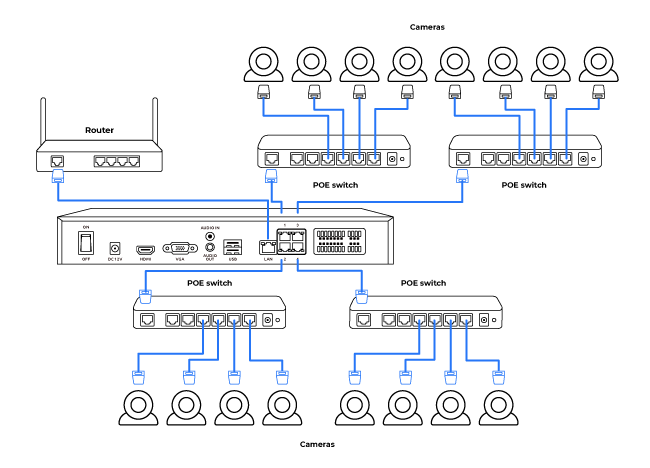
Note:
1. Adding PoE switches does not increase the number of cameras supported by the NVR, since video channels are fixed.
2. To avoid overloading your PoE switches, distribute cameras evenly across the four Internet ports if possible.
What kind of microSD card can I use?
This camera supports up to 512GB microSD cards with FAT32 format and Class 10 read & write speed.
Is a subscription fee required for Reolink PoE cameras?
No. Reolink PoE cameras work independently without subscription fees. You can use person/vehicle/animal detection, local storage, and other features at no extra cost.
How can I preview or playback the video?
Method 1: Connect the NVR to a monitor or TV for preview or playback.
Method 2: Download FREE Reolink APP or Client, add the NVR to the APP or Client, configure the settings, and then you can preview or playback the videos.
Can I use third-party cameras with the NVR?
It's not recommended. Third-party cameras may have compatibility issues. Please contact our support ream for protocol-relatiod inquires.
Can I connect the NVR to the router wirelessly?
No, the NVR must be connected to the router via an Ethernet cable.
How can I expand the NVR's storage capacity?
You can replace the pre-installed 2TB HDD with a larger one and add an external HDD for the NVR. The RP-PN8 supports up to 32TB total: Max. 16TB via internal SATA, Max. 16TB via external eSATA.
What is the hardware version of the NVR?
The hardware version is N5MB01.
Can I turn off the spotlights?
Yes, you can turn off the spotlights manually.
By default, the camera's spotlights are motion activated: it will turn on automatically when a motion is detected. You can turn them off or adjust the brightness to your liking.
Please note that with the spotlights on you can enjoy clear color night vision, but if the spotlights are turned off, you will only see black and white images at night.
Where are the recordings stored? Is NVR a must?
The camera can work without an NVR.
1. When it works without an NVR, the recordings can be saved to the micro SD card (purchased separately);
2. When it works with an NVR, the recordings can be saved to the NVR.
Note: For best compatibility, do not use the camera with third-party NVRs.
Can this camera support smart home like Google Assistant?
How do I use live view and playback?
You can add and set up the camera on Reolink APP/Client. Then click the camera to check the live view and playback of it from anywhere, at any time.
Reolink APP/Client is free of charge and the service is free of subscription.
How do I use live view and playback?
You can add and set up the camera on Reolink APP/Client. Then click the camera to check the live view and playback of it from anywhere, at any time. Yet, via the App, you can live view in the dual-view display only in fluent mode; Via browsers, you cannot check two views synchronously.
Reolink APP/Client is free of charge and the service is free of subscription.
Where are the recordings stored? Is NVR a must?
The camera can work without an NVR.
1. When it works without an NVR, the recordings can be saved to the microSD card (purchased separately);
2. When it works with an NVR, the recordings can be saved to the NVR.
Note: For best compatibility, do not use the camera with third-party NVRs.
What Ethernet cable do I need?
The camera supports T-568B connectors and 8-PIN Ethernet cables of CAT5 or higher.
What storage capacities does the RP-PN8 support?
The RP-PN8 supports up to 32TB of storage: Max. 16TB via internal SATA, Max. 16TB via external eSATA.
What storage capacities does the RP-PN8 support?
The RP-PN8 supports up to 32TB of storage: Max. 16TB via internal SATA, Max. 16TB via external eSATA.
How long does the battery last?
Once powered up fully, this camera can work for up to 3 months under motion-triggered mode. Equipped with a 3W solar panel, it can operate continuously with just 10 minutes of charging per day.
Where are the recordings stored? Is NVR a must?
The camera can work without an NVR.
1. When it works without an NVR, the recordings can be saved to the microSD card (purchased separately);
2. When it works with an NVR, the recordings can be saved to the NVR.
Note: For best compatibility, do not use the camera with third-party NVRs.
Where are the recordings stored? Is NVR a must?
The camera can work without an NVR.
1. When it works without an NVR, the recordings can be saved to the micro SD card (purchased separately);
2. When it works with an NVR, the recordings can be saved to the NVR.
Note: For best compatibility, do not use the camera with third-party NVRs.
What kind of micro SD card can I use?
This camera supports up to 256GB micro SD cards with FAT32 format and Class 10 read & write speed.
Can this camera support time-lapse function?
Yes, the camera can support time-lapse. It can save time-lapse photos and videos to the SD card.
Tips:
How to Set Up Time Lapse?Can I turn off the spotlights?
Yes, you can turn off the spotlights manually.
By default, the camera's spotlights are motion activated: it will turn on automatically when a motion is detected. You can turn them off or adjust the brightness to your liking.
Please note that with the spotlights on you can enjoy clear color night vision, but if the spotlights are turned off, you will only see black and white images at night.
How do I use live view and playback?
You can add and set up the camera on Reolink APP/Client. Then click the camera to check the live view and playback of it from anywhere, at any time. Yet, via the App, you can live view in the dual-view display only in fluent mode; Via browsers, you cannot check two views synchronously.
Reolink APP/Client is free of charge and the service is free of subscription.
What Ethernet cable do I need?
The camera supports T-568B connectors and 8-PIN Ethernet cables of CAT5 or higher.
Can this camera support time-lapse function?
Can this camera support smart home like Google Assistant?
What is the hardware version of the NVR?
The hardware version is N5MB01.
Does the NVR support the person/vehicle/animal detection of my Reolink cameras?
Yes, the NVR in RLK12-800WB4 supports the cameras' smart person/vehicle/animal detection.
How can I preview or playback the video?
Method 1: Connect the NVR to a monitor or TV for preview or playback.
Method 2: Download FREE Reolink APP or Client, add the NVR to the APP or Client, configure the settings, and then you can preview or playback the videos.
How can I preview or playback the video?
Method 1: Connect the NVR to a monitor or TV for preview or playback.
Method 2: Download FREE Reolink APP or Client, add the NVR to the APP or Client, configure the settings, and then you can preview or playback the videos.
How do I use live view and playback?
You can add and set up the camera on Reolink APP/Client. Then click the camera to check the live view and playback of it from anywhere, at any time.
Reolink APP/Client is free of charge and the service is free of subscription.
¿Se necesita una suscripción?
No. OMVI prioriza el almacenamiento local y ofrece copias de seguridad opcionales en la nube.
Can I turn off the warm light and siren?
Yes, you can turn off the warm lightand siren manually.
By default, the camera's warm light and siren are motion activated: they will be turned on automatically when a motion is detected. You can turn them off, adjust the brightness of warm light, or customize the siren to your liking.
The camera can provide clear and natural true full-color night vision even without turning on the warm light. You can also choose to turn on the warm light to enhance the quality of the color night vision in extremely dark environments.
Can I use a cable to power the camera instead of batteries?
Yes. You can power the camera via a cable. But please note that the power applies to the camera, not to the battery.
Is a subscription required?
No. OMVI supports local-first storage with optional cloud backup.
Can I connect the NVR to the router wirelessly?
No. The NVR must be connected to the router via Ethernet cable.
Can the camera's angle be adjusted?
Gun camera: Horizontal direction - 90° left and right, Vertical direction - can be adjusted down by 20° from the horizontal position.
PTZ camera: Horizontal direction - 350° rotation, Vertical direction - can be adjusted downward up to 50° starting from a 3° angle from the horizontal.
What do the letters and numbers in the model name mean?
PR = Reolink Professional Series
PC = PoE Camera
PT = Pan & Tilt
8M = 8MP
21Z = 21X Optical Zoom
Can I connect the NVR to the third-party cameras?
It's not suggested to do so. Compatibility issues can occur with third-party cameras. Please contact
our support team if you have any concerns about protocols.
Are the RLC, Argus, TrackMix, and Duo Series compatible with RP-PN16?
Yes, these models are compatible except the 4G/LTE version.
How long can the NVR record?
Recording time depends on the bit rate setting—the higher the bit rate, the better the quality, leading to a larger file size. Please refer to:
How Long Can Reolink NVR Record forCan I add a PoE switch?
Yes, there are three common connection methods
Method 1: Connect both the PoE NVR and PoE switch to the same router via Ethernet cables. Then connect cameras to the switch or NVR.
Method 2: Connect the PoE switch to the NVR, then connect the NVR's LAN port to the router.
Method 3: Connect the PoE switch to the router, then connect the NVR's LAN port to the switch.
For more details please refer to:
How Long Can Reolink NVR Record for Note: Adding PoE switches does not allow for an increase in number of cameras your NVR is able to support, as its channel limit is fixed.
How to connect the NVR to PoE cameras?
You can connect the NVR to a router via its LAN port, and to PoE switches via its video-in Ethernet ports. Then up to 36 cameras can be connected to the NVR via the PoE switches. The most suggested connecting configuration is as the follow:
Note:
1. By adding PoE switches, you will not expand the number of cameras supported by the NVR, since its video channels are immutable.
2. To protect your PoE switch(es) from overloading, distribute your cameras/PoE switches evenly to the four Internet ports if possible.
How can I power up the camera?
There are two methods:
1. Via an Ethernet cable, connect the camera to a PoE NVR, PoE injector, PoE switch, or directly to a router with a PoE port, for both power supply and video signal transmission.
Note: Please make sure that the PoE injector/switch is 802.3 af compliant (48V) and supports active mode.
2.Via a DC 12V 1A power adapter (purchased separately), connect the camera to power outlet for power supply only.
Can I use this camera with Synology?
Yes, this PoE IP camera can work with Synology. There are 2 methods for you to save videos in it.
Method 1 (recommended): You can add this camera to the Synology Surveillance Station. Check this article to learn how to add a camera.
Method 2: You can treat your Synology device as an FTP server. For detailed steps, check How to Set up FTP for Reolink Products.
Can this camera be used outdoors/indoors?
This camera can be used both indoors and outdoors.
It is IP66 certified weatherproof and its operating temperature is from -10°C to 55°C (14°F to 131°F), perfect for outdoor and indoor usage.
Can this camera support smart home like Google Assistant?
How can I power up the camera?
There are two methods:
1. Via an Ethernet cable, connect the camera to a PoE NVR, PoE injector, PoE switch, or directly to a router with a PoE port, for both power supply and video signal transmission.
Note: Please make sure that the PoE injector/switch is 802.3 af compliant (48V) and supports active mode.
2.Via a DC 12V 1A power adapter (purchased separately), connect the camera to power outlet for power supply only.
What kind of microSD card can I use?
This camera supports up to 256GB microSD cards with FAT32 format and Class 10 read & write speed.
Can I add a PoE switch?
Yes, there are three common connection methods
Method 1: Connect both the PoE NVR and PoE switch to the same router via Ethernet cables. Then connect cameras to the switch or NVR.
Method 2: Connect the PoE switch to the NVR, then connect the NVR's LAN port to the router.
Method 3: Connect the PoE switch to the router, then connect the NVR's LAN port to the switch.
For more details please refer to:
How to Connect PoE Switch Router and PoE NVRNote: Adding PoE switches does not allow for an increase in number of cameras your NVR is able to support, as its channel limit is fixed.
Can I add a PoE switch?
Yes, there are three common connection methods
Method 1: Connect both the PoE NVR and PoE switch to the same router via Ethernet cables. Then connect cameras to the switch or NVR.
Method 2: Connect the PoE switch to the NVR, then connect the NVR's LAN port to the router.
Method 3: Connect the PoE switch to the router, then connect the NVR's LAN port to the switch.
For more details please refer to:
How to Connect PoE Switch Router and PoE NVRNote: Adding PoE switches does not allow for an increase in number of cameras your NVR is able to support, as its channel limit is fixed.
Can I use this camera with Synology?
Yes, via Surveillance Station or FTP setup.
Method 1 (recommended): You can add this camera to the Synology Surveillance Station. See
setup guide.
Method 2: You can treat your Synology device as an FTP server. For detailed steps, read through the
setup guide.How is it connected to the 4G network?
How can I power up the camera?
There are two methods:
1. Via an Ethernet cable, connect the camera to a PoE NVR, PoE injector, PoE switch, or directly to a router with a PoE port, for both power supply and video signal transmission.
Note: Please make sure that the PoE injector/switch is 802.3 af compliant (48V) and supports active mode.
2.Via a DC 12V 1A power adapter (purchased separately), connect the camera to power outlet for power supply only.
How can I power up the camera?
There are two methods:
1. Via an Ethernet cable, connect the camera to a PoE NVR, PoE injector, PoE switch, or directly to a router with a PoE port, for both power supply and video signal transmission.
Note: Please make sure that the PoE injector/switch is 802.3 af compliant (48V) and supports active mode.
2.Via a DC 12V 1A power adapter (purchased separately), connect the camera to power outlet for power supply only.
Where are the recordings stored? Is NVR a must?
The camera can work without an NVR.
1. When it works without an NVR, the recordings can be saved to the micro SD card (purchased separately);
2. When it works with an NVR, the recordings can be saved to the NVR.
Note: For best compatibility, do not use the camera with third-party NVRs.
How to connect the NVR to PoE cameras?
You can connect the NVR to a router via its LAN port, and to PoE switches via its video-in Ethernet ports. Then up to 36 cameras can be connected to the NVR via the PoE switches. The most suggested connecting configuration is as the follow:
Note:
1. By adding PoE switches, you will not expand the number of cameras supported by the NVR, since its video channels are immutable.
2. To protect your PoE switch(es) from overloading, distribute your cameras/PoE switches evenly to the four Internet ports if possible.
What Does the PIR Sensor Work for?
PIR sensors are more sensitive to infrared radiations from humans or animals, and thus can dramatically reduce false alarms caused by fluttering moths or flying twigs.
Its full name is passive infrared sensor. It measures the infrared (IR) light radiating from objects with a temperature above absolute zero. When the amount of infrared radiation changes, it triggers detection.
Can this camera support smart home like Google Assistant?
What kind of microSD card can I use?
This camera supports up to 512GB microSD cards with FAT32 format and Class 10 read & write speed.
Can this camera support smart home like Google Assistant?
Can I use this camera with Synology?
Yes, this PoE IP camera can work with Synology. There are 2 methods for you to save videos in it.
Method 1 (recommended): You can add this camera to the Synology Surveillance Station. Check
this article to learn how to add a camera.
Method 2: You can treat your Synology device as an FTP server. For detailed steps, check
How to Set up FTP for Reolink Products.
How can I preview or playback the video?
Method 1: Connect the NVR to a monitor or TV for preview or playback.
Method 2: Download FREE Reolink APP or Client, add the NVR to the APP or Client, configure the settings, and then you can preview or playback the videos.
Can I connect the NVR to the third-party cameras?
It's not suggested to do so. Compatibility issues can occur with third-party cameras. Please contact
our support team if you have any concerns about protocols.
Can I connect Reolink NVR to one or more displayers?
You can connect a maximum of two displayers with the NVR via HDMI or VGA (see the diagram below).
Cameras connected to the NVR will be shown on the displayer(s).
Can this camera be used outdoors/indoors?
This camera can be used both indoors and outdoors.
It is IP66 certified weatherproof and its operating temperature is from -10°C to 55°C (14°F to 131°F), perfect for outdoor and indoor usage.
¿Para quién está diseñado OMVI?
OMVI es ideal para quienes necesitan una cobertura completa y una protección fiable, como propietarios de viviendas con grandes terrenos, pequeños negocios y quienes buscan soluciones de seguridad flexibles sin las limitaciones del cableado.
Does the camera support person/vehicle/animal detection?
Yes, this camera supports person/vehicle/animal detection.
How to add a Reolink camera to the Home Hub?
Who is OMVI designed for?
Large-property homeowners and tech-savvy users who want reliable, long-term protection.
Are the RLC, Argus, TrackMix, and Duo Series cameras compatible with RP-N64?
Yes, all listed models are compatible except for the 4G/LTE version.
What Ethernet cable do I need?
The camera supports T-568B connectors and 8-PIN Ethernet cables of CAT5 or higher.
What is 3D Zoom? How can I use this function?
3D Zoom allows the camera to automatically pan, tilt, and zoom into a selected area on the screen, without manual step-by-step control.
Can I connect a Reolink NVR to one or more displays?
You can connect a maximum of two displays with the NVR via HDMI or VGA (see the diagram below).
Cameras connected to the NVR will be shown on the displays.
Can I connect the NVR to the router wirelessly?
No, the NVR must be connected to the router via an Ethernet cable.
Does the NVR support the person/vehicle detection of my Reolink cameras?
Yes. RLN36 supports the camera's smart person/vehicle detection.
Can I connect the camera to my PoE NVR or PoE NVR system?
Yes, Reolink WiFi cameras can be connected to Reolink PoE NVR in an indirect way. You can follow these steps to connect them:
Step 1: Connect the camera to a wifi router via wifi signals or an ethernet cable, and it needs to be powered via a power adapter.
Step 2: Connect the NVR to the same router by a network cable.
The NVR will pick up all the cameras on the same network.
Note: (1)For best compatibility, do not use the camera with third-party NVRs.
(2)Although the camera occupies only one channel for recording, it will produce two separate recording files.
Can this camera be used outdoors/indoors?
This camera can be used both indoors and outdoors.
It is IP66 certified weatherproof and its operating temperature is from -10°C to 55°C (14°F to 131°F), perfect for outdoor and indoor usage.
What kind of microSD card can I use?
This camera supports up to 256GB microSD cards with FAT32 format and Class 10 read & write speed.
What Ethernet Cable do I need?
The camera supports T-568B connectors and 8-PIN Ethernet cables of CAT5 or higher.
Can I turn off the spotlights?
Yes, you can turn off the spotlights manually.
By default, the camera's spotlights are motion activated: it will turn on automatically when a motion is detected. You can turn them off or adjust the brightness to your liking.
Please note that with the spotlights on you can enjoy clear color night vision, but if the spotlights are turned off, you will only see black and white images at night.
Can this camera be used outdoors/indoors?
This camera can be used both indoors and outdoors.
It is IP66 certified weatherproof and its operating temperature is from -10掳C to 55掳C (14掳F to 131掳F), perfect for outdoor and indoor usage.
Which NVR can work with the camera?
The camera can work with NVRs with the Hw_H3MB18, Hw_N3MB01, Hw_N2MB02, Hw_N5MB01, Hw_N6MB01 and Hw_N7MB01 hardware.
For the NVR with the Hw_H3MB18, Hw_N3MB01, and Hw_N2MB02 hardware, you need to
upgrade the NVR's firmware to the latest version for video displaying. In such case, the camera can only support up to 6MP video resolution.
For the NVR with the Hw_N5MB01, Hw_N6MB01 and Hw_N7MB01 hardware, the camera's maximum video resolution can be 8MP.
If you want to buy a new compatible NVR, you can check its hardware version on its Specs page before placing the order.
Can I connect the NVR to the router wirelessly?
No, the NVR must be connected to the router via an Ethernet cable.
Can I connect the NVR to the router wirelessly?
No, the NVR must be connected to the router via an Ethernet cable.
How can I expand the NVR's storage capacity?
You can replace the pre-installed 2TB HDD with a larger one and add an external HDD for the NVR. The RP-PN8 supports up to 32TB total: Max. 16TB via internal SATA, Max. 16TB via external eSATA.
Can I select or change my Cellular Data Service?
Yes, you can choose the service plan as you wish on the Reolink App, and you can also view data usage so that you can adjust your
data plan.
Can this camera be used outdoors/indoors?
This camera can be used both indoors and outdoors.
It is IP66 certified weatherproof and its operating temperature is from -10掳C to 55掳C (14掳F to 131掳F), perfect for outdoor and indoor usage.
Can this camera be used outdoors/indoors?
This camera can be used both indoors and outdoors.
It is IP66 certified weatherproof and its operating temperature is from -10°C to 55°C (14°F to 131°F), perfect for outdoor and indoor usage.
Does the NVR support the person/vehicle detection of my Reolink cameras?
Yes. RLN36 supports the camera's smart person/vehicle detection.
How much data does the camera use?
Data usage of this camera depends on the bitrate you set up. 1 hour of live feed in 1440p mode (default bitrate: 3Mbps) will use about 2GB of data. And if you use 1GB of data to stream live feed in Fluent mode (default bitrate: 160kbps), you can watch for 4 hours. Based on that, you can estimate the data usage to choose the right data plan for you.
Can I connect the camera to my PoE NVR or PoE NVR system?
Yes, Reolink WiFi cameras can be connected to Reolink PoE NVR in an indirect way. You can follow these steps to connect them:
Step 1: Connect the camera to a wifi router via wifi signals or an ethernet cable, and it needs to be powered via a power adapter.
Step 2: Connect the NVR to the same router by a network cable.
The NVR will pick up all the cameras on the same network.
Note: (1)For best compatibility, do not use the camera with third-party NVRs.
(2)Although the camera occupies only one channel for recording, it will produce two separate recording files.
Can I turn off the spotlights?
Yes, you can turn off the spotlights manually.
By default, the camera's spotlights are motion activated: it will turn on automatically when a motion is detected. You can turn them off or adjust the brightness to your liking.
Please note that with the spotlights on you can enjoy clear color night vision, but if the spotlights are turned off, you will only see black and white images at night.
Does the camera support NAS?
What Ethernet Cable Do I Need?
The camera supports T-568B connectors and 8-PIN Ethernet cables of CAT5 or higher.
Which NVR can work with the camera?
The camera can work with NVRs with the Hw_H3MB18, Hw_N3MB01, Hw_N2MB02, Hw_N5MB01, Hw_N6MB01 and Hw_N7MB01 hardware.
For the NVR with the Hw_H3MB18, Hw_N3MB01, and Hw_N2MB02 hardware, you need to
upgrade the NVR's firmware to the latest version for video displaying. In such case, the camera can only support up to 6MP video resolution.
For the NVR with the Hw_N5MB01, Hw_N6MB01 and Hw_N7MB01 hardware, the camera's maximum video resolution can be 8MP.
If you want to buy a new compatible NVR, you can check its hardware version on its Specs page before placing the order.
Can I connect Reolink NVR to one or more displayers?
You can connect a maximum of two displayers with the NVR via HDMI or VGA (see the diagram below).
Cameras connected to the NVR will be shown on the displayer(s).
Can I connect a Reolink NVR to one or more displays?
You can connect a maximum of two displays with the NVR via HDMI or VGA (see the diagram below).
Cameras connected to the NVR will be shown on the displays.
Can I connect my previously purchased Reolink PoE camera to the Wi-Fi NVR?
Yes, PoE cameras can work with the Wi-Fi NVR. But you need to first power on the PoE camera with a PoE injector, PoE switch, or power adapter, and connect it to the NVR or to the same network as the NVR.
What Ethernet Cable do I need?
The camera supports T-568B connectors and 8-PIN Ethernet cables of CAT5 or higher.
¿Qué tipo de tarjeta microSD puedo usar?
Esta cámara admite tarjetas microSD de hasta 512 GB, con formato FAT32 y velocidad de lectura y escritura de clase 10.
What kind of microSD card can I use?
This camera supports up to 512GB microSD cards with FAT32 format and Class 10 read & write speed.
How can I power up this camera?
There are two methods:
1. Via an Ethernet cable, connect the camera to a PoE NVR, PoE injector, PoE switch, or directly to a router with a PoE port, for both power supply and video signal transmission.
Note: Please make sure that the PoE injector/switch is 802.3 af compliant (48V) and supports active mode.
2.Via a DC 12V 2A power adapter (purchased separately), connect the camera to power outlet for power supply only.
Does this camera have a microSD card?
No, the camera does not come with a microSD card, but a microSD card slot that supports up to a 512GB microSD card with FAT32 format and Class 10 or higher read & write speed.
What kind of microSD card can I use?
This camera supports up to 512GB microSD cards with FAT32 format and Class 10 read & write speed.
How much storage does the RP-N64 support?
Supports up to 4 internal HDDs, with a maximum of 20TB per HDD.
Note: PR-N64 does not include a pre-installed HDD.
Can this camera support smart home integrations like Google Assistant?
Can this camera be used outdoors/indoors?
Yes. It is suitable for both indoor and outdoor use.
With IP66 weatherproof protection and an operating temperature range of -30°C to 55°C (-22°F to 131°F), it performs reliably in harsh conditions.
How to expand the NVR storage capacity?
You can change the pre-installed 2TB HDD to a larger one (The NVR has 1 SATA interface).
The NVR NVS12W supports Max. 8TB Storage per SATA.
Can I use third-party cameras with the NVR?
It's not recommended. Third-party cameras may have compatibility issues. Please contact our support ream for protocol-related inquiries.
Can I connect WiFi cameras to the NVR when it is already connected to 36 PoE cameras?
No, RLN36 supports Max. 36 cameras (no matter WiFi or PoE). You cannot add any more cameras if it is already occupied by 36 ones.
The video channels of an NVR limit the number of cameras it supports. RLN36 has 36 channels and hence supports 36 cameras (excluding dual-lens cameras).
Please note that a Reolink duo-lens camera occupies two video channels.
What kind of microSD card can I use?
This camera supports up to 512GB microSD cards with FAT32 format and Class 10 read & write speed.
How do I use live view and playback?
You can add and set up the camera on Reolink APP/Client. Then click the camera to check the live view and playback of it from anywhere, at any time.
Reolink APP/Client is free of charge and the service is free of subscription.
What Ethernet Cable Do I Need?
The camera supports T-568B connectors and 8-PIN Ethernet cables of CAT5 or higher.
Can I use this camera with Synology?
Yes, this PoE IP camera can work with Synology. There are 2 methods for you to save videos in it.
Method 1 (recommended): You can add this camera to the Synology Surveillance Station. Check
this article to learn how to add a camera.
Method 2: You can treat your Synology device as an FTP server. For detailed steps, check How to Set up FTP for Reolink Products.Does the camera support two-way audio?
Yes, the camera supports two-way audio via its built-in mic and speaker. You can not only capture videos with audio recorded but also have real-time communication with people on the camera's end through Reolink App or Client.
How do I use live view and playback?
You can add and set up the camera on Reolink APP/Client. Then click the camera to check the live view and playback of it from anywhere, at any time.
Reolink APP/Client is free of charge and the service is free of subscription.
Where are the recordings stored? Is NVR a must?
The camera can work without an NVR.
1. When it works without an NVR, the recordings can be saved to the microSD card (purchased separately);
2. When it works with an NVR, the recordings can be saved to the NVR, and the transmission will use one NVR channel.
Note: For best compatibility, do not use the camera with third-party NVRs.
Can I use third-party cameras with the NVR?
It's not recommended. Third-party cameras may have compatibility issues. Please contact our support ream for protocol-relatiod inquires.
Can I use third-party cameras with the NVR?
It's not recommended. Third-party cameras may have compatibility issues. Please contact our support ream for protocol-relatiod inquires.
How long does an HDD last for recordings?
It depends on the bit rate and settings. A higher bit rate will allow for better image and audio quality, leading to a bigger file size. Read more about it here:
How Long Can Reolink NVR Record for Does the camera support person/vehicle/animal detection?
Yes, it supports person/vehicle/animal detection.
How do I use live view and playback?
You can add and set up the camera on Reolink APP/Client. Then click the camera to check the live view and playback of it from anywhere, at any time.
Reolink APP/Client is free of charge and the service is free of subscription.
How do I use live view and playback?
You can add and set up the camera on Reolink APP/Client. Then click the camera to check the live view and playback of it from anywhere, at any time.
Reolink APP/Client is free of charge and the service is free of subscription.
Can I connect WiFi cameras to the NVR when it is already connected to 36 PoE cameras?
No, RLN36 supports Max. 36 cameras (no matter WiFi or PoE). You cannot add any more cameras if it is already occupied by 36 ones.
The video channels of an NVR limit the number of cameras it supports. RLN36 has 36 channels and hence supports 36 cameras (excluding dual-lens cameras).
Please note that a Reolink duo-lens camera occupies two video channels.
Does the camera work on 5G/4G/3G/2G?
The camera works on 4G networks. It also supports 3G, which is not recommended though (since wireless companies are working to retire older network technologies). It does not support 5G or 2G SIM card.
Yet it does not matter if you use a 4G or 5G mobile phone to access the camera. The camera needs a SIM card of its own, which is totally irrelevant to your mobile's SIM card.
Note:
(1) The camera does not support WiFi connection.
(2) As of July 1, 2022, T-Mobile’s older 3G UMTS network will be retired.
What kind of microSD card can I use?
This camera supports up to 512GB microSD cards with FAT32 format and Class 10 read & write speed.
Does the camera support two-way audio?
Yes, the camera supports two-way audio via its built-in mic and speaker. You can not only capture videos with audio recorded but also have real-time communication with people on the camera's end through Reolink App or Client.
Where are the recordings stored? Is NVR a must?
The camera can work without an NVR.
1. When it works without an NVR, the recordings can be saved to the microSD card (purchased separately);
2. When it works with an NVR, the recordings can be saved to the NVR, and the transmission will use one NVR channel.
Note: For best compatibility, do not use the camera with third-party NVRs.
Can I turn off the floodlights and siren?
Yes, you can turn off the floodlights and siren manually.
By default, the camera's floodlights and siren are motion-activated: they will be turned on automatically when motion is detected. You can turn them off, adjust the brightness of floodlights, or customize the siren to your liking.
Please note that with the floodlights on, you can enjoy clear color night vision, but if the floodlights are turned off, you will only see black and white images at night.
What kind of micro SD card can I use?
This camera supports up to 256GB micro SD cards with FAT32 format and Class 10 read & write speed.
Can I connect my previously purchased Reolink PoE camera to the WiFi NVR?
Yes, PoE cameras can work with the WiFi NVR. But you need to first power on the PoE camera with a PoE injector, PoE switch, or power adapter, and connect it to the NVR or to the same network as the NVR.
How to expand the NVR storage capacity?
You can change the pre-installed 2TB HDD to a larger one (The NVR has 1 SATA interface).
The NVR RLN12W supports Max. 8TB Storage per SATA.
What Ethernet Cable Do I Need?
The camera supports T-568B connectors and 8-PIN Ethernet cables of CAT5 or higher.
What are the maximum transmission distances between the NVR and the cameras, as well as between the NVR and the router?
The distance between the NVR and the router primarily depends on the length of the Ethernet cable used. In optimal conditions, the distance between the NVR and the cameras can reach up to 120 meters.
Can I use this camera with Synology?
Yes, this PoE IP camera can work with Synology. There are 2 methods for you to save videos in it.
Method 1 (recommended): You can add this camera to the Synology Surveillance Station. Check
this article to learn how to add a camera.
Method 2: You can treat your Synology device as an FTP server. For detailed steps, check How to Set up FTP for Reolink Products.¿Puedo ajustar los ángulos de la cámara?
Sí. La cámara superior tipo bullet tiene una inclinación predeterminada de 7° hacia abajo y permite un ajuste manual de 25° adicionales hacia abajo, hasta alcanzar los 32°. La cámara inferior PT permite un giro horizontal de 340° y una inclinación vertical de 55°.
How can I power up this camera?
The camera can be powered by a 12V 2A DC power adapter (A 1.2-meter power adaptor and a 4.5m extension cable are shipped with the camera). You can check what is in the box at the end of the overview page.
What Ethernet cable do I need?
The camera supports T-568B connectors and 8-PIN Ethernet cables of CAT5 or higher.
Can this camera support the time-lapse function?
Yes, the camera can support time-lapse. It can save time-lapse photos and videos to the microSD card.
How to Set Up Time Lapse?Can the camera’s angle be adjusted?
Gun camera: Horizontal direction - 90° left and right, Vertical direction - can be adjusted down by 20° from the horizontal position.
PTZ camera: Horizontal direction - 350° rotation, Vertical direction - can be adjusted downward up to 50° starting from a 3° angle from the horizontal.
Can I use third-party cameras with the NVR?
It's not recommended. Third-party cameras may have compatibility issues. Please contact our support team for protocol-related inquiries.
How can I power up this camera?
It is recommended to use with Reolink PoE NVR/injector/switch. If using your own switch, it needs to be 802.3at and have a single-port power output of 30W or higher. Low power may cause operational issues. 12V/2A DC adapter (not included), with a DC power input on the camera.
How do I use live view and playback?
Add and set up the camera in the Reolink VMS Client or App. Then select the device to access live view and playback anytime, anywhere.
Can I connect my previously purchased Reolink PoE camera to the Wi-Fi NVR?
Yes, PoE cameras can work with the Wi-Fi NVR. But you need to first power on the PoE camera with a PoE injector, PoE switch, or power adapter, and connect it to the NVR or to the same network as the NVR.
How long can the NVR record?
Can I connect the NVR to the router wirelessly?
No, the NVR has to connect to the router via an ethernet cable.
How can I power up this camera?
The camera can be powered by a 12V 2A DC power adapter (A 1.2-meter power adaptor and a 4.5m extension cable are shipped with the camera). You can check what is in the box at the end of the overview page.
Can this camera support smart home like Google Assistant?
Where are the recordings stored? Is NVR a must?
The camera can work without an NVR.
1. When it works without an NVR, the recordings can be saved to the microSD card (purchased separately);
2. When it works with an NVR, the recordings can be saved to the NVR, and the transmission will use one NVR channel.
Note: For best compatibility, do not use the camera with third-party NVRs.
Does the camera work with my Reolink PoE NVR?
If you want to buy a new one: the currently on-sale NVRs work with all PoE and plug-in WiFi cameras.
If you already have one:
Please first refer to
this article for its hardware version.
For the NVR with the hardware N7MB01, N6MB01, or N5MB01, it works with all PoE and plug-in WiFi cameras.
For the NVR with the hardware N2MB02, N3MB01, or H3MB18, it works with all PoE and plug-in WiFi cameras. But you can not have a full-resolution live view of the following cameras: RLC-1212A, RLC-1224A, Reolink Duo 2 PoE, Reolink Duo 2 WiFi, Reolink Duo Floodlight WiFi, Reolink Duo Floodlight PoE.
For the NVR with the rest hardwares such as H3MB17, H3MB02, and H3MB16, please refer to Introduction to Hardware Versions of Reolink NVRs for more detailed information.Does my camera support person/vehicle detection?
Yes, this camera supports person/vehicle detection. It can also detects the cat and dog (beta version.
Can this camera support smart home like Google Assistant?
How can I power up this camera?
There are two methods:
Method 1. Via an Ethernet cable, connect this camera to a PoE NVR, PoE injector, PoE switch, or directly to a router with a PoE port, for both power supply and video signal transmission.
Note: Please make sure that the PoE injector/switch is 802.3af compliant (48V) and supports active mode.
Method 2.Via a DC 12V 2A power adapter (purchased separately) for power supply only.
How long can the NVR record?
Recording time depends on the bit rate setting—the higher the bit rate, the better the quality, leading to a larger file size. Please refer to:
How Long Can Reolink NVR Record forHow long can the NVR record?
Recording time depends on the bit rate setting—the higher the bit rate, the better the quality, leading to a larger file size. Please refer to:
How Long Can Reolink NVR Record forWhat kind of microSD card is supported?
Up to 512GB, FAT32 format, Class 10 speed.
Does the camera support smart home features like Google Assistant?
Yes, currently, this camera can work with Google Assistant.
Tips:
How to add this camera to Google Assistant?Can this camera support smart home like Google Assistant?
Can this camera support smart home like Google Assistant?
Can I connect the NVR to the router wirelessly?
No, the NVR has to connect to the router via an ethernet cable.
How does 4G work on this camera?
Similar to your cellular phone, cellular trail cameras need a SIM card with a data plan to transmit video signals over 3G/4G network.
The common SIM cards offered by carriers like T-Mobile and Vodafone can work for this 4G camera (as they can for your cellular phone). Click to check
supported carriers in available countries and regions for this camera.
You can also contact
our support for consultation.
How can I power up this camera?
The camera can be powered by a 12V 2A DC power adapter (A 1.2-meter power adaptor and a 4.5m extension cable are shipped with the camera). You can check what is in the box at the end of the overview page.
Does my camera support person/vehicle detection?
Yes, this camera supports person/vehicle detection. It can also detects the cat and dog (beta version.
How can I power up this camera?
There are two methods:
Method 1. Via an Ethernet cable, connect this camera to a PoE NVR, PoE injector, PoE switch, or directly to a router with a PoE port, for both power supply and video signal transmission.
Note: Please make sure that the PoE injector/switch is 802.3af compliant (48V) and supports active mode.
Method 2.Via a DC 12V 2A power adapter (purchased separately) for power supply only.
Which NVR can work with the camera?
The camera can work with NVRs with the Hw_H3MB18, Hw_N3MB01, Hw_N2MB02, Hw_N5MB01, Hw_N6MB01 and Hw_N7MB01 hardware.
For the NVR with the Hw_H3MB18, Hw_N3MB01, and Hw_N2MB02 hardware, you need to
upgrade the NVR's firmware to the latest version for video displaying. In such case, the camera can only support up to 6MP video resolution.
For the NVR with the Hw_N5MB01, Hw_N6MB01 and Hw_N7MB01 hardware, the camera's maximum video resolution can be 8MP.
If you want to buy a new compatible NVR, you can check its hardware version on its Specs page before placing the order.
Which NVR can work with the camera?
The camera can work with NVRs with the Hw_H3MB18, Hw_N3MB01, Hw_N2MB02, Hw_N5MB01, Hw_N6MB01 and Hw_N7MB01 hardware.
For the NVR with the Hw_H3MB18, Hw_N3MB01, and Hw_N2MB02 hardware, you need to
upgrade the NVR's firmware to the latest version for video displaying. In such case, the camera can only support up to 6MP video resolution.
For the NVR with the Hw_N5MB01, Hw_N6MB01 and Hw_N7MB01 hardware, the camera's maximum video resolution can be 8MP.
If you want to buy a new compatible NVR, you can check its hardware version on its Specs page before placing the order.
Can I turn off the spotlights?
Yes, you can turn off the spotlights manually.
By default, the camera's spotlights are motion activated: it will turn on automatically when a motion is detected.
You can turn them off or adjust the brightness to your liking.
Please note that with the spotlights on you can enjoy clear color night vision, but if the spotlights are turned off, you will only see black and white images at night.
Can I connect my previously purchased Reolink PoE camera to the Wi-Fi NVR?
Yes, PoE cameras can work with the Wi-Fi NVR. But you need to first power on the PoE camera with a PoE injector, PoE switch, or power adapter, and connect it to the NVR or to the same network as the NVR.
Where are the recordings stored? Is NVR a must?
The camera can work without an NVR.
1. When it works without an NVR, the recordings can be saved to the microSD card (purchased separately);
2. When it works with an NVR, the recordings can be saved to the NVR, and the transmission will use one NVR channel.
Note: For best compatibility, do not use the camera with third-party NVRs.
Can I switch between 2.4GHz and 5GHz Wi-Fi networks?
Yes, our latest hardware version of Wi-Fi NVR supports manual switching between 2.4GHz and 5GHznetwork.
Does the camera work with my Reolink PoE NVR?
If you want to buy a new one: the currently on-sale NVRs work with all PoE and plug-in WiFi cameras.
If you already have one:
Please first refer to
this article for its hardware version.
For the NVR with the hardware N7MB01, N6MB01, or N5MB01, it works with all PoE and plug-in WiFi cameras.
For the NVR with the hardware N2MB02, N3MB01, or H3MB18, it works with all PoE and plug-in WiFi cameras. But you can not have a full-resolution live view of the following cameras: RLC-1212A, RLC-1224A, Reolink Duo 2 PoE, Reolink Duo 2 WiFi, Reolink Duo Floodlight WiFi, Reolink Duo Floodlight PoE.
For the NVR with the rest hardwares such as H3MB17, H3MB02, and H3MB16, please refer to Introduction to Hardware Versions of Reolink NVRs for more detailed information.¿Qué es la protección perimetral y cómo funciona?
How do I use live view and playback?
You can add and set up the camera on Reolink APP/Client. Then click the camera to check the live view and playback of it from anywhere, at any time. Yet, via the App, you can live view in the dual-view display only in fluent mode; Via browsers, you cannot check two views synchronously.
Reolink APP/Client is free of charge and the service is free of subscription.
Where are the recordings stored? Is NVR a must?
The camera can work without an NVR.
1. When it works without an NVR, the recordings can be saved to the microSD card (purchased separately);
2. When it works with an NVR, the recordings can be saved to the NVR.
Note: For best compatibility, do not use the camera with third-party NVRs.
Does my camera support person/vehicle/animal detection?
Yes, this camera supports person/vehicle/animal detection in both battery-powered and DC-powered modes.
What is Perimeter Protection, and how does it function?
Perimeter Protection is the name of a bundle of custom AI fencing zone options, including line Crossing, Zone Intrusion, and Zone Loitering. Once these virutal lines are crossed, you'll recieve an alert.
How long can the NVR record?
Recording time depends on the bit rate setting—the higher the bit rate, the better the quality, leading to a larger file size. Please refer to:
How Long Can Reolink NVR Record forDoes my camera support person/vehicle/animal detection?
Yes, this camera supports person/vehicle/animal detection.
Can I turn off the spotlights?
Yes. You can turn off the spotlights manually or adjust their brightness.
By default, the spotlights are motion-activated and turn on when movement is detected. With spotlights enabled, you get full-color night vision. If turned off, the camera switches to black-and-white night vision.
Can I connect the Wi-Fi NVR to the router wirelessly?
No, the NVR has to be connected to the router via an ethernet cable.
Does the camera support person/vehicle/animal detection?
Yes, this camera supports person/vehicle/animal detection.
Can I connect the NVR to the third-party cameras?
It's not suggested to do so. Compatibility issues can occur with third-pary cameras. Please contact
our support team if you have any concerns about protocals.
How do I use live view and playback?
You can add and set up the camera on Reolink APP/Client. Then click the camera to check the live view and playback of it from anywhere, at any time. Yet, via the App, you can live view in the dual-view display only in fluent mode; Via browsers, you cannot check two views synchronously.
Reolink APP/Client is free of charge and the service is free of subscription.
Can I turn off the spotlights?
Yes, you can turn off the spotlights manually.
By default, the camera's spotlights are motion activated: it will turn on automatically when a motion is detected. You can turn them off or adjust the brightness to your liking.
Please note that with the spotlights on you can enjoy clear color night vision, but if the spotlights are turned off, you will only see black and white images at night.
How can I power up this camera?
There are two methods:
Method 1. Via an Ethernet cable, connect this camera to a PoE NVR, PoE injector, PoE switch, or directly to a router with a PoE port, for both power supply and video signal transmission.
Note: Please make sure that the PoE injector/switch is 802.3af compliant (48V) and supports active mode.
Method 2.Via a DC 12V 2A power adapter (purchased separately) for power supply only.
What kind of microSD card can I use?
This camera supports up to 256GB microSD cards with FAT32 format and Class 10 read & write speed.
Can this camera support time-lapse function?
Yes, the camera supports time-lapse for its wide-angle lens. It can save time-lapse photos and videos to the SD card.
How to Set Up Time Lapse?Can I turn off the spotlights?
Yes, you can turn off the spotlights manually.
By default, the camera's spotlights are motion activated: it will turn on automatically when a motion is detected. You can turn them off or adjust the brightness to your liking.
Please note that with the spotlights on you can enjoy clear color night vision, but if the spotlights are turned off, you will only see black and white images at night.
Can this camera be used outdoors/indoors?
This camera can be used both indoors and outdoors.
It is IP67 certified weatherproof and its operating temperature is from -10°C to 55°C (14°F to 131°F), perfect for outdoor and indoor usage.
Are the RLC, Argus, TrackMix, and Duo Series compatible with RP-PN8?
Yes, these models are compatible except the 4G/LTE version.
Are the RLC, Argus, TrackMix, and Duo Series compatible with RP-PN8?
Yes, these models are compatible except the 4G/LTE version.
What is the difference between Professional Series cameras and residential security cameras?
Professional Series cameras offer greater resolution, storage, and security capabilities, as opposed to residential security cameras which only have basic features.
What kind of microSD card can I use?
This camera supports up to 512GB microSD cards with FAT32 format and Class 10 read & write speed.
Can I turn off the spotlights?
Yes, you can turn off the spotlights manually.
By default, the camera's spotlights are motion activated: it will turn on automatically when a motion is detected. You can turn them off or adjust the brightness to your liking.
Please note that with the spotlights on you can enjoy clear color night vision, but if the spotlights are turned off, you will only see black and white images at night.
Can I turn off the spotlights?
Yes, you can turn off the spotlights manually.
By default, the camera's spotlights are motion activated: it will turn on automatically when a motion is detected. You can turn them off or adjust the brightness to your liking.
Please note that with the spotlights on you can enjoy clear color night vision, but if the spotlights are turned off, you will only see black and white images at night.
Can I connect the NVR to the third-party cameras?
It's not suggested to do so. Compatibility issues can occur with third-pary cameras. Please contact
our support team if you have any concerns about protocals.
Does the camera have an SD card?
Yes, the camera has a 32GB micro SD card built-in.
The camera actually supports Max. 128GB micro SD cards with FAT32 format and Class 10 or higher read & write speed.
How do I use live view and playback?
You can add and set up the camera on Reolink APP/Client. Then click the camera to check the live view and playback of it from anywhere, at any time. Yet, via the App, you can live view in the dual-view display only in fluent mode; Via browsers, you cannot check two views synchronously.
Reolink APP/Client is free of charge and the service is free of subscription.
Can this camera support time-lapse function?
Yes, the camera supports time-lapse for its wide-angle lens. It can save time-lapse photos and videos to the SD card.
How to Set Up Time Lapse?Can this camera be used outdoors/indoors?
This camera can be used both indoors and outdoors.
It is IP67 certified weatherproof and its operating temperature is from -10°C to 55°C (14°F to 131°F), perfect for outdoor and indoor usage.
Can I connect the camera to my PoE NVR or PoE NVR system?
Yes, Reolink Wi-Fi cameras can be connected to Reolink PoE NVR in an indirect way. You can follow these steps to connect them:
Step 1: Connect the camera to a Wi-Fi router via wifi signals or an Ethernet cable, and it needs to be powered via a power adapter.
Step 2: Connect the NVR to the same router by a network cable.
The NVR will pick up all the cameras on the same network.
When it works with a Reolink NVR, the recordings can be saved to the NVR, and the transmission will use one NVR channel.
Please note that when using live view or playback on Reolink NVR, you may be prompted to switch the preview resolution, and following the prompt is recommended to avoid potential impact on performance.
Where are the recordings stored? Is NVR a must?
The camera can work without an NVR.
1. When it works without an NVR, the recordings can be saved to the micro SD card (purchased separately);
2. When it works with an NVR, the recordings can be saved to the NVR, and the transmission will use one NVR channel.
Note: For best compatibility, do not use the camera with third-party NVRs.
What are the maximum transmission distances between the NVR and the cameras, as well as between the NVR and the router?
The distance between the NVR and the router primarily depends on the length of the Ethernet cable used. In optimal conditions, the distance between the NVR and the cameras can reach up to 120 meters.
Can I connect the Wi-Fi NVR to the router wirelessly?
No, the NVR has to be connected to the router via an ethernet cable.
What kind of microSD card can I use?
This camera supports up to 256GB microSD cards with FAT32 format and Class 10 read & write speed.
¿Es compatible con los NVR y la serie Home Hub de Reolink?
Sí. Esta cámara es compatible con todos los NVR disponibles actualmente, así como con Home Hub y Home Hub Pro, para una gestión centralizada y grabación continua las 24 horas. Para disfrutar de la mejor experiencia, actualiza el firmware del NVR o Home Hub y la aplicación o el cliente de Reolink a las últimas versiones. No se recomienda usarla con Home Hub Mini.
Can this camera support smart home like Google Assistant?
What kind of microSD card can I use?
This camera supports up to 256GB microSD cards with FAT32 format and Class 10 read & write speed.
Can I talk to someone via the Reolink App? (Two-way audio)
Yes, this security camera features two-way audio, which means you can listen and talk to someone in real time with simple clicks in the App.
Can this camera work with Reolink NVR or Reolink Home Hub Series?
Yes, this camera can work with all currently available PoE NVRs and Wi-Fi NVRs, supporting 24/7 continuous recording. It is also compatible with Reolink Home Hub and Home Hub Pro.
Can this camera be used indoors and outdoors?
Yes. It's IP66 weatherproof and designed for both indoor and outdoor use. It operates in temperatures from -10°C to 55°C (14°F to 131°F).
Can I turn off the siren?
Yes. The siren can be turned off via the Reolink App, Client, or NVR interface.
What are the maximum transmission distances between the NVR and the cameras, as well as between the NVR and the router?
The distance between the NVR and the router primarily depends on the length of the Ethernet cable used. In optimal conditions, the distance between the NVR and the cameras can reach up to 120 meters.
Why can't I connect the camera to 3rd party softwares?
The RTSP and other ports may be disabled by default. You can launch Reolink Client, then go to Device Settings >> Network >> Advanced >> Port Settings to make sure all ports are enabled before using 3rd party softwares.
Can this camera support smart home like Google Assistant?
Does the camera support two-way audio?
Yes, the camera supports two-way audio via its built-in mic and speaker. You can not only capture videos with audio recorded but also have real-time communication with people on the camera's end through Reolink App or Client.
Can this camera be used outdoors/indoors?
This camera can be used both indoors and outdoors.
It is IP67 certified weatherproof and its operating temperature is from -10°C to 55°C (14°F to 131°F), perfect for outdoor and indoor usage.
Where are the recordings stored? Is NVR a must?
The camera can work without an NVR.
1. When it works without an NVR, the recordings can be saved to the microSD card (purchased separately);
2. When it works with an NVR, the recordings can be saved to the NVR.
Note: For best compatibility, do not use the camera with third-party NVRs.
Can I use this camera with Synology?
Yes, this PoE IP camera can work with Synology. There are 2 methods for you to save videos in it.
Method 1 (recommended): You can add this camera to the Synology Surveillance Station. Check
this article to learn how to add a camera.
Method 2: You can treat your Synology device as an FTP server. For detailed steps, check
How to Set up FTP for Reolink Products.
Please note that by default the wide-angle view will be shown on the Synology. You can manually switch it to the zoomed view. For a dual-view display, make sure the camera can occupy two channels.
Does the camera support two-way audio?
Yes, the camera supports two-way audio via its built-in mic and speaker. You can not only capture videos with audio recorded but also have real-time communication with people on the camera's end through Reolink App or Client.
How do I use live view and playback?
You can add and set up the camera on Reolink APP/Client. Then click the camera to check the live view and playback of it from anywhere, at any time.
Reolink APP/Client is free of charge and the service is free of subscription.
Please note that when using live view or playback on Reolink NVR, you may be prompted to switch the preview resolution, and following the prompt is recommended to avoid potential impact on performance.
What kind of Junction Box can I use with this model?
The
D20 Junction Box is compatible.
Does the camera support cloud storage?
Does the camera support two-way audio?
Yes, the camera supports two-way audio via its built-in mic and speaker. You can not only capture videos with audio recorded but also have real-time communication with people on the camera's end through Reolink App or Client.
Does the camera support two-way audio?
Yes, the camera supports two-way audio via its built-in mic and speaker. You can not only capture videos with audio recorded but also have real-time communication with people on the camera's end through Reolink App or Client.
How long does the battery last?
The camera comes with a rechargeable battery. Normally, the battery lasts for about 1-4 weeks per charge (Actual use varies based on settings, use conditions and environmental factors.) When the battery level goes down to 10%, the camera will send you a low-battery notification.
For non-stop power supply, you can connect the camera to a solar panel (purchased separately).
Can this camera support smart home like Google Assistant?
Can I use this camera with Synology?
Yes, this PoE IP camera can work with Synology. There are 2 methods for you to save videos in it.
Method 1 (recommended): You can add this camera to the Synology Surveillance Station. Check
this article to learn how to add a camera.
Method 2: You can treat your Synology device as an FTP server. For detailed steps, check
How to Set up FTP for Reolink Products.
Please note that by default the wide-angle view will be shown on the Synology. You can manually switch it to the zoomed view. For a dual-view display, make sure the camera can occupy two channels.
How do I use live view and playback?
You can add and set up the camera on Reolink APP/Client. Then click the camera to check the live view and playback of it from anywhere, at any time.
Reolink APP/Client is free of charge and the service is free of subscription.
Please note that when using live view or playback on Reolink NVR, you may be prompted to switch the preview resolution, and following the prompt is recommended to avoid potential impact on performance.
What kind of microSD card can I use?
This camera supports up to 512GB microSD cards with FAT32 format and Class 10 read & write speed.
How can I power up this camera?
There are two methods:
Method 1. Via an Ethernet cable, connect this camera to a PoE NVR, PoE injector, PoE switch, or directly to a router with a PoE port, for both power supply and video signal transmission.
Note: Please make sure that the PoE injector/switch is 802.3af compliant (48V) and supports active mode.
Method 2.Via a DC 12V 2A power adapter (purchased separately) for power supply only.
Can I switch between 2.4GHz and 5GHz WiFi networks?
Yes, our latest hardware version of Wi-Fi NVR supports manual switching between 2.4GHz and 5GHznetwork.
What are the maximum transmission distances between the NVR and the cameras, as well as between the NVR and the router?
The distance between the NVR and the router primarily depends on the length of the Ethernet cable used. In optimal conditions, the distance between the NVR and the cameras can reach up to 120 meters.
Where are the recordings stored? Is NVR a must?
The camera can work without an NVR.
1. When it works without an NVR, the recordings can be saved to the microSD card (purchased separately);
2. When it works with an NVR, the recordings can be saved to the NVR.
Note: For best compatibility, do not use the camera with third-party NVRs.
¿La cámara detecta personas, vehículos y animales?
Sí. Esta cámara permite detectar personas, vehículos y animales.
Can this camera be used outdoors/indoors?
This camera can be used both indoors and outdoors.
It is IP66 certified weatherproof and its operating temperature is from -10°C to 55°C (14°F to 131°F), perfect for outdoor and indoor usage.
How do I use live view and playback?
You can add and set up the camera on Reolink APP/Client. Then click the camera to check the live view and playback of it from anywhere, at any time.
What does the PIR sensor work for?
PIR sensors are more sensitive to the infrared radiation from humans or animals, and thus can dramatically reduce false alarms caused by fluttering moths or flying twigs.
Its full name is passive infrared sensor. It measures the infrared (IR) light radiating from objects with a temperature above absolute zero. When the amount of infrared radiation changes, it triggers detection.
Does my camera support person/vehicle/animal detection?
Yes, this camera supports person/vehicle/animal detection.
What is Perimeter Protection, and how does it function?
Perimeter Protection is the name of a bundle of custom AI fencing zone options, including line Crossing, Zone Intrusion, and Zone Loitering. Once these virutal lines are crossed, you'll recieve an alert.
How can I power up this camera?
There are two methods:
Via an Ethernet cable, connect the camera to a PoE NVR, PoE injector, PoE switch, or directly to a router with a PoE port, for both power supply and video signal transmission.
Note: Please make sure that the PoE injector/switch is 802.3at compliant (48V) and supports active mode.
Via its DC 12V 2A power adapter for power supply only.
Can I switch between 2.4GHz and 5GHz WiFi networks?
Yes, our latest hardware version of Wi-Fi NVR supports manual switching between 2.4GHz and 5GHznetwork.
Can this camera be used outdoors/indoors?
This camera can be used both indoors and outdoors.
It is IP66 certified weatherproof and its operating temperature is from -10°C to 55°C (14°F to 131°F), perfect for outdoor and indoor usage.
Does my camera support person/vehicle/pet detection?
Yes, this camera supports person/vehicle/pet detection.
How do I use live view and playback?
You can add and set up the camera on Reolink APP/Client. Then click the camera to check the live view and playback of it from anywhere, at any time.
Reolink APP/Client is free of charge and the service is free of subscription.
Please note that when using live view or playback on Reolink NVR, you may be prompted to switch the preview resolution, and following the prompt is recommended to avoid potential impact on performance.
How can I power up this camera?
There are two methods:
1. Via an Ethernet cable, connect the camera to a PoE NVR, PoE injector, PoE switch, or directly to a router with a PoE port, for both power supply and video signal transmission.
Note: Please make sure that the PoE injector/switch is 802.3at compliant (48V) and supports active mode.
2.Via its DC 12V 2A power adapter for power supply only.
What is dual-tracking?
Dual-tracking refers to the two ways that a TrackMix camera simultaneously uses to auto track an object in both the wide-angle and zoomed views.
In the panoramic view, which is captured by the camera's wide-angle lens, the camera pans and tilts to keep the detected objects within its field of view; In the zoomed view, which is produced by the two lenses cooperatively, the camera zooms in to the targeted object (which is within the camera's field) to closely follow its movement. It's notable that the TrackMix camera uses advanced technology to restore details and definition to the zoomed-in image, enhancing the image quality.
This can help you track the situation and details at the same time, without manually making the camera pan, tilt or zoom in.
Does my camera support person/vehicle/pet detection?
Yes, this camera supports person/vehicle/pet detection.
Can I turn off the spotlights and siren?
Yes, you can turn off the spotlights and siren manually.
By default, the camera's spotlights and siren are motion activated: they will be turned on automatically when a motion is detected. You can turn them off, adjust the brightness of spotlights, or customize the siren to your liking.
Please note that with the spotlights on you can enjoy clear color night vision, but if the spotlights are turned off, you will only see black and white images at night.
Which Ethernet cable should I use?
Any 8-pin CAT5 or higher cable with T-568B wiring.
Can this camera support time-lapse function?
Yes, it supports Time-Lapse Recording.
Does my camera support person/vehicle/pet detection?
Yes, this camera supports person/vehicle/pet detection.
Does my camera support person/vehicle/pet detection?
Yes, this camera supports person/vehicle/pet detection.
How can I charge this camera? Is the solar panel a must?
You have two charging options (including solar charging):
Option 1. Have the camera connected to a solar panel for non-stop power supply.
(👆Also recommended as the friendliest charging option for the camera's battery.)
Option 2. Charge the camera (with its non-removable battery) via a 5V 2A USB charger. (Please note that it's ok to charge the camera while it's working, but not for long.)
Can this camera be used outdoors/indoors?
This camera can be used both indoors and outdoors.
It is IP66 certified weatherproof and its operating temperature is from -10°C to 55°C (14°F to 131°F), perfect for outdoor and indoor usage.
What is dual-tracking?
Dual-tracking refers to the two ways that a TrackMix camera simultaneously uses to auto track an object in both the wide-angle and zoomed views.
In the panoramic view, which is captured by the camera's wide-angle lens, the camera pans and tilts to keep the detected objects within its field of view; In the zoomed view, which is produced by the two lenses cooperatively, the camera zooms in to the targeted object (which is within the camera's field) to closely follow its movement. It's notable that the TrackMix camera uses advanced technology to restore details and definition to the zoomed-in image, enhancing the image quality.
This can help you track the situation and details at the same time, without manually making the camera pan, tilt or zoom in.
Can I turn off the spotlights and siren?
Yes, you can turn off the spotlights and siren manually.
By default, the camera's spotlights and siren are motion activated: they will be turned on automatically when a motion is detected. You can turn them off, adjust the brightness of spotlights, or customize the siren to your liking.
Please note that with the spotlights on you can enjoy clear color night vision, but if the spotlights are turned off, you will only see black and white images at night.
How can I power up this camera?
The camera can be powered by a 12V 2A DC power adapter (A 1.2-meter power adaptor and a 4.5m extension cable are shipped with the camera). You can check what is in the box at the end of the overview page.
Can this camera be used outdoors/indoors?
This camera can be used both indoors and outdoors.
It is IP66 certified weatherproof and its operating temperature is from -10°C to 55°C (14°F to 131°F), perfect for outdoor and indoor usage.
Can I switch between 2.4GHz and 5GHz WiFi networks?
Yes, our latest hardware version of Wi-Fi NVR supports manual switching between 2.4GHz and 5GHznetwork.
How can I power up this camera?
There are two methods:
1. Via an Ethernet cable, connect the camera to a PoE NVR, PoE injector, PoE switch, or directly to a router with a PoE port, for both power supply and video signal transmission.
Note: Please make sure that the PoE injector/switch is 802.3at compliant (48V) and supports active mode.
2.Via its DC 12V 2A power adapter for power supply only.
¿Se puede usar en interiores y exteriores?
Sí. Cuenta con protección IP66 frente al polvo y al agua y está diseñada para su uso en interiores y exteriores. Funciona a temperaturas de entre −10 °C y 55 °C.
Why can't I connect the camera to 3rd party softwares?
The RTSP and other ports may be disabled by default. You can launch Reolink Client, then go to Device Settings >> Network >> Advanced >> Port Settings to make sure all ports are enabled before using 3rd party softwares.
Does this camera support network protocols, such as RTSP/RTMP?
This camera can support remote access and live viewing via the Reolink App/Client, and RTSP is supported by using the Reolink Home Hub Series. No subscription fees are required.
Can this camera be used indoors and outdoors?
Yes. It’s IP66 weatherproof and designed for both indoor and outdoor use. It operates at temperatures from -10°C to 55°C (14°F to 131°F).
What kind of microSD card can I use?
Up to 512GB microSD card (FAT32 format, Class 10 or higher). (Not included)
Does the NVR support the person/vehicle/animal detection of my Reolink cameras?
Yes, this NVR supports the cameras' smart person/vehicle/animal detection.
Can this camera support time-lapse function?
Can I turn off the spotlights and siren?
Yes, you can turn off the spotlights and siren manually.
By default, the camera's spotlights and siren are motion activated: they will be turned on automatically when a motion is detected. You can turn them off, adjust the brightness of spotlights, or customize the siren to your liking.
Please note that with the spotlights on you can enjoy clear color night vision, but if the spotlights are turned off, you will only see black and white images at night.
Is a subscription fee required for Reolink PoE cameras?
No, Reolink PoE cameras work well on their own without subscription fees. You can make full use of the person/vehicle/animal detection, local storage, and other functions for free!
What kind of micro SD card can I use?
This camera supports up to 256GB micro SD cards with FAT32 format and Class 10 read & write speed.
Can this camera support time-lapse function?
Does the camera support two-way audio?
Yes, the camera supports two-way audio via its built-in mic and speaker. You can not only capture videos with audio recorded but also have real-time communication with people on the camera's end through Reolink App or Client.
Can I use third-party cameras with the NVR?
It's not recommended. Third-party cameras may have compatibility issues. Please contact our support ream for relatiod inquires.
Can this camera support time-lapse function?
Can this camera support time-lapse function?
Can I view live through the camera all the time?
Yes. Please note if you view live through the camera for a long time, its battery will be consumed quickly.
What kind of micro SD card can I use?
This camera supports up to 256GB micro SD cards with FAT32 format and Class 10 read & write speed.
Does the camera support two-way audio?
Yes, the camera supports two-way audio via its built-in mic and speaker. You can not only capture videos with audio recorded but also have real-time communication with people on the camera's end through Reolink App or Client.
Can this camera be used outdoors/indoors?
This camera can be used both indoors and outdoors.
It is IP67 certified weatherproof and its operating temperature is from -10°C to 55°C (14°F to 131°F), perfect for outdoor and indoor usage.
How do I use live view and playback?
You can add and set up the camera on Reolink APP/Client. Then click the camera to check the live view and playback of it from anywhere, at any time.
Reolink APP/Client is free of charge and the service is free of subscription.
Please note that when using live view or playback on Reolink NVR, you may be prompted to switch the preview resolution, and following the prompt is recommended to avoid potential impact on performance.
Does the NVR support the person/vehicle/animal detection of my Reolink cameras?
Yes, this NVR supports the cameras' smart person/vehicle/animal detection.
Is a subscription fee required for Reolink PoE cameras?
No, Reolink PoE cameras work well on their own without subscription fees. You can make full use of the person/vehicle/animal detection, local storage, and other functions for free!
¿Es compatible con Google Assistant?
Sí. Esta cámara es compatible con Google Assistant. Consulta cómo añadir la cámara a Google Assistant.
Can this camera support time-lapse function?
Yes, the camera supports time-lapse for its wide-angle lens. It can save time-lapse photos and videos to the SD card.
How to Set Up Time Lapse?Does the camera support time-lapse function?
Can this camera support smart home integrations, like Google Assistant?
Can this camera support time-lapse function?
Yes. The camera supports time-lapse, and files can be saved to the microSD card.
Can this camera support time-lapse function?
Yes, the camera supports time-lapse for its wide-angle lens. It can save time-lapse photos and videos to the SD card.
How to Set Up Time Lapse?Can I use this camera with Synology?
Yes, this PoE IP camera can work with Synology. There are 2 methods for you to save videos in it.
Method 1 (recommended): You can add this camera to the Synology Surveillance Station. Check
this article to learn how to add a camera.
Method 2: You can treat your Synology device as an FTP server. For detailed steps, check
How to Set up FTP for Reolink Products.
Does the camera support two-way audio?
Yes, the camera supports two-way audio via its built-in mic and speaker. You can not only capture videos with audio recorded but also have real-time communication with people on the camera's end through Reolink App or Client.
Does my camera support person/vehicle/animal detection?
Yes. This camera supports person/vehicle/animal detection.
Which NVR can work with the camera?
The camera can work with NVRs with the Hw_H3MB18, Hw_N3MB01, Hw_N2MB02, Hw_N5MB01, Hw_N6MB01 and Hw_N7MB01 hardware.
For the NVR with the Hw_H3MB18, Hw_N3MB01, and Hw_N2MB02 hardware, you need to
upgrade the NVR's firmware to the latest version for video displaying.
If you want to buy a new compatible NVR, you can check its hardware version on its Specs page before placing the order.
Can I use this camera with Synology?
Yes, this PoE IP camera can work with Synology. There are 2 methods for you to save videos in it.
Method 1 (recommended): You can add this camera to the Synology Surveillance Station. Check
this article to learn how to add a camera.
Method 2: You can treat your Synology device as an FTP server. For detailed steps, check
How to Set up FTP for Reolink Products.
Does my camera support person/vehicle/animal detection?
Yes, this camera supports person/vehicle/animal detection.
Can I use this camera with Synology?
Yes, this PoE IP camera can work with Synology. There are 2 methods for you to save videos in it.
Method 1 (recommended): You can add this camera to the Synology Surveillance Station. Check
this article to learn how to add a camera.
Method 2: You can treat your Synology device as an FTP server. For detailed steps, check
How to Set up FTP for Reolink Products.
Can I use this camera with Synology?
Yes, this PoE IP camera can work with Synology. There are 2 methods for you to save videos in it.
Method 1 (recommended): You can add this camera to the Synology Surveillance Station. Check
this article to learn how to add a camera.
Method 2: You can treat your Synology device as an FTP server. For detailed steps, check
How to Set up FTP for Reolink Products.
Where can I install this trail camera?
You can install this camera anywhere in the wild, or in your backyard. It’s recommended to install the camera in a higher place than other trail cameras so that you can get a better view by using its pan & tilt function and make the camera more invisible to animals.
Can this camera support time-lapse function?
Yes, the camera supports time-lapse for its wide-angle lens. It can save time-lapse photos and videos to the SD card.
How to Set Up Time Lapse?Does my camera support person/vehicle/animal detection?
Yes, this camera supports person/vehicle/animal detection.
Does this camera support person/vehicle/animal detection?
Yes, this camera supports person/vehicle/animal detection.
Can I turn off the floodlights and siren?
Yes, you can turn off the floodlights and siren manually.
By default, the camera's floodlights and siren are motion activated: they will be turned on automatically when a motion is detected. You can turn them off, adjust the brightness of floodlights, or customize the siren to your liking.
Please note that with the spotlights on you can enjoy clear color night vision, but if the floodlights are turned off, you will only see black and white images at night.
Which NVR can work with the camera?
The camera can work with NVRs with the Hw_H3MB18, Hw_N3MB01, Hw_N2MB02, Hw_N5MB01, Hw_N6MB01 and Hw_N7MB01 hardware.
For the NVR with the Hw_H3MB18, Hw_N3MB01, and Hw_N2MB02 hardware, you need to
upgrade the NVR's firmware to the latest version for video displaying.
If you want to buy a new compatible NVR, you can check its hardware version on its Specs page before placing the order.
Does my camera support person/vehicle/animal detection?
Yes. This camera supports person/vehicle/animal detection.
¿Qué es WiFi 6 y cuáles son sus ventajas?
El WiFi 6 (protocolo 802.11ax) ofrece una conexión inalámbrica más rápida y estable, con menor latencia. Además, utiliza el protocolo de cifrado avanzado WPA3 para reforzar la seguridad de la red inalámbrica.
What is hybrid zoom?
Hybrid zoom is a combination of optical zoom and digital zoom. Reolink TrackMix series are equipped with a wide-angle lens and a telephoto lens. First, the wide-angle lens provides digital zoom. Then it switches to the telephoto lens for optical zoom. After that, the telephoto lens zooms in digitally. Thus, compared to digital zoom, hybrid zoom can retain more details and provide sharper images when zooming in.
Does the camera support smart home like Google Assistant?
What is Wi-Fi 6? What are the benefits?
Wi-Fi 6 (802.11ax Protocol) is the newest Wi-Fi standard, known for faster, more stable wireless connectivity and reduced network latency. It also applies the advanced encryption protocol WPA3 to enhance the security of the wireless network.
Can I use this camera with Synology?
Yes. This PoE IP camera works with Synology in two ways:
Method 1 (Recommended):
Add the camera to Synology Surveillance Station. Refer to this
setup guide for more details.
Method 2:
Use your Synology device as an FTP server for video storage. Refer to this
setup guide for more details.
What is hybrid zoom?
Hybrid zoom is a combination of optical zoom and digital zoom. Reolink TrackMix series are equipped with a wide-angle lens and a telephoto lens. First, the wide-angle lens provides digital zoom. Then it switches to the telephoto lens for optical zoom. After that, the telephoto lens zooms in digitally. Thus, compared to digital zoom, hybrid zoom can retain more details and provide sharper images when zooming in.
Why can't I connect it to 3rd party softwares?
The RTSP and other ports may be disabled by default. You can launch Reolink Client, then go to Device Settings >> Network >> Advanced >> Port Settings to make sure all ports are enabled before using 3rd party softwares.
Does the camera work with my Reolink PoE NVR?
If you want to buy a new one: the currently on-sale NVRs work with all PoE and plug-in WiFi cameras including the Duo Series P750 camera with the latest firmware version.
If you already have one:
Please first refer to this article for its hardware version.
For the NVR with the hardware N7MB01, N6MB01, or N5MB01, it works with all PoE and plug-in WiFi cameras including the Duo Series P750 camera with the latest firmware version.
For the NVR with the hardware N2MB02, N3MB01, or H3MB18, it works with all PoE and plug-in WiFi cameras. But you can not have a full-resolution live view of the following cameras: Reolink Duo 3 PoE, RLC-1212A, RLC-1224A, Reolink Duo 2 PoE, Reolink Duo 2 WiFi, Reolink Duo Floodlight WiFi, Reolink Duo Floodlight PoE.
For the NVR with the rest hardware such as H3MB17, H3MB02, and H3MB16, please refer to Introduction to Hardware Versions of Reolink NVRs for more detailed information. For all the compatible NVRs, we recommend you update their firmware version here before using them with the camera.
Can I turn off the Siren?
Yes. It can be switched off on Reolink App, Reolink Client, or the NVR interface.
Where are the recordings stored? Is NVR a must?
The camera can work without an NVR.
1. When it works without an NVR, the recordings can be saved to the micro SD card (purchased separately);
2. When it works with an NVR, the recordings can be saved to the NVR.
Note: (1)For best compatibility, do not use the camera with third-party NVRs.
(2)Although the camera occupies only one channel for recording, it will produce two separate recording files.
Why can't I connect it to 3rd party softwares?
The RTSP and other ports may be disabled by default. You can launch Reolink Client, then go to Device Settings >> Network >> Advanced >> Port Settings to make sure all ports are enabled before using 3rd party softwares.
What are the advantages of the dual-lens camera?
This dual-lens camera is equipped with two lenses that capture views in 4K UHD from a 180° ultra-wide angle. You don’t need two or more single-lens cameras to monitor a large area. Instead, with only one dual-lens camera you can save installation time and enjoy much broader images with lower distortion. Images from the dual lens are seamlessly merged into one frame both in live view and playback.
Where are the recordings stored? Is NVR a must?
The camera can work without an NVR.
1. When it works without an NVR, the recordings can be saved to the micro SD card (purchased separately);
2. When it works with an NVR, the recordings can be saved to the NVR.
Note: (1)For best compatibility, do not use the camera with third-party NVRs.
(2)Although the camera occupies only one channel for recording, it will produce two separate recording files.
What are the advantages of the dual-lens camera?
This dual-lens camera is equipped with two lenses that capture views in 4K UHD from a 180° ultra-wide angle. You don’t need two or more single-lens cameras to monitor a large area. Instead, with only one dual-lens camera you can save installation time and enjoy much broader images with lower distortion. Images from the dual lens are seamlessly merged into one frame both in live view and playback.
What are the advantages of the dual-lens camera?
This dual-lens camera is equipped with two lenses that capture views in 4K Ultra HD from a 180° ultra-wide angle. You don't need two or more single-lens cameras to monitor a large area. Instead, with only one dual-lens camera you can save installation time and enjoy much broader images with lower distortion. Images from the dual lens are seamlessly merged into one frame both in live view and playback.
Does the camera support two-way audio?
Yes, the camera supports two-way audio via its built-in mic and speaker. You can not only capture videos with audio recorded but also have real-time communication with people on the camera's end through Reolink App or Client.
What is hybrid zoom?
Hybrid zoom is a combination of optical zoom and digital zoom. Reolink TrackMix series are equipped with a wide-angle lens and a telephoto lens. First, the wide-angle lens provides digital zoom. Then it switches to the telephoto lens for optical zoom. After that, the telephoto lens zooms in digitally. Thus, compared to digital zoom, hybrid zoom can retain more details and provide sharper images when zooming in.
Why can't I connect it to 3rd party softwares?
The RTSP and other ports may be disabled by default. You can launch Reolink Client, then go to Device Settings >> Network >> Advanced >> Port Settings to make sure all ports are enabled before using 3rd party softwares.
Why can't I connect it to 3rd party softwares?
The RTSP and other ports may be disabled by default. You can launch Reolink Client, then go to Device Settings >> Network >> Advanced >> Port Settings to make sure all ports are enabled before using 3rd party softwares.
Can I turn off the Siren?
Yes. It can be switched off on Reolink App, Reolink Client, or the NVR interface.
How can I configure Surveillance Rules for Reolink Professional Series cameras?
Why can't I connect it to 3rd party softwares?
The RTSP and other ports may be disabled by default. You can launch Reolink Client, then go to Device Settings >> Network >> Advanced >> Port Settings to make sure all ports are enabled before using 3rd party softwares.
Does the camera support two-way audio?
Yes, the camera supports two-way audio via its built-in mic and speaker. You can not only capture videos with audio recorded but also have real-time communication with people on the camera's end through Reolink App or Client.
What is hybrid zoom?
Hybrid zoom is a combination of optical zoom and digital zoom. Reolink TrackMix series are equipped with a wide-angle lens and a telephoto lens. First, the wide-angle lens provides digital zoom. Then it switches to the telephoto lens for optical zoom. After that, the telephoto lens zooms in digitally. Thus, compared to digital zoom, hybrid zoom can retain more details and provide sharper images when zooming in.
Why can't I connect it to 3rd party softwares?
The RTSP and other ports may be disabled by default. You can launch Reolink Client, then go to Device Settings >> Network >> Advanced >> Port Settings to make sure all ports are enabled before using 3rd party softwares.
Does my camera support person/vehicle/pet detection?
Yes, this camera supports person/vehicle detection and pet detection (beta). Currently, pet detection is used to detect cats and dogs and is in beta testing.
What is hybrid zoom?
Hybrid zoom is a combination of optical zoom and digital zoom. Reolink TrackMix series are equipped with a wide-angle lens and a telephoto lens. First, the wide-angle lens provides digital zoom. Then it switches to the telephoto lens for optical zoom. After that, the telephoto lens zooms in digitally. Thus, compared to digital zoom, hybrid zoom can retain more details and provide sharper images when zooming in.
Why can't I connect it to 3rd party softwares?
The RTSP and other ports may be disabled by default. You can launch Reolink Client, then go to Device Settings >> Network >> Advanced >> Port Settings to make sure all ports are enabled before using 3rd party softwares.
Why can't I connect it to 3rd party softwares?
The RTSP and other ports may be disabled by default. You can launch Reolink Client, then go to Device Settings >> Network >> Advanced >> Port Settings to make sure all ports are enabled before using 3rd party softwares.
Does the camera support two-way audio?
Yes, the camera supports two-way audio via its built-in mic and speaker. You can not only capture videos with audio recorded but also have real-time communication with people on the camera's end through Reolink App or Client.
How can I configure I/O alarms?
Designed for smart integration with external alarm devices, Reolink cameras with I/O alarm ports enable advanced automation, allowing your security system to respond to events in real time. Please refer to
How to Set Up Alarm In/Out Function on Reolink Camera for the methods to configure the I/O alarm ports and achieve seamless integration with your Reolink camera for smart, responsive alarm linkage.
Does my camera support person/vehicle/animal detection?
Yes, this camera supports person/vehicle/animal detection.
Does this camera support auto tracking?
Yes. This camera will automatically follow detected objects. You can also control the camera to manually pan and tilt via the Reolink App/Client.
Why can't I connect it to 3rd party softwares?
The RTSP and other ports may be disabled by default. You can launch Reolink Client, then go to Device Settings >> Network >> Advanced >> Port Settings to make sure all ports are enabled before using 3rd party softwares.
What are the advantages of the dual-lens camera?
This dual-lens camera is equipped with two lenses that capture views in 4K UHD from a 180° ultra-wide angle. You don’t need two or more single-lens cameras to monitor a large area. Instead, with only one dual-lens camera you can save installation time and enjoy much broader images with lower distortion. Images from the dual lens are seamlessly merged into one frame both in live view and playback.
Why can't I connect it to 3rd party softwares?
The RTSP and other ports may be disabled by default. You can launch Reolink Client, then go to Device Settings >> Network >> Advanced >> Port Settings to make sure all ports are enabled before using 3rd party softwares.
Does this camera support auto tracking?
Yes. This camera will automatically follow detected objects. You can also control the camera to manually pan and tilt via the Reolink App/Client.
What are the advantages of the dual-lens camera?
This dual-lens camera is equipped with two lenses that capture views in 4K 16MP UHD from a 180° ultra-wide angle. You don’t need two or more single-lens cameras to monitor a large area. Instead, with only one dual-lens camera you can save installation time and enjoy much broader images with lower distortion. Images from the dual lens are seamlessly merged into one frame both in live view and playback.
Does the camera support color night vision?
Yes, the camera supports color night vision when its spotlights are always on or scheduled, or there is ample ambient light. The spotlights can't be triggered by motions.
Why can't I connect it to 3rd party softwares?
The RTSP and other ports may be disabled by default. You can launch Reolink Client, then go to Device Settings >> Network >> Advanced >> Port Settings to make sure all ports are enabled before using 3rd party softwares.
Does the camera support color night vision?
Yes, the camera supports color night vision when its spotlights are always on or scheduled, or there is ample ambient light. The spotlights can't be triggered by motions.
What is Motion Track, and how does it function?
Motion Track captures the detected target's movement over a period of time and creates an image depicting its trajectory. You can receive the image via email in real time, eliminating the hassle of video downloads. Additionally, future firmware updates are expected to enable image creation based on selected movement duration in the Reolink App.
Can the camera's spotlights be triggered by motions?
No, they can't. You can switch between color night vision and IR black & white vision by turning them on/off throughout the night or scheduling them.
What is Motion Track, and how does it function?
Motion Track captures the detected target's movement over a period of time and creates an image depicting its trajectory. You can receive the image via email in real time, eliminating the hassle of video downloads. Additionally, future firmware updates are expected to enable image creation based on selected movement duration in the Reolink App.
Can the camera's spotlights be triggered by motions?
No, they can't. You can switch between color night vision and IR black & white vision by turning them on/off throughout the night or scheduling them.
What is 3D Zoom? How can I use this function?
3D Zoom is a function that enables the camera to automatically pan, tilt, and zoom in on the specific area that you selected on the screen, without the need for manual control step by step.
What is 3D Zoom? How can I use this function?
3D Zoom is a function that enables the camera to automatically pan, tilt, and zoom in on the specific area that you selected on the screen, without the need for manual control step by step.
What is the best placement for the Reolink Elite Pro WiFi camera?
Its ultra-wide field of view is ideal for large open areas. In tight spaces, walls and ceilings may dominate the frame and cause IR reflection at night, reducing visibility.
Does the camera support an integrated solar panel?
The Argus 3 Ultra sold on this page supports integrated installation with the Solar Panel and comes with an integrated bracket.
How do I choose between a battery-powered and a power-connected model?
Power-connected models eliminate the need for frequent recharging. Please note that the total cable length, including the camera’s tail wire, is 19 feet.
How long does the battery last?
The battery lasts for about 120 days per charge based on 5-minute recordings a day. (Actual use varies based on settings, use conditions, and environmental factors) A 3W solar panel is included in the package, which supports daily use with 30 minutes of sunlight a day.
Does my camera support person/vehicle/animal detection?
Yes, this camera supports person/vehicle/animal detection.
How can I charge this camera? Is the solar panel a must?
You have two charging options (including solar charging):
Option 1. Have the camera connected to a solar panel for a non-stop power supply.
(Also recommended as the most friendly charging option for the cam's battery.)
Option 2. Charge the camera (with its non-removable battery) via a 5V 2A USB charger. (Please note that it's fine to charge the camera while it's working, but not for long.)
How can I power up this camera?
The camera can be powered by a 12V 2A DC power adapter (A 1.5-meter power adaptor and a 4.5m extension cable are shipped with the camera). You can check what is in the box at the end of the overview page.
Does this camera have a microSD card?
No, the camera does not come with a microSD card, but its microSD card slot supports up to a 512GB microSD card with FAT32 format and Class 10 or higher read & write speed.
Can this camera be used outdoors/indoors?
This camera can be used both indoors and outdoors. It is IP67 certified weatherproof and its operating temperature is from -10°C to 50°C (14°F to 122°F), perfect for outdoor and indoor use.
How can I know the footage duration that a microSD card with various storage capacities can store?
Can this camera support time-lapse function?
What does the PIR sensor work for?
PIR sensors are more sensitive to the infrared radiation from humans or animals and thus can dramatically reduce false alarms caused by fluttering moths or flying twigs.
Its full name is Passive Infrared Sensor. It measures the infrared (IR) light radiating from objects with a temperature above absolute zero. When the amount of infrared radiation changes, it triggers detection.
Can this camera support smart home like Google Assistant?
Can this camera be used indoors and outdoors?
The camera can be used both indoors and outdoors.
Its IP66 certified weatherproof rating and operating temperature range from -10°C to 55°C make it ideal for outdoor and indoor usage.
What kind of microSD card can I use?
This camera supports up to a 512GB microSD card with FAT32 format and Class 10 read & write speed.
Can I talk to someone via the Reolink App? (Two-way audio)
Yes, this security camera features two-way audio, which means you can hear and talk to someone in real time with simple clicks in the App.
Does the camera support two-way audio?
Yes, the camera supports two-way audio via its built-in mic and speaker. You can not only capture videos with audio recorded but also have real-time communication with people on the camera's end through the Reolink App or Client.
Can this camera support the time-lapse function?
Yes, the camera can support time-lapse. It can save time-lapse photos and videos to the microSD card.
How to Set Up Time Lapse?What is Wi-Fi 6?What are its benefits?
Wi-Fi 6 (802.11ax Protocol) is the newest standard of WiFi technology, known for its faster and more stable wireless connectivity with reduced network latency. It also applies the advanced encryption protocol WPA3 to enhance the security of the wireless network.
Can this camera connect to non-Wi-Fi 6 routers?
Yes, this camera can connect to non-Wi-Fi 6 routers, but a WiFi 6 router is better recommended for enhanced networking.
Can this camera work with Reolink NVR or Reolink Home Hub Series?
Yes, this camera can work with all currently available PoE NVRs and Wi-Fi NVRs, supporting 24/7 continuous recording. It is also compatible with Reolink Home Hub and Home Hub Pro.
Can I turn off the spotlights and siren?
Yes, you can turn off the spotlights and siren manually. By default, the camera's spotlights and siren are motion-activated: they will be turned on automatically when motion is detected. You can turn them off, adjust the brightness of the spotlights, or customize the siren to your liking. Please note that with the spotlights on, you can enjoy clear color night vision, but if the spotlights are turned off, you will only see black-and-white images at night.
What are the advantages of a dual-lens camera?
With two lenses, this camera captures 16MP UHD video in a seamless 180° ultra-wide view. It reduces the need for multiple cameras, making installation easier while delivering a broad, low-distortion image in both live view and playback.
Does the camera support NAS?
What is Perimeter Protection, and how does it function?
Perimeter Protection is a bundle of custom AI fencing zone options, including Line Crossing, Zone Intrusion, and Zone Loitering, along with Smart Event Detection such as Object Removal and Forgotten Object, that are transforming security monitoring.
Which Reolink cameras are compatible with the Reolink Home Hub Mini?
Currently, Reolink Home Hub series products are compatible with all Reolink Wi-Fi cameras, including wired Wi-Fi and battery-powered Wi-Fi cameras.
Can a Reolink IP camera be added to multiple Home Hubs or NVRs?
No, one Reolink IP camera can only be added to one home hub or NVR.
Can all the IP cameras in the same router network connect to the Reolink Home Hub Mini?
Yes. All Reolink battery-powered Wi-Fi and plug-in Wi-Fi cameras connected to the same router can connect to the Reolink Home Hub Mini.
What are Event History and Weekly Summary?
The Event History collects all 24/7 footage from connected cameras, enabling smart playback across multiple cameras and video filtering by date, device, and event type.
The Weekly Summary provides statistics on detection events, including daily alarms, alarm types, and involved devices, helping you know when and where break-ins are most likely to occur.
Can the angles of the TrackFlex Floodlight PoE and the Floodlight be adjusted?
Yes, you can adjust both of the angles as you need. The camera can be adjusted at any of the pan angles from 0 to 355° and tilt angles from 0 to 50°. And the floodlight panels can be adjusted manually within 0 to 10° upward, 0 to 45° downward, and 0 to 70° horizontally backward.
Does the Reolink Home Hub Mini support continuous recording?
To view continuous recordings, including both alarm events and non-alarm events, please select the "Fluent Mode" in the playback interface. If you select "Clear Mode", you can only view playback of alarm events.
What makes OMVI different from other security cameras?
OMVI combines wide-angle coverage with auto-tracking PT, offering both full-area visibility and detailed focus.
Can this camera work with Reolink NVR or Reolink Home Hub Series?
Yes, this camera can work with all currently available PoE NVRs and Wi-Fi NVRs, supporting 24/7 continuous recording. It is also compatible with Reolink Home Hub and Home Hub Pro
Does the doorbell work with Reolink IoT devices (Reolink Floodlight, etc.)? How can they be linked?
Yes, the doorbell works with Reolink IoT devices, including Reolink Floodlight PoE/WiFi. The specific functions supported depend on the doorbell.
When Reolink Floodlight is linked to a doorbell, the floodlight and the built-in siren will be triggered once the doorbell detects a person.
Click here to see how to link the doorbell to Reolink Floodlight.What makes OMVI different from other security cameras?
OMVI combines panoramic coverage with auto-tracking PTZ, offering both full-area visibility and detailed focus.
Who is OMVI designed for?
Large-property homeowners and tech-savvy users who want reliable, long-term protection.
If I decide to buy new batteries, what kind of batteries should I buy?
The camera supports AA lithium batteries, so we recommend you buy AA lithium batteries that are well compatible with the camera. If you use other batteries, such as AA alkaline batteries, the battery life may suffer. The camera comes with a pair of non-rechargeable AA lithium batteries. For any battery recommendation, visit
How Reolink Power Mode Works .
What Ethernet Cable do I Need?
The camera supports T-568B connectors and 8-PIN Ethernet cables of CAT5 or higher.
What is the difference between the black and white versions?
Apart from their body colors, the white and black doorbells feature different screen ratios: 3:4 for the white version and 4:3 for the black one. This makes the white doorbell ideal for front doors with a long, narrow porch, ensuring a complete view of visitors from head to toe. In contrast, the black doorbell is designed for doors with a more open front view, offering a wider horizontal field of vision. Additionally, the white version can detect packages, which helps prevent porch piracy.
If I decide to buy new batteries, what kind of batteries should I buy?
The camera supports AA lithium batteries, so we recommend you buy AA lithium batteries that are well compatible with the camera. If you use other batteries, such as AA alkaline batteries, the battery life may suffer. The camera comes with a pair of non-rechargeable AA lithium batteries. For any battery recommendation, visit
How Reolink Power Mode Works .
Who is OMVI designed for?
Large-property homeowners and tech-savvy users who want reliable, long-term protection.
What should I do when the OMVI 2i PoE is used independently and there is no PT view or PT control buttons?
Make sure the Reolink App and PC Client are all updated to the latest versions.
• Reolink App: v4.60 or later
• PC Client: v8.21 or later
What makes OMVI different from other security cameras?
OMVI combines panoramic coverage with auto-tracking PTZ, offering both full-area visibility and detailed focus.
Can I use the camera 24/7?
Yes, the camera can be used 24/7 only when it is powered by a cord. But please note that the Wi-Fi feature is restricted in the power-on mode when the camera can't record continuously through a Hub.
Where can I find the Heatmap Analysis?
This feature is only available on the NVR, neither the Reolink App nor the PC Client. A monitor is required, which is connected to the NVR through the VGA port or HDMI port.
Can I customize the floodlight settings?
Yes, you can adjust the floodlight brightness from 0 to 2800 lumens, and switch the color temperature from 3000K (warm) to 6500K (cold).
What's the difference between Video Doorbell PoE and Video Doorbell WiFi?
Reolink doorbell video camera series has two versions: the PoE version and the WiFi version. The main difference between the two versions lies in their ways of getting network connections.
To get access to the network, Reolink video doorbell PoE needs to use network cables. It can get both the network and power via PoE injector/ PoE NVR by an Ethernet cable. Or it can get network access by connecting to a router via a network cable, and be powered via a 24V 0.5A power adapter, 12~24V AC pre-existing doorbell wiring.
Reolink video doorbell WiFi supports 2.4/5 GHz dual-band WiFi. And you can power it on via a 24V 0.5A power adapter or 12~24V AC pre-existing doorbell wiring.
Can I use the camera 24/7?
Yes, the camera can be used 24/7 only when it is powered by a cord. But please note that the Wi-Fi feature is restricted in the power-on mode when the camera can't record continuously through a Hub.
Reolink app and NVR monitor show both views, but the PC Client only shows the panoramic view. How to fix this?
To enable both wide-angle view and PT view, please update your Client to version 8.21 or later.
For Windows users, update to version 8.21+ via the Reolink Download Center.
For Mac users, we offer separate versions for Apple Silicon and Intel, which will be updated separately going forward. Please select the specific download package that matches your Mac's architecture. The initial upgrade to version 8.21 must be downloaded manually from the Reolink Download Center, while subsequent updates can be installed directly from within the Mac Client.
When the OMVI 2i PoE works with a Reolink NVR, there is no PT view or PT control buttons. How can I fix it?
Check if your NVR hardware version is compatible and whether the firmware is up to date.
✔ Supported NVRs: (with the latest firmware v3.6.5 or later)
RLN8-410/NVS8 (Hardware version: N7MB01 / NVR_NNT3NA78P)
RLN16-410/NVS16 (Hardware version: N6MB01 / NVR_NNT4NA716P)
RP-PN8/RP-PN16
✔ Supported NVRs: (with the latest firmware v3.6.4 or later)
RLN12W/NVS12W
RLN36/NVS36
Note: The firmware v3.6.4 is a version number that starts with v3.6.4, e.g., v3.6.4.473 26021143. Download the firmware at
Download Center.
Is a subscription required?
No. OMVI supports local-first storage with optional cloud backup.
Does the camera or Home Hub Mini have a microSD card?
No, the Reolink Home Hub Mini does not come with a microSD card. But it has a microSD card slot that supports up to a 1TB microSD card. The Argus MagiCam supports Max. 256GB microSD card with FAT32 format and Class 10 or higher read & write speed.
How long does the battery last?
With AA lithium batteries, the camera can operate for up to 9 months, provided it records for 300 seconds per day.
Which HDD should I purchase?
Please read the article How to Choose HDDs for Your Reolink Device.
https://support.reolink.com/hc/en-us/articles/900000419883-How-to-Choose-HDDs-for-your-Reolink-Device/
Does the camera support two-way audio?
Yes, the camera supports two-way audio via its built-in mic and speaker. You can not only capture videos with audio recorded, but also have real-time communication with people on the camera's end through the Reolink App or Client.
Does it support third-party products?
No, Reolink Video Doorbell WiFi and its chime cannot work with doorbells or chimes from other brands. You can add it to some third-party software for live view, however. Please contact
our support team if you have any concerns about protocols.
How long does the battery last?
With AA lithium batteries, the camera can operate for up to 9 months, provided it records for 300 seconds per day.
What Ethernet cable do I need? What is the maximum distance between the camera and the NVR?
Reolink PoE cameras support 8-pin CAT5, CAT5E, CAT6, and CAT7 Ethernet cables. The maximum length is 330ft (100m). Please note that the data is obtained with a standard CAT5E Ethernet cable under specific test conditions, and actual use may vary.
The Reolink App and NVR monitor show both views, but the PC Client only shows panorama. How to fix it?
To enable both wide-angle view and PT view, please update your Client to version 8.21 or later.
For Windows users, update to version 8.21+ via the Reolink Download Center.
For Mac users, we offer separate versions for Apple Silicon and Intel, which will be updated separately going forward. Please select the specific download package that matches your Mac's architecture. The initial upgrade to version 8.21 must be downloaded manually from the Reolink Download Center, while subsequent updates can be installed directly from within the Mac Client.
Who is OMVI designed for?
Large-property homeowners and tech-savvy users who want reliable, long-term protection.
How can I charge this camera?
The camera comes with Alkaline AA batteries and a power cable. You can power the camera by Alkaline AA batteries or via a power cable. When the camera is battery-powered and records for 5 minutes a day, it can work for up to 4 months.
If I need to buy some new batteries, what kind of batteries should I buy?
The camera supports AA lithium batteries, so we recommend you buy AA lithium batteries that are well compatible with the camera. If you use other batteries, such as AA alkaline batteries, the battery life may suffer. The camera comes with a pair of non-rechargeable AA lithium batteries. For any battery recommendation, visit
How Reolink Power Mode Works .
How can I charge this camera?
You can charge the Argus Solar with its built-in solar panel for an endless power supply with 1 hour of sunlight a day. You can also charge the camera directly with a cord.
How can I charge this camera? Is the solar panel a must?
The camera comes with lithium batteries rather than rechargeable batteries. Even though you replace them with rechargeable batteries, and then you connect the camera to the power supply via a cord, it can't charge the batteries inside the camera. The USB cable in the box is only used for power access. The camera does not support solar charging as it does not have a port for a solar panel.
How can I know the footage duration that an NVR with various storage capacities can store?
Please refer to the storage calculator: https://reolink.com/lp/storage-calculator/
What kind of microSD card can I use?
This camera supports up to 512GB microSD cards with FAT32 format and Class 10 read & write speed.
Does Reolink Video Doorbell WiFi require a subscription?
No, you don’t need any subscription for using Reolink Video Doorbell WiFi unless you want to use Reolink Cloud services for cloud storage or rich notification.
How can I charge this camera? Is the solar panel a must?
The camera comes with lithium batteries rather than rechargeable batteries. Even though you replace them with rechargeable batteries, and then you connect the camera to the power supply via a cord, it can't charge the batteries inside the camera. The USB cable in the box is only used for power access. The camera does not support solar charging as it does not have a port for a solar panel.
How much footage can the security system store?
How can I charge this camera? Is the solar panel a must?
You have two charging options (including solar charging):
Option 1. Have the camera connected to a solar panel for non-stop power supply.
(Also recommended as the most friendly charging option for the cam's battery.)
Option 2. Charge the camera via a 5V 2A USB charger. (Please note that it's ok to charge the cam while it's working, but not for long.)
What articles/information can I get to learn about how to check the version number, upgrade the firmware, or use NVR HyBridge mode?
What kind of microSD card can I use?
This camera supports up to 512GB microSD cards with FAT32 format and Class 10 read & write speed.
Can I use a cable to power the camera instead of batteries?
Yes. You can power the camera via a cable. But please note that the power applies to the camera, not to the battery.
Can I use the camera 24/7?
Yes, the camera can be used 24/7 only when it is powered by a cord. But please note that the Wi-Fi feature is restricted in the power-on mode, so the camera can't record continuously through a Hub.
Can I use a cable to power the camera instead of batteries?
Yes, the camera can be powered or rechargeable via a cable.
How to add a Reolink camera to the Home Hub?
Does the NVR support the person/vehicle/animal detection of my Reolink cameras?
Yes, RLN4E supports the Person/Vehicle/Animal Detection feature.
Can this camera support the smart home like Google Assistant?
Yes, currently, this camera can work with Google Assistant.
Tips:
How to add this camera to Google Assistant?Can I use Reolink Video Doorbell WiFi with my pre-existing chimes?
No, it does not work with chimes of other brands or pre-existing mechanical chimes. But the doorbell can be powered by the existing wiring from your mechanical chime, which will no longer ring in such circumstances.
How to add a Reolink camera to the Home Hub?
When the OMVI 2i PoE works standalone, there is no PT view or PT control buttons. How can I fix it?
Make sure the Reolink App, OMVI 2i PoE firmware, and PC Client are all updated to the latest versions.
• Reolink App: v4.60 or later.
• PC Client: 8.20 or later.
• OMVI 3i PoE Firmware: v3.2.0.6443_2605220882, v3.2.0.6443_2605229559, or later.
How long does the battery last?
The detachable 10,000mAh battery complies with the new EU battery regulations and provides up to 6 months of battery life on a single charge. With the 6W solar panel, the camera runs on just 0.5 hours of sunlight per day.
What kind of microSD card can I use?
This camera supports up to 512GB microSD cards with FAT32 format and Class 10 read & write speed.
Can the camera’s angle be adjusted?
Gun camera: Horizontal direction - 90° left and right, Vertical direction - can be adjusted down by 20° from the horizontal position.
PTZ camera: Horizontal direction - 350° rotation, Vertical direction - can be adjusted downward up to 50° starting from a 3° angle from the horizontal.
How to add a Reolink camera to the Home Hub?
Does the Reolink Home Hub Mini support continuous recording?
To view continuous recordings, including both alarm events and non-alarm events, please select the "Fluent Mode" in the playback interface. If you select "Clear Mode", you can only view playback of alarm events.
How to add a Reolink camera to the Home Hub?
Can I talk to someone via the Reolink App? (Two-way audio)
Yes, this security camera features two-way audio, which means you can listen and talk to someone in real time with simple clicks in the App.
How to expand the NVR storage capacity?
You can purchase an HDD for the NVR. The currently on-sale RLN4E supports Max. an 8TB HDD (without the eSATA port).
Can this camera support time-lapse function?
Yes, the camera can support time-lapse. It can save time-lapse photos and videos to the SD card.
How to Set Up Time Lapse?Can I use the Reolink Video Doorbell WiFi offline?
Yes. Without the Internet connection, the doorbell camera can still detect motion/person and record videos to the SD card (purchased separately). But it cannot send alerts to your mobile devices and you cannot live view it.
If the chime is connected to the doorbell, it will chime when the doorbell is pressed, regardless of the Internet connection.
Can I talk to someone via the Reolink App? (Two-way audio)
Yes, this security camera features two-way audio, which means you can listen and talk to someone in real time with simple clicks in the App.
Can these cameras be used indoors and outdoors?
Yes. It's IP66 weatherproof and designed for both indoor and outdoor use. It can operate in temperatures from -10°C to 55° C (14°F to 131°F).
Does my camera support person/vehicle/animal detection?
Yes, this camera supports person/vehicle/animal detection.
Can I adjust the angles of the camera?
Yes. The upper camera has a default 7° downward tilt and can be manually adjusted up to 32° vertically. The lower PT camera supports 340° pan and 55° tilt.
What Ethernet cable do I need?
The camera supports T-568B connectors and 8-PIN Ethernet cables of CAT5 or higher.
Does the camera support an integrated solar panel?
The Argus 3 Pro sold here supports the integrated installation with Solar Panel Lite and includes brackets.
Does the Reolink Video Doorbell (2nd Gen) require a subscription?
No, you don’t need any subscription for using this battery doorbell unless you want to use Reolink Cloud services for cloud storage or rich notification.
Does this camera have a microSD card?
No, the camera does not come with a microSD card, but a microSD card slot that supports up to a 512GB microSD card with FAT32 format and Class 10 or higher read & write speed.
How can I charge this camera? Is the solar panel a must?
The camera comes with lithium batteries rather than rechargeable batteries. Even though you replace them with rechargeable batteries, and then you connect the camera to the power supply via a cord, it can't charge the batteries inside the camera. The USB cable in the box is only used for power access. The camera does not support solar charging as it does not have a port for a solar panel.
Does the camera have a microSD card?
No, the camera does not come with a microSD card, but a microSD card slot that supports up to a 512GB microSD card with FAT32 format and Class 10 or higher read & write speed.
Can this camera support the time-lapse function?
Can I add a PoE switch?
Yes, there are 3 methods.
Method 1: Plug the PoE NVR and the PoE switch to the same router via Ethernet cable. Then plug the PoE cameras into the PoE switch or PoE NVR.
Method 2: Plug the PoE switch into the PoE NVR, and then connect the NVR LAN port to the router.
Method 3: Plug the PoE switch to your router, then connect the NVR LAN port to your PoE switch.
For more information, please refer to How to Connect PoE Switch Router and PoE NVR
Note: By adding PoE switches, you will not expand the number of cameras supported by the NVR, since its video channels are immutable.
Can this camera be used outdoors/indoors?
This camera can be used both indoors and outdoors.
It is IP66 certified weatherproof, and its operating temperature is from -10°C to 55°C (14°F to 131°F), perfect for outdoor and indoor usage.
Can I control the volume of the Chime?
Yes, you can control the volume of the Chime by pressing its button. Initially the volume goes up when you press the button. After the volume reaches the highest, it goes down if you keep pressing the button.
Please note that the settings of the Chime can only be done locally; you can NOT control the Chime via App or Client.
Can this camera support the time-lapse function?
Can I adjust the angles of the camera?
Yes. The upper camera has a default 7° downward tilt and can be manually adjusted up to 32° vertically. The lower PT camera supports 340° pan and 55° tilt.
Can this camera be used indoors and outdoors?
Yes. It's IP65 weatherproof and designed for both indoor and outdoor use. It operates in temperatures from -10°C to 55°C (14°F to 131°F).
What Ethernet cable do I need?
The camera supports T-568B connectors and 8-PIN Ethernet cables of CAT5 or higher.
Can this camera support smart home integrations like Google Assistant?
Yes, currently, this camera can work with Google Assistant. Tips: How to add this camera to Google Assistant?
Does the camera or Home Hub Mini have a microSD card?
No, the Reolink Home Hub Mini does not come with a microSD card. But it has a microSD card slot that supports up to a 1TB microSD card. The Argus 3 Pro supports Max. 512GB microSD card with FAT32 format and Class 10 or higher read/write speed.
Does the camera or Home Hub Mini have a microSD card?
No, the Reolink Home Hub Mini does not come with a microSD card. But it has a microSD card slot that supports up to a 1TB microSD card. The Argus 3 Pro supports Max. 512GB microSD card with FAT32 format and Class 10 or higher read/write speed.
Can I pair this doorbell with my mechanical chime?
Yes. In Battery Mode, the doorbell can ring a compatible mechanical chime when connected to an 8–24VAC, 5VA–40VA transformer.
In Wired Power Mode, keeping the mechanical chime active requires 16–24VAC power and the RLA-PK1 Power Kit (sold separately).
Can this camera support the time-lapse function?
Yes, the camera can support time-lapse. It can save time-lapse photos and videos to the microSD card.
How to Set Up Time Lapse?Does this camera support network protocols, such as RTSP/RTMP?
This camera can support remote access and live viewing via the Reolink App/Client, and RTSP is supported by using the Reolink Home Hub Series. No subscription fees are required.
Can this camera support the time-lapse function?
Can I connect the NVR to the router wirelessly?
No, the NVR can only connect to the router via an Ethernet cable.
Do I need to charge the floodlights?
No. Power supply is required for the camera only.
Does Reolink Video Doorbell WiFi use batteries?
No, it is hardwired. You need to power it via power adapter, or via the pre-existing doorbell wiring (12-24V AC; 24V DC).
Are there any requirements for the Reolink App and PC Client when I access the camera via the App or PC Client?
The Reolink App should be updated to version v4.57 or later, and your PC Client should be version v8.21 or later. Previous versions do not support dual views, Pinpoint, and SyncTrack.
Does this camera have an SD card?
No, the camera does not come with a microSD card built in. But it has a microSD card slot.
This camera supports Max. 512GB microSD cards with FAT32 format and Class 10 or higher read & write speed.
For more info on storage calculations, please refer to:
Storage Calculator
How to optimize the efficiency of the Reolink Doorbell Solar Charger?
It's recommended to install the charger in a place with full sunlight. The actual charging efficiency depends on illumination level, installation angle, weather, temperature, device usage frequency, and other factors.
Can this camera support smart home like Google Assistant?
How can I power up this camera?
It is recommended to use with Reolink PoE NVR/injector/switch. If using your own switch, it needs to be 802.3at and have a single-port power output of 30W or higher. Low power may cause operational issues. 12V/2A DC adapter (not included), with a DC power input on the camera.
Can I delete those videos stored on the microSD card?
Yes. You can delete those local recordings via the Reolink App.
Can I delete those videos stored on the microSD card?
Yes. You can delete those local recordings via the Reolink App.
What kind of chimes can be added to this doorbell?
This doorbell supports Reolink Chime Plus (sold separately) and pairs with up to 5 chimes. Reolink Chime V1 and V2 are not supported.
Does my camera support person/vehicle/animal detection?
Yes, this camera supports person/vehicle/animal detection in both battery-powered and DC-powered modes.
How to add a Reolink camera to the Home Hub Mini?
Does my camera support person/vehicle/animal detection?
Yes, this camera supports person/vehicle/animal detection.
Does this camera have a microSD card?
No, the camera does not come with a microSD card built in. But it has a microSD card slot.
This camera supports Max. 256GB microSD cards with FAT32 format and Class 10 or higher read & write speed.
Can I connect the NVR to the third-party cameras?
It's not suggested to do so. Compatibility issues may occur with third-party cameras. Please contact our support team if you have any concerns about protocols.
What is the difference between spotlights and floodlights?
Spotlights can provide condensed and bright lighting for the smaller areas, while floodlights bring more powerful lighting for the larger areas with widely and evenly distributed lights.
Does the video doorbell support 24/7 recording?
Yes, you can set Reolink Video Doorbell WiFi to record 24/7 continuously to a microSD card (not included) or an NVR. Or you can set it to record only when a person/motion is detected during the scheduled time periods.
Does this camera have a microSD card?
No, the camera does not come with a microSD card built in. But it has a microSD card slot.
This camera supports Max. 256GB microSD cards with FAT32 format and Class 10 or higher read & write speed.
Can this camera support time-lapse function?
Does the charger work with my Reolink Doorbell?
It supports both 1st- and 2nd-generation Reolink battery doorbells. When working with a Reolink video doorbell (1st generation), it should connect via the Y-shaped terminals rather than the solar charging contacts.
Tip: You can verify your doorbell version by checking the sticker on the back or side of the device.
Does my camera support person/vehicle/animal detection?
Yes, this camera supports person/vehicle/animal detection.
How much video can a microSD card store?
How much video can a microSD card store?
Is the doorbell compatible with Reolink Home Hub?
Yes, it works with Reolink Home Hub. When connecting doorbells to the hub, you can set different chime tones for different Reolink doorbell cameras.
Can I talk to someone via the Reolink App? (Two-way audio)
Yes, this security camera features two-way audio, which means you can listen and talk to someone in real time with simple clicks in the App.
How much video can a microSD card store?
Can I talk to someone via the Reolink App? (Two-way audio)
Yes, this security camera features two-way audio, which means you can listen and talk to someone in real time with simple clicks in the App.
Can I use a cable to power the camera instead of batteries?
Yes, the camera can be powered via a cable.
What are your payment options? And what currencies do you support?
You can use PayPal (available in 202 countries and 25 currencies) to purchase Reolink security products, or use credit or debit cards (Visa, MasterCard, American Express, Discover) directly without logging into your PayPal account. See details of
Payment Policy.
Where should I place Reolink Video Doorbell WiFi?
You can place the doorbell camera on the entry points of your property such as your front door, and you are recommended to mount it 1.2m high off the ground. A 15° wedge is contained to help set up the right angle or alter the angle.
Can I use a cable to power the camera instead of batteries?
Yes, the camera can be powered via a cable.
Does it charge differently with 1st-gen and 2nd-gen doorbells?
Yes. The 2nd-gen doorbells offer improved performance and deliver higher charging efficiency with about a 20% improvement compared with 1st-gen doorbells. For optimal charging performance, we recommend pairing the charger with a 2nd-gen doorbell.
Which Reolink cameras are compatible with the Reolink Home Hub 2?
Reolink Home Hub 2 is compatible with all Reolink Wi-Fi/PoE cameras (except 4G cameras, cameras in NVR security kits, and add-on cameras). Learn more about
Reolink Home Hub 2 compatibility.How can I power up this camera?
You can power it up via a Reolink NVR/PoE injector/PoE Switch, or plug it into an outlet with a DC 12V 1A power supply (not included).
Can this camera be used indoors and outdoors?
Yes. It’s IP66 weatherproof and designed for both indoor and outdoor use. It operates in temperatures from -10°C to 55°C (14°F to 131°F).
Does the Reolink Home Hub Mini support continuous recording?
To view continuous recordings, including both alarm events and non-alarm events, please select "Fluent Mode" in the playback interface. If you select "Clear Mode", you can only view playback of alarm events.
Does the Reolink Home Hub Mini support continuous recording?
To view continuous recordings, including both alarm events and non-alarm events, please select the "Fluent Mode" in the playback interface. If you select "Clear Mode", you can only view playback of alarm events.
How long does the battery last, and can I hardwire the doorbell?
You have ultimate flexibility. Powered by the Qualcomm® Micro-Power Wi-Fi solution, the doorbell delivers up to 300 days of battery life on a single charge*. For continuous, eco-friendly power, pair it with a Reolink Solar Panel (0.6W). In Battery Mode, the doorbell can get trickle charging when it's hardwired to an 8–24V AC circuit.
Alternatively, you can connect it to a 16–24V AC power supply and turn on Wired Power Mode for always-on operation, 24/7 continuous recording, and pre-recording.
*Battery life is calculated based on 5 minutes of recording per day. Actual usage may vary.
What does the PIR sensor work for?
PIR sensors are more sensitive to the infrared radiation from humans or animals, and thus can dramatically reduce false alarms caused by fluttering moths or flying twigs.
Its full name is passive infrared sensor. It measures the infrared (IR) light radiating from objects with a temperature above absolute zero. When the amount of infrared radiation changes, it triggers detection.
Which Reolink cameras are compatible with Reolink Home Hub Mini?
All Reolink Wi-Fi and PoE cameras are supported (battery-powered models require a firmware update to support the Hub; up to 12MP Reolink cameras supported).
What does the PIR sensor work for?
PIR sensors are more sensitive to the infrared radiation from humans or animals, and thus can dramatically reduce false alarms caused by fluttering moths or flying twigs.
Its full name is passive infrared sensor. It measures the infrared (IR) light radiating from objects with a temperature above absolute zero. When the amount of infrared radiation changes, it triggers detection.
What does the PIR Sensor work for?
PIR sensors are more sensitive to the infrared radiation from humans or animals, and thus can dramatically reduce false alarms caused by fluttering moths or flying twigs.
Its full name is passive infrared sensor. It measures the infrared (IR) light radiating from objects with a temperature above absolute zero. When the amount of infrared radiation changes, it triggers detection.
How many wired IP cameras (including PoE & plug-in Wi-Fi cameras) does this NVR support at most?
The NVR has 4 PoE ports, allowing a maximum of 6 cameras, 4 PoE cameras and 2 wired/battery Wi-Fi cameras. If you connect it with a PoE Switch (sold separately), the NVR can support 6 PoE IP cameras, max.
Where can you ship? How long will it take to receive my items?
We sell security cameras to the United States, Germany, the United Kingdom and other dozens of countries.
And we handle orders within 24 hours and pass the packages to our forwarders within 48 working hours. The delivery time varies due to where your items are shipped from and shipped to. See details of
Shipping & Delivery Policy.
Does this doorbell use the same app for remote access as other Reolink products?
Yes. You can check your Reolink Video Doorbell WiFi at the same Reolink App as other Reolink products.
What does the PIR Sensor work for?
PIR sensors are more sensitive to the infrared radiation from humans or animals, and thus can dramatically reduce false alarms caused by fluttering moths or flying twigs.
Its full name is passive infrared sensor. It measures the infrared (IR) light radiating from objects with a temperature above absolute zero. When the amount of infrared radiation changes, it triggers detection.
How to properly enable the SyncTrack & PinPoint Control?
To ensure SyncTrack and PinPoint work properly, you must run PTZ calibration once after outdoor installation. Tap "Calibration" under the PTZ menu, and the camera will begin the calibration process.
Is it normal that the camera's battery does not get charged in winter?
Yes, it's normal because the camera's battery cannot get charged below 0°C. But the built-in battery of Solar Panel 2S will directly power the camera instead of charging the camera.
Without sunlight, how long can the built-in battery of the Reolink Solar Panel 2S power a camera to work?
It depends on what kind of battery-powered camera it is. For instance, it can extend the battery life of about 160 days for Argus 4 Pro, but 310 days for Altas PT Ultra (The data is based on that the cameras wake up from standby and work for 300 seconds a day). For more details, please contact support@reolink.com.
How long does it take to fully charge the built-in battery of Solar Panel 2S?
The built-in battery charges by 10% per hour with the 6W solar panel, in a full sun environment. If the panel gets sunlight for 5 hours a day, it takes 2 days to get the battery fully charged.
Does it support third-party products?
No, Reolink Doorbell Solar Charger cannot work with doorbells from other brands.
Can all the IP cameras on the same router network connect to the Reolink Home Hub 2?
Yes. All Reolink battery cameras, PoE cameras, and plug-in Wi-Fi cameras connected to the same router can connect to the Reolink Home Hub.
Can this camera be used indoors and outdoors?
Yes. It’s IP66 weatherproof and designed for both indoor and outdoor use. It operates in temperatures from -10°C to 55°C (14°F to 131°F).
What is Perimeter Protection, and how does it function?
Perimeter Protection is the name of a bundle of custom AI fencing zone options, including line Crossing, Zone Intrusion, and Zone Loitering. Once these virutal lines are crossed, you'll recieve an alert.
Does the RLN4E support OMVI 3i PoE?
Yes. It is compatible with the OMVI 3i PoE.
Is Heat Map available on the Reolink App?
No. Heat Map is only available on the NVR and is not supported on the Reolink App or PC Client.
Does the RLN4E support Intelligent H.265+/H.265/H.264 video compression?
Yes. It's available only when the camera itself supports Intelligent H.265+/H.265/H.264 compression.
Does the NVR support AI Video Search?
Which Reolink cameras are compatible with Reolink Home Hub Mini?
All Reolink Wi-Fi and PoE cameras are supported (battery-powered models require a firmware update to support the Hub; up to 12MP Reolink cameras supported).
Which Reolink cameras are compatible with Reolink Home Hub Mini?
All Reolink Wi-Fi and PoE cameras are supported (battery-powered models require a firmware update to support the Hub; up to 12MP Reolink cameras supported).
Does the Reolink Video Doorbell (2nd Gen) support pre-recording and 24/7 continuous recording? Will my existing chime still work?
Yes, it does. Connect the Reolink Video Doorbell (2nd Gen) to a 16-24V AC power supply and enable Wired Power Mode for always-on operation, pre-recording, and 24/7 recording.
Please note that full 24/7 recording will be available when the doorbell is used as a standalone unit. 24/7 recordings will be stored only on the doorbell's microSD card, while motion recordings will be kept on an NVR or Hub (if any).
Does this camera support network protocols, such as RTSP/RTMP?
This camera can support remote access and live viewing via the Reolink App/Client, and RTSP is supported by using the Reolink Home Hub Series. No subscription fees are required.
Which animal species can the Talon Pro identify?
With cloud service support, the Talon Pro can currently recognize 12 species, including buck, bear, wild boar, fox, antlerless deer, raccoon, turkey, wolf, American lion, weasel, bison, and mountain goat.
What photo and video modes does the Talon Pro support in power-saving mode?
In power-saving mode, the Talon Pro disables live view but continues to function normally, triggering photos and videos via PIR detection and automatically uploading them to the cloud for user access at any time.
Can I use my own SIM card for 4G service instead of the Talon Pro's SIM card?
Yes, you can use other compatible SIM cards listed here: (Link to the list of compatible SIM cards.)
What are the advantages of inserting the included SIM card into the camera?
By inserting the SIM card included in the package, the camera automatically connects to the strongest available network, ensuring it stays online. We recommend using this provided SIM card, as it comes with no contracts or activation fees, making it particularly ideal for farms, construction sites, or remote areas.
How can I install my Talon Pro camera?
The default package includes a strap, allowing you to secure the camera to a tree. Additionally, you can purchase compatible mounts and security boxes for more installation options.
Can all the IP cameras under the same router network connect to the Reolink Home Hub Mini?
Yes. All Reolink battery-powered Wi-Fi and plug-in Wi-Fi cameras connected to the same router can connect to the Reolink Home Hub Mini.
Can I connect an additional solar panel to the camera?
Yes. The camera supports an additional Reolink Solar Panel for more flexible solar charging.
The built-in solar panel already provides reliable power in various lighting conditions. In more challenging lighting environments, an external panel can help ensure more consistent charging performance.
Does this camera support network protocols, such as RTSP/RTMP?
This camera can support remote access and live viewing via the Reolink App/Client, and RTSP is supported by using the Reolink Home Hub Series. No subscription fees are required.
Which Reolink cameras are compatible with the Reolink Hub 1 Lite?
Currently, Reolink Home Hub series products are compatible with all Reolink Wi-Fi cameras, including wired Wi-Fi and battery-powered Wi-Fi cameras.
Can a Reolink IP camera be added to multiple Home Hubs or NVRs?
No, one Reolink IP camera can only be added to one home hub or NVR.
Can all the IP cameras in the same router network connect to the Reolink Hub 1 Lite?
Yes. All Reolink battery-powered Wi-Fi and plug-in Wi-Fi cameras connected to the same router can connect to the Reolink Hub 1 Lite.
What are Event History and Weekly Summary?
The Event History collects all 24/7 footage from connected cameras, enabling smart playback across multiple cameras and video filtering by date, device, and event type.
The Weekly Summary provides statistics on detection events, including daily alarms, alarm types, and involved devices, helping you know when and where break-ins are most likely to occur.
Does the Reolink Hub 1 Lite support continuous recording?
To view continuous recordings, including both alarm events and non-alarm events, please select the "Fluent Mode" in the playback interface. If you select "Clear Mode", you can only view playback of alarm events.
Does this camera support network protocol, such as RTSP/RTMP?
This camera can support remote access and live viewing via Reolink App/Client, and RTSP is supported by using Reolink Home Hub.No subscription fees are required.
How to add a Reolink camera to the Home Hub?
Why can't I connect it to 3rd party softwares?
You can add a camera to the Home Hub to support RTSP. If this does not apply to you, you can launch Reolink Client, then go to Device Settings >> Network >> Advanced >> Port Settings to make sure all ports are enabled before using 3rd party softwares.
Can I turn off the floodlights and siren?
Yes, you can manually turn off the floodlights and siren. By default, both are motion-activated and will automatically turn on when motion is detected. You can also adjust the floodlight brightness or customize the siren to suit your preferences.
Please note that with the floodlights on, you'll get clear color night vision. However, if the floodlights are off, you'll only see black-and-white images at night.
Does the camera support two-way audio?
Yes, the camera supports two-way audio via its built-in mic and speaker. You can not only capture videos with audio recorded, but also have real-time communication with people on the camera's end through the Reolink App or Client.
Can this camera connect to non-Wi-Fi 6 routers?
Yes, this camera can connect to non-Wi-Fi 6 routers, but a WiFi 6 router is recommended for enhanced networking.
What kind of microSD card can I use?
This camera supports up to 512GB microSD cards with FAT32 format and Class 10 read & write speed.
What is Reolink SolarEase™?
The Reolink SolarEase™ is Reolink's cutting-edge solar charging solution, boasting an industry-leading photoelectric conversion efficiency of up to 26%. It supports solar charging even when the illuminance levels are as low as 1000 lux, providing continuous power.
"Lux" is a unit of measurement for illuminance, which quantifies how much light is received on a unit surface, defined as one lumen per square meter. Direct sunlight can reach levels of 50,000 lux, while shaded areas typically range from 10,000 lux to 25,000 lux. On an overcast day, light levels are approximately 15,000 lux, whereas during sunrise and sunset, they measure around 400 lux.
Which products support Reolink SolarEase™?
Reolink SolarEase™ is available on Floodlight Series F310B, and future Argus Solar and Argus 4S.
How many battery-powered Wi-Fi cameras does this NVR support at most?
RLN4E can support up to 6 cameras in total. The number of battery-powered Wi-Fi cameras it supports should be the maximum minus the number of wired IP cameras connected.
How much are the customs duties?
Customs duties depend on where your items are shipped from and shipped to. See details in the Shipping Fees part of
Shipping & Delivery Policy.
How can I power up this camera?
To power up this floodlight camera, you need to connect it to a 100-240V AC power using a UL-certified junction box. Be sure to review local laws and regulations before starting the installation. For regions outside North America, a licensed electrician must handle the installation and wiring.
Can I turn off the floodlights and siren?
Yes, you can manually turn off the floodlights and siren. By default, both are motion-activated and will automatically turn on when motion is detected. You can also adjust the floodlight brightness or customize the siren to suit your preferences.
Please note that with the floodlights on, you'll get clear color night vision. However, if the floodlights are off, you'll only see black-and-white images at night.
What is the difference between spotlights and floodlights?
Spotlights deliver focused, bright light for smaller areas, while floodlights provide broader, more powerful illumination for larger spaces with well-distributed light.
Can this camera be used outdoors/indoors?
This floodlight camera is suitable for both indoor and outdoor use. It is IP66 weatherproof certified and operates in temperatures ranging from -10°C to 55°C (14°F to 131°F), making it ideal for any environment.
Does this camera support Time Lapse?
Yes, this camera supports Time Lapse. It can record and save time-lapse videos directly to the microSD card. Learn more about
how to set up Time Lapse.Does this camera support smart home integration, such as Google Assistant?
Yes, this camera can work with Google Assistant. Learn more about
how to add this camera to Google Assistant.What kind of microSD card can I use?
This camera supports microSD cards up to 512GB, formatted in FAT32, with a Class 10 read and write speed.
Does this camera support two-way audio?
Yes, this camera supports two-way audio through its built-in mic and speaker. You can record videos with audio and also communicate in real-time with people at the camera’s location via the Reolink App or Client.
Can this camera connect to non-Wi-Fi 6 routers?
Yes, this camera can connect to non-Wi-Fi 6 routers, but a Wi-Fi 6 router is recommended for enhanced networking.
Can this camera work with Reolink NVRs and home hubs?
Yes, this camera can work with all currently available PoE and Wi-Fi NVRs, supporting 24/7 continuous recording. It is also compatible with Reolink Home Hub and Home Hub Pro.
Which NVR can work with the doorbell?
The doorbell can work with NVRs with the Hw_H3MB18, Hw_N3MB01, Hw_N2MB02, Hw_N5MB01, Hw_N6MB01 and Hw_N7MB01 hardware.
If you want to buy a new compatible NVR, all of them on sale can work with the doorbell.
Does the Reolink Home Hub Mini support continuous recording?
To view continuous recordings, including both alarm events and non-alarm events, please select the "Fluent Mode" in the playback interface. If you select "Clear Mode", you can only view playback of alarm events.
What are Event History and Weekly Summary?
The Event History collects all 24/7 footage from connected cameras, enabling smart playback across multiple cameras and video filtering by date, device, and event type.
The Weekly Summary provides statistics on detection events, including daily alarms, alarm types, and involved devices, helping you know when and where break-ins are most likely to occur.
Can all the IP cameras in the same router network connect to the Reolink Home Hub Mini?
Yes. All Reolink battery-powered Wi-Fi and plug-in Wi-Fi cameras connected to the same router can connect to the Reolink Home Hub Mini.
Can a Reolink IP camera be added to multiple Home Hubs or NVRs?
No, one Reolink IP camera can only be added to one home hub or NVR.
Which Reolink cameras are compatible with the Reolink Home Hub Mini?
Currently, Reolink Home Hub series products are compatible with all Reolink Wi-Fi cameras, including wired Wi-Fi and battery-powered Wi-Fi cameras.
Does this camera support network protocol, such as RTSP/RTMP?
No, this camera can only support remote access and live viewing via Reolink App/Client, no subscription fees required.
Does this camera have an SD card?
No, the camera does not come with a microSD card built in. But it has a microSD card slot.
This camera supports Max. 512GB microSD cards with FAT32 format and Class 10 or higher read & write speed.
Can I turn off the spotlights?
Yes, you can turn off the spotlights manually.
By default, the camera's spotlights are motion activated: it will turn on automatically when a motion is detected. You can turn them off or adjust the brightness to your liking.
Please note that with the spotlights on you can enjoy clear color night vision, but if the spotlights are turned off, you will only see black and white images at night.
Does my camera support person/vehicle/animal detection?
Yes, this camera supports person/vehicle/animal detection.
How long does the battery last?
The camera comes with a rechargeable battery. Normally, the battery lasts for about 1-4 weeks per charge (Actual use varies based on settings, use conditions and environmental factors.) When the battery level goes down to 10%, the camera will send you a low-battery notification.
For non-stop power supply, you can connect the camera to a
Reolink Solar Panel 2 (purchased separately).
How can I charge this camera? Is the solar panel a must?
You have two charging options (including solar charging):
Option 1. Have the camera connected to a solar panel for non-stop power supply.
( Also recommended as the most friendly charging option for the cam's battery.)
Option 2. Charge the camera (with its non-removable battery) via a 5V 2A USB charger. (Please note that it's ok to charge the cam while it's working, but not for long.)
(Note: To purchase one Reolink Solar Panel, you can choose "1 Camera + 1 Solar Panel" option while buying this camera; or you can buy it separately from https://store.reolink.com/accessories/.)
Can this camera support smart home like Google Assistant?
Can I talk to someone via the Reolink App? (Two-way audio)
Yes, this security camera features two-way audio, which means you can listen and talk to someone in real time with simple clicks in App.
Does the camera support PoE NVR or a third-party storage device such as NAS?
Can this camera support time-lapse function?
Can this camera be used outdoors/indoors?
This camera can be used both indoors and outdoors.
It is IP65 certified weatherproof and its operating temperature is from -10°C to 55°C (14°F to 131°F), ideal for outdoor and indoor usage.
What does the PIR sensor work for?
PIR sensors are more sensitive to the infrared radiations from humans or animals, and thus can dramatically reduce false alarms caused by fluttering moths or flying twigs.
Its full name is passive infrared sensor. It measures the infrared (IR) light radiating from objects with a temperature above absolute zero. When the amount of infrared radiation changes, it triggers detection.
Does the Reolink Home Hub Mini support continuous recording?
To view continuous recordings, including both alarm events and non-alarm events, please select the "Fluent Mode" in the playback interface. If you select "Clear Mode", you can only view playback of alarm events.
What are Event History and Weekly Insights?
The Event History collects all 24/7 footage from connected cameras, enabling smart playback across multiple cameras and video filtering by date, device, and event type.
The Weekly Insights provide statistics on detection events, including daily alarms, alarm types, and involved devices, helping you know when and where break-ins are most likely to occur.
Can all the IP cameras in the same router network connect to the Reolink Home Hub Mini?
Yes. All Reolink battery-powered Wi-Fi and plug-in Wi-Fi cameras connected to the same router can connect to the Reolink Home Hub Mini.
Can a Reolink IP camera be added to multiple Home Hubs or NVRs?
No, one Reolink IP camera can only be added to one home hub or NVR.
Which Reolink cameras are compatible with the Reolink Home Hub Mini?
Currently, Reolink Home Hub series products are compatible with all Reolink Wi-Fi cameras, including wired Wi-Fi and battery-powered Wi-Fi cameras.
Which products support Reolink SolarEase™?
Reolink SolarEase™ is available on Solar Floodlight Cam, and future Argus Solar and Argus 4S.
What is Reolink SolarEase™?
The Reolink SolarEase™ is Reolink's cutting-edge solar charging solution, boasting an industry-leading photoelectric conversion efficiency of up to 26%. It supports solar charging even when the illuminance levels are as low as 1000 lux, providing continuous power.
"Lux" is a unit of measurement for illuminance, which quantifies how much light is received on a unit surface, defined as one lumen per square meter. Direct sunlight can reach levels of 50,000 lux, while shaded areas typically range from 10,000 lux to 25,000 lux. On an overcast day, light levels are approximately 15,000 lux, whereas during sunrise and sunset, they measure around 400 lux.
What kind of microSD card can I use?
This camera supports up to 512GB microSD cards with FAT32 format and Class 10 read & write speed.
Can this camera connect to non-Wi-Fi 6 routers?
Yes, this camera can connect to non-Wi-Fi 6 routers, but a WiFi 6 router is recommended for enhanced networking.
Does the camera support two-way audio?
Yes, the camera supports two-way audio via its built-in mic and speaker. You can not only capture videos with audio recorded, but also have real-time communication with people on the camera's end through the Reolink App or Client.
Can I turn off the floodlights and siren?
Yes, you can manually turn off the floodlights and siren. By default, both are motion-activated and will automatically turn on when motion is detected. You can also adjust the floodlight brightness or customize the siren to suit your preferences.
Please note that with the floodlights on, you'll get clear color night vision. However, if the floodlights are off, you'll only see black-and-white images at night.
Why can't I connect it to 3rd party softwares?
You can add a camera to the Home Hub to support RTSP. If this does not apply to you, you can launch Reolink Client, then go to Device Settings >> Network >> Advanced >> Port Settings to make sure all ports are enabled before using 3rd party softwares.
How to add a Reolink camera to the Home Hub?
Does the Reolink Home Hub Mini support continuous recording?
To view continuous recordings, including both alarm events and non-alarm events, please select the "Fluent Mode" in the playback interface. If you select "Clear Mode", you can only view playback of alarm events.
Does this camera support network protocol, such as RTSP/RTMP?
This camera can support remote access and live viewing via Reolink App/Client, and RTSP is supported by using Reolink Home Hub.No subscription fees are required.
What are Event History and Weekly Summary?
The Event History collects all 24/7 footage from connected cameras, enabling smart playback across multiple cameras and video filtering by date, device, and event type.
The Weekly Summary provides statistics on detection events, including daily alarms, alarm types, and involved devices, helping you know when and where break-ins are most likely to occur.
Can all the IP cameras in the same router network connect to the Reolink Home Hub Mini?
Yes. All Reolink battery-powered Wi-Fi and plug-in Wi-Fi cameras connected to the same router can connect to the Reolink Home Hub Mini.
Can a Reolink IP camera be added to multiple Home Hubs or NVRs?
No, one Reolink IP camera can only be added to one home hub or NVR.
Which Reolink cameras are compatible with the Reolink Home Hub Mini?
Currently, Reolink Home Hub series products are compatible with all Reolink Wi-Fi cameras, including wired Wi-Fi and battery-powered Wi-Fi cameras.
When will the video call feature on the battery doorbell be triggered?
A video call notification appears on your phone when someone presses the doorbell. If it only detects motion from passers-by, it will trigger person detection without initiating a video call.
Can the camera continue recording to the Reolink Home Hub Mini when the network connection is interrupted?
Yes, cameras can continue recording and save videos to the microSD card in the Reolink Home Hub mini during an Internet outage.
Does Reolink Battery Doorbell require a subscription?
No, you don’t need any subscription to use this battery doorbell unless you want to use Reolink Cloud services for cloud storage or Rich Notification.
Can I pair this doorbell with my mechanical chime?
Yes, this doorbell is compatible with traditional mechanical chimes and works with transformers ranging from 8-24VAC and 5VA-40VA.
Will my recordings be at risk if the video doorbell is stolen?
With the built-in AES128 encryption method, the Home Hub Mini stores your recordings locally and keeps them confidential. Protect your footage with an encryption key;
without it, no one can access or delete recordings, even if the doorbell or microSD card is stolen or reset.
What are Event History and Weekly Summary?
The Event History collects all 24/7 footage from connected cameras, enabling smart playback across multiple cameras and video filtering by date, device, and event type.
The Weekly Summary provides statistics on detection events, including daily alarms, alarm types, and involved devices, helping you know when and where break-ins are most likely to occur.
Can all the IP cameras in the same router network connect to the Reolink Home Hub Mini?
Yes. All Reolink battery cameras, PoE cameras, and plug-in Wi-Fi cameras connected to the same router can connect to the Reolink Home Hub Mini.
Can a Reolink IP camera be added to multiple Home Hubs or NVRs?
No, one Reolink IP camera can only be added to one home hub or NVR.
Which Reolink cameras are compatible with the Reolink Home Hub Mini?
Currently, Reolink Home Hub Series products support all Reolink PoE cameras, plug-in Wi-Fi cameras, and most recently released battery Wi-Fi cameras, except for 2MP battery cameras and 4G cameras.
Can this camera work with Reolink NVRs and home hubs?
Yes, this camera can work with all currently available PoE and Wi-Fi NVRs, supporting 24/7 continuous recording. It is also compatible with Reolink Home Hub and Home Hub Pro.
Can this camera connect to non-Wi-Fi 6 routers?
Yes, this camera can connect to non-Wi-Fi 6 routers, but a Wi-Fi 6 router is recommended for enhanced networking.
Does this camera support two-way audio?
Yes, this camera supports two-way audio through its built-in mic and speaker. You can record videos with audio and also communicate in real-time with people at the camera’s location via the Reolink App or Client.
What kind of microSD card can I use?
This camera supports microSD cards up to 512GB, formatted in FAT32, with a Class 10 read and write speed.
Does this camera support smart home integration, such as Google Assistant?
Yes, this camera can work with Google Assistant. Learn more about
how to add this camera to Google Assistant.Does this camera support Time Lapse?
Yes, this camera supports Time Lapse. It can record and save time-lapse videos directly to the microSD card. Learn more about
how to set up Time Lapse.Can this camera be used outdoors/indoors?
This floodlight camera is suitable for both indoor and outdoor use. It is IP66 weatherproof certified and operates in temperatures ranging from -10°C to 55°C (14°F to 131°F), making it ideal for any environment.
What is the difference between spotlights and floodlights?
Spotlights deliver focused, bright light for smaller areas, while floodlights provide broader, more powerful illumination for larger spaces with well-distributed light.
Can I turn off the floodlights and siren?
Yes, you can manually turn off the floodlights and siren. By default, both are motion-activated and will automatically turn on when motion is detected. You can also adjust the floodlight brightness or customize the siren to suit your preferences.
Please note that with the floodlights on, you'll get clear color night vision. However, if the floodlights are off, you'll only see black-and-white images at night.
How can I power up this camera?
To power up this floodlight camera, you need to connect it to a 100-240V AC power using a UL-certified junction box. Be sure to review local laws and regulations before starting the installation. For regions outside North America, a licensed electrician must handle the installation and wiring.
What kind of microSD card can I use?
This camera supports up to 512GB microSD cards with FAT32 format and Class 10 read & write speed.
Does the NVR support the person/vehicle/animal detection of my Reolink cameras?
Yes, the NVR in RLK16-1200D8-A supports the cameras' smart person/vehicle/animal detection.
How can I live view or play back the video?
Method 1: Connect the NVR to a monitor or TV for live view or playback;
Method 2: Download FREE Reolink APP or Client, add the NVR to the APP or Client, configure the settings, and then you can preview or play back the videos.
Can I connect Reolink NVR to one or more displayers?
You can connect maximum two displayers with the NVR via HDMI or VGA (See the diagram below).
Cameras connected to the NVR will be shown on the displayer(s).
What is the difference if I buy cameras and NVR separately instead of buying a whole system?
The cameras in the kit cannot work alone. They have to work with the Reolink PoE NVR. If you buy standalone cameras and the NVR separately, the cameras can work alone.
Also, the network cables for cameras in the kit are 18m long while those for standalone cameras are 1m long.
What ethernet cable can I use? What is the maximum distance between the camera and NVR?
We have included 8 18M ethernet cables for the 8 cameras included in the kit. You can change them to longer ones if needed.
Reolink PoE cameras support CAT5, CAT5E, CAT6, CAT7 with 8 PIN Ethernet cables. The maximum length of the network cable they support is 330ft (100m). Please note that the data is obtained with a standard CAT5E Ethernet cable under specific test conditions and actual use may vary.
How long does the security camera systems store video footage?
The length of time to store video footage is closely related to the video code rate.
As for RLK16-1200D8-A, the default bit rate of its cameras is 8192 kbps. Proximately, with the 8 cameras all working, this security system can store video footage for
4 days to its pre-installed 4TB HDD.
You can refer to
"How Long Can Reolink NVR Record?"for more details.
If you want to keep longer video storage, you can
expand the NVR's storage capacity.
Does my security system work with Google Assistant?
Sorry, the NVR system cannot work with Google Assistant.